Step by Step to install database 12c
Osama Mustafa Page 1
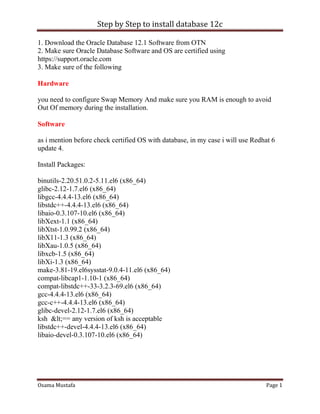
1. Download the Oracle Database 12.1 Software from OTN
2. Make sure Oracle Database Software and OS are certified using
https://support.oracle.com
3. Make sure of the following
Hardware
you need to configure Swap Memory And make sure you RAM is enough to avoid
Out Of memory during the installation.
Software
as i mention before check certified OS with database, in my case i will use Redhat 6
update 4.
Install Packages:
binutils-2.20.51.0.2-5.11.el6 (x86_64)
glibc-2.12-1.7.el6 (x86_64)
libgcc-4.4.4-13.el6 (x86_64)
libstdc++-4.4.4-13.el6 (x86_64)
libaio-0.3.107-10.el6 (x86_64)
libXext-1.1 (x86_64)
libXtst-1.0.99.2 (x86_64)
libX11-1.3 (x86_64)
libXau-1.0.5 (x86_64)
libxcb-1.5 (x86_64)
libXi-1.3 (x86_64)
make-3.81-19.el6sysstat-9.0.4-11.el6 (x86_64)
compat-libcap1-1.10-1 (x86_64)
compat-libstdc++-33-3.2.3-69.el6 (x86_64)
gcc-4.4.4-13.el6 (x86_64)
gcc-c++-4.4.4-13.el6 (x86_64)
glibc-devel-2.12-1.7.el6 (x86_64)
ksh <== any version of ksh is acceptable
libstdc++-devel-4.4.4-13.el6 (x86_64)
libaio-devel-0.3.107-10.el6 (x86_64)
Step by Step to install database 12c
Osama Mustafa Page 2
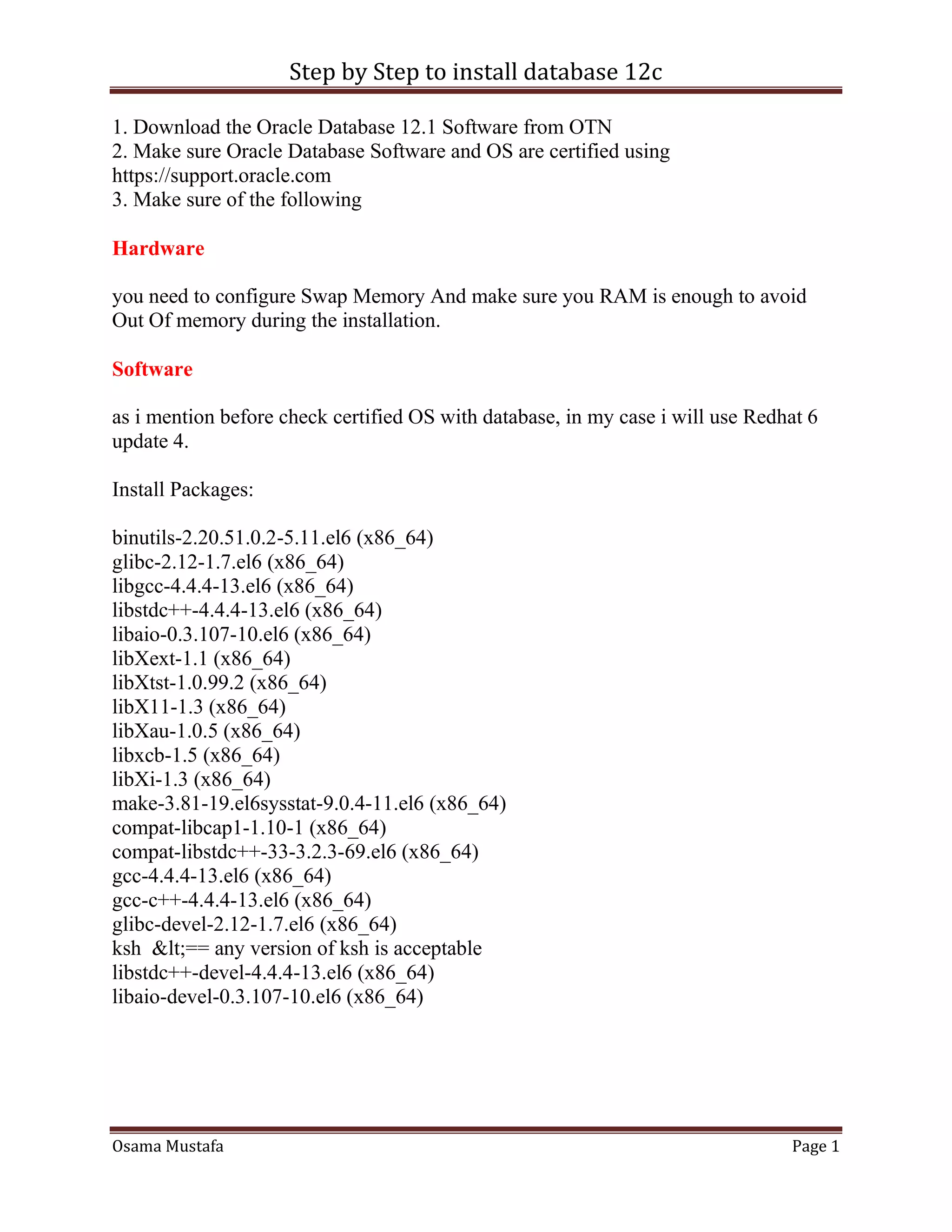
inside /etc/sysctl.conf
fs.file-max = 6815744
kernel.sem = 250 32000 100 128
kernel.shmmni = 4096
kernel.shmall = 1073741824
kernel.shmmax = 4398046511104
net.core.rmem_default = 262144
net.core.rmem_max = 4194304
net.core.wmem_default = 262144
net.core.wmem_max = 1048576
fs.aio-max-nr = 1048576
net.ipv4.ip_local_port_range = 9000 65500
Use this command to restart kernel /sbin/sysctl -p
/etc/hosts
Serverip Hostname
/etc/security/limits.conf
oracle soft nofile 1024
oracle hard nofile 65536
oracle soft nproc 2047
oracle hard nproc 16384
oracle soft stack 10240
oracle hard stack 32768
/etc/pam.d/login
session required pam_limits.so
Step by Step to install database 12c
Osama Mustafa Page 3
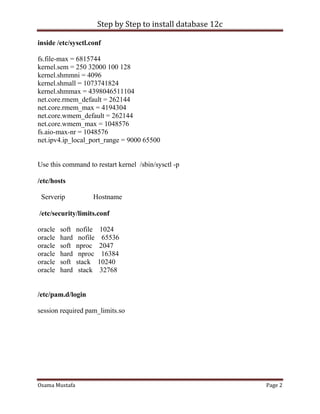
after edit OS parameter you need to create Oracle user :
groupadd -g 101 oinstall
groupadd -g 102 dba
groupadd -g 103 oper
useradd -u 100 -g oinstall -G dba,oper oracle
passwd oracle
copy media to your Server , and do the following :
chown -R oracle:oinstall /u01/database
chmod -R 775 /u0/database
mkdir -p /u01/app/oracle/product/12.1.0/db_1
chown -R oracle:oinstall /u01
chmod -R 775 /u01
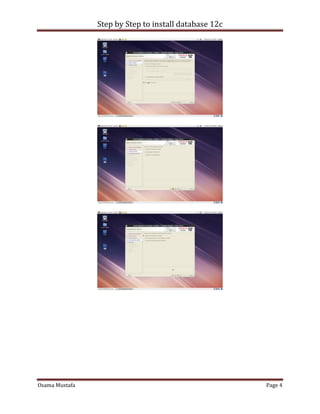
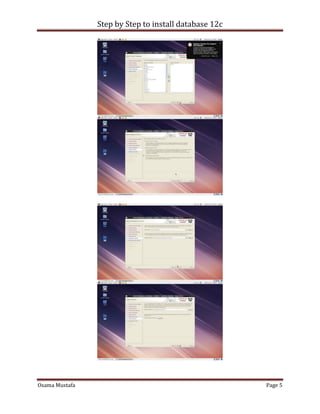
Now start installation by ./runInstaller
Step by Step to install database 12c
Osama Mustafa Page 4
Step by Step to install database 12c
Osama Mustafa Page 5
Step by Step to install database 12c
Osama Mustafa Page 6
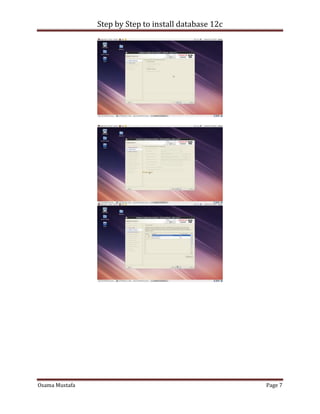
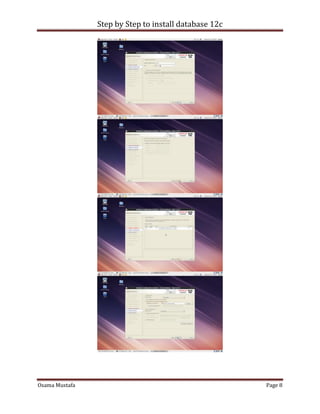
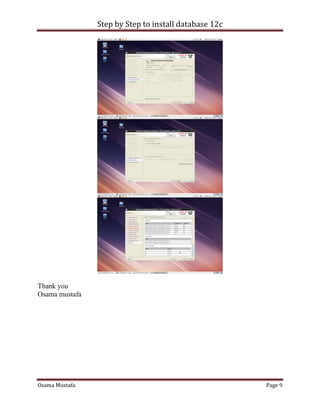
to Create Database you need to configure listener using netca and after finished
successfully use dbca like below :
Step by Step to install database 12c
Osama Mustafa Page 7
Step by Step to install database 12c
Osama Mustafa Page 8
Step by Step to install database 12c
Osama Mustafa Page 9
Thank you
Osama mustafa

12c installation

  • 1.
    Step by Stepto install database 12c Osama Mustafa Page 1 1. Download the Oracle Database 12.1 Software from OTN 2. Make sure Oracle Database Software and OS are certified using https://support.oracle.com 3. Make sure of the following Hardware you need to configure Swap Memory And make sure you RAM is enough to avoid Out Of memory during the installation. Software as i mention before check certified OS with database, in my case i will use Redhat 6 update 4. Install Packages: binutils-2.20.51.0.2-5.11.el6 (x86_64) glibc-2.12-1.7.el6 (x86_64) libgcc-4.4.4-13.el6 (x86_64) libstdc++-4.4.4-13.el6 (x86_64) libaio-0.3.107-10.el6 (x86_64) libXext-1.1 (x86_64) libXtst-1.0.99.2 (x86_64) libX11-1.3 (x86_64) libXau-1.0.5 (x86_64) libxcb-1.5 (x86_64) libXi-1.3 (x86_64) make-3.81-19.el6sysstat-9.0.4-11.el6 (x86_64) compat-libcap1-1.10-1 (x86_64) compat-libstdc++-33-3.2.3-69.el6 (x86_64) gcc-4.4.4-13.el6 (x86_64) gcc-c++-4.4.4-13.el6 (x86_64) glibc-devel-2.12-1.7.el6 (x86_64) ksh <== any version of ksh is acceptable libstdc++-devel-4.4.4-13.el6 (x86_64) libaio-devel-0.3.107-10.el6 (x86_64)
  • 2.
    Step by Stepto install database 12c Osama Mustafa Page 2 inside /etc/sysctl.conf fs.file-max = 6815744 kernel.sem = 250 32000 100 128 kernel.shmmni = 4096 kernel.shmall = 1073741824 kernel.shmmax = 4398046511104 net.core.rmem_default = 262144 net.core.rmem_max = 4194304 net.core.wmem_default = 262144 net.core.wmem_max = 1048576 fs.aio-max-nr = 1048576 net.ipv4.ip_local_port_range = 9000 65500 Use this command to restart kernel /sbin/sysctl -p /etc/hosts Serverip Hostname /etc/security/limits.conf oracle soft nofile 1024 oracle hard nofile 65536 oracle soft nproc 2047 oracle hard nproc 16384 oracle soft stack 10240 oracle hard stack 32768 /etc/pam.d/login session required pam_limits.so
  • 3.
    Step by Stepto install database 12c Osama Mustafa Page 3 after edit OS parameter you need to create Oracle user : groupadd -g 101 oinstall groupadd -g 102 dba groupadd -g 103 oper useradd -u 100 -g oinstall -G dba,oper oracle passwd oracle copy media to your Server , and do the following : chown -R oracle:oinstall /u01/database chmod -R 775 /u0/database mkdir -p /u01/app/oracle/product/12.1.0/db_1 chown -R oracle:oinstall /u01 chmod -R 775 /u01 Now start installation by ./runInstaller
  • 4.
    Step by Stepto install database 12c Osama Mustafa Page 4
  • 5.
    Step by Stepto install database 12c Osama Mustafa Page 5
  • 6.
    Step by Stepto install database 12c Osama Mustafa Page 6 to Create Database you need to configure listener using netca and after finished successfully use dbca like below :
  • 7.
    Step by Stepto install database 12c Osama Mustafa Page 7
  • 8.
    Step by Stepto install database 12c Osama Mustafa Page 8
  • 9.
    Step by Stepto install database 12c Osama Mustafa Page 9 Thank you Osama mustafa