Oracle Linux 7 Beta First Look (Installation)
Osama Mustafa Page 1
Oracle has announced that the initial beta build of Oracle Linux 7.0,a distribution built from source for
Red Hat and enhanced with an "unbreakable" Linux kernel and now it's Ready for your Testing.
 RHEL 7 Will now format drives with the XFS filesystem by default.
 Enabling volumes of up to 500TB in size.
 If you prefer the older ext4 filesystem it's now supports 50TB volumes.
 Improves support for large-scale enterprise storage arrays.
 Provides new tools for managing heterogeneous storage.
 New Version of SAMBA 4.1.
Software’s:-
 Oracle Linux  You can download it from here.
 Any Virtualization Software such as ( Vmware, Virtual Box, KVM … )
Oracle Linux 7 Beta First Look (Installation)
Osama Mustafa Page 2
About the Author
Osama Mustafa – Oracle ACE, a database specialist, Certified Oracle Professional (10g, 11g),
Certified Ethical hacker (Penetration testing), and Sun System Administrator, author of book
Oracle Penetration Testing. Publishes many articles, including Oracle database articles in his
blog,Fusion Middle Ware and Oracle RAC Documentation, Including to this he is Active
Member On Oracle OTN and other Groups.
Twitter: @OsamaOracle.
G+: Osama Mustafa.
Slid-Share: Osama Mustafa.
LinkedIn: http://www.linkedin.com/in/osamamustafa.
Blog: http://osamamustafa.blogpsot.com.
Oracle Linux 7 Beta First Look (Installation)
Osama Mustafa Page 3
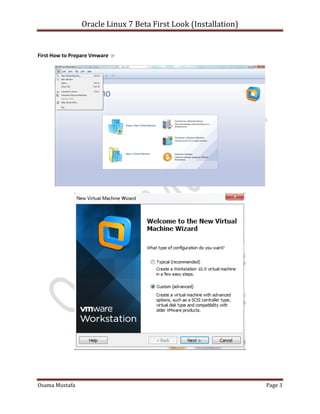
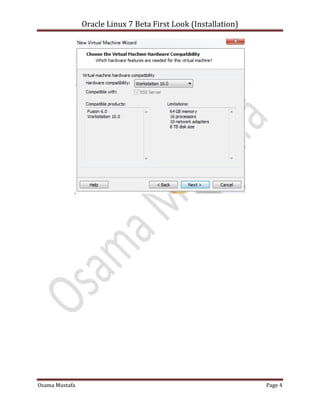
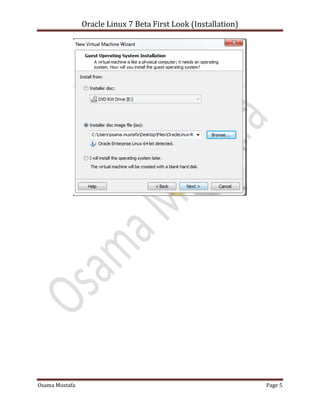
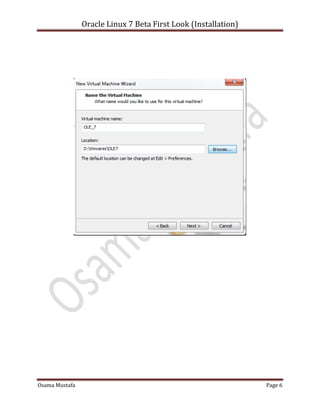
First How to Prepare Vmware :-
Oracle Linux 7 Beta First Look (Installation)
Osama Mustafa Page 4
Oracle Linux 7 Beta First Look (Installation)
Osama Mustafa Page 5
Oracle Linux 7 Beta First Look (Installation)
Osama Mustafa Page 6
Oracle Linux 7 Beta First Look (Installation)
Osama Mustafa Page 7
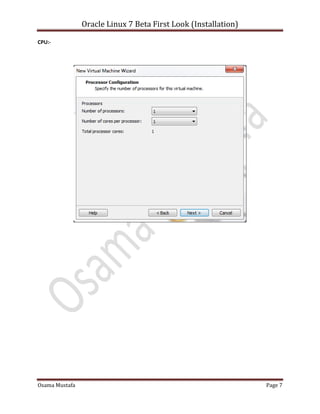
CPU:-
Oracle Linux 7 Beta First Look (Installation)
Osama Mustafa Page 8
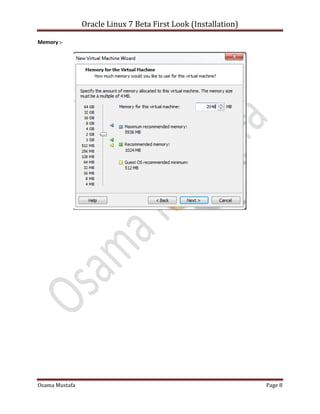
Memory :-
Oracle Linux 7 Beta First Look (Installation)
Osama Mustafa Page 9
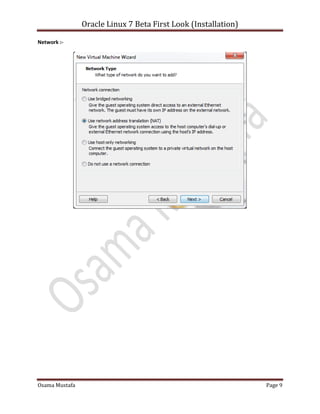
Network :-
Oracle Linux 7 Beta First Look (Installation)
Osama Mustafa Page 10
Oracle Linux 7 Beta First Look (Installation)
Osama Mustafa Page 11
Oracle Linux 7 Beta First Look (Installation)
Osama Mustafa Page 12
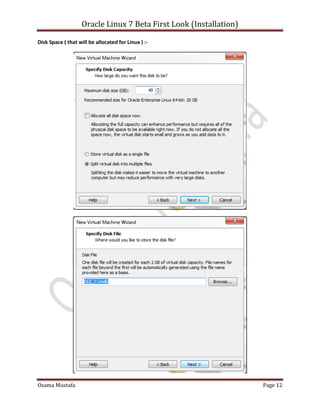
Disk Space ( that will be allocated for Linux ) :-
Oracle Linux 7 Beta First Look (Installation)
Osama Mustafa Page 13
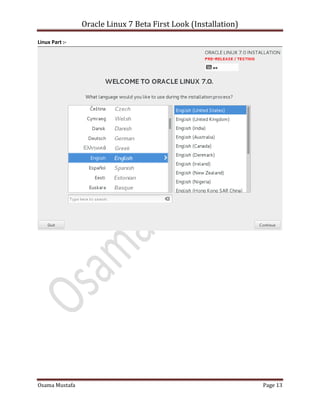
Linux Part :-
Oracle Linux 7 Beta First Look (Installation)
Osama Mustafa Page 14
Oracle Linux 7 Beta First Look (Installation)
Osama Mustafa Page 15
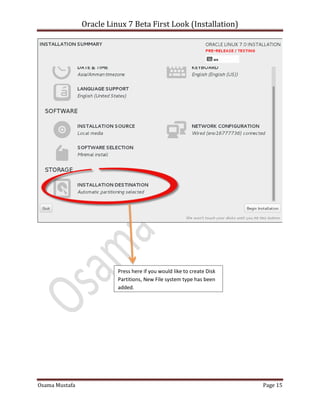
Press here if you would like to create Disk
Partitions, New File system type has been
added.
Oracle Linux 7 Beta First Look (Installation)
Osama Mustafa Page 16
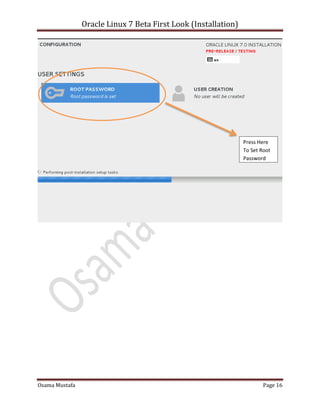
Press Here
To Set Root
Password
Oracle Linux 7 Beta First Look (Installation)
Osama Mustafa Page 17
Oracle Linux 7 Beta First Look (Installation)
Osama Mustafa Page 18

Oracle Linux 7 Beta First Look (Installations)

  • 1.
    Oracle Linux 7Beta First Look (Installation) Osama Mustafa Page 1 Oracle has announced that the initial beta build of Oracle Linux 7.0,a distribution built from source for Red Hat and enhanced with an "unbreakable" Linux kernel and now it's Ready for your Testing.  RHEL 7 Will now format drives with the XFS filesystem by default.  Enabling volumes of up to 500TB in size.  If you prefer the older ext4 filesystem it's now supports 50TB volumes.  Improves support for large-scale enterprise storage arrays.  Provides new tools for managing heterogeneous storage.  New Version of SAMBA 4.1. Software’s:-  Oracle Linux  You can download it from here.  Any Virtualization Software such as ( Vmware, Virtual Box, KVM … )
  • 2.
    Oracle Linux 7Beta First Look (Installation) Osama Mustafa Page 2 About the Author Osama Mustafa – Oracle ACE, a database specialist, Certified Oracle Professional (10g, 11g), Certified Ethical hacker (Penetration testing), and Sun System Administrator, author of book Oracle Penetration Testing. Publishes many articles, including Oracle database articles in his blog,Fusion Middle Ware and Oracle RAC Documentation, Including to this he is Active Member On Oracle OTN and other Groups. Twitter: @OsamaOracle. G+: Osama Mustafa. Slid-Share: Osama Mustafa. LinkedIn: http://www.linkedin.com/in/osamamustafa. Blog: http://osamamustafa.blogpsot.com.
  • 3.
    Oracle Linux 7Beta First Look (Installation) Osama Mustafa Page 3 First How to Prepare Vmware :-
  • 4.
    Oracle Linux 7Beta First Look (Installation) Osama Mustafa Page 4
  • 5.
    Oracle Linux 7Beta First Look (Installation) Osama Mustafa Page 5
  • 6.
    Oracle Linux 7Beta First Look (Installation) Osama Mustafa Page 6
  • 7.
    Oracle Linux 7Beta First Look (Installation) Osama Mustafa Page 7 CPU:-
  • 8.
    Oracle Linux 7Beta First Look (Installation) Osama Mustafa Page 8 Memory :-
  • 9.
    Oracle Linux 7Beta First Look (Installation) Osama Mustafa Page 9 Network :-
  • 10.
    Oracle Linux 7Beta First Look (Installation) Osama Mustafa Page 10
  • 11.
    Oracle Linux 7Beta First Look (Installation) Osama Mustafa Page 11
  • 12.
    Oracle Linux 7Beta First Look (Installation) Osama Mustafa Page 12 Disk Space ( that will be allocated for Linux ) :-
  • 13.
    Oracle Linux 7Beta First Look (Installation) Osama Mustafa Page 13 Linux Part :-
  • 14.
    Oracle Linux 7Beta First Look (Installation) Osama Mustafa Page 14
  • 15.
    Oracle Linux 7Beta First Look (Installation) Osama Mustafa Page 15 Press here if you would like to create Disk Partitions, New File system type has been added.
  • 16.
    Oracle Linux 7Beta First Look (Installation) Osama Mustafa Page 16 Press Here To Set Root Password
  • 17.
    Oracle Linux 7Beta First Look (Installation) Osama Mustafa Page 17
  • 18.
    Oracle Linux 7Beta First Look (Installation) Osama Mustafa Page 18