

Whether you're a startup getting to profitability or an enterprise optimizing spend, it pays to run cost-efficient architectures on AWS. Building on last year's popular foundation of how to reduce waste and fine-tune your AWS spending, this session reviews a wide range of cost planning, monitoring, and optimization strategies, featuring real-world experience from AWS customer Adobe Systems. With the massive growth of subscribers to Adobe's Creative Cloud, Adobe's footprint in AWS continues to expand. We will discuss the techniques used to optimize and manage costs, while maximizing performance and improving resiliency. 
When traditional application and operating practices are used in cloud deployments, immediate benefits occur in speed of deployment, automation, and transparency of costs. The next step is a re-architecture of the application to be cloud-native, and significant operating cost reductions can help justify this development work. Cloud-native applications are dynamic and use ephemeral resources that customers are only charged for when the resources are in use.
With AWS, you can reduce capital costs, lower your overall bill, and match your expense to your usage. This session describes how to calculate the total cost of ownership (TCO) for deploying solutions on AWS vs. on-premises or at a colocation facility, as well as how to address common pitfalls in building a TCO analysis. The session presents and models customer examples. 
This session is a deep dive into techniques used by successful customers who optimized their use of AWS. Learn tricks and hear tips you can implement right away to reduce waste, choose the most efficient instance, and fine-tune your spending; often with improved performance and a better end-customer experience. We showcase innovative approaches and demonstrate easily applicable methods to save you time and money with Amazon EC2, Amazon S3, and a host of other services.
In this session, you learn how you can leverage AWS services together with third-party storage appliances and gateways to automate your backup and recovery processes so that they are not only less complex and lightweight, but also easy to manage and maintain. We demonstrate how to manage data flow from on- premises systems to the cloud and how to leverage storage gateways. You also learn best practices for quick implementation, reducing TCO, and automating lifecycle management. 
In the event of a disaster, you need to be able to recover lost data quickly to ensure business continuity. For critical applications, keeping your time to recover and data loss to a minimum as well as optimizing your overall capital expense can be challenging. This session presents AWS features and services along with Disaster Recovery architectures that you can leverage when building highly available and disaster resilient applications. We will provide recommendations on how to improve your Disaster Recovery plan and discuss example scenarios showing how to recover from a disaster.
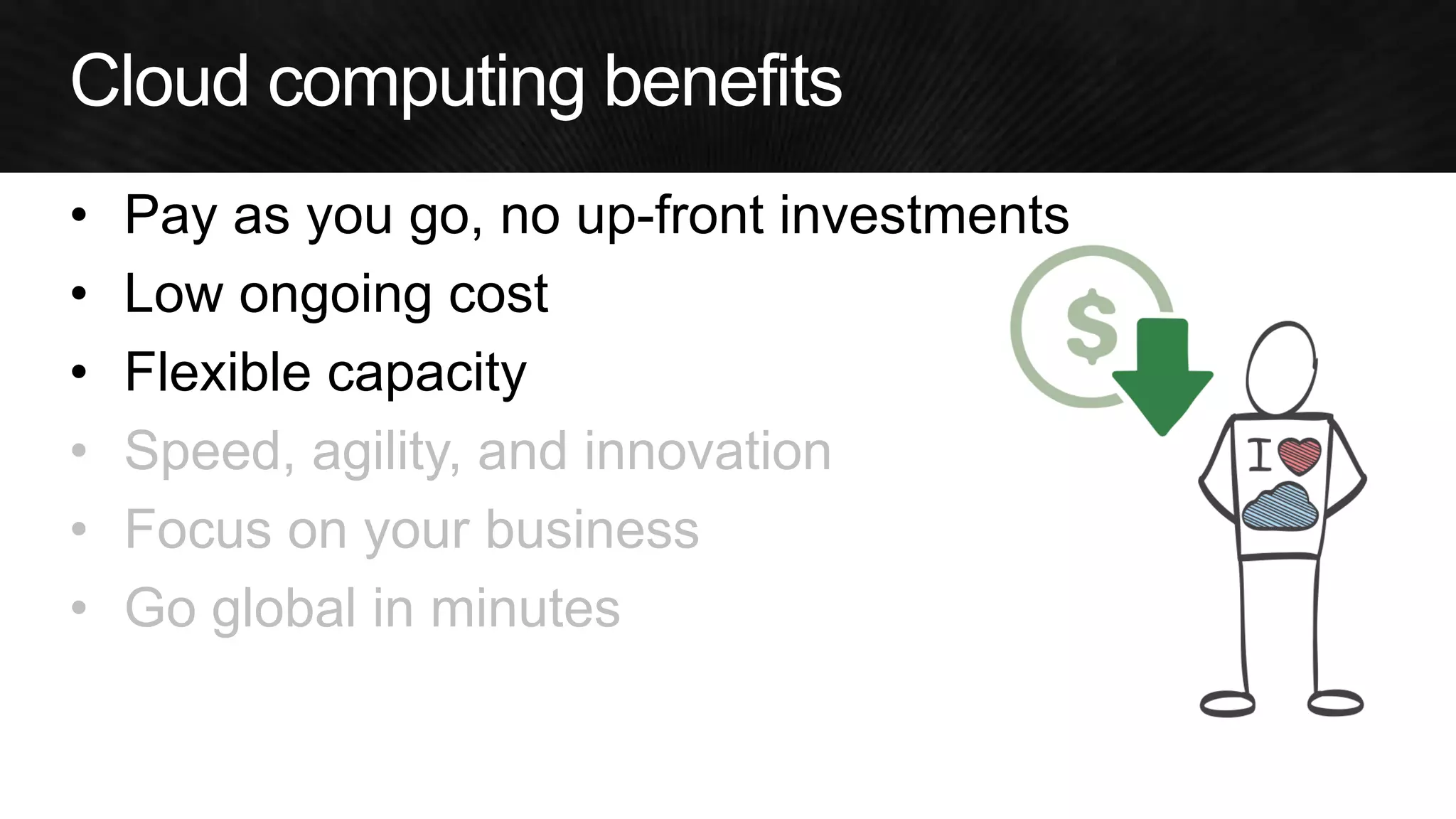
•Pay as you go, no up-front investments 
•Low ongoing cost 
•Flexible capacity 
•Speed, agility, and innovation 
•Focus on your business 
•Go global in minutes
Strategy 1: Do nothing
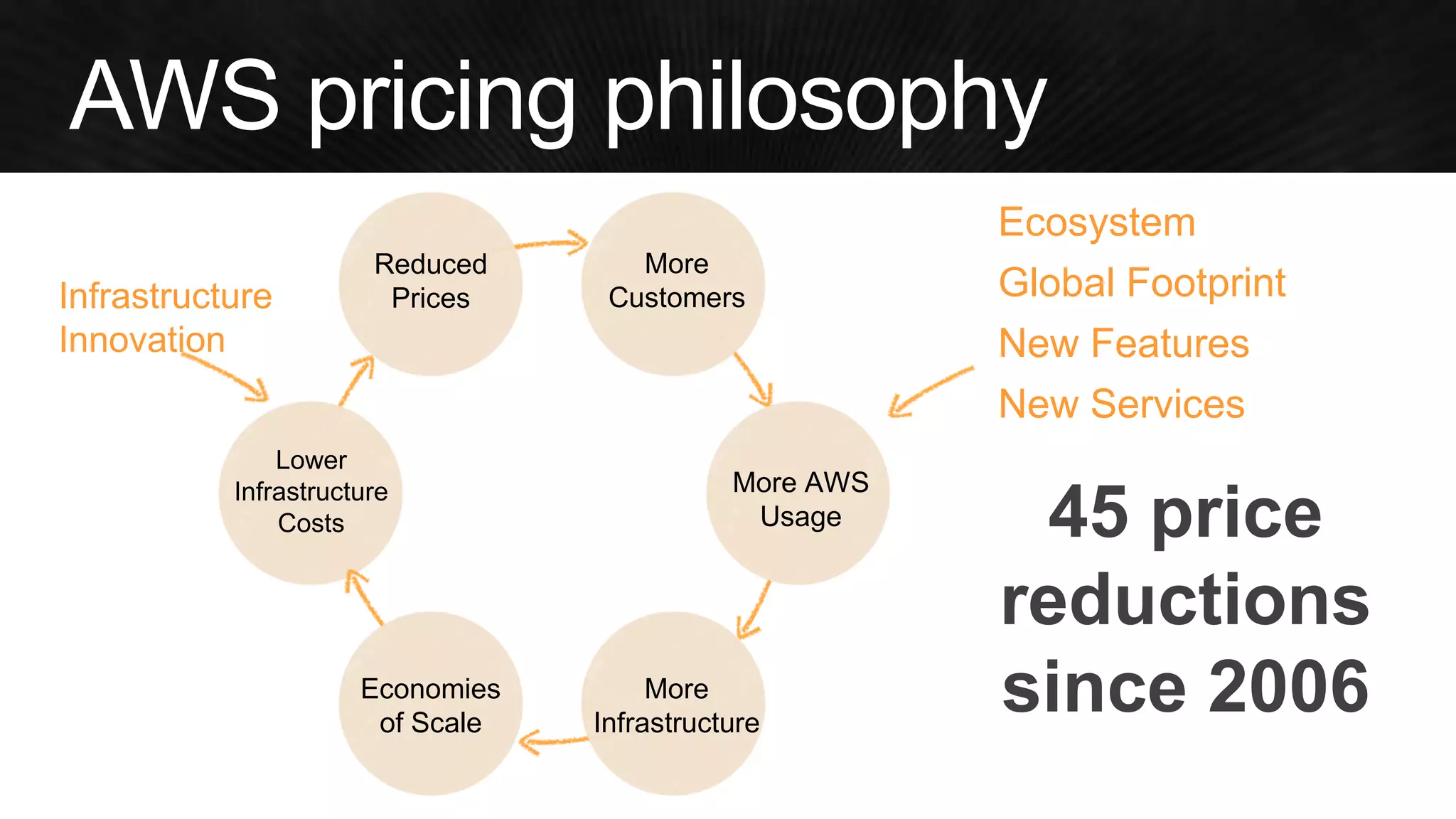
Ecosystem 
Global Footprint 
New Features 
New Services 
More AWS Usage 
More Infrastructure 
Lower Infrastructure Costs 
Reduced Prices 
More Customers 
Infrastructure Innovation 
45 price reductions since 2006 
Economies 
of Scale
Strategy 2: Do almost nothing
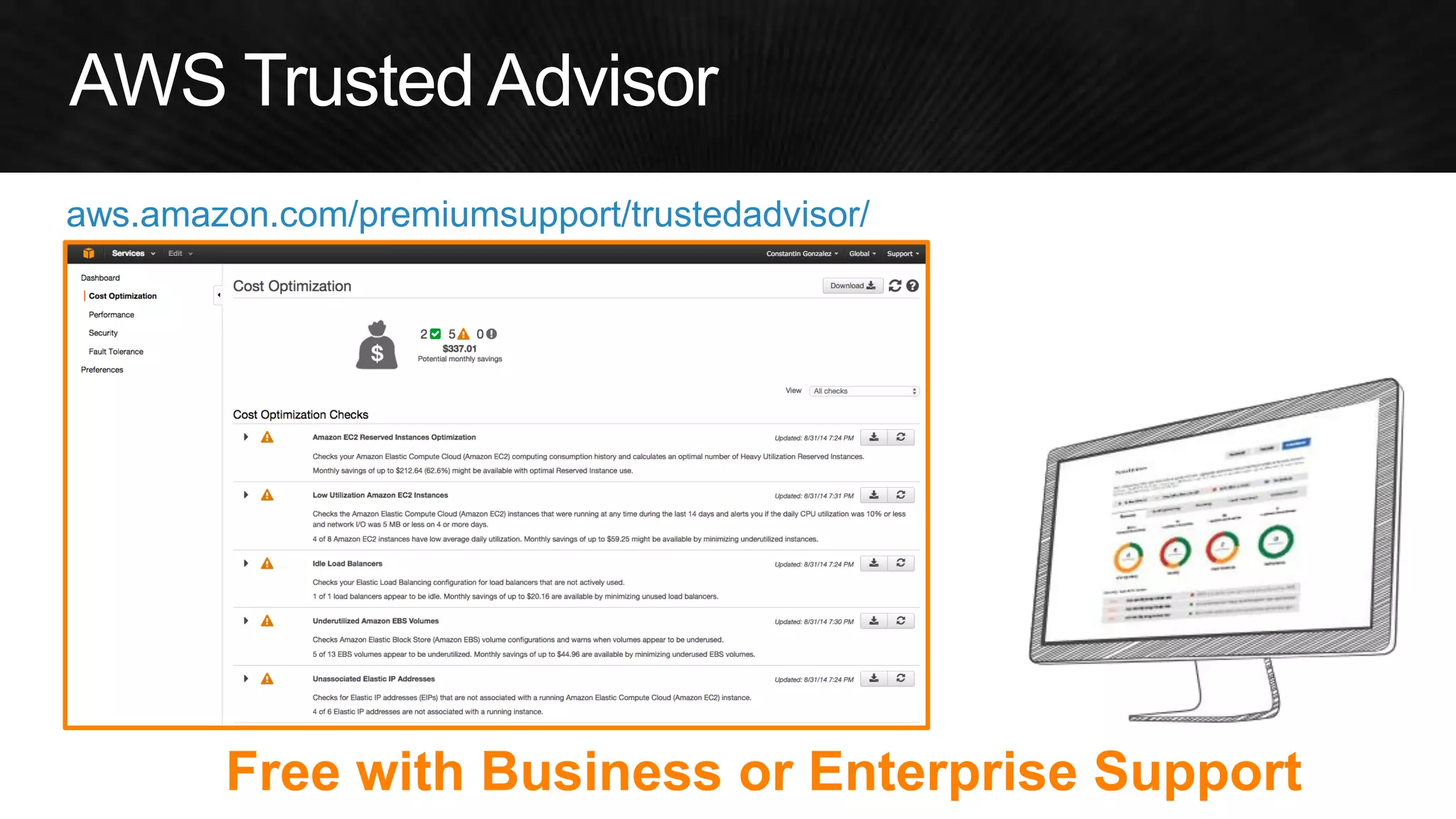
aws.amazon.com/premiumsupport/trustedadvisor/ 
Free with Business or Enterprise Support
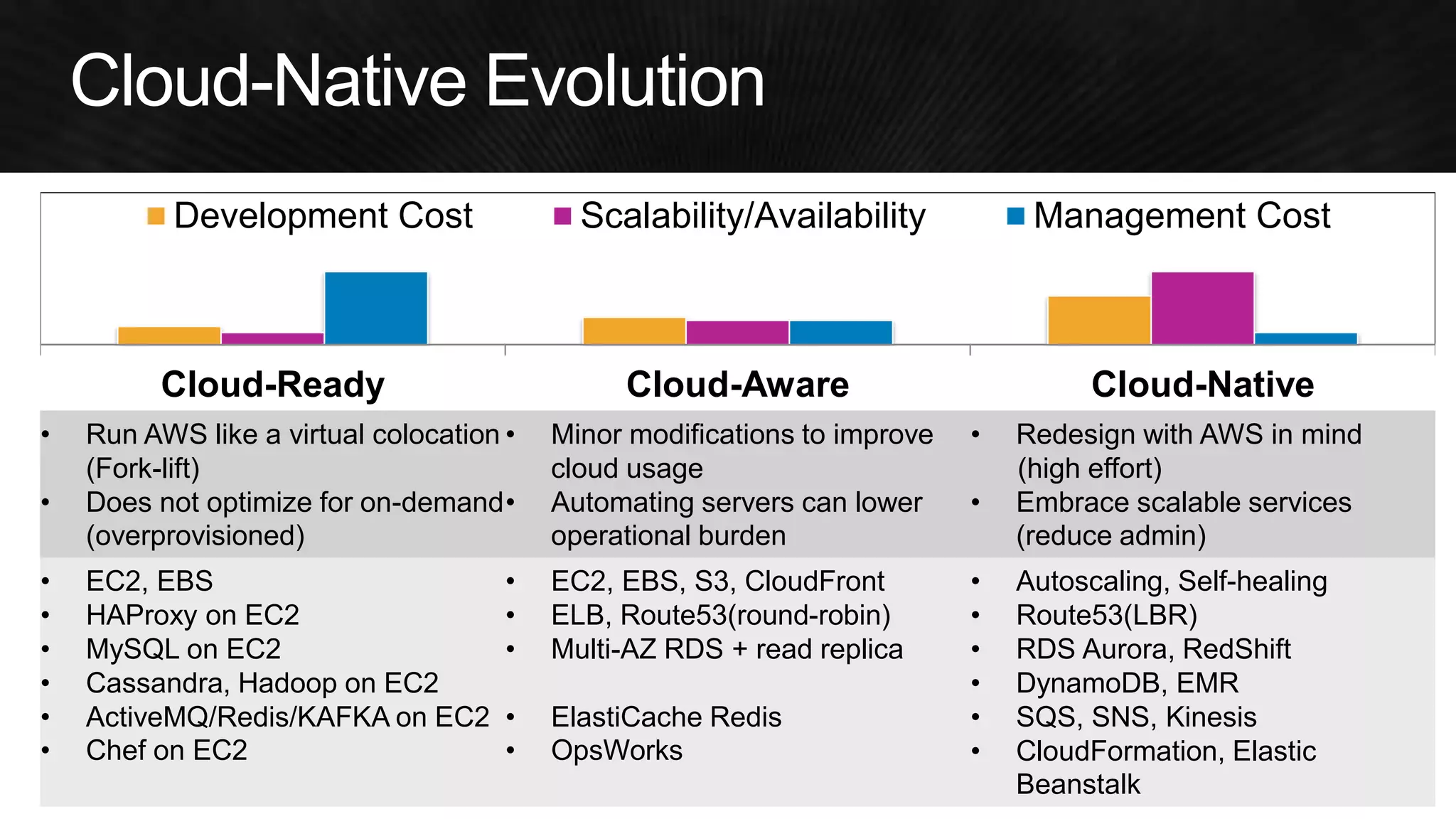
Strategy 3: Optimize Architecture
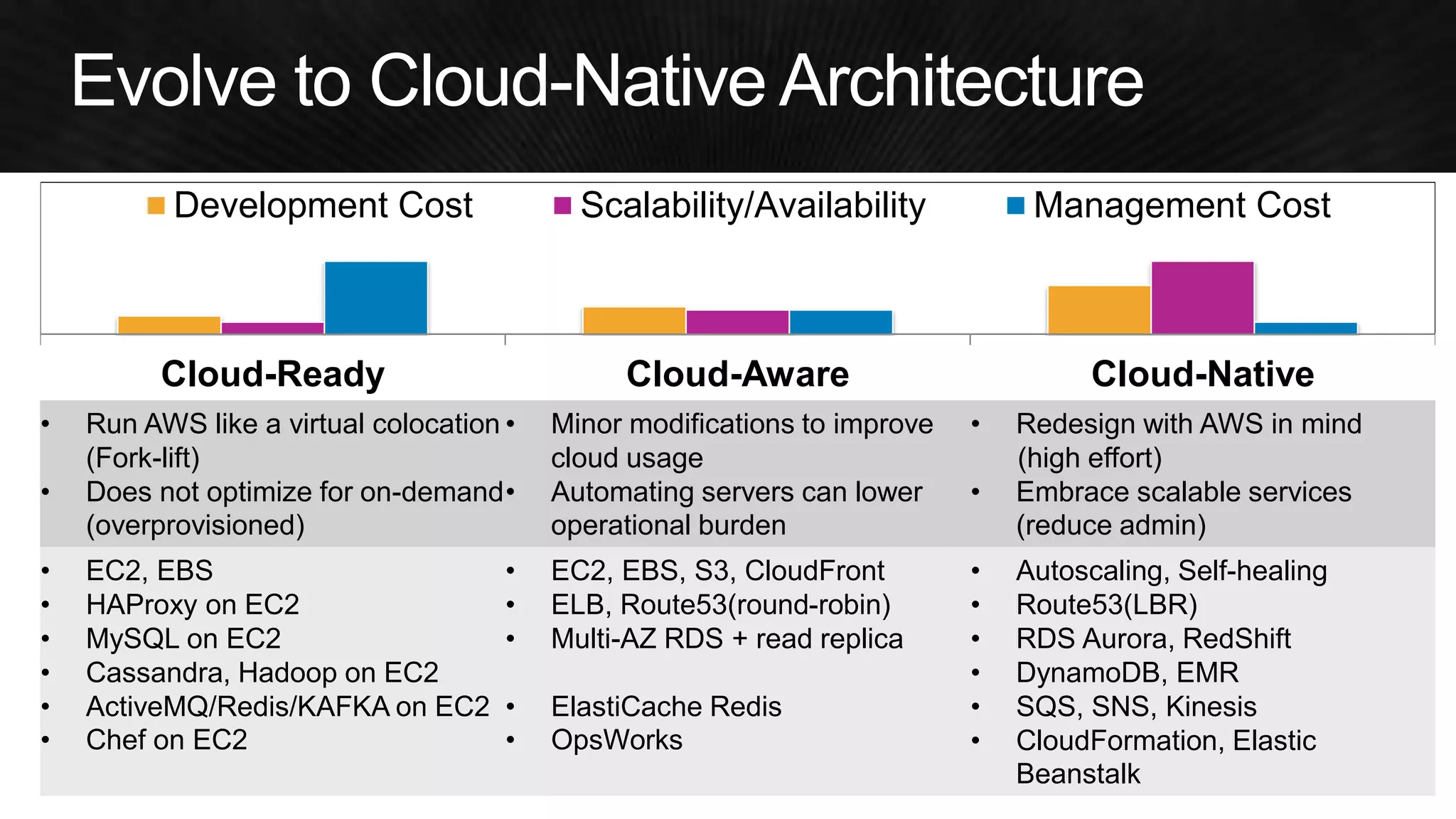
Cloud-Ready 
Cloud-Aware 
Cloud-Native 
•Run AWS like a virtual colocation (Fork-lift) 
•Does not optimize for on-demand (overprovisioned) 
•Minor modifications to improve cloud usage 
•Automating servers can lower operational burden 
•Redesign with AWS in mind 
(high effort) 
•Embrace scalable services (reduce admin) 
•EC2, EBS 
•HAProxy on EC2 
•MySQL on EC2 
•Cassandra, Hadoop on EC2 
•ActiveMQ/Redis/KAFKA on EC2 
•Chef on EC2 
•EC2, EBS, S3, CloudFront 
•ELB, Route53(round-robin) 
•Multi-AZ RDS + read replica 
•ElastiCache Redis 
•OpsWorks 
•Autoscaling, Self-healing 
•Route53(LBR) 
•RDS Aurora, RedShift 
•DynamoDB, EMR 
•SQS, SNS, Kinesis 
•CloudFormation, Elastic Beanstalk 
Development Cost 
Scalability/Availability 
Management Cost
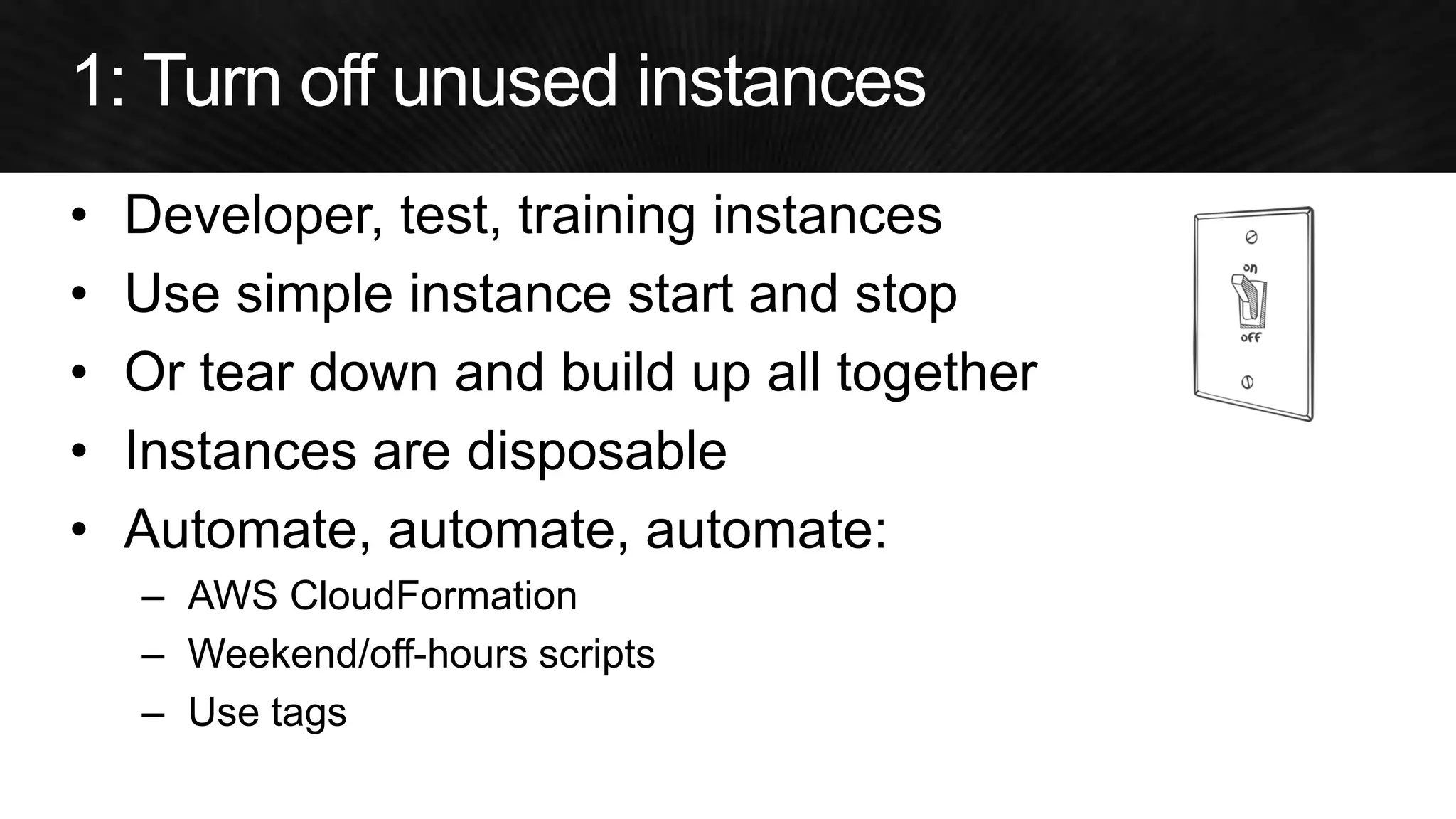
•Developer, test, training instances 
•Use simple instance start and stop 
•Or tear down and build up all together 
•Instances are disposable 
•Automate, automate, automate: 
–AWS CloudFormation 
–Weekend/off-hours scripts 
–Use tags
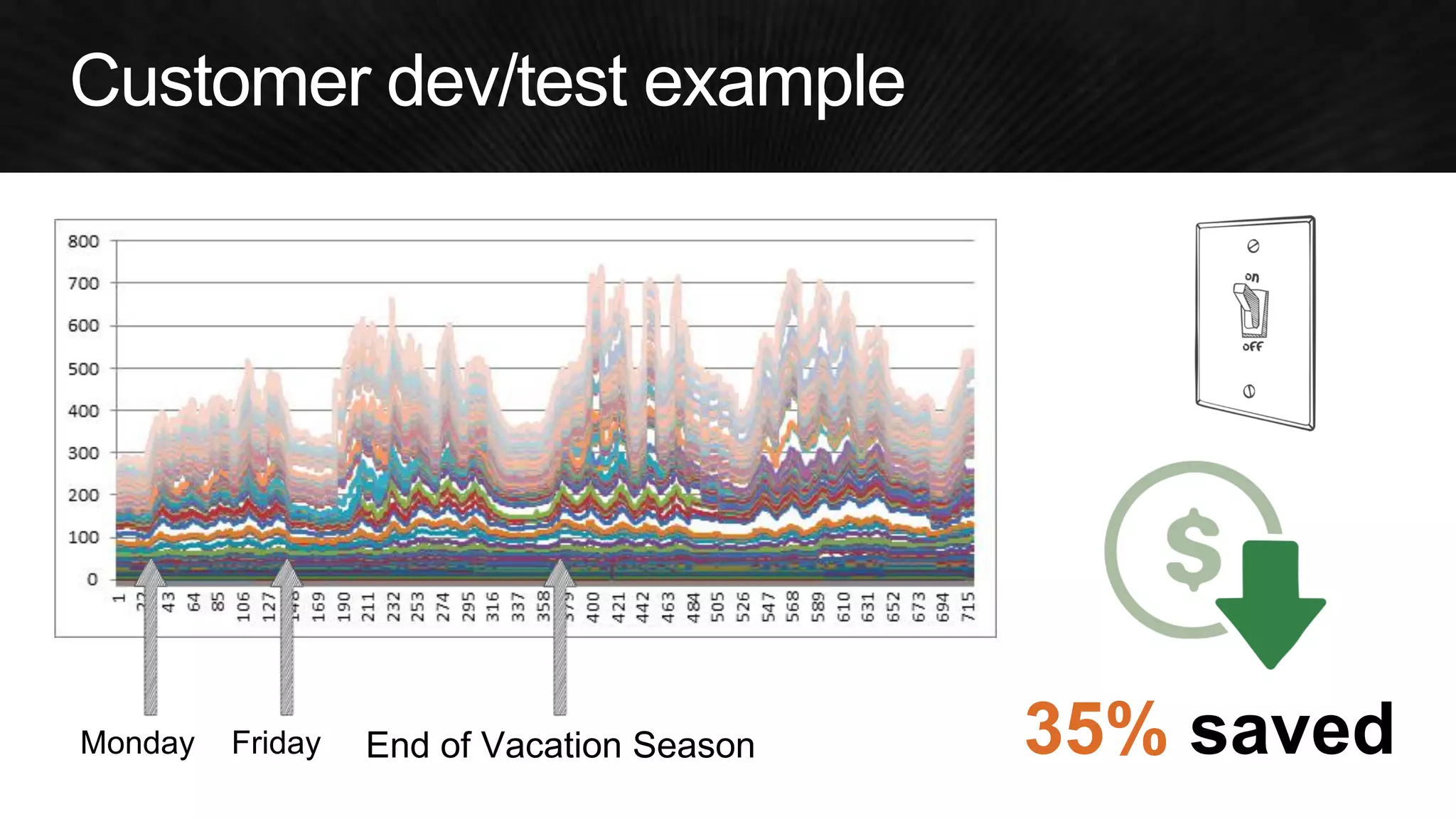
Monday 
Friday 
End of Vacation Season 
35% saved
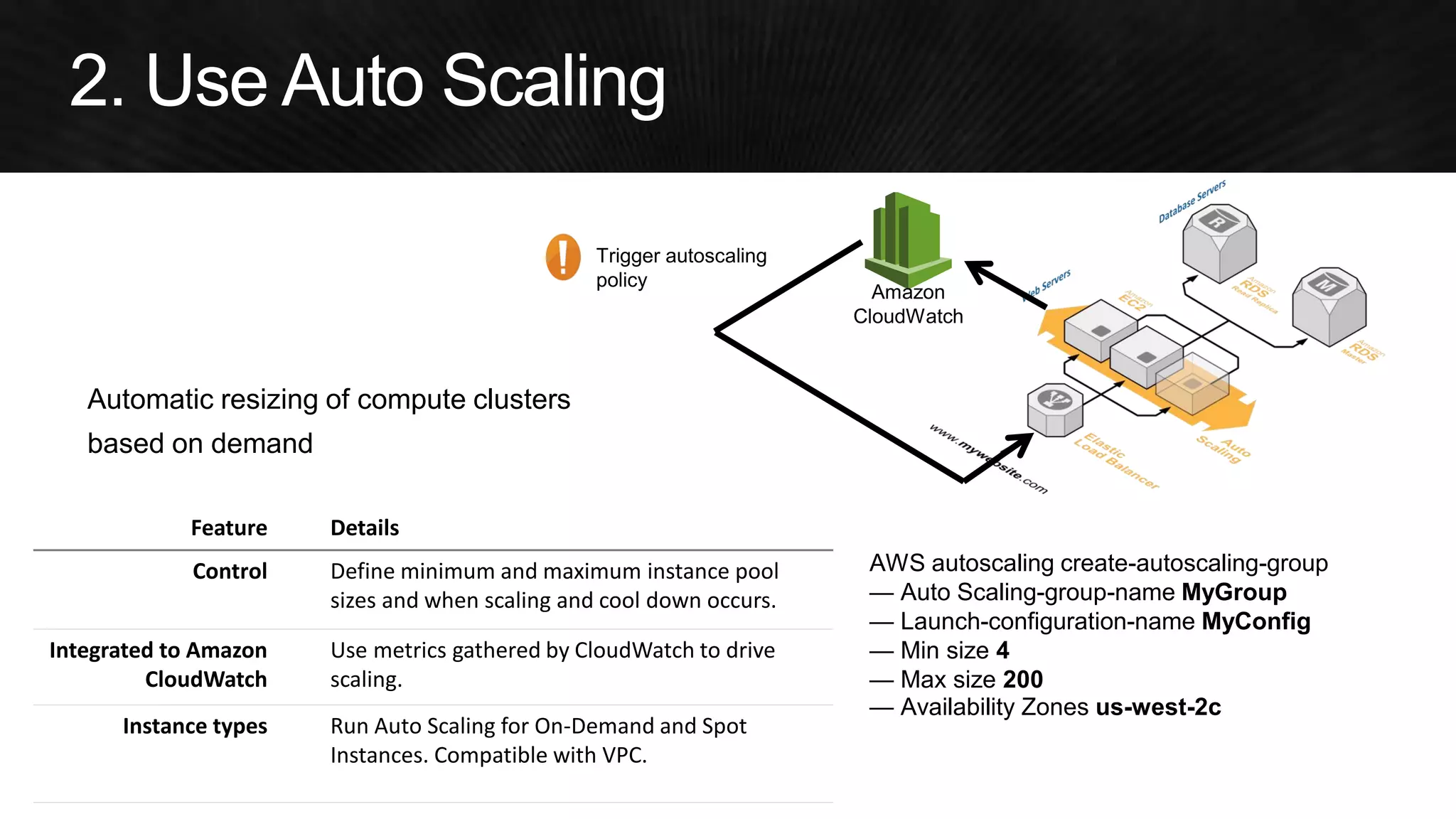
Automatic resizing of compute clusters 
based on demand 
Trigger autoscaling 
policy 
Feature Details 
Control Define minimum and maximum instance pool 
sizes and when scaling and cool down occurs. 
Integrated to Amazon 
CloudWatch 
Use metrics gathered by CloudWatch to drive 
scaling. 
Instance types Run Auto Scaling for On-Demand and Spot 
Instances. Compatible with VPC. 
AWS autoscaling create-autoscaling-group 
— Auto Scaling-group-name MyGroup 
— Launch-configuration-name MyConfig 
— Min size 4 
— Max size 200 
— Availability Zones us-west-2c 
Amazon 
CloudWatch
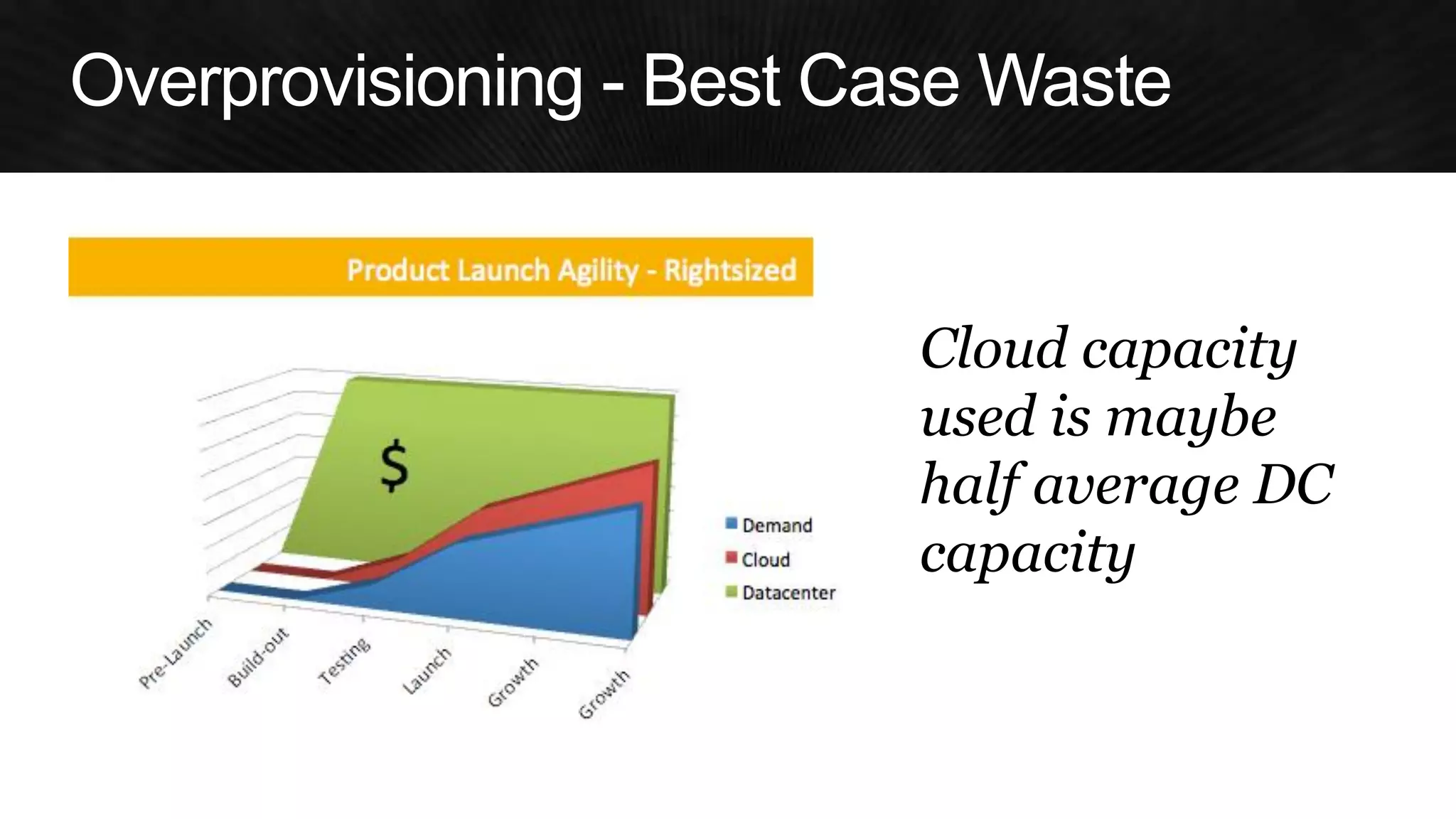
Cloud capacity 
used is maybe 
half average DC capacity
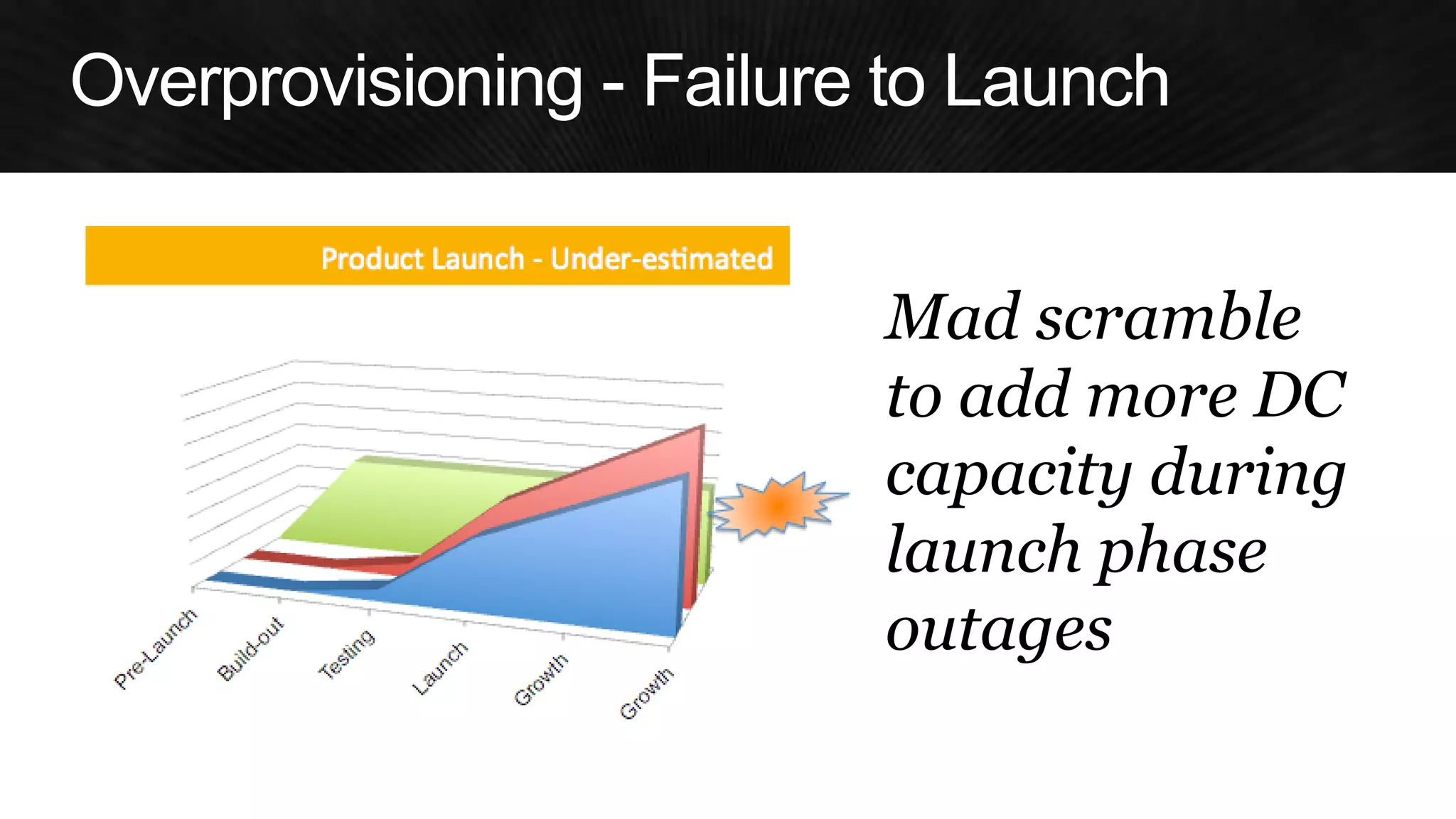
Mad scramble to add more DC capacity during launch phase outages
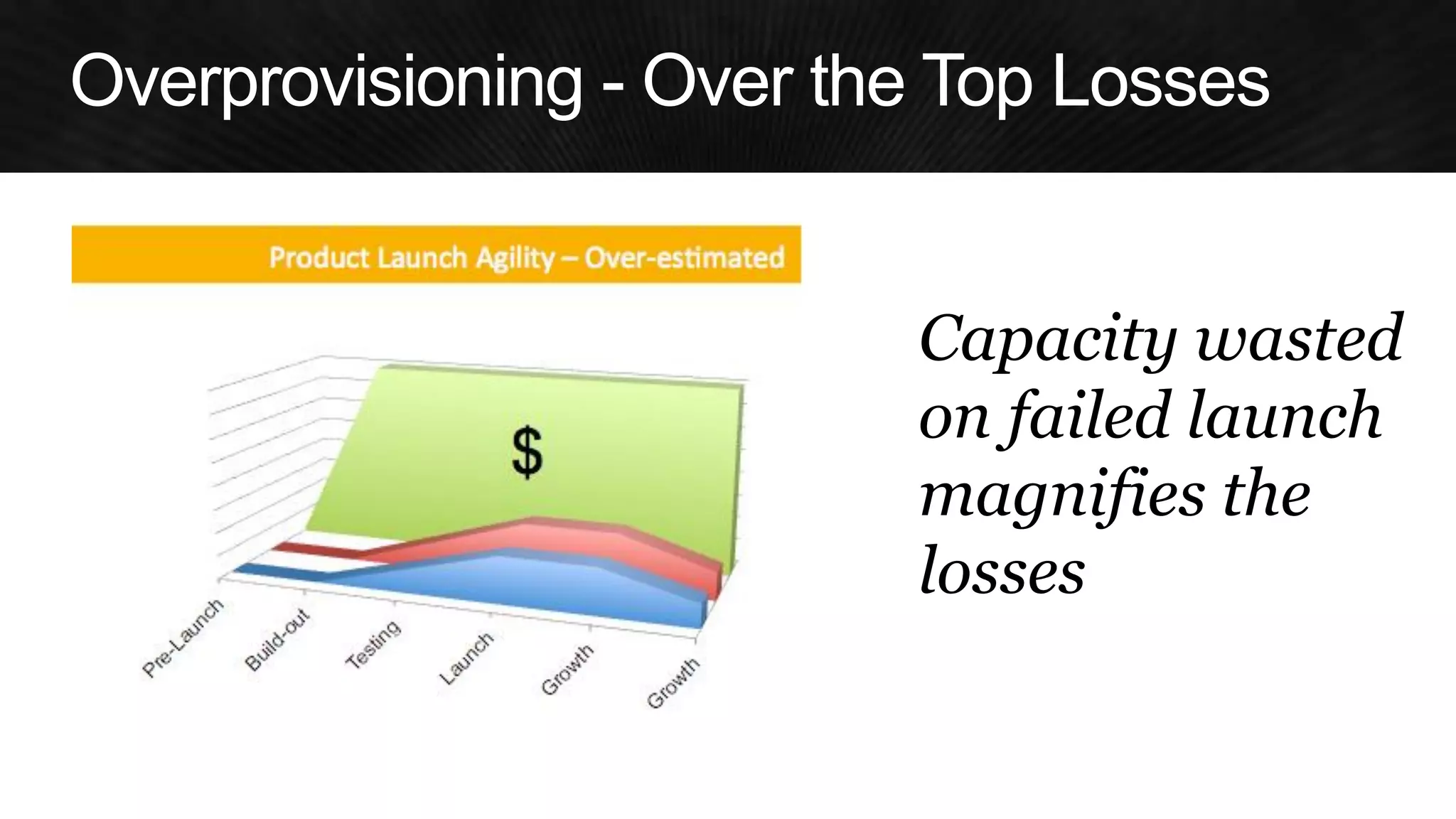
Capacity wasted 
on failed launch 
magnifies the 
losses
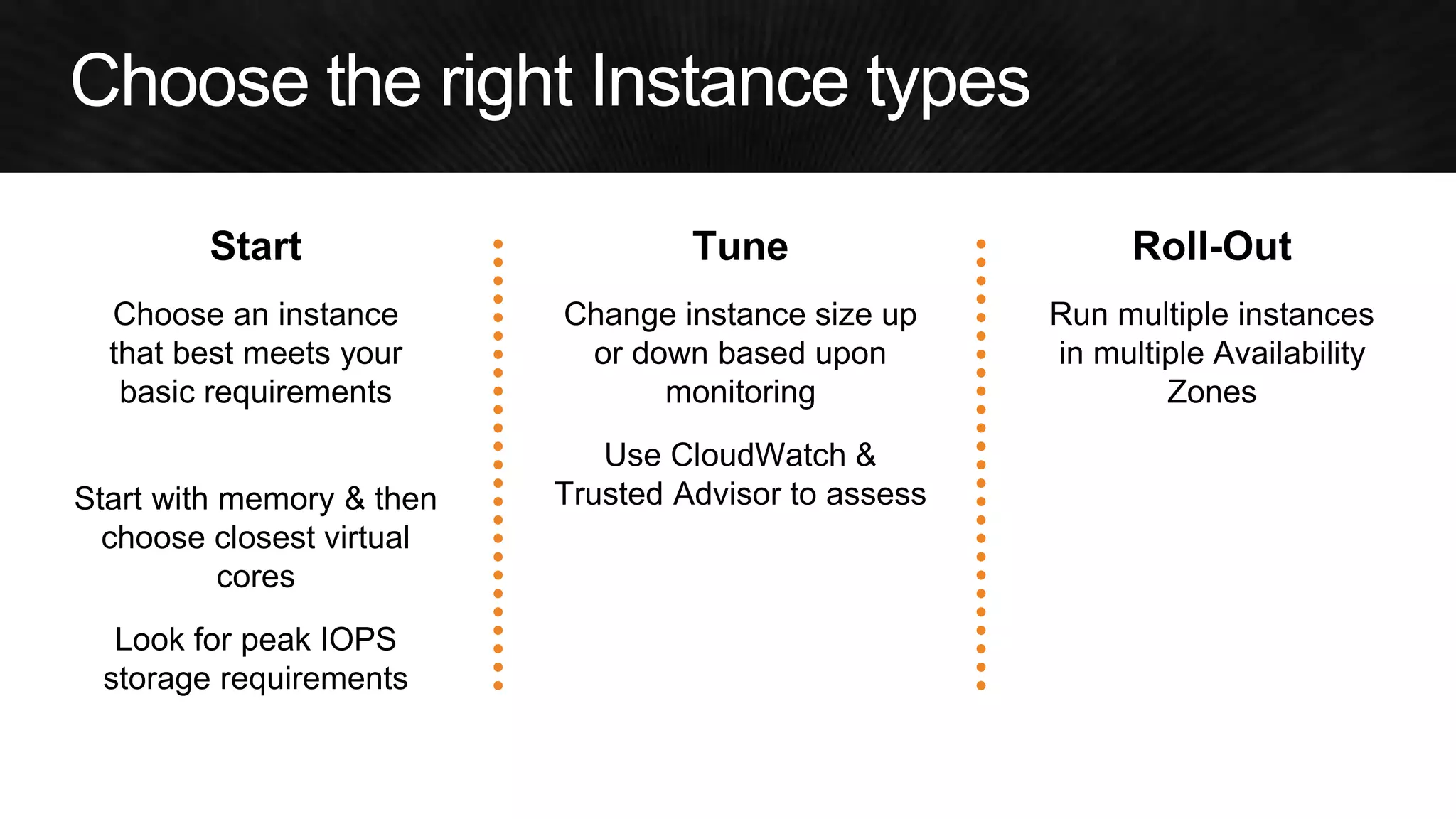
Start 
Choose an instance that best meets your basic requirements 
Start with memory & then choose closest virtual cores 
Look for peak IOPS storage requirements 
Tune 
Change instance size up or down based upon monitoring 
Use CloudWatch & Trusted Advisor to assess 
Roll-Out 
Run multiple instances in multiple Availability Zones
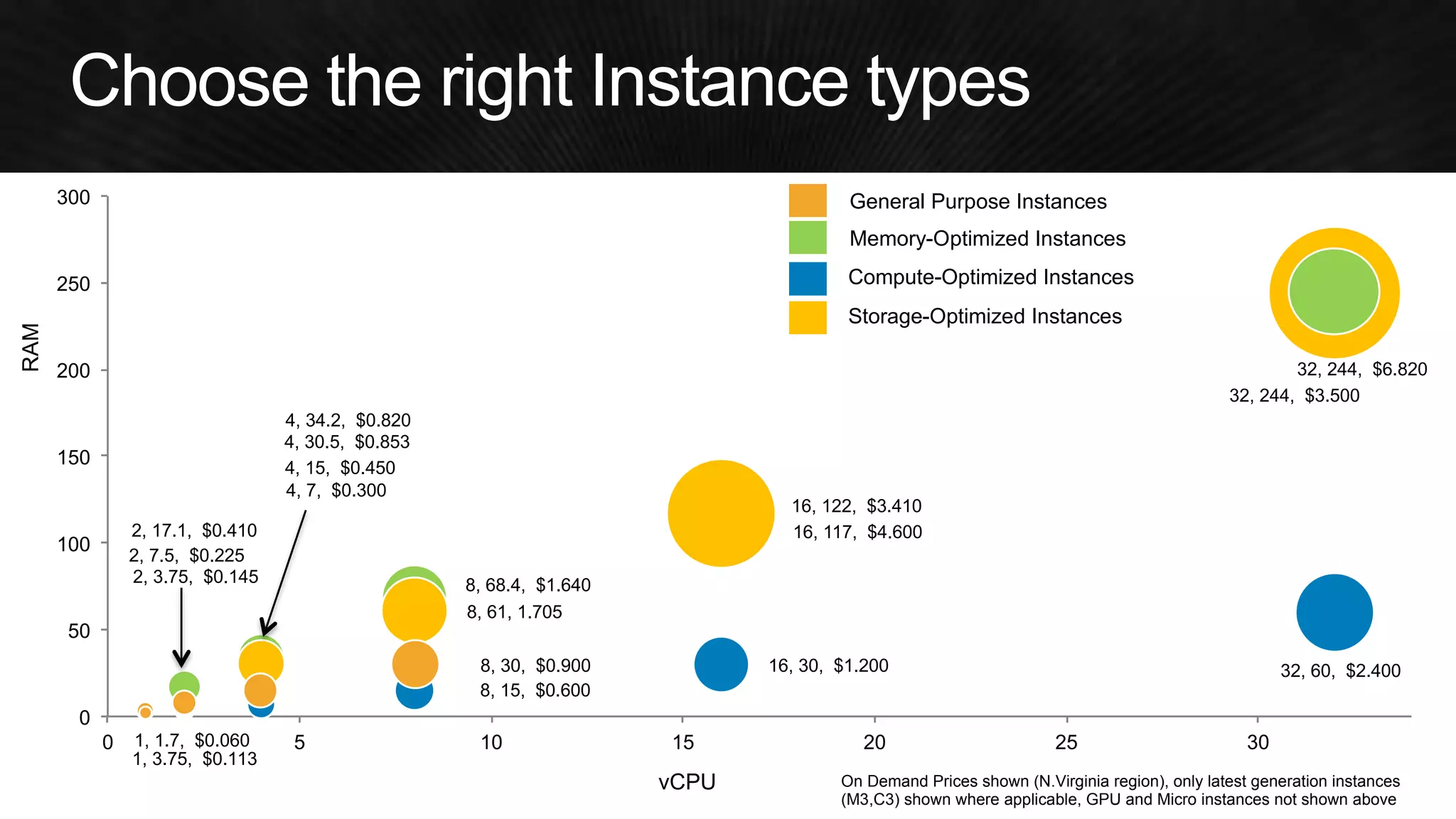
1, 1.7, $0.060 1, 3.75, $0.113 2, 3.75, $0.145 2, 7.5, $0.225 2, 17.1, $0.410 4, 7, $0.300 4, 15, $0.450 4, 34.2, $0.820 8, 15, $0.600 8, 30, $0.900 8, 68.4, $1.640 4, 30.5, $0.853 8, 61, 1.705 16, 30, $1.200 32, 60, $2.400 32, 244, $3.500 16, 122, $3.410 16, 117, $4.600 32, 244, $6.820 0 50 100 150 200 250 300 0 5 10 15 20 25 30 On Demand Prices shown (N.Virginia region), only latest generation instances (M3,C3) shown where applicable, GPU and Micro instances not shown above Memory-Optimized Instances Compute-Optimized Instances General Purpose Instances Storage-Optimized Instances vCPU RAM
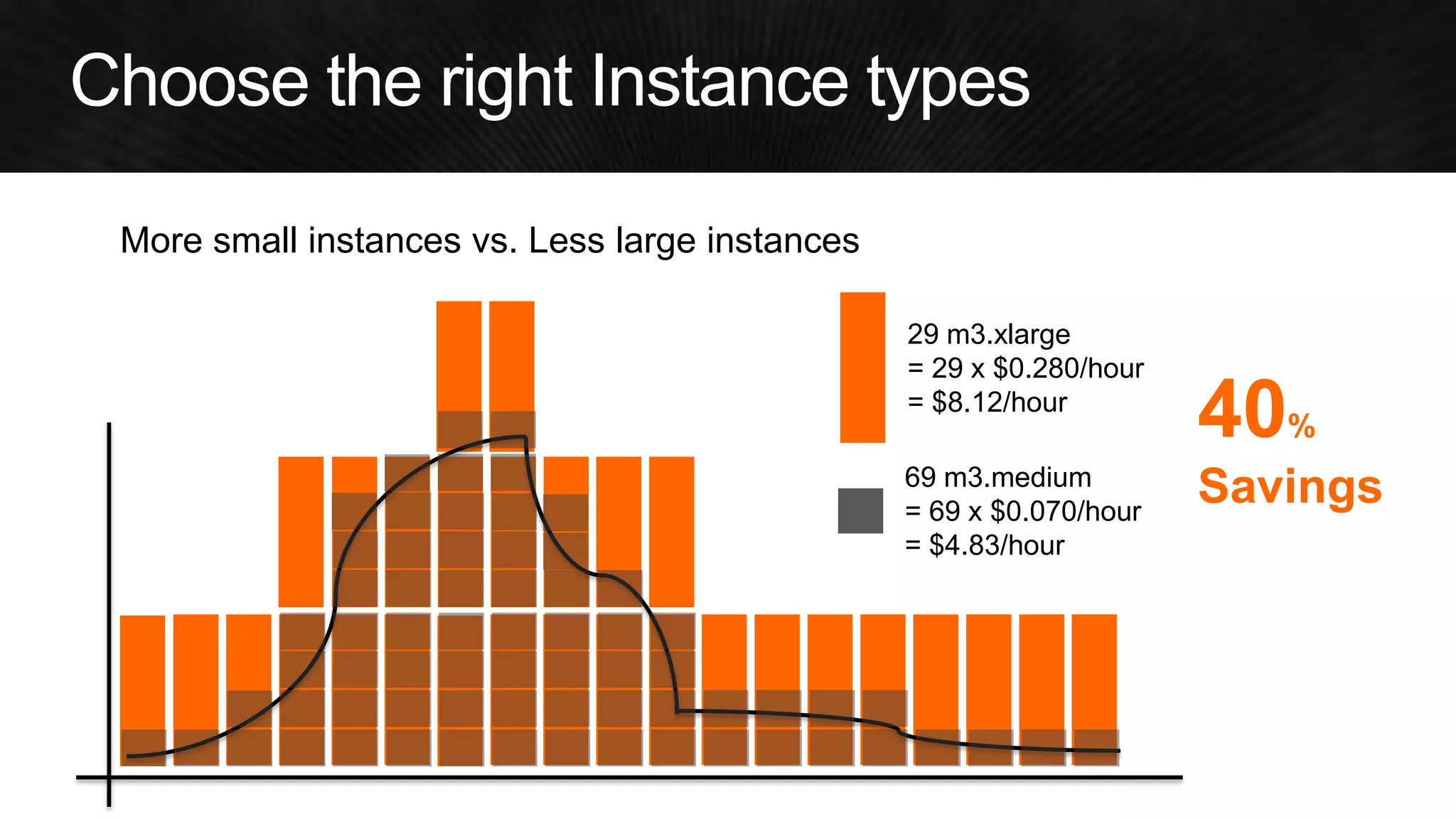
More small instances vs. Less large instances 
29 m3.xlarge 
= 29 x $0.280/hour 
= $8.12/hour 
69 m3.medium 
= 69 x $0.070/hour 
= $4.83/hour 
40% Savings
1 
5 
9 
13 
17 
21 
25 
29 
33 
37 
41 
45 
49 
Web Servers 
Week 
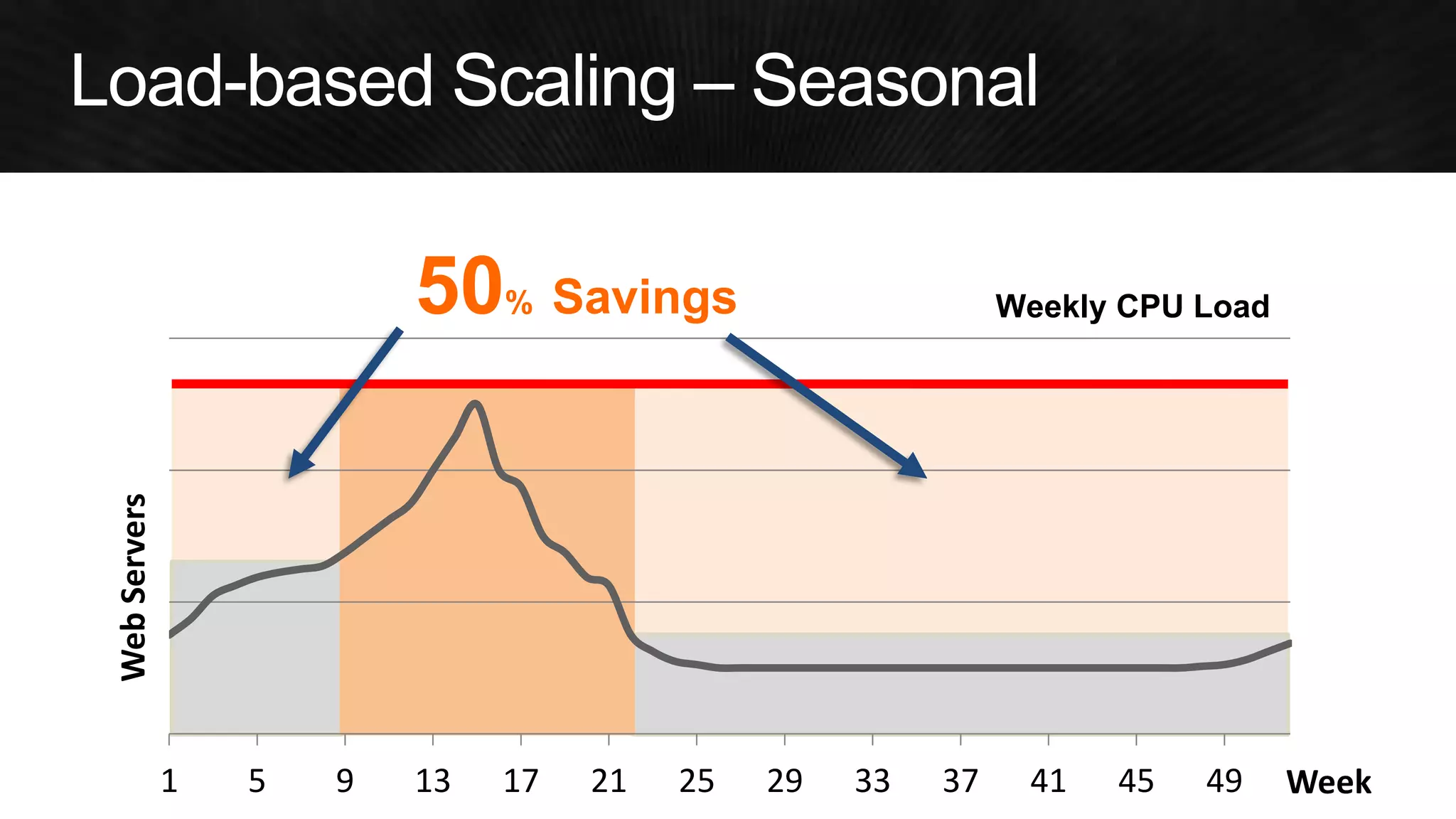
50% Savings 
Weekly CPU Load
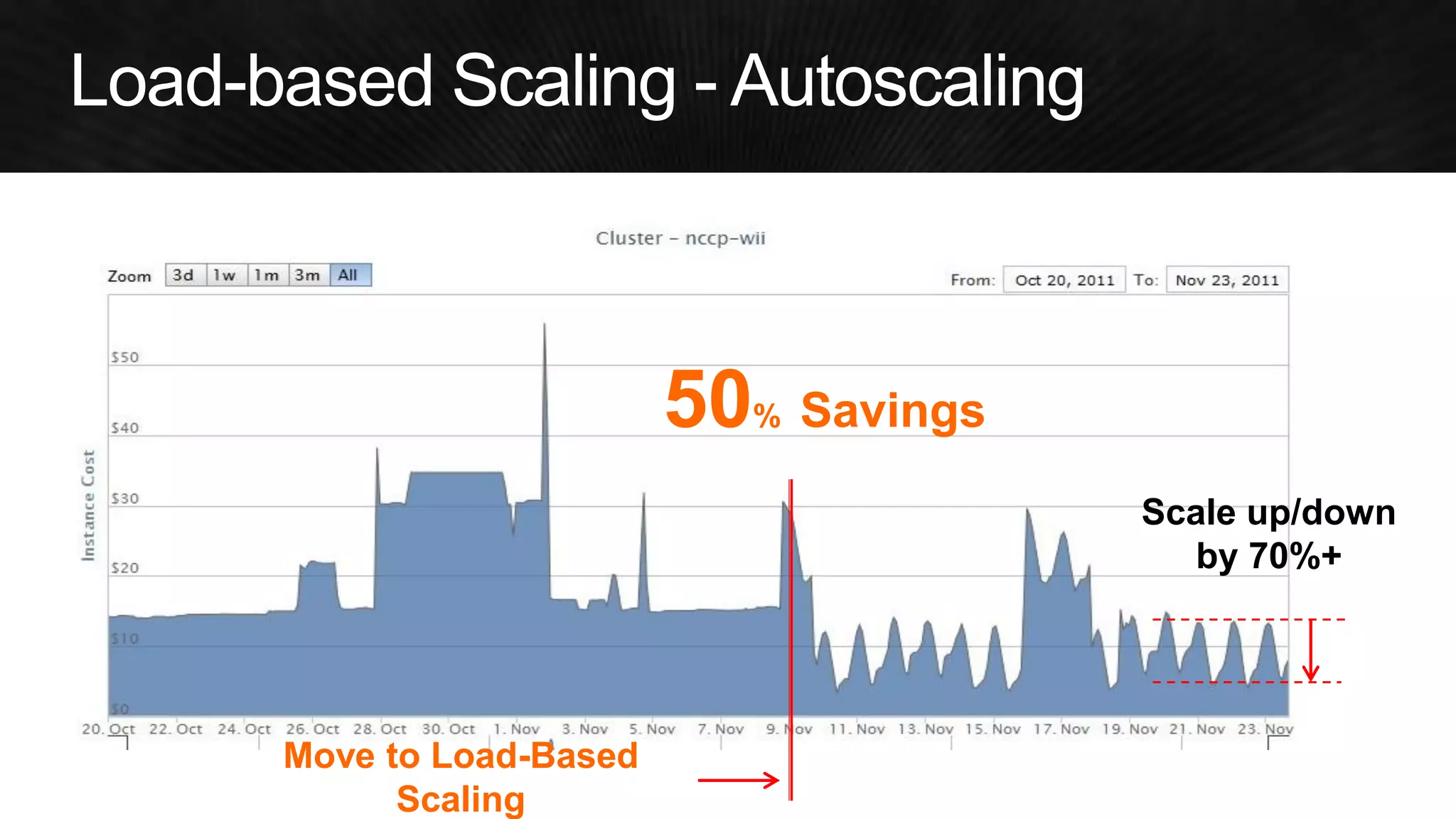
Scale up/down by 70%+ 
Move to Load-Based Scaling 
50% Savings
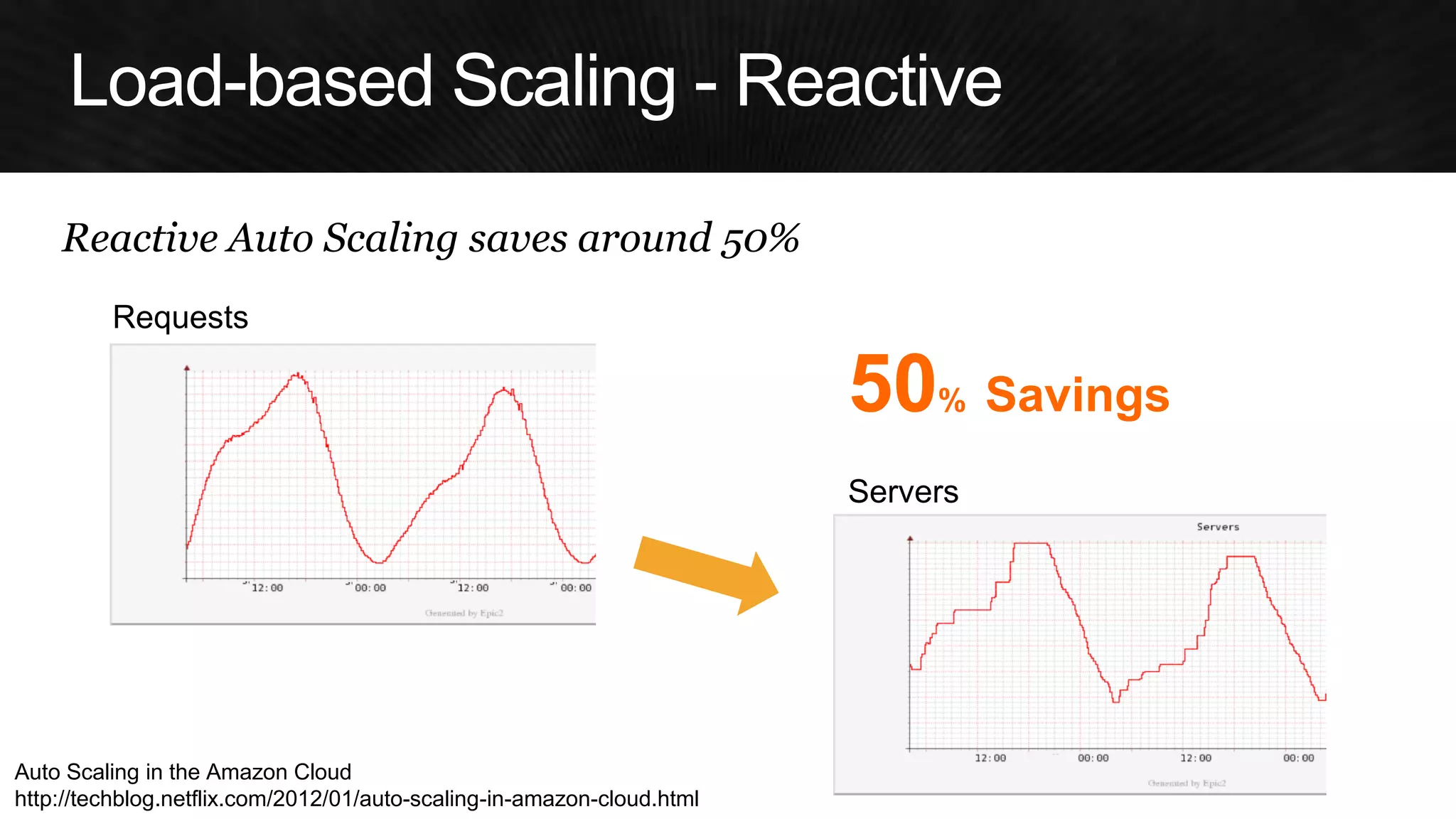
Auto Scaling in the Amazon Cloud 
http://techblog.netflix.com/2012/01/auto-scaling-in-amazon-cloud.html 
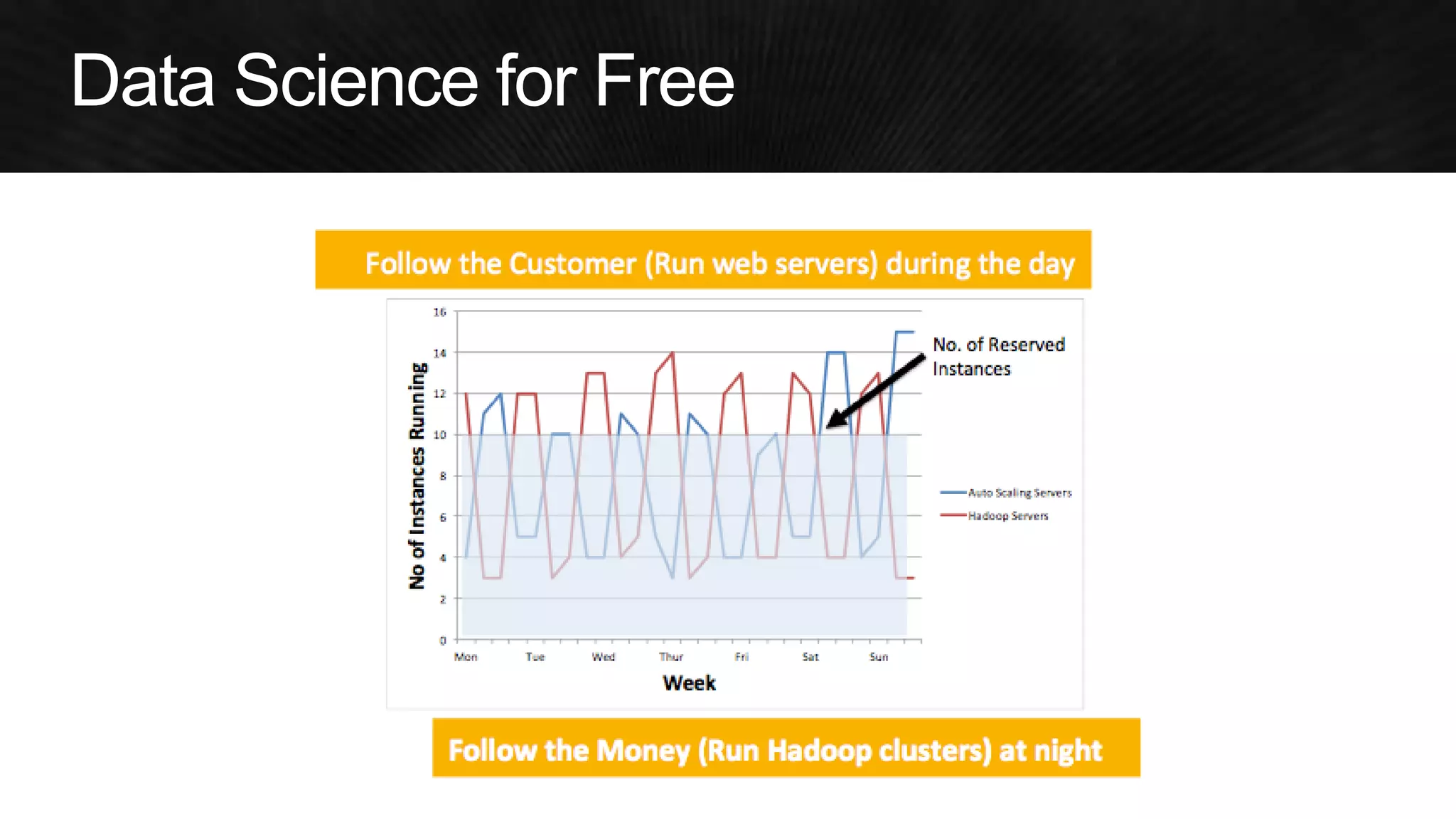
Reactive Auto Scaling saves around 50% 
Requests 
Servers 
50% Savings
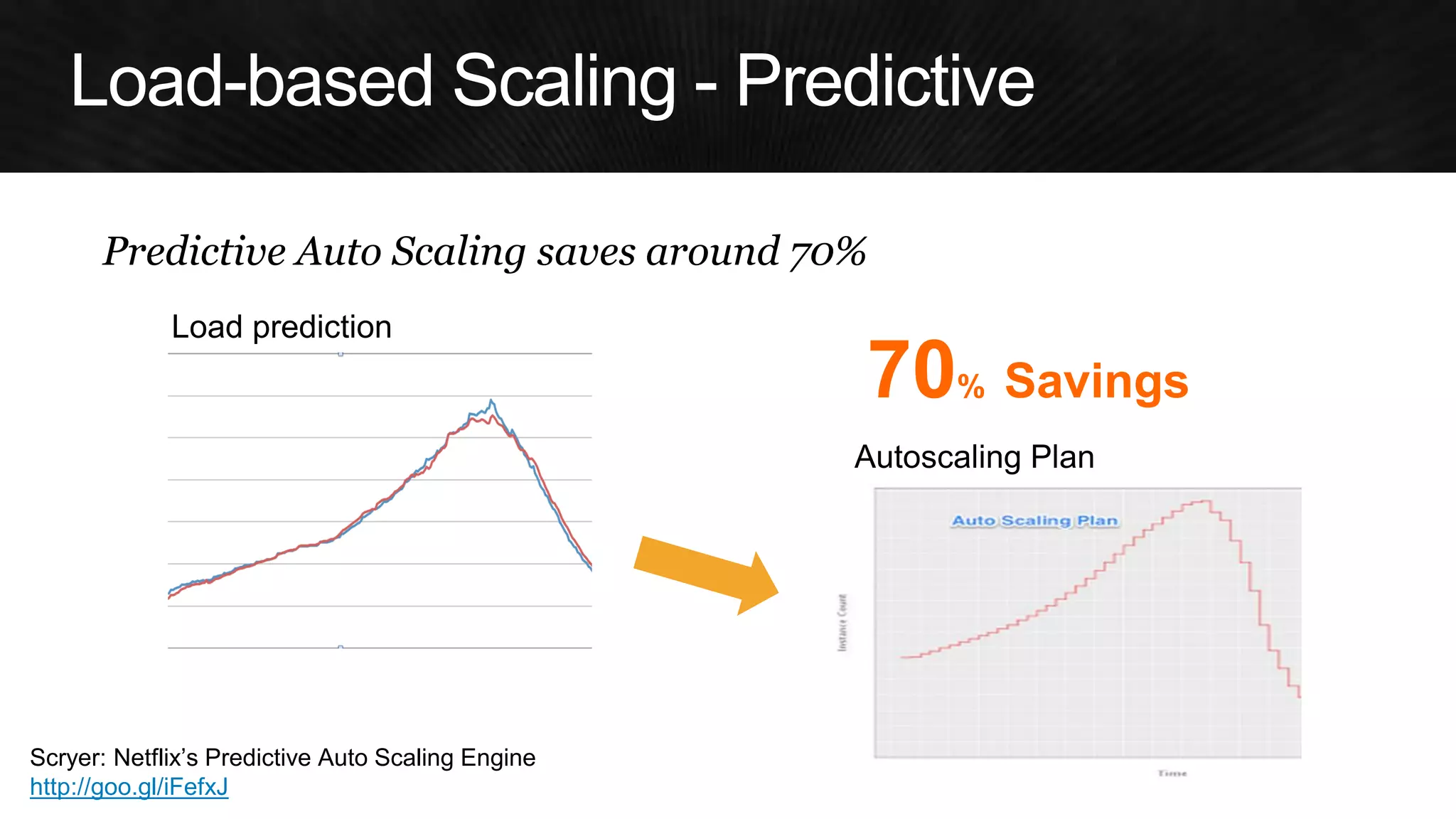
Predictive Auto Scaling saves around 70% 
Load prediction 
Autoscaling Plan 
Scryer: Netflix’s Predictive Auto Scaling Engine 
http://goo.gl/iFefxJ 
70% Savings
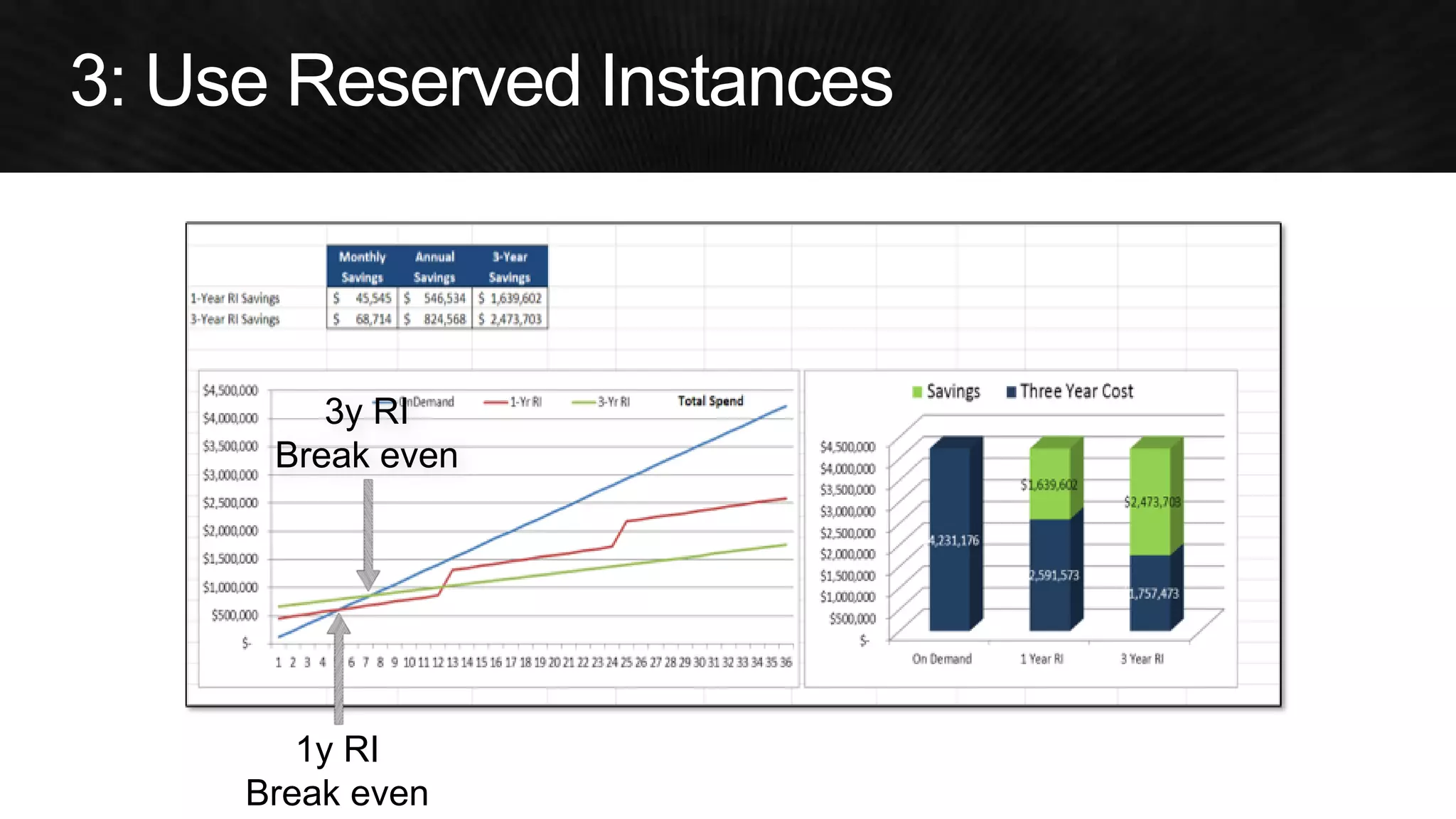
1y RI 
Break even 
3y RI 
Break even
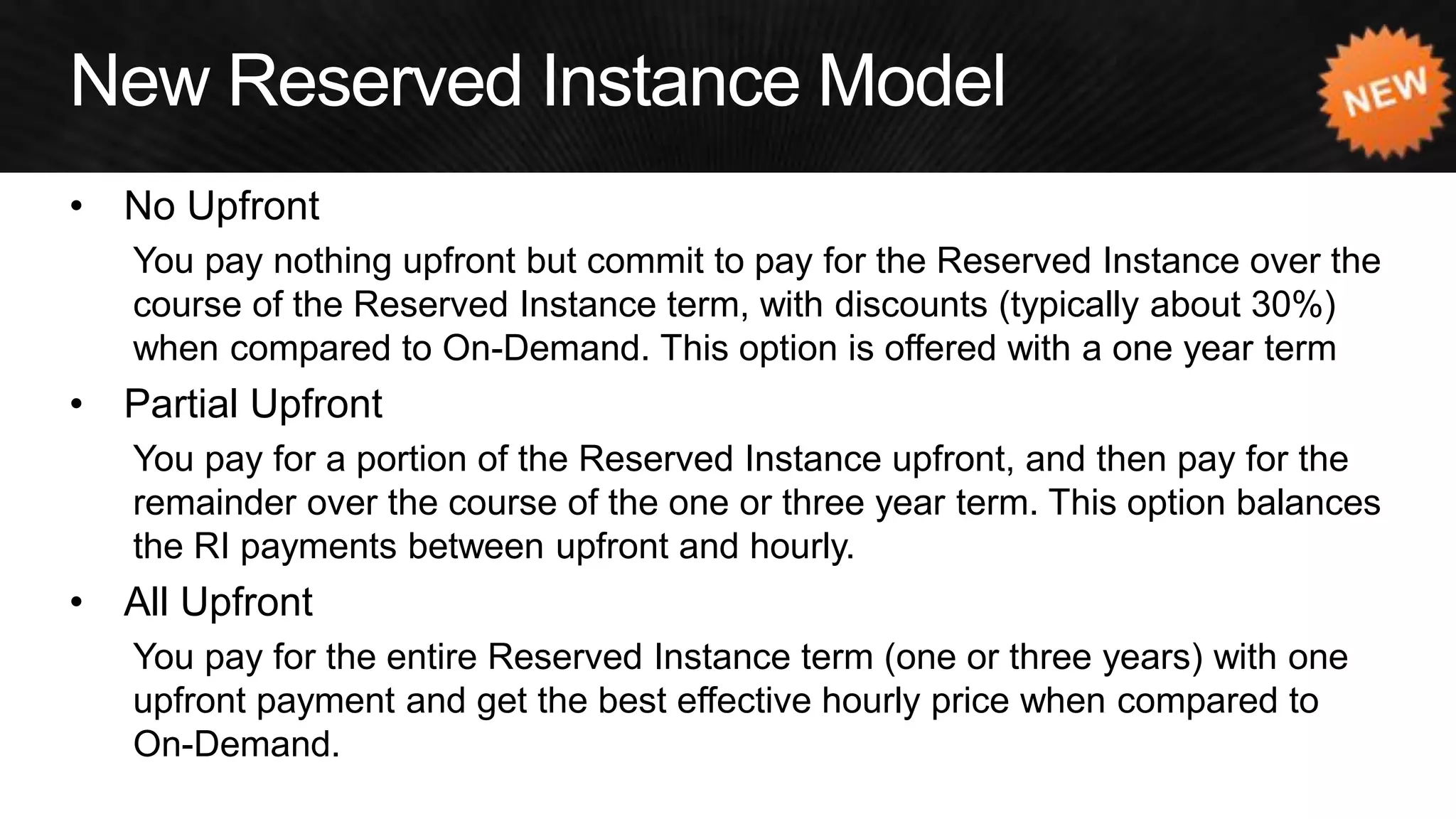
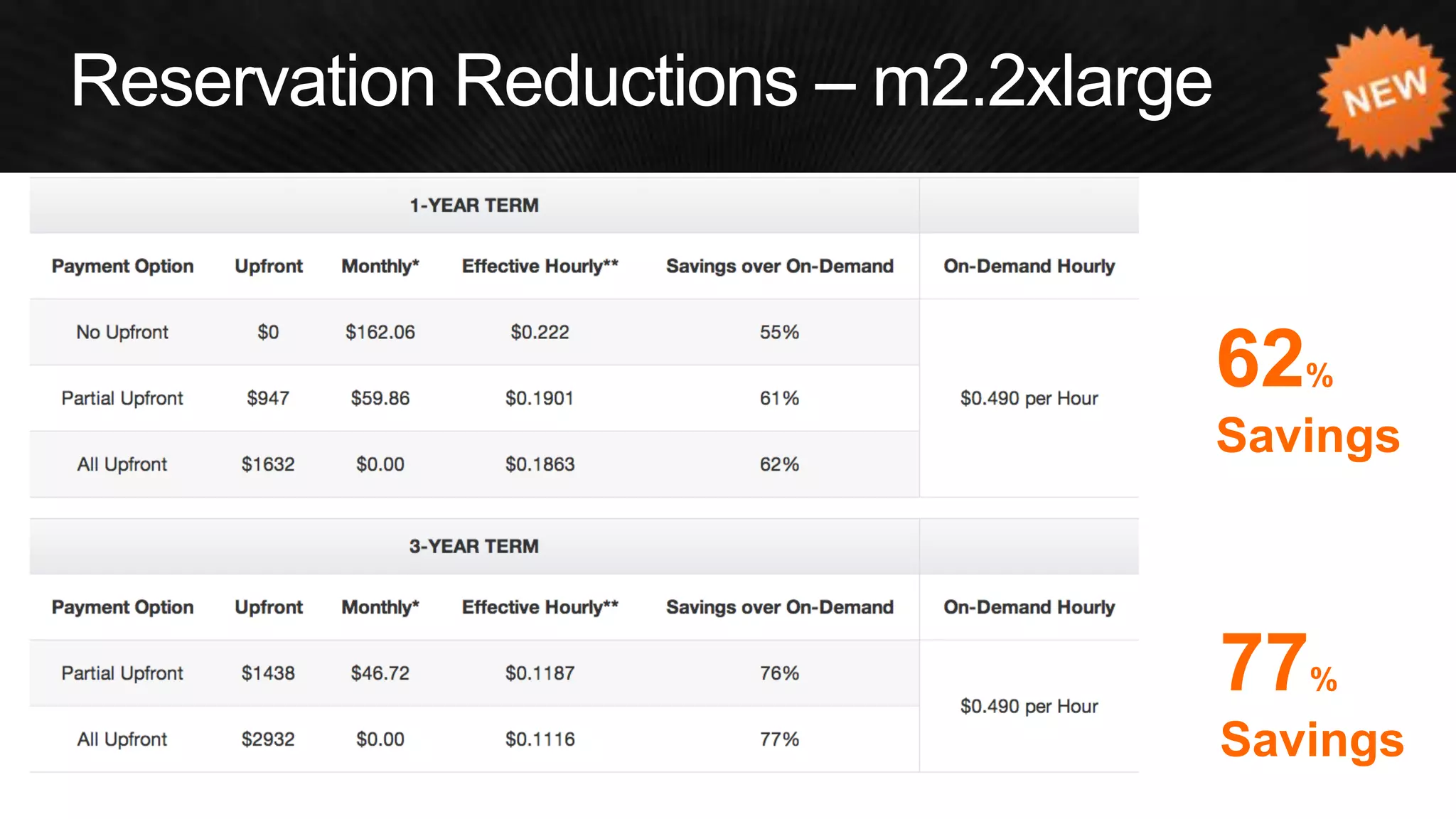
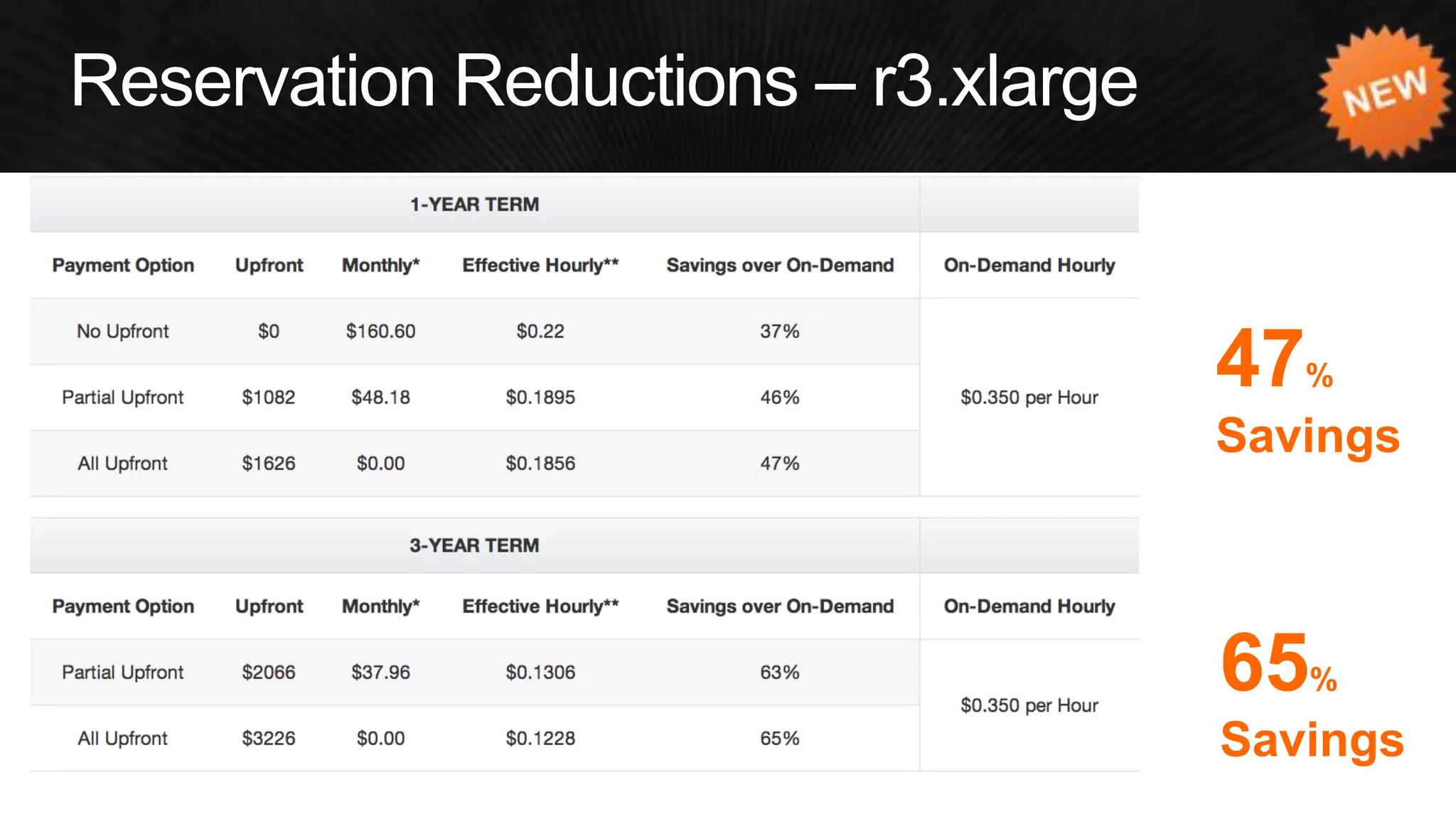
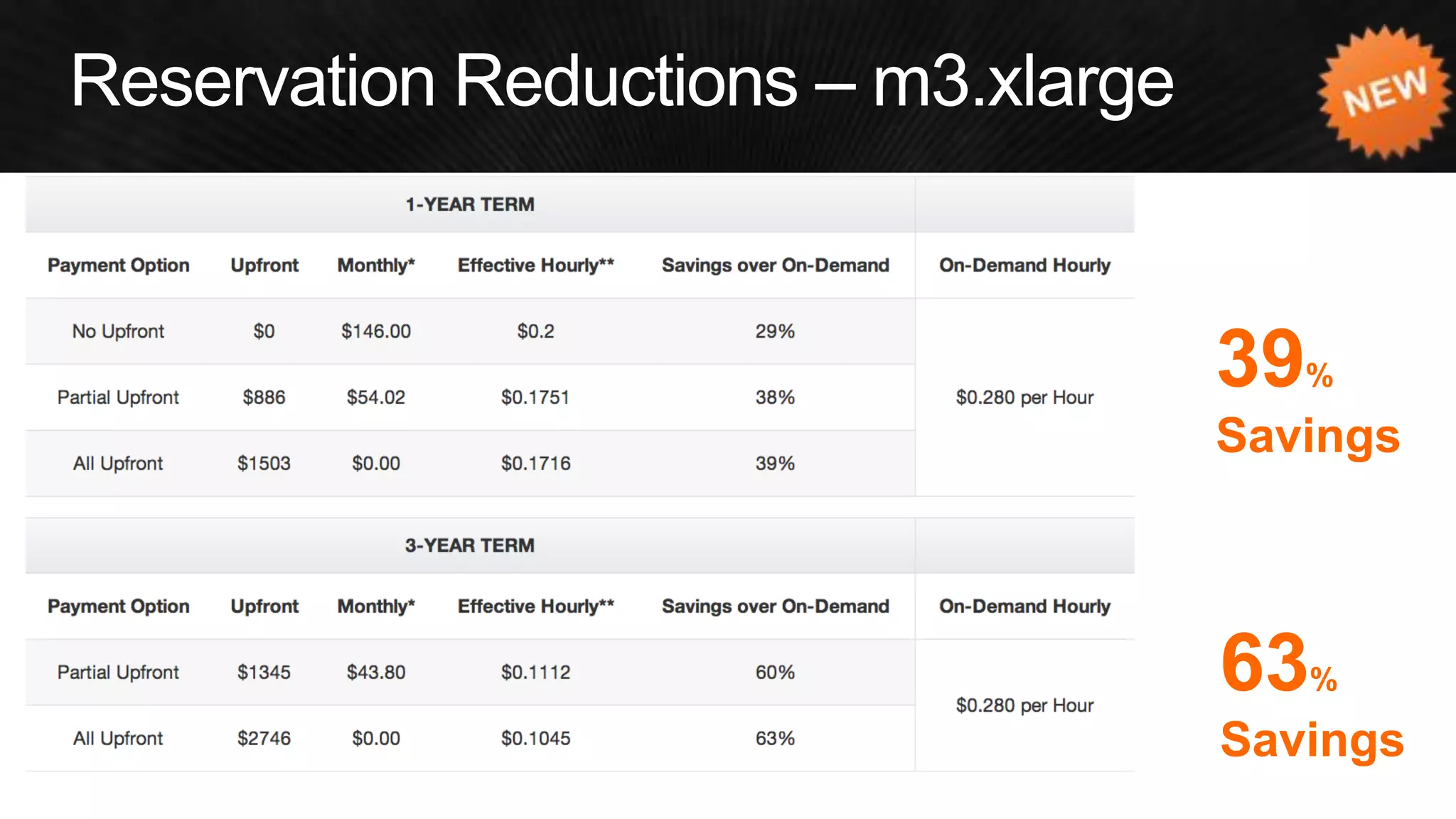
•No Upfront 
You pay nothing upfront but commit to pay for the Reserved Instance over the course of the Reserved Instance term, with discounts (typically about 30%) when compared to On-Demand. This option is offered with a one year term 
•Partial Upfront 
You pay for a portion of the Reserved Instance upfront, and then pay for the remainder over the course of the one or three year term. This option balances the RI payments between upfront and hourly. 
•All Upfront 
You pay for the entire Reserved Instance term (one or three years) with one upfront payment and get the best effective hourly price when compared to On-Demand.
62% Savings 
77% Savings
47% Savings 
65% Savings
39% Savings 
63% Savings
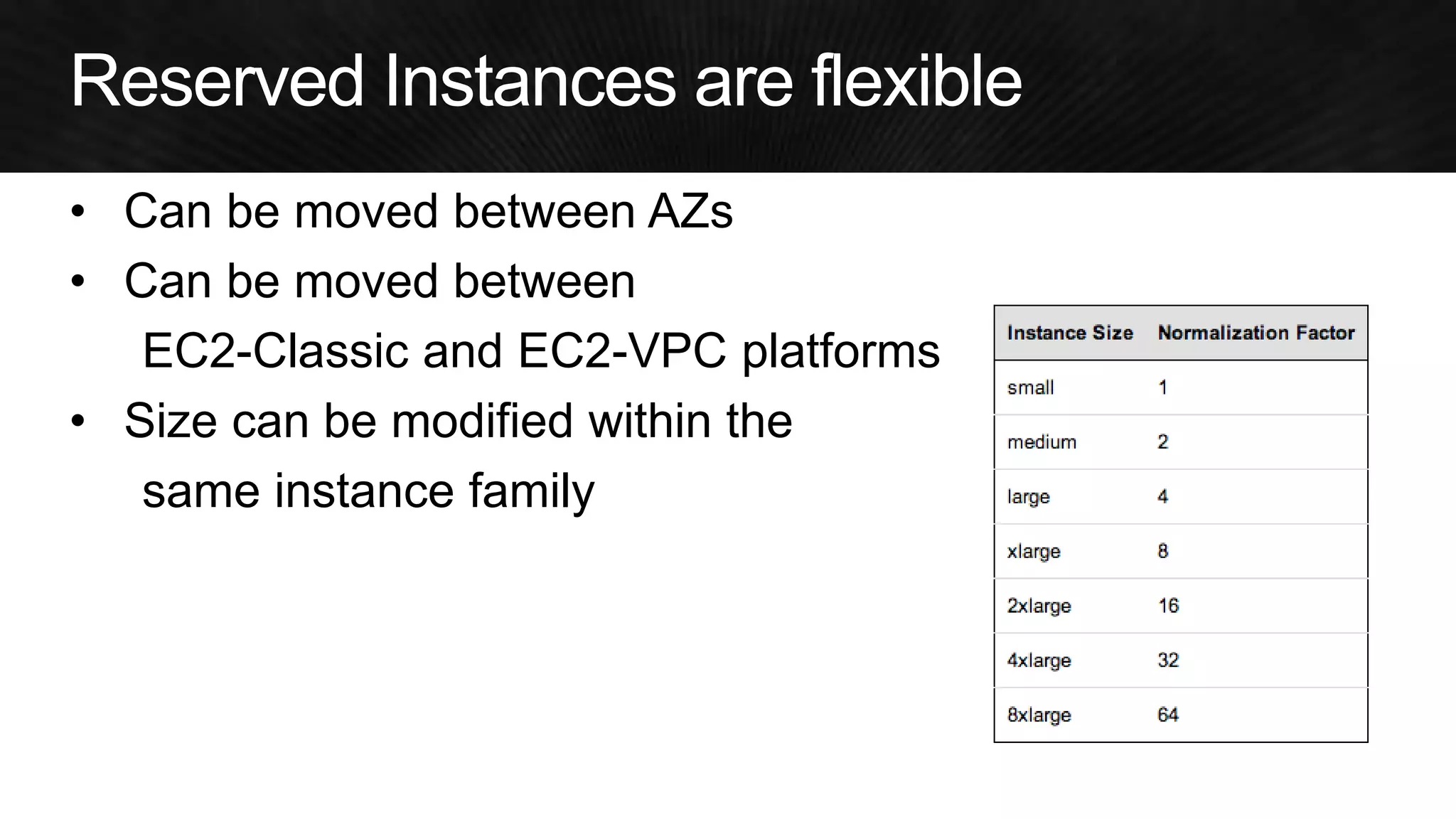
•Can be moved between AZs 
•Can be moved between 
EC2-Classic and EC2-VPC platforms 
•Size can be modified within the 
same instance family
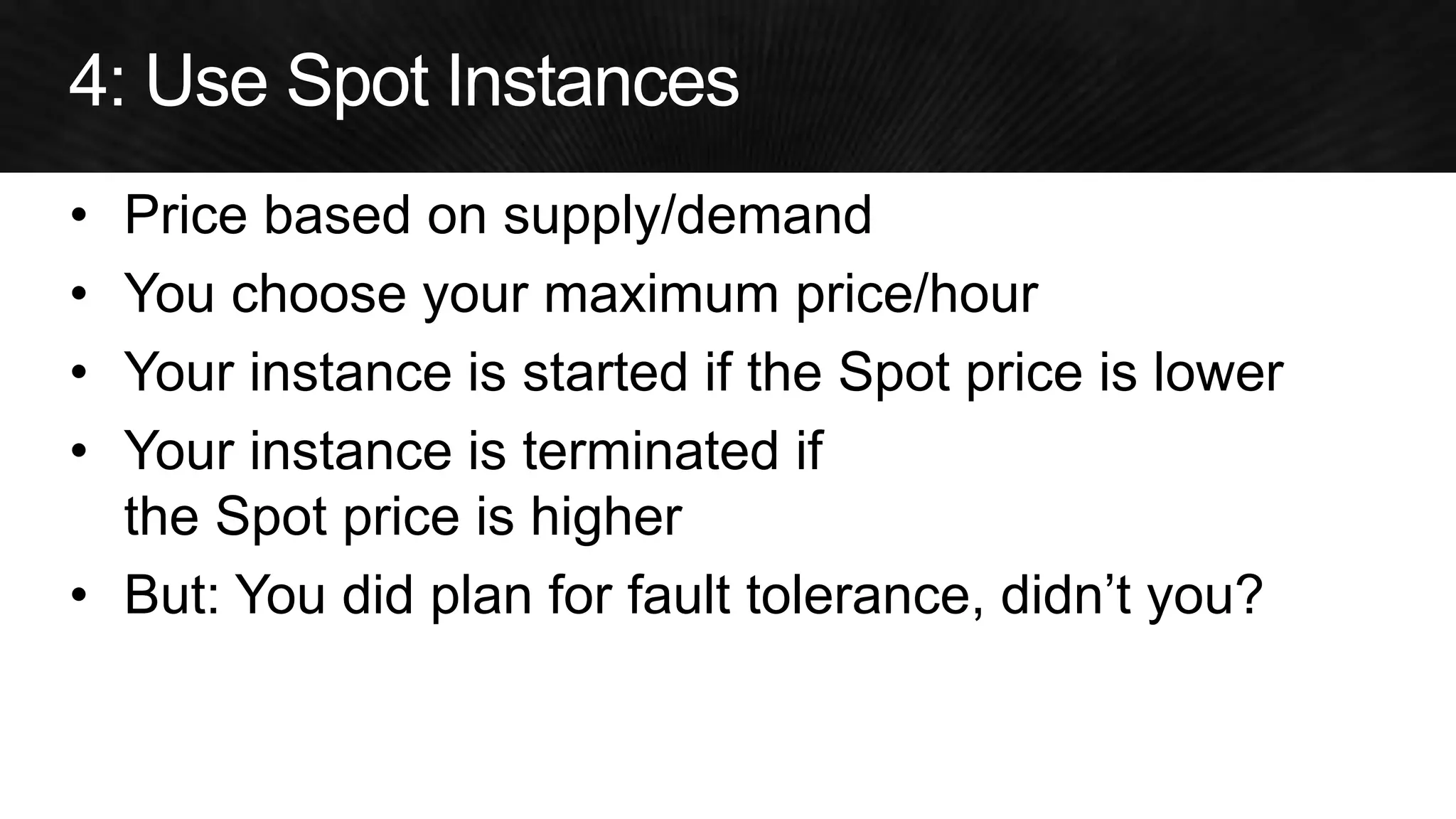
•Price based on supply/demand 
•You choose your maximum price/hour 
•Your instance is started if the Spot price is lower 
•Your instance is terminated if the Spot price is higher 
•But: You did plan for fault tolerance, didn’t you?
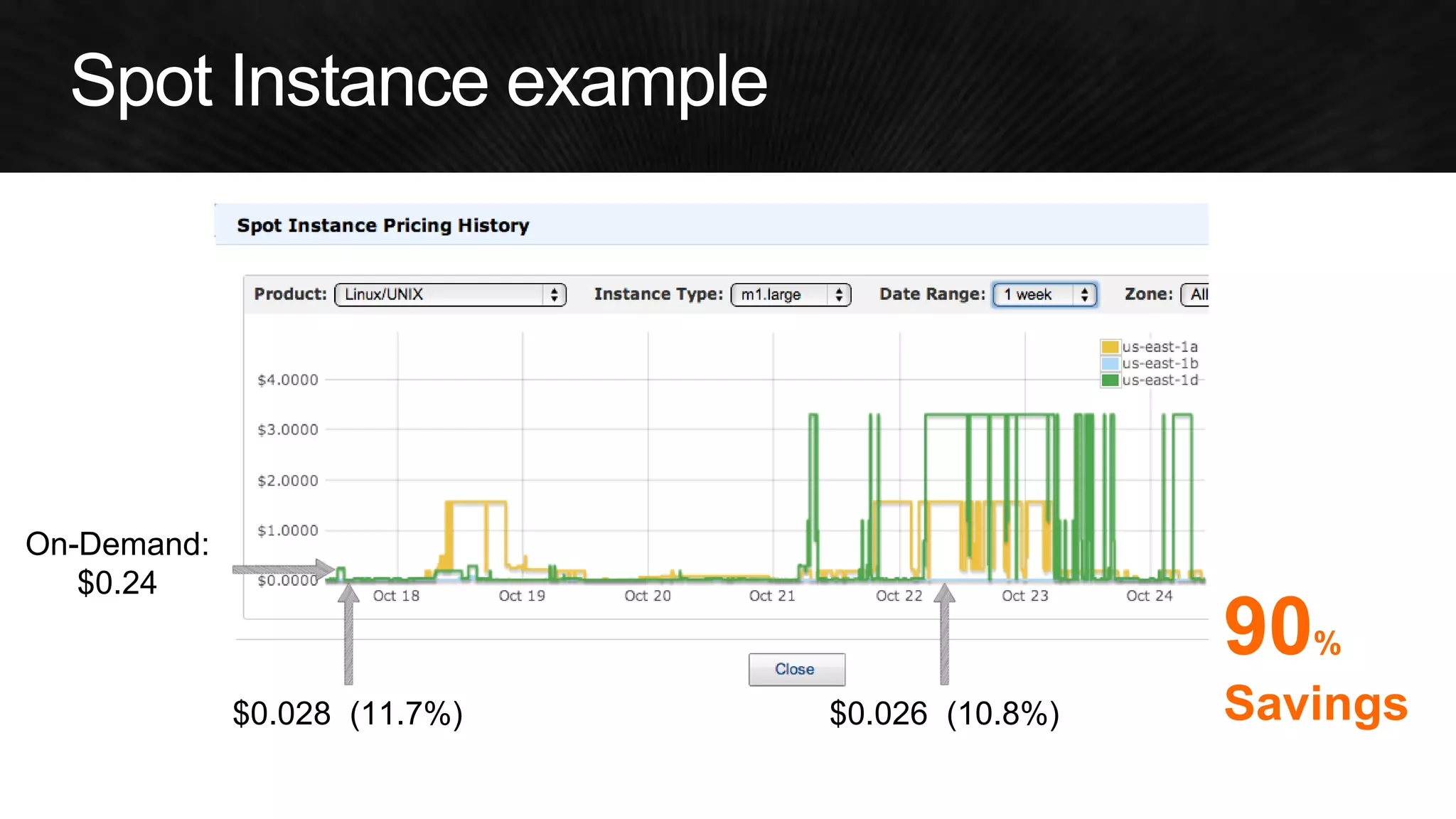
On-Demand: 
$0.24 
$0.028 (11.7%) 
$0.026 (10.8%) 
90% Savings
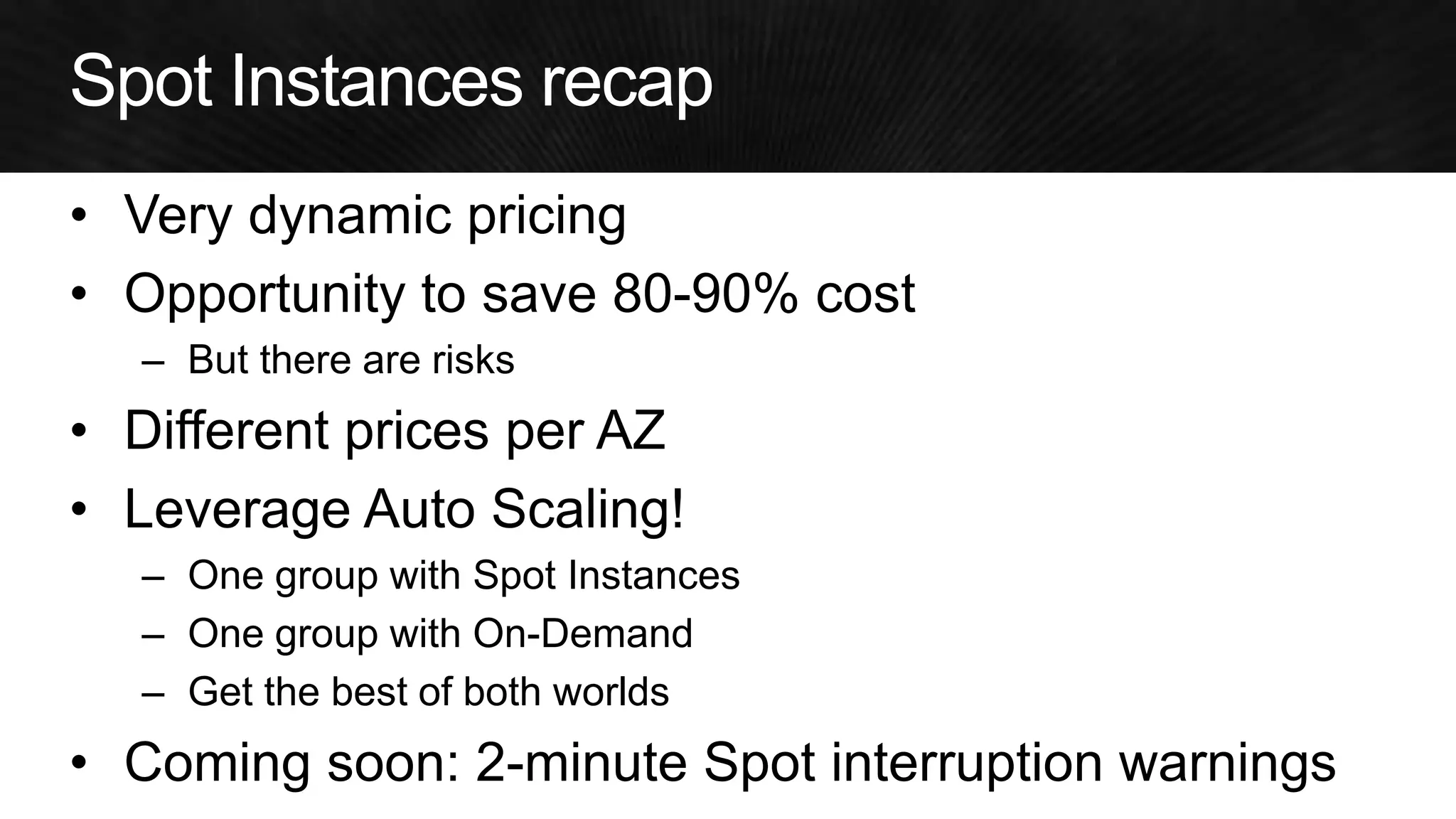
•Very dynamic pricing 
•Opportunity to save 80-90% cost 
–But there are risks 
•Different prices per AZ 
•Leverage Auto Scaling! 
–One group with Spot Instances 
–One group with On-Demand 
–Get the best of both worlds 
•Coming soon: 2-minute Spot interruption warnings
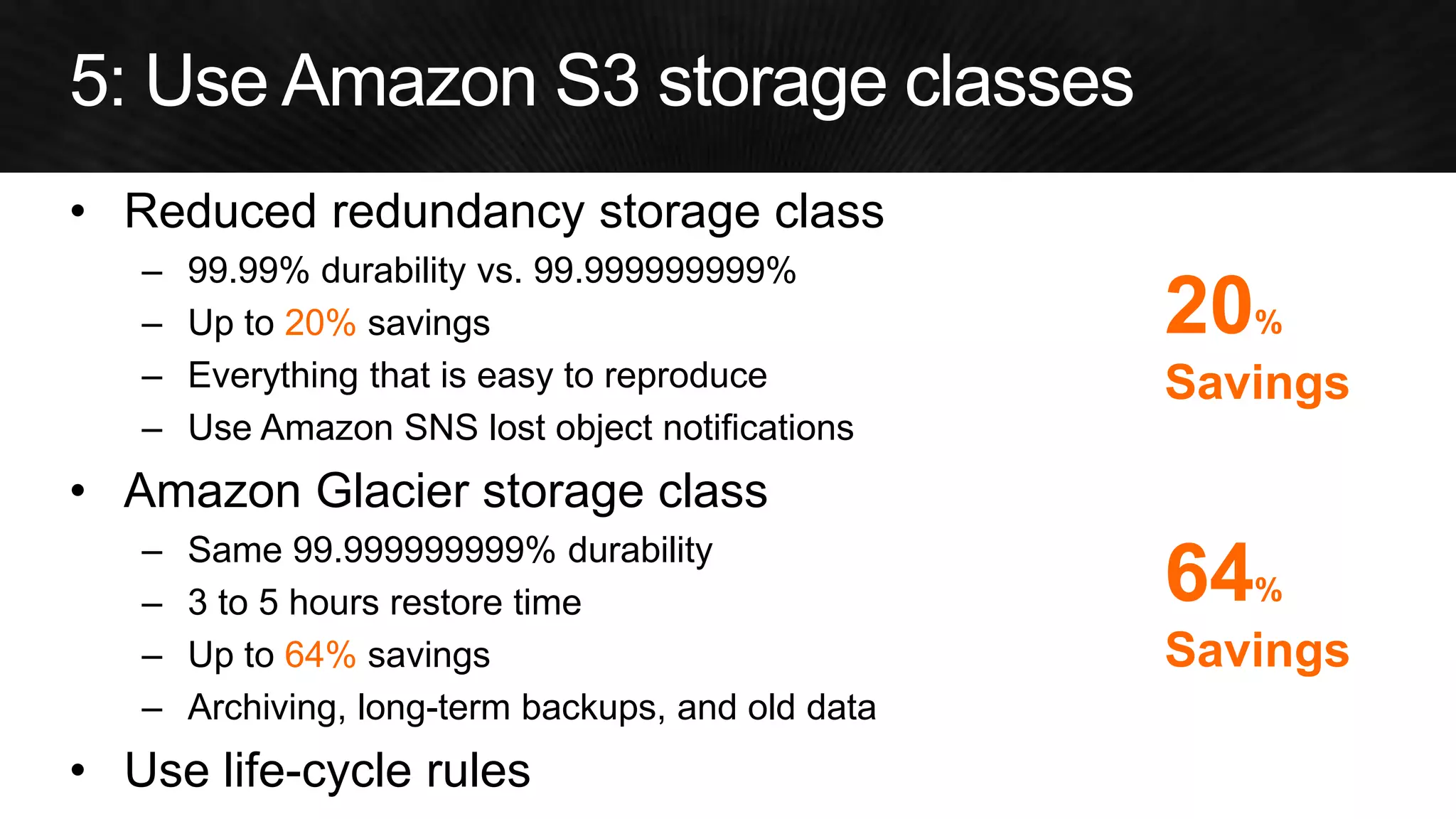
•Reduced redundancy storage class 
–99.99% durability vs. 99.999999999% 
–Up to 20% savings 
–Everything that is easy to reproduce 
–Use Amazon SNS lost object notifications 
•Amazon Glacier storage class 
–Same 99.999999999% durability 
–3 to 5 hours restore time 
–Up to 64% savings 
–Archiving, long-term backups, and old data 
•Use life-cycle rules 
64% Savings 
20% Savings
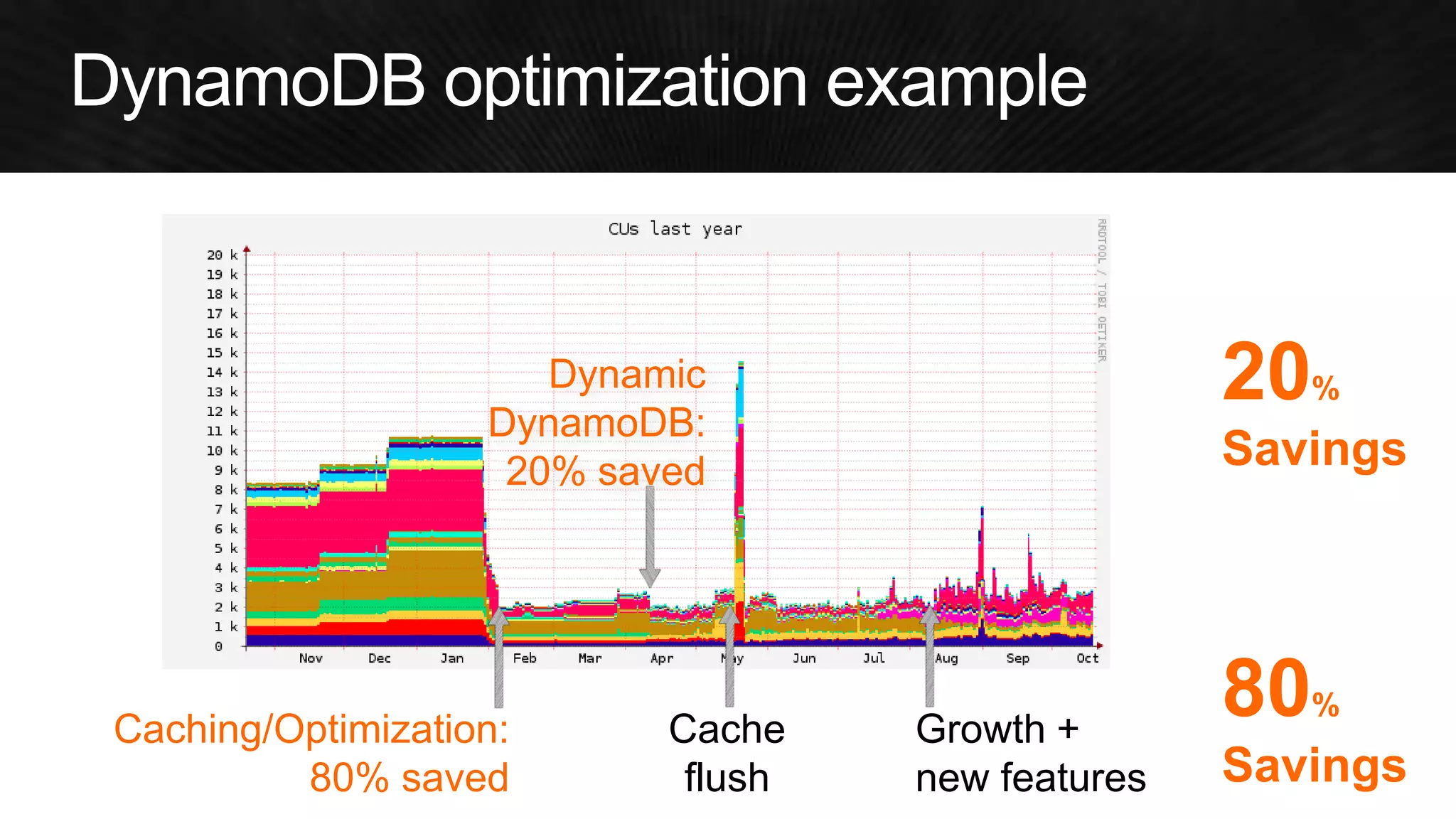
•Read/write capacity units (CUs) determine most of DynamoDB cost 
•By optimizing CUs, you can save a lot of money 
•But: 
–Need to provision enough capacity to not run into capacity errors 
–Need to prepare for peaks 
–Need to constantly monitor/adjust
•Use caching to save read capacity units 
–Local RAM caches at app server instances 
–Check out Amazon ElastiCache 
•Think of strategies for optimizing CU use 
–Use multiple tables to support varied access patterns 
–Understand access patterns for time series data 
–Compress large attribute values 
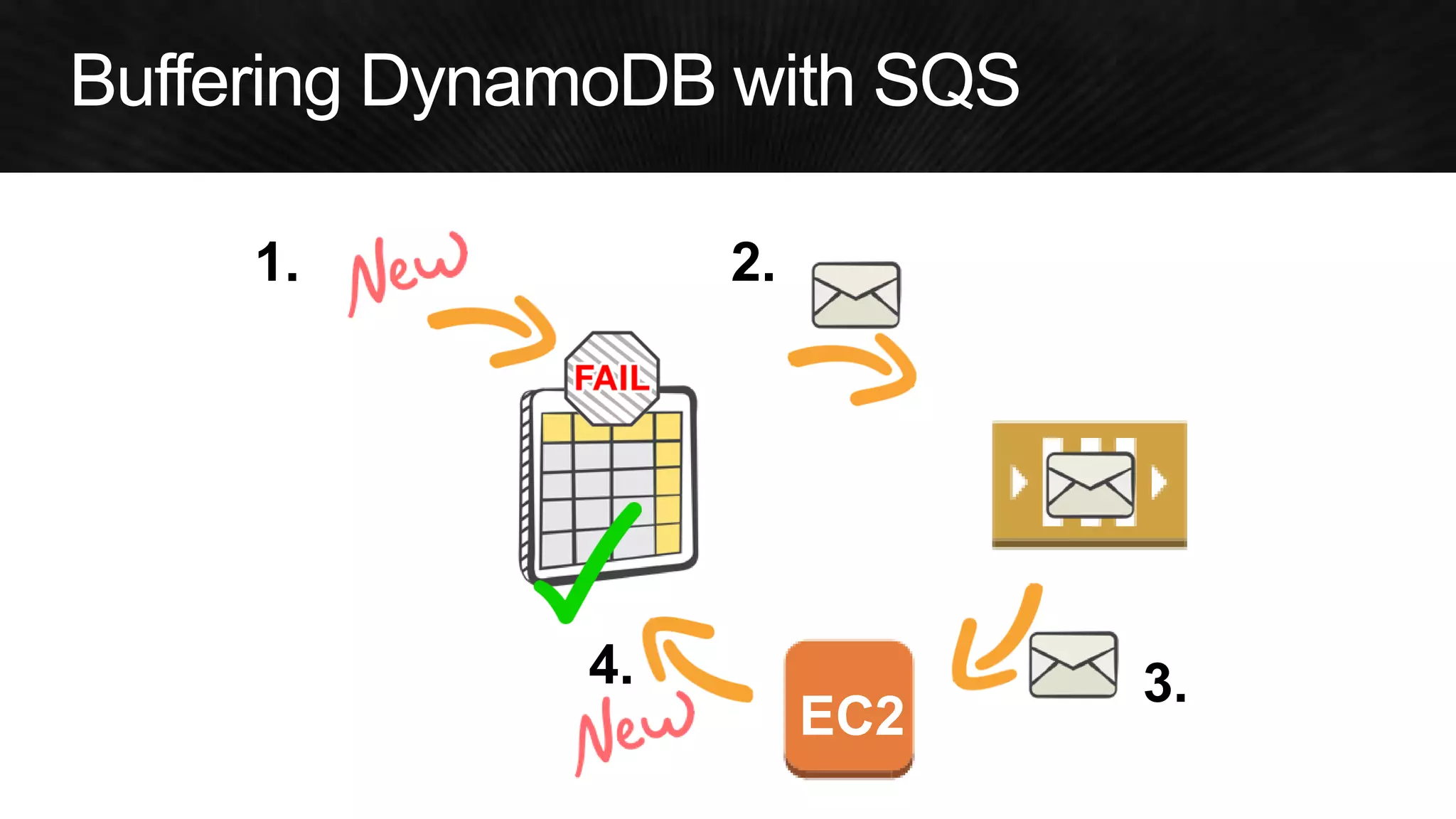
•Use Amazon SQS to buffer over-capacity writes
EC2 
1. 
2. 
3. 
4.
Caching/Optimization: 80% saved 
Cache flush 
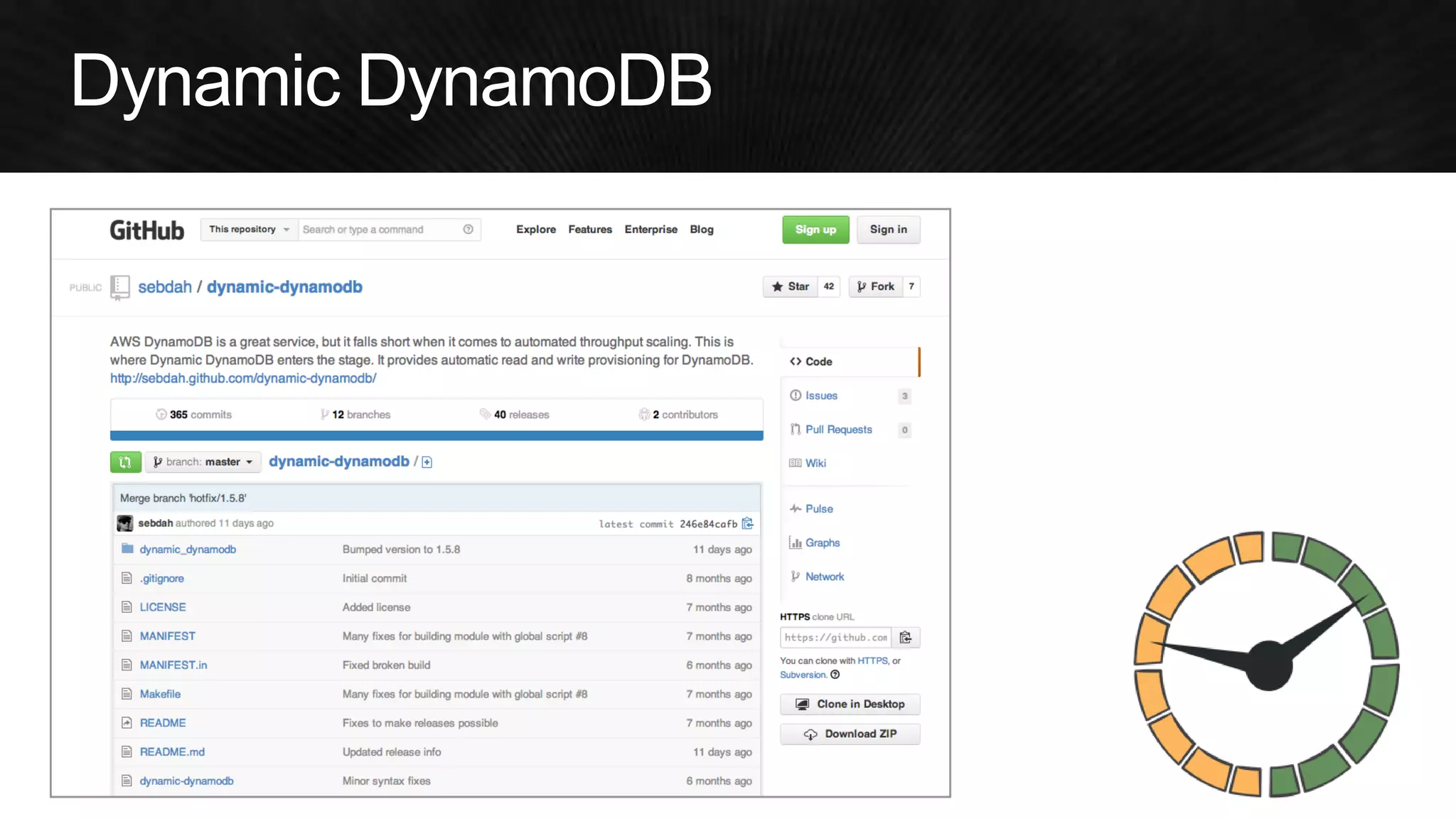
Dynamic DynamoDB: 
20% saved 
Growth + new features 
80% Savings 
20% Savings
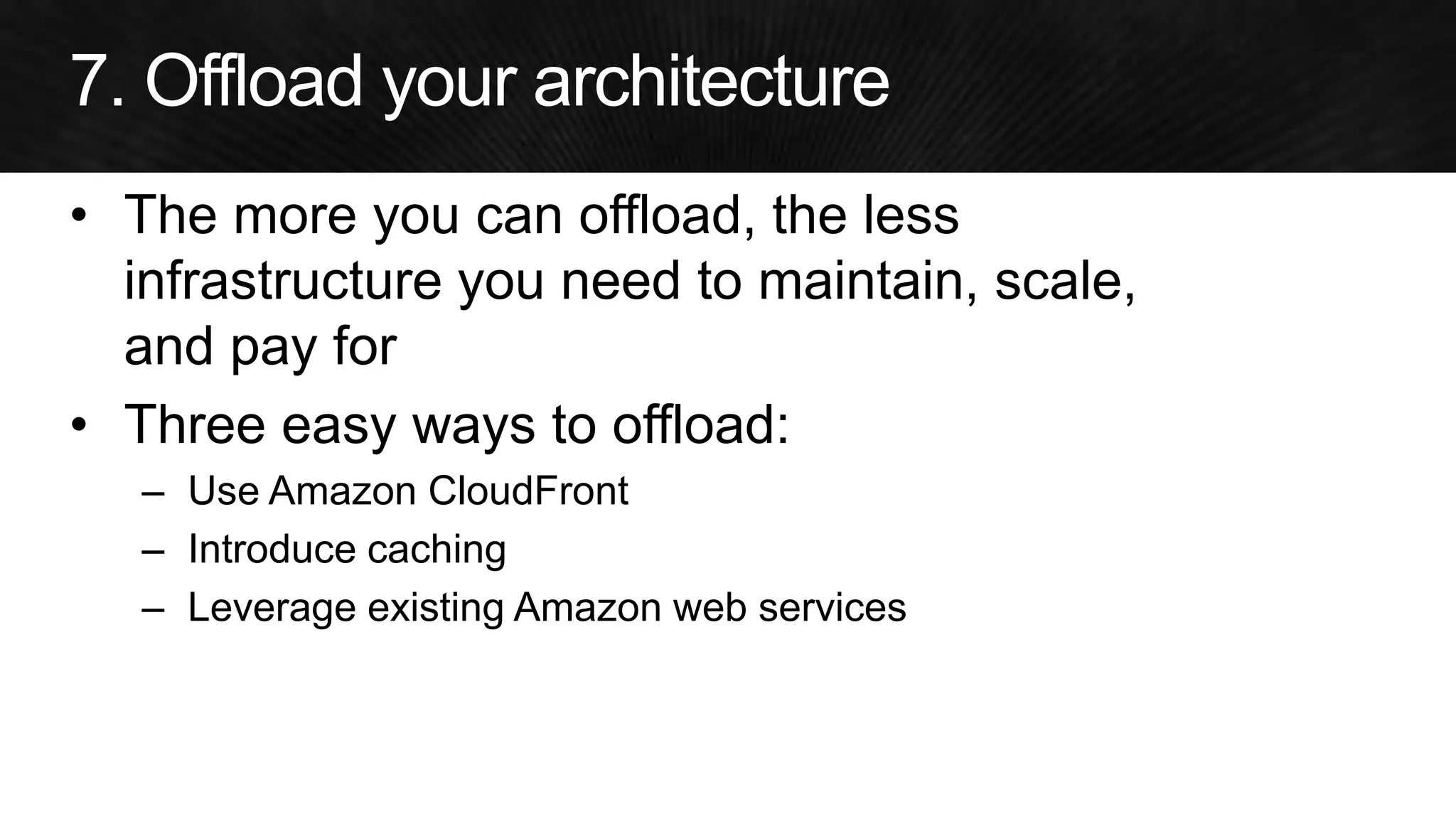
•The more you can offload, the less infrastructure you need to maintain, scale, and pay for 
•Three easy ways to offload: 
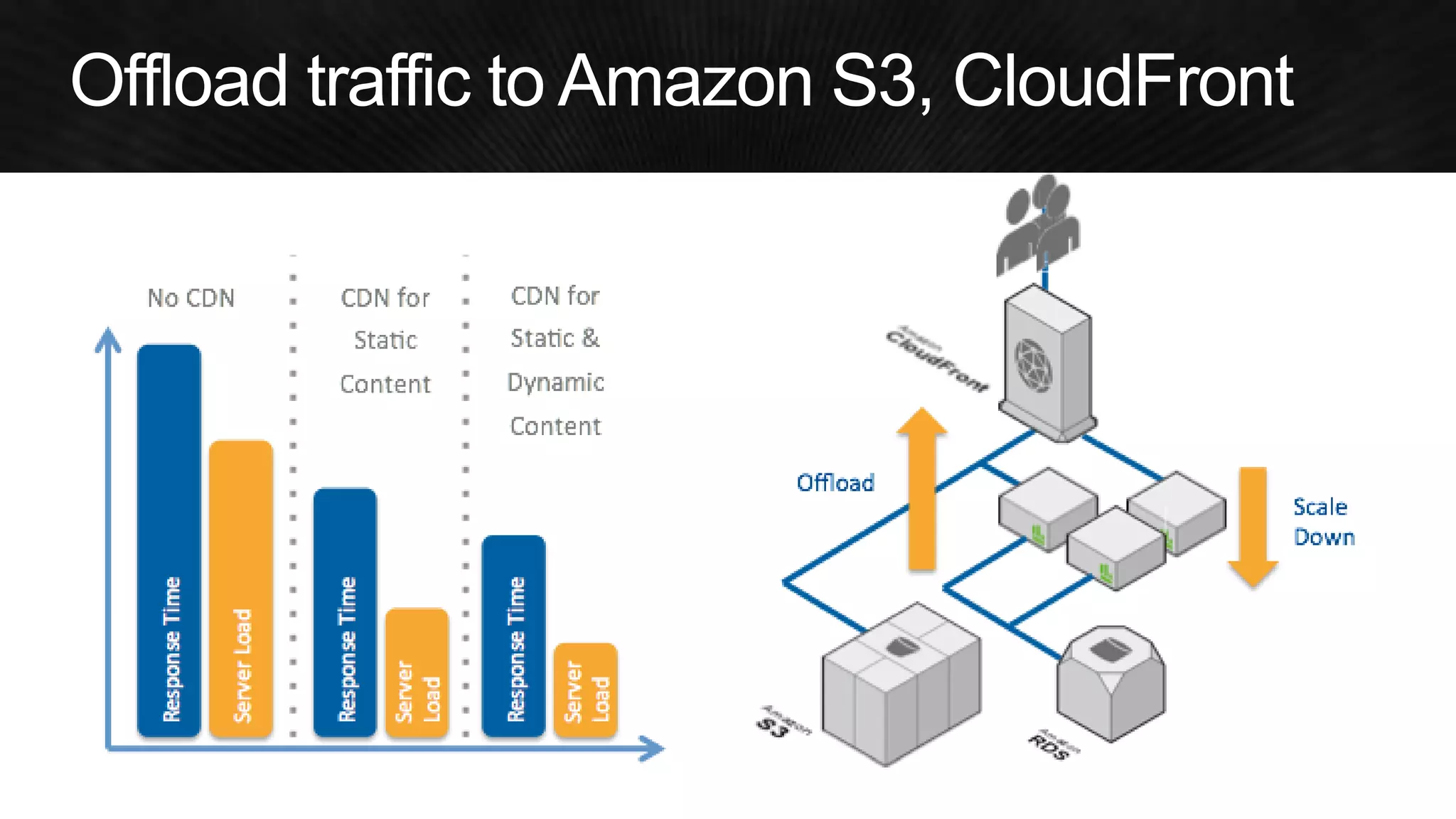
–Use Amazon CloudFront 
–Introduce caching 
–Leverage existing Amazon web services
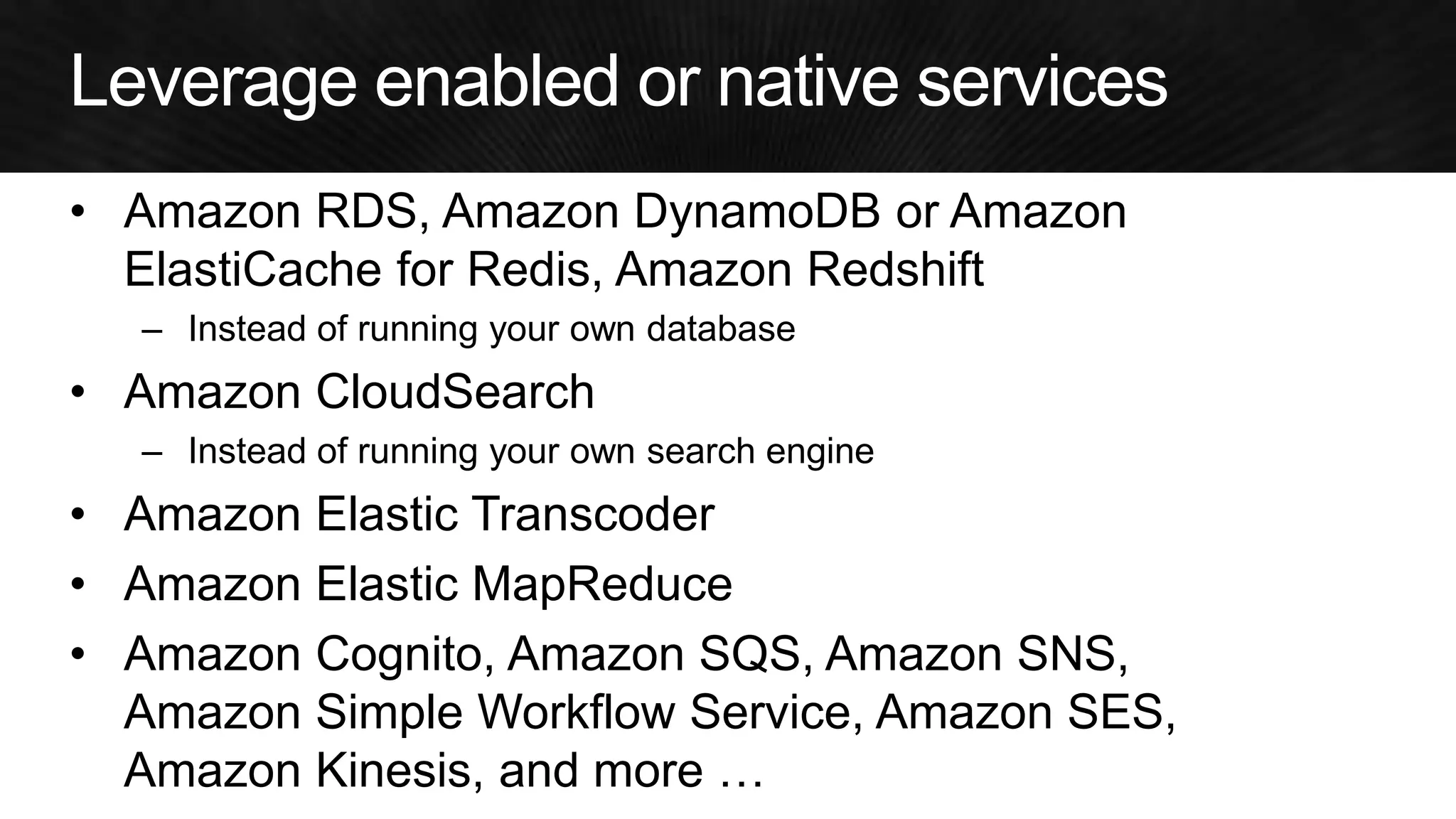
•Amazon RDS, Amazon DynamoDB or Amazon ElastiCache for Redis, Amazon Redshift 
–Instead of running your own database 
•Amazon CloudSearch 
–Instead of running your own search engine 
•Amazon Elastic Transcoder 
•Amazon Elastic MapReduce 
•Amazon Cognito, Amazon SQS, Amazon SNS, Amazon Simple Workflow Service, Amazon SES, Amazon Kinesis, and more …
November 14, 2014 | Las Vegas 
Adrian Cockcroft @adrianco, Battery Ventures
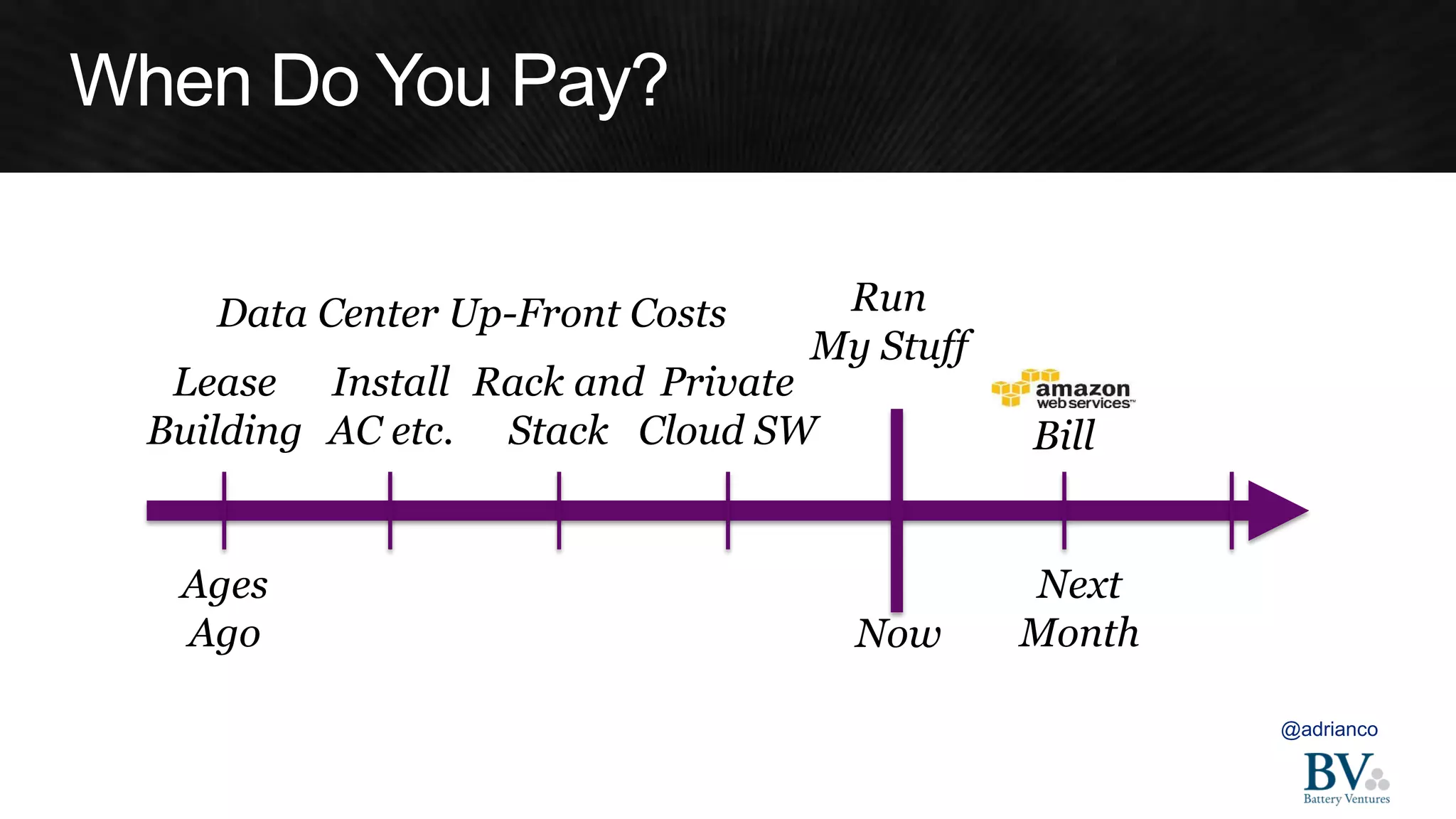
@adrianco 
Bill 
Now 
Next Month 
Ages 
Ago 
Lease 
Building 
Install 
AC etc. 
Rack and 
Stack 
Private Cloud SW 
Run 
My Stuff 
Data Center Up-Front Costs
0 
25 
50 
75 
100 
125 
1 
2 
3 
4 
5 
6 
7 
8 
9 
10 
11 
12 
1 
2 
3 
4 
5 
6 
7 
8 
9 
10 
11 
12 
1 
2 
3 
4 
5 
6 
7 
8 
9 
10 
11 
12 
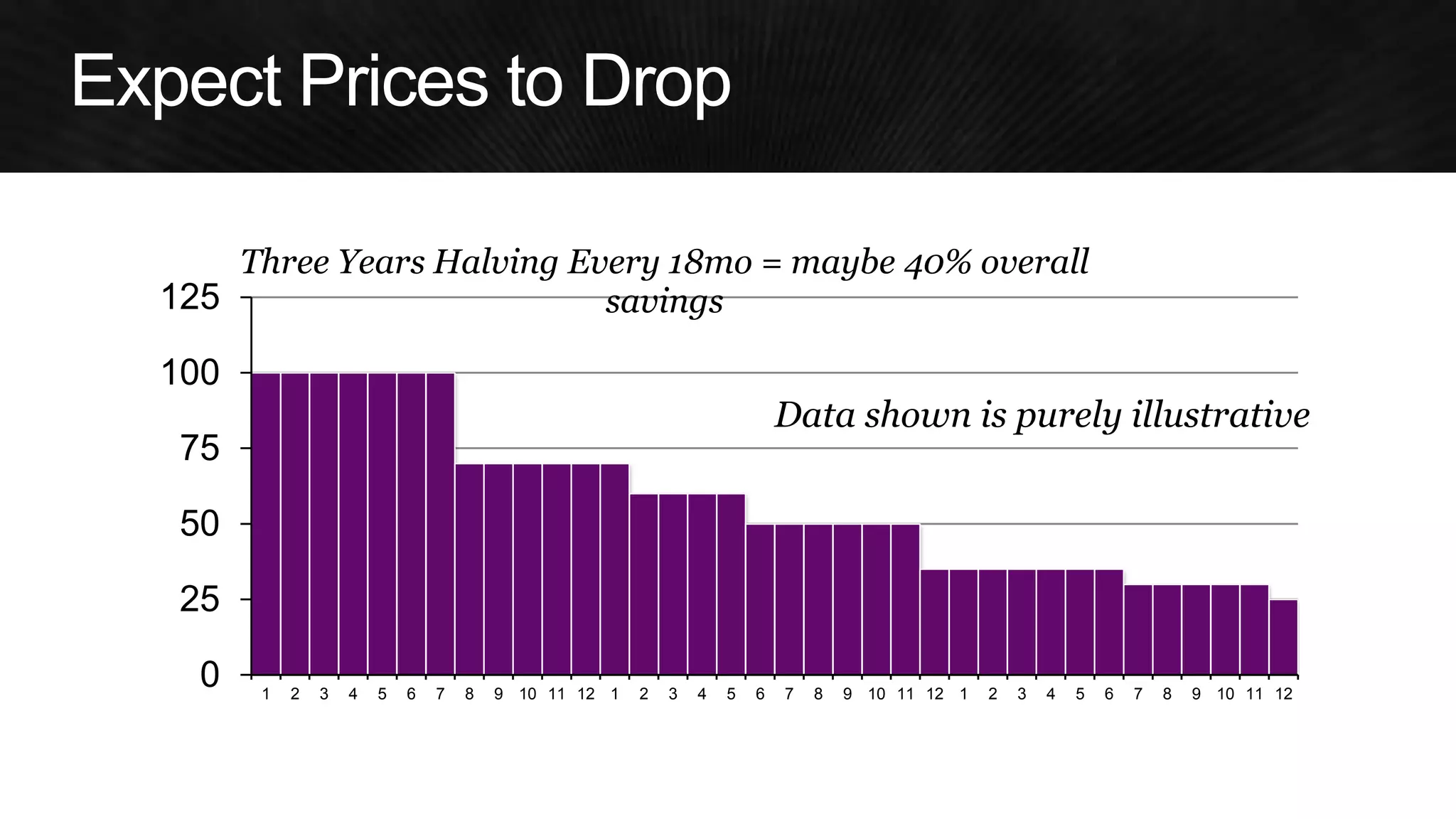
Three Years Halving Every 18mo = maybe 40% overall savings 
Data shown is purely illustrative
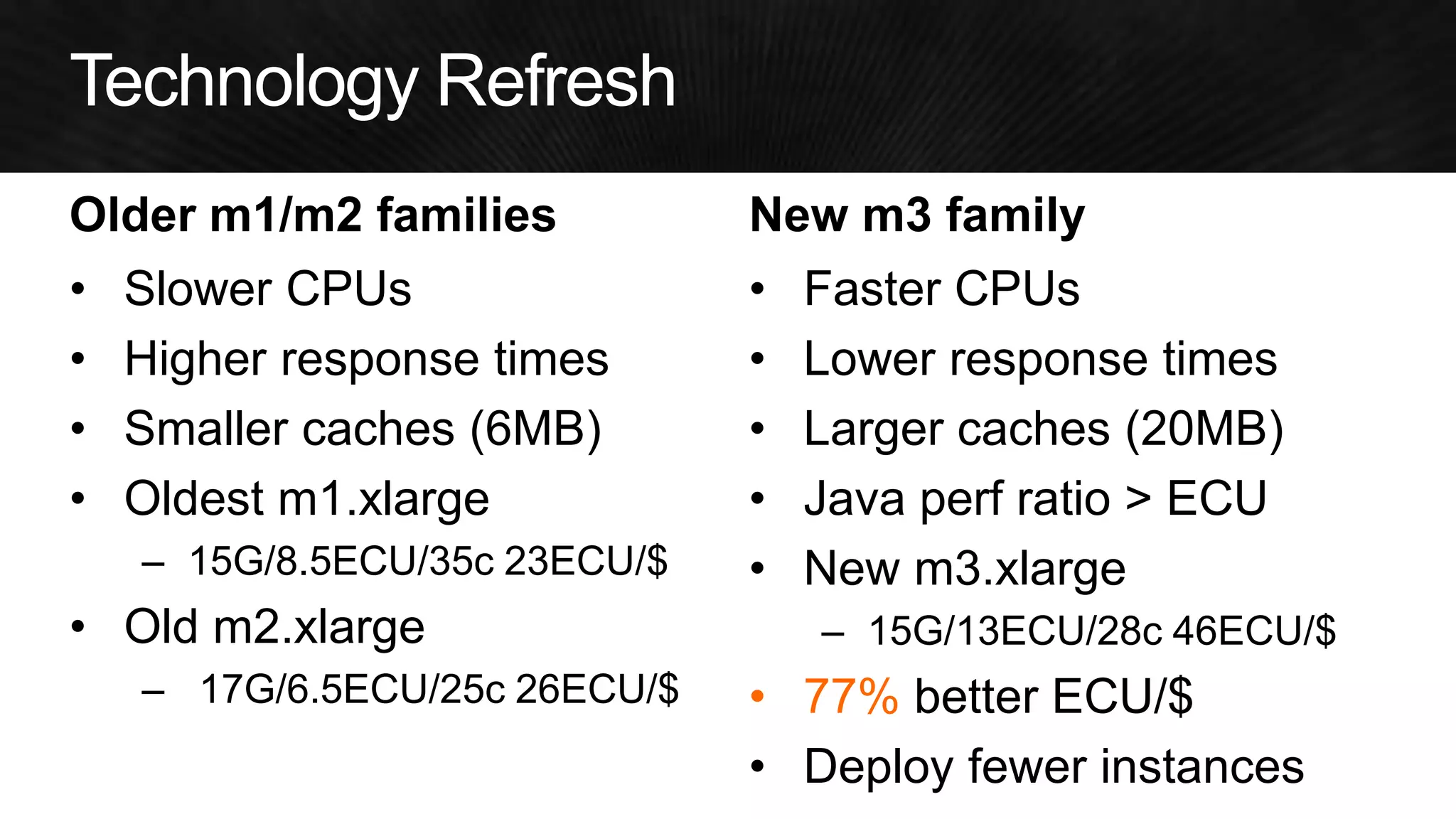
Older m1/m2 families 
•Slower CPUs 
•Higher response times 
•Smaller caches (6MB) 
•Oldest m1.xlarge 
–15G/8.5ECU/35c 23ECU/$ 
•Old m2.xlarge 
– 17G/6.5ECU/25c 26ECU/$ 
New m3 family 
•Faster CPUs 
•Lower response times 
•Larger caches (20MB) 
•Java perf ratio > ECU 
•New m3.xlarge 
–15G/13ECU/28c 46ECU/$ 
•77% better ECU/$ 
•Deploy fewer instances
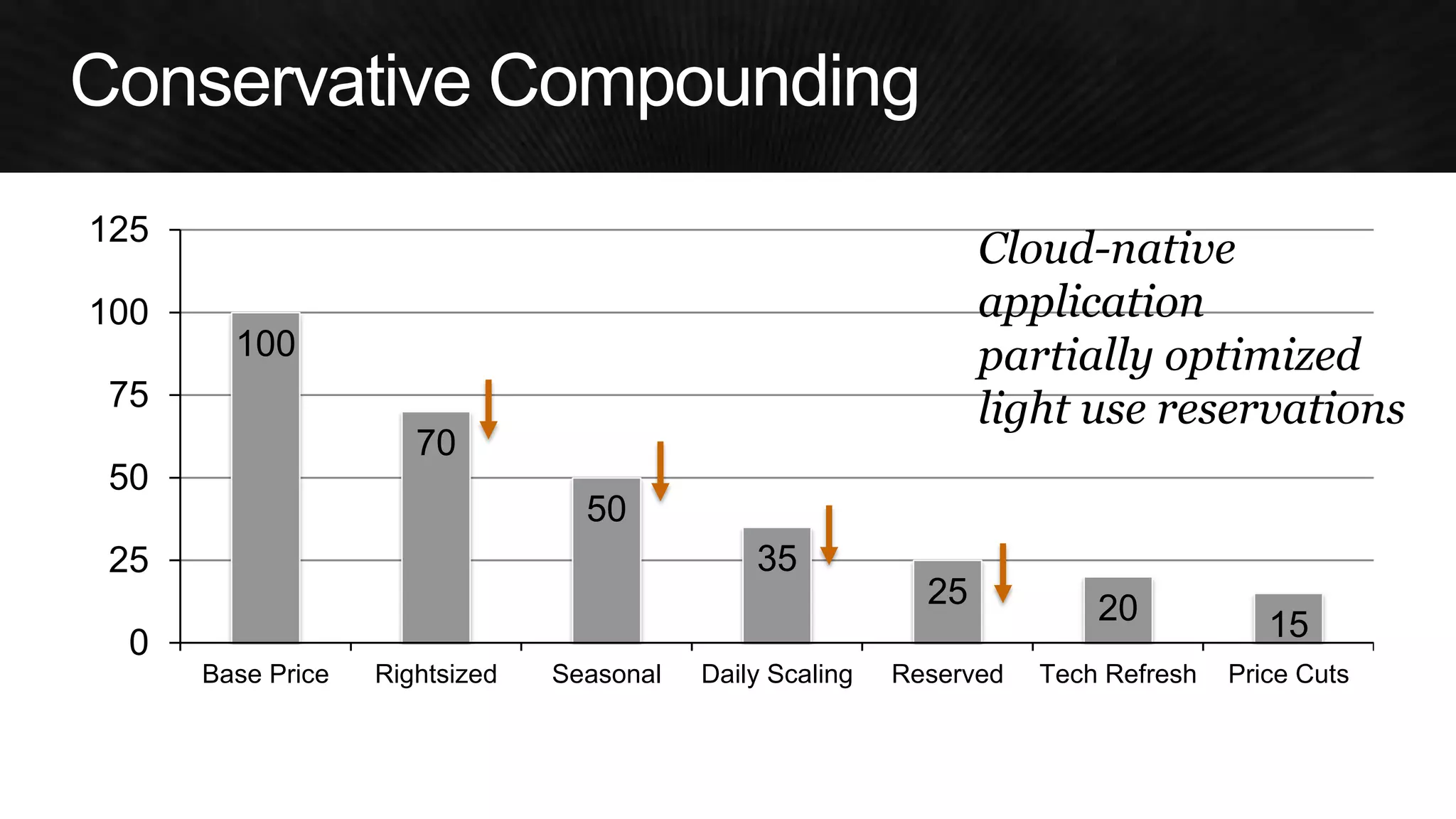
Combinations
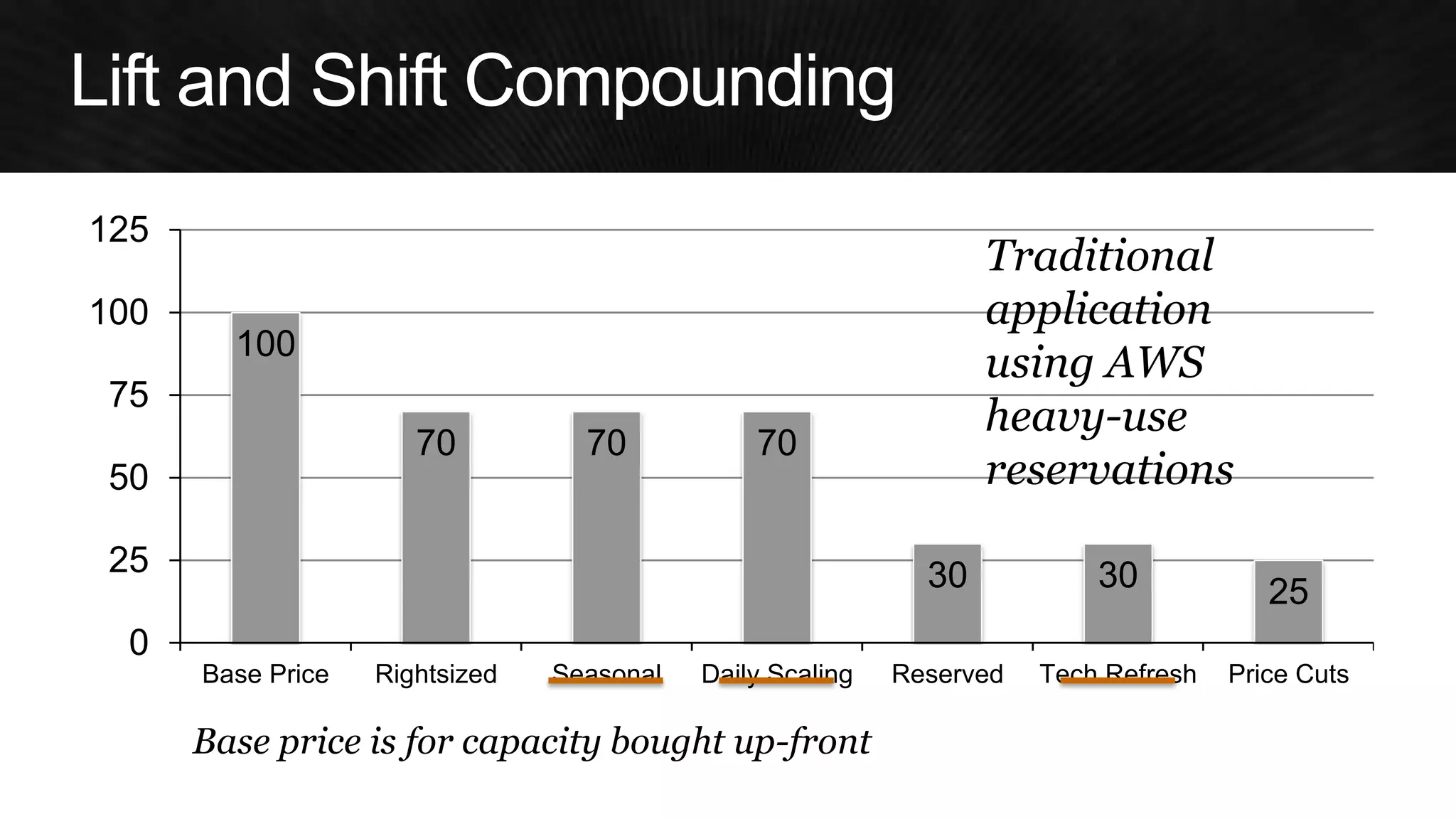
100 
70 
70 
70 
30 
30 
25 
0 
25 
50 
75 
100 
125 
Base Price 
Rightsized 
Seasonal 
Daily Scaling 
Reserved 
Tech Refresh 
Price Cuts 
Traditional 
application 
using AWS 
heavy-use 
reservations 
Base price is for capacity bought up-front
100 
70 
50 
35 
25 
20 
15 
0 
25 
50 
75 
100 
125 
Base Price 
Rightsized 
Seasonal 
Daily Scaling 
Reserved 
Tech Refresh 
Price Cuts 
Cloud-native 
application 
partially optimized 
light use reservations
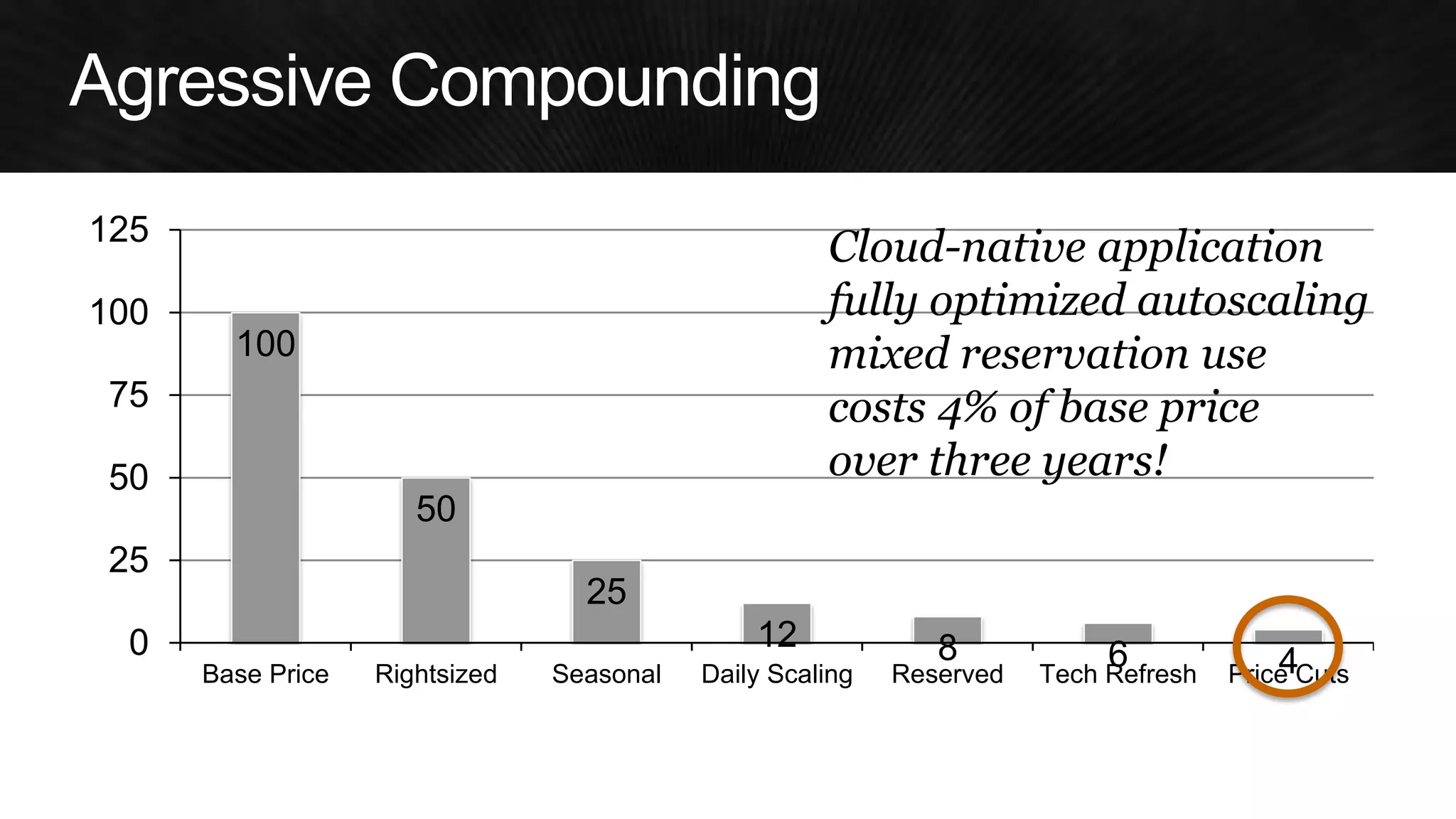
100 
50 
25 
12 
8 
6 
4 
0 
25 
50 
75 
100 
125 
Base Price 
Rightsized 
Seasonal 
Daily Scaling 
Reserved 
Tech Refresh 
Price Cuts 
Cloud-native application 
fully optimized autoscaling 
mixed reservation use 
costs 4% of base price 
over three years!
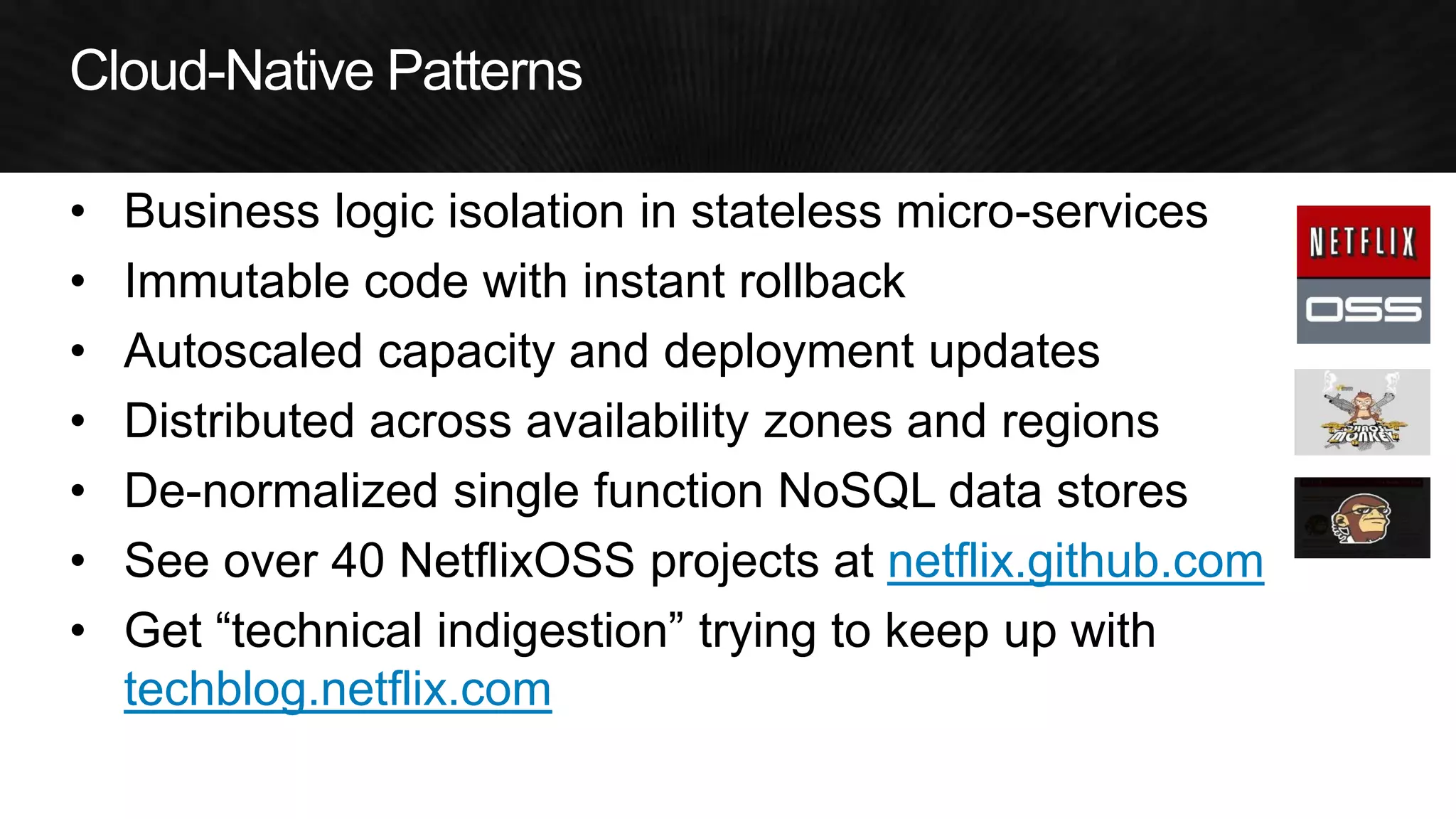
•Business logic isolation in stateless micro-services 
•Immutable code with instant rollback 
•Autoscaled capacity and deployment updates 
•Distributed across availability zones and regions 
•De-normalized single function NoSQL data stores 
•See over 40 NetflixOSS projects at netflix.github.com 
•Get “technical indigestion” trying to keep up with techblog.netflix.com
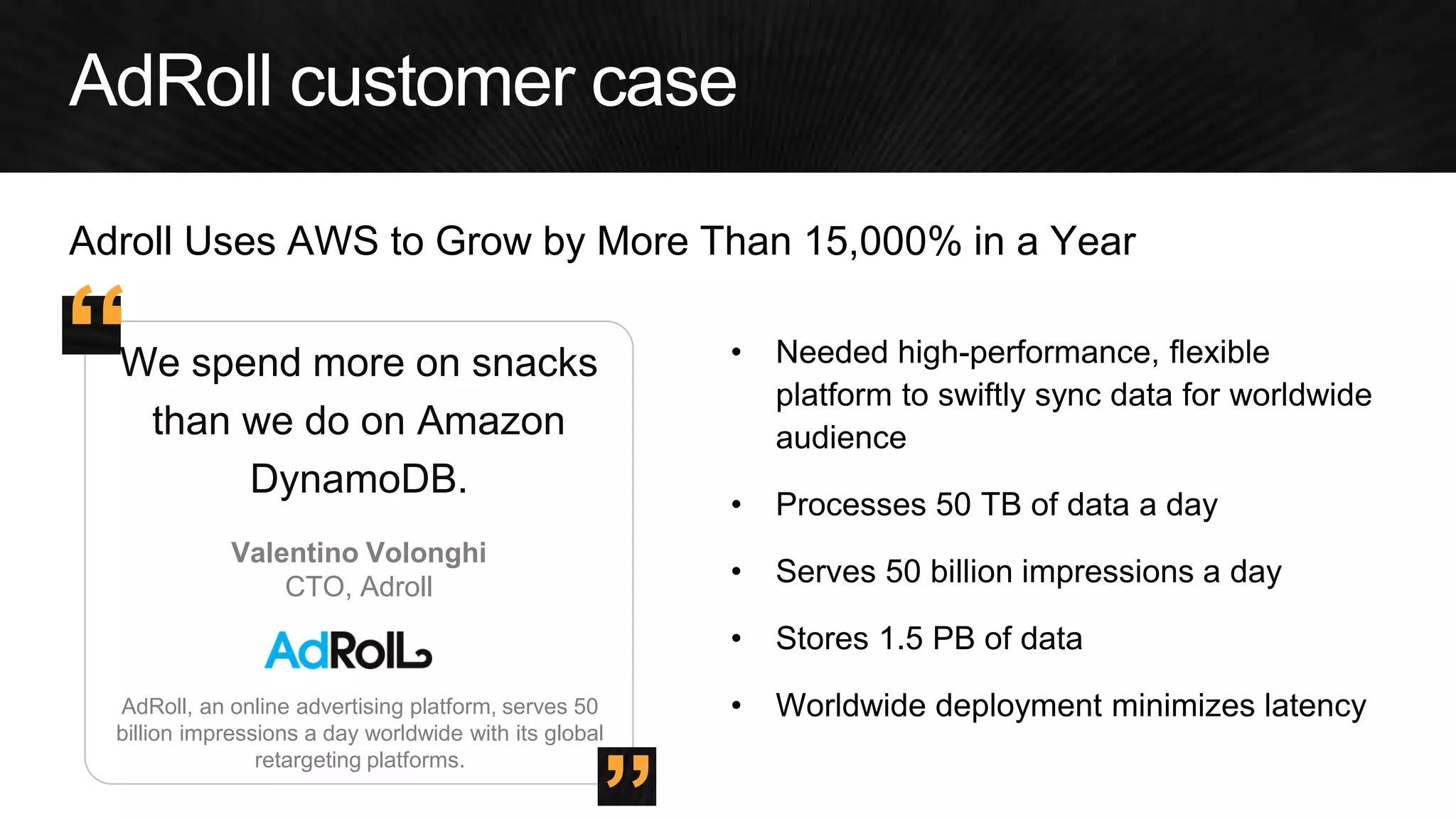
AdRoll, an online advertising platform, serves 50 billion impressions a day worldwide with its global retargeting platforms. 
We spend more on snacks than we do on Amazon DynamoDB. 
•Needed high-performance, flexible platform to swiftly sync data for worldwide audience 
•Processes 50 TB of data a day 
•Serves 50 billion impressions a day 
•Stores 1.5 PB of data 
•Worldwide deployment minimizes latency 
Valentino Volonghi 
CTO, Adroll 
” 
“ 
Adroll Uses AWS to Grow by More Than 15,000% in a Year
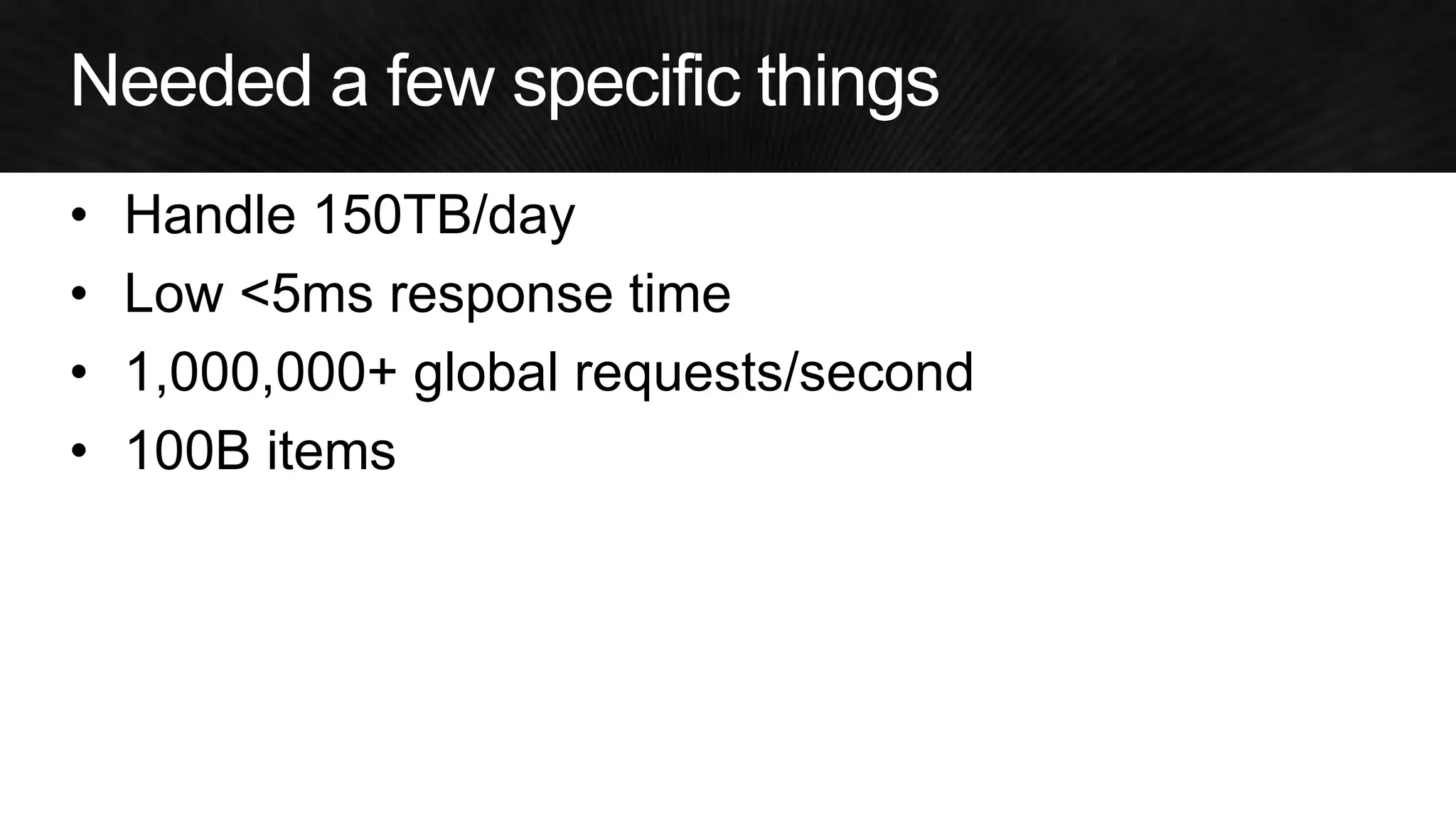
•Handle 150TB/day 
•Low <5ms response time 
•1,000,000+ global requests/second 
•100B items
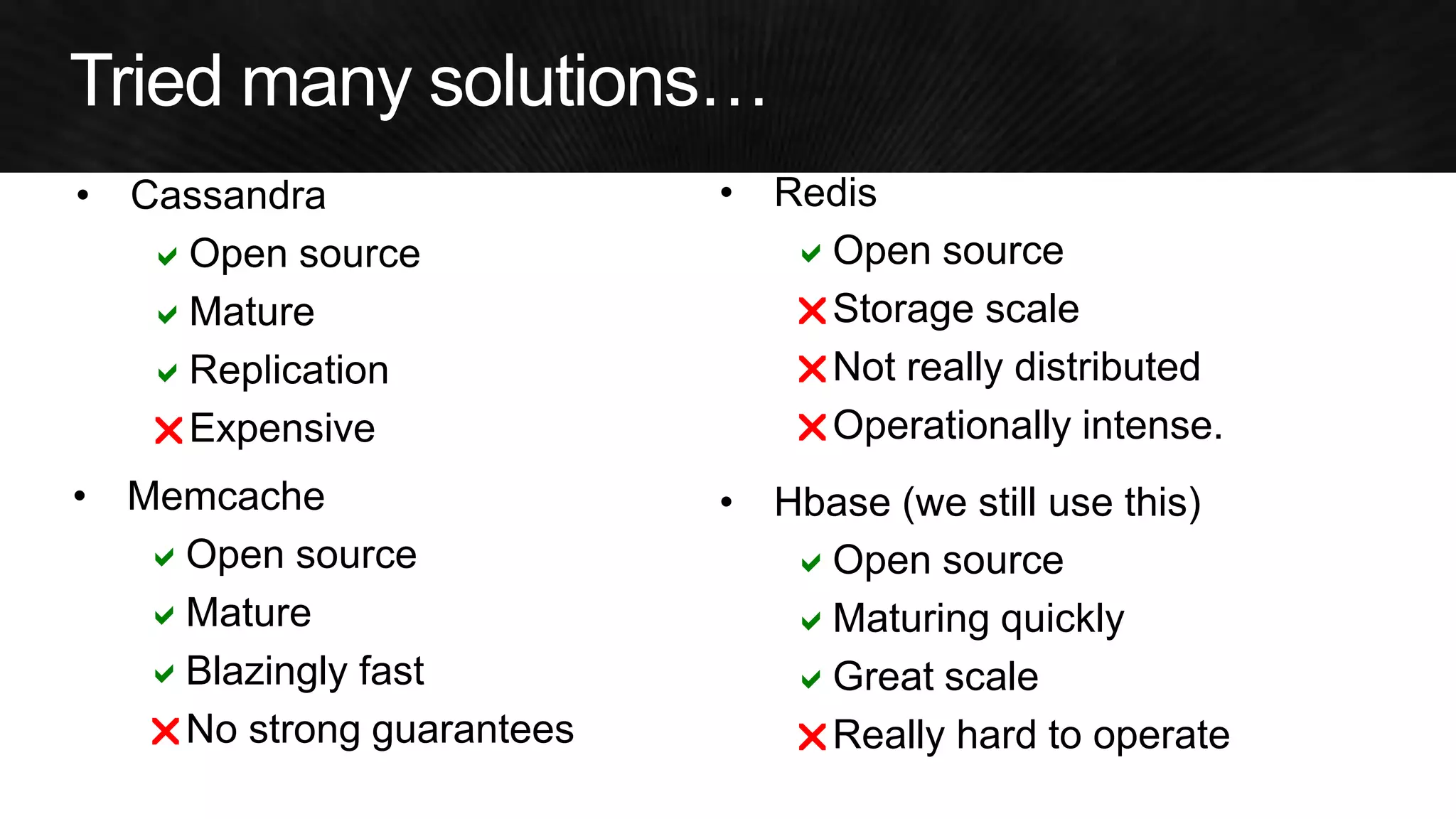
•Memcache 
aOpen source 
aMature 
aBlazingly fast 
rNo strong guarantees 
•Redis 
aOpen source 
rStorage scale 
rNot really distributed 
rOperationally intense. 
•Hbase (we still use this) 
aOpen source 
aMaturing quickly 
aGreat scale 
rReally hard to operate 
a 
a 
a 
r
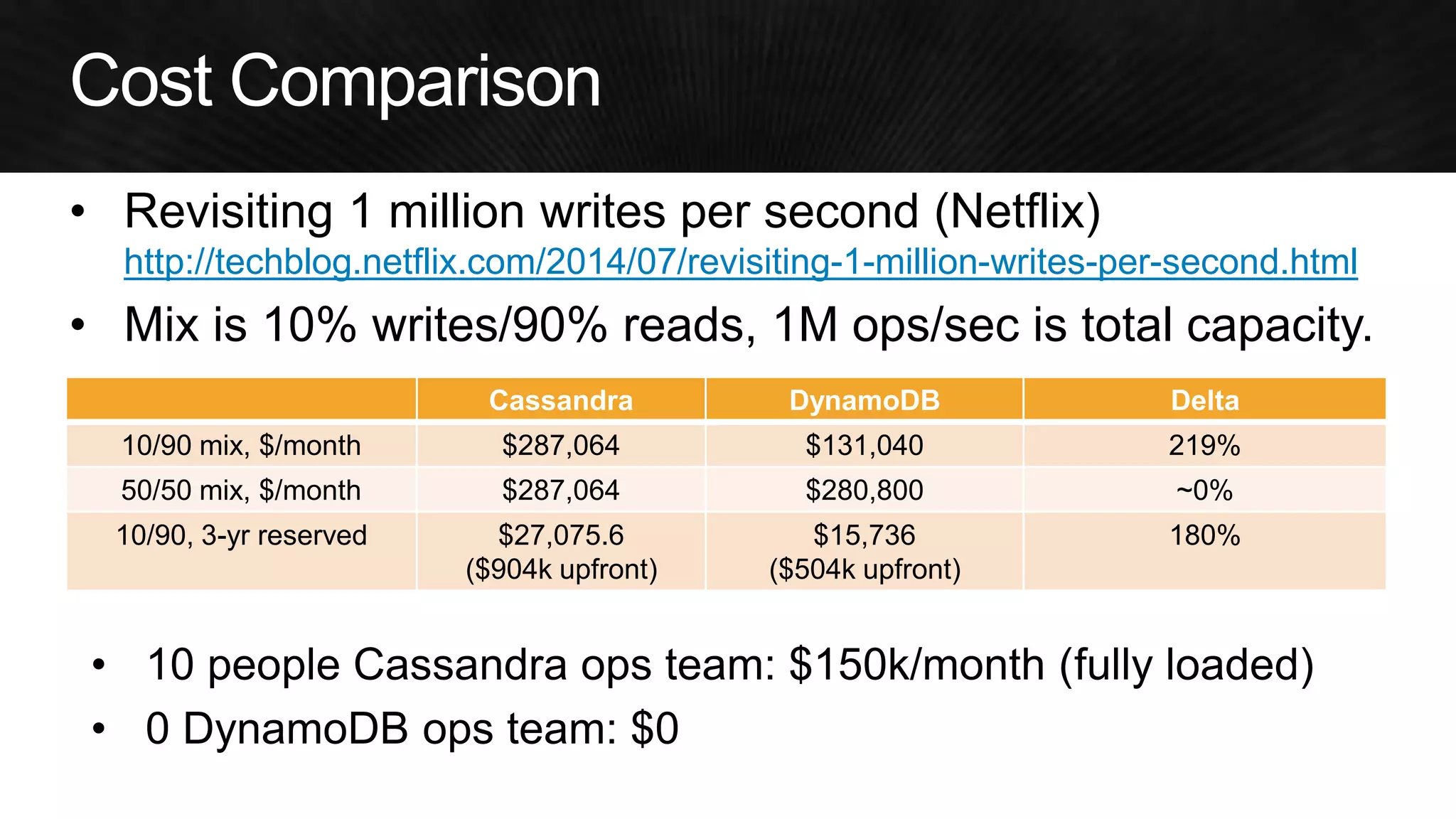
•Revisiting 1 million writes per second (Netflix) http://techblog.netflix.com/2014/07/revisiting-1-million-writes-per-second.html 
•Mix is 10% writes/90% reads, 1M ops/sec is total capacity. 
Cassandra 
DynamoDB 
Delta 
10/90 mix, $/month 
$287,064 
$131,040 
219% 
50/50 mix, $/month 
$287,064 
$280,800 
~0% 
10/90, 3-yr reserved 
$27,075.6 
($904k upfront) 
$15,736 
($504k upfront) 
180% 
•10 people Cassandra ops team: $150k/month (fully loaded) 
•0 DynamoDB ops team: $0
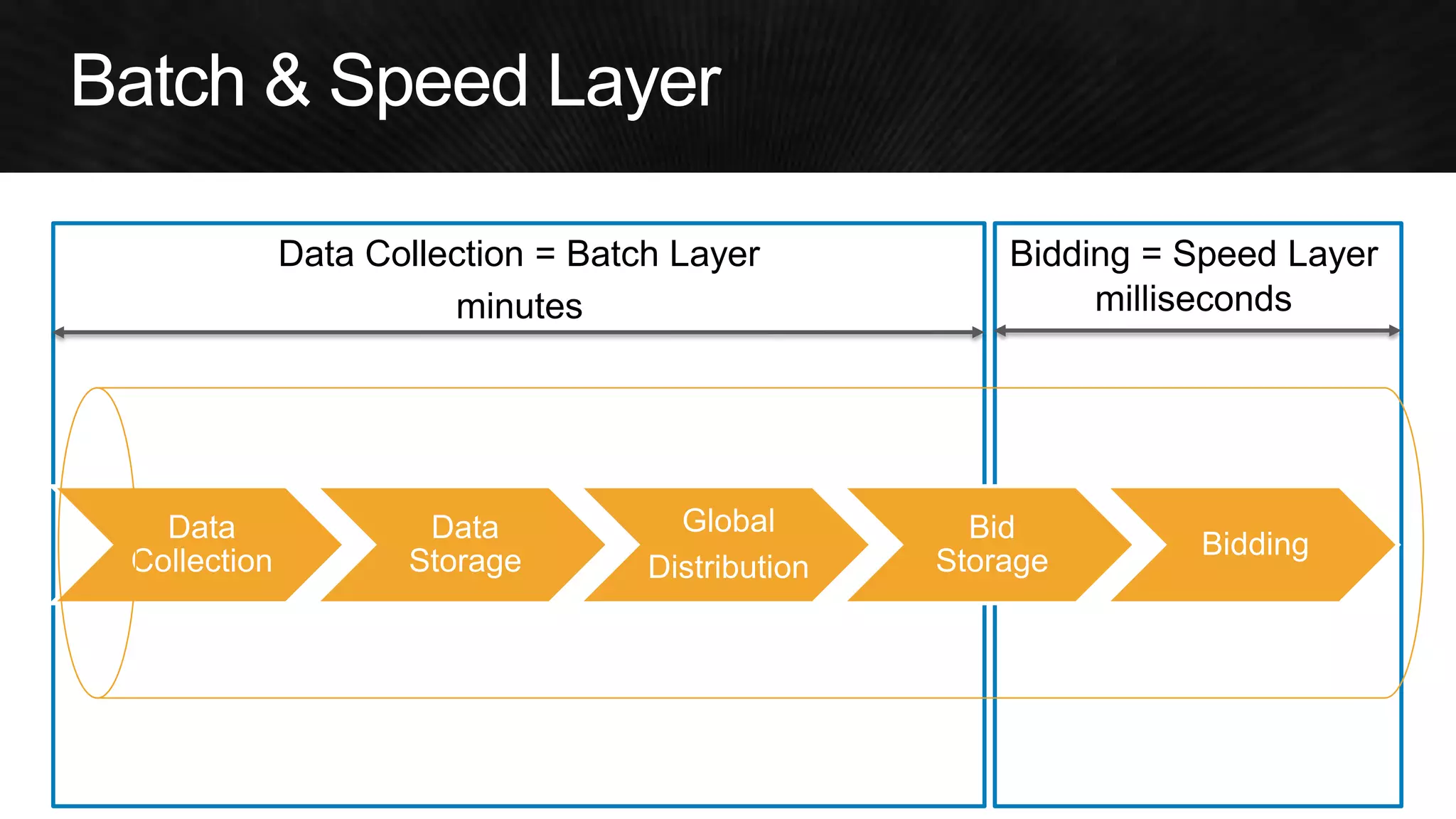
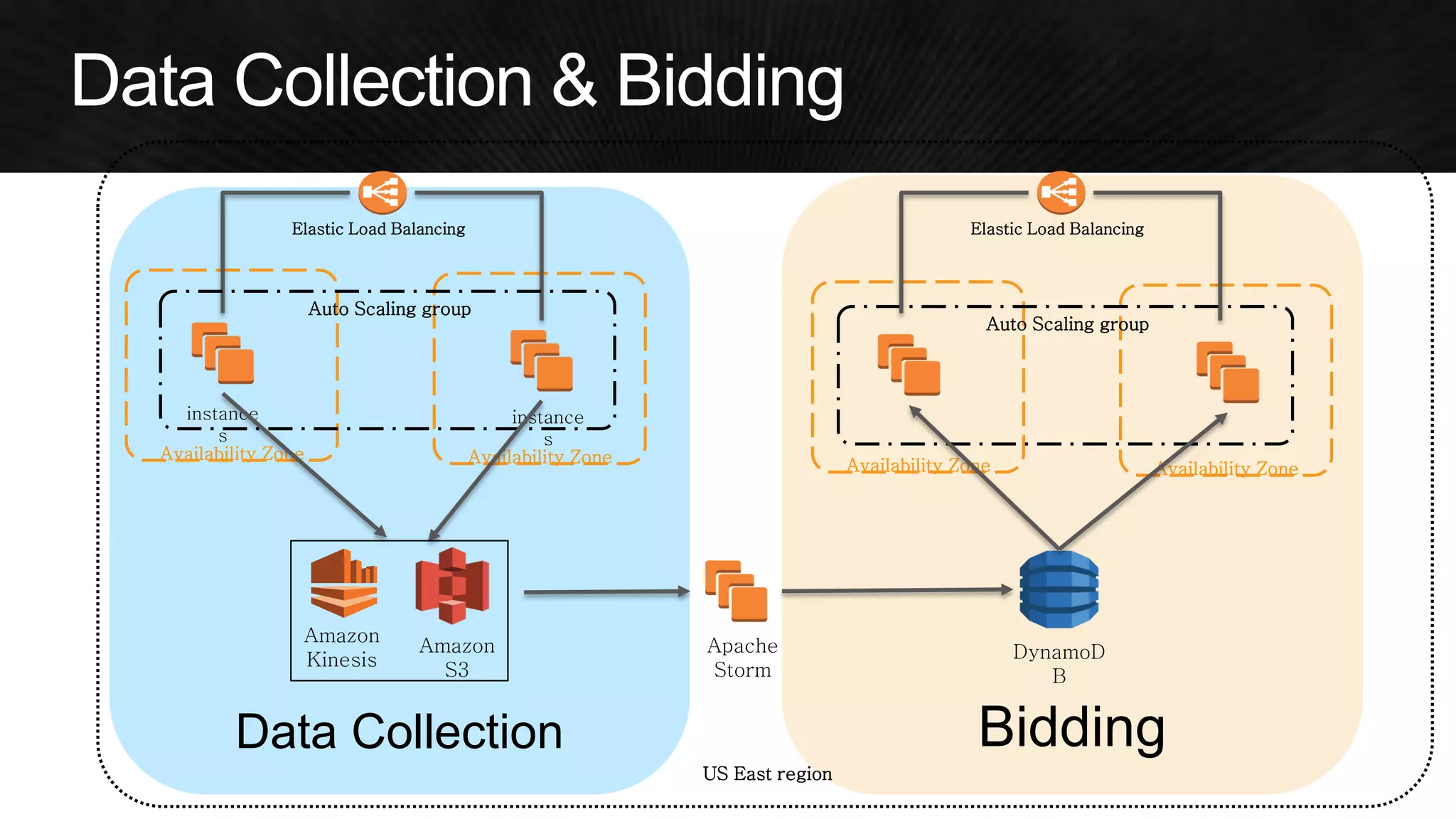
Data Collection = Batch Layer 
Bidding = Speed Layer 
Data Collection 
Data Storage 
Global 
Distribution 
Bid Storage 
Bidding
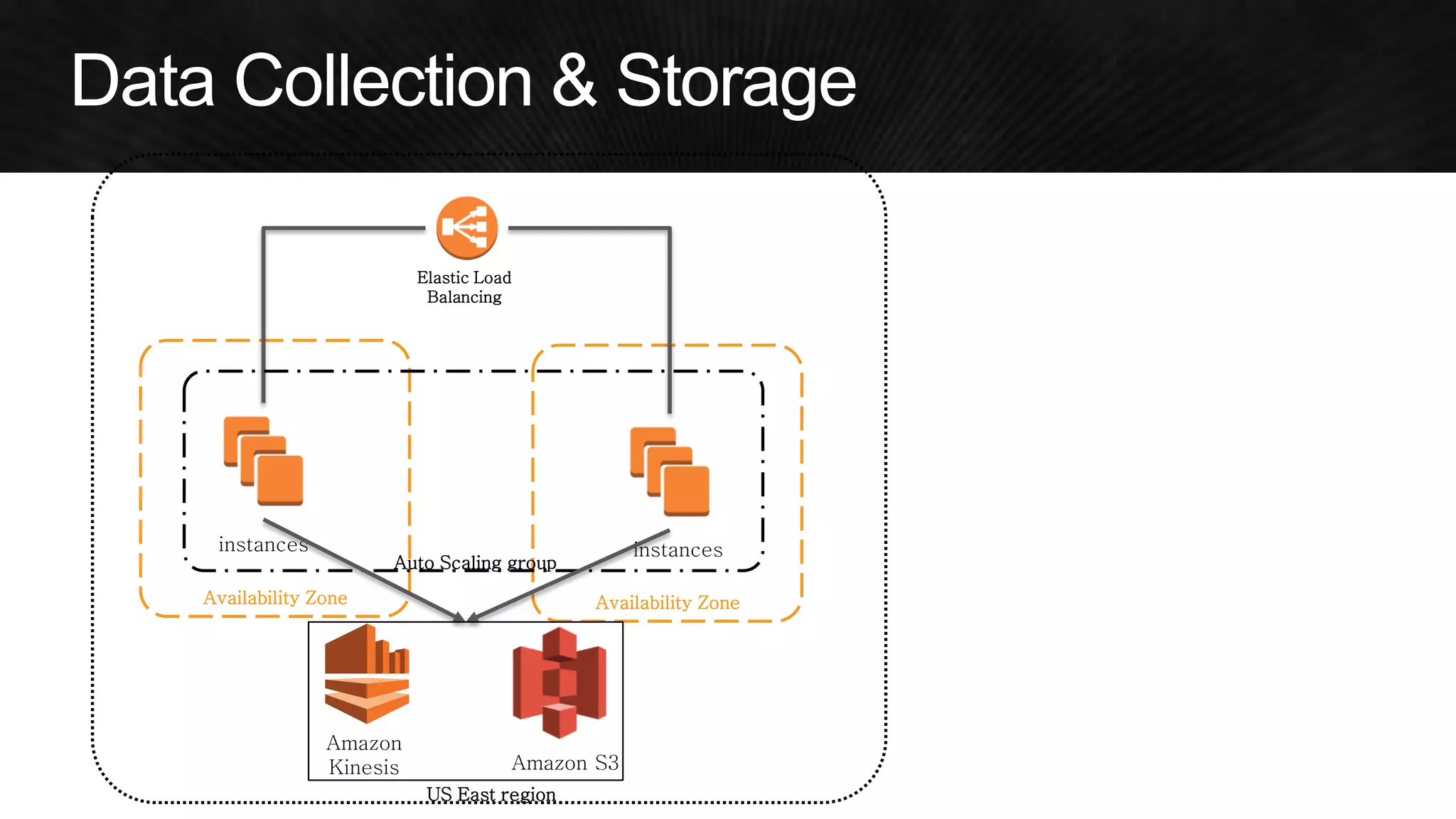
US East region 
Availability Zone 
Availability Zone 
Elastic Load Balancing 
instances 
instances 
Auto Scaling group 
Amazon S3 
Amazon Kinesis
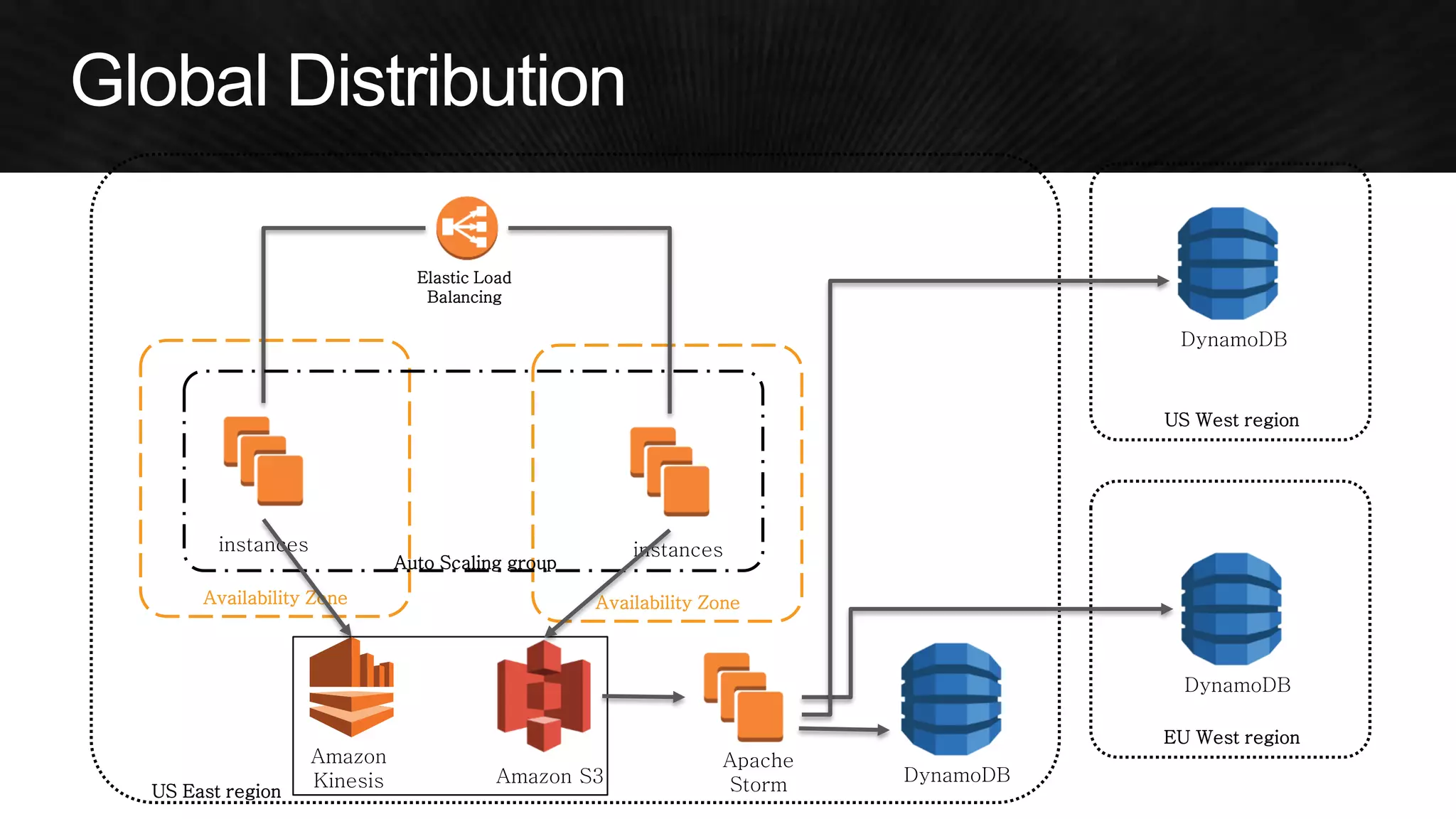
US East region 
Availability Zone Availability Zone 
Elastic Load 
Balancing 
instances instances 
Auto Scaling group 
Amazon S3 
Amazon 
Kinesis 
Apache 
Storm DynamoDB 
US West region 
EU West region 
DynamoDB 
DynamoDB
Data Collection Bidding 
US East region 
Availability Zone Availability Zone 
Elastic Load Balancing 
instance 
s 
instance 
s 
Auto Scaling group 
Amazon 
S3 
Amazon 
Kinesis 
Apache 
Storm 
DynamoD 
B 
Availability Zone Availability Zone 
Auto Scaling group 
Elastic Load Balancing
Data Collection 
Bidding 
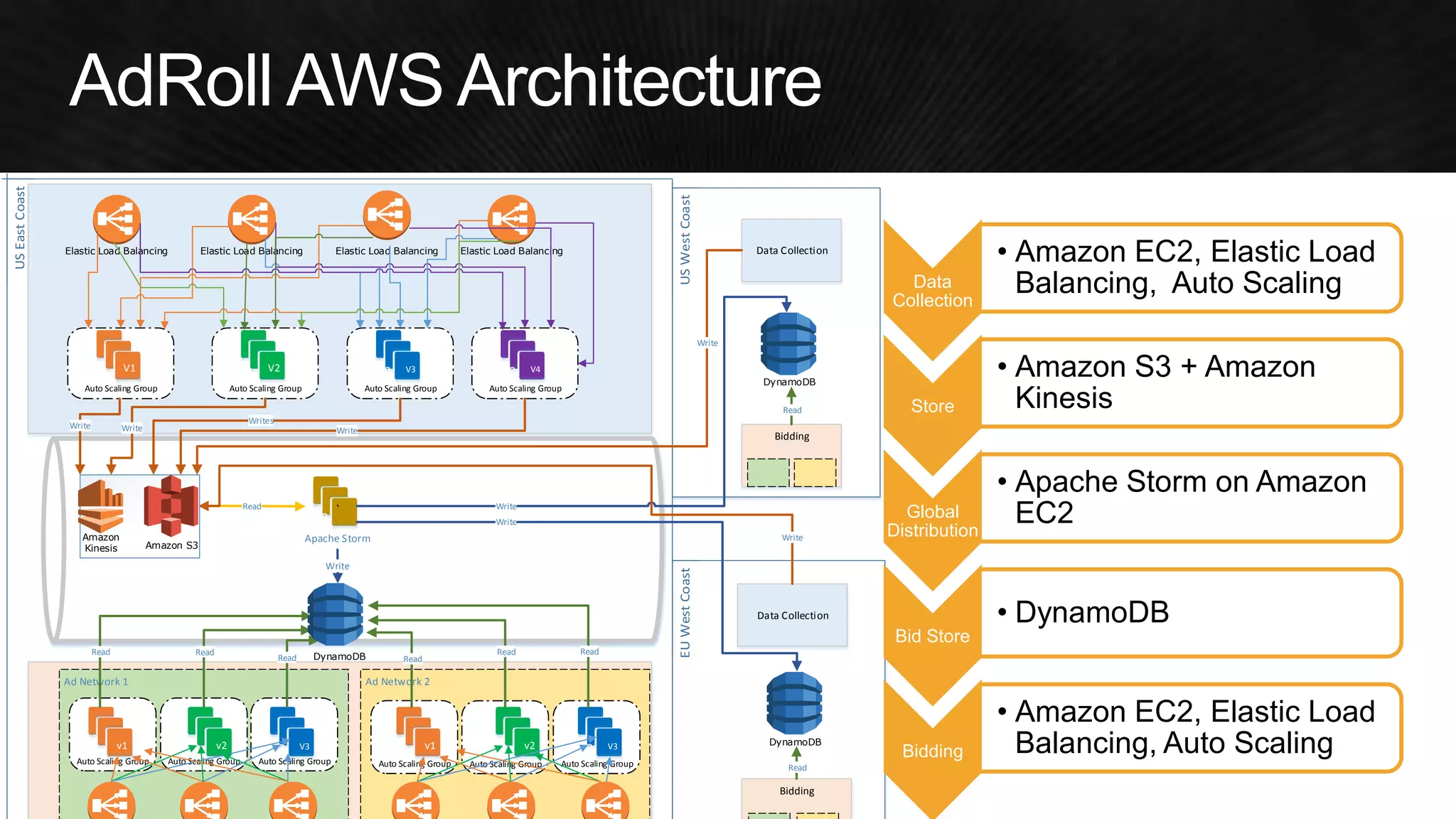
Ad Network 1 Ad Network 2 
Auto Scaling Group Auto Scaling Group Auto Scaling Group Auto Scaling Group Auto Scaling Group Auto Scaling Group 
Auto Scaling Group Auto Scaling Group Auto Scaling Group 
Apache Storm 
v1 v2 V3 V3 v1 v2 V3 V3 
V1 V2 V3 V3 
Auto Scaling Group 
V3 V4 
Elastic Load Balancing Elastic Load Balancing Elastic Load Balancing Elastic Load Balancing 
DynamoDB 
Write 
Read Read Read Read 
Read Read 
Write 
Writes 
Write 
Write 
Read 
V3 
` 
DynamoDB 
Data Collection 
Bidding 
DynamoDB 
Write 
Read 
Read 
Write 
Write 
Write 
Amazon S3 
Amazon 
Kinesis 
Data 
Collection 
• Amazon EC2, Elastic Load 
Balancing, Auto Scaling 
Store 
• Amazon S3 + Amazon 
Kinesis 
Global 
Distribution 
• Apache Storm on Amazon 
EC2 
Bid Store 
• DynamoDB 
Bidding 
• Amazon EC2, Elastic Load 
Balancing, Auto Scaling
Cloud-Ready 
Cloud-Aware 
Cloud-Native 
•Run AWS like a virtual colocation (Fork-lift) 
•Does not optimize for on-demand (overprovisioned) 
•Minor modifications to improve cloud usage 
•Automating servers can lower operational burden 
•Redesign with AWS in mind 
(high effort) 
•Embrace scalable services (reduce admin) 
•EC2, EBS 
•HAProxy on EC2 
•MySQL on EC2 
•Cassandra, Hadoop on EC2 
•ActiveMQ/Redis/KAFKA on EC2 
•Chef on EC2 
•EC2, EBS, S3, CloudFront 
•ELB, Route53(round-robin) 
•Multi-AZ RDS + read replica 
•ElastiCache Redis 
•OpsWorks 
•Autoscaling, Self-healing 
•Route53(LBR) 
•RDS Aurora, RedShift 
•DynamoDB, EMR 
•SQS, SNS, Kinesis 
•CloudFormation, Elastic Beanstalk 
Development Cost 
Scalability/Availability 
Management Cost
AWS re:Invent re:Cap - 비용 최적화 - 모범사례와 아키텍처 설계 심화편 - 이원일

AWS re:Invent re:Cap - 비용 최적화 - 모범사례와 아키텍처 설계 심화편 - 이원일

  • 2.
    Whether you're astartup getting to profitability or an enterprise optimizing spend, it pays to run cost-efficient architectures on AWS. Building on last year's popular foundation of how to reduce waste and fine-tune your AWS spending, this session reviews a wide range of cost planning, monitoring, and optimization strategies, featuring real-world experience from AWS customer Adobe Systems. With the massive growth of subscribers to Adobe's Creative Cloud, Adobe's footprint in AWS continues to expand. We will discuss the techniques used to optimize and manage costs, while maximizing performance and improving resiliency. When traditional application and operating practices are used in cloud deployments, immediate benefits occur in speed of deployment, automation, and transparency of costs. The next step is a re-architecture of the application to be cloud-native, and significant operating cost reductions can help justify this development work. Cloud-native applications are dynamic and use ephemeral resources that customers are only charged for when the resources are in use.
  • 3.
    With AWS, youcan reduce capital costs, lower your overall bill, and match your expense to your usage. This session describes how to calculate the total cost of ownership (TCO) for deploying solutions on AWS vs. on-premises or at a colocation facility, as well as how to address common pitfalls in building a TCO analysis. The session presents and models customer examples. This session is a deep dive into techniques used by successful customers who optimized their use of AWS. Learn tricks and hear tips you can implement right away to reduce waste, choose the most efficient instance, and fine-tune your spending; often with improved performance and a better end-customer experience. We showcase innovative approaches and demonstrate easily applicable methods to save you time and money with Amazon EC2, Amazon S3, and a host of other services.
  • 4.
    In this session,you learn how you can leverage AWS services together with third-party storage appliances and gateways to automate your backup and recovery processes so that they are not only less complex and lightweight, but also easy to manage and maintain. We demonstrate how to manage data flow from on- premises systems to the cloud and how to leverage storage gateways. You also learn best practices for quick implementation, reducing TCO, and automating lifecycle management. In the event of a disaster, you need to be able to recover lost data quickly to ensure business continuity. For critical applications, keeping your time to recover and data loss to a minimum as well as optimizing your overall capital expense can be challenging. This session presents AWS features and services along with Disaster Recovery architectures that you can leverage when building highly available and disaster resilient applications. We will provide recommendations on how to improve your Disaster Recovery plan and discuss example scenarios showing how to recover from a disaster.
  • 6.
    •Pay as yougo, no up-front investments •Low ongoing cost •Flexible capacity •Speed, agility, and innovation •Focus on your business •Go global in minutes
  • 8.
  • 9.
    Ecosystem Global Footprint New Features New Services More AWS Usage More Infrastructure Lower Infrastructure Costs Reduced Prices More Customers Infrastructure Innovation 45 price reductions since 2006 Economies of Scale
  • 10.
    Strategy 2: Doalmost nothing
  • 11.
  • 12.
  • 14.
    Cloud-Ready Cloud-Aware Cloud-Native •Run AWS like a virtual colocation (Fork-lift) •Does not optimize for on-demand (overprovisioned) •Minor modifications to improve cloud usage •Automating servers can lower operational burden •Redesign with AWS in mind (high effort) •Embrace scalable services (reduce admin) •EC2, EBS •HAProxy on EC2 •MySQL on EC2 •Cassandra, Hadoop on EC2 •ActiveMQ/Redis/KAFKA on EC2 •Chef on EC2 •EC2, EBS, S3, CloudFront •ELB, Route53(round-robin) •Multi-AZ RDS + read replica •ElastiCache Redis •OpsWorks •Autoscaling, Self-healing •Route53(LBR) •RDS Aurora, RedShift •DynamoDB, EMR •SQS, SNS, Kinesis •CloudFormation, Elastic Beanstalk Development Cost Scalability/Availability Management Cost
  • 16.
    •Developer, test, traininginstances •Use simple instance start and stop •Or tear down and build up all together •Instances are disposable •Automate, automate, automate: –AWS CloudFormation –Weekend/off-hours scripts –Use tags
  • 17.
    Monday Friday Endof Vacation Season 35% saved
  • 18.
    Automatic resizing ofcompute clusters based on demand Trigger autoscaling policy Feature Details Control Define minimum and maximum instance pool sizes and when scaling and cool down occurs. Integrated to Amazon CloudWatch Use metrics gathered by CloudWatch to drive scaling. Instance types Run Auto Scaling for On-Demand and Spot Instances. Compatible with VPC. AWS autoscaling create-autoscaling-group — Auto Scaling-group-name MyGroup — Launch-configuration-name MyConfig — Min size 4 — Max size 200 — Availability Zones us-west-2c Amazon CloudWatch
  • 19.
    Cloud capacity usedis maybe half average DC capacity
  • 20.
    Mad scramble toadd more DC capacity during launch phase outages
  • 21.
    Capacity wasted onfailed launch magnifies the losses
  • 22.
    Start Choose aninstance that best meets your basic requirements Start with memory & then choose closest virtual cores Look for peak IOPS storage requirements Tune Change instance size up or down based upon monitoring Use CloudWatch & Trusted Advisor to assess Roll-Out Run multiple instances in multiple Availability Zones
  • 23.
    1, 1.7, $0.0601, 3.75, $0.113 2, 3.75, $0.145 2, 7.5, $0.225 2, 17.1, $0.410 4, 7, $0.300 4, 15, $0.450 4, 34.2, $0.820 8, 15, $0.600 8, 30, $0.900 8, 68.4, $1.640 4, 30.5, $0.853 8, 61, 1.705 16, 30, $1.200 32, 60, $2.400 32, 244, $3.500 16, 122, $3.410 16, 117, $4.600 32, 244, $6.820 0 50 100 150 200 250 300 0 5 10 15 20 25 30 On Demand Prices shown (N.Virginia region), only latest generation instances (M3,C3) shown where applicable, GPU and Micro instances not shown above Memory-Optimized Instances Compute-Optimized Instances General Purpose Instances Storage-Optimized Instances vCPU RAM
  • 24.
    More small instancesvs. Less large instances 29 m3.xlarge = 29 x $0.280/hour = $8.12/hour 69 m3.medium = 69 x $0.070/hour = $4.83/hour 40% Savings
  • 25.
    1 5 9 13 17 21 25 29 33 37 41 45 49 Web Servers Week 50% Savings Weekly CPU Load
  • 26.
    Scale up/down by70%+ Move to Load-Based Scaling 50% Savings
  • 27.
    Auto Scaling inthe Amazon Cloud http://techblog.netflix.com/2012/01/auto-scaling-in-amazon-cloud.html Reactive Auto Scaling saves around 50% Requests Servers 50% Savings
  • 28.
    Predictive Auto Scalingsaves around 70% Load prediction Autoscaling Plan Scryer: Netflix’s Predictive Auto Scaling Engine http://goo.gl/iFefxJ 70% Savings
  • 29.
    1y RI Breakeven 3y RI Break even
  • 30.
    •No Upfront Youpay nothing upfront but commit to pay for the Reserved Instance over the course of the Reserved Instance term, with discounts (typically about 30%) when compared to On-Demand. This option is offered with a one year term •Partial Upfront You pay for a portion of the Reserved Instance upfront, and then pay for the remainder over the course of the one or three year term. This option balances the RI payments between upfront and hourly. •All Upfront You pay for the entire Reserved Instance term (one or three years) with one upfront payment and get the best effective hourly price when compared to On-Demand.
  • 31.
  • 32.
  • 33.
  • 34.
    •Can be movedbetween AZs •Can be moved between EC2-Classic and EC2-VPC platforms •Size can be modified within the same instance family
  • 35.
    •Price based onsupply/demand •You choose your maximum price/hour •Your instance is started if the Spot price is lower •Your instance is terminated if the Spot price is higher •But: You did plan for fault tolerance, didn’t you?
  • 36.
    On-Demand: $0.24 $0.028(11.7%) $0.026 (10.8%) 90% Savings
  • 37.
    •Very dynamic pricing •Opportunity to save 80-90% cost –But there are risks •Different prices per AZ •Leverage Auto Scaling! –One group with Spot Instances –One group with On-Demand –Get the best of both worlds •Coming soon: 2-minute Spot interruption warnings
  • 38.
    •Reduced redundancy storageclass –99.99% durability vs. 99.999999999% –Up to 20% savings –Everything that is easy to reproduce –Use Amazon SNS lost object notifications •Amazon Glacier storage class –Same 99.999999999% durability –3 to 5 hours restore time –Up to 64% savings –Archiving, long-term backups, and old data •Use life-cycle rules 64% Savings 20% Savings
  • 39.
    •Read/write capacity units(CUs) determine most of DynamoDB cost •By optimizing CUs, you can save a lot of money •But: –Need to provision enough capacity to not run into capacity errors –Need to prepare for peaks –Need to constantly monitor/adjust
  • 40.
    •Use caching tosave read capacity units –Local RAM caches at app server instances –Check out Amazon ElastiCache •Think of strategies for optimizing CU use –Use multiple tables to support varied access patterns –Understand access patterns for time series data –Compress large attribute values •Use Amazon SQS to buffer over-capacity writes
  • 41.
    EC2 1. 2. 3. 4.
  • 43.
    Caching/Optimization: 80% saved Cache flush Dynamic DynamoDB: 20% saved Growth + new features 80% Savings 20% Savings
  • 44.
    •The more youcan offload, the less infrastructure you need to maintain, scale, and pay for •Three easy ways to offload: –Use Amazon CloudFront –Introduce caching –Leverage existing Amazon web services
  • 46.
    •Amazon RDS, AmazonDynamoDB or Amazon ElastiCache for Redis, Amazon Redshift –Instead of running your own database •Amazon CloudSearch –Instead of running your own search engine •Amazon Elastic Transcoder •Amazon Elastic MapReduce •Amazon Cognito, Amazon SQS, Amazon SNS, Amazon Simple Workflow Service, Amazon SES, Amazon Kinesis, and more …
  • 47.
    November 14, 2014| Las Vegas Adrian Cockcroft @adrianco, Battery Ventures
  • 48.
    @adrianco Bill Now Next Month Ages Ago Lease Building Install AC etc. Rack and Stack Private Cloud SW Run My Stuff Data Center Up-Front Costs
  • 49.
    0 25 50 75 100 125 1 2 3 4 5 6 7 8 9 10 11 12 1 2 3 4 5 6 7 8 9 10 11 12 1 2 3 4 5 6 7 8 9 10 11 12 Three Years Halving Every 18mo = maybe 40% overall savings Data shown is purely illustrative
  • 50.
    Older m1/m2 families •Slower CPUs •Higher response times •Smaller caches (6MB) •Oldest m1.xlarge –15G/8.5ECU/35c 23ECU/$ •Old m2.xlarge – 17G/6.5ECU/25c 26ECU/$ New m3 family •Faster CPUs •Lower response times •Larger caches (20MB) •Java perf ratio > ECU •New m3.xlarge –15G/13ECU/28c 46ECU/$ •77% better ECU/$ •Deploy fewer instances
  • 53.
  • 54.
    100 70 70 70 30 30 25 0 25 50 75 100 125 Base Price Rightsized Seasonal Daily Scaling Reserved Tech Refresh Price Cuts Traditional application using AWS heavy-use reservations Base price is for capacity bought up-front
  • 55.
    100 70 50 35 25 20 15 0 25 50 75 100 125 Base Price Rightsized Seasonal Daily Scaling Reserved Tech Refresh Price Cuts Cloud-native application partially optimized light use reservations
  • 56.
    100 50 25 12 8 6 4 0 25 50 75 100 125 Base Price Rightsized Seasonal Daily Scaling Reserved Tech Refresh Price Cuts Cloud-native application fully optimized autoscaling mixed reservation use costs 4% of base price over three years!
  • 57.
    •Business logic isolationin stateless micro-services •Immutable code with instant rollback •Autoscaled capacity and deployment updates •Distributed across availability zones and regions •De-normalized single function NoSQL data stores •See over 40 NetflixOSS projects at netflix.github.com •Get “technical indigestion” trying to keep up with techblog.netflix.com
  • 60.
    AdRoll, an onlineadvertising platform, serves 50 billion impressions a day worldwide with its global retargeting platforms. We spend more on snacks than we do on Amazon DynamoDB. •Needed high-performance, flexible platform to swiftly sync data for worldwide audience •Processes 50 TB of data a day •Serves 50 billion impressions a day •Stores 1.5 PB of data •Worldwide deployment minimizes latency Valentino Volonghi CTO, Adroll ” “ Adroll Uses AWS to Grow by More Than 15,000% in a Year
  • 61.
    •Handle 150TB/day •Low<5ms response time •1,000,000+ global requests/second •100B items
  • 62.
    •Memcache aOpen source aMature aBlazingly fast rNo strong guarantees •Redis aOpen source rStorage scale rNot really distributed rOperationally intense. •Hbase (we still use this) aOpen source aMaturing quickly aGreat scale rReally hard to operate a a a r
  • 63.
    •Revisiting 1 millionwrites per second (Netflix) http://techblog.netflix.com/2014/07/revisiting-1-million-writes-per-second.html •Mix is 10% writes/90% reads, 1M ops/sec is total capacity. Cassandra DynamoDB Delta 10/90 mix, $/month $287,064 $131,040 219% 50/50 mix, $/month $287,064 $280,800 ~0% 10/90, 3-yr reserved $27,075.6 ($904k upfront) $15,736 ($504k upfront) 180% •10 people Cassandra ops team: $150k/month (fully loaded) •0 DynamoDB ops team: $0
  • 64.
    Data Collection =Batch Layer Bidding = Speed Layer Data Collection Data Storage Global Distribution Bid Storage Bidding
  • 65.
    US East region Availability Zone Availability Zone Elastic Load Balancing instances instances Auto Scaling group Amazon S3 Amazon Kinesis
  • 66.
    US East region Availability Zone Availability Zone Elastic Load Balancing instances instances Auto Scaling group Amazon S3 Amazon Kinesis Apache Storm DynamoDB US West region EU West region DynamoDB DynamoDB
  • 67.
    Data Collection Bidding US East region Availability Zone Availability Zone Elastic Load Balancing instance s instance s Auto Scaling group Amazon S3 Amazon Kinesis Apache Storm DynamoD B Availability Zone Availability Zone Auto Scaling group Elastic Load Balancing
  • 68.
    Data Collection Bidding Ad Network 1 Ad Network 2 Auto Scaling Group Auto Scaling Group Auto Scaling Group Auto Scaling Group Auto Scaling Group Auto Scaling Group Auto Scaling Group Auto Scaling Group Auto Scaling Group Apache Storm v1 v2 V3 V3 v1 v2 V3 V3 V1 V2 V3 V3 Auto Scaling Group V3 V4 Elastic Load Balancing Elastic Load Balancing Elastic Load Balancing Elastic Load Balancing DynamoDB Write Read Read Read Read Read Read Write Writes Write Write Read V3 ` DynamoDB Data Collection Bidding DynamoDB Write Read Read Write Write Write Amazon S3 Amazon Kinesis Data Collection • Amazon EC2, Elastic Load Balancing, Auto Scaling Store • Amazon S3 + Amazon Kinesis Global Distribution • Apache Storm on Amazon EC2 Bid Store • DynamoDB Bidding • Amazon EC2, Elastic Load Balancing, Auto Scaling
  • 70.
    Cloud-Ready Cloud-Aware Cloud-Native •Run AWS like a virtual colocation (Fork-lift) •Does not optimize for on-demand (overprovisioned) •Minor modifications to improve cloud usage •Automating servers can lower operational burden •Redesign with AWS in mind (high effort) •Embrace scalable services (reduce admin) •EC2, EBS •HAProxy on EC2 •MySQL on EC2 •Cassandra, Hadoop on EC2 •ActiveMQ/Redis/KAFKA on EC2 •Chef on EC2 •EC2, EBS, S3, CloudFront •ELB, Route53(round-robin) •Multi-AZ RDS + read replica •ElastiCache Redis •OpsWorks •Autoscaling, Self-healing •Route53(LBR) •RDS Aurora, RedShift •DynamoDB, EMR •SQS, SNS, Kinesis •CloudFormation, Elastic Beanstalk Development Cost Scalability/Availability Management Cost