Project leader:
    1)-Mona Fahd Omshgebe.
           Assistant:
     2)-Jwaher Mohammed.

     3)- Esra Mohammed.
1
Introduction

      In our project , we offer a set of commands that can serve us
      on the network by allowing users to know the names of the
      devices connected in the network and also can help the user to
      find the last IP connected in the network . know the present
      Protocol and disply the network settings and determine the
      path of the network.


     Objectives

      1 –Determine the path of the network.

      2 ––
         know the names of the devices connected to the network.

      3   know the address of any IP in the network.

      4 –Determine the path of network connection.


      Tools :


    Software:
      . command line.
      . name system windows 7.

      Hardware :
      1- computers .
      2- switch
      ]3-cable UTP

2
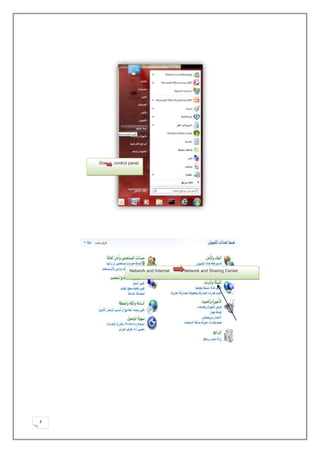
Star   control panel


                   Network and Internet     Network and Sharing Center


                   Network and Sharing Center


3
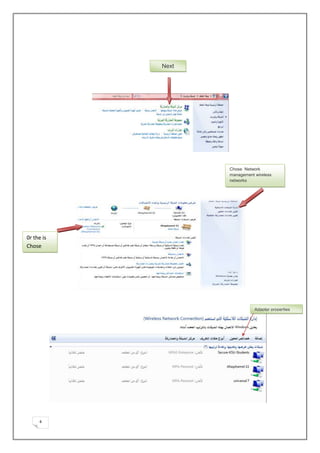
Next


                   Chose Network
                   management wireless
                   networks


0r the is
Chose


                              Adapter properties


     4
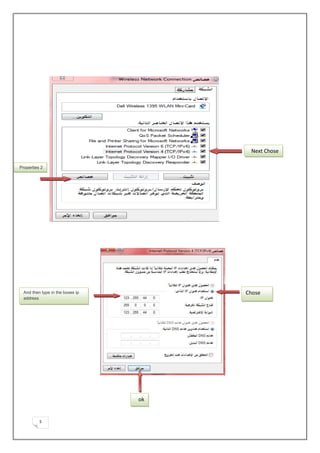
Next Chose

Properties 2


  And then type in the boxes ip        Chose
  address


                                  ok


          5
(We use the network commands the examples)


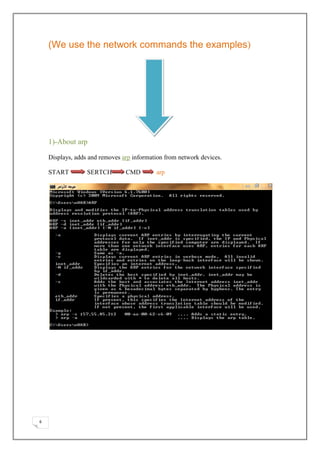
    1)-About arp

    Displays, adds and removes arp information from network devices.

    START         SERTCH        CMD        arp


6
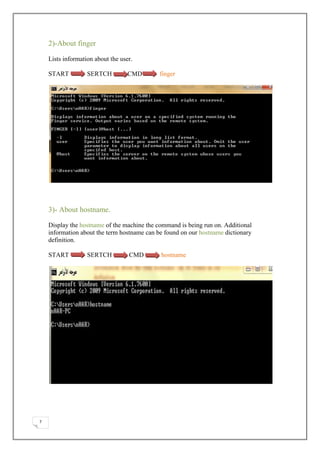
2)-About finger

    Lists information about the user.

    START          SERTCH          CMD       finger


    3)- About hostname.

    Display the hostname of the machine the command is being run on. Additional
    information about the term hostname can be found on our hostname dictionary
    definition.

    START          SERTCH          CMD       hostname


7
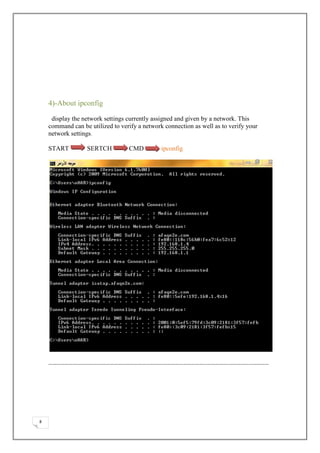
4)-About ipconfig

     display the network settings currently assigned and given by a network. This
    command can be utilized to verify a network connection as well as to verify your
    network settings.

    START         SERTCH          CMD          ipconfig


    ………………………………………………………………………………………………………………………………………………


8
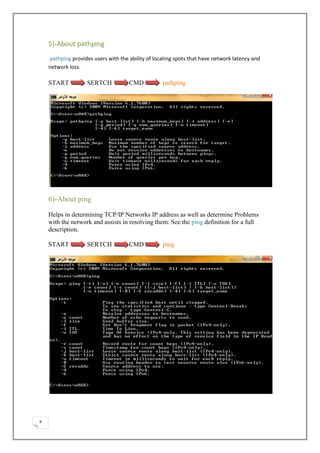
5)-About pathping
    pathping provides users with the ability of locating spots that have network latency and
    network loss.

    START           SERTCH           CMD           pathping


    6)-About ping

    Helps in determining TCP/IP Networks IP address as well as determine Problems
    with the network and assists in resolving them. See the ping definition for a full
    description.

    START           SERTCH           CMD           ping


9
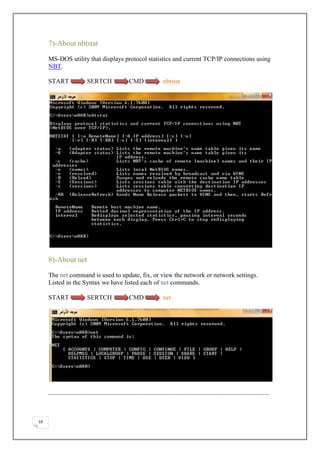
7)-About nbtstat

     MS-DOS utility that displays protocol statistics and current TCP/IP connections using
     NBT.

     START          SERTCH         CMD          nbtstat


     8)-About net

     The net command is used to update, fix, or view the network or network settings.
     Listed in the Syntax we have listed each of net commands.

     START          SERTCH         CMD          net


     ………………………………………………………………………………………………………………………………………………


10
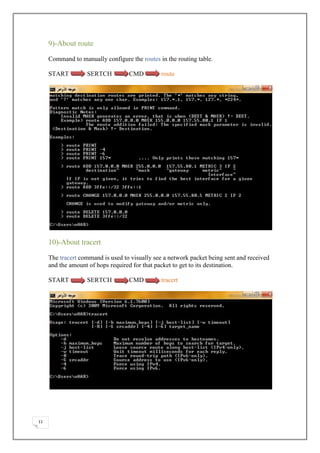
9)-About route

     Command to manually configure the routes in the routing table.

     START         SERTCH          CMD         route


     10)-About tracert

     The tracert command is used to visually see a network packet being sent and received
     and the amount of hops required for that packet to get to its destination.

     START         SERTCH          CMD         tracert


11
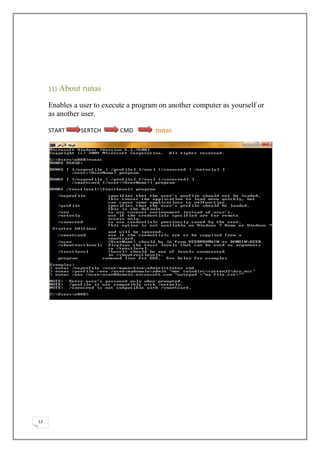
11)-About   runas
     Enables a user to execute a program on another computer as yourself or
     as another user.

     START       SERTCH     CMD        runas


12
Explain the the steps, and work Explain IP and Word, Help
     Jwaher commands.


                   Help Mona Introduction, objectives, PowerPoint and
     Word.


                   Bloge and in Required commands executed.


                              Reference:
              http://www.computerhope.com/issues/ch000444.htm

             http://www.computerhope.com/jargon/e/extecomm.htm

                      http://www.radmin.com/download/


13
Connector Bloge
     http://hmokhofflin.blogspot.com/


14

111

  • 1.
    Project leader: 1)-Mona Fahd Omshgebe. Assistant: 2)-Jwaher Mohammed. 3)- Esra Mohammed. 1
  • 2.
    Introduction In our project , we offer a set of commands that can serve us on the network by allowing users to know the names of the devices connected in the network and also can help the user to find the last IP connected in the network . know the present Protocol and disply the network settings and determine the path of the network. Objectives 1 –Determine the path of the network. 2 –– know the names of the devices connected to the network. 3 know the address of any IP in the network. 4 –Determine the path of network connection. Tools : Software: . command line. . name system windows 7. Hardware : 1- computers . 2- switch ]3-cable UTP 2
  • 3.
    Star control panel Network and Internet Network and Sharing Center Network and Sharing Center 3
  • 4.
    Next Chose Network management wireless networks 0r the is Chose Adapter properties 4
  • 5.
    Next Chose Properties 2 And then type in the boxes ip Chose address ok 5
  • 6.
    (We use thenetwork commands the examples) 1)-About arp Displays, adds and removes arp information from network devices. START SERTCH CMD arp 6
  • 7.
    2)-About finger Lists information about the user. START SERTCH CMD finger 3)- About hostname. Display the hostname of the machine the command is being run on. Additional information about the term hostname can be found on our hostname dictionary definition. START SERTCH CMD hostname 7
  • 8.
    4)-About ipconfig display the network settings currently assigned and given by a network. This command can be utilized to verify a network connection as well as to verify your network settings. START SERTCH CMD ipconfig ……………………………………………………………………………………………………………………………………………… 8
  • 9.
    5)-About pathping pathping provides users with the ability of locating spots that have network latency and network loss. START SERTCH CMD pathping 6)-About ping Helps in determining TCP/IP Networks IP address as well as determine Problems with the network and assists in resolving them. See the ping definition for a full description. START SERTCH CMD ping 9
  • 10.
    7)-About nbtstat MS-DOS utility that displays protocol statistics and current TCP/IP connections using NBT. START SERTCH CMD nbtstat 8)-About net The net command is used to update, fix, or view the network or network settings. Listed in the Syntax we have listed each of net commands. START SERTCH CMD net ……………………………………………………………………………………………………………………………………………… 10
  • 11.
    9)-About route Command to manually configure the routes in the routing table. START SERTCH CMD route 10)-About tracert The tracert command is used to visually see a network packet being sent and received and the amount of hops required for that packet to get to its destination. START SERTCH CMD tracert 11
  • 12.
    11)-About runas Enables a user to execute a program on another computer as yourself or as another user. START SERTCH CMD runas 12
  • 13.
    Explain the thesteps, and work Explain IP and Word, Help Jwaher commands. Help Mona Introduction, objectives, PowerPoint and Word. Bloge and in Required commands executed. Reference: http://www.computerhope.com/issues/ch000444.htm http://www.computerhope.com/jargon/e/extecomm.htm http://www.radmin.com/download/ 13
  • 14.
    Connector Bloge http://hmokhofflin.blogspot.com/ 14