第 11 讲 管理 Cisco 互联网络
本章目标 通过本章的学习,您应该掌握以下内容 : 清楚配置文件和 IOS 映象文件被加载的位置和过程 获取直接相邻设备的信息 获取远程设备的信息
路由器加电 / 启动顺序 加电自检  (POST) 加载并运行启动引导微代码 寻找 IOS 映象文件 加载 IOS 映象文件 寻找配置文件 加载配置文件 正常运行
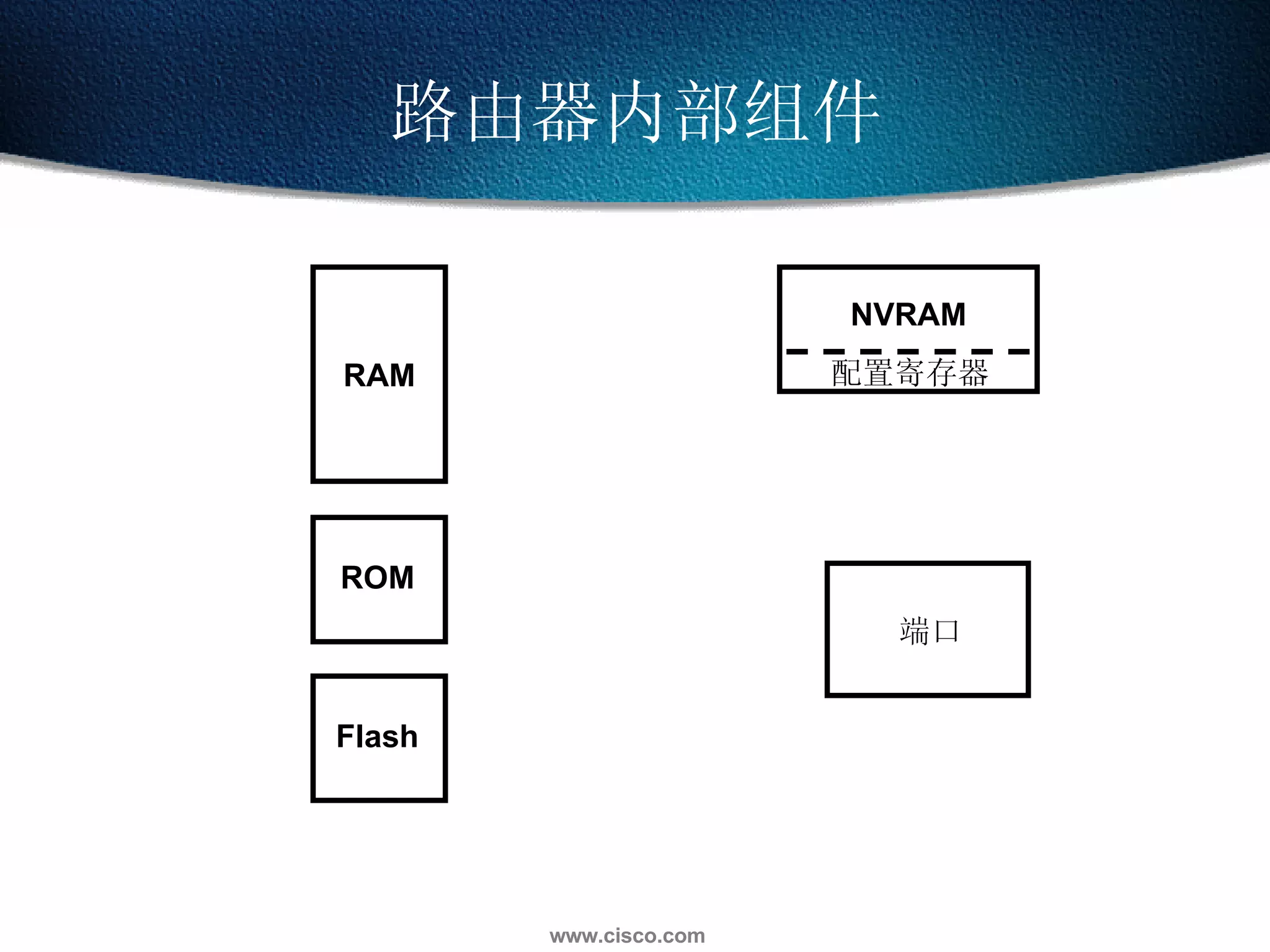
路由器内部组件 RAM 配置寄存器 ROM Flash NVRAM 端口
ROM  功能 ROM 存放完成基本功能的微代码 Bootstrap Mini IOS ROM monitor POST show version 控制台
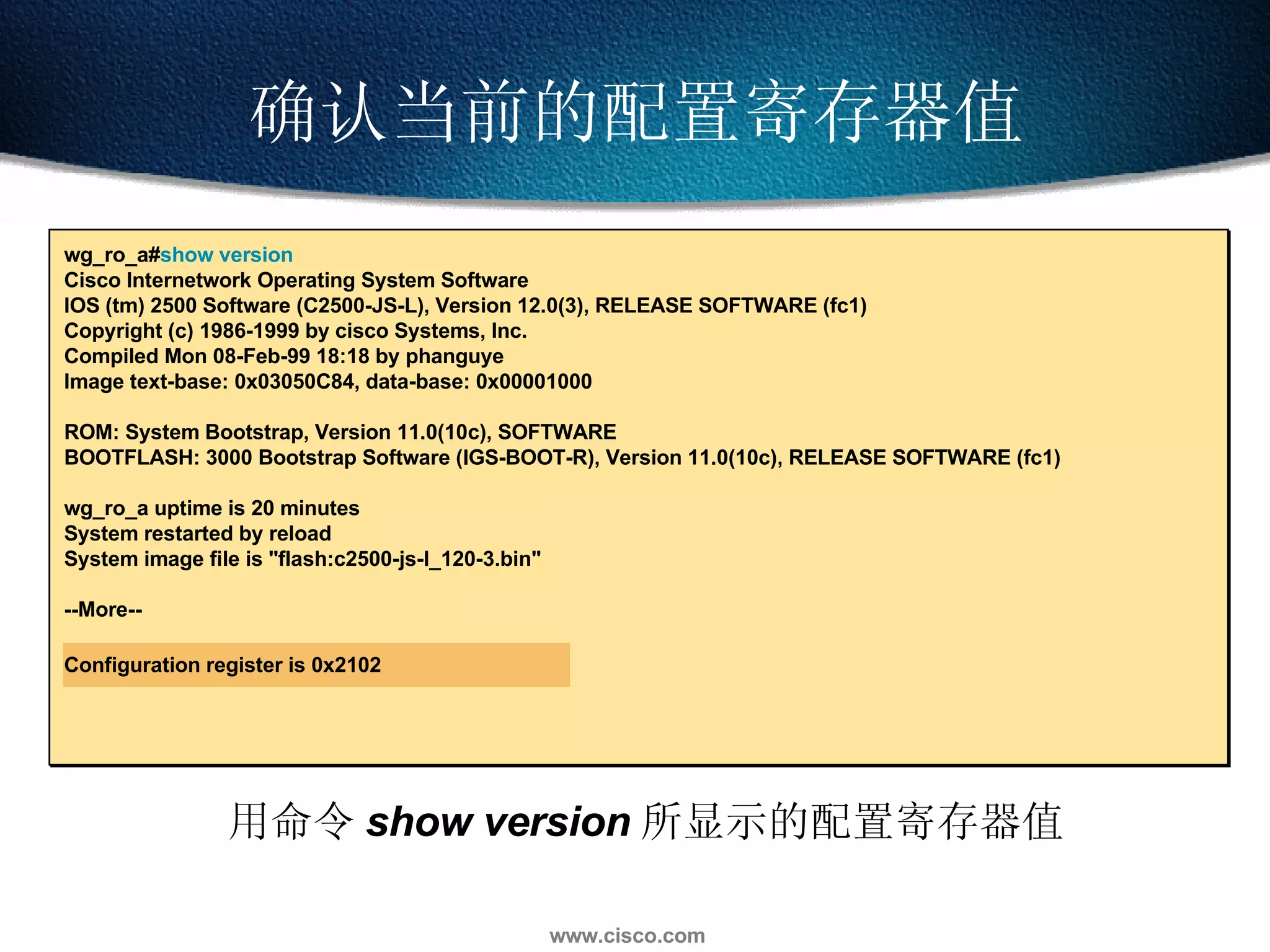
确认当前的配置寄存器值 wg_ro_a# show version Cisco Internetwork Operating System Software  IOS (tm) 2500 Software (C2500-JS-L), Version 12.0(3), RELEASE SOFTWARE (fc1) Copyright (c) 1986-1999 by cisco Systems, Inc. Compiled Mon 08-Feb-99 18:18 by phanguye Image text-base: 0x03050C84, data-base: 0x00001000 ROM: System Bootstrap, Version 11.0(10c), SOFTWARE BOOTFLASH: 3000 Bootstrap Software (IGS-BOOT-R), Version 11.0(10c), RELEASE SOFTWARE (fc1) wg_ro_a uptime is 20 minutes System restarted by reload System image file is "flash:c2500-js-l_120-3.bin" --More-- Configuration register is 0x2102 用命令 show version 所显示的配置寄存器值
设定配置寄存器的值 配置寄存器的 3, 2, 1 和 0 位是启动选项位 Router#configure terminal Router(config)# config-register 0x2102 [Ctrl-Z] Router#reload
设定配置寄存器的值 配置寄存器的 3, 2, 1 和 0 位是启动选项位 配置寄存器启动选项部分的值 0x0 含义 进入 ROM monitor 模式 ( 人工启动时用  b  命令 ) Router#configure terminal Router(config)# config-register 0x2102 [Ctrl-Z] Router#reload
设定配置寄存器的值 配置寄存器的 3, 2, 1 和 0 位是启动选项位 配置寄存器启动选项部分的值 0x0 0x1 含义 进入 ROM monitor 模式 ( 人工启动时用  b  命令 ) 自动从 ROM 启动 ( 提供完整 IOS 的一个子集 ) Router#configure terminal Router(config)# config-register 0x2102 [Ctrl-Z] Router#reload
配置寄存器的 3, 2, 1 和 0 位是启动选项位 用命令 show version 来检查配置寄存器的值 设定配置寄存器的值 配置寄存器启动选项部分的值 0x0 0x2 to 0xF 0x1 含义 进入 ROM monitor 模式 ( 人工启动时用  b  命令 ) Rommon> 检查 NVRAM 之  boot system   命令 ( 如果路由器配有 Flash 则缺省值为  0x2) 自动从 ROM 启动 ( 提供完整 IOS 的一个子集 ) Router(boot)> Router#configure terminal Router(config)# config-register 0x2102 [Ctrl-Z] Router#reload
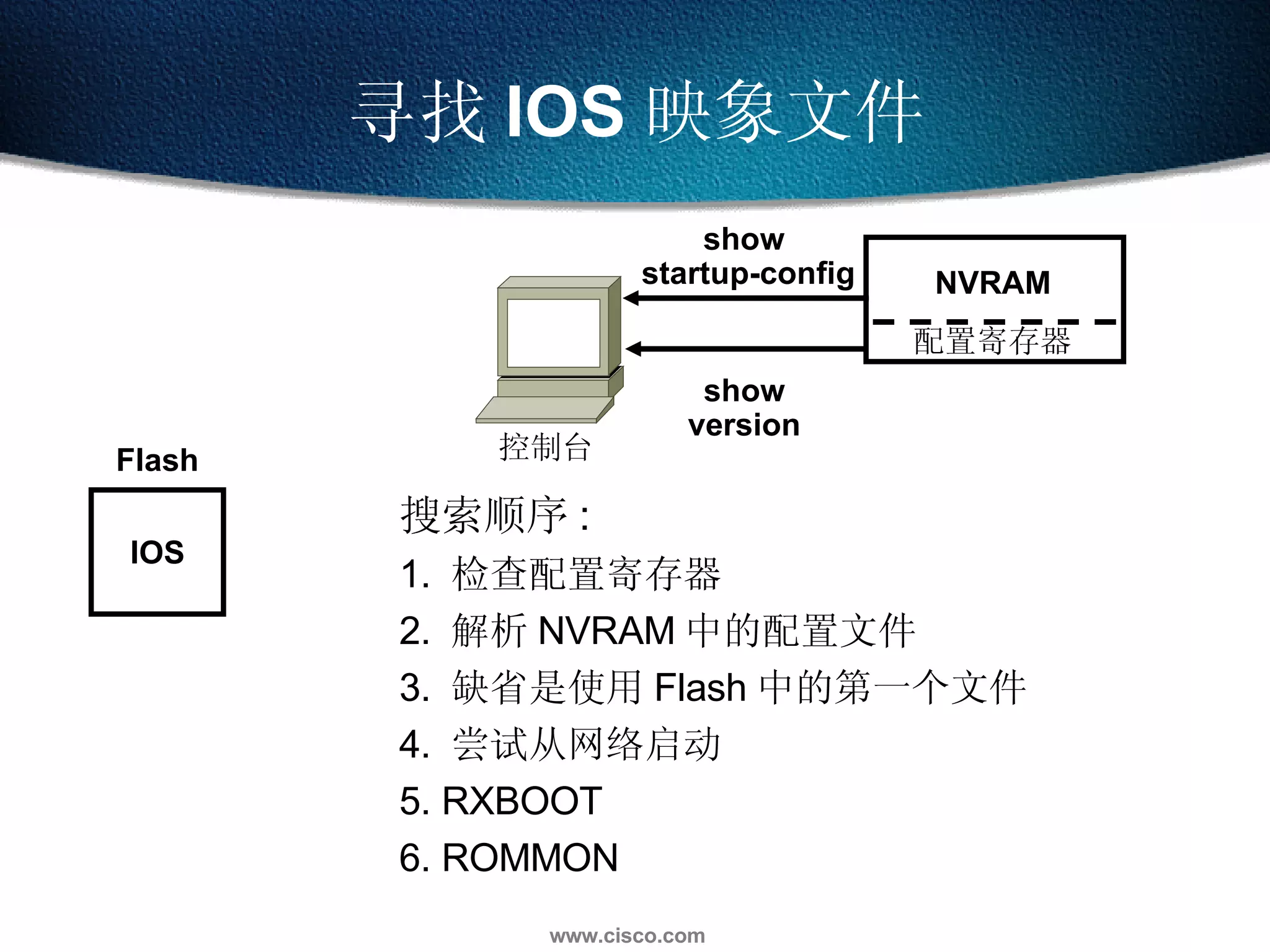
寻找 IOS 映象文件 Flash show version show  startup-config IOS 搜索顺序 : 1.  检查配置寄存器  2.  解析 NVRAM 中的配置文件 3.  缺省是使用 Flash 中的第一个文件 4.  尝试从网络启动 5. RXBOOT 6. ROMMON 控制台 配置寄存器 NVRAM
从 Flash 加载 IOS 映象文件 Flash IOS IOS show flash Flash 中的映象文件解压缩到 RAM 中 控制台 RAM
使用  show flash   命令 wg_ro_a# sh flash   System flash directory: File  Length  Name/status  1  10084696  c2500-js-l_120-3.bin  [10084760 bytes used, 6692456 available, 16777216 total] 16384K bytes of processor board System flash (Read ONLY)
加载配置文件 控制台 IOS Setup utility show startup-config show running-config 从 NVRAM 中加载并运行配置文件 如果 NVRAM 中没有配置文件 ,  进入 setup 模式 Config Config RAM NVRAM
使用  show running   和  show startup   命令 wg_ro_c# show startup-config Using 1359 out of 32762 bytes ! version 12.0 ! -- More -- wg_ro_c # show running-config Building configuration... Current configuration: ! version 12.0 ! -- More -- 存在 NVRAM 中 存在 RAM 中 显示当前运行的和保存的配置情况
路由器启动流程图 Use IOS from Flash Attempt to get IOS from network Use IOS in ROM (RXBoot mode) Check  start-up config Boot  field =0 0x0 Boot  field =1 0x1 Boot  system commands ? Config reg bit 13=1 ?   5 failures ? Valid  IOS in Flash ? Do what they say Run ROM  Monitor START Yes Yes No No Yes No No Yes Yes No No Yes Success ? No Yes Use file from Network Load IOS Valid  config ? Config reg bit 6=1 ? Yes No Yes SETUP DIALOG NORMAL START UP COMPLETE No
Cisco 文件系统与设备 RAM NVRAM TFTP 服务器 Flash flash: system: nvram: tftp:
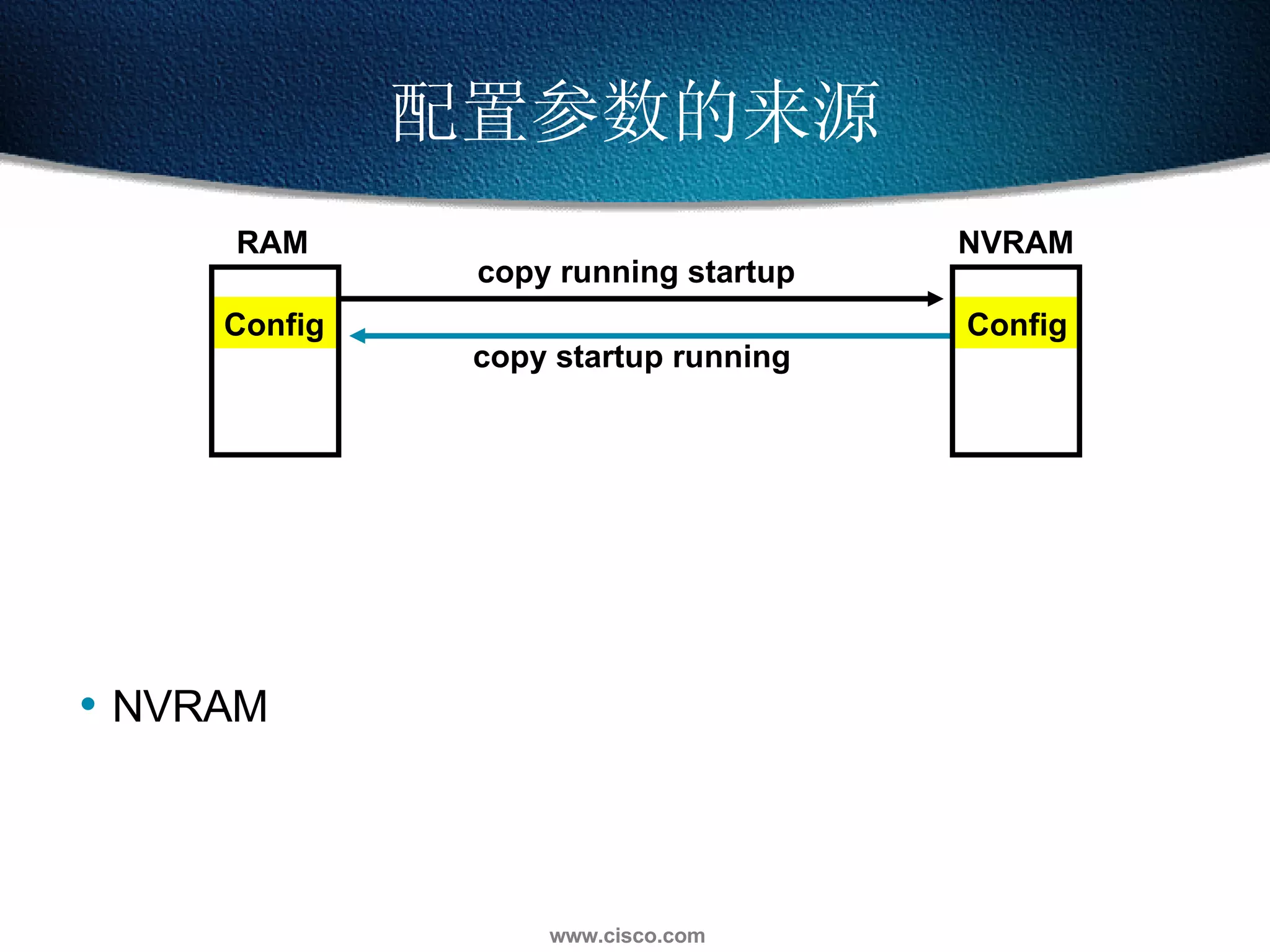
配置参数的来源 Config Config RAM NVRAM NVRAM copy running startup copy startup running
配置参数的来源 Config Config RAM NVRAM NVRAM Terminal copy running startup copy startup running Console
配置参数的来源 Config Config Console RAM NVRAM NVRAM Terminal TFTP  服务器 copy running startup copy startup running TFTP 服务器 copy start tftp copy tftp start copy run tftp copy tftp run
配置参数的来源 Config Config Console RAM NVRAM NVRAM Terminal TFTP server 删除启动配置文件 copy running startup copy startup running TFTP 服务器 Blank 000000 000000 erase start copy tftp run  copy tftp start copy start tftp copy run tftp
使用 copy run tftp  和   copy tftp run  命令 wg_ro_a# copy running-config tftp   Address or name of remote host []? 10.1.1.1  Destination filename [running-config]? wgroa.cfg  .!! 1684 bytes copied in 13.300 secs (129 bytes/sec)  wg_ro_a# copy tftp running-config  Address or name of remote host []? 10.1.1.1  Source filename []? wgroa.cfg  Destination filename [running-config]?  Accessing tftp://10.1.1.1/wgroa.cfg...  Loading wgroa.cfg from 10.1.1.1 (via Ethernet0): ! [OK - 1684/3072 bytes] 1684 bytes copied in 17.692 secs (99 bytes/sec)
Cisco IOS  升级
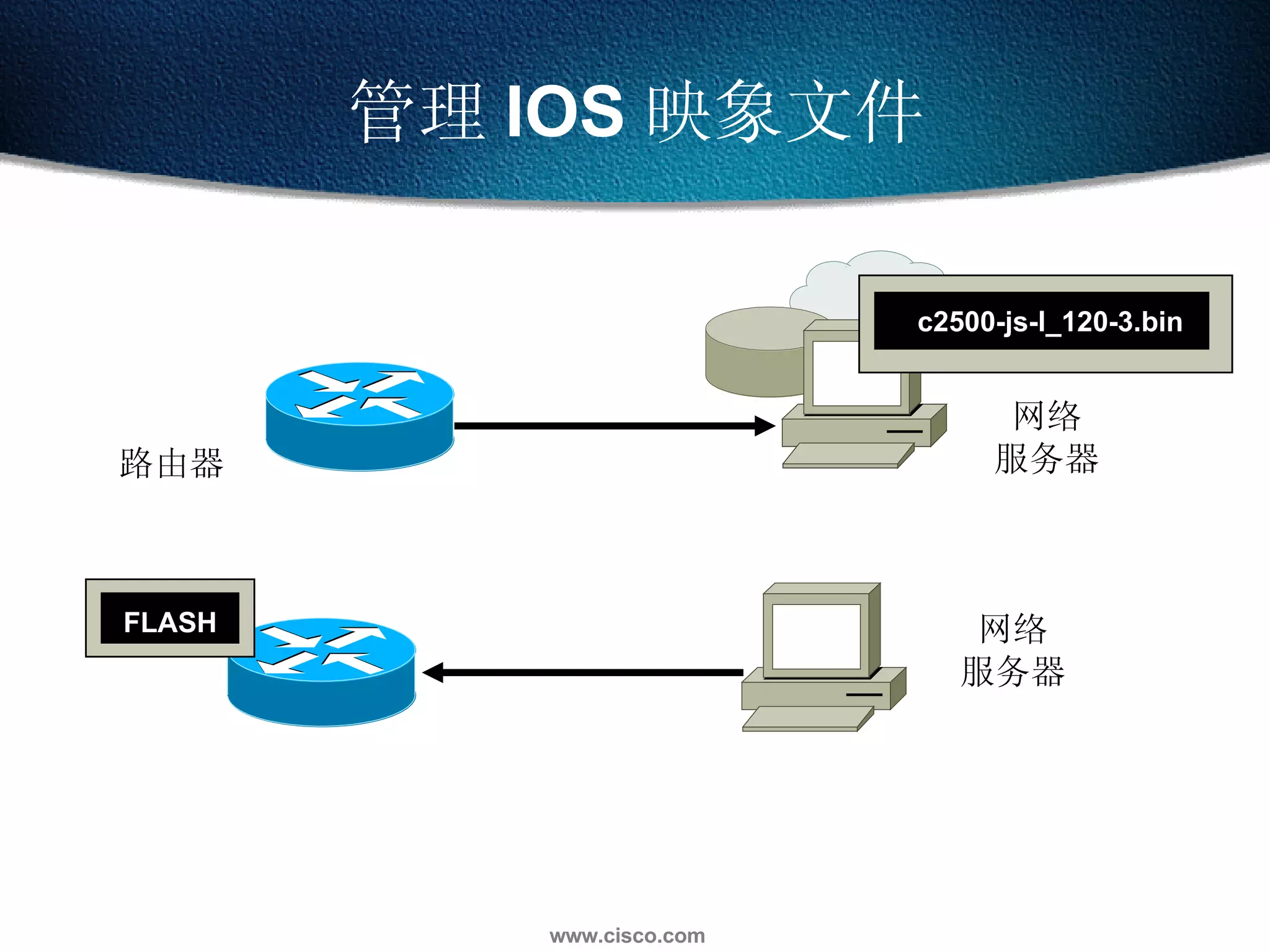
管理 IOS 映象文件 网络 服务器 FLASH 路由器 网络 服务器 c2500-js-l_120-3.bin
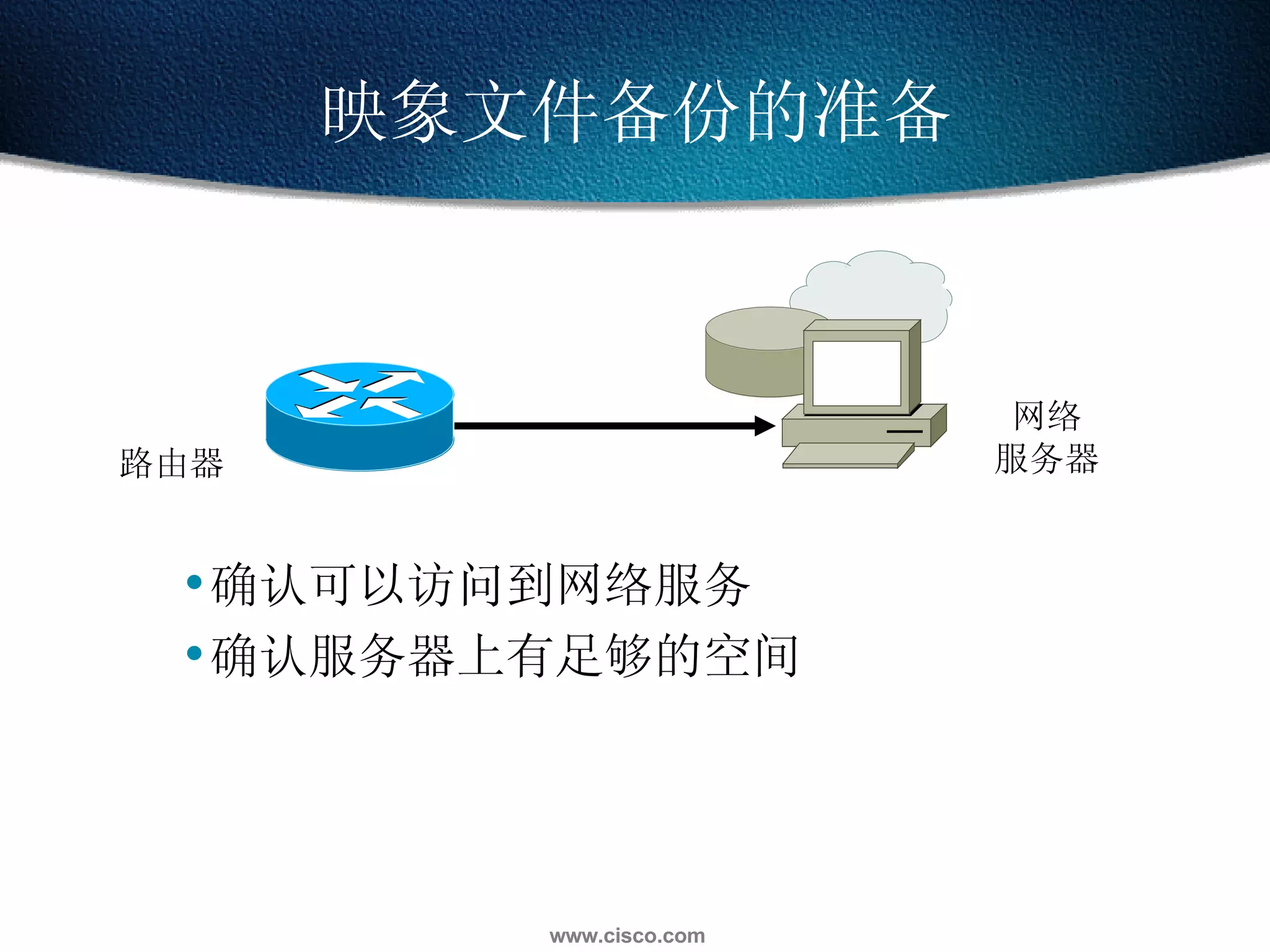
映象文件备份的准备 确认可以访问到网络服务 路由器 网络 服务器
映象文件备份的准备 确认可以访问到网络服务 确认服务器上有足够的空间 路由器 网络 服务器
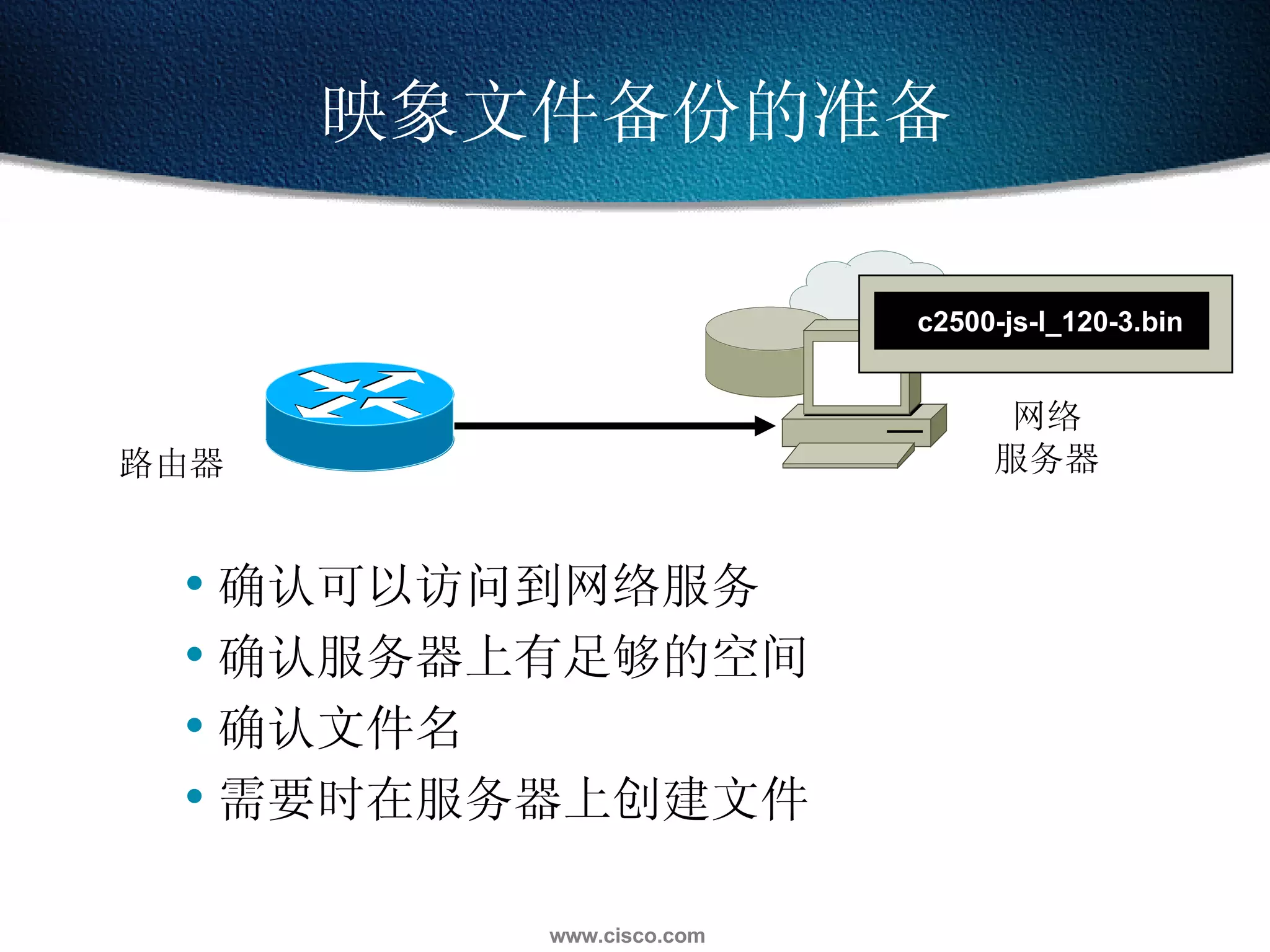
映象文件备份的准备 确认可以访问到网络服务 确认服务器上有足够的空间 确认文件名 路由器 网络 服务器 c2500-js-l_120-3.bin
映象文件备份的准备 路由器 网络 服务器 确认可以访问到网络服务 确认服务器上有足够的空间 确认文件名 需要时在服务器上创建文件 c2500-js-l_120-3.bin
确认存贮空间并解析文件名 确认 Flash 中有足够空间来存放 IOS 映象文件 wg_ro_a# show flash System flash directory: File  Length  Name/status 1  10084696  c2500-js-l_120-3.bin  [10084760 bytes used, 6692456 available, 16777216 total] 16384K bytes of processor board System flash (Read ONLY)
作映象文件的备份 在升级 IOS 前备份当前的映象文件 网络 服务器 FLASH copy flash tftp wg_ro_a# copy flash tftp Source filename []? c2500-js-l_120-3.bin Address or name of remote host []? 10.1.1.1 Destination filename [c2500-js-l_120-3.bin]?  !!!!!!!!!!!!!!!!!!!!!!!!!!!!!!!!!!!!!!!!!!!!!!!!!!!!!!!!!!!!!! <output omitted> 10084696 bytes copied in 709.228 secs (14223 bytes/sec) wg_ro_a#
从网络升级 IOS 加载新的映象文件前对 Flash 作适当的文件删除 注意关于映象文件已经存在的提示信息 网络 服务器 FLASH wg_ro_a# copy tftp flash Address or name of remote host [10.1.1.1]?  Source filename []? c2500-js-l_120-3.bin Destination filename [c2500-js-l_120-3.bin]?  Accessing tftp://10.1.1.1/c2500-js-l_120-3.bin... Erase flash: before copying? [confirm] Erasing the flash filesystem will remove all files! Continue? [confirm] Erasing device... eeeee  (output omitted)  ...erased Erase of flash: complete Loading c2500-js-l_120-3.bin from 10.1.1.1 (via Ethernet0): !!!!!!!!!!!!!!!!!!!! (output omitted) [OK - 10084696/20168704 bytes] Verifying checksum...  OK (0x9AA0) 10084696 bytes copied in 309.108 secs (32636 bytes/sec) wg_ro_a#
Cisco  密码恢复
查看寄存器值;  Router#show version  ROM: System Bootstrap, Version 5.2(8a), RELEASE SOFTWARE  BOOTFLASH: 3000 Bootstrap Software (IGS-RXBOOT), Version 10.2(8a),  RELEASE SOFTW  ARE (fc1)  RouterA uptime is 11 minutes  System restarted by power-on  System image file is &quot;flash:c2500-d-l_113-5.bin&quot;, booted via flash  Bridging software.  X.25 software, Version 3.0.0.  1 Ethernet/IEEE 802.3 interface(s)  2 Serial network interface(s)  32K bytes of non-volatile configuration memory.  8192K bytes of processor board System flash (Read ONLY)  Configuration register is 0x2102  注意:三个常用的寄存器值, 0x2102 正常启动,调用 NVRAM 配置信息; 0x2142 跳过 NVRAM 启动路由器  ;0x2101 Read/Write ,可擦写模式。
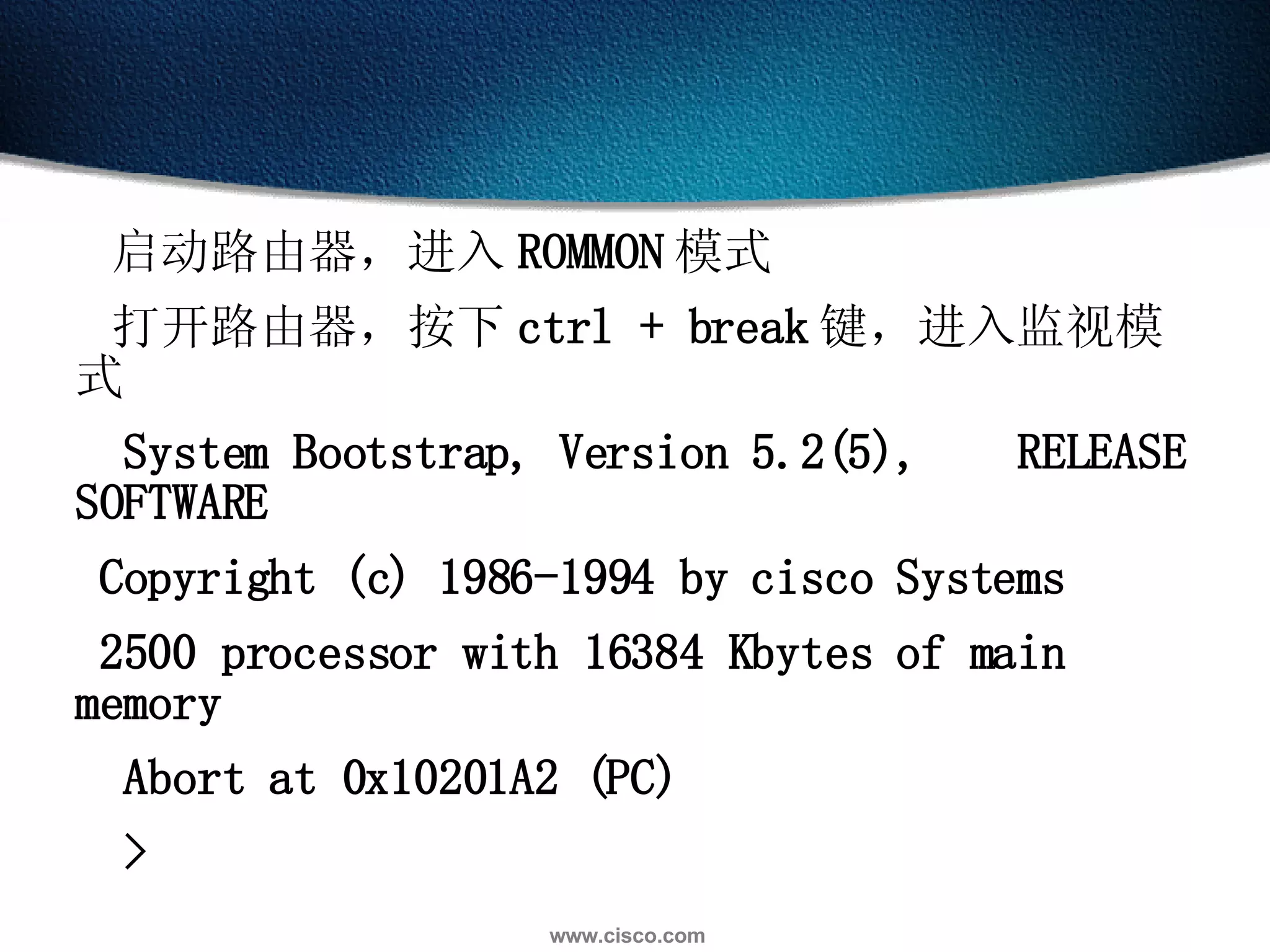
启动路由器,进入 ROMMON 模式  打开路由器,按下 ctrl + break 键,进入监视模式  System Bootstrap, Version 5.2(5),  RELEASE SOFTWARE  Copyright (c) 1986-1994 by cisco Systems  2500 processor with 16384 Kbytes of main memory  Abort at 0x10201A2 (PC)  >
在 ROMMON 模式下将寄存器值改成 0x2142 并且重新启动路由器  CISCO 2500 系列命令 :  CISCO 2600 系列命令 : >o/r 0x2142  rommon>confreg 0x2142  >i  rommon>reset
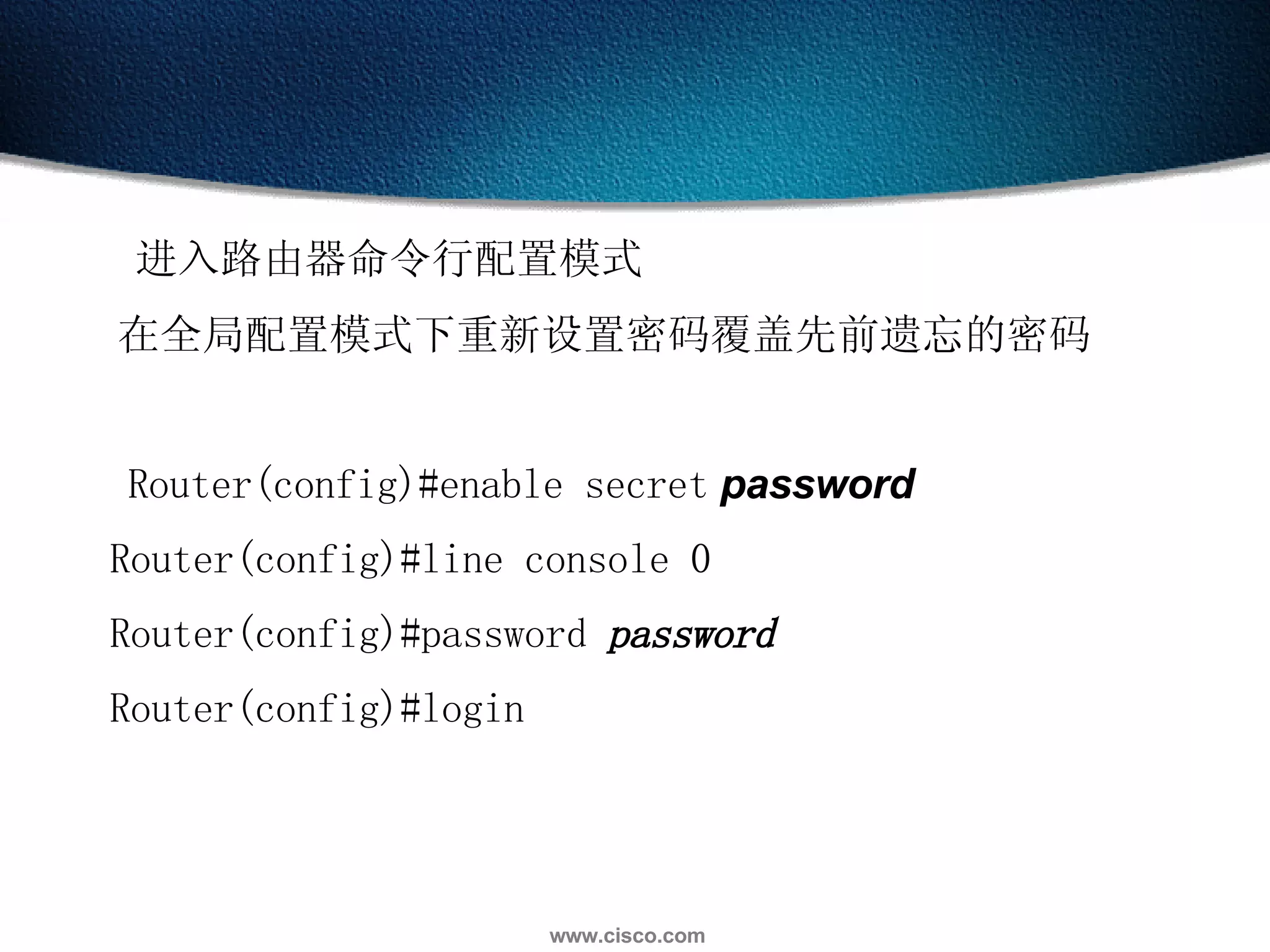
进入路由器命令行配置模式  在全局配置模式下重新设置密码覆盖先前遗忘的密码      Router(config)#enable secret   password Router(config)#line console 0 Router(config)#password  password Router(config)#login  
  修改配置寄存器的值    Router(config)#config-register 0x2102 Router(config)#copy run start    重新启动路由器  正常使用路由器
CDP 协议 Cisco Discovery Protocol 是一个提供关于直接相连的交换机、路由器和其它 Cisco 设备的综合信息的专有工具  CDP  能够发现直接相邻的设备而不管这些设备所运行的是什么协议栈  物理介质必须能够支持 Subnetwork Access Protocol (SNAP) 上层地址 Cisco 专有的链路层协议 介质必须能够支持  SNAP TCP/IP Novell IPX CDP 能 发现并显示关于直接相连的 Cisco 设备的信息 ATM Others LANs 帧中继 AppleTalk Others
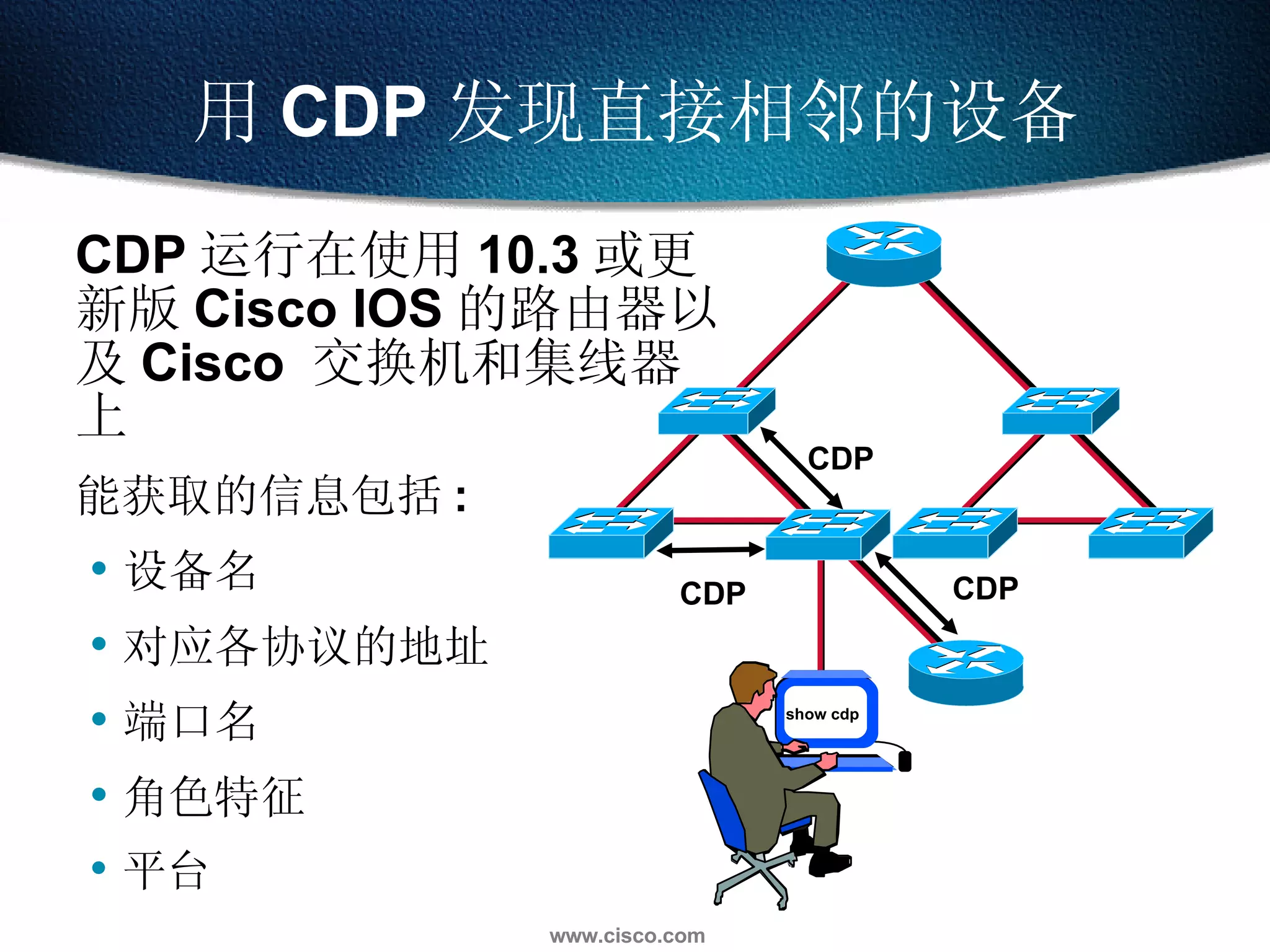
CDP 运行在使用 10.3 或更新版 Cisco IOS 的路由器以及 Cisco  交换机和集线器上 能获取的信息包括 : 设备名 对应各协议的地址 端口名 角色特征 平台  用 CDP 发现直接相邻的设备 CDP CDP CDP show cdp
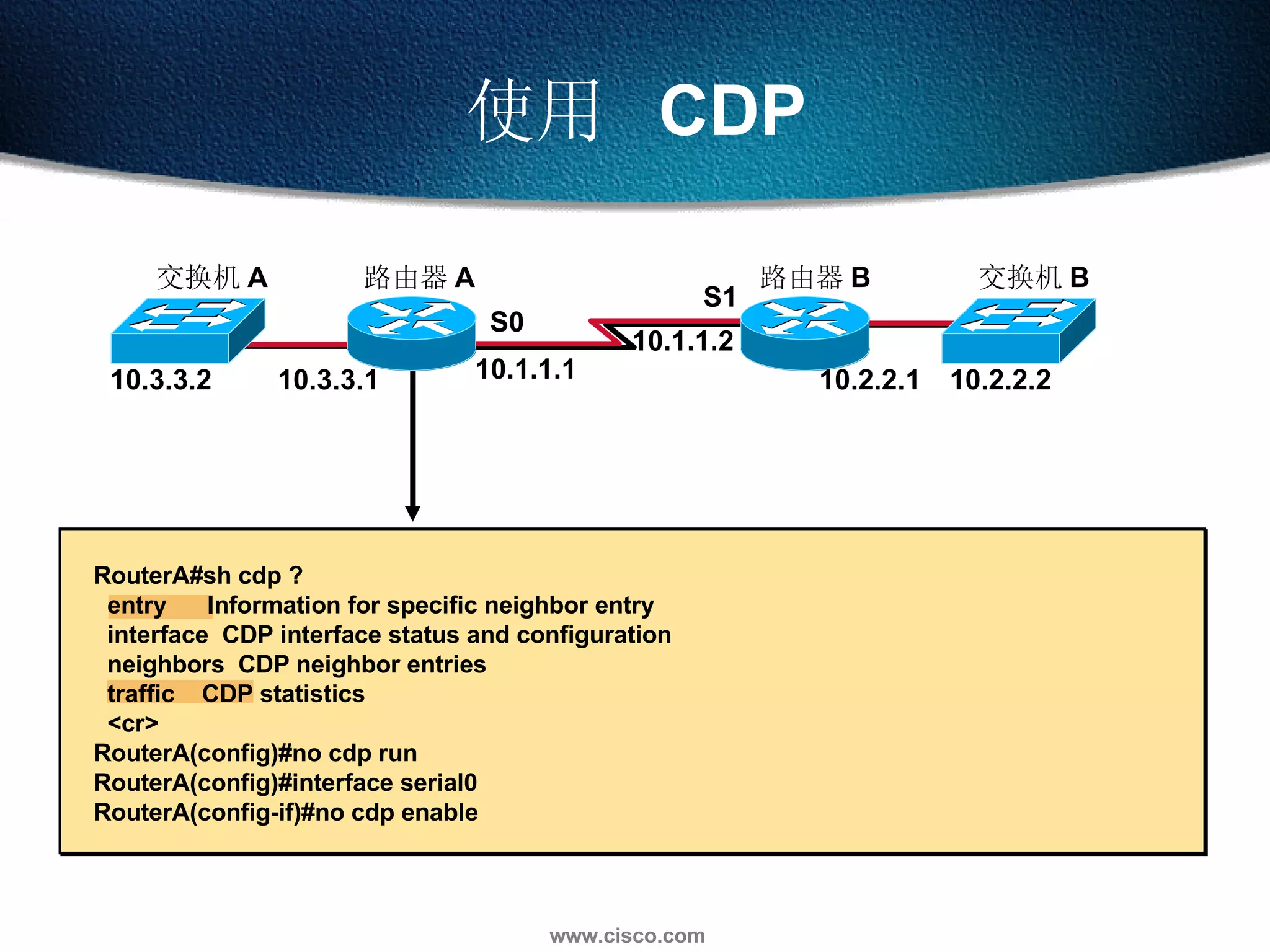
使用  CDP 交换机 B 路由器 A 路由器 B 交换机 A 10.3.3.2 10.3.3.1 10.1.1.1 10.1.1.2 10.2.2.1 10.2.2.2 S0 S1 RouterA#sh cdp ?  entry  Information for specific neighbor entry interface  CDP interface status and configuration neighbors  CDP neighbor entries traffic  CDP statistics <cr> RouterA(config)#no cdp run  RouterA(config)#interface serial0  RouterA(config-if)#no cdp enable
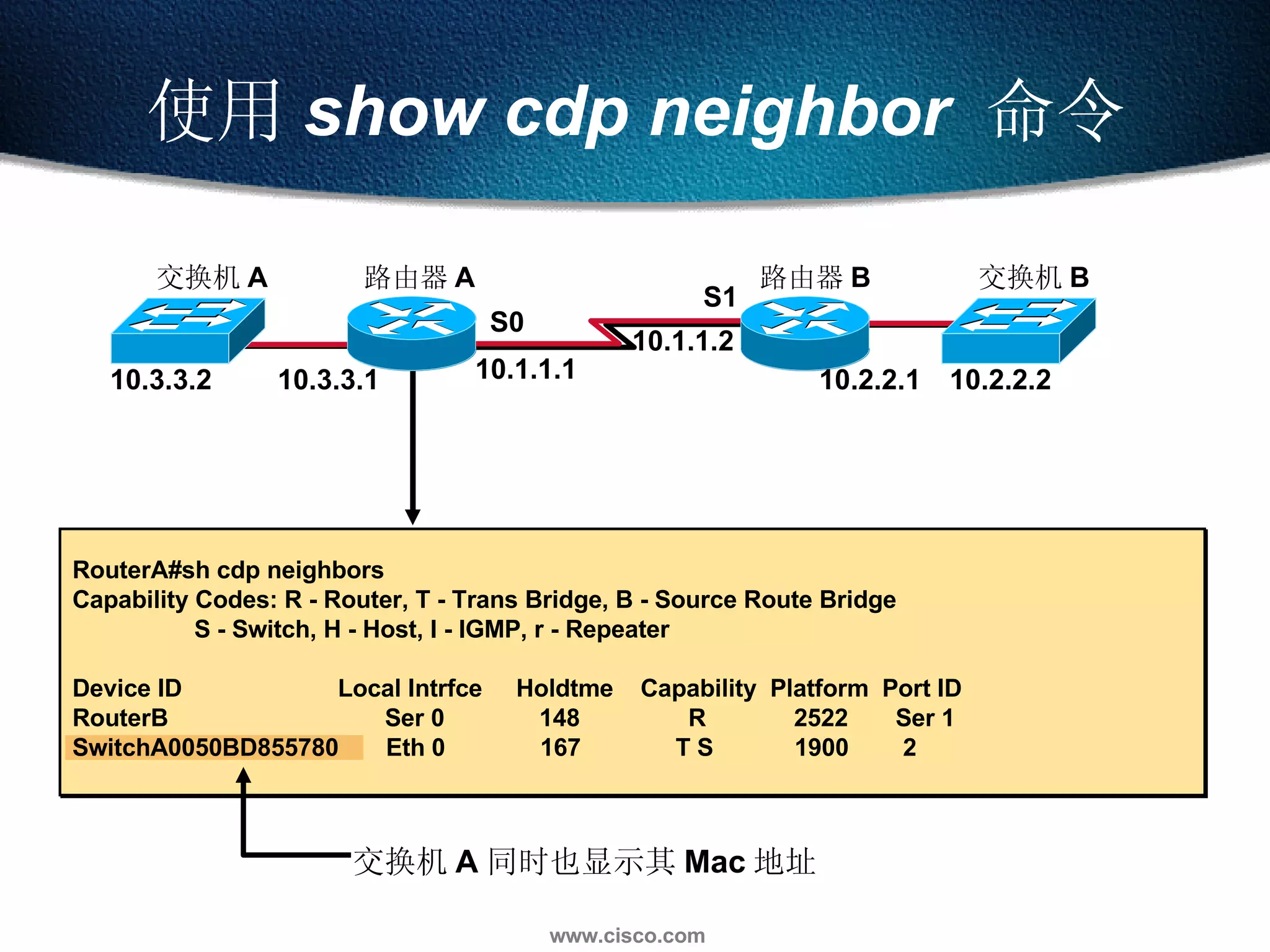
使用 show cdp neighbor   命令 交换机 A 同时也显示其 Mac 地址 RouterA#sh cdp neighbors Capability Codes: R - Router, T - Trans Bridge, B - Source Route Bridge S - Switch, H - Host, I - IGMP, r - Repeater Device ID  Local Intrfce  Holdtme  Capability  Platform  Port ID RouterB  Ser 0  148  R  2522  Ser 1 SwitchA0050BD855780  Eth 0  167  T S  1900  2  10.3.3.2 10.3.3.1 10.1.1.1 10.1.1.2 10.2.2.1 10.2.2.2 S0 S1 交换机 B 路由器 A 路由器 B 交换机 A
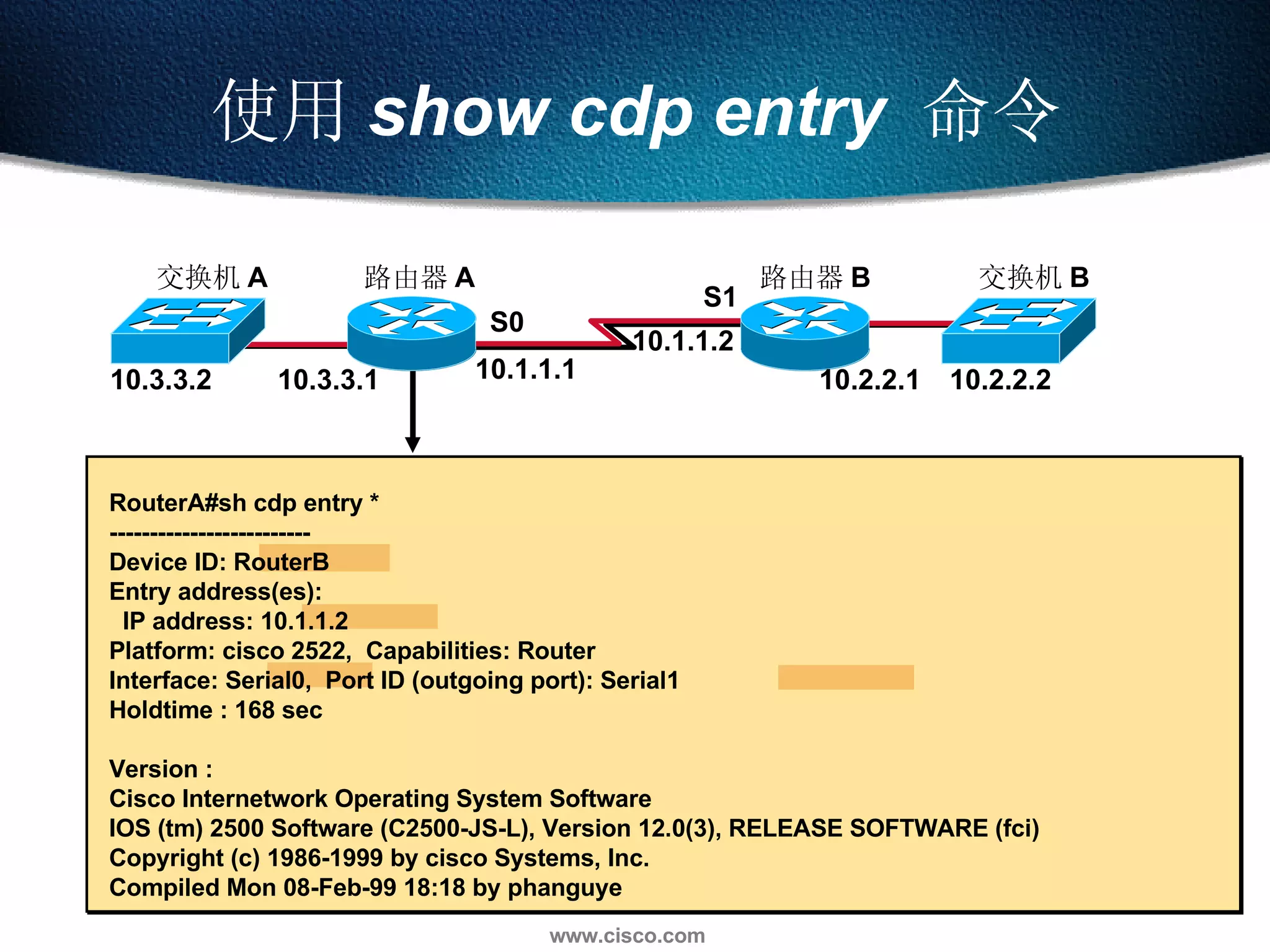
使用 show cdp entry   命令 RouterA#sh cdp entry * ------------------------- Device ID: RouterB  Entry address(es):  IP address: 10.1.1.2  Platform: cisco 2522,  Capabilities: Router  Interface: Serial0,  Port ID (outgoing port): Serial1 Holdtime : 168 sec Version : Cisco Internetwork Operating System Software  IOS (tm) 2500 Software (C2500-JS-L), Version 12.0(3), RELEASE SOFTWARE (fci) Copyright (c) 1986-1999 by cisco Systems, Inc. Compiled Mon 08-Feb-99 18:18 by phanguye 10.3.3.2 10.3.3.1 10.1.1.1 10.1.1.2 10.2.2.1 10.2.2.2 S0 S1 交换机 B 路由器 A 路由器 B 交换机 A
其它 CDP 命令 RouterA#sh cdp traffic CDP counters : Packets output: 56, Input: 38 Hdr syntax: 0, Chksum error: 0, Encaps failed: 3 No memory: 0, Invalid packet: 0, Fragmented: 0 RouterA#sh cdp interface  BRI0 is administratively down, line protocol is down Encapsulation HDLC Sending CDP packets every 60 seconds Holdtime is 180 seconds 10.3.3.2 10.3.3.1 10.1.1.1 10.1.1.2 10.2.2.1 10.2.2.2 S0 S1 交换机 B 路由器 A 路由器 B 交换机 A
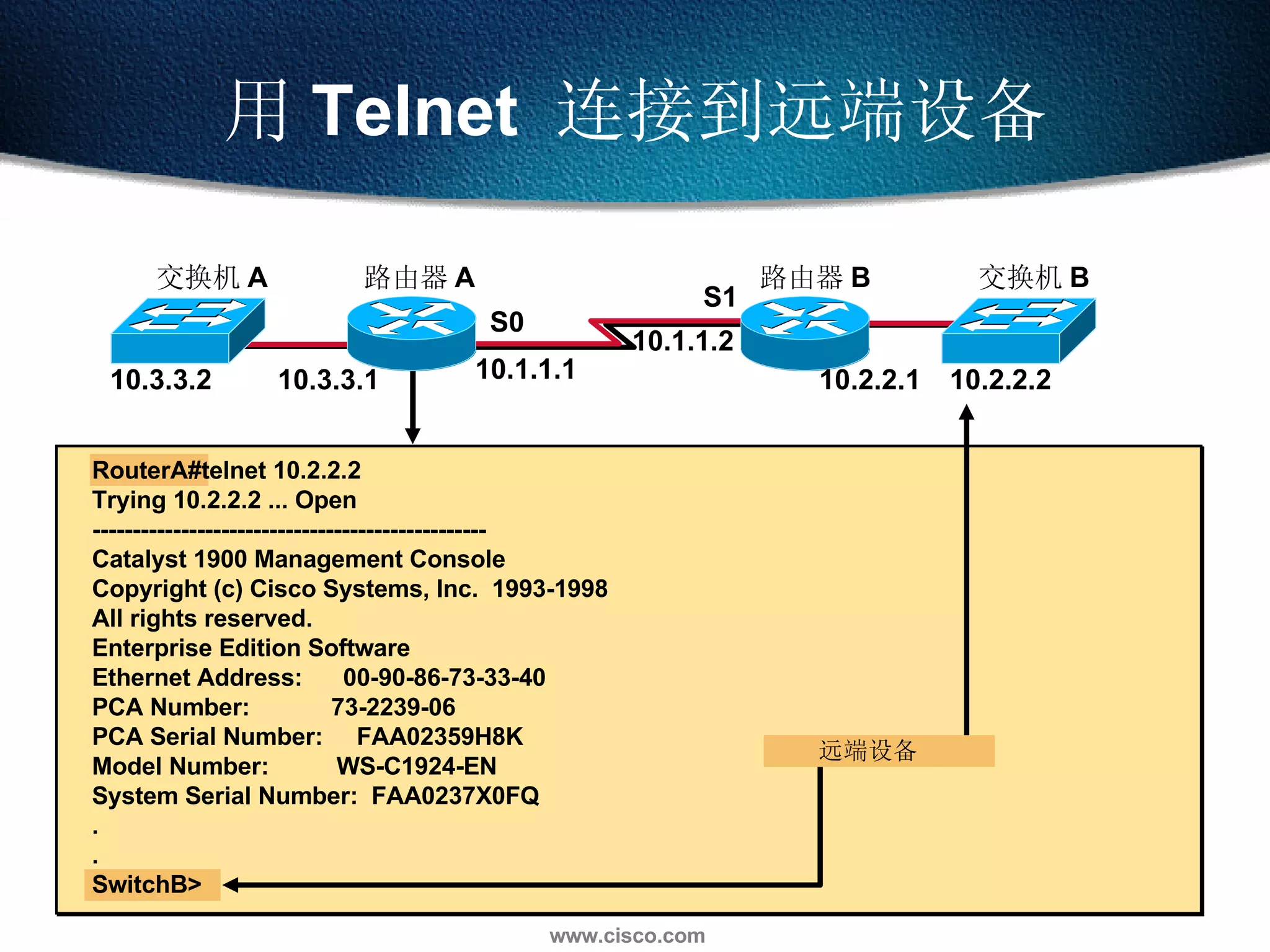
用 Telnet  连接到远端设备 远端设备 10.3.3.2 10.3.3.1 10.1.1.1 10.1.1.2 10.2.2.1 10.2.2.2 S0 S1 RouterA#telnet 10.2.2.2  Trying 10.2.2.2 ... Open ------------------------------------------------- Catalyst 1900 Management Console Copyright (c) Cisco Systems, Inc.  1993-1998 All rights reserved. Enterprise Edition Software Ethernet Address:  00-90-86-73-33-40 PCA Number:  73-2239-06 PCA Serial Number:  FAA02359H8K Model Number:  WS-C1924-EN System Serial Number:  FAA0237X0FQ . . SwitchB> 交换机 B 路由器 A 路由器 B 交换机 A
查看 Telnet 连接 10.3.3.2 10.3.3.1 10.1.1.1 10.1.1.2 10.2.2.1 10.2.2.2 S0 S1 RouterA#sh session Conn Host  Address  Byte  Idle  Conn Name 1 10.1.1.2  10.1.1.2  0  1  10.1.1.2 *  2 10.3.3.2  10.3.3.2  0  0  10.3.3.2 RouterA#sh user Line  User  Host(s)  Idle  Location *  0 con 0  10.1.1.2  3  10.3.3.2  2  11 vty 0  idle  1  10.1.1.2 交换机 B 路由器 A 路由器 B 交换机 A
挂起一个 Telnet 会话 10.3.3.2 10.3.3.1 10.1.1.1 10.1.1.2 10.2.2.1 10.2.2.2 S0 S1 RouterB#<Ctrl-Shift-6>x RouterA#sh session Conn Host  Address  Byte  Idle Conn Name 1 10.1.1.2  10.1.1.2  0  1  10.1.1.2 RouterA#resume 1 RouterB# 交换机 B 路由器 A 路由器 B 交换机 A
关闭一个 Telnet 会话 RouterA#disconnect  Closing connection to 10.3.3.2 [confirm] RouterA#clear line 11 [confirm] [OK] 关闭由远端设备建立的会话 关闭由自己建立的当前会话 10.3.3.2 10.3.3.1 10.1.1.1 10.1.1.2 10.2.2.1 10.2.2.2 S0 S1 交换机 B 路由器 A 路由器 B 交换机 A
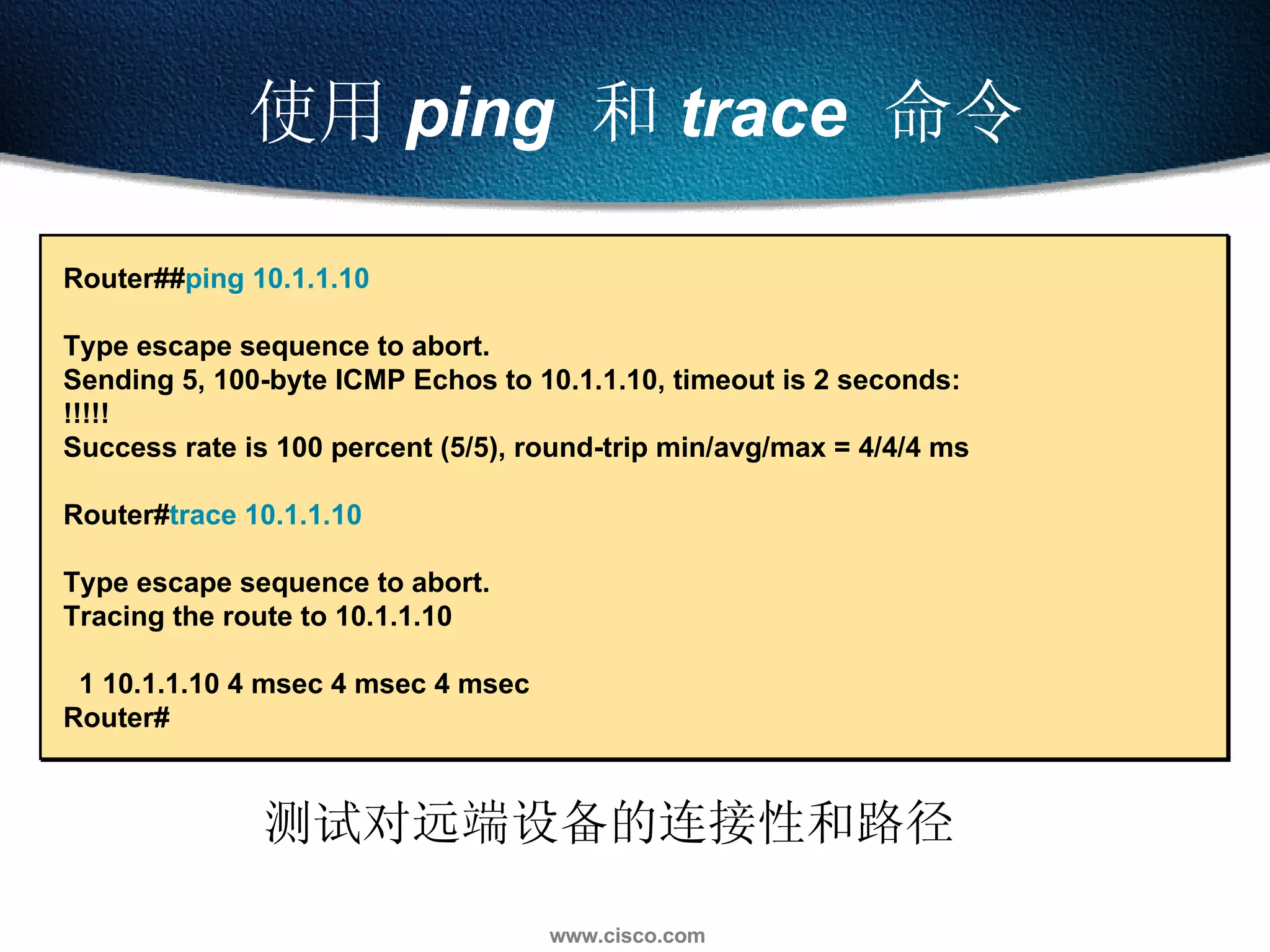
使用 ping   和 trace   命令 测试对远端设备的连接性和路径 Router## ping 10.1.1.10   Type escape sequence to abort. Sending 5, 100-byte ICMP Echos to 10.1.1.10, timeout is 2 seconds: !!!!! Success rate is 100 percent (5/5), round-trip min/avg/max = 4/4/4 ms Router# trace 10.1.1.10   Type escape sequence to abort. Tracing the route to 10.1.1.10 1 10.1.1.10 4 msec 4 msec 4 msec Router#
通过本章的学习,您应该掌握以下内容 : 在一个设备上利用 CDP 获取与其直接相邻的设备信息 用 Telnet 来获取远端设备的信息 清楚被加载 IOS 映象文件的位置和过程 本章总结
问题回顾 1.  哪个 CDP 命令用来获取某个指定直接相邻设备的 信息 ? 2.  哪些键的组合可以挂起一个 Telnet 会话 ? 3.  运行的配置内容可以源自于哪三个地方 ? 4. 哪个 show   命令列出了配置寄存器的值 ?

第11讲 管理Cisco互联网络

  • 1.
    第 11 讲管理 Cisco 互联网络
  • 2.
    本章目标 通过本章的学习,您应该掌握以下内容 :清楚配置文件和 IOS 映象文件被加载的位置和过程 获取直接相邻设备的信息 获取远程设备的信息
  • 3.
    路由器加电 / 启动顺序加电自检 (POST) 加载并运行启动引导微代码 寻找 IOS 映象文件 加载 IOS 映象文件 寻找配置文件 加载配置文件 正常运行
  • 4.
  • 5.
    ROM 功能ROM 存放完成基本功能的微代码 Bootstrap Mini IOS ROM monitor POST show version 控制台
  • 6.
    确认当前的配置寄存器值 wg_ro_a# showversion Cisco Internetwork Operating System Software IOS (tm) 2500 Software (C2500-JS-L), Version 12.0(3), RELEASE SOFTWARE (fc1) Copyright (c) 1986-1999 by cisco Systems, Inc. Compiled Mon 08-Feb-99 18:18 by phanguye Image text-base: 0x03050C84, data-base: 0x00001000 ROM: System Bootstrap, Version 11.0(10c), SOFTWARE BOOTFLASH: 3000 Bootstrap Software (IGS-BOOT-R), Version 11.0(10c), RELEASE SOFTWARE (fc1) wg_ro_a uptime is 20 minutes System restarted by reload System image file is &quot;flash:c2500-js-l_120-3.bin&quot; --More-- Configuration register is 0x2102 用命令 show version 所显示的配置寄存器值
  • 7.
    设定配置寄存器的值 配置寄存器的 3,2, 1 和 0 位是启动选项位 Router#configure terminal Router(config)# config-register 0x2102 [Ctrl-Z] Router#reload
  • 8.
    设定配置寄存器的值 配置寄存器的 3,2, 1 和 0 位是启动选项位 配置寄存器启动选项部分的值 0x0 含义 进入 ROM monitor 模式 ( 人工启动时用 b 命令 ) Router#configure terminal Router(config)# config-register 0x2102 [Ctrl-Z] Router#reload
  • 9.
    设定配置寄存器的值 配置寄存器的 3,2, 1 和 0 位是启动选项位 配置寄存器启动选项部分的值 0x0 0x1 含义 进入 ROM monitor 模式 ( 人工启动时用 b 命令 ) 自动从 ROM 启动 ( 提供完整 IOS 的一个子集 ) Router#configure terminal Router(config)# config-register 0x2102 [Ctrl-Z] Router#reload
  • 10.
    配置寄存器的 3, 2,1 和 0 位是启动选项位 用命令 show version 来检查配置寄存器的值 设定配置寄存器的值 配置寄存器启动选项部分的值 0x0 0x2 to 0xF 0x1 含义 进入 ROM monitor 模式 ( 人工启动时用 b 命令 ) Rommon> 检查 NVRAM 之 boot system 命令 ( 如果路由器配有 Flash 则缺省值为 0x2) 自动从 ROM 启动 ( 提供完整 IOS 的一个子集 ) Router(boot)> Router#configure terminal Router(config)# config-register 0x2102 [Ctrl-Z] Router#reload
  • 11.
    寻找 IOS 映象文件Flash show version show startup-config IOS 搜索顺序 : 1. 检查配置寄存器 2. 解析 NVRAM 中的配置文件 3. 缺省是使用 Flash 中的第一个文件 4. 尝试从网络启动 5. RXBOOT 6. ROMMON 控制台 配置寄存器 NVRAM
  • 12.
    从 Flash 加载IOS 映象文件 Flash IOS IOS show flash Flash 中的映象文件解压缩到 RAM 中 控制台 RAM
  • 13.
    使用 showflash 命令 wg_ro_a# sh flash System flash directory: File Length Name/status 1 10084696 c2500-js-l_120-3.bin [10084760 bytes used, 6692456 available, 16777216 total] 16384K bytes of processor board System flash (Read ONLY)
  • 14.
    加载配置文件 控制台 IOSSetup utility show startup-config show running-config 从 NVRAM 中加载并运行配置文件 如果 NVRAM 中没有配置文件 , 进入 setup 模式 Config Config RAM NVRAM
  • 15.
    使用 showrunning 和 show startup 命令 wg_ro_c# show startup-config Using 1359 out of 32762 bytes ! version 12.0 ! -- More -- wg_ro_c # show running-config Building configuration... Current configuration: ! version 12.0 ! -- More -- 存在 NVRAM 中 存在 RAM 中 显示当前运行的和保存的配置情况
  • 16.
    路由器启动流程图 Use IOSfrom Flash Attempt to get IOS from network Use IOS in ROM (RXBoot mode) Check start-up config Boot field =0 0x0 Boot field =1 0x1 Boot system commands ? Config reg bit 13=1 ? 5 failures ? Valid IOS in Flash ? Do what they say Run ROM Monitor START Yes Yes No No Yes No No Yes Yes No No Yes Success ? No Yes Use file from Network Load IOS Valid config ? Config reg bit 6=1 ? Yes No Yes SETUP DIALOG NORMAL START UP COMPLETE No
  • 17.
    Cisco 文件系统与设备 RAMNVRAM TFTP 服务器 Flash flash: system: nvram: tftp:
  • 18.
    配置参数的来源 Config ConfigRAM NVRAM NVRAM copy running startup copy startup running
  • 19.
    配置参数的来源 Config ConfigRAM NVRAM NVRAM Terminal copy running startup copy startup running Console
  • 20.
    配置参数的来源 Config ConfigConsole RAM NVRAM NVRAM Terminal TFTP 服务器 copy running startup copy startup running TFTP 服务器 copy start tftp copy tftp start copy run tftp copy tftp run
  • 21.
    配置参数的来源 Config ConfigConsole RAM NVRAM NVRAM Terminal TFTP server 删除启动配置文件 copy running startup copy startup running TFTP 服务器 Blank 000000 000000 erase start copy tftp run copy tftp start copy start tftp copy run tftp
  • 22.
    使用 copy runtftp 和 copy tftp run 命令 wg_ro_a# copy running-config tftp Address or name of remote host []? 10.1.1.1 Destination filename [running-config]? wgroa.cfg .!! 1684 bytes copied in 13.300 secs (129 bytes/sec) wg_ro_a# copy tftp running-config Address or name of remote host []? 10.1.1.1 Source filename []? wgroa.cfg Destination filename [running-config]? Accessing tftp://10.1.1.1/wgroa.cfg... Loading wgroa.cfg from 10.1.1.1 (via Ethernet0): ! [OK - 1684/3072 bytes] 1684 bytes copied in 17.692 secs (99 bytes/sec)
  • 23.
    Cisco IOS 升级
  • 24.
    管理 IOS 映象文件网络 服务器 FLASH 路由器 网络 服务器 c2500-js-l_120-3.bin
  • 25.
  • 26.
  • 27.
  • 28.
    映象文件备份的准备 路由器 网络服务器 确认可以访问到网络服务 确认服务器上有足够的空间 确认文件名 需要时在服务器上创建文件 c2500-js-l_120-3.bin
  • 29.
    确认存贮空间并解析文件名 确认 Flash中有足够空间来存放 IOS 映象文件 wg_ro_a# show flash System flash directory: File Length Name/status 1 10084696 c2500-js-l_120-3.bin [10084760 bytes used, 6692456 available, 16777216 total] 16384K bytes of processor board System flash (Read ONLY)
  • 30.
    作映象文件的备份 在升级 IOS前备份当前的映象文件 网络 服务器 FLASH copy flash tftp wg_ro_a# copy flash tftp Source filename []? c2500-js-l_120-3.bin Address or name of remote host []? 10.1.1.1 Destination filename [c2500-js-l_120-3.bin]? !!!!!!!!!!!!!!!!!!!!!!!!!!!!!!!!!!!!!!!!!!!!!!!!!!!!!!!!!!!!!! <output omitted> 10084696 bytes copied in 709.228 secs (14223 bytes/sec) wg_ro_a#
  • 31.
    从网络升级 IOS 加载新的映象文件前对Flash 作适当的文件删除 注意关于映象文件已经存在的提示信息 网络 服务器 FLASH wg_ro_a# copy tftp flash Address or name of remote host [10.1.1.1]? Source filename []? c2500-js-l_120-3.bin Destination filename [c2500-js-l_120-3.bin]? Accessing tftp://10.1.1.1/c2500-js-l_120-3.bin... Erase flash: before copying? [confirm] Erasing the flash filesystem will remove all files! Continue? [confirm] Erasing device... eeeee (output omitted) ...erased Erase of flash: complete Loading c2500-js-l_120-3.bin from 10.1.1.1 (via Ethernet0): !!!!!!!!!!!!!!!!!!!! (output omitted) [OK - 10084696/20168704 bytes] Verifying checksum... OK (0x9AA0) 10084696 bytes copied in 309.108 secs (32636 bytes/sec) wg_ro_a#
  • 32.
  • 33.
    查看寄存器值; Router#showversion ROM: System Bootstrap, Version 5.2(8a), RELEASE SOFTWARE BOOTFLASH: 3000 Bootstrap Software (IGS-RXBOOT), Version 10.2(8a), RELEASE SOFTW ARE (fc1) RouterA uptime is 11 minutes System restarted by power-on System image file is &quot;flash:c2500-d-l_113-5.bin&quot;, booted via flash Bridging software. X.25 software, Version 3.0.0. 1 Ethernet/IEEE 802.3 interface(s) 2 Serial network interface(s) 32K bytes of non-volatile configuration memory. 8192K bytes of processor board System flash (Read ONLY) Configuration register is 0x2102 注意:三个常用的寄存器值, 0x2102 正常启动,调用 NVRAM 配置信息; 0x2142 跳过 NVRAM 启动路由器 ;0x2101 Read/Write ,可擦写模式。
  • 34.
    启动路由器,进入 ROMMON 模式 打开路由器,按下 ctrl + break 键,进入监视模式 System Bootstrap, Version 5.2(5), RELEASE SOFTWARE Copyright (c) 1986-1994 by cisco Systems 2500 processor with 16384 Kbytes of main memory Abort at 0x10201A2 (PC) >
  • 35.
    在 ROMMON 模式下将寄存器值改成0x2142 并且重新启动路由器 CISCO 2500 系列命令 : CISCO 2600 系列命令 : >o/r 0x2142 rommon>confreg 0x2142 >i rommon>reset
  • 36.
    进入路由器命令行配置模式  在全局配置模式下重新设置密码覆盖先前遗忘的密码     Router(config)#enable secret password Router(config)#line console 0 Router(config)#password password Router(config)#login  
  • 37.
      修改配置寄存器的值   Router(config)#config-register 0x2102 Router(config)#copy run start    重新启动路由器  正常使用路由器
  • 38.
    CDP 协议 CiscoDiscovery Protocol 是一个提供关于直接相连的交换机、路由器和其它 Cisco 设备的综合信息的专有工具 CDP 能够发现直接相邻的设备而不管这些设备所运行的是什么协议栈 物理介质必须能够支持 Subnetwork Access Protocol (SNAP) 上层地址 Cisco 专有的链路层协议 介质必须能够支持 SNAP TCP/IP Novell IPX CDP 能 发现并显示关于直接相连的 Cisco 设备的信息 ATM Others LANs 帧中继 AppleTalk Others
  • 39.
    CDP 运行在使用 10.3或更新版 Cisco IOS 的路由器以及 Cisco 交换机和集线器上 能获取的信息包括 : 设备名 对应各协议的地址 端口名 角色特征 平台 用 CDP 发现直接相邻的设备 CDP CDP CDP show cdp
  • 40.
    使用 CDP交换机 B 路由器 A 路由器 B 交换机 A 10.3.3.2 10.3.3.1 10.1.1.1 10.1.1.2 10.2.2.1 10.2.2.2 S0 S1 RouterA#sh cdp ? entry Information for specific neighbor entry interface CDP interface status and configuration neighbors CDP neighbor entries traffic CDP statistics <cr> RouterA(config)#no cdp run RouterA(config)#interface serial0 RouterA(config-if)#no cdp enable
  • 41.
    使用 show cdpneighbor 命令 交换机 A 同时也显示其 Mac 地址 RouterA#sh cdp neighbors Capability Codes: R - Router, T - Trans Bridge, B - Source Route Bridge S - Switch, H - Host, I - IGMP, r - Repeater Device ID Local Intrfce Holdtme Capability Platform Port ID RouterB Ser 0 148 R 2522 Ser 1 SwitchA0050BD855780 Eth 0 167 T S 1900 2 10.3.3.2 10.3.3.1 10.1.1.1 10.1.1.2 10.2.2.1 10.2.2.2 S0 S1 交换机 B 路由器 A 路由器 B 交换机 A
  • 42.
    使用 show cdpentry 命令 RouterA#sh cdp entry * ------------------------- Device ID: RouterB Entry address(es): IP address: 10.1.1.2 Platform: cisco 2522, Capabilities: Router Interface: Serial0, Port ID (outgoing port): Serial1 Holdtime : 168 sec Version : Cisco Internetwork Operating System Software IOS (tm) 2500 Software (C2500-JS-L), Version 12.0(3), RELEASE SOFTWARE (fci) Copyright (c) 1986-1999 by cisco Systems, Inc. Compiled Mon 08-Feb-99 18:18 by phanguye 10.3.3.2 10.3.3.1 10.1.1.1 10.1.1.2 10.2.2.1 10.2.2.2 S0 S1 交换机 B 路由器 A 路由器 B 交换机 A
  • 43.
    其它 CDP 命令RouterA#sh cdp traffic CDP counters : Packets output: 56, Input: 38 Hdr syntax: 0, Chksum error: 0, Encaps failed: 3 No memory: 0, Invalid packet: 0, Fragmented: 0 RouterA#sh cdp interface BRI0 is administratively down, line protocol is down Encapsulation HDLC Sending CDP packets every 60 seconds Holdtime is 180 seconds 10.3.3.2 10.3.3.1 10.1.1.1 10.1.1.2 10.2.2.1 10.2.2.2 S0 S1 交换机 B 路由器 A 路由器 B 交换机 A
  • 44.
    用 Telnet 连接到远端设备 远端设备 10.3.3.2 10.3.3.1 10.1.1.1 10.1.1.2 10.2.2.1 10.2.2.2 S0 S1 RouterA#telnet 10.2.2.2 Trying 10.2.2.2 ... Open ------------------------------------------------- Catalyst 1900 Management Console Copyright (c) Cisco Systems, Inc. 1993-1998 All rights reserved. Enterprise Edition Software Ethernet Address: 00-90-86-73-33-40 PCA Number: 73-2239-06 PCA Serial Number: FAA02359H8K Model Number: WS-C1924-EN System Serial Number: FAA0237X0FQ . . SwitchB> 交换机 B 路由器 A 路由器 B 交换机 A
  • 45.
    查看 Telnet 连接10.3.3.2 10.3.3.1 10.1.1.1 10.1.1.2 10.2.2.1 10.2.2.2 S0 S1 RouterA#sh session Conn Host Address Byte Idle Conn Name 1 10.1.1.2 10.1.1.2 0 1 10.1.1.2 * 2 10.3.3.2 10.3.3.2 0 0 10.3.3.2 RouterA#sh user Line User Host(s) Idle Location * 0 con 0 10.1.1.2 3 10.3.3.2 2 11 vty 0 idle 1 10.1.1.2 交换机 B 路由器 A 路由器 B 交换机 A
  • 46.
    挂起一个 Telnet 会话10.3.3.2 10.3.3.1 10.1.1.1 10.1.1.2 10.2.2.1 10.2.2.2 S0 S1 RouterB#<Ctrl-Shift-6>x RouterA#sh session Conn Host Address Byte Idle Conn Name 1 10.1.1.2 10.1.1.2 0 1 10.1.1.2 RouterA#resume 1 RouterB# 交换机 B 路由器 A 路由器 B 交换机 A
  • 47.
    关闭一个 Telnet 会话RouterA#disconnect Closing connection to 10.3.3.2 [confirm] RouterA#clear line 11 [confirm] [OK] 关闭由远端设备建立的会话 关闭由自己建立的当前会话 10.3.3.2 10.3.3.1 10.1.1.1 10.1.1.2 10.2.2.1 10.2.2.2 S0 S1 交换机 B 路由器 A 路由器 B 交换机 A
  • 48.
    使用 ping 和 trace 命令 测试对远端设备的连接性和路径 Router## ping 10.1.1.10 Type escape sequence to abort. Sending 5, 100-byte ICMP Echos to 10.1.1.10, timeout is 2 seconds: !!!!! Success rate is 100 percent (5/5), round-trip min/avg/max = 4/4/4 ms Router# trace 10.1.1.10 Type escape sequence to abort. Tracing the route to 10.1.1.10 1 10.1.1.10 4 msec 4 msec 4 msec Router#
  • 49.
    通过本章的学习,您应该掌握以下内容 : 在一个设备上利用CDP 获取与其直接相邻的设备信息 用 Telnet 来获取远端设备的信息 清楚被加载 IOS 映象文件的位置和过程 本章总结
  • 50.
    问题回顾 1. 哪个 CDP 命令用来获取某个指定直接相邻设备的 信息 ? 2. 哪些键的组合可以挂起一个 Telnet 会话 ? 3. 运行的配置内容可以源自于哪三个地方 ? 4. 哪个 show 命令列出了配置寄存器的值 ?