Programming
http://www.yahmad.co.uk/
Python Programming
Lesson 1: Python Turtle
Programming
Introduction to Python and Variables
http://www.yahmad.co.uk/
Objectives
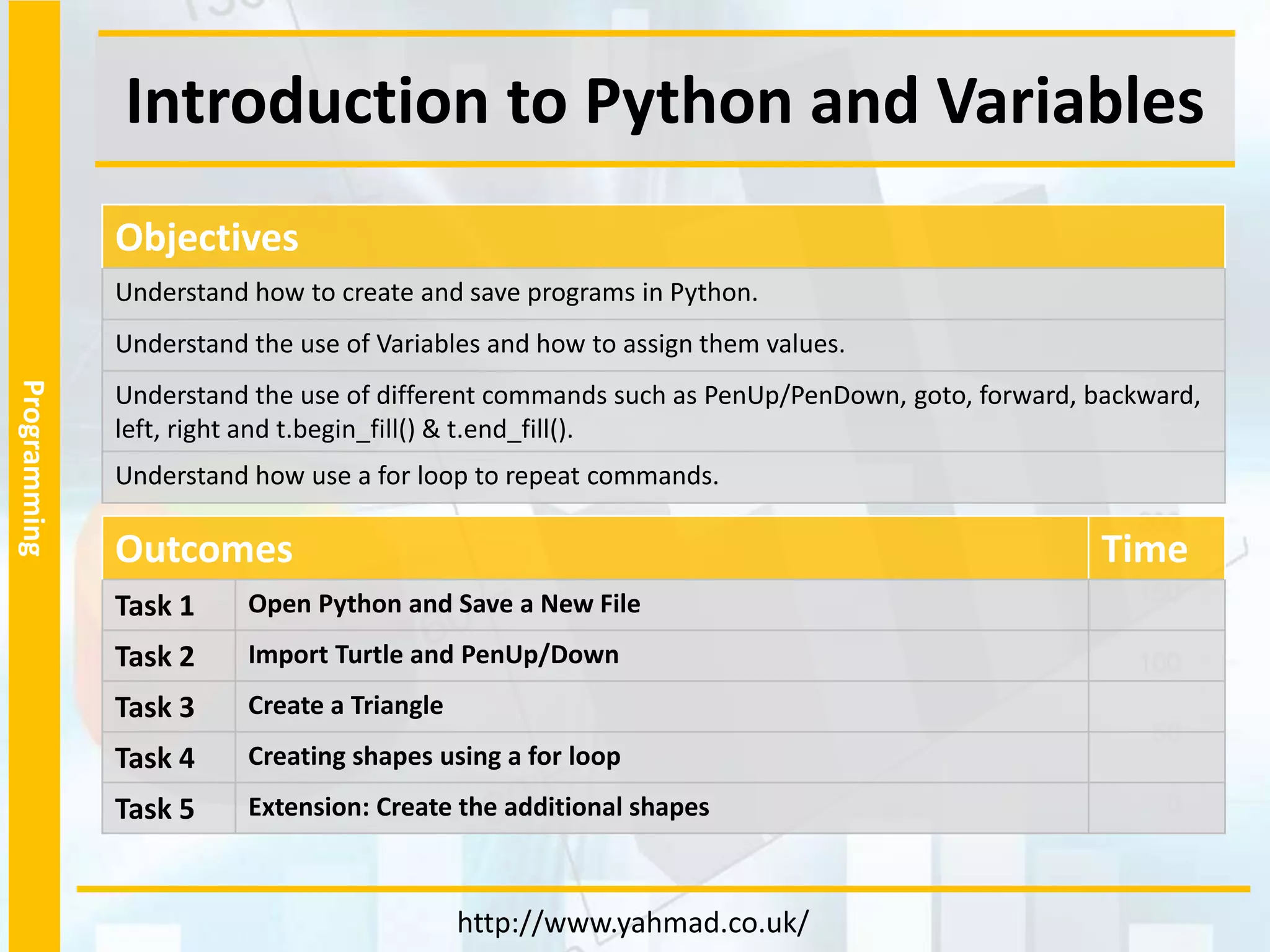
Understand how to create and save programs in Python.
Understand the use of Variables and how to assign them values.
Understand the use of different commands such as PenUp/PenDown, goto, forward, backward,
left, right and t.begin_fill() & t.end_fill().
Understand how use a for loop to repeat commands.
Outcomes Time
Task 1 Open Python and Save a New File
Task 2 Import Turtle and PenUp/Down
Task 3 Create a Triangle
Task 4 Creating shapes using a for loop
Task 5 Extension: Create the additional shapes
Programming
Task 1 – Open Python and Save a New File
1. Make a new
Python Folder
2. Open Python Idle.
3. Click on File >>
New
4. Save the program
into your Python
Folder
5. Run the Program
Run > Run Module
Programming
Task 2 – Import Turtle and PenUp/Down
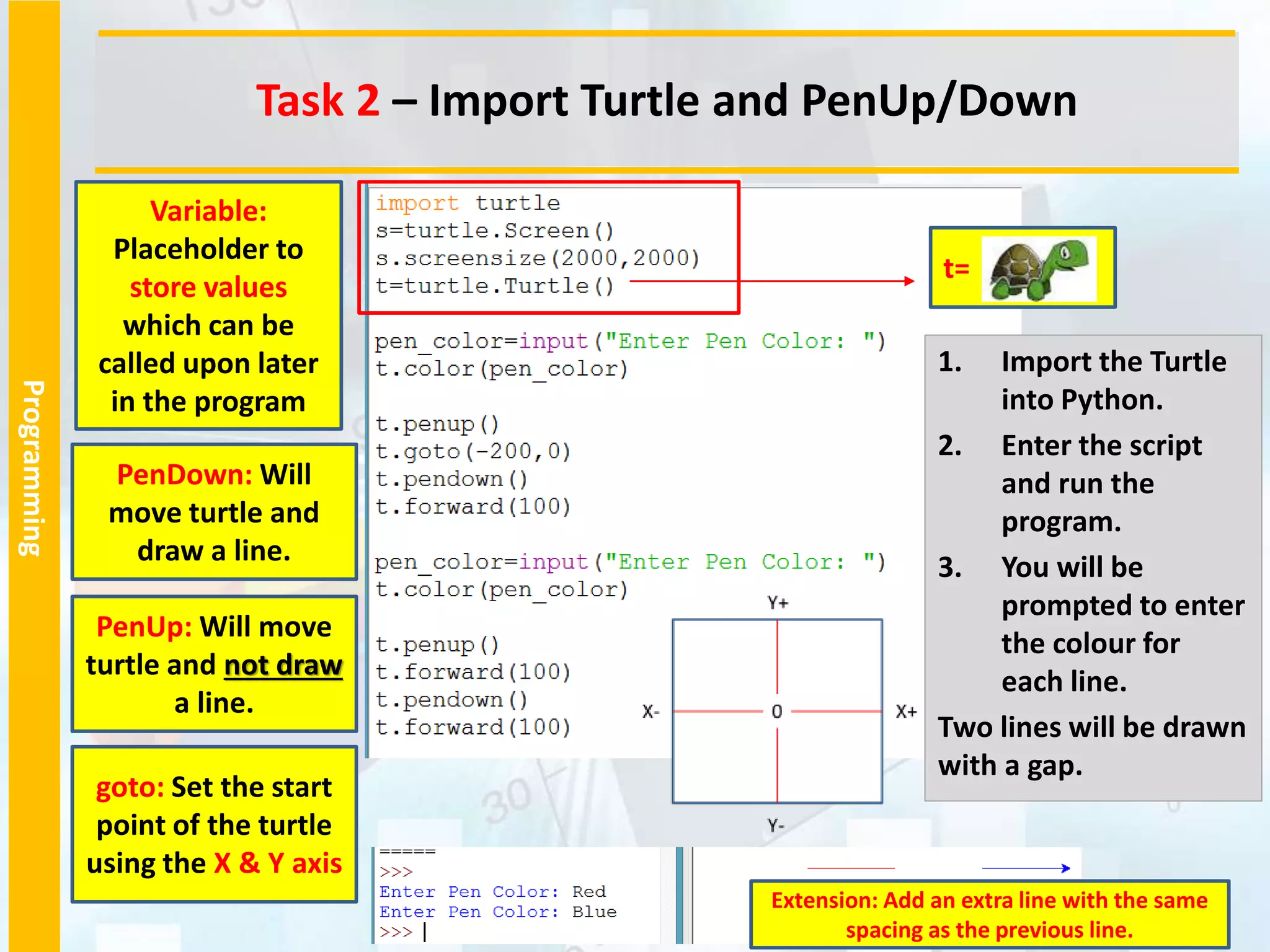
1. Import the Turtle
into Python.
2. Enter the script
and run the
program.
3. You will be
prompted to enter
the colour for
each line.
Two lines will be drawn
with a gap.
PenUp: Will move
turtle and not draw
a line.
goto: Set the start
point of the turtle
using the X & Y axis
PenDown: Will
move turtle and
draw a line.
Variable:
Placeholder to
store values
which can be
called upon later
in the program
t=
Extension: Add an extra line with the same
spacing as the previous line.
Programming
Task 2 – Create a Triangle
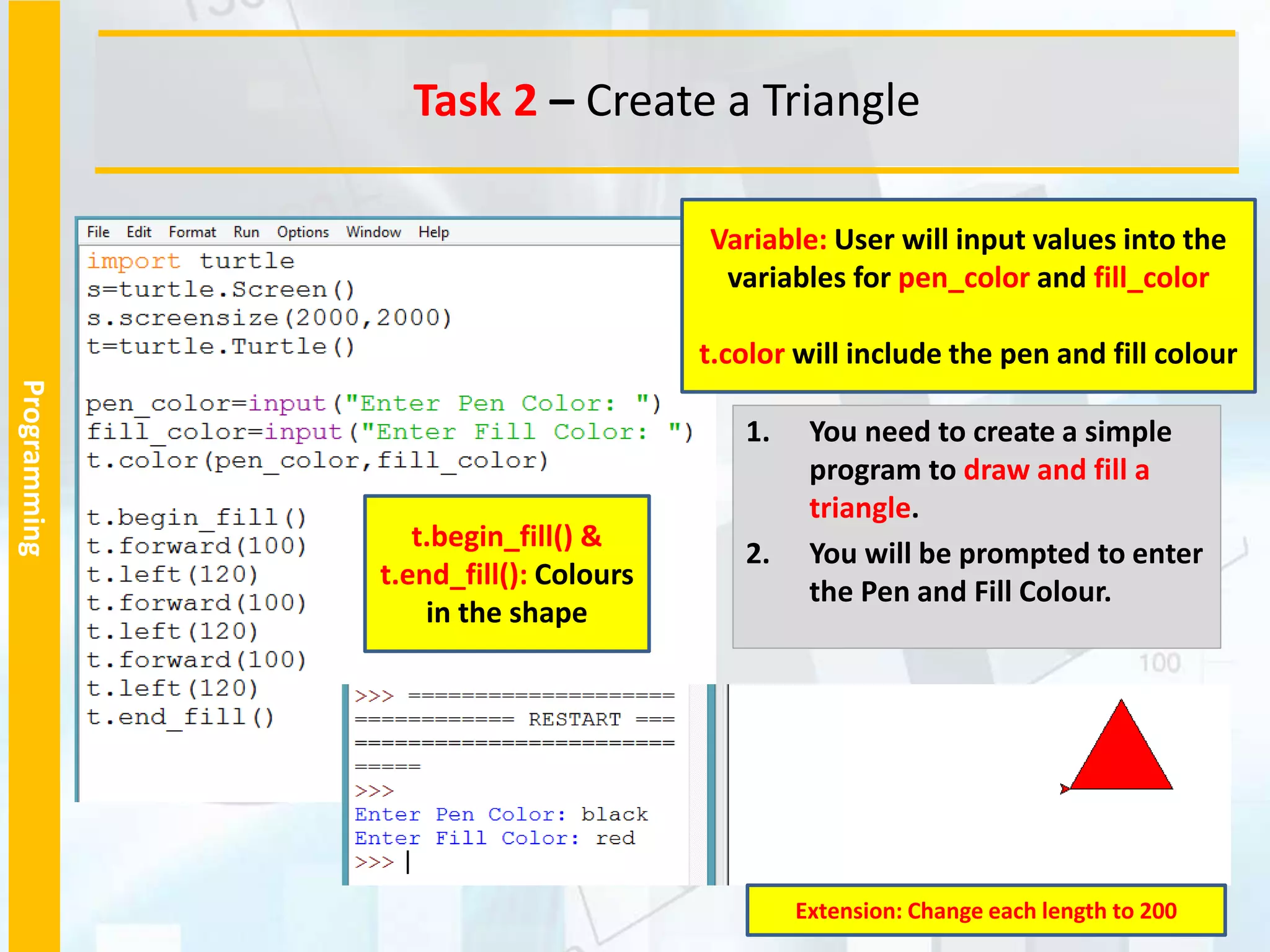
1. You need to create a simple
program to draw and fill a
triangle.
2. You will be prompted to enter
the Pen and Fill Colour.
t.begin_fill() &
t.end_fill(): Colours
in the shape
Variable: User will input values into the
variables for pen_color and fill_color
t.color will include the pen and fill colour
Extension: Change each length to 200
Programming
Task 2 – Create a Triangle
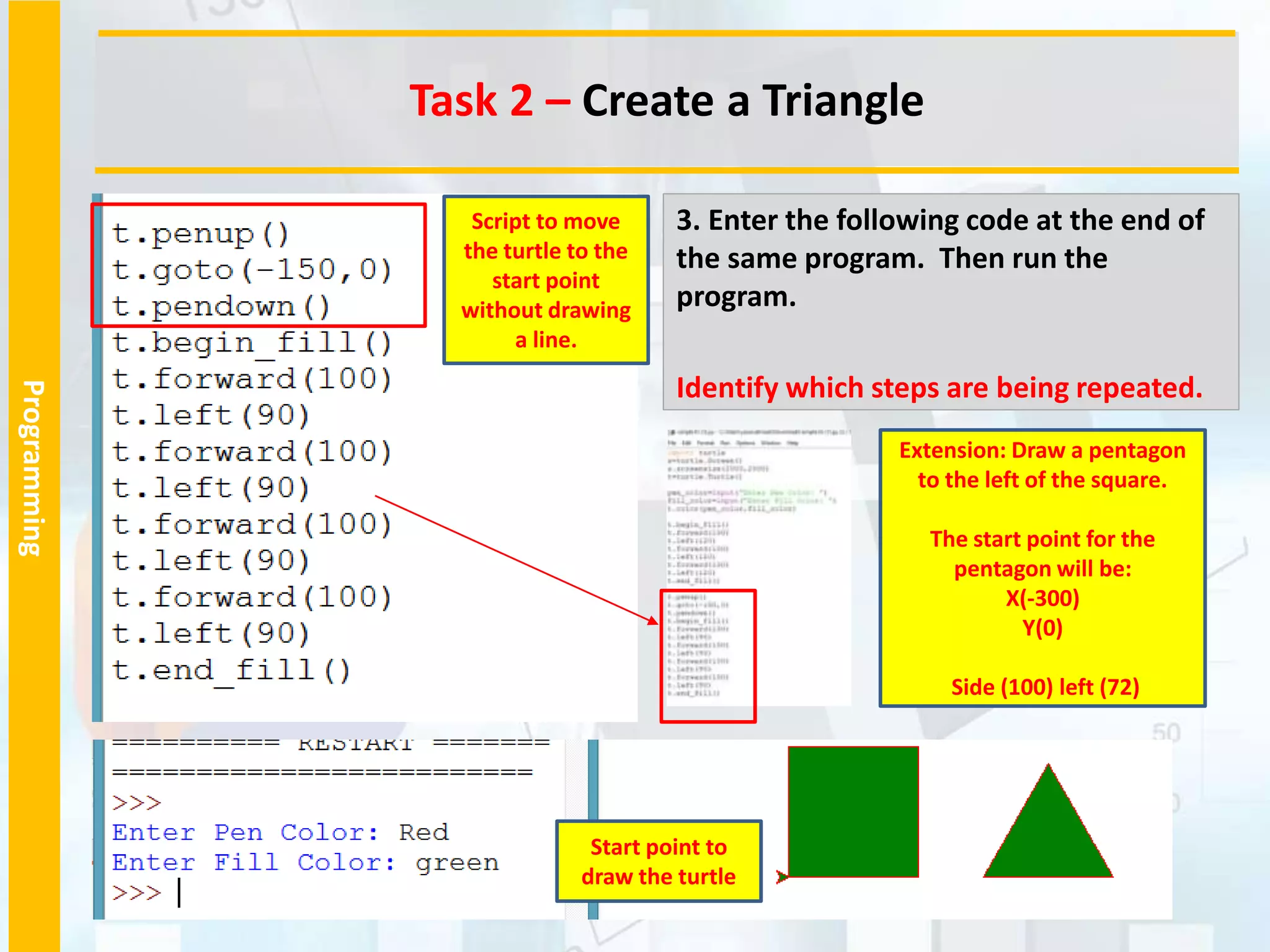
3. Enter the following code at the end of
the same program. Then run the
program.
Identify which steps are being repeated.
Start point to
draw the turtle
Script to move
the turtle to the
start point
without drawing
a line.
Extension: Draw a pentagon
to the left of the square.
The start point for the
pentagon will be:
X(-300)
Y(0)
Side (100) left (72)
Programming
Task 3 – Creating shapes using a for loop
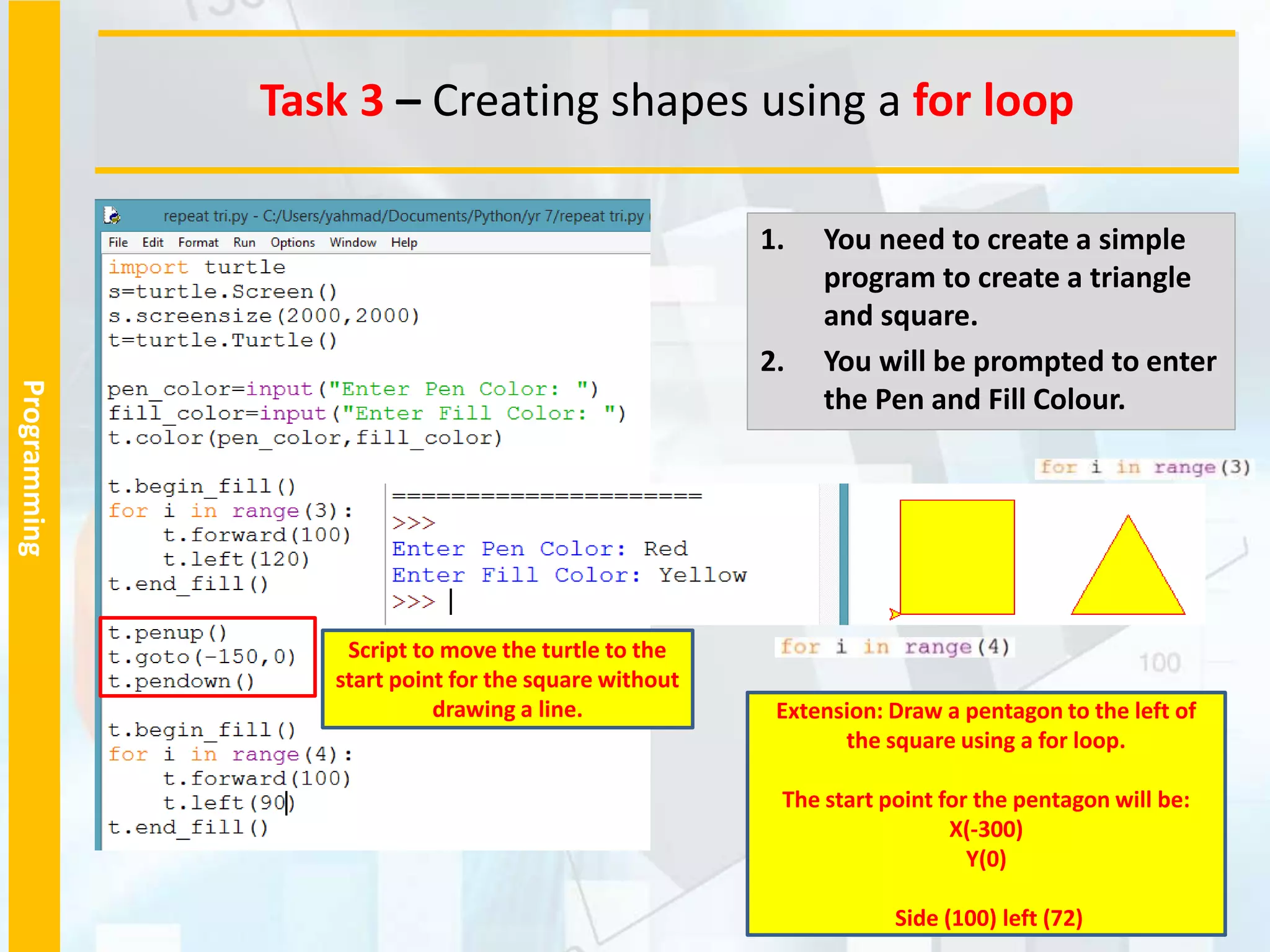
1. You need to create a simple
program to create a triangle
and square.
2. You will be prompted to enter
the Pen and Fill Colour.
Script to move the turtle to the
start point for the square without
drawing a line. Extension: Draw a pentagon to the left of
the square using a for loop.
The start point for the pentagon will be:
X(-300)
Y(0)
Side (100) left (72)
Programming
Task 4 – Create the following Shapes
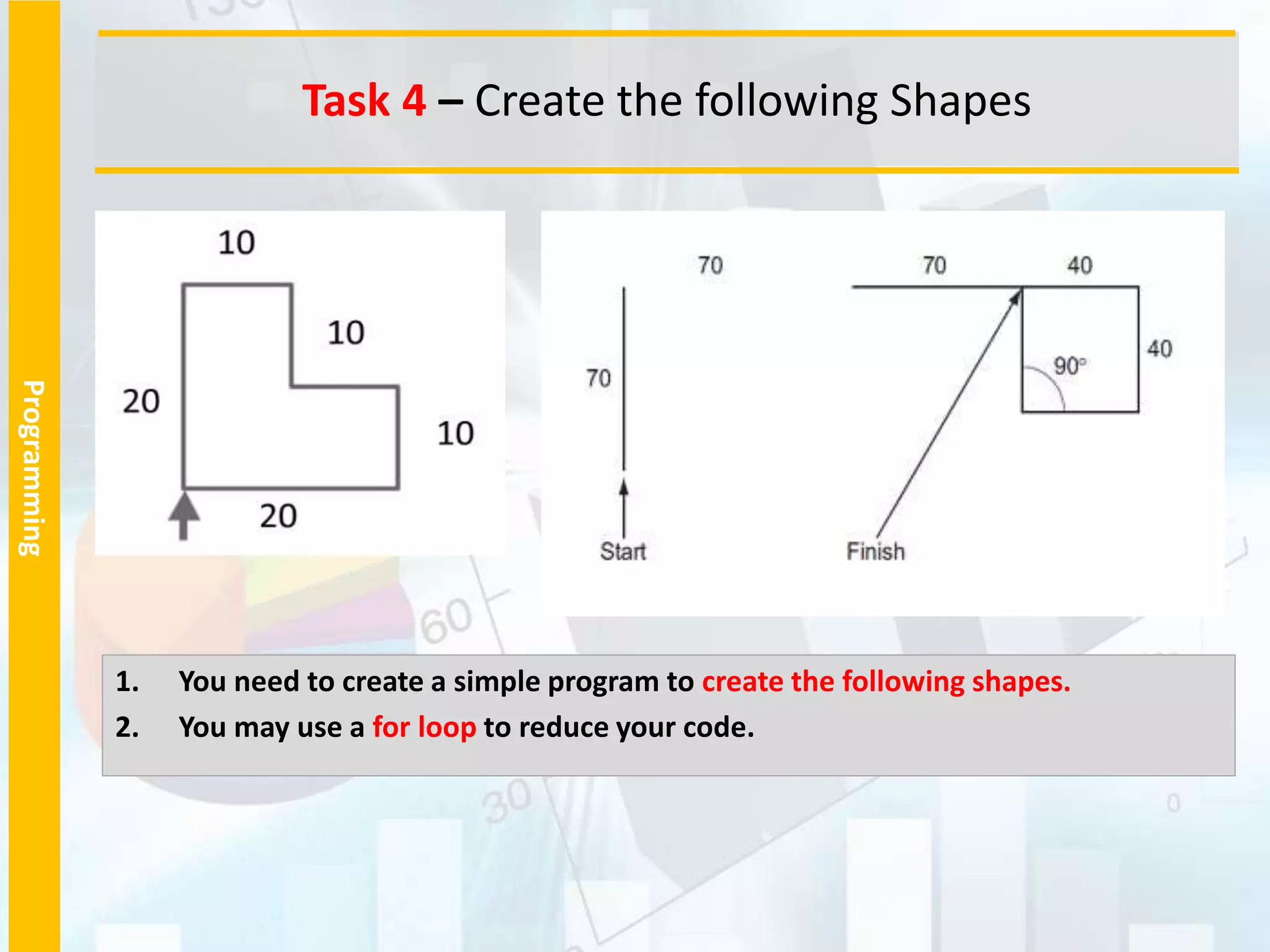
1. You need to create a simple program to create the following shapes.
2. You may use a for loop to reduce your code.
Programming
Task 4 – Create the following Shapes
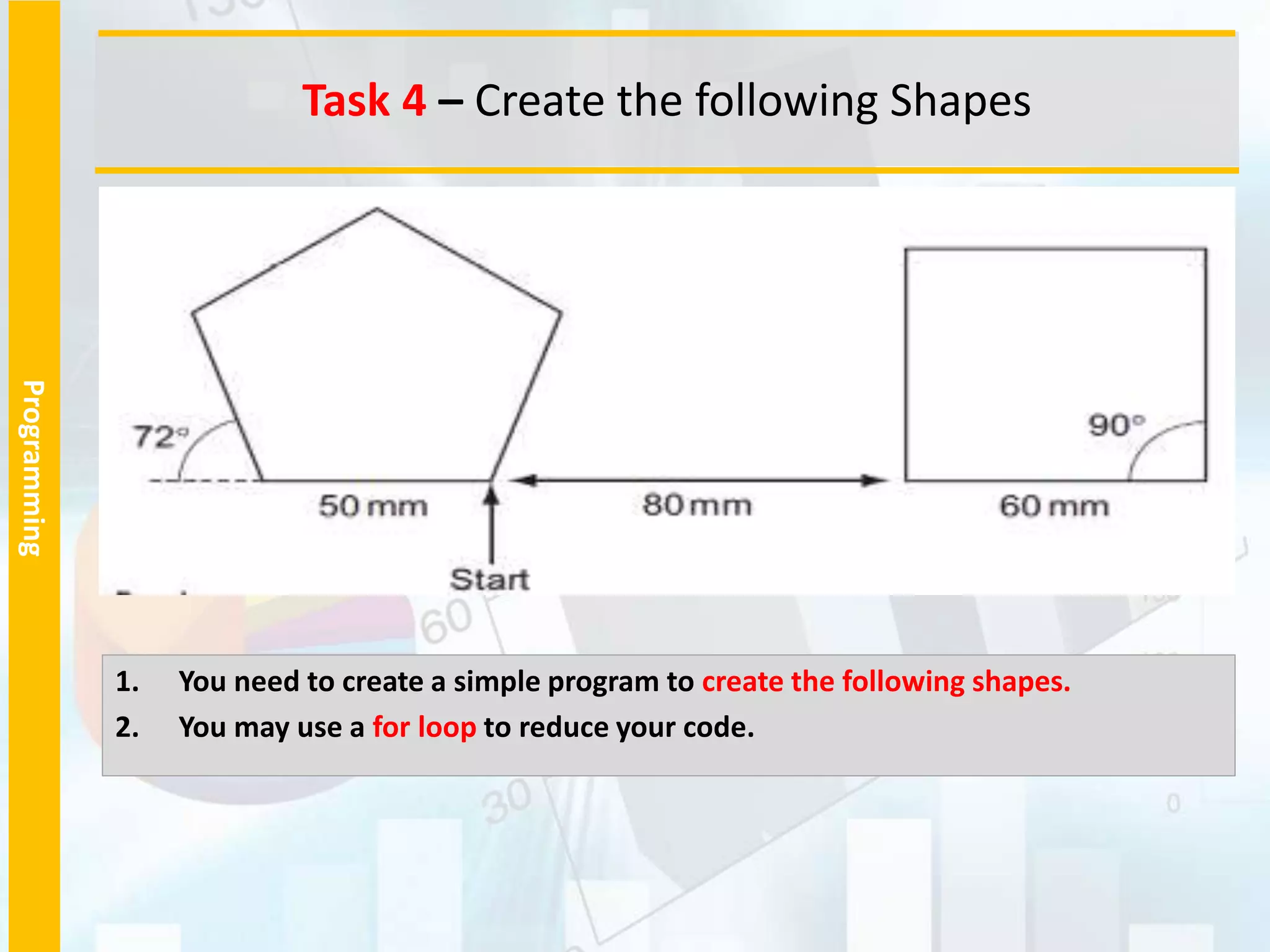
1. You need to create a simple program to create the following shapes.
2. You may use a for loop to reduce your code.
Programming
Plenary – Refer to the Lesson Objectives
http://www.yahmad.co.uk/
Plenary Task (Q&A)
Peer assess each other scripts.
Question: What is the purpose of variables?
Question: What are the different data types of commands you have used in this lesson.
Objectives
Understand how to create and save programs in Python.
Understand the use of Variables and how to assign them values.
Understand the use of different commands such as PenUp/PenDown, goto, forward, backward,
left, right and t.begin_fill() & t.end_fill().
Understand how use a for loop to repeat commands.

1. Python Turtle.pptx

  • 1.
  • 2.
    Programming Introduction to Pythonand Variables http://www.yahmad.co.uk/ Objectives Understand how to create and save programs in Python. Understand the use of Variables and how to assign them values. Understand the use of different commands such as PenUp/PenDown, goto, forward, backward, left, right and t.begin_fill() & t.end_fill(). Understand how use a for loop to repeat commands. Outcomes Time Task 1 Open Python and Save a New File Task 2 Import Turtle and PenUp/Down Task 3 Create a Triangle Task 4 Creating shapes using a for loop Task 5 Extension: Create the additional shapes
  • 3.
    Programming Task 1 –Open Python and Save a New File 1. Make a new Python Folder 2. Open Python Idle. 3. Click on File >> New 4. Save the program into your Python Folder 5. Run the Program Run > Run Module
  • 4.
    Programming Task 2 –Import Turtle and PenUp/Down 1. Import the Turtle into Python. 2. Enter the script and run the program. 3. You will be prompted to enter the colour for each line. Two lines will be drawn with a gap. PenUp: Will move turtle and not draw a line. goto: Set the start point of the turtle using the X & Y axis PenDown: Will move turtle and draw a line. Variable: Placeholder to store values which can be called upon later in the program t= Extension: Add an extra line with the same spacing as the previous line.
  • 5.
    Programming Task 2 –Create a Triangle 1. You need to create a simple program to draw and fill a triangle. 2. You will be prompted to enter the Pen and Fill Colour. t.begin_fill() & t.end_fill(): Colours in the shape Variable: User will input values into the variables for pen_color and fill_color t.color will include the pen and fill colour Extension: Change each length to 200
  • 6.
    Programming Task 2 –Create a Triangle 3. Enter the following code at the end of the same program. Then run the program. Identify which steps are being repeated. Start point to draw the turtle Script to move the turtle to the start point without drawing a line. Extension: Draw a pentagon to the left of the square. The start point for the pentagon will be: X(-300) Y(0) Side (100) left (72)
  • 7.
    Programming Task 3 –Creating shapes using a for loop 1. You need to create a simple program to create a triangle and square. 2. You will be prompted to enter the Pen and Fill Colour. Script to move the turtle to the start point for the square without drawing a line. Extension: Draw a pentagon to the left of the square using a for loop. The start point for the pentagon will be: X(-300) Y(0) Side (100) left (72)
  • 8.
    Programming Task 4 –Create the following Shapes 1. You need to create a simple program to create the following shapes. 2. You may use a for loop to reduce your code.
  • 9.
    Programming Task 4 –Create the following Shapes 1. You need to create a simple program to create the following shapes. 2. You may use a for loop to reduce your code.
  • 10.
    Programming Plenary – Referto the Lesson Objectives http://www.yahmad.co.uk/ Plenary Task (Q&A) Peer assess each other scripts. Question: What is the purpose of variables? Question: What are the different data types of commands you have used in this lesson. Objectives Understand how to create and save programs in Python. Understand the use of Variables and how to assign them values. Understand the use of different commands such as PenUp/PenDown, goto, forward, backward, left, right and t.begin_fill() & t.end_fill(). Understand how use a for loop to repeat commands.