UACE SUB-ICT 1:Introduction to Computing Slide 1
Subsidiary
ICT for
Uganda
Topic 1 of 15
INTRODUCTION
TO COMPUTING
2.
UACE SUB-ICT 1:Introduction to Computing Slide 2
Background
• The topic introduces the learner to computers, their use
and implications of using them in a variety of fields. It is
developed bearing in mind that most of the learners might
be encountering the subject for the first time. They need to
attain the background knowledge to the use of computer
systems across a number of fields. The topic lays a
foundation to the rest of the topics. It should be well
handled to give the learners a solid foundation in the
subject.
• Learning Outcome: The learner should be able to describe
the application of Information and Communication
Technologies (ICTs) in society.
3.
UACE SUB-ICT 1:Introduction to Computing Slide 3
Presentation Outline
UACE Sub – ICT Topic 1:
Introduction to Computing
• Sub Topic 1.1: Introduction to Computers
• Sub Topic 1.2: World of ICTs
• Sub Topic 1.3: Implications of Using ICTs
4.
UACE SUB-ICT 1:Introduction to Computing Slide 4
Sub Topic 1.1: Introduction to Computers
• Sub topic Objectives:
1.1.1 Describing a
computer.
1.1.2 Identifying different
parts of a computer and
their uses.
• 1.1.3 Making a
distinction between
information and data.
• 1.1.4 Describing the
information processing
cycle.
5.
UACE SUB-ICT 1:Introduction to Computing Slide 5
1.1.1 Describing a computer.
• A Computer is electronic device that receives data,
processes data, stores data, and produces a result
(output).
• A computer system is more than a box with
components; it encompasses four elements that make
the machine fully useful:
– Hardware
– Software
– Data
– Users
6.
UACE SUB-ICT 1:Introduction to Computing Slide 6
1.1.2 Parts / Components of a
Computer
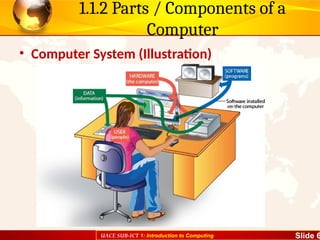
• Computer System (Illustration)
7.
UACE SUB-ICT 1:Introduction to Computing Slide 7
1.1.2 Parts / Components of a
Computer
• Computer Hardware
• This is a term used to describe all the various physical
devices of a computer.
• Computer hardware components are tangible (they
can be touched).
• Computer hardware includes.
– Input devices like the keyboard and mouse,
– Processing devices like the Microprocessor Chip,
– Storage devices like the Hard disks and the CDs,
– Output devices like the monitor and the printer.
8.
UACE SUB-ICT 1:Introduction to Computing Slide 8
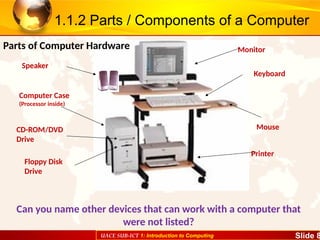
Monitor
Keyboard
Mouse
Printer
Speaker
Computer Case
(Processor inside)
Floppy Disk
Drive
CD-ROM/DVD
Drive
1.1.2 Parts / Components of a Computer
Can you name other devices that can work with a computer that
were not listed?
Parts of Computer Hardware
9.
UACE SUB-ICT 1:Introduction to Computing Slide 9
1.1.2 Parts / Components of a Computer
• Computer Software
• Software is a term for electronic
instructions that tell the
computer how to perform a
task.
• These are a series of programs
(instructions) that tell the
computer what and how to
work.
• Computer software can be
grouped into System software
and Application software.
• System software like the
Operating system (such as
Windows, Linux, UNIX, DOS,
Mac Os etc.) are used to
manage and coordinate all the
computer resources and
activities.
• Application software (such as
Games, Calculator and Media
Player, Word Processors, etc.)
solve the specific or exact
needs of the user.
10.
UACE SUB-ICT 1:Introduction to Computing Slide 10
1.1.2 Parts / Components of a Computer
• Computer Users
• Computer Users
(Humanware) refers to
the people who operate
and initialize
instructions to the
computer system.
• They design and
develop computer
systems, operate the
computer hardware,
create the software, and
establish procedures for
carrying out tasks.
• There are two kinds of Computer Users:
• Ordinary user - is someone without
much technical knowledge of computers
but uses computers to produce
information for professional or personal
tasks, enhance learning, or have fun.
Ordinary users include Computer
students, Typists (Secretaries), etc.
• Professional user -is a person in a
profession involving computers who has
had formal education in the technical
aspects of computers; Examples include
Computer programmers, webmasters,
etc.
11.
UACE SUB-ICT 1:Introduction to Computing Slide 11
1.1.3 Computer Data and Information
• Data refers to raw facts and figures used to create
information
• This is entered into the computer by the user via
input devices, in a form suitable for processing.
• Data may consist of characters, symbols, sounds
and graphics, videos etc.
12.
UACE SUB-ICT 1:Introduction to Computing Slide 12
1.1.3 Computer Data and Information
• Computer Information refers to the processed data
that makes meaning and is useful.
• For example the figure 10082006 may be input as
data, but once this same figure is converted to the
format 10/08/2006, you realize that it’s a date.
• Computer Information is organized into files, which
are collections of data grouped together and given a
name
• A file that a user can open and use is often called a
document.
13.
UACE SUB-ICT 1:Introduction to Computing Slide 13
1.1.4 The Information Processing Cycle
• The information processing cycle is a series of steps the
computer follows to receive data:
• Input: The computer accepts data from some source
• Processing: The computer's processing components perform
actions on or with the data
• Output: The computer provides the results of its processing
• Storage: The computer stores the results of its processing.
• Looking at the parts of the computer that we looked at, in what
stage do you think each computer part would be listed under?
14.
UACE SUB-ICT 1:Introduction to Computing Slide 14
Sub Topic 1.2: World of ICTs
Sub topic Objectives:
1.2.1 Explaining the
meaning of ICTs.
1.2.2 Justifying the use
of ICTs in society in..
- business
- education
- health
- security
- politics and governance
- art, leisure and
entertainment
- industrial, technical and
scientific uses
1.2.3 Searching the
Internet.
15.
UACE SUB-ICT 1:Introduction to Computing Slide 15
1.2.1 The meaning of ICTs
• The term Information and communication
Technology (ICT) combines three items i.e.
[information, communication, and technology]
• Communication in this regard refers to the
electronic transfer of data from one point to
another.
• Technology refers to the technique and way of
doing something.
• What is Information? We shall define this
ahead…
16.
UACE SUB-ICT 1:Introduction to Computing Slide 16
1.2.1 The meaning of ICTs
• GENERAL DEFINITON: Information and Communication
Technology (ICT) refers to the broad range of hardware,
software, network infrastructure and media that enable
the processing, storage and sharing of information
among humans and computers, locally and globally”
• ICT devices range from radio, television, cellular phones,
compact disks, Fax machines, computers, biometric
devices, internet and network hardware and software
platforms, satellite systems and so on. It involves to all
means which facilitate information or data capture
processing storage and output.
17.
UACE SUB-ICT 1:Introduction to Computing Slide 17
1.2.2 The use of ICTs in society
• Today people use ICTs in almost
every walk of life.
• However, along with these
advancements of science there
arises the dilemma of
development of technology as it
affects human individuals.
• They have come with both
positive and negative impacts to
our society.
• Computers are applied in the
areas of
• 1) Education,
• 2) Business,
• 3) Health,
• 4) security,
• 5) Politics, E.t.c
• 6) Communication,
• 7) Entertainment / leisure,
• 8) Technical and scientific uses
18.
UACE SUB-ICT 1:Introduction to Computing Slide 18
1.2.2 The use of ICTs in society
• In education, we use Computer Assisted Instruction (CAI),
Computer Aided Learning (CAL) and Computer Aided
Assessment (CAA)
• Schools use computers to create school websites for
sharing information with the public.
• Productivity tools like desktop publishing and presentation
software are used in projects and other school activities.
• Computers are used for calculating mathematical
arithmetic by students and teachers in class.
• Students’ Report Cards can be produced electronically by
use of computers instead of hand written ones.
Uses Of ICTs In the Area of Education
19.
UACE SUB-ICT 1:Introduction to Computing Slide 19
1.2.2 The use of ICTs in society
• With Use of School Administration and Management Systems.
(SAMS) Records management is made easier because all details
of learners can be held on computer, and easily retrieved,
reducing administrative costs.
• Distance learning through computer based training. People get
award such as degrees without going to class.
• Teachers use simulation software to perform difficult or
dangerous experiments in class.
• Use of special facilities for students with disabilities like text to
speech and speech recognition to help blind students.
Uses Of ICTs In the Area of Education
20.
UACE SUB-ICT 1:Introduction to Computing Slide 20
1.2.2 The use of ICTs in society
• Computers enable people to Working from home, using a
computer connected to the employer's network or via the
Internet. This is known as Telecommuting.
• Computers have created more jobs such as Computer
technicians, Computer teachers, etc.
• Buying and selling Computers and its components is a
source of income to individuals, and companies.
• Through, Computer Aided Design (CAD), scale drawings,
and excellent designs can be created easily.
• Computers are used for sending and receiving Mobile
Money and making world wide money transfers.
Uses Of ICTs In the Area of Business
21.
UACE SUB-ICT 1:Introduction to Computing Slide 21
1.2.2 The use of ICTs in society
• Banks use Computers to manage transactions and
Automatic Teller Machines ATMs for 24 hours banking.
• Computers help in Business Advertisement through
creating websites, internet, flyers, brochures and billboards.
• Computers are used in typesetting business for production
of document printouts and publication of Books for sale.
• Computers are used for E-Commerce: the sale of goods and
services over the internet.
Uses Of ICTs In the Area of Business
22.
UACE SUB-ICT 1:Introduction to Computing Slide 22
1.2.2 The use of ICTs in society
• Hospitals use computers for
managing and storing Records
electronically, rather than paper
files.
• Hospital Administration is also
aided by printing labels,
allocating beds, make
appointments, staff rotas, etc.
• Internet helps us get Web sites
for information on health care,
treatments, conditions, etc.
• Monitoring/Diagnosis such as
Heart rate, blood pressure, etc.
is aided by Computer Expert
systems.
• Medical Training is facilitated by
Simulation software and on-line
data sources.
Uses Of ICTs In the Area of Health
23.
UACE SUB-ICT 1:Introduction to Computing Slide 23
1.2.2 The use of ICTs in society
• Computers aid monitoring
security through cameras,
Automatic number plate
recognition, etc.
• Communication systems are
widely used in the military to
coordinate the personnel.
• Some computer systems can
detect temperatures and alarm
in case of danger of fire
outbreaks.
• Computers are used for
capturing data for Police
National Computer Databases
–, vehicle number plates,
criminals fingerprints, etc.
• Computers are used to detect
presence of illegal devices such
as bombs.
• Computers are also used for
controlling dangerous weapons
such as missiles.
Uses Of ICTs In the Area of Security
24.
UACE SUB-ICT 1:Introduction to Computing Slide 24
1.2.2 The use of ICTs in society
• Paying government tax online
through a government website
• Online forms such as vehicle
registration and passport forms
• Advertising government tenders
and Applying for government
tenders
• Public records - A maintained
database of statistical
information such as electoral
register and census data can be
availed online.
• Use of electronic voting during
elections
• Government departments can
use a computer based platform
to get feedback from the
citizens.
Uses Of ICTs In the Area of Politics
25.
UACE SUB-ICT 1:Introduction to Computing Slide 25
1.2.2 The use of ICTs in society
• E-mail: Electronic Mail
sent from one person
to another using
connected computers
helps a lot in the area
of communication.
• Video Conferencing
enables people in
different locations to
conduct meeting as if
they are in the same
location.
• Computers are used for Faxing:
Sending an image of a document
electronically.
• Computers enable people to send
voice, image, text and data though
telephones and mobile cell phones.
• Social Networks such as Facebook,
and Twitter enable people to stay in
touch with their relatives, friends and
interests.
Uses of ICTs In the Area of Communication
26.
UACE SUB-ICT 1:Introduction to Computing Slide 26
1.2.2 The use of ICTs in society
• In Astronomy, Computers
are essential tools to
study the behavior of the
complex systems in space
as regards to their
movements, interactions
etc.
• Through Computer Aided
Manufacture (CAM),
computers can be used to
control the production of
goods in factories.
• Computers perform Telescope pointing and
tracking (including error correction),
Camera operation, image download and
storage, Image reduction (the measurement
of the image), and Data processing.
• Monitoring highway traffic
• Computers are used to tell schedules of
water vessels, train, buses to their
respective stations. You only need to use
your PDA device or cello phone and check it
out.
• Computers are used very extensively in
design of roads. Roadways and bridges are
designed using software programs like CAD
etc.
Technical and Scientific Uses of ICTs
27.
UACE SUB-ICT 1:Introduction to Computing Slide 27
1.2.3 Searching the Internet
• The internet is a
global connection of
computer networks.
• The internet
connects together
billions of computers
and other ICT
devices, to exchange
and share
information all over
the world.
• To find the information
that we want, we search
or ‘browse’ or ‘surf’ the
World Wide Web (WWW).
• The WWW is a service on
the Internet that consists
of Websites, containing
hyperlinked electronic
documents (webpages)
with different kinds of
information.
28.
UACE SUB-ICT 1:Introduction to Computing Slide 28
1.2.3 Searching the Internet
• You can open a Web page by
entering a Web address in
the Address bar of a web
browser.
• A URL (Uniform Resource
Locator) is another term for
Web address. Web addresses
uniquely identify websites on
the www, for example
http://www.newvision.co.ug
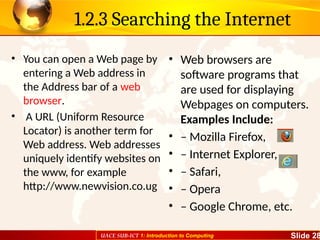
• Web browsers are
software programs that
are used for displaying
Webpages on computers.
Examples Include:
• – Mozilla Firefox,
• – Internet Explorer,
• – Safari,
• – Opera
• – Google Chrome, etc.
29.
UACE SUB-ICT 1:Introduction to Computing Slide 29
1.2.3 Searching the Internet
• If you don’t know the URL
of the website you want to
visit, you can use a web
search engine
• Search Engines are
Software programs or
systems that look through
the www to locate sites
matching a keyword
entered by the user.
• Keyword: A string of
letters or words that
indicates the subject to be
searched.
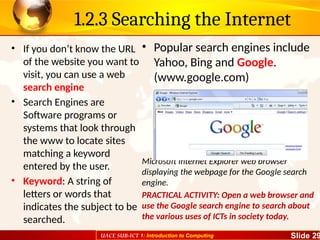
• Popular search engines include
Yahoo, Bing and Google.
(www.google.com)
Microsoft Internet Explorer web browser
displaying the webpage for the Google search
engine.
PRACTICAL ACTIVITY: Open a web browser and
use the Google search engine to search about
the various uses of ICTs in society today.
30.
UACE SUB-ICT 1:Introduction to Computing Slide 30
Sub Topic 1.3 Implications of Using ICTs
• Sub Topic Objectives:
• Discussing the implications
of using ICTs.
– social / ethical
– economic
– political
– environmental (Green
Computing)
– security, reliability and
resilience of computer
systems
• 1.3.1 Positive Implications of
Using Computers to Society
• 1.3.2 Negative Implications of
Using Computers to Society
• 1.3.3 Health concerns of
computer use
• 1.3.4 Green Computing
• 1.3.5 Security, reliability and
resilience of computer
systems
31.
UACE SUB-ICT 1:Introduction to Computing Slide 31
1.3.1 Positive Implications of Using
Computers to Society
• Computers have Created and widened employment
opportunities e.g.; software engineers, computer teachers,
technicians, etc.
• Improved education and research by simplifying teaching and
learning. E.g. abstract content can be made real through cyber
science technology – others are computer aided teaching and
computer aided learning, presentations software, etc.
• Improved entertainment and leisure through computer games,
music, etc for people to refresh and make-up.
• Improved communication and collaboration through computer
networks. Improved health services where computers facilitate
recording, monitoring, and diagnosis for patients.
32.
UACE SUB-ICT 1:Introduction to Computing Slide 32
1.3.1 Positive Implications of Using
Computers to Society
• Improved security through computer managed gates and
monitoring of commercial and domestic premises, detecting
and controlling crime by police.
• Reduced production time and manufacturing processes
through computer aided manufacturing and computer aided
designing which have greatly improved the quantity and
quality of life.
• Improved customer services delivery and care eg networked
computers provide 24/7 on-line services like credit cards
Improved business and investment opportunities.
• Improved data and document production, storage and
manipulation.
33.
UACE SUB-ICT 1:Introduction to Computing Slide 33
1.3.2 Negative Implications of Using
Computers to Society
• Computer related crime e.g. forgeries, cyberbullying, Piracy etc.
• Increased cost of production as computers are very expensive to buy
and maintain. Computer experts can as well be expensive to hire.
• They are many health hazards e.g. can cause eye defects, Tendonitis,
RSI, etc.
• Electronic fraud: Stealing money electronically through practices like
Credit card cloning and illegal money transfers.
• Impact on Environment: Computer manufacturing processes and
computer waste are depleting natural resources and polluting the
environment.
• Hacking: Unauthorized access into computers possibly to access
information, compromising privacy. e.g. Wikileaks
• Virus threats which has made data storage and safety very unreliable.
34.
UACE SUB-ICT 1:Introduction to Computing Slide 34
1.3.2 Negative Implications of Using
Computers to Society
• Loss of employment as they take over job assignments for semi
and less skilled job functions.
• Deaths and accidents due to computer malfunctioning or
explosion.
• Erosion of human integrity and creativity as even the smallest
calculation is assigned to the computer. Other cases are
Forgeries, GMFs, test tube children, etc.
• Loss of man-hours as some workers go for unproductive
computer based leisure at the expense of their work. Cyber
terrorism.
• Moral Decay: The internet has websites with content such as
pornography, which have a bad impact on the users especially
the young children.
35.
UACE SUB-ICT 1:Introduction to Computing Slide 35
1.3.3 Health concerns of computer use
• The widespread use of computers has led to some important user
health concerns:
• People who spend their workday using the computer sometimes
complain of lower back pain, muscle fatigue, and emotional
fatigue.
• A repetitive strain injury (RSI) is an injury or disorder of the
muscles, nerves, tendons, ligaments, and joints. Computer-
related RSIs include tendonitis and carpal tunnel syndrome.
• Tendonitis is inflammation of a tendon due to some repeated
motion or stress on that tendon.
• Carpal tunnel syndrome (CTS) is inflammation of the nerve that
connects the forearm to the palm of the wrist. Symptoms of CTS
include burning pain when the nerve is compressed, along with
numbness and tingling in the thumb and first two fingers.
36.
UACE SUB-ICT 1:Introduction to Computing Slide 36
1.3.3 Health concerns of computer use
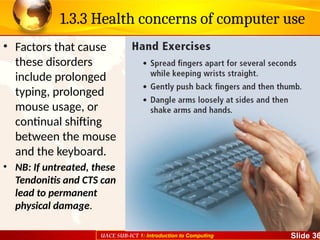
• Factors that cause
these disorders
include prolonged
typing, prolonged
mouse usage, or
continual shifting
between the mouse
and the keyboard.
• NB: If untreated, these
Tendonitis and CTS can
lead to permanent
physical damage.
37.
UACE SUB-ICT 1:Introduction to Computing Slide 37
1.3.3 Health concerns of computer use
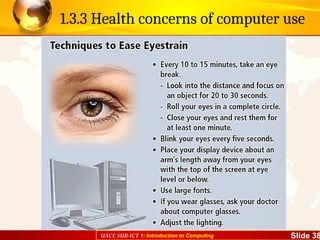
• Eye strain and CVS:
• Another type of health-related condition due to
computer usage is computer vision syndrome (CVS).
– You may have CVS if you have sore, tired, burning,
itching, or dry eyes; blurred or double vision; distance
blurred vision after prolonged staring at a display
device; headache or sore neck; difficulty shifting
focus between a display device and documents;
difficulty focusing on the screen image; color fringes
or after-images when you look away from the display
device; and increased sensitivity to light.
38.
UACE SUB-ICT 1:Introduction to Computing Slide 38
1.3.3 Health concerns of computer use
39.
UACE SUB-ICT 1:Introduction to Computing Slide 39
1.3.3 Health concerns of computer use
Computer Addiction
• Computers can provide
entertainment and enjoyment.
Some computer users, however,
become obsessed with the
computer and the Internet.
Computer addiction occurs
when the computer consumes
someone’s entire social life.
Computer addiction is a growing
health problem but can be
treated through therapy and
support groups.
Symptoms of a user with
computer addiction include the
following:
• Craves computer time
• Irritable when not at the
computer
• Overjoyed when at the
computer
• Unable to stop computer
activity
• Neglects family and friends
• Problems at work or school
40.
UACE SUB-ICT 1:Introduction to Computing Slide 40
1.3.3 Health concerns of computer use
• Ergonomics is an applied science devoted to
incorporating comfort, efficiency, and safety into
the design of items in the workplace.
• Ergonomic studies have shown that using the
correct type and configuration of chair, keyboard,
display device, and work surface helps users work
comfortably and efficiently and helps protect their
health.
Ergonomics and Workplace Design
41.
UACE SUB-ICT 1:Introduction to Computing Slide 41
1.3.3 Health concerns of computer use
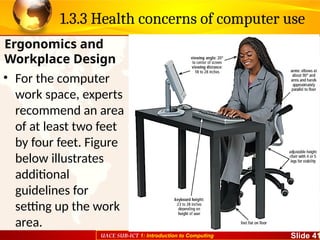
• For the computer
work space, experts
recommend an area
of at least two feet
by four feet. Figure
below illustrates
additional
guidelines for
setting up the work
area.
Ergonomics and
Workplace Design
42.
UACE SUB-ICT 1:Introduction to Computing Slide 42
1.3.4 Green Computing
• Green computing involves reducing the electricity and environmental
waste while using a computer. People use, and often waste, resources
such as electricity and paper while using a computer.
• The United States government developed the ENERGY STAR program
to help reduce the amount of electricity used by computers and
related devices. This program encourages manufacturers to create
energy-efficient devices that require little power when they are not in
use. Computers and devices that meet the ENERGY STAR guidelines
display an ENERGY STAR label.
• Computers, monitors, and other equipment contain toxic materials
and potentially dangerous elements including lead, mercury, and
flame retardants. In a landfill, these materials release into the
environment. Recycling and refurbishing old equipment are much
safer alternatives for the environment.
43.
UACE SUB-ICT 1:Introduction to Computing Slide 43
1.3.4 Green Computing
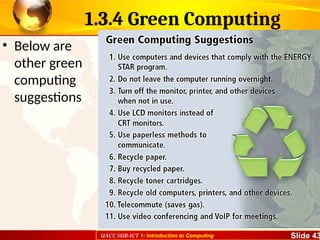
• Below are
other green
computing
suggestions
44.
UACE SUB-ICT 1:Introduction to Computing Slide 44
1.3.5 Security, reliability and resilience of
computer systems
• Resilience is the fast recovery from a degraded system state.
Computer networking community defines it as the combination of
tolerance and trustworthiness (dependability, security, performance
and survivability) of computer systems.
• The electronic components in modern computers are dependable
and reliable because they rarely break or fail.
• Organizations today often have a chief security officer (CSO) who is
responsible for the physical security of an organization’s property and
people and also is in charge of securing its computing resources. It is
critical that the CSO is included in all system development projects to
ensure that all projects adequately address information security.
• The CSO uses many of the techniques to maintain confidentiality or
limited access to information, ensure integrity and reliability of
systems and ensure uninterrupted availability of systems.
Editor's Notes
#1 Guidance to the Teacher
You are advised to introduce the topic using real parts of a computer where possible. In the event that such objects cannot be obtained, use
their images which are readily available online.
The implications of using ICTs should clearly look at the advantages and disadvantages of using ICTs in each of the areas that have been
highlighted in the table above.
Use of ICTs in business should focus on banking, mobile money transfers and Electronic Funds Transfer (EFT).
You are encouraged to organise learners in groups to make presentations on the implications of ICT in society.
Suggested Competences for Assessment
Assess the learners’ ability to distinguish the different parts of a computer and other ICT devices and their uses.
Discuss the implication of using ICT in a variety of fields.
![UACE SUB-ICT 1: Introduction to Computing Slide 15
1.2.1 The meaning of ICTs
• The term Information and communication
Technology (ICT) combines three items i.e.
[information, communication, and technology]
• Communication in this regard refers to the
electronic transfer of data from one point to
another.
• Technology refers to the technique and way of
doing something.
• What is Information? We shall define this
ahead…](https://image.slidesharecdn.com/1introductiontocomputing-250920010732-143b4998/85/1-Introduction-to-Computing-of-technology-15-320.jpg)