Ministry Of Higher Education
Kandahar University
Computer Science Faculty
Web Development
Web Front-End Development
Lecture: 03
Lecturer: Sayed Shah Agha Hakimi
1
2
Contents:
• What Is Front-End Development
• Objectives
• Introduction To HTML
• HTML Tags
• HTML Page Structure
• HTML Versions
• Code Writer for HTML
• HTML Elements
2
What Is Front-End Development
Front-end web development, also known as client-side development
is the practice of producing HTML, CSS and JavaScript for a website
or Web Application so that a user can see and interact with them
directly.
3
What Is Front-End Development
The challenge associated with front end development is that the
tools and techniques used to create the front end of a website
change constantly and so the developer needs to constantly be
aware of how the field is developing.
4
Objectives
The objective of designing a site is to ensure that when the users
open up the site they see the information in a format that is easy to
read and relevant.
5
Introduction To HTML
Hypertext Markup Language is the standard markup language for
documents designed to be displayed in a web browser. It can be
assisted by technologies such as Cascading Style Sheets and
scripting languages such as JavaScript.
6
What is HTML?
• HTML stands for Hyper Text Markup Language
• HTML describes the structure of a Web page
• HTML consists of a series of elements
• HTML elements tell the browser how to display the content
• HTML elements are represented by tags
• HTML tags label pieces of content such as "heading",
"paragraph", "table", and so on
• Browsers do not display the HTML tags, but use them to render
the content of the page
7
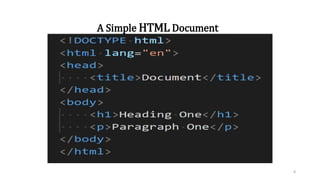
A Simple HTML Document
8
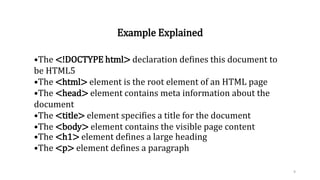
Example Explained
•The <!DOCTYPE html> declaration defines this document to
be HTML5
•The <html> element is the root element of an HTML page
•The <head> element contains meta information about the
document
•The <title> element specifies a title for the document
•The <body> element contains the visible page content
•The <h1> element defines a large heading
•The <p> element defines a paragraph
9
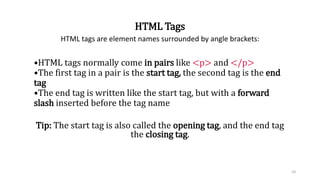
HTML Tags
HTML tags are element names surrounded by angle brackets:
•HTML tags normally come in pairs like <p> and </p>
•The first tag in a pair is the start tag, the second tag is the end
tag
•The end tag is written like the start tag, but with a forward
slash inserted before the tag name
Tip: The start tag is also called the opening tag, and the end tag
the closing tag.
10
Web Browsers
The purpose of a web browser (Chrome, Edge, Firefox, Safari)
is to read HTML documents and display them.
The browser does not display the HTML tags, but uses them to
determine how to display the document.
11
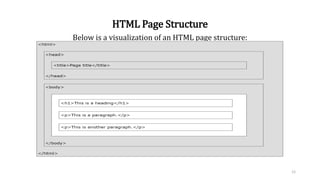
HTML Page Structure
Below is a visualization of an HTML page structure:
12
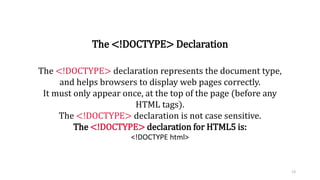
The <!DOCTYPE> Declaration
The <!DOCTYPE> declaration represents the document type,
and helps browsers to display web pages correctly.
It must only appear once, at the top of the page (before any
HTML tags).
The <!DOCTYPE> declaration is not case sensitive.
The <!DOCTYPE> declaration for HTML5 is:
<!DOCTYPE html>
13
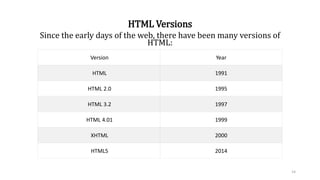
HTML Versions
Since the early days of the web, there have been many versions of
HTML:
Version Year
HTML 1991
HTML 2.0 1995
HTML 3.2 1997
HTML 4.01 1999
XHTML 2000
HTML5 2014
14
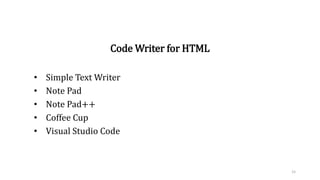
Code Writer for HTML
• Simple Text Writer
• Note Pad
• Note Pad++
• Coffee Cup
• Visual Studio Code
15
HTML Documents
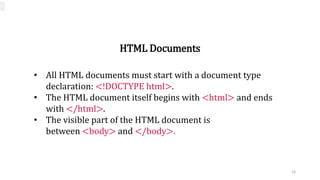
• All HTML documents must start with a document type
declaration: <!DOCTYPE html>.
• The HTML document itself begins with <html> and ends
with </html>.
• The visible part of the HTML document is
between <body> and </body>.
16
HTML Elements
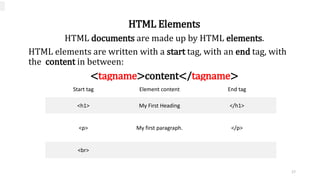
HTML documents are made up by HTML elements.
HTML elements are written with a start tag, with an end tag, with
the content in between:
<tagname>content</tagname>
Start tag Element content End tag
<h1> My First Heading </h1>
<p> My first paragraph. </p>
<br>
17
Empty Tags!
Self Closing Tags!
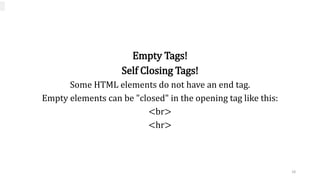
Some HTML elements do not have an end tag.
Empty elements can be "closed" in the opening tag like this:
<br>
<hr>
18
Nested HTML Elements
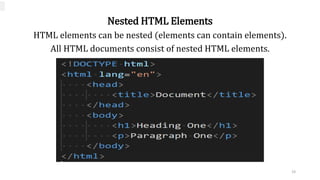
HTML elements can be nested (elements can contain elements).
All HTML documents consist of nested HTML elements.
19
HTML Tip: Use Lowercase Tags
HTML tags are not case sensitive: <P> means the same as <p>.
The HTML5 standard does not require lowercase tags, but
recommends lowercase in HTML4, and demands lowercase for
stricter document types like XHTML.
20
HTML Tip: Use Lowercase Tags
HTML tags are not case sensitive: <P> means the same as <p>.
The HTML5 standard does not require lowercase tags, but
recommends lowercase in HTML4, and demands lowercase for
stricter document types like XHTML.
21
Thanks!
?
22

Web Engineering, Web design, development-2

  • 1.
    Ministry Of HigherEducation Kandahar University Computer Science Faculty Web Development Web Front-End Development Lecture: 03 Lecturer: Sayed Shah Agha Hakimi 1 2
  • 2.
    Contents: • What IsFront-End Development • Objectives • Introduction To HTML • HTML Tags • HTML Page Structure • HTML Versions • Code Writer for HTML • HTML Elements 2
  • 3.
    What Is Front-EndDevelopment Front-end web development, also known as client-side development is the practice of producing HTML, CSS and JavaScript for a website or Web Application so that a user can see and interact with them directly. 3
  • 4.
    What Is Front-EndDevelopment The challenge associated with front end development is that the tools and techniques used to create the front end of a website change constantly and so the developer needs to constantly be aware of how the field is developing. 4
  • 5.
    Objectives The objective ofdesigning a site is to ensure that when the users open up the site they see the information in a format that is easy to read and relevant. 5
  • 6.
    Introduction To HTML HypertextMarkup Language is the standard markup language for documents designed to be displayed in a web browser. It can be assisted by technologies such as Cascading Style Sheets and scripting languages such as JavaScript. 6
  • 7.
    What is HTML? •HTML stands for Hyper Text Markup Language • HTML describes the structure of a Web page • HTML consists of a series of elements • HTML elements tell the browser how to display the content • HTML elements are represented by tags • HTML tags label pieces of content such as "heading", "paragraph", "table", and so on • Browsers do not display the HTML tags, but use them to render the content of the page 7
  • 8.
    A Simple HTMLDocument 8
  • 9.
    Example Explained •The <!DOCTYPEhtml> declaration defines this document to be HTML5 •The <html> element is the root element of an HTML page •The <head> element contains meta information about the document •The <title> element specifies a title for the document •The <body> element contains the visible page content •The <h1> element defines a large heading •The <p> element defines a paragraph 9
  • 10.
    HTML Tags HTML tagsare element names surrounded by angle brackets: •HTML tags normally come in pairs like <p> and </p> •The first tag in a pair is the start tag, the second tag is the end tag •The end tag is written like the start tag, but with a forward slash inserted before the tag name Tip: The start tag is also called the opening tag, and the end tag the closing tag. 10
  • 11.
    Web Browsers The purposeof a web browser (Chrome, Edge, Firefox, Safari) is to read HTML documents and display them. The browser does not display the HTML tags, but uses them to determine how to display the document. 11
  • 12.
    HTML Page Structure Belowis a visualization of an HTML page structure: 12
  • 13.
    The <!DOCTYPE> Declaration The<!DOCTYPE> declaration represents the document type, and helps browsers to display web pages correctly. It must only appear once, at the top of the page (before any HTML tags). The <!DOCTYPE> declaration is not case sensitive. The <!DOCTYPE> declaration for HTML5 is: <!DOCTYPE html> 13
  • 14.
    HTML Versions Since theearly days of the web, there have been many versions of HTML: Version Year HTML 1991 HTML 2.0 1995 HTML 3.2 1997 HTML 4.01 1999 XHTML 2000 HTML5 2014 14
  • 15.
    Code Writer forHTML • Simple Text Writer • Note Pad • Note Pad++ • Coffee Cup • Visual Studio Code 15
  • 16.
    HTML Documents • AllHTML documents must start with a document type declaration: <!DOCTYPE html>. • The HTML document itself begins with <html> and ends with </html>. • The visible part of the HTML document is between <body> and </body>. 16
  • 17.
    HTML Elements HTML documentsare made up by HTML elements. HTML elements are written with a start tag, with an end tag, with the content in between: <tagname>content</tagname> Start tag Element content End tag <h1> My First Heading </h1> <p> My first paragraph. </p> <br> 17
  • 18.
    Empty Tags! Self ClosingTags! Some HTML elements do not have an end tag. Empty elements can be "closed" in the opening tag like this: <br> <hr> 18
  • 19.
    Nested HTML Elements HTMLelements can be nested (elements can contain elements). All HTML documents consist of nested HTML elements. 19
  • 20.
    HTML Tip: UseLowercase Tags HTML tags are not case sensitive: <P> means the same as <p>. The HTML5 standard does not require lowercase tags, but recommends lowercase in HTML4, and demands lowercase for stricter document types like XHTML. 20
  • 21.
    HTML Tip: UseLowercase Tags HTML tags are not case sensitive: <P> means the same as <p>. The HTML5 standard does not require lowercase tags, but recommends lowercase in HTML4, and demands lowercase for stricter document types like XHTML. 21
  • 22.