Resolution
& Value
Topic 7​
DCC1043 – COMPUTER GRAPHIC
tOPIC 8
SDSDSD TOPIC 8
Introduction to Computer Graphics Resolution
•Definition of Resolution in Computer Graphics
•Importance of Resolution in Computer Graphics
•Factors affecting Resolution in Computer Graphics
2
Definition of Resolution
in Computer Graphics
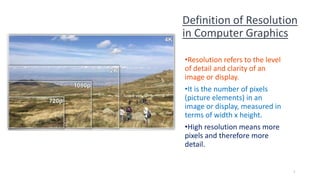
•Resolution refers to the level
of detail and clarity of an
image or display.
•It is the number of pixels
(picture elements) in an
image or display, measured in
terms of width x height.
•High resolution means more
pixels and therefore more
detail.
3
Importance of Resolution in Computer Graphics
4
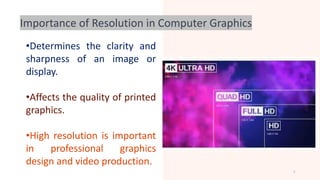
•Determines the clarity and
sharpness of an image or
display.
•Affects the quality of printed
graphics.
•High resolution is important
in professional graphics
design and video production.
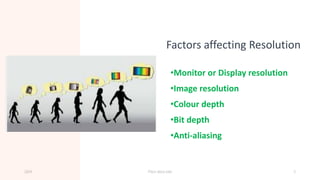
Factors affecting Resolution
•Monitor or Display resolution
•Image resolution
•Colour depth
•Bit depth
•Anti-aliasing
20XX Pitch deck title 5
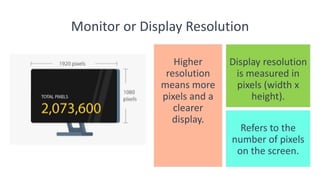
Monitor or Display Resolution
Refers to the
number of pixels
on the screen.
20XX
Higher
resolution
means more
pixels and a
clearer
display.
Pitch deck title
Display resolution
is measured in
pixels (width x
height).
6
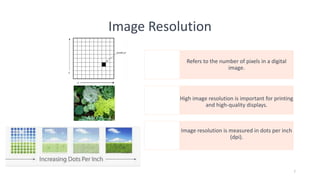
Image Resolution
Refers to the number of pixels in a digital
image.
High image resolution is important for printing
and high-quality displays.
Image resolution is measured in dots per inch
(dpi).
7
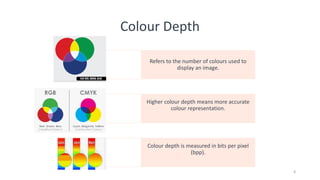
Colour Depth
Refers to the number of colours used to
display an image.
Higher colour depth means more accurate
colour representation.
Colour depth is measured in bits per pixel
(bpp).
8
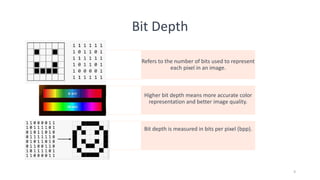
Bit Depth
Refers to the number of bits used to represent
each pixel in an image.
Higher bit depth means more accurate color
representation and better image quality.
Bit depth is measured in bits per pixel (bpp).
9
Anti-Aliasing
the smoothing of jagged
edges in an image.
Anti-aliasing helps to improve
the visual quality of an image.
Anti-aliasing can be applied
to both text and graphics.
10
Conclusion : Resolution
•Resolution plays a crucial role in determining the
quality of computer graphics.
•Understanding the factor's affecting resolution is
important for professionals working in graphics
design and video production.
•To achieve high-quality graphics, it is important
to consider monitor or display resolution, image
resolution, colour depth, bit depth, and anti-
aliasing.
11
Computer Graphics
Value
Introduction to Computer Graphics Value
•Definition of Value in Computer Graphics
•Importance of Value in Computer Graphics
•Factors affecting Value in Computer Graphics
13
Definition of Value in
Computer Graphics
•Value refers to the lightness
or darkness of an image or
colour.
•It is an important aspect of
colour theory in graphics
design.
•Value is used to create depth,
contrast, and visual interest in
an image.
20XX Pitch deck title 14
Importance of Value in Computer Graphics
•Determines the clarity and
sharpness of an image or
display.
•Affects the quality of
printed graphics.
•High resolution is important
in professional graphics
design and video
production.
15
•Value is crucial in creating an
effective visual hierarchy in
an image.
•It can be used to direct the
viewer's attention to
important elements in an
image.
•Value helps to create mood,
atmosphere, and emotional
impact in an image.
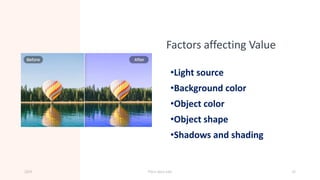
Factors affecting Value
•Light source
•Background color
•Object color
•Object shape
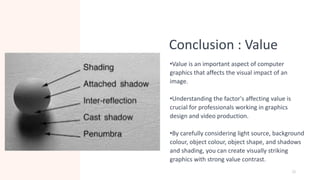
•Shadows and shading
20XX Pitch deck title 16
Light Source
The position and
intensity of the
light source
affects the value
of an object..
20XX
Shadows and
highlights are
created based on
the light source.
Pitch deck title
Changing the light
source can
dramatically
affect the value of
an image.
17
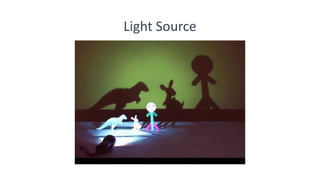
Light Source
20XX Pitch deck title 18
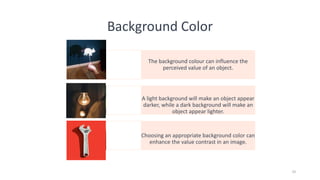
Background Color
The background colour can influence the
perceived value of an object.
A light background will make an object appear
darker, while a dark background will make an
object appear lighter.
Choosing an appropriate background color can
enhance the value contrast in an image.
19
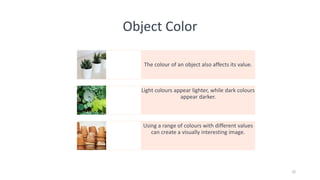
Object Color
The colour of an object also affects its value.
Light colours appear lighter, while dark colours
appear darker.
Using a range of colours with different values
can create a visually interesting image.
20
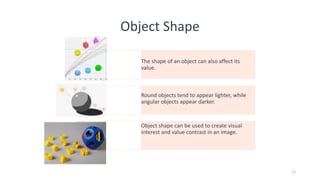
Object Shape
The shape of an object can also affect its
value.
Round objects tend to appear lighter, while
angular objects appear darker.
Object shape can be used to create visual
interest and value contrast in an image.
21
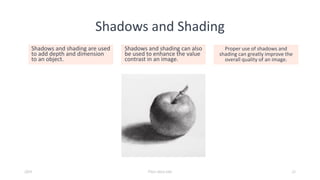
Shadows and Shading
Shadows and shading are used
to add depth and dimension
to an object.
Shadows and shading can also
be used to enhance the value
contrast in an image.
Proper use of shadows and
shading can greatly improve the
overall quality of an image.
20XX Pitch deck title 22
Conclusion : Value
•Value is an important aspect of computer
graphics that affects the visual impact of an
image.
•Understanding the factor's affecting value is
crucial for professionals working in graphics
design and video production.
•By carefully considering light source, background
colour, object colour, object shape, and shadows
and shading, you can create visually striking
graphics with strong value contrast.
23

08-Resolution & Value.pdf

  • 1.
    Resolution & Value Topic 7​ DCC1043– COMPUTER GRAPHIC tOPIC 8 SDSDSD TOPIC 8
  • 2.
    Introduction to ComputerGraphics Resolution •Definition of Resolution in Computer Graphics •Importance of Resolution in Computer Graphics •Factors affecting Resolution in Computer Graphics 2
  • 3.
    Definition of Resolution inComputer Graphics •Resolution refers to the level of detail and clarity of an image or display. •It is the number of pixels (picture elements) in an image or display, measured in terms of width x height. •High resolution means more pixels and therefore more detail. 3
  • 4.
    Importance of Resolutionin Computer Graphics 4 •Determines the clarity and sharpness of an image or display. •Affects the quality of printed graphics. •High resolution is important in professional graphics design and video production.
  • 5.
    Factors affecting Resolution •Monitoror Display resolution •Image resolution •Colour depth •Bit depth •Anti-aliasing 20XX Pitch deck title 5
  • 6.
    Monitor or DisplayResolution Refers to the number of pixels on the screen. 20XX Higher resolution means more pixels and a clearer display. Pitch deck title Display resolution is measured in pixels (width x height). 6
  • 7.
    Image Resolution Refers tothe number of pixels in a digital image. High image resolution is important for printing and high-quality displays. Image resolution is measured in dots per inch (dpi). 7
  • 8.
    Colour Depth Refers tothe number of colours used to display an image. Higher colour depth means more accurate colour representation. Colour depth is measured in bits per pixel (bpp). 8
  • 9.
    Bit Depth Refers tothe number of bits used to represent each pixel in an image. Higher bit depth means more accurate color representation and better image quality. Bit depth is measured in bits per pixel (bpp). 9
  • 10.
    Anti-Aliasing the smoothing ofjagged edges in an image. Anti-aliasing helps to improve the visual quality of an image. Anti-aliasing can be applied to both text and graphics. 10
  • 11.
    Conclusion : Resolution •Resolutionplays a crucial role in determining the quality of computer graphics. •Understanding the factor's affecting resolution is important for professionals working in graphics design and video production. •To achieve high-quality graphics, it is important to consider monitor or display resolution, image resolution, colour depth, bit depth, and anti- aliasing. 11
  • 12.
  • 13.
    Introduction to ComputerGraphics Value •Definition of Value in Computer Graphics •Importance of Value in Computer Graphics •Factors affecting Value in Computer Graphics 13
  • 14.
    Definition of Valuein Computer Graphics •Value refers to the lightness or darkness of an image or colour. •It is an important aspect of colour theory in graphics design. •Value is used to create depth, contrast, and visual interest in an image. 20XX Pitch deck title 14
  • 15.
    Importance of Valuein Computer Graphics •Determines the clarity and sharpness of an image or display. •Affects the quality of printed graphics. •High resolution is important in professional graphics design and video production. 15 •Value is crucial in creating an effective visual hierarchy in an image. •It can be used to direct the viewer's attention to important elements in an image. •Value helps to create mood, atmosphere, and emotional impact in an image.
  • 16.
    Factors affecting Value •Lightsource •Background color •Object color •Object shape •Shadows and shading 20XX Pitch deck title 16
  • 17.
    Light Source The positionand intensity of the light source affects the value of an object.. 20XX Shadows and highlights are created based on the light source. Pitch deck title Changing the light source can dramatically affect the value of an image. 17
  • 18.
  • 19.
    Background Color The backgroundcolour can influence the perceived value of an object. A light background will make an object appear darker, while a dark background will make an object appear lighter. Choosing an appropriate background color can enhance the value contrast in an image. 19
  • 20.
    Object Color The colourof an object also affects its value. Light colours appear lighter, while dark colours appear darker. Using a range of colours with different values can create a visually interesting image. 20
  • 21.
    Object Shape The shapeof an object can also affect its value. Round objects tend to appear lighter, while angular objects appear darker. Object shape can be used to create visual interest and value contrast in an image. 21
  • 22.
    Shadows and Shading Shadowsand shading are used to add depth and dimension to an object. Shadows and shading can also be used to enhance the value contrast in an image. Proper use of shadows and shading can greatly improve the overall quality of an image. 20XX Pitch deck title 22
  • 23.
    Conclusion : Value •Valueis an important aspect of computer graphics that affects the visual impact of an image. •Understanding the factor's affecting value is crucial for professionals working in graphics design and video production. •By carefully considering light source, background colour, object colour, object shape, and shadows and shading, you can create visually striking graphics with strong value contrast. 23