UNIT-I
BASICS OF COMPUTER GRAPHICS
COMPUTER GRAPHICS
CGR-22318
20-06-2020
Mr. Naresh A. Kamble
POINTS TO BE COVERED
• Introduction to Computer Graphics
• Image and Objects
• Pixel and Resolution
• Aspect Ratio
• Text mode and Graphics mode
• Basic Graphics Pipeline
20-06-2020
INTRODUCTION
• Definition of Computer Graphics
• Computer graphics are visual representations
of data displayed on a monitor made on a computer.
Computer graphics can be a series of images (most often
called video) or a single image.
• Use of Computer Graphics
– movie making
– video game
– computer program development
– scientific modeling
– design for advertising and other commercial art.
20-06-2020
20-06-2020
LIGHT EMITTING DIODE [LED] MONITOR LIQUID CRYSTAL DISPLAY [LCD] MONITOR
CATHODE RAY TUBE [CRT] MONITOR
IMAGE AND OBJECTS
• Definition of IMAGE
• An image is a visual representation of something. It is a
picture that has been created or copied and stored in
electronic form.
• An image can be described in terms of vector
graphics or raster graphics.
• Images may be 2 dimensional (2D) such as photograph or
screen display.
• Or it may be 3 dimensional (3D) such as statue or hologram.
20-06-2020
20-06-2020
2D Image 3D Image
IMAGE AND OBJECTS
• Definition of OBJECTS
• In computer graphics, an object refers to an item within
a graphic, such as a graphic circle or a square.
• It represents picture by describing the objects in the picture in
a mathematical way.
• For example 2D things like lines and circle.
20-06-2020
Pixel and Resolution
• Definition of PIXEL
• The image that is displayed on the screen is composed of
thousands (or millions) of small dots, these are called as
PIXELS.
• The pixel represents the smallest element on the screen that
can be controlled individually.
• PICTURE + ELEMENT = PIXEL
• Each pixel has different colour and intensity (brightness)
20-06-2020
20-06-2020
PIXEL
GRID
ROW x COLUMN
ROW
COLUMN
Pixel and Resolution
20-06-2020
• Definition of RESOLUTION
• Resolution refers to total number of count of pixels in an
digital image.
• For example, if an image has M rows and N columns, then its
resolution can be defined as M x N.
• Where, M[rows] = HEIGHT and N[columns] = WIDTH.
20-06-2020
RESOLUTION {M x N} =
600 x 480 = 2,88,000 pixels
M {ROW} = HEIGHT
600 pixels
N {COLUMN} = WIDTH
480 pixels
Pixel and Resolution
20-06-2020
• The more number of pixels in a resolution, higher is the image
quality.
• The resolution is described as Pixels Per Inch (PPI).
• PPI refers to how many pixels are displayed per inch in an
image.
ASPECT RATIO
• Definition of ASPECT RATIO
• An aspect ratio is an attribute that describes the relationship
between the width and height of an image.
• Aspect ratio is expressed by the symbolic notation: X:Y
• The values of X and Y are not the actual width and height of
the image, but describe the relationship between them.
• For example, if a graphic has an aspect ratio of 2:1, it means
that the width is twice as large as the height.
20-06-2020
20-06-2020
TEXT MODE AND GRAPHICS MODE
• Definition of TEXT MODE
• It is also known as character mode or alphanumeric
mode, text mode is a display mode divided into rows and
columns of boxes showing only alphanumeric characters.
• In this mode every character is drawn as a dot pattern.
• In this mode there is no way to show or display pictures.
• Example, Command Prompt [CMD].
20-06-2020
TEXT MODE AND GRAPHICS MODE
• Definition of GRAPHIC MODE
• Graphics mode is a computer display mode that generates
image using pixels.
• Today, most users operate their computer in a graphics mode
opposed to a text mode or command line environment.
• In this mode we can display pictures, charts, graphs very
easily.
• Example, Graphical User Interface [GUI]
20-06-2020
20-06-2020
TEXT MODE
GRAPHICS MODE
BASIC GRAPHICS PIPELINE
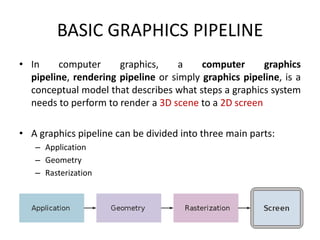
• In computer graphics, a computer graphics
pipeline, rendering pipeline or simply graphics pipeline, is a
conceptual model that describes what steps a graphics system
needs to perform to render a 3D scene to a 2D screen
• A graphics pipeline can be divided into three main parts:
– Application
– Geometry
– Rasterization
20-06-2020
BASIC GRAPHICS PIPELINE
• STEP-I APPLICATION
• The application step is executed by the software on the main
processor (CPU).
• In the application step, changes are made to the scene as
required, for example, by user interaction by means of input
devices or during an animation.
• The new scene with all its primitives, usually triangles, lines
and points, is then passed on to the next step in the pipeline.
20-06-2020
BASIC GRAPHICS PIPELINE
• STEP-II GEOMETRY
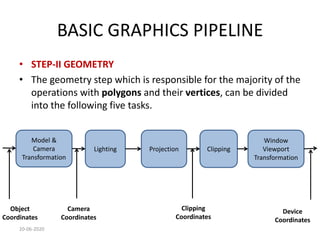
• The geometry step which is responsible for the majority of the
operations with polygons and their vertices, can be divided
into the following five tasks.
20-06-2020
Model &
Camera
Transformation
Lighting Projection Clipping
Window
Viewport
Transformation
Object
Coordinates
Camera
Coordinates
Device
Coordinates
Clipping
Coordinates
BASIC GRAPHICS PIPELINE
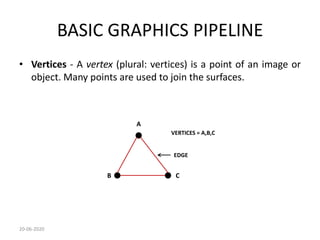
• Vertices - A vertex (plural: vertices) is a point of an image or
object. Many points are used to join the surfaces.
20-06-2020
A
B C
VERTICES = A,B,C
EDGE
BASIC GRAPHICS PIPELINE
• Co-ordinates – It describes the points position in a co-
ordinate system.
• Basically there are 3 co-ordinate systems
• a) Object co-ordinate system
– Local co-ordinate system
• b) Camera co-ordinate system
– Centre of projection
• c) World co-ordinate system
– Reference frame for all objects in a scene
20-06-2020
BASIC GRAPHICS PIPELINE
• STEP-III RASTERIZATION
• In this final step the image described in vector graphics
format (shapes) is converted into raster image (pixels) for
output on a display device, printer or for storage purpose in
bitmap format.
20-06-2020
POINTS TO BE COVERED
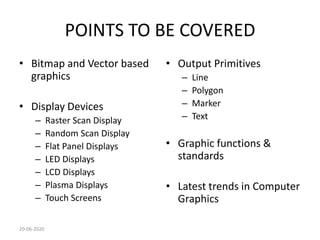
• Bitmap and Vector based
graphics
• Display Devices
– Raster Scan Display
– Random Scan Display
– Flat Panel Displays
– LED Displays
– LCD Displays
– Plasma Displays
– Touch Screens
• Output Primitives
– Line
– Polygon
– Marker
– Text
• Graphic functions &
standards
• Latest trends in Computer
Graphics
20-06-2020
BITMAP AND VECTOR BASED
GRAPHICS
20-06-2020
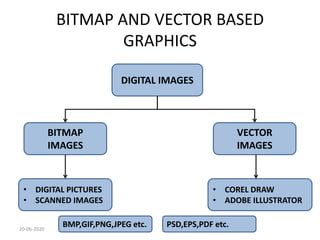
DIGITAL IMAGES
BITMAP
IMAGES
VECTOR
IMAGES
• DIGITAL PICTURES
• SCANNED IMAGES
• COREL DRAW
• ADOBE ILLUSTRATOR
BMP,GIF,PNG,JPEG etc. PSD,EPS,PDF etc.
BITMAP AND VECTOR BASED
GRAPHICS
• Definition of BITMAP Graphics
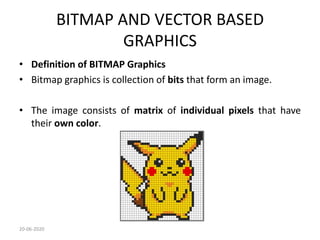
• Bitmap graphics is collection of bits that form an image.
• The image consists of matrix of individual pixels that have
their own color.
20-06-2020
BITMAP AND VECTOR BASED
GRAPHICS
• TYPES OF BITMAP IMAGES
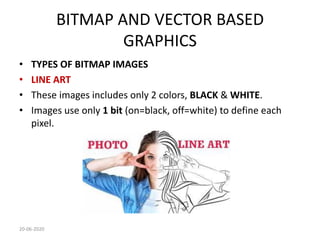
• LINE ART
• These images includes only 2 colors, BLACK & WHITE.
• Images use only 1 bit (on=black, off=white) to define each
pixel.
20-06-2020
BITMAP AND VECTOR BASED
GRAPHICS
• GRAYSCALE IMAGES
• These images contains various shades of GRAY as well as pure
black and white.
• It includes 256 shades of GRAY (8-bit).
20-06-2020
BITMAP AND VECTOR BASED
GRAPHICS
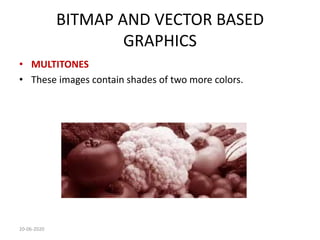
• MULTITONES
• These images contain shades of two more colors.
20-06-2020
BITMAP AND VECTOR BASED
GRAPHICS
• FULL-COLOR IMAGES
• These images use
• RED, GREEN, BLUE [RGB] &
• CYAN, MAGENTA, YELLOW, BLACK [CMYK]
20-06-2020
BITMAP AND VECTOR BASED
GRAPHICS
• Definition of VECTOR Graphics
• These images are defined using mathematical definitions.
• These images only contain information about lines, polygons
and curves that forms drawing.
• These images can be scaled without loss of quality and the
size of this file is also less.
• These are used for making company logos, maps etc.
20-06-2020
20-06-2020
DISPLAY DEVICES
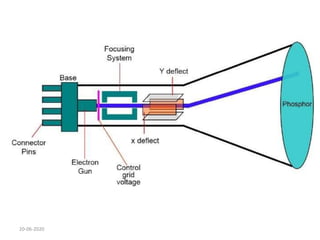
• CATHODE RAY TUBE [CRT]
• The electron gun emits a beam of electrons cathode rays.
• The electron beam passes through focusing and deflection
systems that direct it towards specified positions on the
phosphor-coated screen.
• When the beam hits the screen, the phosphor emits a small
spot of light at each position contacted by the electron beam.
• It redraws the picture by directing the electron beam back
over the same screen points quickly.
20-06-2020
20-06-2020
DISPLAY DEVICES
• RASTER SCAN DISPLAY
• In a raster scan system, the electron beam is swept across the
screen, one row at a time from top to bottom.
• As the electron beam moves across each row, the beam
intensity is turned on and off to create a pattern of
illuminated spots.
• Picture definition is stored in memory area called the Refresh
Buffer or Frame Buffer. This memory area holds the set of
intensity values for all the screen points.
20-06-2020
DISPLAY DEVICES
• Each screen point is referred to as a pixel.
• At the end of each scan line, the electron beam returns to the
left side of the screen to begin displaying the next scan line.
20-06-2020
20-06-2020
DISPLAY DEVICES
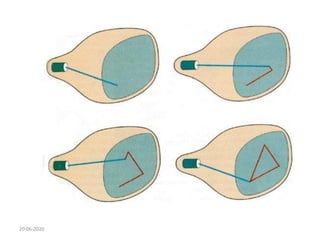
• VECTOR SCAN DISPLAY / RANDOM SCAN DISPLAY
• Vector scan display directly traces out only the desired lines
on CRT.
• For example, if we want a line connecting point A with B on
the vector graphics display, we simply drive the beam
deflection circuitry, this will cause beam to go directly from
point A to point B.
20-06-2020
20-06-2020
A
B
DISPLAY DEVICES
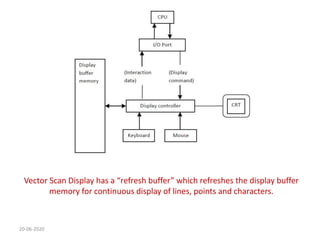
• ARCHITECTURE OF VECTOR SCAN DISPLAY
• DISPLAY BUFFER MEMORY
• It stores the computer produced display list or display
program.
• DISPLAY CONTROLLER
• It interprets commands for plotting lines, points and
characters.
20-06-2020
20-06-2020
Vector Scan Display has a “refresh buffer” which refreshes the display buffer
memory for continuous display of lines, points and characters.
20-06-2020
20-06-2020
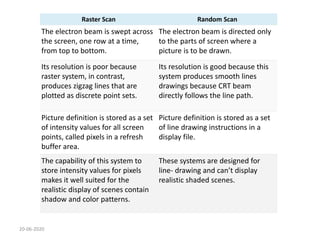
Raster Scan Random Scan
The electron beam is swept across
the screen, one row at a time,
from top to bottom.
The electron beam is directed only
to the parts of screen where a
picture is to be drawn.
Its resolution is poor because
raster system, in contrast,
produces zigzag lines that are
plotted as discrete point sets.
Its resolution is good because this
system produces smooth lines
drawings because CRT beam
directly follows the line path.
Picture definition is stored as a set
of intensity values for all screen
points, called pixels in a refresh
buffer area.
Picture definition is stored as a set
of line drawing instructions in a
display file.
The capability of this system to
store intensity values for pixels
makes it well suited for the
realistic display of scenes contain
shadow and color patterns.
These systems are designed for
line- drawing and can’t display
realistic shaded scenes.
20-06-2020
Raster Scan Random Scan
Screen points/pixels are used to draw
an image.
Mathematical functions are used to
draw an image.
The cost is less. The cost is more.
Raster display has the ability to display
areas, filled with solid colors or
patterns.
Vector display only draws lines and
characters.
Refreshing on Raster scan display is
carryout at the Rate of 60 to 80 frames
per second.
Refreshing in Random scan display to
draw all the components of lines of
pictures 30 to 60 frames per second.
It is used for photos. That is Why
photoshop is Raster editing program.
It is used for text, logs, letterheads.
Raster Scan Mainly in photos like JPG,
PNG, GIF File Format.
Random Scan system High-Quality
Images In SVG, the Size is Rescaleable
like Logo in sites.
DISPLAY DEVICES
• FLAT PANEL DISPLAYS
• These display devices are light weight and requires less power
consumption than CRT panels.
• There are two types of flat panel display
• A. Emissive Display
– Converts electrical energy into light energy
– Example LED
• B. Non-emissive Display
– They use optical effects to convert light from some other source into
some graphics pattern.
– Example LCD
20-06-2020
DISPLAY DEVICES
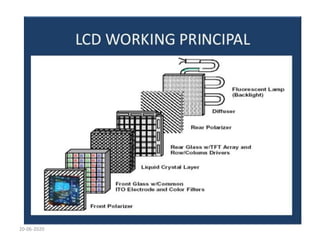
• LIQUID CRYSTAL DISPLAY [LCD]
• LCD (Liquid Crystal Display) is a type of flat panel display
which uses liquid crystals in its primary form of operation.
• Liquid crystals do not emit light directly, instead using
a backlight or reflector to produce images in color
or monochrome.
20-06-2020
DISPLAY DEVICES
• CONSTRUCTION OF LCD
• There are two plates placed each containing light polarizer.
• One plate is placed 900 in front of other and behind all pixels.
• In between both filters are the liquid crystals, which can be electronically
switched ON and OFF.
• In ON state the molecules in the polarized light are twisted so that it they
can pass through other polarized glass.
• In OFF state a voltage is applied so that the molecules in the polarized
light are not twisted.
20-06-2020
20-06-2020
20-06-2020
DISPLAY DEVICES
• LIGHT EMMITING DIODE [LED]
• A LED display is a flat panel display that uses an array of light-
emitting diodes as pixels for a video display.
• Their brightness allows them to be used outdoors where they
are visible in the sun for store signs and billboards.
• An LED panel has several LED’s while an LED display has
several LED panels.
20-06-2020
DISPLAY DEVICES
• CONSTRUCTION OF LED
• An LED is made up of semiconductor chip which is
surrounded by a transparent plastic case.
• The plastic case allows the light to pass through it
• The emission of different colours depends on semiconductor
material that is used in the diode.
20-06-2020
20-06-2020
DISPLAY DEVICES
• PLASMA DISPLAY
• Plasma panel display writes images on the display surface
point by point, each point remains bright after it has been
intensified.
• Plasma display uses small cells “PLASMA” : ionized gas that
responds to electric fields.
20-06-2020
DISPLAY DEVICES
• CONSTRUCTION OF PLASMA DISPLAY
• It contains two plates of glass with thin closely spaced golden electrodes.
• One plate is VERTICAL placed and other HORIZONTALLY placed with
golden electrodes attached to inner faces covered with dielectric material.
• The space between two glass plates is filled with neon-based gas and
sealed.
• A voltage of 120 volts is applied to the neon-based gas and which treats it
as independent cell each different from its neighbour.
• The voltage makes each cell glow at a voltage of 90 volts.
20-06-2020
20-06-2020
20-06-2020
DISPLAY DEVICES
• TOUCH SCREEN
• These display are designed to accept user input on a single
touch.
• These display are used to make a choice from a menu.
• These display need dirt free environment.
• Used on
– Automated Teller Machine (ATM)
– Mobile Phones
– Departmental Stores etc.
20-06-2020
DISPLAY DEVICES
• Touch input can be recorded through optical, electrical or
acoustical methods.
• OPTICAL TOUCH SCREEN
• It includes two edges vertical and horizontal containing
infrared LED.
• The detectors are used to record which beams are interrupted
when the panel is touched.
• The records produce exact coordinates respective to X-axis
and Y-axis.
20-06-2020
20-06-2020
DISPLAY DEVICES
• ELECTRICAL TOUCH SCREEN
• It includes two transparent plates separated by small distance.
• One plate is coated with conductive material and other with
resistive material.
• When outer plate is touched it is forced to touch the inner
plate creating a voltage drop across the resistive plate.
• This produce exact coordinates respective to X-axis and Y-axis.
20-06-2020
20-06-2020
DISPLAY DEVICES
• ACOUSTIC TOUCH SCREEN
• It use high frequency sound waves in horizontal and vertical
directions across the glass plate.
• Touching the screen causes partial reflection of each wave
form from finger to the emitter.
• The exact coordinates respective to X-axis and Y-axis are
calculated by measuring time between the transmission of
each wave and its reflection to the emitter.
20-06-2020
20-06-2020
OUTPUT PRIMITIVES
• LINE
• A line can be in any direction.
• A line has attributes like type, width and colour.
• A line is of different types.
20-06-2020
SOLID LINE DASHED LINE
DOTTED LINE
OUTPUT PRIMITIVES
• POLYGON
• It is a closed figure where the sides are all line segments.
• A polygon is usually named after how many sides it has.
• If a polygon has 5 sides it is called as PENTAGON
20-06-2020
PENTAGON
HEXAGON OCTAGON
OUTPUT PRIMITIVES
• MARKER
• A marker symbol is a single character that can be displayed in
different colours and different size.
20-06-2020
OUTPUT PRIMITIVES
• TEXT
• A text can has attributes like font type, size, colour etc.
• A text includes characters, numbers and special symbols.
• A text can be made BOLD, ITALIC and UDERLINED.
20-06-2020
CALIBRI FONT TIMES NEW ROMAN
ARIAL
GRAPHIC FUNCTIONS & STANDARDS
• NEED OF GRAPHIC STANDARDS
• Portability of Geometric Model among different hardware
platforms.
• For exchange of drawing database among software packages.
• Need for exchanging graphic data between different
computer system.
20-06-2020
GRAPHIC FUNCTIONS & STANDARDS
• TYPES OF GRAPHIC STANDARDS
• GRAPHIC KERNEL SYSTEM (GKS)
• GKS-3D
• PROGRAMMERS HIERACHICAL INTERFACE FOR GRAPHICS
(PHIGS)
• CORE (ACM-SIGGRAPH)
• INITIAL GRAPHIC EXCHANGE SPECIFICATION (IGES)
20-06-2020
LATEST TRENDS IN COMPUTER GRAPHICS
• VIRTUAL REALITY (VR)
• It a computer simulated environment that can simulate
physical presence in the real world or imagined world.
• It describes the term 3D graphics.
• It creates a virtual environment where a person can become
part of that virtual world and can manipulate object or
perform various activities.
20-06-2020
20-06-2020
COMPONENTS OF VR
20-06-2020
VIRTUAL WORLD
SOFTWARE &
DATABASE
SIMULATION
ENGINE
GRAPHICS
ENGINE
VIRTUAL WORLD
INPUTS OUTPUTS
VR ENGINE
INTERNAL
COMPONENTS
EXTERNAL
COMPONENTS
LATEST TRENDS IN COMPUTER GRAPHICS
• ADVANTAGES OF VR
• Training and Education
• Entertainment and Gaming
• Help and Healing
• Architecture and Planning
• Seeking and recognizing visual signs
20-06-2020
LATEST TRENDS IN COMPUTER GRAPHICS
• AUGMENTED REALITY (AR)
• VR systems are virtual in nature which allows the user to
perform his task.
• Whereas AR combine real and the virtual world to assist the
user on performing his task.
• It include more real world objects than virtual and which
allows the user to manipulate the same.
20-06-2020
20-06-2020
20-06-2020

CHAPTER-I BASICS OF COMPUTER GRAPHICS.pdf

  • 1.
    UNIT-I BASICS OF COMPUTERGRAPHICS COMPUTER GRAPHICS CGR-22318 20-06-2020 Mr. Naresh A. Kamble
  • 2.
    POINTS TO BECOVERED • Introduction to Computer Graphics • Image and Objects • Pixel and Resolution • Aspect Ratio • Text mode and Graphics mode • Basic Graphics Pipeline 20-06-2020
  • 3.
    INTRODUCTION • Definition ofComputer Graphics • Computer graphics are visual representations of data displayed on a monitor made on a computer. Computer graphics can be a series of images (most often called video) or a single image. • Use of Computer Graphics – movie making – video game – computer program development – scientific modeling – design for advertising and other commercial art. 20-06-2020
  • 4.
    20-06-2020 LIGHT EMITTING DIODE[LED] MONITOR LIQUID CRYSTAL DISPLAY [LCD] MONITOR CATHODE RAY TUBE [CRT] MONITOR
  • 5.
    IMAGE AND OBJECTS •Definition of IMAGE • An image is a visual representation of something. It is a picture that has been created or copied and stored in electronic form. • An image can be described in terms of vector graphics or raster graphics. • Images may be 2 dimensional (2D) such as photograph or screen display. • Or it may be 3 dimensional (3D) such as statue or hologram. 20-06-2020
  • 6.
  • 7.
    IMAGE AND OBJECTS •Definition of OBJECTS • In computer graphics, an object refers to an item within a graphic, such as a graphic circle or a square. • It represents picture by describing the objects in the picture in a mathematical way. • For example 2D things like lines and circle. 20-06-2020
  • 8.
    Pixel and Resolution •Definition of PIXEL • The image that is displayed on the screen is composed of thousands (or millions) of small dots, these are called as PIXELS. • The pixel represents the smallest element on the screen that can be controlled individually. • PICTURE + ELEMENT = PIXEL • Each pixel has different colour and intensity (brightness) 20-06-2020
  • 9.
  • 10.
    Pixel and Resolution 20-06-2020 •Definition of RESOLUTION • Resolution refers to total number of count of pixels in an digital image. • For example, if an image has M rows and N columns, then its resolution can be defined as M x N. • Where, M[rows] = HEIGHT and N[columns] = WIDTH.
  • 11.
    20-06-2020 RESOLUTION {M xN} = 600 x 480 = 2,88,000 pixels M {ROW} = HEIGHT 600 pixels N {COLUMN} = WIDTH 480 pixels
  • 12.
    Pixel and Resolution 20-06-2020 •The more number of pixels in a resolution, higher is the image quality. • The resolution is described as Pixels Per Inch (PPI). • PPI refers to how many pixels are displayed per inch in an image.
  • 13.
    ASPECT RATIO • Definitionof ASPECT RATIO • An aspect ratio is an attribute that describes the relationship between the width and height of an image. • Aspect ratio is expressed by the symbolic notation: X:Y • The values of X and Y are not the actual width and height of the image, but describe the relationship between them. • For example, if a graphic has an aspect ratio of 2:1, it means that the width is twice as large as the height. 20-06-2020
  • 14.
  • 15.
    TEXT MODE ANDGRAPHICS MODE • Definition of TEXT MODE • It is also known as character mode or alphanumeric mode, text mode is a display mode divided into rows and columns of boxes showing only alphanumeric characters. • In this mode every character is drawn as a dot pattern. • In this mode there is no way to show or display pictures. • Example, Command Prompt [CMD]. 20-06-2020
  • 16.
    TEXT MODE ANDGRAPHICS MODE • Definition of GRAPHIC MODE • Graphics mode is a computer display mode that generates image using pixels. • Today, most users operate their computer in a graphics mode opposed to a text mode or command line environment. • In this mode we can display pictures, charts, graphs very easily. • Example, Graphical User Interface [GUI] 20-06-2020
  • 17.
  • 18.
    BASIC GRAPHICS PIPELINE •In computer graphics, a computer graphics pipeline, rendering pipeline or simply graphics pipeline, is a conceptual model that describes what steps a graphics system needs to perform to render a 3D scene to a 2D screen • A graphics pipeline can be divided into three main parts: – Application – Geometry – Rasterization 20-06-2020
  • 19.
    BASIC GRAPHICS PIPELINE •STEP-I APPLICATION • The application step is executed by the software on the main processor (CPU). • In the application step, changes are made to the scene as required, for example, by user interaction by means of input devices or during an animation. • The new scene with all its primitives, usually triangles, lines and points, is then passed on to the next step in the pipeline. 20-06-2020
  • 20.
    BASIC GRAPHICS PIPELINE •STEP-II GEOMETRY • The geometry step which is responsible for the majority of the operations with polygons and their vertices, can be divided into the following five tasks. 20-06-2020 Model & Camera Transformation Lighting Projection Clipping Window Viewport Transformation Object Coordinates Camera Coordinates Device Coordinates Clipping Coordinates
  • 21.
    BASIC GRAPHICS PIPELINE •Vertices - A vertex (plural: vertices) is a point of an image or object. Many points are used to join the surfaces. 20-06-2020 A B C VERTICES = A,B,C EDGE
  • 22.
    BASIC GRAPHICS PIPELINE •Co-ordinates – It describes the points position in a co- ordinate system. • Basically there are 3 co-ordinate systems • a) Object co-ordinate system – Local co-ordinate system • b) Camera co-ordinate system – Centre of projection • c) World co-ordinate system – Reference frame for all objects in a scene 20-06-2020
  • 23.
    BASIC GRAPHICS PIPELINE •STEP-III RASTERIZATION • In this final step the image described in vector graphics format (shapes) is converted into raster image (pixels) for output on a display device, printer or for storage purpose in bitmap format. 20-06-2020
  • 24.
    POINTS TO BECOVERED • Bitmap and Vector based graphics • Display Devices – Raster Scan Display – Random Scan Display – Flat Panel Displays – LED Displays – LCD Displays – Plasma Displays – Touch Screens • Output Primitives – Line – Polygon – Marker – Text • Graphic functions & standards • Latest trends in Computer Graphics 20-06-2020
  • 25.
    BITMAP AND VECTORBASED GRAPHICS 20-06-2020 DIGITAL IMAGES BITMAP IMAGES VECTOR IMAGES • DIGITAL PICTURES • SCANNED IMAGES • COREL DRAW • ADOBE ILLUSTRATOR BMP,GIF,PNG,JPEG etc. PSD,EPS,PDF etc.
  • 26.
    BITMAP AND VECTORBASED GRAPHICS • Definition of BITMAP Graphics • Bitmap graphics is collection of bits that form an image. • The image consists of matrix of individual pixels that have their own color. 20-06-2020
  • 27.
    BITMAP AND VECTORBASED GRAPHICS • TYPES OF BITMAP IMAGES • LINE ART • These images includes only 2 colors, BLACK & WHITE. • Images use only 1 bit (on=black, off=white) to define each pixel. 20-06-2020
  • 28.
    BITMAP AND VECTORBASED GRAPHICS • GRAYSCALE IMAGES • These images contains various shades of GRAY as well as pure black and white. • It includes 256 shades of GRAY (8-bit). 20-06-2020
  • 29.
    BITMAP AND VECTORBASED GRAPHICS • MULTITONES • These images contain shades of two more colors. 20-06-2020
  • 30.
    BITMAP AND VECTORBASED GRAPHICS • FULL-COLOR IMAGES • These images use • RED, GREEN, BLUE [RGB] & • CYAN, MAGENTA, YELLOW, BLACK [CMYK] 20-06-2020
  • 31.
    BITMAP AND VECTORBASED GRAPHICS • Definition of VECTOR Graphics • These images are defined using mathematical definitions. • These images only contain information about lines, polygons and curves that forms drawing. • These images can be scaled without loss of quality and the size of this file is also less. • These are used for making company logos, maps etc. 20-06-2020
  • 32.
  • 33.
    DISPLAY DEVICES • CATHODERAY TUBE [CRT] • The electron gun emits a beam of electrons cathode rays. • The electron beam passes through focusing and deflection systems that direct it towards specified positions on the phosphor-coated screen. • When the beam hits the screen, the phosphor emits a small spot of light at each position contacted by the electron beam. • It redraws the picture by directing the electron beam back over the same screen points quickly. 20-06-2020
  • 34.
  • 35.
    DISPLAY DEVICES • RASTERSCAN DISPLAY • In a raster scan system, the electron beam is swept across the screen, one row at a time from top to bottom. • As the electron beam moves across each row, the beam intensity is turned on and off to create a pattern of illuminated spots. • Picture definition is stored in memory area called the Refresh Buffer or Frame Buffer. This memory area holds the set of intensity values for all the screen points. 20-06-2020
  • 36.
    DISPLAY DEVICES • Eachscreen point is referred to as a pixel. • At the end of each scan line, the electron beam returns to the left side of the screen to begin displaying the next scan line. 20-06-2020
  • 37.
  • 38.
    DISPLAY DEVICES • VECTORSCAN DISPLAY / RANDOM SCAN DISPLAY • Vector scan display directly traces out only the desired lines on CRT. • For example, if we want a line connecting point A with B on the vector graphics display, we simply drive the beam deflection circuitry, this will cause beam to go directly from point A to point B. 20-06-2020
  • 39.
  • 40.
    DISPLAY DEVICES • ARCHITECTUREOF VECTOR SCAN DISPLAY • DISPLAY BUFFER MEMORY • It stores the computer produced display list or display program. • DISPLAY CONTROLLER • It interprets commands for plotting lines, points and characters. 20-06-2020
  • 41.
    20-06-2020 Vector Scan Displayhas a “refresh buffer” which refreshes the display buffer memory for continuous display of lines, points and characters.
  • 42.
  • 43.
    20-06-2020 Raster Scan RandomScan The electron beam is swept across the screen, one row at a time, from top to bottom. The electron beam is directed only to the parts of screen where a picture is to be drawn. Its resolution is poor because raster system, in contrast, produces zigzag lines that are plotted as discrete point sets. Its resolution is good because this system produces smooth lines drawings because CRT beam directly follows the line path. Picture definition is stored as a set of intensity values for all screen points, called pixels in a refresh buffer area. Picture definition is stored as a set of line drawing instructions in a display file. The capability of this system to store intensity values for pixels makes it well suited for the realistic display of scenes contain shadow and color patterns. These systems are designed for line- drawing and can’t display realistic shaded scenes.
  • 44.
    20-06-2020 Raster Scan RandomScan Screen points/pixels are used to draw an image. Mathematical functions are used to draw an image. The cost is less. The cost is more. Raster display has the ability to display areas, filled with solid colors or patterns. Vector display only draws lines and characters. Refreshing on Raster scan display is carryout at the Rate of 60 to 80 frames per second. Refreshing in Random scan display to draw all the components of lines of pictures 30 to 60 frames per second. It is used for photos. That is Why photoshop is Raster editing program. It is used for text, logs, letterheads. Raster Scan Mainly in photos like JPG, PNG, GIF File Format. Random Scan system High-Quality Images In SVG, the Size is Rescaleable like Logo in sites.
  • 45.
    DISPLAY DEVICES • FLATPANEL DISPLAYS • These display devices are light weight and requires less power consumption than CRT panels. • There are two types of flat panel display • A. Emissive Display – Converts electrical energy into light energy – Example LED • B. Non-emissive Display – They use optical effects to convert light from some other source into some graphics pattern. – Example LCD 20-06-2020
  • 46.
    DISPLAY DEVICES • LIQUIDCRYSTAL DISPLAY [LCD] • LCD (Liquid Crystal Display) is a type of flat panel display which uses liquid crystals in its primary form of operation. • Liquid crystals do not emit light directly, instead using a backlight or reflector to produce images in color or monochrome. 20-06-2020
  • 47.
    DISPLAY DEVICES • CONSTRUCTIONOF LCD • There are two plates placed each containing light polarizer. • One plate is placed 900 in front of other and behind all pixels. • In between both filters are the liquid crystals, which can be electronically switched ON and OFF. • In ON state the molecules in the polarized light are twisted so that it they can pass through other polarized glass. • In OFF state a voltage is applied so that the molecules in the polarized light are not twisted. 20-06-2020
  • 48.
  • 49.
  • 50.
    DISPLAY DEVICES • LIGHTEMMITING DIODE [LED] • A LED display is a flat panel display that uses an array of light- emitting diodes as pixels for a video display. • Their brightness allows them to be used outdoors where they are visible in the sun for store signs and billboards. • An LED panel has several LED’s while an LED display has several LED panels. 20-06-2020
  • 51.
    DISPLAY DEVICES • CONSTRUCTIONOF LED • An LED is made up of semiconductor chip which is surrounded by a transparent plastic case. • The plastic case allows the light to pass through it • The emission of different colours depends on semiconductor material that is used in the diode. 20-06-2020
  • 52.
  • 53.
    DISPLAY DEVICES • PLASMADISPLAY • Plasma panel display writes images on the display surface point by point, each point remains bright after it has been intensified. • Plasma display uses small cells “PLASMA” : ionized gas that responds to electric fields. 20-06-2020
  • 54.
    DISPLAY DEVICES • CONSTRUCTIONOF PLASMA DISPLAY • It contains two plates of glass with thin closely spaced golden electrodes. • One plate is VERTICAL placed and other HORIZONTALLY placed with golden electrodes attached to inner faces covered with dielectric material. • The space between two glass plates is filled with neon-based gas and sealed. • A voltage of 120 volts is applied to the neon-based gas and which treats it as independent cell each different from its neighbour. • The voltage makes each cell glow at a voltage of 90 volts. 20-06-2020
  • 55.
  • 56.
  • 57.
    DISPLAY DEVICES • TOUCHSCREEN • These display are designed to accept user input on a single touch. • These display are used to make a choice from a menu. • These display need dirt free environment. • Used on – Automated Teller Machine (ATM) – Mobile Phones – Departmental Stores etc. 20-06-2020
  • 58.
    DISPLAY DEVICES • Touchinput can be recorded through optical, electrical or acoustical methods. • OPTICAL TOUCH SCREEN • It includes two edges vertical and horizontal containing infrared LED. • The detectors are used to record which beams are interrupted when the panel is touched. • The records produce exact coordinates respective to X-axis and Y-axis. 20-06-2020
  • 59.
  • 60.
    DISPLAY DEVICES • ELECTRICALTOUCH SCREEN • It includes two transparent plates separated by small distance. • One plate is coated with conductive material and other with resistive material. • When outer plate is touched it is forced to touch the inner plate creating a voltage drop across the resistive plate. • This produce exact coordinates respective to X-axis and Y-axis. 20-06-2020
  • 61.
  • 62.
    DISPLAY DEVICES • ACOUSTICTOUCH SCREEN • It use high frequency sound waves in horizontal and vertical directions across the glass plate. • Touching the screen causes partial reflection of each wave form from finger to the emitter. • The exact coordinates respective to X-axis and Y-axis are calculated by measuring time between the transmission of each wave and its reflection to the emitter. 20-06-2020
  • 63.
  • 64.
    OUTPUT PRIMITIVES • LINE •A line can be in any direction. • A line has attributes like type, width and colour. • A line is of different types. 20-06-2020 SOLID LINE DASHED LINE DOTTED LINE
  • 65.
    OUTPUT PRIMITIVES • POLYGON •It is a closed figure where the sides are all line segments. • A polygon is usually named after how many sides it has. • If a polygon has 5 sides it is called as PENTAGON 20-06-2020 PENTAGON HEXAGON OCTAGON
  • 66.
    OUTPUT PRIMITIVES • MARKER •A marker symbol is a single character that can be displayed in different colours and different size. 20-06-2020
  • 67.
    OUTPUT PRIMITIVES • TEXT •A text can has attributes like font type, size, colour etc. • A text includes characters, numbers and special symbols. • A text can be made BOLD, ITALIC and UDERLINED. 20-06-2020 CALIBRI FONT TIMES NEW ROMAN ARIAL
  • 68.
    GRAPHIC FUNCTIONS &STANDARDS • NEED OF GRAPHIC STANDARDS • Portability of Geometric Model among different hardware platforms. • For exchange of drawing database among software packages. • Need for exchanging graphic data between different computer system. 20-06-2020
  • 69.
    GRAPHIC FUNCTIONS &STANDARDS • TYPES OF GRAPHIC STANDARDS • GRAPHIC KERNEL SYSTEM (GKS) • GKS-3D • PROGRAMMERS HIERACHICAL INTERFACE FOR GRAPHICS (PHIGS) • CORE (ACM-SIGGRAPH) • INITIAL GRAPHIC EXCHANGE SPECIFICATION (IGES) 20-06-2020
  • 70.
    LATEST TRENDS INCOMPUTER GRAPHICS • VIRTUAL REALITY (VR) • It a computer simulated environment that can simulate physical presence in the real world or imagined world. • It describes the term 3D graphics. • It creates a virtual environment where a person can become part of that virtual world and can manipulate object or perform various activities. 20-06-2020
  • 71.
  • 72.
    COMPONENTS OF VR 20-06-2020 VIRTUALWORLD SOFTWARE & DATABASE SIMULATION ENGINE GRAPHICS ENGINE VIRTUAL WORLD INPUTS OUTPUTS VR ENGINE INTERNAL COMPONENTS EXTERNAL COMPONENTS
  • 73.
    LATEST TRENDS INCOMPUTER GRAPHICS • ADVANTAGES OF VR • Training and Education • Entertainment and Gaming • Help and Healing • Architecture and Planning • Seeking and recognizing visual signs 20-06-2020
  • 74.
    LATEST TRENDS INCOMPUTER GRAPHICS • AUGMENTED REALITY (AR) • VR systems are virtual in nature which allows the user to perform his task. • Whereas AR combine real and the virtual world to assist the user on performing his task. • It include more real world objects than virtual and which allows the user to manipulate the same. 20-06-2020
  • 75.
  • 76.