
Necto Training
Module 8: Working
with Key
Performance
Indicators (KPIs)
Objectives

  By the end of this lesson you will be able
  to perform basic analytics by:
    Using KPI to see if you have met your goals
    Defining your own KPIs
Agenda

  Introduction to KPIs
  Defining KPIs Using the Wizard
Introduction to KPIs
Case Study

       I’d like a quick visual way to
       see which of my regions is
       not reaching their targets


        Linda Taylor
        VP Sales
What are KPIs?
 Key Performance Indicators
 Clear indication of performance compared to goal
                                      Trend


                                      Goal


                                      Value


 Minimum                              Maximum
 Value                                Value
Advantages of Panorama® Necto™ KPI

  Distill information into indicators
  Monitor progress towards goals
  Highlight variances from targets
  Dynamically update with slicing and drilling
  Drill through to analyze
  Customize to suit any requirement
KPI Types
            Single KPI Status
            Value


            Pre-defined KPI
            Status Values


            Multiple KPI Status
            Values
KPI Layout
Dashboard KPI Layout   Crosstab KPI Layout
Defining KPIs Using the Wizard
Defining KPIs
          Each store’s target is to increase
          sales by 10%.
          Can I define KPI’s that will show me
          if they reach their target?
What Needs to be Defined?

 KPI is part of
 a view
                            Trend


                            Goal


 Minimum                    Maximum
 Value                      Value
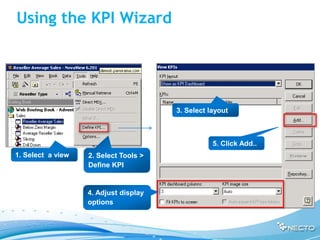
Using the KPI Wizard


                                       3. Select layout


                                                  5. Click Add..
1. Select a view   2. Select Tools >
                   Define KPI


                   4. Adjust display
                   options
Selecting a KPI


                   . Select Category


                  2. Select a KPI from
                  the category


                  Description of the
                  KPI is available
Define Parameters
Define Goal
Define Trend
Define Minimum
Define Maximum
Select Images   Select image
                for KPI


                                       Click to assign
                                       colors to value
                                       ranges


                               Select image
                               for trend
Modifying KPI Color Range
Select Set
             Used for
             Dashboard KPI


                             Click for advanced
                             set definitions


                              Used to simulate
                              drill down
Advanced Set Definition
Finish – Define Name and Description


        Name and
        description
KPI Definition Summary
Summary

  KPI Definition
     Containing View
     Goal
     Minimum value
     Maximum value
     Display method
     Trend
  Definition tool: Desktop Client
Exercise

  Define KPIs that will show
    If sales goals have been reached
    If target number of customers has been
    reached
Thank you
Any Questions?

08 necto working_with_kpi_ready