Chapter 4
Modular Combinational Logic
Decoders
Decoders
 n to 2n
decoder
 n inputs
 2n
outputs
 For each input, one and only one output
will be active.
 Uses:
 “Minterm generator”
 Wordline (memory) circuit
 Code conversion
 Routing data
2 to 4 Decoder Example
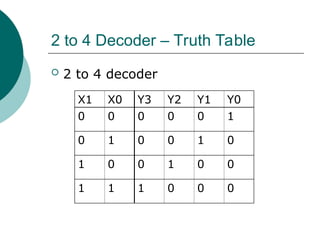
2 to 4 Decoder – Truth Table
 2 to 4 decoder
X1 X0 Y3 Y2 Y1 Y0
0 0 0 0 0 1
0 1 0 0 1 0
1 0 0 1 0 0
1 1 1 0 0 0
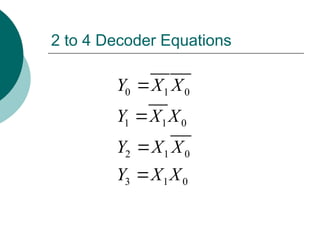
2 to 4 Decoder Equations
0 1 0
1 1 0
2 1 0
3 1 0
Y X X
Y X X
Y X X
Y X X




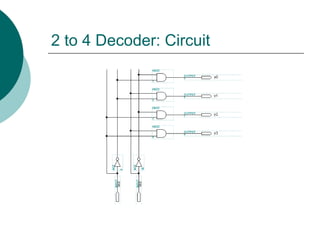
2 to 4 Decoder: Circuit
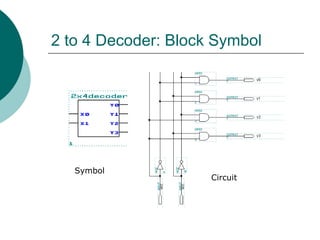
2 to 4 Decoder: Block Symbol
Symbol
Circuit
3 to 8 Decoder Example
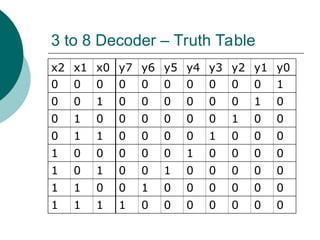
3 to 8 Decoder – Truth Table
x2 x1 x0 y7 y6 y5 y4 y3 y2 y1 y0
0 0 0 0 0 0 0 0 0 0 1
0 0 1 0 0 0 0 0 0 1 0
0 1 0 0 0 0 0 0 1 0 0
0 1 1 0 0 0 0 1 0 0 0
1 0 0 0 0 0 1 0 0 0 0
1 0 1 0 0 1 0 0 0 0 0
1 1 0 0 1 0 0 0 0 0 0
1 1 1 1 0 0 0 0 0 0 0
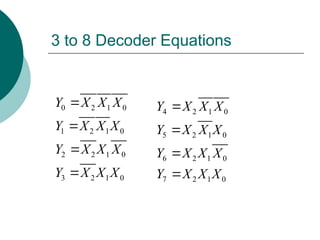
3 to 8 Decoder Equations
0 2 1 0
1 2 1 0
2 2 1 0
3 2 1 0
Y X X X
Y X X X
Y X X X
Y X X X




4 2 1 0
5 2 1 0
6 2 1 0
7 2 1 0
Y X X X
Y X X X
Y X X X
Y X X X




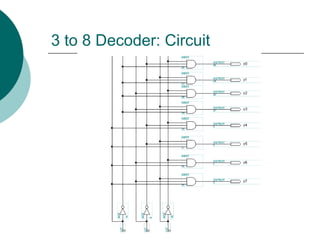
3 to 8 Decoder: Circuit
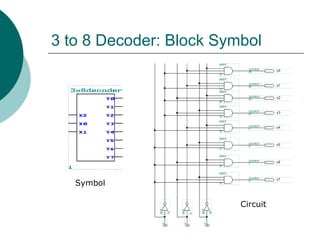
3 to 8 Decoder: Block Symbol
Symbol
Circuit
Design Example
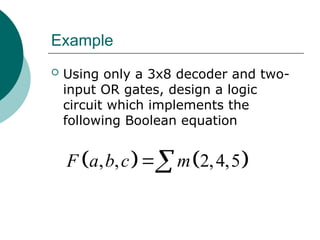
Example
 Using only a 3x8 decoder and two-
input OR gates, design a logic
circuit which implements the
following Boolean equation
   
, , 2,4,5
F a b c m

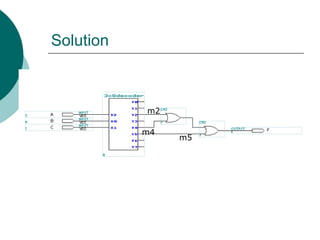
Solution
m2
m4
m5
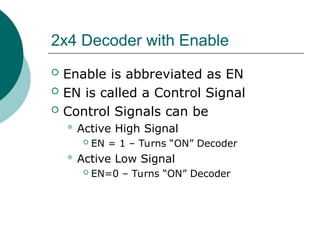
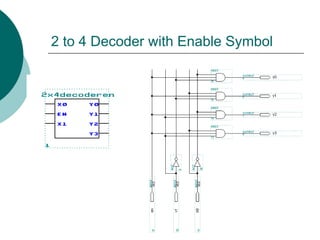
2 to 4 Decoder with Enable
2x4 Decoder with Enable
 Enable is abbreviated as EN
 EN is called a Control Signal
 Control Signals can be
 Active High Signal
 EN = 1 – Turns “ON” Decoder
 Active Low Signal
 EN=0 – Turns “ON” Decoder
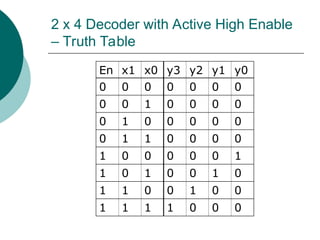
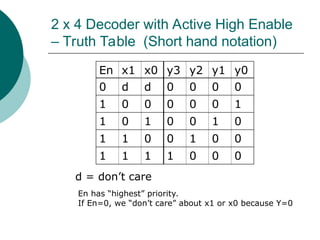
2 x 4 Decoder with Active High Enable
– Truth Table
En x1 x0 y3 y2 y1 y0
0 0 0 0 0 0 0
0 0 1 0 0 0 0
0 1 0 0 0 0 0
0 1 1 0 0 0 0
1 0 0 0 0 0 1
1 0 1 0 0 1 0
1 1 0 0 1 0 0
1 1 1 1 0 0 0
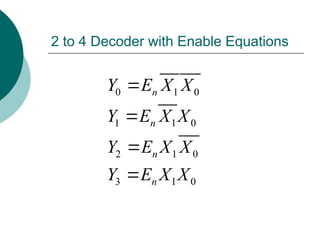
2 to 4 Decoder with Enable Equations
0 1 0
1 1 0
2 1 0
3 1 0
n
n
n
n
Y E X X
Y E X X
Y E X X
Y E X X




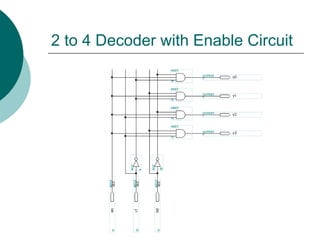
2 to 4 Decoder with Enable Circuit
2 to 4 Decoder with Enable Symbol
2 x 4 Decoder with Active High Enable
– Truth Table (Short hand notation)
En x1 x0 y3 y2 y1 y0
0 d d 0 0 0 0
1 0 0 0 0 0 1
1 0 1 0 0 1 0
1 1 0 0 1 0 0
1 1 1 1 0 0 0
d = don’t care
En has “highest” priority.
If En=0, we “don’t care” about x1 or x0 because Y=0
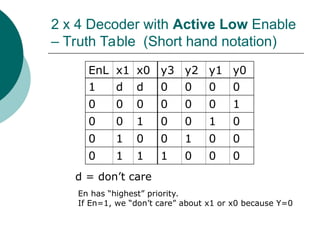
2 x 4 Decoder with Active Low Enable
– Truth Table (Short hand notation)
EnL x1 x0 y3 y2 y1 y0
1 d d 0 0 0 0
0 0 0 0 0 0 1
0 0 1 0 0 1 0
0 1 0 0 1 0 0
0 1 1 1 0 0 0
d = don’t care
En has “highest” priority.
If En=1, we “don’t care” about x1 or x0 because Y=0
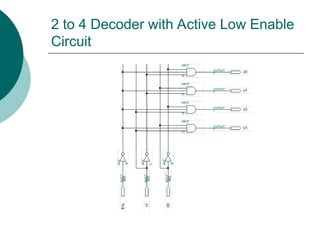
2 to 4 Decoder with Active Low Enable
Circuit
Design Example
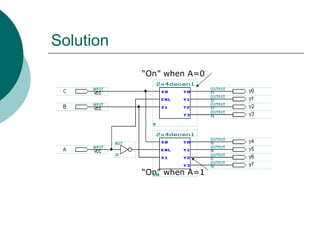
Example
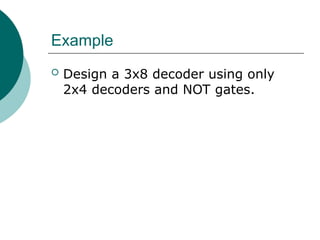
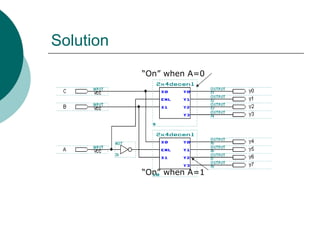
 Design a 3x8 decoder using only
2x4 decoders and NOT gates.
Solution
“On” when A=1
“On” when A=0
TPS Quiz
Encoders
Encoders
 Opposite of a decoder
 2n
to n encoder
 2n
inputs
 n outputs
 For each input, the circuit will
produce an “encoded” output
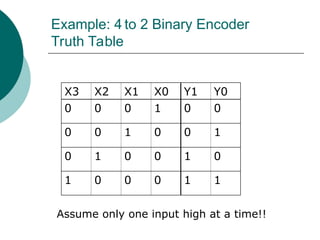
Example: 4 to 2 Binary Encoder
Truth Table
X3 X2 X1 X0 Y1 Y0
0 0 0 1 0 0
0 0 1 0 0 1
0 1 0 0 1 0
1 0 0 0 1 1
Assume only one input high at a time!!
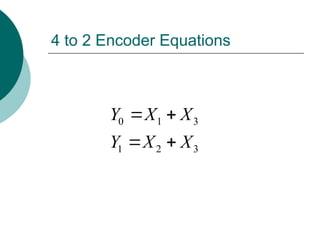
4 to 2 Encoder Equations
0 1 3
1 2 3
Y X X
Y X X
 
 
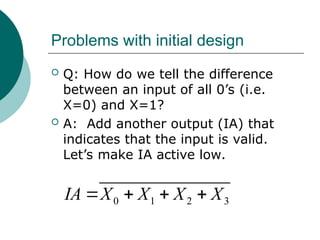
Problems with initial design
 Q: How do we tell the difference
between an input of all 0’s (i.e.
X=0) and X=1?
 A: Add another output (IA) that
indicates that the input is valid.
Let’s make IA active low.
0 1 2 3
IA X X X X
   
Problems with initial design
If IA = 1 => all lines are 0
If IA = 0 => at least one line is 1
 Q: What happens if more than one input
is high at the same time?
 A: Design a “priority” encoder that will
encode the input with the highest priority.
 Let’s set X3 with the highest priority,
followed by X2, X1, and X0
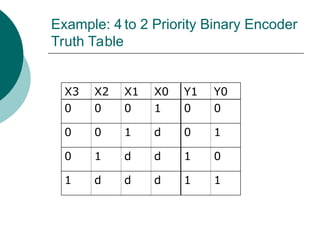
Example: 4 to 2 Priority Binary Encoder
Truth Table
X3 X2 X1 X0 Y1 Y0
0 0 0 1 0 0
0 0 1 d 0 1
0 1 d d 1 0
1 d d d 1 1
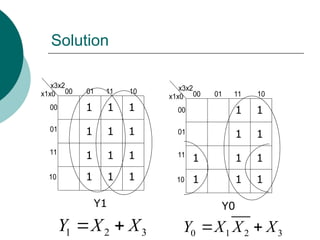
Solution
x3x2
x1x0 00 01 11 10
00
01
11
10
Y1
x3x2
x1x0 00 01 11 10
00
01
11
10
Y0
1
1
1
1
1
1
1
1
1
1
1
1
1
1
1
1
1
1
1
1
1
1
1 2 3
Y X X
  0 1 2 3
Y X X X
 
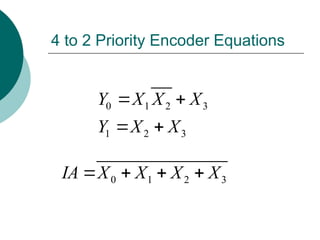
4 to 2 Priority Encoder Equations
0 1 2 3
1 2 3
Y X X X
Y X X
 
 
0 1 2 3
IA X X X X
   
Multiplexer/Data Selectors
MUX
Very Important Module!!!
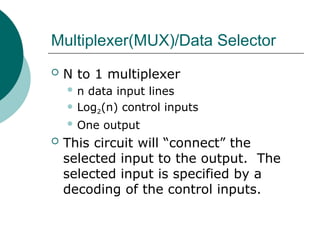
Multiplexer(MUX)/Data Selector
 N to 1 multiplexer
 n data input lines
 Log2(n) control inputs
 One output
 This circuit will “connect” the
selected input to the output. The
selected input is specified by a
decoding of the control inputs.
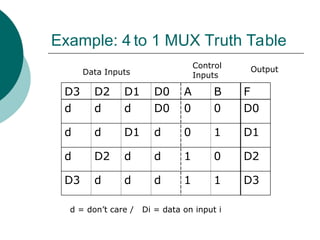
Example: 4 to 1 MUX Truth Table
D3 D2 D1 D0 A B F
d d d D0 0 0 D0
d d D1 d 0 1 D1
d D2 d d 1 0 D2
D3 d d d 1 1 D3
d = don’t care / Di = data on input i
Data Inputs
Control
Inputs
Output
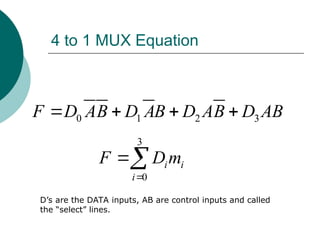
4 to 1 MUX Equation
0 1 2 3
F D AB D AB D AB D AB
   
3
0
i i
i
F D m


D’s are the DATA inputs, AB are control inputs and called
the “select” lines.
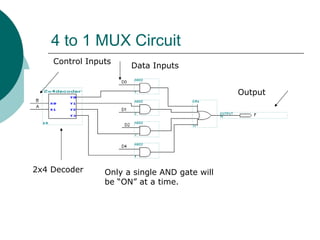
4 to 1 MUX Circuit
2x4 Decoder Only a single AND gate will
be “ON” at a time.
Output
Control Inputs
Data Inputs
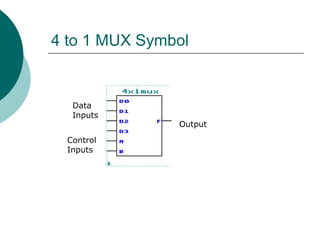
4 to 1 MUX Symbol
Data
Inputs
Control
Inputs
Output
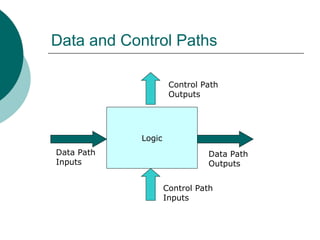
Data and Control Paths
Logic
Data Path
Inputs
Data Path
Outputs
Control Path
Inputs
Control Path
Outputs
MUX Applications
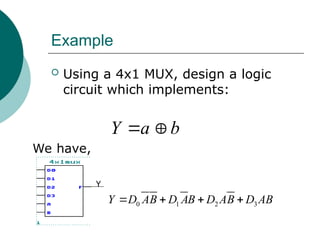
Example
 Using a 4x1 MUX, design a logic
circuit which implements:
Y a b
 
We have,
Y
0 1 2 3
Y D AB D AB D AB D AB
   
Example
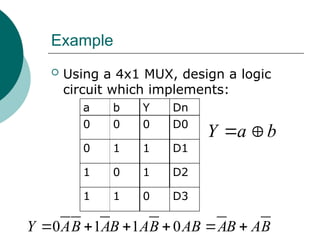
 Using a 4x1 MUX, design a logic
circuit which implements:
Y a b
 
a b Y Dn
0 0 0 D0
0 1 1 D1
1 0 1 D2
1 1 0 D3
0 1 1 0
Y AB AB AB AB AB AB
     
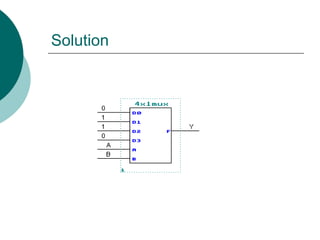
Solution
Multibit Multiplexers
Multi-bit Multiplexers
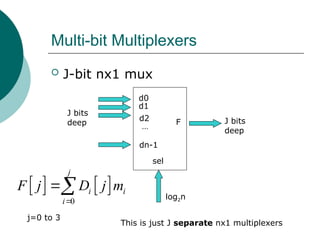
 J-bit nx1 mux
sel
d0
d1
…
dn-1
d2 F
J bits
deep
log2n
J bits
deep
   
0
j
i i
i
F j D j m


j=0 to 3
This is just J separate nx1 multiplexers
Example 4-bit 4x1 MUX
A B
D0[3..0]
D1[3..0]
D3[3..0]
D2[3..0]
F[3..0] 4 bits
deep
D0[3..0]
D1[3..0]
D2[3..0]
D3[3..0]
A B
F[3..0]
   
3
0
i i
i
F j D j m


j=0 to 3 This is just 4 separate 4x1 muxes
Example
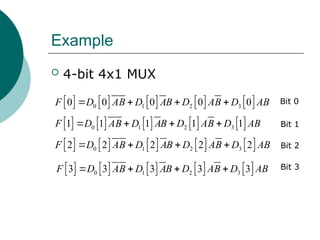
 4-bit 4x1 MUX
         
0 1 2 3
0 0 0 0 0
F D AB D AB D AB D AB
   
         
0 1 2 3
1 1 1 1 1
F D AB D AB D AB D AB
   
         
0 1 2 3
2 2 2 2 2
F D AB D AB D AB D AB
   
         
0 1 2 3
3 3 3 3 3
F D AB D AB D AB D AB
   
Bit 0
Bit 3
Bit 2
Bit 1
Example 4 bit 4x1 MUX
 For the jth output, we have
D0[j]
D1[j]
D2[j]
D3[j]
A
B
F[j]
Example 4 bit 4x1 MUX
 For the bit 0 output, we have
D0[0]
D1[0]
D2[0]
D3[0]
A
B
F[0]
Example 4 bit 4x1 MUX
 For the bit 1 output, we have
D0[1]
D1[1]
D2[1]
D3[1]
A
B
F[1]
Example 4 bit 4x1 MUX
 For the bit 2 output, we have
D0[2]
D1[2]
D2[2]
D3[2]
A
B
F[2]
Example 4 bit 4x1 MUX
 For the bit 3 output, we have
D0[3]
D1[3]
D2[3]
D3[3]
A
B
F[3]
Example 4 bit 4x1 Mux
F[0]
F[1]
F[2]
F[3]
Complete Circuit
Bit 0
Bit 1
Bit 2
Bit 3
Example 4 bit 4x1 MUX
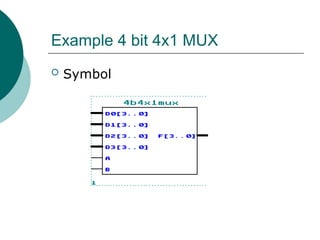
 Symbol
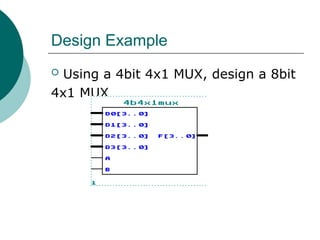
Design Example
 Using a 4bit 4x1 MUX, design a 8bit
4x1 MUX
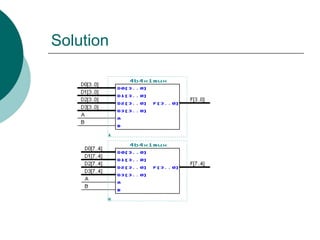
Solution
DeMultiplexers/
Data Distributors
Demultiplexer/Data Distributor
 Opposite of a multiplexer
 1 to N demultiplexer
 1 data input
 N data outputs
 Log2(n) control inputs
 This circuit will “connect” a data
input to one and only one output.
The selected output is specified by a
decoding of the control inputs.
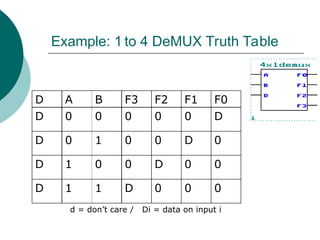
Example: 1 to 4 DeMUX Truth Table
D A B F3 F2 F1 F0
D 0 0 0 0 0 D
D 0 1 0 0 D 0
D 1 0 0 D 0 0
D 1 1 D 0 0 0
d = don’t care / Di = data on input i
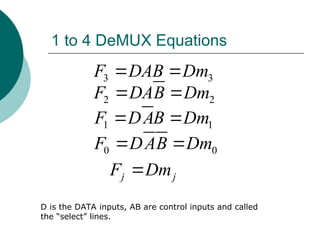
1 to 4 DeMUX Equations
3 3
F DAB Dm
 
j j
F Dm

D is the DATA inputs, AB are control inputs and called
the “select” lines.
1 1
F DAB Dm
 
2 2
F DAB Dm
 
0 0
F DAB Dm
 
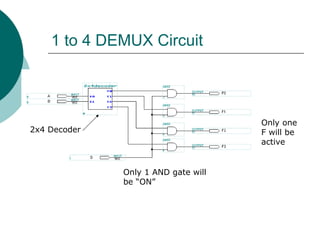
1 to 4 DEMUX Circuit
Only 1 AND gate will
be “ON”
2x4 Decoder
Only one
F will be
active
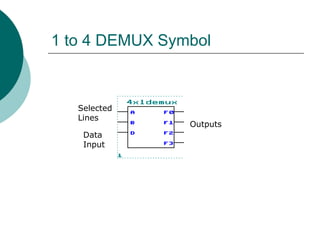
1 to 4 DEMUX Symbol
Data
Input
Selected
Lines
Outputs
Example
 Design a 3x8 decoder using only
2x4 decoders and NOT gates.
Solution
“On” when A=1
“On” when A=0
TPS Quiz
Basic Arithmetic Elements
Half Adder
Half Adder-Truth Table
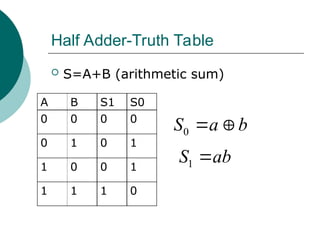
 S=A+B (arithmetic sum)
A B S1 S0
0 0 0 0
0 1 0 1
1 0 0 1
1 1 1 0
0
S a b
 
1
S ab

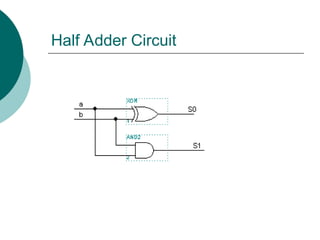
Half Adder Circuit
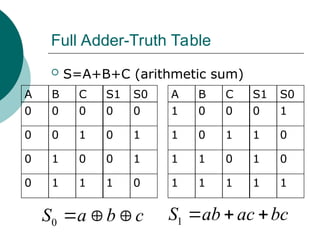
Full Adder-Truth Table
 S=A+B+C (arithmetic sum)
A B C S1 S0
0 0 0 0 0
0 0 1 0 1
0 1 0 0 1
0 1 1 1 0
0
S a b c
   1
S ab ac bc
  
A B C S1 S0
1 0 0 0 1
1 0 1 1 0
1 1 0 1 0
1 1 1 1 1
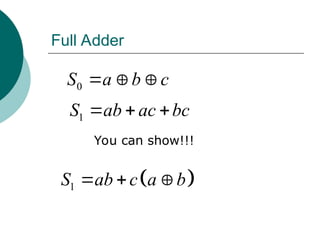
Full Adder
0
S a b c
  
1
S ab ac bc
  
You can show!!!
 
1
S ab c a b
  
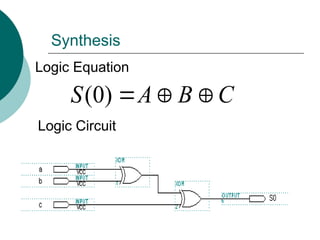
Synthesis
(0)
S A B C
  
Logic Equation
Logic Circuit
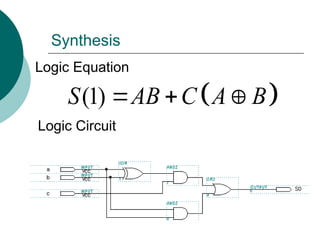
Synthesis
 
(1)
S AB C A B
  
Logic Equation
Logic Circuit
17
AND2 18
OR2
19 cout
OUTPUT
16
AND2
VCC
14 Cin INPUT
VCC
13 B INPUT
10
XOR
11
XOR
15 sum
OUTPUT
VCC
12 A INPUT
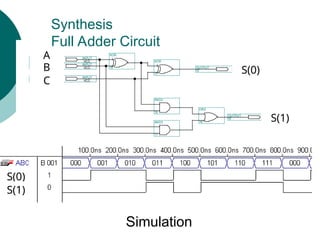
Synthesis
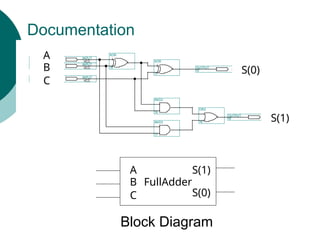
Full Adder Circuit
S(0)
S(1)
C
A
B
S(0)
S(1)
Simulation
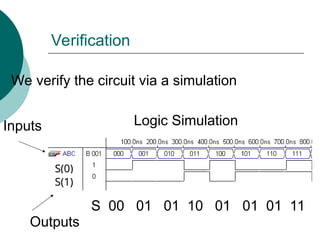
Verification
S(0)
S(1)
We verify the circuit via a simulation
Logic Simulation
Inputs
Outputs
S 00 01 01 10 01 01 01 11
17
AND2 18
OR2
19 cout
OUTPUT
16
AND2
VCC
14 Cin INPUT
VCC
13 B INPUT
10
XOR
11
XOR
15 sum
OUTPUT
VCC
12 A INPUT
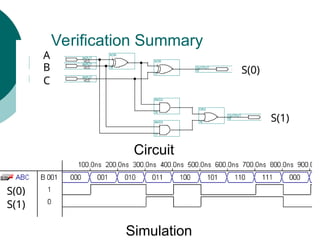
Verification Summary
S(0)
S(1)
C
A
B
S(0)
S(1)
Simulation
Circuit
Documentation
17
AND2 18
OR2
19 cout
OUTPUT
16
AND2
VCC
14 Cin INPUT
VCC
13 B INPUT
10
XOR
11
XOR
15 sum
OUTPUT
VCC
12 A INPUT
S(0)
S(1)
C
A
B
FullAdder
C
A
B
S(0)
S(1)
Block Diagram
Ripple Carry Adder
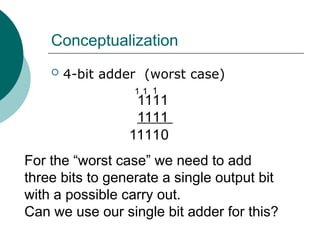
Conceptualization
 4-bit adder (worst case)
1111
1111
11110
1
1
1
For the “worst case” we need to add
three bits to generate a single output bit
with a possible carry out.
Can we use our single bit adder for this?
Ripple Carry Adder
 We can cascade several full adders
to create a ripple carry adder
 The circuit gets its name because
the carry bit “ripples” from one bit
position to the next
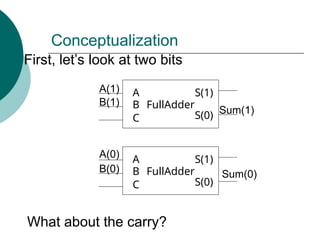
Conceptualization
FullAdder
C
A
B
S(0)
S(1)
FullAdder
C
A
B
S(0)
S(1)
First, let’s look at two bits
A(0)
B(0)
B(1)
A(1)
Sum(0)
Sum(1)
What about the carry?
Conceptualization
FullAdder
C
A
B
S(0)
S(1)
FullAdder
C
A
B
S(0)
S(1)
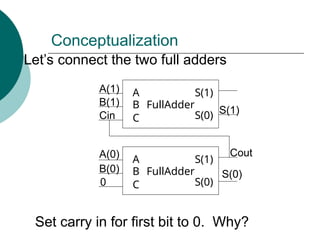
Let’s connect the two full adders
A(0)
B(0)
B(1)
A(1)
S(0)
S(1)
Set carry in for first bit to 0. Why?
Cout
Cin
0
Analysis
FullAdder
C
A
B
S(0)
S(1)
FullAdder
C
A
B
S(0)
S(1)
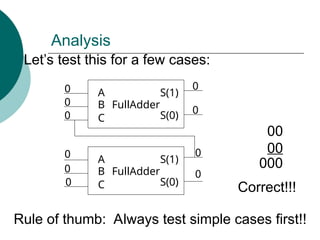
Let’s test this for a few cases:
0
0
0
0
0
0
0
0
0
0
00
00
000
Correct!!!
Rule of thumb: Always test simple cases first!!
Analysis
FullAdder
C
A
B
S(0)
S(1)
FullAdder
C
A
B
S(0)
S(1)
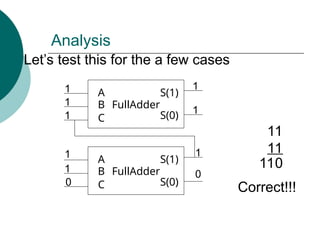
Let’s test this for the a few cases
0
1
1
1
1
1
1
0
1
1
11
11
110
Correct!!!
Analysis
FullAdder
C
A
B
S(0)
S(1)
FullAdder
C
A
B
S(0)
S(1)
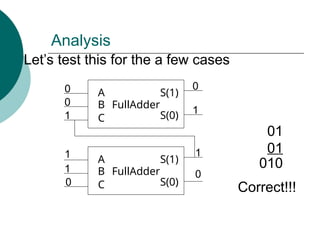
Let’s test this for the a few cases
1
1
0
0
0
1
1
1
0
0
01
01
010
Correct!!!
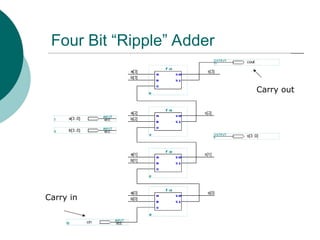
Four Bit “Ripple” Adder
Carry in
Carry out
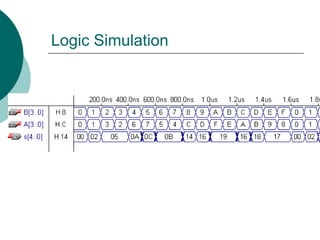
Logic Simulation
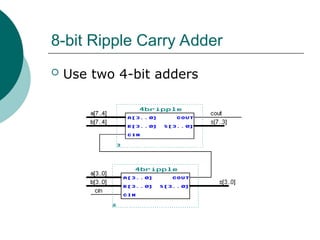
8-bit Ripple Carry Adder
 Use two 4-bit adders
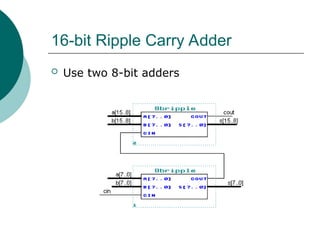
16-bit Ripple Carry Adder
 Use two 8-bit adders
Subtraction Circuit
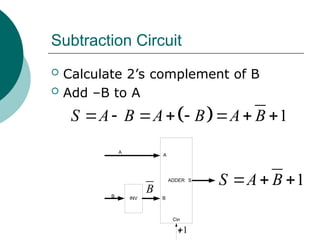
Subtraction Circuit
 Calculate 2’s complement of B
 Add –B to A
ADDER
INV
A
B
S
1
Cin
A
B
  1
S A B A B A B
       
B
1

1
S A B
  
Add/Sub Circuit
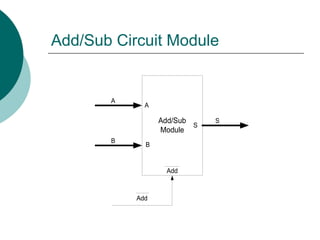
Add/Sub Circuit Module
Add/Sub
Module
A
B
S
Add
A
B
Add
S
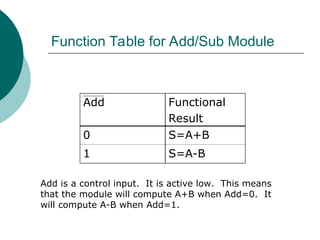
Function Table for Add/Sub Module
Add Functional
Result
0 S=A+B
1 S=A-B
Add is a control input. It is active low. This means
that the module will compute A+B when Add=0. It
will compute A-B when Add=1.
Add/Sub Circuit
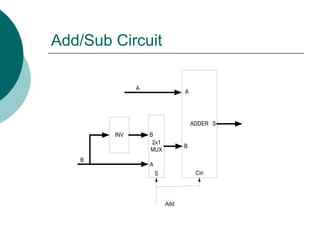
Design using Modules
Add/Sub Circuit
ADDER
INV
2x1
MUX
A
B
S
B
B
A
S Cin
A
Add
Add/Sub Circuit
ADDER
INV
2x1
MUX
A
B
S
B
B
A
S Cin
A
Add
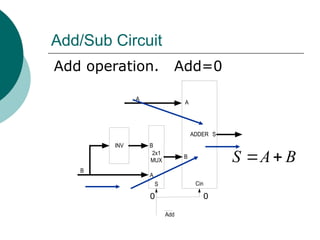
Add operation. Add=0
0 0
S A B
 
Add/Sub Circuit
ADDER
INV
2x1
MUX
A
B
S
B
B
A
S Cin
A
Add
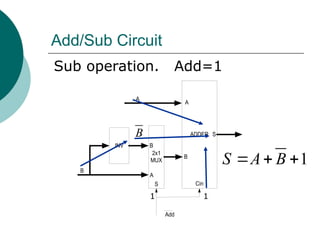
Sub operation. Add=1
1 1
1
S A B
  
B
TPS Quiz
17-18
Overflow/Underflow Detection
Numerical Overflow/Underflow
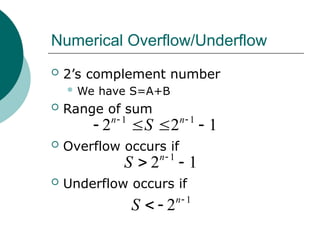
 2’s complement number
 We have S=A+B
 Range of sum
 Overflow occurs if
 Underflow occurs if
1 1
2 2 1
n n
S
 
   
1
2 1
n
S 
 
1
2n
S 
 
Example: Overflow
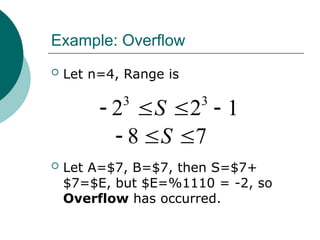
 Let n=4, Range is
 Let A=$7, B=$7, then S=$7+
$7=$E, but $E=%1110 = -2, so
Overflow has occurred.
8 7
S
  
3 3
2 2 1
S
   
Example: Overflow
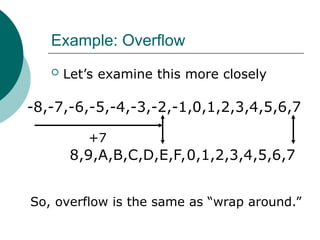
 Let’s examine this more closely
-8,-7,-6,-5,-4,-3,-2,-1,0,1,2,3,4,5,6,7
+7
So, overflow is the same as “wrap around.”
8,9,A,B,C,D,E,F,0,1,2,3,4,5,6,7
Example: Underflow
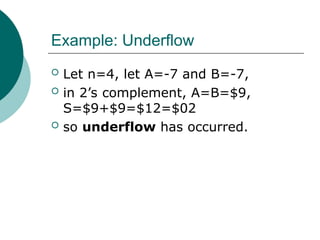
 Let n=4, let A=-7 and B=-7,
 in 2’s complement, A=B=$9,
S=$9+$9=$12=$02
 so underflow has occurred.
Example: Underflow
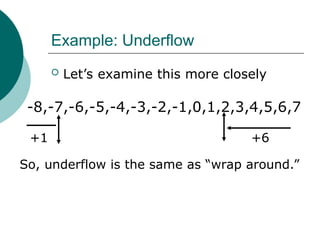
 Let’s examine this more closely
-8,-7,-6,-5,-4,-3,-2,-1,0,1,2,3,4,5,6,7
+6
So, underflow is the same as “wrap around.”
+1
Overflow/Underflow Detection
 How do we detect overflow and
underflow?
 First adding a positive to a negative
number is always OK.
 4 bit example: 7 + (-8) = -1
 Let’s examine the sum of the MSB’s to
determine overflow and underflow.
 Set V=1, if overflow/underflow occurs
Examination of MSB
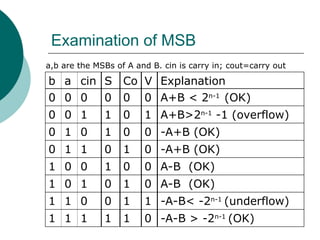
b a cin S Co V Explanation
0 0 0 0 0 0 A+B < 2n-1
(OK)
0 0 1 1 0 1 A+B>2n-1
-1 (overflow)
0 1 0 1 0 0 -A+B (OK)
0 1 1 0 1 0 -A+B (OK)
1 0 0 1 0 0 A-B (OK)
1 0 1 0 1 0 A-B (OK)
1 1 0 0 1 1 -A-B< -2n-1
(underflow)
1 1 1 1 1 0 -A-B > -2n-1
(OK)
a,b are the MSBs of A and B. cin is carry in; cout=carry out
Overflow/Underflow Detection
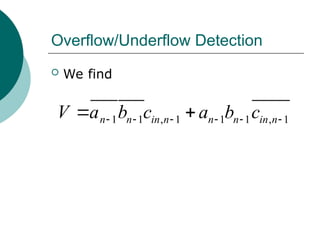
 We find
1 1 , 1 1 1 , 1
n n in n n n in n
V a b c a b c
     
 
Overflow/Underflow Detection
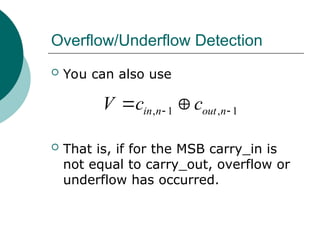
, 1 , 1
in n out n
V c c
 
 
 You can also use
 That is, if for the MSB carry_in is
not equal to carry_out, overflow or
underflow has occurred.
TPS Quiz
19-20
Comparators
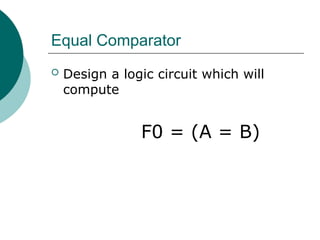
Equal Comparator
 Design a logic circuit which will
compute
F0 = (A = B)
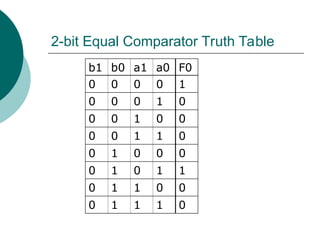
2-bit Equal Comparator Truth Table
b1 b0 a1 a0 F0
0 0 0 0 1
0 0 0 1 0
0 0 1 0 0
0 0 1 1 0
0 1 0 0 0
0 1 0 1 1
0 1 1 0 0
0 1 1 1 0
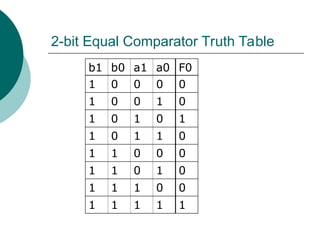
2-bit Equal Comparator Truth Table
b1 b0 a1 a0 F0
1 0 0 0 0
1 0 0 1 0
1 0 1 0 1
1 0 1 1 0
1 1 0 0 0
1 1 0 1 0
1 1 1 0 0
1 1 1 1 1
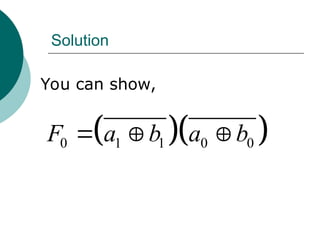
Solution
  
0 1 1 0 0
F a b a b
  
You can show,
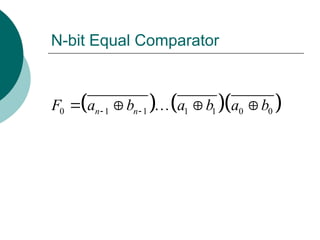
N-bit Equal Comparator
    
0 1 1 1 1 0 0
n n
F a b a b a b
 
   

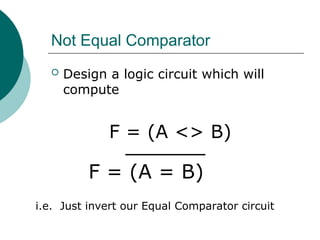
Not Equal Comparator
 Design a logic circuit which will
compute
F = (A <> B)
F = (A = B)
i.e. Just invert our Equal Comparator circuit
Magnitude Comparator
 Design a logic circuit which will
compute
F2 = (A>B)
F1 = (A<B)
Let’s develop a truth table for 2-bits
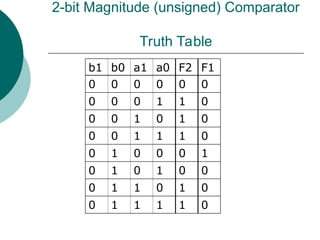
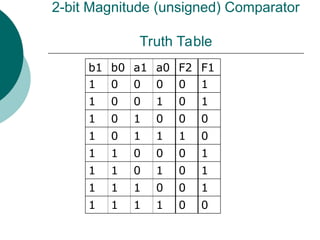
2-bit Magnitude (unsigned) Comparator
Truth Table
b1 b0 a1 a0 F2 F1
0 0 0 0 0 0
0 0 0 1 1 0
0 0 1 0 1 0
0 0 1 1 1 0
0 1 0 0 0 1
0 1 0 1 0 0
0 1 1 0 1 0
0 1 1 1 1 0
2-bit Magnitude (unsigned) Comparator
Truth Table
b1 b0 a1 a0 F2 F1
1 0 0 0 0 1
1 0 0 1 0 1
1 0 1 0 0 0
1 0 1 1 1 0
1 1 0 0 0 1
1 1 0 1 0 1
1 1 1 0 0 1
1 1 1 1 0 0
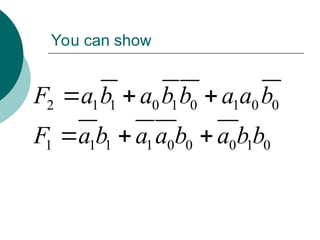
You can show
2 1 1 0 1 0 1 0 0
F a b a b b a a b
  
1 1 1 1 0 0 0 1 0
F a b a a b a b b
  
TPS Quiz
21
Arithmetic Logic Units (ALUs)
Arithmetic Logic Unit (ALU)
ALU
A[n-1,,0]
B[n-1..0]
F
S[m-1..0]
A,B are data inputs of n bits each in depth
S is a control input. We have 2m
operations
F is the output
Example
 Let n=4,m=3
 We have A[3..0] and B[3..0]
 With m=3, we have 23
= 8 operations
 Let’s look at a possible function table
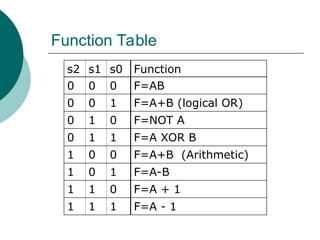
Function Table
s2 s1 s0 Function
0 0 0 F=AB
0 0 1 F=A+B (logical OR)
0 1 0 F=NOT A
0 1 1 F=A XOR B
1 0 0 F=A+B (Arithmetic)
1 0 1 F=A-B
1 1 0 F=A + 1
1 1 1 F=A - 1
Design using a Truth Table
 How large is the truth table?
 2n from data inputs A and B
 Example: n=8, we have 16 data inputs
 A[7..0] and B[7..0]
 3 control inputs
 Total of 2n+3 inputs
 N=8, we have 19 inputs
 Our truth table will have
 192
(361) rows and 8 outputs
 Too complex. Let’s explore another
alternative using a “system” or modular
approach
Design using Modules
 Note:
 For S2=0, we have logic operations
 For S2=1, we have arithmetic
operations
 So, let’s use S2 to control a 2x1 MUX
 to select between logic and arithmetic
operations, so our top level design
would look like:
ALU Design
Logic
Module
Arithmetic
Module
2x1
MUX
S[2]
A B
A
A
B
F
A
B
F
S[1..0]
S[1..0]
B
F F
ALU Design S2=0
Logic
Module
Arithmetic
Module
2x1
MUX
S[2]
A B
A
A
B
F
A
B
F
S[1..0]
S[1..0]
B
F F
With S2=0, F is the output from
the logic module
ALU Design S2=1
Logic
Module
Arithmetic
Module
2x1
MUX
S[2]
A B
A
A
B
F
A
B
F
S[1..0]
S[1..0]
B
F F
With S2=1, F is the output from
the arithmetic module
Logic Module Design
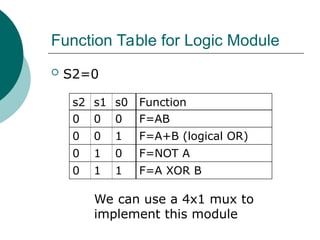
Function Table for Logic Module
 S2=0
s2 s1 s0 Function
0 0 0 F=AB
0 0 1 F=A+B (logical OR)
0 1 0 F=NOT A
0 1 1 F=A XOR B
We can use a 4x1 mux to
implement this module
Logic Module Design
OR
NOT
XOR
AND
A
B
C
D
4
X
1
F
S[1..0]
S1 S0
A
A
B
F
A
B
F
A
B
F
A F
B
Logic Module Design
OR
NOT
XOR
AND
A
B
C
D
4
X
1
F
S[1..0]
S1 S0
A
A
B
F
A
B
F
A
B
F
A F
B
AND Operation
S[1..0]=00
0 0
F=AB
Logic Module Design
OR
NOT
XOR
AND
A
B
C
D
4
X
1
F
S[1..0]
S1 S0
A
A
B
F
A
B
F
A
B
F
A F
B
OR Operation
S[1..0]=01
0 1
F=A+B
Logic Module Design
OR
NOT
XOR
AND
A
B
C
D
4
X
1
F
S[1..0]
S1 S0
A
A
B
F
A
B
F
A
B
F
A F
B
NOT Operation
S[1..0]=10
1 0
F=A
Logic Module Design
OR
NOT
XOR
AND
A
B
C
D
4
X
1
F
S[1..0]
S1 S0
A
A
B
F
A
B
F
A
B
F
A F
B
XOR Operation
S[1..0]=11
1 1
F=A XOR B
What do these logic modules
look like?
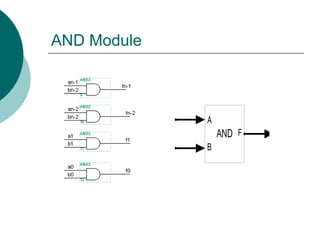
AND Module
AND
A
B
F
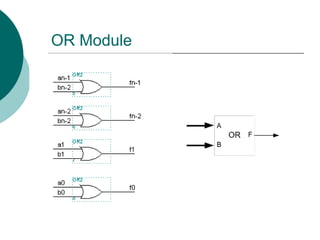
OR Module
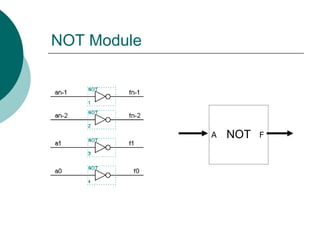
NOT Module
NOT
A F
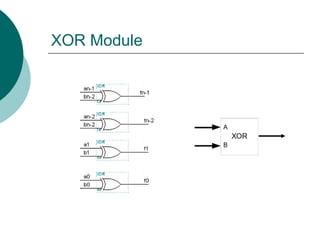
XOR Module
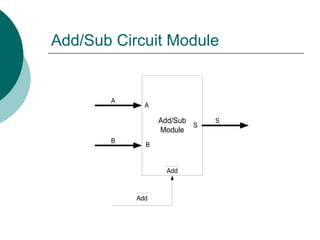
Arithmetic Module
Let’s use our ADD/SUB Module
Add/Sub Circuit Module
Add/Sub
Module
A
B
S
Add
A
B
Add
S
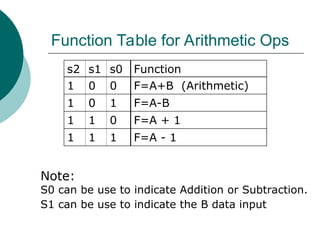
Function Table for Arithmetic Ops
s2 s1 s0 Function
1 0 0 F=A+B (Arithmetic)
1 0 1 F=A-B
1 1 0 F=A + 1
1 1 1 F=A - 1
Note:
S0 can be use to indicate Addition or Subtraction.
S1 can be use to indicate the B data input
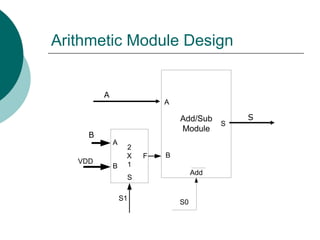
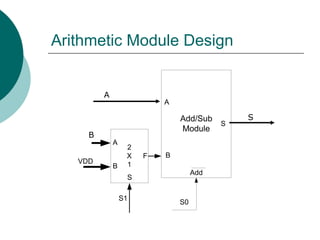
Arithmetic Module Design
Add/Sub
Module
S0
A
B
Add
S
S
2
X
1
A
B
F
VDD
S1
B
A
S
Arithmetic Module Design
Add/Sub
Module
S0
A
B
Add
S
S
2
X
1
A
B
F
VDD
S1
B
A
S
0
0
F=A+B
S[1..0]=00
Arithmetic Module Design
Add/Sub
Module
S0
A
B
Add
S
S
2
X
1
A
B
F
VDD
S1
B
A
S
1
0
F=A-B
S[1..0]=01
Arithmetic Module Design
Add/Sub
Module
S0
A
B
Add
S
S
2
X
1
A
B
F
VDD
S1
B
A
S
0
1
F=A+1
S[1..0]=10
Arithmetic Module Design
Add/Sub
Module
S0
A
B
Add
S
S
2
X
1
A
B
F
VDD
S1
B
A
S
1
1
F=A-1
S[1..0]=11
Overall Design
We have
ALU Design
Logic
Module
Arithmetic
Module
2x1
MUX
S[2]
A B
A
A
B
F
A
B
F
S[1..0]
S[1..0]
B
F F
Logic Module Design
OR
NOT
XOR
AND
A
B
C
D
4
X
1
F
S[1..0]
S1 S0
A
A
B
F
A
B
F
A
B
F
A F
B
Arithmetic Module Design
Add/Sub
Module
S0
A
B
Add
S
S
2
X
1
A
B
F
VDD
S1
B
A
S
Total Design
OR
NOT
XOR
AND
A
B
C
D
4
X
1
F
S[1..0]
Add/Sub
Module
A
S
S0
A
B
Add
S
B
S
F
2
X
1
S2
S
2
X
1
A
B
F
VDD
S1 S0
S1
A B
A
B
F
A
B
F
A
B
F
A F
Logic Module
Arithmetic Module
End of Chapter 4

04_Chapter 4768 - Modular Comb logic.ppt