1 © 2011 Zynx Health Incorporated | The information contained herein is confidential and proprietary to Zynx Health Incorporated and is intended for its
authorized recipient. Unauthorized review, use, disclosure or distribution is strictly prohibited. All rights reserved.
2 © 2011 Zynx Health Incorporated | The information contained herein is confidential and proprietary to Zynx Health Incorporated and is intended for its
authorized recipient. Unauthorized review, use, disclosure or distribution is strictly prohibited. All rights reserved.
Agile XML
There is such a thing.
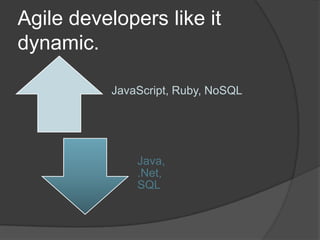
Agile developers like it
dynamic.
JavaScript, Ruby, NoSQL
Java,
.Net,
SQL
 Strict types in static languages like C++ and
Java make code more time-consuming to
write and verbose to read.
 Static code is harder to unit-test (type
system fights mocks).
 Dynamic languages present a lower barrier to
entry and the code often ends up more terse
and expressive.
 Dynamic flexibility means no hoops to jump
through when you want to change things.
 Developers prefer to ensure integrity through
tests rather than type safety features.
 Mapping data to objects produces profuse
code, mostly boilerplate but obligatory
nevertheless
 Piles of model classes and mapping
artifacts, often containing specialized
configurations for indirectly tuning queries, add
friction to change.
 Abstracts code away from database interactions
in ways that can encourage sub-optimal
behavior (e.g., the "n+1 selects" problem).
 But still preferable to the drudgery and
maintenance nightmare of stored procedures.
 Static schema is strict and very difficult and
complicated to change.
 Normalized relational models make complex data
cumbersome to manipulate in native query language.
 Query language (SQL) is virtually impossible to unit-
test.
Developers like NoSQL
 Low barrier to entry
 Scales horizontally
 Seamless programming language integration
Developers like NoSQL
 Low barrier to entry
 Scales horizontally
 Seamless programming language integration
 BUT MOSTLY because it's dynamic
 Easier to change
 Easier to scale up
 Easier to test
But when you think XML,
you don't think NoSQL.
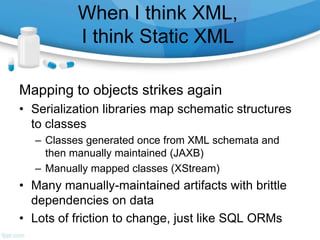
When I think XML,
I think Static XML
Mapping to objects strikes again
• Serialization libraries map schematic structures
to classes
– Classes generated once from XML schemata and
then manually maintained (JAXB)
– Manually mapped classes (XStream)
• Many manually-maintained artifacts with brittle
dependencies on data
• Lots of friction to change, just like SQL ORMs
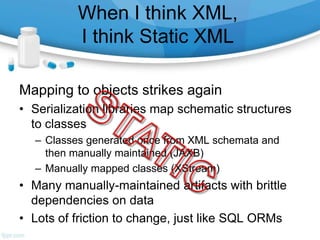
When I think XML,
I think Static XML
Mapping to objects strikes again
• Serialization libraries map schematic structures
to classes
– Classes generated once from XML schemata and
then manually maintained (JAXB)
– Manually mapped classes (XStream)
• Many manually-maintained artifacts with brittle
dependencies on data
• Lots of friction to change, just like SQL ORMs
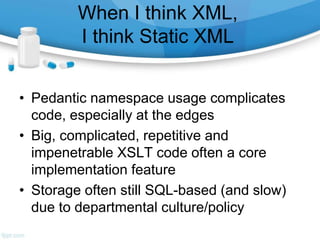
When I think XML,
I think Static XML
• Pedantic namespace usage complicates
code, especially at the edges
• Big, complicated, repetitive and
impenetrable XSLT code often a core
implementation feature
• Storage often still SQL-based (and slow)
due to departmental culture/policy
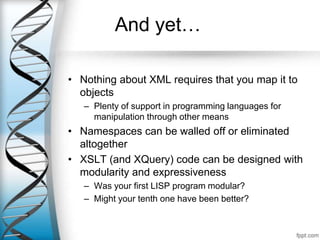
And yet…
• Nothing about XML requires that you map it to
objects
– Plenty of support in programming languages for
manipulation through other means
• Namespaces can be walled off or eliminated
altogether
• XSLT (and XQuery) code can be designed with
modularity and expressiveness
– Was your first LISP program modular?
– Might your tenth one have been better?
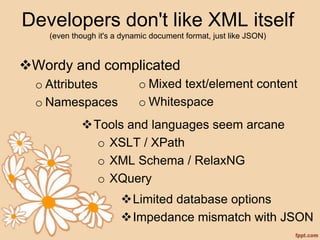
Developers don't like XML itself
(even though it's a dynamic document format, just like JSON)
Wordy and complicated
o Attributes
o Namespaces
o Mixed text/element content
o Whitespace
Tools and languages seem arcane
o XSLT / XPath
o XML Schema / RelaxNG
o XQuery
Limited database options
Impedance mismatch with JSON
What's More…
• XML provides a rich ecosystem
• Rich transformation…
– …with XQuery in the database
– …with XSLT almost everywhere
– …in code with rich, embedded DSLs
• Rich query…
– …with XQuery in the database
– …with XPath almost everywhere
– …with GPath in Groovy
What's More…
• XML provides multiple, rich schema
standards (unlike other document NoSQL
formats)
– Automated validation and even content repair
at database level
– Usage is completely optional; could be used
as a barrier, or just to generate information
about schema violations
What's More…
• XML provides multiple facilities for data
integration…
– …XInclude for automated document
aggregation (including automated broken link
reporting)
– …Attributes, including RDFA, for aspect-
oriented tagging
– …Namespaces for more aspect-oriented
integration
What's More…
• Breadth and depth of XML ecosystem
provides all sorts of network effect benefits
– Multiple implementations of various strategies
for dealing with large data sets
(DOM, SAX, XPP, etc.)
– Pipelining for faster, layered work on data
– Schematrons for semantic validation
– Schema-based editors like
InfoPath, Oxygen, XMLSpy, Arbortext, XMeta
L and Xopus
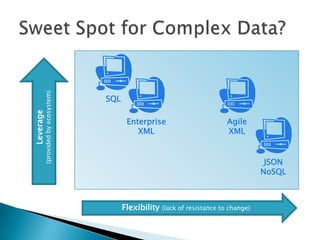
Leverage Can Tip the Scale
• Complex, modular data
• Complex things being done with data
• Integration in an XML-rich space
– Healthcare, for example
When is it enough?
…to offset the additional complexity versus JSON/JavaScript
Flexibility (lack of resistance to change)
Leverage
(providedbyecosystem)
SQL
JSON
NoSQL
Enterprise
XML
Agile
XML
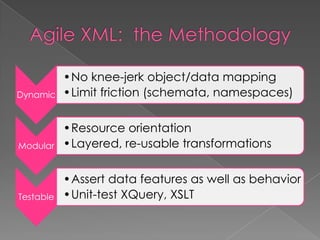
The Methodology…
Dynamic
•No knee-jerk object/data mapping
•Limit friction (schemata, namespaces)
Modular
•Resource orientation
•Layered, re-usable transformations
Testable
•Assert data features as well as behavior
•Unit-test XQuery, XSLT
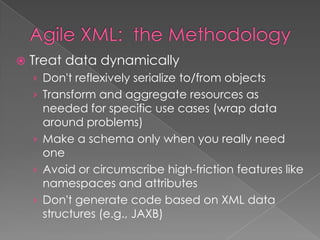
 Treat data dynamically
› Don't reflexively serialize to/from objects
› Transform and aggregate resources as
needed for specific use cases (wrap data
around problems)
› Make a schema only when you really need
one
› Avoid or circumscribe high-friction features like
namespaces and attributes
› Don't generate code based on XML data
structures (e.g., JAXB)
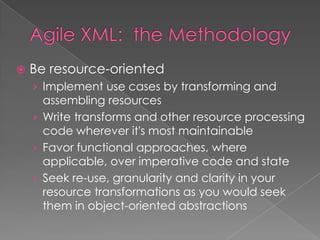
 Be resource-oriented
› Implement use cases by transforming and
assembling resources
› Write transforms and other resource processing
code wherever it's most maintainable
› Favor functional approaches, where
applicable, over imperative code and state
› Seek re-use, granularity and clarity in your
resource transformations as you would seek
them in object-oriented abstractions
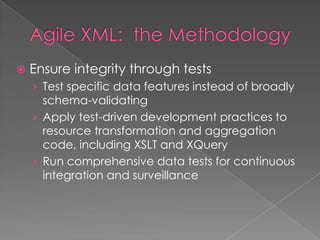
 Ensure integrity through tests
› Test specific data features instead of broadly
schema-validating
› Apply test-driven development practices to
resource transformation and aggregation
code, including XSLT and XQuery
› Run comprehensive data tests for continuous
integration and surveillance
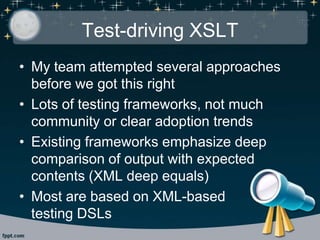
Test-driving XSLT
• My team attempted several approaches
before we got this right
• Lots of testing frameworks, not much
community or clear adoption trends
• Existing frameworks emphasize deep
comparison of output with expected
contents (XML deep equals)
• Most are based on XML-based
testing DSLs
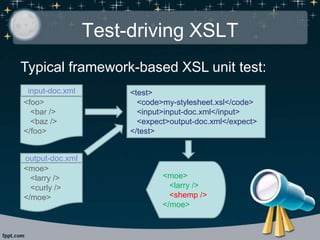
Test-driving XSLT
Typical framework-based XSL unit test:
<test>
<code>my-stylesheet.xsl</code>
<input>input-doc.xml</input>
<expect>output-doc.xml</expect>
</test>
<foo>
<bar />
<baz />
</foo>
input-doc.xml
<moe>
<larry />
<curly />
</moe>
output-doc.xml
<moe>
<larry />
<shemp />
</moe>
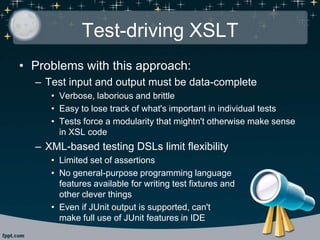
Test-driving XSLT
• Problems with this approach:
– Test input and output must be data-complete
• Verbose, laborious and brittle
• Easy to lose track of what's important in individual tests
• Tests force a modularity that mightn't otherwise make sense
in XSL code
– XML-based testing DSLs limit flexibility
• Limited set of assertions
• No general-purpose programming language
features available for writing test fixtures and
other clever things
• Even if JUnit output is supported, can't
make full use of JUnit features in IDE
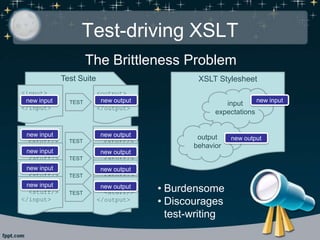
Test-driving XSLT
<output>
<stuff/>
</output>
<output>
<stuff/>
</output><output>
<stuff/>
</output><output>
<stuff/>
</output><output>
<stuff/>
</output>
<input>
<stuff/>
</input>
<input>
<stuff/>
</input><input
<stuff/>
</input><input
<stuff/>
</input><input
<stuff/>
</input>
TEST
TEST
TEST
TEST
TEST
XSLT Stylesheet
input
expectations
output
behavior
new inputnew input
new input
new input
new input
new input
new output
new output
new output
new output
new output
new output
• Burdensome
• Discourages
test-writing
Test Suite
The Brittleness Problem
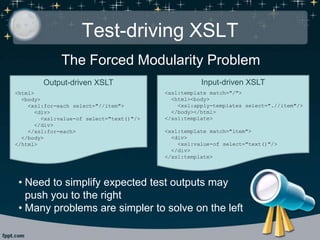
Test-driving XSLT
The Forced Modularity Problem
Output-driven XSLT
<html>
<body>
<xsl:for-each select="//item">
<div>
<xsl:value-of select="text()"/>
</div>
</xsl:for-each>
</body>
</html>
Input-driven XSLT
<xsl:template match="/">
<html><body>
<xsl:apply-templates select=".//item"/>
</body></html>
</xsl:template>
<xsl:template match="item">
<div>
<xsl:value-of select="text()"/>
</div>
</xsl:template>
• Need to simplify expected test outputs may
push you to the right
• Many problems are simpler to solve on the left
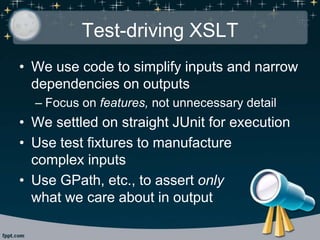
Test-driving XSLT
• We use code to simplify inputs and narrow
dependencies on outputs
– Focus on features, not unnecessary detail
• We settled on straight JUnit for execution
• Use test fixtures to manufacture
complex inputs
• Use GPath, etc., to assert only
what we care about in output
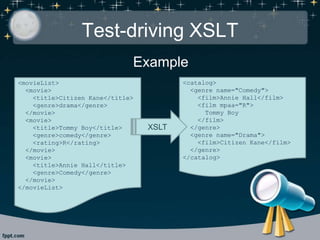
Test-driving XSLT
Example
<movieList>
<movie>
<title>Citizen Kane</title>
<genre>drama</genre>
</movie>
<movie>
<title>Tommy Boy</title>
<genre>comedy</genre>
<rating>R</rating>
</movie>
<movie>
<title>Annie Hall</title>
<genre>Comedy</genre>
</movie>
</movieList>
<catalog>
<genre name="Comedy">
<film>Annie Hall</film>
<film mpaa="R">
Tommy Boy
</film>
</genre>
<genre name="Drama">
<film>Citizen Kane</film>
</genre>
</catalog>
XSLT
Test-driving XSLT
Test fixtures simplify complex inputs:
Fragments
String makeMovie(Map fields) {
"""<movie>
<title>${
fields?.title ?: 'Fake Title'
}</title>
<genre>${
fields?.genre ?: 'fakumentary'
}</genre>
${fields?.rating ?
'<rating>' + fields.rating + '</rating>' : ''}
</movie>"""
}
Documents
String makeMovieList(List movies) {
"""<movieList>
${movies.join('n')}
</movieList>"""
}
Usage
@Test
void shouldTransformMovies() {
String input = makeMovieList([
makeMovie(title: 'Primer')
])
// act, assert…
}
Test-driving XSLT
Tests analyze specific features:
@Test
void shouldAggregateIntoGenres() {
List movies = (1..2).collect {
makeMovie(genre: 'drama')
}
movies << makeMovie(genre: 'comedy')
def result =
parseXml(transform(makeMovieList(movies)))
assert result.genre.size() == 2
}
@Test
void shouldCanonicalizeGenreNames() {
String input = makeMovieList([
makeMovie(genre: 'science fiction'),
makeMovie(genre: 'SCIENCE FICTION')
])
def result = parseXml(transform(input))
assert result.genre.size() == 1
assert result.genre.'@name' == 'Science Fiction'
}
Test-driving XSLT
Use of rich language features can help
keep tests short and expressive:
@Test
void shouldSortMovieTitles() {
String input = makeMovieList([
makeMovie(title: 'Zorro', rating: '2'),
makeMovie(title: 'Catching Fire', rating: '1'),
makeMovie(title: 'case insensitive', rating: '0')
])
def result = parseXml(transform(input))
0..2.each {
assertEquals(
it.toString(),
result.genre.film[it].'@mpaa'
)
}
}
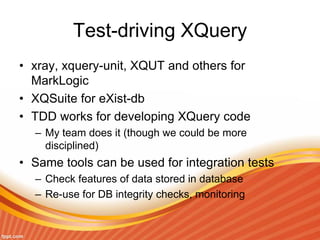
Test-driving XQuery
• xray, xquery-unit, XQUT and others for
MarkLogic
• XQSuite for eXist-db
• TDD works for developing XQuery code
– My team does it (though we could be more
disciplined)
• Same tools can be used for integration tests
– Check features of data stored in database
– Re-use for DB integrity checks, monitoring
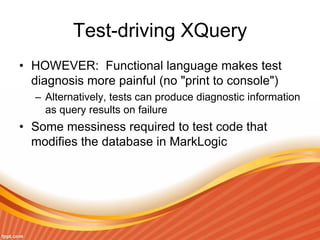
Test-driving XQuery
• HOWEVER: Functional language makes test
diagnosis more painful (no "print to console")
– Alternatively, tests can produce diagnostic information
as query results on failure
• Some messiness required to test code that
modifies the database in MarkLogic
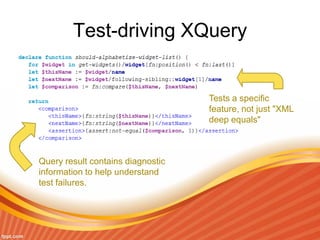
Test-driving XQuery
Query result contains diagnostic
information to help understand
test failures.
Tests a specific
feature, not just "XML
deep equals"
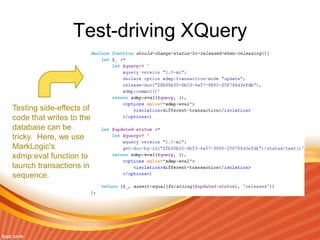
Test-driving XQuery
Testing side-effects of
code that writes to the
database can be
tricky. Here, we use
MarkLogic's
xdmp:eval function to
launch transactions in
sequence.
Writing Maintainable XSLT and XQuery
• Test-driven development is critical
– Well-written tests document the code they're
testing
– Comprehensive tests document
comprehensively
– Without an infrastructure that at least supports
test-driven development, comprehensive tests
will never be written
• Readable tests use names to tell a story
– Test (function) names should follow some
Given-When-Then-like convention
– Variable names should be thoughtfully chosen
with storytelling in mind
– Add a variable, even if unneeded, just to give
a name to something if it needs explanation
Writing Maintainable XSLT and XQuery
• XSLT is a flexible language, so employ patterns
that work for your team
• Most people find output-driven stylesheets
easier to read than input-driven ones
– Easier to think in terms of end product
– Named templates add more context
– Imperative queries map more closely to imperative
programming experience
– CAUTION: Performance cost can get significant
Writing Maintainable XSLT
• Again, use variables to help tell stories even
when they're unnecessary
• Use xsl:include for modularity and re-use
• Use modes only when necessary; they are easy
to ignore and add to cognitive load
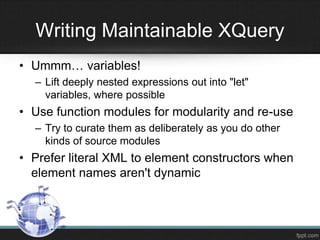
Writing Maintainable XSLT
• Ummm… variables!
– Lift deeply nested expressions out into "let"
variables, where possible
• Use function modules for modularity and re-use
– Try to curate them as deliberately as you do other
kinds of source modules
• Prefer literal XML to element constructors when
element names aren't dynamic
Writing Maintainable XQuery
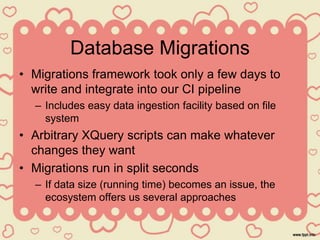
Database Migrations
• Migrations framework took only a few days to
write and integrate into our CI pipeline
– Includes easy data ingestion facility based on file
system
• Arbitrary XQuery scripts can make whatever
changes they want
• Migrations run in split seconds
– If data size (running time) becomes an issue, the
ecosystem offers us several approaches
Database Migrations
One day, we decided to stop version-managing a
category of documents. Here's what the
migration looked like:
for $doc in cts:search( /citation, dls:documents-query() )
return dls:document-unmanage( fn:base-uri($doc), fn:false(), fn:true() )
And here's a fix for some damaged data:
for $empty-desc in /somePath/description[ fn:string-length() = 0 ]
return xdmp:node-delete( $empty-desc )
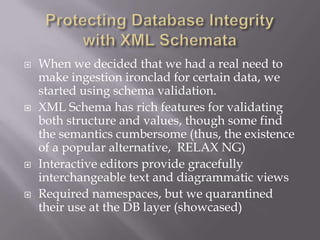
 When we decided that we had a real need to
make ingestion ironclad for certain data, we
started using schema validation.
 XML Schema has rich features for validating
both structure and values, though some find
the semantics cumbersome (thus, the existence
of a popular alternative, RELAX NG)
 Interactive editors provide gracefully
interchangeable text and diagrammatic views
 Required namespaces, but we quarantined
their use at the DB layer (showcased)
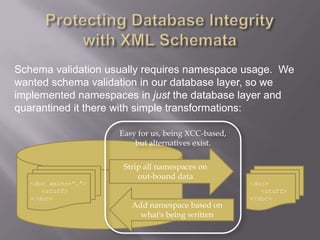
Schema validation usually requires namespace usage. We
wanted schema validation in our database layer, so we
implemented namespaces in just the database layer and
quarantined it there with simple transformations:
<doc xmlns="…">
<stuff>
</doc>
<doc>
<stuff>
</doc>
Add namespace based on
what's being written
Strip all namespaces on
out-bound data
Easy for us, being XCC-based,
but alternatives exist.
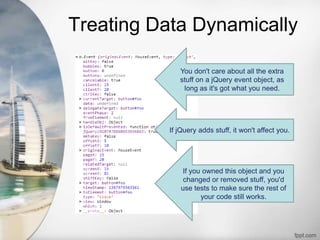
Treating Data Dynamically
You don't care about all the extra
stuff on a jQuery event object, as
long as it's got what you need.
If jQuery adds stuff, it won't affect you.
If you owned this object and you
changed or removed stuff, you'd
use tests to make sure the rest of
your code still works.
Treating Data Dynamically
• In an Agile XML application, your
code is also loosely coupled to its
resources
• No need to care about data noise
or changes that don't affect you
– Changes from/for other code
– xml:base, xml:type and schema
location attributes from other
systems
Treating Data Dynamically
• Your code doesn't care
– It's not mapping data to objects
– It's not schema-validating data
• Your tests don't care
– They're not using "XML deep equals"
– They're modeling and examining
only what's important about the data
• Dynamic data is changeable data!
Treating Data Dynamically
• Manage change through tests
– Unit tests where your changes originate
(and wherever else you remember)
– Integration tests cover data that cross
boundaries (i.e., code you forgot)
– Database-layer tests can cover persistent
data changes comprehensively
• Continuous integration step
• Integrity monitoring
– Functional tests cover changed data as
they are
manufactured, stored, retrieved, transform
Chaos?
Resource Orientation = Chaos?
Modularizing through resources can scatter
business logic.
• Variety of solution technologies to handle variety
of problems
• XQuery makes investment of logic at database
layer more attractive
– Real (though bizarre) functional programming
language
– Proximity to data (reduction of round trips)
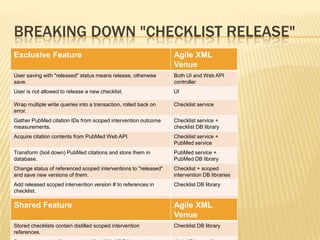
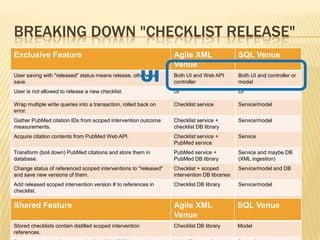
BREAKING DOWN "CHECKLIST RELEASE"
Exclusive Feature Agile XML
Venue
User saving with "released" status means release, otherwise
save.
Both UI and Web API
controller
User is not allowed to release a new checklist. UI
Wrap multiple write queries into a transaction, rolled back on
error.
Checklist service
Gather PubMed citation IDs from scoped intervention outcome
measurements.
Checklist service +
checklist DB library
Acquire citation contents from PubMed Web API. Checklist service +
PubMed service
Transform (boil down) PubMed citations and store them in
database.
PubMed service +
PubMed DB library
Change status of referenced scoped interventions to "released"
and save new versions of them.
Checklist + scoped
intervention DB libraries
Add released scoped intervention version # to references in
checklist.
Checklist DB library
Save new version of checklist. Checklist DB library
Shared Feature Agile XML
Venue
Stored checklists contain distilled scoped intervention
references.
Checklist DB library
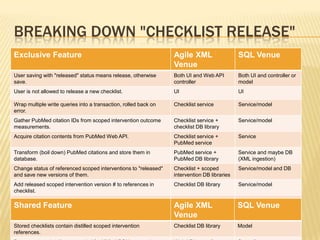
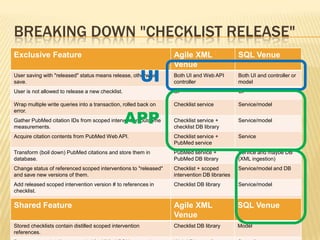
BREAKING DOWN "CHECKLIST RELEASE"
Exclusive Feature Agile XML
Venue
SQL Venue
User saving with "released" status means release, otherwise
save.
Both UI and Web API
controller
Both UI and controller or
model
User is not allowed to release a new checklist. UI UI
Wrap multiple write queries into a transaction, rolled back on
error.
Checklist service Service/model
Gather PubMed citation IDs from scoped intervention outcome
measurements.
Checklist service +
checklist DB library
Service/model
Acquire citation contents from PubMed Web API. Checklist service +
PubMed service
Service
Transform (boil down) PubMed citations and store them in
database.
PubMed service +
PubMed DB library
Service and maybe DB
(XML ingestion)
Change status of referenced scoped interventions to "released"
and save new versions of them.
Checklist + scoped
intervention DB libraries
Service/model and DB
Add released scoped intervention version # to references in
checklist.
Checklist DB library Service/model
Save new version of checklist. Checklist DB library Service/model and DB
Shared Feature Agile XML
Venue
SQL Venue
Stored checklists contain distilled scoped intervention
references.
Checklist DB library Model
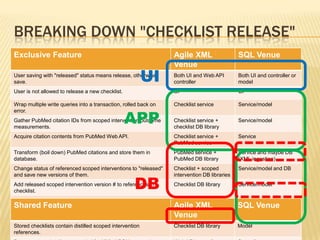
BREAKING DOWN "CHECKLIST RELEASE"
Exclusive Feature Agile XML
Venue
SQL Venue
User saving with "released" status means release, otherwise
save.
Both UI and Web API
controller
Both UI and controller or
model
User is not allowed to release a new checklist. UI UI
Wrap multiple write queries into a transaction, rolled back on
error.
Checklist service Service/model
Gather PubMed citation IDs from scoped intervention outcome
measurements.
Checklist service +
checklist DB library
Service/model
Acquire citation contents from PubMed Web API. Checklist service +
PubMed service
Service
Transform (boil down) PubMed citations and store them in
database.
PubMed service +
PubMed DB library
Service and maybe DB
(XML ingestion)
Change status of referenced scoped interventions to "released"
and save new versions of them.
Checklist + scoped
intervention DB libraries
Service/model and DB
Add released scoped intervention version # to references in
checklist.
Checklist DB library Service/model
Save new version of checklist. Checklist DB library Service/model and DB
Shared Feature Agile XML
Venue
SQL Venue
Stored checklists contain distilled scoped intervention
references.
Checklist DB library Model
UI
BREAKING DOWN "CHECKLIST RELEASE"
Exclusive Feature Agile XML
Venue
SQL Venue
User saving with "released" status means release, otherwise
save.
Both UI and Web API
controller
Both UI and controller or
model
User is not allowed to release a new checklist. UI UI
Wrap multiple write queries into a transaction, rolled back on
error.
Checklist service Service/model
Gather PubMed citation IDs from scoped intervention outcome
measurements.
Checklist service +
checklist DB library
Service/model
Acquire citation contents from PubMed Web API. Checklist service +
PubMed service
Service
Transform (boil down) PubMed citations and store them in
database.
PubMed service +
PubMed DB library
Service and maybe DB
(XML ingestion)
Change status of referenced scoped interventions to "released"
and save new versions of them.
Checklist + scoped
intervention DB libraries
Service/model and DB
Add released scoped intervention version # to references in
checklist.
Checklist DB library Service/model
Save new version of checklist. Checklist DB library Service/model and DB
Shared Feature Agile XML
Venue
SQL Venue
Stored checklists contain distilled scoped intervention
references.
Checklist DB library Model
UI
APP
BREAKING DOWN "CHECKLIST RELEASE"
Exclusive Feature Agile XML
Venue
SQL Venue
User saving with "released" status means release, otherwise
save.
Both UI and Web API
controller
Both UI and controller or
model
User is not allowed to release a new checklist. UI UI
Wrap multiple write queries into a transaction, rolled back on
error.
Checklist service Service/model
Gather PubMed citation IDs from scoped intervention outcome
measurements.
Checklist service +
checklist DB library
Service/model
Acquire citation contents from PubMed Web API. Checklist service +
PubMed service
Service
Transform (boil down) PubMed citations and store them in
database.
PubMed service +
PubMed DB library
Service and maybe DB
(XML ingestion)
Change status of referenced scoped interventions to "released"
and save new versions of them.
Checklist + scoped
intervention DB libraries
Service/model and DB
Add released scoped intervention version # to references in
checklist.
Checklist DB library Service/model
Save new version of checklist. Checklist DB library Service/model and DB
Shared Feature Agile XML
Venue
SQL Venue
Stored checklists contain distilled scoped intervention
references.
Checklist DB library Model
UI
APP
DB
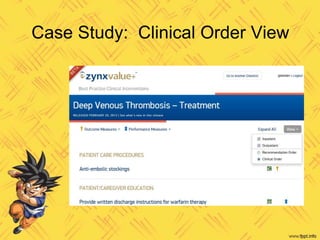
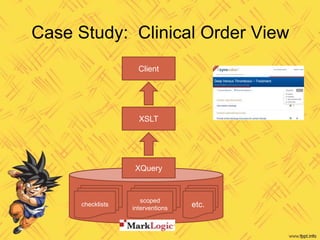
Case Study: Clinical Order View
checklists
scoped
interventions etc.
XQuery
XSLT
Client
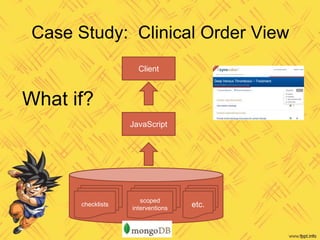
Case Study: Clinical Order View
checklists
scoped
interventions etc.
JavaScript
Client
What if?
Fetching the Data
declare private function enriched-performance-measure($perfMeasure as node()) {
return element performanceMeasure {
$perfMeasure/*,
/performanceMeasure[fn:normalize-space(id) = fn:normalize-space($perfMeasure/*[fn:local-name() = 'id'])]/abbreviation
}
};
declare private function enriched-impact-threshold($impactThreshold as node()) {
return element impactThreshold {
$impactThreshold/*,
element pubMedCitation {
let $citation := /pubMedCitation[fn:normalize-space(id) = fn:normalize-space($impactThreshold/*[fn:local-name() = 'pubMedId']/text())]
return (
element title {zpmc:get-article-title($citation)},
element journalInfo {zpmc:get-journal-info($citation)},
element authorList {zpmc:get-authors-list($citation)}
)
}
}
};
declare function enrich-scoped-intervention($element as element()) as element() {
return element { fn:node-name($element) } {
$element/@*,
for $n in $element/node()
return typeswitch ($n)
case element(si:performanceMeasure) return enriched-performance-measure($n)
case element(si:impactThreshold) return enriched-impact-threshold($n)
case element() return enrich-scoped-intervention($n)
default return $n
}
};
declare private function produce-enriched-checklist($element as element()) as element() {
element { fn:node-name($element) } {
$element/@*
,
for $n in $element/node()
return typeswitch ($n)
case $siRef as element(scopedIntervention) return
let $original := zsi:get-scoped-intervention-by-id($siRef/id, $siRef/version/version-id cast as xs:unsignedInt)
return zsi:enrich-scoped-intervention($original)
case $e as element()
return produce-enriched-checklist($e, $fields-to-include)
default return $n
}
};
declare function get-checklist($id as xs:string, $version as xs:unsignedInt) {
let $uri := checklist-uri-from-id($id)
let $doc := c:get-document-with-version-metadata-embedded($uri, $version)
return produce-enriched-checklist($doc)
};
55 Xquery lines
1 round trip
Fetching the Data
declare private function enriched-performance-measure($perfMeasure as node()) {
return element performanceMeasure {
$perfMeasure/*,
/performanceMeasure[fn:normalize-space(id) = fn:normalize-space($perfMeasure/*[fn:local-name() = 'id'])]/abbreviation
}
};
declare private function enriched-impact-threshold($impactThreshold as node()) {
return element impactThreshold {
$impactThreshold/*,
element pubMedCitation {
let $citation := /pubMedCitation[fn:normalize-space(id) = fn:normalize-space($impactThreshold/*[fn:local-name() = 'pubMedId']/text())]
return (
element title {zpmc:get-article-title($citation)},
element journalInfo {zpmc:get-journal-info($citation)},
element authorList {zpmc:get-authors-list($citation)}
)
}
}
};
declare function enrich-scoped-intervention($element as element()) as element() {
return element { fn:node-name($element) } {
$element/@*,
for $n in $element/node()
return typeswitch ($n)
case element(si:performanceMeasure) return enriched-performance-measure($n)
case element(si:impactThreshold) return enriched-impact-threshold($n)
case element() return enrich-scoped-intervention($n)
default return $n
}
};
declare private function produce-enriched-checklist($element as element()) as element() {
element { fn:node-name($element) } {
$element/@*
,
for $n in $element/node()
return typeswitch ($n)
case $siRef as element(scopedIntervention) return
let $original := zsi:get-scoped-intervention-by-id($siRef/id, $siRef/version/version-id cast as xs:unsignedInt)
return zsi:enrich-scoped-intervention($original)
case $e as element()
return produce-enriched-checklist($e, $fields-to-include)
default return $n
}
};
declare function get-checklist($id as xs:string, $version as xs:unsignedInt) {
let $uri := checklist-uri-from-id($id)
let $doc := c:get-document-with-version-metadata-embedded($uri, $version)
return produce-enriched-checklist($doc)
};
function enrichedScopedIntervention(id) {
var si = db.scopedInterventions.findOne({'id': id});
si.performanceMeasures.forEach(function (pm) {
pm.abbreviation = db.performanceMeasures.findOne({'id': pm.id}).abbreviation;
});
si.impactThresholds.forEach(function (th) {
var citation = db.pubMedCitations.findOne({'id': th.pubMedId})
th.pubMedCitation = {
title: getArticleTitle(citation),
journalInfo: getJournalInfo(citation),
authorList: getAuthorList(citation)
};
});
}
function getChecklist(id, version) {
var checklist = db.checklists.findOne({'id': id + '_' + version});
checklist.groups.forEach(function (group) {
for (i = 0; i < group.scopedInterventions.length; ++i) {
group.scopedInterventions[i] =
enrichedScopedIntervention(group.scopedInterventions[i].id);
}
});
return checklist;
}
26 JavaScript lines
> 200
round trips
Generating the View
<xsl:template name="intervention">
<xsl:param name="intervention-group-key"/>
<xsl:param name="intervention-name" />
<intervention>
<id>
<xsl:copy-of select="normalize-space($intervention-group-key)"/>
</id>
<displayName><xsl:value-of select="$intervention-name" /></displayName>
<xsl:copy-of select="current-group()[1]/shouldAvoid"/>
<hasOutcomes>
<xsl:value-of select="exists(current-group()/outcomes/outcomeContainer/outcome)" />
</hasOutcomes>
<hasGuidelines>
<xsl:value-of select="exists(current-group()/guidelines/guideline)" />
</hasGuidelines>
<scopes>
<xsl:for-each-group select="current-group()"
group-by="concat(local:canonicalize-field-value-ids(., 'careSetting'), '_', local:canonicalize-field-value-ids(., 'ageGroup'))">
<xsl:sort>
<xsl:variable name="care-setting-names" select="local:canonicalize-field-values-for-sorting(., 'careSetting')" />
<xsl:variable name="age-group-names" select="local:canonicalize-field-values-for-sorting(., 'ageGroup')" />
<xsl:value-of select="concat($care-setting-names, '__', $age-group-names)" />
</xsl:sort>
<xsl:variable name="sub-group-key" select="current-grouping-key()"/>
<scope>
<xsl:variable name="first-si" select="current-group()[1]"/>
<ageGroupName>
<xsl:value-of select="local:format-field-values-for-display($first-si, 'ageGroup')"/>
</ageGroupName>
<careSettingName>
<xsl:value-of select="local:format-field-values-for-display($first-si, 'careSetting')"/>
</careSettingName>
<id>
<xsl:value-of select="$intervention-group-key"/>
<xsl:text>__</xsl:text>
<xsl:value-of select="$sub-group-key"/>
</id>
<scopedInterventions>
<xsl:for-each select="current-group()">
<xsl:copy-of select="." />
</xsl:for-each>
</scopedInterventions>
</scope>
</xsl:for-each-group>
</scopes>
</intervention>
</xsl:template>
84 lines
of XSLT
<xsl:template name="intervention">
<xsl:param name="intervention-group-key"/>
<xsl:param name="intervention-name" />
<intervention>
<id>
<xsl:copy-of select="normalize-space($intervention-group-key)"/>
</id>
<displayName><xsl:value-of select="$intervention-name" /></displayName>
<xsl:copy-of select="current-group()[1]/shouldAvoid"/>
<hasOutcomes>
<xsl:value-of select="exists(current-group()/outcomes/outcomeContainer/outcome)" />
</hasOutcomes>
<hasGuidelines>
<xsl:value-of select="exists(current-group()/guidelines/guideline)" />
</hasGuidelines>
<scopes>
<xsl:for-each-group select="current-group()"
group-by="concat(local:canonicalize-field-value-ids(., 'careSetting'), '_', local:canonicalize-field-value-ids(., 'ageGroup'))">
<xsl:sort>
<xsl:variable name="care-setting-names" select="local:canonicalize-field-values-for-sorting(., 'careSetting')" />
<xsl:variable name="age-group-names" select="local:canonicalize-field-values-for-sorting(., 'ageGroup')" />
<xsl:value-of select="concat($care-setting-names, '__', $age-group-names)" />
</xsl:sort>
<xsl:variable name="sub-group-key" select="current-grouping-key()"/>
<scope>
<xsl:variable name="first-si" select="current-group()[1]"/>
<ageGroupName>
<xsl:value-of select="local:format-field-values-for-display($first-si, 'ageGroup')"/>
</ageGroupName>
<careSettingName>
<xsl:value-of select="local:format-field-values-for-display($first-si, 'careSetting')"/>
</careSettingName>
<id>
<xsl:value-of select="$intervention-group-key"/>
<xsl:text>__</xsl:text>
<xsl:value-of select="$sub-group-key"/>
</id>
<scopedInterventions>
<xsl:for-each select="current-group()">
<xsl:copy-of select="." />
</xsl:for-each>
</scopedInterventions>
</scope>
</xsl:for-each-group>
</scopes>
</intervention>
</xsl:template>
Generating the View
function makeScopeSubGroups(group, interventionGroupKey) {
var result = [];
var scopeSubGroups = [];
var makePredicate = function (scopedIntervention) {
return function (scopeSubGroup) {
if (scopeSubGroup.id === makeScopeSubGroupKey(scopedIntervention)) {
scopeSubGroup.members.push(scopedIntervention);
return true;
}
else {
return false;
}
}
};
section.scopedInterventions.forEach(function (si) {
if (! scopeSubGroups.some(makePredicate(si))) {
scopeSubGroups.push({
id: makeScopeSubGroupKey(si),
members: [si]
});
}
});
scopeSubGroups.sort(function (first, second) {
var firstCanonical =
canonicalizeFieldValuesForSorting(first.careSettings) + '__' +
canonicalizeFieldValuesForSorting(first.ageGroups);
var secondCanonical =
canonicalizeFieldValuesForSorting(second.careSettings) + '__' +
canonicalizeFieldValuesForSorting(second.ageGroups);
return first.localeCompare(second);
});
scopeSubGroups.forEach(function (subGroup) {
var firstSi = subGroup.members[0];
var realSubGroup = {
ageGroupName: formatFieldValuesForDisplay(firstSi.ageGroups),
careSettingName: formatFieldValuesForDisplay(firstSi.careSettings),
id: interventionGroupKey + '__' + subGroup.id,
scopedInterventions: []
};
subGroup.members.forEach(function (si) {
realSubGroup.scopedInterventions.push(si);
});
result.push(realSubGroup);
});
return result;
}
118 lines of
JavaScript
<xsl:with-param name="intervention-group-key">
<xsl:text>section-</xsl:text>
<xsl:value-of select="normalize-space(current-group()[1]/sections/section[1]/id)"/>
<xsl:text>-intervention-</xsl:text>
<xsl:value-of select="normalize-space(current-group()[1]/intervention/id)"/>
</xsl:with-param>
var key = "section-" + interventionGroup.members[0].sections[0].id +
"-intervention-" + interventionGroup.id;
In XSLT, concatenating values
happens to be wordy:
VS.
<xsl:for-each-group select="scopedInterventions/scopedIntervention"
group-by="normalize-space(intervention/id)">
var result = [];
var interventionGroups = [];
var makePredicate = function (scopedIntervention) {
return function (interventionGroup) {
if (interventionGroup.id === scopedIntervention.intervention.id) {
interventionGroup.members.push(scopedIntervention);
return true;
}
else {
return false;
}
}
};
section.scopedInterventions.forEach(function (si) {
if (! interventionGroups.some(makePredicate(si))) {
interventionGroups.push({
id: si.intervention.id,
members: [si]
});
}
});
interventionGroups.forEach(function (interventionGroup) {
var key = "section-" + interventionGroup.members[0].sections[0].id + "-intervention-" + interventionGroup.id;
result.push(
makeInterventionGroup(interventionGroup.members, key, interventionGroup.members[0].scopedInterventionName)
);
});
But JavaScript lacks
transformation features like
"for-each-group" that reduce real
complexity:
VS.
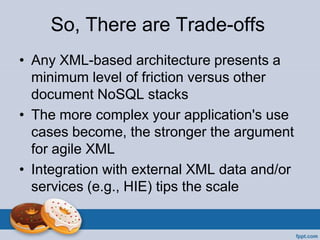
So, There are Trade-offs
• Any XML-based architecture presents a
minimum level of friction versus other
document NoSQL stacks
• The more complex your application's use
cases become, the stronger the argument
for agile XML
• Integration with external XML data and/or
services (e.g., HIE) tips the scale
72 © 2011 Zynx Health Incorporated | The information contained herein is confidential and proprietary to Zynx Health Incorporated and is intended for its
authorized recipient. Unauthorized review, use, disclosure or distribution is strictly prohibited. All rights reserved.
Thank You

Agile xml

  • 1.
    1 © 2011Zynx Health Incorporated | The information contained herein is confidential and proprietary to Zynx Health Incorporated and is intended for its authorized recipient. Unauthorized review, use, disclosure or distribution is strictly prohibited. All rights reserved.
  • 2.
    2 © 2011Zynx Health Incorporated | The information contained herein is confidential and proprietary to Zynx Health Incorporated and is intended for its authorized recipient. Unauthorized review, use, disclosure or distribution is strictly prohibited. All rights reserved. Agile XML There is such a thing.
  • 3.
    Agile developers likeit dynamic. JavaScript, Ruby, NoSQL Java, .Net, SQL
  • 4.
     Strict typesin static languages like C++ and Java make code more time-consuming to write and verbose to read.  Static code is harder to unit-test (type system fights mocks).  Dynamic languages present a lower barrier to entry and the code often ends up more terse and expressive.  Dynamic flexibility means no hoops to jump through when you want to change things.  Developers prefer to ensure integrity through tests rather than type safety features.
  • 5.
     Mapping datato objects produces profuse code, mostly boilerplate but obligatory nevertheless  Piles of model classes and mapping artifacts, often containing specialized configurations for indirectly tuning queries, add friction to change.  Abstracts code away from database interactions in ways that can encourage sub-optimal behavior (e.g., the "n+1 selects" problem).  But still preferable to the drudgery and maintenance nightmare of stored procedures.
  • 6.
     Static schemais strict and very difficult and complicated to change.  Normalized relational models make complex data cumbersome to manipulate in native query language.  Query language (SQL) is virtually impossible to unit- test.
  • 7.
    Developers like NoSQL Low barrier to entry  Scales horizontally  Seamless programming language integration
  • 8.
    Developers like NoSQL Low barrier to entry  Scales horizontally  Seamless programming language integration  BUT MOSTLY because it's dynamic  Easier to change  Easier to scale up  Easier to test
  • 9.
    But when youthink XML, you don't think NoSQL.
  • 10.
    When I thinkXML, I think Static XML Mapping to objects strikes again • Serialization libraries map schematic structures to classes – Classes generated once from XML schemata and then manually maintained (JAXB) – Manually mapped classes (XStream) • Many manually-maintained artifacts with brittle dependencies on data • Lots of friction to change, just like SQL ORMs
  • 11.
    When I thinkXML, I think Static XML Mapping to objects strikes again • Serialization libraries map schematic structures to classes – Classes generated once from XML schemata and then manually maintained (JAXB) – Manually mapped classes (XStream) • Many manually-maintained artifacts with brittle dependencies on data • Lots of friction to change, just like SQL ORMs
  • 12.
    When I thinkXML, I think Static XML • Pedantic namespace usage complicates code, especially at the edges • Big, complicated, repetitive and impenetrable XSLT code often a core implementation feature • Storage often still SQL-based (and slow) due to departmental culture/policy
  • 13.
    And yet… • Nothingabout XML requires that you map it to objects – Plenty of support in programming languages for manipulation through other means • Namespaces can be walled off or eliminated altogether • XSLT (and XQuery) code can be designed with modularity and expressiveness – Was your first LISP program modular? – Might your tenth one have been better?
  • 14.
    Developers don't likeXML itself (even though it's a dynamic document format, just like JSON) Wordy and complicated o Attributes o Namespaces o Mixed text/element content o Whitespace Tools and languages seem arcane o XSLT / XPath o XML Schema / RelaxNG o XQuery Limited database options Impedance mismatch with JSON
  • 17.
    What's More… • XMLprovides a rich ecosystem • Rich transformation… – …with XQuery in the database – …with XSLT almost everywhere – …in code with rich, embedded DSLs • Rich query… – …with XQuery in the database – …with XPath almost everywhere – …with GPath in Groovy
  • 18.
    What's More… • XMLprovides multiple, rich schema standards (unlike other document NoSQL formats) – Automated validation and even content repair at database level – Usage is completely optional; could be used as a barrier, or just to generate information about schema violations
  • 19.
    What's More… • XMLprovides multiple facilities for data integration… – …XInclude for automated document aggregation (including automated broken link reporting) – …Attributes, including RDFA, for aspect- oriented tagging – …Namespaces for more aspect-oriented integration
  • 20.
    What's More… • Breadthand depth of XML ecosystem provides all sorts of network effect benefits – Multiple implementations of various strategies for dealing with large data sets (DOM, SAX, XPP, etc.) – Pipelining for faster, layered work on data – Schematrons for semantic validation – Schema-based editors like InfoPath, Oxygen, XMLSpy, Arbortext, XMeta L and Xopus
  • 21.
    Leverage Can Tipthe Scale • Complex, modular data • Complex things being done with data • Integration in an XML-rich space – Healthcare, for example When is it enough? …to offset the additional complexity versus JSON/JavaScript
  • 22.
    Flexibility (lack ofresistance to change) Leverage (providedbyecosystem) SQL JSON NoSQL Enterprise XML Agile XML
  • 23.
  • 24.
    Dynamic •No knee-jerk object/datamapping •Limit friction (schemata, namespaces) Modular •Resource orientation •Layered, re-usable transformations Testable •Assert data features as well as behavior •Unit-test XQuery, XSLT
  • 25.
     Treat datadynamically › Don't reflexively serialize to/from objects › Transform and aggregate resources as needed for specific use cases (wrap data around problems) › Make a schema only when you really need one › Avoid or circumscribe high-friction features like namespaces and attributes › Don't generate code based on XML data structures (e.g., JAXB)
  • 26.
     Be resource-oriented ›Implement use cases by transforming and assembling resources › Write transforms and other resource processing code wherever it's most maintainable › Favor functional approaches, where applicable, over imperative code and state › Seek re-use, granularity and clarity in your resource transformations as you would seek them in object-oriented abstractions
  • 27.
     Ensure integritythrough tests › Test specific data features instead of broadly schema-validating › Apply test-driven development practices to resource transformation and aggregation code, including XSLT and XQuery › Run comprehensive data tests for continuous integration and surveillance
  • 28.
    Test-driving XSLT • Myteam attempted several approaches before we got this right • Lots of testing frameworks, not much community or clear adoption trends • Existing frameworks emphasize deep comparison of output with expected contents (XML deep equals) • Most are based on XML-based testing DSLs
  • 29.
    Test-driving XSLT Typical framework-basedXSL unit test: <test> <code>my-stylesheet.xsl</code> <input>input-doc.xml</input> <expect>output-doc.xml</expect> </test> <foo> <bar /> <baz /> </foo> input-doc.xml <moe> <larry /> <curly /> </moe> output-doc.xml <moe> <larry /> <shemp /> </moe>
  • 30.
    Test-driving XSLT • Problemswith this approach: – Test input and output must be data-complete • Verbose, laborious and brittle • Easy to lose track of what's important in individual tests • Tests force a modularity that mightn't otherwise make sense in XSL code – XML-based testing DSLs limit flexibility • Limited set of assertions • No general-purpose programming language features available for writing test fixtures and other clever things • Even if JUnit output is supported, can't make full use of JUnit features in IDE
  • 31.
  • 32.
    Test-driving XSLT The ForcedModularity Problem Output-driven XSLT <html> <body> <xsl:for-each select="//item"> <div> <xsl:value-of select="text()"/> </div> </xsl:for-each> </body> </html> Input-driven XSLT <xsl:template match="/"> <html><body> <xsl:apply-templates select=".//item"/> </body></html> </xsl:template> <xsl:template match="item"> <div> <xsl:value-of select="text()"/> </div> </xsl:template> • Need to simplify expected test outputs may push you to the right • Many problems are simpler to solve on the left
  • 33.
    Test-driving XSLT • Weuse code to simplify inputs and narrow dependencies on outputs – Focus on features, not unnecessary detail • We settled on straight JUnit for execution • Use test fixtures to manufacture complex inputs • Use GPath, etc., to assert only what we care about in output
  • 34.
    Test-driving XSLT Example <movieList> <movie> <title>Citizen Kane</title> <genre>drama</genre> </movie> <movie> <title>TommyBoy</title> <genre>comedy</genre> <rating>R</rating> </movie> <movie> <title>Annie Hall</title> <genre>Comedy</genre> </movie> </movieList> <catalog> <genre name="Comedy"> <film>Annie Hall</film> <film mpaa="R"> Tommy Boy </film> </genre> <genre name="Drama"> <film>Citizen Kane</film> </genre> </catalog> XSLT
  • 35.
    Test-driving XSLT Test fixturessimplify complex inputs: Fragments String makeMovie(Map fields) { """<movie> <title>${ fields?.title ?: 'Fake Title' }</title> <genre>${ fields?.genre ?: 'fakumentary' }</genre> ${fields?.rating ? '<rating>' + fields.rating + '</rating>' : ''} </movie>""" } Documents String makeMovieList(List movies) { """<movieList> ${movies.join('n')} </movieList>""" } Usage @Test void shouldTransformMovies() { String input = makeMovieList([ makeMovie(title: 'Primer') ]) // act, assert… }
  • 36.
    Test-driving XSLT Tests analyzespecific features: @Test void shouldAggregateIntoGenres() { List movies = (1..2).collect { makeMovie(genre: 'drama') } movies << makeMovie(genre: 'comedy') def result = parseXml(transform(makeMovieList(movies))) assert result.genre.size() == 2 } @Test void shouldCanonicalizeGenreNames() { String input = makeMovieList([ makeMovie(genre: 'science fiction'), makeMovie(genre: 'SCIENCE FICTION') ]) def result = parseXml(transform(input)) assert result.genre.size() == 1 assert result.genre.'@name' == 'Science Fiction' }
  • 37.
    Test-driving XSLT Use ofrich language features can help keep tests short and expressive: @Test void shouldSortMovieTitles() { String input = makeMovieList([ makeMovie(title: 'Zorro', rating: '2'), makeMovie(title: 'Catching Fire', rating: '1'), makeMovie(title: 'case insensitive', rating: '0') ]) def result = parseXml(transform(input)) 0..2.each { assertEquals( it.toString(), result.genre.film[it].'@mpaa' ) } }
  • 38.
    Test-driving XQuery • xray,xquery-unit, XQUT and others for MarkLogic • XQSuite for eXist-db • TDD works for developing XQuery code – My team does it (though we could be more disciplined) • Same tools can be used for integration tests – Check features of data stored in database – Re-use for DB integrity checks, monitoring
  • 39.
    Test-driving XQuery • HOWEVER:Functional language makes test diagnosis more painful (no "print to console") – Alternatively, tests can produce diagnostic information as query results on failure • Some messiness required to test code that modifies the database in MarkLogic
  • 40.
    Test-driving XQuery Query resultcontains diagnostic information to help understand test failures. Tests a specific feature, not just "XML deep equals"
  • 41.
    Test-driving XQuery Testing side-effectsof code that writes to the database can be tricky. Here, we use MarkLogic's xdmp:eval function to launch transactions in sequence.
  • 42.
    Writing Maintainable XSLTand XQuery • Test-driven development is critical – Well-written tests document the code they're testing – Comprehensive tests document comprehensively – Without an infrastructure that at least supports test-driven development, comprehensive tests will never be written
  • 43.
    • Readable testsuse names to tell a story – Test (function) names should follow some Given-When-Then-like convention – Variable names should be thoughtfully chosen with storytelling in mind – Add a variable, even if unneeded, just to give a name to something if it needs explanation Writing Maintainable XSLT and XQuery
  • 44.
    • XSLT isa flexible language, so employ patterns that work for your team • Most people find output-driven stylesheets easier to read than input-driven ones – Easier to think in terms of end product – Named templates add more context – Imperative queries map more closely to imperative programming experience – CAUTION: Performance cost can get significant Writing Maintainable XSLT
  • 45.
    • Again, usevariables to help tell stories even when they're unnecessary • Use xsl:include for modularity and re-use • Use modes only when necessary; they are easy to ignore and add to cognitive load Writing Maintainable XSLT
  • 46.
    • Ummm… variables! –Lift deeply nested expressions out into "let" variables, where possible • Use function modules for modularity and re-use – Try to curate them as deliberately as you do other kinds of source modules • Prefer literal XML to element constructors when element names aren't dynamic Writing Maintainable XQuery
  • 47.
    Database Migrations • Migrationsframework took only a few days to write and integrate into our CI pipeline – Includes easy data ingestion facility based on file system • Arbitrary XQuery scripts can make whatever changes they want • Migrations run in split seconds – If data size (running time) becomes an issue, the ecosystem offers us several approaches
  • 48.
    Database Migrations One day,we decided to stop version-managing a category of documents. Here's what the migration looked like: for $doc in cts:search( /citation, dls:documents-query() ) return dls:document-unmanage( fn:base-uri($doc), fn:false(), fn:true() ) And here's a fix for some damaged data: for $empty-desc in /somePath/description[ fn:string-length() = 0 ] return xdmp:node-delete( $empty-desc )
  • 49.
     When wedecided that we had a real need to make ingestion ironclad for certain data, we started using schema validation.  XML Schema has rich features for validating both structure and values, though some find the semantics cumbersome (thus, the existence of a popular alternative, RELAX NG)  Interactive editors provide gracefully interchangeable text and diagrammatic views  Required namespaces, but we quarantined their use at the DB layer (showcased)
  • 50.
    Schema validation usuallyrequires namespace usage. We wanted schema validation in our database layer, so we implemented namespaces in just the database layer and quarantined it there with simple transformations: <doc xmlns="…"> <stuff> </doc> <doc> <stuff> </doc> Add namespace based on what's being written Strip all namespaces on out-bound data Easy for us, being XCC-based, but alternatives exist.
  • 51.
    Treating Data Dynamically Youdon't care about all the extra stuff on a jQuery event object, as long as it's got what you need. If jQuery adds stuff, it won't affect you. If you owned this object and you changed or removed stuff, you'd use tests to make sure the rest of your code still works.
  • 52.
    Treating Data Dynamically •In an Agile XML application, your code is also loosely coupled to its resources • No need to care about data noise or changes that don't affect you – Changes from/for other code – xml:base, xml:type and schema location attributes from other systems
  • 53.
    Treating Data Dynamically •Your code doesn't care – It's not mapping data to objects – It's not schema-validating data • Your tests don't care – They're not using "XML deep equals" – They're modeling and examining only what's important about the data • Dynamic data is changeable data!
  • 54.
    Treating Data Dynamically •Manage change through tests – Unit tests where your changes originate (and wherever else you remember) – Integration tests cover data that cross boundaries (i.e., code you forgot) – Database-layer tests can cover persistent data changes comprehensively • Continuous integration step • Integrity monitoring – Functional tests cover changed data as they are manufactured, stored, retrieved, transform
  • 55.
  • 56.
    Resource Orientation =Chaos? Modularizing through resources can scatter business logic. • Variety of solution technologies to handle variety of problems • XQuery makes investment of logic at database layer more attractive – Real (though bizarre) functional programming language – Proximity to data (reduction of round trips)
  • 57.
    BREAKING DOWN "CHECKLISTRELEASE" Exclusive Feature Agile XML Venue User saving with "released" status means release, otherwise save. Both UI and Web API controller User is not allowed to release a new checklist. UI Wrap multiple write queries into a transaction, rolled back on error. Checklist service Gather PubMed citation IDs from scoped intervention outcome measurements. Checklist service + checklist DB library Acquire citation contents from PubMed Web API. Checklist service + PubMed service Transform (boil down) PubMed citations and store them in database. PubMed service + PubMed DB library Change status of referenced scoped interventions to "released" and save new versions of them. Checklist + scoped intervention DB libraries Add released scoped intervention version # to references in checklist. Checklist DB library Save new version of checklist. Checklist DB library Shared Feature Agile XML Venue Stored checklists contain distilled scoped intervention references. Checklist DB library
  • 58.
    BREAKING DOWN "CHECKLISTRELEASE" Exclusive Feature Agile XML Venue SQL Venue User saving with "released" status means release, otherwise save. Both UI and Web API controller Both UI and controller or model User is not allowed to release a new checklist. UI UI Wrap multiple write queries into a transaction, rolled back on error. Checklist service Service/model Gather PubMed citation IDs from scoped intervention outcome measurements. Checklist service + checklist DB library Service/model Acquire citation contents from PubMed Web API. Checklist service + PubMed service Service Transform (boil down) PubMed citations and store them in database. PubMed service + PubMed DB library Service and maybe DB (XML ingestion) Change status of referenced scoped interventions to "released" and save new versions of them. Checklist + scoped intervention DB libraries Service/model and DB Add released scoped intervention version # to references in checklist. Checklist DB library Service/model Save new version of checklist. Checklist DB library Service/model and DB Shared Feature Agile XML Venue SQL Venue Stored checklists contain distilled scoped intervention references. Checklist DB library Model
  • 59.
    BREAKING DOWN "CHECKLISTRELEASE" Exclusive Feature Agile XML Venue SQL Venue User saving with "released" status means release, otherwise save. Both UI and Web API controller Both UI and controller or model User is not allowed to release a new checklist. UI UI Wrap multiple write queries into a transaction, rolled back on error. Checklist service Service/model Gather PubMed citation IDs from scoped intervention outcome measurements. Checklist service + checklist DB library Service/model Acquire citation contents from PubMed Web API. Checklist service + PubMed service Service Transform (boil down) PubMed citations and store them in database. PubMed service + PubMed DB library Service and maybe DB (XML ingestion) Change status of referenced scoped interventions to "released" and save new versions of them. Checklist + scoped intervention DB libraries Service/model and DB Add released scoped intervention version # to references in checklist. Checklist DB library Service/model Save new version of checklist. Checklist DB library Service/model and DB Shared Feature Agile XML Venue SQL Venue Stored checklists contain distilled scoped intervention references. Checklist DB library Model UI
  • 60.
    BREAKING DOWN "CHECKLISTRELEASE" Exclusive Feature Agile XML Venue SQL Venue User saving with "released" status means release, otherwise save. Both UI and Web API controller Both UI and controller or model User is not allowed to release a new checklist. UI UI Wrap multiple write queries into a transaction, rolled back on error. Checklist service Service/model Gather PubMed citation IDs from scoped intervention outcome measurements. Checklist service + checklist DB library Service/model Acquire citation contents from PubMed Web API. Checklist service + PubMed service Service Transform (boil down) PubMed citations and store them in database. PubMed service + PubMed DB library Service and maybe DB (XML ingestion) Change status of referenced scoped interventions to "released" and save new versions of them. Checklist + scoped intervention DB libraries Service/model and DB Add released scoped intervention version # to references in checklist. Checklist DB library Service/model Save new version of checklist. Checklist DB library Service/model and DB Shared Feature Agile XML Venue SQL Venue Stored checklists contain distilled scoped intervention references. Checklist DB library Model UI APP
  • 61.
    BREAKING DOWN "CHECKLISTRELEASE" Exclusive Feature Agile XML Venue SQL Venue User saving with "released" status means release, otherwise save. Both UI and Web API controller Both UI and controller or model User is not allowed to release a new checklist. UI UI Wrap multiple write queries into a transaction, rolled back on error. Checklist service Service/model Gather PubMed citation IDs from scoped intervention outcome measurements. Checklist service + checklist DB library Service/model Acquire citation contents from PubMed Web API. Checklist service + PubMed service Service Transform (boil down) PubMed citations and store them in database. PubMed service + PubMed DB library Service and maybe DB (XML ingestion) Change status of referenced scoped interventions to "released" and save new versions of them. Checklist + scoped intervention DB libraries Service/model and DB Add released scoped intervention version # to references in checklist. Checklist DB library Service/model Save new version of checklist. Checklist DB library Service/model and DB Shared Feature Agile XML Venue SQL Venue Stored checklists contain distilled scoped intervention references. Checklist DB library Model UI APP DB
  • 62.
  • 63.
    Case Study: ClinicalOrder View checklists scoped interventions etc. XQuery XSLT Client
  • 64.
    Case Study: ClinicalOrder View checklists scoped interventions etc. JavaScript Client What if?
  • 65.
    Fetching the Data declareprivate function enriched-performance-measure($perfMeasure as node()) { return element performanceMeasure { $perfMeasure/*, /performanceMeasure[fn:normalize-space(id) = fn:normalize-space($perfMeasure/*[fn:local-name() = 'id'])]/abbreviation } }; declare private function enriched-impact-threshold($impactThreshold as node()) { return element impactThreshold { $impactThreshold/*, element pubMedCitation { let $citation := /pubMedCitation[fn:normalize-space(id) = fn:normalize-space($impactThreshold/*[fn:local-name() = 'pubMedId']/text())] return ( element title {zpmc:get-article-title($citation)}, element journalInfo {zpmc:get-journal-info($citation)}, element authorList {zpmc:get-authors-list($citation)} ) } } }; declare function enrich-scoped-intervention($element as element()) as element() { return element { fn:node-name($element) } { $element/@*, for $n in $element/node() return typeswitch ($n) case element(si:performanceMeasure) return enriched-performance-measure($n) case element(si:impactThreshold) return enriched-impact-threshold($n) case element() return enrich-scoped-intervention($n) default return $n } }; declare private function produce-enriched-checklist($element as element()) as element() { element { fn:node-name($element) } { $element/@* , for $n in $element/node() return typeswitch ($n) case $siRef as element(scopedIntervention) return let $original := zsi:get-scoped-intervention-by-id($siRef/id, $siRef/version/version-id cast as xs:unsignedInt) return zsi:enrich-scoped-intervention($original) case $e as element() return produce-enriched-checklist($e, $fields-to-include) default return $n } }; declare function get-checklist($id as xs:string, $version as xs:unsignedInt) { let $uri := checklist-uri-from-id($id) let $doc := c:get-document-with-version-metadata-embedded($uri, $version) return produce-enriched-checklist($doc) }; 55 Xquery lines 1 round trip
  • 66.
    Fetching the Data declareprivate function enriched-performance-measure($perfMeasure as node()) { return element performanceMeasure { $perfMeasure/*, /performanceMeasure[fn:normalize-space(id) = fn:normalize-space($perfMeasure/*[fn:local-name() = 'id'])]/abbreviation } }; declare private function enriched-impact-threshold($impactThreshold as node()) { return element impactThreshold { $impactThreshold/*, element pubMedCitation { let $citation := /pubMedCitation[fn:normalize-space(id) = fn:normalize-space($impactThreshold/*[fn:local-name() = 'pubMedId']/text())] return ( element title {zpmc:get-article-title($citation)}, element journalInfo {zpmc:get-journal-info($citation)}, element authorList {zpmc:get-authors-list($citation)} ) } } }; declare function enrich-scoped-intervention($element as element()) as element() { return element { fn:node-name($element) } { $element/@*, for $n in $element/node() return typeswitch ($n) case element(si:performanceMeasure) return enriched-performance-measure($n) case element(si:impactThreshold) return enriched-impact-threshold($n) case element() return enrich-scoped-intervention($n) default return $n } }; declare private function produce-enriched-checklist($element as element()) as element() { element { fn:node-name($element) } { $element/@* , for $n in $element/node() return typeswitch ($n) case $siRef as element(scopedIntervention) return let $original := zsi:get-scoped-intervention-by-id($siRef/id, $siRef/version/version-id cast as xs:unsignedInt) return zsi:enrich-scoped-intervention($original) case $e as element() return produce-enriched-checklist($e, $fields-to-include) default return $n } }; declare function get-checklist($id as xs:string, $version as xs:unsignedInt) { let $uri := checklist-uri-from-id($id) let $doc := c:get-document-with-version-metadata-embedded($uri, $version) return produce-enriched-checklist($doc) }; function enrichedScopedIntervention(id) { var si = db.scopedInterventions.findOne({'id': id}); si.performanceMeasures.forEach(function (pm) { pm.abbreviation = db.performanceMeasures.findOne({'id': pm.id}).abbreviation; }); si.impactThresholds.forEach(function (th) { var citation = db.pubMedCitations.findOne({'id': th.pubMedId}) th.pubMedCitation = { title: getArticleTitle(citation), journalInfo: getJournalInfo(citation), authorList: getAuthorList(citation) }; }); } function getChecklist(id, version) { var checklist = db.checklists.findOne({'id': id + '_' + version}); checklist.groups.forEach(function (group) { for (i = 0; i < group.scopedInterventions.length; ++i) { group.scopedInterventions[i] = enrichedScopedIntervention(group.scopedInterventions[i].id); } }); return checklist; } 26 JavaScript lines > 200 round trips
  • 67.
    Generating the View <xsl:templatename="intervention"> <xsl:param name="intervention-group-key"/> <xsl:param name="intervention-name" /> <intervention> <id> <xsl:copy-of select="normalize-space($intervention-group-key)"/> </id> <displayName><xsl:value-of select="$intervention-name" /></displayName> <xsl:copy-of select="current-group()[1]/shouldAvoid"/> <hasOutcomes> <xsl:value-of select="exists(current-group()/outcomes/outcomeContainer/outcome)" /> </hasOutcomes> <hasGuidelines> <xsl:value-of select="exists(current-group()/guidelines/guideline)" /> </hasGuidelines> <scopes> <xsl:for-each-group select="current-group()" group-by="concat(local:canonicalize-field-value-ids(., 'careSetting'), '_', local:canonicalize-field-value-ids(., 'ageGroup'))"> <xsl:sort> <xsl:variable name="care-setting-names" select="local:canonicalize-field-values-for-sorting(., 'careSetting')" /> <xsl:variable name="age-group-names" select="local:canonicalize-field-values-for-sorting(., 'ageGroup')" /> <xsl:value-of select="concat($care-setting-names, '__', $age-group-names)" /> </xsl:sort> <xsl:variable name="sub-group-key" select="current-grouping-key()"/> <scope> <xsl:variable name="first-si" select="current-group()[1]"/> <ageGroupName> <xsl:value-of select="local:format-field-values-for-display($first-si, 'ageGroup')"/> </ageGroupName> <careSettingName> <xsl:value-of select="local:format-field-values-for-display($first-si, 'careSetting')"/> </careSettingName> <id> <xsl:value-of select="$intervention-group-key"/> <xsl:text>__</xsl:text> <xsl:value-of select="$sub-group-key"/> </id> <scopedInterventions> <xsl:for-each select="current-group()"> <xsl:copy-of select="." /> </xsl:for-each> </scopedInterventions> </scope> </xsl:for-each-group> </scopes> </intervention> </xsl:template> 84 lines of XSLT
  • 68.
    <xsl:template name="intervention"> <xsl:param name="intervention-group-key"/> <xsl:paramname="intervention-name" /> <intervention> <id> <xsl:copy-of select="normalize-space($intervention-group-key)"/> </id> <displayName><xsl:value-of select="$intervention-name" /></displayName> <xsl:copy-of select="current-group()[1]/shouldAvoid"/> <hasOutcomes> <xsl:value-of select="exists(current-group()/outcomes/outcomeContainer/outcome)" /> </hasOutcomes> <hasGuidelines> <xsl:value-of select="exists(current-group()/guidelines/guideline)" /> </hasGuidelines> <scopes> <xsl:for-each-group select="current-group()" group-by="concat(local:canonicalize-field-value-ids(., 'careSetting'), '_', local:canonicalize-field-value-ids(., 'ageGroup'))"> <xsl:sort> <xsl:variable name="care-setting-names" select="local:canonicalize-field-values-for-sorting(., 'careSetting')" /> <xsl:variable name="age-group-names" select="local:canonicalize-field-values-for-sorting(., 'ageGroup')" /> <xsl:value-of select="concat($care-setting-names, '__', $age-group-names)" /> </xsl:sort> <xsl:variable name="sub-group-key" select="current-grouping-key()"/> <scope> <xsl:variable name="first-si" select="current-group()[1]"/> <ageGroupName> <xsl:value-of select="local:format-field-values-for-display($first-si, 'ageGroup')"/> </ageGroupName> <careSettingName> <xsl:value-of select="local:format-field-values-for-display($first-si, 'careSetting')"/> </careSettingName> <id> <xsl:value-of select="$intervention-group-key"/> <xsl:text>__</xsl:text> <xsl:value-of select="$sub-group-key"/> </id> <scopedInterventions> <xsl:for-each select="current-group()"> <xsl:copy-of select="." /> </xsl:for-each> </scopedInterventions> </scope> </xsl:for-each-group> </scopes> </intervention> </xsl:template> Generating the View function makeScopeSubGroups(group, interventionGroupKey) { var result = []; var scopeSubGroups = []; var makePredicate = function (scopedIntervention) { return function (scopeSubGroup) { if (scopeSubGroup.id === makeScopeSubGroupKey(scopedIntervention)) { scopeSubGroup.members.push(scopedIntervention); return true; } else { return false; } } }; section.scopedInterventions.forEach(function (si) { if (! scopeSubGroups.some(makePredicate(si))) { scopeSubGroups.push({ id: makeScopeSubGroupKey(si), members: [si] }); } }); scopeSubGroups.sort(function (first, second) { var firstCanonical = canonicalizeFieldValuesForSorting(first.careSettings) + '__' + canonicalizeFieldValuesForSorting(first.ageGroups); var secondCanonical = canonicalizeFieldValuesForSorting(second.careSettings) + '__' + canonicalizeFieldValuesForSorting(second.ageGroups); return first.localeCompare(second); }); scopeSubGroups.forEach(function (subGroup) { var firstSi = subGroup.members[0]; var realSubGroup = { ageGroupName: formatFieldValuesForDisplay(firstSi.ageGroups), careSettingName: formatFieldValuesForDisplay(firstSi.careSettings), id: interventionGroupKey + '__' + subGroup.id, scopedInterventions: [] }; subGroup.members.forEach(function (si) { realSubGroup.scopedInterventions.push(si); }); result.push(realSubGroup); }); return result; } 118 lines of JavaScript
  • 69.
    <xsl:with-param name="intervention-group-key"> <xsl:text>section-</xsl:text> <xsl:value-of select="normalize-space(current-group()[1]/sections/section[1]/id)"/> <xsl:text>-intervention-</xsl:text> <xsl:value-ofselect="normalize-space(current-group()[1]/intervention/id)"/> </xsl:with-param> var key = "section-" + interventionGroup.members[0].sections[0].id + "-intervention-" + interventionGroup.id; In XSLT, concatenating values happens to be wordy: VS.
  • 70.
    <xsl:for-each-group select="scopedInterventions/scopedIntervention" group-by="normalize-space(intervention/id)"> var result= []; var interventionGroups = []; var makePredicate = function (scopedIntervention) { return function (interventionGroup) { if (interventionGroup.id === scopedIntervention.intervention.id) { interventionGroup.members.push(scopedIntervention); return true; } else { return false; } } }; section.scopedInterventions.forEach(function (si) { if (! interventionGroups.some(makePredicate(si))) { interventionGroups.push({ id: si.intervention.id, members: [si] }); } }); interventionGroups.forEach(function (interventionGroup) { var key = "section-" + interventionGroup.members[0].sections[0].id + "-intervention-" + interventionGroup.id; result.push( makeInterventionGroup(interventionGroup.members, key, interventionGroup.members[0].scopedInterventionName) ); }); But JavaScript lacks transformation features like "for-each-group" that reduce real complexity: VS.
  • 71.
    So, There areTrade-offs • Any XML-based architecture presents a minimum level of friction versus other document NoSQL stacks • The more complex your application's use cases become, the stronger the argument for agile XML • Integration with external XML data and/or services (e.g., HIE) tips the scale
  • 72.
    72 © 2011Zynx Health Incorporated | The information contained herein is confidential and proprietary to Zynx Health Incorporated and is intended for its authorized recipient. Unauthorized review, use, disclosure or distribution is strictly prohibited. All rights reserved. Thank You