
LINQ
 Language Integrated Query (LINQ, pronounced "link") is
a Microsoft .NET Framework component that adds native
data querying capabilities to .NET languages, although ports exist
for Java, PHP and JavaScript.
 LINQ defines a set of method names (called standard query
operators, or standard sequence operators), along with translation
rules from so-called query expressions to expressions using these
method names, lambda expressions and anonymous types. These
can, for example, be used to project and filter data into arrays,
enumerable classes, XML (LINQ to XML), relational databases, and
third party data sources.
ADVANTAGES

Quick turn around for development
Queries can be dynamically run
Tables are automatically created into class
Columns are automatically created into properties
Relationship are automatically applied to classes
Lambda expressions are awesome
Data is easy to setup and use
DISADVANTAGES
No clear outline for Tiers
No good way of view permissions
Small data sets will take longer to build the query than
execute
There is an overhead for creating queries
When queries are moved from sql to application side,
joins are very slow
DBMS concurrency issues
Hard to understand advance queries using
Expressions
LINQ Providers

The C# 3.0 specification defines a so-
called Query Expression Pattern along with
translation rules from a LINQ expression to an
expression in a subset of C# 3.0 without LINQ
expressions.
These different providers define the different flavors
of LINQ:


  LINQ to Objects: The LINQ to Objects provider is used for in-memory
  collections, using the local query execution engine of LINQ.


  LINQ to XML (formerly called XLINQ): The LINQ to XML provider
  converts an XML document to a collection of XElement objects, which
  are then queried against using the local execution engine that is
  provided as a part of the implementation of the standard query
  operator.
LINQ to SQL (formerly called DLINQ): The LINQ to SQL provider
allows LINQ to be used to query SQL Server databases,
including SQL Server Compact databases. Since SQL Server data
may reside on a remote server, and because SQL Server has its own
query engine, LINQ to SQL does not use the query engine of LINQ.


LINQ to DataSets: The LINQ to SQL provider works only
with Microsoft SQL Server databases; to support any generic
database, LINQ also includes the LINQ to DataSets, which uses
ADO.NET to handle the communication with the database. Once the
data is in ADO.NET Datasets, LINQ to DataSets execute queries
against these datasets.
What is LINQ to XML?
Working with XML using Microsoft's .NET Framework version 2.0 and
below is a cumbersome task.
The API available follows the W3C DOM model, and is document-
centric. Everything begins with the document; you can't create elements
without having a document; even a fragment of XML is a document.
In the latest release of the .NET Framework, however, this has
changed. XML is now element-centric.
 With features like object initialization and anonymous types, it's very
easy to create XML. Add to this the features of LINQ, and we now have a
very easy to use and powerful tool for XML.
What is LINQ to XML?
LINQ to XML is a LINQ-enabled, in-memory XML programming
interface that enables you to work with XML from within the .NET
Framework programming languages.
LINQ to XML is like the Document Object Model (DOM) in that it
brings the XML document into memory. You can query and modify
the document, and after you modify it you can save it to a file or
serialize it and send it over the Internet. However, LINQ to XML
differs from DOM: It provides a new object model that is lighter weight
and easier to work with, and that takes advantage of language
improvements in Visual C# 2008.
The most important advantage of LINQ to XML is its integration with
Language-Integrated Query (LINQ). This integration enables to write
queries on the in-memory XML document to retrieve collections of
elements and attributes. The query capability of LINQ to XML is
comparable in functionality (although not in syntax) to XPath and XQuery.
The integration of LINQ in Visual C# 2008 provides stronger typing,
compile-time checking, and improved debugger support.


All LINQ to XML types are defined in the System.Xml.Linq namespace.


LINQ to XML comprises of an XML DOM, which we call the X-DOM
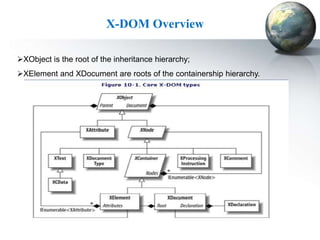
X-DOM Overview

XObject is the root of the inheritance hierarchy;
XElement and XDocument are roots of the containership hierarchy.
The System.Xml.Linq Namespace

LINQ to XML allows querying XML data. A new namespace in .NET
3.5, System.Xml.Linq, contains classes for creating and querying XML
trees:
 Xname: Represents a name of an XML element or attribute.
 XNode represents the abstract concept of a node in the XML tree.
 XContainer, derived from XNode, is an abstract base class for all
   nodes that can have child nodes ;is the base class for XDocument
   and XElement.
 XDocument represents an XML document, that contains the root
   level XML constructs, such as: a document type declaration
   (XDocumentType), one root element (XElement), zero or more
   comments objects (XComment).
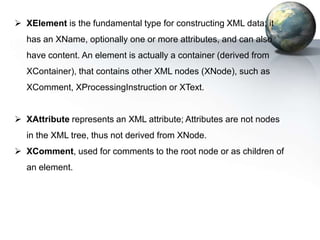
 XElement is the fundamental type for constructing XML data; it
  has an XName, optionally one or more attributes, and can also
  have content. An element is actually a container (derived from
  XContainer), that contains other XML nodes (XNode), such as
  XComment, XProcessingInstruction or XText.


 XAttribute represents an XML attribute; Attributes are not nodes
  in the XML tree, thus not derived from XNode.
 XComment, used for comments to the root node or as children of
  an element.
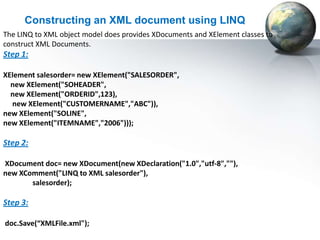
Constructing an XML document using LINQ
The LINQ to XML object model does provides XDocuments and XElement classes to
construct XML Documents.
Step 1:

XElement salesorder= new XElement("SALESORDER",
  new XElement("SOHEADER",
  new XElement("ORDERID",123),
  new XElement("CUSTOMERNAME","ABC")),
new XElement("SOLINE",
new XElement("ITEMNAME","2006")));

Step 2:

XDocument doc= new XDocument(new XDeclaration("1.0","utf-8",""),
new XComment("LINQ to XML salesorder"),
       salesorder);

Step 3:

doc.Save(“XMLFile.xml");
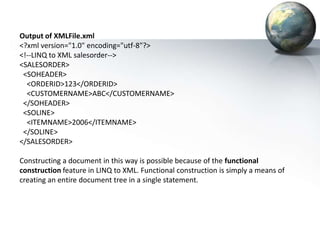
Output of XMLFile.xml
<?xml version="1.0" encoding="utf-8"?>
<!--LINQ to XML salesorder-->
<SALESORDER>
 <SOHEADER>
  <ORDERID>123</ORDERID>
  <CUSTOMERNAME>ABC</CUSTOMERNAME>
 </SOHEADER>
 <SOLINE>
  <ITEMNAME>2006</ITEMNAME>
 </SOLINE>
</SALESORDER>

Constructing a document in this way is possible because of the functional
construction feature in LINQ to XML. Functional construction is simply a means of
creating an entire document tree in a single statement.
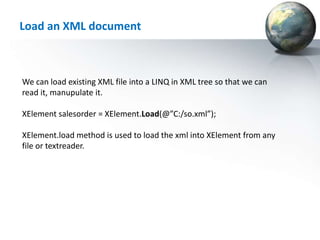
Load an XML document


We can load existing XML file into a LINQ in XML tree so that we can
read it, manupulate it.

XElement salesorder = XElement.Load(@”C:/so.xml”);

XElement.load method is used to load the xml into XElement from any
file or textreader.
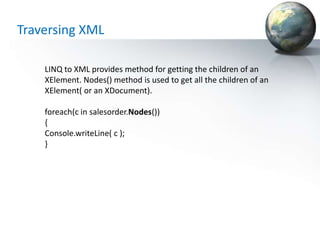
Traversing XML

    LINQ to XML provides method for getting the children of an
    XElement. Nodes() method is used to get all the children of an
    XElement( or an XDocument).

    foreach(c in salesorder.Nodes())
    {
    Console.writeLine( c );
    }
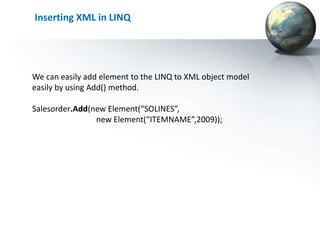
Inserting XML in LINQ


We can easily add element to the LINQ to XML object model
easily by using Add() method.

Salesorder.Add(new Element(“SOLINES”,
                new Element(“ITEMNAME”,2009));
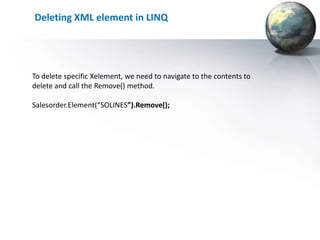
Deleting XML element in LINQ


To delete specific Xelement, we need to navigate to the contents to
delete and call the Remove() method.

Salesorder.Element(“SOLINES”).Remove();
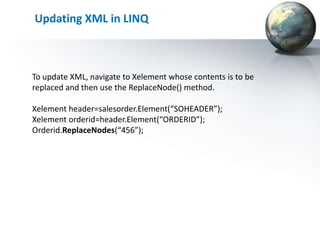
Updating XML in LINQ


To update XML, navigate to Xelement whose contents is to be
replaced and then use the ReplaceNode() method.

Xelement header=salesorder.Element(“SOHEADER”);
Xelement orderid=header.Element(“ORDERID”);
Orderid.ReplaceNodes(“456”);
Thank You

Linq to xml

  • 2.
    LINQ  Language IntegratedQuery (LINQ, pronounced "link") is a Microsoft .NET Framework component that adds native data querying capabilities to .NET languages, although ports exist for Java, PHP and JavaScript.  LINQ defines a set of method names (called standard query operators, or standard sequence operators), along with translation rules from so-called query expressions to expressions using these method names, lambda expressions and anonymous types. These can, for example, be used to project and filter data into arrays, enumerable classes, XML (LINQ to XML), relational databases, and third party data sources.
  • 3.
    ADVANTAGES Quick turn aroundfor development Queries can be dynamically run Tables are automatically created into class Columns are automatically created into properties Relationship are automatically applied to classes Lambda expressions are awesome Data is easy to setup and use
  • 4.
    DISADVANTAGES No clear outlinefor Tiers No good way of view permissions Small data sets will take longer to build the query than execute There is an overhead for creating queries When queries are moved from sql to application side, joins are very slow DBMS concurrency issues Hard to understand advance queries using Expressions
  • 5.
    LINQ Providers The C#3.0 specification defines a so- called Query Expression Pattern along with translation rules from a LINQ expression to an expression in a subset of C# 3.0 without LINQ expressions.
  • 6.
    These different providersdefine the different flavors of LINQ: LINQ to Objects: The LINQ to Objects provider is used for in-memory collections, using the local query execution engine of LINQ. LINQ to XML (formerly called XLINQ): The LINQ to XML provider converts an XML document to a collection of XElement objects, which are then queried against using the local execution engine that is provided as a part of the implementation of the standard query operator.
  • 7.
    LINQ to SQL(formerly called DLINQ): The LINQ to SQL provider allows LINQ to be used to query SQL Server databases, including SQL Server Compact databases. Since SQL Server data may reside on a remote server, and because SQL Server has its own query engine, LINQ to SQL does not use the query engine of LINQ. LINQ to DataSets: The LINQ to SQL provider works only with Microsoft SQL Server databases; to support any generic database, LINQ also includes the LINQ to DataSets, which uses ADO.NET to handle the communication with the database. Once the data is in ADO.NET Datasets, LINQ to DataSets execute queries against these datasets.
  • 8.
    What is LINQto XML? Working with XML using Microsoft's .NET Framework version 2.0 and below is a cumbersome task. The API available follows the W3C DOM model, and is document- centric. Everything begins with the document; you can't create elements without having a document; even a fragment of XML is a document. In the latest release of the .NET Framework, however, this has changed. XML is now element-centric.  With features like object initialization and anonymous types, it's very easy to create XML. Add to this the features of LINQ, and we now have a very easy to use and powerful tool for XML.
  • 9.
    What is LINQto XML? LINQ to XML is a LINQ-enabled, in-memory XML programming interface that enables you to work with XML from within the .NET Framework programming languages. LINQ to XML is like the Document Object Model (DOM) in that it brings the XML document into memory. You can query and modify the document, and after you modify it you can save it to a file or serialize it and send it over the Internet. However, LINQ to XML differs from DOM: It provides a new object model that is lighter weight and easier to work with, and that takes advantage of language improvements in Visual C# 2008.
  • 10.
    The most importantadvantage of LINQ to XML is its integration with Language-Integrated Query (LINQ). This integration enables to write queries on the in-memory XML document to retrieve collections of elements and attributes. The query capability of LINQ to XML is comparable in functionality (although not in syntax) to XPath and XQuery. The integration of LINQ in Visual C# 2008 provides stronger typing, compile-time checking, and improved debugger support. All LINQ to XML types are defined in the System.Xml.Linq namespace. LINQ to XML comprises of an XML DOM, which we call the X-DOM
  • 11.
    X-DOM Overview XObject isthe root of the inheritance hierarchy; XElement and XDocument are roots of the containership hierarchy.
  • 12.
    The System.Xml.Linq Namespace LINQto XML allows querying XML data. A new namespace in .NET 3.5, System.Xml.Linq, contains classes for creating and querying XML trees:  Xname: Represents a name of an XML element or attribute.  XNode represents the abstract concept of a node in the XML tree.  XContainer, derived from XNode, is an abstract base class for all nodes that can have child nodes ;is the base class for XDocument and XElement.  XDocument represents an XML document, that contains the root level XML constructs, such as: a document type declaration (XDocumentType), one root element (XElement), zero or more comments objects (XComment).
  • 13.
     XElement isthe fundamental type for constructing XML data; it has an XName, optionally one or more attributes, and can also have content. An element is actually a container (derived from XContainer), that contains other XML nodes (XNode), such as XComment, XProcessingInstruction or XText.  XAttribute represents an XML attribute; Attributes are not nodes in the XML tree, thus not derived from XNode.  XComment, used for comments to the root node or as children of an element.
  • 14.
    Constructing an XMLdocument using LINQ The LINQ to XML object model does provides XDocuments and XElement classes to construct XML Documents. Step 1: XElement salesorder= new XElement("SALESORDER", new XElement("SOHEADER", new XElement("ORDERID",123), new XElement("CUSTOMERNAME","ABC")), new XElement("SOLINE", new XElement("ITEMNAME","2006"))); Step 2: XDocument doc= new XDocument(new XDeclaration("1.0","utf-8",""), new XComment("LINQ to XML salesorder"), salesorder); Step 3: doc.Save(“XMLFile.xml");
  • 15.
    Output of XMLFile.xml <?xmlversion="1.0" encoding="utf-8"?> <!--LINQ to XML salesorder--> <SALESORDER> <SOHEADER> <ORDERID>123</ORDERID> <CUSTOMERNAME>ABC</CUSTOMERNAME> </SOHEADER> <SOLINE> <ITEMNAME>2006</ITEMNAME> </SOLINE> </SALESORDER> Constructing a document in this way is possible because of the functional construction feature in LINQ to XML. Functional construction is simply a means of creating an entire document tree in a single statement.
  • 16.
    Load an XMLdocument We can load existing XML file into a LINQ in XML tree so that we can read it, manupulate it. XElement salesorder = XElement.Load(@”C:/so.xml”); XElement.load method is used to load the xml into XElement from any file or textreader.
  • 17.
    Traversing XML LINQ to XML provides method for getting the children of an XElement. Nodes() method is used to get all the children of an XElement( or an XDocument). foreach(c in salesorder.Nodes()) { Console.writeLine( c ); }
  • 18.
    Inserting XML inLINQ We can easily add element to the LINQ to XML object model easily by using Add() method. Salesorder.Add(new Element(“SOLINES”, new Element(“ITEMNAME”,2009));
  • 19.
    Deleting XML elementin LINQ To delete specific Xelement, we need to navigate to the contents to delete and call the Remove() method. Salesorder.Element(“SOLINES”).Remove();
  • 20.
    Updating XML inLINQ To update XML, navigate to Xelement whose contents is to be replaced and then use the ReplaceNode() method. Xelement header=salesorder.Element(“SOHEADER”); Xelement orderid=header.Element(“ORDERID”); Orderid.ReplaceNodes(“456”);
  • 21.