CLOUD COMPUTING
WHAT IS CLOUD ? 
•Cloud is good because you can access 
files when you are anywhere like I use 
drop box on the internet and has made 
transferring your files easier from one 
computer and then accessing them on 
another.
CLOUD 
• The files you can access at home, college computer 
and phone , so whatever I store on one device I can 
access on any deceive. Cloud computing can not 
beat running data off you hard drive because hard 
drive is local storage on your computer everything is 
physically close to you which mean you can access It 
faster and easier but cloud computing has made it 
easy to store files on the internet and has made 
transferring your files easier.
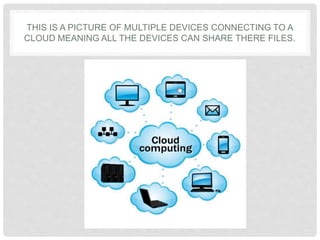
THIS IS A PICTURE OF MULTIPLE DEVICES CONNECTING TO A 
CLOUD MEANING ALL THE DEVICES CAN SHARE THERE FILES.
CLOUD APPS 
Cloud storage can be used for apps on the internet like Google drives what 
can be use on tablets, computers and phones. 
• Google drives can be used for things like creating document, 
PowerPoint, sheets , drawing, calendar and Gmail all these things store 
online and work online. 
• Dropbox-on this you can save all your items on to it and access your 
items anywhere from phones, internet or if you download drop box as a 
document folder 
• Sky drive-on this you can save all your items on to it and access your 
items anywhere from phones, internet or if you have the SkyDrive app 
you can access as a document folder. 
• Apple iCloud-Apple's cloud service is primarily used for online storage 
and synchronization of your mail, contacts, calendar, and more. All the 
data you need is available to you on your iOS, Mac OS, or Windows 
device. iCloud also stores media files.
CLOUD APPS 
Cloud apps include things like: 
• Google drive 
• Dropbox 
• Sky drive 
I have personal used all these to store my files on as they 
provide a easy way to access these files quickly 
anywhere, from backing my files up , to using it to transfer 
my files around.
CLOUD HARDWARE 
•There is also Cloud hardware out like a laptop that 
has just enough local storage and power to let it run a 
Web browser. From there, most everything you do is 
online: apps, media, and storage are all in the cloud. 
• Chrome computers 
• Chrome books use cloud technology to store them
HOW IT WILL WORK ? 
• Two different ends the front end and back end: 
The front end 
Part you interact with, so pretty much The front layer are 
the parts you see and interact with on webpage and 
apps on computers and smart phones so pretty much you 
are using software running on the front end of the cloud. 
The back end 
The back end consists of the hardware and the software 
architecture that delivers the data to you to see on the 
front end.
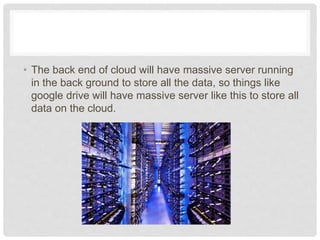
• The back end of cloud will have massive server 
running in the back ground to store all the data, so 
things like google drive will have massive server like 
this to store all data on the cloud.
BENEFITS OF USING IT 
• Store all the information in a secure cloud 
application. 
• Secure log in for cloud storage. 
• Access files anywhere. 
• Cost effective 
• Also easy to back up and be restored. 
• High capacity for storage
ENVIRONMENTAL & ETHICAL FACTORS 
• Less power because fewer machines 
• Using less power With cloud computing, multiple 
users can access a single server. Meaning they 
don’t have to turn on multiple computer to find the 
file on a hard drive, so having a cloud will make the 
process quicker to get the files instead of logging on 
to the correct computer to find the file. 
• It can also be cost effective
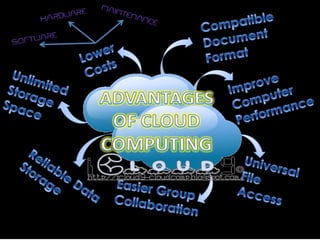
ADVANTAGES 
• 1. Flexibility as you can access the page anywhere from 
home and work or on the go , so that means you can 
work on a document out and about when you have 
internet to connect to the cloud . 
• 2. Another good thing about cloud computing is that 
you can back up your files online so you can have 
multiple copy's of your files . 
• 3. Another good things is that you can use cloud 
computing for free online getting enough storage to use. 
And also cost effective in long term of a business as you 
can store a server to hold all your files at your business 
and then after that never worry about buying any other 
storage devices because you can just save to the cloud 
on your server.
• Cloud is good because you can access files when 
you are anywhere. 
• The front end &The back end 
• Cost effective 
• Cloud computing will get bigger in future as it is 
easy , cost effective and makes it easy to access 
files anywhere and I can imagine it will make a big 
impact in future
DISADVANTAGES 
• Disadvantages is if your internet is down at home 
you cannot access your cloud then. Unlike if you 
had your files back up on a USB.
HERE IS A VIDEO 
• http://www.youtube.com/watch?v=ae_DKNwK_ms 
video 
fromhttp://www.salesforce.com/cloudcomputing/
THE MAG 
• http://uk.pcmag.com/networking-communications-software- 
products/16824/feature/what-is-cloud-computing
Cloud computing

Cloud computing

  • 1.
  • 2.
    WHAT IS CLOUD? •Cloud is good because you can access files when you are anywhere like I use drop box on the internet and has made transferring your files easier from one computer and then accessing them on another.
  • 3.
    CLOUD • Thefiles you can access at home, college computer and phone , so whatever I store on one device I can access on any deceive. Cloud computing can not beat running data off you hard drive because hard drive is local storage on your computer everything is physically close to you which mean you can access It faster and easier but cloud computing has made it easy to store files on the internet and has made transferring your files easier.
  • 4.
    THIS IS APICTURE OF MULTIPLE DEVICES CONNECTING TO A CLOUD MEANING ALL THE DEVICES CAN SHARE THERE FILES.
  • 5.
    CLOUD APPS Cloudstorage can be used for apps on the internet like Google drives what can be use on tablets, computers and phones. • Google drives can be used for things like creating document, PowerPoint, sheets , drawing, calendar and Gmail all these things store online and work online. • Dropbox-on this you can save all your items on to it and access your items anywhere from phones, internet or if you download drop box as a document folder • Sky drive-on this you can save all your items on to it and access your items anywhere from phones, internet or if you have the SkyDrive app you can access as a document folder. • Apple iCloud-Apple's cloud service is primarily used for online storage and synchronization of your mail, contacts, calendar, and more. All the data you need is available to you on your iOS, Mac OS, or Windows device. iCloud also stores media files.
  • 6.
    CLOUD APPS Cloudapps include things like: • Google drive • Dropbox • Sky drive I have personal used all these to store my files on as they provide a easy way to access these files quickly anywhere, from backing my files up , to using it to transfer my files around.
  • 7.
    CLOUD HARDWARE •Thereis also Cloud hardware out like a laptop that has just enough local storage and power to let it run a Web browser. From there, most everything you do is online: apps, media, and storage are all in the cloud. • Chrome computers • Chrome books use cloud technology to store them
  • 8.
    HOW IT WILLWORK ? • Two different ends the front end and back end: The front end Part you interact with, so pretty much The front layer are the parts you see and interact with on webpage and apps on computers and smart phones so pretty much you are using software running on the front end of the cloud. The back end The back end consists of the hardware and the software architecture that delivers the data to you to see on the front end.
  • 9.
    • The backend of cloud will have massive server running in the back ground to store all the data, so things like google drive will have massive server like this to store all data on the cloud.
  • 10.
    BENEFITS OF USINGIT • Store all the information in a secure cloud application. • Secure log in for cloud storage. • Access files anywhere. • Cost effective • Also easy to back up and be restored. • High capacity for storage
  • 11.
    ENVIRONMENTAL & ETHICALFACTORS • Less power because fewer machines • Using less power With cloud computing, multiple users can access a single server. Meaning they don’t have to turn on multiple computer to find the file on a hard drive, so having a cloud will make the process quicker to get the files instead of logging on to the correct computer to find the file. • It can also be cost effective
  • 13.
    ADVANTAGES • 1.Flexibility as you can access the page anywhere from home and work or on the go , so that means you can work on a document out and about when you have internet to connect to the cloud . • 2. Another good thing about cloud computing is that you can back up your files online so you can have multiple copy's of your files . • 3. Another good things is that you can use cloud computing for free online getting enough storage to use. And also cost effective in long term of a business as you can store a server to hold all your files at your business and then after that never worry about buying any other storage devices because you can just save to the cloud on your server.
  • 14.
    • Cloud isgood because you can access files when you are anywhere. • The front end &The back end • Cost effective • Cloud computing will get bigger in future as it is easy , cost effective and makes it easy to access files anywhere and I can imagine it will make a big impact in future
  • 15.
    DISADVANTAGES • Disadvantagesis if your internet is down at home you cannot access your cloud then. Unlike if you had your files back up on a USB.
  • 17.
    HERE IS AVIDEO • http://www.youtube.com/watch?v=ae_DKNwK_ms video fromhttp://www.salesforce.com/cloudcomputing/
  • 18.
    THE MAG •http://uk.pcmag.com/networking-communications-software- products/16824/feature/what-is-cloud-computing