BY
P.KARPAGAM
R.JEEVITHA
iiird ece(msec).
PRINTING
It is a process of reproducing text or

images on a paper or similar medium
 It is a promising and evergrowing

technology
HISTORY OF PRINTING
Earliest form of printing called woodblock

printing - 220AD.
Movable type printers - 1040AD
Printing like etching - 1500
Lithography - 1796
Facsimile - 1860
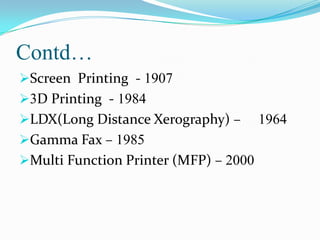
Contd…
Screen Printing - 1907
3D Printing - 1984
LDX(Long Distance Xerography) –

Gamma Fax – 1985
Multi Function Printer (MFP) – 2000

1964
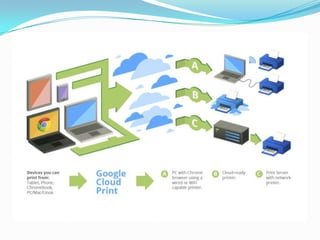
What is Cloud Printing?
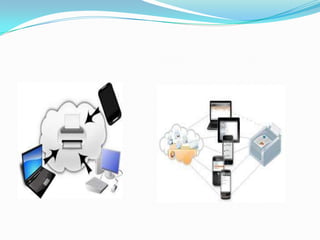
It is one of the aspect of cloud computing

that enables printing through web.
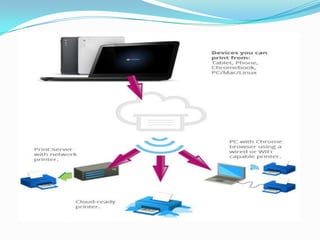
Any device having access to the internet can
be used to print regardless of printer’s
location.
It allows both cloud enabled and general
printers.
Works on your phone, tablet, chromebook,
PC and other web connected devices also.
Contd…
Cloud printing could be possible in classic

printers by connecting to an internet
enabled computer by installing a software
connector.
Any printers can be made to work by using
particular apps(like Google cloud print
, Airprint, e-print).
History of CLOUD PRINTING
First introduced by GOOGLE in April
2010, allowing users to share printers in
DECEMBER 14,2011
Then Airprinters by APPLE in November
2010.
Followed by HP with its e-printers in 2010

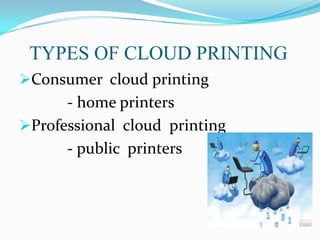
TYPES OF CLOUD PRINTING
Consumer cloud printing

- home printers
Professional cloud printing
- public printers
HOW TO DEAL WITH IT ?
Includes three steps

1. Choose document
2. Choose printer
3. Set printer driver
Contd…
Choose document

- select a document and choose cortado
print option.
Choose printer
- can be printed via Wi-Fi or
Bluetooth
- in case of admin block printer’s IP
address must be entered directly
Contd...
Set printer Driver

- as soon as printer is choosen the
appropriate printer driver is selected.
- the print job is sent via the
mobile service to the selected printer.
COMPARISON OF PRINTERS
GOOGLE CLOUD PRINT

-Google introduced Cloud Print
Beta in april 2010
- operates on cloud ready printers.
-to operate it we need a google
account and chrome browser.
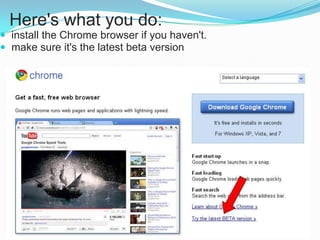
Here's what you do:
 install the Chrome browser if you haven't.
 make sure it's the latest beta version
AIR PRINTERS
Supports IOS devices and also growing

printers like canon and HP
It does not require printer specific drivers
It connects via a Wi–Fi networks and
require Wi–Fi routers
Contd…
Direct Wi–Fi connection between the

device and the printer is not supported.
It is an extension of IPP(Internet
Printing Protocol)
- printers support either directly or as a
result of being shared through an
intermediating system
Contd...
In Air Print the specific component of

the protocol are missing and it leads to
compatability issues
It can be addressed completely by
translating between the two dilalects of
IPP
e - PRINTERS
It works only on certain HP printers

mostly consumer and small office models.
It have their own internal e –mail address.
A job is sent as an e-mail attachment
from your device to the printer’s address,
going through HP’s proprietary e-mail
servers along the way.
SUPPORTING OS
 Windows XP, Vista, or Windows 7

(Sorry Macs, Google says you're coming
soon)
 The latest version of Google's browser:

Chrome
ADVANTAGES
Direct printing without turning

on a PC

- can takes place directly on a
printer connected to a mobile device.
- this can be either a printer within
the same Wi-Fi network as the device is
currently located or via Bluetooth printer
or to a network printer in the
organization.
Supports all major file types
- Supports different file formats like

Excel spreadsheets, PDF contracts,
PowerPoint presentations, HTML
messages or pictures
- Cortado’s cloud printing solution
prints all mainstream file types.
Use any printer
- any printer can be used for

mobile printing with Cortado
Workplace.
- Several thousand printers
from over 90 manufacturers are already
supported
One solution for all devices

- Can be used with iPad, iPhone,
iPod touch, BlackBerry, Android and
Symbian devices.
- Once registered, a user can use the
cloud directory and Cortado functions with
all devices.
Available as a private cloud

solution
- all Cortado services are available
for your protected corporate network
- smartphone and tablet users have
access to the corporate drives and the
solution provides all the classic desktop
functions
BENEFITS
Printouts can be taken without

carrying any data storage devices.
The data can be stored on the server
,so that the user can select the content
from anywhere in the world by just
enabling the internet devices
Contd…
Economically effective when compared to

fascimile
It is eco-friendly device.
It provides solution to the organization
to print the required amount of data
without extra cost and delays.
Both paper wastage and printing cost are
reduced.
CONCLUSION
Now you can print
documents, photos and webpages from
your phone or tablet .
You can print to any printer
connected to Google Cloud Printer, to HP
or e-printer and to other printers that
have apps in the Google Play Store.
Cloud  printing final

Cloud printing final

  • 1.
  • 2.
    PRINTING It is aprocess of reproducing text or images on a paper or similar medium  It is a promising and evergrowing technology
  • 3.
    HISTORY OF PRINTING Earliestform of printing called woodblock printing - 220AD. Movable type printers - 1040AD Printing like etching - 1500 Lithography - 1796 Facsimile - 1860
  • 4.
    Contd… Screen Printing -1907 3D Printing - 1984 LDX(Long Distance Xerography) – Gamma Fax – 1985 Multi Function Printer (MFP) – 2000 1964
  • 5.
    What is CloudPrinting? It is one of the aspect of cloud computing that enables printing through web. Any device having access to the internet can be used to print regardless of printer’s location. It allows both cloud enabled and general printers. Works on your phone, tablet, chromebook, PC and other web connected devices also.
  • 6.
    Contd… Cloud printing couldbe possible in classic printers by connecting to an internet enabled computer by installing a software connector. Any printers can be made to work by using particular apps(like Google cloud print , Airprint, e-print).
  • 8.
    History of CLOUDPRINTING First introduced by GOOGLE in April 2010, allowing users to share printers in DECEMBER 14,2011 Then Airprinters by APPLE in November 2010. Followed by HP with its e-printers in 2010 
  • 10.
    TYPES OF CLOUDPRINTING Consumer cloud printing - home printers Professional cloud printing - public printers
  • 11.
    HOW TO DEALWITH IT ? Includes three steps 1. Choose document 2. Choose printer 3. Set printer driver
  • 13.
    Contd… Choose document - selecta document and choose cortado print option. Choose printer - can be printed via Wi-Fi or Bluetooth - in case of admin block printer’s IP address must be entered directly
  • 14.
    Contd... Set printer Driver -as soon as printer is choosen the appropriate printer driver is selected. - the print job is sent via the mobile service to the selected printer.
  • 15.
    COMPARISON OF PRINTERS GOOGLECLOUD PRINT -Google introduced Cloud Print Beta in april 2010 - operates on cloud ready printers. -to operate it we need a google account and chrome browser.
  • 16.
    Here's what youdo:  install the Chrome browser if you haven't.  make sure it's the latest beta version
  • 17.
    AIR PRINTERS Supports IOSdevices and also growing printers like canon and HP It does not require printer specific drivers It connects via a Wi–Fi networks and require Wi–Fi routers
  • 18.
    Contd… Direct Wi–Fi connectionbetween the device and the printer is not supported. It is an extension of IPP(Internet Printing Protocol) - printers support either directly or as a result of being shared through an intermediating system
  • 19.
    Contd... In Air Printthe specific component of the protocol are missing and it leads to compatability issues It can be addressed completely by translating between the two dilalects of IPP
  • 20.
    e - PRINTERS Itworks only on certain HP printers mostly consumer and small office models. It have their own internal e –mail address. A job is sent as an e-mail attachment from your device to the printer’s address, going through HP’s proprietary e-mail servers along the way.
  • 21.
    SUPPORTING OS  WindowsXP, Vista, or Windows 7 (Sorry Macs, Google says you're coming soon)  The latest version of Google's browser: Chrome
  • 22.
    ADVANTAGES Direct printing withoutturning on a PC - can takes place directly on a printer connected to a mobile device. - this can be either a printer within the same Wi-Fi network as the device is currently located or via Bluetooth printer or to a network printer in the organization.
  • 23.
    Supports all majorfile types - Supports different file formats like Excel spreadsheets, PDF contracts, PowerPoint presentations, HTML messages or pictures - Cortado’s cloud printing solution prints all mainstream file types.
  • 24.
    Use any printer -any printer can be used for mobile printing with Cortado Workplace. - Several thousand printers from over 90 manufacturers are already supported
  • 25.
    One solution forall devices - Can be used with iPad, iPhone, iPod touch, BlackBerry, Android and Symbian devices. - Once registered, a user can use the cloud directory and Cortado functions with all devices.
  • 26.
    Available as aprivate cloud solution - all Cortado services are available for your protected corporate network - smartphone and tablet users have access to the corporate drives and the solution provides all the classic desktop functions
  • 27.
    BENEFITS Printouts can betaken without carrying any data storage devices. The data can be stored on the server ,so that the user can select the content from anywhere in the world by just enabling the internet devices
  • 28.
    Contd… Economically effective whencompared to fascimile It is eco-friendly device. It provides solution to the organization to print the required amount of data without extra cost and delays. Both paper wastage and printing cost are reduced.
  • 29.
    CONCLUSION Now you canprint documents, photos and webpages from your phone or tablet . You can print to any printer connected to Google Cloud Printer, to HP or e-printer and to other printers that have apps in the Google Play Store.