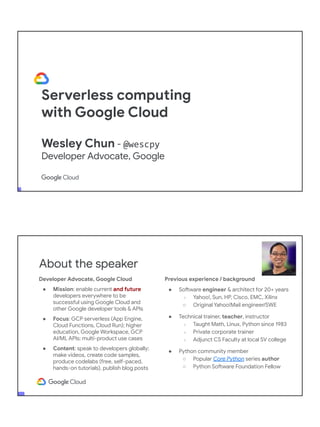
Serverless computing
with Google Cloud
Wesley Chun - @wescpy
Developer Advocate, Google
Developer Advocate, Google Cloud
● Mission: enable current and future
developers everywhere to be
successful using Google Cloud and
other Google developer tools & APIs
● Focus: GCP serverless (App Engine,
Cloud Functions, Cloud Run); higher
education, Google Workspace, GCP
AI/ML APIs; multi-product use cases
● Content: speak to developers globally;
make videos, create code samples,
produce codelabs (free, self-paced,
hands-on tutorials), publish blog posts
About the speaker
Previous experience / background
● Software engineer & architect for 20+ years
○ Yahoo!, Sun, HP, Cisco, EMC, Xilinx
○ Original Yahoo!Mail engineer/SWE
● Technical trainer, teacher, instructor
○ Taught Math, Linux, Python since 1983
○ Private corporate trainer
○ Adjunct CS Faculty at local SV college
● Python community member
○ Popular Core Python series author
○ Python Software Foundation Fellow
● AB (Math/CS) & CMP (Music/Piano), UC
Berkeley and MSCS, UC Santa Barbara
● Adjunct Computer Science Faculty, Foothill
College (Silicon Valley)
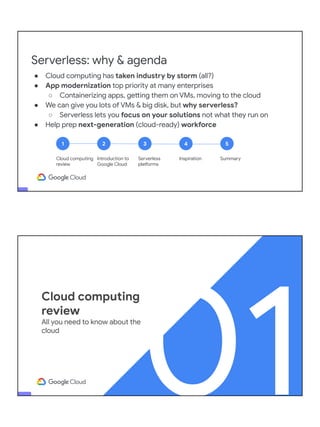
Serverless: why & agenda
1
Cloud computing
review
2
Introduction to
Google Cloud
3
Serverless
platforms
4
Inspiration
5
Summary
● Cloud computing has taken industry by storm (all?)
● App modernization top priority at many enterprises
○ Containerizing apps, getting them on VMs, moving to the cloud
● We can give you lots of VMs & big disk, but why serverless?
○ Serverless lets you focus on your solutions not what they run on
● Help prep next-generation (cloud-ready) workforce
01
Cloud computing
review
All you need to know about the
cloud
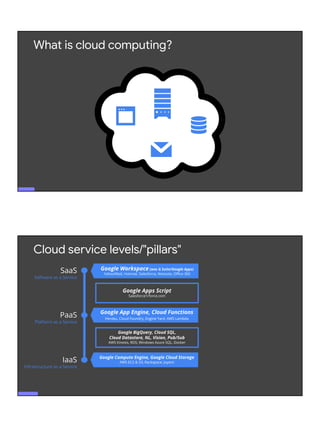
What is cloud computing?
spar
Google Compute Engine, Google Cloud Storage
AWS EC2 & S3; Rackspace; Joyent
Cloud service levels/"pillars"
SaaS
Software as a Service
PaaS
Platform as a Service
IaaS
Infrastructure as a Service
Google BigQuery, Cloud SQL,
Cloud Datastore, NL, Vision, Pub/Sub
AWS Kinesis, RDS; Windows Azure SQL, Docker
Google Apps Script
Salesforce1/force.com
Google Workspace (was G Suite/Google Apps)
Yahoo!Mail, Hotmail, Salesforce, Netsuite, Office 365
Google App Engine, Cloud Functions
Heroku, Cloud Foundry, Engine Yard, AWS Lambda
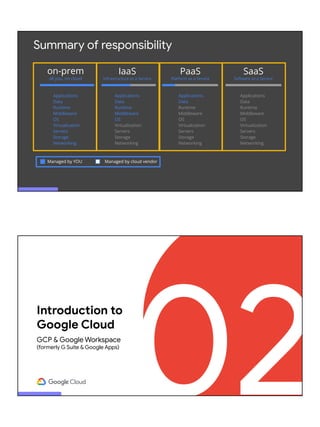
Summary of responsibility
SaaS
Software as a Service
Applications
Data
Runtime
Middleware
OS
Virtualization
Servers
Storage
Networking
Applications
Data
Runtime
Middleware
OS
Virtualization
Servers
Storage
Networking
IaaS
Infrastructure as a Service
Applications
Data
Runtime
Middleware
OS
Virtualization
Servers
Storage
Networking
PaaS
Platform as a Service
Managed by YOU Managed by cloud vendor
Applications
Data
Runtime
Middleware
OS
Virtualization
Servers
Storage
Networking
on-prem
all you, no cloud
02
Introduction to
Google Cloud
GCP & Google Workspace
(formerly G Suite & Google Apps)
YOUR
NEXT
APP? google.com/datacenter
Nine products with 1B+ (monthly)
users each, all powered by our cloud
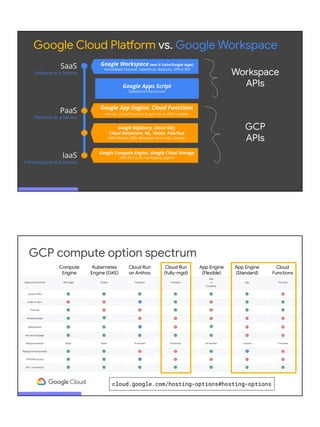
formerly
( )
Google Workspace
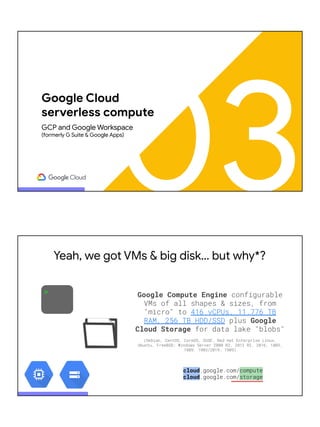
Top-level documentation and comprehensive developers
overview video at developers.google.com/gsuite
(formerly G Suite and Google Apps)
APIs
Google Compute Engine, Google Cloud Storage
AWS EC2 & S3; Rackspace; Joyent
SaaS
Software as a Service
PaaS
Platform as a Service
IaaS
Infrastructure as a Service
Google Apps Script
Salesforce1/force.com
Google Workspace (was G Suite/Google Apps)
Yahoo!Mail, Hotmail, Salesforce, Netsuite, Office 365
Google App Engine, Cloud Functions
Heroku, Cloud Foundry, Engine Yard, AWS Lambda
Google BigQuery, Cloud SQL,
Cloud Datastore, NL, Vision, Pub/Sub
AWS Kinesis, RDS; Windows Azure SQL, Docker
Google Cloud Platform vs. Google Workspace
Workspace
APIs
GCP
APIs
cloud.google.com/hosting-options#hosting-options
GCP compute option spectrum
Compute
Engine
Kubernetes
Engine (GKE)
Cloud Run
on Anthos
Cloud Run
(fully-mgd)
App Engine
(Flexible)
App Engine
(Standard)
Cloud
Functions
03
Google Cloud
serverless compute
GCP and Google Workspace
(formerly G Suite & Google Apps)
> Google Compute Engine configurable
VMs of all shapes & sizes, from
"micro" to 416 vCPUs, 11.776 TB
RAM, 256 TB HDD/SSD plus Google
Cloud Storage for data lake "blobs"
(Debian, CentOS, CoreOS, SUSE, Red Hat Enterprise Linux,
Ubuntu, FreeBSD; Windows Server 2008 R2, 2012 R2, 2016, 1803,
1809, 1903/2019, 1909)
cloud.google.com/compute
cloud.google.com/storage
Yeah, we got VMs & big disk… but why*?
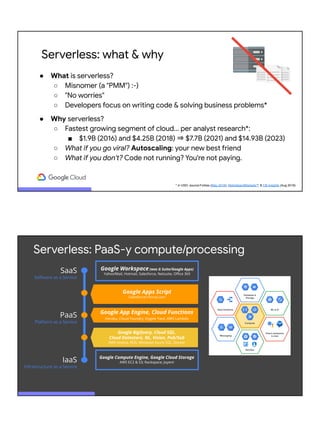
Serverless: what & why
● What is serverless?
○ Misnomer (a "PMM") :-)
○ "No worries"
○ Developers focus on writing code & solving business problems*
● Why serverless?
○ Fastest growing segment of cloud... per analyst research*:
■ $1.9B (2016) and $4.25B (2018) ⇒ $7.7B (2021) and $14.93B (2023)
○ What if you go viral? Autoscaling: your new best friend
○ What if you don't? Code not running? You're not paying.
* in USD; source:Forbes (May 2018), MarketsandMarkets™ & CB Insights (Aug 2018)
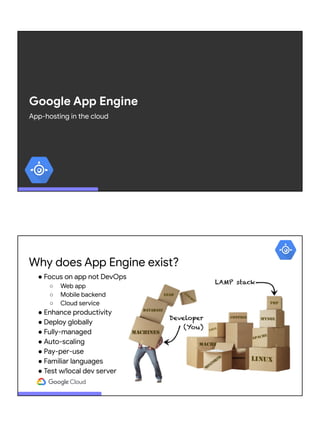
Google Compute Engine, Google Cloud Storage
AWS EC2 & S3; Rackspace; Joyent
SaaS
Software as a Service
PaaS
Platform as a Service
IaaS
Infrastructure as a Service
Google Workspace (was G Suite/Google Apps)
Yahoo!Mail, Hotmail, Salesforce, Netsuite, Office 365
Google App Engine, Cloud Functions
Heroku, Cloud Foundry, Engine Yard, AWS Lambda
Google BigQuery, Cloud SQL,
Cloud Datastore, NL, Vision, Pub/Sub
AWS Kinesis, RDS; Windows Azure SQL, Docker
Serverless: PaaS-y compute/processing
Google Apps Script
Salesforce1/force.com
Google App Engine
App-hosting in the cloud
Why does App Engine exist?
● Focus on app not DevOps
○ Web app
○ Mobile backend
○ Cloud service
● Enhance productivity
● Deploy globally
● Fully-managed
● Auto-scaling
● Pay-per-use
● Familiar languages
● Test w/local dev server
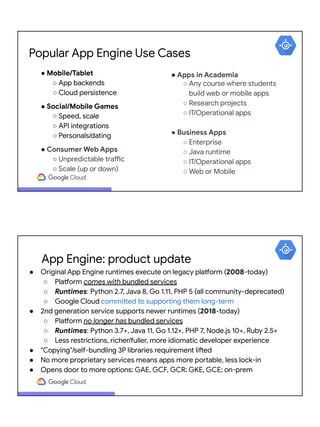
Hello World (Python "MVP")
app.yaml
runtime: python38
main.py
from flask import Flask
app = Flask(__name__)
@app.route('/')
def hello():
return 'Hello World!'
requirements.txt
Flask>=1.1.2
Deploy:
$ gcloud app deploy
Access globally:
PROJECT_ID.appspot.com
cloud.google.com/appengine/docs/standard/python3/quickstart
Not all apps user-facing or web-based!!
● Need backend processing? Want to build your own?
● No UI required... just need HTTP
● Optimal for user info (high scores, contacts, levels/badges, etc.)
● Better UI: move user data off phone so it's universally available
Popular App Engine Use Cases
● Mobile/Tablet
○ App backends
○ Cloud persistence
● Social/Mobile Games
○ Speed, scale
○ API integrations
○ Personals/dating
● Consumer Web Apps
○ Unpredictable traffic
○ Scale (up or down)
● Apps in Academia
○ Any course where students
build web or mobile apps
○ Research projects
○ IT/Operational apps
● Business Apps
○ Enterprise
○ Java runtime
○ IT/Operational apps
○ Web or Mobile
App Engine: product update
● Original App Engine runtimes execute on legacy platform (2008-today)
○ Platform comes with bundled services
○ Runtimes: Python 2.7, Java 8, Go 1.11, PHP 5 (all community-deprecated)
○ Google Cloud committed to supporting them long-term
● 2nd generation service supports newer runtimes (2018-today)
○ Platform no longer has bundled services
○ Runtimes: Python 3.7+, Java 11, Go 1.12+, PHP 7, Node.js 10+, Ruby 2.5+
○ Less restrictions, richer/fuller, more idiomatic developer experience
● "Copying"/self-bundling 3P libraries requirement lifted
● No more proprietary services means apps more portable, less lock-in
● Opens door to more options: GAE, GCF, GCR; GKE, GCE; on-prem
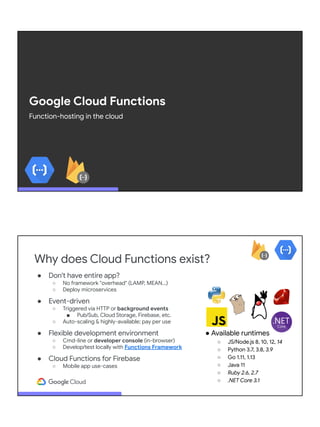
Google Cloud Functions
Function-hosting in the cloud
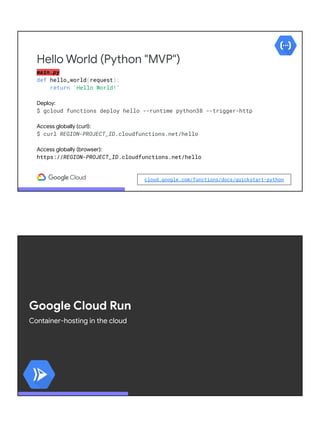
Why does Cloud Functions exist?
● Don't have entire app?
○ No framework "overhead" (LAMP, MEAN...)
○ Deploy microservices
● Event-driven
○ Triggered via HTTP or background events
■ Pub/Sub, Cloud Storage, Firebase, etc.
○ Auto-scaling & highly-available; pay per use
● Flexible development environment
○ Cmd-line or developer console (in-browser)
○ Develop/test locally with Functions Framework
● Cloud Functions for Firebase
○ Mobile app use-cases
● Available runtimes
○ JS/Node.js 8, 10, 12, 14
○ Python 3.7, 3.8, 3.9
○ Go 1.11, 1.13
○ Java 11
○ Ruby 2.6, 2.7
○ .NET Core 3.1
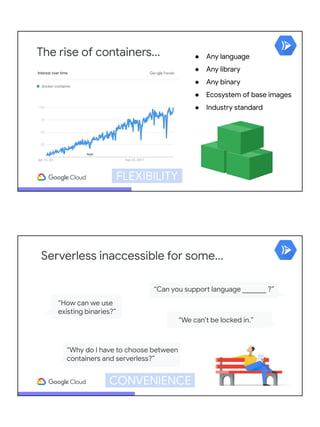
main.py
def hello_world(request):
return 'Hello World!'
Deploy:
$ gcloud functions deploy hello --runtime python38 --trigger-http
Access globally (curl):
$ curl REGION-PROJECT_ID.cloudfunctions.net/hello
Access globally (browser):
https://REGION-PROJECT_ID.cloudfunctions.net/hello
Hello World (Python "MVP")
cloud.google.com/functions/docs/quickstart-python
Google Cloud Run
Container-hosting in the cloud
The rise of containers... ● Any language
● Any library
● Any binary
● Ecosystem of base images
● Industry standard
FLEXIBILITY
“We can’t be locked in.”
“How can we use
existing binaries?”
“Why do I have to choose between
containers and serverless?”
“Can you support language _______ ?”
Serverless inaccessible for some...
CONVENIENCE
Cloud Run: code, build, deploy
.js .rb .go
.sh
.py ...
● Any language, library, binary
○ HTTP port, stateless
● Bundle into container
○ Build w/Docker OR
○ Google Cloud Build
○ Image ⇒ Container Registry
● Deploy to Cloud Run (managed or GKE)
● GitOps: (CI/)CD Push-to-deploy from Git
State
HTTP
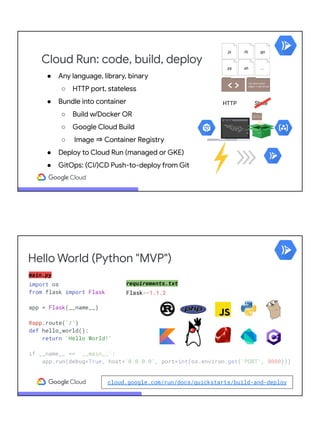
Hello World (Python "MVP")
main.py
import os
from flask import Flask
app = Flask(__name__)
@app.route('/')
def hello_world():
return 'Hello World!'
if __name__ == '__main__':
app.run(debug=True, host='0.0.0.0', port=int(os.environ.get('PORT', 8080)))
cloud.google.com/run/docs/quickstarts/build-and-deploy
requirements.txt
Flask==1.1.2
Hello World (Python "MVP")
Dockerfile
FROM python:3-slim
WORKDIR /app
COPY . .
RUN pip install -r requirements.txt
CMD ["python", "main.py"]
.dockerignore
Dockerfile
README.md
*.pyc
*.pyo
.git/
__pycache__
Build (think docker build and docker push) then deploy (think docker run):
$ gcloud builds submit --tag gcr.io/PROJ_ID/IMG_NAME
$ gcloud run deploy SVC_NAME --image gcr.io/PROJ_ID/IMG_NAME
OR… Build and Deploy (1-line combination of above commands):
$ gcloud run deploy SVC_NAME --source .
Access globally:
SVC_NAME-HASH-REG_ABBR.a.run.app
Docker &
Dockerfile
OPTIONAL!!
● Build containers easily & securely without creating/managing Dockerfiles
● Open source, open standard; based on CNCF Buildpacks spec v3
● Used by GCF Functions Framework to deploy locally-developed functions
● Supports most common development tools
○ Go 1.10+
○ Node.js 10+
○ Python 3.7+
○ Java 8 & 11
○ .NET Core 3.1+
● Blog posts
○ cloud.google.com/blog/products/containers-kubernetes/google-cloud-now-supports-buildpacks and
cloud.google.com/blog/products/serverless/build-and-deploy-an-app-to-cloud-run-with-a-single-command
Deploy to Cloud Run with Buildpacks
github.com/GoogleCloudPlatform/buildpacks
$ ls
index.js package.json
$ gcloud run deploy myapp --source .
$ ls
app.py requirements.txt
$ gcloud run deploy myapp --source .
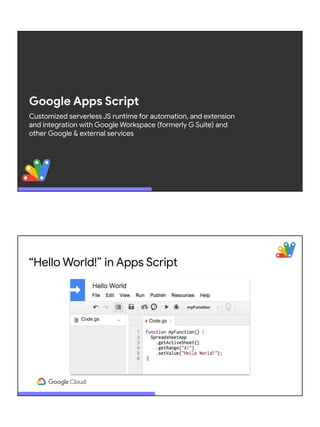
Google Apps Script
Customized serverless JS runtime for automation, and extension
and integration with Google Workspace (formerly G Suite) and
other Google & external services
“Hello World!” in Apps Script
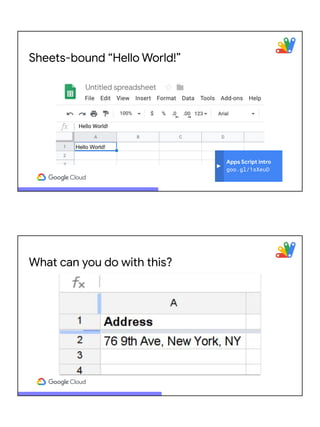
Sheets-bound “Hello World!”
Apps Script intro
goo.gl/1sXeuD
What can you do with this?
Accessing maps from
spreadsheets?!?
goo.gl/oAzBN9
This… with help from Google Maps & Gmail
function sendMap() {
var sheet = SpreadsheetApp.getActiveSheet();
var address = sheet.getRange("A2").getValue();
var map = Maps.newStaticMap().addMarker(address);
GmailApp.sendEmail('friend@example.com', 'Map',
'See below.', {attachments:[map]});
}
JS
g.co/codelabs/apps-script-intro
04
In-practice
Use cases, nebulousness &
flexibility, best practices,
local development & testing
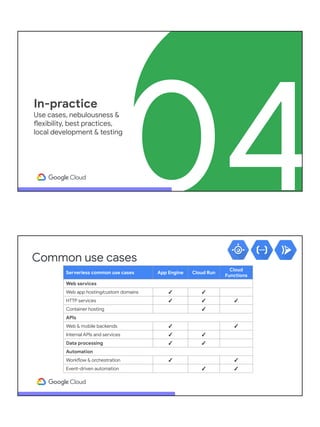
Serverless common use cases App Engine Cloud Run
Cloud
Functions
Web services
Web app hosting/custom domains ✓ ✓
HTTP services ✓ ✓ ✓
Container hosting ✓
APIs
Web & mobile backends ✓ ✓
Internal APIs and services ✓ ✓
Data processing ✓ ✓
Automation
Workflow & orchestration ✓ ✓
Event-driven automation ✓ ✓
Common use cases
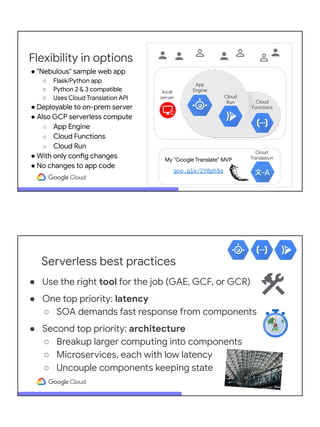
Flexibility in options
Cloud
Functions
App
Engine
Cloud
Run
local
server
Cloud
Translation
My "Google Translate" MVP
goo.gle/2Y0ph5q
● "Nebulous" sample web app
○ Flask/Python app
○ Python 2 & 3 compatible
○ Uses Cloud Translation API
● Deployable to on-prem server
● Also GCP serverless compute
○ App Engine
○ Cloud Functions
○ Cloud Run
● With only config changes
● No changes to app code
Serverless best practices
● Use the right tool for the job (GAE, GCF, or GCR)
● One top priority: latency
○ SOA demands fast response from components
● Second top priority: architecture
○ Breakup larger computing into components
○ Microservices, each with low latency
○ Uncouple components keeping state
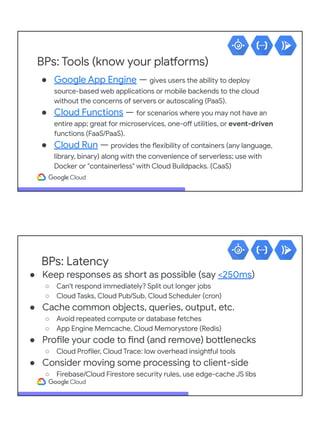
BPs: Tools (know your platforms)
● Google App Engine — gives users the ability to deploy
source-based web applications or mobile backends to the cloud
without the concerns of servers or autoscaling (PaaS).
● Cloud Functions — for scenarios where you may not have an
entire app; great for microservices, one-off utilities, or event-driven
functions (FaaS/PaaS).
● Cloud Run — provides the flexibility of containers (any language,
library, binary) along with the convenience of serverless; use with
Docker or "containerless" with Cloud Buildpacks. (CaaS)
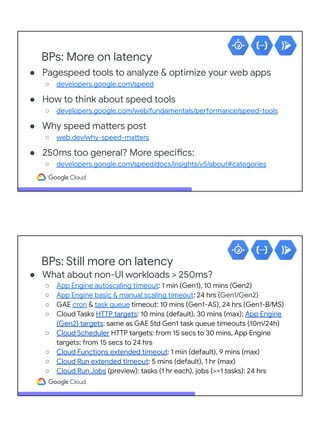
BPs: Latency
● Keep responses as short as possible (say <250ms)
○ Can't respond immediately? Split out longer jobs
○ Cloud Tasks, Cloud Pub/Sub, Cloud Scheduler (cron)
● Cache common objects, queries, output, etc.
○ Avoid repeated compute or database fetches
○ App Engine Memcache, Cloud Memorystore (Redis)
● Profile your code to find (and remove) bottlenecks
○ Cloud Profiler, Cloud Trace: low overhead insightful tools
● Consider moving some processing to client-side
○ Firebase/Cloud Firestore security rules, use edge-cache JS libs
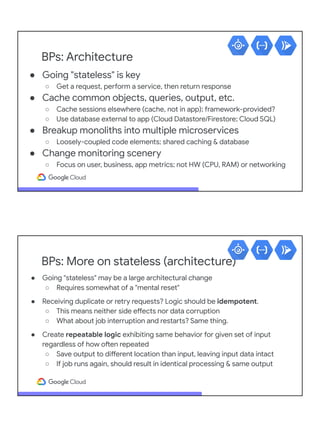
BPs: More on latency
● Pagespeed tools to analyze & optimize your web apps
○ developers.google.com/speed
● How to think about speed tools
○ developers.google.com/web/fundamentals/performance/speed-tools
● Why speed matters post
○ web.dev/why-speed-matters
● 250ms too general? More specifics:
○ developers.google.com/speed/docs/insights/v5/about#categories
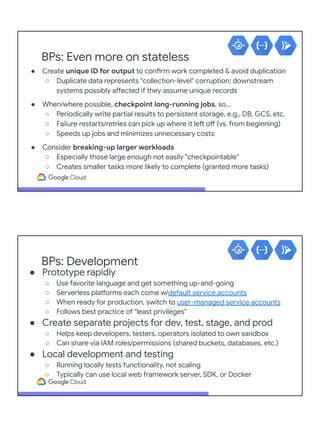
BPs: Still more on latency
● What about non-UI workloads > 250ms?
○ App Engine autoscaling timeout: 1 min (Gen1), 10 mins (Gen2)
○ App Engine basic & manual scaling timeout: 24 hrs (Gen1/Gen2)
○ GAE cron & task queue timeout: 10 mins (Gen1-AS), 24 hrs (Gen1-B/MS)
○ Cloud Tasks HTTP targets: 10 mins (default), 30 mins (max); App Engine
(Gen2) targets: same as GAE Std Gen1 task queue timeouts (10m/24h)
○ Cloud Scheduler HTTP targets: from 15 secs to 30 mins, App Engine
targets: from 15 secs to 24 hrs
○ Cloud Functions extended timeout: 1 min (default), 9 mins (max)
○ Cloud Run extended timeout: 5 mins (default), 1 hr (max)
○ Cloud Run Jobs (preview): tasks (1 hr each), jobs (>=1 tasks): 24 hrs
BPs: Architecture
● Going "stateless" is key
○ Get a request, perform a service, then return response
● Cache common objects, queries, output, etc.
○ Cache sessions elsewhere (cache, not in app); framework-provided?
○ Use database external to app (Cloud Datastore/Firestore; Cloud SQL)
● Breakup monoliths into multiple microservices
○ Loosely-coupled code elements; shared caching & database
● Change monitoring scenery
○ Focus on user, business, app metrics; not HW (CPU, RAM) or networking
BPs: More on stateless (architecture)
● Going "stateless" may be a large architectural change
○ Requires somewhat of a "mental reset"
● Receiving duplicate or retry requests? Logic should be idempotent.
○ This means neither side effects nor data corruption
○ What about job interruption and restarts? Same thing.
● Create repeatable logic exhibiting same behavior for given set of input
regardless of how often repeated
○ Save output to different location than input, leaving input data intact
○ If job runs again, should result in identical processing & same output
BPs: Even more on stateless
● Create unique ID for output to confirm work completed & avoid duplication
○ Duplicate data represents "collection-level" corruption; downstream
systems possibly affected if they assume unique records
● When/where possible, checkpoint long-running jobs, so…
○ Periodically write partial results to persistent storage, e.g., DB, GCS, etc.
○ Failure restarts/retries can pick up where it left off (vs. from beginning)
○ Speeds up jobs and minimizes unnecessary costs
● Consider breaking-up larger workloads
○ Especially those large enough not easily "checkpointable"
○ Creates smaller tasks more likely to complete (granted more tasks)
BPs: Development
● Prototype rapidly
○ Use favorite language and get something up-and-going
○ Serverless platforms each come w/default service accounts
○ When ready for production, switch to user-managed service accounts
○ Follows best practice of "least privileges"
● Create separate projects for dev, test, stage, and prod
○ Helps keep developers, testers, operators isolated to own sandbox
○ Can share via IAM roles/permissions (shared buckets, databases, etc.)
● Local development and testing
○ Running locally tests functionality, not scaling
○ Typically can use local web framework server, SDK, or Docker
BPs: Local development/testing
● App Engine — local or framework devserver
○ Local devserver (Gen1 or Gen2) and local unit testing (Gen1)
○ Testing and deploying your application: running locally (Gen2)
● Cloud Functions — Functions Framework
○ Functions Framework (local dev/testing; bundle function for Cloud Run)
○ Cloud Functions local development
○ Cloud Functions testing overview
○ Codelab: Local development with Cloud Functions (Node.js) using VSC
● Cloud Run — run Docker containers locally
○ Testing a Cloud Run service locally
○ Tutorial: Local troubleshooting of a Cloud Run service
BPs: Local testing Cloud emulators
● Cloud Datastore
○ Datastore emulator (non-App Engine or App Engine [Gen2])
○ App Engine Datastore emulator (Gen1 [or Gen2]; migrate to above)
● Firebase/Cloud Firestore
○ Firebase Emulator Suite (multiple product emulators; unit testing video)
○ Cloud Firestore emulator (w/in Firebase Emulator Suite; ex: React Native)
○ Cloud Storage emulator (w/in Firebase Emulator Suite; ex: React Native)
● Other Google Cloud emulators
○ Cloud Pub/Sub, Cloud Spanner, Cloud BigTable
● Others: Google Cloud Java test tools; BigQuery test kit (non-Google)
BPs: Best practices reading library
● Automated tracing & performance analysis to find app bottlenecks (GAE, Feb 2016)
● Best practices for coldstarts/startup time (GAE, Jun 2017)
● Profile your app's performance in production (GAE, Jun 2019)
● Managing serverless cost & reliability (all, Apr 2020)
● Serverless optimizations & efficiency (all, Jun 2020)
● Global load balancer and CDN for serverless (all, Jul 2020)
● Creating effective services with good response times (GCR, Node.js, Nov 2020)
● Cloud Run "min instances" to reduce coldstarts (GCR, Dec 2020)
● Running effective Node.js Cloud Functions (GCF, Node.js, Dec 2020)
● GCR container lifecycle (GCR, Jan 2021)
● Overall architecture best practices (GCR, Java, Apr 2021)
● Zero effort performance insights with tracing (all, Aug 2021)
● Cloud Functions "min instances" to reduce coldstarts (GCF, Aug 2021)
05
Inspirational Ideas
Build with ALL of Google
Custom intelligence in Gmail
Analyze Google Workspace (formerly G Suite) data with GCP
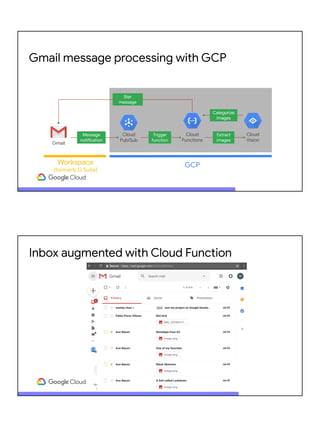
Gmail message processing with GCP
Gmail
Cloud
Pub/Sub
Cloud
Functions
Cloud
Vision
Workspace
(formerly G Suite)
GCP
Star
message
Message
notification
Trigger
function
Extract
images
Categorize
images
Inbox augmented with Cloud Function
● Gmail API: sets up notification forwarding to Cloud Pub/Sub
● developers.google.com/gmail/api/guides/push
● Pub/Sub: triggers logic hosted by Cloud Functions
● cloud.google.com/functions/docs/calling/pubsub
● Cloud Functions: "orchestrator" accessing GCP (and Google Workspace/G Suite) APIs
● Combine all of the above to add custom intelligence to Gmail
● Deep dive code blog post
● cloud.google.com/blog/products/application-development/
adding-custom-intelligence-to-gmail-with-serverless-on-gcp
● Application source code
● github.com/GoogleCloudPlatform/cloud-functions-gmail-nodejs
App summary
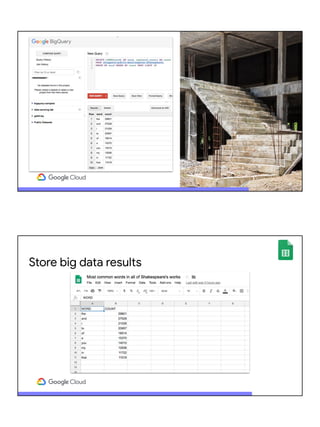
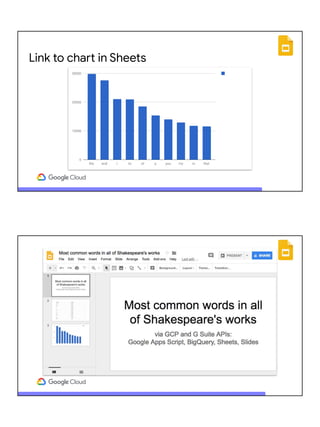
Big data analysis to slide presentation
Access GCP tools from Google Workspace (formerly G Suite)
Store big data results
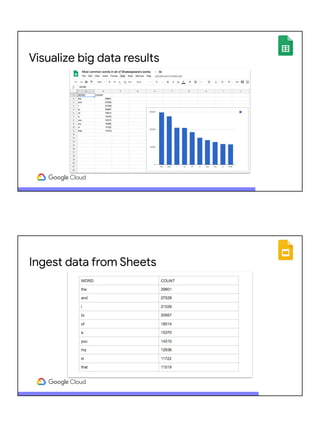
Visualize big data results
Ingest data from Sheets
Link to chart in Sheets
Supercharge Workspace (G Suite) with GCP
Workspace (G Suite) GCP
BigQuery
Apps Script
Slides Sheets
Application
request
Big data
analytics
App summary
● Leverage GCP and build the "final mile" with Google Workspace (formerly G Suite)
● Driven by Google Apps Script
● Google BigQuery for data analysis
● Google Sheets for visualization
● Google Slides for presentable results
● "Glued" together w/Google Workspace (formerly G Suite) serverless
● Build this app (codelab): g.co/codelabs/bigquery-sheets-slides
● Video and blog post: bit.ly/2OcptaG
● Application source code: github.com/googlecodelabs/bigquery-sheets-slides
● Presented at Google Cloud NEXT (Jul 2018 [DEV229] & Apr 2019 [DEV212])
● cloud.withgoogle.com/next18/sf/sessions/session/156878
● cloud.withgoogle.com/next/sf/sessions?session=DEV212
06
Summary
Online resources &
references
Cost of Google Cloud serverless tools
● What is free in Google Cloud overall?
○ Free Trial (credit card required; expires)
■ $300USD credit good for first 90 days
○ Always Free tier (credit card required; no expiration; subject to change)
■ Independent of Free Trial & education grants (more below)
■ Some GCP products free up to usage limits
○ Learn about both programs at cloud.google.com/free
● Serverless Always Free tier (daily or monthly quotas)
○ App Engine (28 [or 9] hours, 1GB storage & 1GB egress) per day
○ Cloud Run (2M reqs, 350k GB-secs, 180k vCPU-secs, 1GB egress) per month
○ Cloud Functions (2M calls, 400k GB-secs, 200k vCPU-secs, 5GB egress) per month
● Higher education (teaching & research) grants
○ cloud.google.com/edu (credit card NOT required; expires)
○ Provides "free" usage for coursework and initial research
$$ FREE $$
Cloud/serverless session summary
● Why go cloud?
○ Cloud computing has taken the world by storm
○ You're behind if you're not already using it… it's not too late!
○ Help train the next generation cloud-ready workforce!
● Google Cloud and why serverless?
○ Many features: compute, storage, AI/ML, NW, data processing, etc.
○ Modernization more than moving VMs to the cloud
○ Serverless lets users focus on just their logic (apps or functions)
○ Interesting possibilities using all of Google Cloud (GCP + Workspace)
● Documentation
○ GCP: cloud.google.com/{docs,appengine,functions,run,vision,automl,translate,language,
speech,texttospeech,video-intelligence,firestore,bigquery,compute,storage,gpu,tpu}
○ G Suite: developers.google.com/{workspace,drive,calendar,docs,sheets,slides,apps-script}
● Introductory "codelabs" (free, online, self-paced, hands-on tutorials [Python])
○ App Engine: codelabs.developers.google.com/codelabs/cloud-app-engine-python
○ Cloud Functions: codelabs.developers.google.com/codelabs/cloud-starting-cloudfunctions
○ Cloud Run: codelabs.developers.google.com/codelabs/cloud-run-hello-python3
○ Apps Script: g.co/codelabs/apps-script-intro
● Others: gcplab.me (GCP) & codelabs.developers.google.com/?cat=googleworkspace (Workspace)
● Videos: youtube.com/GoogleCloudPlatform (GCP) and goo.gl/JpBQ40 (Workspace)
● Samples: github.com/GoogleCloudPlatform (GCP) and github.com/googleworkspace (Workspace)
● Know AWS/Azure? Compare w/GCP at cloud.google.com/docs/compare/{aws,azure}
● Google Cloud serverless products: cloud.google.com/serverless
Google Cloud references
Other Google APIs & platforms
● Google Workspace (G Suite) (code Gmail, Drive, Docs, Sheets, Slides!)
○ developers.google.com/gsuite
● Firebase (mobile development platform and RT DB plus ML-Kit)
○ firebase.google.com and firebase.google.com/docs/ml-kit
● Google Data Studio (data visualization, dashboards, etc.)
○ datastudio.google.com/overview
○ goo.gle/datastudio-course
● Actions on Google/Assistant/DialogFlow (voice apps)
○ developers.google.com/actions
● YouTube (Data, Analytics, and Livestreaming APIs)
○ developers.google.com/youtube
● Google Maps (Maps, Routes, and Places APIs)
○ developers.google.com/maps
● Flutter (native apps [Android, iOS, web] w/1 code base[!])
○ flutter.dev
Thank you! Questions?
Wesley Chun
@wescpy
Video: youtu.be/nOj8y_gjSWI?t=1170
Progress bars: goo.gl/69EJVw

Serverless computing with Google Cloud

  • 1.
    Serverless computing with GoogleCloud Wesley Chun - @wescpy Developer Advocate, Google Developer Advocate, Google Cloud ● Mission: enable current and future developers everywhere to be successful using Google Cloud and other Google developer tools & APIs ● Focus: GCP serverless (App Engine, Cloud Functions, Cloud Run); higher education, Google Workspace, GCP AI/ML APIs; multi-product use cases ● Content: speak to developers globally; make videos, create code samples, produce codelabs (free, self-paced, hands-on tutorials), publish blog posts About the speaker Previous experience / background ● Software engineer & architect for 20+ years ○ Yahoo!, Sun, HP, Cisco, EMC, Xilinx ○ Original Yahoo!Mail engineer/SWE ● Technical trainer, teacher, instructor ○ Taught Math, Linux, Python since 1983 ○ Private corporate trainer ○ Adjunct CS Faculty at local SV college ● Python community member ○ Popular Core Python series author ○ Python Software Foundation Fellow ● AB (Math/CS) & CMP (Music/Piano), UC Berkeley and MSCS, UC Santa Barbara ● Adjunct Computer Science Faculty, Foothill College (Silicon Valley)
  • 2.
    Serverless: why &agenda 1 Cloud computing review 2 Introduction to Google Cloud 3 Serverless platforms 4 Inspiration 5 Summary ● Cloud computing has taken industry by storm (all?) ● App modernization top priority at many enterprises ○ Containerizing apps, getting them on VMs, moving to the cloud ● We can give you lots of VMs & big disk, but why serverless? ○ Serverless lets you focus on your solutions not what they run on ● Help prep next-generation (cloud-ready) workforce 01 Cloud computing review All you need to know about the cloud
  • 3.
    What is cloudcomputing? spar Google Compute Engine, Google Cloud Storage AWS EC2 & S3; Rackspace; Joyent Cloud service levels/"pillars" SaaS Software as a Service PaaS Platform as a Service IaaS Infrastructure as a Service Google BigQuery, Cloud SQL, Cloud Datastore, NL, Vision, Pub/Sub AWS Kinesis, RDS; Windows Azure SQL, Docker Google Apps Script Salesforce1/force.com Google Workspace (was G Suite/Google Apps) Yahoo!Mail, Hotmail, Salesforce, Netsuite, Office 365 Google App Engine, Cloud Functions Heroku, Cloud Foundry, Engine Yard, AWS Lambda
  • 4.
    Summary of responsibility SaaS Softwareas a Service Applications Data Runtime Middleware OS Virtualization Servers Storage Networking Applications Data Runtime Middleware OS Virtualization Servers Storage Networking IaaS Infrastructure as a Service Applications Data Runtime Middleware OS Virtualization Servers Storage Networking PaaS Platform as a Service Managed by YOU Managed by cloud vendor Applications Data Runtime Middleware OS Virtualization Servers Storage Networking on-prem all you, no cloud 02 Introduction to Google Cloud GCP & Google Workspace (formerly G Suite & Google Apps)
  • 5.
    YOUR NEXT APP? google.com/datacenter Nine productswith 1B+ (monthly) users each, all powered by our cloud
  • 6.
    formerly ( ) Google Workspace Top-leveldocumentation and comprehensive developers overview video at developers.google.com/gsuite (formerly G Suite and Google Apps) APIs
  • 7.
    Google Compute Engine,Google Cloud Storage AWS EC2 & S3; Rackspace; Joyent SaaS Software as a Service PaaS Platform as a Service IaaS Infrastructure as a Service Google Apps Script Salesforce1/force.com Google Workspace (was G Suite/Google Apps) Yahoo!Mail, Hotmail, Salesforce, Netsuite, Office 365 Google App Engine, Cloud Functions Heroku, Cloud Foundry, Engine Yard, AWS Lambda Google BigQuery, Cloud SQL, Cloud Datastore, NL, Vision, Pub/Sub AWS Kinesis, RDS; Windows Azure SQL, Docker Google Cloud Platform vs. Google Workspace Workspace APIs GCP APIs cloud.google.com/hosting-options#hosting-options GCP compute option spectrum Compute Engine Kubernetes Engine (GKE) Cloud Run on Anthos Cloud Run (fully-mgd) App Engine (Flexible) App Engine (Standard) Cloud Functions
  • 8.
    03 Google Cloud serverless compute GCPand Google Workspace (formerly G Suite & Google Apps) > Google Compute Engine configurable VMs of all shapes & sizes, from "micro" to 416 vCPUs, 11.776 TB RAM, 256 TB HDD/SSD plus Google Cloud Storage for data lake "blobs" (Debian, CentOS, CoreOS, SUSE, Red Hat Enterprise Linux, Ubuntu, FreeBSD; Windows Server 2008 R2, 2012 R2, 2016, 1803, 1809, 1903/2019, 1909) cloud.google.com/compute cloud.google.com/storage Yeah, we got VMs & big disk… but why*?
  • 9.
    Serverless: what &why ● What is serverless? ○ Misnomer (a "PMM") :-) ○ "No worries" ○ Developers focus on writing code & solving business problems* ● Why serverless? ○ Fastest growing segment of cloud... per analyst research*: ■ $1.9B (2016) and $4.25B (2018) ⇒ $7.7B (2021) and $14.93B (2023) ○ What if you go viral? Autoscaling: your new best friend ○ What if you don't? Code not running? You're not paying. * in USD; source:Forbes (May 2018), MarketsandMarkets™ & CB Insights (Aug 2018) Google Compute Engine, Google Cloud Storage AWS EC2 & S3; Rackspace; Joyent SaaS Software as a Service PaaS Platform as a Service IaaS Infrastructure as a Service Google Workspace (was G Suite/Google Apps) Yahoo!Mail, Hotmail, Salesforce, Netsuite, Office 365 Google App Engine, Cloud Functions Heroku, Cloud Foundry, Engine Yard, AWS Lambda Google BigQuery, Cloud SQL, Cloud Datastore, NL, Vision, Pub/Sub AWS Kinesis, RDS; Windows Azure SQL, Docker Serverless: PaaS-y compute/processing Google Apps Script Salesforce1/force.com
  • 10.
    Google App Engine App-hostingin the cloud Why does App Engine exist? ● Focus on app not DevOps ○ Web app ○ Mobile backend ○ Cloud service ● Enhance productivity ● Deploy globally ● Fully-managed ● Auto-scaling ● Pay-per-use ● Familiar languages ● Test w/local dev server
  • 11.
    Hello World (Python"MVP") app.yaml runtime: python38 main.py from flask import Flask app = Flask(__name__) @app.route('/') def hello(): return 'Hello World!' requirements.txt Flask>=1.1.2 Deploy: $ gcloud app deploy Access globally: PROJECT_ID.appspot.com cloud.google.com/appengine/docs/standard/python3/quickstart Not all apps user-facing or web-based!! ● Need backend processing? Want to build your own? ● No UI required... just need HTTP ● Optimal for user info (high scores, contacts, levels/badges, etc.) ● Better UI: move user data off phone so it's universally available
  • 12.
    Popular App EngineUse Cases ● Mobile/Tablet ○ App backends ○ Cloud persistence ● Social/Mobile Games ○ Speed, scale ○ API integrations ○ Personals/dating ● Consumer Web Apps ○ Unpredictable traffic ○ Scale (up or down) ● Apps in Academia ○ Any course where students build web or mobile apps ○ Research projects ○ IT/Operational apps ● Business Apps ○ Enterprise ○ Java runtime ○ IT/Operational apps ○ Web or Mobile App Engine: product update ● Original App Engine runtimes execute on legacy platform (2008-today) ○ Platform comes with bundled services ○ Runtimes: Python 2.7, Java 8, Go 1.11, PHP 5 (all community-deprecated) ○ Google Cloud committed to supporting them long-term ● 2nd generation service supports newer runtimes (2018-today) ○ Platform no longer has bundled services ○ Runtimes: Python 3.7+, Java 11, Go 1.12+, PHP 7, Node.js 10+, Ruby 2.5+ ○ Less restrictions, richer/fuller, more idiomatic developer experience ● "Copying"/self-bundling 3P libraries requirement lifted ● No more proprietary services means apps more portable, less lock-in ● Opens door to more options: GAE, GCF, GCR; GKE, GCE; on-prem
  • 13.
    Google Cloud Functions Function-hostingin the cloud Why does Cloud Functions exist? ● Don't have entire app? ○ No framework "overhead" (LAMP, MEAN...) ○ Deploy microservices ● Event-driven ○ Triggered via HTTP or background events ■ Pub/Sub, Cloud Storage, Firebase, etc. ○ Auto-scaling & highly-available; pay per use ● Flexible development environment ○ Cmd-line or developer console (in-browser) ○ Develop/test locally with Functions Framework ● Cloud Functions for Firebase ○ Mobile app use-cases ● Available runtimes ○ JS/Node.js 8, 10, 12, 14 ○ Python 3.7, 3.8, 3.9 ○ Go 1.11, 1.13 ○ Java 11 ○ Ruby 2.6, 2.7 ○ .NET Core 3.1
  • 14.
    main.py def hello_world(request): return 'HelloWorld!' Deploy: $ gcloud functions deploy hello --runtime python38 --trigger-http Access globally (curl): $ curl REGION-PROJECT_ID.cloudfunctions.net/hello Access globally (browser): https://REGION-PROJECT_ID.cloudfunctions.net/hello Hello World (Python "MVP") cloud.google.com/functions/docs/quickstart-python Google Cloud Run Container-hosting in the cloud
  • 15.
    The rise ofcontainers... ● Any language ● Any library ● Any binary ● Ecosystem of base images ● Industry standard FLEXIBILITY “We can’t be locked in.” “How can we use existing binaries?” “Why do I have to choose between containers and serverless?” “Can you support language _______ ?” Serverless inaccessible for some... CONVENIENCE
  • 16.
    Cloud Run: code,build, deploy .js .rb .go .sh .py ... ● Any language, library, binary ○ HTTP port, stateless ● Bundle into container ○ Build w/Docker OR ○ Google Cloud Build ○ Image ⇒ Container Registry ● Deploy to Cloud Run (managed or GKE) ● GitOps: (CI/)CD Push-to-deploy from Git State HTTP Hello World (Python "MVP") main.py import os from flask import Flask app = Flask(__name__) @app.route('/') def hello_world(): return 'Hello World!' if __name__ == '__main__': app.run(debug=True, host='0.0.0.0', port=int(os.environ.get('PORT', 8080))) cloud.google.com/run/docs/quickstarts/build-and-deploy requirements.txt Flask==1.1.2
  • 17.
    Hello World (Python"MVP") Dockerfile FROM python:3-slim WORKDIR /app COPY . . RUN pip install -r requirements.txt CMD ["python", "main.py"] .dockerignore Dockerfile README.md *.pyc *.pyo .git/ __pycache__ Build (think docker build and docker push) then deploy (think docker run): $ gcloud builds submit --tag gcr.io/PROJ_ID/IMG_NAME $ gcloud run deploy SVC_NAME --image gcr.io/PROJ_ID/IMG_NAME OR… Build and Deploy (1-line combination of above commands): $ gcloud run deploy SVC_NAME --source . Access globally: SVC_NAME-HASH-REG_ABBR.a.run.app Docker & Dockerfile OPTIONAL!! ● Build containers easily & securely without creating/managing Dockerfiles ● Open source, open standard; based on CNCF Buildpacks spec v3 ● Used by GCF Functions Framework to deploy locally-developed functions ● Supports most common development tools ○ Go 1.10+ ○ Node.js 10+ ○ Python 3.7+ ○ Java 8 & 11 ○ .NET Core 3.1+ ● Blog posts ○ cloud.google.com/blog/products/containers-kubernetes/google-cloud-now-supports-buildpacks and cloud.google.com/blog/products/serverless/build-and-deploy-an-app-to-cloud-run-with-a-single-command Deploy to Cloud Run with Buildpacks github.com/GoogleCloudPlatform/buildpacks $ ls index.js package.json $ gcloud run deploy myapp --source . $ ls app.py requirements.txt $ gcloud run deploy myapp --source .
  • 18.
    Google Apps Script Customizedserverless JS runtime for automation, and extension and integration with Google Workspace (formerly G Suite) and other Google & external services “Hello World!” in Apps Script
  • 19.
    Sheets-bound “Hello World!” AppsScript intro goo.gl/1sXeuD What can you do with this?
  • 20.
    Accessing maps from spreadsheets?!? goo.gl/oAzBN9 This…with help from Google Maps & Gmail function sendMap() { var sheet = SpreadsheetApp.getActiveSheet(); var address = sheet.getRange("A2").getValue(); var map = Maps.newStaticMap().addMarker(address); GmailApp.sendEmail('friend@example.com', 'Map', 'See below.', {attachments:[map]}); } JS g.co/codelabs/apps-script-intro
  • 21.
    04 In-practice Use cases, nebulousness& flexibility, best practices, local development & testing Serverless common use cases App Engine Cloud Run Cloud Functions Web services Web app hosting/custom domains ✓ ✓ HTTP services ✓ ✓ ✓ Container hosting ✓ APIs Web & mobile backends ✓ ✓ Internal APIs and services ✓ ✓ Data processing ✓ ✓ Automation Workflow & orchestration ✓ ✓ Event-driven automation ✓ ✓ Common use cases
  • 22.
    Flexibility in options Cloud Functions App Engine Cloud Run local server Cloud Translation My"Google Translate" MVP goo.gle/2Y0ph5q ● "Nebulous" sample web app ○ Flask/Python app ○ Python 2 & 3 compatible ○ Uses Cloud Translation API ● Deployable to on-prem server ● Also GCP serverless compute ○ App Engine ○ Cloud Functions ○ Cloud Run ● With only config changes ● No changes to app code Serverless best practices ● Use the right tool for the job (GAE, GCF, or GCR) ● One top priority: latency ○ SOA demands fast response from components ● Second top priority: architecture ○ Breakup larger computing into components ○ Microservices, each with low latency ○ Uncouple components keeping state
  • 23.
    BPs: Tools (knowyour platforms) ● Google App Engine — gives users the ability to deploy source-based web applications or mobile backends to the cloud without the concerns of servers or autoscaling (PaaS). ● Cloud Functions — for scenarios where you may not have an entire app; great for microservices, one-off utilities, or event-driven functions (FaaS/PaaS). ● Cloud Run — provides the flexibility of containers (any language, library, binary) along with the convenience of serverless; use with Docker or "containerless" with Cloud Buildpacks. (CaaS) BPs: Latency ● Keep responses as short as possible (say <250ms) ○ Can't respond immediately? Split out longer jobs ○ Cloud Tasks, Cloud Pub/Sub, Cloud Scheduler (cron) ● Cache common objects, queries, output, etc. ○ Avoid repeated compute or database fetches ○ App Engine Memcache, Cloud Memorystore (Redis) ● Profile your code to find (and remove) bottlenecks ○ Cloud Profiler, Cloud Trace: low overhead insightful tools ● Consider moving some processing to client-side ○ Firebase/Cloud Firestore security rules, use edge-cache JS libs
  • 24.
    BPs: More onlatency ● Pagespeed tools to analyze & optimize your web apps ○ developers.google.com/speed ● How to think about speed tools ○ developers.google.com/web/fundamentals/performance/speed-tools ● Why speed matters post ○ web.dev/why-speed-matters ● 250ms too general? More specifics: ○ developers.google.com/speed/docs/insights/v5/about#categories BPs: Still more on latency ● What about non-UI workloads > 250ms? ○ App Engine autoscaling timeout: 1 min (Gen1), 10 mins (Gen2) ○ App Engine basic & manual scaling timeout: 24 hrs (Gen1/Gen2) ○ GAE cron & task queue timeout: 10 mins (Gen1-AS), 24 hrs (Gen1-B/MS) ○ Cloud Tasks HTTP targets: 10 mins (default), 30 mins (max); App Engine (Gen2) targets: same as GAE Std Gen1 task queue timeouts (10m/24h) ○ Cloud Scheduler HTTP targets: from 15 secs to 30 mins, App Engine targets: from 15 secs to 24 hrs ○ Cloud Functions extended timeout: 1 min (default), 9 mins (max) ○ Cloud Run extended timeout: 5 mins (default), 1 hr (max) ○ Cloud Run Jobs (preview): tasks (1 hr each), jobs (>=1 tasks): 24 hrs
  • 25.
    BPs: Architecture ● Going"stateless" is key ○ Get a request, perform a service, then return response ● Cache common objects, queries, output, etc. ○ Cache sessions elsewhere (cache, not in app); framework-provided? ○ Use database external to app (Cloud Datastore/Firestore; Cloud SQL) ● Breakup monoliths into multiple microservices ○ Loosely-coupled code elements; shared caching & database ● Change monitoring scenery ○ Focus on user, business, app metrics; not HW (CPU, RAM) or networking BPs: More on stateless (architecture) ● Going "stateless" may be a large architectural change ○ Requires somewhat of a "mental reset" ● Receiving duplicate or retry requests? Logic should be idempotent. ○ This means neither side effects nor data corruption ○ What about job interruption and restarts? Same thing. ● Create repeatable logic exhibiting same behavior for given set of input regardless of how often repeated ○ Save output to different location than input, leaving input data intact ○ If job runs again, should result in identical processing & same output
  • 26.
    BPs: Even moreon stateless ● Create unique ID for output to confirm work completed & avoid duplication ○ Duplicate data represents "collection-level" corruption; downstream systems possibly affected if they assume unique records ● When/where possible, checkpoint long-running jobs, so… ○ Periodically write partial results to persistent storage, e.g., DB, GCS, etc. ○ Failure restarts/retries can pick up where it left off (vs. from beginning) ○ Speeds up jobs and minimizes unnecessary costs ● Consider breaking-up larger workloads ○ Especially those large enough not easily "checkpointable" ○ Creates smaller tasks more likely to complete (granted more tasks) BPs: Development ● Prototype rapidly ○ Use favorite language and get something up-and-going ○ Serverless platforms each come w/default service accounts ○ When ready for production, switch to user-managed service accounts ○ Follows best practice of "least privileges" ● Create separate projects for dev, test, stage, and prod ○ Helps keep developers, testers, operators isolated to own sandbox ○ Can share via IAM roles/permissions (shared buckets, databases, etc.) ● Local development and testing ○ Running locally tests functionality, not scaling ○ Typically can use local web framework server, SDK, or Docker
  • 27.
    BPs: Local development/testing ●App Engine — local or framework devserver ○ Local devserver (Gen1 or Gen2) and local unit testing (Gen1) ○ Testing and deploying your application: running locally (Gen2) ● Cloud Functions — Functions Framework ○ Functions Framework (local dev/testing; bundle function for Cloud Run) ○ Cloud Functions local development ○ Cloud Functions testing overview ○ Codelab: Local development with Cloud Functions (Node.js) using VSC ● Cloud Run — run Docker containers locally ○ Testing a Cloud Run service locally ○ Tutorial: Local troubleshooting of a Cloud Run service BPs: Local testing Cloud emulators ● Cloud Datastore ○ Datastore emulator (non-App Engine or App Engine [Gen2]) ○ App Engine Datastore emulator (Gen1 [or Gen2]; migrate to above) ● Firebase/Cloud Firestore ○ Firebase Emulator Suite (multiple product emulators; unit testing video) ○ Cloud Firestore emulator (w/in Firebase Emulator Suite; ex: React Native) ○ Cloud Storage emulator (w/in Firebase Emulator Suite; ex: React Native) ● Other Google Cloud emulators ○ Cloud Pub/Sub, Cloud Spanner, Cloud BigTable ● Others: Google Cloud Java test tools; BigQuery test kit (non-Google)
  • 28.
    BPs: Best practicesreading library ● Automated tracing & performance analysis to find app bottlenecks (GAE, Feb 2016) ● Best practices for coldstarts/startup time (GAE, Jun 2017) ● Profile your app's performance in production (GAE, Jun 2019) ● Managing serverless cost & reliability (all, Apr 2020) ● Serverless optimizations & efficiency (all, Jun 2020) ● Global load balancer and CDN for serverless (all, Jul 2020) ● Creating effective services with good response times (GCR, Node.js, Nov 2020) ● Cloud Run "min instances" to reduce coldstarts (GCR, Dec 2020) ● Running effective Node.js Cloud Functions (GCF, Node.js, Dec 2020) ● GCR container lifecycle (GCR, Jan 2021) ● Overall architecture best practices (GCR, Java, Apr 2021) ● Zero effort performance insights with tracing (all, Aug 2021) ● Cloud Functions "min instances" to reduce coldstarts (GCF, Aug 2021) 05 Inspirational Ideas Build with ALL of Google
  • 29.
    Custom intelligence inGmail Analyze Google Workspace (formerly G Suite) data with GCP
  • 30.
    Gmail message processingwith GCP Gmail Cloud Pub/Sub Cloud Functions Cloud Vision Workspace (formerly G Suite) GCP Star message Message notification Trigger function Extract images Categorize images Inbox augmented with Cloud Function
  • 31.
    ● Gmail API:sets up notification forwarding to Cloud Pub/Sub ● developers.google.com/gmail/api/guides/push ● Pub/Sub: triggers logic hosted by Cloud Functions ● cloud.google.com/functions/docs/calling/pubsub ● Cloud Functions: "orchestrator" accessing GCP (and Google Workspace/G Suite) APIs ● Combine all of the above to add custom intelligence to Gmail ● Deep dive code blog post ● cloud.google.com/blog/products/application-development/ adding-custom-intelligence-to-gmail-with-serverless-on-gcp ● Application source code ● github.com/GoogleCloudPlatform/cloud-functions-gmail-nodejs App summary Big data analysis to slide presentation Access GCP tools from Google Workspace (formerly G Suite)
  • 32.
  • 33.
    Visualize big dataresults Ingest data from Sheets
  • 34.
    Link to chartin Sheets
  • 35.
    Supercharge Workspace (GSuite) with GCP Workspace (G Suite) GCP BigQuery Apps Script Slides Sheets Application request Big data analytics App summary ● Leverage GCP and build the "final mile" with Google Workspace (formerly G Suite) ● Driven by Google Apps Script ● Google BigQuery for data analysis ● Google Sheets for visualization ● Google Slides for presentable results ● "Glued" together w/Google Workspace (formerly G Suite) serverless ● Build this app (codelab): g.co/codelabs/bigquery-sheets-slides ● Video and blog post: bit.ly/2OcptaG ● Application source code: github.com/googlecodelabs/bigquery-sheets-slides ● Presented at Google Cloud NEXT (Jul 2018 [DEV229] & Apr 2019 [DEV212]) ● cloud.withgoogle.com/next18/sf/sessions/session/156878 ● cloud.withgoogle.com/next/sf/sessions?session=DEV212
  • 36.
    06 Summary Online resources & references Costof Google Cloud serverless tools ● What is free in Google Cloud overall? ○ Free Trial (credit card required; expires) ■ $300USD credit good for first 90 days ○ Always Free tier (credit card required; no expiration; subject to change) ■ Independent of Free Trial & education grants (more below) ■ Some GCP products free up to usage limits ○ Learn about both programs at cloud.google.com/free ● Serverless Always Free tier (daily or monthly quotas) ○ App Engine (28 [or 9] hours, 1GB storage & 1GB egress) per day ○ Cloud Run (2M reqs, 350k GB-secs, 180k vCPU-secs, 1GB egress) per month ○ Cloud Functions (2M calls, 400k GB-secs, 200k vCPU-secs, 5GB egress) per month ● Higher education (teaching & research) grants ○ cloud.google.com/edu (credit card NOT required; expires) ○ Provides "free" usage for coursework and initial research $$ FREE $$
  • 37.
    Cloud/serverless session summary ●Why go cloud? ○ Cloud computing has taken the world by storm ○ You're behind if you're not already using it… it's not too late! ○ Help train the next generation cloud-ready workforce! ● Google Cloud and why serverless? ○ Many features: compute, storage, AI/ML, NW, data processing, etc. ○ Modernization more than moving VMs to the cloud ○ Serverless lets users focus on just their logic (apps or functions) ○ Interesting possibilities using all of Google Cloud (GCP + Workspace) ● Documentation ○ GCP: cloud.google.com/{docs,appengine,functions,run,vision,automl,translate,language, speech,texttospeech,video-intelligence,firestore,bigquery,compute,storage,gpu,tpu} ○ G Suite: developers.google.com/{workspace,drive,calendar,docs,sheets,slides,apps-script} ● Introductory "codelabs" (free, online, self-paced, hands-on tutorials [Python]) ○ App Engine: codelabs.developers.google.com/codelabs/cloud-app-engine-python ○ Cloud Functions: codelabs.developers.google.com/codelabs/cloud-starting-cloudfunctions ○ Cloud Run: codelabs.developers.google.com/codelabs/cloud-run-hello-python3 ○ Apps Script: g.co/codelabs/apps-script-intro ● Others: gcplab.me (GCP) & codelabs.developers.google.com/?cat=googleworkspace (Workspace) ● Videos: youtube.com/GoogleCloudPlatform (GCP) and goo.gl/JpBQ40 (Workspace) ● Samples: github.com/GoogleCloudPlatform (GCP) and github.com/googleworkspace (Workspace) ● Know AWS/Azure? Compare w/GCP at cloud.google.com/docs/compare/{aws,azure} ● Google Cloud serverless products: cloud.google.com/serverless Google Cloud references
  • 38.
    Other Google APIs& platforms ● Google Workspace (G Suite) (code Gmail, Drive, Docs, Sheets, Slides!) ○ developers.google.com/gsuite ● Firebase (mobile development platform and RT DB plus ML-Kit) ○ firebase.google.com and firebase.google.com/docs/ml-kit ● Google Data Studio (data visualization, dashboards, etc.) ○ datastudio.google.com/overview ○ goo.gle/datastudio-course ● Actions on Google/Assistant/DialogFlow (voice apps) ○ developers.google.com/actions ● YouTube (Data, Analytics, and Livestreaming APIs) ○ developers.google.com/youtube ● Google Maps (Maps, Routes, and Places APIs) ○ developers.google.com/maps ● Flutter (native apps [Android, iOS, web] w/1 code base[!]) ○ flutter.dev Thank you! Questions? Wesley Chun @wescpy Video: youtu.be/nOj8y_gjSWI?t=1170 Progress bars: goo.gl/69EJVw