KuberNETes
Nathan Ness
Sr. Technical Product Manager,
VMware CNABU
nness@vmware.com
@nvpnathan
Agenda
1 Kubernetes Overview
2 Kubernetes Network Topologies
3 Kubernetes Services
4 Kubernetes Endpoints
5 A word on CNI
What is Kubernetes?
[1] http://kubernetes.io/docs/whatisk8s/ [0] http://static.googleusercontent.com/media/research.google.com/de//pubs/archive/43438.pdf
• Kubernetes: Kubernetes or K8s in short is the ancient Greek word for
Helmsmen
• K8s roots: Kubernetes was championed by Google and is now backed by
major enterprise IT vendors and users (including VMware)
• Borg: Google’s internal task scheduling system Borg served as the
blueprint for Kubernetes, but the code base is different [1]
Kubernetes Roots
• Mission statement: Kubernetes is an open-source platform for
automating deployment, scaling, and operations of application containers
across clusters of hosts, providing container-centric infrastructure.
• Capabilities:
• Deploy your applications quickly and predictably
• Scale your applications on the fly
• Seamlessly roll out new features
• Optimize use of your hardware by using only the resources you need
• Role: K8s sits in the Container as a Service (CaaS) or Container
orchestration layer
What Kubernetes is [0]
Kubernetes Components
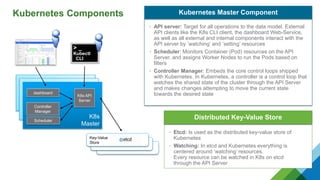
• API server: Target for all operations to the data model. External
API clients like the K8s CLI client, the dashboard Web-Service,
as well as all external and internal components interact with the
API server by ’watching’ and ‘setting’ resources
• Scheduler: Monitors Container (Pod) resources on the API
Server, and assigns Worker Nodes to run the Pods based on
filters
• Controller Manager: Embeds the core control loops shipped
with Kubernetes. In Kubernetes, a controller is a control loop that
watches the shared state of the cluster through the API Server
and makes changes attempting to move the current state
towards the desired state
Kubernetes Master Component
• Etcd: Is used as the distributed key-value store of
Kubernetes
• Watching: In etcd and Kubernetes everything is
centered around ‘watching’ resources.
Every resource can be watched in K8s on etcd
through the API Server
Distributed Key-Value Store
K8s master
K8s master
K8s
Master
Controller
Manager
K8s API
Server
> _
Kubectl
CLI
Key-Value
Store
dashboard
Scheduler
Kubernetes Components
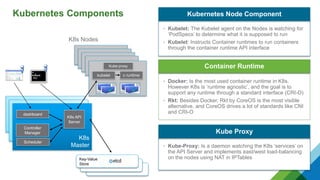
• Kubelet: The Kubelet agent on the Nodes is watching for
‘PodSpecs’ to determine what it is supposed to run
• Kubelet: Instructs Container runtimes to run containers
through the container runtime API interface
Kubernetes Node Component
• Docker: Is the most used container runtime in K8s.
However K8s is ‘runtime agnostic’, and the goal is to
support any runtime through a standard interface (CRI-O)
• Rkt: Besides Docker, Rkt by CoreOS is the most visible
alternative, and CoreOS drives a lot of standards like CNI
and CRI-O
Container Runtime
K8s master
K8s master
K8s
Master
Controller
Manager
K8s API
Server
Key-Value
Store
dashboard
Scheduler
K8s node
K8s node
K8s node
K8s node
K8s Nodes
kubelet c runtime
Kube-proxy
> _
Kubectl
CLI
• Kube-Proxy: Is a daemon watching the K8s ‘services’ on
the API Server and implements east/west load-balancing
on the nodes using NAT in IPTables
Kube Proxy
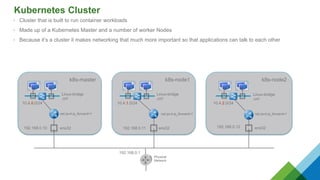
Kubernetes Cluster
• Cluster that is built to run container workloads
• Made up of a Kubernetes Master and a number of worker Nodes
• Because it’s a cluster it makes networking that much more important so that applications can talk to each other
k8s-master k8s-node1 k8s-node2
ens32 ens32 ens32192.168.0.10 192.168.0.11 192.168.0.12
net.ipv4.ip_forward=1 net.ipv4.ip_forward=1 net.ipv4.ip_forward=1
Physical
Network
192.168.0.1
Linux-bridge
‚cni‘
10.4.0.0/24
Linux-bridge
‚cni‘
10.4.1.0/24 10.4.2.0/24
Linux-bridge
‚cni‘
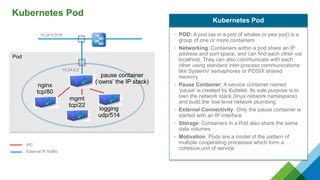
Kubernetes Pod
Pod
pause container
(‘owns’ the IP stack)
10.24.0.0/16
10.24.0.2
nginx
tcp/80
mgmt
tcp/22
logging
udp/514
• POD: A pod (as in a pod of whales or pea pod) is a
group of one or more containers
• Networking: Containers within a pod share an IP
address and port space, and can find each other via
localhost. They can also communicate with each
other using standard inter-process communications
like SystemV semaphores or POSIX shared
memory
• Pause Container: A service container named
‘pause’ is created by Kubelet. Its sole purpose is to
own the network stack (linux network namespace)
and build the ‘low level network plumbing’
• External Connectivity: Only the pause container is
started with an IP interface
• Storage: Containers in a Pod also share the same
data volumes
• Motivation: Pods are a model of the pattern of
multiple cooperating processes which form a
cohesive unit of service
Kubernetes Pod
IPC
External IP Traffic
Node Wiring
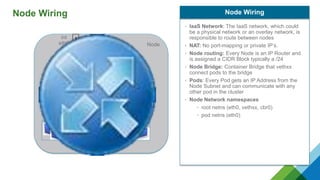
Node Wiring
Node
int
eth0
10.240.0.3
int
cbr0
10.24.1.1/24
10.24.1.4
vethzz
10.24.1.2
vethxx
10.24.1.3
vethyy
• IaaS Network: The IaaS network, which could
be a physical network or an overlay network, is
responsible to route between nodes
• NAT: No port-mapping or private IP’s.
• Node routing: Every Node is an IP Router and
is assigned a CIDR Block typically a /24
• Node Bridge: Container Bridge that vethxx
connect pods to the bridge
• Pods: Every Pod gets an IP Address from the
Node Subnet and can communicate with any
other pod in the cluster
• Node Network namespaces
• root netns (eth0, vethxx, cbr0)
• pod netns (eth0)
Node Wiring
Kubernetes Network Toplogies
Node 2int
eth0
10.240.0.4
int
cbr0
10.24.2.1/24
10.24.2.2 10.24.2.3 10.24.2.4
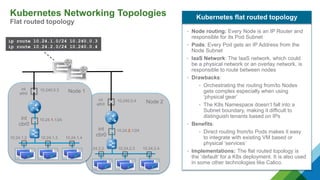
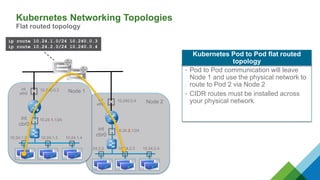
Kubernetes Networking Topologies
Flat routed topology
ip route 10.24.1.0/24 10.240.0.3
ip route 10.24.2.0/24 10.240.0.4
• Node routing: Every Node is an IP Router and
responsible for its Pod Subnet
• Pods: Every Pod gets an IP Address from the
Node Subnet
• IaaS Network: The IaaS network, which could
be a physical network or an overlay network, is
responsible to route between nodes
• Drawbacks:
• Orchestrating the routing from/to Nodes
gets complex especially when using
‘physical gear’
• The K8s Namespace doesn’t fall into a
Subnet boundary, making it difficult to
distinguish tenants based on IPs
• Benefits:
• Direct routing from/to Pods makes it easy
to integrate with existing VM based or
physical ‘services’
• Implementations: The flat routed topology is
the ‘default’ for a K8s deployment. It is also used
in some other technologies like Calico.
Kubernetes flat routed topology
Node 1int
eth0
10.240.0.3
int
cbr0
10.24.1.1/24
10.24.1.2 10.24.1.3 10.24.1.4
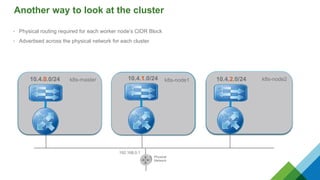
Another way to look at the cluster
• Physical routing required for each worker node’s CIDR Block
• Advertised across the physical network for each cluster
k8s-master k8s-node1 k8s-node2
ens32 ens32 ens32192.168.0.10 192.168.0.11 192.168.0.12
net.ipv4.ip_forward=1 net.ipv4.ip_forward=1 net.ipv4.ip_forward=1
Physical
Network
192.168.0.1
Linux-bridge
‚cni‘
10.4.0.0/24
Linux-bridge
‚cni‘
10.4.1.0/24 10.4.2.0/24
Linux-bridge
‚cni‘
k8s-master k8s-node1 k8s-node210.4.0.0/24 10.4.2.0/2410.4.1.0/24
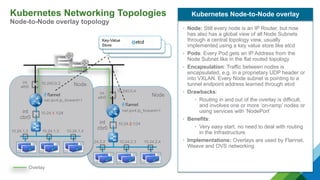
Kubernetes Networking Topologies
Node-to-Node overlay topology
Nodeint
eth0
10.240.0.4
int
cbr0
10.24.2.1/24
10.24.2.2 10.24.2.3 10.24.2.4
Nodeint
eth0
10.240.0.3
int
cbr0
10.24.1.1/24
10.24.1.2 10.24.1.3 10.24.1.4
net.ipv4.ip_forward=1
Overlay
• Node: Still every node is an IP Router, but now
has also has a global view of all Node Subnets
through a central topology view, usually
implemented using a key value store like etcd
• Pods: Every Pod gets an IP Address from the
Node Subnet like in the flat routed topology
• Encapsulation: Traffic between nodes is
encapsulated, e.g. in a proprietary UDP header or
into VXLAN. Every Node subnet is pointing to a
tunnel endpoint address learned through etcd
• Drawbacks:
• Routing in and out of the overlay is difficult,
and involves one or more ‘on-ramp’ nodes or
using services with ‘NodePort’
• Benefits:
• Very easy start, no need to deal with routing
in the Infrastructure
• Implementations: Overlays are used by Flannel,
Weave and OVS networking
Kubernetes Node-to-Node overlay
Key-Value
Store
Pod Traffic Flows
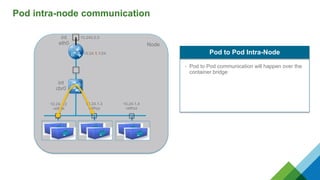
Pod intra-node communication
Node
int
eth0
10.240.0.3
int
cbr0
10.24.1.1/24
10.24.1.4
vethzz
10.24.1.2
vethxx
10.24.1.3
vethyy
• Pod to Pod communication will happen over the
container bridge
Pod to Pod Intra-Node
Node 2int
eth0
10.240.0.4
int
cbr0
10.24.2.1/24
10.24.2.2 10.24.2.3 10.24.2.4
ip route 10.24.1.0/24 10.240.0.3
ip route 10.24.2.0/24 10.240.0.4
Kubernetes Pod to Pod flat routed
topology
Node 1int
eth0
10.240.0.3
int
cbr0
10.24.1.1/24
10.24.1.2 10.24.1.3 10.24.1.4
Kubernetes Networking Topologies
Flat routed topology
• Pod to Pod communication will leave
Node 1 and use the physical network to
route to Pod 2 via Node 2
• CIDR routes must be installed across
your physical network
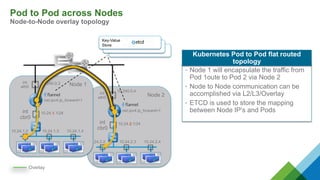
Pod to Pod across Nodes
Node-to-Node overlay topology
Node 2int
eth0
10.240.0.4
int
cbr0
10.24.2.1/24
10.24.2.2 10.24.2.3 10.24.2.4
Node 1int
eth0
10.240.0.3
int
cbr0
10.24.1.1/24
10.24.1.2 10.24.1.3 10.24.1.4
net.ipv4.ip_forward=1
Overlay
Key-Value
Store
Kubernetes Pod to Pod flat routed
topology
• Node 1 will encapsulate the traffic from
Pod 1oute to Pod 2 via Node 2
• Node to Node communication can be
accomplished via L2/L3/Overlay
• ETCD is used to store the mapping
between Node IP’s and Pods
Kubernetes Services
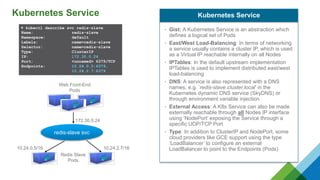
Kubernetes Service
▶ kubectl describe svc redis-slave
Name: redis-slave
Namespace: default
Labels: name=redis-slave
Selector: name=redis-slave
Type: ClusterIP
IP: 172.30.0.24
Port: <unnamed> 6379/TCP
Endpoints: 10.24.0.5:6379,
10.24.2.7:6379
Redis Slave
Pods
redis-slave svc
10.24.0.5/16 10.24.2.7/16
172.30.0.24
• Gist: A Kubernetes Service is an abstraction which
defines a logical set of Pods
• East/West Load-Balancing: In terms of networking
a service usually contains a cluster IP, which is used
as a Virtual IP reachable internally on all Nodes
• IPTables: In the default upstream implementation
IPTables is used to implement distributed east/west
load-balancing
• DNS: A service is also represented with a DNS
names, e.g. ’redis-slave.cluster.local’ in the
Kubernetes dynamic DNS service (SkyDNS) or
through environment variable injection
• External Access: A K8s Service can also be made
externally reachable through all Nodes IP interface
using ‘NodePort’ exposing the Service through a
specific UDP/TCP Port
• Type: In addition to ClusterIP and NodePort, some
cloud providers like GCE support using the type
‘LoadBalancer’ to configure an external
LoadBalancer to point to the Endpoints (Pods)
Kubernetes Service
Web Front-End
Pods
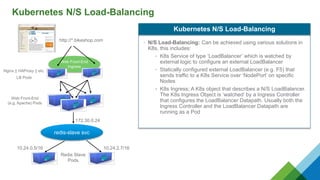
Kubernetes N/S Load-Balancing
• N/S Load-Balancing: Can be achieved using various solutions in
K8s, this includes:
• K8s Service of type ‘LoadBalancer’ which is watched by
external logic to configure an external LoadBalancer
• Statically configured external LoadBalancer (e.g. F5) that
sends traffic to a K8s Service over ‘NodePort’ on specific
Nodes
• K8s Ingress; A K8s object that describes a N/S LoadBalancer.
The K8s Ingress Object is ’watched’ by a Ingress Controller
that configures the LoadBalancer Datapath. Usually both the
Ingress Controller and the LoadBalancer Datapath are
running as a Pod
Kubernetes N/S Load-Balancing
Redis Slave
Pods
redis-slave svc
10.24.0.5/16 10.24.2.7/16
172.30.0.24
Web Front-End
(e.g. Apache) Pods
Web Front-End
Ingress
Nginx || HAProxy || etc.
LB Pods
http://*.bikeshop.com
A word on CNI
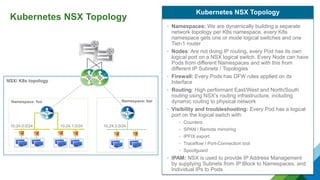
Kubernetes NSX Topology
Namespace: foo Namespace: bar
NSX/ K8s topology
• Namespaces: We are dynamically building a separate
network topology per K8s namespace, every K8s
namespace gets one or mode logical switches and one
Tier-1 router
• Nodes: Are not doing IP routing, every Pod has its own
logical port on a NSX logical switch. Every Node can have
Pods from different Namespaces and with this from
different IP Subnets / Topologies
• Firewall: Every Pods has DFW rules applied on its
Interface
• Routing: High performant East/West and North/South
routing using NSX’s routing infrastructure, including
dynamic routing to physical network
• Visibility and troubleshooting: Every Pod has a logical
port on the logical switch with:
• Counters
• SPAN / Remote mirroring
• IPFIX export
• Traceflow / Port-Connection tool
• Spoofguard
• IPAM: NSX is used to provide IP Address Management
by supplying Subnets from IP Block to Namespaces, and
Individual IPs to Pods
Kubernetes NSX Topology
10.24.0.0/24 10.24.1.0/24 10.24.3.0/24
Q&A

KuberNETes - meetup

  • 1.
    KuberNETes Nathan Ness Sr. TechnicalProduct Manager, VMware CNABU nness@vmware.com @nvpnathan
  • 2.
    Agenda 1 Kubernetes Overview 2Kubernetes Network Topologies 3 Kubernetes Services 4 Kubernetes Endpoints 5 A word on CNI
  • 3.
    What is Kubernetes? [1]http://kubernetes.io/docs/whatisk8s/ [0] http://static.googleusercontent.com/media/research.google.com/de//pubs/archive/43438.pdf • Kubernetes: Kubernetes or K8s in short is the ancient Greek word for Helmsmen • K8s roots: Kubernetes was championed by Google and is now backed by major enterprise IT vendors and users (including VMware) • Borg: Google’s internal task scheduling system Borg served as the blueprint for Kubernetes, but the code base is different [1] Kubernetes Roots • Mission statement: Kubernetes is an open-source platform for automating deployment, scaling, and operations of application containers across clusters of hosts, providing container-centric infrastructure. • Capabilities: • Deploy your applications quickly and predictably • Scale your applications on the fly • Seamlessly roll out new features • Optimize use of your hardware by using only the resources you need • Role: K8s sits in the Container as a Service (CaaS) or Container orchestration layer What Kubernetes is [0]
  • 4.
    Kubernetes Components • APIserver: Target for all operations to the data model. External API clients like the K8s CLI client, the dashboard Web-Service, as well as all external and internal components interact with the API server by ’watching’ and ‘setting’ resources • Scheduler: Monitors Container (Pod) resources on the API Server, and assigns Worker Nodes to run the Pods based on filters • Controller Manager: Embeds the core control loops shipped with Kubernetes. In Kubernetes, a controller is a control loop that watches the shared state of the cluster through the API Server and makes changes attempting to move the current state towards the desired state Kubernetes Master Component • Etcd: Is used as the distributed key-value store of Kubernetes • Watching: In etcd and Kubernetes everything is centered around ‘watching’ resources. Every resource can be watched in K8s on etcd through the API Server Distributed Key-Value Store K8s master K8s master K8s Master Controller Manager K8s API Server > _ Kubectl CLI Key-Value Store dashboard Scheduler
  • 5.
    Kubernetes Components • Kubelet:The Kubelet agent on the Nodes is watching for ‘PodSpecs’ to determine what it is supposed to run • Kubelet: Instructs Container runtimes to run containers through the container runtime API interface Kubernetes Node Component • Docker: Is the most used container runtime in K8s. However K8s is ‘runtime agnostic’, and the goal is to support any runtime through a standard interface (CRI-O) • Rkt: Besides Docker, Rkt by CoreOS is the most visible alternative, and CoreOS drives a lot of standards like CNI and CRI-O Container Runtime K8s master K8s master K8s Master Controller Manager K8s API Server Key-Value Store dashboard Scheduler K8s node K8s node K8s node K8s node K8s Nodes kubelet c runtime Kube-proxy > _ Kubectl CLI • Kube-Proxy: Is a daemon watching the K8s ‘services’ on the API Server and implements east/west load-balancing on the nodes using NAT in IPTables Kube Proxy
  • 6.
    Kubernetes Cluster • Clusterthat is built to run container workloads • Made up of a Kubernetes Master and a number of worker Nodes • Because it’s a cluster it makes networking that much more important so that applications can talk to each other k8s-master k8s-node1 k8s-node2 ens32 ens32 ens32192.168.0.10 192.168.0.11 192.168.0.12 net.ipv4.ip_forward=1 net.ipv4.ip_forward=1 net.ipv4.ip_forward=1 Physical Network 192.168.0.1 Linux-bridge ‚cni‘ 10.4.0.0/24 Linux-bridge ‚cni‘ 10.4.1.0/24 10.4.2.0/24 Linux-bridge ‚cni‘
  • 7.
    Kubernetes Pod Pod pause container (‘owns’the IP stack) 10.24.0.0/16 10.24.0.2 nginx tcp/80 mgmt tcp/22 logging udp/514 • POD: A pod (as in a pod of whales or pea pod) is a group of one or more containers • Networking: Containers within a pod share an IP address and port space, and can find each other via localhost. They can also communicate with each other using standard inter-process communications like SystemV semaphores or POSIX shared memory • Pause Container: A service container named ‘pause’ is created by Kubelet. Its sole purpose is to own the network stack (linux network namespace) and build the ‘low level network plumbing’ • External Connectivity: Only the pause container is started with an IP interface • Storage: Containers in a Pod also share the same data volumes • Motivation: Pods are a model of the pattern of multiple cooperating processes which form a cohesive unit of service Kubernetes Pod IPC External IP Traffic
  • 8.
  • 9.
    Node Wiring Node int eth0 10.240.0.3 int cbr0 10.24.1.1/24 10.24.1.4 vethzz 10.24.1.2 vethxx 10.24.1.3 vethyy • IaaSNetwork: The IaaS network, which could be a physical network or an overlay network, is responsible to route between nodes • NAT: No port-mapping or private IP’s. • Node routing: Every Node is an IP Router and is assigned a CIDR Block typically a /24 • Node Bridge: Container Bridge that vethxx connect pods to the bridge • Pods: Every Pod gets an IP Address from the Node Subnet and can communicate with any other pod in the cluster • Node Network namespaces • root netns (eth0, vethxx, cbr0) • pod netns (eth0) Node Wiring
  • 10.
  • 11.
    Node 2int eth0 10.240.0.4 int cbr0 10.24.2.1/24 10.24.2.2 10.24.2.310.24.2.4 Kubernetes Networking Topologies Flat routed topology ip route 10.24.1.0/24 10.240.0.3 ip route 10.24.2.0/24 10.240.0.4 • Node routing: Every Node is an IP Router and responsible for its Pod Subnet • Pods: Every Pod gets an IP Address from the Node Subnet • IaaS Network: The IaaS network, which could be a physical network or an overlay network, is responsible to route between nodes • Drawbacks: • Orchestrating the routing from/to Nodes gets complex especially when using ‘physical gear’ • The K8s Namespace doesn’t fall into a Subnet boundary, making it difficult to distinguish tenants based on IPs • Benefits: • Direct routing from/to Pods makes it easy to integrate with existing VM based or physical ‘services’ • Implementations: The flat routed topology is the ‘default’ for a K8s deployment. It is also used in some other technologies like Calico. Kubernetes flat routed topology Node 1int eth0 10.240.0.3 int cbr0 10.24.1.1/24 10.24.1.2 10.24.1.3 10.24.1.4
  • 12.
    Another way tolook at the cluster • Physical routing required for each worker node’s CIDR Block • Advertised across the physical network for each cluster k8s-master k8s-node1 k8s-node2 ens32 ens32 ens32192.168.0.10 192.168.0.11 192.168.0.12 net.ipv4.ip_forward=1 net.ipv4.ip_forward=1 net.ipv4.ip_forward=1 Physical Network 192.168.0.1 Linux-bridge ‚cni‘ 10.4.0.0/24 Linux-bridge ‚cni‘ 10.4.1.0/24 10.4.2.0/24 Linux-bridge ‚cni‘ k8s-master k8s-node1 k8s-node210.4.0.0/24 10.4.2.0/2410.4.1.0/24
  • 13.
    Kubernetes Networking Topologies Node-to-Nodeoverlay topology Nodeint eth0 10.240.0.4 int cbr0 10.24.2.1/24 10.24.2.2 10.24.2.3 10.24.2.4 Nodeint eth0 10.240.0.3 int cbr0 10.24.1.1/24 10.24.1.2 10.24.1.3 10.24.1.4 net.ipv4.ip_forward=1 net.ipv4.ip_forward=1 Overlay • Node: Still every node is an IP Router, but now has also has a global view of all Node Subnets through a central topology view, usually implemented using a key value store like etcd • Pods: Every Pod gets an IP Address from the Node Subnet like in the flat routed topology • Encapsulation: Traffic between nodes is encapsulated, e.g. in a proprietary UDP header or into VXLAN. Every Node subnet is pointing to a tunnel endpoint address learned through etcd • Drawbacks: • Routing in and out of the overlay is difficult, and involves one or more ‘on-ramp’ nodes or using services with ‘NodePort’ • Benefits: • Very easy start, no need to deal with routing in the Infrastructure • Implementations: Overlays are used by Flannel, Weave and OVS networking Kubernetes Node-to-Node overlay Key-Value Store
  • 14.
  • 15.
  • 16.
    Node 2int eth0 10.240.0.4 int cbr0 10.24.2.1/24 10.24.2.2 10.24.2.310.24.2.4 ip route 10.24.1.0/24 10.240.0.3 ip route 10.24.2.0/24 10.240.0.4 Kubernetes Pod to Pod flat routed topology Node 1int eth0 10.240.0.3 int cbr0 10.24.1.1/24 10.24.1.2 10.24.1.3 10.24.1.4 Kubernetes Networking Topologies Flat routed topology • Pod to Pod communication will leave Node 1 and use the physical network to route to Pod 2 via Node 2 • CIDR routes must be installed across your physical network
  • 17.
    Pod to Podacross Nodes Node-to-Node overlay topology Node 2int eth0 10.240.0.4 int cbr0 10.24.2.1/24 10.24.2.2 10.24.2.3 10.24.2.4 Node 1int eth0 10.240.0.3 int cbr0 10.24.1.1/24 10.24.1.2 10.24.1.3 10.24.1.4 net.ipv4.ip_forward=1 net.ipv4.ip_forward=1 Overlay Key-Value Store Kubernetes Pod to Pod flat routed topology • Node 1 will encapsulate the traffic from Pod 1oute to Pod 2 via Node 2 • Node to Node communication can be accomplished via L2/L3/Overlay • ETCD is used to store the mapping between Node IP’s and Pods
  • 18.
  • 19.
    Kubernetes Service ▶ kubectldescribe svc redis-slave Name: redis-slave Namespace: default Labels: name=redis-slave Selector: name=redis-slave Type: ClusterIP IP: 172.30.0.24 Port: <unnamed> 6379/TCP Endpoints: 10.24.0.5:6379, 10.24.2.7:6379 Redis Slave Pods redis-slave svc 10.24.0.5/16 10.24.2.7/16 172.30.0.24 • Gist: A Kubernetes Service is an abstraction which defines a logical set of Pods • East/West Load-Balancing: In terms of networking a service usually contains a cluster IP, which is used as a Virtual IP reachable internally on all Nodes • IPTables: In the default upstream implementation IPTables is used to implement distributed east/west load-balancing • DNS: A service is also represented with a DNS names, e.g. ’redis-slave.cluster.local’ in the Kubernetes dynamic DNS service (SkyDNS) or through environment variable injection • External Access: A K8s Service can also be made externally reachable through all Nodes IP interface using ‘NodePort’ exposing the Service through a specific UDP/TCP Port • Type: In addition to ClusterIP and NodePort, some cloud providers like GCE support using the type ‘LoadBalancer’ to configure an external LoadBalancer to point to the Endpoints (Pods) Kubernetes Service Web Front-End Pods
  • 20.
    Kubernetes N/S Load-Balancing •N/S Load-Balancing: Can be achieved using various solutions in K8s, this includes: • K8s Service of type ‘LoadBalancer’ which is watched by external logic to configure an external LoadBalancer • Statically configured external LoadBalancer (e.g. F5) that sends traffic to a K8s Service over ‘NodePort’ on specific Nodes • K8s Ingress; A K8s object that describes a N/S LoadBalancer. The K8s Ingress Object is ’watched’ by a Ingress Controller that configures the LoadBalancer Datapath. Usually both the Ingress Controller and the LoadBalancer Datapath are running as a Pod Kubernetes N/S Load-Balancing Redis Slave Pods redis-slave svc 10.24.0.5/16 10.24.2.7/16 172.30.0.24 Web Front-End (e.g. Apache) Pods Web Front-End Ingress Nginx || HAProxy || etc. LB Pods http://*.bikeshop.com
  • 21.
  • 22.
    Kubernetes NSX Topology Namespace:foo Namespace: bar NSX/ K8s topology • Namespaces: We are dynamically building a separate network topology per K8s namespace, every K8s namespace gets one or mode logical switches and one Tier-1 router • Nodes: Are not doing IP routing, every Pod has its own logical port on a NSX logical switch. Every Node can have Pods from different Namespaces and with this from different IP Subnets / Topologies • Firewall: Every Pods has DFW rules applied on its Interface • Routing: High performant East/West and North/South routing using NSX’s routing infrastructure, including dynamic routing to physical network • Visibility and troubleshooting: Every Pod has a logical port on the logical switch with: • Counters • SPAN / Remote mirroring • IPFIX export • Traceflow / Port-Connection tool • Spoofguard • IPAM: NSX is used to provide IP Address Management by supplying Subnets from IP Block to Namespaces, and Individual IPs to Pods Kubernetes NSX Topology 10.24.0.0/24 10.24.1.0/24 10.24.3.0/24
  • 23.

Editor's Notes

  • #4 Platform – Automating, scaling, operating container workloads across a cluster of hosts. Functions as the CaaS or Container orchestration layer Deploy’s applications quickly, and predictably Little history lesson for today, k8s came from an internal project named Borg. Kubernetes greek word meaning Helmsmen
  • #8  Pod to Pod communication is accessible by their IP address regardless of what VM they live on. This is done through Linux network namespaces and virtual interfaces
  • #10 IaaS network requirement can be satisfied by L2/L3 or Overlay network IPs are routable Pods can talk to each other without NAT Don’t have the to worry about port mapping management and complexity