© 2024. All rights reserved. IQVIA®
is a registered trademark of IQVIA Inc. in the United States, the European Union, and various other countries.
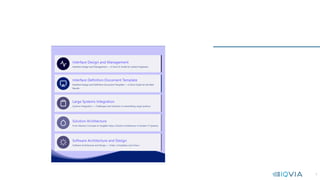
Interface Design and
Management – How-To
Guide
Interface Design and Management — A How-To Guide for Syste
m Engineers (softwaredominos.com)
2
• Table of Contents
• 1. System Interfaces
• 2. Types of Software Interfaces
• 3. Network Interfaces
• 4. Interface Design and Management
• 5. Further Reading
3
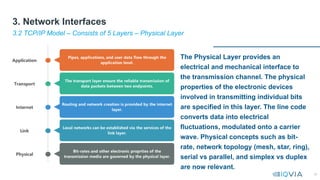
4
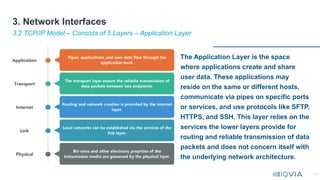
• Interfaces often do not receive the attention they deserve, as they are
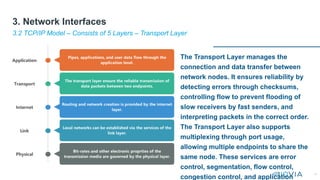
somehow considered peripheral and secondary to business logic, where
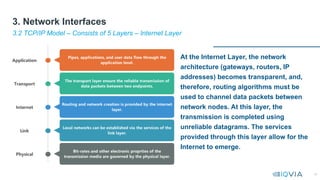
all the magic happens.
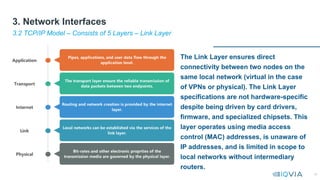
• Interface design and management are central to architecture. In addition
to facilitating interactions across system boundaries, they connect teams,
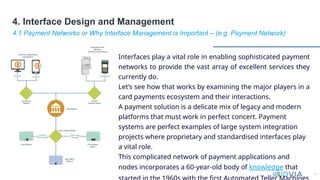
departments, and third-party vendors, dependencies that must be
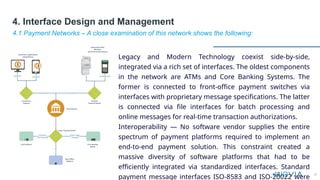
efficiently managed.
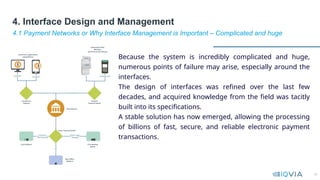
• This article will focus on the technical aspects of interfaces that are most
relevant to designing and engineering functioning solutions, especially in
large integration projects.
1.1 Overview
1. System Interfaces
5
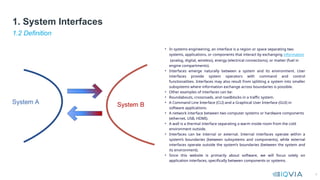
• In systems engineering, an interface is a region or space separating two
systems, applications, or components that interact by exchanging information
(analog, digital, wireless), energy (electrical connections), or matter (fuel in
engine compartments).
• Interfaces emerge naturally between a system and its environment. User
interfaces provide system operators with command and control
functionalities. Interfaces may also result from splitting a system into smaller
subsystems where information exchange across boundaries is possible.
• Other examples of interfaces can be:
• Roundabouts, crossroads, and roadblocks in a traffic system.
• A Command Line Interface (CLI) and a Graphical User Interface (GUI) in
software applications.
• A network interface between two computer systems or hardware components
(ethernet, USB, HDMI).
• A wall is a thermal interface separating a warm inside room from the cold
environment outside.
• Interfaces can be internal or external. Internal interfaces operate within a
system’s boundaries (between subsystems and components), while external
interfaces operate outside the system’s boundaries (between the system and
its environment).
• Since this website is primarily about software, we will focus solely on
application interfaces, specifically between components or systems.
1.2 Definition
1. System Interfaces
6
• In software design, using interfaces allows us to satisfy
the Dependency Inversion Principle (DIP), one of the SOLID principles
of clean code.
• Interfaces allow classes to be swapped without worrying too much
about the underlying implementation. This abstraction method hides
code complexity and prevents the calling class from coupling to the
implementation.
• In systems architecture, internal interfaces are the natural result of
breaking down large monolithic systems into modularized
components. The contract that the interface adheres to when
publishing its services binds the subsystems together.
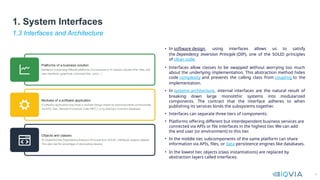
• Interfaces can separate three tiers of components:
• Platforms offering different but interdependent business services are
connected via APIs or file interfaces in the highest tier. We can add
the end user (or environment) to this tier.
• In the middle tier, subcomponents of the same platform can share
information via APIs, files, or data persistence engines like databases.
• In the lowest tier, objects (class instantiations) are replaced by
abstraction layers called interfaces.
1.3 Interfaces and Architecture
1. System Interfaces
7
Interfaces often do not receive the attention
they deserve, as they are somehow
considered peripheral and secondary to
business logic, where all the magic happens.
Interface design and management are
central to architecture. In addition to
facilitating interactions across system
boundaries, they connect teams,
departments, and third-party vendors,
dependencies that must be efficiently
managed.
This article will focus on the technical
aspects of interfaces that are most relevant
to designing and engineering functioning
solutions, especially in large integration
projects.
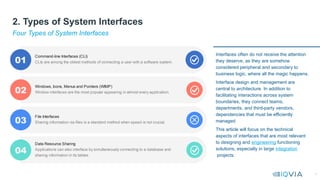
Four Types of System Interfaces
2. Types of System Interfaces
8
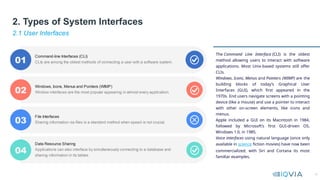
The Command Line Interface (CLI) is the oldest
method allowing users to interact with software
applications. Most Unix-based systems still offer
CLIs.
Windows, Icons, Menus and Pointers (WIMP) are the
building blocks of today’s Graphical User
Interfaces (GUI), which first appeared in the
1970s. End users navigate screens with a pointing
device (like a mouse) and use a pointer to interact
with other on-screen elements, like icons and
menus.
Apple included a GUI on its Macintosh in 1984,
followed by Microsoft’s first GUI-driven OS,
Windows 1.0, in 1985.
Voice interfaces using natural language (once only
available in science fiction movies) have now been
commercialized, with Siri and Cortana its most
familiar examples.
2.1 User Interfaces
2. Types of System Interfaces
9
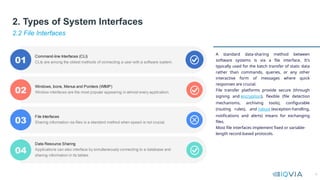
A standard data-sharing method between
software systems is via a file interface. It’s
typically used for the batch transfer of static data
rather than commands, queries, or any other
interactive form of messages where quick
responses are crucial.
File transfer platforms provide secure (through
signing and encryption), flexible (file detection
mechanisms, archiving tools), configurable
(routing rules), and robust (exception-handling,
notifications and alerts) means for exchanging
files.
Most file interfaces implement fixed or variable-
length record-based protocols.
2.2 File Interfaces
2. Types of System Interfaces
10
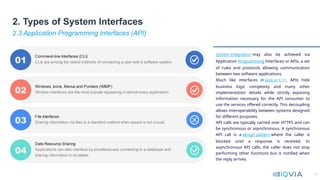
System integration may also be achieved via
Application Programming Interfaces or APIs, a set
of rules and protocols allowing communication
between two software applications.
Much like interfaces in Java or C++, APIs hide
business logic complexity and many other
implementation details while strictly exposing
information necessary for the API consumer to
use the services offered correctly. This decoupling
allows interoperability between systems designed
for different purposes.
API calls are typically carried over HTTPS and can
be synchronous or asynchronous. A synchronous
API call is a design pattern where the caller is
blocked until a response is received. In
asynchronous API calls, the caller does not stop
performing other functions but is notified when
the reply arrives.
2.3 Application Programming Interfaces (API)
2. Types of System Interfaces
11
2.4 Data Resource Sharing
2. Types of System Interfaces
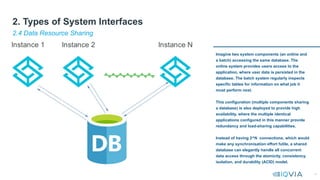
Imagine two system components (an online and
a batch) accessing the same database. The
online system provides users access to the
application, where user data is persisted in the
database. The batch system regularly inspects
specific tables for information on what job it
must perform next.
This configuration (multiple components sharing
a database) is also deployed to provide high
availability, where the multiple identical
applications configured in this manner provide
redundancy and load-sharing capabilities.
Instead of having 2^N connections, which would
make any synchronisation effort futile, a shared
database can elegantly handle all concurrent
data access through the atomicity, consistency,
isolation, and durability (ACID) model.
12
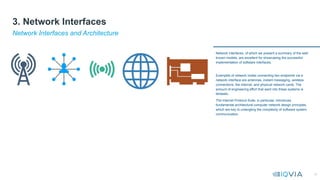
Network interfaces, of which we present a summary of the well-
known models, are excellent for showcasing the successful
implementation of software interfaces.
Examples of network nodes connecting two endpoints via a
network interface are antennas, instant messaging, wireless
connections, the internet, and physical network cards. The
amount of engineering effort that went into these systems is
fantastic.
The Internet Protocol Suite, in particular, introduces
fundamental architectural computer network design principles,
which are key to untangling the complexity of software system
communication
Network Interfaces and Architecture
3. Network Interfaces
13
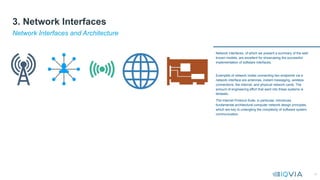
Network interfaces, of which we present a summary of the well-
known models, are excellent for showcasing the successful
implementation of software interfaces.
Examples of network nodes connecting two endpoints via a
network interface are antennas, instant messaging, wireless
connections, the internet, and physical network cards. The
amount of engineering effort that went into these systems is
fantastic.
The Internet Protocol Suite, in particular, introduces
fundamental architectural computer network design principles,
which are key to untangling the complexity of software system
communication
Network Interfaces and Architecture
3. Network Interfaces
14
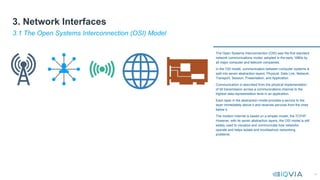
The Open Systems Interconnection (OSI) was the first standard
network communications model, adopted in the early 1980s by
all major computer and telecom companies.
In the OSI model, communication between computer systems is
split into seven abstraction layers: Physical, Data Link, Network,
Transport, Session, Presentation, and Application.
Communication is described from the physical implementation
of bit transmission across a communications channel to the
highest data representation level in an application.
Each layer in the abstraction model provides a service to the
layer immediately above it and receives services from the ones
below it.
The modern Internet is based on a simpler model, the TCP/IP.
However, with its seven abstraction layers, the OSI model is still
widely used to visualize and communicate how networks
operate and helps isolate and troubleshoot networking
problems.
3.1 The Open Systems Interconnection (OSI) Model
3. Network Interfaces
15
The Transmission Control Protocol (TCP) ensures the successful exchange of data packets between devices over a network. It has become the standard for today’s internet.
TCP powers various applications, including web servers, websites, file transfers, and peer-to-peer applications.
TCP and the Internet Protocol (IP) operate in tandem to guarantee the correct exchange of data online. IP is responsible for routing each packet to its destination, while TCP ensures that bytes are
transmitted intact and in the proper order.
The two protocols are jointly called TCP/IP or the Internet Protocol Suite.
Key architectural principles, like the end-to-end and the robustness principle, governed the design of network interfaces.
Initially, the end-to-end principle required network end nodes (applications exchanging the data) to guarantee data communication’s security and reliability. On the other hand, intermediary nodes like
routers and gateways must remain stateless and care only about efficiency and speed.
The robustness principle states that sender nodes must carefully generate properly formatted data packets. Receiver nodes, however, are more at liberty to try to interpret a malformed packet if the
interpretation makes sense.
3.2 The Transmission Control Protocol / Internet Protocol (TCP/IP) Model
3. Network Interfaces
16
The Application Layer is the space
where applications create and share
user data. These applications may
reside on the same or different hosts,
communicate via pipes on specific ports
or services, and use protocols like SFTP,
HTTPS, and SSH. This layer relies on the
services the lower layers provide for
routing and reliable transmission of data
packets and does not concern itself with
the underlying network architecture.
3.2 TCP/IP Model – Consists of 5 Layers – Application Layer
3. Network Interfaces
17
The Transport Layer manages the
connection and data transfer between
network nodes. It ensures reliability by
detecting errors through checksums,
controlling flow to prevent flooding of
slow receivers by fast senders, and
interpreting packets in the correct order.
The Transport Layer also supports
multiplexing through port usage,
allowing multiple endpoints to share the
same node. These services are error
control, segmentation, flow control,
congestion control, and application
3.2 TCP/IP Model – Consists of 5 Layers – Transport Layer
3. Network Interfaces
18
At the Internet Layer, the network
architecture (gateways, routers, IP
addresses) becomes transparent, and,
therefore, routing algorithms must be
used to channel data packets between
network nodes. At this layer, the
transmission is completed using
unreliable datagrams. The services
provided through this layer allow for the
Internet to emerge.
3.2 TCP/IP Model – Consists of 5 Layers – Internet Layer
3. Network Interfaces
19
The Link Layer ensures direct
connectivity between two nodes on the
same local network (virtual in the case
of VPNs or physical). The Link Layer
specifications are not hardware-specific
despite being driven by card drivers,
firmware, and specialized chipsets. This
layer operates using media access
control (MAC) addresses, is unaware of
IP addresses, and is limited in scope to
local networks without intermediary
routers.
3.2 TCP/IP Model – Consists of 5 Layers – Link Layer
3. Network Interfaces
20
The Physical Layer provides an
electrical and mechanical interface to
the transmission channel. The physical
properties of the electronic devices
involved in transmitting individual bits
are specified in this layer. The line code
converts data into electrical
fluctuations, modulated onto a carrier
wave. Physical concepts such as bit-
rate, network topology (mesh, star, ring),
serial vs parallel, and simplex vs duplex
are now relevant.
3.2 TCP/IP Model – Consists of 5 Layers – Physical Layer
3. Network Interfaces
21
Interfaces play a vital role in enabling sophisticated payment
networks to provide the vast array of excellent services they
currently do.
Let’s see how that works by examining the major players in a
card payments ecosystem and their interactions.
A payment solution is a delicate mix of legacy and modern
platforms that must work in perfect concert. Payment
systems are perfect examples of large system integration
projects where proprietary and standardised interfaces play
a vital role.
This complicated network of payment applications and
nodes incorporates a 60-year-old body of knowledge that
4.1 Payment Networks or Why Interface Management is Important – (e.g. Payment Network)
4. Interface Design and Management
22
Legacy and Modern Technology coexist side-by-side,
integrated via a rich set of interfaces. The oldest components
in the network are ATMs and Core Banking Systems. The
former is connected to front-office payment switches via
interfaces with proprietary message specifications. The latter
is connected via file interfaces for batch processing and
online messages for real-time transaction authorizations.
Interoperability — No software vendor supplies the entire
spectrum of payment platforms required to implement an
end-to-end payment solution. This constraint created a
massive diversity of software platforms that had to be
efficiently integrated via standardized interfaces. Standard
payment message interfaces ISO-8583 and ISO-20022 were
4.1 Payment Networks – A close examination of this network shows the following:
4. Interface Design and Management
23
Because the system is incredibly complicated and huge,
numerous points of failure may arise, especially around the
interfaces.
The design of interfaces was refined over the last few
decades, and acquired knowledge from the field was tacitly
built into its specifications.
A stable solution has now emerged, allowing the processing
of billions of fast, secure, and reliable electronic payment
transactions.
4.1 Payment Networks or Why Interface Management is Important – Complicated and huge
4. Interface Design and Management
24
An Interface Requirements Document (IRD) describes the following aspects of an interface:
• Functionality — or what the interface does
• Performance — or how much load is expected over that interface
• Security requirements — integrity, confidentiality, authenticity
• Interface type — File, API, or UI
• Other — physical (communication medium or channel) or environmental (high-contrast
screens for better visibility in the daytime).
An Interface Control Document (ICD) contains the interface specifications (messages, fields,
usage, security) as well as the properties of the systems using this interface.
An ICD is an extension of an Interface Definition Document (IDD, also referred to
as Interface Design Definition), which contains a unilateral interface description. An IDD is
typically created by the party implementing the interface.
4.2 Interface Control Documents
4. Interface Design and Management
25
4.3 Nielsen’s Usability Heuristics – series of white papers (2005) now widely used as principles of design
4. Interface Design and Management – Part 1 - Ten Usability Heuristics
• Visibility of system status — A system offering services to end users or to other systems must
always keep the latter informed on its status via appropriate feedback within a reasonable
timeframe.
• Match between system and the real world — The terms and language an interface uses must
correspond as best as possible to the language its consumers are familiar with and avoid
paradigms known only within its confines.
• User control and freedom — This heuristic requires an interface to provide the user with enough
information on where they are and how they can return if they wish to do so. It is relevant to
navigation in a form and jumping back and forth between system states (undo and redo).
• Consistency and standards — This heuristic applies to all terms and definitions used within the
interface. Consistency requires terms to retain their meaning across locations. Standards allow
users and system designers to conform to specific rules, facilitating smooth communications.
• Error prevention — Prevent the user from making errors by validating inputs and actions before
executing them. Meaningful messages are vital in conveying important information to the operator
or caller.
• Recognition rather than recall — Beneficial for human operators interacting with a system, this
measure requires user interfaces to provide ample information on how to interact with the system
so that the user does not have to memorize all the program’s commands and instructions. For
26
•Aesthetic and minimalist design — User experience varies greatly when designing interfaces. The
relationships between screen elements should be intuitive and obvious, and irrelevant information should
be suppressed to reduce the cognitive load on users.
•Help users recognize, diagnose, and recover from errors — Error signalling and error messages
should be clear, generous, and easy to identify and interpret. Interfaces must allow users to recover from
errors by resetting system or transaction states and undoing previous mistakes.
•Help and documentation — Systems with the best user experience are self-explanatory and adequately
documented. For example, when typing an incorrect command, a CLI might return a list of possible valid
alternatives.
•Flexibility and efficiency of use — A great UI design provides users with shortcuts and other means for
making their interactions with the application more efficient. The AirPods are a fantastic example of how
such a design can be implemented. You can easily trigger specific functionalities without explicitly
supplying any commands. The AirPods are so powerful in predicting the user’s intentions.
4.3 Nielsen’s Usability Heuristics – series of white papers (2005) now widely used as principles of design
4. Interface Design and Management – Part 2
27
•Systems Engineering Handbook f
rom NASA
•MIT Lecture on
Systems Integration and
Interface Management:
Further reading on interfaces
5. Further Reading

01 Interface Design and Management – How-To Guide.pptx

  • 1.
    © 2024. Allrights reserved. IQVIA® is a registered trademark of IQVIA Inc. in the United States, the European Union, and various other countries. Interface Design and Management – How-To Guide Interface Design and Management — A How-To Guide for Syste m Engineers (softwaredominos.com)
  • 2.
    2 • Table ofContents • 1. System Interfaces • 2. Types of Software Interfaces • 3. Network Interfaces • 4. Interface Design and Management • 5. Further Reading
  • 3.
  • 4.
    4 • Interfaces oftendo not receive the attention they deserve, as they are somehow considered peripheral and secondary to business logic, where all the magic happens. • Interface design and management are central to architecture. In addition to facilitating interactions across system boundaries, they connect teams, departments, and third-party vendors, dependencies that must be efficiently managed. • This article will focus on the technical aspects of interfaces that are most relevant to designing and engineering functioning solutions, especially in large integration projects. 1.1 Overview 1. System Interfaces
  • 5.
    5 • In systemsengineering, an interface is a region or space separating two systems, applications, or components that interact by exchanging information (analog, digital, wireless), energy (electrical connections), or matter (fuel in engine compartments). • Interfaces emerge naturally between a system and its environment. User interfaces provide system operators with command and control functionalities. Interfaces may also result from splitting a system into smaller subsystems where information exchange across boundaries is possible. • Other examples of interfaces can be: • Roundabouts, crossroads, and roadblocks in a traffic system. • A Command Line Interface (CLI) and a Graphical User Interface (GUI) in software applications. • A network interface between two computer systems or hardware components (ethernet, USB, HDMI). • A wall is a thermal interface separating a warm inside room from the cold environment outside. • Interfaces can be internal or external. Internal interfaces operate within a system’s boundaries (between subsystems and components), while external interfaces operate outside the system’s boundaries (between the system and its environment). • Since this website is primarily about software, we will focus solely on application interfaces, specifically between components or systems. 1.2 Definition 1. System Interfaces
  • 6.
    6 • In softwaredesign, using interfaces allows us to satisfy the Dependency Inversion Principle (DIP), one of the SOLID principles of clean code. • Interfaces allow classes to be swapped without worrying too much about the underlying implementation. This abstraction method hides code complexity and prevents the calling class from coupling to the implementation. • In systems architecture, internal interfaces are the natural result of breaking down large monolithic systems into modularized components. The contract that the interface adheres to when publishing its services binds the subsystems together. • Interfaces can separate three tiers of components: • Platforms offering different but interdependent business services are connected via APIs or file interfaces in the highest tier. We can add the end user (or environment) to this tier. • In the middle tier, subcomponents of the same platform can share information via APIs, files, or data persistence engines like databases. • In the lowest tier, objects (class instantiations) are replaced by abstraction layers called interfaces. 1.3 Interfaces and Architecture 1. System Interfaces
  • 7.
    7 Interfaces often donot receive the attention they deserve, as they are somehow considered peripheral and secondary to business logic, where all the magic happens. Interface design and management are central to architecture. In addition to facilitating interactions across system boundaries, they connect teams, departments, and third-party vendors, dependencies that must be efficiently managed. This article will focus on the technical aspects of interfaces that are most relevant to designing and engineering functioning solutions, especially in large integration projects. Four Types of System Interfaces 2. Types of System Interfaces
  • 8.
    8 The Command LineInterface (CLI) is the oldest method allowing users to interact with software applications. Most Unix-based systems still offer CLIs. Windows, Icons, Menus and Pointers (WIMP) are the building blocks of today’s Graphical User Interfaces (GUI), which first appeared in the 1970s. End users navigate screens with a pointing device (like a mouse) and use a pointer to interact with other on-screen elements, like icons and menus. Apple included a GUI on its Macintosh in 1984, followed by Microsoft’s first GUI-driven OS, Windows 1.0, in 1985. Voice interfaces using natural language (once only available in science fiction movies) have now been commercialized, with Siri and Cortana its most familiar examples. 2.1 User Interfaces 2. Types of System Interfaces
  • 9.
    9 A standard data-sharingmethod between software systems is via a file interface. It’s typically used for the batch transfer of static data rather than commands, queries, or any other interactive form of messages where quick responses are crucial. File transfer platforms provide secure (through signing and encryption), flexible (file detection mechanisms, archiving tools), configurable (routing rules), and robust (exception-handling, notifications and alerts) means for exchanging files. Most file interfaces implement fixed or variable- length record-based protocols. 2.2 File Interfaces 2. Types of System Interfaces
  • 10.
    10 System integration mayalso be achieved via Application Programming Interfaces or APIs, a set of rules and protocols allowing communication between two software applications. Much like interfaces in Java or C++, APIs hide business logic complexity and many other implementation details while strictly exposing information necessary for the API consumer to use the services offered correctly. This decoupling allows interoperability between systems designed for different purposes. API calls are typically carried over HTTPS and can be synchronous or asynchronous. A synchronous API call is a design pattern where the caller is blocked until a response is received. In asynchronous API calls, the caller does not stop performing other functions but is notified when the reply arrives. 2.3 Application Programming Interfaces (API) 2. Types of System Interfaces
  • 11.
    11 2.4 Data ResourceSharing 2. Types of System Interfaces Imagine two system components (an online and a batch) accessing the same database. The online system provides users access to the application, where user data is persisted in the database. The batch system regularly inspects specific tables for information on what job it must perform next. This configuration (multiple components sharing a database) is also deployed to provide high availability, where the multiple identical applications configured in this manner provide redundancy and load-sharing capabilities. Instead of having 2^N connections, which would make any synchronisation effort futile, a shared database can elegantly handle all concurrent data access through the atomicity, consistency, isolation, and durability (ACID) model.
  • 12.
    12 Network interfaces, ofwhich we present a summary of the well- known models, are excellent for showcasing the successful implementation of software interfaces. Examples of network nodes connecting two endpoints via a network interface are antennas, instant messaging, wireless connections, the internet, and physical network cards. The amount of engineering effort that went into these systems is fantastic. The Internet Protocol Suite, in particular, introduces fundamental architectural computer network design principles, which are key to untangling the complexity of software system communication Network Interfaces and Architecture 3. Network Interfaces
  • 13.
    13 Network interfaces, ofwhich we present a summary of the well- known models, are excellent for showcasing the successful implementation of software interfaces. Examples of network nodes connecting two endpoints via a network interface are antennas, instant messaging, wireless connections, the internet, and physical network cards. The amount of engineering effort that went into these systems is fantastic. The Internet Protocol Suite, in particular, introduces fundamental architectural computer network design principles, which are key to untangling the complexity of software system communication Network Interfaces and Architecture 3. Network Interfaces
  • 14.
    14 The Open SystemsInterconnection (OSI) was the first standard network communications model, adopted in the early 1980s by all major computer and telecom companies. In the OSI model, communication between computer systems is split into seven abstraction layers: Physical, Data Link, Network, Transport, Session, Presentation, and Application. Communication is described from the physical implementation of bit transmission across a communications channel to the highest data representation level in an application. Each layer in the abstraction model provides a service to the layer immediately above it and receives services from the ones below it. The modern Internet is based on a simpler model, the TCP/IP. However, with its seven abstraction layers, the OSI model is still widely used to visualize and communicate how networks operate and helps isolate and troubleshoot networking problems. 3.1 The Open Systems Interconnection (OSI) Model 3. Network Interfaces
  • 15.
    15 The Transmission ControlProtocol (TCP) ensures the successful exchange of data packets between devices over a network. It has become the standard for today’s internet. TCP powers various applications, including web servers, websites, file transfers, and peer-to-peer applications. TCP and the Internet Protocol (IP) operate in tandem to guarantee the correct exchange of data online. IP is responsible for routing each packet to its destination, while TCP ensures that bytes are transmitted intact and in the proper order. The two protocols are jointly called TCP/IP or the Internet Protocol Suite. Key architectural principles, like the end-to-end and the robustness principle, governed the design of network interfaces. Initially, the end-to-end principle required network end nodes (applications exchanging the data) to guarantee data communication’s security and reliability. On the other hand, intermediary nodes like routers and gateways must remain stateless and care only about efficiency and speed. The robustness principle states that sender nodes must carefully generate properly formatted data packets. Receiver nodes, however, are more at liberty to try to interpret a malformed packet if the interpretation makes sense. 3.2 The Transmission Control Protocol / Internet Protocol (TCP/IP) Model 3. Network Interfaces
  • 16.
    16 The Application Layeris the space where applications create and share user data. These applications may reside on the same or different hosts, communicate via pipes on specific ports or services, and use protocols like SFTP, HTTPS, and SSH. This layer relies on the services the lower layers provide for routing and reliable transmission of data packets and does not concern itself with the underlying network architecture. 3.2 TCP/IP Model – Consists of 5 Layers – Application Layer 3. Network Interfaces
  • 17.
    17 The Transport Layermanages the connection and data transfer between network nodes. It ensures reliability by detecting errors through checksums, controlling flow to prevent flooding of slow receivers by fast senders, and interpreting packets in the correct order. The Transport Layer also supports multiplexing through port usage, allowing multiple endpoints to share the same node. These services are error control, segmentation, flow control, congestion control, and application 3.2 TCP/IP Model – Consists of 5 Layers – Transport Layer 3. Network Interfaces
  • 18.
    18 At the InternetLayer, the network architecture (gateways, routers, IP addresses) becomes transparent, and, therefore, routing algorithms must be used to channel data packets between network nodes. At this layer, the transmission is completed using unreliable datagrams. The services provided through this layer allow for the Internet to emerge. 3.2 TCP/IP Model – Consists of 5 Layers – Internet Layer 3. Network Interfaces
  • 19.
    19 The Link Layerensures direct connectivity between two nodes on the same local network (virtual in the case of VPNs or physical). The Link Layer specifications are not hardware-specific despite being driven by card drivers, firmware, and specialized chipsets. This layer operates using media access control (MAC) addresses, is unaware of IP addresses, and is limited in scope to local networks without intermediary routers. 3.2 TCP/IP Model – Consists of 5 Layers – Link Layer 3. Network Interfaces
  • 20.
    20 The Physical Layerprovides an electrical and mechanical interface to the transmission channel. The physical properties of the electronic devices involved in transmitting individual bits are specified in this layer. The line code converts data into electrical fluctuations, modulated onto a carrier wave. Physical concepts such as bit- rate, network topology (mesh, star, ring), serial vs parallel, and simplex vs duplex are now relevant. 3.2 TCP/IP Model – Consists of 5 Layers – Physical Layer 3. Network Interfaces
  • 21.
    21 Interfaces play avital role in enabling sophisticated payment networks to provide the vast array of excellent services they currently do. Let’s see how that works by examining the major players in a card payments ecosystem and their interactions. A payment solution is a delicate mix of legacy and modern platforms that must work in perfect concert. Payment systems are perfect examples of large system integration projects where proprietary and standardised interfaces play a vital role. This complicated network of payment applications and nodes incorporates a 60-year-old body of knowledge that 4.1 Payment Networks or Why Interface Management is Important – (e.g. Payment Network) 4. Interface Design and Management
  • 22.
    22 Legacy and ModernTechnology coexist side-by-side, integrated via a rich set of interfaces. The oldest components in the network are ATMs and Core Banking Systems. The former is connected to front-office payment switches via interfaces with proprietary message specifications. The latter is connected via file interfaces for batch processing and online messages for real-time transaction authorizations. Interoperability — No software vendor supplies the entire spectrum of payment platforms required to implement an end-to-end payment solution. This constraint created a massive diversity of software platforms that had to be efficiently integrated via standardized interfaces. Standard payment message interfaces ISO-8583 and ISO-20022 were 4.1 Payment Networks – A close examination of this network shows the following: 4. Interface Design and Management
  • 23.
    23 Because the systemis incredibly complicated and huge, numerous points of failure may arise, especially around the interfaces. The design of interfaces was refined over the last few decades, and acquired knowledge from the field was tacitly built into its specifications. A stable solution has now emerged, allowing the processing of billions of fast, secure, and reliable electronic payment transactions. 4.1 Payment Networks or Why Interface Management is Important – Complicated and huge 4. Interface Design and Management
  • 24.
    24 An Interface RequirementsDocument (IRD) describes the following aspects of an interface: • Functionality — or what the interface does • Performance — or how much load is expected over that interface • Security requirements — integrity, confidentiality, authenticity • Interface type — File, API, or UI • Other — physical (communication medium or channel) or environmental (high-contrast screens for better visibility in the daytime). An Interface Control Document (ICD) contains the interface specifications (messages, fields, usage, security) as well as the properties of the systems using this interface. An ICD is an extension of an Interface Definition Document (IDD, also referred to as Interface Design Definition), which contains a unilateral interface description. An IDD is typically created by the party implementing the interface. 4.2 Interface Control Documents 4. Interface Design and Management
  • 25.
    25 4.3 Nielsen’s UsabilityHeuristics – series of white papers (2005) now widely used as principles of design 4. Interface Design and Management – Part 1 - Ten Usability Heuristics • Visibility of system status — A system offering services to end users or to other systems must always keep the latter informed on its status via appropriate feedback within a reasonable timeframe. • Match between system and the real world — The terms and language an interface uses must correspond as best as possible to the language its consumers are familiar with and avoid paradigms known only within its confines. • User control and freedom — This heuristic requires an interface to provide the user with enough information on where they are and how they can return if they wish to do so. It is relevant to navigation in a form and jumping back and forth between system states (undo and redo). • Consistency and standards — This heuristic applies to all terms and definitions used within the interface. Consistency requires terms to retain their meaning across locations. Standards allow users and system designers to conform to specific rules, facilitating smooth communications. • Error prevention — Prevent the user from making errors by validating inputs and actions before executing them. Meaningful messages are vital in conveying important information to the operator or caller. • Recognition rather than recall — Beneficial for human operators interacting with a system, this measure requires user interfaces to provide ample information on how to interact with the system so that the user does not have to memorize all the program’s commands and instructions. For
  • 26.
    26 •Aesthetic and minimalistdesign — User experience varies greatly when designing interfaces. The relationships between screen elements should be intuitive and obvious, and irrelevant information should be suppressed to reduce the cognitive load on users. •Help users recognize, diagnose, and recover from errors — Error signalling and error messages should be clear, generous, and easy to identify and interpret. Interfaces must allow users to recover from errors by resetting system or transaction states and undoing previous mistakes. •Help and documentation — Systems with the best user experience are self-explanatory and adequately documented. For example, when typing an incorrect command, a CLI might return a list of possible valid alternatives. •Flexibility and efficiency of use — A great UI design provides users with shortcuts and other means for making their interactions with the application more efficient. The AirPods are a fantastic example of how such a design can be implemented. You can easily trigger specific functionalities without explicitly supplying any commands. The AirPods are so powerful in predicting the user’s intentions. 4.3 Nielsen’s Usability Heuristics – series of white papers (2005) now widely used as principles of design 4. Interface Design and Management – Part 2
  • 27.
    27 •Systems Engineering Handbookf rom NASA •MIT Lecture on Systems Integration and Interface Management: Further reading on interfaces 5. Further Reading

Editor's Notes

  • #16 The Application Layer is the space where applications create and share user data. These applications may reside on the same or different hosts, communicate via pipes on specific ports or services, and use protocols like SFTP, HTTPS, and SSH. This layer relies on the services the lower layers provide for routing and reliable transmission of data packets and does not concern itself with the underlying network architecture. The Transport Layer manages the connection and data transfer between network nodes. It ensures reliability by detecting errors through checksums, controlling flow to prevent flooding of slow receivers by fast senders, and interpreting packets in the correct order. The Transport Layer also supports multiplexing through port usage, allowing multiple endpoints to share the same node. These services are error control, segmentation, flow control, congestion control, and application addressing. At the Internet Layer, the network architecture (gateways, routers, IP addresses) becomes transparent, and, therefore, routing algorithms must be used to channel data packets between network nodes. At this layer, the transmission is completed using unreliable datagrams. The services provided through this layer allow for the Internet to emerge. The Link Layer ensures direct connectivity between two nodes on the same local network (virtual in the case of VPNs or physical). The Link Layer specifications are not hardware-specific despite being driven by card drivers, firmware, and specialized chipsets. This layer operates using media access control (MAC) addresses, is unaware of IP addresses, and is limited in scope to local networks without intermediary routers. The Physical Layer provides an electrical and mechanical interface to the transmission channel. The physical properties of the electronic devices involved in transmitting individual bits are specified in this layer. The line code converts data into electrical fluctuations, modulated onto a carrier wave. Physical concepts such as bit-rate, network topology (mesh, star, ring), serial vs parallel, and simplex vs duplex are now relevant.
  • #17 The Application Layer is the space where applications create and share user data. These applications may reside on the same or different hosts, communicate via pipes on specific ports or services, and use protocols like SFTP, HTTPS, and SSH. This layer relies on the services the lower layers provide for routing and reliable transmission of data packets and does not concern itself with the underlying network architecture. The Transport Layer manages the connection and data transfer between network nodes. It ensures reliability by detecting errors through checksums, controlling flow to prevent flooding of slow receivers by fast senders, and interpreting packets in the correct order. The Transport Layer also supports multiplexing through port usage, allowing multiple endpoints to share the same node. These services are error control, segmentation, flow control, congestion control, and application addressing. At the Internet Layer, the network architecture (gateways, routers, IP addresses) becomes transparent, and, therefore, routing algorithms must be used to channel data packets between network nodes. At this layer, the transmission is completed using unreliable datagrams. The services provided through this layer allow for the Internet to emerge. The Link Layer ensures direct connectivity between two nodes on the same local network (virtual in the case of VPNs or physical). The Link Layer specifications are not hardware-specific despite being driven by card drivers, firmware, and specialized chipsets. This layer operates using media access control (MAC) addresses, is unaware of IP addresses, and is limited in scope to local networks without intermediary routers. The Physical Layer provides an electrical and mechanical interface to the transmission channel. The physical properties of the electronic devices involved in transmitting individual bits are specified in this layer. The line code converts data into electrical fluctuations, modulated onto a carrier wave. Physical concepts such as bit-rate, network topology (mesh, star, ring), serial vs parallel, and simplex vs duplex are now relevant.
  • #18 The Application Layer is the space where applications create and share user data. These applications may reside on the same or different hosts, communicate via pipes on specific ports or services, and use protocols like SFTP, HTTPS, and SSH. This layer relies on the services the lower layers provide for routing and reliable transmission of data packets and does not concern itself with the underlying network architecture. The Transport Layer manages the connection and data transfer between network nodes. It ensures reliability by detecting errors through checksums, controlling flow to prevent flooding of slow receivers by fast senders, and interpreting packets in the correct order. The Transport Layer also supports multiplexing through port usage, allowing multiple endpoints to share the same node. These services are error control, segmentation, flow control, congestion control, and application addressing. At the Internet Layer, the network architecture (gateways, routers, IP addresses) becomes transparent, and, therefore, routing algorithms must be used to channel data packets between network nodes. At this layer, the transmission is completed using unreliable datagrams. The services provided through this layer allow for the Internet to emerge. The Link Layer ensures direct connectivity between two nodes on the same local network (virtual in the case of VPNs or physical). The Link Layer specifications are not hardware-specific despite being driven by card drivers, firmware, and specialized chipsets. This layer operates using media access control (MAC) addresses, is unaware of IP addresses, and is limited in scope to local networks without intermediary routers. The Physical Layer provides an electrical and mechanical interface to the transmission channel. The physical properties of the electronic devices involved in transmitting individual bits are specified in this layer. The line code converts data into electrical fluctuations, modulated onto a carrier wave. Physical concepts such as bit-rate, network topology (mesh, star, ring), serial vs parallel, and simplex vs duplex are now relevant.
  • #19 The Application Layer is the space where applications create and share user data. These applications may reside on the same or different hosts, communicate via pipes on specific ports or services, and use protocols like SFTP, HTTPS, and SSH. This layer relies on the services the lower layers provide for routing and reliable transmission of data packets and does not concern itself with the underlying network architecture. The Transport Layer manages the connection and data transfer between network nodes. It ensures reliability by detecting errors through checksums, controlling flow to prevent flooding of slow receivers by fast senders, and interpreting packets in the correct order. The Transport Layer also supports multiplexing through port usage, allowing multiple endpoints to share the same node. These services are error control, segmentation, flow control, congestion control, and application addressing. At the Internet Layer, the network architecture (gateways, routers, IP addresses) becomes transparent, and, therefore, routing algorithms must be used to channel data packets between network nodes. At this layer, the transmission is completed using unreliable datagrams. The services provided through this layer allow for the Internet to emerge. The Link Layer ensures direct connectivity between two nodes on the same local network (virtual in the case of VPNs or physical). The Link Layer specifications are not hardware-specific despite being driven by card drivers, firmware, and specialized chipsets. This layer operates using media access control (MAC) addresses, is unaware of IP addresses, and is limited in scope to local networks without intermediary routers. The Physical Layer provides an electrical and mechanical interface to the transmission channel. The physical properties of the electronic devices involved in transmitting individual bits are specified in this layer. The line code converts data into electrical fluctuations, modulated onto a carrier wave. Physical concepts such as bit-rate, network topology (mesh, star, ring), serial vs parallel, and simplex vs duplex are now relevant.
  • #20 The Application Layer is the space where applications create and share user data. These applications may reside on the same or different hosts, communicate via pipes on specific ports or services, and use protocols like SFTP, HTTPS, and SSH. This layer relies on the services the lower layers provide for routing and reliable transmission of data packets and does not concern itself with the underlying network architecture. The Transport Layer manages the connection and data transfer between network nodes. It ensures reliability by detecting errors through checksums, controlling flow to prevent flooding of slow receivers by fast senders, and interpreting packets in the correct order. The Transport Layer also supports multiplexing through port usage, allowing multiple endpoints to share the same node. These services are error control, segmentation, flow control, congestion control, and application addressing. At the Internet Layer, the network architecture (gateways, routers, IP addresses) becomes transparent, and, therefore, routing algorithms must be used to channel data packets between network nodes. At this layer, the transmission is completed using unreliable datagrams. The services provided through this layer allow for the Internet to emerge. The Link Layer ensures direct connectivity between two nodes on the same local network (virtual in the case of VPNs or physical). The Link Layer specifications are not hardware-specific despite being driven by card drivers, firmware, and specialized chipsets. This layer operates using media access control (MAC) addresses, is unaware of IP addresses, and is limited in scope to local networks without intermediary routers. The Physical Layer provides an electrical and mechanical interface to the transmission channel. The physical properties of the electronic devices involved in transmitting individual bits are specified in this layer. The line code converts data into electrical fluctuations, modulated onto a carrier wave. Physical concepts such as bit-rate, network topology (mesh, star, ring), serial vs parallel, and simplex vs duplex are now relevant.
  • #25 Jakob Nielsen identified Ten Usability Heuristics in a series of papers he published, the last of which was in 2005. These heuristics are now widely used as general principles for interface design.
  • #26 Jakob Nielsen identified Ten Usability Heuristics in a series of papers he published, the last of which was in 2005. These heuristics are now widely used as general principles for interface design.