004. WORKING WITH REACT
COMPONENT
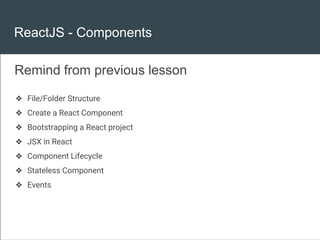
ReactJS - Components
❖ File/Folder Structure
❖ Create a React Component
❖ Bootstrapping a React project
❖ JSX in React
❖ Component Lifecycle
❖ Stateless Component
❖ Events
Remind from previous lesson
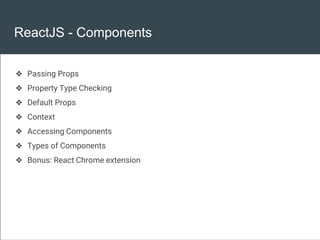
ReactJS - Components
❖ Passing Props
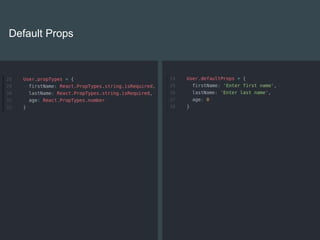
❖ Property Type Checking
❖ Default Props
❖ Context
❖ Accessing Components
❖ Types of Components
❖ Bonus: React Chrome extension
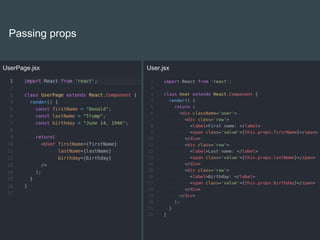
Passing props
UserPage.jsx User.jsx
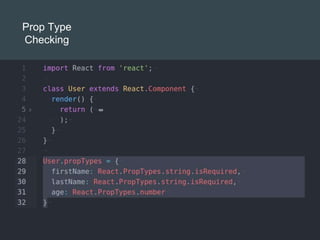
Prop Type
Checking
Prop Type
Checking
Prop Types
❖ array
❖ bool
❖ Func
❖ Number
❖ Object
❖ String
❖ Symbol
❖ Element
❖ instanceOf(<type>)
❖ oneOf([array])
❖ oneOfType([arrayOfTypes])
❖ arrayOf(<type>)
❖ objectOf(<type>)
❖ shape(shapeObject)
See more: https://facebook.github.io/react/docs/typechecking-with-proptypes.html
Default Props
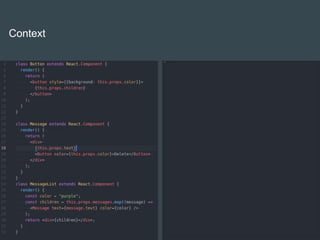
Context
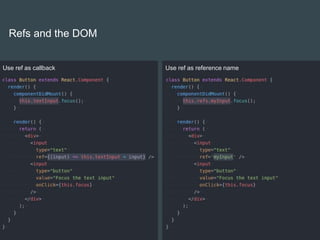
Refs and the DOM
Use ref as callback Use ref as reference name
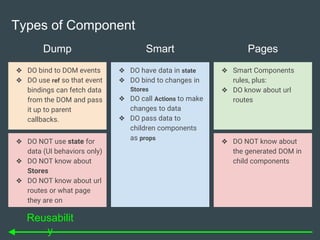
Dump
❖ DO bind to DOM events
❖ DO use ref so that event
bindings can fetch data
from the DOM and pass
it up to parent
callbacks.
❖ DO have data in state
❖ DO bind to changes in
Stores
❖ DO call Actions to make
changes to data
❖ DO pass data to
children components
as props
❖ Smart Components
rules, plus:
❖ DO know about url
routes
Smart Pages
Types of Component
❖ DO NOT use state for
data (UI behaviors only)
❖ DO NOT know about
Stores
❖ DO NOT know about url
routes or what page
they are on
❖ DO NOT know about
the generated DOM in
child components
Reusabilit
y
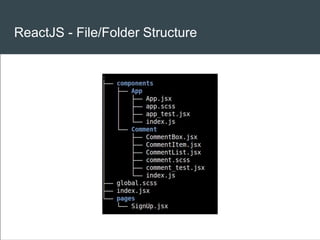
ReactJS - File/Folder Structure
Now Demo

004. Working with React component

  • 1.
    004. WORKING WITHREACT COMPONENT
  • 2.
    ReactJS - Components ❖File/Folder Structure ❖ Create a React Component ❖ Bootstrapping a React project ❖ JSX in React ❖ Component Lifecycle ❖ Stateless Component ❖ Events Remind from previous lesson
  • 3.
    ReactJS - Components ❖Passing Props ❖ Property Type Checking ❖ Default Props ❖ Context ❖ Accessing Components ❖ Types of Components ❖ Bonus: React Chrome extension
  • 4.
  • 5.
  • 6.
    Prop Type Checking Prop Types ❖array ❖ bool ❖ Func ❖ Number ❖ Object ❖ String ❖ Symbol ❖ Element ❖ instanceOf(<type>) ❖ oneOf([array]) ❖ oneOfType([arrayOfTypes]) ❖ arrayOf(<type>) ❖ objectOf(<type>) ❖ shape(shapeObject) See more: https://facebook.github.io/react/docs/typechecking-with-proptypes.html
  • 7.
  • 8.
  • 9.
    Refs and theDOM Use ref as callback Use ref as reference name
  • 10.
    Dump ❖ DO bindto DOM events ❖ DO use ref so that event bindings can fetch data from the DOM and pass it up to parent callbacks. ❖ DO have data in state ❖ DO bind to changes in Stores ❖ DO call Actions to make changes to data ❖ DO pass data to children components as props ❖ Smart Components rules, plus: ❖ DO know about url routes Smart Pages Types of Component ❖ DO NOT use state for data (UI behaviors only) ❖ DO NOT know about Stores ❖ DO NOT know about url routes or what page they are on ❖ DO NOT know about the generated DOM in child components Reusabilit y
  • 11.
  • 12.