Digital Learning Committee
School Committee Presentation
May 9, 2017
Agenda
Introduce Committee Members
District Improvement Plan
Current Status
Video
Scope and Sequence
2016-2017 District Improvement Plan
Strategic Objective:
To ensure that all students are supported and challenged to reach their full
potential, the Franklin Public Schools will align curriculum, best instructional
practices, and varied assessment opportunities to personalize learning and
meet individual needs.
Action Item #2:
● Continue development and implementation of alignment and instructional
changes of new standards in:
○ Science
○ Digital Learning/Technology
Current Status:
Work from previous years was updated; some has been
finalized
Re-aligned the scope and sequence when the 2016 (final)
MA Digital Learning Standards were released (Had been
working from the draft to get a head start)
Scope and sequence has been enhanced with current
examples of digital learning from our classrooms
Current Status:
Finalized rights and responsibilities for students and staff
Updated frequently asked questions (FAQ) for families
Working on communication and professional development
plans
Digital Learning in Action
You will see:
Students from all grade levels demonstrating the seven Digital Literacy Computer
Science (DLCS) practices across several content areas: Connecting, Creating,
Abstracting, Analyzing, Communicating, Collaborating, & Research
● Students effectively using technology to solve problems and build 21st century
skills, e.g.:
~ online comparative anatomy museum ~ music
composition
~ graphical analysis of math functions ~ digital peer editing
Technology In Our Schools
The following video was edited by the Remington Tech Titans under the guidance of Emily Ambrose
and Brian Wildeman.
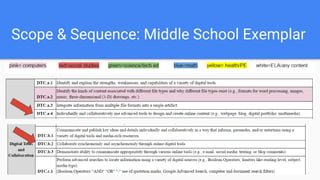
Scope and Sequence
Unpacked/translated new standards to everyday language
Categorized standards by content area in which it is likely
being addressed
Gathered exemplars for specific digital standards from
content areas
Scope & Sequence: Middle School Exemplar
Level Rights Responsibilities-Students Responsibilities- Faculty & Staff
Middle
School
I have the right to …
● Safety
● Responsible
access
● Own my work
I will …
● uphold school core values online
(12)
● return parent permission form
(AUP) for video, photo, and other
technology access (12)
● Use school technology and
accounts as directed by a teacher
(2, 6)
● protect my personal information
and that of others (1, 3, 4, 6)
● make responsible choices (9, 12,
14, 16)
● only represent myself honestly
online
(ex: false profiling) (2, 5, 6)
We will …
● ensure parent permission to video,
photograph, or use technology (12)
● monitor students’ use of technology (all)
● reinforce proper use including digital
etiquette (all) and safe handling of
devices (5)
● provide resources to
parents/families/students about safe
internet use (all)
Rights & Responsibilities: Middle School Exemplar
Sample of FAQs for Families
Honesty-
What are some examples of information you can use freely from online sources?
Advanced Google search (Only yields results that give permission to use)
Any other site that gives explicit permission to use
Monitoring-
How much monitoring does my child require when using the internet?
It depends on the age of your child. However, it is critical that every child be monitored to
ensure safety. Parent supervision is necessary and key at all ages.
Digital Etiquette-
What is digital etiquette?
Digital etiquette refers to using proper manners while online- be polite, stay positive and
keep personal information private.
Possible Ways to Share Rights & Responsibilities
● Staff
○ Faculty meeting presentation
○ Professional development ½ day training
● Students
○ Use rights and responsibilities language to create tech expectations
○ Introduce when reviewing classroom expectations and rules
○ Model each “I will” statement
Next Steps: Preschool-12
● Develop a communication plan for staff, students,
and families
● Plan and implement professional development for
staff
● Identify gaps and overlaps of digital learning
standards within content areas
Next Steps: Preschool-12
● Create elementary launching units to introduce
students to proper digital etiquette and citizenship
● Reinforce digital etiquette and citizenship at the middle
and high school levels
● Create enhanced access to resources for teachers,
including sharing of best practices
Committee Members 2016-2017
Joyce Edwards, Chair
Elementary:
Evan Chelman, Lauren Diez, Jennifer Gargan, Meghan
Moynihan, Alicia Gray, Victoria Saldana
Middle School:
Emily Ambrose, Joe Corey, Jim d’Entremont, Christine
Gontarz, Sandy Morris, Marianne Zogby
High School:
Trevor Barron, Lisa Ferns, Ann Ritchie
Administrators:
Kelty Kelley
Sarah Klim
Tim Rapoza
Brian Wildeman

Digital Learning Committee - 5/09/17

  • 1.
    Digital Learning Committee SchoolCommittee Presentation May 9, 2017
  • 2.
    Agenda Introduce Committee Members DistrictImprovement Plan Current Status Video Scope and Sequence
  • 3.
    2016-2017 District ImprovementPlan Strategic Objective: To ensure that all students are supported and challenged to reach their full potential, the Franklin Public Schools will align curriculum, best instructional practices, and varied assessment opportunities to personalize learning and meet individual needs. Action Item #2: ● Continue development and implementation of alignment and instructional changes of new standards in: ○ Science ○ Digital Learning/Technology
  • 4.
    Current Status: Work fromprevious years was updated; some has been finalized Re-aligned the scope and sequence when the 2016 (final) MA Digital Learning Standards were released (Had been working from the draft to get a head start) Scope and sequence has been enhanced with current examples of digital learning from our classrooms
  • 5.
    Current Status: Finalized rightsand responsibilities for students and staff Updated frequently asked questions (FAQ) for families Working on communication and professional development plans
  • 6.
    Digital Learning inAction You will see: Students from all grade levels demonstrating the seven Digital Literacy Computer Science (DLCS) practices across several content areas: Connecting, Creating, Abstracting, Analyzing, Communicating, Collaborating, & Research ● Students effectively using technology to solve problems and build 21st century skills, e.g.: ~ online comparative anatomy museum ~ music composition ~ graphical analysis of math functions ~ digital peer editing
  • 7.
    Technology In OurSchools The following video was edited by the Remington Tech Titans under the guidance of Emily Ambrose and Brian Wildeman.
  • 9.
    Scope and Sequence Unpacked/translatednew standards to everyday language Categorized standards by content area in which it is likely being addressed Gathered exemplars for specific digital standards from content areas
  • 10.
    Scope & Sequence:Middle School Exemplar
  • 11.
    Level Rights Responsibilities-StudentsResponsibilities- Faculty & Staff Middle School I have the right to … ● Safety ● Responsible access ● Own my work I will … ● uphold school core values online (12) ● return parent permission form (AUP) for video, photo, and other technology access (12) ● Use school technology and accounts as directed by a teacher (2, 6) ● protect my personal information and that of others (1, 3, 4, 6) ● make responsible choices (9, 12, 14, 16) ● only represent myself honestly online (ex: false profiling) (2, 5, 6) We will … ● ensure parent permission to video, photograph, or use technology (12) ● monitor students’ use of technology (all) ● reinforce proper use including digital etiquette (all) and safe handling of devices (5) ● provide resources to parents/families/students about safe internet use (all) Rights & Responsibilities: Middle School Exemplar
  • 12.
    Sample of FAQsfor Families Honesty- What are some examples of information you can use freely from online sources? Advanced Google search (Only yields results that give permission to use) Any other site that gives explicit permission to use Monitoring- How much monitoring does my child require when using the internet? It depends on the age of your child. However, it is critical that every child be monitored to ensure safety. Parent supervision is necessary and key at all ages. Digital Etiquette- What is digital etiquette? Digital etiquette refers to using proper manners while online- be polite, stay positive and keep personal information private.
  • 13.
    Possible Ways toShare Rights & Responsibilities ● Staff ○ Faculty meeting presentation ○ Professional development ½ day training ● Students ○ Use rights and responsibilities language to create tech expectations ○ Introduce when reviewing classroom expectations and rules ○ Model each “I will” statement
  • 14.
    Next Steps: Preschool-12 ●Develop a communication plan for staff, students, and families ● Plan and implement professional development for staff ● Identify gaps and overlaps of digital learning standards within content areas
  • 15.
    Next Steps: Preschool-12 ●Create elementary launching units to introduce students to proper digital etiquette and citizenship ● Reinforce digital etiquette and citizenship at the middle and high school levels ● Create enhanced access to resources for teachers, including sharing of best practices
  • 16.
    Committee Members 2016-2017 JoyceEdwards, Chair Elementary: Evan Chelman, Lauren Diez, Jennifer Gargan, Meghan Moynihan, Alicia Gray, Victoria Saldana Middle School: Emily Ambrose, Joe Corey, Jim d’Entremont, Christine Gontarz, Sandy Morris, Marianne Zogby High School: Trevor Barron, Lisa Ferns, Ann Ritchie Administrators: Kelty Kelley Sarah Klim Tim Rapoza Brian Wildeman