Working with
CloudStack Usage Data
Tariq Iqbal
Senior Consultant
tariq.iqbal@shapeblue.com
Twitter: @TariqIqbal_ @ShapeBlue
About Me





Involved with CloudStack before donation to Apache
Built and deployed CloudStack/CloudPlatform based clouds for
Enterprises and Service Providers globally - SunGard, Ascenty
Specialise in integrating CloudStack with Business Support and
Operational Support systems, which include:






CloudPortals (including Payment Gateways, Fraud Control solutions)
Ticketing Systems – ServiceDesk, Email
CRM/ERP Systems – SAPB/1, Salesforce.com
Monitoring Solutions – Nagios, Splunk, Zenoss
@ShapeBlue #CloudStack #CCCEU13
About ShapeBlue
“ShapeBlue are expert builders of public & private clouds. They
are the leading global independent CloudStack / CloudPlatform
integrator & consultancy”

“ShapeBlue is absolutely one of the top experts on deploying
CloudStack. Great company and very deep skill set”
“First to offer professional 24x7x365 support of
Apache CloudStack”
@ShapeBlue #CloudStack #CCCEU13
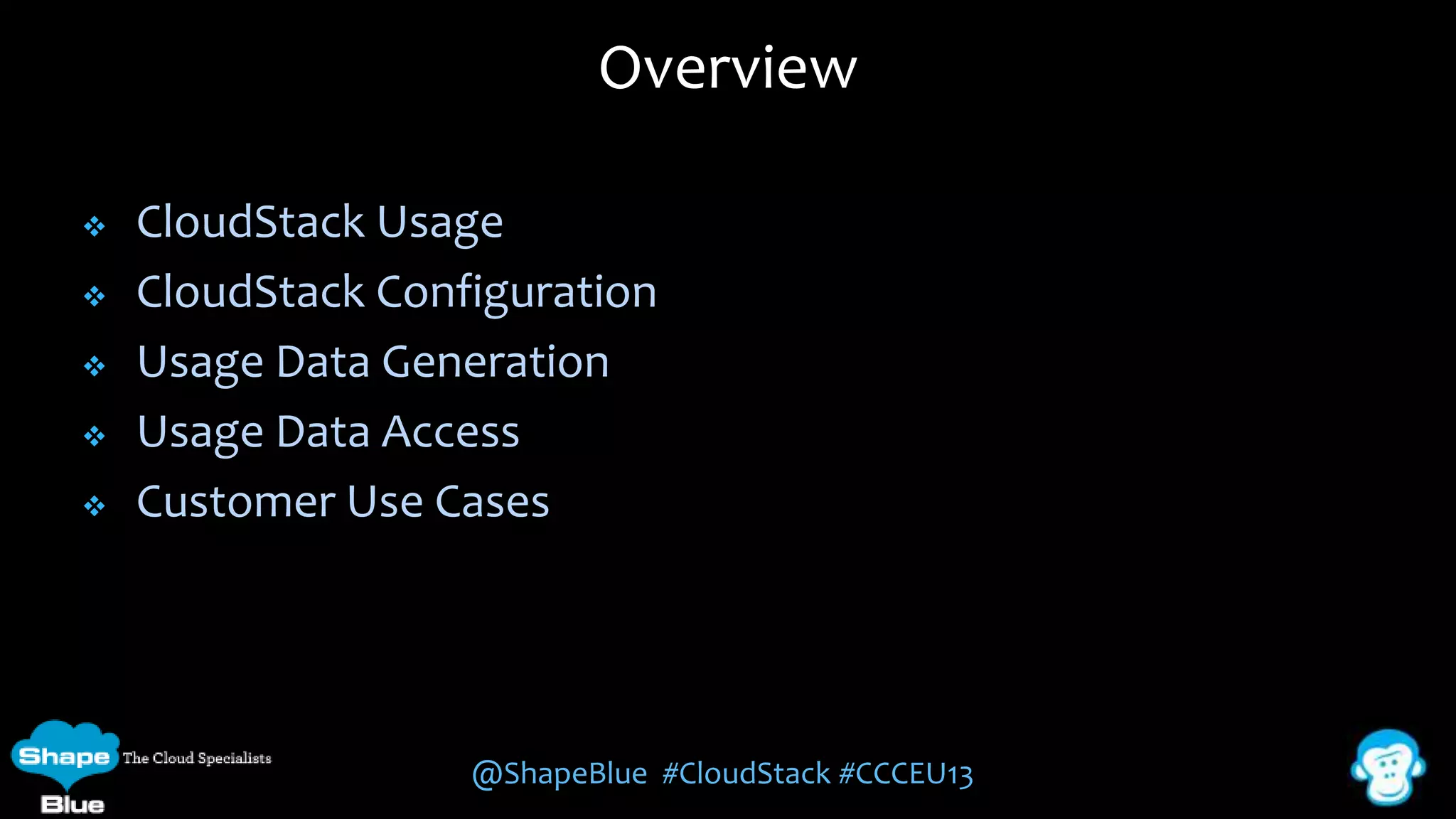
Overview






CloudStack Usage
CloudStack Configuration
Usage Data Generation
Usage Data Access
Customer Use Cases

@ShapeBlue #CloudStack #CCCEU13
Usage Requirements


Organisations need to be able to meter their cloud's
consumption to:







Monetize the cloud offerings by charging for usage
Report on the cloud’s resource usage for monitoring/capacity
planning

Majority of organisations already have existing BSS/OSS and just
need access to the usage data
Organisations tend to have different billing criteria/charging
models and require access to usage data for their specific needs
@ShapeBlue #CloudStack #CCCEU13
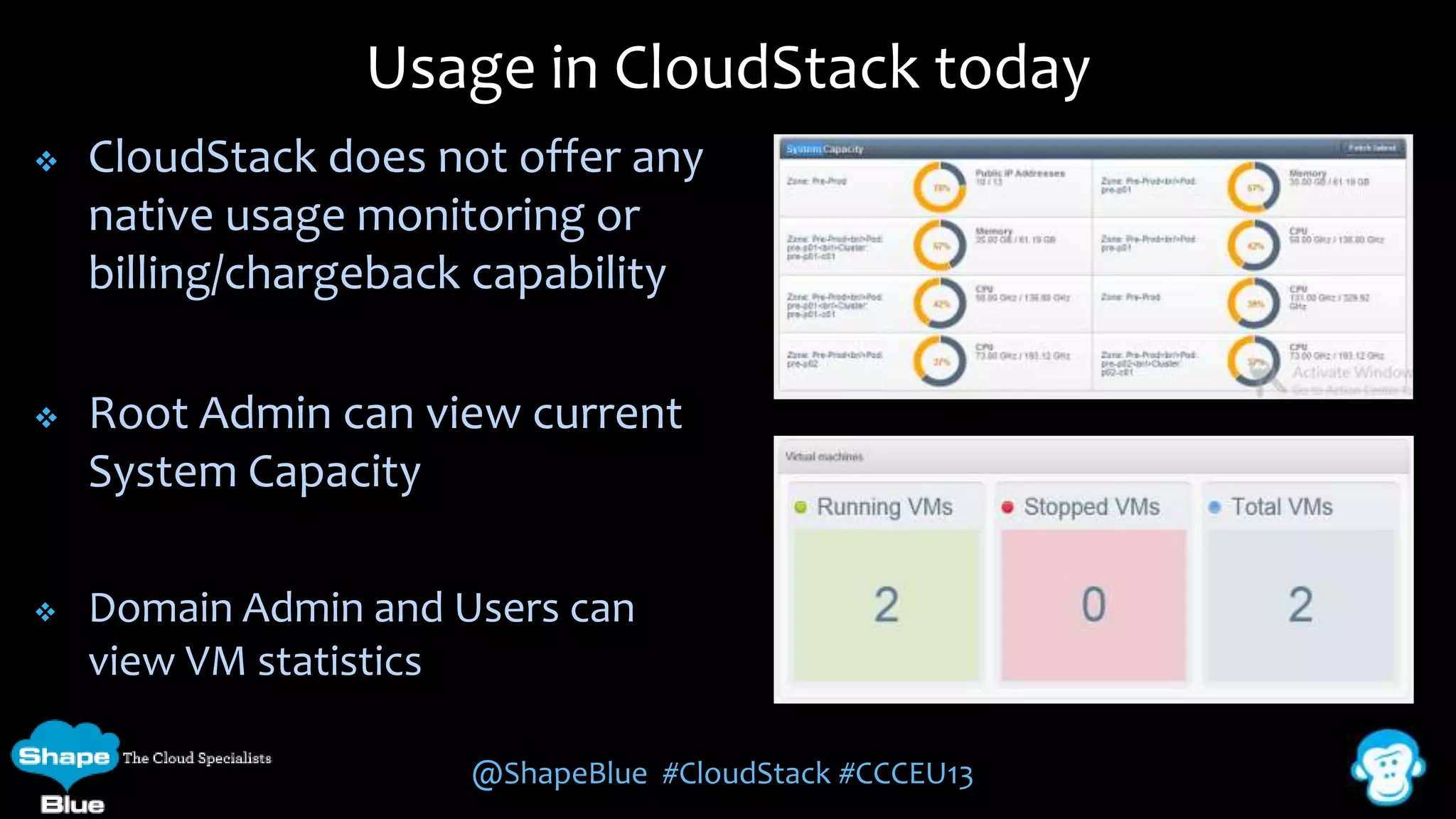
Usage in CloudStack today


CloudStack does not offer any
native usage monitoring or
billing/chargeback capability



Root Admin can view current
System Capacity



Domain Admin and Users can
view VM statistics
@ShapeBlue #CloudStack #CCCEU13
Usage Server


CloudStack includes a Usage Server:








Optional Component
Separately installed service called ‘cloudstack-usage’
Runs once a day (Default)

Creates aggregated usage records for the various resources
consumed in CloudStack
The usage records are stored in a separate database called
‘cloud_usage’

@ShapeBlue #CloudStack #CCCEU13
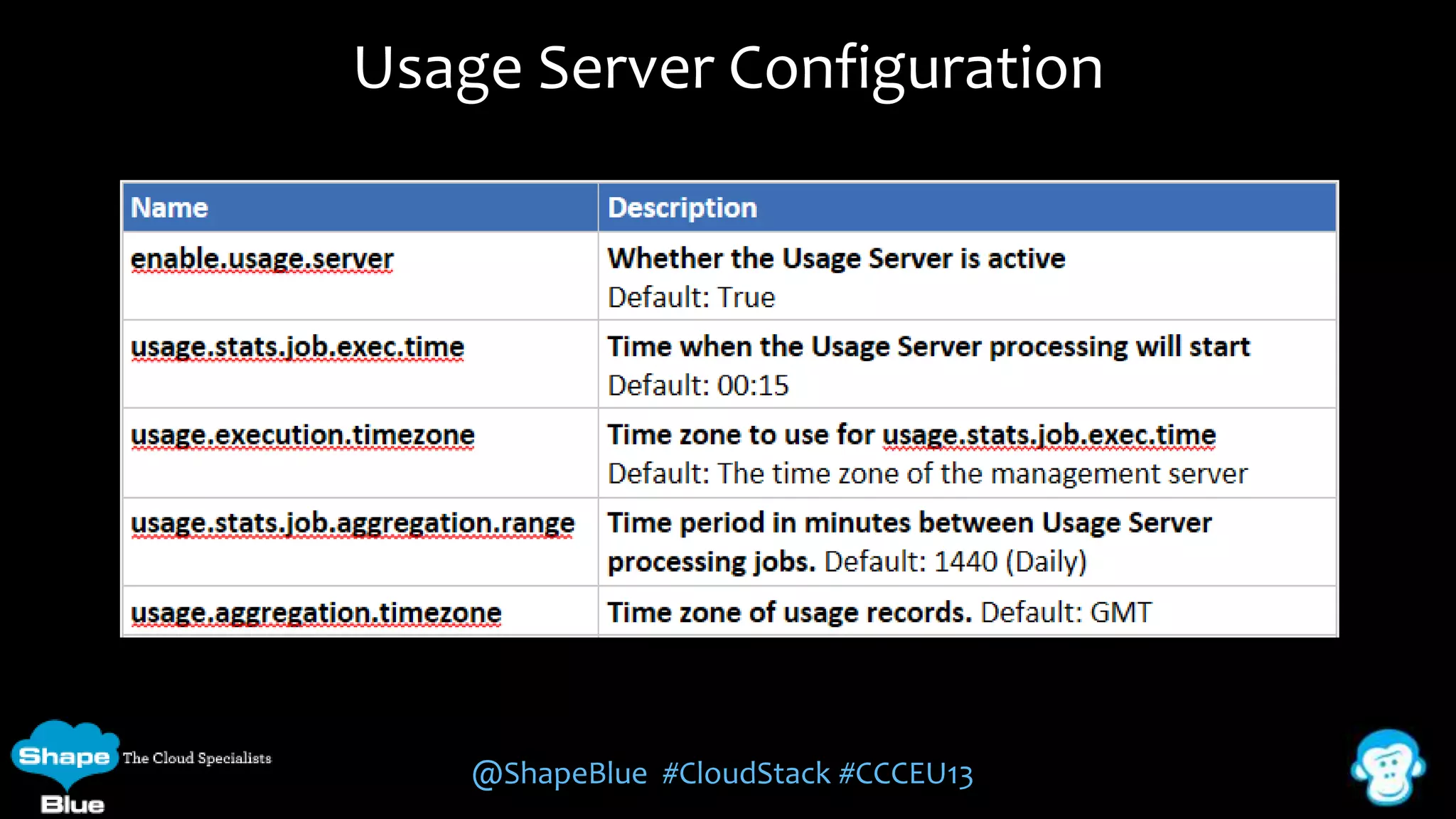
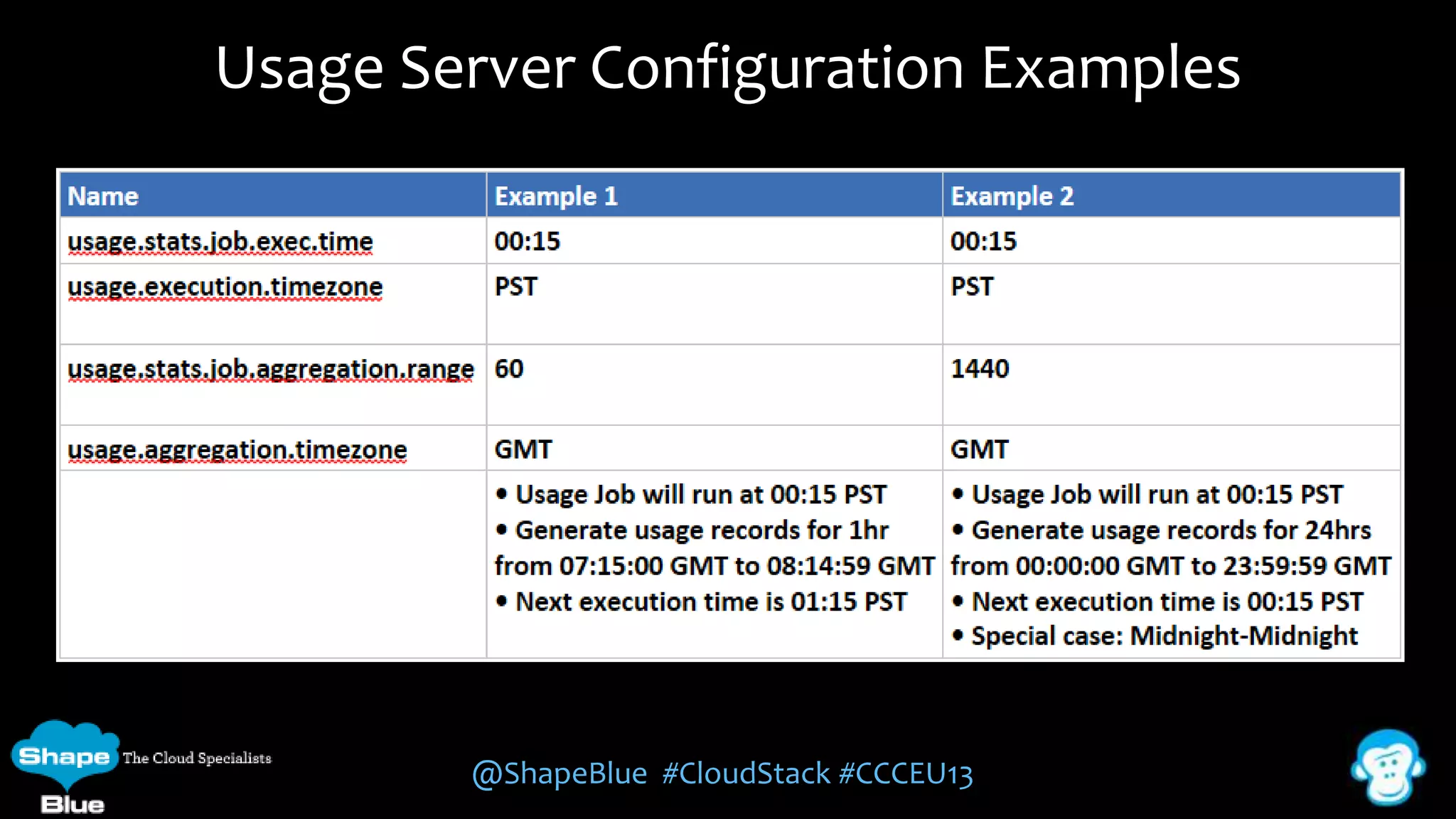
Usage Server Configuration

@ShapeBlue #CloudStack #CCCEU13
Usage Server Configuration Examples

@ShapeBlue #CloudStack #CCCEU13
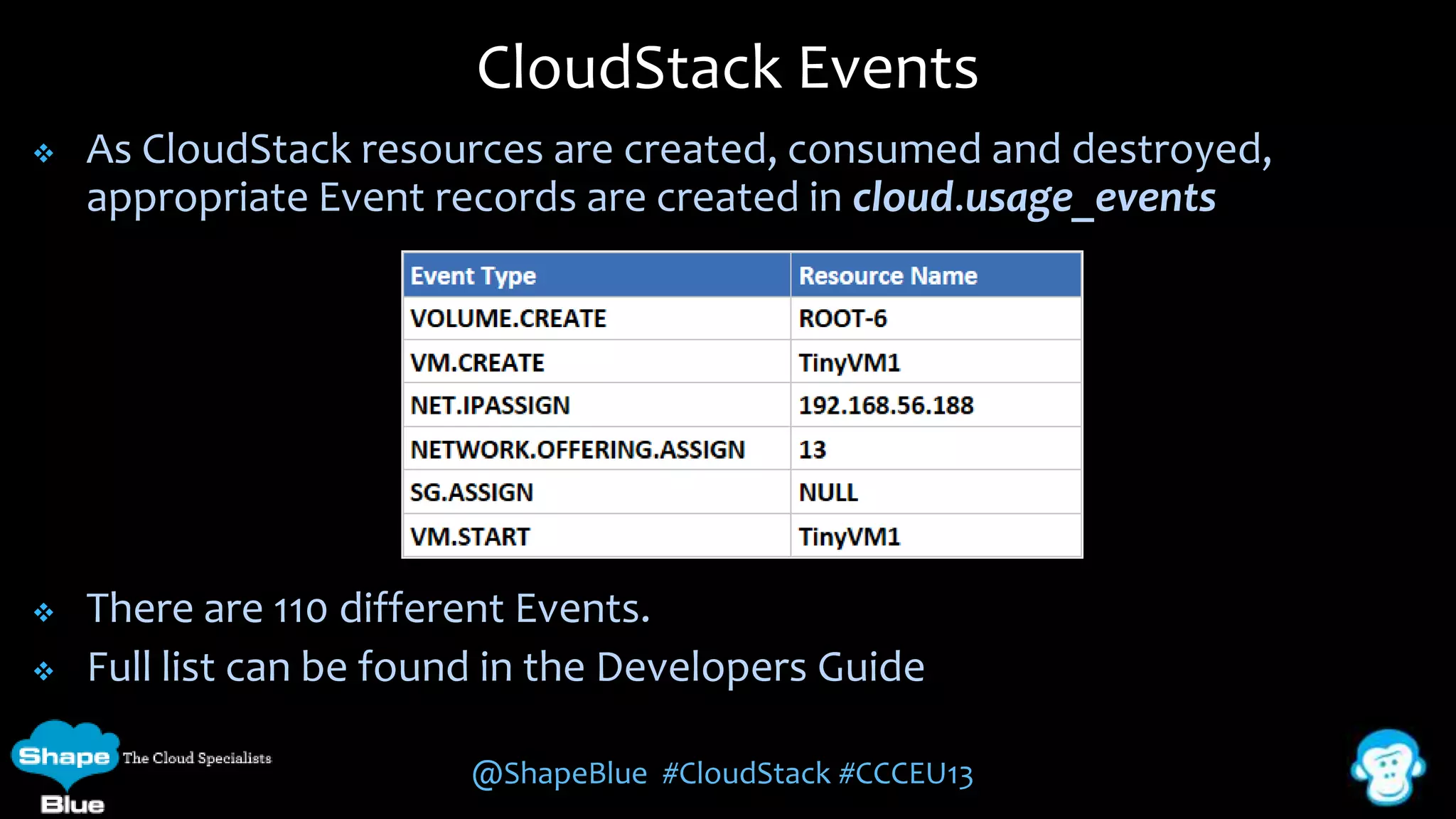
CloudStack Events


As CloudStack resources are created, consumed and destroyed,
appropriate Event records are created in cloud.usage_events



There are 110 different Events.
Full list can be found in the Developers Guide



@ShapeBlue #CloudStack #CCCEU13
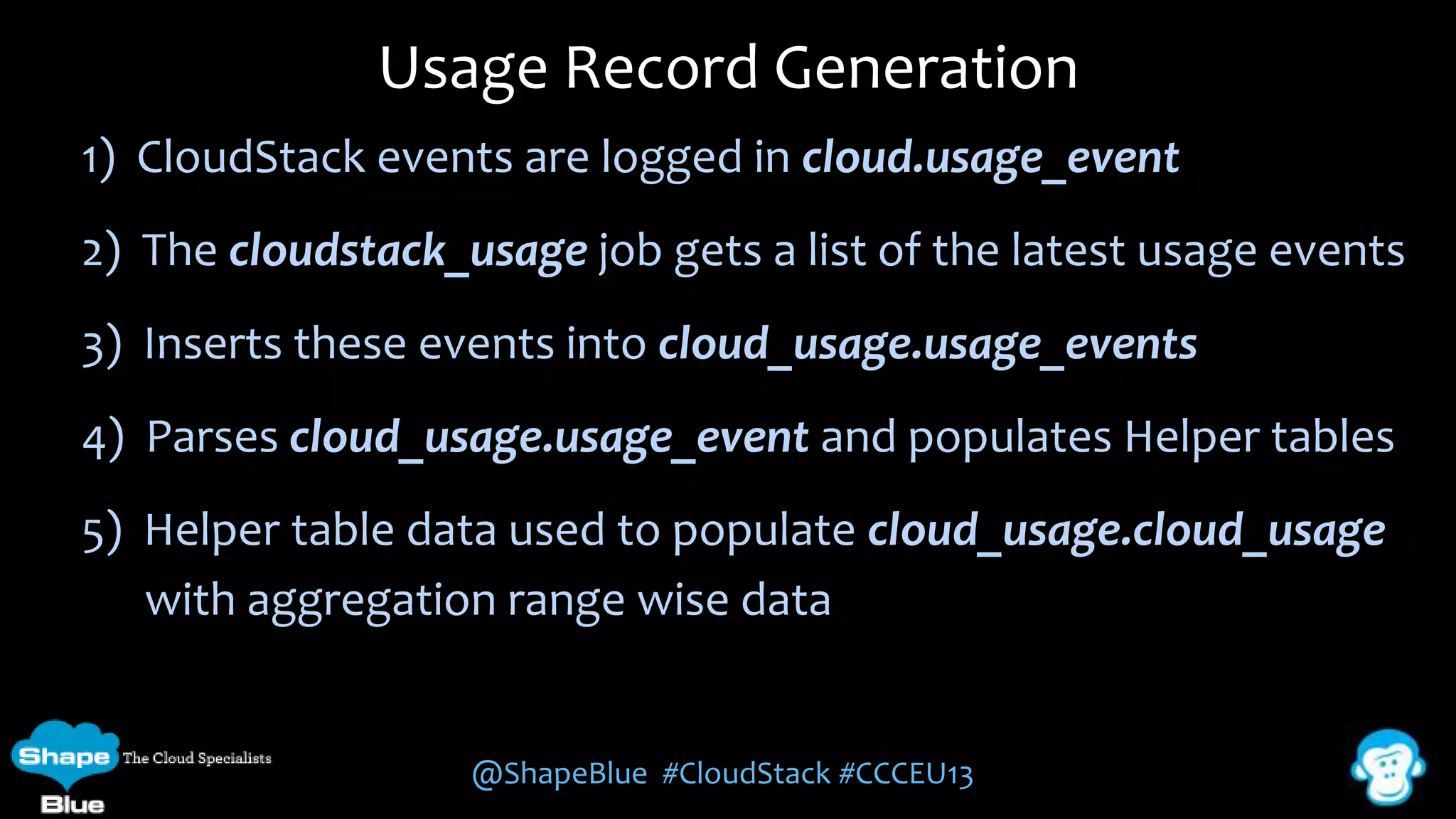
Usage Record Generation
1) CloudStack events are logged in cloud.usage_event

2) The cloudstack_usage job gets a list of the latest usage events
3) Inserts these events into cloud_usage.usage_events

4) Parses cloud_usage.usage_event and populates Helper tables
5) Helper table data used to populate cloud_usage.cloud_usage
with aggregation range wise data

@ShapeBlue #CloudStack #CCCEU13
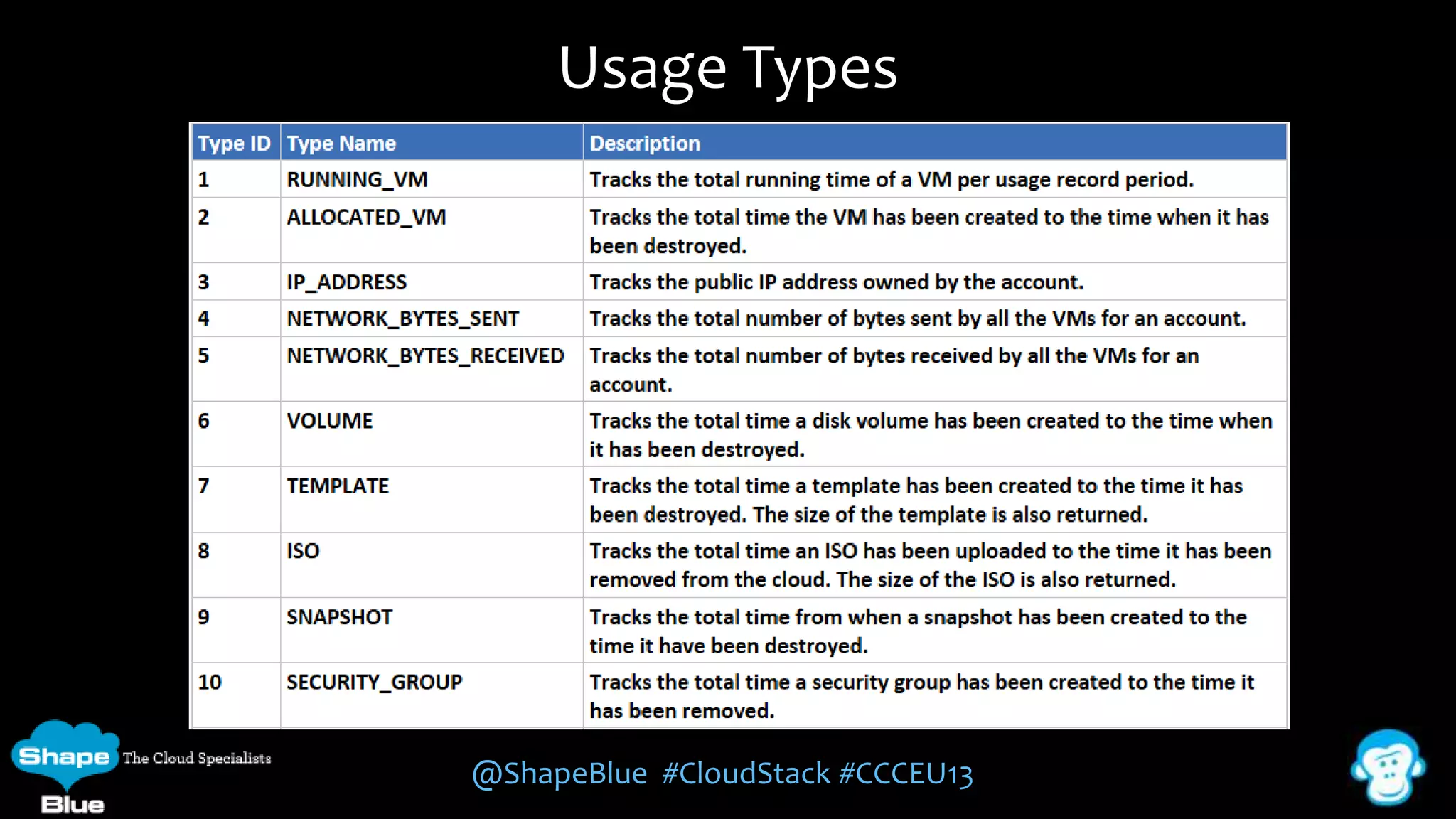
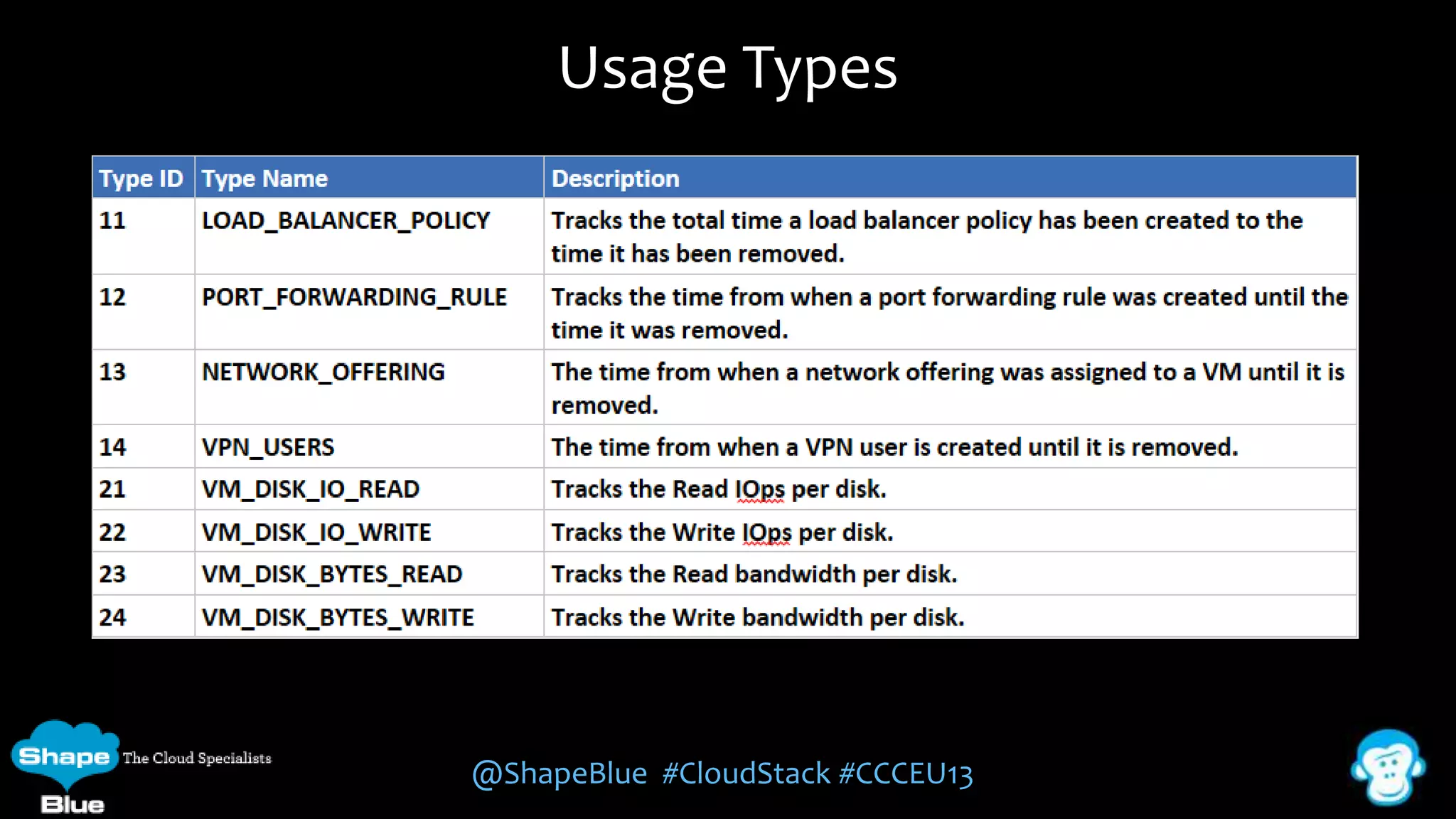
Usage Types

@ShapeBlue #CloudStack #CCCEU13
Usage Types

@ShapeBlue #CloudStack #CCCEU13
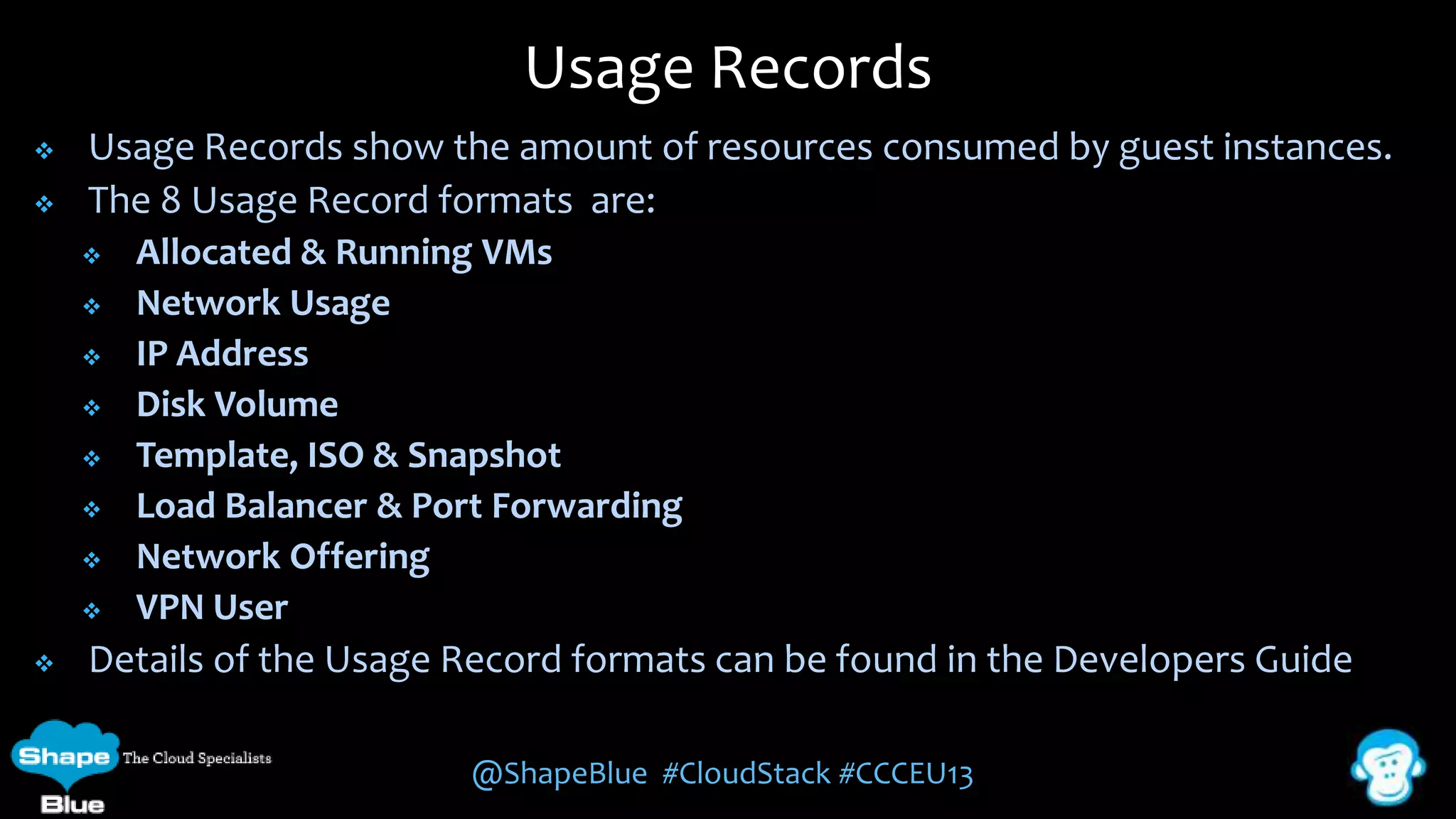
Usage Records



Usage Records show the amount of resources consumed by guest instances.
The 8 Usage Record formats are:












Allocated & Running VMs
Network Usage
IP Address
Disk Volume
Template, ISO & Snapshot
Load Balancer & Port Forwarding
Network Offering
VPN User

Details of the Usage Record formats can be found in the Developers Guide
@ShapeBlue #CloudStack #CCCEU13
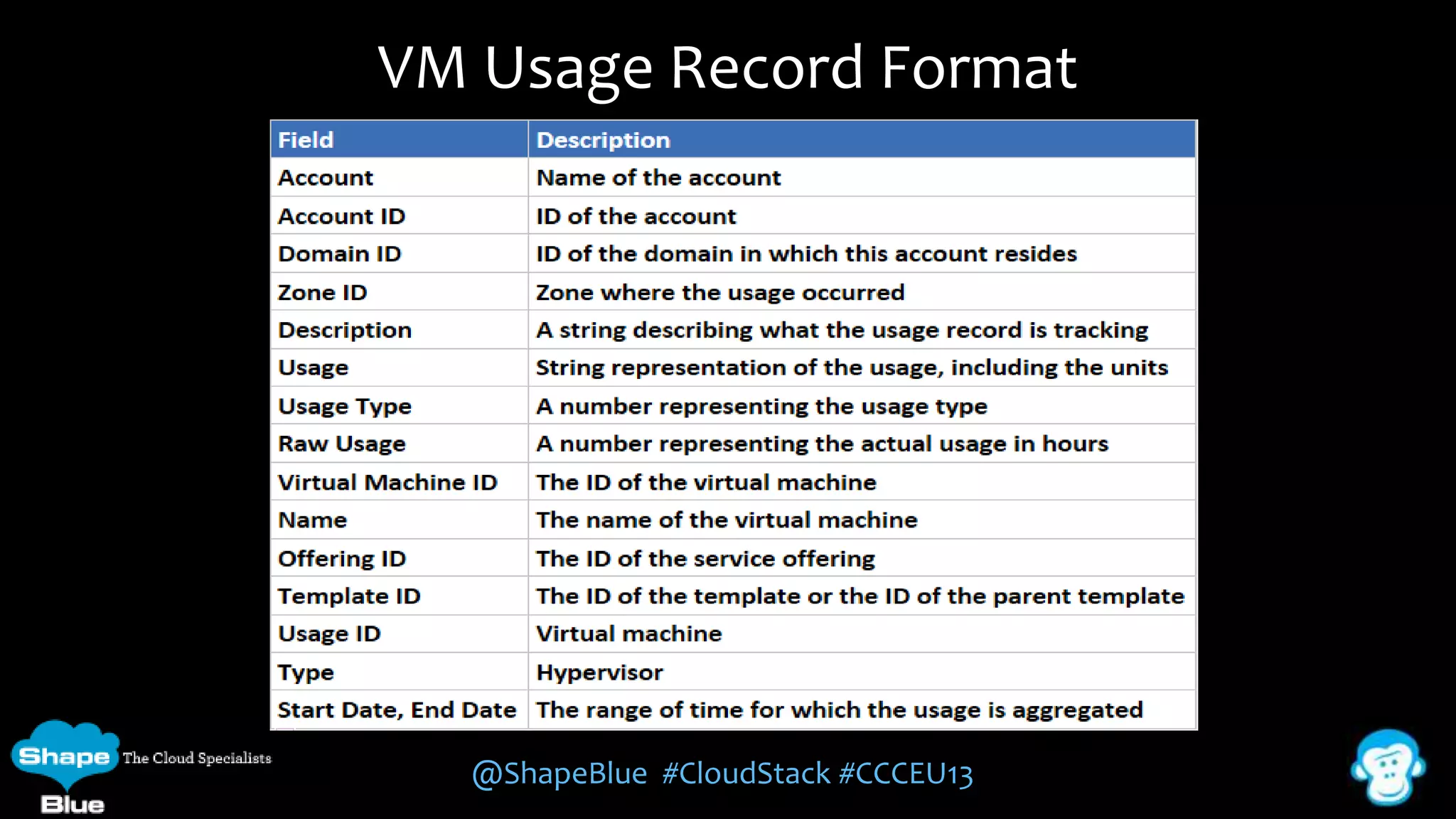
VM Usage Record Format

@ShapeBlue #CloudStack #CCCEU13
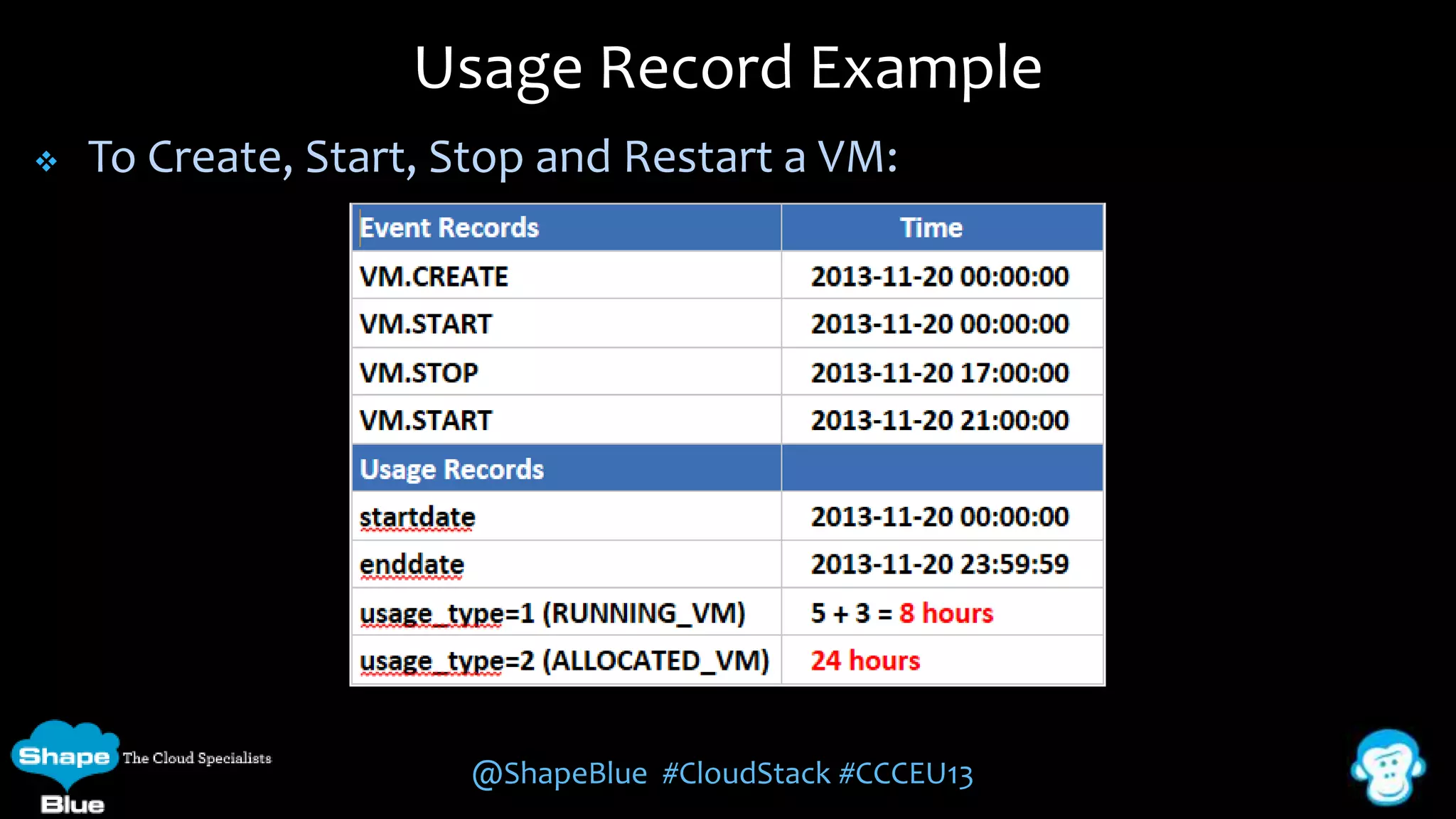
Usage Record Example


To Create, Start, Stop and Restart a VM:

@ShapeBlue #CloudStack #CCCEU13
CloudStack Usage Data

Accessing Usage Data

@ShapeBlue #CloudStack #CCCEU13
CloudStack API





The usage records can be accessed through the CloudStack API
This is best done using the authentication port 8080 and requires
both the API Key and Secret Key and for the API request to be
signed
CloudStack provides the following Root Admin API calls and
responds with XML and JSON responses:




listUsageTypes – lists available Usage Types
listUsageRecords - provides Usage records for a date range
generateUsageRecords - asynchronous usage record generation
@ShapeBlue #CloudStack #CCCEU13
ListUsageRecords API


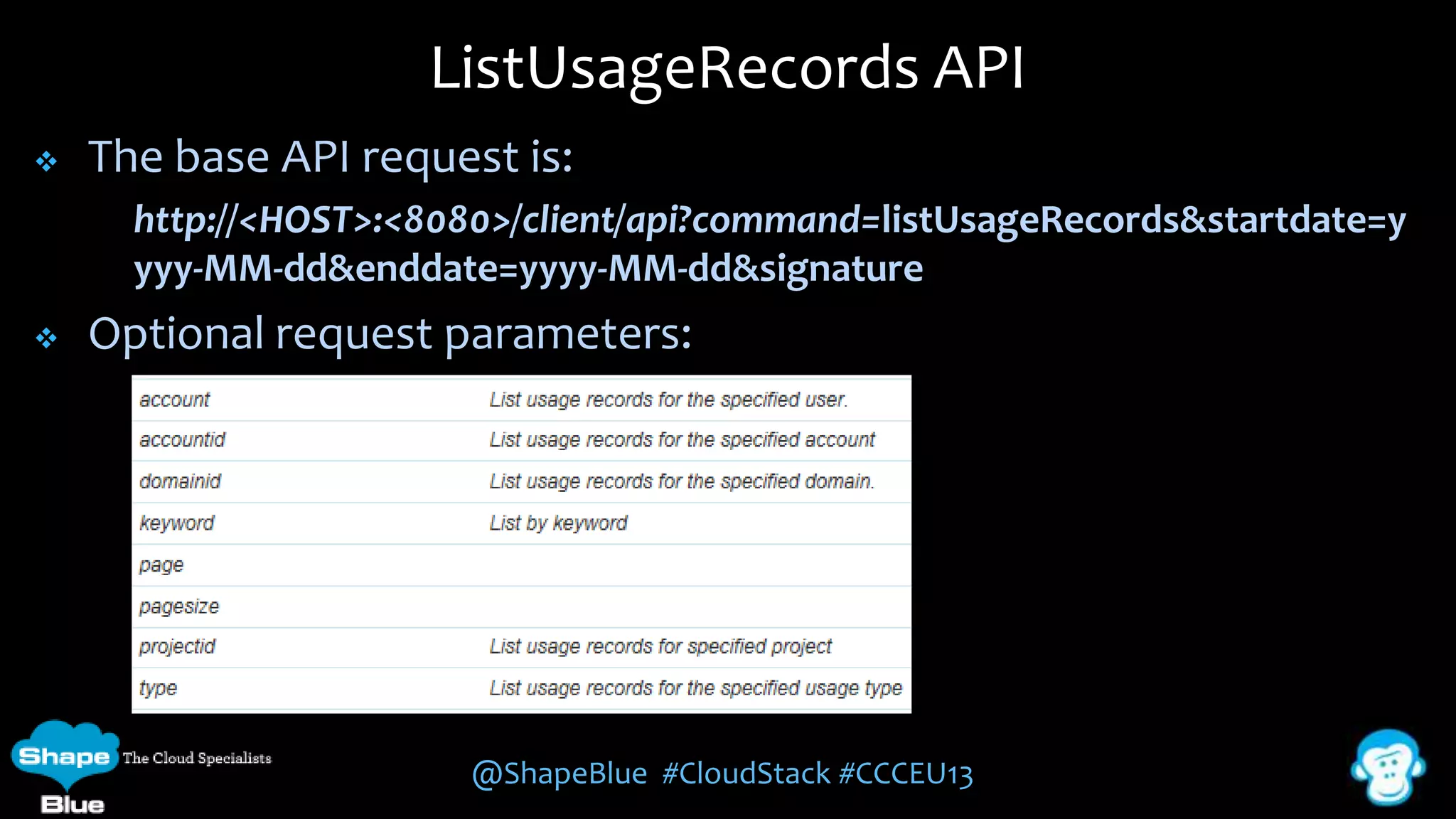
The base API request is:
http://<HOST>:<8080>/client/api?command=listUsageRecords&startdate=y
yyy-MM-dd&enddate=yyyy-MM-dd&signature



Optional request parameters:

@ShapeBlue #CloudStack #CCCEU13
ListUsageRecords Response


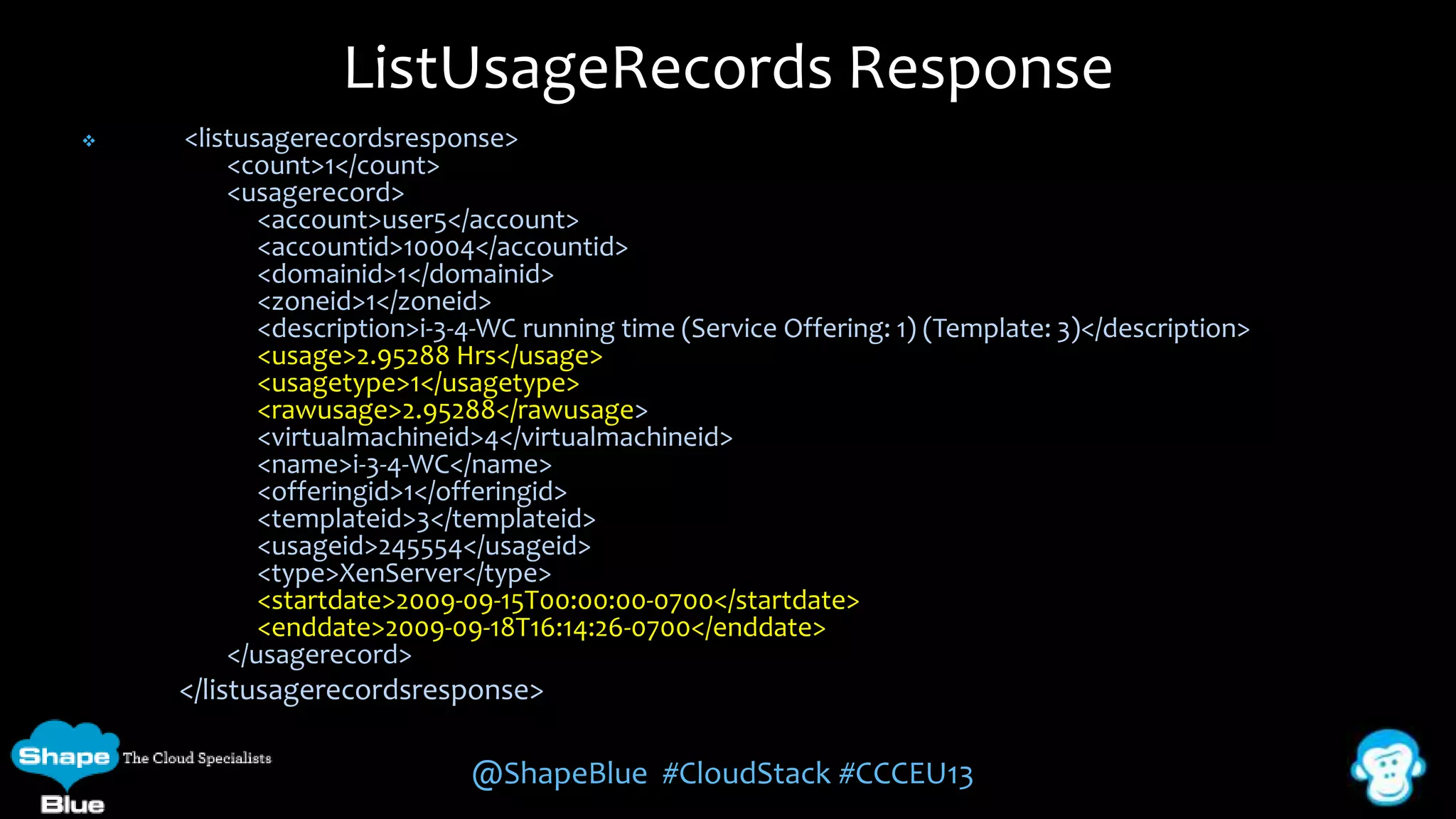
<listusagerecordsresponse>
<count>1</count>
<usagerecord>
<account>user5</account>
<accountid>10004</accountid>
<domainid>1</domainid>
<zoneid>1</zoneid>
<description>i-3-4-WC running time (Service Offering: 1) (Template: 3)</description>
<usage>2.95288 Hrs</usage>
<usagetype>1</usagetype>
<rawusage>2.95288</rawusage>
<virtualmachineid>4</virtualmachineid>
<name>i-3-4-WC</name>
<offeringid>1</offeringid>
<templateid>3</templateid>
<usageid>245554</usageid>
<type>XenServer</type>
<startdate>2009-09-15T00:00:00-0700</startdate>
<enddate>2009-09-18T16:14:26-0700</enddate>
</usagerecord>

</listusagerecordsresponse>

@ShapeBlue #CloudStack #CCCEU13
CloudMonkey CLI








CloudMonkey is a CLI tool for CloudStack and can be used as an
interactive shell or from within a shell script to call the API
It can output the Usage Data in both JSON and Tabular form to a
file or pipe it to another application for further processing
Filtering can be used to limit the result set
It supports argument passing and shell automation
The host, port, apikey and secretkey can be configured on setup

@ShapeBlue #CloudStack #CCCEU13
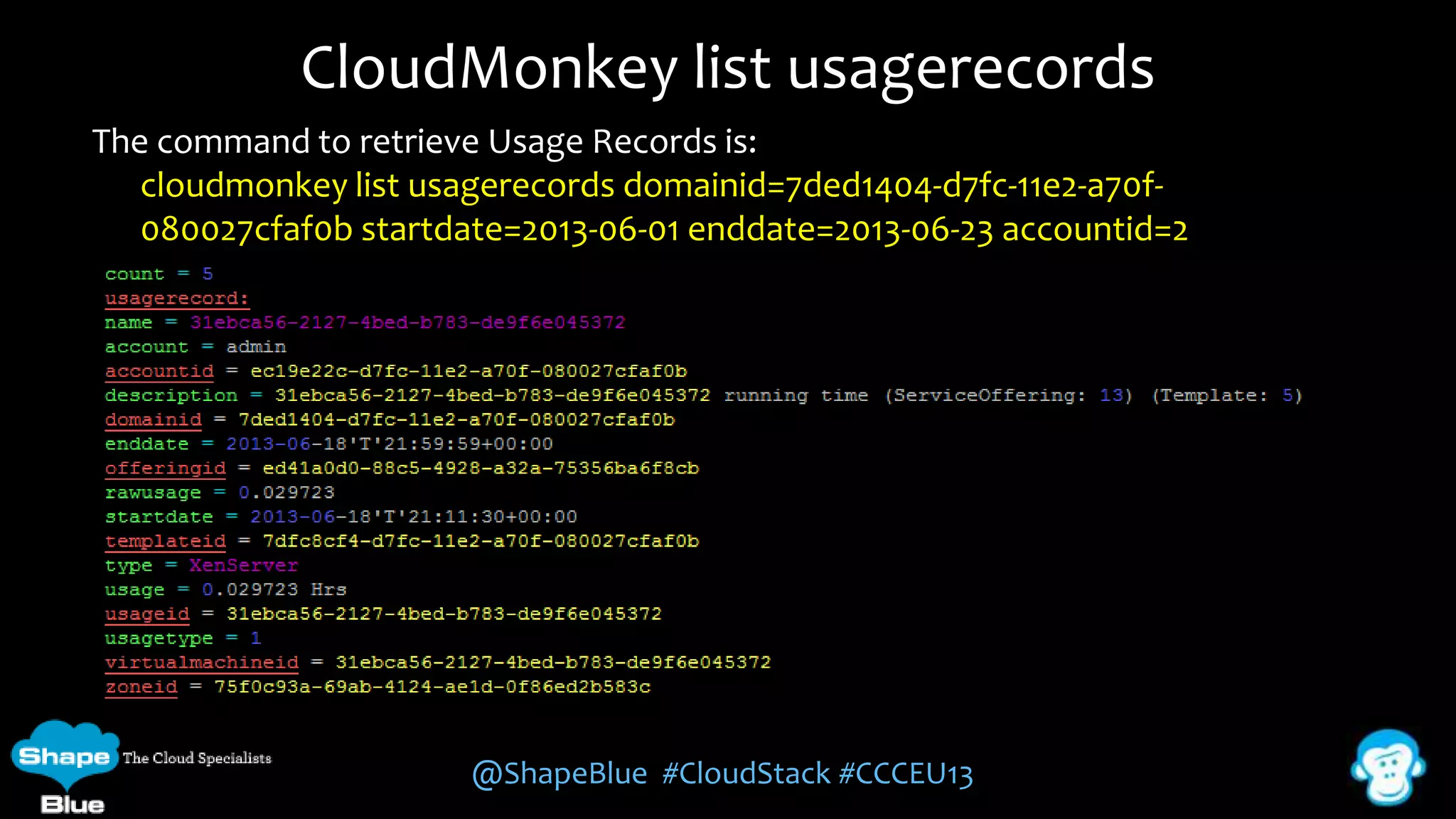
CloudMonkey list usagerecords
The command to retrieve Usage Records is:
cloudmonkey list usagerecords domainid=7ded1404-d7fc-11e2-a70f080027cfaf0b startdate=2013-06-01 enddate=2013-06-23 accountid=2

@ShapeBlue #CloudStack #CCCEU13
SQL








The usage records can be also accessed by directly querying the
cloud_usage.cloud_usage MySQL table in CloudStack
Usage Data can be exported in a CSV format from a SELECT
query
The SQL query can become complex if the ID fields in the data
need to be de-referenced
Typically multiple passes of the query results may be required to
extract the required information

@ShapeBlue #CloudStack #CCCEU13
CloudStack Message Queue









CloudStack 4.1 started publishing events onto a message queue
Uses RabbitMQ as the message broker, but likely to work with other AMQPbased brokers
Use case: A third-party cloud usage solution can subscribe to CloudStack
events and generate usage data which can be consumed by their billing
software
Great blog from Chip Childers on configuring a CloudStack management
server to publish events, and some sample code that prints each event to the
console as they are received
http://www.chipchilders.com/blog/2013/7/16/tapping-into-apache-cloudstackevents-via-amqp.html
http://cloudstack.apache.org/docs/enUS/Apache_CloudStack/4.1.0/html/Admin_Guide/events.html
@ShapeBlue #CloudStack #CCCEU13
Mediation




Once you are able to access the Usage Data, you will need to
design the mapping between the fields in the CloudStack Usage
Data and the fields of the target system
Considerations:





Do you actually need all the Usage Data for all Resources?
Any UUID values of the CloudStack resources should also be
imported into the target system for reference purposes
Decide which system will be the master for the user account data
and if synchronisation is required
@ShapeBlue #CloudStack #CCCEU13
CloudStack Usage Data

Customer Use Cases

@ShapeBlue #CloudStack #CCCEU13
MS Excel






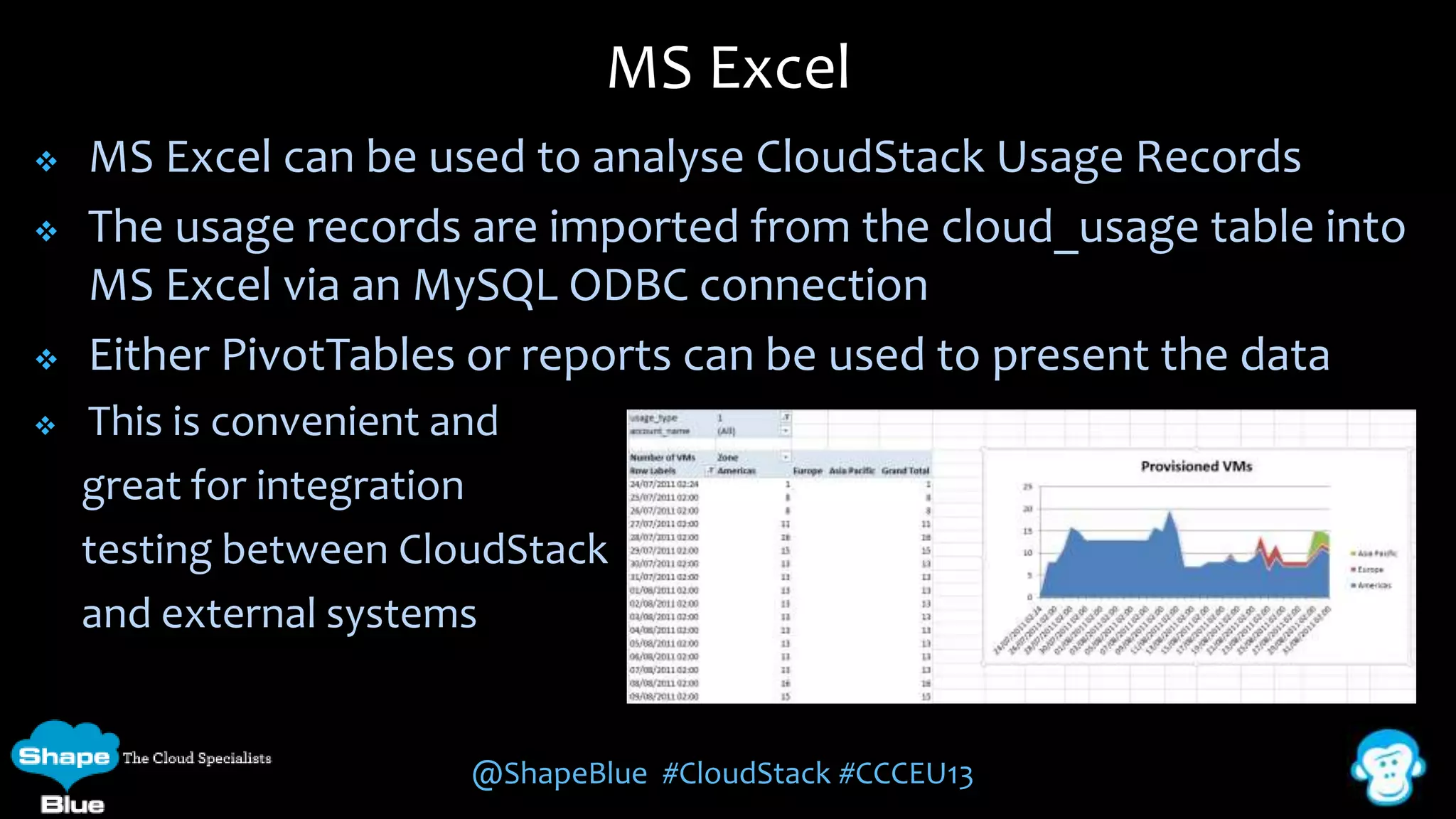
MS Excel can be used to analyse CloudStack Usage Records
The usage records are imported from the cloud_usage table into
MS Excel via an MySQL ODBC connection
Either PivotTables or reports can be used to present the data
This is convenient and
great for integration
testing between CloudStack
and external systems

@ShapeBlue #CloudStack #CCCEU13
Citrix CloudPortal






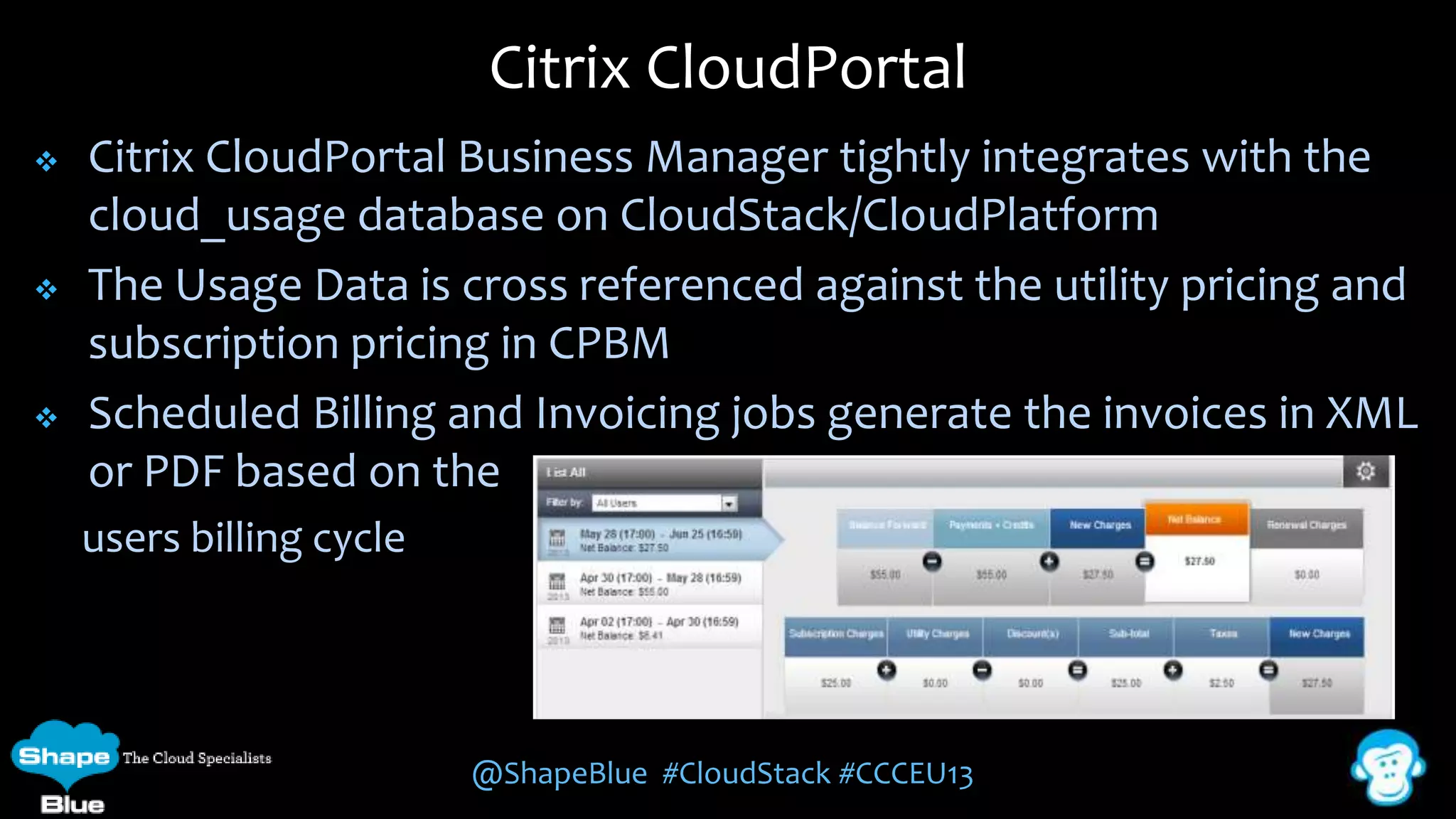
Citrix CloudPortal Business Manager tightly integrates with the
cloud_usage database on CloudStack/CloudPlatform
The Usage Data is cross referenced against the utility pricing and
subscription pricing in CPBM
Scheduled Billing and Invoicing jobs generate the invoices in XML
or PDF based on the
users billing cycle

@ShapeBlue #CloudStack #CCCEU13
Splunk>






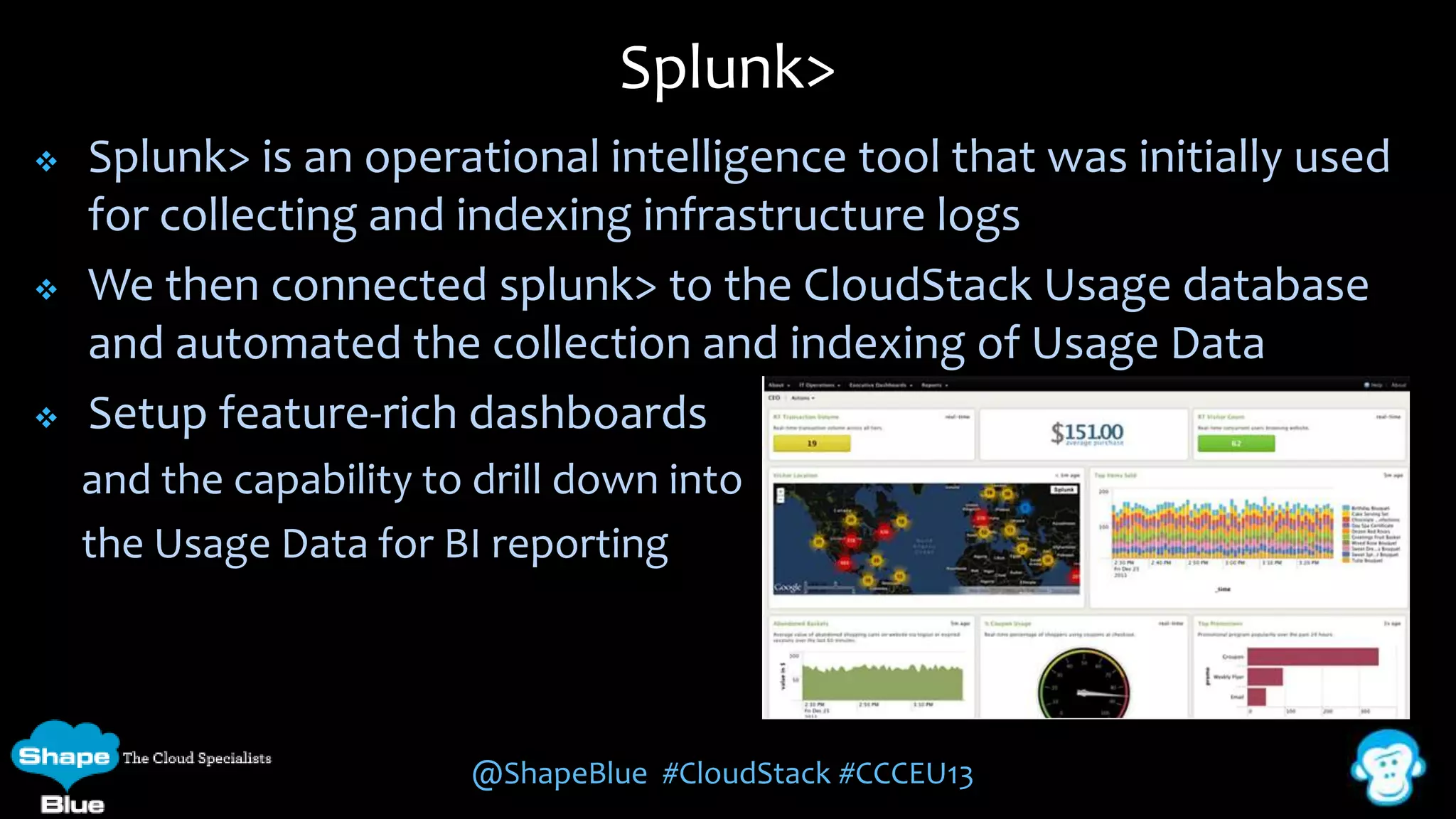
Splunk> is an operational intelligence tool that was initially used
for collecting and indexing infrastructure logs
We then connected splunk> to the CloudStack Usage database
and automated the collection and indexing of Usage Data
Setup feature-rich dashboards
and the capability to drill down into
the Usage Data for BI reporting

@ShapeBlue #CloudStack #CCCEU13
Amysta






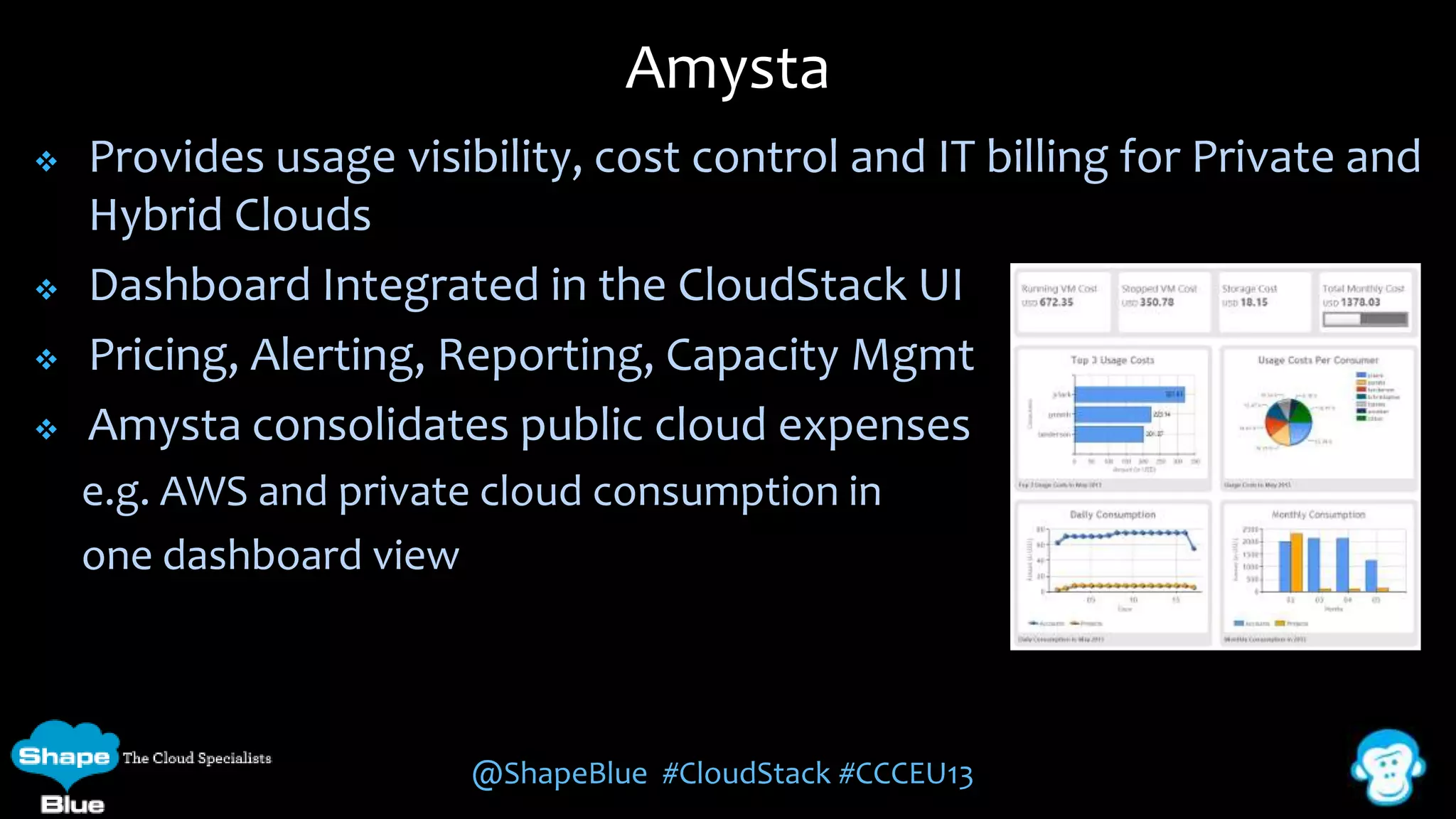
Provides usage visibility, cost control and IT billing for Private and
Hybrid Clouds
Dashboard Integrated in the CloudStack UI
Pricing, Alerting, Reporting, Capacity Mgmt
Amysta consolidates public cloud expenses
e.g. AWS and private cloud consumption in
one dashboard view

@ShapeBlue #CloudStack #CCCEU13
Further Information





Slides: www.slideshare.net/shapeblue
Blogs: www.shapeblue.com/blogs
CloudStack Developers Guide, API Documentation & Wiki:
http://cloudstack.apache.org/



CloudStack Mailing Lists (Users, Development, Marketing):
http://cloudstack.apache.org/mailing-lists.html



CloudMonkey:
https://cwiki.apache.org/CLOUDSTACK/cloudstack+cloudmonkey+cli



How to Use MS Excel to Analyze CloudStack Usage Records:
http://support.citrix.com/article/CTX132030
@ShapeBlue #CloudStack #CCCEU13
Working with
CloudStack Usage Data
Tariq Iqbal
Senior Consultant
tariq.iqbal@shapeblue.com
Twitter: @TariqIqbal_ @ShapeBlue

Working with CloudStack Usage Data

  • 1.
    Working with CloudStack UsageData Tariq Iqbal Senior Consultant tariq.iqbal@shapeblue.com Twitter: @TariqIqbal_ @ShapeBlue
  • 2.
    About Me    Involved withCloudStack before donation to Apache Built and deployed CloudStack/CloudPlatform based clouds for Enterprises and Service Providers globally - SunGard, Ascenty Specialise in integrating CloudStack with Business Support and Operational Support systems, which include:     CloudPortals (including Payment Gateways, Fraud Control solutions) Ticketing Systems – ServiceDesk, Email CRM/ERP Systems – SAPB/1, Salesforce.com Monitoring Solutions – Nagios, Splunk, Zenoss @ShapeBlue #CloudStack #CCCEU13
  • 3.
    About ShapeBlue “ShapeBlue areexpert builders of public & private clouds. They are the leading global independent CloudStack / CloudPlatform integrator & consultancy” “ShapeBlue is absolutely one of the top experts on deploying CloudStack. Great company and very deep skill set” “First to offer professional 24x7x365 support of Apache CloudStack” @ShapeBlue #CloudStack #CCCEU13
  • 4.
    Overview      CloudStack Usage CloudStack Configuration UsageData Generation Usage Data Access Customer Use Cases @ShapeBlue #CloudStack #CCCEU13
  • 5.
    Usage Requirements  Organisations needto be able to meter their cloud's consumption to:     Monetize the cloud offerings by charging for usage Report on the cloud’s resource usage for monitoring/capacity planning Majority of organisations already have existing BSS/OSS and just need access to the usage data Organisations tend to have different billing criteria/charging models and require access to usage data for their specific needs @ShapeBlue #CloudStack #CCCEU13
  • 6.
    Usage in CloudStacktoday  CloudStack does not offer any native usage monitoring or billing/chargeback capability  Root Admin can view current System Capacity  Domain Admin and Users can view VM statistics @ShapeBlue #CloudStack #CCCEU13
  • 7.
    Usage Server  CloudStack includesa Usage Server:      Optional Component Separately installed service called ‘cloudstack-usage’ Runs once a day (Default) Creates aggregated usage records for the various resources consumed in CloudStack The usage records are stored in a separate database called ‘cloud_usage’ @ShapeBlue #CloudStack #CCCEU13
  • 8.
  • 9.
    Usage Server ConfigurationExamples @ShapeBlue #CloudStack #CCCEU13
  • 10.
    CloudStack Events  As CloudStackresources are created, consumed and destroyed, appropriate Event records are created in cloud.usage_events  There are 110 different Events. Full list can be found in the Developers Guide  @ShapeBlue #CloudStack #CCCEU13
  • 11.
    Usage Record Generation 1)CloudStack events are logged in cloud.usage_event 2) The cloudstack_usage job gets a list of the latest usage events 3) Inserts these events into cloud_usage.usage_events 4) Parses cloud_usage.usage_event and populates Helper tables 5) Helper table data used to populate cloud_usage.cloud_usage with aggregation range wise data @ShapeBlue #CloudStack #CCCEU13
  • 12.
  • 13.
  • 14.
    Usage Records   Usage Recordsshow the amount of resources consumed by guest instances. The 8 Usage Record formats are:          Allocated & Running VMs Network Usage IP Address Disk Volume Template, ISO & Snapshot Load Balancer & Port Forwarding Network Offering VPN User Details of the Usage Record formats can be found in the Developers Guide @ShapeBlue #CloudStack #CCCEU13
  • 15.
    VM Usage RecordFormat @ShapeBlue #CloudStack #CCCEU13
  • 16.
    Usage Record Example  ToCreate, Start, Stop and Restart a VM: @ShapeBlue #CloudStack #CCCEU13
  • 17.
    CloudStack Usage Data AccessingUsage Data @ShapeBlue #CloudStack #CCCEU13
  • 18.
    CloudStack API    The usagerecords can be accessed through the CloudStack API This is best done using the authentication port 8080 and requires both the API Key and Secret Key and for the API request to be signed CloudStack provides the following Root Admin API calls and responds with XML and JSON responses:    listUsageTypes – lists available Usage Types listUsageRecords - provides Usage records for a date range generateUsageRecords - asynchronous usage record generation @ShapeBlue #CloudStack #CCCEU13
  • 19.
    ListUsageRecords API  The baseAPI request is: http://<HOST>:<8080>/client/api?command=listUsageRecords&startdate=y yyy-MM-dd&enddate=yyyy-MM-dd&signature  Optional request parameters: @ShapeBlue #CloudStack #CCCEU13
  • 20.
    ListUsageRecords Response  <listusagerecordsresponse> <count>1</count> <usagerecord> <account>user5</account> <accountid>10004</accountid> <domainid>1</domainid> <zoneid>1</zoneid> <description>i-3-4-WC runningtime (Service Offering: 1) (Template: 3)</description> <usage>2.95288 Hrs</usage> <usagetype>1</usagetype> <rawusage>2.95288</rawusage> <virtualmachineid>4</virtualmachineid> <name>i-3-4-WC</name> <offeringid>1</offeringid> <templateid>3</templateid> <usageid>245554</usageid> <type>XenServer</type> <startdate>2009-09-15T00:00:00-0700</startdate> <enddate>2009-09-18T16:14:26-0700</enddate> </usagerecord> </listusagerecordsresponse> @ShapeBlue #CloudStack #CCCEU13
  • 21.
    CloudMonkey CLI      CloudMonkey isa CLI tool for CloudStack and can be used as an interactive shell or from within a shell script to call the API It can output the Usage Data in both JSON and Tabular form to a file or pipe it to another application for further processing Filtering can be used to limit the result set It supports argument passing and shell automation The host, port, apikey and secretkey can be configured on setup @ShapeBlue #CloudStack #CCCEU13
  • 22.
    CloudMonkey list usagerecords Thecommand to retrieve Usage Records is: cloudmonkey list usagerecords domainid=7ded1404-d7fc-11e2-a70f080027cfaf0b startdate=2013-06-01 enddate=2013-06-23 accountid=2 @ShapeBlue #CloudStack #CCCEU13
  • 23.
    SQL     The usage recordscan be also accessed by directly querying the cloud_usage.cloud_usage MySQL table in CloudStack Usage Data can be exported in a CSV format from a SELECT query The SQL query can become complex if the ID fields in the data need to be de-referenced Typically multiple passes of the query results may be required to extract the required information @ShapeBlue #CloudStack #CCCEU13
  • 24.
    CloudStack Message Queue       CloudStack4.1 started publishing events onto a message queue Uses RabbitMQ as the message broker, but likely to work with other AMQPbased brokers Use case: A third-party cloud usage solution can subscribe to CloudStack events and generate usage data which can be consumed by their billing software Great blog from Chip Childers on configuring a CloudStack management server to publish events, and some sample code that prints each event to the console as they are received http://www.chipchilders.com/blog/2013/7/16/tapping-into-apache-cloudstackevents-via-amqp.html http://cloudstack.apache.org/docs/enUS/Apache_CloudStack/4.1.0/html/Admin_Guide/events.html @ShapeBlue #CloudStack #CCCEU13
  • 25.
    Mediation   Once you areable to access the Usage Data, you will need to design the mapping between the fields in the CloudStack Usage Data and the fields of the target system Considerations:    Do you actually need all the Usage Data for all Resources? Any UUID values of the CloudStack resources should also be imported into the target system for reference purposes Decide which system will be the master for the user account data and if synchronisation is required @ShapeBlue #CloudStack #CCCEU13
  • 26.
    CloudStack Usage Data CustomerUse Cases @ShapeBlue #CloudStack #CCCEU13
  • 27.
    MS Excel     MS Excelcan be used to analyse CloudStack Usage Records The usage records are imported from the cloud_usage table into MS Excel via an MySQL ODBC connection Either PivotTables or reports can be used to present the data This is convenient and great for integration testing between CloudStack and external systems @ShapeBlue #CloudStack #CCCEU13
  • 28.
    Citrix CloudPortal    Citrix CloudPortalBusiness Manager tightly integrates with the cloud_usage database on CloudStack/CloudPlatform The Usage Data is cross referenced against the utility pricing and subscription pricing in CPBM Scheduled Billing and Invoicing jobs generate the invoices in XML or PDF based on the users billing cycle @ShapeBlue #CloudStack #CCCEU13
  • 29.
    Splunk>    Splunk> is anoperational intelligence tool that was initially used for collecting and indexing infrastructure logs We then connected splunk> to the CloudStack Usage database and automated the collection and indexing of Usage Data Setup feature-rich dashboards and the capability to drill down into the Usage Data for BI reporting @ShapeBlue #CloudStack #CCCEU13
  • 30.
    Amysta     Provides usage visibility,cost control and IT billing for Private and Hybrid Clouds Dashboard Integrated in the CloudStack UI Pricing, Alerting, Reporting, Capacity Mgmt Amysta consolidates public cloud expenses e.g. AWS and private cloud consumption in one dashboard view @ShapeBlue #CloudStack #CCCEU13
  • 31.
    Further Information    Slides: www.slideshare.net/shapeblue Blogs:www.shapeblue.com/blogs CloudStack Developers Guide, API Documentation & Wiki: http://cloudstack.apache.org/  CloudStack Mailing Lists (Users, Development, Marketing): http://cloudstack.apache.org/mailing-lists.html  CloudMonkey: https://cwiki.apache.org/CLOUDSTACK/cloudstack+cloudmonkey+cli  How to Use MS Excel to Analyze CloudStack Usage Records: http://support.citrix.com/article/CTX132030 @ShapeBlue #CloudStack #CCCEU13
  • 32.
    Working with CloudStack UsageData Tariq Iqbal Senior Consultant tariq.iqbal@shapeblue.com Twitter: @TariqIqbal_ @ShapeBlue