eCTD Submissions


                   Saikat Chakraborty
WHAT IS COMMON TECHNICAL DOCUMENT?

 CTD is an ICH standard that FDA adopted in a consensus process,
 as a member of ICH, together with other member regions, Europe
 and Japan
 Currently global format for regulatory submissions
 Consistent data organization
 Method to electronically transfer product information and data
 Collection of electronic files organized according to guidelines
 defining file format, folder/files naming convention, document
 specifications etc.
 Applies to all NDAs, ANDAs, BLAs, INDs and master files
The eCTD challenge
In the US, eCTD-only NDAs, BLAs and INDs are accepted – no
paper necessary

eCTD plus paper still needed for Medical authorities in EU

Paper is still the official archival copy of the EU MA

EU wants eCTD as preferred format for all Marketing
Authorization Applications(MAAs) and variations

Only eCTD for MA for all EU members states by 1 Jan 2010

Health Canada wants eCTD format on CD/DVD plus paper
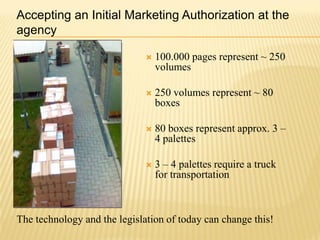
Accepting an Initial Marketing Authorization at the
agency

                                 100.000 pages represent ~ 250
                                  volumes

                                 250 volumes represent ~ 80
                                  boxes

                                 80 boxes represent approx. 3 –
                                  4 palettes

                                 3 – 4 palettes require a truck
                                  for transportation


The technology and the legislation of today can change this!
NEED FOR ELECTRONIC SUBMISSIONS
Designed with consideration that facilitate
  Creation

  Review

  Assists project management and information management

  Lifecycle management

  (the history of a product application)

  Archiving

  Drug development planning
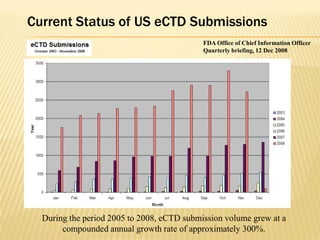
Current Status of US eCTD Submissions
                                            FDA Office of Chief Information Officer
                                            Quarterly briefing, 12 Dec 2008


  During the period 2005 to 2008, eCTD submission volume grew at a
       compounded annual growth rate of approximately 300%.
Barriers to adoption typically include:
 Costs (initial capital: $200K- $300K and annual expense: $100
- $200K) of building, validating and operating an electronic
publishing system.
Effort and time to learn and understand the regulatory
requirements and to develop the organizational competency to
efficiently produce compliant eCTD submissions.
Growth of eCTD as a fraction of total submissions.
In 2007, eCTDs represented 10% of total submissions to CDER.
By February 2009, eCTDs were 20% of the total received.
It is expected that by the end of 2012, eCTD submissions may
represent 40 or 50% of total submissions to CDER.
Basics of eCTD
The ICH M4 Expert Working Group (EWG) has defined the
Common Technical Document (CTD).

The ICH M2 EWG has defined, in the current document, the
specification for the Electronic Common Technical Document
(eCTD).

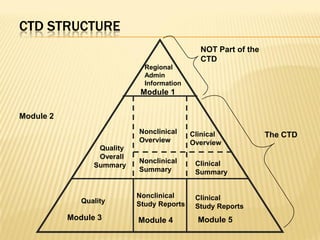
There are 5 modules in the submission report.

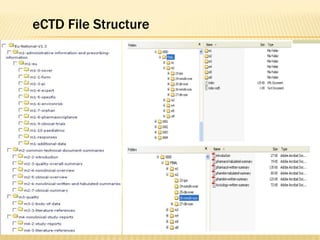
A hierarchical cabinet/folder structure containing the electronic
documents (PDF).

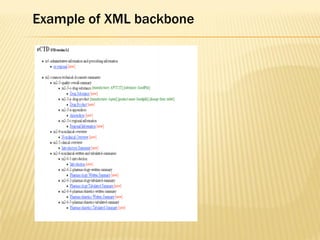
An XML backbone that provides a structure to display the PDF
documents in the eCTD format (eCTD viewer)
CTD STRUCTURE
                                              NOT Part of the
                                              CTD
                              Regional
                              Admin
                              Information
                             Module 1


Module 2
                            Nonclinical     Clinical            The CTD
                            Overview        Overview
                  Quality
                  Overall
                            Nonclinical      Clinical
                 Summary
                            Summary          Summary


                            Nonclinical      Clinical
              Quality       Study Reports    Study Reports
           Module 3         Module 4          Module 5
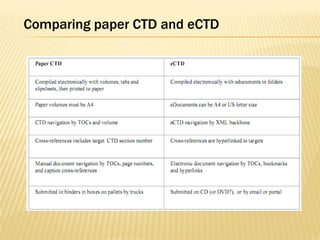
Comparing paper CTD and eCTD
eCTD File Structure
Example of XML backbone
XML Mapping to Folder
Document Granularity
All eCTD Submissions Include Module 1
Module 1 Identifies important information
  Company Name

  Drug Name

  Submission Type

  Submission Date

  Application Number

  Sequence Number
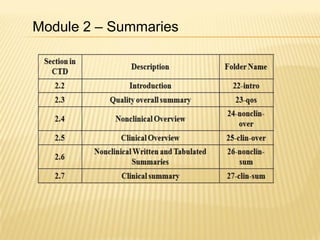
Module 2 – Summaries
Document granularity – Module 3

 Module 3 consists of highly granular Quality documents that can
 be individually updated

 ICH eCTD specification and CTD guidance provides level of

 granularity

 Module 3 contains hundreds of granules in MA
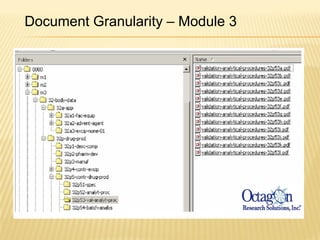
Document Granularity – Module 3
Document granularity – Modules 4 and 5

Study report formats

– Legacy report

• Report components published and submitted as a single

PDF with maximum size 100 MB

– Granular report – US eCTD

• Study documents submitted as separate PDF files as originally
  published
Module 4 contains the Preclinical data
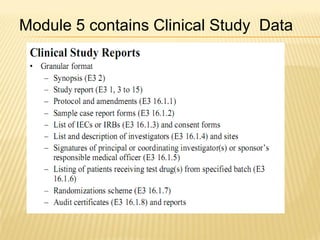
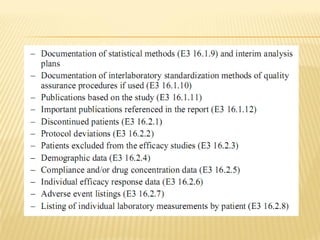
Module 5 contains Clinical Study Data
Document Publishing

Use tools based on Adobe Acrobat 5.0 or higher

(PDF version 1.4)

Publishing greatly facilitated by use of Word templates

Automate extraction of bookmarks and hyperlinks from Word files

Create PDFs from intelligent source- MS Office—Word, Excel,
PowerPoint or Other word processors, spreadsheets, ASCII text etc.

PDF should be text searchable, however some legacy document
may only be available in scanned form
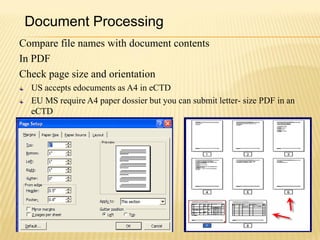
Document Processing
Compare file names with document contents
In PDF
Check page size and orientation
  US accepts edocuments as A4 in eCTD
  EU MS require A4 paper dossier but you can submit letter- size PDF in an
  eCTD
Scanned Documents
Avoid scanning unless no other choice
If You Must Scan


    Document Type                         Resolution
    Handwritten notes                     300 dpi (black ink)
    Plotter output graphics               300 dpi
    Photographs—b&w                       600 dpi (8 bit gray scale)
    Photographs—color                     600 dpi (24 bit RGB)
    Gels and karotypes                    600 dpi (8 bit grayscale depth)
    High pressure liquid chromatography   300 dpi
Hypertext Linking
Navigation improved for PDF documents

Hypertext links for:
„
Annotations

„Related sections

„References

„
Appendices

„Tables or figures

„For anything not located on same page
Table of contents and hyperlinks
Hyperlinks designated by blue text or rectangles with thin lines
   „Blue text for PDFs from intelligent source
   „Thin rectangles only option for scanned documents
„Tables of Contents
   „Hyperlinked
   „Invisible rectangles and blue text preferred
Bookmarks and Hyperlink
Bookmarks
– Match the document TOC
– Bookmarks – Up to level 4, e.g. 1.1.1.1
– For documents with multiple granules, each granule
has its own bookmarks
Provide Bookmarks with Intuitive Names
          Incorrect                             Correct
Bookmarks and Hyperlink
One of the important aspect in eCTD reports is to maintain ‘inherit
zoom’ throughout the document.
eCTD publishing system should generate automatically.
It can also be done manually with arcobat.
Bookmarks Hierarchy       Initial View = Bookmarks & Page


Page Numbering
Document Page = PDF Page
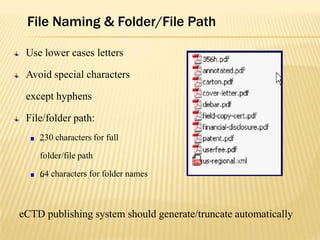
File Naming & Folder/File Path

 Use lower cases letters

 Avoid special characters

 except hyphens

 File/folder path:
    2
    „ 30 characters for full

    folder/file path

    6
    „ 4 characters for folder names


eCTD publishing system should generate/truncate automatically
Verbally Communicated Requirements
Font size
      „12 point font for text
      „10 point for tables (9.5 pt)
Font Style:
      Arial, Times New Roman, Courier

Optimize for Fast Web View
QC of eCTD
Precompilation

  QC interdocument links

  100% QC that all bookmarks and hyperlinks are live

  100% QC that all bookmarks and hyperlinks point to the correct targets

  Check all all documents for presence and location

  Check document titles in eCTD viewer

Postcompilation

  Validate eCTD

  Recheck for broken links
Submitting the eCTD
Cover letter (From the ICH eCTD spec, v. 3.2.2) as paper copy
with any non-electronic portions and as cover.pdf
  A description of the submission including appropriate regulatory
  information.
  A listing of the sections of the submission filed as paper,
  electronic, or both paper and electronic.
  A description of the electronic submission including type and
  number of electronic media,
  Approximate size of the submission, and, if appropriate,
  characteristics concerning the media (e.g. Format used for DLT
  tapes) based on regional guidance.
Submitting an eCTD
A statement that the submission is virus free with a description of
the software used to check the files for viruses.

The regulatory and information technology points of contact for
the submission.

Copy eCTD to CD-ROM, DVD or DLT master

Reload eCTD from CD, DVD or DLT master and revalidate

Create eCTD copies from master

Number of copies determined by each EU MS
Points to Remember
1. Files Referenced in the XML Backbone(s)
2. eCTD Submissions Include Module 1
3. Application Numbers are 6 Digits
4. Sequence Numbers are 4 Digits
5. Ensure we receive what you intended
6. Do not send in one submission to be applied to
   multiple applications
7. XML must be Standard Components
8. PDF contains Recognizable Text
9. PDF Hyperlinks/Bookmarks are Correct
10.PDF Documents include TOCs
Closing Remarks
  The end is near for the traditional paper base era for
  managing, reviewing, and submitting regulatory submissions.
Successful transtition to eCTD provides competitive advantages:
     Increased review efficiency
     Decreased risk of refusal to file
     Faster time to market
     H
     „ appier stockholders
     G
     „ reater employee & management satisfaction
     „Lower cost of production
     „Simultaneous global submissions
     „Healthier patients
References
CDER Contact for information on eCTD submissions
esub@fda.hhs.gov
CDER Contact for information on SDTM submission
cder-edata@fda.hhs.gov
Electronic Regulatory Submissions and Review
website
http://www.fda.gov/cder/regulatory/ersr/default.htm
• International Conference on Harmonization
http://www.ich.org
• All FDA Guidances on Electronic Submissions
http://www.fda.gov/cder/guidance/index.htm#electronic_submissions

eCTD Submissions

  • 1.
    eCTD Submissions Saikat Chakraborty
  • 2.
    WHAT IS COMMONTECHNICAL DOCUMENT? CTD is an ICH standard that FDA adopted in a consensus process, as a member of ICH, together with other member regions, Europe and Japan Currently global format for regulatory submissions Consistent data organization Method to electronically transfer product information and data Collection of electronic files organized according to guidelines defining file format, folder/files naming convention, document specifications etc. Applies to all NDAs, ANDAs, BLAs, INDs and master files
  • 3.
    The eCTD challenge Inthe US, eCTD-only NDAs, BLAs and INDs are accepted – no paper necessary eCTD plus paper still needed for Medical authorities in EU Paper is still the official archival copy of the EU MA EU wants eCTD as preferred format for all Marketing Authorization Applications(MAAs) and variations Only eCTD for MA for all EU members states by 1 Jan 2010 Health Canada wants eCTD format on CD/DVD plus paper
  • 4.
    Accepting an InitialMarketing Authorization at the agency  100.000 pages represent ~ 250 volumes  250 volumes represent ~ 80 boxes  80 boxes represent approx. 3 – 4 palettes  3 – 4 palettes require a truck for transportation The technology and the legislation of today can change this!
  • 5.
    NEED FOR ELECTRONICSUBMISSIONS Designed with consideration that facilitate Creation Review Assists project management and information management Lifecycle management (the history of a product application) Archiving Drug development planning
  • 6.
    Current Status ofUS eCTD Submissions FDA Office of Chief Information Officer Quarterly briefing, 12 Dec 2008 During the period 2005 to 2008, eCTD submission volume grew at a compounded annual growth rate of approximately 300%.
  • 7.
    Barriers to adoptiontypically include: Costs (initial capital: $200K- $300K and annual expense: $100 - $200K) of building, validating and operating an electronic publishing system. Effort and time to learn and understand the regulatory requirements and to develop the organizational competency to efficiently produce compliant eCTD submissions. Growth of eCTD as a fraction of total submissions. In 2007, eCTDs represented 10% of total submissions to CDER. By February 2009, eCTDs were 20% of the total received. It is expected that by the end of 2012, eCTD submissions may represent 40 or 50% of total submissions to CDER.
  • 8.
    Basics of eCTD TheICH M4 Expert Working Group (EWG) has defined the Common Technical Document (CTD). The ICH M2 EWG has defined, in the current document, the specification for the Electronic Common Technical Document (eCTD). There are 5 modules in the submission report. A hierarchical cabinet/folder structure containing the electronic documents (PDF). An XML backbone that provides a structure to display the PDF documents in the eCTD format (eCTD viewer)
  • 9.
    CTD STRUCTURE NOT Part of the CTD Regional Admin Information Module 1 Module 2 Nonclinical Clinical The CTD Overview Overview Quality Overall Nonclinical Clinical Summary Summary Summary Nonclinical Clinical Quality Study Reports Study Reports Module 3 Module 4 Module 5
  • 10.
  • 11.
  • 12.
  • 13.
  • 14.
    Document Granularity All eCTDSubmissions Include Module 1 Module 1 Identifies important information Company Name Drug Name Submission Type Submission Date Application Number Sequence Number
  • 15.
    Module 2 –Summaries
  • 16.
    Document granularity –Module 3 Module 3 consists of highly granular Quality documents that can be individually updated ICH eCTD specification and CTD guidance provides level of granularity Module 3 contains hundreds of granules in MA
  • 17.
  • 18.
    Document granularity –Modules 4 and 5 Study report formats – Legacy report • Report components published and submitted as a single PDF with maximum size 100 MB – Granular report – US eCTD • Study documents submitted as separate PDF files as originally published
  • 19.
    Module 4 containsthe Preclinical data
  • 20.
    Module 5 containsClinical Study Data
  • 22.
    Document Publishing Use toolsbased on Adobe Acrobat 5.0 or higher (PDF version 1.4) Publishing greatly facilitated by use of Word templates Automate extraction of bookmarks and hyperlinks from Word files Create PDFs from intelligent source- MS Office—Word, Excel, PowerPoint or Other word processors, spreadsheets, ASCII text etc. PDF should be text searchable, however some legacy document may only be available in scanned form
  • 23.
    Document Processing Compare filenames with document contents In PDF Check page size and orientation US accepts edocuments as A4 in eCTD EU MS require A4 paper dossier but you can submit letter- size PDF in an eCTD
  • 24.
    Scanned Documents Avoid scanningunless no other choice If You Must Scan Document Type Resolution Handwritten notes 300 dpi (black ink) Plotter output graphics 300 dpi Photographs—b&w 600 dpi (8 bit gray scale) Photographs—color 600 dpi (24 bit RGB) Gels and karotypes 600 dpi (8 bit grayscale depth) High pressure liquid chromatography 300 dpi
  • 25.
    Hypertext Linking Navigation improvedfor PDF documents Hypertext links for: „ Annotations „Related sections „References „ Appendices „Tables or figures „For anything not located on same page
  • 26.
    Table of contentsand hyperlinks Hyperlinks designated by blue text or rectangles with thin lines „Blue text for PDFs from intelligent source „Thin rectangles only option for scanned documents „Tables of Contents „Hyperlinked „Invisible rectangles and blue text preferred
  • 27.
    Bookmarks and Hyperlink Bookmarks –Match the document TOC – Bookmarks – Up to level 4, e.g. 1.1.1.1 – For documents with multiple granules, each granule has its own bookmarks Provide Bookmarks with Intuitive Names Incorrect Correct
  • 28.
    Bookmarks and Hyperlink Oneof the important aspect in eCTD reports is to maintain ‘inherit zoom’ throughout the document. eCTD publishing system should generate automatically. It can also be done manually with arcobat.
  • 29.
    Bookmarks Hierarchy Initial View = Bookmarks & Page Page Numbering Document Page = PDF Page
  • 30.
    File Naming &Folder/File Path Use lower cases letters Avoid special characters except hyphens File/folder path: 2 „ 30 characters for full folder/file path 6 „ 4 characters for folder names eCTD publishing system should generate/truncate automatically
  • 31.
    Verbally Communicated Requirements Fontsize „12 point font for text „10 point for tables (9.5 pt) Font Style: Arial, Times New Roman, Courier Optimize for Fast Web View
  • 32.
    QC of eCTD Precompilation QC interdocument links 100% QC that all bookmarks and hyperlinks are live 100% QC that all bookmarks and hyperlinks point to the correct targets Check all all documents for presence and location Check document titles in eCTD viewer Postcompilation Validate eCTD Recheck for broken links
  • 33.
    Submitting the eCTD Coverletter (From the ICH eCTD spec, v. 3.2.2) as paper copy with any non-electronic portions and as cover.pdf A description of the submission including appropriate regulatory information. A listing of the sections of the submission filed as paper, electronic, or both paper and electronic. A description of the electronic submission including type and number of electronic media, Approximate size of the submission, and, if appropriate, characteristics concerning the media (e.g. Format used for DLT tapes) based on regional guidance.
  • 34.
    Submitting an eCTD Astatement that the submission is virus free with a description of the software used to check the files for viruses. The regulatory and information technology points of contact for the submission. Copy eCTD to CD-ROM, DVD or DLT master Reload eCTD from CD, DVD or DLT master and revalidate Create eCTD copies from master Number of copies determined by each EU MS
  • 35.
    Points to Remember 1.Files Referenced in the XML Backbone(s) 2. eCTD Submissions Include Module 1 3. Application Numbers are 6 Digits 4. Sequence Numbers are 4 Digits 5. Ensure we receive what you intended 6. Do not send in one submission to be applied to multiple applications 7. XML must be Standard Components 8. PDF contains Recognizable Text 9. PDF Hyperlinks/Bookmarks are Correct 10.PDF Documents include TOCs
  • 36.
    Closing Remarks The end is near for the traditional paper base era for managing, reviewing, and submitting regulatory submissions. Successful transtition to eCTD provides competitive advantages: Increased review efficiency Decreased risk of refusal to file Faster time to market H „ appier stockholders G „ reater employee & management satisfaction „Lower cost of production „Simultaneous global submissions „Healthier patients
  • 37.
    References CDER Contact forinformation on eCTD submissions esub@fda.hhs.gov CDER Contact for information on SDTM submission cder-edata@fda.hhs.gov Electronic Regulatory Submissions and Review website http://www.fda.gov/cder/regulatory/ersr/default.htm • International Conference on Harmonization http://www.ich.org • All FDA Guidances on Electronic Submissions http://www.fda.gov/cder/guidance/index.htm#electronic_submissions