
Unit 1
Chapter1
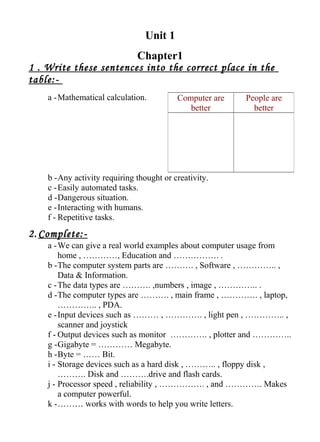
1 . Write these sentences into the correct place in the
table:-
a -Mathematical calculation.
b -Any activity requiring thought or creativity.
c -Easily automated tasks.
d -Dangerous situation.
e -Interacting with humans.
f - Repetitive tasks.
2. Complete:-
a -We can give a real world examples about computer usage from
home , …………, Education and ……………. .
b -The computer system parts are ………. , Software , ………….. ,
Data & Information.
c -The data types are ………. ,numbers , image , ………….. .
d -The computer types are ………. , main frame , …………. , laptop,
………….. , PDA.
e -Input devices such as ……… , …………. , light pen , ………….. ,
scanner and joystick
f - Output devices such as monitor …………. , plotter and …………..
g -Gigabyte = ………… Megabyte.
h -Byte = …… Bit.
i - Storage devices such as a hard disk , ……….. , floppy disk ,
………. Disk and ……….drive and flash cards.
j - Processor speed , reliability , ……………. , and …………. Makes
a computer powerful.
k -……… works with words to help you write letters.
Computer are
better
People are
better
l - ……….helps you use functions.
m -Data processing consists of three basic activities (1- capturing the
input data , 2- ………………….. , 3- managing the output results).
n -Internet services are …………. , world wide web , …………… and
multimedia on the web.
Unit 1
Chapter 2
3. Define :-
a -Hardware.
b -Software.
c -Human ware.
d -Data & Information.
e -PC.
f - Main frame.
g -Macintosh
h -Laptop.
i - Server.
j - Personal data assistant.
k -Computer processor.
l - Computer memory.
m -Networks.
n -Internet.
o -The web.
p -The web page.
q -Web site.
r - Web browsers.
s - Web URLs.
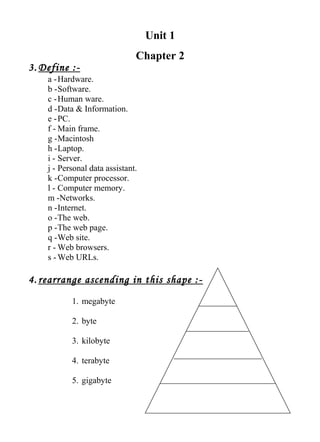
4. rearrange ascending in this shape :-
1. megabyte
2. byte
3. kilobyte
4. terabyte
5. gigabyte
Unit 1
Chapter 3
1- complete:
a- …………… is the brain of the computer while others
describe it as the brain
b- ……………. is a computer's temporary storage place
c- Input devices such as ……… , …………. , light pen ,
………….. , scanner and joystick
d- Output devices such as monitor …………. , plotter and
…………..
e- Gigabyte = ………… Megabyte.
f- Byte = …… Bits
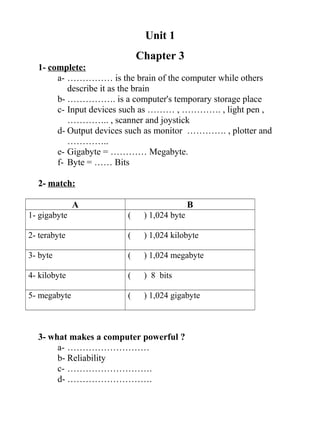
2- match:
A B
1- gigabyte ( ) 1,024 byte
2- terabyte ( ) 1,024 kilobyte
3- byte ( ) 1,024 megabyte
4- kilobyte ( ) 8 bits
5- megabyte ( ) 1,024 gigabyte
3- what makes a computer powerful ?
a- ………………………
b- Reliability
c- ……………………….
d- ……………………….
Unit 1
Chapter 4
1- Complete:
a- …………………. is a program that tells your computer what to do
b- ………………….. are what make a computer runs
c- ………………….. helps you use functions
d- ………………….. works with words to help you write letters
e- ………………….. helps you do mailing lists
f- the software models are
1- hardware
2- ………………………
3- Application
4- ………………………
2- Choose:
a- Which of the three steps do you think software does?
1- Input
2- Processing
3- Output
b- Which tasks you think the Operating system can do?
1- paint a picture
2- Select which program to run
3- Save a file to disk
4- Play a chess game
Unit 1
Chapter 5
1- Complete
a- …………………. is a combination of computers , accessories that
handle processing and storing of information
b- …………………. is organized into files and consists of raw facts
c- Data such as ……………., Numbers and ……………..
d- Data is the new material for ……………………..
e- ……………………. is the brain of a computer , the place where
data is processed
f- CPU is central ……………… unit
g- Every CPU has at least two basic parts :
1- ……………………
2- The arithmetic & logic unit
h- Data processing consists of three basic activities:
1- Capturing the input data
2- ………………………..
3- ………………………..
2- choose :
a- the space where the computer can quickly read or write programs
and data while they are used
(CPU - Memory - Information technology)
b- Is the brain of a computer , the place where data is processed
(CPU - Memory - Information technology )
c- Is organized into files and consists of raw facts
(Information - Data - Memory )
Unit 2
Chapter 1
1- Re-arrange the following steps to move “My Computer”
( )place the mouse on the title bar of the window
( )Hold down the left mouse button and drag the mouse
in any
direction to move it
( )Open My Computer: by double – clicking “My
computer” icon
on the desktop
2- Re-arrange the following steps to open a Notepad
( ) Click Notepad
( ) Point at Accessories
( ) Point at All Programs
( ) Click Start
3- Re-arrange the following steps to open program “ paint “
( ) Click Paint
( ) Point at Accessories
( ) Click Start
( ) Point at All Programs
4- Re-arrange the following steps to open Calculator
( ) Point at All Programs
( ) Click Calculator
( ) Point at Accessories
( ) Click Start
Unit 2
Chapter 2
1- re-arrange the following steps to bring up the search window:
( ) Click on the search option
( ) Click On: All Files and Folders
( ) Click on Start icon
2- put ( √ ) or ( X ):
a- we can stop the search by clicking on search ( )
b- To start the search click on stop ( )
c- In case there is no result after searching process this message will appear: “the
search was ended and there are no results to show” ( )
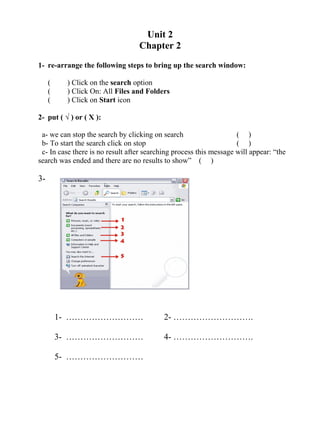
3-
1- ……………………… 2- ……………………….
3- ……………………… 4- ……………………….
5- ………………………
Unit 2
Chapter 3
1- Re-arrange the following steps about searching for hardware
( ) Select the option Search
( ) Choose Computers or People
( ) Once the window has opened
( ) Click on Start menu
2- Choose the correct answer:
a- To search for hardware on the network you need to :
1- From start menu choose hardware from the Search menu
2- From the search menu select the option Computers or
People and then choose A computer on the network
b- If you are looking for a file named
1- we only get files named John
2- We get files that contain the name John , like Johnny for
example
3- Option 2 , but we also get folders
Unit 2
Chapter 4
1- re-arrange the following steps about searching for People
( ) Select the option Search
( ) Choose Computers or People
( ) Once the window has opened
( ) People in your address book
( ) Click on Start menu
2- re-arrange the following steps to search for the name in the address
book :
( ) Select People in address book
( ) Click on search now to begin the search
( ) Display the search menu and select the option Computers
or people
( ) In the E-mail box his email address
( ) Click on Start menu
( ) In the name box put your friend's name
3- put ( √ ) or ( X ):
a- When I look for a file or folder I can only see it , I can't change or delete
it ( )
b- To look for computers in the web I need to have the name written
properly and completely ( )
Unit “2“
Chapter (5(
Printer
1-Re-arrange the following steps to printers and faxes
on your start menu.
1. ( ) Double click on printers and faxes.
2. ( ) select the option control panel.
3. ( ) open the start menu.
2-Draw a line to match between two columns What
The steps must do for:
1- Set the printer as a- Select document.
The main printer. - click on delete.
2- Temporarily stop b - open the menu
The printing of all documents.
The documents. – Click on pause.
3- Pause a document c - Open the menu Printer.
- Select cancel all Document
4- Delete a document d- open the menu printer
- Select pause printing
5- Delete all documents e- open the menu printer
- Select set as default printer
Unit “2 “
Chapter (6(
Add or removing programs objectives
1-Complete the fooling:
A- Add new programs
1.Open the start menu.
2…………………………-
3…………………………-
b- Modifying or removing.
1.Click on the start menu.
2.…………………………-
3……………………………… -
4..………………………………… -
2-Adding or removing programs choose the
correct option.
A- Why is it important to properly uninstall programs?
1-So that they will not appear later on the task bar.
2-To save space.
3-Both A and B
.
b- How can you install a system component that is not currently installed?
1-Selecting from the control panel add or remove programs, and then
choosing add / remove windows component.
2-Only by reinstalling the system.
1- Neither A nor B.
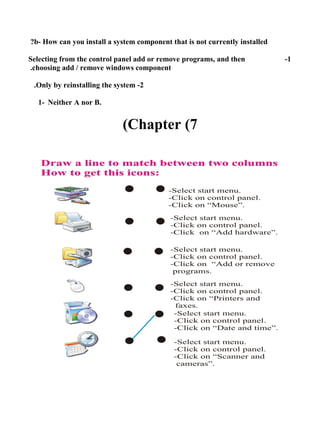
Chapter (7(

شيتات واجب كمبيوتر للصف الأول الإعدادى الترم الأول

  • 1.
    Unit 1 Chapter1 1 .Write these sentences into the correct place in the table:- a -Mathematical calculation. b -Any activity requiring thought or creativity. c -Easily automated tasks. d -Dangerous situation. e -Interacting with humans. f - Repetitive tasks. 2. Complete:- a -We can give a real world examples about computer usage from home , …………, Education and ……………. . b -The computer system parts are ………. , Software , ………….. , Data & Information. c -The data types are ………. ,numbers , image , ………….. . d -The computer types are ………. , main frame , …………. , laptop, ………….. , PDA. e -Input devices such as ……… , …………. , light pen , ………….. , scanner and joystick f - Output devices such as monitor …………. , plotter and ………….. g -Gigabyte = ………… Megabyte. h -Byte = …… Bit. i - Storage devices such as a hard disk , ……….. , floppy disk , ………. Disk and ……….drive and flash cards. j - Processor speed , reliability , ……………. , and …………. Makes a computer powerful. k -……… works with words to help you write letters. Computer are better People are better
  • 2.
    l - ……….helpsyou use functions. m -Data processing consists of three basic activities (1- capturing the input data , 2- ………………….. , 3- managing the output results). n -Internet services are …………. , world wide web , …………… and multimedia on the web.
  • 3.
    Unit 1 Chapter 2 3.Define :- a -Hardware. b -Software. c -Human ware. d -Data & Information. e -PC. f - Main frame. g -Macintosh h -Laptop. i - Server. j - Personal data assistant. k -Computer processor. l - Computer memory. m -Networks. n -Internet. o -The web. p -The web page. q -Web site. r - Web browsers. s - Web URLs. 4. rearrange ascending in this shape :- 1. megabyte 2. byte 3. kilobyte 4. terabyte 5. gigabyte
  • 4.
    Unit 1 Chapter 3 1-complete: a- …………… is the brain of the computer while others describe it as the brain b- ……………. is a computer's temporary storage place c- Input devices such as ……… , …………. , light pen , ………….. , scanner and joystick d- Output devices such as monitor …………. , plotter and ………….. e- Gigabyte = ………… Megabyte. f- Byte = …… Bits 2- match: A B 1- gigabyte ( ) 1,024 byte 2- terabyte ( ) 1,024 kilobyte 3- byte ( ) 1,024 megabyte 4- kilobyte ( ) 8 bits 5- megabyte ( ) 1,024 gigabyte 3- what makes a computer powerful ? a- ……………………… b- Reliability c- ………………………. d- ……………………….
  • 5.
    Unit 1 Chapter 4 1-Complete: a- …………………. is a program that tells your computer what to do b- ………………….. are what make a computer runs c- ………………….. helps you use functions d- ………………….. works with words to help you write letters e- ………………….. helps you do mailing lists f- the software models are 1- hardware 2- ……………………… 3- Application 4- ……………………… 2- Choose: a- Which of the three steps do you think software does? 1- Input 2- Processing 3- Output b- Which tasks you think the Operating system can do? 1- paint a picture 2- Select which program to run 3- Save a file to disk 4- Play a chess game
  • 6.
    Unit 1 Chapter 5 1-Complete a- …………………. is a combination of computers , accessories that handle processing and storing of information b- …………………. is organized into files and consists of raw facts c- Data such as ……………., Numbers and …………….. d- Data is the new material for …………………….. e- ……………………. is the brain of a computer , the place where data is processed f- CPU is central ……………… unit g- Every CPU has at least two basic parts : 1- …………………… 2- The arithmetic & logic unit h- Data processing consists of three basic activities: 1- Capturing the input data 2- ……………………….. 3- ……………………….. 2- choose : a- the space where the computer can quickly read or write programs and data while they are used (CPU - Memory - Information technology) b- Is the brain of a computer , the place where data is processed (CPU - Memory - Information technology ) c- Is organized into files and consists of raw facts (Information - Data - Memory )
  • 7.
    Unit 2 Chapter 1 1-Re-arrange the following steps to move “My Computer” ( )place the mouse on the title bar of the window ( )Hold down the left mouse button and drag the mouse in any direction to move it ( )Open My Computer: by double – clicking “My computer” icon on the desktop 2- Re-arrange the following steps to open a Notepad ( ) Click Notepad ( ) Point at Accessories ( ) Point at All Programs ( ) Click Start 3- Re-arrange the following steps to open program “ paint “ ( ) Click Paint ( ) Point at Accessories ( ) Click Start ( ) Point at All Programs 4- Re-arrange the following steps to open Calculator ( ) Point at All Programs ( ) Click Calculator ( ) Point at Accessories ( ) Click Start
  • 8.
    Unit 2 Chapter 2 1-re-arrange the following steps to bring up the search window: ( ) Click on the search option ( ) Click On: All Files and Folders ( ) Click on Start icon 2- put ( √ ) or ( X ): a- we can stop the search by clicking on search ( ) b- To start the search click on stop ( ) c- In case there is no result after searching process this message will appear: “the search was ended and there are no results to show” ( ) 3- 1- ……………………… 2- ………………………. 3- ……………………… 4- ………………………. 5- ………………………
  • 9.
    Unit 2 Chapter 3 1-Re-arrange the following steps about searching for hardware ( ) Select the option Search ( ) Choose Computers or People ( ) Once the window has opened ( ) Click on Start menu 2- Choose the correct answer: a- To search for hardware on the network you need to : 1- From start menu choose hardware from the Search menu 2- From the search menu select the option Computers or People and then choose A computer on the network b- If you are looking for a file named 1- we only get files named John 2- We get files that contain the name John , like Johnny for example 3- Option 2 , but we also get folders
  • 10.
    Unit 2 Chapter 4 1-re-arrange the following steps about searching for People ( ) Select the option Search ( ) Choose Computers or People ( ) Once the window has opened ( ) People in your address book ( ) Click on Start menu 2- re-arrange the following steps to search for the name in the address book : ( ) Select People in address book ( ) Click on search now to begin the search ( ) Display the search menu and select the option Computers or people ( ) In the E-mail box his email address ( ) Click on Start menu ( ) In the name box put your friend's name 3- put ( √ ) or ( X ): a- When I look for a file or folder I can only see it , I can't change or delete it ( ) b- To look for computers in the web I need to have the name written properly and completely ( )
  • 11.
    Unit “2“ Chapter (5( Printer 1-Re-arrangethe following steps to printers and faxes on your start menu. 1. ( ) Double click on printers and faxes. 2. ( ) select the option control panel. 3. ( ) open the start menu. 2-Draw a line to match between two columns What The steps must do for: 1- Set the printer as a- Select document. The main printer. - click on delete. 2- Temporarily stop b - open the menu The printing of all documents. The documents. – Click on pause. 3- Pause a document c - Open the menu Printer. - Select cancel all Document 4- Delete a document d- open the menu printer - Select pause printing 5- Delete all documents e- open the menu printer - Select set as default printer
  • 12.
    Unit “2 “ Chapter(6( Add or removing programs objectives 1-Complete the fooling: A- Add new programs 1.Open the start menu. 2…………………………- 3…………………………- b- Modifying or removing. 1.Click on the start menu. 2.…………………………- 3……………………………… - 4..………………………………… - 2-Adding or removing programs choose the correct option. A- Why is it important to properly uninstall programs? 1-So that they will not appear later on the task bar. 2-To save space. 3-Both A and B .
  • 13.
    b- How canyou install a system component that is not currently installed? 1-Selecting from the control panel add or remove programs, and then choosing add / remove windows component. 2-Only by reinstalling the system. 1- Neither A nor B. Chapter (7(