4 3>


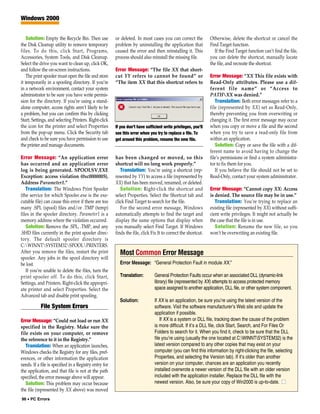
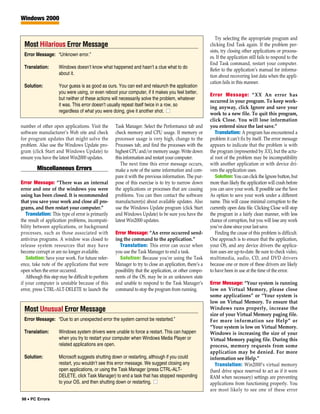
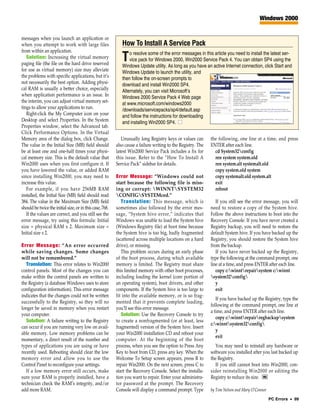
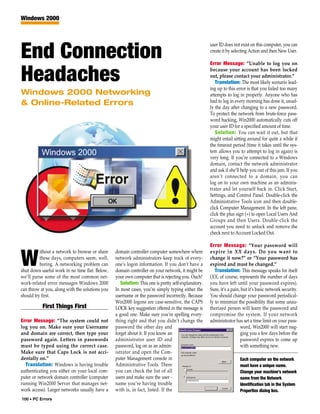
7   25274 81181   6
PC ERRORS                                                                       June/July 2004 - Vol. 8, Issue 3

Smart Computing Reference Series


In an ideal world, computers would never                 WINDOWS XP
crash and programs would never run into
problems. Or at least, if those things did               12   Windows XP Installation Errors
                                                              Don’t Get Stopped Before You Start
occur, your PC would notify you about any
glitches in a way that let you quickly patch             18   Windows XP Startup & Shutdown Errors
                                                              Keep Windows Running Smoothly
things up and continue working.
  Uh, time to wake up. PCs run into problems             26   Windows XP Hardware Errors
                                                              Keep Windows & Devices In Sync
all the time, and they typically respond by
sending you a message that is either indeci-             34   Windows XP Software-Related Errors
                                                              Keep Working Despite Problems
pherable or too vague to be of any use.
  In this issue we translate those arcane com-           42   Windows XP Network & Online Error Messages
                                                              Get Connected & Stay Connected
puting error messages into plain English, and
we point out potential solutions to the prob-
lem. Use this issue as a handy reference for
whenever you encounter PC errors.


ERROR MESSAGES
4    Error Terror
     Your PC’s Scary Messages Can Help You
     Resolve System Conflicts

6    Don’t Shoot The Messenger
     Error Messages Contain Helpful
     Troubleshooting Information

7    Big, Bad & Blue
     Understand One Of The Most-Feared
     Types Of Error Messages

8    Coping With PC Anxiety
     Tips & Techniques For Stress-Free Troubleshooting

10   A Helpful Hand
     Debuggers Let You Record & Track Error Messages     WINDOWS 98
                                                         48   Windows 98 Installation Error Messages
                                                              Get Windows Up & Running

                                                         54   Windows 98 Startup & Shutdown Errors
                                                              Enter & Exit On Your Terms

                                                         60   Windows 98 Hardware Errors
                                                              Decipher The Undecipherable

                                                         66   Windows 98 Software Errors
                                                              Don’t Get Shut Down

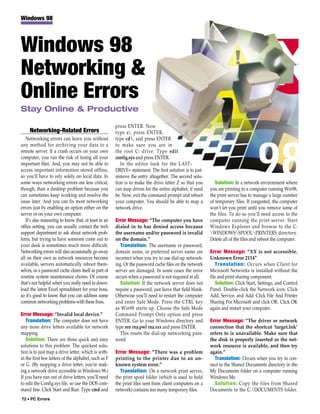
                                                         72   Windows 98 Networking & Online Errors
                                                              Stay Online & Productive
ONLINE COMMUNICATIONS
                                                             123   General Online Errors
                                                                   We Demystify The Internet’s Cryptic Errors

                                                             129   Revive Your Network
                                                                   Troubleshoot Network & Internet Connection Problems

WINDOWS 2000                                                 131   Browser Errors
                                                                   What You Can Do When The Surf’s Not Up
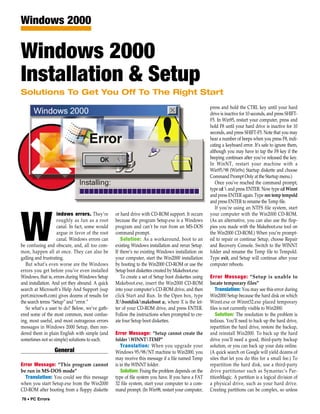
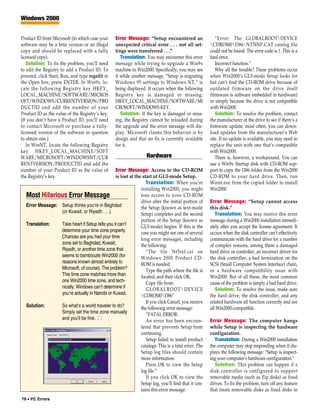
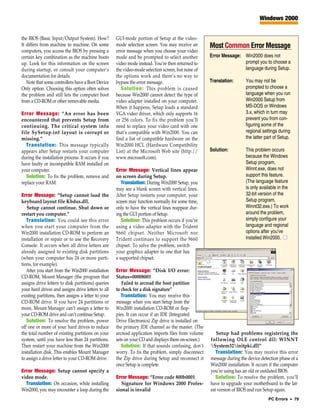
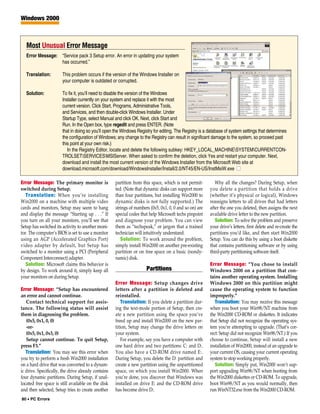
76    Windows 2000 Installation & Setup
      Solutions To Get You Off To The Right Start

82    Windows 2000 Startup & Shutdown Errors
      Say Hello & Goodbye With Ease

88    Windows 2000 Hardware Errors
      Learn What’s Behind Those Cryptic Messages

94    Windows 2000 Software Errors
      How To Figure Out What Your OS Is Trying To Tell You

100   End Connection Headaches
      Windows 2000 Networking & Online-Related Errors


MICROSOFT OFFICE 2003
104   Microsoft Office System 2003
      Installation & Startup Errors

108   Word 2003
      Diagnose & Correct Microsoft Word Error Messages

112   Excel 2003
      Diagnose & Correct Excel Errors

116   PowerPoint 2003
      Work The Bugs Out Of Your Presentations

120   Outlook 2003
      Failure To Communicate? We Can Help                    HARDWARE
                                                             137   Memory, CPU, BIOS & Port Headaches
                                                                   Tough Solutions For Tough Issues

                                                             141   Drive & Storage Problem Solving
                                                                   Your Data is Gone! Or is it?

                                                             144   Troubling Printing & Scanning
                                                                   Documents Check In, But Try These Tips
                                                                   When They Don’t Check Out

                                                             146   Sound Solutions To Audio Problems
                                                                   Clearing Up What You Can Hear

                                                             148   Video Card & Monitor Errors
                                                                   Some Are More Visible Than Others
Editorial Staff: Ronald D. Kobler / Rod Scher /
                                                                                      Kimberly Fitzke / Sally Curran / Samit Gupta
                                                                                      Choudhuri / Corey Russman / Christopher
                                                                                      Trumble / Calvin Clinchard / Katie Dolan /
                                                                                      Jennie Schlueter / Blaine Flamig / Raejean
MISCELLANEOUS                                                                         Brooks / Rebecca Christensen / Tara Weber /
                                                                                      Michael Sweet / Katie Crooks / Shawn Kupfer /
                                                                                      Dana Montey / Nate Hoppe / Sheila Allen /
150   Speaking BIOS                                                                   Heather Svoboda / Jennifer Hansen / Trista
                                                                                      Kunce / Marty Sems / Chad Denton / Nathan
      How To Decipher What Your Computer Is Saying                                    Chandler / Kylee Dickey / Josh Gulick /
                                                                                      Andrew Leibman / Eric Reed
152   The Fatal Exception Error                                                       Web Staff: Missy Fletcher / Dorene Krausnick /
      Deciphering Processor Exception Codes                                           Nick Ray
                                                                                      Customer Service: Travis Brock / Alisha Lamb /
                                                                                      Brandie Humphrey / Becky Rezabek / Lana
                                                                                      Matic
                                                                                      Subscription Renewals: Liz Kohout / Connie
                                                                                      Beatty / Matt Bolling / Patrick Kean / Charmaine
                                                                                      Vondra / Miden Ebert / Kathy DeCoito /
                                                                                      Stephanie Contreras / Nicole Buckendahl
                                                                                      Art & Design: Lesa Call / Fred Schneider / Carrie
                                                                                      Benes / Ginger Riley / Sonja Warner / Leigh
                                                                                      Trompke / Aaron Weston / Aaron Clark / Lori
                                                                                      Garris / Jason Codr / Andria Schultz / Erin
                                                                                      Rodriguez / Lindsay Anker
                                                                                      Newsstand: Garth Lienemann / Kelly
                                                                                      Richardson / Chris McGreer / Jeff Schnittker
                                                                                      Advertising Sales: Grant Ossenkop / Cindy
                                                                                      Pieper / Brooke Wolzen / Eric Cobb
                                                                                      Marketing: Mark Peery / Marcy Gunn / Heather
                                                                                      Mentgen / Amber Coffin

                                                                                      Copyright 2004 by Sandhills Publishing Company. All rights
                                                                                      reserved. Reproduction of material appearing in Smart
                                                                                      Computing REFERENCE SERIES: PC Errors is strictly prohib-
                                                                                      ited without written permission. Printed in the U.S.A. GST #
                                                                                      123482788RT0001. Smart Computing is published monthly by
                                                                                      Sandhills Publishing Company. 131 West Grand Drive, P.O.
                                                                                      Box 85380, Lincoln, NE 68501. POSTMASTER: Send address
                                                                                      changes to Smart Computing, P.O. Box 85380, Lincoln, NE
                                                                                      68501.

INDEX                                                                                 Web Services
                                                                                      (For questions about our Web site.)
155   Error Message Index                                                             webhelp@smartcomputing.com
      (An Alphabetical Listing Of Error Messages In This Issue)                       (800) 368-8304

                                                                                      Customer Service
                                                                                      (For questions about your subscription.)
                                                                                      customer.service@smartcomputing.com
SPECIAL: For Subscribers Only                                                         Smart Computing
                                                                                      P.O. Box 85380
                                                                                      Lincoln, NE 68501-5308
      Readers who subscribe to any of Sandhills Publishing’s computing publications
                                                                                      Hours
      may read this issue online. Just go to SmartComputing.com, PCToday.com,         Mon. - Fri.: 7a.m. to 8p.m. (CST)
      CEtips.com, or ComputerPowerUser.com and link to articles from the online       Sat.: 8a.m. to 4p.m. (CST)
      table of contents for this issue. As an added bonus, subscribers also have      To Place An Order Or Change An Address
                                                                                      (800) 733-3809
      access to these Web-only articles:                                              FAX: (402) 479-2193
      Access 2003                                                                     Subscription Renewals
                                                                                      (800) 424-7900
      Don’t Let Errors Trash Your Database                                            FAX: (402) 479-2193
                                                                                      http://www.smartcomputing.com
      Publisher 2003
                                                                                      Authorization For Reprints
      Problem-Free Publishing—Almost                                                  (800) 334-7458
                                                                                      FAX: (402) 479-2104
      Input Device Errors
                                                                                      Editorial Staff
      What Goes In Should Come Out                                                    editor@smartcomputing.com
                                                                                      FAX: (402) 479-2104
                                                                                      131 W. Grand Drive
                                                                                      Lincoln, NE 68521

                                                                                      Advertising Staff
                                                                                      (800) 848-1478
                                                                                      120 W. Harvest Dr.
                                                                                      Lincoln, NE 68521
                                                                                      FAX: (402) 479-2193
Error Messages
                                                                                                            When programmers beat their tight coding

Error Terror                                                                                             deadlines, they take a step back and try to
                                                                                                         write clear, concise error messages that help
                                                                                                         users diagnose and fix problems. But as you
Your PC’s Scary Messages Can                                                                             know, few error messages are really that help-
                                                                                                         ful. One reason is that programmers just don’t
Help You Resolve System Conflicts                                                                        have the time (or enthusiasm) for creating top-
                                                                                                         notch error messages. As a result, their sloppy
                                                                                                         error messages utilize esoteric English or jum-
                                                                                                         bled alphanumeric codes that mean nothing to
                                                                                                         end users. Worse yet, many error messages are
                                                                                                         composed by people who’ve never developed
                                                                                                         an application themselves, meaning the writ-
                                                                                                         ers don’t have an intricate knowledge of the
                                                                                                         product’s inner workings. Other times, the
                                                                                                         opposite occurs—an engineer who helped
                                                                                                         build the program writes the messages, but
                                                                                                         does so in language that’s of no assistance to
                                                                                                         end users. Still, unhelpful error messages are
                                                                                                         better than no error messages at all. Without
                                                                                                         them, programs would simply freeze, fail, or
                                                                                                         go berserk with zero explanation. Error mes-
                                                                                                         sages give us a starting point for taking the
                                                                                                         first steps toward addressing problems that, if
                                                                                                         undetected, could damage valuable data.
                                                                                                            Hardware and OS errors. Your computer’s
                                                                                                         hardware and OS spawn many of the mes-
                                                                                                         sages you see, in part because the OS has such
                                                                                                         an intense job. It must coordinate the activities
                                                                                                         of all hardware and software and keep tabs on
                                                                                                         many separate OS functions, too. Program-
                                                                                                         mers assure hardware and software compati-
                                                                                                         bility by testing their OS with as many setups
                                                                                                         as they can, but there are always unknown
                                                                                                         configurations that cause problems.
           ou’re probably familiar with the             The next time you become livid at a vague           When an OS encounters unfamiliar or newly


Y          sinking sensation you get when a
           car’s service engine light illuminates.
           That ominous, vaguely threatening
           feeling occurs again when your
computer displays portentous and vague error
messages. In both cases, drivers/users are left
pondering, and maybe panicking, about the
                                                     error message, consider the multitude of chal-
                                                     lenges facing software developers. They not
                                                     only have to create cutting-edge applications on
                                                     tight deadlines, but they also have to make sure
                                                     their product doesn’t conflict with the programs
                                                     and hardware components that will likely be on
                                                     their customers’ computers. Developers do their
                                                                                                         revised hardware and software, conflicts may
                                                                                                         occur due to incompatibilities, or because more
                                                                                                         than one product demands the same resources
                                                                                                         as another. There are a few OS-related errors
                                                                                                         that happen more often than others, and one is
                                                                                                         called a fatal exception error. Often called BSOD
                                                                                                         (Blue Screen of Death) errors because of the blue
unexpected problem: What in the world went           best to smash the worst of their software’s bugs,   screen and white text that appears, fatal excep-
wrong? And what do I do next?                        but then the program’s release date draws near,     tion errors are the bane of all computer users, as
                                                     forcing companies to move forward in a hurry.       these errors generally halt all programs and
■ Elusive Errors. Error messages aren’t evil         Randy Camp, MusicMatch’s vice president of          prompt users to restart their PCs. You can read
monkey wrenches that clog the gears of your          software and research and development, says         in-depth details about BSOD errors in the article
computer’s systems—but they are signs that           that in these situations, “programmers may for-     “The Fatal Exception Error” on page 152, but for
something isn’t quite right. Pinpointing the         get to omit error messages created during the       your reference, BSOD errors typically occur due
problem, even if you have a clearly written          debugging process, or they may be overlooked        to an incomplete or inefficient third-party pro-
error message at your disposal, is not always        because of time and money restrictions or high-     gram. Often the program in question requests
easy because your computer is so complex,            er-priority user-interface items.” As a result,     system resources (such as memory) that aren’t
incorporating hardware, numerous programs,           users may not only come across a vague error        available, and if the program becomes unstable,
and an OS (operating system) that supposedly         message, they might even see messages that          the OS puts a stop to the process and requires
helps each of those components play nice.            programmers didn’t intend for the public eye.       you to restart your computer.
4 • PC Errors
Error Messages


   Many users also see Windows protection or           that imprecise message won’t necessarily help         depending on the situation, you might be able
STOP errors, which usually occur at startup.           you fix the problem. Other messages may indi-         to resolve such errors very quickly. Check out
Like fatal exception errors, protection errors         cate that system resources aren’t available           the following tips to combat common errors.
freeze processes and force you to restart your         because another program is working, but you              New installations. Many errors surface
PC. Protection errors happen for many rea-             still might not have a clue on how to resolve         soon after you install new hardware or soft-
sons, such as driver conflicts, viruses and            the conflict.                                         ware because conflicts often occur between the
worms, a corrupted Registry, hardware mal-                These unclear errors are notorious for their       new product and previously installed compo-
functions, and more.                                   unhelpfulness, at least to ordinary home users;       nents. To put an end to such messages, you
   You might also encounter GPFs (general              nevertheless, many error messages offer more          might be able to uninstall the program or hard-
protection faults) or any number of illegal oper-      help than those of the past. For example, if you      ware (and hardware drivers) and then restart
ation errors. GPFs occur due to a variety of           can’t save a file in a specific format, a program     your computer to an errorless state.
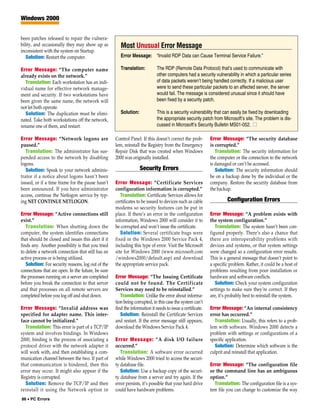
hardware and software problems and often               might well explain why. And if an application            If you do find that removing a new prod-
appear when your processor receives invalid            is starved for memory, there’s a good chance          uct eliminates errors, you might have to do
                                                                              an error message will give     some research to figure out the source of the
                                                                              you an accurate heads up.      conflict before you can reinstall the new
                                                                                 Things should continue      product. Check the manufacturer’s Web site
                                                                              to improve as companies        for updated drivers, search support areas for
                                                                              provide a more aggres-         known conflicts, and contact technical sup-
                                                                              sive reaction to errors.       port for assistance. Sometimes tech support
                                                                              Microsoft lets users send      gurus can help you tweak a setting to end
                                                                              error reports via email,       software conflicts.
                                                                              hoping to glean informa-          Let it finish. Developing new computing
                                                                              tion that will help the        habits can also limit the number of error mes-
                                                                              company’s products work        sages you see. When you first start up your
                                                                              better in the future. Miller   PC, let the hard drive come to a complete stop
                                                                              indicates Corel’s appli-       before starting a task; this lets your computer
                                                                              cations offer a similar        load all necessary drivers and operating sys-
                                                                              capability and says, “the      tem components necessary for efficient and
                                                                              software offers to transmit    error-free operation. The same concept works
                                                                              a snapshot of related sys-     for your other programs. Let each program
                                                                              tem data via email that        start up or shut down completely before you
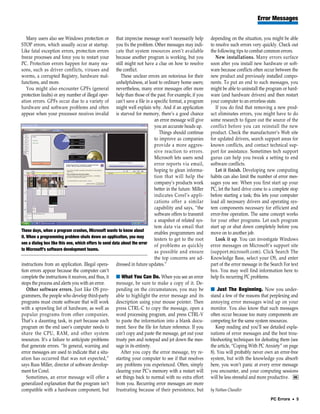
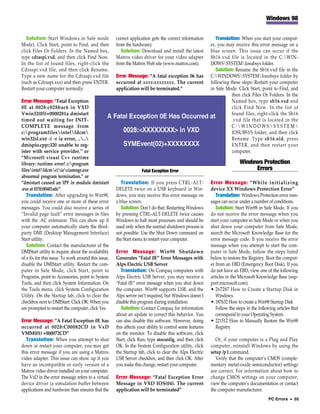
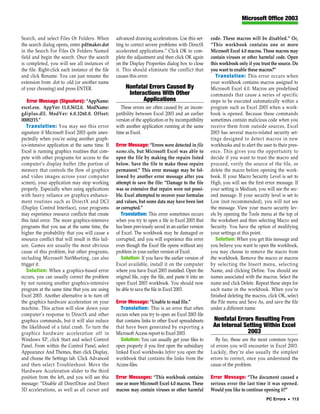
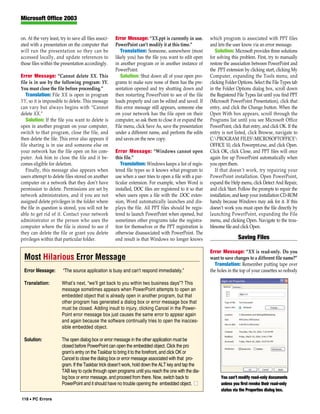
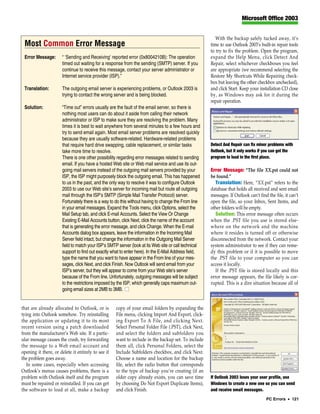
These days, when a program crashes, Microsoft wants to know about
                                                                              enables programmers and        move on to another job.
it. When a programming problem shuts down an application, you may
                                                                              testers to get to the root        Look it up. You can investigate Windows
see a dialog box like this one, which offers to send data about the error
                                                                              of problems as quickly         error messages on Microsoft’s support site
to Microsoft’s software development teams.
                                                                              as possible and ensure         (support.microsoft.com). Click Search The
                                                                              the top concerns are ad-       Knowledge Base, select your OS, and enter
instructions from an application. Illegal opera- dressed in future updates.”                                 part of the error message in the Search For text
tion errors appear because the computer can’t                                                                box. You may well find information here to
complete the instructions it receives, and thus, it ■ What You Can Do. When you see an error                 help fix recurring PC problems.
stops the process and alerts you with an error.        message, be sure to make a copy of it. De-
    Other software errors. Just like OS pro- pending on the circumstances, you may be                        ■ Just The Beginning. Now you under-
grammers, the people who develop third-party able to highlight the error message and its                     stand a few of the reasons that perplexing and
programs must create software that will work description using your mouse pointer. Then                      annoying error messages wind up on your
with a sprawling list of hardware, as well as press CTRL-C to copy the message, open a                       monitor. You also know that such messages
popular programs from other companies. word processing program, and press CTRL-V                             often occur because too many components are
That’s a daunting task, in part because each to paste the information into a blank docu-                     competing for the same system resources.
program on the end user’s computer needs to ment. Save the file for future reference. If you                    Keep reading and you’ll see detailed expla-
share the CPU, RAM, and other system can’t copy and paste the message, get out your                          nations of error messages and the best trou-
resources. It’s a failure to anticipate problems trusty pen and notepad and jot down the mes-                bleshooting techniques for defeating them (see
that generate errors. “In general, warning and sage in its entirety.                                         the article, “Coping With PC Anxiety” on page
error messages are used to indicate that a situ-          After you copy the error message, try re-          8). You will probably never own an error-free
ation has occurred that was not expected,” starting your computer to see if that resolves                    system, but with the knowledge you absorb
says Russ Miller, director of software develop- any problems you experienced. Often, simply                  here, you won’t panic at every error message
ment for Corel.                                        clearing your PC’s memory with a restart will         you encounter, and your computing sessions
    Sometimes, an error message will offer a set things back to normal with no extra effort                  will be less stressful and more productive. RS
generalized explanation that the program isn’t from you. Recurring error messages are more
compatible with a hardware component, but frustrating because of their persistence, but                      by Nathan Chandler
                                                                                                                                             PC Errors • 5
Error Messages


Don’t Shoot The Messenger
Error Messages Contain Helpful
Troubleshooting Information
      rror messages can seem overwhelming if we don’t understand        program and system failures. Understanding each part of an error

E     why they happen or how to prevent them. It helps to remember
      that an error message does not cause the problem; it is merely
the messenger. Error messages are much less intimidating if you view
                                                                        message can help you decipher the information and eliminate
                                                                        the error. RS

them not as signs of doom but as valuable tools that hold clues to      Compiled by Kylee Dickey


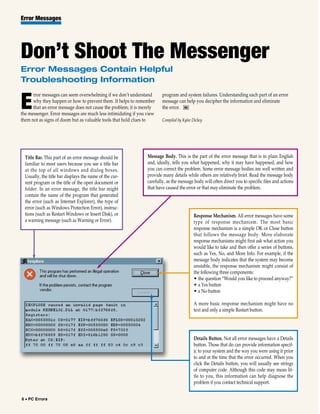
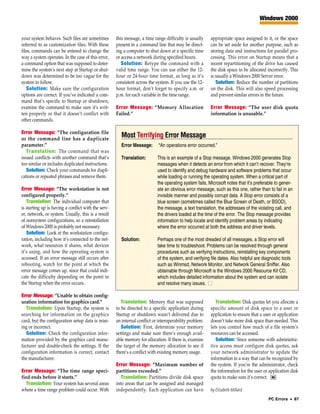
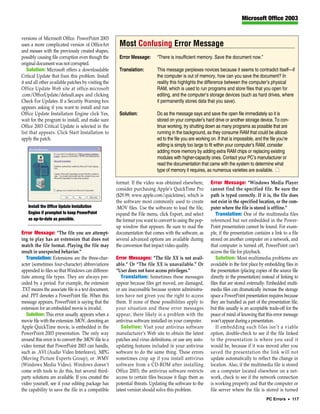
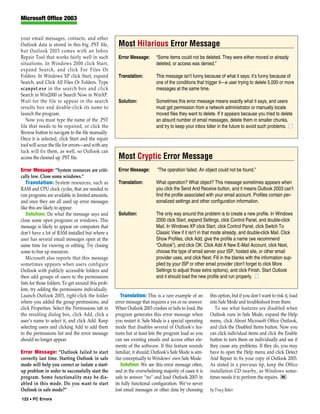
  Title Bar. This part of an error message should be            Message Body. This is the part of the error message that is in plain English
  familiar to most users because you see a title bar            and, ideally, tells you what happened, why it may have happened, and how
  at the top of all windows and dialog boxes.                   you can correct the problem. Some error message bodies are well written and
  Usually, the title bar displays the name of the cur-          provide many details while others are relatively brief. Read the message body
  rent program or the title of the open document or             carefully, as the message body will often direct you to specific files and actions
  folder. In an error message, the title bar might              that have caused the error or that may eliminate the problem.
  contain the name of the program that generated
  the error (such as Internet Explorer), the type of
  error (such as Windows Protection Error), instruc-
  tions (such as Restart Windows or Insert Disk), or                                      Response Mechanism. All error messages have some
  a warning message (such as Warning or Error).                                           type of response mechanism. The most basic
                                                                                          response mechanism is a simple OK or Close button
                                                                                          that follows the message body. More elaborate
                                                                                          response mechanisms might first ask what action you
                                                                                          would like to take and then offer a series of buttons,
                                                                                          such as Yes, No, and More Info. For example, if the
                                                                                          message body indicates that the system may become
                                                                                          unstable, the response mechanism might consist of
                                                                                          the following three components:
                                                                                          • the question “Would you like to proceed anyway?”
                                                                                          • a Yes button
                                                                                          • a No button

                                                                                          A more basic response mechanism might have no
                                                                                          text and only a simple Restart button.


                                                                                          Details Button. Not all error messages have a Details
                                                                                          button. Those that do can provide information specif-
                                                                                          ic to your system and the way you were using it prior
                                                                                          to and at the time that the error occurred. When you
                                                                                          click the Details button, you will usually see strings
                                                                                          of computer code. Although this code may mean lit-
                                                                                          tle to you, this information can help diagnose the
                                                                                          problem if you contact technical support.


6 • PC Errors
Error Messages


Big, Bad & Blue
Understand One Of The Most-Feared
Types Of Error Messages
       he sight makes many computer users tremble: the BSOD (Blue                Various types of errors may cause a BSOD. For example, a bad device

T      Screen Of Death). Chances are that if you’ve used Windows for a
       while, you have, at one point or another, encountered the BSOD.
Even Bill Gates had the misfortune of seeing a BSOD on his computer
                                                                              driver, a hardware conflict, or even an error in the Registry may prompt
                                                                              a BSOD. One of the most common causes of a BSOD is that Windows
                                                                              can’t boot from the hard drive. Corrupted data on a hard drive can cause
screen during his Windows 98 presentation at Comdex Spring 1998.              a BSOD, as can the installation of incompatible memory modules.
   The BSOD is one type of Windows error message. Unlike the error               The most common type of BSOD is a fatal exception error, an error that
message shown in the last article, the BSOD is a full-screen error mes-       forces the current application to shut down. This happens when an unex-
sage. With its bright blue background and white text, the BSOD is hard        pected event, or exception, occurs. If no code exists to handle the exception,
to miss. Sometimes it signals that an individual program must shut            the program cannot proceed, and Windows will display a fatal exception
down. Other times, the BSOD indicates that the error is so grave that the     error message. For more information about fatal exception errors, see “The
entire system must shut down.                                                 Fatal Exception Error: Deciphering Processor Exception Codes” on page 152.
   The BSOD exists in Windows 3.1/9x/Me. You will also find some-                With so many possible causes, it helps to understand the parts of a
thing very similar to a BSOD in Windows NT/2000/XP. These more                BSOD and its language so you can diagnose the problem. RS
recent OSes have an error message called a STOP message that looks
similar to and has many of the same elements as a BSOD.                       Compiled by Kylee Dickey


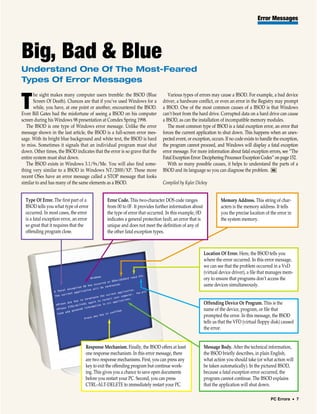
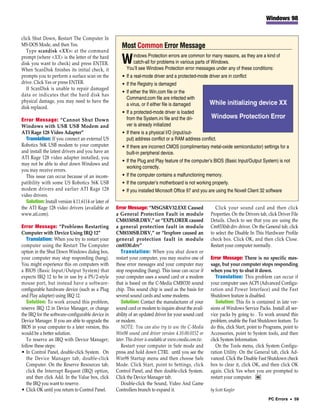
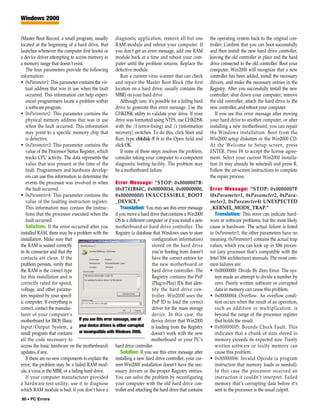
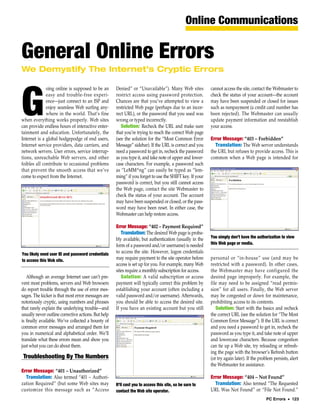
  Type Of Error. The first part of a           Error Code. This two-character DOS code ranges                    Memory Address. This string of char-
  BSOD tells you what type of error            from 00 to 0F. It provides further information about              acters is the memory address. It tells
  occurred. In most cases, the error           the type of error that occurred. In this example, 0D              you the precise location of the error in
  is a fatal exception error, an error         indicates a general protection fault, an error that is            the system memory.
  so great that it requires that the           unique and does not meet the definition of any of
  offending program close.                     the other fatal exception types.


                                                                                                        Location Of Error. Here, the BSOD tells you
                                                                                                        where the error occurred. In this error message,
                                                                                                        we can see that the problem occurred in a VxD
                                                                                                        (virtual device driver), a file that manages mem-
                                                                                                        ory to ensure that programs don’t access the
                                                                                                        same devices simultaneously.


                                                                                                        Offending Device Or Program. This is the
                                                                                                        name of the device, program, or file that
                                                                                                        prompted the error. In this message, the BSOD
                                                                                                        tells us that the VFD (virtual floppy disk) caused
                                                                                                        the error.


                                    Response Mechanism. Finally, the BSOD offers at least               Message Body. After the technical information,
                                    one response mechanism. In this error message, there                the BSOD briefly describes, in plain English,
                                    are two response mechanisms. First, you can press any               what action you should take (or what action will
                                    key to exit the offending program but continue work-                be taken automatically). In the pictured BSOD,
                                    ing. This gives you a chance to save open documents                 because a fatal exception error occurred, the
                                    before you restart your PC. Second, you can press                   program cannot continue. The BSOD explains
                                    CTRL-ALT-DELETE to immediately restart your PC.                     that the application will shut down.

                                                                                                                                             PC Errors • 7
Error Messages

Coping With PC Anxiety
Tips & Techniques For Stress-Free Troubleshooting

                                                                                                         probably software-related. You’d want to start
                                                                                                         troubleshooting other hardware, such as the
                                                                                                         scanner’s cable and power connections
                                                                                                            Once you’ve located the source of the
                                                                                                         problem and determined whether it’s caused
                                                                                                         by hardware or software, you can begin the
                                                                                                         troubleshooting process.

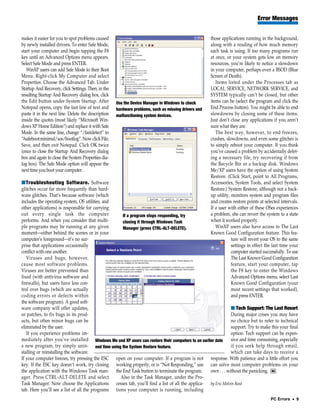
                                                                                                         ■ Troubleshooting Hardware. Let’s be
                                                                                                         honest, you don’t want to open your computer
                                                                                                         unless you have to. So before you go reaching
                                                                                                         for a screwdriver, listen for irregular noises
                                                                                                         coming from inside your PC. A ratchety
                                                                                                         “zzzzz” sound may mean a stray wire is
                                                                                                         touching the fan blades or that the fan motor is
                                                                                                         low on lubricant. A grinding noise may indi-
                                                                                                         cate a problem with the hard drive. (If that’s
                                                                                                         the case, save the drive’s data immediately:
                                                                                                         The motor or head system, which contains
                                                                                                         read/write heads that record and retrieve
                                                                                                         information from within the drive’s case, could
                                                                                                         be preparing to fail. You have a right to panic.)
                                                                                                            Try solving hardware problems outside
                                                                                                         your PC by first making sure the hardware is
                                                                                                         plugged in and turned on. This may sound
                                                                                                         obvious, but more than a few people have
                                                                                                         spent valuable time troubleshooting a PC
                                                                                                         when all they had to do was just reattach a
                                                                                                         loose cable or flip a switch.
                                                                                                            If the power and cable sources check out
       ooner or later, you’re going to have          determine this by tracing your steps. Try to        OK, refer to the Device Manager. In Windows

S      computer problems. That’s not a warn-
       ing; it’s a guarantee.
   Fortunately, how you react to those prob-
                                                     remember what you were doing before the prob-
                                                     lem occurred. Take note if you’ve recently
                                                     installed a new program, saved or deleted an
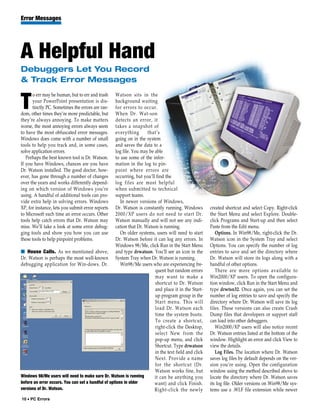
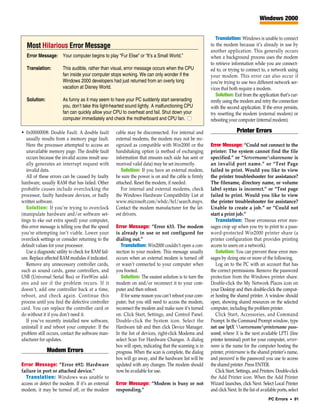
                                                                                                         XP, right-click My Computer, select Properties,
                                                                                                         choose the Hardware tab, and click Device
                                                                                                         Manager. Navigate to the hardware device
lems is up to you. While some of us remain           odd-looking file, or moved your computer to a       that is giving you problems. A small yellow
calm, others stress out. Still others scream         new location. Don’t disregard anything.             circle and an exclamation point or question
and panic much like students in bomb squad              If you’re lucky—well, perhaps “lucky” isn’t      mark to the left of the device’s name indicates
school about to fail their first and final exam.     the right word—an error message will accom-         that Windows has detected a problem. Click
   Needless to say, such reactions are unhealthy.    pany the problem. If so, write it down. This will   the exclamation point, and you might be
   That’s why we want to help you handle your        prevent you from later forgetting what went         directed through a series of problem-solving
PC problems stress-free. Here are a few trou-        wrong. Your notes might also come in handy if       steps. If not, right-click the device, uninstall it,
bleshooting essentials that might help not only to   you need to call a technician. Moreover, error      and remove it from Device Manager. Then
get you through your next computer crash, but        messages sometimes contain important clues as       reboot your computer. Windows will redetect
help keep your blood pressure down, as well.         to whether your problem is hardware- or soft-       the hardware, hopefully without the problem.
                                                     ware-related. Let’s say you’re trying to upload        If your computer won’t reboot, try starting it
■ Find The Root Of The Problem. The first            images from your scanner but keep getting an        in Windows’ diagnostics mode, called Safe
thing to do when your PC misbehaves (aside           error message saying your computer is unable        Mode. In Safe Mode, Windows uses only the
from sighing, gasping, and moaning) is to locate     to connect to the scanning device. Chances are,     most vital drivers and components, which lim-
the source of the problem. You might be able to      your PC didn’t cause the problem. Nor is it         its the numbers of tasks you can perform but
8 • PC Errors
Error Messages


makes it easier for you to spot problems caused                                                       those applications running in the background,
by newly installed drivers. To enter Safe Mode,                                                       along with a reading of how much memory
start your computer and begin tapping the F8                                                          each task is using. If too many programs run
key until an Advanced Options menu appears.                                                           at once, or your system gets low on memory
Select Safe Mode and press ENTER.                                                                     resources, you’re likely to notice a slowdown
   WinXP users can add Safe Mode to their Boot                                                        in your computer, perhaps even a BSOD (Blue
Menu. Right-click My Computer and select                                                              Screen of Death).
Properties. Choose the Advanced Tab. Under                                                               Items listed under the Processes tab as
Startup And Recovery, click Settings. Then, in the                                                    LOCAL SERVICE, NETWORK SERVICE, and
resulting Startup And Recovery dialog box, click                                                      SYSTEM typically can’t be closed, but other
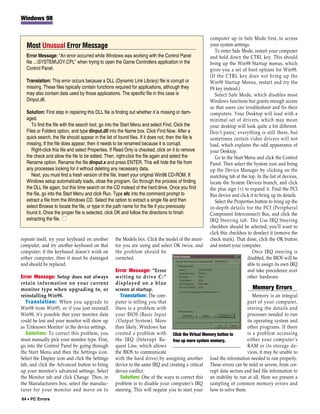
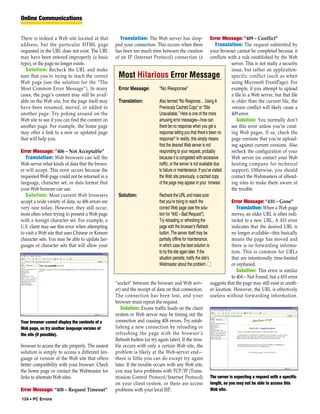
the Edit button under System Startup. After          Use the Device Manager in Windows to check       items can be (select the program and click the
Notepad opens, copy the last line of text and        hardware problems, such as missing drivers and   End Process button). You might be able to end
paste it in the next line. Delete the description    malfunctioning system devices.                   slowdowns by closing some of these items.
inside the quotes (most likely “Microsoft Win-                                                        Just don’t close any applications if you aren’t
dows XP Home Edition”) and replace it with Safe                                                       sure what they are.
Mode. In the same line, change “/fastdetect” to                                                          The best way, however, to end freezes,
“/safeboot:minimal/sos/bootlog”. Now click File,                                                      crashes, slowdowns, and even some glitches is
Save, and then exit Notepad. Click OK twice                                                           to simply reboot your computer. If you think
(once to close the Startup And Recovery dialog                                                        you’ve caused a problem by accidentally delet-
box and again to close the System Properties dia-                                                     ing a necessary file, try recovering if from
log box). The Safe Mode option will appear the                                                        the Recycle Bin or a backup disk. Windows
next time you boot your computer.                                                                     Me/XP users have the option of using System
                                                                                                      Restore. (Click Start, point to All Programs,
■Troubleshooting Software. Software                                                                   Accessories, System Tools, and select System
glitches occur far more frequently than hard-                                                         Restore.) System Restore, although not a back-
ware glitches. That’s because software (which                                                         up utility, monitors system and program files
includes the operating system, OS utilities, and                                                      and creates restore points at selected intervals.
other applications) is responsible for carrying                                                       If a user with either of these OSes experiences
out every single task the computer                  If a program stops responding, try                a problem, she can revert the system to a state
performs. And when you consider that multi-         closing it through Windows Task                   when it worked properly.
ple programs may be running at any given            Manager (press CTRL-ALT-DELETE).                     WinXP users also have access to The Last
moment—either behind the scenes or in your                                                            Known Good Configuration feature. This fea-
computer’s foreground—it’s no sur-                                                                                ture will revert your OS to the same
prise that applications occasionally                                                                              settings in effect the last time your
conflict with one another.                                                                                        computer started successfully. To use
   Viruses and bugs, however,                                                                                     The Last Known Good Configuration
cause most software problems.                                                                                     feature, start your computer, tap
Viruses are better prevented than                                                                                 the F8 key to enter the Windows
fixed (with antivirus software and                                                                                Advanced Options menu, select Last
firewalls), but users have less con-                                                                              Known Good Configuration (your
trol over bugs (which are actually                                                                                most recent settings that worked),
coding errors or defects within                                                                                   and press ENTER.
the software program). A good soft-
ware company will offer updates,                                                                            ■ Tech Support: The Last Resort
or patches, to fix bugs in its prod-                                                                        During major crises you may have
ucts, but often minor bugs can be                                                                           no choice but to refer to technical
eliminated by the user.                                                                                     support. Try to make this your final
   If you experience problems im-                                                                           option. Tech support can be expen-
mediately after you’ve installed Windows Me and XP users can restore their computers to an earlier date     sive and time consuming, especially
a new program, try simply unin- and time using the System Restore feature.                                  if you seek help through email,
stalling or reinstalling the software.                                                                      which can take days to receive a
If your computer freezes, try pressing the ESC open on your computer. If a program is not response. With patience and a little effort you
key. If the ESC key doesn’t work, try closing working properly, or is “Not Responding,” use can solve most computer problems on your
the application with the Windows Task man- the End Task button to terminate the program.        own . . . without the panicking. RS
ager. Press CTRL-ALT-DELETE and select             Also in the Task Manager, under the Pro-
Task Manager. Now choose the Applications cesses tab, you’ll find a list of all the applica- by Eric Melvin Reed
tab. Here you’ll see a list of all the programs tions your computer is running, including
                                                                                                                                       PC Errors • 9
Error Messages


A Helpful Hand
Debuggers Let You Record
& Track Error Messages
      o err may be human, but to err and trash      Watson sits in the

T     your PowerPoint presentation is dis-
      tinctly PC. Sometimes the errors are ran-
dom, other times they’re more predictable, but
                                                    background waiting
                                                    for errors to occur.
                                                    When Dr. Wat-son
they’re always annoying. To make matters            detects an error, it
worse, the most annoying errors always seem         takes a snapshot of
to have the most obfuscated error messages.         everything       that’s
Windows does come with a number of small            going on in the system
tools to help you track and, in some cases,         and saves the data to a
solve application errors.                           log file. You may be able
   Perhaps the best known tool is Dr. Watson.       to use some of the infor-
If you have Windows, chances are you have           mation in the log to pin-
Dr. Watson installed. The good doctor, how-         point where errors are
ever, has gone through a number of changes          occurring, but you’ll find the
over the years and works differently depend-        log files are most helpful
ing on which version of Windows you’re              when submitted to technical
using. A handful of additional tools can pro-       support teams.
vide extra help in solving errors. Windows             In newer versions of Windows,
XP, for instance, lets you submit error reports     Dr. Watson is constantly running. Windows          created shortcut and select Copy. Right-click
to Microsoft each time an error occurs. Other       2000/XP users do not need to start Dr.             the Start Menu and select Explore. Double-
tools help catch errors that Dr. Watson may         Watson manually and will not see any indi-         click Programs and Start-up and then select
miss. We’ll take a look at some error debug-        cation that Dr. Watson is running.                 Paste from the Edit menu.
ging tools and show you how you can use                On older systems, users will need to start         Options. In Win98/Me, right-click the Dr.
these tools to help pinpoint problems.              Dr. Watson before it can log any errors. In        Watson icon in the System Tray and select
                                                    Windows 98/Me, click Run in the Start Menu         Options. You can specify the number of log
■ House Calls. As we mentioned above, and type drwatson. You’ll see an icon in the                     entries to save and set the directory where
Dr. Watson is perhaps the most well-known System Tray when Dr. Watson is running.                      Dr. Watson will store its logs along with a
debugging application for Win-dows. Dr.                Win98/Me users who are experiencing fre-        handful of other options.
                                                                         quent but random errors          There are more options available to
                                                                         may want to make a            Win2000/XP users. To open the configura-
                                                                         shortcut to Dr. Watson        tion window, click Run in the Start Menu and
                                                                         and place it in the Start-    type drwtsn32. Once again, you can set the
                                                                         up program group in the       number of log entries to save and specify the
                                                                         Start menu. This will         directory where Dr. Watson will save its log
                                                                         load Dr. Watson each          files. These versions can also create Crash
                                                                         time the system boots.        Dump files that developers or support staff
                                                                         To create a shortcut,         can load into other debuggers.
                                                                         right-click the Desktop,         Win2000/XP users will also notice recent
                                                                         select New from the           Dr. Watson entries listed at the bottom of the
                                                                         pop-up menu, and click        window. Highlight an error and click View to
                                                                         Shortcut. Type drwatson       view the details.
                                                                         in the text field and click      Log Files. The location where Dr. Watson
                                                                         Next. Provide a name          saves log files by default depends on the ver-
                                                                         for the shortcut (Dr.         sion you’re using. Open the configuration
                                                                         Watson works fine, but        window using the method described above to
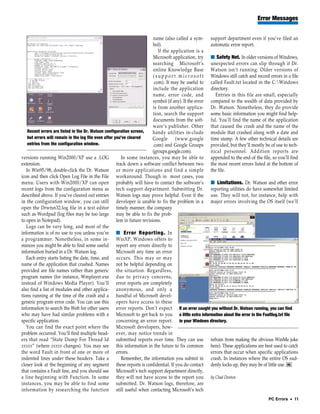
Windows 98/Me users will need to make sure Dr. Watson is running         it can be anything you        locate the directory where Dr. Watson saves
before an error occurs. You can set a handful of options in older        want) and click Finish.       its log file. Older versions on Win98/Me sys-
versions of Dr. Watson.                                                  Right-click the newly         tems use a .WLF file extension while newer
10 • PC Errors
Error Messages


                                                                           name (also called a sym- support department even if you’ve filed an
                                                                           bol).                               automatic error report.
                                                                               If the application is a
                                                                           Microsoft application, try ■ Safety Net. In older versions of Windows,
                                                                           searching Microsoft’s unexpected errors can slip through if Dr.
                                                                           online Knowledge Base Watson isn’t running. Older versions of
                                                                           ( s u p p o r t . m i c r o s o f t Windows still catch and record errors in a file
                                                                           .com). It may be useful to called Fault.txt located in the C:Windows
                                                                           include the application directory.
                                                                           name, error code, and                 Entries in this file are small, especially
                                                                           symbol (if any). If the error compared to the wealth of data provided by
                                                                           is from another applica- Dr. Watson. Nonetheless, they do provide
                                                                           tion, search the support some basic information you might find help-
                                                                           documents from the soft- ful. You’ll find the name of the application
                                                                           ware’s publisher. Other that caused the crash and the name of the
    Recent errors are listed in the Dr. Watson configuration screen,       handy utilities in-clude module that crashed along with a date and
    but errors will remain in the log file even after you’ve cleared       Google (www.google time stamp. A few other technical details are
    entries from the configuration window.                                 .com) and Google Groups provided, but they’ll mostly be of use to tech-
                                                                           (groups.google.com).                nical personnel. Addition reports are
versions running Win2000/XP use a .LOG                    In some instances, you may be able to appended to the end of the file, so you’ll find
extension.                                             track down a software conflict between two the most recent errors listed at the bottom of
   In Win95/98, double-click the Dr. Watson or more applications and find a simple the file.
icon and then click Open Log File in the File workaround. Though in most cases, you
menu. Users with Win2000/XP can open probably will have to contact the software’s ■ Limitations. Dr. Watson and other error
recent logs from the configuration menu as tech support department. Submitting Dr. reporting utilities do have somewhat limited
described above. If you’ve cleared out entries Watson logs may prove helpful. Even if the use. They will not, for instance, help with
in the configuration window, you can still developer is unable to fix the problem in a major errors involving the OS itself (we’ll
open the Drwtsn32.log file in a text editor timely manner, the company
such as Wordpad (log files may be too large may be able to fix the prob-
to open in Notepad).                                   lem in future revisions.
   Logs can be very long, and most of the
information is of no use to you unless you’re ■ Error Reporting. In
a programmer. Nonetheless, in some in- WinXP, Windows offers to
stances you might be able to find some useful report any errors directly to
information buried in a Dr. Watson log.                Microsoft any time an error
   Each entry starts listing the date, time, and occurs. This may or may
name of the application that crashed. Names not be helpful depending on
provided are file names rather than generic the situation. Regardless,
program names (for instance, Wmplayer.exe due to privacy concerns,
instead of Windows Media Player). You’ll error reports are completely
also find a list of modules and other applica- anonymous, and only a
tions running at the time of the crash and a handful of Microsoft devel-
generic program error code. You can use this opers have access to these
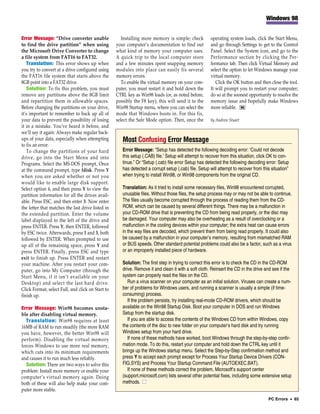
information to search the Web for other users error reports. Don’t expect If an error caught you without Dr. Watson running, you can find
who may have had similar problems with a Microsoft to get back to you a little extra information about the error in the Faultlog.txt file
specific application.                                  concerning an error report. in your Windows directory.
   You can find the exact point where the Microsoft developers, how-
problem occurred. You’ll find multiple head- ever, may notice trends in
ers that read “State Dump For Thread Id submitted reports over time. They can use refrain from making the obvious WinMe joke
xxxxx” (where xxxxx changes). You may see this information in the future to fix common here). These applications are best used to catch
the word Fault in front of one or more of errors.                                                              errors that occur when specific applications
indented lines under these headers. Take a                Remember, the information you submit in crash. In instances where the entire OS sud-
closer look at the beginning of any segment these reports is confidential. If you do contact denly locks up, they may be of little use. RS
that contains a Fault line, and you should see Microsoft’s tech support department directly,
a line beginning with Function. In some they will not have access to the report you by Chad Denton
instances, you may be able to find some submitted. Dr. Watson logs, therefore, are
information by researching the function still useful when contacting Microsoft’s tech
                                                                                                                                             PC Errors • 11
Windows XP (Home & Pro)

Windows XP Installation Errors
Don’t Get Stopped Before You Start

                nce upon a time, installing a new


O               version of Windows could turn
                into a monumental chore fraught
                with errors and frustration. We
                even recall the times when Win-
dows 95 came on floppy diskettes (about 25 of
them for a new installation). The Web is full of
horror stories from Windows users who suf-
fered through botched installations and spent
countless hours getting their systems to run.
   One of WinXP’s many improvements to the
Windows experience is ease of installation.
The vast majority of the time, a WinXP instal-
lation is very easy and chugs efficiently along
with little or no interference from you. It’s
almost as easy as inserting the setup CD into
your CD-ROM drive and walking away. If set-
ting up WinXP is boring, that’s a very good
thing. Go get a cup of coffee, prop your feet
up, and relax while Windows does the heavy
lifting. But don’t relax too much. Sometimes
things can go wrong.
   When something goes wrong with a WinXP
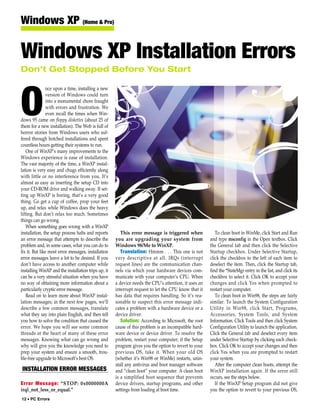
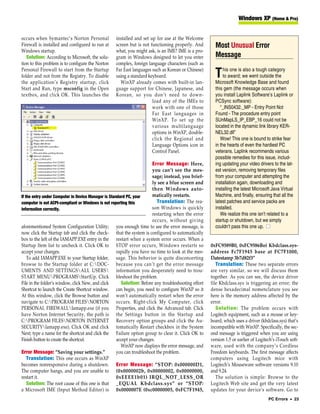
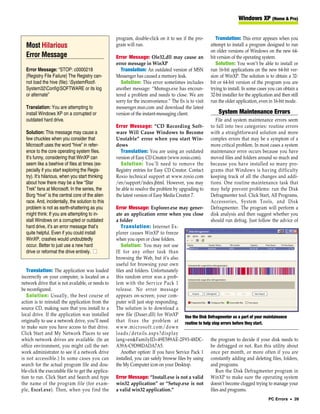
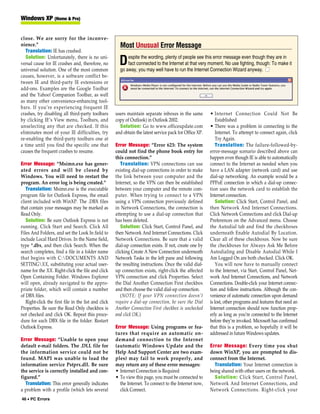
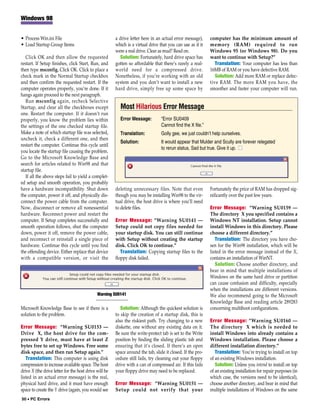
installation, the setup process halts and reports       This error message is triggered when             To clean boot in WinMe, click Start and Run
an error message that attempts to describe the       you are upgrading your system from               and type msconfig in the Open textbox. Click
problem and, in some cases, what you can do to       Windows 98/Me to WinXP.                          the General tab and then click the Selective
fix it. But like most error messages, installation      Translation: Hmmm . . . This one is not       Startup checkbox. Under Selective Startup,
error messages leave a lot to be desired. If you     very descriptive at all. IRQs (interrupt         click the checkbox to the left of each item to
don’t have access to another computer while          request lines) are the communication chan-       deselect the item. Then, click the Startup tab,
installing WinXP and the installation trips up, it   nels via which your hardware devices com-        find the *StateMgr entry in the list, and click its
can be a very stressful situation when you have      municate with your computer’s CPU. When          checkbox to select it. Click OK to accept your
no way of obtaining more information about a         a device needs the CPU’s attention, it uses an   changes and click Yes when prompted to
particularly cryptic error message.                  interrupt request to let the CPU know that it    restart your computer.
   Read on to learn more about WinXP instal-         has data that requires handling. So it’s rea-       To clean boot in Win98, the steps are fairly
lation messages; in the next few pages, we’ll        sonable to suspect this error message indi-      similar. To launch the System Configuration
describe a few common messages, translate            cates a problem with a hardware device or a      Utility in Win98, click Start, Programs,
what they say into plain English, and then tell      device driver.                                   Accessories, System Tools, and System
you how to solve the condition that caused the          Solution: According to Microsoft, the root    Information. Click Tools and then click System
error. We hope you will see some common              cause of this problem is an incompatible hard-   Configuration Utility to launch the application.
threads at the heart of many of these error          ware device or device driver. To resolve the     Click the General tab and deselect every item
messages. Knowing what can go wrong and              problem, restart your computer; if the Setup     under Selective Startup by clicking each check-
why will give you the knowledge you need to          program gives you the option to revert to your   box. Click OK to accept your changes and then
prep your system and ensure a smooth, trou-          previous OS, take it. When your old OS           click Yes when you are prompted to restart
ble-free upgrade to Microsoft’s best OS.             (whether it’s Win98 or WinMe) restarts, unin-    your system.
                                                     stall any antivirus and boot manager software       After the computer clean boots, attempt the
INSTALLATION ERROR MESSAGES                          and “clean boot” your computer. A clean boot     WinXP installation again. If the error still
                                                     is a simplified boot sequence that prevents      occurs, see the steps below.
Error Message: “STOP: 0x0000000A                     device drivers, startup programs, and other         If the WinXP Setup program did not give
irql_not_less_or_equal.”                             settings from loading at boot time.              you the option to revert to your previous OS,
12 • PC Errors
Windows XP (Home & Pro)


Microsoft advises that you remove every unnec-          If you have any of the Echo Audio sound
essary piece of hardware from your system.           cards we mentioned above, upgrade their
This includes any hardware device that you           audio driver to version 6.0 or higher. Go to
absolutely don’t need to run the computer, from      www.echoaudio.com to get the files and
USB (Universal Serial Bus) devices to network        instructions for installing them.
and sound cards. If the WinXP setup is still            If the steps outlined above don’t solve
unsuccessful, try flashing your BIOS (Basic          the problem, perform a clean boot in Win98
Input/Output System) to a new version.               or WinMe as we described above and restart
Consult with your computer’s manufacturer to         the setup process. If Setup still reports the
figure out how to do this.                           error, unplug all peripherals that are not
                                                     required to start your computer and restart the
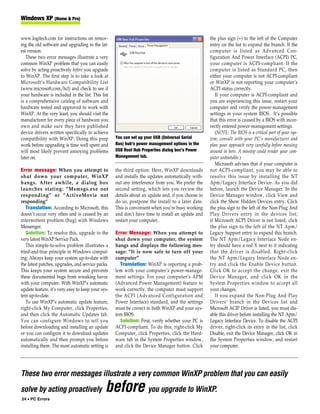
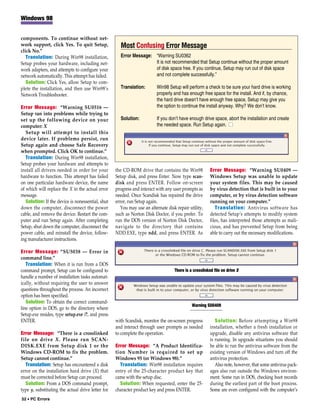
Error Message: When upgrading                        setup process. Microsoft even recommends           During the installation, Windows XP’s Setup pro-
Win98/Me to WinXP, you get one of the                that you clean your installation CD-ROM            gram prompts you to check Microsoft’s Web site
following messages:                                  before proceeding.                                 for updated installation files. This is a good option
   “Fatal Error:                                        This issue brings up an important question:     to choose and ensures a trouble-free installation.
   Setup Cannot Continue. Please                     Should you upgrade to WinXP on top of your
Contact Microsoft Technical Support.                 Win98 or WinMe installation or should you per-
(Error: 3E6h)”                                       form a clean upgrade? The short answer is no.
   or
   “WINNT32 this program has per-                    Error Message: “Fatal Error: An error
formed an illegal operation. WINNT32                 has been encountered that prevents
caused an invalid page fault in module               setup from continuing.
KERNEL32.DLL”                                           One of the components that Windows
   Translation: This message indicates that a        needs to continue setup could not be
software application or a device caused the          installed.
Setup program to crash. The second message              Press OK to view the setup log file.”
indicates that another application or program           Translation: This error message means
tried to access the same area of memory              the Setup program is unable to read from
assigned to KERNEL32.DLL, one of the critical        your WinXP installation CD.
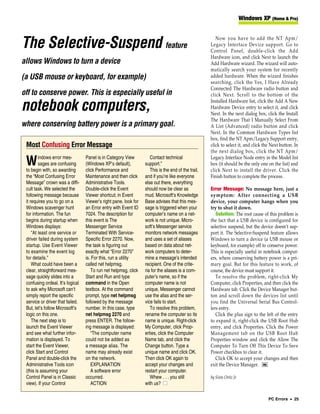
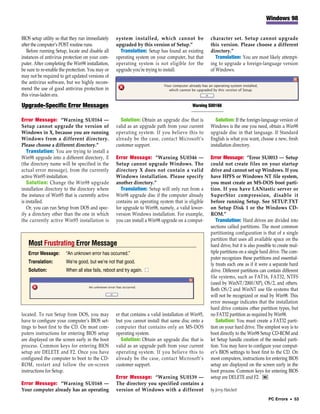
Windows DLL (dynamic-link library) files.               Solution: If your WinXP installation CD is      To perform a clean boot, choose Selective
   Solution: If you have any of the following        very damaged or scratched, you’ll have to get      Startup in the System Configuration Utility’s
programs or hardware devices,                        a replacement from Microsoft. If you’re in the     General tab and uncheck all the checkboxes to
• System Restore Remover Pro by Definition           United States, call (800) 360-7561 Monday          minimize the number of files processed and
   Software                                          through Friday from 5 a.m. to 7 p.m. Pacific to    loaded by Windows at boot time.
• Intuit Quickbooks                                  order a new CD. If you’re in Canada, call (800)
• Dell Dimension 8100                                933-4750 during the same days and hours to
• Echo Audio sound card                              get a replacement.                                 the Setup program from a startup disk com-
                                                        You may be able to resolve this by copy-        mand prompt.
   Microsoft recommends that you take some           ing the setup files from the CD to a folder           If you’re simply upgrading an existing
actions before continuing. Remove both soft-         in your hard drive. If you’re installing           Win98/Me installation, click Start and Run,
ware programs using Add/Remove Programs.             WinXP to a clean hard drive, insert a Win98        type cmd in the Open textbox, and click OK.
The System Restore Remover Pro works only            or WinMe startup disk in your computer’s           At the command prompt, type the same
with WinMe, so you won’t be able to use this         floppy drive and reboot the computer. At           command as above to copy the files. When
program with WinXP. Intuit’s Quickbooks is           the command prompt, type the following             the copy process is complete, type c:i386
compatible, but Microsoft advises that you           command:                                           winnt32.exe to launch the setup process. The
remove the program, complete the setup                  xcopy [CD Drive Letter]i386*.*                reason you use the winnt32.exe file in this situ-
process, and then reinstall it once WinXP is up      c:i386*.* /s /e                                  ation is that you are running the Setup pro-
and running.                                                                                            gram from within Windows.
   If your Dell Dimension 8100 has a Turtle             This command copies all the files in the
Beach Santa Cruz sound card installed, browse        i386 folder of your WinXP installation CD to a     Error Message: When upgrading from
to the C:DELLDRIVERSr33637 folder and             new i386 folder in your C: drive. The /s and /e    Win98/Me to WinXP, you get the follow-
check for two installation files for the sound       command switches ensure that you copy all          ing message during setup:
card’s drivers, both called Setup.exe. These files   directories and subdirectories (even empty           “Setup has disabled the upgrade
are found at C: DELLDRIVERS R33637                ones) to the new location.                         option, could not load the file D:
9xSetup.exe and C:DELLDRIVERS                       Now, type c:i386winnt.exe to continue         i386Win9xupgW95upg.dll. Setup can-
R33637NTSetup.exe; rename both programs           the setup process. Winnt.exe is the installation   not continue, because this version can
to Setup.old.                                        file that must be used when you’re running         only install as an upgrade.”
                                                                                                                                           PC Errors • 13
Windows XP (Home & Pro)


   Translation: As the message implies, this                                                                Translation: Again, this is a symptom that
issue occurs because the Setup program mis-                                                              occurs when performing an upgrade to WinXP
takenly assumes the upgrade option is not                                                                on top of an existing Windows installation.
valid for your software. This occurs in spite of                                                         According to Microsoft, the root cause of this
the fact that you are eligible for an upgrade                                                            problem is antivirus software installed with
because you are obviously installing on top of                                                           your previous version of Windows that is run-
an existing Windows installation.                                                                        ning in the background and interfering with
   Solution: There are two solutions to this                                                             the setup process.
problem that Microsoft suggests. First, clean                                                               Solution: To resolve this issue, exit Setup
boot your computer and try to run Setup after                                                            and then disable or uninstall any antivirus
the boot process completes. Please refer to the                                                          software in your computer. Once the anti-
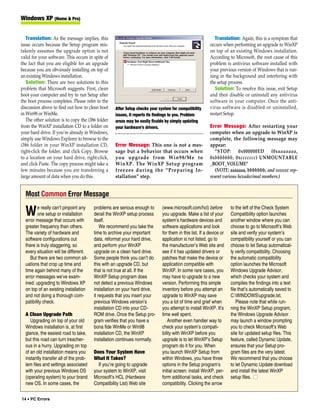
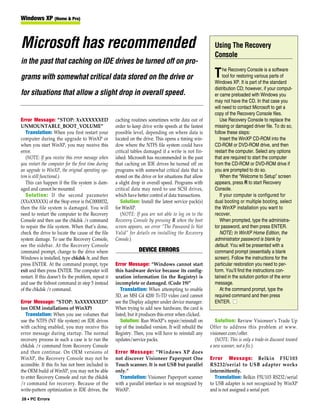
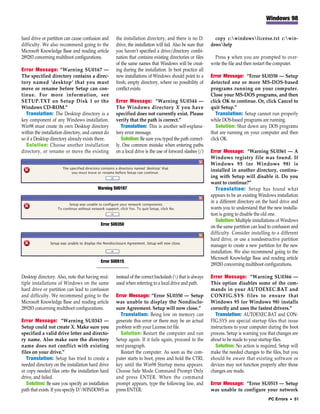
discussion above to find out how to clean boot     After Setup checks your system for compatibility      virus software is disabled or uninstalled,
in Win98 or WinMe.                                 issues, it reports its findings to you. Problem       restart Setup.
   The other solution is to copy the i386 folder   areas may be easily fixable by simply updating
from the WinXP installation CD to a folder on      your hardware’s drivers.                              Error Message: After restarting your
your hard drive. If you’re already in Windows,                                                           computer when an upgrade to WinXP is
simply use Windows Explorer to browse to the                                                             complete, the following message may
i386 folder in your WinXP installation CD,         Error Message: This one is not a mes-                 appear:
right-click the folder, and click Copy. Browse     sage but a behavior that occurs when                     “STOP: 0x000000ED (0xaaaaaaa,
to a location on your hard drive, right-click,     you upgrade from Win98/Me to                          0xbbbbbbb, 0xccccccc) UNMOUNTABLE
and click Paste. The copy process might take a     WinXP. The WinXP Setup program                        _BOOT_VOLUME”
few minutes because you are transferring a         freezes during the “Preparing In-                        (NOTE: aaaaaaa, bbbbbbb, and ccccccc rep-
large amount of data when you do this.             stallation” step.                                     resent various hexadecimal numbers.)


  Most Common Error Message
         e really can’t pinpoint any    problems are serious enough to       (www.microsoft.com/hcl) before          to the left of the Check System
  W      one setup or installation
  error message that occurs with
                                        derail the WinXP setup process
                                        itself.
                                                                             you upgrade. Make a list of your
                                                                             system’s hardware devices and
                                                                                                                     Compatibility option launches
                                                                                                                     another window where you can
  greater frequency than others.            We recommend you take the        software applications and look          choose to go to Microsoft’s Web
  The variety of hardware and           time to archive your important       for them in this list. If a device or   site and verify your system’s
  software configurations out           data, reformat your hard drive,      application is not listed, go to        compatibility yourself or you can
  there is truly staggering, so         and perform your WinXP               the manufacturer’s Web site and         choose to let Setup automatical-
  every situation will be different.    upgrade on a clean hard drive.       see if it has updated drivers or        ly verify compatibility. Choosing
     But there are two common sit-      Some people think you can’t do       patches that make the device or         the automatic compatibility
  uations that crop up time and         this with an upgrade CD, but         application compatible with             option launches the Microsoft
  time again behind many of the         that is not true at all. If the      WinXP. In some rare cases, you          Windows Upgrade Advisor,
  error messages we’ve exam-            WinXP Setup program does             may have to upgrade to a new            which checks your system and
  ined: upgrading to Windows XP         not detect a previous Windows        version. Performing this simple         compiles the findings into a text
  on top of an existing installation    installation on your hard drive,     inventory before you attempt an         file that’s automatically saved to
  and not doing a thorough com-         it requests that you insert your     upgrade to WinXP may save               C:WINDOWSupgrade.txt.
  patibility check.                     previous Windows version’s           you a lot of time and grief when            Please note that while run-
                                        installation CD into your CD-        you attempt to install WinXP. It’s      ning the WinXP Setup program,
  A Clean Upgrade Path                  ROM drive. Once the Setup pro-       time well spent.                        the Windows Upgrade Advisor
     Upgrading on top of your old       gram verifies that you have a           Another even handier way to          may launch a window prompting
  Windows installation is, at first     bona fide WinMe or Win98             check your system’s compati-            you to check Microsoft’s Web
  glance, the easiest road to take,     installation CD, the WinXP           bility with WinXP before you            site for updated setup files. This
  but this road can turn treacher-      installation continues normally.     upgrade is to let WinXP’s Setup         feature, called Dynamic Update,
  ous in a hurry. Upgrading on top                                           program do it for you. When             ensures that your Setup pro-
  of an old installation means you      Does Your System Have                you launch WinXP Setup from             gram files are the very latest.
  instantly transfer all of the prob-   What It Takes?                       within Windows, you have three          We recommend that you choose
  lem files and settings associated       If you’re going to upgrade         options in the Setup program’s          to let Dynamic Update download
  with your previous Windows OS         your system to WinXP, visit          initial screen: install WinXP, per-     and install the latest WinXP
  (operating system) to your brand      Microsoft’s HCL (Hardware            form additional tasks, and check        setup files. ■
  new OS. In some cases, the            Compatibility List) Web site         compatibility. Clicking the arrow

14 • PC Errors
Windows XP (Home & Pro)


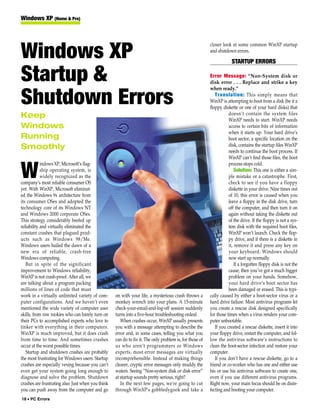
This is another one of those messages
that points to a possible problem with your WinXP installation CD.

   Translation: If you have a UDMA hard just completed the WinXP installation,                        If the file system is NTFS, configure your
drive and motherboard controller but are but when you reboot the computer, you                     BIOS settings so the computer boots from the
using a standard 40-wire connector cable to discover that WinXP assigned pass-                     CD drive and insert your WinXP installation
connect the drive to the controller and the words to all user accounts. Because you                CD into your CD-ROM drive. Restart the
BIOS is configured for UDMA mode, this don’t know the password Windows                             computer, and at the prompt press any key
error will be triggered. This is a complex assigned to each account, you can’t log                 to boot from the CD. Press r at the Welcome
way to say that you’re using the wrong cable in to any of them.                                    To Setup screen to launch the Recovery
with your UDMA drive and controller.                                                                   Console and then press ENTER when
   Another possible cause of this error mes-                                                           prompted for the administrator pass-
sage is a damaged file system. If the second                                                           word. At the command prompt, input
reported memory address is 0xC0000032,                                                                 type setupact.log and press ENTER.
the file system is damaged.                                                                            Make a note of the password associated
   Solution: To resolve the first cause                                                                with each account. Restart the computer
behind this error message, replace your 40-                                                            and use the retrieved password to log on
wire IDE (Integrated Drive Electronics) con-                                                           to the user account.
nector cable and reset your BIOS settings to
the default options.                                                                                   Error Message: “This program cannot
   To resolve the second problem triggering                                                            be run in DOS Mode.”
the error message, reboot your computer                                                                  This message appears when you
using either a startup disk or the WinXP                                                               attempt to execute Setup.exe from
Setup CD-ROM. At the Welcome to Setup Windows generates an upgrade report, saved in a text             within a DOS real-mode command
screen, press r to launch the Recovery file called Upgrade.txt and saved to your C:WINDOWS            prompt.
Console and type chkdsk /r to begin repair- folder.                                                      Translation: The WinXP Setup.exe exe-
ing your damaged file system. When the                                                                 cutable cannot be run from MS-DOS.
process completes, type exit to leave the                                                                Solution: If you need to run the instal-
Recovery Console and press ENTER to restart        Translation: The problem here is the            lation from within MS-DOS, type [CD-ROM
the computer. If this doesn’t resolve the prob- Setup program did not complete properly.           Drive]:i386winnt.exe to start the Setup
lem, repeat this process but use the fixboot During the Setup operation, Windows as-               program.
command instead.                                signs temporary passwords to each user
                                                account; these passwords are stored in a file      Error Message: After the WinXP Setup
Error Message: This is not an error called setupact.log in your Windows instal-                    program completes the file-copy
message, but a symptom: While you’re lation folder. When the Setup program com-                    process, the following error message
entering the Product Key during Setup pletes properly, these temporary passwords                   appears:
while upgrading from Win98/Me, Setup are cleared, allowing you to set up your                         “Setup cannot set the required
cycles back to the Welcome to Setup own password. But if the Setup program                         Windows XP configuration information.
screen.                                         does not complete properly, the passwords          This indicates an internal setup error.
   Translation: This is another one of those are retained.                                         Contact your system administrator.”
messages that points to a possible problem         Solution: To resolve this problem, find the        Translation: This is WinXP’s way of
with your WinXP installation CD.                setupact.log file and locate an entry that reads   reporting a hardware incompatibility issue.
   Solution: To resolve the problem, copy the      “Random password for Username is [pass-            Solution: First, update your system BIOS
contents of your installation CD-ROM’s i386 word].”                                                to the latest version. Then, determine if any
folder to a folder on your C: drive (using the     Write down the password exactly as it’s         hardware in your system is incompatible
xcopy command we discussed earlier) and written and use it to log on to the account.               with WinXP. You can verify this by using
run the Setup program from your hard drive. How you do this depends on whether you                 the Setup program’s automatic compati-
To do this, click Start and Run and type configured your file system as FAT32 or NTFS.             bility check or manually by browsing to
c:i386winnt32.exe in the Open textbox.           If the file system is FAT32, restart your       Microsoft’s Hardware Compatibility List
Click OK to execute the command.                system using a WinMe or Win98 startup disk.        (www.microsoft.com/hcl) Web catalog.
                                                At the command prompt, type edit c:               Either update the device drivers or remove
Error Message: Again, this one is not an windowssetupact.log and follow the instruc-              the incompatible hardware from your sys-
error message, but a symptom. You’ve tions above to locate the password.                           tem. Then restart the Setup program.
                                                                                                                                 PC Errors • 15
Windows XP (Home & Pro)


                                                    “Error:                                           memory to 256MB or 512MB. The more memo-
  Most Confusing                                    Warning! Setup failed to remove the               ry you have when running WinXP, the better;
                                                 setup catalog ieexcep.cat”                           512MB is probably the optimum amount of
  Error Message                                     or                                                memory you’ll need to run WinXP and all
                                                    “Error:                                           your other applications efficiently.
      inding the most confusing error mes-          Warning! Setup failed to remove the
  F   sage among so many candidates
  was truly a difficult task. But, we think we
                                                 setup catalog sp1.cat”
                                                    Translation: If the Setup program fails to
                                                                                                      Error Message: During the WinXP
                                                                                                      installation process, you receive one of
  found a very worthy nominee. The fol-          delete all of the files in the C:WINDOWS           these error messages:
  lowing error message can occur during          SYSTEM32CATROOT2 folder (or whatever                   “Failed to install product catalog.”
  the WinXP upgrade process:                     drive letter and Windows folder contain the             or
     “An unexpected error (768)                  previous Windows version files), these error            “STOP: 0x0000008E (0x00000005,
  occurred at line 5118 in <drive let-           messages may be generated. This is another           0xBF869F22,0xF9470688,0x00000000)”
  ter>xpclientbasebootsetupsetup            one of the many problems that can occur when            Translation: This error message is a varia-
  .c Press any key to continue.”                 you attempt to upgrade to WinXP on top of a          tion on the “Cannot get main entry point for
     When you press any key as instruct-         previous Windows version.                            C:WINDOWSSYSTEMVIPERSTI.CPL.
  ed, the following error message appears:          Solution: Rename the C:WINDOWSSYS-              Error:127 [ERROR=127 (7Fh)]” message dis-
     “A problem has been detected and            TEM32CATROOT2 folder to something such              cussed above. Again, if the Setup program fails
  windows has been shutdown to pre-              as catold to prevent WinXP’s Setup program           to completely remove the CATROOT2 folder
  vent damage to your computer.                  from locating the folder and halting the instal-     in your previous Windows installation, Setup
  PROCESS1_INITIALIZATION_FAILED”                lation. If you are still in Setup, press SHIFT-F10   will report this error. This error also occurs if
     Huh? Again, the Microsoft                   to launch a command prompt from within               one of your RAM memory modules is faulty.
  Knowledge Base comes to the rescue.            Setup. At the command prompt, type cdwin               Solution: To resolve the first possibility,
  The root cause triggering this error           dowsSystem32 to open the System32 folder            use the same approach discussed in the
  message is a software program                  and then type rename CATROOT2 catold,                “Cannot get main entry point for C:WIN-
  (namely Roxio’s GoBack) that is                press ENTER, restart the computer, and               DOWSSYSTEMVIPERSTI.CPL. Error:127
  incompatible with WinXP. To resolve            attempt the upgrade again.                           [ERROR=127 (7Fh)]” error message to rename
  the problem, disable GoBack when                  If you cannot reach a command prompt              the CATROOT2 folder.
  WinXP restarts by pressing the space           from Setup, reboot the computer from a                  To determine which of your RAM memory
  bar at the GoBack boot menu, press-            Win95, Win98, or WinMe startup disk and              modules is defective, use the troubleshooting
  ing d to disable and pressing y to             rename the folder from the command prompt.           approach discussed in the “STOP 0x0000008e”
  confirm. Once GoBack is disabled,              You can also launch a command prompt by              message.
  cancel the WinXP setup process and             booting from the WinXP installation CD and
  uninstall GoBack. ■                            running the Recovery Console.                        Error Message: When upgrading from
                                                                                                      Windows 98/98SE/WinMe/NT to WinXP
                                                 Error Message: During a WinXP instal-                Professional, the following error mes-
Error Message: When performing an                lation, you get one of the following error           sage appears:
upgrade to WinXP from Win98/Me, you              messages:                                              “Setup cannot upgrade your current
get any one or more of the following                “STOP: 0x0000008e”                                installation to Windows XP. Your copy
error messages:                                     or                                                of Windows XP does not support up-
   “Error: Cannot get main entry point              “STOP: 0x00000050 PAGE_FAULT_                     grading from an evaluation copy of
for C:WINDOWSSYSTEMVIPERSTI                      IN_NON_PAGED_AREA”                                   Windows. Setup cannot continue.”
.CPL. Error:127 [ERROR=127 (7Fh)]”                  Translation: This error is generated when           Translation: The problem here is your
   “Error:                                       one or more of your system’s RAM memory              WinXP Pro installation CD may only be
   The signature for Windows XP edi-             modules is faulty.                                   designed to upgrade an OEM (original equip-
tion Setup is invalid. The error code is            Solution: Remove a memory module and              ment manufacturer) version of Windows 2000.
fffffdf0.”                                       restart the setup process. If the error reap-        In other words, you have the wrong type of
   or                                            pears, replace the memory module you just            WinXP installation CD for the type of upgrade
   “The system cannot find message text          removed, remove a different memory mod-              you’re trying to do.
for message number 0xfffffdf0 in the             ule, and restart the setup process again.              Solution: Contact the OEM or reseller
message file for Syssetup.dll.”                  Continue using this procedure until you iso-         where you purchased the CD and obtain a
   or                                            late the specific memory module that is caus-        valid WinXP Pro upgrade CD-ROM.
   “Fatal Error:                                 ing the error message.
   Setup failed to install the product cat-         Keep in mind that WinXP needs at least            Error Message: “STOP: 0x0000001E
alogs. This is a fatal error. The setup log      128MB of RAM to run properly. If you have            (0x80000003, 0xBFC0304, 0x0000000,
files should contain more information.”          128MB or less of total system RAM, this is a         0x0000001)
   or                                            good opportunity to upgrade your system                [bugcheck code] ([1] [2] [3] [4])”
16 • PC Errors
Windows XP (Home & Pro)


Remember, WinXP requires at least                               2GB of hard drive                           Most Unusual
                                                                                                            Error Message
space, so if you’re at the ragged edge of that limit,
                                                                                                                 fter sifting through a few error mes-
try to make some more room.                                                                                 A    sages, we nominated this gem for
                                                                                                            the most unusual error message:
                                                                                                               “Error Message: An unexpected
   Translation: Microsoft calls this specific          download the file from Adaptec’s Web site at         error has occurred. (536821760)
error message (STOP 0x1E) a bug check code,            www.adaptec.com.                                     occurred at line 1768 in D:xpclient
which is a programmatic procedure used to                                                                   basebootsetuparcdisp.c”
report an illegal instruction detected by the          Error Message: During the WinXP setup                   This error message gives us absolute-
WinXP kernel. The number 1 represents the              process, you see the following message:              ly no clue as to what is causing the prob-
exception code, the number 2 represents the               “Uninstall Option Not Available                   lem. Fortunately, the Microsoft Knowl-
memory address where the error occurred,                  There is not enough Space to save                 edge Base does have an answer:
and the numbers 3 and 4 represent the para-            your current operation system.                       What’s triggering this error message is
meters 0 and 1 of the exception.                          Your computer has enough disk space               a problem with our computer’s memory,
   In plain English, Microsoft uses this error         for Windows XP, but it does not have                 specifically a damaged memory module
code to report programmatic errors caused by           enough to save your current version of               or a damaged memory slot (the physical
insufficient hard drive space, a faulty device         Windows for backup.                                  area in the motherboard where memory
driver, or possibly a BIOS that needs updat-              The backup image size is [number                  modules are inserted.
ing. If a device driver is the cause behind the        _of_megabytes]                                          We can’t understand why Microsoft’s
error message, the name of the device driver              It is recommended that you cancel                 Windows developers can’t simply say
may be displayed in the error message text.            Setup now, free additional disk space,               that a problem exists with one of your
   Solution: First, try to make more room              and then restart Setup.”                             memory modules. That approach would
in your hard drive for WinXP. Remember,                   Translation: This is a surprisingly clear         at least point you in the right trouble-
WinXP requires at least 2GB of hard drive              Windows error message. When WinXP is                 shooting direction. ■
space, so if you’re at the ragged edge of that         installed, the Setup program saves a backup
limit, try to make some more room.                     copy of your previous Windows version to a
   If a faulty device driver is the culprit, upgrade   folder in your hard drive. This backup is in         Solution: You can do a number of things to
the driver to the latest WinXP-compliant version       two files, BACKUP.CAB and BOOT.CAB,               resolve this situation. First and foremost, we
if one is available. If a WinXP-compliant version      stored in a folder at C:Undo. This is done in    certainly recommend that you take advantage
of the driver is not available, you may                                                                              of the option to back up your current
have to remove the hardware from                                                                                     OS. You never know what might go
your system to make WinXP Setup                                                                                      wrong with your WinXP installa-
work properly.                                                                                                       tion, so it’s advantageous to have the
   Finally, perform a flash upgrade to                                                                               option to go back to your old OS,
get your system BIOS up-to-date.                                                                                     just in case.
Consult your BIOS documentation to                                                                                       You can cancel the Setup process
learn how to upgrade the BIOS; fol-                                                                                  by pressing ESC. After you cancel
low all instructions provided by your                                                                                Setup, reboot into your existing OS
BIOS manufacturer to the letter or                                                                                   and free up more drive space. If you
you could wind up with major prob-                                                                                   have another partition in your sys-
lems if you botch the flash upgrade.                                                                                 tem with sufficient space for this
                                                                                                                     backup, choose this partition when
Error Message: “STOP:                                                                                                prompted to back up the existing
0x0000001E KMODE_EXCEP-                                                                                              system files by the Setup program.
TION_NOT_HANDLED”                       The folder structure of the Windows XP installation CD features four             This error is not a show stop-
   This message also mentions folders: DOCS, I386, SUPPORT, and VALUEADD.                                            per for the Setup program. If you
the device driver aspi32.sys.                                                                                        choose to simply not do the back-
   Translation: This is a specific example of a case your WinXP upgrade is not successful up, click Next to continue the Setup proce-
STOP 0x1E message; ASPI32.SYS is Adaptec’s and you want to revert to your previous dure. But, remember that you will not be
Advanced SCSI Programming Interface, a Windows version. But in this instance, the able to uninstall WinXP and revert to your
device driver used in CD writers.                   Setup program reports there is not enough previous OS if you choose to do this. RS
   Solution: Upgrade your system’s ver- space to save this backup copy of your previ-
sion of ASPI32.SYS to version 4.57 or higher; ous Windows version.                                       by Sixto Ortiz Jr.
                                                                                                                                          PC Errors • 17
Windows XP (Home & Pro)


                                                                                                          closer look at some common WinXP startup

Windows XP                                                                                                and shutdown errors.

                                                                                                                      STARTUP ERRORS

Startup &                                                                                                 Error Message: “Non-System disk or
                                                                                                          disk error . . . Replace and strike a key
                                                                                                          when ready.”

Shutdown Errors                                                                                              Translation: This simply means that
                                                                                                          WinXP is attempting to boot from a disk (be it a
                                                                                                          floppy diskette or one of your hard disks) that
Keep                                                                                                                 doesn’t contain the system files
                                                                                                                     WinXP needs to start. WinXP needs
Windows                                                                                                              access to certain bits of information
                                                                                                                     when it starts up. Your hard drive’s
Running                                                                                                              boot sector, a specific location on the
Smoothly                                                                                                             disk, contains the startup files WinXP
                                                                                                                     needs to continue the boot process. If
                                                                                                                     WinXP can’t find those files, the boot
            indows XP, Microsoft’s flag-                                                                             process stops cold.

W           ship operating system, is
            widely recognized as the
company’s most reliable consumer OS
                                                                                                                         Solution: This one is either a sim-
                                                                                                                     ple mistake or a catastrophe. First,
                                                                                                                     check to see if you have a floppy
yet. With WinXP, Microsoft eliminat-                                                                                 diskette in your drive. Nine times out
ed the Windows 9x architecture from                                                                                  of 10, this error is caused when you
its consumer OSes and adopted the                                                                                    leave a floppy in the disk drive, turn
technology core of its Windows NT                                                                                    off the computer, and then turn it on
and Windows 2000 corporate OSes.                                                                                     again without taking the diskette out
This strategy considerably beefed up                                                                                 of the drive. If the floppy is not a sys-
reliability and virtually eliminated the                                                                             tem disk with the required boot files,
constant crashes that plagued prod-                                                                                  WinXP won’t launch. Check the flop-
ucts such as Windows 98/Me.                                                                                          py drive, and if there is a diskette in
Windows users hailed the dawn of a                                                                                   it, remove it and press any key on
new era of reliable, crash-free                                                                                      your keyboard. Windows should
Windows computing.                                                                                                   now start up normally.
   But in spite of the significant                                                                                       If a forgotten floppy disk is not the
improvement to Windows reliability,                                                                                  cause, then you’ve got a much bigger
WinXP is not crash-proof. After all, we                                                                              problem on your hands. Somehow,
are talking about a program packing                                                                                  your hard drive’s boot sector has
millions of lines of code that must                                                                                  been damaged or erased. This is typi-
work in a virtually unlimited variety of com-       on with your life, a mysterious crash throws a        cally caused by either a boot-sector virus or a
puter configurations. And we haven’t even           monkey wrench into your plans. A 15-minute            hard drive failure. Most antivirus programs let
mentioned the wide variety of computer user         check-your-email-and-log-off session suddenly         you create a rescue disk designed specifically
skills, from raw rookies who can barely turn on     turns into a five-hour troubleshooting ordeal.        for those times when a virus renders your com-
their PCs to accomplished experts who love to          When crashes occur, WinXP usually presents         puter unbootable.
tinker with everything in their computers.          you with a message attempting to describe the            If you created a rescue diskette, insert it into
WinXP is much improved, but it does crash           error and, in some cases, telling you what you        your floppy drive, restart the computer, and fol-
from time to time. And sometimes crashes            can do to fix it. The only problem is, for those of   low the antivirus software’s instructions to
occur at the worst possible times.                  us who aren’t programmers or Windows                  clean the boot-sector infection and restore your
   Startup and shutdown crashes are probably        experts, most error messages are virtually            computer.
the most frustrating for Windows users. Startup     incomprehensible. Instead of making things               If you don’t have a rescue diskette, go to a
crashes are especially vexing because you can’t     clearer, cryptic error messages only muddy the        friend or co-worker who has one and either use
even get your system going long enough to           waters. Seeing “Non-system disk or disk error”        his or use his antivirus software to create one,
diagnose and solve the problem. Shutdown            at startup sounds pretty serious, right?              even if you use different antivirus programs.
crashes are frustrating also: Just when you think      In the next few pages, we're going to cut          Right now, your main focus should be on disin-
you can push away from the computer and go          through WinXP's gobbledygook and take a               fecting and booting your computer.
18 • PC Errors
Windows XP (Home & Pro)


   If a boot-sector virus is not the cause, the                                                        restore the required files. First, how to restore
hard drive’s boot sector, for some reason or          Most Common                                      the drivers:
another, has been damaged. WinXP’s Recovery                                                            1. Type cd windowssystem32drivers at the
Console has two utilities you can use to try to       Error Message                                       command prompt to open that directory.
repair your boot sector: FIXBOOT or FIXMBR.                                                            2. Type ren DRIVER.SYS DRIVER.BAK to
FIXBOOT writes an entirely new boot sector,                es, the most common error message              rename the corrupted copy of the driver (if
while FIXMBR repairs the MBR (master boot
record) in the boot sector.
                                                      Y    found in Computerland is the classic
                                                      “Non-System disk error” message. More
                                                                                                          the problem is a corrupted driver; if the dri-
                                                                                                          ver is just missing, skip this step and pro-
   To run the Recovery Console, boot into             often than not, this error occurs because           ceed to step 3).
your WinXP setup CD and press r when                  we leave a floppy disk in the disk drive         3. Type copy [CD drive letter]:i386
prompted. To boot into your WinXP installa-           after turning off the computer. When the            DRIVER.SYS to copy a fresh, functional
tion CD, restart the computer and enter your          computer is turned on again, it attempts            copy of the driver from your WinXP instal-
Setup (BIOS [Basic Input/Output System])              to boot from the floppy disk, which more            lation CD to the WINDOWSSYSTEM32
program. Your BIOS should have a menu                 than likely does not contain the files              Drivers directory.
where you can change the sequence of boot             Windows needs to boot normally.                  4. Type exit and then press the ENTER key to
devices for your computer. By default, your              We already gave an exhaustive                    exit the Recovery Console.
computer looks for a bootable disk in your            overview of this message, including what
floppy drive first, your hard drive second,           to do when a floppy disk is not the cause           Second, let’s restore USER32.DLL:
and your CD drive last. Adjust the boot               (besides panic when you don’t know               1. Browse to the required directory by typing
sequence in your BIOS so your computer                what the error means). Most of the time,            cd [drive letter]:windowssystem32 at the
searches for a bootable disc in your CD drive         the panic is short-lived, and all you have          command prompt.
first (leave the hard drive as the second             to do is remove the floppy from the drive        2. If you have a copy of USER32.DLL in the
choice), insert your WinXP installation disc          and restart your system. ■                          windowssystem32 directory that you sus-
into your CD drive, and restart the computer.                                                             pect is corrupt, type ren USER32.DLL
Because BIOS programs vary from manufac-                                                                  USER32.BAK to rename the file. If the file is
turer to manufacturer, consult your BIOS’           information that WinXP absolutely needs to            missing, skip to step 3.
documentation to find out how to change the         run properly.                                      3. Type expand [CD drive letter]:i386
boot device sequence.                                  In a nutshell, a DLL (dynamic-link library)        USER32.DLL_ [drive letter]:windows
   To run FIXBOOT, type FIXBOOT [drive] at          is a file containing information that another         system32 to copy the new USER32.DLL
the command prompt, where drive is the drive        program (this time, it is Windows itself) needs       file to your Windows directory.
letter for your boot drive (usually C:). To run     to run properly. For example, a DLL file may
FIXMBR, type FIXMBR [device name], where            contain additional functions that another pro-     Error Message: “The file C:windows
device name is the nomenclature the Recovery        gram’s code may call as the program runs.          system32c_1252.nls is missing or
Console’s MAP command uses to describe the          Programmers love DLLs because they let them        corrupt.”
various hardware devices in your computer.          simply call functions from within their code          Translation: As WinXP error messages go,
For example, you might type FIXMBR                  instead of having to code them from scratch.       this is one of the most straightforward. WinXP
deviceHardDisk0 to restore your boot              This particular DLL provides functionality         is simply reporting that the strangely named
record’s MBR. If you don’t enter a device           related to the WinXP API (Application              file c_1252.nls has gone AWOL.
name, FIXMBR repairs the MBR of the default         Programming Interface). Bottom line is,               Solution: The strategy to solve this prob-
system disk.                                        USER32.DLL is very important to WinXP.             lem is the same as in the “STOP: 0xc000026C
                                                       Solution: The solution to this problem is to    [Unable to load device driver] Driver” error:
Error Message: “STOP: 0xc000026C                    restore the missing or corrupted files to your     Restore a fresh copy of the missing or
[Unable to load device driver] Driver” or
“STOP: 0xv0000221 [Unable to load
device driver] Driver” or “STOP:
0xv0000221. Bad image check sum, the
image user32.dll is possibly corrupt. The
header check sum does not match the
computed check sum.”
                                                    This seemingly terrifying message is actually quite common, and most of the time, it has a very
   Translation: These errors have two possi-
                                                    simple solution.
ble root causes: As the first two messages
imply, the errors can be caused by a device dri-
ver file (*.SYS) that is missing or has been cor-   system. This is done using WinXP’s Recovery        corrupted file from your WinXP installation
rupted. The third message is pretty straightfor-    Console. In the solution to the last message, we   CD. Again, you must use the Recovery
ward, also: Again, something’s gone awry            discussed how to access the Recovery Console.      Console to do this. Once in the Recovery
with a file—this time with USER32.DLL. This            At the Recovery Console’s command               Console’s command prompt, type the follow-
is one of those critical system files containing    prompt, type the following commands to             ing commands:
                                                                                                                                       PC Errors • 19
Windows XP (Home & Pro)


This problem illustrates a tried-and-true principle of Windows computing:
When upgrading to a new Windows version, always perform a                                                   “clean” upgrade.
• cd C:windowssystem32—                                                                                                  Delete. Click Yes to confirm the
   opens the system32 folder in                                                                                            deletion:
   C:Windows; this is the de-                                                                                                HKEY_LOCAL_MACHINE
   fault location of the file.                                                                                             SYSTEMCURRENTCON
• ren c_1252.nls c_1252.bak—                                                                                               TROLSETSERVICESCdr4_2K
   The approach here is to give                                                                                               HKEY_LOCAL_MACHINE
                                         As this error message advises, the key to solving this problem is using
   the existing copy of the file an                                                                                        SYSTEMCURRENTCON
                                         the Recovery Console to copy a functional version of this file to the
   extension that disables it by                                                                                           TROLSETSERVICES Cdralw2k
                                         appropriate directory.
   preventing WinXP from find-                                                                                                HKEY_LOCAL_MACHINE
   ing the corrupted file at startup. If the file                                                               SYSTEMCURRENTCONTROLSETSER
   is missing, this step is not necessary.                                                                      VICES Cdudf
• expand [CD drive letter]:i386                                                                                   HKEY_LOCAL_MACHINESYSTEM
   USER32.DL_ [drive letter]:win                                                                              CURRENTCONTROLSETSERVICES
   dowssystem32—This copies a pristine                                                                          UdfReadr
   copy of the file from the WinXP instal-
   lation CD to the WINDOWS/System32                                                                            Error Message: “Hpppt.exe unable to
   folder.                                                                                                      locate component. This application
• Do as usual to exit the Recovery Console.                                                                     failed because WNASPI32.DLL was
                                                                                                                not found.”
Error Message: “Devices or applica-                                                                                Translation: The message suggests that
tions disabled. CD Recording soft- Use the Startup tab in Windows XP’s System Configuration Hpppt.exe is executed at Windows startup,
ware will cause Windows to become Utility to view the programs that automatically start with                    but because it cannot find the auxiliary file
unstable. Windows has prevented Windows and, if need be, to prevent unnecessary or trou-                        it needs, the program reports the error mes-
these drivers from loading. Click here blesome programs from starting.                                          sage and interrupts the Windows startup
for more details.”                                                                                              process.
   Translation: WinXP doesn’t get along                                                                            Hpppt.exe is HP’s parallel port test util-
very well with older versions of Easy CD any files called Cdr4_2K.sys or Cdralw2k.sys, ity, a program that verifies whether or not
Creator software. If you upgraded to WinXP right-click the file names, click Rename, and your parallel port is set to ECP (Extended
and didn’t remove your older copy of Easy CD change each file name to Cd*.old.                               Capabilities Port) or EPP (Enhanced Parallel
Creator software, WinXP detects this incom-               Finally, you must remove any keys in your Port) mode, two parallel-port configurations
patible program and lets you know about it Windows Registry that reference Easy CD that support bi-directional communications
with the above message.                                 Creator files. Keep in mind, modifying the between your parallel port and whatever
   Solution: The solution here is to purge Registry is dangerous, so tread with care. A device is connected to it. Many devices that
your system of all traces of the program. This misstep here and you can easily end up with a connect to your parallel port, such as scan-
problem illustrates a tried-and-true principle very sick system. OK, on with our Registry ners and printers, require bi-directional com-
of Windows computing: When upgrading to a surgery: Click Start and Run, type regedit in munication to allow a software utility that
new Windows version, always perform a the Open textbox, and click OK.                                        controls the device to get information about
“clean” upgrade. In other words, format your              In the Registry editor, find the following key the status of the printer or scanner.
hard drive to wipe it clean and then upgrade.           and click it to highlight it:                          Solution: As you might guess, the key is to
   The first step is removing Easy CD Creator.            HKEY_LOCAL_MACHINESYSTEMCUR- prevent the Hpppt.exe program from launch-
Click Start and Control Panel and double-click RENTCONTROLSETCONTROLCLASS ing when Windows starts. To do this, remove
the Add or Remove Programs icon. Locate the {4D36E965-E325-11CE-BFC1-08002BE10318}                           Hpppt.exe from the Startup list of programs by
Easy CD Creator program on the list and click             If you see a value called UpperFilters on clicking Start and Run and typing msconfig in
Remove.                                                 the Registry editor’s right pane, delete it by the Open textbox. Click OK to launch msconfig
   The next step is to disable any drivers Easy right-clicking it and clicking Delete. Click Yes (the System Configuration Utility) and click
CD Creator copied to your system. Click Start, to confirm.                                                   the Startup tab. Find the HP Parallel Port Test
Search, and All Files And Folders. Type                   Likewise, if you see a LowerFilters value, checkbox and click it. This clears the checkbox
cdr*.sys in the All Or Part Of The File Name use the same procedure to delete it.                            and removes Hpppt.exe from the startup list of
box, select your C: drive in the Look In drop-            Now, delete the following Registry keys. To programs. Click Apply and OK and restart
down menu, and click Search. If Search finds delete a key, locate it, right-click, and click your computer.
20 • PC Errors
Windows XP (Home & Pro)


Error Message: “Hard disk drive                      drive. If everything looks OK in the BIOS, you             Translation: This error can occur when
failure”                                             may have a damaged hard drive. In this case,            you’re starting up the computer from a stand-
   Translation: This one is self-explanatory:        we hope that you have backed up your data               by or hibernation state or when you attempt to
WinXP is reporting a problem with your hard          because most likely the data on the damaged             shut down your computer. The message is
drive.                                               drive may be very difficult, if not impossible,         telling you that a device driver in your sys-
   Solution: This is a hardware problem, so          to recover.                                             tem—it doesn’t specify which one—is not
the solution is to determine whether your hard                                                               behaving properly when WinXP changes
drive is permanently damaged or whether the          Error Message: “Fatal System Error:                     power states.
hard drive information in your system’s BIOS         0x000000a0 (0x00000002, 0x00000000,                        Solution: According to Microsoft, you
is incorrect. The first step is to reboot the com-   0x00000000)”                                            must find out if any device drivers in your
puter, enter your computer’s BIOS Setup pro-            Translation: This one is fairly straightfor-         system are not digitally signed by Microsoft.
gram, and verify the settings for your hard          ward: WinXP reports a serious crash along               WinXP’s developers knew that a huge reason
                                                     with a memory address. The question is,                 for Windows problems in previous versions
                                                     what exactly is this telling you? Reporting             was the use of device drivers that did not
  Most Hilarious                                     a hexadecimal memory address without                    work well with Windows, especially with its
                                                     further detail is no help at all in deciphering         power-management features. Many times,
  Error Message                                      this message.                                           hardware and software developers did not
                                                        Solution: According to Microsoft, this error         take the time to properly test their device dri-
          e searched and searched and                occurs if you have a Microsoft Sidewinder               vers, resulting in incompatibility problems
  W       finally found what we think is the
  most hilarious Windows error message
                                                     Gamepad Pro USB device, and you unplug it
                                                     during the boot process. The solution? Simple,
                                                                                                             with Windows.
                                                                                                                Microsoft’s solution was to digitally sign
  we’ve seen. Of course, you might not               really. Don’t unplug your Gamepad Pro dur-              device drivers that were tested and verified to
  find this so funny if it’s happening to you.       ing startup.                                            work well with Windows. Obviously, not
  The message is:                                                                                            every developer is going to have its driver test-
      “Windows could not start because of            Error Message: “Windows could not                       ed. So, many third-party hardware devices and
  an error in the software”                          start because the following file is miss-               applications have unsigned device drivers.
      Really? And all this time we thought           ing or corrupt: WindowsSystem32                      These unsigned drivers may be the root cause
  Windows crashed just to spite us. The              DriversIsapnp.sys”                                     of the specific problem described here.
  guy in charge of error messages must                  Translation: This is another one of those               To find out which device drivers in your
  have been in a hurry to get home the               messages that points directly to the culprit.           system are not digitally signed, run a tool
  day this one got written because it’s              ISAPNP.SYS is a device driver WinXP needs to            called sigverif.exe (File Signature Verification
  painfully obvious that very little thought         function properly. The message is telling you           utility) by clicking Start and Run and typing
  went into crafting this pearl of wisdom.           this file is either missing or damaged.                 sigverif.exe in the Open textbox. Click OK to
      But seriously, this error occurs when             Most WinXP files with a *.SYS extension are          launch sigverif.exe. At the sigverif startup win-
  Windows XP or Windows 2000 program                 Windows device drivers that reside in the               dow, click the Advanced button and click the
  files are missing or corrupted. To correct         C:WINDOWSSYSTEM32DRIVERS folder.                     Look For Other Files That Are Not Digitally
  the error, you must perform an in-place            This folder is one of the most important in             Signed checkbox. Now, click the Browse but-
  upgrade using your WinXP installation CD.          your entire hard drive. If any of these files go        ton, go to the C:WINDOWSSYSTEM32DRI
      To perform an in-place upgrade, boot           AWOL or are damaged, WinXP will report                  VERS folder, and click OK. Click OK again to
  your computer from your WinXP installa-            serious errors and you won’t be able to get             return to the initial screen and click Start to
  tion CD. At the Welcome To Setup                   your system started until you restore a func-           begin the search. The tool’s output is a list of
  screen, press ENTER to enter the WinXP             tional device driver.                                   device drivers that are not digitally signed.
  Setup program. On the next screen,                    Solution: Start the Recovery Console (we’ve             Now, the task is to disable each driver one
  press F8 to accept the Windows licens-             already discussed how to start the WinXP                by one to verify whether it is the root cause of
  ing agreement. In the next screen, you             Recovery Console). If the ISAPNP.SYS file is still      the problem. There are three ways to disable a
  should only see one WinXP installation             in your C:WINDOWSSYSTEM32DRIVERS                     driver. First, right-click My Computer, click
  listed; to repair it, press r. The process         folder, the driver is corrupt. Rename the existing      the Hardware tab, and click the Device
  starts automatically, so follow the instruc-       file and copy a new version from your WinXP             Manager button. Scroll down the list until you
  tions to complete it and perform the               installation CD. If the file is missing, then all you   encounter the hardware device that the driver
  required in-place upgrade. All this does is        need to do is copy the file from your WinXP CD          controls. Right-click the device’s entry in the
  reinstall a fresh copy of Windows over             to the C:WINDOWSSYSTEM32DRIVERS                      list and click Disable. Click OK to accept your
  your existing (and malfunctioning) copy.           folder by typing the expand command: expand             changes.
  Microsoft’s error message might not tell           [CD drive letter]:i386isapnp.sy_ C:win                  Second, if the driver in question is associat-
  you what specific software error is caus-          dowssystem32driversisapnp.sys.                       ed with a software application, remove the
  ing the problem, but this shotgun                                                                          program. Do this by going to Control Panel
  approach is designed to cure it. ■                 Error Message: “STOP: 0x0000009F DRI-                   and using Add/Remove Programs to uninstall
                                                     VER_POWER_STATE_FAILURE”                                the application.
                                                                                                                                             PC Errors • 21
Windows XP (Home & Pro)


This is another one of those messages reporting that a specific file—                                           Hal.dll
in this case—is missing or damaged.

   The third and final way to disable a driver                                                          “Windows could not start because the
is to browse to the Drivers folder in C:                                                            following file is missing or corrupt.
WINDOWSSystem32 and simply rename the                                                                  C:Windowssystem32hal.dll.
device driver file.                                                                                     Please re-install a copy of the above
   Once you disable the driver, try to duplicate                                                     file.”
the error by putting your computer into                                                                 Translation: This is another one of those
Hibernate or Standby mode and attempting to                                                          messages reporting that a specific file—Hal.dll
wake the computer from its low-power mode.                                                           in this case—is missing or damaged. Hal.dll is
If the computer restarts normally, you’ve                                                            the Windows Hardware Abstrac-tion Layer
isolated the problem; if the error message still                                                     DLL, a set of programming tools that shields
occurs, you’ve got some more wayward-driver                                                          Windows from having to know intimate
                                                   The Windows Signature Verification utility is
hunting to do.                                                                                       details about every piece of hardware it con-
                                                   an excellent tool for determining which device
                                                                                                     trols. So this DLL is critical to Windows’ inter-
                                                   drivers are not digitally signed by Microsoft.
Error Message: “Windows                                                                                             action with device drivers in
cannot find openme.exe”                                                                                             your system.
   Translation: This one is                                                                                            Solution: The solution, un-
straightforward: Windows is                                                                                         fortunately, is to begin the setup
looking for a file called OPEN-                                                                                     process all over again. Restart
ME.EXE that is configured via                                                                                       the computer, select Cancel
the Registry to start automati-                                                                                     Windows XP Setup in Windows
cally.                                                                                                              Advanced Options to uninstall
   Solution: OPENME.EXE is                                                                                          WinXP, and then run Setup
an executable file containing the                                                                                   again.
W32.DSS Trojan horse virus.
The file is typically attached to                                                                                    SHUTDOWN ERRORS
an unsolicited email; if you
launch the executable, you infect                                                                                Error Message: “Your sys-
your computer with this Trojan                                                                                   tem is low on virtual memo-
horse, and the program also                                                                                      ry. Windows is increasing
adds an entry in your Windows                                                                                    the size of your virtual mem-
Registry. If your antivirus soft-                                                                                ory paging file. During this
ware is working properly, it                                                                                     process memory requested
will remove the virus and the                                                                                    for some applications may
program from your computer,                                                                                      be denied.”
but, in some cases, it won’t                                                                                        Translation: This message is
remove the reference to the file                                                                                 telling you that an unruly appli-
in your Registry.                                                                                                cation is hogging inordinate
   To get rid of the Registry entry Check out Microsoft’s HCL (Hardware Compatibility List) catalog to see       amounts of virtual memory.
causing this startup problem, click which of your installed hardware devices or software programs are            Virtual memory is space on your
Start and Run and type regedit at deemed compatible with Windows XP, especially if you are about to              hard drive that Windows re-
the Open textbox. In the Registry upgrade to WinXP.                                                              serves as “pseudo-memory.”
editor, navigate to HKEY_LO-                                                                                     When you’re running low on
CAL_MACHINESOFT-                                                                                                system RAM, Windows swaps
W A R E  M I C R O S O F T  W I N D O W S N T part of the string. Restart the computer; the memory usage to a designated region in your
CURRENTVERSIONWinlogon and click the issue should now be resolved.                                hard drive. That is why, especially if your sys-
Winlogon key to select it. In the Registry edi-                                                     tem has the minimal memory requirements to
tor’s right pane, find the name Shell and look at Error Message: When you complete an run WinXP, your hard drive starts to audibly
its Data value. If the Data column contains the upgrade to WinXP from Win98 or thrash when your system memory is used
string “explorer.exe openme.exe,” right-click WinMe and Setup restarts your comput- up and WinXP has to go to virtual memo-
Shell, click Modify, and delete the openme.exe er, you get the following message:                   ry. According to Microsoft, this problem
22 • PC Errors
Windows XP (Home & Pro)


occurs when Symantec’s Norton Personal            installed and set up for use at the Welcome
Firewall is installed and configured to run at    screen but is not functioning properly. And          Most Unusual Error
Windows startup.                                  what, you might ask, is an IME? IME is a pro-
   Solution: According to Microsoft, the solu-    gram in Windows designed to let you enter            Message
tion to this problem is to configure the Norton   complex, foreign language characters (such as
Personal Firewall to start from the Startup       Far East languages such as Korean or Chinese)             his one is also a tough category
folder and not from the Registry. To disable
the application’s Registry startup, click
                                                  using a standard keyboard.
                                                    WinXP already comes with built-in lan-
                                                                                                       T    to award; we went outside the
                                                                                                       Microsoft Knowledge Base and found
Start and Run, type msconfig in the Open          guage support for Chinese, Japanese, and             this gem (the message occurs when
textbox, and click OK. This launches the          Korean, so you don’t need to down-                   you install Laplink Software’s Laplink or
                                                                     load any of the IMEs to           PCSync software):
                                                                     work with one of those               “_INS0432._MP - Entry Point Not
                                                                     Far East languages in             Found - The procedure entry point
                                                                     WinXP. To set up the              SUnMapLS_IP_EBP_16 could not be
                                                                     various multilanguage             located in the dynamic link library KER-
                                                                     options in WinXP, double-         NEL32.dll”
                                                                     click the Regional and               Wow! This one is bound to strike fear
                                                                     Language Options icon in          in the hearts of even the hardiest PC
                                                                     Control Panel.                    veterans. Laplink recommends various
                                                                                                       possible remedies for this issue, includ-
                                                                       Error Message: Here,            ing updating your video drivers to the lat-
                                                                       you can’t see the mes-          est version, removing temporary files
                                                                       sage; instead, you brief-       from your computer and attempting the
                                                                       ly see a blue screen and        installation again, downloading and
                                                                       then Windows auto-              installing the latest Microsoft Java Virtual
If the entry under Computer in Device Manager is Standard PC, your     matically restarts.             Machine, and finally, ensuring that all the
computer is not ACPI-compliant or Windows is not reporting this            Translation: The rea-       latest patches and service packs are
information correctly.                                                 son Windows is quickly          installed.
                                                                       restarting when the error          We realize this one isn’t related to a
                                                                       occurs, without giving          startup or shutdown, but we simply
aforementioned System Configuration Utility; you enough time to see the error message, is              couldn’t pass this one up. ■
now click the Startup tab and click the check- that the system is configured to automatically
box to the left of the IAMAPP.EXE entry in the restart when a system error occurs. When a
Startup Item list to uncheck it. Click OK to STOP error occurs, Windows restarts so                  0xFC9589B0, 0xFC9586Bo) Kbdclass.sys-
accept your changes.                                 rapidly you have no time to look at the mes-    address Fc7F1945 base at FC7F1000,
    To add IAMAPP.EXE to your Startup folder, sage. This behavior is quite disconcerting             Datestamp 3b7d82f3”
browse to the Startup folder at C:DOC- because you can’t get the error message                         Translation: These two separate errors
UMENTS AND SETTINGSALL USERS information you desperately need to trou-                             are very similar, so we will discuss them
START MENUPROGRAMSStartUp. Click bleshoot the problem.                                             together. As you can see, the device driver
File in the folder’s window, click New, and click      Solution: Before any troubleshooting effort   file Kbdclass.sys is triggering an error; the
Shortcut to launch the Create Shortcut window. can begin, you need to configure WinXP so it          dense hexadecimal nomenclature you see
At this window, click the Browse button and won’t automatically restart when the error               here is the memory address affected by the
navigate to C:PROGRAM FILESNORTON occurs. Right-click My Computer, click                           error.
PERSONAL FIREWALLIamapp.exe (if you Properties, and click the Advanced tab. Click                      Solution: The problem occurs with
have Norton Internet Security, the path is the Settings button in the Startup and                    Logitech equipment, such as a mouse or key-
C:PROGRAM FILESNORTON INTERNET Recovery option groups and click the Au-                            board, which uses a driver (kbdclass.sys) that’s
SECURITYIamapp.exe). Click OK and click tomatically Restart checkbox in the System                  incompatible with WinXP. Specifically, the sec-
Next; type a name for the shortcut and click the Failure option group to clear it. Click OK to       ond message is triggered when you are using
Finish button to create the shortcut.                accept your changes.                            version 1.5 or earlier of Logitech’s iTouch soft-
                                                       WinXP now displays the error message, and     ware, used with the company’s Cordless
Error Message: “Saving your settings.”               you can troubleshoot the problem.               Freedom keyboards. The first message affects
    Translation: This one occurs as WinXP                                                            computers using Logitech mice with
becomes nonresponsive during a shutdown. Error Message: “STOP: 0x000000D1,                           Logitech’s Mouseware software versions 9.10
The computer hangs, and you are unable to (0x0000002b, 0x00000002, 0x00000000,                       and 9.24.
restart it.                                          0xEEEE1b01) IRQL_NOT_LESS_OR                       The solution is simple: Browse to the
    Solution: The root cause of this one is that _EQUAL Kbdclass.sys” or “STOP:                      Logitech Web site and get the very latest
a Microsoft IME (Input Method Editor) is 0x0000007E (0xc00000005, 0xFC7F1945,                        updates for your device’s software. Go to
                                                                                                                                     PC Errors • 23
Windows XP (Home & Pro)


www.logitech.com for instructions on remov-                                                        the plus sign (+) to the left of the Computer
ing the old software and upgrading to the lat-                                                     entry on the list to expand the branch. If the
est version.                                                                                       computer is listed as Advanced Con-
   These two error messages illustrate a very                                                      figuration And Power Interface (ACPI) PC,
common WinXP problem that you can easily                                                           your computer is ACPI-compliant. If the
solve by acting proactively before you upgrade                                                     computer is listed as Standard PC, then
to WinXP. The first step is to take a look at                                                      either your computer is not ACPI-compliant
Microsoft’s Hardware Compatibility List                                                            or WinXP is not reporting your computer’s
(www.microsoft.com/hcl) and check to see if                                                        ACPI status correctly.
your hardware is included in the list. This list                                                      If your computer is ACPI-compliant and
is a comprehensive catalog of software and                                                         you are experiencing this issue, restart your
hardware tested and approved to work with                                                          computer and verify the power-management
WinXP. At the very least, you should visit the                                                     settings in your system BIOS. It’s possible
manufacturer for every piece of hardware you                                                       that this error is caused by a BIOS with incor-
own and make sure they have published                                                              rectly entered power-management settings.
device drivers written specifically to achieve                                                        (NOTE: The BIOS is a critical part of your sys-
compatibility with WinXP. Doing this prep          You can set up your USB (Universal Serial       tem; consult with your PC’s manufacturer and
work before upgrading is time well spent and       Bus) hub’s power management options in the      plan your approach very carefully before messing
will most likely prevent annoying problems         USB Root Hub Properties dialog box’s Power      around in here. A misstep could render your com-
later on.                                          Management tab.                                 puter unbootable.)
                                                                                                      Microsoft advises that if your computer is
Error message: When you attempt to                 the third option: Here, WinXP downloads         not ACPI-compliant, you may be able to
shut down your computer, WinXP                     and installs the updates automatically with-    resolve this issue by installing the NT
hangs. After awhile, a dialog box                  out any interference from you. We prefer the    Apm/Legacy Interface Device. As you did
launches stating: “Msmsgs.exe not                  second setting, which lets you review the       before, launch the Device Manager. In the
responding” or “ActiveMovie not                    details about an update and, if you choose to   Device Manager window, click View and
responding”                                        do so, postpone the install to a later date.    click the Show Hidden Devices entry. Click
   Translation: According to Microsoft, this       This is convenient when you’re busy working     the plus sign to the left of the Non-Plug And
doesn’t occur very often and is caused by an       and don’t have time to install an update and    Play Drivers entry in the devices list;
intermittent problem (bug) with Windows            restart your computer.                          if Microsoft ACPI Driver is not listed, click
Messenger.                                                                                         the plus sign to the left of the NT Apm/
   Solution: To resolve this, upgrade to the       Error Message: When you attempt to              Legacy Support entry to expand this branch.
very latest WinXP Service Pack.                    shut down your computer, the system             The NT Apm/Legacy Interface Node en-
   This simple-to-solve problem illustrates a      hangs and displays the following mes-           try should have a red X next to it indicating
tried-and-true principle in Windows comput-        sage: “It is now safe to turn off your          that the driver is disabled. Right-click
ing: Always keep your system up-to-date with       computer”                                       the NT Apm/Legacy Interface Node en-
the latest patches, upgrades, and service packs.     Translation: WinXP is reporting a prob-       try and click the Enable Device button.
This keeps your system secure and prevents         lem with your computer’s power-manage-          Click OK to accept the change, exit the
these documented bugs from wreaking havoc          ment settings. For your computer’s APM          Device Manager, and click OK in the
with your computer. With WinXP’s automatic         (Advanced Power Management) feature to          System Properties window to accept all
update feature, it’s very easy to keep your sys-   work correctly, the computer must support       your changes.
tem up-to-date.                                    the ACPI (Advanced Configuration and               If you expand the Non-Plug And Play
   To use WinXP’s automatic update feature,        Power Interface) standard, and the settings     Drivers’ branch in the Devices list and
right-click My Computer, click Properties,         must be correct in both WinXP and your sys-     Microsoft ACIP Driver is listed, you must dis-
and then click the Automatic Updates tab.          tem BIOS.                                       able this driver before installing the NT Apm/
You can configure Windows to tell you                Solution: First, verify whether your PC is    Legacy Interface Device. To disable the ACPI
before downloading and installing an update        ACPI-compliant. To do this, right-click My      driver, right-click its entry in the list, click
or you can configure it to download updates        Computer, click Properties, click the Hard-     Disable, exit the Device Manager, click OK in
automatically and then prompt you before           ware tab in the System Properties window,       the System Properties window, and restart
installing them. The most automatic setting is     and click the Device Manager button. Click      your computer.


These two error messages illustrate a very common WinXP problem that you can easily
solve by acting proactively                   before you upgrade to WinXP.
24 • PC Errors
Windows XP (Home & Pro)


The Selective-Suspend feature                                                                           Now you have to add the NT Apm/
                                                                                                     Legacy Interface Device support. Go to
                                                                                                     Control Panel, double-click the Add
                                                                                                     Hardware icon, and click Next to launch the
allows Windows to turn a device                                                                      Add Hardware wizard. The wizard will auto-
                                                                                                     matically search your system for recently
(a USB mouse or keyboard, for example)                                                               added hardware. When the wizard finishes
                                                                                                     searching, click the Yes, I Have Already
                                                                                                     Connected The Hardware radio button and
off to conserve power. This is especially useful in                                                  click Next. Scroll to the bottom of the

notebook computers,                                                                                  Installed Hardware list, click the Add A New
                                                                                                     Hardware Device entry to select it, and click
                                                                                                     Next. In the next dialog box, click the Install
                                                                                                     The Hardware That I Manually Select From
where conserving battery power is a primary goal.                                                    A List (Advanced) radio button and click
                                                                                                     Next. In the Common Hardware Types list
                                                                                                     box, find the NT Apm/Legacy Support entry,
 Most Confusing Error Message                                                                        click to select it, and click the Next button. In
                                                                                                     the next dialog box, click the NT Apm/
         indows error mes-        Panel is in Category View          Contact technical               Legacy Interface Node entry in the Model list
 W       sages are confusing
 to begin with, so awarding
                                  (Windows XP’s default),
                                  click Performance and
                                                                  support.”
                                                                     This is the end of the trail,
                                                                                                     box (it should be the only one on the list) and
                                                                                                     click Next to install the driver. Click the
 the “Most Confusing Error        Maintenance and then click      and if you’re like everyone        Finish button to complete the process.
 Message” crown was a diffi-      Administrative Tools.           else out there, everything
 cult task. We selected the       Double-click the Event          should now be clear as             Error Message: No message here, just a
 following message because        Viewer shortcut; in Event       mud. Microsoft’s Knowledge         symptom: After connecting a USB
 it requires you to go on a       Viewer’s right pane, look for   Base advises that this mes-        device, your computer hangs when you
 Windows scavenger hunt           an Error entry with Event ID    sage is triggered when your        try to shut it down.
 for information. The fun         7024. The description for       computer’s name on a net-             Solution: The root cause of this problem is
 begins during startup when       this event is The               work is not unique. Micro-         the fact that a USB device is configured for
 Windows displays:                Messenger Service               soft’s Messenger service           selective suspend, but the device doesn’t sup-
     “At least one service or     Terminated With Service-        monitors network messages          port it. The Selective-Suspend feature allows
 driver failed during system      Specific Error 2270. Now,       and uses a set of aliases          Windows to turn a device (a USB mouse or
 startup. Use Event Viewer        the task is figuring out        based on data about net-           keyboard, for example) off to conserve power.
 to examine the event log         exactly what “Error 2270”       work computers to deter-           This is especially useful in notebook comput-
 for details.”                    is. For this, run a utility     mine a message’s intended          ers, where conserving battery power is a pri-
     What could have been a       called net helpmsg.             recipient. One of the crite-       mary goal. But for this feature to work, of
 clear, straightforward mes-         To run net helpmsg, click    ria for the aliases is a com-      course, the device must support it.
 sage quickly slides into a       Start and Run and type          puter’s name, so if the               To resolve the problem, right-click My
 confusing ordeal. It’s logical   command in the Open             computer name is not               Computer, click Properties, and then click the
 to ask why Microsoft can’t       textbox. At the command         unique, Messenger cannot           Hardware tab. Click the Device Manager but-
 simply report the specific       prompt, type net helpmsg        use the alias and the ser-         ton and scroll down the devices list until
 service or driver that failed.   followed by the message         vice fails to start.               you find the Universal Serial Bus Control-
 But, let’s follow Microsoft’s    number. In this case, type         To resolve this problem,        lers entry.
 logic on this one.               net helpmsg 2270 and            rename the computer so its            Click the plus sign to the left of the entry
     The next step is to          press ENTER. The follow-        name is unique. Right-click        to expand it, right-click the USB Root Hub
 launch the Event Viewer          ing message is displayed:       My Computer, click Prop-           entry, and click Properties. Click the Power
 and see what further infor-         “The computer name           erties, click the Computer         Management tab on the USB Root Hub
 mation is displayed. To          could not be added as           Name tab, and click the            Properties window and click the Allow The
 start the Event Viewer,          a message alias. The            Change button. Type a              Computer To Turn Off This Device To Save
 click Start and Control          name may already exist          unique name and click OK.          Power checkbox to clear it.
 Panel and double-click the       on the network.                 Then click OK again to                Click OK to accept your changes and then
 Administrative Tools icon           EXPLANATION                  accept your changes and            exit the Device Manager. RS
 (this is assuming your              A software error             restart your computer.
 Control Panel is in Classic      occurred.                          Whew . . . you still            by Sixto Ortiz Jr.
 view). If your Control              ACTION                       with us? ■

                                                                                                                                     PC Errors • 25
Windows XP (Home & Pro)


                                                                                                           the list. If that fixes the problem, get in touch

Windows XP                                                                                                 with the manufacturer of the component or
                                                                                                           check for an updated driver on their Web site.
                                                                                                           • Upgrade Your System BIOS


Hardware Errors                                                                                               Check with the manufacturer of your com-
                                                                                                           puter or the manufacturer of your computer’s
                                                                                                           motherboard for availability and procedures
                                                                                                           for updating the system’s BIOS.
Keep Windows & Devices In Sync
                                                                                                           Error Message: “STOP: C0000221
            indows XP is much more competent           • There is insufficient disk space on the drive     Unknown Hard Error” or “STOP:

W           than previous versions of Windows
            at dealing with the wide variety of
hardware devices it needs to communicate with.
                                                         on which you installed Windows.
                                                       • There is an outdated or incompatible third-
                                                         party driver (or drivers) installed on your
                                                                                                           C0000221 STATUS_IMAGE_CHECK-
                                                                                                           SUM_MISMATCH”
                                                                                                              Translation: These error messages are all
Even so, there are times when XP hits a stum-            computer—a faulty video driver, for example.      related.
bling block and calls for help by issuing one of its   • There are system BIOS (Basic Input/Output            STOP: C0000221 unknown hard error
cryptic error messages. Understanding the error          System) incompatibilities.                        PathFile_name
message and determining which device is caus-                                                                 -or-
ing the problem is easier than ever, but resolving
the problem can still be a very complex process.

               STOP ERRORS

Error Message: WinXP Generates a
“STOP: 0xA0” Error Message During
Hibernation
   Translation: If you have an IDE (Integrated
Drive Electronics) hard drive, it may time out
during the hibernation process. This is because
the ATAPI driver does not wait long enough for
the primary drive to become available.
   Solution: This is resolved in the latest
service pack for WinXP. Go to www.windows
update.com and download any service packs
that are not installed on your computer.

Error Message: “STOP: XxXXXXXXD1”
   Translation: When you shut down your
computer that has one or more USB (Universal
Serial Bus) devices attached to it, you may
receive this error message. This problem occurs
because of bugs in the USB driver software.
   Solution: This problem has been resolved in            Solution: Depending on which of the con-            STOP: 0xC0000221 unknown hard error
Service Pack 1. Download and install all avail-        ditions exists, use one of these procedures.        C:WinntSystem32Ntdll.dll (or another spe-
able service packs for WinXP, available at             • Free Up Hard Drive Space                          cific file or driver)
www.windowsupdate.com.                                    Make sure the drive you are installing              -or-
                                                       Windows on has enough free space. You may              STOP: 0xC0000221 STATUS_IMAGE_
Error Message: “STOP: 0x0000001E                       need to delete some files or install to a differ-   CHECKSUM_MISMATCH PathFile_name
(0x80000003, 0xBFC0304, 0x0000000,                     ent drive.                                             You will see one of these if the file named in
0x0000001) [bugcheck code] ([1] [2] [3] [4]”           • Disable or Remove the Third-Party Driver          the error message is corrupted. Windows
   Translation: When you run WinXP Setup,                 If the STOP 0x1E error message lists a driver    always checks a series of files on startup,
you may receive an error message similar to            by name, disable or remove it by clicking Start,    including:
this one.                                              My Computer, and then Control Panel. Then           • All driver files.
   This can show up if you restart your com-           double-click System, Hardware, and Device           • All DLLs (dynamic-link libraries), including
puter during or after the Windows Setup                Manager. From the list, find the item “DVD/CD-         User, GDI (Graphics Device Interface), Shell,
process, if any of these conditions exist:             ROM drive and click the plus sign (+) to expand        Kernel, Ntdll, Crtdll, etc.
26 • PC Errors
Windows XP (Home & Pro)


   You may also see this                                                    copy D:i386 XXXXXXXX,             Type exit, press ENTER, and then restart the
if you installed the wrong                                               where D: is the drive letter computer. (NOTE: If WinXP still won’t boot, you
driver for a particular com-                                             for the drive that contains may have to perform an in-place upgrade [also
ponent.                                                                  the WinXP Installation CD- called a repair install]).
   Solution: To fix this,                                                ROM.
either get a new copy of the                                                Type exit, press the Error Message: “STOP: 0x0000009F
corrupted file and copy it                                               ENTER key, and then restart DRIVER_POWER_STATE_FAILURE”
to your system or reinstall                                              your computer.                        Translation: This error appears when
Windows. If you continue to        A simple numeric error with a         •For a Missing or Dam- drivers don’t handle power state transition
receive any of these error         long explanation lets you know           aged User32.dll File           requests properly, usually during shutting
messages after you reinstall       that you aren’t connected to             Use Recovery Console to down, suspending or resuming from Standby
Windows, it’s possible you         the network.                          replace the corrupted or mode, or suspending or resuming from
may have a hardware or net-                                              damaged User32.dll file, hibernation.
work problem.                                         then, if needed, perform an in-place upgrade             Solution: To fix this error, update or
                                                      (also called a repair install) of WinXP. To do remove the driver that’s causing the problem.
Error Message: A “STOP: 0xc000026C” so, follow these steps:                                                This error can occur because of a device driver,
or “STOP: 0xc0000221 Unable to Load                      Insert the WinXP CD-ROM into the CD- but it can also occur because of a file system
Device Driver”                                        ROM or DVD-ROM drive and then restart the filter driver such as an antivirus, remote con-
   Translation: When WinXP starts up, you computer. Select any options that are required trol, or backup program.
may get one of the following error messages:          to start the computer from the CD-ROM or                 To isolate the driver that is causing the
   STOP: 0xc000026C [Unable to load device DVD-ROM drive if you are prompted to do so.                     error, follow these steps:
driver] XXXXXXXX
   -or-
   STOP: 0xc0000221 [Unable to load device               Most Unusual Error Message
driver] XXXXXXXX
   -or-                                                  Error Message: “THREAD_STUCK_IN_DEVICE_DRIVER”
   STOP: 0xc0000221. Bad image check sum,
the image user32.dll is possibly corrupted. The          Translation:        This is a STOP error that pertains
header check sum does not match the comput-                                  specifically to an NVIDIA video card.
ed check sum.                                                                The actual message is “STOP:
   XXXXXXXX is the name of the device driver                                 0x000000EA THREAD_STUCK_
file. This may happen if one of these conditions                             IN_DEVICE_DRIVER.” It shows up if
exists:                                                                      you are using the Nv4.sys video driver
• A device driver file (.sys) is missing or dam-                             to support the NVIDIA card. Fortun-
   aged.                                                                     ately, getting an updated driver from
• The missing or damaged file is probably the                                the NVIDIA site (www.nvidia.com) will extract the string and let your video
   driver file that the error message mentions.                              device work properly. ■
• The User32.dll file may be missing or dam-
   aged.
   Solution: Use the appropriate fix depend-             When the “Welcome to Setup” screen ap- • Check to see if your computer and all the
ing on the particular problem above:                  pears, press R to start Recovery Console. (See           installed devices are listed on the HCL
• For a Missing or Damaged Driver File                the sidebar “Using The Recovery Console.”)               (Hardware Compatibility List) located at
   Use Recovery Console to replace the miss-             At the command prompt, type the following             www.microsoft.com/hcl.
ing or damaged driver file. (See the sidebar command, and then press ENTER:                                • Check for with the hardware manufacturer
“Using The Recovery Console.”)                           cd windowssystem32                                   for updates that may be available for your
   At the command prompt, type the following             To rename the User32.dll file, type the fol-          hardware (updates are usually available on
command, and then press ENTER:                        lowing command, and then press ENTER:                    the hardware manufacturers’ Web sites).
   cd windowssystem32drivers                           ren user32.dll user32.bak                         • Update any software that uses filter drivers
   Rename the damaged driver file by typing              To expand a new copy of the User32.dll file           such as antivirus, remote control, and back-
the following command, and then press from the WinXP CD-ROM to the System32                                    up software.
ENTER:                                                folder, type the following command, and then • Remove any noncritical devices and soft-
   ren XXXXXXXX.sys XXXXXXXX.bak, where press ENTER:                                                           ware and see if the error appears after they
XXXXXXXX is the name of the damaged driver               expand D:i386user32.dl_ c:windows                 are removed. If the error returns, you’ve
file.                                                 system32user32.dll,where D: is the drive let-           found your problem.
   To copy the driver from the WinXP CD- ter for the drive that contains the WinXP CD- • Install Windows in a new folder. Add any
ROM to the Drivers folder, type the following ROM, and c:windows is the drive letter and                      drivers or components one at time, and
command, and then press ENTER:                        folder where WinXP is installed.                         restart the computer after each addition.
                                                                                                                                          PC Errors • 27
Windows XP (Home & Pro)


Microsoft has recommended                                                                                   Using The Recovery
                                                                                                            Console
in the past that caching on IDE drives be turned off on pro-
                                                                                                                 he Recovery Console is a software
grams with somewhat critical data stored on the drive or                                                    T    tool for restoring various parts of
                                                                                                            Windows XP. It is part of the standard
                                                                                                            distribution CD; however, if your comput-
for situations that allow a slight drop in overall speed.                                                   er came preloaded with Windows you
                                                                                                            may not have the CD. In that case you
                                                                                                            will need to contact Microsoft to get a
                                                                                                            copy of the Recovery Console files.
Error Message: “STOP: XxXXXXXXED                      caching routines sometimes write data out of             Use Recovery Console to replace the
UNMOUNTABLE_BOOT_VOLUME”                              order to keep drive write speeds at the fastest       missing or damaged driver file. To do so,
   Translation: When you first restart your           possible level, depending on where data is            follow these steps:
computer during the upgrade to WinXP or               located on the drive. This opens a timing win-           Insert the WinXP CD-ROM into the
when you start WinXP, you may receive this            dow where the NTFS file system could have             CD-ROM or DVD-ROM drive, and then
error.                                                critical tables damaged if a write is not fin-        restart the computer. Select any options
   (NOTE: If you receive this error message when      ished. Microsoft has recommended in the past          that are required to start the computer
you restart the computer for the first time during    that caching on IDE drives be turned off on           from the CD-ROM or DVD-ROM drive if
an upgrade to WinXP, the original operating sys-      programs with somewhat critical data that is          you are prompted to do so.
tem is still functional.)                             stored on the drive or for situations that allow         When the “Welcome to Setup” screen
   This can happen if the file system is dam-         a slight drop in overall speed. Programs with         appears, press R to start Recovery
aged and cannot be mounted                            critical data may need to use SCSI drives,            Console.
   Solution: If the second parameter                  which have better control of data transactions.          If your computer is configured for
(XXxXXXXXX) of the Stop error is 0xC0000032,             Solution: Install the latest service pack(s)       dual booting or multiple booting, select
then the file system is damaged. You will             for WinXP.                                            the WinXP installation you want to
need to restart the computer to the Recovery             (NOTE: If you are not able to log on to the        recover.
Console and then use the chkdsk /r command            Recovery Console by pressing R when the boot             When prompted, type the administra-
to repair the file system. When that’s done,          screen appears, see error “The Password Is Not        tor password, and then press ENTER.
check the drive to locate the cause of the file       Valid” for details on installing the Recovery            NOTE: In WinXP Home Edition, the
system damage. To use the Recovery Console,           Console.)                                             administrator password is blank by
see the sidebar. At the Recovery Console                                                                    default. You will be presented with a
command prompt, change to the drive where                          DEVICE ERRORS                            command prompt (essentially a blank
Windows is installed, type chkdsk /r, and then                                                              screen). Follow the instructions for the
press ENTER. At the command prompt, type              Error Message: “Windows cannot start                  particular restoration you need to per-
exit and then press ENTER. The computer will          this hardware device because its config-              form. You’ll find the instructions con-
restart. If this doesn’t fix the problem, repeat it   uration information (in the Registry) is              tained in the solution portion of the error
and use the fixboot command in step 5 instead         incomplete or damaged. (Code 19)”                     message.
of the chkdsk /r command.                                Translation: When attempting to enable                At the command prompt, type the
                                                      3D, an MSI G4 4200 Ti-TD video card cannot            required command and then press
Error Message: “STOP: XxXXXXXXED”                     see the Display adapter under device manager.         ENTER. ■
(on OEM installations of WinXP)                       When trying to add new hardware, the card is
   Translation: When you use volumes that             listed, but it produces this error when clicked.
use the NTFS (NT file system) on IDE drives              Solution: Run WinXP’s repair/reinstall on           Solution: Review Visioneer’s Trade Up
with caching enabled, you may receive this            top of the installed version. It will rebuild the   Offer to address this problem at www.
error message during startup. The normal              Registry. Then, you will have to reinstall any      visioneer.com/offer.
recovery process in such a case is to run the         updates/service packs.                                 (NOTE: This is only a trade-in discount toward
chkdsk /r command from Recovery Console                                                                   a new scanner, not a fix.)
and then continue. On OEM versions of                 Error Message: “Windows XP does
WinXP, the Recovery Console may not be                not discover Visioneer Paperport One                Error Message: Belkin F5U103
accessible. If this fix has not been included in      Touch scanner. It is not USB but parallel           RS232/serial to USB adapter works
the OEM build of WinXP, you may not be able           only.”                                              intermittently.
to enter Recovery Console and run the chkdsk            Translation: Visioneer Paperport scanner             Translation: Belkin F5U103 RS232/serial
/r command for recovery. Because of the               with a parallel interface is not recognized by      to USB adapter is not recognized by WinXP
write-pattern optimization in IDE drives, the         WinXP.                                              and is not assigned a serial port.
28 • PC Errors
Windows XP (Home & Pro)


   Solution: Download a current driver                 Translation: The game-                                        proper motherboard drivers
from the Belkin Web site at web.belkin              port-to-USB adapter worked                                       so as to get the built-in IDE
.com/support.                                       with previous operating sys-                                     ATA 133 driver installed or
   If it’s necessary to reinstall the drivers,      tems but is not recognized                                       install the correct driver if it
unplug the F5U103 and go to System hardware         or installable for WinXP.                                        is an add-on ATA 133 card.
and “Remove” it. Then plug the F5U103 back             Solution: Microsoft no                                        See the manufacturer of the
in, and when Windows asks for the location of       longer supports enhanced                                         motherboard or ATA card.
the driver, point to the folder where the driver    gameport drivers/software.
file is. If the installation is successful, the     The industry as a whole This pesky message is annoying           Error Message: A
assigned COM port should show up under              has abandoned gameport and persistent.                           modem is installed on
“Ports: Com and LPT” in the hardware list.          devices. Gameports were                                          the computer, but the
                                                    largely unreliable at getting                                    network services can’t
Error Message: Can’t get a Matshita CD-             data through the sound card to the system. For make an Internet connection with the
RW/DVD ujda740 to work on a Dell                    this reason, manufacturers now make their modem.
Latitude 640c.                                      devices USB, which is far more reliable. It is   Translation: WinXP’s Remote Access
  Translation: The driver delivered with            necessary to replace the device with a direct applet is not functioning. The modem itself is
the computer doesn’t work with the CD-              USB connection.                                working, but the applet doesn’t recognize it.
RW/DVD drive properly.                                                                               Solution: Reinstall all WinXP updates,
  Solution: Panasonic is the manufacturer of        Error Message: WinXP doesn’t support starting with SP1.
the Matshita drive. A simple driver will fix the    ATA-133 controller and hard drive.
problem; you can download the drivers from             Translation: When installing WinXP on Error Message: After upgrading to
www.panasonic.com/business/office/sup               a new system with an ATA 133 controller, WinXP Pro: When attempting to play a
port/downl_drivers_cdr.asp.                         occasionally the drives/controller are not DVD that has a readability problem,
                                                    discovered.                                    WinXP sets the transfer mode to PIO.
Error Message: Unable to make a game-                  Solution: ATA 133 hasn’t been supported       Translation: PIO (Programmed Input/
port-to-USB device work in WinXP.                   since Windows 98. You may need to install the Output) is only fast enough for CDs.


  Most Common Error Message
            TOP” errors contain spe-        This step-by-step article            You may receive a “STOP:          Hardware That Does Not Appear
  “S        cific coded information
  that identifies the particular prob-
                                         describes how to troubleshoot
                                         “STOP: 0x0000007B” error mes-
                                                                              0x0000007B” error message if
                                                                              your computer is infected with a
                                                                                                                   on the Windows HCL
                                                                                                                      If the System hive in the
  lem Windows XP has encoun-             sages in WinXP. A “STOP:             boot-sector virus.                   WinXP Registry is corrupted,
  tered. They cover a wide range of      0x0000007B” error message may           You may receive a “STOP:          WinXP may not be able to load
  problems, but because the mes-         appear on a blue screen when         0x0000007B” error message if a       the miniport device driver that
  sages are in code, you will need       you start your computer. The error   device driver that your comput-      the boot controller requires.
  to look up each one in order to        message includes the following       er’s boot controller requires is        You may receive a “STOP:
  find out what it’s reporting and       information: STOP: 0x0000007B        not configured to start during the   0x0000007B” error message if
  how to resolve the problem.            (parameter1, parameter2, para-                                            there is a resource conflict
     Because there are so many           meter3, parameter4) INACCES-                                              between the boot controller and
  possible conditions that can trig-     SIBLE_BOOT_DEVICE                                                         another controller, or between
  ger a STOP error, they are fairly         Setup has encountered a                                                SCSI devices, or if drive transla-
  common. The best way to                fatal error that prevents it from                                         tion is not being performed or
  address one when you see it is         continuing. Setup cannot contin-                                          was changed.
  to follow the particular Microsoft     ue. Power down or reboot your                                                Other potential causes of a
  troubleshooting guide for the          computer now.                                                             “STOP: 0x0000007B” error mes-
  specific code.                            Use the Last Known Good                                                sage include:
     Here are excerpts from the          Configuration feature. This may      startup process or is corrupted         The boot volume is corrupted
  “HOW TO: Troubleshoot “Stop            resolve the problem if you           or if information in the WinXP       and cannot be mounted by
  0x0000007B” Errors in WinXP.”          recently installed an incompati-     Registry about which device          WinXP.
  You’ll find this guide in the          ble device driver for your boot      drivers load during the startup         You are installing on a mir-
  Microsoft Knowledge Base as            controller.                          process is corrupted.                rored boot partition that was cre-
  Article 324103. Remember that             Use the Repair option with           And, from Article 315239 in       ated by Windows NT 4.0. ■
  code 0x0000007B is only one of         WinXP Setup.                         the Microsoft Knowledge Base:
  the possible codes.                       Restore a Registry backup.        Microsoft Support Policy for

                                                                                                                                       PC Errors • 29
Windows XP (Home & Pro)


 When you save or move documents or during general
                   file-management activities in WinXP, you may intermittently receive

                      “Delayed Write Failed” error messages.
   Solution: Go to your device Manager.             using before the download (on a Sony VAIO,         40-pin cable. Contact your UDMA hard-drive
Remove the CD-R drive by following these            the driver is “yacxgc.sys”). Click Start, My       controller manufacturer. If the issue is not
steps: Click Start, My Computer, and then           Computer, and then Control Panel. Then click       resolved, go to the next step.
Control Panel. Then double-click System,            System, Hardware, and Device Manager. In              Also make sure that the settings in your
Hardware, and Device Manager. From the              the Device Manager, find the entry for the         BIOS are not configured to force faster UDMA
list, find the item DVD/CD-ROM Drive and            sound chip. Click it. From the Driver tab, click   modes.
click the plus sign to expand the list. Select      Driver Rollback.                                      NOTE: Change BIOS settings with caution.
the CD-R drive (if there is more than one                                                              Read your computer’s documentation regarding
item) and right-click it. From the menu that        Error Message: “Data is invalid”                   changing any BIOS settings.
appears, click Uninstall. Then, find the item          Translation: When installing the audio             If the issue is not resolved, go to the next
in the Device Manager list named IDE                driver for the VIA Technologies chipset, this      step. Turn off the Enable Write Caching On
ATA/ATAPI controllers and click the plus            error message appears.                             The Disk feature:
sign to expand the list. Select Secondary              Solution: The error is a known issue for           (NOTE: If you turn off the Enable Write
IDE Channel and right-click it. From the            this PCI card and usually means a Registry         Caching On The Disk feature, your hard drive per-
menu that appears, click Uninstall. Reboot.         protection problem. To fix it, click Start,        formance may decrease.)
This will allow the device to work; however,        then Run, and then type regedit. Locate the        • In Windows Explorer, right-click your hard
the condition indicates you are getting             HKEY_LOCAL_MACHINESYSTEMCON-                        disk and click Properties.
repeated DMA errors. See info at www                TROLSET001ENUMPCI entry. Go through              • Click the Hardware tab.
.microsoft.com/whdc/hwdev/tech/storage              all the VEN_XXX entries till you find your         • Click the hard drive and then click Prop-
/ide-dma.mspx.                                      card. Highlight it, click the right mouse             erties.
                                                    button, and highlight Permissions. Then click      • Click the Policies tab.
Error Message: DVD-R/-RW drive can                  Allow By Full Control, click                                           • Click to clear the Enable
read DVDs but nothing else.                         OK, and quit regedit. Reboot.                                            Write Caching On The
   Translation: The machine tries to read                                                                                    Disk checkbox and click
from the CDs but fails. It even fails to read its   Error Message: “De-                                                      OK twice.
own product recovery CDs, so it can’t be a          layed Write Failed”                                                    • Repeat these for each
problem with the CDs themselves.                      Translation: When you                                                  hard disk installed in
   Solution: In Control Panel, start Sounds         save or move documents or                                                your computer.
and Audio Devices, click the Hardware tab,          during general file-manage-
and then make sure that the CD/DVD drive is         ment activities in WinXP,                                           Error Message: “Video
listed, along with Audio Codecs. If these items     you may intermittently Cached data can be lost if your              decoder error”
are not listed, use the Add/Remove Hardware         receive “Delayed Write hard drive settings are not correct.            Translation: After you
program in Control Panel to reinstall these         Failed” error messages.                                             install WinXP on a comput-
drivers. Search Microsoft’s knowledge base for        This issue may be caused if any of the fol- er that was previously running Windows 2000,
article #314096, How to Troubleshoot CD-            lowing conditions exist:                         everything works except for ASUS Live. The
ROM Drive Problems in WinXP.                        • The Enable Write Caching On The Disk fea- error message above appears.
                                                      ture for your hard drive is turned on.            Solution: Find the solution on the ASUS
Error Message: After downloading criti-             • Your UDMA (Ultra-Direct Memory Access) (usa.asus.com/download/multimedia/beta-
cal windows updates to WinXP Pro, the                 hard-drive controller is configured in either app.htm) download site. Download the driver
sound is not working.                                 of the following ways:                         first and then the beta software. WinXP will
  Translation: If you have a Sony VAIO PC             •You are using a 40-wire connector cable to advise you that this version is not XP au-
and you see this message, it probably means           connect the UDMA drive to the controller thorized. Ignore it and you’ll get the correct
you have a problem with a Yamaha audio                instead of the required 80-wire, 40-pin cable. drivers. If that doesn’t resolve the problem,
device driver.                                        •Your BIOS settings are configured to force try this:
  Solution: You need to download the cur-             faster UDMA modes.                             • Remove any third-party drivers you have.
rent generic driver from Yamaha or roll back          Solution: Make sure that your UDMA • Go to www.nvidia.com and download the
your system to the original driver you were         hard-drive controller is using an 80-wire,          detonator drivers for WinXP.
30 • PC Errors
Windows XP (Home & Pro)


                                                                                                      Error Message: “Error 692: Hardware
  Most Hilarious Error Message                                                                        Failure in the Modem”
                                                                                                         Translation: When you dial a RAS (Re-
         ou almost have to laugh when you get an error message like this. As a Hard error and         mote Access Services) server in WinXP, you
  Y      also a STOP error, there has to be something very specific going wrong.
      At startup, Windows XP runs through each of the driver
                                                                                                      may receive this error message as the modem
                                                                                                      starts to initialize.
  files, .dll files, and a series of files that are critical to making                                   This can happen if any of the following con-
  XP work and checks them to see if they’re still in proper                                           ditions exists:
  working order. If it finds a problem, you’ll get this message.                                      • The modem is turned off, unplugged, or
      If you’re lucky, the file causing the error will be named                                          malfunctioning.
  in the error message, and you can go right to the Recov-                                            • If you have an external modem, the serial
  ery Console and restore the offending file. But of course,                                             cable is incorrectly wired.
  there’s always the possibility that just replacing the dam-                                         • If you have an external modem, the serial cable
  aged file won’t cure the problem. In that case, simply reinstall Windows.                              is not connected or has open connections.
                                                                                                      • The serial port or multiport adapter on the
  Error Message: “STOP: C0000221 Unknown Hard Error” or “STOP: C0000221 STA-                             RAS server or client is malfunctioning.
  TUS_IMAGE_CHECKSUM_MISMATCH”                                                                        • The handshaking options for the modem are
     Translation: These error messages are all related.                                                  incorrectly configured.
     STOP: C0000221 unknown hard error                                                                • The modem is unsupported or the chosen
  PathFile_name                                                                                         emulation may be incorrect.
     -or-                                                                                             • The modem INF files become corrupted or
     STOP: 0xC0000221 unknown hard error                                                                 the modem driver becomes corrupted.
  C:WinntSystem32Ntdll.dll (or another specific file or driver)
     -or-                                                                                               Solution: Check these conditions.
     STOP: 0xC0000221 STATUS_IMAGE_CHECKSUM_MISMATCH                                                  • Reset your modem. Consult the documen-
  PathFile_name                                                                                        tation for information about how to reset
     You will see one of these if the file named in the error message is corrupted. Windows             the modem.
  checks a series of files on startup, including:                                                     • If you have an external modem, make sure
  • All driver files.                                                                                   that you are using the correct serial cable.
  • All DLLs (dynamic-link libraries), including User, GDI (Graphics Device Interface), Shell,        • If you have an external modem, make sure
     Kernel, Ntdll, Crtdll, etc.                                                                        that the serial cable is connected securely.
     You may also see this if you installed the wrong driver for a particular component.              • If you are using a pin adapter to connect
     Solution: To fix this, either get a new copy of the corrupted file and copy it to your sys-        your external modem to your serial port,
  tem or reinstall Windows. If you continue to receive any of these error messages after you            make sure that the pin adapter is wired
  reinstall Windows, you may have a hardware or network problem. ■                                      properly for modem communication.
                                                                                                      • Test the serial port or multiport adapter,
                                                                                                        and replace the adapter if necessary.
• From the same Web site, download the                The same disk may work correctly with MS-       • Make sure that the handshaking options for
  WDM_1.08.exe file.                               DOS or Windows 95 or after you reformat the          the modem are configured properly.
• Download the new Asus VCR (asvd200.zip).         disk with Windows 98/Me/NT/2000/XP or              • Contact the modem manufacturer to see if
• Install everything and reboot.                   Windows Server 2003.                                 any setup and initialization information is
                                                      You’ll see this on disks that don’t contain a     available for your modem. Also, check the
Error Message: “Floppy Disk is Not                 media-descriptor byte in the BPB (BIOS para-         latest Windows Hardware Compatibility List
Accessible, Not Formatted, or Not Rec-             meter block) of the boot sector. Some older,         to make sure that your modem is supported.
ognized by Windows”                                preformatted floppy disks were not created         • Use Device Manager to remove the modem.
   Translation: When you access a floppy           with a media-descriptor byte. Older product          You can do this in Safe Mode or in normal
disk, you may receive one of the following         disks may also not have the media-descrip-           mode. Restart the computer in normal
error messages:                                    tor byte.                                            mode. WinXP will redetect the modem and
   A: is not accessible.                             The media descriptor indicates the type of        reinstall the correct drivers.
   The device is not ready.                        medium currently in a drive. With MS-DOS
   -or-                                            and Win95, you do not have to set the media-       Error Message: CD or DVD drive is not
   Disk is not formatted.                          descriptor byte. Therefore, this problem does      recognized as installed.
   The disk in drive A is not formatted.           not occur with older operating systems.              Translation: After performing a System
   Do you want to format it now?                      Solution: To resolve this problem, simply       Restore, the CD-RW or DVD+RW drives are
   -or-                                            reformat the floppy disk with Win98/Me/            no longer recognized on the computer.
   STOP: The disk media is not recognized, it      NT/2000/XP or Windows Server 2003. Your              Solution: Attach CD/DVD drives to a rib-
may not be formatted.                              computer should now recognize the floppy.          bon cable (different drive controller header on
                                                                                                                                      PC Errors • 31
Windows XP (Home & Pro)


the mother board) that does not connect to the       may continue to receive the preceding message        Error Message: How do I make sure that
hard drive.                                          until you insert a disk into the floppy drive or     my new installation of WinXP Pro rec-
                                                     until you click Cancel. You’ll see this if you       ognizes my dual Pentiums correctly?
Error Message: Hard disk may become                  have selected the Restore previous folder win-          Translation: When installing WinXP on a
corrupted when entering standby or                   dows at logon checkbox in Folder Options,            computer with two processors, how does
hibernation.                                         and you shut down or restart the computer            WinXP recognize multiple processors?
  Translation: If your computer has an               when the floppy drive is being viewed, but the          Solution: Windows requests information
ATAPI hard drive that is larger than 137 giga-       drive is empty when the desktop appears.             from the computer’s BIOS; as long as the BIOS
bytes, you may get one of these problems.               Solution: To stop this from appearing, exit       of your machine sees them, WinXP should see
• The computer may restart instead of resum-         the floppy drive in Windows Explorer before          them. Check the BIOS of your computer to
  ing from hibernation.                              you restart the computer, or disable the             determine that the processors are correctly
• Your hard drive may be corrupted when              Restore previous folder windows at logon fea-        identified there.
  your computer enters standby or hibernation.       ture. To disable this feature, follow these steps:
• Your hard drive may be corrupted when                 Open Windows Explorer.                           Error Message: After you install a new
  WinXP writes a memory dump file because               In the Tools menu, click Options.                hardware device or new software, your
  of a Windows error.                                   On the View tab, click to clear the check        computer may start to restart sponta-
  Solution: Search Microsoft.com for article         from the the Restore Previous Folder Windows        neously, or you may receive error mes-
331958 and download the patch shown there.           At Logon checkbox.                                  sages on a blue screen.
                                                                                                            Translation: This is usually caused by a
              BOOT ERRORS                            Error Message: “Services.exe - Applica- device driver that doesn’t match the version of
                                                     tion Error. The application failed to ini- Windows on which it is installed. Or just a
Error Message: “System Restore cannot                tialize (0xc0000006).”                              poorly written driver.
run until you restart the computer.”                    Translation: When the                                                  Solution: Check third-
   Translation: When you attempt to run              computer is started, the                                               party software or drivers.
System Restore, this error message may               desktop appears without the                                            Try removing any third-
appear. This can happen if a Wininit.ini file is     icons, and a message box                                               party software or drivers
present in the Windows directory.                    appears with the title of                                              recently installed or dis-
   Solution: To fix this, restart the computer. If   “Services.exe - Application                                            abling them so that they do
the error appears again, search the hard drive       Error” and the above error.                                            not load. Then, restart the
for the presence of the Wininit.ini file, and then      After clicking OK, nothing                                          computer to see whether
rename it. To do so, follow these steps:             appears on the screen and                                              that cures the problem. If
   Restart your computer in Safe or DOS Mode.        the Desktop is blank. If the This Hard Error is really describing      that cures it, report the
   Click Start. Point to Search. Click For Files     Services.exe file is renamed some software component that is           problem to the manufactur-
or Folders. In the Named box, type wininit.ini.      or removed, the message box either missing or damaged.                 er of the software of driver.
In the Look in box, click Local Hard Drives.         doesn’t appear, but the com-                                              If you can’t restart WinXP
   Click Find Now, right-click the Wininit.ini       puter is still on the Desktop without the icons.    after you install the software or drivers, use
file, click Rename, and then type wininit.xxx.          Solution: Services.exe is an Application one of these methods to restore Windows:
Click OK. Close the Find Files window, and           used only in Windows NT4/2000/XP for • Try using the Roll Back Driver feature.
then run System Restore again.                       starting, stopping, and interacting with sys-          Search Microsoft.com for article 283657
   If that doesn’t fix the problem, run the fol-     tem services. To resolve the issue, reinstall the      HOW TO: Use the Roll Back Driver Feature
lowing command to repair the damaged por-            operating system.                                      in WinXP
tions of your Registry: scanreg /fix                    (NOTE: This is really called an “in-place • Try using the WinXP System Restore fea-
                                                     upgrade” and should only have the effect of repair-    ture. Search Microsoft.com for article 306084
Error Message: “Please Insert a Disk                 ing the current installation.)                         HOW TO: Restore the Operating System to
into Drive A:”                                          Refer to the link for more details:                 a Previous State in WinXP.
  Translation: This message continually                 support.microsoft.com/default.aspx?scid • Try using Recovery Console. (See the
appears when starting the computer, and you          =kb;en-us;315341                                       “Using The Recovery Console” sidebar.)


When you attempt to run  System Restore, this error message may
appear. This can happen if a Wininit.ini file is present in the
Windows directory.
32 • PC Errors
Windows XP (Home & Pro)


Most Confusing Error                             If WinXP will not start, you will need
                                                 to create a new Setup Disk by downloading the
Message
     UH? There’s a problem with my
H    disk?
   Disk-reading problems can show up
                                                 appropriate files from the Microsoft site and following the
almost any time you try to open a file,
start a program from disc, switch discs          included instructions.
while using programs that require multi-
ple discs, or when a program tries to
read data from some particular area on
the disc. There is a wide variety of error       • Try starting MS-DOS:                                  Translation: When you attempt to log on
                                                   If Windows is installed on a partition that        to Recovery Console in WinXP by typing the
                                                 uses the FAT file system, try starting your          correct password for the local Administrator
                                                 computer to MS-DOS and then renaming the             account, Recovery Console may display the
                                                 problem software or driver.                          following error message:
                                                                                                         “The password is not valid. Please retype
                                                             GENERAL ERRORS                           the password.”
                                                                                                         Type the Administrator password:
                                                 Error Message: “Error 769”                              This issue may occur if WinXP was origi-
                                                    Translation: Either you specified a desti- nally installed from a Sysprep image or if
messages indicating problems reading             nation address that is not valid, or your remote Sysprep 2.0 was run on the computer at one
the disc or copying specific files. Here         server is down. This behavior also may occur time. Sysprep.exe makes changes to the way
are some of them, but remember that              if the network card in your computer is not that password keys are stored in the Registry;
the one you get may or may not be simi-          turned on.                                           these changes are not compatible with the
lar to one of these.                                Solution: Turn on (enable) the network Recovery Console logon routine.
   Best of luck.                                 card and then run the Network Setup Wizard.             Solution: Attempt to install the Recov-
• “application name is not a valid win32         To do this, follow these                                                 ery Console by acces-
   application.”                                 steps:                                                                   sing the Windows SP
• “A device attached to the system is not        • Click Start and then                                                   CD-ROM from the com-
   functioning.”                                    click Control Panel. In                                               mand prompt and typing
• “A required file kernl32.dll was not found.”      Control Panel, click                                                  winnt32 /cmdcons from
• “Not enough memory to run this appli-             Performance and Main-                                                 the I386 folder on the
   cation.”                                         tenance, and then click                                               WinXP CD-ROM.
• “Cannot find the file(s) needed to start          System. In the System                                                    If WinXP will not start,
   this application.”                               Properties dialog box,                                                you will need to create a
• “Error Reading From File [Installer               click the Hardware tab,                                               new Setup Disk by down-
   Error 1305]”                                     and then click Device                                                 loading the appropriate
• “Unable to find Setup.exe”                        Manager. In Device                                                    files from the Microsoft
• “CDR-101.”                                        Manager, click Net-                                                   site and following the
• “Unable to read drive drive letter:”              work Adapters. On the                                                 included instructions.
   Insufficient Memory Problems reading             Action menu, click                                                    Boot the computer with
                                                                                 Click Device Manager to access the
from a disc may also produce the follow-            Enable. Quit Device                                                   the Startup Disk (the
                                                                                 Network Adapters on your machine.
ing symptoms:                                       Manager. Click Start                                                  Recovery Console will be
• The disc label does not appear in                 and then click Control                                                included in them) and log
   Windows Explorer.                                Panel. In Control Panel, click Network and into the Recovery Console.
• The contents of the disc will not dis-            Internet Connections, and then click                 You are now able to perform Recovery tasks
   play in Windows Explorer.                        Network Connections. In Network Con- as required (see Error Message: STOP:
• When you insert the disk in the drive             nections, click Network Setup Wizard under XxXXXXXXED [on OEM installations of
   or read a disc, the computer stops               Network Tasks- and then follow the on- WinXP]). RS
   responding.                                      screen steps. When you complete the steps
• The disc does not eject from the drive.           in the wizard, restart your computer.              by Scott Koegler
• Reading from the disc takes an
   exceptionally long time. ■                    Error Message: “The Password Is Not
                                                 Valid”
                                                                                                                                    PC Errors • 33
Windows XP (Home & Pro)


                                                                                                     ous errors can be resolved by following some

Windows XP                                                                                           specific steps. No conflict occurs randomly just
                                                                                                     to spoil your day; they are usually the result of
                                                                                                     a program you have installed recently, a new


Software-Related                                                                                     hardware device you’ve attached to the com-
                                                                                                     puter, or some other traceable and logical
                                                                                                     cause. The good news is that once an error
                                                                                                     occurs, you can fix the problem, and it proba-

Errors                                                                                               bly won’t occur again. Every problem, at least
                                                                                                     on a computer, has a solution.

Keep Working Despite Problems                                                                        Error Message: “STOP: 0x00000077” or
                                                                                                     “KERNEL_STACK_INPAGE_ERROR”
                                                                                                                  Translation: This could be a
      n Windows XP, there’s no                                                                                 boot sector virus or a corrupted

I     such thing as an elegant
      crash. A dialog box appears
suddenly, demanding your atten-
                                                                                                               WinXP paging file.
                                                                                                                  Solution: Reboot your com-
                                                                                                               puter. In some cases when Win-
tion. A cryptic stop message,                                                                                  dows starts up and runs the
accompanied by a red exclama-                                                                                  Autochk program, any bad sec-
tion point, interrupts your daily                                                                              tors will be remapped—problem
routine. Usually the application                                                                               solved. (Just keep an eye on your
or operating system task you                                                                                   computer, though, to see if
were performing comes to a                                                                                     the error message reappears.)
screeching halt.                                                                                               Otherwise, if Autochk does not
   Thankfully the most common                                                                                  fix the problem, your computer
crashes—the kind that occurs                                                                                   may have defective or poorly
when you were just trying to                                                                                   seated RAM modules. If you’re
change your video resolution or                                                                                comfortable opening the comput-
copy a file—are not too detrimen-                                                                              er case, you can reseat the RAM
tal. You can sometimes just reboot                                                                             modules so that they are firmly
or close the dialog box and get                                                                                snapped into position (ground
back to work. In other instances a                                                                             yourself properly beforehand).
crash can signal a more serious                                                                                Also, double-check all the other
problem with the operating sys-                                                                                PCI (Peripheral Component
tem—one that might take hours to                                                                               Interconnect) and AGP (Ac-
resolve or, worse, a long phone                                                                                celerated Graphics Port) cards to
call to tech support.                                                                                          make sure they are seated prop-
   Fortunately Microsoft has pro-                                                                              erly. Run a virus-checking pro-
vided several new diagnostic fea-                                                                              gram such as Norton Anti-Virus
tures in WinXP. One of the most                                                                                2004 (www.symantec.com) to
important: There’s a way to send                                                                               scan for a boot sector virus.
bug reports to Redmond, where
technicians can track the issue and                                                                               Error Message: “STOP:
fix any problems that seem to be                                                                                  0xA0” error message during
rather widespread. WinXP some-                                                                                    hibernation
times provides clues about what                                                                                      Translation: This problem
went wrong, including an error                                                                                    can occur on a notebook if you
code or message that you can use to address the             Most Serious Errors                      use the Standby option (by selecting Start,
problem right away. Interestingly many of the         Serious operating system errors are often      Turn Off Computer, and Standby), which puts
errors in WinXP are brand new problems not         the most frustrating to fix because they often    the computer to sleep. The CD-ROM driver
found in previous 16-bit versions of the operat-   involve a recurring system conflict. When you     conflicting with the hard drive driver usually
ing system, such as Windows 98. So, by follow-     see a blue screen with a vague message about      causes the error.
ing the tips and ideas below, you can fix prob-    kernels and page faults, you might be tempted       Solution: Microsoft fixed this problem with
lems in WinXP and restore your computer to         to just bring the computer back to the shop       the WinXP Service Pack 1, available at
good working order.                                and start over. Fortunately even the most seri-   www.microsoft.com.
34 • PC Errors
Windows XP (Home & Pro)


   However, if you’re not connected to the                                                            Look For Other Files That Are Not Digitally
Internet and can’t download the service pack        Most Obvious                                      Signed . . . and click OK. In the Look In This
(and the error keeps causing your notebook to                                                         Folder field, type C:Windowssystem32dri
crash), you can just avoid the problem by           Error Message                                     vers (substitute C for the drive letter you use).
adjusting the battery-saving features on your                                                         Next, on the Logging tab, make sure the Save
computer to never hibernate. That way, even if      Error Message: “Another copy of this              The File Signature Verification Results To A
you pause to answer the phone or fix dinner,        application is already running”                   Log File option is checked and then click OK.
your notebook will never hibernate and crash.                                                         Now click Start. Windows will save the
                                                    Translation: The application you are try-         Sigverif.txt file to C:Windows, so open that
Error Message: “STOP: 0x0000000A”                   ing to start is already running.                  file with Notepad to see a listing of all signed
error message when you fast switch                                                                    and unsigned driver listings.
between users                                       Solution: You can just switch over to                Use the Device Manager to disable unsigned
   Translation: This rare but troublesome           the application you are trying to start           drivers you find, one by one, until the problem
error can occur if your multimedia keyboard         instead. This error can also appear if you        is fixed. Click Start, Control Panel, and System.
uses the Netropa driver and you have                have upgraded from Windows 98 to                  Select the Hardware tab and click Device
enabled fast user switching. Typically, when        Windows XP, which makes it much less              Manager. Look for the driver you want to dis-
you log off your computer (using Start and          obvious and more difficult to fix. You’ll         able. (You may need to use the Show Hidden
Log Off), all the programs you are running          need to rename some files and reinstall           Devices option under the View menu.) Right-
will shut down automatically. If you enable         some WinXP files, but for most of us, the         click the driver and select Disable. You may be
Fast User Switching in the User Accounts            error only appears when you don’t notice          able to remove the program and any associat-
control panel, your programs will remain            that the program is already running. ■            ed drivers by using the Add Or Remove
active. When you log off, the keyboard driver                                                         Programs control panel.
will cause a stop error.                                                                                 Another trick: You can just look in the
   Solution: You’ll need to download and          BIOS (Basic Input/Output System; the soft-          WINNTSYSTEM32Drivers folder for any
install a new keyboard driver, available at       ware that controls the computer startup proce-      drivers that may be causing the power man-
www.netropa.com/download/mmkbd/down               dure). As a last resort, you can reformat the       agement problems and rename the file,
load.html                                         drive to correct a boot sector problem, which       which means WinXP won’t load that driver
                                                  will require that you reload WinXP.                 after you reboot.
Error Message: “STOP: 0x0000007B”                                                                        Use the Sigverif.exe program to look for
or “0x4,0,0,0”                                    Error Message: “STOP: 0x9F”                         unsigned drivers that may be causing power
   Translation: The boot sector of your com-         Translation: This error occurs most com-         management problems in WinXP.
puter (the portion of memory that handles         monly on notebooks that are frequently
computer start ups) has become corrupted,         entering standby mode or resuming from Error Message: “STOP: 0xC2” or “STOP:
causing an error on a blue startup screen.        hibernation. The problem has to do with the 0x000000C2”
   Solution: Boot sector problems are diffi-      power management features on the notebook               Translation: A device driver has caused a
cult to troubleshoot because they occur before    conflicting with a device driver.                     WinXP kernel error.
WinXP even loads. You won’t be able to just          Solution: The quickest solution is to                Solution: A device driver has caused a con-
run a program, edit a WinXP Registry file, or     remove the driver that is                                               flict with the kernel in
remove a device driver. The 0x0000007B error      causing the problem, but                                                WinXP, which is the heart
usually includes an error code such as            finding the guilty party can                                            of the operating system—
0x4,0,0,0 that can help a Microsoft tech sup-     be difficult. Conflicts occur                                           the most important code
port engineer troubleshoot the problem.           with unsigned drivers that                                              that is used to run applica-
However, you can perform a few diagnostic         are not officially sanctioned                                           tions and manage memory.
steps on your own.                                by Microsoft to work with                                               A device driver error is like
   First, try rebooting a second time to see      power management fea-                                                   a faulty part on an automo-
whether the stop error reoccurs. Sometimes        tures (or with WinXP in                                                 bile: The best way to get
WinXP may run the Autochk program and             general). You can use the                                               the operating system run-
correct a disk error automatically. Second,       Sigverif.exe tool to see                                                ning again is to remove the
                                                                                  The Sigverif.exe tool will help you
think about whether you have added any new        which unsigned drivers                                                  driver. Unlike the “STOP:
                                                                                  find error-causing drivers.
hardware devices recently, such as a second       might be causing problems.                                              0x9F” error in WinXP,
hard drive or a SCSI (Small Computer System       (Before you run this pro-                                               which unsigned drivers can
Interface) drive. Try removing that drive and     gram, it’s a good idea to close any open appli- cause, a signed or unsigned driver can cause
restarting. Third, you can remove your prima-     cations and make a backup of your most the “STOP: 0xC2” error. The best method for
ry hard drive and install it on another comput-   important data because the computer will resolving this problem is to think about any
er. Often a boot sector problem can be resolved   enter a diagnostic-scanning mode.)                    new programs you have installed recently or
by using a different computer because the sec-       Click Start and Run and type Sigverif.exe. new hardware devices that you have attached
ond computer may be using a more recent           Click the Advanced button. Select the option to and that have installed a driver automatically.
                                                                                                                                      PC Errors • 35
Windows XP (Home & Pro)


This error can occur when you transfer                             large files such as photo
and videos over a USB connection to your computer.
Try uninstalling any new programs you’ve             of the file listed in the error message. (After     you need to type these commands into the
added recently (by using the Add Or Remove           each command, press ENTER.)                         Recovery Console instead and then reboot:
Programs control panel) and unplug any hard-            Type in your login information. Then, at the       cd windowssystem32
ware devices. Reboot your computer.                  command prompt, type:                                 ren user32.dll user32.bak
                                                        cd windowssystem32drivers                        expand cd-rom:i386user32.dl_ c:win
Error Message: “0x000000D1” error                                                                        dowssystem32user32.dll
when you turn your computer off                        Then, type:
   Translation: A USB (Universal Serial Bus)-          ren drivername.sys drivername.bak                    If replacing the files still doesn’t work,
related error related to the OHCI (Open Host                                                             you’ll need to do a repair install of WinXP,
Controller Interface) driver, which controls           Finally, type:                                    which is an option listed at the Welcome
USB file size and memory allocations.                  copy cd-rom:i386 drivername                      screen when you boot from the CD. Note
   Solution: This error can occur when you                                                               that a repair install won’t delete your docu-
transfer large files such as photo and videos over     The Recovery Console will reboot the com-         ments and important files, but you will
a USB connection to your computer. WinXP does        puter. If the user32.dll file caused the problem,   lose all your Windows settings, Internet
not allocate enough resources for the large file                                                         favorites, and other operating-system-re-
transfers. To prevent this error from occurring,                                                         lated files.
you’ll need to download the WinXP Service Pack         Most Annoying
1 at www.microsoft.com/windowsxp/pro                                                                     Error Message: “0x0000008E” error on a
/downloads/servicepacks/sp1/default.asp                Error Message                                     blue screen in WinXP
                                                                                                            Translation: This rare (and random) error
Error Message: “0xc000026C” or “STOP:                  Error Message: “System Has Recov-                 can occur when a program references an incor-
0xc0000221 Unable to Load Device                       ered from a Serious Error” message                rect memory address, causing your computer
Driver” error occurs when you start                    after every restart                               to crash.
WinXP                                                                                                       Solution: Microsoft has released a hotfix,
   Translation: This error occurs during the           Translation: Windows XP error report-             which you can install and run to fix the prob-
WinXP startup process if a critical system dri-        ing sometimes gets stuck in memory and            lem. You’ll need to call Microsoft technical
ver is missing or damaged or if the file               won’t refresh, so the error will appear           support to obtain the hotfix, however. It’s not
User32.dll is missing or damaged.                      each time you restart.                            available online (at least, not yet). If you only
   Solution: WinXP is not too forgiving if you                                                           see the error occasionally, you might consider
happen to delete a .SYS file in your WIN-              Solution: This is an annoying error mes-          waiting for another service pack release for
DOWSSystem directory. One missing file and            sage because, even if you fix the prob-           WinXP, although living with the error is prob-
the operating system will fail during startup.         lem, WinXP will still prompt you to send          ably counter-productive. For support options
There’s only one solution: You’ll need to run          the error to Microsoft after every reboot.        visit support.microsoft.com.
the Recovery Console and replace the missing           It’s one of those errors that some of us             The good news is that if the tech support
or damaged file; otherwise, you’ll have to rein-       just live with, even to the point where we        engineer determines that you do need the hot-
stall WinXP altogether. Fortunately the error          expect to get the error after a reboot and        fix, you won’t be charged for the call.
message contains the driver file name, so fix-         just click Don’t Send each time. How-
ing the error is relatively easy.                      ever, you can correct the problem. Click          Error Message: “STOP: 0x0000001e”
   To run the Recovery Console, first insert the       Start and My Computer, and then right-               Translation: You’re using an older version
WinXP disc in your CD-ROM drive and then               click and select Properties. Select the           of the Aspi32.sys CD-ROM driver.
reboot. Newer computers typically include a            Advanced tab and click Settings in the               Solution: You’ll need to download the lat-
startup option to boot from the CD; otherwise,         Performance area. In the Virtual Memory           est driver from Adaptec (www.adaptec.com).
you’ll need to enter your BIOS (usually by             area, click Change. Under Paging File             Go to the site, look for the Support area, and
pressing the DELETE key) and change the boot           Size For Selected Drive, click No Paging          then click Downloads. Download the latest
sequence so that your computer boots from              File and click set. You’ll see two warn-          version and install the new driver.
CD. Save the BIOS, and your computer will              ings; just click Yes on both of them and
continue the startup process.                          then select the System Managed Size               Error Message: “WinXP could not start
   When you see the Welcome To Windows                 option. Close out of all the dialog boxes         because the following file is missing
screen, press r to use the Recovery Console. In        and reboot. ■                                     or corrupt: WINDOWSSYSTEM32
the instructions below, drivername is the name                                                           CONFIGSYSTEM”
36 • PC Errors
Windows XP (Home & Pro)


                                                                                                               Most Common
                                                                                                               Error Message
                                                                                                               Error Message: “Missing shortcut”

                                                                                                               Translation: You have tried to start a
                                                                                                               program using a shortcut that is no
                                                                                                               longer valid.

                                                                                                               Solution: This common error occurs
                                                                                                               because Windows XP doesn’t automati-
                                                                                                               cally change shortcuts if you move a
                                                                                                               program file to a new location (for exam-
                                                                                                               ple, if you decide to run a card game
                                                                                                               program from the root of your C: drive
                                                                                                               instead of the Program Files folder). The
                                                                                                               solution: Right-click the shortcut. Click in
                                                                                                               the Target field and change the path to
                                                                                                               the correct EXE application. As an
Cleaning a specific file from your Registry can help solve Bluetooth errors.
                                                                                                               option, you can let WinXP attempt to
                                                                                                               find the missing application. This can
   Translation: Your WinXP Registry is cor-           the solution involves four specific steps. You’ll        take some time, so it’s usually easier to
rupted and requires restoration.                      need to copy new files from the WinXP setup              just click the Browse button (in the
   Solution: This is one of the most serious          disc, reinstall GUID (globally unique identifier)        Missing Shortcut dialog box) and look in
errors you’re likely to encounter in WinXP, and       files, delete critical system files that are causing     your Programs Files folder for the cor-
                                                      problems, and use the RestorePoint feature in            rect application. ■
                                                      WinXP. Although the fix may seem complicat-
  Most Frustrating                                    ed, it’s clear and straightforward.
                                                         You can access the complete solution at             transfer files back and forth. To solve the prob-
  Error Message                                       Microsoft’s Knowledge Base; look up article            lem, remove the Bluetooth Authentication
                                                      number 307545.                                         Agent using the Add Or Remove Programs
  Error Message: “Computer Con-                          However, because you will be replacing sys-         control panel. Sometimes when you remove
  figurationWindows SettingsLocal                   tem files, there’s always a possibility that your      Bluetooth, the Registry entries still attempt to
  PoliciesSecurity OptionsShutdown:                 system could become even more unstable, that           control authentication between the device and
  Clear virtual memory pagefile.”                     you could replace the wrong file and have to           your computer. To remove the Registry entry,
                                                      start over, or that one of your previous               click Start and Run, type regedit, and click OK.
  Translation: The secpol.msc and                     RestorePoint files is also corrupt. If you have a      Look for the following Registry entry:
  sceregvl.inf localization files are corrupt.        backup of your most important files and don’t          HKEY_LOCAL_MACHINESOFTWAREMI-
                                                      mind losing your WinXP settings (for example,          CROSOFTWINDOWSCURRENTVER-
  Solution: For anyone who uses foreign               Internet Favorites, desktop wallpapers, etc.),         SIONRun.
  language localizations of WinXP, you                then a faster and easier solution—one that will           Right-click BluetoothAuthenticationAgent
  know that errors can occur that are diffi-          eliminate any problems once and for all—is to          and click Delete. Close Registry Editor and
  cult to understand and troubleshoot,                reformat your hard drive and reinstall WinXP           restart your computer.
  especially if the translations are wrong.           from scratch.                                             Use the WinXP Registry program as a last
  For example, when the French location                                                                      resort to troubleshooting the most arcane
  files cause security problems and virtual           Error Message: “RUNDLL Error loading                   error messages.
  memory paging file errors, the message              irprops.cpl” error when you start WinXP
  “Arret: Creer un fichier d’ échange de                 Translation: A Bluetooth Authentication             Error Message: “8E STOP” error on a
  memoire virtuelle” will appear. If you              Agent DLL file is missing or you have un-              blue screen
  know French, you know that the error is             installed the Bluetooth Authentication Agent,             Translation: When you transfer a file to a
  meaningless. Worse, there is no fix for             but a Bluetooth-related entry still exists in the      USB device, the Usbser.sys driver generates an
  the error because Microsoft is still                WinXP Registry.                                        error on a blue screen. Usually the file is
  addressing the problem. So: frustrating,               Solution: Bluetooth is the short-range wire-        shown with the error, although you may just
  translated incorrectly, and not fixable! ■          less standard for connecting handheld devices          see the stop error and not the name of the
                                                      and phones to your computer so you can                 offending driver.
                                                                                                                                             PC Errors • 37
Windows XP (Home & Pro)


Outdated applications such as CD-backup software and programs
designed to run on the previous 16-bit versions of Windows can cause frequent error
messages, usually when they access memory incorrectly.

   Solution: You’ll need to call and request a      computer is damaged and causing problems        should first try rebooting the computer and
hotfix for this problem. To contact Microsoft       with the Registry.                              see if the Load Last Known Good Con-
go to support.microsoft.com.                          Solution: There are several troubleshooting   figuration option appears. Sometimes, by
   Most likely, because this is an operating sys-   options available, each one intended to         using this option, you can load a previous ver-
tem problem, you won’t be charged for the           address one of the four possible causes. You    sion of the Registry that is not corrupted. The
tech support call. Another option: Try reboot-                                                      next step involves using the WinXP Recovery
ing, copying the file to your USB device again,                                                     Console program to rebuild the system
and seeing if the error reoccurs.                     Most Confusing                                Registry, a complicated process described
                                                                                                    online at Microsoft’s Knowledge Base in arti-
Error Message: “STOP: 0x00000073                      Error Message                                 cle number 307654.
(0x00000001, 0xc000017d, 0x00000002,                                                                   The other options are much more drastic:
0xfc96fcc0) CONFIG_LIST_FAILED”                       Error Message: “Load needed DLLs for          reformatting your hard drive completely and
   Translation: WinXP is unable to access a           Kernel”                                       reinstalling WinXP and replacing the RAM on
core system file.                                                                                   your computer. One of the problems with solv-
   Solution: One of the more common stop              Translation: Important Windows XP             ing this error is that, if the problem is RAM-
errors in WinXP, this problem occurs when             program files are missing or damaged.         related, you could replace the hard drive and
you have run low on either disk space or                                                            still experience problems (and vice versa). Our
system memory (or both). If you are running           Solution: This error is confusing for         advice is to consult a computer repair techni-
low on disk space, reboot your computer               several reasons. First, many users may        cian or call Microsoft tech support engineers
and delete files that you don’t need any-             not understand that the kernel is the         who can further diagnose the problem and
more. You can do a search (Start and Search)          main program file in WinXP, the heart of      suggest the best course of action.
to look for large files that you may have for-        the operating system. Second, the term
gotten about, such as game files and large            “load needed DLLs” is just ambiguous                    Application Errors
photos. Under Search, click All Files And             enough that you might not know how               Not every program runs perfectly on
Folders, click the What Size Is It? arrow, and        serious the error really is. Unfortunately,   WinXP. However, application errors are gen-
then select Large (More Than 1 MB). Click             this problem cannot be corrected by just      erally easier to diagnose than an operating
Search and view the list by size by clicking          rebuilding the system Registry or restor-     system error. The worst-case scenario is that
the Size tab. Look through the largest files          ing files from the WinXP installation CD.     you will have to remove the application and
and delete the ones that are taking up un-            You’ll need to perform an “in-place           try something that works better in WinXP.
necessary space.                                      install” of the operating system, which       Outdated applications such as CD-backup
   If system memory ran low and caused the            will destroy most of your settings such       software and programs designed to run on
error, you can usually solve the problem just         as Internet Favorites and all of your         the previous 16-bit versions of Windows can
by rebooting and running fewer programs at            applications. The good news: An in-           cause frequent error messages, usually when
the same time. Upgrading your RAM is only             place install will usually not overwrite      they access memory incorrectly. WinXP han-
important if you tend to multitask several            files in your My Documents folder and         dles most applications errors gracefully, pro-
applications at the same time.                        will keep other files located in other        viding a message and shutting down the
                                                      directories (as long as they are not          program. WinXP itself usually remains quite
Error Message: “STOP: 0xc0000218                      operating-system-related). To perform         stable after an application error (which was
(0xe11a30e8, 0x00000000, 0x000000000,                 an in-place upgrade, you’ll need to boot      not true in previous iterations of the operat-
0x00000000) UNKNOWN_HARD_                             from the WinXP CD, which might require        ing system). The best rule of thumb is that, if
ERROR” or “STOP: 0xc0000218 {Re-                      that you enter the BIOS (Basic Input/         the program is outdated, you can usually
gistry File Failure} The Registry cannot              Output System) of your computer and           obtain an updated release by going to the
load the hive (file).”                                enable the Boot From CD option. Then,         company Web site and downloading and
   Translation: This occurs due to a corrupt-         when the install starts up, select the        then installing the upgrade.
ed Registry, corrupted hard drive, a driver           Install WinXP option and follow the
that is damaged and is attempting to load             remaining instructions. ■                     Error Message: “This Application
into system memory, or if the RAM on your                                                           Requires the Windows Installer to Run”
38 • PC Errors
Windows XP (Home & Pro)


                                                    program, double-click on it to see if the pro-         Translation: This error appears when you
  Most Hilarious                                    gram will run.                                      attempt to install a program designed to run
                                                                                                        on older versions of Windows on the new 64-
  Error Message                                     Error Message: Ole32.dll may cause an               bit version of the operating system.
                                                    error message in WinXP                                 Solution: You won’t be able to install or
  Error Message: “STOP: c0000218                       Translation: An outdated version of MSN          run 16-bit applications on the new 64-bit ver-
  {Registry File Failure} The Registry can-         Messenger has caused a memory leak.                 sion of WinXP. The solution is to obtain a 32-
  not load the hive (file): SystemRoot               Solution: This error sometimes includes          bit or 64-bit version of the program you are
  System32ConfigSOFTWARE or its log               another message: “Msmsgs.exe has encoun-            trying to install. In some cases you can obtain a
  or alternate”                                     tered a problem and needs to close. We are          32-bit installer for the application and then still
                                                    sorry for the inconvenience.” The fix is to visit   run the older application, even in 16-bit mode.
  Translation: You are attempting to                messenger.msn.com and download the latest
  install Windows XP on a corrupted or              version of the instant-messaging client.                System Maintenance Errors
  outdated hard drive.                                                                                     File and system maintenance errors seem
                                                    Error Message: “CD Recording Soft-                  to fall into two categories: routine errors
  Solution: This message may cause a                ware Will Cause Windows to Become                   with a straightforward solution and more
  few chuckles when you consider that               Unstable” error when you start Win-                 complex errors that may be a symptom of a
  Microsoft uses the word “hive” in refer-          dows                                                more critical problem. In most cases a system
  ence to the core operating system files.            Translation: You are using an outdated            maintenance error occurs because you have
  It’s funny, considering that WinXP can            version of Easy CD Creator (www.roxio.com).         moved files and folders around so much and
  seem like a beehive of files at times (es-          Solution: You’ll need to remove the               because you have installed so many pro-
  pecially if you start exploring the Regis-        Registry entries for Easy CD Creator. Contact       grams that Windows is having difficulty
  try). It’s hilarious, when you start thinking     Roxio technical support at www.roxio.com            keeping track of all the changes and addi-
  about how there may be a few “Star                /en/support/index.jhtml. However, you may           tions. One routine maintenance task that
  Trek” fans at Microsoft. In the series, the       be able to resolve the problem by upgrading to      may help prevent problems: run the Disk
  Borg “hive” is the central core of the alien      the latest version of Easy Media Creator 7.         Defragmenter tool. Click Start, All Programs,
  race. And, incidentally, the solution to this                                                         Accessories, System Tools, and Disk
  problem is not as earth-shattering as you         Error Message: Explorer.exe may gener-              Defragmenter. The program will perform a
  might think: If you are attempting to in-         ate an application error when you close             disk analysis and then suggest whether you
  stall Windows on a corrupted or outdated          a folder                                            should run defrag. Just follow the advice of
  hard drive, it’s an error message that’s             Translation: Internet Ex-
  quite helpful. Even if you could install          plorer causes WinXP to freeze
  WinXP, crashes would undoubtedly                  when you open or close folders.
  occur. Better to just use a new hard                 Solution: You may not use
  drive or reformat the drive entirely. ■           IE for any other task than
                                                    browsing the Web, but it’s also
                                                    useful for browsing your own
   Translation: The application was loaded          files and folders. Unfortunately
incorrectly on your computer, is located on a       this random error was a prob-
network drive that is not available, or needs to    lem with the Service Pack 1
be reconfigured.                                    release. No error message
   Solution: Usually, the best course of            appears on-screen; your com-
action is to reinstall the application from the     puter will just stop responding.
source CD, making sure that you install to a        The solution is to download a
local drive. If the application was installed       new file (Duser.dll) for WinXP Use the Disk Defragmenter as a part of your maintainance
originally to use a network drive, you’ll need      that fixes the problem at routine to help stop errors before they start.
to make sure you have access to that drive.         www.microsoft.com/down
Click Start and My Network Places to see            loads/details.aspx?display
which network drives are available. (In an          lang=en&FamilyID=49E589AE-2F93-48DC- the program to decide if your disk needs to
office environment, you might call the net-         A39A-C9D98DADA7A5.                              be defragged or not. Run this utility about
work administrator to see if a network drive           Another option: If you have Service Pack 1 once per month, or more often if you are
is not accessible.) In some cases you can           installed, you can safely browse files by using constantly adding and deleting files, folders,
search for the actual program file and dou-         the My Computer icon on your Desktop.           and programs.
ble-click the executable file to get the applica-                                                      Run the Disk Defragmenter program in
tion to run. Click Start and Search and type        Error Message: “Install.exe is not a valid WinXP to make sure the operating system
the name of the program file (for exam-             win32 application” or “Setup.exe is not doesn’t become clogged trying to manage your
ple, Excel.exe). Then, when you find the            a valid win32 application.”                     files and programs.
                                                                                                                                         PC Errors • 39
Windows XP (Home & Pro)


  Memory errors occur when your computer runs low on disk space,
                                            you open too many applications at once,
                               or when the RAM in your computer becomes corrupted.

Error Message: Unable to start programs               Using the BIOS on your computer incorrectly           Of course, other memory problems, such as
with an .EXE extension                                can cause new (and harder to diagnose) prob-       a corrupted hard drive or corrupted RAM, are
   Translation: A virus has infected your             lems, so you should consult the manual that        more difficult to diagnose. In those cases you
computer.                                             came with your computer or call for technical      may need to experiment with a variety of trou-
   Solution: Many of the most destructive             support before enabling or disabling any other     bleshooting techniques, such as removing
viruses will cause EXE problems. You’ll need          features. Make sure that if you do use the BIOS    RAM modules one by one until you find the
to install and run a virus protection pro-            and disable disk caching that you save your        culprit. In some rare cases, you may need to
gram, such as Symantec’s Norton Anti-Virus            changes in the BIOS.                               reformat the hard drive and start fresh with a
2004 (www.symantec.com). Many of the                                                                     new WinXP installation.
most powerful antivirus programs also                 Error Message: “Bad Command Struc-
include virus-prevention tools that scan              ture” error message occurs when you                Error Message: The StgCreateDocFile()
incoming email and can watch for boot sec-            extract files from a compressed folder             function causes an “STG_E_FILEAL-
tor viruses.                                             Translation: You’ve discovered another          READYEXISTS” error in WinXP
                                                      minor bug in WinXP when you try to ex-               Translation: A memory leak has occurred
Error Message: “The Target can not                    tract a compressed file but only if you            that’s related to a core operating system file.
handle this type of document” error                   type in a directory that does not exist on           Solution: This is a known bug that occurs
appears when you try to copy a file in                your computer.                                     when a program uses the StgCreateDocFile
WinXP SP1                                                Solution: WinXP has built-in file compres-
   Translation: This is an operating system           sion capabilities. This error occurs when you
bug.                                                  right-click on a compressed file (with a .ZIP        Most Unusual
   Solution: This error occurs when you right-        extension) and decide to extract the file.
click a file and use the Send To command to           WinXP presents a dialog box where you can            Error Message
copy a file that is not housed in the My              type in the directory for the extracted file. If
Documents folder to some other location, such         you type in an invalid destination, you’ll           Error Message: “Fatal System Error:
as a network drive. The solution is to use the        receive an error that WinXP was unable to cre-       0x000000a0 (0x00000002,0x00070124,
Send To command from the Desktop. The bug             ate the directory. Microsoft will undoubtedly        0x00000000,0x00000000)”
is also quite innocuous: although you will see        address this problem in the next WinXP ser-
the error, the file actually copies over correctly.   vice pack.                                           Translation: If you happen to own a
Microsoft will address the bug in the next ser-                                                            Microsoft Sidewinder Game Pad Pro
vice pack update.                                                  Memory Errors                           (not the joystick model), you may expe-
                                                         Memory errors occur when your computer            rience a unique problem. If you just
Error Message: “Delayed Write Failed”                 runs low on disk space, you open too many            happen to be running WinXP (as
error when you manage files in WinXP                  applications at once, or when the RAM                opposed to any other operating sys-
   Translation: You have selected the Enable          in your computer becomes corrupted.                  tem) and you decide to unplug the
Write Caching On The Disk option in your              Fortunately most memory problems can be              USB (Universal Serial Bus) cable
computer’s BIOS or you have used a 40-wire            resolved quite easily, just by freeing more          while WinXP is starting up, you will
cable to connect a UDMA (Ultra-Direct                 space on your hard drive, adding a memory            see the fatal system error and a blue
Memory Access) hard drive to your IDE                 module or two, or closing out of applica-            screen, preventing you from accessing
(Integrated Drive Electronics) controller             tions. Some memory errors can be resolved            your Desktop.
instead of an 80-wire, 40-pin cable.                  once and for all by just rebooting your com-
   Solution: You should replace the 40-wire           puter and waiting for the Autochk program            Solution: Microsoft is working on a fix
UDMA cable with the 80-wire, 40-pin cable (or         to run, which fixes common hard drive prob-          for this error, but at press time it is still
bring the computer to a service shop to per-          lems. And if the virtual memory paging file          unresolved. Fortunately, the workaround
form the replacement). If that doesn’t solve the      (which provides more memory when your                is rather simple. Just make sure you
problem, you should enter the BIOS (usually           RAM runs low) is overloaded, you can usu-            don’t unplug the Sidewinder cable when
by pressing the DELETE key as the computer            ally just reboot or adjust the size of the pag-      the system is starting. ■
starts up) and disable the write-caching option.      ing file. Problem solved!
40 • PC Errors
Windows XP (Home & Pro)


                                                   system resources. In some cases, you can just       Adjust the paging file size to prevent virtual
  Most Difficult To Fix                            close some applications to free more memory,      memory errors from occurring.
                                                   although it may just be a matter of time before
  Error Message                                    the computer starts running too slow. If you      Error Message: “System restart has been
                                                   are not running more than just a couple of        paused: Continue with system restart.
  Error Message: “Error 1402. Could not            applications, WinXP may be conflicting with       Delete restoration data and proceed to
  open key.”                                       Norton’s Personal Firewall program, especially    system boot menu.”
                                                   if you have configured that program to start         Translation: During hibernation, the com-
  Translation: Microsoft Office 2000               automatically by using the Registry as opposed    puter accessed memory incorrectly.
  causes this error when you try to run the        to using the WinXP Startup Group folder.             Solution: This error occurs on notebooks
  application suite on Windows XP.                    For more information about this Symantec       occasionally after returning from hibernation,
                                                   error (including how to configure the Personal    the sleep mode in WinXP. There’s no option
  Solution: There is a complicated fix to          Firewall correctly for WinXP), visit the compa-   for returning to the Desktop, so you may lose
  this error message, which involves some          ny’s support site at www.symantec.com             your work. Use the option to Delete Re-
  detailed editing in the system Registry          /techsupport and type the following ID:           storation Data And Proceed To System Boot
  (not for the uninitiated). One of the prob-      2000040412261536.                                 Menu, which will cause WinXP to reboot.
  lems with editing the Registry, though, is                                                         Microsoft will fix this problem in a future
  that you can do more harm than good if           Error Message: “System has recovered              WinXP update. For now you can set the power
  you enable or disable just one simple            from a serious error DRIVER_IRQL_                 management features on your notebook to use
  option by mistake. Also, you’ll need to          NOT_LESS_OR_EQUAL”                                standby mode but not hibernate, but only if
  know how to search for a specific                   Translation: You have corrupted RAM            the error occurs frequently.
  Registry key (HKEY_LOCAL_MACHINE                 installed, the wrong memory modules
  on Local Machine in this case). More             installed for your computer, or the Windows Error Message: “STOP: 0x00000074
  importantly, beacuse Office 2000 is sev-         paging file is corrupted.                         (0x00000003, 0x00000002, 0x80087000)
  eral versions older than the latest                 Solution: This error can occur just after BAD_SYSTEM_CONFIG_INFO” or
  release, you may experience additional           you install new RAM chips, so the easiest solu- “The following file is corrupted:
  errors while running Word, Excel, and            tion is to remove the new RAM (after properly toside.sys”
  other programs—such as unexpected                grounding yourself, either by using a ground-        Translation: One of the RAM modules on
  crashes and a constant reminder to reg-          ing strap or touching the power supply). If your computer is corrupted or won’t work with
  ister the software. The best solution is to      you’re not sure if the RAM                                           your computer correctly.
  call Microsoft tech support and discuss          modules you installed                                                   Solution: If you re-
  various options, such upgrading to Office        work with your computer,                                             cently upgraded your
  2003 or updating the Windows Registry            you can visit Microsoft’s                                            RAM, try removing the
  with help from the engineer. ■                   Knowledge Base and look                                              new chips you installed.
                                                   up article number 65416.                                             (Make sure you have
                                                      If you know that the                                              properly grounded your-
core operating system function in WinXP. It’s      RAM should work (for                                                 self, either with a ground-
actually a code flaw that will cause the memo-     example, if the modules                                              ing strap or by touching
ry leak, leading to additional error messages      came with the computer                                               the power supply.) If you
until the computer becomes unstable and you        and have always worked),                                             are using the RAM that
have to reboot. The solution is to obtain the      then you might try in-                                               came with your computer,
WinXP Service Pack 1, available at www             creasing the paging file                                             try removing one module
.microsoft.com.                                    size. First, click Start, go                                         at a time and rebooting
                                                   to My Computer, right-                                               each time to see if the
                                                                                  Windows XP lets you specify how
Error Message: “Your system is low on              click, and select Prop-                                              error reappears. If the
                                                                                  much space Virtual Memory uses.
virtual memory. Windows is increasing              erties. Click the Advanced                                           error doesn’t occur, re-
the size of your virtual memory pag-               button and, under the                                                place the RAM module
ing file. During this process memory               Performance tab, click Settings. Click the that is causing the error.
requested for some applications may                Advanced tab and, under the Virtual                  (NOTE: The “toside.sys” error only appears if
be denied.”                                        Memory area, click Change. Click the No you try to boot from the WinXP installation CD
    Translation: You are running too many          Paging File option and click OK for each as a way to correct the problem. WinXP won’t
applications at the same time, or there is a       open dialog box. Now restart your comput- boot normally or from a CD if a RAM module is
conflict with Symantec’s Norton Internet           er. Open Properties again for My Computer corrupted.) RS
Security program.                                  and go back to the Virtual Memory area.
    Solution: If you see this large balloon mes-   Click Change and select the System by John Brandon
sage in the lower-right corner of your screen,     Managed Size option. Click OK to close each
it’s a good idea to reboot the computer to free    dialog box again and restart.
                                                                                                                                     PC Errors • 41
Windows XP (Home & Pro)


Windows XP
Network & Online
Error Messages
Get Connected & Stay Connected

       ired of cryptic error messages that          Error Message: “Windows cannot find

T      invade your screen and ruin your day,
       often without providing any real advice
on how to prevent their return? We under-
                                                    file ‘XX.’ Check the spelling and try
                                                    again, or try searching for the item by
                                                    clicking the Start button and then
stand. Here are explanations for some of the        clicking Search.”
more common and/or more frustrating                     Translation: Straightforward is the trans-
Windows XP error messages and situations            lation on this one. Windows can’t find the file
that occur in WinXP. For more detailed infor-       you’ve specified, represented here by XX. It
mation on these errors, as well as errors and       could be a network error, a mistyped file
difficulties that aren’t covered here, visit        location or name, or the file could be missing.
support.microsoft.com.                                  Solution: Verify that your network is
   Oh, and if you’re as sick of those annoying      working by browsing to another known file.
sounds as you are the error messages them-          If the network is not working, check cabling and        Protocol) diagnostic utility included
selves, here’s a quick and easy fix: Click Start,   power to any hubs or routers in the path. If the        in Windows. The utility runs in a
Control Panel, and then Sound, Speech, And          network is working, verify the file does exist.         command-line interface reminiscent of
Audio Devices. Click Sound, And Audio                                                                       the Days of DOS, and we’ve heard
Devices, then select the Sounds tab. At the bot-    Error Message: “An unexpected error                     many users express frustration over
tom of that panel, under Program Events, you        occurred.”                                              the fact that the command-line
can assign new, more pleasant sounds (or even         Translation: This message may appear                  window disappears far too quickly to
silence) to almost any Windows event imagin-        when opening the properties of a network con-           be of use.
able, including those pesky errors. Enjoy.          nection in the Network Connections folder. It’s           Translation: By default, as soon as a com-
                                                    possible that Registry settings for the network         mand window-based task finishes, the win-
     General Networking Errors                      connection may be damaged.                              dow closes itself.

Error Message: “An error has occurred
during configuration of home net-
working on this computer. For more
information, see the home networking
log file.”                                          This error may indicate a missing file, or it may be a symptom of a nonfunctioning network.
   Translation: An unknown error has
occurred during WinXP’s attempt to configure           Solution: Click Start, Run, and type regsvr32           Solution: To run a command line-based
your network automatically.                         %systemroot%system32netshell                          diagnostic tool, click Start, Run, and type in
   Solution: The steps attempted by the wiz-        .dll. Click OK and try again to open the proper-        the appropriate command; click OK. To pre-
ard, along with notations of success or failure     ties for the affected network connection. If it still   vent the window from closing itself, preface
for each step, are contained in a log file called   doesn’t work, click Start, Run, type regsvr32           the command with CMD /K. For example, to
Hnetwiz.log, found in your SystemRoot,              %systemroot%system32ole32.dll, click OK,              run IPCONFIG, click Start, Run. Type in cmd
which is C:WINDOWS by default. You can             and then restart the computer and try to open           /k ipconfig and click OK.
read this file with a text editor such as           the properties for the network connection.
Notepad, but the information therein may be                                                                 Error Message: “Explorer.exe has
hard to understand. If you’re forced to turn to     Error Message: Many network trou-                       encountered a problem and needs to
Microsoft for tech support, the log file will       bleshooting explanations involve the                    close. We are sorry for the inconve-
help them solve the problem.                        use of IPCONFIG, an IP (Internet                        nience.”
42 • PC Errors
Windows XP (Home & Pro)


   Translation: This error may occur, along-                                                               field, and click OK. Exit the Registry and
side an Explorer crash, in a multitude of situa-      Most Common                                          restart the computer.
tions. One documented situation is when you
attempt to map a drive letter to a network            Error Message                                        Error Message: “Error 2229: An internal
share, either on the LAN (local-area network)                                                              error has occurred.”
or on the Web, if the name of the mapped to              he ubiquitous 404 Error message                      Translation: A Setup.exe software installa-
resource is over 300 characters long. A name of
that length is unlikely with a network resource
                                                      T  has been annoying surfers for a
                                                      decade now, with its headache-inducing
                                                                                                           tion that uses Windows Installer, when run
                                                                                                           across a wireless network link, may fail and
on the LAN, but it could easily happen when           “The page cannot be found” declaration.              generate this error message because the wire-
mapping to a Web-based resource.                      Be sure you typed in the URL (Uniform                less link is dropping data and Windows
   Solution: Install the latest WinXP service         Resource Locator) correctly. Mistyping is            Installer is unable to handle the errors in a
pack at www.windowsupdate.com. Click Scan             easy, especially on long addresses. And              manner that allows the installation to continue.
For Updates and Microsoft will determine              remember: Internet addresses use for-                   Solution: Go to www.windowsupdate
what your machine needs. Click an update              ward slashes (/), not backslashes (). ■             .com and install Windows XP SP1 (Service
from the list to install it and follow the direc-                                                          Pack 1).
tions the update presents.
                                                                                                            Internet- & Email-Related Errors
Error Message: “Cannot load Remote
Access Service Connection Manager.”                                                                        Error Message: “The page cannot be
  Translation: Attempting to create a new                                                                  displayed. Cannot find server or DNS
network connection or installing a network                                                                 error.”
adapter may generate this error message.                                                                      Translation: The first part of this message
Certain services that are required for the task                                                            is found at the top of an Internet Explorer error
are probably disabled.                                                                                     page, the second part at the bottom. There are
  Solution: Click Start, Run, type services.msc,                                                           two likely causes. First, the server may not
and click OK. In the right viewing pane, find                                                              exist. Second, the server may exist, but your
and double-click the Telephony entry. If the                                                               system can’t connect to it because your DNS
service is stopped, click Start and change                                                                 (Domain Name System) server can’t translate
Startup Type to Automatic. Repeat this pro-                                                                the domain name.
cess for both the Remote Access Connection          Registry editing process, and do not edit your            Solution: Try refreshing the page, via
Manager service and the Remote Access Auto          Registry without first backing it up. Do not edit      either the Refresh button on the IE toolbar or
Connection Manager service.                         your Registry without first understanding how          the F5 function key. If that doesn’t work, check
                                                    to restore the Registry from a backed up ver-          the URL (Uniform Resource Locator; the
Error Message: Various error messages               sion. Treat Registry entries as case sensitive.        Internet address that you type in) to be sure
reference an error regarding “Remote                   Click Start, Run, type regedit, and click OK.       you entered it correctly. If you’re certain it’s
Procedure Call” after which the computer            Use the navigation tree in the left pane to            right, you may need to change your DNS
mysteriously shuts down.                            browse to HKEY_LOCAL_MACHINESYS-                      server to one that sees more domain names.
   Translation: You probably have the               TEMCURRENTCONTROLSETSER-                             The standard DNS servers are government-run
Blaster virus.                                      VICESLANMANSERVERParameters and                      and translate only a portion of the available
   Solution: Go to www.microsoft.com                then look in the right pane for an IRPStackSize        domain extensions. Go the Open Root Server
/security/incident/blast.asp and follow the         entry. If it exists, double-click it.                  Confederation at support.open-rsc.org/servers
instructions to remove the virus.                      If the IRPStackSize entry does not exist, cre-      and follow the instructions there. After you’ve
                                                    ate it like this: Right-click in a blank area of the   changed your DNS server to one of the more
Error Message: “Not enough server
storage is available to process this com-
mand.”
    Translation: Norton AntiVirus or another
third-party application may have corrupted a
Registry entry on the computer you’re trying        It’s possible that this error message indicates a corrupt Registry entry; proceed with caution.
to connect to over a LAN.
    Solution: This fix must be implemented on       right pane, move your cursor to New, and               “open” ones, test the change by trying to view
the computer you’re trying to connect to, for       click DWORD. Remembering that Registry                 the www.atlantic.ocean Web site.
it’s there that the problem exists, even though     entries are case sensitive, name the new entry
the error message is being displayed on your        IRPStackSize. Press ENTER, and then double-            Error Message: “The page cannot be
local machine. Warning: This solution requires      click the IRPStackSize entry.                          found. HTTP 404 - file not found.”
changes to the Windows Registry. Do not                Underneath Base, click the radio button to             Translation: The first sentence is typical-
attempt this if you are unfamiliar with the         select Decimal, type 15 in the Value Data              ly at the top of an IE error page, while the
                                                                                                                                            PC Errors • 43
Windows XP (Home & Pro)


second sentence is usually found at the bot-          Error Message: “Unable to establish a                 Translation: This is not an indication of
tom, following a page of boilerplate text.            connection with the activation server.             a problem on the ISP computer, but rather a
Perhaps the most common error message on              Please check your network settings and             notice that the connection cannot be estab-
the Internet, the 404 error code’s meaning is         confirm that you are able to connect to            lished between that computer and your
straightforward: The file to display that page        the Internet, then try again.”                     computer using the logon credentials you
cannot be found.                                         Translation: WinXP, as well as many other       provided.
   Solution: Check the URL. Common mis-               Microsoft applications including the Office           Solution: Verify that you’ve entered your
takes are using backward slashes () when you         family, require activation, either via the         username and password correctly, including
should use forward slashes (/) and mistyped           Internet or telephone. If you’re sure that you     the proper case. Once verified, you may need
filename extensions. The most common exten-           have a valid Internet connection, yet you are      to turn off the Require Secured Password
sions are .HTM and .HTML, but there are               receiving the above error message, your sys-       setting for that dial-up connection. Click
many others, such as .PHP, .CGI, and .ASP. If         tem clock may be incorrectly set, which causes     Start, Control Panel, Network And Internet
you have indeed entered the address correctly         the connection between your computer and           Connections, and Network Connections.
and still get the 404 error even though you can       the activation server to fail.                     Click the dial-up connection in question and
successfully load other pages, the file probably         Solution: Double-click the time in your         click Change Settings Of This Connection
doesn’t exist and you will need to contact the        System Tray at the bottom right corner of          underneath Network Tasks in the top of the
administrator of that site.                           your screen. Set your calendar and clock to the    left pane. Click the Security tab and verify
                                                      correct date and time, click OK, and try the       that Typical (Recommended Settings) is
Error Message: When viewing Web                       activation again.                                  selected. In the Validate My Identity As
pages, you receive error messages denot-                                                                 Follows section, be sure Allow Unsecured
ing a “Runtime Error” and asking if you               Error Message: “Access was denied                  Password is checked. Click the Options tab
wish to debug.                                        because the user name and/or password              and be sure the Include Windows Logon
  Translation: The problem is in the code for         was invalid on the domain.”                        Domain box is not selected. Click OK twice to
the Web pages, not your computer, so there is           Translation: This is a common error mes-         exit and try the connection again.
nothing you can do to correct the actual error.       sage when a WinXP attempt to connect to an
                                                                                                         Error Message: “The local policy of this
                                                                                                         system does not allow you to log in
  Most Confusing Error Message                                                                           interactively.”
                                                                                                            Translation: VPN (virtual private net-
      UH? The “server storage” error cries out for an explanation, especially because it may
  H   appear when the task you’re attempting opening a file, for example has nothing to do
  storage in the traditional sense. The most likely culprit is a corrupted Registry entry on the
                                                                                                         work) connections, which allow many
                                                                                                         employees to access their company comput-
                                                                                                         ers from remote locations, have become
  remote computer. ■                                                                                     much more popular over the past couple of
                                                                                                         years. When attempting to log in to a remote
                                                                                                         machine via a VPN connection, you will
                                                                                                         receive this message if the remote machine is
                                                                                                         configured to allow logins only from the
                                                                                                         physical remote computer itself.
                                                                                                            Solution: Ask the administrator of the
You can, however, disable these annoying              ISP fails. Simply put, the ISP computer is stat-   remote computer to enable remote login by
error messages.                                       ing that your username/password combina-           editing that computer’s Group Policy. Do
   Solution: From IE, click the Tools menu            tion, as received, does not qualify for access.    note that many administrators are reluctant
and select Internet Options. Click the Ad-               Solution: Remember, ISP logon pass-             to enable this level of remote access due to
vanced tab and check the Disable Script               words are virtually always case sensitive,         security concerns.
Debugging entry in the list of options. Now           meaning that “password” and “pAsSwOrD”
find and uncheck the entry that says Display A        and “PASSWORD” are three completely dif-           Error Message: “Error 691: Access
Notification About Every Script Error. Click          ferent entries. Be sure you enter the informa-     denied because username and/or pass-
OK. If the error messages persist, close all IE       tion exactly as provided to you by the ISP,        word is invalid on the domain.”
windows and restart the program.                      including username, password, dial-up                 Translation: You are unable to connect to
   Another way to slow down the proliferation         access phone number, and associated connec-        your ISP because your dial-up connection
of IE crashes and error messages is the practice      tion properties. Also be sure your CAPS            settings don’t match the logon settings
of regularly updating both your WinXP and IE          LOCK key isn’t engaged.                            required by the ISP.
software. You can set your computer to automat-                                                             Solution: Several different steps may be
ically keep itself up-to-date (click Start, Control   Error Message: “The computer you are               required in order to remedy this situation, and
Panel, and double-click Automatic Updates), or        dialing in to cannot establish a Dial-Up           before beginning, you should contact the ISP
you can manually check for updates at any time        Networking connection. Check your                  to verify the correct settings. First, verify that
by going to www.windowsupdate.com.                    password, and then try again.”                     your username and password are correct,
44 • PC Errors
Windows XP (Home & Pro)


bearing in mind that at least the password is         SOFTWAREMICROSOFTMEDIAPLAY-                       services must be thus configured in order to
case sensitive. “PASSWORD” and “Password”             ERPreferences and click to highlight the           use ICS:
are two different words to the ISP’s computer.        Preferences folder in the left pane. Now right-       Application Layer Gateway Service
With these credentials verified, click Start,         click a blank area of the right pane, select New,     Network Connections
Control Panel, and double-click Network               and click DWORD. A new entry will be creat-           Network Location Awareness (NLA)
Connections. Right-click the connection in            ed in the list in the right pane, and it will be      Plug And Play
question and then click Properties.                   highlighted, ready for you to name it. Type           Remote Access Auto Connection Manager
   Under the Options tab, be sure the Include         ForceOnline and press ENTER. Now double-              Remote Access Connection Manager
Windows Logon Domain choice is unchecked.             click the ForceOnline entry and type a 1 in the       Remote Procedure Call (RPC)
Under the Security tab, be sure the Require           Value Data field. Click OK, exit the Registry,        Telephony
Secured Password setting is set to match the          and restart your computer.
requirements given to you by your ISP. Click                                                                After verifying and/or configuring Auto-
OK and try the connection again. If it still          Error Message: “Error 769: The specific             matic startup for each of these services, close
doesn’t work, ask your ISP to assign a new            destination is not reachable.”                      the Services window and restart the computer
username and create a new dial-up connection             Translation: This error may occur when           before attempting again to enable ICS.
from scratch.                                         attempting to connect to the Internet via a
                                                      PPPoE (Point-To-Point Protocol over Ethernet)       Error Message: “Windows Media Player
Error Message: “Modem in use by                       connection, a connection type often used with       is not configured for the Internet. Before
another application” or “Port already                 DSL (Digital Subscriber Line) Internet connec-      you can use the Media Guide or Radio
open.”                                                tions, as a result of a disabled network card.      Tuner features, you must be connected
   Translation: Another application is using             Solution: From the Desktop, right-click My       to the Internet. To connect to the
the modem and/or the communication port               Computer and choose Properties. Click the           Internet, run the Internet Connection
needed by the modem, or you have a hard-              Hardware tab and click the Device Manager           Wizard and try again.”
ware error.
   Solution: Use CTRL-ALT-DELETE to bring
up the Windows Task Manager. The Applica-               Most Hilarious Error Message
tions tab will be selected by default, so look
                                                           his one’s good for a chuckle. Explorer needs to close. Who cares? You need to get
first at the list of running applications to see if
an application is running that is likely to use a       T  your work done, right? Oh well, at least the Microsoft Error Authors are polite about it.
                                                        They’re sorry. ■
modem. If so, select that application, click End
Task, and try your connection again. If you get
the same error message, perform an End Task
on all running applications. If the error per-
sists, restart your computer. If the error still
persists, restart your computer again and
check the Com Port settings in your comput-
er’s BIOS (Basic Input/Output System). If the         button. Once the list populates, use the plus          Translation: Even if you’re already con-
com port that the modem needs is set in the           sign (+) beside Network Adapters to expand          nected to the Internet, Windows Media Player
BIOS to power an external com port, disable           that branch of the navigation tree. Find your       may not be able to “sense” the connection.
that setting to return use of the com port to         network card, which will probably have a yel-          Solution: For Windows Media Player ver-
WinXP and your modem.                                 low exclamation mark beside it. Double-click        sion 9, first try this quick solution. Click the
                                                      the network card and choose Use This Device         Tools menu and select Options. Be sure the
Error Message: “Windows Media Player                  (Enable) from the Device Usage drop-down            Connect To The Internet checkbox is selected.
Error C00D10B3 - unable to access the                 list. Click OK, close the Device Manager, and       If that doesn’t solve the problem, or if you’re
network.”                                             try your PPPoE connection again.                    using an earlier version of Windows Media
   Translation: This error occurs when                                                                    Player, proceed to the next paragraph.
Windows Media Player attempts, and fails, to          Error Message: “An error occurred                      Exit Windows Media Player and run the
connect to the Internet.                              while Internet Connection Sharing was               Internet Connection Wizard by clicking Start,
   Solution: WARNING: This solution                   being enabled. The dependency service               Run, and typing inetwiz. Click OK and pro-
requires changes to the Registry. Do not              or group failed to start.”                          ceed through the wizard. If your Internet con-
attempt this if you are unfamiliar with the              Translation: A service needed by ICS             nection is actually already working, be sure to
Registry editing process, and do not edit             (Internet Connection Sharing) is not running.       make choices in the wizard that match your
your Registry without first backing it up.               Solution: Click Start, Run, type ser-            current settings. After completing the wizard,
Registry entries are case sensitive.                  vices.msc, and click OK. To enable a service,       restart Windows Media Player.
   Click Start, Run, type regedit, and click          find it in the right pane and double-click its
OK. Using the navigation tree in the left             entry. Be sure its Startup Type is set to           Error Message: “Internet Explorer has
pane, navigate to HKEY_CURRENT_USER                  Automatic and click OK. All the following           encountered a problem and needs to
                                                                                                                                         PC Errors • 45
Windows XP (Home & Pro)


close. We are sorry for the inconve-
nience.”                                                Most Unusual Error Message
   Translation: IE has crashed.
   Solution: Unfortunately, there is no uni-                espite the wording, plenty of people see this error message even though they are in
versal cause for IE crashes and, therefore, no
universal solution. One of the most common
                                                        D   fact connected to the Internet at that very moment. No use fighting, though: To make it
                                                        go away, you may well have to run the Internet Connection Wizard anyway. ■
causes, however, is a software conflict be-
tween IE and third-party IE extensions or
add-ons. Examples are the Google Toolbar
and the Yahoo! Companion Toolbar, as well
as many other convenience-enhancing tool-
bars. If you’re experiencing frequent IE
crashes, try disabling all third-party toolbars       users maintain separate inboxes in the same         • Internet Connection Could Not Be
by clicking IE’s View menu, Toolbars, and             copy of Outlook) in Outlook 2002.                       Established
unselecting any that are checked. If this               Solution: Go to www.officeupdate.com              • There was a problem in connecting to the
eliminates most of your IE difficulties, try          and obtain the latest service pack for Office XP.       Internet. To attempt to connect again, click
re-enabling the third-party toolbars one at                                                                   Try Again.
a time until you find the specific one that           Error Message: “Error 623: The system                   Translation: The failure-followed-by-
causes the frequent crashes to resume.                could not find the phone book entry for             error-message scenario described above can
                                                      this connection.”                                   happen even though IE is able to automatically
Error Message: “Msimn.exe has gener-                     Translation: VPN connections can use             connect to the Internet as needed when you
ated errors and will be closed by                     existing dial-up connections in order to make       have a LAN adapter (network card) and use
Windows. You will need to restart the                 the link between your computer and the              dial-up networking. An example would be a
program. An error log is being created.”              Internet, so the VPN can then be established        PPPoE connection in which a dial-up connec-
   Translation: Msimn.exe is the executable           between your computer and the remote com-           tion uses the network card to establish the
program file for Outlook Express, the email           puter. When trying to connect to a VPN              Internet connection.
client included with WinXP. The .DBX files            using a VPN connection previously defined               Solution: Click Start, Control Panel, and
that contain your messages may be marked as           in Network Connections, the connection is           then Network And Internet Connections.
Read Only.                                            attempting to use a dial-up connection that         Click Network Connections and click Dial-up
   Solution: Be sure Outlook Express is not           has been deleted.                                   Preferences on the Advanced menu. Choose
running. Click Start and Search. Click All               Solution: Click Start, Control Panel, and        the Autodial tab and find the checkboxes
Files And Folders, and set the Look In field to       then Network And Internet Connections. Click        underneath Enable Autodial By Location.
include Local Hard Drives. In the Name field,         Network Connections. Be sure that a valid           Clear all of these checkboxes. Now be sure
type *.dbx, and then click Search. When the           dial-up connection exists. If not, create one by    the checkboxes for Always Ask Me Before
search completes, find a file in a folder name        clicking Create A New Connection underneath         Autodialing and Disable Autodial While I
that begins with C:DOCUMENTS AND                     Network Tasks in the left pane and following        Am Logged On are both checked. Click OK.
SETTINGXX, substituting your actual user-            the resulting instructions. Once the valid dial-        You will now have to manually connect
name for the XX. Right-click the file and click       up connection exists, right-click the affected      to the Internet, via Start, Control Panel, Net-
Open Containing Folder. Windows Explorer              VPN connection and click Properties. Select         work And Internet Connections, and Network
will open, already navigated to the appro-            the Dial Another Connection First checkbox          Connections. Double-click your Internet connec-
priate folder, which will contain a number            and then choose the valid dial-up connection.       tion and follow instructions. Although the con-
of DBX files.                                            (NOTE: If your VPN connection doesn’t            venience of automatic connection upon demand
   Right-click the first file in the list and click   require a dial-up connection, be sure the Dial      is lost, other programs and features that need an
Properties. Be sure the Read Only checkbox is         Another Connection First checkbox is unchecked      Internet connection should now function prop-
not checked and click OK. Repeat this proce-          and click OK.)                                      erly as long as you’re connected to the Internet
dure for each DBX file in the folder. Restart                                                             before they’re invoked. Microsoft has confirmed
Outlook Express.                                      Error Message: Using programs or fea-               that this is a problem, so hopefully it will be
                                                      tures that require an automatic on-                 addressed in future Windows updates.
Error Message: “Unable to open your                   demand connection to the Internet
default e-mail folders. The .DLL file for             (automatic Windows Update and the                   Error Message: Every time you shut
the information service could not be                  Help And Support Center are two exam-               down WinXP, you are prompted to dis-
found. MAPI was unable to load the                    ples) may fail to work properly, and                connect from the Internet.
information service Pstprx.dll. Be sure               may return any of these error messages:               Translation: Your Internet connection is
the service is correctly installed and con-           • Internet Connection is Required                   being shared with other users on the network.
figured.”                                             • To view this page, you must be connected to         Solution: Click Start, Control Panel,
   Translation: This error generally indicates          the Internet. To connect to the Internet now,     Network And Internet Connections, and
a problem with a profile (which lets several            click Connect.                                    Network Connections. Right-click your
46 • PC Errors
Windows XP (Home & Pro)


Internet connection and click the Advanced              Solution: Click Start, Run, type services.msc,   is already in use by an existing computer on
tab. Uncheck the checkbox for Allow Other            and click OK. Find the Server service in the        the network at IP address YYY.YYY.YYY.YYY.
Network Users To Control Or Disable The              right-pane list and double-click it. If the            Solution: Change the network name of
Shared Internet Connection. Click OK.                service is stopped, click Start. Set the Startup    your computer to something unique. Click
   Other network users will still be able to         Type to Automatic.                                  Start, My Computer, and then View System
share your Internet connection when it is
active, but they will not be able to disable or      Error Message: “Spooler subsystem app
control it from their computers.                     has encountered a problem and needs to
                                                     close.”
Error Message: Certain Web pages fail to                Translation: The print spooling system
load, followed by various error messages,            (which lets multiple users print from the same
particularly when using shared DSL ser-              printer by queuing print jobs) can generate a
vice that connects via a PPPoE connection.           conflict that interrupts the wizard.
   Translation: Client computers that ac-               Solution: Before launching the wizard,
cess a PPPoE DSL connection over a network           click Start, Run, type command, and click OK
may not be configured for optimum broad-             to launch a command prompt window. At the
band performance.                                    prompt, type net stop spooler and press
   Solution: Dramatic improvement in online          ENTER. Run the wizard. After the wizard has
performance can be realized by properly config-      completed, go back to the command prompt,
uring a computer to match the type of Internet       type net start spooler, and press Enter.
connection in use. Virtually all of these settings
involve making changes to the Registry, a task       Error Message: “The folder you entered              To give your computer a unique name on the
that you should never, ever undertake without        does not appear to be valid. Please                 network, go into System Properties.
first backing up your Registry and having a          choose another.”
thorough understanding of how to restore that           Translation: This error typically occurs         Information underneath System Tasks. Click
backup should the need arise.                        when you use the Add Network Place Wizard,          the Computer Name tab, click the Change but-
   With that firmly in mind, take heart in the       signaling that the network location you’ve          ton, and type a new name.
fact that there are now a number of easy-to-use      entered is not valid.
“tweaker” programs that vastly simplify this            Solution: When adding a location in              Error Message: “User has not been
optimization process. One popular such pro-          WinXP, you must list both ServerName and            granted requested login type.”
gram is DrTCP, available free of charge at           ShareName in the wizard’s Location box, not            Translation: The computer you’re attempt-
www.dslreports.com/front/drtcp.html.                 just the ServerName. The correct convention in      ing to access via the network is not configured
                                                     the Location box is servernamesharename          to allow a network login.
          LAN-Specific Errors                        instead of the servername convention                 Solution: On the computer you’re trying to
                                                     allowed in earlier versions of Windows.             access, not the client machine where the error
Error Message: “Network path not                                                                         message is being displayed, click Start, Control
found.”                                              Error Message: “Could not start print               Panel, and double-click Administrative Tools.
   Translation: Assuming your LAN is work-           job.” (Printing to a network printer.)              Now double-click Local Security Policy and
ing, this particular location is not showing up         Translation: Your computer is unable to          expand Local Policies in the left pane by click-
as a valid path on your network.                     establish contact with the print server.            ing the plus sign beside that entry. Single-click
   Solution: If you’re certain the network              Solution: Be sure the printer is powered on      to select User Rights Assignment. In the right
resource exists, the most logical culprit is a       and online. Then be sure it’s properly installed    pane, double-click Deny Access To This
mistyped network address, and slash errors           by right-clicking it in the Printers window,        Computer From The Network. If your user-
are the most common. Internet addresses use          clicking Properties, and then clicking Print        name and/or group isn’t listed in this window,
forward slashes as directory separators, but         Test Page. If the test page does not print, check   you will not be able to access this computer
Windows LANs use traditional backward                all connections. If the test page still does not    from the network, regardless of other settings.
slashes just as you use when typing a file           print, repeat the printer installation procedure.   If present, single-click to select your username
path on your own machine. LAN server                                                                     and/or group and click Remove. Click OK.
names are preceded by two slashes, like this:        Error Message: “Duplicate name exists.                 Now double-click Access This Computer
HomeServerInkjetPrinter                           The name ‘XX’ could not be registered on            From The Network and be sure your username
                                                     the Interface with IP address XXX.XXX               or group is listed. If not, click Add User Or
Error Message: “Server service is not                .XXX.XXX. The machine with the IP                   Group, type your username or group name and
started.”                                            address YYY.YYY.YYY.YYY did not allow               click OK twice. Now go back to the client com-
   Translation: When sharing files, printers, or     the name to be claimed by this machine.”            puter and try the logon. If still unsuccessful,
other resources from your computer on the net-         Translation: Each computer on your LAN            restart the computer and try again. RS
work, the software service that allows this kind     must have a unique name. The name you have
of sharing, the server service, must be active.      given your computer, represented here by XX,        by Jerry Hatchett
                                                                                                                                         PC Errors • 47
Windows 98


Windows 98
Installation Error
Messages
Get Windows Up & Running

             lthough Windows XP is the ver-          Error Message: “Warning


A            sion of choice among today’s
             Windows users, we know there
             are still a lot of Windows 98 instal-
             lations taking place, too. In certain
situations Win98 is actually a viable solution
when WinXP is not. For example, there are DOS
applications that have been chugging along for
                                                     SU0011 — Setup has detected
                                                     a password-protected partition
                                                     on your hard disk. To set up
                                                     Windows 95 (or Windows 98), you first
                                                     need to remove the password protection.
                                                     For more information, see SETUP.TXT on
                                                     Setup Disk 1 or the Windows CD-ROM.”
                                                                                                       file system partition on your hard disk.
                                                                                                       Files on this partition will not be avail-
years, programs that still perform admirably            Translation: The Windows setup process         able when you use Windows 95 (or
when called upon. Many of these applications         cannot run successfully on a password-protect-    Windows 98). For more information, see
require a real-mode DOS environment, and             ed hard drive or partition.                       SETUP.TXT on Setup Disk 1 or the
Win98 Second Edition was the last version of            Solution: Disable the password protection,     Windows CD-ROM.”
Windows to provide a real-mode DOS prompt.           install Win98, and then re-enable the protec-        Translation: Hard drives are divided
So, with a hearty salute to the workhorse            tion. To disable password protection on newer     into sections called partitions. The most
known as Win98, here we go.

          General Installation
            Error Messages

Error Message: “Warning SU0010 —                                                              Warning SU0010
Setup has detected a Boot Manager parti-
tion on your computer. If you set up
Windows, you will not be able to use
Boot Manager. For more information,
quit Setup, and read SETUP.TXT on
Setup Disk 1 or the Windows CD-ROM.”                                                          Warning SU0011
   Translation: If you currently have boot
manager software installed that allows you to        hard drives that provide this security feature,   common partitioning configuration is that of
boot into different operating systems, Win98         refer to the hard drive manufacturer’s instruc-   a single partition that uses all available space
will probably disable it by making its own           tions. For older machines that offer drive or     on the hard drive, but it is also possible to
changes to the hard drive’s boot record.             partition protection at the BIOS (Basic           create multiple partitions on a single hard
   Solution: Be very careful here. Boot record       Input/Output System) level, you will have to      drive. The computer recognizes these parti-
changes can render a hard drive unable to            enter the computer’s BIOS configuration utility   tions and essentially treats each one as if it
boot, and repairing the damage can be diffi-         and look for security settings that can be        were a separate hard drive. Different parti-
cult. The best solution is to install Win98 onto     adjusted. On most computers instructions for      tions can contain different file systems, such
a hard drive without a boot manager installed        entering BIOS setup are displayed on the          as FAT16, FAT32, NTFS (used by Windows
and then install and configure the boot man-         screen early in the boot process. Common keys     NT/2000/XP), OS/2, and others. Both OS/2
ager. We also recommend going to the                 for entering BIOS setup are DELETE and F2.        and WinNT use file systems that will not be
Microsoft Knowledge Base at support                                                                    recognized or read by Win98.
.microsoft.com and reading article 289283,           Error Message: “Warning SU0012 —                     Solution: Although a FAT32 partition (the
concerning multiboot configurations.                 Setup detected an OS/2 or Windows NT              type used by Win98) can certainly exist on a
48 • PC Errors
Windows 98


hard drive alongside partitions that contain         Error Message: “Warning SU0019 —                    Error Message: “Warning SU0133 —
different file systems, Win98 will not be able       Setup has found commands in                         Setup was unable to determine your sys-
to see or access those partitions. If you need       your AUTOEXEC.BAT or CONFIG                         tem configuration by using full detec-
access to the files on those partitions, you         .SYS files that are not compatible                  tion. Would you like to try again using
will also need an operating system(s) capable        with Windows.”                                      minimal detection?”
of accessing those partitions and files.                Translation: AUTOEXEC.BAT and CON-                  Translation: This error, as well as other
                                                     FIG.SYS are special startup files that issue        error messages related to hardware detection,
Error Message: “Warning SU0016 —                     instructions to your computer during the boot       or even “freezes” or “hangs” that don’t gener-
Setup has detected OS/2 files on your                process. Win98 Setup has found such instruc-        ate an error message at all, can be caused by a
computer. If you set up Windows 95 (or               tions in your startup files that are incompatible   variety of issues, including excessive size of
Windows 98), you may not be able to                  with Win98.                                         certain files, missing files, and hardware that is
use OS/2. For more information, quit                    Solution: After obtaining permission             not compatible with Win98.
Setup and read SETUP.TXT on Setup                    from you, Setup will create backup copies of           Solution: First, answer Yes to the question
Disk 1 or the Windows CD-ROM.”                       your existing AUTOEXEC.BAT and CON-                 and let Setup try again, with a less aggressive
   Translation: The Win98 installation may           FIG.SYS files and then create new ones that         hardware-probing routine. If this also fails,
make changes to the hard drive’s MBR (Master         are compatible with Win98. Do note that             proceed to the next paragraph.
Boot Record) that render existing OS/2 instal-
lations unable to run.
   Solution: Install Win98 first and then
install boot manager software that will allow
you to run multiple operating systems from
the same hard drive.                                                                           Warning SU0016

Error Message: “Error SU0018 — Setup
could not create files on your startup
drive and cannot set up Windows.
   There may be too many files in the
root directory of your startup drive. For                                                      Warning SU0019
more information, see SETUP.TXT on
Setup Disk 1 or the Windows CD-ROM.”
   Translation: The “top” directory on a hard
drive, such as the C: directory, is known as the
root directory. Older drives may be formatted
with an older file structure, such as FAT16,                                                   Warning SU0133
that allows a maximum of 512 files or directo-
ries within the root directory. You may be so        if existing software or hardware requires              Look in your root directory (C: on most sys-
close to this limit that Win98 Setup cannot cre-     entries that were in the old startup files,         tems) for the presence of a file called
ate the files and directories it needs in order to   you may have to make changes to the                 Setuplog.txt. If that file is larger than 64KB,
complete the installation.                           new versions after Setup has completed, in          rename it to Setuplog.bak and run Setup again.
   Solution: First, it’s simply bad housekeep-       order to render that software or hardware           If the file size is less than 64KB, proceed to the
ing to have a large number of files in your          useable again.                                      next paragraph.
root directory. Consider cleaning up and reor-                                                              Restart your computer and immediately
ganizing any existing data. Or, if you don’t         Error Message: “Error SU0129 — Setup                after the POST (Power On Self Test; a startup
need the existing data, you can also reformat        was unable to determine your comput-                routine during which core hardware compo-
the drive to the newer and more efficient            er’s hardware configuration. Setup can-             nents are tested for proper operation, and
FAT32 file system.                                   not continue and will now close.”                   often listed on-screen), press and hold the
   Running Windows Setup from DOS will                  Translation: This error message occurs           CTRL key. When the Win98 Startup Options
allow you to make decisions about formatting         primarily during reinstallations of Win98 or        screen appears, choose Safe Mode.
and partitions. You may have to configure            Windows Me, specifically during the phase in           Once Windows loads in Safe Mode, click
your computer’s BIOS settings to boot first to       which Setup probes the computer’s hardware          Start, Run, and then type msconfig. Click OK.
the CD. On most computers instructions for           in an attempt to identify it and install the dri-   On the General tab, click Selective Startup and
entering BIOS setup are displayed on the             vers needed for proper operation.                   be sure the following checkboxes are all
screen early in the boot process. Common                Solution: Run Setup again and, when pre-         unchecked:
keys for entering BIOS setup are DELETE and          sented with the option, choose Safe Recovery.       • Process Config.sys File
F2. Once you have configured the computer            Also, note the discussion about Error Message       • Process Autoexec.bat File
to boot to the CD-ROM, restart and follow the        SU0133 later in this article, which may contain     • Process Winstart.bat File
on-screen instructions for Setup.                    information relevant to this issue.                 • Process System.ini File
                                                                                                                                          PC Errors • 49
Windows 98


• Process Win.ini File                                 a drive letter here in an actual error message),     computer has the minimum amount of
• Load Startup Group Items                             which is a virtual drive that you can use as if it   memory (RAM) required to run
                                                       were a real drive. Clear as mud? Read on.            Windows 95 (or Windows 98). Do you
   Click OK and then allow the requested                 Solution: Fortunately, hard drive space has        want to continue with Setup?”
restart. If Setup finishes, click Start, Run, and      gotten so affordable that there’s rarely a real-        Translation: Your computer has less than
then type msconfig. Click OK. Click to place a         world need for a compressed drive.                   16MB of RAM or you have defective RAM.
check mark in the Normal Startup checkbox              Nonetheless, if you’re working with an old              Solution: Add more RAM or replace defec-
and then confirm the requested restart. If the         system and you don’t want to install a new           tive RAM. The more RAM you have, the
computer operates properly, you’re done. If it         hard drive, simply free up some space by             smoother and faster your computer will run.
hangs again proceed to the next paragraph.
   Run msconfig again, recheck Selective
Startup, and clear all the checkboxes except             Most Hilarious Error Message
one. Restart the computer. If it doesn’t run
properly, you know the problem lies within               Error Message:          “Error SU0409
the settings of the one checked startup file.                                    Cannot find the X file.”
Make a note of which startup file was selected,          Translation:            Golly gee, we just couldn’t help ourselves.
uncheck it, check a different one, and then
                                                         Solution:               It would appear that Mulder and Scully are forever relegated
restart the computer. Continue this cycle until
                                                                                 to rerun status. Sad but true. Give it up. ■
you locate the startup file causing the problem.
Go to the Microsoft Knowledge Base and
search for articles related to Win98 and that
startup file.
   If all the above steps fail to yield a complet-
ed setup and smooth operation, you probably
have a hardware incompatibility. Shut down             deleting unnecessary files. Note that even           Fortunately the price of RAM has dropped sig-
the computer, power it off, and physically dis-        though you may be installing Win98 to the vir-       nificantly over the past few years.
connect the power cable from the computer.             tual drive, the host drive is where you’ll need
Now, disconnect or remove all nonessential             to delete files.                                     Error Message: “Warning SU0159 —
hardware. Reconnect power and restart the                                                                   The directory X you specified contains a
computer. If Setup completes successfully and          Error Message: “Warning SU0141 —                     Windows NT installation. Setup cannot
smooth operation follows, shut the computer            Setup could not copy files needed for                install Windows in this directory. Please
down, power it off, remove the power cable,            your startup disk. You can still continue            choose a different directory.”
and reconnect or reinstall a single piece of           with Setup without creating the startup                 Translation: The directory you have cho-
hardware. Continue this cycle until you find           disk. Click OK to continue.”                         sen for the Win98 installation, which will be
the offending device. Either replace that device          Translation: Copying startup files to the         listed in the error message instead of the X,
with a compatible version, or visit the                floppy disk failed.                                  contains an installation of WinNT.
                                                                                                               Solution: Choose another directory, and
                                                                                                            bear in mind that multiple installations of
                                                                                                            Windows on the same hard drive or partition
                                                                                                            can cause confusion and difficulty, especially
                                                                                                            when the installations are different versions.
                                             Warning SU0141                                                 We also recommend going to the Microsoft
                                                                                                            Knowledge Base and reading article 289283
Microsoft Knowledge Base to see if there is a             Solution: Although the quickest solution is       concerning multiboot configurations.
solution to the problem.                               to skip the creation of a startup disk, this is
                                                       also the riskiest path. Try changing to a new        Error Message: “Warning SU0160 —
Error Message: “Warning SU0153 —                       diskette, one without any existing data on it.       The directory X which is needed to
Drive X, the host drive for the com-                   Be sure the write-protect tab is set to the Write    install Windows into already contains a
pressed Y drive, must have at least Z                  position by finding the sliding plastic tab and      Windows installation. Please choose a
bytes free to set up Windows. Free some                ensuring that it’s closed. If there’s an open        different installation directory.”
disk space, and then run Setup again.”                 space around the tab, slide it closed. If the pro-      Translation: You’re trying to install on top
   Translation: This computer is using disk            cedure still fails, try cleaning out your floppy     of an existing Windows installation.
compression to increase available space. The host      drive with a can of compressed air. If this fails       Solution: Unless you intend to install on top
drive X (the drive letter for the host drive will be   your floppy drive may need to be replaced.           of an existing installation for repair purposes (in
listed in an actual error message) is the real,                                                             which case, the versions need to be identical),
physical hard drive, and it must have enough           Error Message: “Warning SU0151 —                     choose another directory, and bear in mind that
space to create the Y drive (again, you would see      Setup could not verify that your                     multiple installations of Windows on the same
50 • PC Errors
Windows 98


hard drive or partition can cause confusion and    the installation directory, and there is no D:           copy c:windowslicense.txt c:win-
difficulty. We also recommend going to the         drive, the installation will fail. Also be sure that   dowshelp
Microsoft Knowledge Base and reading article       you haven’t specified a drive/directory combi-
289283 concerning multiboot configurations.        nation that contains existing directories or files       Press y when you are prompted to over-
                                                   of the same names that Windows will be creat-          write the file and then restart the computer.
Error Message: “Warning SU0167 —                   ing during the installation. In best practice all
The specified directory contains a direc-          new installations of Windows should point to a         Error Message: “Error SU0358 — Setup
tory named ‘desktop’ that you must                 fresh, empty directory, where no possibility of        detected one or more MS-DOS-based
move or rename before Setup can con-               conflict exists.                                       programs running on your computer.
tinue. For more information, see                                                                          Close your MS-DOS programs, and then
SETUP.TXT on Setup Disk 1 or the                   Error Message: “Warning SU0344 —                       click OK to continue. Or, click Cancel to
Windows CD-ROM.”                                   The Windows directory X you have                       quit Setup.”
   Translation: The Desktop directory is a         specified does not currently exist. Please                Translation: Setup cannot run properly
key component of any Windows installation.         verify that the path is correct.”                      while DOS-based programs are running.
Win98 must create its own Desktop directory           Translation: This is another self-explana-             Solution: Shut down any DOS programs
within the installation directory, and cannot do   tory error message.                                    that are running on your computer and then
so if a Desktop directory already exists there.       Solution: Be sure you typed the path correct-       click OK.
   Solution: Choose another installation           ly. One common mistake when entering paths
directory, or rename or move the existing          on a local drive is the use of forward slashes (/)     Error Message: “Warning SU0361 — A
                                                                                                          Windows registry file was found. If
                                                                                                          Windows 95 (or Windows 98) is
                                                                                                          installed in another directory, continu-
                                                                                                          ing with Setup will disable it. Do you
                                                                                                          want to continue?”
                                          Warning SU0167                                                     Translation: Setup has found what
                                                                                                          appears to be an existing Windows installation
                                                                                                          in a different directory on the hard drive and
                                                                                                          wants you to understand that the new installa-
                                                                                                          tion is going to disable the old one.
                                                                                                             Solution: Multiple installations of Windows
                                           Error SU0350
                                                                                                          on the same partition can lead to confusion and
                                                                                                          difficulty. Consider installing to a different
                                                                                                          hard drive, or use a nondestructive partition
                                                                                                          manager to create a new partition for the new
                                                                                                          installation. We also recommend going to the
                                                                                                          Microsoft Knowledge Base and reading article
                                           Error SU0515
                                                                                                          289283 concerning multiboot configurations.

Desktop directory. Also, note that having mul-     instead of the correct backslash () that is always    Error Message: “Warning SU0366 —
tiple installations of Windows on the same         used when referring to a local drive and path.         This option disables some of the com-
hard drive or partition can lead to confusion                                                             mands in your AUTOEXEC.BAT and
and difficulty. We recommend going to the          Error Message: “Error SU0350 — Setup                   CONFIG.SYS files to ensure that
Microsoft Knowledge Base and reading article       was unable to display the Nondisclo-                   Windows 95 (or Windows 98) installs
289283 concerning multiboot configurations.        sure Agreement. Setup will now close.”                 correctly and uses the fastest drivers.”
                                                     Translation: Being low on memory can                    Translation: AUTOEXEC.BAT and CON-
Error Message: “Warning SU0343 —                   generate this error or there may be an actual          FIG.SYS are special startup files that issue
Setup could not create X. Make sure you            problem with your License.txt file.                    instructions to your computer during the boot
specified a valid drive letter and directo-          Solution: Restart the computer and run               process. Setup is warning you that changes are
ry name. Also make sure the directory              Setup again. If it fails again, proceed to the         about to be made to your startup files.
name does not conflict with existing               next paragraph.                                           Solution: No action is required. Setup will
files on your drive.”                                Restart the computer. As soon as the com-            make the needed changes to the files, but you
   Translation: Setup has tried to create a        puter starts to boot, press and hold the CTRL          should be aware that existing software or
needed directory on the installation hard drive    key until the Win98 Startup menu appears.              devices may not function properly after those
or copy needed files onto the installation hard    Choose Safe Mode Command Prompt Only                   changes are made.
drive, and failed.                                 and press ENTER. When the command
   Solution: Be sure you specify an installation   prompt appears, type the following line, and           Error Message: “Error SU0515 — Setup
path that exists. If you specify D:WINDOWS as     press ENTER:                                           was unable to configure your network
                                                                                                                                         PC Errors • 51
Windows 98


components. To continue without net-
work support, click Yes. To quit Setup,              Most Confusing Error Message
click No.”
   Translation: During Win98 installation,           Error Message: “Warning SU0362
Setup probes your hardware, including net-                          It is not recommended that Setup continue without the proper amount
work adapters, and attempts to configure your                       of disk space free. If you continue, Setup may run out of disk space
network automatically. This attempt has failed.                     and not complete successfully.”
   Solution: Click Yes, allow Setup to com-
plete the installation, and then use Win98’s         Translation:        Win98 Setup will perform a check to be sure your hard drive is working
Network Troubleshooter.                                                  properly and has enough free space for the install. And if, by chance,
                                                                         the hard drive doesn’t have enough free space, Setup may give you
Error Message: “Warning SU0516 —                                         the option to continue the install anyway. Why? We don’t know.
Setup ran into problems while trying to
set up the following device on your                  Solution:           If you don’t have enough drive space, abort the installation and create
computer: X                                                              the needed space. Run Setup again. ■
   Setup will attempt to install this
device later. If problems persist, run
Setup again and choose Safe Recovery
when prompted. Click OK to continue.”
   Translation: During Win98 installation,
Setup probes your hardware and attempts to
install all drivers needed in order for your       the CD-ROM drive that contains the Win98             Error Message: “Warning SU0409 —
hardware to function. This attempt has failed      Setup disk, and press Enter. Now type scan-          Windows Setup was unable to update
on one particular hardware device, the name        disk and press ENTER. Follow on-screen               your system files. This may be caused
of which will replace the X in the actual error    progress and interact with any user prompts as       by virus detection that is built in to your
message.                                           needed. Once Scandisk has repaired the drive         computer, or by virus detection software
   Solution: If the device is nonessential, shut   error, run Setup again.                              running on your computer.”
down the computer, disconnect the power               You may use an alternate disk repair utility,        Translation: Antivirus software has
cable, and remove the device. Restart the com-     such as Norton Disk Doctor, if you prefer. To        detected Setup’s attempts to modify system
puter and run Setup again. After completing        run the DOS version of Norton Disk Doctor,           files, has interpreted those attempts as mali-
Setup, shut down the computer, disconnect the      navigate to the directory that contains              cious, and has prevented Setup from being
power cable, and reinstall the device, follow-     NDD.EXE, type ndd, and press ENTER. As               able to carry out the necessary modifications.
ing manufacturer instructions.

Error Message: “SU5038 — Error in
command line.”
   Translation: When it is run from a DOS
command prompt, Setup can be configured to                                         There is a crosslinked file on drive X
handle a number of installation tasks automat-
ically, without requiring the user to answer
questions throughout the process. An incorrect
option has been specified.
   Solution: To obtain the correct command-
                                                                                             Warning SU0409
line option in DOS, go to the directory where
Setup.exe resides, type setup.exe /?, and press
ENTER.                                             with Scandisk, monitor the on-screen progress           Solution: Before attempting a Win98
                                                   and interact through user prompts as needed          installation, whether a fresh installation or
Error Message: “There is a crosslinked             to complete the operation.                           upgrade, disable any antivirus software that
file on drive X. Please run SCAN-                                                                       is running. In upgrade situations you should
DISK.EXE from Setup disk 1 or the                  Error Message: “A Product Identifica-                be able to run the antivirus software from the
Windows CD-ROM to fix the problem.                 tion Number is required to set up                    existing version of Windows and turn off the
Setup cannot continue.”                            Windows 95 (or Windows 98).”                         antivirus protection.
  Translation: Setup has encountered a disk          Translation: Win98 installation requires              Also note, however, that some antivirus pack-
error on the installation hard drive (X) that      entry of the 25-character product key that           ages also run outside the Windows environ-
must be corrected before Setup can proceed.        came with the setup disc.                            ment. Some run in DOS, checking boot records
  Solution: From a DOS command prompt,               Solution: When requested, enter the 25-            during the earliest part of the boot process.
type y, substituting the actual drive letter for   character product key and press ENTER.               Some are even configured with the computer’s
52 • PC Errors
Windows 98


BIOS setup utility so that they run immediately   system installed, which cannot be                 character set. Setup cannot upgrade
after the computer’s POST routine runs.           upgraded by this version of Setup.”               this version. Please choose a different
   Before running Setup, locate and disable all     Translation: Setup has found an existing        directory.”
instances of antivirus protection on your com-    operating system on your computer, but that          Translation: You are most likely attempt-
puter. After completing the Win98 installation,   operating system is not eligible for the          ing to upgrade a foreign-language version
be sure to re-enable the protection. You may or   upgrade you’re trying to install.                 of Windows.
may not be required to get updated versions of
the antivirus software, but we highly recom-
mend the use of good antivirus protection in
this virus-laden era.

Upgrade-Specific Error Messages                                                            Warning SU0168


Error Message: “Warning SU0164 —                    Solution: Obtain an upgrade disc that is           Solution: If the foreign-language version of
Setup cannot upgrade the version of               valid as an upgrade path from your current        Windows is the one you need, obtain a Win98
Windows in X, because you are running             operating system. If you believe this to          upgrade disc in that language. If Standard
Windows from a different directory.               already be the case, contact Microsoft’s          English is what you want, choose a new, fresh
Please choose a different directory.”             customer support.                                 installation directory.
   Translation: You are trying to install a
Win98 upgrade into a different directory, X       Error Message: “Warning SU0346 —                  Error Message: “Error SU0013 — Setup
(the directory name will be specified in the      Setup cannot upgrade Windows. The                 could not create files on your startup
actual error message), from the currently         directory X does not contain a valid              drive and cannot set up Windows. If you
active Win95 installation.                        Windows installation. Please specify              have HPFS or Windows NT file system,
   Solution: Change the Win98 upgrade             another directory.”                               you must create an MS-DOS boot parti-
installation directory to the directory where        Translation: Setup will only run from a        tion. If you have LANtastic server or
the instance of Win95 that is currently active    Win98 upgrade disc if the computer already        SuperStor compression, disable it
is installed.                                     contains an operating system that is eligible     before running Setup. See SETUP.TXT
   Or, you can run Setup from DOS and spec-       for upgrade to Win98, namely, a valid lower-      on Setup Disk 1 or the Windows CD-
ify a directory other than the one in which       version Windows installation. For example,        ROM.”
the currently active Win95 installation is        you can install a Win98 upgrade on a comput-         Translation: Hard drives are divided into
                                                                                                    sections called partitions. The most common
                                                                                                    partitioning configuration is that of a single
                                                                                                    partition that uses all available space on the
   Most Frustrating Error Message                                                                   hard drive, but it is also possible to create mul-
   Error Message:       “An unknown error has occurred.”                                            tiple partitions on a single hard drive. The com-
                                                                                                    puter recognizes these partitions and essential-
   Translation:         We’re good, but we’re not that good.                                        ly treats each one as if it were a separate hard
   Solution:            When all else fails, reboot and try again. ■                                drive. Different partitions can contain different
                                                                                                    file systems, such as FAT16, FAT32, NTFS
                                                                                                    (used by WinNT/2000/XP), OS/2, and others.
                                                                                                    Both OS/2 and WinNT use file systems that
                                                                                                    will not be recognized or read by Win98. This
                                                                                                    error message indicates that the installation
                                                                                                    hard drive contains other partition types, but
located. To run Setup from DOS, you may           er that contains a valid installation of Win95,   no FAT32 partition as required by Win98.
have to configure your computer’s BIOS set-       but you cannot install that same disc onto a         Solution: You must create a FAT32 parti-
tings to boot first to the CD. On most com-       computer that contains only an MS-DOS             tion on your hard drive. The simplest way is to
puters instructions for entering BIOS setup       operating system.                                 boot directly to the Win98 Setup CD-ROM and
are displayed on the screen early in the boot        Solution: Obtain an upgrade disc that is       let Setup handle creation of the needed parti-
process. Common keys for entering BIOS            valid as an upgrade path from your current        tion. You may have to configure your comput-
setup are DELETE and F2. Once you have            operating system. If you believe this to          er’s BIOS settings to boot first to the CD. On
configured the computer to boot to the CD-        already be the case, contact Microsoft’s          most computers, instructions for entering BIOS
ROM, restart and follow the on-screen             customer support.                                 setup are displayed on the screen early in the
instructions for Setup.                                                                             boot process. Common keys for entering BIOS
                                                  Error Message: “Warning SU0139 —                  setup are DELETE and F2. RS
Error Message: “Warning SU0168 —                  The directory you specified contains a
Your computer already has an operating            version of Windows with a different               by Jerry Hatchett
                                                                                                                                     PC Errors • 53
Windows 98


Windows 98
Startup &
Shutdown Errors
Enter & Exit On Your Terms

        tarting up and shutting down Windows          • Click Start and Run, type

S       98 can be a harrowing experience. Win-
        dows attempts to connect to its various
files, devices, and processes at startup and if it
                                                        sysedit, and then click OK.
                                                        On the Window menu,
                                                        click System.ini. On the Search
finds problems, generates error messages that           menu, click Find. In the Find box, type
are generally less than self-explanatory. The           symevnt.386, and then press ENTER. Place a
same can happen when Windows attempts to                semicolon at the beginning of the line that
shut down. Here is a collection of the error            contains “symevnt.386.” On the File menu,            Click Start, point to Settings, and then click
messages that can show up at startup and                click Save and then click Exit. Restart your         Control Panel. Double-click Display, click the
shutdown, along with their explanations, and            computer. After Setup has finished success-          Settings tab, and then click Advanced. Click
possible solutions.                                     fully, you can reinstall the affected Symantec       the Adapter tab, Change, Next, and then click
                                                        program. If you still have a problem, contact        Display A List Of All The Drivers In A Specific
         Fatal Exception Errors                         Symantec (www.symantec.com).                         Location, So You Can Select The Driver You
                                                                                                             Want. Click Next and then click the ATI All-In-
Error Message: “A fatal exception XX has              Error Message: “Fatal Exception 0D” Using              Wonder Pro dated 5/11/98. Click Next, click
occurred at xxxx:xxxxxxxx”                            ATI All-in-Wonder Pro Video Adapter                    Next, and then click Finish. Click Apply and
   Translation: You may see this error when              Translation: After you install one of the           Close, and then restart your computer.
you shut down your computer, start it up, or          ATI All-In-Wonder Pro video adapter drivers
even when you start a program. XX indicates           version 5.0 or later provided by ATI, you              Error Message: “A Fatal Exception 0E has
the error number, while xxxx:xxxxxxxx indi-           may receive this error message on a blue               occurred at 0028:C001AEEB”
cates the code segment.                               screen. This can happen under either of the               Translation: When you try to shut down
   Solution: “Clean boot” your computer (start        following conditions:                                  your Win98-based computer with a Compaq
your computer with a minimal set of files). If        • You are using a program written to use fea-          FX-series monitor, you may receive an error
you’ve worked with Win98 for some length of              tures of the Windows 3.x 16-bit video device        message like this one.
time, you’ve undoubtedly seen a fatal exception          drivers that aren’t available in the 32-bit video      This can happen because the version of USB
error. There can be many causes for this type of         device drivers used in Windows 98/Me.               (Universal Serial Bus) support software included
error, but the first step is to narrow the focus by   • You are using a program that installs an older       with some FX-series monitors isn’t completely
trying a clean boot of your computer.                    version of a multimedia program.                    compatible with Win98.
                                                                                                                Solution: Get the most current version of the
Error Message: “A Fatal Exception 0E Has                 Solution: Contact ATI Customer Care                 USB support software for FX-series monitors
Occurred at 0028:<XXXXXXXX> in VXD                    (www.ati.com/support) to get the correct               from HP/Compaq (www.hp.com).
SYMEvent(02)+XXXXXXXX.”                               drivers for your video adapter. To work
   Translation: This behavior can occur if an         around this behavior, follow these steps:              Error Message: “A fatal exception 0E has
older version of a Symantec program (such as          Restart your computer in Safe mode. Click              occurred at 0028:C02A0201 in VXD
Norton AntiVirus) is installed.                       Start and Run, type msconfig, and then click           IOS(04)+00001FC9”
   Solution: To resolve this issue, disable the       OK. Click the System.ini tab, double-click the            Translation: When Setup restarts your com-
Symantec Symevnt.386 file by performing the           [boot] branch to expand it, and then right-            puter for the last time during Win98 installation,
following steps:                                      click Display.drv=Pnpdrvr.drv. Click Clear,            you could get this error message on a blue
• Use Registry Editor to delete the following         OK, and then Yes when you are prompted to              screen. This can happen if Corel CD Creator 2.0
   Registry key, if it exists: HKEY_LOCAL_            restart your computer. Repeat steps 2 and 3.           is installed on your computer. Windows isn’t
   MACHINESYSTEMCURRENTCON                          Click Select and OK, and then click No when            compatible with the Cdraspi.vxd file installed
   TROLSETSERVICESVXDSymEvnt.                      you are prompted to restart your computer.             by Corel CD Creator 2.0.
54 • PC Errors
Windows 98


   Solution: Start Windows in Safe mode               correct application gets the correct information        Translation: When you start your comput-
Mode). Click Start, point to Find, and then           from the hardware).                                  er, you may receive this error message on a
click Files Or Folders. In the Named box,                Solution: Download and install the latest         blue screen. This issue can occur if the
type cdraspi.vxd, and then click Find Now.            Matrox video driver for your video adapter           Sb16.vxd file is located in the C:WIN-
In the list of found files, right-click the           from the Matrox Web site (www.matrox.com).           DOWSSYSTEMIosubsys folder.
Cdraspi.vxd file, and then click Rename.                                                                      Solution: Rename the Sb16.vxd file in the
Type a new name for the Cdraspi.vxd file              Error Message: “A fatal exception 06 has             C:WINDOWSSYSTEMIosubsys folder by
(such as Cdraspi.xxx) and then press ENTER.           occurred at xxxx:xxxxxxxx. The current               following these steps: Restart your computer
Restart your computer normally.                       application will be terminated.”                     in Safe Mode. Click Start, point to Find, and
                                                                                                                      then click Files Or Folders. In the
Error Message: “Fatal Exception                                                                                       Named box, type sb16.vxd and
0E at 0028:c028bac6 in VXD                                                                                            click Find Now. In the list of
Vwin32(05)+0000281a dmistart                                                                                          found files, right-click the Sb16
timed out waiting for INIT-                                                                                           .vxd file that is located in the
COMPLETE message from                                                                                                 C:WINDOWSSYSTEM
c:programfilesintelldcm                                                                                           IOSUBSYS folder, and then click
win32sl.exe -i -r ia error, ....                                                                                    Rename. Type sb16.old, press
dmispio.cpp::320 unable to reg-                                                                                       ENTER, and then restart your
ister with service provider.” or                                                                                      computer.
“Microsoft visual C++ runtime
library: runtime error! c:program                                                                                         Windows Protection
filesintelldcmciiaciamngr.exe                                  Fatal Exception Error                                       Errors
abnormal program termination.” or
“dmistart caused an IPF in module dmistart               Translation: If you press CTRL-ALT-               Error Message: “While initializing
.exe at 015f:00401a0c”                                DELETE twice on a USB keyboard in Win-               device XX Windows Protection Error”
   Translation: After upgrading to Win98,             dows, you may receive this error message on             Translation: Windows Protection error mes-
you could receive one or more of these error          a blue screen.                                       sages can occur under a number of conditions.
messages. You could also receive a series of             Solution: Don’t do that. Restarting Windows          Solution: Start Win98 in Safe Mode. If you
“Invalid page fault” error messages in files          by pressing CTRL-ALT-DELETE twice causes             do not receive the error message when you
with the .AC extension. This can show up if           Windows to halt most processes and should be         start your computer in Safe Mode or when you
your computer automatically starts the third-         used only when the normal shutdown process is        shut down your computer from Safe Mode,
party DMI (Desktop Management Interface)              not possible. Use the Shut Down command on           search the Microsoft Knowledge Base for the
Start utility.                                        the Start menu to restart your computer.             error message code. If you receive the error
   Solution: Contact the manufacturer of the                                                               message when you attempt to start the com-
DMIStart utility to inquire about the availability    Error Message: Win98 Shutdown                        puter in Safe Mode, follow the steps listed
of a fix for this issue. To work around this issue,   Generates “Fatal 0E” Error Messages with             below to restore the Registry. Boot the comput-
disable the DMIStart utility. Restart the com-        Alps Electric USB Server                             er from an EBD (Emergency Boot Disk). If you
puter in Safe Mode, click Start, point to                Translation: On Compaq computers with             do not have an EBD, view one of the following
Programs, point to Accessories, point to System       Alps Electric USB Server, you may receive a          articles in the Microsoft Knowledge Base (sup-
Tools, and then click System Information. On          “Fatal 0E” error message when you shut down          port.microsoft.com):
the Tools menu, click System Configuration            the computer. Win98 supports USB, and the            • 267287 How to Create a Startup Disk in
Utility. On the Startup tab, click to clear the       Alps server isn’t required, but Windows doesn’t         Windows
checkbox next to DMIStart. Click OK. When you         disable this program during installation.            • 187632 How to create a Win98 Startup Disk
are prompted to restart the computer, click Yes.         Solution: Contact Compaq for information             Follow the steps in the following articles that
                                                      about an update to correct this behavior. You           correspond to your Operating System.
Error Message: “A Fatal Exception 0E has              can also disable this software. However, doing       • 221512 How to Manually Restore the Win98
occurred at 0028:C00082CD in VxD                      this affects your ability to control some features      Registry
VMM(01) +000072CD”                                    on the monitor. To disable this software, click
   Translation: When you attempt to shut              Start, click Run, type msconfig, and then click         Or, if your computer is a Plug and Play
down or restart your computer, you may get            OK. In the System Configuration utility, click       computer, reinstall Windows by using the
this error message if you are using a Matrox          the Startup tab, click to clear the Alps Electric    setup /p I command.
video adapter. This issue can show up if you          USB Server checkbox, and then click OK. After           Verify that the computer’s CMOS (comple-
have an incompatible or early version of a            you make this change, restart your computer.         mentary metal-oxide semiconductor) settings
Matrox video driver installed on your computer.                                                            are correct. For information about how to
The VxD in the error message refers to a virtual      Error Message: “Fatal Exception Error                change CMOS settings on your computer,
device driver (a simulation buffer between            Message in VXD IOS(04). The current                  view the computer’s documentation or contact
applications and hardware than ensures that the       application will be terminated”                      the computer manufacturer.
                                                                                                                                            PC Errors • 55
Windows 98


Error Message: “Windows Protection                    most cases, a program or component with               ([folder] should be the name of the folder you
Error,” or your computer may stop re-                 drivers designed for use with Win98 will also      took note of.) Restart your computer. If this
sponding (hang) while displaying the                  be listed in the Add/Remove Programs tool          method doesn’t work, try this: Using a text edi-
“Windows is Shutting Down” message.                   in Control Panel. Following the instructions       tor (such as Notepad), edit the Autoexec.bat file
   Translation: When you try to shut down a           in the first step should correct the problem.      and add or modify the PATH line so that it
computer that is running Win98 and the floppy       • If the error message still occurs after follow-    includes the C:WINDOWSSystem folder. For
drive light is on, you may experience one or          ing the instructions above, or it does not         example, add the following line to your
more of these symptoms. Your antivirus pro-           apply, extract the missing file from the Win98     Autoexec.bat file: path=c:windowssystem.
gram is causing the computer to stop respond-         CD-ROM as follows: Click Start, point to
ing when you shut down.                               Programs, point to Accessories, point to           Error Message: “TASKMON caused an
   Solution: Contact the manufacturer of your         System Tools, and then click System Infor-         invalid page fault in module KER-
antivirus program to inquire about the availabil-     mation. On the Tools menu, click System File       NEL32.DLL,” or “EXPLORER caused an
ity of a fix for this issue.                          Checker. Click Extract One File From Instal-       invalid page fault in module KER-
   To work around this issue, configure your          lation Disk, type the name of the file you         NEL32.DLL.”
antivirus program not to scan floppy disk drives      want to extract in the Specify The System File        Translation: When you attempt to start or
when you shut down your computer.                     You Would Like To Restore box, and then            shut down Win98 or start Windows Explorer,
                                                      click Start. In the Restore From box, type the     you may receive one of the error messages.
        File Missing Or Damaged                       path to the Win98 folder on the Win98 CD-             This can happen if log files in the C:WIN-
                                                      ROM. Type the destination folder in the Save       DOWSApplog folder are damaged. When you
Error Message: “The Windows registry or               File In box if necessary, and then click OK.       shut down Win98, the Task Monitor tool
SYSTEM.INI file refers to this                                                                                    attempts to update the log files, and
device file, but the device file no                                                                               when it can’t, the error message occurs.
longer exists. A Windows virtual                                                                                     Solution: Double-click My Com-
device driver (VxD) referenced in                                                                                 puter on the Desktop. Double-click
the System.ini file or registry is                                                                                the drive that contains the Windows
missing or damaged.”                                                                                              folder. On the View menu, click
   Translation: At startup, you may                                                                               Folder Options.
receive the error message stating a file                                                                             Click the View tab. Under the
is missing. (NOTE: The specific file may                                                                          Hidden Files section, click Show All
not be named.)                                                                                                    Files. Click OK.
   This error message can occur for                                                                                  Double-click the Windows folder.
either of the following reasons:                                                                                  Right-click the Applog folder, click
• One of the StaticVxD values in the Applications as seemingly stable as Windows Explorer can trigger             Rename, type a new name for the
   Registry contains invalid data. For an error when shutting down Window 98. The program itself is not           folder (such as Applog2), and then
   example, the value is blank or con- the real culprit; you’ll need to look for any error codes that show up     press ENTER. Restart your computer.
   tains only spaces. In this case, the in order to hunt down the real problem.                                   The Applog folder and log files are re-
   missing device driver is not named                                                                             created automatically.
   in the error message.                              Click OK, click OK, and then click Yes when
   Solution: Follow each step below until you         you are prompted to restart your computer.         Error Message: “Msgsrv32 Caused a
don’t get the error any longer:                                                                          General Protection Fault in User.exe”
• If you have recently removed a program or Error Message: “VMM32.VXD Is Re-                                Translation: This error message may show
   component, reinstall the program or compo- quired to Run Windows. . .”                                up when you shut down. This behavior can
   nent, and then run the uninstall tool, if one is   Translation: This problem may happen if occur if you have faulty computer hardware or a
   available. If no uninstall tool is available for the C:WINDOWSSystem folder is missing damaged driver or program, or if Windows’
   the program or component, contact the manu- or renamed, or if the PATH line in the core files are damaged.
   facturer to obtain instructions on uninstalling. Autoexec.bat file is missing or does not include        Solution: To work around this behavior,
• If the missing device driver has a .386 exten- the C:WINDOWSSystem folder.                           you must first determine whether it is caused
   sion, disable the line referring to this device    Solution: Try this first: At the command by software or hardware. If you restart your
   driver in the System.ini file by placing a prompt, type dir vmm32.vxd /s. If the computer in Safe Mode and the error message
   semicolon at the beginning of the line. For Vmm32.vxd file is not found, you must install does not occur, the origin is more likely to be a
   example, where XX is the file name and the Win98 again. If the Vmm32.vxd file is found, driver or program. If you restart your comput-
   line referencing the missing device driver note the folder in which it is located and then er in Safe Mode and the error message does
   reads: device=XX.386, change the line to continue with the next step.                                 occur, the issue is more likely to be hardware
   read: ;device=XX.386.                              At the command prompt, type the following or damaged Windows core files. Restart your
• If the missing device driver has a .VXD exten- commands; press ENTER after each command:               computer in Safe Mode. Test your computer in
   sion, it is a driver designed for use with         cd windows                                         Safe Mode. If you don’t get the error message,
   Win98 and is referenced in the Registry. In        ren [folder] system                                use the following steps with the System
56 • PC Errors
Windows 98


Configuration utility to identify which pro-          Error Message: “Error Loading Kernel.               file shows a “loadfail” status for all font files.
gram or driver is causing the error message:          You Must Reinstall Windows.” Then,                  This error can occur if the Fonts folder is re-
Click Start, point to Programs, point to              after you receive this error message,               moved from the Windows folder.
Accessories, point to System Tools, and then          Windows quits.                                         Solution: To resolve this situation, reinstall
click System Information. On the Tools menu,             Translation: You may get this error mes-         Windows or boot the computer with a Win98
click System Configuration Utility. On the            sage when you start Windows.                        Startup disk with CD-ROM support. (Or
General tab, click Selective Startup, and then           Solution: To resolve this situation, extract a   choose Command Prompt Only from the
click to clear the following checkboxes:              new copy of the Kernel32.dll file from your         Windows 95/98 Startup menu if you have
• Process Config.sys File                             original Windows disks or CD-ROM. To do so,         real-mode CD-ROM drivers installed or if you
• Process Autoexec.bat File                           follow these steps:                                 have a copy of the Windows source files on
• Process Winstart.bat File (if available)            • Restart your computer. Press and hold             your hard disk). Type the following com-
• Process System.ini File                                down the CTRL key while your computer            mands, pressing ENTER after each command:
• Process Win.ini File                                   restarts until you see the Win98 Startup         md c:windowsfonts
• Load Startup Group Items                               menu, and then choose Command Prompt             attrib +s c:windowsfonts
                                                         Only. Type the following commands, press-        extract /a d:win98win98_22.cab *.fon /l
  Click OK and restart your computer. After              ing ENTER after each line:                          c:windowsfonts
you restart and test your computer, if you still do     cdwindowssystem                                 extract /a d:win98win98_22.cab *.ttf /l
not receive the error message, try the next steps:      ren kernel32.dll kernel32.xxx                        c:windowsfonts
• Identify the entry that is causing the error        • Extract a new copy of the Kernel32.dll file
  message.                                               from your original Windows disks or CD-            Reboot the computer. If the Fonts folder
• Run the System Configuration Utility again.            ROM to the C:WINDOWSSystem folder              exists, just use the extract commands to extract
  Click to select one check box under Selective          by typing extract [drive]:win98ker-            the fonts into the folder.
  Startup, click OK, restart your computer, and          nel32.dll /l c:windowssystem (where
  then test.                                             [drive] is the CD-ROM drive containing your      Error Message: “Error Loading GDI.EXE.
• Continue this process until you have selected          Win98 CD-ROM). Press ENTER and restart           You Must Reinstall Windows”
  all of the items under Selective Startup.              your computer.                                      Translation: When you start Win98, you
                                                                                                          may receive this error message. After you
   If you select an item and the issue occurs,        Error Message: “Error Loading GDI.EXE.              receive this error message, the computer may
click the tab for the corresponding Selective         You Must Reinstall Windows”                         stop responding (hang) or restart. This behav-
Startup item, clear half of the check boxes, click      Translation: Windows may stop respond-            ior may also occur when you start Win98 in
OK, and then restart your computer. Continue          ing (hang) when you start up. The Bootlog.txt       Safe Mode.
this process until you locate the setting that is
causing the issue.
   If you can restart your computer success-             Most Hilarious Error Message
fully when all of the items are selected, run
                                                         Reload Windows
the System Configuration utility, click
                                                             here’s actually nothing hilarious about having to reinstall Windows, but the recom-
Normal Startup, click OK, and then restart
your computer.                                           T   mendation shows up quite often in Windows error messages.
                                                            Fortunately, reinstalling Windows doesn’t always mean starting over with a newly for-
       Reinstall Windows Errors                          matted hard drive and losing all your work. Reinstalling Windows doesn’t change your
                                                         currently installed programs
Error Message: “Error Loading User.exe.                  unless one of those programs has
You Must Reinstall Windows”                              previously replaced a Windows
  Translation: You may get this error if the             system file. If a program does not
Ddeml.dll file is missing or corrupted.                  work correctly after you reinstall
  Solution: Start your computer with the                 Windows, reinstall the program,
Windows Startup disk. Choose Start Win98                 but remember that the program
With CD-ROM Support from the Startup menu                may be replacing one or more
and then press ENTER.                                    Windows system files.
  Type the following command and then press                 To reinstall Win98 system files,
ENTER: extract [drive]:win98win98_xx.cab               reinstall Windows from your origi-
ddeml.dll /l c:windowssystem ([drive] is the           nal installation media.
CD-ROM drive containing your Win98 CD-                      Often, using the System File Checker utility (sfc.exe) will leave your Registry set-
ROM and xx is 28 if you are running Win98                tings intact.
Second Edition, or 31 if you are running                    Alternatively, it may be possible to simply replace a Windows OS file that is damaged
Win98). Remove the Startup disk and restart              by extracting it from the installation CD. ■
the computer.
                                                                                                                                           PC Errors • 57
Windows 98


   This behavior can occur if you are using a       Setup while the Copying Files dialog box is dis-      • A PCI display adapter or ISA display adapter
VGA video adapter driver and one or more of         played. The Dial-Up Networking files are not            may appear as a disabled device in Device
the following files are missing or damaged:         copied to the hard disk, but the file names are         Manager.
   Vgasys.fon                                       added to the Registry. When the computer is           • When your computer automatically restarts
   Vgaoem.fon                                       restarted, the files are requested and cannot be        for the second time during Win98 Setup, but
   Vga850.fon                                       found. This is followed by a list of missing files.     before Win98 is completely started, the infor-
                                                       Solution: Copy down any of the information           mation displayed on the screen may appear
   Solution: To resolve this issue, rename the      you have your dialup configurations; it will all        distorted. Even though you may not be able
Vgasys.fon, Vgaoem.fon, and Vga850.fon files (if    be lost when you reinstall the dialup adapter.          to read the information on the screen, Win98
they exists) in the C:WINDOWSFonts folder,           To resolve this problem, remove and then             starts successfully. This can happen if the ISA
and then extract new copies of the Vgasys.fon,      reinstall Dial-Up Networking. To do so, follow          display adapters may not be detected proper-
Vgaoem.fon, and Vga850.fon files from your          these steps: Click Start, point to Settings, and        ly when you upgrade a Win95-based comput-
original Win98 CD-ROM to the WindowsFonts          then click Control Panel. In Control Panel, dou-        er with an integrated PCI display adapter.
folder (using the method outlined in the above      ble-click Add/Remove Programs. Click the                Solution: To resolve this issue, verify that
error message).                                     Windows Setup tab, and then click Communi-            your integrated PCI display adapter is disabled
                                                    cations. Click Details, and then click to clear the   and then reinstall your ISA display adapter. To
          Device Failed Errors                      Dial-Up Networking check box.                         do so, use the following steps:
                                                       NOTE: If you receive the Ndiswan.vxd error mes-    • Verify that your integrated PCI display
Error Message: “VFAT Device Initiali-               sage, click to clear the Virtual Private Networking     adapter is disabled. For information about
zation Failed. A device or resource re-             checkbox only.                                          how to do so, view the manufacturer’s docu-
quired by VFAT is not present or is                                                                               mentation included with your integrated
unavailable. VFAT cannot continue                                                                                 PCI display adapter.
loading. System halted.”                                                                                      • Click Start, point to Settings, click Control
   Translation: You may receive the error                                                                         Panel, and then double-click Add New
message on a blue screen when you start                                                                           Hardware. Windows should find the
your computer. It can be caused if: the                                                                           new display adapter and install it.
Ifshlp.sys file is missing from the Windows
folder; if the Config.sys file contains a line                                                                 Error Message: “Hard Disk Errors
that points to a previous version of the                                                                       Caused by Damaged Data or
Ifshlp.sys file; if the following Ifshlp.sys                                                                   Physical Damage” or “Serious Disk
statement is deleted from the Config.sys file Some fixes to startup and shutdown problems require              Error Writing Drive <XX>” or
after you reinstall Windows: DEVICE=C: editing Win98’s Registry. Use regedit.exe to first make a              “Data Error Reading Drive <XX>”
WindowsIfshlp.sys; if the [Paths] section in copy of your current version with the File/export function,      or “Error Reading Drive <XX>” or
the Msdos.sys file is incorrect; if a Win- then carefully follow the instructions provided for the fix.        “I/O Error” or “Seek Error - Sector
boot.ini file from a previous incomplete                                                                       not found”
installation is present in the root folder on your    Click Close, click OK, and then click Apply.           Translation: You may receive one of these
Startup disk; or if a “maxfilecache = 4096” line is When you are prompted to restart Windows, error messages when you are starting or
present in the System.ini file.                     do so.                                                using your computer. These error messages
   Solution: Extract a new copy of the file from      Click Start, point to Settings, and then click indicate either damaged data or physical
your original Windows CD-ROM to the Control Panel. In Control Panel, double-click damage on the hard disk.
Windows folder using the System File Checker Add/Remove Programs. Click the Windows                          Solution: To test the hard disk (where XX
utility outlined in the “The Windows registry or Setup tab, and then click Communications. is the drive name), run ScanDisk. To run
SYSTEM.INI file refers to this device file, but the Click Details, and then click to select the Dial- ScanDisk from within Windows, click Start,
device file no longer exists. A Windows virtual Up Networking check box.                                  point to Programs, point to Accessories,
device driver (VxD) referenced in the System.ini       NOTE: If you cleared the Virtual Private point to System Tools, and then click
file or registry is missing or damaged” error Networking checkbox, click to reselect it.                  ScanDisk. Click the drive you want to exam-
message above.                                        Click Close, and then click OK. If you are ine for errors.
                                                    prompted to restart Windows, do so. If any addi-         Click Thorough and then click Start.
Error Message: “Cannot Find a Device tional protocols are necessary, add the protocols Running ScanDisk with the Thorough option
File That May Be Needed to Run Win- by using the Network tool in Control Panel.                           selected examines the hard disk for physical
dows or a Windows application.” After                                                                     damage. If damaged data is detected,
you acknowledge this error message, Error Message: “Your display adapter is ScanDisk gives you the option to save the
Windows starts normally, but without not configured properly.”                                            damaged data to a file or to discard the data.
Dial-Up Networking functionality.                     Translation: You may see this particular Be prepared to let the ScanDisk run for a long
   Translation: You may see this if you install error message when you start Win98 after a time if you have a large disk.
Dial-Up Networking, Dial-Up Adapter, or new installation. It can appear for the follow-                      To run ScanDisk from a command prompt
Virtual Private Networking and then cancel ing reasons:                                                   outside of Windows, click the Start button,
58 • PC Errors
Windows 98


click Shut Down, Restart The Computer In
MS-DOS Mode, and then Yes.                             Most Common Error Message
   Type scandisk <XX>: at the command
                                                              indows Protection errors are common for many reasons, as they are a kind of
prompt (where <XX> is the letter of the hard
disk you want to check) and press ENTER.               W      catch-all for problems in various parts of Windows.
                                                         You’ll see Windows Protection error messages under any of these conditions:
When ScanDisk finishes its initial check, it
prompts you to perform a surface scan on the           • If a real-mode driver and a protected-mode driver are in conflict
drive. Click Yes or press ENTER.                       • If the Registry is damaged
   If ScanDisk is unable to repair damaged
                                                       • If either the Win.com file or the
data or indicates that the hard disk has
                                                         Command.com file are infected with
physical damage, you may need to have the
                                                         a virus, or if either file is damaged
disk replaced.
                                                       • If a protected-mode driver is loaded
Error Message: “Cannot Shut Down                         from the System.ini file and the dri-
Windows with USR USB Modem and                           ver is already initialized
ATI Rage 128 Video Adapter”                            • If there is a physical I/O (input/out-
  Translation: If you connect an external US             put) address conflict or a RAM address conflict.
Robotics 56K USB modem to your computer                • If there are incorrect CMOS (complimentary metal-oxide semiconductor) settings for a
and install the latest drivers and you have an           built-in peripheral device.
ATI Rage 128 video adapter installed, you
                                                       • If the Plug and Play feature of the computer’s BIOS (Basic Input/Output System) is not
may not be able to shut down Windows and
                                                         working correctly.
you may receive errors.
  This issue can occur because of an incom-            • If the computer contains a malfunctioning memory.
patibility with some US Robotics 56K USB               • If the computer’s motherboard is not working properly.
modem drivers and earlier ATI Rage 128                 • If you installed Microsoft Office 97 and you are using the Novell Client 32 software
video drivers.
  Solution: Install version 4.11.6114 or later of
the ATI Rage 128 video drivers (available at        Error Message: “MSGSRV32.EXE Caused                        Click your sound card and then click
www.ati.com).                                       a General Protection Fault in module                    Properties. On the Drivers tab, click Driver File
                                                    CM8330SB.DRV,” or “EXPLORER caused                      Details. Check to see that you are using the
Error Message: “Problems Restarting                 a general protection fault in module                    Cm8330sb.drv driver. On the General tab, click
Computer with Device Using IRQ 12”                  CM8330SB.DRV,” or “Iexplore caused an                   to select the Disable In This Hardware Profile
   Translation: When you try to restart your        general protection fault in module                      check box. Click OK, and then click Close.
computer using the Restart The Computer             cm8330.drv”                                             Restart your computer normally.
option in the Shut Down Windows dialog box,            Translation: When you shut down or
your computer may stop responding (hang).           restart your computer, you may receive one of           Error Message: There is no specific mes-
You might experience this on computers with         these error messages and your computer may              sage, but your computer stops responding
a BIOS (Basic Input/Output System) that             stop responding (hang). This issue can occur if         when you try to shut it down.
expects IRQ 12 to be in use by a PS/2-style         your computer uses a sound card or a modem                 Translation: This problem can occur if
mouse port, but instead have a software-            that is based on the C-Media CMI8330 sound              your computer uses ACPI (Advanced Configu-
configurable hardware device (such as a Plug        chip. This sound chip is used as the basis for          ration and Power Interface) and the Fast
and Play adapter) using IRQ 12.                     several sound cards and some modems.                    Shutdown feature is disabled.
   Solution: To work around this problem,              Solution: Contact the manufacturer of your              Solution: This fix is contained in late ver-
reserve IRQ 12 in Device Manager, or change         sound card or modem to inquire about the avail-         sions of Windows Service Packs. Install all ser-
the IRQ for the software-configurable device in     ability of an updated driver for your sound card        vice packs by going to . To work around this
Device Manager. If you are able to upgrade the      or modem.                                               problem, enable the Fast Shutdown feature. To
BIOS in your computer to a later version, this         NOTE: You can also try to use the C-Media            do this, click Start, point to Programs, point to
would be a better solution.                         Win98 sound card driver version 4.10.00.0152 or         Accessories, point to System tools, and then
   To reserve an IRQ with Device Manager,           later. This driver is available at www.cmedia.com.tw.   click System Information.
follow these steps:                                    Restart your computer in Safe mode and                  On the Tools menu, click System Configu-
• In Control Panel, double-click System. On         press and hold down CTRL until you see the              ration Utility. On the General tab, click Ad-
   the Device Manager tab, double-click             Win98 Startup menu and then choose Safe                 vanced. Click the Disable Fast Shutdown check
   Computer. On the Reserve Resources tab,          Mode. Click Start, point to Settings, click             box to clear it, click OK, and then click OK
   click the Interrupt Request (IRQ) option,        Control Panel, and then double-click System.            again. Click Yes when you are prompted to
   and then click Add. In the Value box, click      Click the Device Manager tab.                           restart your computer. RS
   the IRQ you want to reserve.                        Double-click the Sound, Video And Game
• Click OK until you return to Control Panel.       Controllers branch to expand it.                        by Scott Koegler
                                                                                                                                            PC Errors • 59
Windows 98


Windows 98
Hardware Errors
Decipher The Undecipherable
           hen it was introduced, Windows 98            Translation: This error may

W          was a step up from Windows 95,
           offering new features, new errors,
and new annoyances. But that was six years
                                                     show up if you try to perform
                                                     a write action and you have
                                                     a Ricoh CD-RW drive and
ago; ancient, by technology standards.               are running Adaptec’s
Microsoft still offers support for Win98, but        DirectCD software. Your
many third-party developers do not, which            system lacks an up-to-date
creates a troublesome situation for any com-         Adaptec driver, which prevents
puter user still using Win98. Getting new dri-       it from communicating properly
vers or updated products can be all but              with the CD-RW drive.
impossible. That much aside, the fact that              Solution: To correct this error, you need
some people still use Win98 makes a clear            to get a current version of the Adaptec dri-
statement about the venerable operating sys-         ver. Many of Adaptec’s programs are now            Registry files. According to Microsoft’s
tem’s staying power and its ability to per-          handled by Roxio, however, so you’ll need to       Support Center, the following devices are
form as needed in most situations.                   contact them to get the driver. When Roxio         known to have this problem:
   But, let’s face it: Few things can be more dis-   took over programs in the Adaptec product            Cis1284.386 from Canon Multipass
couraging than trying to figure out a problem        line, it bundled DirectCD into the Easy CD           Lex01.386 from Lexmark
whose solution repeatedly escapes you. No            & DVD Creator software package. All of this          Lexsw2.386 from Lexmark
end of stress and frustration can come from a        may seem a bit confusing, but the good               Mpass.386 from Canon Multipass
critical error that crashes your computer every      news is that support for this program hasn’t         Okiport.386 from Okidata laser printers
time you fix it. Win98 was good for its time,        gone away, it has simply switched names              Sumovmi.386 from Panasonic KXP-6100
but for every good feature it had, there was a       and locations.                                       laser printers
major bug just around the corner waiting to be          To download the updated driver file for           Vcpd.386
found; a problem some users still deal with          DirectCD, go to www.roxio.com/en/sup                 Vecpd.386 from Netscape Navigator
today. Fortunately, Microsoft’s Support Center       port/ecdc/software_updatesv6.jhtml#A                 Hpypeppy.386 from HP
and Knowledge Base both continue to provide          and click the bottom download link. You
some help in correcting errors and problems          will need to register at the Roxio Web site           Solution: To fix this problem, you need to
with Win98. Compiling a list of every error          in order to access the download, but once          change your system.ini file to correct the way
found in Win98 and how to correct them all is        that is done, run the EXE file that downloads      the devices were entered. To make this
a monumental task, but read on for a variety of      to your computer.                                  change, open the Start Menu and go into the
different hardware-related errors that most             After all of this, the issue should be fixed.   Program section. Click the Accessories sub-
users will encounter sooner or later.                If not, you may want to consider upgrading         menu, and you should be able to open the
                                                     to a more current product, such as Roxio’s         Windows Explorer. Within the Windows
               Driver Errors                         Easy CD & DVD Creator 7.                           Explorer, click on the Windows folder, and
   Computer drivers are system files that                                                               locate the System.ini file.
dictate how a computer interacts with its            Error Message: “Error writing to LPTx                 Right-click System.ini, and choose to open
hardware; these files enable the computer to         for Printer XX, there may be a problem             it with Notepad. (Be careful not to make any
communicate with and control all of its              with the Network or password is incor-             other changes to the file.) Find the [386Enh]
installed hardware. Errors with malfunc-             rect.” Or when you install a printer,              section, and then Microsoft Support Center
tioning hardware are commonly caused by              you may not be able to print after you             suggests disabling the following lines by
problems with drivers, so it is important to         restart the computer.                              adding a semicolon (;) at the beginning of
keep drivers current and monitor them for              Translation: This problem can happen             the line:
conflicts with more recently-installed drivers.      when devices have drivers that were loaded         • DEVICE=<path>Cis1284.386
                                                     into the [386Enh] (which stands for 386            • DEVICE=<path>Lex01.386
Error Message: “CD-RW is not under                   Enhanced Mode, an operational mode in              • DEVICE=<path>Okiport.386
Direct CD’s control”                                 older Windows versions) section of the             • DEVICE=<path>Sumovmi.386
60 • PC Errors
Windows 98


• DEVICE=<path>Vcpd.386                           Artisoft. Contact information is available at      Audio Device. Then click Next and Finish,
• DEVICE=<path>Vecpd.386                          www.artisoft.com, though we could not find         then select Yes.
                                                   updated drivers on that site.                         Go back into the Control Panel once again
   After making any necessary corrections,                                                            and select the System icon this time. Go into
save and exit the file. Then restart your           Error Message: “Please insert an audio            the Device Manager by selecting the appro-
computer. If the problem persists, return to        compact disc,” or “Data or no disc                priate tab at the top, and then click the plus
the system.ini file and disable any line in         loaded” when trying to run the                    sign (+) next to the CD-ROM branch to ex-
the [386Enh] section that ends in an exten-         Microsoft CD player.                              pand its options. Select the CD-ROM drive
sion .386.                                             Translation: Your computer is unable to        from the available options, and select the
                                                    read the CD in your CD drive. This may            Properties button. From there, click the
Error Message: “Spool32 caused mean there is a problem with your CD or                                Settings tab and choose the option to clear
an invalid page fault in module your CD drive, but most likely it means that                          the DMA (direct memory access). Then click
WNPP32.DLL” when trying to print there’s a problem with your driver.                                  OK twice. Now your driver should be
on a LANtastic network printer.                        Solution: The first thing you should           successfully reinstalled, which should
   Translation: This error is caused by a check in an instance such as this is the condi-             correct any problems you’re having with the
driver problem with your printer, causing a tion of the CD in the drive. If there is no CD            CD-ROM drive.
communication error between your computer in the drive, or the CD is damaged or con-                     If none of this worked, however, it is quite
and the network printer. It can be caused by tains an error with the data, then the fault             possible you have a problem with the CD
either an error in your real-mode LANtastic isn’t with your hardware; you simply need to              drive itself. If this turns out to be the case, the
drivers, or your Artisoft Lantnet drivers may replace the compact disc. If you have multi-            easiest solution would just be to replace the
be out-of-date.                                                   ple CD drives, try putting the      defective drive with new hardware.
   Solution: To correct the                                       disc in a different drive and
possible errors, you need                                         check to see if the player will                System Registry Errors
to either fix your LANtastic                                      read it then.                            The system Registry files dictate what pro-
drivers or you need to get                                           If everything with the phys- grams are installed and loaded upon startup.
an updated version of the                                         ical media seems to be in Errors in these files can cause software to be
Artisoft Lantnet driver.                                          order, it’s worth reinstalling loaded improperly, and can cause malfunc-
                                    A malfunctioning CD drive
   To fix the LANtastic dri-                                      the driver to correct any pos- tions with different hardware interfaces.
                                    can cause this error.
vers, you will need to edit the                                   sible errors with it. Access Changing these files can be dangerous if
Startnet.bat file in order to dis-                                your Control Panel (go to the done carelessly because it can remove inte-
able its “net use lptx” statement. To find the Start Menu, click Settings, and then select gral parts of your operating system. It is
file with the search tool, go into the Start the Control Panel). Select the Multimedia always a good idea to make a backup copy
Menu and select Find. Click on the Files or icon and click the Devices tab. Find the of these files before changing them, and
Folders option, and type startnet.bat into the Media Control Devices                                                        take care to only make
Name box. Click Find Now. After a quick branch in the displayed                                                             specific changes.
search, the file should appear in the list of tree and click it to ex-
found files.                                        pand it. Then select the
   Right-click this file and select Properties CD Audio Device con-                                                         Error Message: “Can-
from the menu of options. If Read Only is trol, and click the Prop-                                                         not find autorun.exe”
checked, click it to remove the check and erties button.                                                                    when trying to ac-
allow the file to be edited. Then right-click          From this point, click                                               cess a hard drive; the
the file again and open the file with the Remove and then Yes                                                               hard disk icon in My
Notepad text editor. Inside the editor, press when prompted. Click                                                          Computer appears as
CTRL-F to bring up the search tool. In the OK twice, and you will                                                           a CD drive icon.
find field, type net use lptx and click on the have to restart your Use Windows 98’s Find command to                           Translation: This
                                                                                  track down critical system files.
Find button. This should place the cursor at computer.                                                                      error occurs when you
the proper statement; if it does not, make             When your computer                                                   have an autorun file in
sure the case-sensitive box is not checked and has been restarted, go back into the Control the root directory of your hard drive.
the phrase was typed correctly. When you Panel (from the Start Menu, click Settings Autorun files are files that cause a CD to
find the statement, type rem before it to edit and the Control Panel). Instead of going back automatically load up and start running
the statement out. Save and close the file, and to Multimedia, this time double-click the a program when a disc is placed in the
then restart your computer. (If this change Add New Hardware icon. Click Next twice, CD drive.
causes errors, you can easily undo the change and choose the option to select the new hard-                Solution: Fixing this problem is relatively
by deleting the newly added “rem.”)                 ware from a list. Select the sound controllers simple. All that is required is to find the
   If this doesn’t work, you may need to from the list and click the Next button. Then, affected file and rename it.
change the driver. To get an up-to-date in the list of manufacturers select Microsoft                      The file should be located in the root
Lantnet driver, you will need to contact MCI, and in the list of models click the CD directory (the very first folder in the drive,
                                                                                                                                       PC Errors • 61
Windows 98


which contains all the other folders and files
on the hard drive; typically labeled “C:”) of           Most Hilarious Error Message
the affected hard drive. To find the file, you
can do one of two things: Search for the file           Error Message: Win98 reboots continuously or locks up with more than 1.5GB of memory.
manually, or use Win98’s built-in search
capabilities.                                           Translation: Win98 was never designed to handle as much memory as is commonly
   To find it manually, first go into My                available today; 1GB is too much for it and actually causes it to become less stable, even
Computer (go to the Start Menu and click                causing critical errors like a perpetual reboot cycle or simply locking up.
the My Computer icon). Within the My
Computer folder, open the affected hard                 Solution: The easiest solution to this problem is to not install so much memory on a
drive, which should put you in the root                 machine running Win98: If your computer’s processor is capable of dealing with that
directory. In the list of files shown, you              amount of RAM, you should consider upgrading to a more suitable operating system.
should be able to find Autorun.inf.                     However, if you have already invested in the superfluous RAM, and can’t upgrade to
   To find the file with the search tool, go into       Windows 2000 or XP, then there is a solution for you.
the Start Menu and select Find. Click the                  If you add “MaxPhysPage=400000” to the [386enh] section of the System.ini file, you
Files or Folders option, and type autorun.inf           will limit the amount of RAM that Win98 has access to. This intentionally disables the addi-
into the Name box. Click Find Now. After a              tional RAM, making it even more worthless with the older OS. To make this change, go
quick search, Autorun.inf should appear in              into the Start Menu and go into the Programs section. Click on the Accessories submenu,
the list of found files. Right-click this file and      and you should be able to open the Windows Explorer. Within the Windows Explorer, click
select Properties from the menu of options. If          the Windows folder and locate the System.ini file.
Read Only is checked, click it to remove the               Right-click System.ini, and choose to open it with Notepad (be careful not to make any
check and allow the file to be edited. Then,            other changes to the file). Find the [386Enh] section, and add the line
right-click the file again and select the               “MaxPhysPage=400000” in it. Save the file, close it, and restart your computer. ■
Rename option. Rename the file to autorun.x
and press ENTER. This will hide the file from
any processes looking for it without deleting                                                              If they exist, also remove:
any necessary data.                                                                                        HKEY_LOCAL_MACHINEENUM
   When you restart your computer, your                                                                  ROOTMOUSE<nnnn>; again, where
hard drive should resume working normally.                                                               <nnnn> is an incremental four-digit number
                                                                                                         that starts at 0000.
Error Message: Windows does not
detect Some Plug and Play pointers,                                                                        Both of the following Registry keys also
and running the Add New Hardware                                                                         need to be removed, if they are there:
Wizard does not correct the problem.                                                                     HKEY_LOCAL_MACHINEENUM
   Translation: Certain Plug and Play                                                                    Serenum
                                                     Tread lightly in the Registry Editor, and always
devices (such as the Microsoft Plug and Play                                                               HKEY_LOCAL_MACHINESOFT-
                                                     back up your Registry before making changes.
Serial Mouse, Microsoft EasyBall, Microsoft                                                              WARELOGITECHMouseware
IntelliMouse) don’t work with Win98 because
the system does not automatically recognize          folder of personalized documents. Name the            Then go back to the Desktop, right-click
them when they are first installed. This prob-       file something meaningful that will be easy         the My Computer icon, and select Properties.
lem occurs because your computer’s Registry          for you to remember, such as Registrybak,           Select the Device Manager section from the
files still contain entries for a different kind     and save it.                                        tabs above. In the list of system devices,
of pointing device, so Windows does not                 NOTE: Taking the extra minute to perform         select each pointing device and press the
install the new ones.                                this backup before any Registry change, no matter   Remove button, and then click OK. When
   Solution: Correcting these problems               how minor the change may seem, can save you         you restart Windows, the system should
requires editing your Registry files. Always         quite a lot of heartache down the road. We recom-   automatically detect the connected pointers
make a backup copy of your Registry files            mend that you always back up the Registry before    and they should begin to work.
(System.dat, User.dat) before editing them,          attempting any Registry fix.
whatever the circumstances.                             The next step is to remove the Registry          Error Message: “Unable to open port”
   The first step to correcting your Registry        entries that no longer apply to your com-           when trying to use the Angia PCMCIA
files is to save them. Click the Start button        puter’s current setup. The entries to look          (Personal Computer Memory Card
and select the Run option. In the text box,          for, according to the Microsoft Support             International Association) modem.
type regedit and click OK. This will bring up        Center, are:                                          Translation: This error occurs because
the Registry menu; select Export Registry               HKEY_LOCAL_MACHINESYSTEM                       the software included with the modem has
File. When saving the Registry file, be sure to      CURRENTCONTROLSETSERVICESCLASS                    created an invalid entry in your computer’s
save it in a location you are familiar with          MOUSE<nnnn>, where <nnnn> is an incre-            System.ini file (which is an initialization file
and use frequently, such as the Desktop or a         mental four-digit number that starts at 0000.       that stores configuration data). Correcting
62 • PC Errors
Windows 98


the error involves editing this file to repair    an LS-120 drive, despite having addi-              Properties from the menu of options. If Read
the software’s error. Be as careful with this     tional space on the drive and having it            Only is checked, click it to remove the check
file as you would be with a Registry change.      set as write-enabled.                              and allow the file to be edited. Then, right-
   Solution: To make this change, open               Translation: A file called ‘Pgrmcvsd.vxd’       click the file again and select the Rename
the Start Menu and go into the Program            is being improperly loaded from your com-          option. Rename the file to Pgrmcvsd.x and
section. Click the Accessories submenu, and       puter’s hard drive, which is preventing the        press ENTER. This will hide the file from any
you should be able to open the Windows            drive from writing data properly.                  processes looking for it without deleting any
Explorer. Within the Windows Explorer,               Solution: Fixing this problem is relatively     necessary data
click on the Windows folder, and locate the       simple, and quite comparable to the “Cannot           When you restart your computer, your
System.ini file.                                                                                                LS-120 drive should resume
   Right-click System.ini and                                                                                   working normally.
choose to open it with Notepad
(be careful not to make any other                                                                                  Error Message: “Invalid
changes to the file). Press down                                                                                   Drive Specifications” after
CTRL-F to start Notepad’s search                                                                                   booting your computer from
tool, and type [Boot] in the Find                                                                                  a floppy boot disk.
field. Run the search, which                                                                                          Translation: This problem
should set the cursor at the                                                                                       occurs when you do not follow
[Boot] section of the System.ini                                                                                   the proper instructions for boot-
file. In this section, locate the line                                                                             ing from a floppy diskette while
“Comm.drv=” and change it to                                                                                       using a drive-overlay program.
read “Comm.drv=Comm.drv.”                                                                                          The drive overlay prevents users
Save and close the file, and then                                                                                  from accessing the hard drive if
restart Windows.                                                                                                   booting from a floppy.
                                                                                                                      Solution: To correct this prob-
       Loading Errors                                                                                              lem, you need to load the drive
                                     Windows Explorer can help you find the System.ini file, which may be the
  Load processes on your sys-                                                                                      overlay program before booting
                                     cause of an “Unable to open port” error.
tem can create problems if they                                                                                    the computer from the floppy
are in error, as they can load                                                                                     diskette; refer to the manuals and
components of your computer improperly. find autorun.exe” error above; as with that documentation that came with the overlay
This can create errors in the way your system error, all you need to do is find the file that’s software for assistance in doing this.
reads from the different drives to which it is causing the problem and rename it. To find
connected. Fortunately, these errors are often the file with the search tool, go into the Start               Hardware Setup Errors
easy to correct.                                  Menu and select Find. Click the Files or                Some of the most common and most simple
                                                  Folders option, and enter Pgrmcvsd.vxd into errors can stem from setup and connection
Error Message: “Cannot copy file to the Name box. Click Find Now. After a quick errors. These typically result from hardware
disk, the disk may be full or write-pro- search, the file should appear in the list of being installed improperly, either in the physi-
tected,” when trying to write data with found files. Right-click this file and select cal connection or the way the hardware was
                                                                                                       integrated into the system. Plug and Play and
                                                                                                       USB (Universal Serial Bus) ports have elimi-
                                                                                                       nated some of the issues with hardware inte-
   Most Common Error Message                                                                           gration, but in earlier systems running on
   Error Message: “The Windows 98 CD was not found in your CD-ROM drive.”                              Win98 they can still be problems.

  Translation: This error occurs when Win98 tries to update its system files (usually to add         Error Message: “While initializing
  or modify a driver) and cannot find the necessary files, either on the system or on the            device vkd - Windows Protection Error
  Win98 CD. This error may be as simple as not having the right CD in the CD drive, but it           - You need to restart your computer”
  typically happens when Win98 was installed from a source other than the CD, such as a              upon startup.
  shared network installation.                                                                          Translation: This means that the key-
                                                                                                     board failed to initialize on startup, and is
  Solution: If you have access to the Win98 CD, insert it into your CD ROM drive and click           generally a good indication of a failed piece
  Retry. If you installed Win98 from a different source, you will have to locate the necessary       of hardware, or possibly a simple connec-
  folders manually. Click the Browse button and select the file folder Win98 was originally          tion issue.
  installed from. If the file cannot be found in either the original Windows directory or the           Solution: Turn off the computer, and then
  Win98 CD, you may need to contact Microsoft (www.microsoft.com), or the third-party                disconnect the keyboard from the machine
  producers of your software to acquire the necessary driver files. ■                                before reconnecting it. Be sure to insert the
                                                                                                     plug securely into the port. If the error
                                                                                                                                     PC Errors • 63
Windows 98


                                                                                                       computer up in Safe Mode first, to access
   Most Unusual Error Message                                                                          your system settings.
                                                                                                          To enter Safe Mode, restart your computer
   Error Message: “An error occurred while Windows was working with the Control Panel                  and hold down the CTRL key. This should
   file ...SYSTEMJOY.CPL” when trying to open the Game Controllers application in the                bring up the Win98 Startup menus, which
   Control Panel.                                                                                      gives you a set of boot options for Win98.
                                                                                                       (If the CTRL key does not bring up the
   Translation: This error occurs because a DLL (Dynamic Link Library) file is corrupt or              Win98 Startup Menus, restart and try the
   missing. These files typically contain functions required for applications, although they           F8 key instead.)
   may also contain data used by those applications. The specific file in this case is                    Select Safe Mode, which disables most
   Dinput.dll.                                                                                         Windows functions but grants enough access
                                                                                                       so that users can troubleshoot and fix their
   Solution: First step in repairing this DLL file is finding out whether it is missing or dam-        computers. Your Desktop will load with a
   aged.                                                                                               minimal set of drivers, which may mean
      To find the file with the search tool, go into the Start Menu and select Find. Click the         your desktop will look quite a bit different.
   Files or Folders option, and type dinput.dll into the Name box. Click Find Now. After a             Don’t panic; everything is still there, but
   quick search, the file should appear in the list of found files. If it does not, then the file is   sometimes certain video drivers will not
   missing. If the file does appear, then it needs to be renamed because it is corrupt.                load, which explains the odd appearance of
      Right-click this file and select Properties. If Read Only is checked, click on it to remove      your Desktop.
   the check and allow the file to be edited. Then, right-click the file again and select the             Go to the Start Menu and click the Control
   Rename option. Rename the file dinput.x and press ENTER. This will hide the file from               Panel. Then select the System icon and bring
   any processes looking for it without deleting any necessary data.                                   up the Device Manager by clicking on the
      Next, you must find a fresh version of the file. Insert your original Win98 CD-ROM. If           matching tab at the top. In the list of devices,
   Windows setup automatically loads, close the program. Go through the process of finding             locate the System Devices branch, and click
   the DLL file again, but this time search on the CD instead of the hard drive. Once you find         the plus sign (+) to expand it. Find the PCI
   the file, go into the Start Menu and click Run. Type sfc into the command prompt to                 Bus device and click it to bring up its details.
   extract a file from the Windows CD. Select the option to extract a single file and then                Select the Properties button to bring up the
   select Browse to locate the file, or type in the path name for the file if you previously           in-depth details for the PCI (Peripheral
   found it. Once the proper file is selected, click OK and follow the directions to finish            Component Interconnect) Bus, and click the
   extracting the file. ■                                                                              IRQ Steering tab. The Use IRQ Steering
                                                                                                       checkbox should be selected; you’ll want to
                                                                                                       click this checkbox to deselect it (remove the
repeats itself, try your keyboard on another         the Models box. Click the model of the moni-      check mark). That done, click the OK button
computer, and try another keyboard on that           tor you are using and select OK twice, and        and restart your computer.
computer; if the keyboard doesn’t work on            the problem should be                                                    Once IRQ steering is
either computer, then it must be damaged             corrected.                                                            disabled, the BIOS will be
and should be replaced.                                                                                                    able to assign its own IRQ
                                                     Error Message: “Error                                                 and take precedence over
Error Message: Setup does not always                 writing to drive C:”                                                  other hardware.
retain information on your current                   displayed on a blue
monitor type when upgrading to, or                   screen at startup.                                                   Memory Errors
reinstalling Win98.                                     Translation: The com-                                             Memory is an integral
   Translation: When you upgrade to                  puter is telling you that                                         part of your computer,
Win98 from Win95, or if you just reinstall           there is a problem with                                           storing the details and
Win98, it’s possible that your monitor data          your BIOS (Basic Input                                            processes needed to run
could be lost and your monitor will show up          /Output System). More                                             its operating system and
as ‘Unknown Monitor’ in the device settings.         than likely, Windows has                                          other programs. If there
   Solution: To correct this problem, you            created a problem with Click the Virtual Memory button to         is a problem accessing
must manually pick your monitor type. First,         the IRQ (Interupt Re- free up more system memory.                 either your computer’s
go into the Control Panel by going through           quest Line, which allows                                          RAM or its storage de-
the Start Menu and then the Settings icon.           the BIOS to communicate                                           vices, it may be unable to
Select the Display icon and click the Settings       with the hard drive) by assigning another load the information needed to run properly.
tab, and click the Advanced button to bring          device to the same IRQ and creating a critical These errors can be mild or severe, from cor-
up your monitor’s advanced settings. Select          device conflict.                               rupt data sectors and bad file information to
the Monitor tab and click Change. Then, in              Solution: One of the ways to correct this an inability to run at all. Here we present a
the Manufacturers box, select the manufac-           problem is to disable your computer’s IRQ sampling of common memory errors and
turer for your monitor and move on to                steering. This will require you to start your how to solve them.
64 • PC Errors
Windows 98


Error Message: “Drive converter unable                Installing more memory is simple; check         operating system loads, click the Start Menu,
to find the drive partition” when using            your computer’s documentation to find out          and go through Settings to get to the Control
the Microsoft Drive Converter to change            what kind of memory your computer uses.            Panel. Select the System icon, and go to the
a file system from FAT16 to FAT32.                 A quick trip to the local computer store           Performance section by clicking the Per-
   Translation: This error shows up when           and a few minutes spent snapping memory            formance tab. Then click Virtual Memory and
you try to convert at a drive configured using     modules into place can easily fix several          select the option to let Windows manage your
the FAT16 file system that starts above the        memory errors.                                     virtual memory.
8GB point into a FAT32 drive.                         To enable the virtual memory on your com-          Click the OK button and then close the tool.
   Solution: To fix this problem, you must         puter, you must restart it and hold down the       It will prompt you to restart your computer;
remove any partitions above the 8GB limit          CTRL key as Win98 loads (or, as noted before,      do so at the soonest opportunity to resolve the
and repartition them in allowable spaces.          possibly the F8 key); this will send it to the     memory issue and hopefully make Windows
Before changing the partitions on your drive,      Win98 Startup menu, where you can select the       more reliable. RS
it’s important to remember to back up all of       mode that Windows boots in. For this fix,
your data to prevent the possibility of losing     select the Safe Mode option. Then, once the        by Andrew Stuart
it in a mistake. You’ve heard it before, and
we’ll say it again: Always make regular back-
ups of your data, especially when attempting          Most Confusing Error Message
to fix an error.
   To change the partitions of your hard              Error Message: “Setup has detected the following decoding error: ‘Could not decode
drive, go into the Start Menu and into                this setup (.CAB) file.’ Setup will attempt to recover from this situation, click OK to con-
Programs. Select the MS-DOS prompt. Once              tinue.” Or “Setup (.cab) file error Setup has detected the following decoding error: Setup
at the command prompt, type fdisk. Press Y            has detected a corrupt setup (.cab) file. Setup will attempt to recover from this situation”
when you are asked whether or not you                 when trying to install Win98, or Win98 components from the original CD.
would like to enable large disk support.
Select option 4, and then press Y to view the         Translation: As it tried to install some necessary files, Win98 encountered corrupted,
partition information for all the drives avail-       unusable files. Without those files, the setup process may or may not be able to continue.
able. Press ESC, and then enter 3. Now enter          The files usually become corrupted through the process of reading them from the CD-
the letter that matches the last drive listed in      ROM, which can be caused by several different things. There may be a malfunction in
the extended partition. Enter the volume              your CD-ROM drive that is preventing the CD from being read properly, or the disc may
label displayed to the left of the drive and          be damaged. Your computer may also be overheating as a result of overclocking or a
press ENTER. Press Y, then ENTER, followed            malfunction in the cooling devices within your computer; the extra heat can cause errors
by ESC twice. Afterwards, press 1 and 3, both         in the way files are decoded, which prevent them from being read properly. It could also
followed by ENTER. When prompted to use               be caused by a malfunction in your computer’s memory, resulting from mismatched RAM
up all of the remaining space, press Y and            or BUS speeds. Other standard potential problems could also be a factor, such as a virus
press ENTER. Finally, press ESC and type              or an improperly installed piece of hardware.
exit to finish up. Press ENTER and restart
your machine. After you restart your com-             Solution: The first step in trying to correct this error is to check the CD in the CD-ROM
puter, go into My Computer (through the               drive. Remove it and clean it with a soft cloth. Reinsert the CD in the drive and see if the
Start Menu, if it isn’t available on your             system can properly read the files on the CD.
Desktop) and select the last hard drive.                 Run a virus scanner on your computer as an initial solution. Viruses can create a num-
Click Format, select Full, and click on Start to      ber of problems for Windows users, and running a scanner is usually a simple (if time-
finish up.                                            consuming) process.
                                                         If the problem persists, try installing real-mode CD-ROM drivers, which should be
Error Message: Win98 becomes unsta-                   available on the Win98 Startup Disk. Boot your computer in DOS and run Windows
ble after disabling virtual memory.                   Setup from the startup disk.
  Translation: Win98 requires at least                   If you are able to access the contents of the Windows CD from within Windows, copy
16MB of RAM to run steadily (the more RAM             the contents of the disc to new folder on your computer’s hard disk and try running
you have, however, the better Win98 will              Windows setup from your hard drive.
perform). Disabling the virtual memory                   If none of these methods have worked, boot Windows through the step-by-step confir-
forces Windows to use more real memory,               mation mode. To do this, restart your computer and hold down the CTRL key until it
which cuts into its minimum requirements              brings up the Windows startup menu. Select the Step-by-Step confirmation method and
and causes it to run much less reliably.              press Y to accept each prompt except for Process Your Startup Device Drivers (CON-
  Solution: There are two ways to solve this          FIG.SYS) and Process Your Startup Command File (AUTOEXEC.BAT).
problem: Install more memory or enable your              If none of these methods correct the problem, Microsoft’s support center
computer’s virtual memory again. Doing                (support.microsoft.com) lists several other potential fixes, including some extensive setup
both of these will also help make your com-           methods. ■
puter more stable.
                                                                                                                                      PC Errors • 65
Windows 98


Windows 98
Software Errors
Don’t Get Shut Down
        ven if they don’t know the names, most      delete the file, try reinstalling the

E       Windows users are familiar with some of
        the more deadly errors commonly en-
countered during routine use: general protec-
                                                    program and then use
                                                    Add/Remove Programs to com-
                                                    pletely uninstall the offending
tion fault, fatal exception error, invalid page     program.
fault, illegal shutdown, insufficient memory,
runtime error, and the infamous “blue screen”       Error Message: “An error occurred
error. Often, the only way around these errors is   while trying to remove X. Uninstallation
to reboot your system and hope for the best.        has been cancelled.”
   There is hope, however. Some error messages         Translation: If you click a program in the       Error Message: “Program does not run
are clearly defined, and using resources includ-    Install/Uninstall tab in Add/Remove Programs        under Windows.”
ed with your computer or support services pro-      that has already been deleted, you will get this       Translation: Variations of this message
vided by Microsoft can actually help resolve the    error. Windows may abort the procedure if the       occur when you try to run a program in
problem. In the pages that follow, we’ll discuss    program is no longer present or has been            Windows that is designed to run only in DOS.
some common Windows 98 errors, what they            renamed.                                               Solution: First, verify the software works by
mean, and common solutions. These are not all          Solution: Software in the Install/Uninstall      running it in DOS mode. Start DOS by clicking
of the problems that Win98 can present; howev-      box is harmless, though it may be a nuisance.       Start, Shut Down, and Restart in MS-DOS Mode.
er, the steps below can serve as a guide to point   You would be wise to leave the software alone,      Run the software from the prompt to determine
you in the right direction.                         as removing it will require editing the             whether it works. Return to Windows. Create a
                                                    Registry, which is a tricky procedure. If you       shortcut by right-clicking the icon in Windows
     System Maintenance Error                       must remove it, back up the Registry before         Explorer and clicking Create Shortcut. Right-
   Routine system tasks can cause errors. These     beginning. Click the Start menu and click Run.      click the shortcut and choose Properties; on the
errors are fairly innocuous and have straight-      Type regedit and press ENTER. Click Registry        Program tab, click Advanced, check the MS-
forward solutions, and they are also the errors     and then click Export Registry File. Name the       DOS mode box, click OK, and exit. If the appli-
you are most likely to encounter. Some situa-       file and save it on the Desktop. Next, drill        cation will not launch because Windows is
tions that can cause these errors are:              down through the Registry and locate the fol-       running, repeat the earlier steps and check the
• Renaming or deleting files                        lowing line of text: HKEY_LOCAL_MACH                Prevent MS-DOS-Based Programs From De-
• Installing or uninstalling files                  INESOFTWAREMICROSOFTWIN-                         tecting Windows box and exit.
• Incorrect characters in filenames                 DOWSCURRENTVERSIONUninstall. The
• General drive errors                              line directly under this is the name of the soft-   Error Message: “Error starting the pro-
• Directory errors                                  ware that you want to delete. Delete the line       gram. The XX file cannot start. Check the
                                                    containing the name of the file and the soft-       file to determine the problem”
  Though there are many types of these              ware will be gone.                                      Translation: A program you have installed
errors, below is a short list of errors and                                                             (XX) has replaced a Windows file with a file of
their solutions.                                    Error Message: “Unable to create direc-             its own.
                                                    tory.”                                                  Solution: You must eliminate the new file
Error Message: “Can’t open uninstall                   Translation: You have tried to name a file       and replace it with the old one. Possible files
log file XX”                                        or folder using more than 67 characters while       that need to be substituted are: Comctl32.dll,
   Translation: This error occurs when you          in DOS mode.                                        Comdlg32.dll, Shell32.dll, Iz32.dll, Version.dll,
use Add/Remove Programs from the Control               Solution: Start your computer in Windows         and Winmm.dll. Copying these files from the
Panel to remove a file that has already been        and rename the file using Windows Explorer.         Windows/Sysbckup folder is probably the eas-
deleted. If the log file (X) has been previously    To access Windows Explorer, right-click the         iest way to restore them. Find the old file in the
deleted, the error can also occur.                  Start button on the Windows taskbar and then        folder, right-click it, and click Copy. Drill into
   Solution: Because the uninstallation rou-        click Explore. Find the file, right-click it, and   the Windows/System folder, right-click an
tine cannot proceed without the log file, you       click Rename. Type in the new file name and         empty area, and click Paste. Now, locate and
must manually delete the file. If you still can’t   press ENTER.                                        delete the improper file in this same folder.
66 • PC Errors
Windows 98


Error Message: “The following system                   example, if you have an Excel document                • If the virtual memory area is damaged by a
files have been replaced with older ver-               open and you try to delete that file using              program
sions by a program you recently ran.                   Windows Explorer) this error will occur.              • If a program attempts to access data that is
These files are currently in use and can-              Attempting to delete a temporary file in                being modified by another running program
not be automatically repaired. Windows                 Windows Explorer while Windows is using it
may not run correctly until you exit and               will also cause this error.                             The following is a list of examples of some
restart Windows so that the files can be                  Solution: Close the file that is causing the       invalid page fault errors and possible
automatically repaired. C:Windows                     error. If Windows is using a system file, reboot-     solutions.
SystemXX”                                            ing your system will release the file and allow
    Translation: Software that you have                you to delete it.                                     Error Message: “This program has per-
installed has overwritten some system files. The                                                             formed an illegal operation and will be
file name in the error is the file that’s been over-   Error Message: “Cannot find the file X or             shut down. If the problem persists, con-
written. Any erroneous files should be shown in        one of its components”                                tact the program vendor.”
the error message.                                        Translation: If you move, delete, or unin-            Translation: Clicking Details on this error
    Solution: Rename the overwritten file by           stall a program or clear a drive of unnecessary       message will show a possible explanation,
changing the file extension to, for example, *.old.    files, you may have mistakenly deleted a file         such as “X caused an invalid page fault in
Go to the WindowsSysbckup folder, find the            necessary to run the application or load a file.      module Y at Z,” where X is the name of the
files that correspond to the ones you renamed,            Solution: Check the Recycle Bin. If the file is    program; Y is the name of the module and Z is
and copy them to WindowsSystem (as in the             present, restore it (right-click the file and click   the address within the memory. After you
tip above). If your system has frozen and you          Restore). If not, reinstall the software that con-    click OK, the program shuts down.
cannot replace the file, reboot the system. Press      tains the file.                                          Solution: Identify when the error mes-
the F8 key to access the Startup Menu. Choose                                                                sage first occurred. Also, determine if you
Command Prompt Only and type cd win-                 Error Message: “Drive X contains errors                recently made changes to the computer; for
dowssystem, ren XX XX.old, cd win-                  that must be corrected before the drive                example, you installed software or changed
dowssysbckup, and copy XX windows                   can be compressed.”                                    the hardware configuration. Clean booting
systemXX at the command prompt, inserting              Translation: This error and ones similar to         your computer can help you identify the
appropriate file names in place of XX.                it may be a result of a folder name with more          cause of the message. To Clean Boot, follow
                                                                           than 66 characters. DOS           these steps:
Error Message: “Can-                                                       will not allow long folder        • Restart your computer. When the Starting
not delete: Cannot                                                         names, while Windows                 Windows dialog box is displayed, press
find the specified file.                                                   will. Running ScanDisk on            the F8 key and choose Step-By-Step Con-
Make sure you specify                                                      a drive (X) using the                firmation from the Startup menu.
the correct path and When Windows encounters a character Automatically Fix Errors                            • When you are prompted, load the following
filename.”                    in a file name that is not allowed, it       option treats the system as          items (if you are prompted to load any other
   Translation: Varia- shows this error message.                           if it’s running in DOS.              items, type n):
tions of this message can                                                      Solution: Run ScanDisk           - Dblspace driver
occur when you click a file in Windows to determine the troublesome file and deselect                           - Himem.sys
Explorer to open, delete, or drag it to the Automatically Fix Errors. Determine the offend-                     - Ifshlp.sys
Recycle Bin. The file or folder may contain ing folder if the message reappears and rename                      - Dblbuff.sys
invalid characters, even though they may not it. If an application created the name, keep it but             • Load the Windows GUI (graphical user inter-
appear in the filename.                               try moving the folder to a temporary location             face), and choose to load all Windows drivers.
   Solution: Create a temporary folder, copy with a shorter name. Return the file to its origi-
the file or folder’s contents to it and delete nal location after ScanDisk has completed.                    Error Message: “XX caused an invalid
the old folder’s contents by pressing CTRL-A                                                                 page fault in module HHCTRL.OCX at Y”
and pressing DELETE. Restore all the files                     Invalid Page Fault Error                         Translation: This behavior can occur
except the improperly named one to the old               When programs and the Windows operating             when you try to use the Help feature in pro-
folder. Use a single-character wildcard ques- system pass invalid parameters among them, an                  grams and system tools that are included
tion mark to replace the invalid character (i.e. error known as an invalid page fault will occur.            with Win98, such as WordPad, Notepad, Net
to rename a file named *eadme.txt, type ren An invalid page fault results when an invalid                    Watcher, or Paint. The error usually happens
?eadme.txt readme.txt).                               parameter within a program causes the program          if you are using the Windows swap file and
                                                      to run invalid instructions. The following are         there isn’t enough free space on the drive.
Error Message: “Error Deleting File. some situations that may cause invalid instruc-                            Solution: To resolve this behavior, unin-
Cannot delete XX. Access is denied. Make tions:                                                              stall programs you do not use and use the Disk
sure the disk is not full or write-protected • If the virtual memory becomes unstable due                    Cleanup tool by following these steps:
and that the file is not currently in use.”              to a shortage of RAM                                • Double-click My Computer, right-click the
   Translation: When you attempt to delete • If the virtual memory becomes unstable due                         hard disk you want to clean, click Prop-
a file (XX) that another program is using (for           to a shortage of free disk space                       erties, and then click Disk Cleanup.
                                                                                                                                             PC Errors • 67
Windows 98


• Under Files To Delete, click to select all the      enough space on the drive for three damaged. If the problem does not occur, re-
  appropriate checkboxes for the items you            copies of the file c:windowsuser.dat. peat the steps above, this time typing y at
  want to delete, click OK, click Yes, and then       This error should not cause any loss of the Process Your Startup Command File
  click OK.                                           information, but if space is not made (Autoexec.bat) prompt. Once you have identi-
                                                      on the drive you may experience addi- fied the defective driver, contact the manufac-
                   Windows                            tional problems.                                     turer of the driver or reinstall the driver from
               Protection Error                          Translation: You may receive this error the original disk.
   When your computer attempts to load or when you start Windows. It can occur because
unload a VxD (virtual device driver), a there is not enough free space on the hard Error Message: “Initializing Device
Windows Protection error may occur. This disk, or a damaged driver is being loaded from IOS: Windows Protection Error”
error message lets you know that a device the Config.sys or Autoexec.bat file.                                Translation: When you start your com-
driver in your system has a                                               Solution: To resolve this puter (in either normal or Safe Mode) you may
problem. The VxD that is                                               issue, use the appropriate receive this message. This issue can occur if a
causing the problem will                                               method from the two follow- virus hooked the INT21h or INT13h chain
often be mentioned in the                                              ing methods.                        before Windows is loaded, an unsafe device
message; however, in other                                             • Free additional space on driver is detected, or a protected-mode driver
cases you may not be able                                                 the hard disk containing is missing or damaged in the Iosubsys file
to determine the VxD that                                                 Windows                          located in the C:/WINDOWS/SYSTEM
caused the error. In such                                              • Identify which drivers are /Iosubsys folder.
cases, you should be able to                                              causing the problem by fol-         Solution: If you installed new software or
use clean boot troubleshoot-                                              lowing these steps:              hardware, the installation process may have
ing to find the cause of the                                              -Restart the computer. As performed some action that may be the cause
error message. Windows                                                       the computer starts, of your computer’s current problem. The same
Protection errors may result                                                 press and hold down the situation may have occurred if you removed
                                    Dr. Watson diagnoses your sys-
in any of the following situa-                                               CTRL key until you see outdated software or hardware. Try rein-
                                    tem and displays a “snapshot”
tions:                                                                       the Windows 98 Startup stalling the previous version of the software.
                                    of your system, highlighting
• If a real-mode driver and a                                                Menu, and choose Step- Restart your computer and observe whether
                                    errors and possible solutions.
   protected-mode driver are                                                 By-Step Confirmation.         the message is resolved. If the message is gone,
   in conflict                                                            - Type y at each prompt contact the manufacturer of the hardware to
• If the Registry is damaged                                except for the Process Your Start- ensure that you are using the most recent BIOS
• If either the Win.com file or the Com-                    up Device Drivers (Config.sys) and Pro- for your computer.
   mand.com file are infected with a virus, or              cess Your Startup Command File                    After you have eliminated the possibility of
   if either of the files is damaged                        (Autoexec.bat) prompts.                        a faulty driver as a potential source of the
• If a protected-mode driver is loaded from                                                                error, try to restart your computer in Safe
   the System.ini file and the driver is already         If the error message no longer occurs, the Mode. You can start your computer in Safe
   initialized                                        problem is with a driver being loaded from Mode by holding down the F8 key during
• If there is a physical I/O (input/output) Config.sys or Autoexec.bat. Repeat the steps startup and selecting Safe Mode from the
   address conflict or a RAM address conflict         above, this time typing y at the Process Your menu. If you can restart your computer in Safe
• If there are incorrect CMOS (complementary Startup Device Drivers (Config.sys) prompt. Mode, clean boot your computer to identify
   metal oxide semiconductor) settings for a If the problem returns, the Config.sys file is the cause of the error. If you restart your
   built-in peripheral device such as cache set-
   tings, CPU timing, hard disks, and so on.
• If the Plug and Play feature of the BIOS
   (basic input/output system) on the com-
                                                          Most Common Error Message
   puter is not working correctly                         In Windows 98, the following is an error that is seen more often than any other and is
• If the computer contains a malfunctioning               easily remedied.
   cache or malfunctioning memory
• If the motherboard on the computer is not               Error Message: “A filename cannot contain any of the following characters: /:*?”<>|”
   working properly
• If you installed Microsoft Office 97 and you            Translation:      You have tried to rename a file using an invalid character. For various
   are using the Novell Client 32 software                                  reasons, Windows doesn’t let you use certain characters in a filename
                                                                            (often because Windows uses those characters to denote something
   Below are some examples of Windows                                       else, such as a file path or command switch).
Protection errors and their solutions.
                                                          Solution:         It’s simple—just rename the file without using characters that Windows
Error Message: While backing up the                                         says you can’t. ■
system registry, make sure you have
68 • PC Errors
Windows 98


computer and the same error message appears,
make a Bootlog.txt file and examine it to find         Most Unusual Error Message
the cause of the error. Restart the computer as
before and click Step-By-Step Confirmation.            This error packs a double threat; you won’t see it often, and it is relatively serious.
Press y and then ENTER, after each line is dis-
played. Restart your computer and click                Error Message: “A fatal exception 00 has occurred at X”
Command Prompt Only.
   Use the command prompt to view the                  Translation:       A divide error has occurred. If the processor divides a number by zero
C:Bootlog.txt file to identify the problem. At                           in a register, this error pops up. The register is the location where
the prompt, type edit bootlog.txt. Examine the                            calculations are performed. The error results because division by zero
Bootlog.txt file for Initcomplete= entries. Each                          is mathematically impossible. Therefore, your computer forgot how to
entry must have a matching initcompletesuc-                               do basic math.
cess= entry on a successful start up. If the last
line in the Bootlog.txt file displays an               Solution:          Close the message and attempt to continue the operation. If this fails,
InitFailure or LoadFailure message for a dri-                             close the application and restart your machine. If the error persists,
ver, write down the drive’s name, exit the                                shut down the computer, wait at least 30 seconds, and reboot. ■
Bootlog.txt file, press ALT-F, press x, click OK,
and then search for the driver. Some virtual        listed below to start Dr. Watson, an icon will       tool in the Control Panel. This behavior can
drivers are required for Windows to run prop-       appear in the system tray at the bottom right        occur if the Netdi.dll file or the Netos.dll file is
erly. If one of the drivers in the Sidebar enti-    of your screen. Double-clicking the icon will        missing or damaged.
tled Required Windows Drivers comes up as           gather information about the operating system           Solution: To resolve this issue, extract a
LoadFailure, try to install Windows into a new      and a Dr. Watson dialog box is displayed.            new copy of the Netdi.dll and Netos.dll file
folder to determine whether it is compatible           If Dr. Watson detects a program fault it          from your original Windows disks or CD-
with your current hardware configuration. If        will generate a snapshot of the environment.         ROM. To extract the necessary files from your
the driver is not listed in the sidebar, try to     Clicking the Details button in the message           Windows disks, click Start and Run. Type sfc
rename the driver and restart Windows. At the       will allow you to view the information that          and press ENTER. Once the menu appears,
prompt, type dir /s X, where X is the driver        is generated.                                        click Extract One File From Installation Disk,
name that shows the failure. Type cd path and       • Method 1:                                          and in the Specify The System File You Would
ren XX.old. (XX indicates that the driver name         1. Click Start, click Run, type Dr. Watson,       Like To Restore box, type <drive>:
is typed twice.) If you do not find any unsuc-            and click OK.                                  windows<path><file> (where <drive> is the
cessful attempts in the Bootlog.txt file, or, if       or                                                drive where the Windows folder is installed
after you rename a file you still receive the       • Method 2:                                          [generally C:], <path> is the destination of the
error, try to locate an Ios.log file in the            1. Click Start, point to Programs and Acces-      file that you want to extract, and <file> is the
Windows directory. The Ios.log file may help              sories and click System Tools.                 file that you need). Click Start, browse to the
you identify a virus or it may contain infor-          2. Click System Information, Tools, and Dr.       Restore From box, and locate the installation
mation describing why the protected-mode                  Watson on the menu.                            files. The files are located on the hard disk in
disk driver could not load. If none of the pre-                                                          the C:Cabs folder by default. You can also
ceding steps work, try to install Windows in          Some examples of GPFs and their solutions          insert the Windows CD into your CD-ROM or
another folder.                                     are listed below.                                    DVD-ROM drive and locate the files in the
                                                                                                         folder named Win9x.
      General Protection Fault                      Error Message: “System Busy” appears
   A GPF (general protection fault) can indi-       on a blue screen.                                    Error Message: “Explorer caused a
cate a problem with software or that you need          Translation: This error is often accompa-         general protection fault in module
to update a device driver that you have             nied by information telling you that a GPF has       qtw32.cpl at X”
installed on your computer. If the Microsoft        occurred. This almost always indicates that a           Translation: You may receive this error
Knowledge Base (support.microsoft.com) does         program, or even the entire system, has frozen.      message when you open the Control Panel if
not contain an article to address the specific      Waiting for the system to “catch up” won’t           one or more Apple QuickTime for Windows
GPF, the Dr. Watson tool included with              usually help.                                        files is missing or damaged.
Windows can help you identify the cause of             Solution: The most common solution to                Solution: Remove QuickTime for Windows.
the error message.                                  this problem is to reboot your system. Further       First, restart the computer. Press and hold the F8
   Dr. Watson is a diagnostic tool that takes a     instances of this error should be handled in a       key after your computer completes the POST
snapshot of your computer whenever a fault          similar manner.                                      (Power On Self Test) and choose Safe Mode
occurs. The program intercepts faults, identifies                                                        Command Prompt Only from the Startup menu.
the faulty software and offers a detailed de-       Error Message: “Rundll caused a gen-                 At the prompt, type the following commands,
scription of the cause of the error. Starting Dr.   eral protection fault in krnl386.exe”                pressing ENTER after each command:
Watson will help you catch the error the next         Translation: You may receive this error               cdwindowssystem
time it occurs. After using one of the methods      message when you try to open the Network                ren qtw16.cpl qtw16.xxx
                                                                                                                                           PC Errors • 69
Windows 98


  ren qt32.cpl qtw32.xxx                                Translation: This error message is most          Error Message: “An exception 0E has
                                                     likely to occur after you use the Add New           occurred at X”
   After restarting your computer normally,          Hardware tool in Control Panel if the                  Translation: A page fault has occurred. An
click Start, point to Settings, click Control        Drivers=mmsystem.dll line is missing from           error is generated if a stack instruction tries
Panel, and then double-click Add/Remove              the [boot] section of the System.ini file.          to use memory outside the stack. A stack is a
Programs. On the Install/Uninstall tab, click           Solution: Use any text editor (such as           memory area reserved for programs to process
QuickTime for Windows, and then click                Notepad) to edit the System.ini file. Type dri-     hardware events.
Add/Remove.                                          vers=mmsystem.dll into the [boot] section of           Solution: Close the message and try to con-
                                                                         the file. Save and close the    tinue your work. If that fails, close the software
Error            Message:                                                System.ini file and restart     and restart it. If all else fails, reboot the computer.
“Rundll32 caused a                                                       your computer.
general protection fault                                                                                 Error Message: “MPREXE.EXE caused
in module Macw4.drv”                                                         Fatal Exception             an exception 03h in module USER32.dll
   Translation: This error                                                  There are many types         at X.”
can occur if you are using                                                of Fatal Exception error          Translation: This can occur if a program is
outdated or damaged dri-                                                  messages. The BSOD (Blue       running that prevents Windows from upgrad-
vers for a video adapter                                                  Screen of Death) often ac-     ing files on your computer.
when you click the Security                                               companies these errors.           Solution: Restart your computer using the
tab in the Internet Prop- Changing Virtual memory settings is These exception messages                   Startup Disk A Startup Disk is a tool that will
erties dialog box or you not recommended, but it can help                 are codes that are returned    start your computer from the floppy drive if the
attempt to browse online.          increase system performance for        by a program in the fol-       hard drive will not start. Create a Startup Disk
   Solution: To resolve this the experienced user.                        lowing situations:             by inserting a floppy disk into the floppy drive,
behavior, obtain and install                                              •If access to an illegal in-   click Start, Settings, Control Panel, and then
updated video drivers from the manufacturer              struction has been encountered                  Add/Remove Programs. Click the Startup Disk
of your video driver (most have these available • If invalid data or code has been accessed              tab and click the Create Disk button. Once
on their Web sites). To work around the behav- • If the privilege level of an operation is               you’ve made the disk, restart your computer
ior, reduce your video graphics acceleration set-        invalid                                         with the disk in the floppy drive. On the
ting. Click Start, point to Settings, click Control                                                      Startup menu, choose the correct CD-ROM sup-
Panel, and double-click System. Click the                The processor returns an exception to the       port for your computer and type the following
Performance tab, and then click Graphics. Move operating system when any of these situations             commands (where <windows> is the name of
the Hardware Acceleration slider to one notch occurs, which in turn is handled as a Fatal                your Windows folder and <ramdrive> is the vir-
from the left (the Basic Accelerator Functions Exception error message. The exception is non-            tual drive created by the boot disk (probably e:
setting), click OK, and then click Close. Click recoverable in many situations and you must              or f:), pressing ENTER after each command:
Yes when asked to restart your computer.              either shut down or restart the computer,             C:
                                                      depending on the severity of the problem.             cd <windows> system
Error Message: “Rundll caused a gen-                     Though this list is not extensive, listed          ren user32.dll user32.dlx
eral protection fault in module MMSYS- below are examples of these exception errors                         ren gdi32.dll user32.dlx
TEM.DLL at X.”                                        and their solutions.                                  ren winmm.dll winmm.dlx
                                                                                                            <ramdrive>ext.exe

                                                                                                            Then, type <CD-ROM drive>:win98,
  Most Humorous Error Message                                                                            where <CD-ROM drive> is the drive letter
  Though uncommon and quite easy to avoid, the phrasing of this error is amusing.                        assigned to your CD-ROM drive. Type
  Fortunately, it can be quite easily replicated and remedied.                                           user32.dll gdi32.dll winmm.dll, followed by
                                                                                                         <drive>:<windows>system, and ENTER
  Error Message: “Windows cannot find “search”. You may have typed the name incorrect-                   after each line (where <drive> is the drive on
                 ly in the Run dialog, or another open program cannot find a system file.                which Windows is installed and <windows> is
                 To search a file, click the Start button, and then click Search.”                       the folder containing Windows). If the infor-
                                                                                                         mation shown is correct, type y. Type cd and
  Translation:       Typing Search into the Run dialog in the Start menu has told the                    press ENTER and then type ren Cmapieng.vxt
                     computer to look for a file named “search”. Because most computers                  Cmapieng.vxx and press ENTER. Restart your
                     don’t contain a file named “search”, the system tries to find it and fails.         computer and run the defragmentation appli-
                                                                                                         cation (Start, Programs, System Tools, and
  Solution:          Click OK and rephrase the parameters of your Run command. Or, if                    Disk Defragmenter). When Ext.exe (the final
                     you’re actually trying to launch the Search feature, click Start and Find. ■        command you typed) has finished extracting
                                                                                                         the files, remove the Startup disk and restart
                                                                                                         your computer. Press and hold down the
70 • PC Errors
Windows 98


F8 key as your computer restarts. On the
Windows Startup menu, select Safe Mode.             Most Confusing Error Message
After Windows starts, click Start, point to
Settings, click Control Panel, and then double-     Error Message: “Cannot open file.”
click Add/Remove Programs. Click any utili-
ty that you have installed on the                   Translation:       This error occurs when you open a file by clicking on the filename on
Install/Uninstall tab and then click                                   the list at the lower part of the File menu and there is not enough
Add/Remove until any utilities you have                                memory available in Windows. It’s not terribly helpful that the error is
installed are removed. On the toolbar click                            ambiguous and does not describe why it cannot open the file or how to
Start, point to Settings, click Taskbar And                            correct it. A different message can even be displayed, depending on
Start menu, Start Menu Programs tab, and                               how you attempted to open the file.
then click Remove. Double-click Startup, click
the appropriate entry, and click Remove,            Solution:          There may not be enough memory available to Windows. You may
Close, and OK, and then restart your comput-                           need to close down programs to give Windows enough memory to run
er. In Microsoft System Information, on the                            the program or open the file. Another possibility might be to configure
Tools menu, click System File and Settings; on                         Windows to use more virtual memory. To change virtual memory
the Advanced tab, click Restore Defaults; then                         settings, click Start, Settings, Control Panel, and System; go to the
click OK. Restart your computer.                                       Performance tab and click Virtual Memory. It is recommended that you
                                                                       let Windows decide how much to use, but you can change the settings
Error Message: “A fatal exception 06 has                               as necessary to eliminate the error. ■
occurred at X.”
   Translation: This behavior can occur if an     error messages. Kernel32.dll errors can be         essary, selecting different settings if you con-
earlier version of antivirus software is being    generated by any number of conditions,             tinue to experience the problem.
loaded from the Autoexect.bat in Win98 or         including a damaged Registry, incorrect hard-
Win98SE Setup.                                    ware drivers, a damaged or missing TEMP            Error Message: “SmartHeap Library.
   Solution: Disable the antivirus software by    folder, a CPU that is running too hot, low         MEM_BAD_POINTER. This program
restarting your computer, holding down the        disk space, a damaged Kernel32.dll file, and       has performed an illegal operation and
F8 key until the Windows 98 Startup menu          more. Below is a list of Kernel32.dll errors       will shut down. If the problem persists,
appears and choose Command Prompt only.           and their solutions.                               contact the program vendor. X caused
At the command prompt, type edit c:autoex-                                                          an invalid page fault in module
ec.bat and press ENTER. Type rem at the           Error Message: “Mplayer2 caused an                 Kernel32.dll at X.”
beginning of the line containing the name of      invalid page fault in module                         Translation: If you:
your antivirus software. Save and close the       kernel32.dll”                                      • Have Symantec’s Norton Navigator for
file. Restart your computer.                         Translation: An incompatible display              Win95, version 1.0b, installed and running
                                                  adapter or display adapter driver causes           • Have the File Popups and/or Drive Pop-
               Kernel32.dll                       this error when you try to play a movie in           ups options in the Norton Navigator
   The Kernel32.dll file is a 32-bit DLL          Microsoft’s Windows Media Player. Your               Control center enabled
(dynamic link library) file that is found in      computer may display a black screen, in-           • Display any dialog box as a list of files
Windows 95/98/WinMe. The Kernel32.dll             stead of active video content, or simply             in one of the programs included with
file handles memory management, I/O opera-        not respond.                                         Microsoft Office 97
tions, and interrupts. Other programs will not       Solution: You must obtain an updated            • Right-click any file in the dialog box
take over the memory space occupied by the        display driver by contacting your hardware
Kernel32.dll file because it is a protected       manufacturer. If an updated display adapter           Solution: To prevent this problem from
space. You may receive an IPF (invalid page       does not resolve the behavior, Windows             occurring, you must download and install a
fault) error message, which occurs when a         sending information to your video card             patch for Norton Navigator from Symantec’s
program tries to access the Kernel32.dll pro-     faster than the card can process it may cause      Web site. The update will be applied the next
tected memory space. The error message can        the error. This behavior mainly occurs with        time you restart your computer. If you cannot
be caused by one particular program or by         older video cards and can be resolved by           download and install the patch, you can prevent
multiple files and programs. If the problem       turning down the hardware acceleration in          the problem by turning off the File Popups,
results from running one program, the             Windows.                                           Folder Popups and Drive Popups options in
responsible program must be replaced. If,            To turn down the hardware acceleration,         Norton Navigator by clicking the Start menu,
however, multiple programs cause the prob-        double-click System in the Control Panel.          pointing to Programs, Norton Navigator and
lem, the damage is likely caused by damaged       Click the Performance tab and then Graphics.       Norton Navigator Control Center, Norton
hardware. Clean-booting the computer can          Select the proper setting out of the four possi-   Explorer Extensions. Click to clear the appropri-
help you identify the particular third-party      ble Hardware Acceleration settings: Full,          ate options and click Apply and OK. RS
memory-resident software, but programs that       Most, Basic, and None. Click OK and restart
are not memory-resident can also cause IPF        your computer. Repeat the procedure as nec-        by David Miller
                                                                                                                                     PC Errors • 71
Windows 98


Windows 98
Networking &
Online Errors
Stay Online & Productive

                                                       press ENTER. Now
     Networking-Related Errors                         type c:, press ENTER,
   Networking errors can leave you without             type cd, and press ENTER
any method for archiving your data to a                to make sure you are in
remote server. If a crash occurs on your own           the root C: drive. Type edit
computer, you run the risk of losing all your          config.sys and press ENTER.
important files. And, you may not be able to              In the editor look for the LAST-
access important information stored offline,           DRIVE= statement. The first solution is to just
so you’ll have to rely solely on local data. In        remove the entry altogether. The second solu-
some ways networking errors are less critical,         tion is to make the drive letter Z so that you        Solution: In a network environment where
though, than a desktop problem because you             can map drives for the entire alphabet, if need    you are printing to a computer running Win98,
can sometimes keep working and resolve the             be. Now, exit the command prompt and reboot        the print server has to manage a large number
issue later. And you can fix most networking           your computer. You should be able to map a         of temporary files. If congested, the computer
errors just by enabling an option either on the        network drive.                                     won’t let you print until you remove some of
server or on your own computer.                                                                           the files. To do so you’ll need access to the
   It’s also reassuring to know that, at least in an   Error Message: “The computer you have              computer running the print server. Start
office setting, you can usually contact the tech       dialed in to has denied access because             Windows Explorer and browse to the C:
support department to ask about network prob-          the username and/or password is invalid            WINDOWSSPOOLPRINTERS directory.
lems, but trying to have someone come out to           on the domain.”                                    Delete all of the files and reboot the computer.
your desk is sometimes much more difficult.               Translation: The username or password,
Networking errors will also occasionally go away       domain name, or preferred server name are          Error Message: “XX is not accessible.
all on their own as network resources become           incorrect when you try to use dial-up network-     Unknown Error 2114”
available, servers automatically reboot them-          ing. Or the password cache files on the network       Translation: Occurs when Client for
selves, or a password cache clears itself as part of   server are damaged. In some cases the error        Microsoft Networks is installed without the
routine system maintenance chores. Of course           occurs when a password is not required at all.     file and print sharing component.
that’s not helpful when you really need to down-          Solution: If the network server does not           Solution: Click Start, Settings, and Control
load the latest Excel spreadsheet for your boss,       require a password, just leave that field blank.   Panel. Double-click the Network icon. Click
so it’s good to know that you can address some         Otherwise you’ll need to restart the computer      Add, Service, and Add. Click File And Printer
common networking problems with these fixes.           and enter Safe Mode. Press the CTRL key            Sharing For Microsoft and click OK. Click OK
                                                       as Win98 starts up. Choose the Safe Mode           again and restart your computer.
Error Message: “Invalid local device.”                 Command Prompt Only option and press
   Translation: The computer does not have             ENTER. Go to your Windows directory and            Error Message: “The driver or network
any more drive letters available for network           type ren rna.pwl rna.xxx and press ENTER.          connection that the shortcut ‘target.lnk’
mapping.                                                  This resets the dial-up networking pass-        refers to is unavailable. Make sure that
   Solution: There are three quick and easy            word.                                              the disk is properly inserted or the net-
solutions to this problem. The quickest solu-                                                             work resource is available, and then try
tion is to just map a drive letter, which is with-     Error Message: “There was a problem                again.”
in the first few letters of the alphabet, such as F    printing to the printer due to an un-                Translation: Occurs when you try to con-
or G. (By mapping a drive letter, you’re mak-          known system error.”                               nect to the Shared Documents directory in the
ing a network drive accessible in Windows 98.)           Translation: On a network print server,          My Documents folder on a computer running
If you have run out of drive letters, you’ll need      the print spool folder (which is used to hold      Windows Me.
to edit the Config.sys file, so use the DOS com-       the print files sent from client computers on a      Solution: Copy the files from Shared
mand line. Click Start and Run. Type cmd and           network) contains too many temporary files.        Documents to the C:DOCUMENTS folder.
72 • PC Errors
Windows 98


Another option is that you can run the Home           It’s important to know that, in some cases,       Click OK. Click OK again after you are
Networking Wizard on the WinMe computer            the problem is occurring on the “other end” of       prompted to restart. When your computer
and select the option to share both the Doc-       the connection. If too many users try to access      boots up again, go back to the Network control
uments and My Documents folders.                   a Web site (such as CNN.com after a big news         panel. Now click Protocol, Add, and then click
                                                   event), you may receive errors that will not         Microsoft in the Manufacturers box, click
Error Message: “The network is not                 occur later in the day. In other cases problems      TCP/IP, and click OK. If you are prompted
accessible. Unable to find the device on           can occur due to flawed HTML and ActiveX             about a version conflict, click No when
the network.”                                      programming, incompatibilities between your          prompted to keep the newer version of the
   Translation: There is no computer on the        browser and the Web server, or network con-          file. Now restart the computer again.
network configured as the browse master.           gestion in general. One of the best tips for solv-
The browse master maintains a list of all the      ing Internet-related problems is to go back to       Error Message: “The Microsoft Dial Up
attached computers, including all of their net-    the site later. Also, make sure you have the         adapter is in use or not responding
work settings.                                     latest version of Internet Explorer, available at    properly. Disconnect other connections
   Solution: Make one of the computers on          www.microsoft.com/ie.                                and then try again. If this problem per-
the network the browse master. On that com-                                                             sists, shut down and restart your com-
puter click Start, Settings, and Control Panel.    Error Message: “Cannot open Internet                 puter. Error 645.”
Double-click Network and select File And           site…”                                                  Translation: This error occurs if you are
Printer Sharing For Microsoft Networks on             Translation: This error can occur if you are      trying to use VPN (virtual private networking;
the configuration tab. Click Properties. In        using the wrong version of Winsock, which is         the industrial strength end-to-end security
the Property box, click Browse Master, select      the system file used to establish connections        protocol) to log into a corporate server using
Enabled in the Value box, and click OK twice       between networked computers.                         PPTP (Point-To-Point Tunneling Protocol) and
as prompted. Click Yes when you are prompt-           Solution: Click Start, Settings, and              establish a secure connection.
ed to reboot the computer. Incidentally you        Control Panel. Double-click Network. Click              Solution: Click Start, Settings, and Control
need to have File And Printer Sharing installed    the Configuration tab, click TCP/IP, and             Panel. Double-click Add/Remove Programs.
on the computer for this solution to work.         click Remove. Look for any other TCP/IP              Click the Windows Setup tab, click the Com-
                                                   (Transmission Control Protocol/Internet              munications tab, and Details. Clear the Vir-
Error Message: “Error 629: You have                Protocol) listings and remove those, too.            tual Private Networking checkbox, click OK,
been disconnected from the computer
you dialed. Double-click the connection
to try again.”
   Translation: Occurs if the computer you
                                                     Most Difficult Error Message To Fix
are dialing with dial-up networking is using         Error Message: “Error 745: An essential file is missing. Re-install Dial-Up Networking.”
pass-through authentication, which is a
method for approving passwords sent from a           Translation:        A DLL (dynamic-link library) file is missing or damaged.
client computer.
   Solution: If you’re not concerned about           Solution:           This error can occur if Dial-Up Networking is not installed correctly. The
high-level security when you connect to a                                best solution is to reinstall Dial-Up Networking. To remove Dial-Up
remote server, you can disable pass-through                              Networking, go to Start, Settings, and Control Panel. Double-click
authentication. Double-click the My Computer                             Add/Remove Programs. Click the Windows Setup tab and click
icon on the Desktop and double-click the Dial-                           Communications. Click Details. Click the Dial-Up Networking checkbox
Up Networking icon. Go to the Connections                                and click OK at each dialog box. When prompted, restart your
menu and click Dial-Up Server. Look for the                              computer. Now you’ll also need to take a trip to the Registry and
Server Type button and clear the checkbox                                remove the following line:
next to Require Encrypted Password.
                                                     HKEY_LOCAL_MACHINESYSTEMCURRENTCONTROLSETSERVICESREMOTEAC-
        Online-Related Errors                        CESSAUTHENTICATIONSMM_FILESPPP
   When you really need to get online to check
email or research a topic on Google.com, an                                Editing the Registry is a complicated task in Windows 98, mostly
Internet-related error can be a lot more frus-                           because you can accidentally delete important files and make Windows
trating. Of course, next to a General Protection                         unbootable. We recommend contacting Microsoft Technical Support at
Fault or an error that appears when you start                            support.microsoft.com.
the computer, Web errors can seem trivial.                                 However, even if you reinstall Dial-Up Networking and edit the
Fortunately many Internet errors can be                                  Registry, another lingering problem can cause the DLL errors. For
resolved quickly and without a lot of trou-                              example, if you are using CompuServe’s WOW! Software (which was
bleshooting, as long as you understand why                               discontinued in 1997), you should remove it, as the software can cause
the error is occurring and try a few work-                               DLL and Registry errors. ■
arounds to fix the problem.
                                                                                                                                       PC Errors • 73
Windows 98


                                                                                                       Modems. Select your modem and click Prop-
   Most Confusing Error Message                                                                        erties. Click the Connections tab and look for
                                                                                                       the Wait For Dial Tone Before Dialing option.
   Error Message: “Internet Explorer Script Error: An error has occurred in the script on              Disable it, click OK twice, and try dialing out
                  this page” or “Microsoft Internet Explorer: Internet Explorer cannot                 again. In some cases you may need to reboot
                  open the Internet site XX: Invalid syntax.”                                          the computer.
                                                                                                          Disable the Wait For Dial Tone Before Dial-
   Translation:       Windows has found an invalid default code page, which is due to                  ing option when you want to use a calling card
                      Internet Explorer using a foreign language font character set.                   for Dial-Up Networking.

   Solution:          Anytime an error message uses the phrase “invalid syntax,” you might             Error Message: “Error 630: The com-
                      wonder what’s really happening. In this case the message is confusing            puter is not receiving a response from
                      because it doesn’t say anything about fonts, character sets, or foreign          the modem. Check that the modem is
                      languages and seems to be saying the problem is with the Web site                plugged in, and if necessary, turn the
                      you are visiting. Before you send off an email to the site owner                 modem off, and turn it back on.”
                      complaining about compatibility problems, you should know that,                     Translation: Error 630 is an indication that
                      somehow, the wrong character set is enabled on your computer. You’ll             you are using the ATI 600 Series fax modem,
                      want to use the Western character set. Go to Start, Settings, Control            which does not work with Win98. Another
                      Panel, and double-click Internet. On the General tab, click Fonts,               symptom of this problem is that the error mes-
                      choose Western under Character Sets, click Set As Default, click OK,             sage will appear and then your computer will
                      and then click OK again. ■                                                       stop working; then you’ll have to reboot.
                                                                                                          Solution: You’ll need to obtain the latest
                                                                                                       driver for the ATI 600 Series fax modem.
and then Apply. Click the                                             Translation: Occurs              However, the problem may still occur, in
Communications tab again                                           when you are using a calling        which case you’ll probably need to remove the
and, this time, enable the                                         card and you have enabled           modem card altogether and install a compati-
VPN checkbox. Click OK.                                            the Wait For Dial Tone              ble fax modem.
                                                                   Before Dialing option. Also
Error Message: “The                                                can occur if the phone line is Error Message: “Port Already Open”
Page cannot be dis-                                                not plugged in securely to              Translation: This error can occur after you
played.”                                                           your modem or the phone upgrade from Windows 95 or WinMe due to a
   Translation: The com-                                           line is not working.                 conflict between a COM (communications)
puter you are trying to                                               Solution: Check the port and a FIR (fast infrared) port.
attach to is running ICS                                           connection between the                  Solution: Click Start, Settings, and Control
(Internet Connection Shar- Make sure the Use A Proxy Server        phone line and the modem Panel. Double-click System and select the
ing) and has rebooted, or the option is not checked.               to make sure the connection Device Manager tab. Double-click the Infrared
computer you are dialing                                           is secure. You can also test a Devices tab to expand it, click the first infrared
into is using a proxy server (used for blocking regular phone to make sure there is an active device, click Properties, and click Disable In
unapproved access).                                phone line in your home. Otherwise, click This Hardware Profile. Repeat this process for
   Solution: The simplest solution: Just wait Start, Settings, Control Panel, and double-click any other infrared port. Now double-click the
for the computer that is running ICS to finish
rebooting completely. If that doesn’t work,
check to see if the computer that’s running ICS      Most Common Error Message
is running a proxy server. You’ll need access
to that computer. Click Start, Settings, and         Error Message: “Error Starting Program: A required .DLL file, SUPERSUB.DLL was
Control Panel. Double-click the Internet icon.                         not found.”
Click the Connections tab, LAN Settings, and
see if the Use A Proxy Server box is checked.        Translation:      This error can occur when you try to install America Online if you
If it is, click to uncheck that option. If you are                     previously tried to install the online service and then canceled the install.
still unable to connect, on your computer,
click Start, Run, type winipcfg, and press           Solution:         Millions of users install and uninstall AOL every day, especially those
ENTER. Click OK and Release All. Click                                 who want to try out the service for the free trial period. That’s what
Renew All and OK.                                                      makes this error so common, and fortunately it’s also easy to fix. You
                                                                       just need to install a more recent version of the program, or revisit the
Error Message: “There is no dialtone.                                  original installation program, which is on your Windows 98 Setup CD at
Make sure your modem is connected to                                   WIN98OLSAOLAOL40US. ■
the phone line.”
74 • PC Errors
Windows 98


                                                                                                        the driver as needed and reboot. If you still
   Most Unusual Error Message                                                                           receive the “Could not initialize port” error
                                                                                                        when you try to use Dial-Up Networking, you
   Error Message: “Runtime Error 216 at XX”
                                                                                                        may need to contact the hardware vendors for
                                                                                                        any devices that are causing IRQ conflicts.
   Translation:       This error occurs when you try to start Internet Explorer and your
                      computer is infected with the rare SubSeven Trojan virus. The error
                                                                                                        Error Message: “Error 629: You have
                      can also occur when you try to start other Windows programs, but it
                                                                                                        been disconnected from the computer
                      can more commonly occur with IE, but only if you are running Windows 98.
                                                                                                        you dialed. Double-click the connection
                                                                                                        to try again.”
   Solution:          The solution is to obtain an antivirus program, such as Symantec’s
                                                                                                           Translation: You are trying to use the
                      Norton AntiVirus, then run the virus-checking scan. The problem does
                                                                                                        128-bit security update for Win98 Dial-Up
                      not appear to be serious and won’t cause serious damage to your PC.
                                                                                                        Networking with Win98 Second Edition. The
                      As with any virus, however, it’s important to address the problem,
                                                                                                        original 128-bit security update only works
                      especially if you have other viruses infecting your computer. ■
                                                                                                        with Win98.
                                                                                                           Solution: You’ll need to download and
Network Adapters branch to expand it. Look          Double-click Dial-Up Networking. On the             install the 128-bit security update for Win98SE,
for an Infrared port, click it, and click Remove.   Connections menu, click Dial-Up Server. Click       available at www.microsoft.com/windows
Click OK.                                           the No Caller Access icon and click OK. If you      /ie/download/128bit/intro.htm.
                                                    are using Microsoft Fax for incoming calls, first
   Error Message: “Could not initialize             double-click the Microsoft Fax Status icon in       Error Message: “No ISDN devices were
port”                                               the Taskbar. If you don’t see the status icon       found. Please install an ISDN device and
   Translation: This error occurs for one           in the Taskbar, double-click the Inbox icon on      run the configuration wizard again.”
of three reasons. One, the Allow Caller Ac-         the Desktop and select the Fax option when             Translation: You are attempting to install
cess option could be enabled for Dial-Up            prompted. On the Options menu, select Mo-           an external ISDN (Integrated Services Digital
Networking. Two, you could have Microsoft           dem Properties, and then select the Don’t           Network) device using the Modems control
Fax services set up to answer all incoming          Answer option under the Answer Mode sec-            panel for broadband access, but the wizard
calls. Third, it could be a hardware IRQ            tion. If neither of these fixes solves the prob-    works with internal ISDN cards only.
(Interrupt Request Line) conflict, which can        lem, you may have an IRQ conflict. To check,           Solution: You’ll need to contact the ISDN
occur when a hardware driver is loaded incor-       click Start, Settings, and Control Panel.           device manufacturer directly and ask them
rectly into system memory.                          Double-click System and select the Device           about the installation process for Win98. Most
   Solution: To disable Allow Caller Access,        Manager tab. Look for any red exclamation           likely, they will direct you to a support Web
first double-click the My Computer icon.            marks that indicate an IRQ conflict. Remove         site with a driver and installation program that
                                                                                                        you can use, which will bypass the built-in
                                                                                                        Win98 installation process.
   Most Hilarious Error Message                                                                         Error Message: “An exception OE has
   Error Message: “The page cannot be displayed. The page you’re looking for might                      occurred at XX called from XX in XX”
                  have been removed or had its name changed.”                                              Translation: You are attempting to send a
                                                                                                        large data file over a slow modem connection.
   Translation:       The Windows Media Player is not installed on your computer, so when               The error appears on a blue screen.
                      you visit the windowsmedia.com Web site, Internet Explorer refuses to                Solution: You’ll need to reduce the maxi-
                      display the page and displays the rather verbose error message. This              mum packet size that your modem can sup-
                      error only occurs with Windows 98 when you are using IE5.01.                      port. To do that, click Start, Settings, and
                        It’s great that Microsoft provides so much information in their error           Control Panel. Double-click Network. On the
                      messages, but this particular error is just plain wrong. The page has not         Configuration tab, select Dial-Up Adapter and
                      been removed or had its name changed. Funny, too, because it seems                click Properties. Click the Advanced tab and
                      as though the left hand (in this case, IE) doesn’t know what the right            look for the IP Packet Size option. Click one of
                      hand (Windows Media Player) is doing, even though both tools come                 the following options:
                      from the same company.                                                               Automatic: Programmatic control; this is the
                                                                                                        default setting
   Solution:          The fix is to install the Windows Media Player component in IE. Click                Large: 1,500
                      Start, Settings, Control Panel, and Add/Remove Programs. On the                      Medium: 1,000
                      Install/Uninstall tab, look for Internet Explorer 5 and Internet Tools, and          Small: 576 RS
                      click Add/Remove. Click Add A Component, click OK, and then go
                      through the next few prompts to install Windows Media Player. ■                   by John Brandon


                                                                                                                                       PC Errors • 75
Windows 2000

Windows 2000
Installation & Setup
Solutions To Get You Off To The Right Start
                                                                                                     press and hold the CTRL key until your hard
                                                                                                     drive is inactive for 10 seconds, and press SHIFT-
                                                                                                     F5. In Win95, restart your computer, press and
                                                                                                     hold F8 until your hard drive is inactive for 10
                                                                                                     seconds, and press SHIFT-F5. Note that you may
                                                                                                     hear a number of beeps when you press F8, indi-
                                                                                                     cating a keyboard error. It’s safe to ignore them,
                                                                                                     although you may have to tap the F8 key if the
                                                                                                     beeping continues after you’ve released the key.
                                                                                                     In WinNT, restart your machine with a
                                                                                                     Win95/98 (Win9x) Startup diskette and choose
                                                                                                     Command Prompt Only at the Startup menu.)
                                                                                                        Once you’ve reached the command prompt,
                                                                                                     type cd  and press ENTER. Now type cd Winnt
                                                                                                     and press ENTER again. Type ren temp tempold
                                                                                                     and press ENTER to rename the Temp file.
                                                                                                        If you’re using an NTFS file system, start
                    indows errors. They’re        or hard drive with CD-ROM support. It occurs       your computer with the Win2000 CD-ROM.


W                   roughly as fun as a root
                    canal. In fact, some would
                    argue in favor of the root
                    canal. Windows errors can
be confusing and obscure, and, all too com-
mon, happen all at once. They can also be
galling and frustrating.
                                                  because the program Setup.exe is a Windows
                                                  program and can’t be run from an MS-DOS
                                                  command prompt.
                                                     Solution: As a workaround, boot to an
                                                  existing Windows installation and rerun Setup.
                                                  If there’s no existing Windows installation on
                                                  your computer, start the Win2000 installation
                                                                                                     (As an alternative, you can also use the flop-
                                                                                                     pies you made with the Makeboot.exe tool on
                                                                                                     the Win2000 CD-ROM.) When you’re prompt-
                                                                                                     ed to repair or continue Setup, choose Repair
                                                                                                     and Recovery Console. Switch to the WINNT
                                                                                                     folder and rename the Temp file to Tempold.
                                                                                                     Type exit, and Setup will continue after your
   But what’s even worse are the Windows          by booting to the Win2000 CD-ROM or use the        computer reboots.
errors you get before you’ve even installed       Setup boot diskettes created by Makeboot.exe.
Windows, that is, errors during Windows Setup        To create a set of Setup boot diskettes using   Error Message: “Setup is unable to
and installation. And yet they abound. A quick    Makeboot.exe, insert the Win2000 CD-ROM            locate temporary files”
search at Microsoft’s Help And Support (sup       into your computer’s CD-ROM drive, and then            Translation: You may see this error during
port.microsoft.com) gives dozens of results for   click Start and Run. In the Open box, type         Win2000 Setup because the hard disk on which
the search terms “Setup” and “error.”             X:bootdiskmakeboot a:, where X is the let-       Winnt.exe or Winnt32.exe placed temporary
   So what’s a user to do? Below, we’ve gath-     ter of your CD-ROM drive, and press ENTER.         files is not currently visible to Win2000.
ered some of the most common, most confus-        Follow the instructions when prompted to cre-          Solution: The resolution to the problem is
ing, most useful, and most outrageous errors      ate four Setup boot diskettes.                     tedious. You’ll need to back up the hard drive,
messages in Windows 2000 Setup, then ren-                                                            repartition the hard drive, restore the backup,
dered them in plain English with simple (and      Error Message: “Setup cannot create the            and reinstall Win2000. To back up the hard
sometimes not so simple) solutions to each.       folder WINNTTEMP”                                drive you’ll need a good, third-party backup
                                                      Translation: When you upgrade your             solution, or you can back up your data online.
                  General                         Windows 95/98/NT machine to Win2000, you           (A quick search on Google will yield dozens of
                                                  may receive this message if a file named Temp      sites that let you do this for a small fee.) To
Error Message: “This program cannot               is in the WINNT folder.                            repartition the hard disk, use a third-party
be run in MS-DOS mode”                                Solution: Fixing the problem depends on the    drive partitioner such as Symantec’s Par-
  Translation: You could see this message         type of file system you have. If you have a FAT    titionMagic. A partition is a logical division of
when you start Setup.exe from the Win2000         32 file system, start your computer to a com-      a physical drive, such as your hard drive.
CD-ROM after booting from a floppy diskette       mand prompt. (In Win98, restart your computer,     Creating partitions can be complex, so unless
76 • PC Errors
Windows 2000


you’re an expert, it’s best to resort to third-       Translation: Sometimes during the text-          Error Message: Setup reserves disk
party software that walks you through it.          mode portion of Setup, your keyboard may not        space for upgrading to a dynamic disk.
                                                   function correctly, and you may not be able to         Translation: On occasion during Setup, you
Error Message: Setup fails to copy ran-            use it to create, delete, or format a partition.    may choose to create a partition that uses all the
dom files during text-mode Setup.                     Solution: This can happen if your key-           remaining space on your hard drive, only to find
   Translation: During text-mode Setup, you        board uses a layout that’s not the standard US-     that Setup does not let you use the maximum
may receive one of several messages stating that   101 layout, such as Dvorak. While the Dvorak        space available. For example, if you elect to cre-
a file can’t be copied because it’s damaged or     layout is loaded during the text-mode portion       ate a 5,028MB partition on a hard drive that has
missing. This can occur because the Windows        of Setup, it’s ignored until the GUI (graphical     only 5,028MB available, Setup will create a parti-
CD-ROM is damaged or dirty, PC133 SDRAM is         user interface)-mode portion begins. There’s        tion that’s only 5,027MB or less in size.
being used in a computer that requires PC100       no way to resolve the problem except to switch         Solution: Why does it create the partition of
SDRAM, the CD-ROM drive is malfunctioning,         keyboards or randomly press keys until you          that size? Because Setup reserves space at the
or the RAM is faulty or malfunctioning.            find the key that maps to the US-101 key            end of the disk in case you later want to upgrade
   Solution: To resolve the problem, first         you’re looking for. But beware: You could           the disk to a dynamic disk. Dynamic disk infor-
clean your CD-ROM. Be sure to use a soft, lint-    inadvertently delete a partition.                   mation is stored at the end of the disk, and the
free cloth and not a paper towel, which can                                                            least amount that can be reserved is one cylin-
damage the surface of the disc, and wipe in a      Error Message: “Cannot modify the drive             der, or 1MB, whichever is greater. (Depending
linear motion outwards from the center of the      letter of your system or boot volume”               on your drive geometry and translation, a cylin-
disc. (Avoid using a circular motion.) Once           Translation: You may see this error mes-         der can be up to 8MB in size.)
you’ve cleaned the CD-ROM, run Setup again         sage when you attempt to change the drive let-
and see if this resolves the problem.              ter of the system volume (the drive on which                    Windows Registry
   If this fails to resolve the problem, check     Win2000 is installed, for example) after Setup         (NOTE: Solutions to errors in this section
your computer’s RAM. Make sure the RAM on          has finished.                                       involve changes to the Registry. The Registry is a
your motherboard is the correct type of RAM           Solution: The drive letter for the system        complex database of settings and other Windows
suggested by the motherboard’s manufacturer.       volume is hard-coded in the Windows                 configurations. Even the smallest change to the
(You’ll need to consult the documentation that     Registry and cannot be altered. In Win2000,         Registry, if performed incorrectly, can make your
came with your system to find out what kind        you can reassign the drive letters linked to        system malfunction. You should open, view, and
of RAM your computer needs, and then care-         other drives, but not the system volume, using      edit the Registry only if you know how to back it up
fully open the unit to expose the motherboard      the Disk Management Console.                        and restore it to its original state before you attempt
and check to see if that type of RAM is in fact       Note that when you’re installing Win2000         to change it in any way.)
being used.) Also check the CD-ROM drive to        from Winnt32.exe, you can specify the location
be sure it’s functioning properly. (You can do     of the folder in which Windows should be            Error Message: “Windows 2000 Setup
this by playing a music CD or trying to run        installed by choosing Advanced Options during       could not detect the version of Windows
another setup program to see if it works.) If      the text-mode portion of Setup. This feature is     you are currently running. Setup cannot
you have another CD-ROM drive available,           only available when performing a clean installa-    continue.”
consider using it to install Win2000.              tion of Windows, that is, when installing             Translation: You may receive this error
                                                   Win2000 on a blank hard drive or installing it in   message when you attempt to run Win2000
Error Message: The keyboard does not               a folder other than the folder in which an exist-   Setup from within Win9x/NT. It occurs when
work properly during text-mode Setup.              ing version of Windows is installed.                your version of Win9x/NT does not contain a


  Most Confusing Error Message
  Error Message: Setup allows invalid characters in the computer name.

  Translation:        In the GUI-mode portion of Setup, you’re allowed to
                      enter nonstandard characters such as [, +, *, and ?
                      when prompted to enter the computer name. When you
                      do, Setup displays a warning about using a non-DNS
                      (domain name system) name, but still allows you to con-
                      tinue. Once Setup is finished, the error log (Setuperr.log)
                      shows the computer name has nonstandard characters.

  Solution:           Confusing? Setup tells you certain characters are invalid
                      and then lets you use them anyway. Luckily, the solution is sim-
                      ple. Just avoid any use of the following characters while naming
                      your computer, and you’ll be fine: /  [ ] “ : ; | < > + = , ? *. ■

                                                                                                                                           PC Errors • 77
Windows 2000


Product ID from Microsoft (in which case your     Error Message: “Setup encountered an                  “Error: The GLOBALROOTDEVICE
software may be a beta version or an illegal      unexpected critical error . . . not all set-       CDROM0I386NT5INF.CAT catalog file
copy and should be replaced with a fully          tings were transferred . . .”                      could not be found. The error code is 1. This is a
licensed copy).                                      Translation: You may encounter this error       fatal error.
   Solution: To fix the problem, you’ll need      message while trying to upgrade a Win9x               Incorrect function.”
to edit the Registry to add a Product ID. To      machine to Win2000. Specifically, you may see         Why all the trouble? These problems occur
proceed, click Start, Run, and type regedit in    it while another message, “Setup is migrating      when Win2000’s GUI-mode Setup looks for
the Open box; press ENTER. In Win9x, lo-          Windows 95 settings to Windows NT,” is             but can’t find the CD-ROM drive because of
cate the following Registry key HKEY_             being displayed. It occurs when the following      outdated firmware on the drive itself
LOCAL_MACHINE/SOFTWARE/MICROS                     Registry key is damaged or missing:                (firmware is software embedded in hardware)
OFT/WINDOWS/CURRENTVERSION/PRO                    HKEY_LOCAL_MACHINE/SOFTWARE/MI                     or simply because the drive is not compatible
DUCTID and add the number of your                 CROSOFT/WINDOWS KEY.                               with Win2000.
Product ID as the value of the Registry’s key.       Solution: If the key is damaged or miss-           Solution: To resolve the problem, contact
(If you don’t have a Product ID, you’ll need      ing, the Registry cannot be reloaded during        the manufacturer of the drive to see if there’s a
to contact Microsoft or purchase a fully-         the upgrade and the error message will dis-        firmware update; most often, you can down-
licensed version of the software in question      play. Microsoft claims this behavior is by         load updates from the manufacturer’s Web
to obtain one.)                                   design and that no fix is currently available      site. If no update is available, you may need to
   In WinNT, locate the following Registry        for it.                                            replace the unit with one that’s compatible
key HKEY_LOCAL_MACHINE/SOFT                                                                          with Win2000.
WARE/MICROSOFT/WINDOWSNT/CUR                                       Hardware                             There is, however, a workaround. You can
RENTVERSION/PRODUCTID and add the                                                                    use a Win9x Startup disk with CD-ROM sup-
number of your Product ID as the value of       Error Message: Access to the CD-ROM                  port to copy the I386 folder from the Win2000
the Registry’s key.                             is lost at the start of GUI-mode Setup.              CD-ROM to your hard drive. Then, run
                                                                 Translation: When you’re            Winnt.exe from the copied folder to install
                                                              installing Win2000, you might          Win2000.
  Most Hilarious Error Message                                lose access to your CD-ROM
                                                              drive after the initial portion of     Error Message: “Setup cannot access
  Error Message: Setup thinks you’re in Baghdad               the Setup (known as text-mode          this disk.”
                 (or Kuwait, or Riyadh . . .)                 Setup) completes and the second           Translation: You may receive this error
                                                              portion of the Setup (known as         message during a Win2000 installation immedi-
  Translation:   Take heart if Setup tells you it can’t       GUI-mode) begins. If this is the       ately after you accept the license agreement. It
                 determine your time zone properly.           case you might see one of several      occurs when the disk controller can’t effectively
                 Chances are you had your time                long error messages, including         communicate with the hard drive for a number
                 zone set to Baghdad, Kuwait,                 the following:                         of complex reasons, among them a damaged
                 Riyadh, or another time zone that               “The file Nt5inf.cat on             hard drive or controller, an incorrect driver for
                 seems to bamboozle Win2000 (for              Windows 2000 Product CD-               the disk controller, a bad termination on the
                 reasons known almost entirely to             ROM is needed.                         SCSI (Small Computer System Interface) chain,
                 Microsoft, of course). The problem?             Type the path where the file is     or a hardware compatibility issue with
                 This time zone matches more than             located, and then click OK.            Win2000. But of all these, the most common
                 one Win2000 time zone, and tech-                Copy file from:                     cause of the problem is simply a bad hard drive.
                 nically, Windows can’t determine if             GLOBALROOTDEVICE                      Solution: To resolve the issue, make sure
                 you’re actually in Nairobi or Kuwait.        CDROM0I386”                          the hard drive, the disk controller, and any
                                                                 If you click Cancel, you receive    related hardware all function correctly and are
  Solution:      So what’s a world traveler to do?            the following error message:           all Win2000-compatible.
                 Simply set the time zone manually               “FATAL ERROR:
                 and you’ll be fine. ■                           An error has been encoun-           Error Message: The computer hangs
                                                              tered that prevents Setup from         while Setup is inspecting the hardware
                                                              continuing.                            configuration.
                                                                 Setup failed to install product        Translation: During a Win2000 installation
                                                              catalogs. This is a fatal error. The   the computer may stop responding when it dis-
                                                              Setup log files should contain         plays the following message: “Setup is inspect-
                                                              more information.                      ing your computer’s hardware configuration.”
                                                                 Press OK to view the Setup             Solution: This problem can happen if a
                                                              log file.”                             disk controller is configured to support
                                                                 If you click OK to view the         removable media (such as Zip disks) as fixed
                                                              Setup log, you’ll find that it con-    drives. To fix the problem, turn off any feature
                                                              tains this error message:              that treats removable disks as fixed disks in
78 • PC Errors
Windows 2000


the BIOS (Basic Input/Output System). How?           GUI-mode portion of Setup at the video-
It differs from machine to machine. On some          mode selection screen. You may receive an       Most Common Error Message
computers, you access the BIOS by pressing a         error message when you choose your video
certain key combination as the machine boots         mode and be prompted to select another          Error Message: Win2000 does not
up. Look for this information on the screen          video mode instead. You’re then returned to                    prompt you to choose a
during startup, or consult your computer’s           the video-mode selection screen, but none of                   language during Setup.
documentation for details.                           the options work and there’s no way to
   Note that some controllers have a Boot Device     bypass the error message.                       Translation:      You may not be
Only option. Choosing this option often solves          Solution: This problem is caused                               prompted to choose a
the problem and still lets the computer boot         because Win2000 cannot detect the type of                         language when you run
from a CD-ROM or other removable media.              video adapter installed on your computer.                         Win2000 Setup from
                                                     When it happens, Setup loads a standard                           MS-DOS or Windows
Error Message: “An error has been                    VGA video driver, which only supports 16                          3.x, which in turn may
encountered that prevents Setup from                 or 256 colors. To fix the problem you’ll                          prevent you from con-
continuing. The critical system info                 need to replace your video card with one                          figuring some of the
file SySetup.inf layout is corrupt or                that’s compatible with Win2000. You can                           regional settings during
missing.”                                            find a list of compatible hardware on the                         the latter part of Setup.
  Translation: This message typically                Win2000 HCL (Hardware Compatibility
appears after Setup restarts your computer           List) at the Microsoft Web site (http://        Solution:         This problem occurs
during the installation process. It occurs if you    www.microsoft.com).                                               because the Windows
have faulty or incompatible RAM installed on                                                                           Setup program,
your computer.                                       Error Message: Vertical lines appear                              Winnt.exe, does not
  Solution: To fix the problem, remove and           on screen during Setup.                                           support this feature.
replace your RAM.                                       Translation: During Win2000 Setup, you                         (The language feature
                                                     may see a blank screen with vertical lines.                       is only available in the
Error Message: “Setup cannot load the                After Setup restarts your computer, your                          32-bit version of the
keyboard layout file Kbdus.dll.                      screen may function normally for some time,                       Setup program,
   Setup cannot continue. Shut down or               only to have the vertical lines reappear dur-                     Winnt32.exe.) To work
restart you computer.”                               ing the GUI portion of Setup.                                     around the problem,
   Translation: You could see this error                Solution: This problem occurs if you’re                        simply configure your
when you start your computer from the                using a video adapter with the Trident                            language and regional
Win2000 installation CD-ROM to perform an            9660 chipset. Neither Microsoft nor                               options after you’ve
installation or repair or to use the Recovery        Trident continues to support the 9660                             installed Win2000. ■
Console. It occurs when all drive letters are        chipset. To solve the problem, switch
already assigned to existing disk partitions         your graphics adapter to one that has
(when your computer has 24 or more parti-            a supported chipset.
tions, for example).
   After you start from the Win2000 installation     Error Message: “Disk I/O error:
CD-ROM, Mount Manager (the program that              Status=00008001
assigns drive letters to disk partitions) queries       Failed to arcread the boot partition
your hard drives and assigns drive letters to all    to check for a disk signature”
existing partitions, then assigns a letter to your      Translation: You may receive this
CD-ROM drive. If you have 24 partitions or           message when you start Setup from the
more, Mount Manager can’t assign a letter to         Win2000 installation CD-ROM or flop-
your CD-ROM drive and can’t continue Setup.          pies. It can occur if an IDE (Integrated
   Solution: To resolve the problem, power           Drive Electronics) Zip drive is installed on
off one or more of your hard drives to reduce        the primary IDE channel as the master. (The
the total number of existing partitions on your      arcread application imports files from volume      Setup had problems registering the
system, until you have less than 24 partitions.      sets on your CD and displays them on-screen.)   following OLE control dll: WINNT
Then restart your machine from the Win2000              Solution: If that sounds confusing, don’t    System32initpki.dll”
installation disk. This enables Mount Manager        worry. To fix the problem, simply disconnect       Translation: You may receive this error
to assign a drive letter to your CD-ROM drive.       the Zip drive during Setup and reconnect it     message during the device detection phase of a
                                                     once Setup is complete.                         Win2000 installation. It occurs if the computer
Error Message: Setup cannot specify a                                                                you’re using has an old or outdated BIOS.
video mode.                                          Error Message: “Error code 800b0001                Solution: To resolve the problem, you’ll
  Translation: On occasion, while installing            Signature for Windows 2000 Profes-           have to upgrade your motherboard to the lat-
Win2000, you may encounter a loop during the         sional is invalid                               est version of BIOS and run Setup again.
                                                                                                                                    PC Errors • 79
Windows 2000


   Most Unusual Error Message
   Error Message: “Service pack 3 Setup error. An error in updating your system
                  has occurred.”

   Translation:        This problem occurs if the version of the Windows Installer on
                       your computer is outdated or corrupted.

   Solution:           To fix it, you’ll need to disable the version of the Windows
                       Installer currently on your system and replace it with the most
                       current version. Click Start, Programs, Administrative Tools,
                       and Services, and then double-click Windows Installer. Under
                       Startup Type, select Manual and click OK. Next, click Start and
                       Run. In the Open box, type regedit and press ENTER. (Note
                       that in doing so you’ll open the Windows Registry for editing. The Registry is a database of system settings that determines
                       the configuration of Windows; any change to the Registry can result in significant damage to the system, so proceed past
                       this point at your own risk.)
                          In the Registry Editor, locate and delete the following subkey: HKEY_LOCAL_MACHINESYSTEMCURRENTCON-
                       TROLSETSERVICESMSIServer. When asked to confirm the deletion, click Yes and restart your computer. Next,
                       download and install the most current version of the Windows Installer from the Microsoft Web site at
                       download.microsoft.com/download/WindowsInstaller/Install/2.0/NT45/EN-US/InstMsiW.exe ■

Error Message: The primary monitor is                partition from this space, which is not permit-        Why all the changes? During Setup, when
switched during Setup.                               ted. (Note that dynamic disks can support more      you delete a partition that holds a drive
   Translation: When you’re installing               than four partitions, but installing Win2000 to     (whether it’s physical or logical), Windows
Win2000 on a machine with multiple video             dynamic disks is not fully supported.) The          reassigns letters to all drives that had letters
cards and monitors, Setup may seem to hang           strings of numbers (0x5, 0x1, 0, 0 and so on) are   after the one you deleted, then assigns the next
and display the message “Starting up . . .” If       special codes that help Microsoft techs pinpoint    available drive letter to the new partition.
you turn on all your monitors, you’ll see that       and diagnose your problem. You can view                Solution: To solve the problem and preserve
Setup has switched its activity to another moni-     them as “techspeak,” or jargon that a trained       your drive’s letters, first delete and re-create the
tor. The computer’s BIOS is set to use a monitor     technician will intuitively understand.             partitions you’d like, and then start Win2000
using an AGP (Accelerated Graphics Port)                Solution: To work around the problem,            Setup. You can do this by using a boot diskette
video adapter by default, but Setup has              simply install Win2000 on another pre-existing      that contains partitioning software or by using
switched to a monitor using a PCI (Peripheral        partition or on free space on a basic (nondy-       third-party partitioning software itself.
Component Interconnect) adapter.                     namic) disk.
   Solution: Microsoft claims this behavior is                                                           Error Message: “You chose to install
by design. To work around it, simply keep all                         Partitions                         Windows 2000 on a partition that con-
your monitors on during Setup.                                                                           tains another operating system. Installing
                                                     Error Message: Setup changes drive                  Windows 2000 on this partition might
Error Message: “Setup has encountered                letters after a partition is deleted and            cause the operating system to function
an error and cannot continue.                        reinstalled.                                        improperly.”
   Contact technical support for assis-                  Translation: If you delete a partition dur-        Translation: You may receive this message
tance. The following status will assist              ing the text-mode portion of Setup, then cre-       when you boot your Win98/NT machine from
them in diagnosing the problem.                      ate a new partition using the space you’ve          the Win2000 CD-ROM or diskettes. It indicates
   (0x5, 0x1, 0, 0)                                  freed up and install Win2000 on the new par-        that Setup did not recognize the operating sys-
   -or-                                              tition, Setup may change the drive letters on       tem you’re attempting to upgrade. (That’s cor-
   (0x5, 0x1, 0x3, 0)                                your system.                                        rect: Setup did not recognize Win98/NT.) If you
   Setup cannot continue. To quit Setup,                 For example, say you have a computer with       choose to continue, Setup will install a new
press F3.”                                           one hard drive and two partitions: C: and D:.       installation of Win2000, instead of an upgrade to
   Translation: You may see this error when          You also have a CD-ROM drive named E:.              your current OS, causing your current operating
you try to perform a fresh Win2000 installation      During Setup, you delete the D: partition and       system to stop working properly.
on a hard drive that was converted to a dynam-       create a new partition using the unpartitioned         Solution: Simply put, Win2000 won’t sup-
ic drive. Specifically, the drive already contains   space, on which you install Win2000. When           port upgrading Win98/NT when booting from
four dynamic partitions. During Setup, if unal-      you’re done, you discover that Windows was          the Win2000 diskettes or CD-ROM. To upgrade,
located free space is still available on the disk    installed on drive E: and the CD-ROM drive          boot Win98/NT as you would normally, then
and then selected, Setup tries to create another     has become drive D:.                                run WinNT32.exe from the Win2000 CD-ROM.
80 • PC Errors
Windows 2000


Error Message: Setup cannot create a
new partition in the space you selected                  2nd Most Unusual Error Message
because the maximum number of parti-
tions already exists on the disk.                        Error Message:       “Setup has encountered a fatal error that prevents it from continuing.
   Translation: Hard drives are allowed four                                    Contact your product support representative for assistance. The fol-
partitions, either four primary partitions or                                lowing status will assist them in diagnosing the problem.
three primary partitions and one extended par-                                  (0x4, 0x1, 0, 0)
tition. This problem occurs because you’ve                                      Setup cannot continue. Power down or reboot your computer now.”
already created the maximum number of parti-
tions on your hard drive and Setup is attempt-           Translation:        This message can appear at the beginning of Setup if some or all of your
ing to create yet another.                                                   drives are damaged and not working properly. In that case, Setup can’t
   Solution: It’s simple. Delete the last partition                          reliably count them and is forced to stop. The problem is also caused by
from your hard drive and let Setup combine it                                two or more disks that contain the same disk signature (Windows keeps
with any unpartitioned space on your drive to                                track of which disk is which using a unique, four-byte disk signature that’s
make a new partition. But note: Deleting a parti-                            found in the MBR [Master Boot Record] of each disk) or two or more RAW
tion deletes all data on the partition, so be sure                           disks (that is, those with no file systems) whose MBR checksums are
to back it up first if you plan to keep the data.                            identical. (The Master Boot Record is a small but crucial program that gets
                                                                             executed when a computer boots up. It starts the boot process by search-
Error Message: Multiple unpartitioned                                        ing for the partition table to verify which partition to use for booting.)
spaces are displayed during Setup.
   Translation: During the text-mode por-                Solution:           To fix this problem you’ll need to know which drive or drives are causing
tion of Win2000 Setup, multiple unpartitioned                                the error message. First, remove any drives that are not necessary to the
spaces may be displayed on a single hard                                     Win2000 installation. If you have only one drive on your machine to start
drive. When this happens it may seem like it’s                               with, check all BIOS (Basic Input/Output System) and jumper settings,
not possible to use all the available space on a                             cabling, and termination, then run Setup again. (You’ll need to consult
single partition, and you may be unable to                                   your computer’s documentation for the details of these tasks.) If your drive
delete the extra (unpartitioned) space. This                                 is new and has never been formatted, format it and then use the MS-DOS
problem occurs if you’ve deleted a logical                                   or Windows FDISK tool to partition it before running Setup. Remember,
drive from an extended partition but not yet                                 you can delete and recreate partitions once Setup begins. ■
removed the extended partition itself.
   Solution: To solve the problem, select the         CD-ROM. Once the installation of Win2000 is          Error Message: Setup requests a DHCP
unpartitioned spaces (starting with the last          complete, download the current Novell client         IP address too early.
entry first) on the drive containing them and         from www.novell.com and install it.                     Translation: On occasion, when you do a
then press c to create a new partition. Next,            As an alternative, you can install the            clean installation of Win2000 (that is, you’re
select the new partition and press d to delete it.    Microsoft Client for NetWare component               not upgrading from a previous version of
                                                      included with Win2000. Be sure to also install       Windows), Setup may request a DHCP
                Networking                            CSNW (Client Services for NetWare).                  (Dynamic Host Configuration Protocol) serv-
                                                                                                           er assigned IP (Internet Protocol) address
Error Message: “Network component                     Error Message: “Installer not responding             during GUI-mode Setup before you have the
upgrade                                                  Internal Error 2608, 1332”                        choice of using a static IP address or using
    Error copying OEM files from the                     Translation: You may see this message dur-        DHCP to automatically obtain an IP address.
specified location.                                   ing installation if the system cannot locate a       Otherwise put, Setup incorrectly prompts for
    Do you want to cancel this upgrade?”              valid domain account. This tends to happen           a DHCP address before you have the chance
   Translation: You may see this error message        when the domain controller is down (the              to choose between a static IP address and a
almost immediately after inserting the Win2000        domain controller is a type of server that con-      server assigned IP address.
CD-ROM into the CD-ROM drive of a computer            trols access to assets on a Windows network),           Solution: To solve the problem, create a
that’s running a Win2000 beta release and then        when there are failures in the network, or when      Setup answer file named Winnt.sif using the
clicking Setup. If you click Yes or No, you see       the user has changed his password when log-          Setup Manager deployment tool from the
the following error message:                          ging onto the current computer. In the case of       Windows 2000 Resource Kit. The file will con-
   “Error initializing OEM files.                     network or computer failures, there could be a       tain the static IP address you intend to use. For
   The option to upgrade is not available at          delay while the system waits for a response.         details on creating and using a Setup answer
this time. Access is denied.”                            Solution: To solve the problem, contact your      file in conjunction with Win2000 Setup, consult
   This problem occurs when the Novell client         network administrator and ensure that your           the Microsoft Help And Support area at sup
for Win2000 is installed.                             domain controller is online and there are no fail-   port.microsoft.com. RS
   Solution: To resolve the problem, remove           ures on the network. This is a fatal error to
the Novell client software from the beta release      Setup, meaning it cannot continue once this          by David Garrett
of Win2000. Run Winnt32.exe from the Win2000          error is encountered.
                                                                                                                                           PC Errors • 81
Windows 2000


                                                                                                         a valid directory listing, it can’t configure the

Windows 2000                                                                                             server properly and this error message results.
                                                                                                            Solution: Add a user path by creating the
                                                                                                         directory, if it doesn’t already exist. Stop the


Startup                                                                                                  server service and type the path of the directory
                                                                                                         as the value for USERPATH in the server’s con-
                                                                                                         figuration file. Then start the server and
                                                                                                         Netlogon services. To do this, choose Start,

& Shutdown Errors                                                                                        Settings, Control Panel, and double-click
                                                                                                         System. Select the Advanced tab and click
                                                                                                         Environment Variables. Look for Path in the
Say Hello & Goodbye With Ease                                                                            User Variables and System Variables. If you’re
                                                                                                         unsure of where to add the path, add it to the
                                                                                                         right end of the Path in the User Variables. A
                                                                                                         typical value for this is: C:j2sdk1.4.2_<ver-
                                                                                                         sion>bin. Click OK or Apply.

                                                                                                         Error Message: “Error loading operating
                                                                                                         system.”
                                                                                                             Translation: When you start a computer
                                                                                                         from the hard drive, the system’s code identi-
                                                                                                         fies the Startup disk and identifies the MBR
                                                                                                         (Master Boot Record). This is the first physi-
                                                                                                         cal sector on a bootable disk drive and the
                                                                                                         place where the partition table is located. If
                                                                                                         the first hard drive on the system doesn’t
                                                                                                         contain an active partition, or if the MBR
                                                                                                         can’t locate the system partition’s boot sector
                                                                                                         to start the operating system, the MBR will
                                                                                                         display this error message. Other error mes-
        ew experiences are as disheartening as     shut down and some suggested methods for              sages that may also be displayed because of

F       when the computer seems to start up or
        shut down fine and then, suddenly,
there is that familiar error message box with an
                                                   tackling those dreaded error messages.

                                                          General Error Messages
                                                                                                         this problem are “Invalid partition table” and
                                                                                                         “Missing operating system.”
                                                                                                             Solution: There might not be an active par-
official-sounding message. Despite the chill                                                             tition on the hard disk that you want to use to
that comes up the spine at such a moment,          Error Message: “An internal Windows                   start the computer, or the wrong partition
error messages rarely mean that all is lost.       2000 error occurred.”                                 might be identified as the active partition. In
Instead, they point to a usually minor discrep-       Translation: Usually, this refers to an            that case, use an MS-DOS Startup diskette to
ancy between what the operating system             incompatibility with software.                        start the computer and use the Fdisk tool to set
expected to find and what it actually did, or         Solution: Deselect any applications that           or change the active partition. If the MBR is
didn’t, discover in its search for settings.       are set to open at Startup by clicking Start,         corrupted, which you’d see if the error mes-
   Windows 2000 has a slew of error messages       Programs, and then selecting Startup. This            sage occurs again after using Fdisk, you might
in its normal course of operations, including      will indicate which applications launch auto-         need a third-party disk that can make the
difficulties with external devices, user authen-   matically. If there’s still a need to have cer-       change manually. The partition table field that
tication problems, and simple memory snafus.       tain applications open at Startup, select only        should be changed is the System ID field.
Often, computers configured to launch certain      one application to open and restart the com-
applications or automatically connect to the       puter. This should indicate which software is         Error Message: “The parent directory
network during Startup will see error mes-         causing the problem. If there are no software         could not be located.”
sages that relate to different configuration       applications selected to open at Startup, con-           Translation: The parent directory is a part
options or incompatibility problems. Sim-          tact Microsoft technical support to determine         of the network. When your computer tries to
ilarly, when a computer is shut down, it has to    the cause.                                            log on to the network, it searches for the par-
follow a certain path to turn off safely, which                                                          ent directory to establish permissions for the
can lead to errors with networks, devices,         Error Message: “The server is config-                 individual user.
applications, and access.                          ured without a valid user path.”                         Solution: Ask your network administrator
   Here are some of the most common errors           Translation: The user path is an entry in           about assigning permissions to the parent
that crop up when the system is turned on or       the server’s configuration file. If it doesn’t find   directory. If you’re the administrator, change
82 • PC Errors
Windows 2000


permissions setting so the system will automat-     Error Message: “An internal consisten-                 Solution: An error like this will require
ically be granted access at Startup or at logon.    cy check failed.”                                   multiple troubleshooting efforts, similar to
Do this by going to the Active Directory file          Translation: An error has been detected          what’s needed for Stop messages. First, try
inside the SYSTEM folder. Within that, change       with a piece of software, which is preventing the   restarting the computer to see if the problem is
the information in the Permissions section.         system from starting up properly with the soft-     corrected. If not, check device connections and
                                                    ware that’s set to open automatically at Startup.   configurations, software configurations, and the
Error Message: “Unable to allocate                     Solution: Locate which software applica-         event log. If the error message persists and the
required resources. Initialization failed.”         tions are set to automatically open at Startup.     problem can’t be located, contact Microsoft’s
  Translation: There was a shortage of a            Disable all of them and reboot. If no internal      technical support.
resource that the system requires. Usually,         consistency checks are failing, enable one
resource allocation messages refer to mem-          application at a time and reboot until the          Error Message: “FTP Server could not
ory shortages.                                      problem reoccurs. This way the troublesome          initialize the socket library. The data is
  Solution: Close some applications that            software can be found. Either use a recovery        the error.”
were designed to open at Startup and reboot. If     program to fix the error with the software, or         Translation: An FTP (File Transfer Pro-
the error message appears again, check the          don’t enable the software to open at Startup.       tocol) Server is a software application that runs
event log to find out if other errors occurred at                                                       on a computer host, using the File Transfer
the same time to determine if memory is the         Error Message: “Unknown error.”                     Protocol, and is generally used to host comput-
problem. If other action is needed for those           Translation: This is a common error mes-         er files. Sockets are software objects that con-
errors, such as network resource allocation,        sage that indicates there may be multiple prob-     nect an application to a network protocol or
take the steps necessary to correct them.           lems with the system or simply a configuration      other computer somewhere on the Internet.
Otherwise, you may need to install more mem-        error that the system can’t identify.               The socket library keeps track of these objects,
ory to prevent the error in the future.

Error Message: “Insufficient buffer size,             Most Common Error Message
unable to proceed.”                                   Error Message: “While initializing device: Windows Protection Error. You need to
   Translation: A buffer is a temporary stor-                        restart your computer.”
age area, usually in RAM. Its purpose is to act
like a holding area so the computer’s processor       Translation:         This is a general message that means there’s a problem with hard-
can manipulate the data before it’s transferred                            ware, drivers, or corrupt files. Drivers may not have loaded correctly
to a device. When this error appears, it means                             while the system was booting, or drivers may have been unloading
the display driver and the miniport are work-                              improperly during shutdown. It’s also possible that some drivers will try
ing on the assumption that the same buffer                                 to use a separate system file, so that when Windows tries to load it at
structure has two different sizes. This might                              the same time, an error will occur.
occur because the software that opens at
Startup has been compiled with more than one          Solution:            Because it’s possible that a virus or multiple improper shutdowns is
version of a header file.                                                  causing the error, run a virus check first. Then, check hardware set-
   Another possibility is that there’s insuffi-                            tings to determine if the error could be caused by a damaged com-
cient space in a miniport structure to hold                                ponent. Because there are many areas that need to be checked to
mode tables for all the graphics modules that                              find the problem, it may be easiest to reinstall Windows if this error
are supported by a particular adapter. This                                occurs often. ■
might happen if support for more modes has
been added or if the miniport structure has
been made smaller.
   Solution: Check memory allocation and              Most Frustrating Error Message
set to default settings. To do this, press            Error Message:       “A general network error occurred.”
CTRL-ALT-DEL, select Task Manager, and
click the Performance tab. Note the percent-          Translation:         A failure has occurred in the network hardware. This could have
age numbers. Start one of your applications                                occurred because of a hardware conflict, or it could have happened
and run it for about 15 minutes, then quit. Go                             because of a problem with any number of server service commands.
back to the Performance screen and note the
percentage number again. If the system                Solution:            It’s possible that the last network device or network software installed
resources are significantly lower, there is a                              is what’s causing the problem. Uninstall the questionable hardware or
problem with the memory. At this point, you                                software and do a reinstall to determine whether that’s the difficulty.
will need to contact Microsoft support. To                                 This is a general message that will take time to sort out if a new piece
work in the meantime, you can restart your                                 of equipment hasn’t just been installed. If that’s the case, each piece of
computer, and it should allow for some oper-                               network hardware and software should be individually tested. ■
ational functionality.
                                                                                                                                        PC Errors • 83
Windows 2000


and the socket library function makes the infor-
mation active by creating a communications              Most Confusing Error Message
endpoint. When the server can’t find the end-
point, this error is generated. In this case, a         Error Message:        “The specified extended attribute handle is invalid.”
piece of data is suspected to be the cause.
   Solution: Check your system resources to             Translation:          A file that opens at Startup contains a reference to an attribute that
make sure you have enough available memory                                    doesn’t exist. This could be caused by damage to the disk partition or
to open a socket. Also, check the bindings of                                 improper modification of the extended attribute system file.
the TCP/IP (Transmission Control Proto-
col/Internet Protocol) stack to verify that             Solution:             Run ScanDisk, a disk analysis and repair tool that checks a drive for
TCP/IP appears at the top of the stack. To do                                 errors and corrects the problems it finds. To do this, select Start,
this, open Control Panel and select Network,                                  Programs, Accessories, and Command Prompt. Type SCANDISK. ■
then go to Bindings. Check to make sure your
TCP/IP setting is correct. If you don’t know         changed in the time between when the com-                 Translation: The driver software that’s
your IP setting, go to Start, Programs, Acces-       puter was shut down and when it has been                been installed is incompatible with Win-
sories, and click Command Prompt. This will          started again. If that’s the case, the new name         dows 2000.
bring up a command line. Type IPconfig and           should be entered into the computer and the               Solution: Upgrade the device driver for the
this will show you the correct setting.              computer should be restarted.                           device that’s indicated in the error message to
                                                                                                             one that’s compatible with the computer.
Error Message: “A corrupt extension                           Device & Driver Errors
‘path’ was detected in the Registry.”                                                                        Error Message: “The device is being
   Translation: A file extension name is             Error Message: “Not enough memory                       accessed by an active process.”
incorrect, probably because it has more than         was available to allocate internal storage                 Translation: If you’re shutting down and
three characters.                                    needed for the device.”                                 have designated a certain drive for deletion,
   Solution: Use the Registry Editor to correct         Translation: Most likely, a third-party dri-         this error is an indication the drive specified is
the corrupted extension. Open the Registry by        ver starts up at the same time as Windows and           the one that’s currently being used.
clicking Start and then Run. Type regedit in the     conflicts with your printer driver.                        Solution: Check the drive that you’re try-
box and click OK. Delete the invalid extension          Solution: Locate and disable the third-              ing to delete and make sure it’s not the current
under HKEY_LOCAL_MACHINESYS-                      party driver so it doesn’t conflict at Startup. Do      drive in any of your sessions. If it is, and you
TEMCurrentControlSetServicesMacfilePar           this by going into the Control Panel and select-        still want to delete or redirect it, end the ses-
ametersExtensions.                                  ing Add/Remove Hardware, and then locat-                sion so the error doesn’t keep the computer
   NOTE: Use caution when changing the Registry.     ing which driver has been chosen for Startup.           from deleting it.
A mistyped entry can wreak havoc on your PC.         Choose the option to disable it and reboot.
                                                                                                             Error Message: “The drive letter is in
Error Message: “The server could not be                                                                      use locally.”
located.”                                                                                                       Translation: A drive letter is a letter that’s
   Translation: The server specified as the                                                                  assigned to a drive on a PC. For example, A:
one the computer should access doesn’t seem                                                                  and B: usually refer to floppy drives and C:
to exist or can’t be found.                                                                                  refers to a hard drive. This message indicates
   Solution: Most often, a server location                                                                   that on Startup, the computer was trying to
problem is the result of a misspelling. Check                                                                assign a local drive letter to a shared resource.
that the server name is entered properly. To         This screen shows a list of the drives that are found      Solution: Make sure the shared resource
see a list of servers in your domain, click Start,   by the system and what type of drives they are.         being accessed doesn’t have the same drive let-
Programs, Accessories, and then Command                                                                      ter that’s being used on an individual computer.
Prompt. Type NET VIEW in a command line.             Error Message: “Registry Startup infor-
Remember to precede computer names with              mation is missing or invalid.”                          Error Message: “The UPS driver could
backslashes, as in <computer name>.                   Translation: A problem with the Registry             not be opened.”
                                                     is usually due to missing or corrupt files that            Translation: The UPS (uninterruptible
Error Message: “Invalid domain or serv-              are the result of drivers loading or unload-            power supply) is a device used to power a
er name.”                                            ing incorrectly.                                        computer in the event of an outage. On
    Translation: If your computer is set to log         Solution: Try booting into Safe Mode and             Startup, the system checks to make sure the
on to a server at Startup, it will automatically     replacing the file manually from your CAB files.        UPS hardware is in place in case there’s a
look for the name of the server or domain that       It may also be necessary to reinstall Windows           problem with the computer’s regular power
it’s been set to find.                               into a new directory for testing purposes.              supply while it’s in operation. This error mes-
    Solution: Make sure you have the correct                                                                 sage indicates that the UPS service couldn’t be
domain name or server name. One possibility          Error Message: “Computer is too fast for                started because the driver that accompanies
is that the server or domain name has been           current driver software.”                               your UPS hardware couldn’t be opened. Either
84 • PC Errors
Windows 2000


you don’t have permission to open the file or                                                                 Solution: If administrator access is grant-
the file may be corrupt.                                                                                   ed, then log on with that permission and try
   Solution: Make sure you have the neces-                                                                 again. If you’re a user, ask your administrator
sary permissions on the driver file and all                                                                for the necessary permissions and log on again
directories in the path to that file. If the error                                                         once they’re granted.
message still occurs after you confirm your
permissions, you might need to reinstall the                                                               Error Message: “The workstation driver
UPS driver in the relevant hardware.                 If there’s an error in the network connection, this   is not installed.”
                                                     Telnet screen will provide some options.                 Translation: Windows 2000 isn’t installed
Error Message: “An inconsistency was                                                                       properly, or installed, or there’s a problem
encountered on the tape in drive letter                                                                    with the configuration file.
X:. Do not append to this tape.”                                Networking Errors                             Solution: Install or reinstall the operating
   Translation: If the system is designed to                                                               system. If the message still appears, check to
do an automatic backup at shutdown or                Error Message: “The binding handle is                 ensure that installation settings are accurate.
Startup, this error could occur. It indicates        invalid.”                                             To do this, go to the free tool download section
that the backup system detected an inconsis-            Translation: The system can’t use the              of Microsoft’s Web site at www.microsoft.com
tency in the tape and warns you against              information that’s supplied by a distributed          /windows2000/techinfo/reskit/tools/default
jumping to the end of the tape so you won’t          application, so it can’t establish a client-serv-     .asp and download the Installation Monitor.
risk losing data. It’s also possible that you’re     er relationship that would allow for remote           There are more than 300 other free tools avail-
using a tape that the backup system does             computing.                                            able for other troubleshooting tasks.
not support.                                            Solution: Usually, a distributed application
   Solution: Check your backup tape and try          is being supplied by a third-party source, such       Error Message: “A network resource
a different tape. Also, to prevent errors in the     as a hosting provider. Contact the vendor of          shortage occurred.”
future, replace the tape with a new one and          the application to fix the problem.                      Translation: The network hardware
avoid using that tape again.                                                                               couldn’t access the resources it needed. This
                                                     Error Message: “You are not logged                    may have occurred because too many sessions
Error Message: “The wrong version of                 onto the Windows 2000 workstation as a                are operating or the server is out of memory. If
the driver has been loaded.”                         member of the user group that has the                 several users are attempting to access the same
   Translation: A recently installed driver          right to view the workstation’s Virtual               information from the server at the same time,
conflicts with the software that’s been installed    Memory settings.”                                     the amount of network resources allocated to
to support the driver.                                  Translation: If your workplace logs employ-        access may have run out.
   Solution: Check the compatibility between         ees into user groups automatically upon Startup,         Solution: Try to connect later or ascertain
the driver and the software and make sure            this error is an indication that there’s a problem    how many users are on the server and how long
they are meant to be installed together. If there    with user access. To use the workstation, you         they plan on using the network resources. Talk
still seems to be a problem, contact the manu-       have to be an administrator or a user who’s been      to your administrator about expanding network
facturer of the driver to get the appropriate        granted permission to read the settings that          resources if this is a common problem.
driver and software combination.                     have been put in place by the company.
                                                                                                           Error Message: “Drive not responding.”
                                                                                                             Translation: While enumerating the con-
   Most Hilarious Error Message                                                                            tents of the disk drive, Backup noticed a
   Error Message: “The environment is incorrect.”                                                          device error and issued this message to show
                                                                                                           that the drive is no longer responding
   Translation:        The system schedules a series of tasks that it has to do regularly.                 because of that error.
                       These Scheduled Tasks have their own error handling facility that’s                   Solution: If the drive is a remote disk
                       used for errors that are generated while a job is scheduled, an existing            drive, check that the drive is available and
                       job is active, or an existing job has its properties modified. If errors            then try restarting. If the drive still doesn’t
                       occur within the job, the job closes normally and an error message                  respond, use the Add/Remove Hardware
                       about the environment is received.                                                  option to remove the hardware and reinstall it.

   Solution:           Find the location of the error by selecting Start, Programs,                        Error Message: “The Workstation ser-
                       Accessories, System Tools, and then Scheduled Tasks. Click the                      vice is in an inconsistent state. Restart
                       Advanced/View Log. The resulting code will display with this message:               the computer before restarting the
                       “The task completed with an exit code of XX.” The message is inadver-               Workstation service.”
                       tently hilarious, if taken out of context and viewed in a “Greenpeace is               Translation: The Windows Workstation
                       right” kind of way. Similarly, any error message that reads, “Argument              service is prone to a vulnerability that may let
                       is invalid” never fails to bring an ironic smile. ■                                 a remote attacker gain unauthorized access to
                                                                                                           a vulnerable host. Because of this, there have
                                                                                                                                          PC Errors • 85
Windows 2000


been patches released to repair the vulnera-
bility, and occasionally they may show up as           Most Unusual Error Message
inconsistent with the system on Startup.
   Solution: Restart the computer.                     Error Message: “Invalid RDP Data can Cause Terminal Service Failure.”

Error Message: “The computer name                      Translation:          The RDP (Remote Data Protocol) that’s used to communicate with
already exists on the network.”                                              other computers had a security vulnerability in which a particular series
  Translation: Each workstation has an indi-                                 of data packets weren’t being handled correctly. If a malicious user
vidual name for effective network manage-                                    were to send these particular packets to an affected server, the server
ment and security. If two workstations have                                  would fail. The message is considered unusual since it should have
been given the same name, the network will                                   been fixed by a security patch.
not let both operate.
  Solution: The duplication must be elimi-             Solution:             This is a security vulnerability that can easily be fixed by downloading
nated. Take both workstations off the network,                               the appropriate security patch from Microsoft’s site. The problem is dis-
rename one of them, and restart.                                             cussed in Microsoft’s Security Bulletin MS01-052. ■

Error Message: “Network logons are                  Control Panel. If this doesn’t correct the prob-        Error Message: “The security database
paused.”                                            lem, reinstall the Registry from the Emergency          is corrupted.”
   Translation: The administrator has sus-          Repair Disk that was created when Windows                  Translation: The security information for
pended access to the network by disabling           2000 was originally installed.                          the computer or the connection to the network
logons.                                                                                                     is damaged or can’t be accessed.
   Solution: Speak to your network adminis-                        Security Errors                             Solution: The security information should
trator if a notice about logons hasn’t been                                                                 be on a backup done by the individual or the
issued, or if a time frame for the pause hasn’t     Error Message: “Certificate Services                    company. Restore the security database from
been announced. If you have administrator           configuration information is corrupted.”                the backup.
access, continue the Netlogon service by typ-          Translation: Certificate Services allows for
ing NET CONTINUE NETLOGON.                          certificates to be issued to devices such as cable               Configuration Errors
                                                    modems so security features can be put in
Error Message: “Active connections still            place. If there’s an error in the configuration         Error Message: “A problem exists with
exist.”                                             information, Windows 2000 will consider it to           the system configuration.”
   Translation: When shutting down the              be corrupted and won’t issue the certificate.              Translation: The system hasn’t been con-
computer, the system identifies connections            Solution: Several certificate bugs were              figured properly. There’s also a chance that
that should be closed and issues this alert if it   fixed in the Windows 2000 Service Pack 4,               there are interoperability problems with
finds any. Another possibility is that you tried    including this type of error. Visit the Microsoft       devices and systems, or that system settings
to delete a network connection that still has an    site for Windows 2000 (www.microsoft.com                were changed so a configuration error results.
active process or is being utilized.                /windows2000/default.asp) and download                  This is a general message that doesn’t point to
   Solution: For security reasons, log out of the   the appropriate service pack.                           a specific problem. Rather, it could be a host of
connections that are open. In the future, be sure                                                           problems resulting from poor installation or
the processes running on a server are completed     Error Message: “The Issuing Certificate                 hardware and software conflicts.
before you break the connection to that server      could not be found. The Certificate                        Solution: Check your system configuration
and that processes on all remote servers are        Services may need to be reinstalled.”                   settings to make sure they’re correct. If they
completed before you log off and shut down.            Translation: Unlike the error about informa-         are, it’s probably best to reinstall the system.
                                                    tion being corrupted, in this case the system can’t
Error Message: “Invalid address was                 find the information it needs to issue a certificate.   Error Message: “An internal consistency
specified for adapter name. This inter-                Solution: Reinstall the Certificate Services         error has occurred.”
face cannot be initialized.”                        and restart. If the error message still appears,          Translation: Usually, this refers to a prob-
  Translation: This error is part of a TCP/IP       download the Windows Service Pack 4.                    lem with software. Windows 2000 detects a
system and involves bindings. In Windows                                                                    problem with settings or configurations of a
2000, binding is the process of associating a       Error Message: “A disk I/O failure                      specific application.
protocol driver with the network adapter it         occurred.”                                                Solution: Determine which software is the
will work with, and then establishing a com-           Translation: A software error occurred               culprit and reinstall that application.
munication channel between the two. If part of      while Windows 2000 tried to access the securi-
that communication is hindered, then this           ty database file.                                       Error Message: “The configuration file
error may occur. It might also appear if the           Solution: Use a backup copy of the securi-           or the command line has an ambiguous
Registry is corrupted.                              ty database from a server and try again. If the         option.”
  Solution: Remove the TCP/IP and then              error persists, it’s possible that your hard drive        Translation: The configuration file is a sys-
reinstall it using the Network option in            could have hardware problems.                           tem file you can change to customize the way
86 • PC Errors
Windows 2000


your system behaves. Such files are sometimes        this message, a time range difficulty is usually    appropriate space assigned to it, or the space
referred to as customization files. With these       present in a command line that may be direct-       can be set aside for another purpose, such as
files, commands can be entered to change the         ing a computer to shut down at a specific time      storing data and instructions for parallel pro-
way a system operates. In the case of this error,    or access a network during specified hours.         cessing. This error on Startup means that a
a command option that was supposed to deter-            Solution: Retype the command with a              recent repartitioning of the drive has caused
mine the system’s next step at Startup or shut-      valid time range. You can use either the 12-        the disk space to be allocated incorrectly. This
down was determined to be too vague for the          hour or 24-hour time format, as long as it’s        is usually a Windows 2000 Server error.
system to follow.                                    consistent across the system. If you use the 12-       Solution: Reduce the number of partitions
   Solution: Make sure the configuration             hour format, don’t forget to specify a.m. or        on the disk. This will also speed processing
options are correct. If you’ve indicated a com-      p.m. for each variable in the time range.           and prevent similar errors in the future.
mand that’s specific to Startup or shutdown,
examine the command to make sure it’s writ-          Error Message: “Memory Allocation                   Error Message: “The user disk quota
ten properly or that it doesn’t conflict with        Failed.”                                            information is unusable.”
other commands.

Error Message: “The configuration file
or the command line has a duplicate
                                                       Most Terrifying Error Message
parameter.”                                            Error Message:       “An operations error occurred.”
   Translation: The command that was
issued conflicts with another command that’s           Translation:         This is an example of a Stop message. Windows 2000 generates Stop
too similar or includes duplicated instructions.                            messages when it detects an error from which it can’t recover. They’re
   Solution: Check your commands for dupli-                                 used to identify and debug hardware and software problems that occur
cations or repeated phrases and remove them.                                while loading or running the operating system. When a critical part of
                                                                            the operating system fails, Microsoft notes that it’s preferable to gener-
Error Message: “The workstation is not                                      ate an obvious error message, such as this one, rather than to fail in an
configured properly.”                                                       invisible manner and possibly corrupt data. A Stop error consists of a
   Translation: The individual computer that                                blue screen (sometimes called the Blue Screen of Death, or BSOD),
is starting up is having a conflict with the serv-                          the message, a text translation, the addresses of the violating call, and
er, network, or system. Usually, this is a result                           the drivers loaded at the time of the error. The Stop message provides
of nonsystem configurations, so a reinstallation                            information to help locate and identify problem areas by indicating
of Windows 2000 is probably not necessary.                                  where the error occurred at both the address and driver levels.
   Solution: Look at the workstation configu-
ration, including how it’s connected to the net-       Solution:            Perhaps one of the most dreaded of all messages, a Stop error will
work, what resources it shares, what devices                                take time to troubleshoot. Problems can be resolved through general
it’s using, and how the operating system is                                 procedures such as verifying instructions, reinstalling key components
accessed. If an error message still occurs after                            of the system, and verifying file dates. Also helpful are diagnostic tools
rebooting, watch for the point at which the                                 such as Winmsd, Network Monitor, and Network General Sniffer. Also
error message comes up, since that could indi-                              obtainable through Microsoft is the Windows 2000 Resource Kit CD,
cate the difficulty depending on the point in                               which includes detailed information about the system and can isolate
the Startup when the error occurs.                                          and resolve many issues. ■

Error Message: “Unable to obtain config-
uration information for graphics card.”                 Translation: Memory that was supposed               Translation: Disk quotas let you allocate a
   Translation: Upon Startup, the system is          to be directed to a specific application during     specific amount of disk space to a user or
searching for information on the graphics            Startup or shutdown wasn’t delivered due to         application to ensure that a user or application
card, but the configuration setup data is miss-      an internal conflict or interoperability problem.   doesn’t take more disk space than needed. This
ing or incorrect.                                       Solution: First, determine your memory           lets you control how much of a file system’s
   Solution: Check the configuration infor-          settings and make sure there’s enough avail-        resources can be accessed.
mation provided by the graphics card manu-           able memory for allocation. If there is, examine       Solution: Since someone with administra-
facturer and double-check the settings. If the       the target of the memory allocation to see if       tive access must configure disk quotas, ask
configuration information is correct, contact        there’s a conflict with existing memory usage.      your network administrator to update the
the manufacturer.                                                                                        information in a way that can be recognized by
                                                     Error Message: “Maximum number of                   the system. If you’re the administrator, check
Error Message: “The time range speci-                partitions exceeded.”                               the information for the user or application disk
fied ends before it starts.”                            Translation: Partitions divide disk space        quota to make sure it’s correct. RS
   Translation: Your system has several areas        into areas that can be assigned and managed
where a time range problem could occur. With         independently. Each application can have            by Elizabeth Millard
                                                                                                                                         PC Errors • 87
Windows 2000


                                                                                                     boots successfully, install additional hardware,

Windows 2000                                                                                         one device at a time, rebooting after each
                                                                                                     installation. Continue this process until you
                                                                                                     determine which hardware device is defective.


Hardware Errors                                                                                         If the problem is a new hardware installa-
                                                                                                     tion, remove the hardware and its device dri-
                                                                                                     ver. Contact the manufacturer to ensure that
                                                                                                     the device is compatible with Win2000. Update
Learn What’s Behind Those Cryptic                                                                    the driver, if necessary.
Messages                                                                                             Error Message: “STOP: 0x00000077
                                                                                                     (0xParameter1, 0xParameter2, 0xPa-
                                                                                                     rameter3, 0xParameter4) KERNEL
                                                                                                     _STACK_INPAGE_ERROR.”
                                                                                                        Translation: This series of errors indicates
                                                                                                     a problem with accessing the page file (the file
                                                                                                     the processor uses to temporarily store data
                                                                                                     when actual RAM is unavailable) on your hard
                                                                                                     drive. Four parameters display in the error
                                                                                                     message, which we’ve labeled 0xParameter1,
                                                                                                     0xParameter2, 0xParameter3, and 0xParameter4.
                                                                                                     If 0xParameter1 and 0xParameter3 are not zero
                                                                                                     (that is, not 0x00000000), then 0xParameter2
                                                                                                     contains the I/O (input/output) status code
                                                                                                     (information about an operation that is trans-
                                                                                                     ferring information from [input] or to [output]
                                                                                                     a device that’s external to the computer’s main
                                                                                                     processor), which describes what happened.
                                                                                                        Possible values for 0xParameter2:
       ome of the hardware-related error           the Zip drive uses, Ppa.sys and Ppa3.sys (rep-    • 0xC000009A—STATUS_INSUFFICIENT

S      messages that Windows 2000 sends
       out almost drown you in explanations;
others make you want to scratch your head
                                                   resented by XX in the error message), have
                                                   problems that sometimes interfere with other
                                                   Win2000 processes.
                                                                                                        _RESOURCES. There isn’t enough physical
                                                                                                        memory to load the paging file or there isn’t
                                                                                                        enough free space on the hard drive to store
and say, “Huh?” (And some error messages              Solution: The Win2000 SP4 (Service Pack 4)        the paging file.
do both.)                                          corrects this problem. You can download SP4       • 0xC000009C—STATUS_DEVICE_DATA
   Win2000 is considered one of the more stable    via the Windows Update service or directly           _ERROR. There are bad blocks on your
operating systems Microsoft has released, but      from www.microsoft.com/windows2000/down              hard drive.
that’s of little consolation when a wayward        loads/servicepacks/sp4/default.asp.               • 0xC000009D—STATUS_DEVICE_NOT
error message pops up on your screen. To help                                                           _CONNECTED. The drive controller cannot
you learn to speak the same language as your       Error Message: “STOP: 0x0000000A” or                 access the hard drive, possibly due to a faulty
OS, we’ve compiled a list of some of the more      “IRQL_NOT_LESS_OR_EQUAL.”                            cable or connector.
common hardware-related errors you may                Translation: This usually means that a hard-   • 0xC000016A—STATUS_DISK_OPERA-
encounter as you work with Win2000.                ware device in your computer has failed. The         TION_FAILED. There are bad blocks on
                                                   most common culprit is a faulty memory mod-          your hard drive.
               STOP Errors                         ule on the motherboard, but it can also be the    • 0xC0000185—STATUS_IO_DEVICE
                                                   CPU, motherboard, or drive controllers. If the       ERROR. Improper termination or a defec-
Error Message: “STOP: 0x000000B8                   message occurs during or after installing new        tive cable on a SCSI (Small Computer
(0x00000000,0x00000000,0x00000000,                 hardware, one or more device drivers (small          System Interface)-based device.
0x00000000) ATTEMPTED_SWITCH_                      programs that let Windows communicate with           Solution: Use the corresponding method to
FROM_DPC address 0xf729a248 in XX.”                a computer’s hardware) may be using an            resolve the error.
  Translation: When you access an Iomega           improper memory address.                          • 0xC000009A: Add memory or remove unnec-
Zip drive that’s connected to your computer’s         Solution: If the problem is hardware fail-        essary files to create more hard drive space.
parallel port, you may see this STOP error         ure, remove all unnecessary hardware devices      • 0xC000009C or 0xC000016A: Use a hard
message (an unexpected system error that           from your computer and try restarting your           drive utility to perform a surface scan of the
Windows is unable to recover from; also            computer with a single memory module, disk           drive and map out the bad blocks. Consider
known as a fatal system error). Two of the files   controller, and video card. If the computer          replacing the drive.
88 • PC Errors
Windows 2000


• 0xC000009D or 0xC0000185: Check the              diskette, type exit, press RETURN, and                  Run the CHKDSK utility with the /r switch
  cabling between the hard drive and the           restart your computer.                               to detect and correct file system damage, if
  drive controller for breaks and tears. Make         If you still can’t boot your computer, you        any. To do this, click Start and Run, type
  sure that cables are properly seated and any     may need to delete and re-create the corrupted       chkdsk /r in the Open field, and click OK. If
  SCSI devices are properly terminated.            partition. Unfortunately, you will lose all data     you are unable to boot your computer to run
                                                   on the partition.                                    CHKDSK, try using the Recovery Console to
Error Message: “STOP: 0x00000023                                                                        run the CHKDSK routine. To do this, you will
(0xParameter1, 0xParameter2, 0xPa-                 Error Message: “STOP: 0x00000024                     need to boot from Win2000 startup diskettes.
rameter3, 0xParameter4) FAT_FILE                   (0xParameter1, 0xParameter2, 0xPa-                      Before booting from the startup diskettes, you
_SYSTEM.”                                          rameter3, 0xParameter4) NTFS_FILE                    must modify the Txtsetup.sif file, located on the
   Translation: This error occurs when you         _SYSTEM.”                                            first setup diskette to disable the Ntfs.sys file
are using the FAT file system (the method an          Translation: There’s a problem with the           from loading at boot time. Insert the first setup
OS uses to keep track of files) and have a phys-   Ntfs.sys file, the driver that enables your com-     diskette into a working computer and then use
ical problem with a hard drive, or an IRP          puter to read and write data to a hard drive that    Notepad to open the Txtsetup.sif file. Scroll
(Interrupt Request Packet, a method of send-       uses the NTFS file system. The problem can be a      through the file until you find the section
ing data or commands between devices and           corruption in the file, a damaged hard drive         labeled [FileSystems.Load]. Locate the line that
the Windows Plug-and-Play manager) didn’t          disk, or damaged SCSI or IDE (Integrated Drive       begins with ntfs = ntfs.sys. Put a semicolon at
complete successfully or is corrupted.             Electronics) controllers (any device that controls   the front of this line and save your changes. The
   0xParameter1 contains the source file num-      data transfer between a device and a computer).      new line should read, “;ntfs = ntfs.sys.”
ber (the first four hexadecimal characters            0xParameter1 contains the source file num-           Boot from the setup diskettes. When the
after 0x) and the source line number (the last     ber (the first four hexadecimal characters after     Welcome To Setup dialog box displays, press
four hexadecimal characters) where the STOP        0x) and the source line number (the last four        F10 to start the Recovery Console. When the
error occurred.                                    hexadecimal characters) where the STOP error         Recovery Console prompt displays, you can
   Solution: Disable all backup utilities, virus   actually occurred.                                   try to repair the corrupted NTFS drive or parti-
scanners, firewall software, and any other soft-      Solution: Use the Event Viewer to check           tion. To attempt this, type chkdsk X: /p where
ware that runs automatically at startup. Verify    for error messages from SCSI or FASTFAT (the         X is the drive letter (for example, C).
the file system’s integrity by running the         driver that Win2000 uses to access FAT file             When the CHKDSK utility finishes, remove
CHKDSK utility and repairing any errors it         systems) in the system log. To launch the            the diskette, type exit, press RETURN, and
reports. To do this, click Start and Run, type     Event Viewer, click Start, Settings, and Control     restart your computer. If you still can’t boot
chkdsk in the Open field, and click OK.            Panel; double-click Administrative Tools; and        your computer, you may need to delete and
Contact the manufacturer to ensure that you        double-click Event Viewer. Check for error           recreate the corrupted partition.
have the latest drivers for your hard drive(s)     messages from Autochk in the application log.
and any removable media drives, including          Error messages may tell you whether a device         Error Message: “STOP: 0x0000002E (0xPa-
tape backup and optical drives.                    or a device driver is causing the STOP error.        rameter1, 0xParameter2, 0xParameter3,
   If you are unable to boot your computer to         Disable virus scanning, backup, disk defrag-      0xParameter4) DATA_BUS_ERROR.”
run CHKDSK, try using the Recovery Console         menting, and other programs that actively moni-        Translation: A parity error has been detect-
to run the CHKDSK routine. To do this, you         tor the file system. If you have a hardware diag-    ed. This generally indicates a RAM failure in
will need to boot from a Win2000 setup CD or       nostic program, it may be able to determine          system memory, the L2 RAM cache, or Video
startup floppy diskettes. If you don’t have        which device is causing the problem.                 RAM. It can also indicate a virus in the MBR
these handy, you can make a set by booting
from any Windows startup diskette that
includes support for CD-ROM drives, such as
                                                      Most Common Error Message
Windows 95/98/Me.                                     Error Message: “The device cannot start. (Code 10) Try updating the device drivers for
   After you successfully boot with CD-ROM                           this device.”
support, insert the Win2000 CD. Navigate to
the SUPPORTBootdisk directory on the CD-            Translation:        This error message can occur when you’re using the Device Manager
ROM drive and then run the Make-boot.exe                                  to check the status of specific hardware devices. The cause is usually
or Makebt32.exe program to create the set-                                either an older driver that isn’t compatible with Windows 2000 or a cor-
up diskettes.                                                             rupted driver. In many cases, you’ll see this error when you reinstall
   Boot from the setup diskettes. When the                                hardware or reinstall Windows to fix an unrelated problem. Most of us
Welcome To Setup dialog box displays, press                               are a bit unreliable about updating hardware drivers. We conscientious-
F10 to start the Recovery Console. When the                               ly update them once and then forget about them when we need to rein-
Recovery Console prompt displays, you can                                 stall Windows or a piece of hardware.
try to repair the corrupted NTFS drive or
partition by typing the command chkdsk X:             Solution:           Before you reinstall Windows, a hardware device, or its drivers, check with
/p where X is the drive letter (for example,                              the manufacturer to ensure that you’re using the most current drivers. ■
C). When the command finishes, remove the
                                                                                                                                        PC Errors • 89
Windows 2000


(Master Boot Record, a small program, usually diagnostic application, remove all but one                the operating system back to the original con-
located at the beginning of a hard drive, that RAM module and reboot your computer. If                  troller. Confirm that you can boot successfully
launches whenever the computer first boots) or you don’t get an error message, add one RAM              and then install the new hard drive controller,
a device driver attempting to access memory in module back at a time and reboot your com-               leaving the old controller in place and the hard
a memory range that doesn’t exist.                 puter until the problem returns. Replace the         drive connected to the old controller. Boot your
   The four parameters provide the following defective module.                                          computer. Win2000 will recognize that a new
information:                                         Run a current virus scanner that can check         controller has been added, install the necessary
• 0xParameter1: This parameter contains the vir- and repair the Master Boot Block (the first            drivers, and make the necessary entries in the
   tual address that was in use when the fault location on a hard drive; usually contains the           Registry. After you successfully install the new
   occurred. This information can help experi- MBR) on your hard drive.                                 controller, shut down your computer, remove
   enced programmers locate a problem within         Although rare, it’s possible for a failing hard    the old controller, attach the hard drive to the
   a software program.                             drive to generate this error message. Use the        new controller, and reboot your computer.
• 0xParameter2: This parameter contains the CHKDSK utility to validate your drive. If your                 If you see this error message after moving
   physical memory address that was in use drive was formatted using NTFS, use CHKDSK                   your hard drive to another computer, or after
   when the fault occurred. This information with the /f (error-fixing) and /r (information             installing a new motherboard, you can repair
   may point to a specific memory chip that recovery) switches. To do this, click Start and             the Windows installation. Boot from the
   is defective.                                   Run; type chkdsk /f /r in the Open field and         Win2000 setup diskettes or the Win2000 CD.
• 0xParameter3: This parameter contains the click OK.                                                   At the Welcome to Setup screen, press
   value of the Processor Status Register, which     If none of these steps resolves the problem,       ENTER. Press F8 to accept the license agree-
   tracks CPU activity. The data represents the consider taking your computer to a competent            ment. Select your current Win2000 installa-
   value that was present at the time of the diagnostic testing facility. The problem may               tion (it may already be selected) and press R.
   fault. Programmers and hardware develop- be a motherboard failure.                                   Follow the on-screen instructions to complete
   ers can use this information to determine the                                                        the repair process.
   events the processor was involved in when Error Message: “STOP: 0x0000007B:
   the fault occurred.                             (0xF741B84C, 0x00000034, 0x00000000,                 Error Message: “STOP: 0x0000007F
• 0xParameter4: This parameter contains the 0x00000000) INACCESSIBLE_BOOT                               (0xParameter1, 0xParameter2, 0xPara-
   value of the faulting instruction register. _DEVICE.”                                                meter3, 0xParameter4) UNEXPECTED
   This information may contain the instruc-         Translation: You may see this error message        _KERNEL_MODE_TRAP.”
   tions that the processor executed when the if you move a hard drive that contains a Win2000             Translation: This error can indicate hard-
   fault occurred.                                 OS to a different computer or if you install a new   ware or software problems, but the most likely
   Solution: If the error occurred after you motherboard or hard drive controller. The                  cause is hardware. The actual failure is listed
installed RAM, there may be a problem with the Registry (a database that Windows uses to store          in 0xParameter1; the other parameters have no
installation. Make sure that                                            configuration information)      meaning. 0xParameter1 contains the actual trap
the RAM is seated correctly                                             stored on the hard drive        values, which you can look up in X86 proces-
in its connector and that the                                           you’re booting from doesn’t     sor (any processor that’s compatible with the
contacts are clean. If the                                              have the correct entries for    Intel X86 architecture) manuals. The most com-
problem persists, verify that                                           the new motherboard or          mon failures are:
the RAM is the correct type                                             hard drive controller. The      • 0x00000000: Divide By Zero Error. The sys-
for this installation and is                                            Registry contains the PnP          tem made an attempt to divide a number by
correctly rated for speed,                                              (Plug-n-Play) IDs that iden-       zero. Poorly written software or corrupted
voltage, and other parame-                                              tify the hard drive con-           data in memory can cause this problem.
ters required by your specif-                                           troller. Win2000 uses the       • 0x00000004: Overflow. An overflow condi-
ic computer. If everything is                                           PnP ID to load the correct         tion occurs when the result of an operation,
correct, contact the manufac-                                           driver for the mass storage        such as addition or multiplication, is
turer of your computer’s                                                device. In this case, the          beyond the range of the processor register
motherboard for BIOS (Basic If you see this error message, one of      device driver that Win2000          that holds the result.
Input/Output System, a your device drivers is either corrupted is loading from the Registry             • 0x00000005: Bounds Check Fault. This
small program that contains or incompatible with Windows 2000.         doesn’t work with the new           indicates that a chunk of data stored in
all the code necessary to                                              motherboard or your PC’s            memory exceeds its expected size. Poorly
access the basic hardware on the motherboard) hard drive controller.                                       written software or faulty memory can
updates, if any.                                     Solution: If you see this error message after         cause this problem.
   If there are no new components to explain the installing a new hard drive controller, your cur-      • 0x00000006: Invalid Opcode (a program
error, the problem may be a failed RAM mod- rent Win2000 installation doesn’t have the nec-                instruction that memory loads as needed).
ule, a virus in the MBR, or a failing hard drive.  essary drivers or the proper Registry entries.          In this case the processor received an
   If your computer manufacturer provided You can solve the problem by reconfiguring                       instruction it couldn’t interpret. Failed
a hardware test utility, use it to diagnose your computer with the old hard drive con-                     memory that’s corrupting data before it’s
which RAM module is bad. If you don’t have a troller and attaching the hard drive that contains            sent to the processor is the usual culprit.
90 • PC Errors
Windows 2000


                                                                                                            Translation: Windows is unable to connect
   Most Hilarious Error Message                                                                          to the modem because it’s already in use by
                                                                                                         another application. This generally occurs
   Error Message: Your computer begins to play “Fur Elise” or “It’s a Small World.”                      when a background process uses the modem
                                                                                                         to retrieve information while you are connect-
   Translation:        This audible, rather than visual, error message occurs when the CPU               ed to, or trying to connect to, a network using
                       fan inside your computer stops working. We can only wonder if the                 your modem. This error can also occur if
                       Windows 2000 developers had just returned from an overly long                     you’re trying to use two different network ser-
                       vacation at Disney World.                                                         vices that both require a modem.
                                                                                                            Solution: Exit from the application that’s cur-
   Solution:           As funny as it may seem to have your PC suddenly start serenading                 rently using the modem and retry the connection
                       you, don’t take this light-hearted sound lightly. A malfunctioning CPU            with the second application. If the error persists,
                       fan can quickly allow your CPU to overheat and fail. Shut down your               try resetting the modem (external modem) or
                       computer immediately and check the motherboard and CPU fan. ■                     rebooting your computer (internal modem).

• 0x00000008: Double Fault. A double fault           cable may be disconnected. For internal and                         Printer Errors
   usually results from a memory page fault.         external modems, the modem may not be rec-
   Here the processor attempted to access an         ognized as compatible with Win2000 or the           Error Message: “Could not connect to the
   unavailable memory page. The double fault         handshaking option (a method of exchanging          printer: The system cannot find the file
   occurs because the invalid access result usu-     information that ensures each side has sent or      specified.” or “Servernamesharename is
   ally generates an interrupt request with          received valid data) may be set incorrectly.        an invalid port name.” or “Test Page
   invalid data.                                        Solution: If you have an external modem,         failed to print. Would you like to view
   All of these errors can be caused by faulty       be sure the power is on and the cable is firmly     the printer troubleshooter for assistance?
hardware, usually RAM that has failed. Other         attached. Reset the modem, if needed.               The filename, directory name, or volume
probable causes include overclocking the                For internal and external modems, check          label syntax is incorrect.” or “Test page
processor, faulty hardware devices, or badly         the Windows Hardware Compatibility List at          failed to print. Would you like to view
written software.                                    www.microsoft.com/whdc/hcl/search.mspx.             the printer troubleshooter for assistance?
   Solution: If you’re trying to overclock           Contact the modem manufacturer for the lat-         Unable to create a job.” or “Could not
(manipulate hardware and/or software set-            est drivers.                                        start a print job.”
tings to eke out extra speed) your computer,                                                                Translation: These erroneous error mes-
this error message is telling you that the speed     Error Message: “Error 633. The modem                sages crop up when you try to print to a pass-
you’re attempting isn’t viable. Lower your           is already in use or not configured for             word-protected Win2000 printer share (a
overclock settings or consider returning to the      dialing out.”                                       printer configuration that provides printing
default values for your processor.                      Translation: Win2000 couldn’t open a con-        access to users on a network).
   Use a diagnostic utility to check for RAM fail-   nection to your modem. This message usually            Solution: You can prevent these error mes-
ure. Replace affected RAM modules if indicated.      occurs when an external modem is turned off         sages by doing one or more of the following.
   Remove any unnecessary controller cards,          or wasn’t connected to your computer when              Log on to the PC with an account that has
such as sound cards, game controllers, and           you booted.                                         the correct permissions. Remove the password
USB (Universal Serial Bus) or FireWire add-             Solution: The easiest solution is to turn the    protection from the Windows printer share.
ons and see if the problem recurs. If it             modem on and/or reconnect it to your com-           Double-click the My Network Places icon on
doesn’t, add one controller back at a time,          puter and then reboot.                              your Desktop and then double-click the comput-
reboot, and check again. Continue this                  If for some reason you can’t reboot your com-    er hosting the shared printer. A window should
process until you find the defective controller      puter, but you still need to access the modem,      open, showing shared resources on the selected
card. You can replace the controller card or         reconnect the modem and make sure it’s turned       computer, including the problem printer.
do without it if you don’t need it.                  on. Click Start, Settings, and Control Panel.          Click Start, Accessories, and Command
   If you’ve recently installed new software,        Double-click the System icon. Select the            Prompt. In the Command Prompt window, type
uninstall it and reboot your computer. If the        Hardware tab and then click Device Manager.         net use lptX servernameprintername pass-
problem still occurs, contact the software man-      In the list of devices, right-click Modems and      word, where X is the next available LPT1 (line
ufacturer for updates.                               select Scan For Hardware Changes. A dialog          printer terminal) port for your computer, server-
                                                     box will open, indicating that the scanning is in   name is the name for the computer hosting the
               Modem Errors                          progress. When the scan is complete, the dialog     printer, printername is the shared printer’s name,
                                                     box will go away, and the hardware list will be     and password is the password you use to access
Error Message: “Error 692: Hardware                  updated with any changes. The modem should          the shared printer. Press ENTER.
failure in port or attached device.”                 now be available for use.                              Click Start, Settings, and Printers. Double-click
  Translation: Windows was unable to                                                                     the Add Printer icon. When the Add Printer
access or detect the modem. If it’s an external      Error Message: “Modem is busy or not                Wizard launches, click Next. Select Local Printer
modem, it may be turned off, or the modem            responding.”                                        and click Next. In the list of available ports, select
                                                                                                                                            PC Errors • 91
Windows 2000


the LPT port you specified in the Net Use com-     Configuration, or Communication section of            Solution: Make sure the drive has media in
mand above. Click Next. Follow the Add Printer     the BIOS Setup program. Locate the LPT port        it. Remove the media, reinsert it, and try
Wizard’s prompts to complete the installation.     and change the setting from Automatic,             accessing the drive again. If the problem
The next time you print, select the printer you    OS Controlled, or Disabled to Enabled or           recurs, check the media to be sure it isn’t dam-
created with the Add Printer Wizard.               ECP+EPP (contact your BIOS manufacturer            aged, blank, or in the wrong drive, such as an
                                                   for detailed information about setting the         optical drive. If the problem persists, check the
Error Message: “There was an error                 parallel port parameters). The important           media in another computer. If it works, try
found when printing the document XX                point is that the port should not be disabled      cleaning the drive with a cleaner designed for
to LPT1. Do you want to retry or cancel            or set to Automatic or OS Controlled.              that type of drive.
the job?”
   Translation: By itself, this error message      Error Message: “A port with that name              Error Message: “Serious Disk Error
(in which XX represents the name of the file       already exists. Choose another port                Writing Drive X.”
you’re trying to print) may not indicate a hard-   name.”                                                Translation: The X represents a drive that
ware problem. If it occurs frequently, the par-       Translation: This message appears when          has a serious problem. In many cases, you can
allel port your printer connects to may be set     you use the Add Printer Wizard after failing to    recover the drive using Windows’ error-check-
to a nonactive state, either by your mother-       install a printer, usually because you canceled    ing utility or a third-party hard drive utility. In
board’s BIOS or by Win2000.                        the installation because of missing information.   some cases, you may need to replace the drive.
   Click Start, Settings, and Control Panel.          When you cancel the Add Printer Wizard, it         Solution: Before using a disk utility, try to
Double-click the System icon. Select the           doesn’t perform a cleanup to remove anything it    back up the drive or copy any important files
Hardware tab and then click Device Manager.        has already configured, so it has probably         to removable media such as diskettes or CD-
Expand the Ports (COM & LPT) entry by click-       already assigned a printer to the port you’re      Rs. You may not be able to complete the back-
ing the plus sign (+). Double-click the LPT port   now trying to use.                                 up or copy all of your files, but it’s always
your printer connects to. Click the General tab       Solution: Remove the port the Add Printer       worth a shot.
and check the Device Status area. If the status    Wizard created. Click Start, Settings, and            Double-click the My Computer icon on your
is “Code 29: Firmware not correctly installed,”    Printers. From the File menu, select Server        Desktop. Right-click the drive named in the
then the LPT port is disabled.                     Properties and then click the Ports tab.           error message, select Properties, click the Tools
   Solution: Restart your computer and then        Highlight the port you’re trying to use, click     tab, and click Check Now. In the Check Disk
enter the BIOS setup page (usually by press-       Delete Port, and click OK.                         options dialog box, put a check mark next to
ing DELETE when your computer starts to                                                               Automatically Fix File System Errors and click
boot). There are many different BIOSes, so                        Drive Errors                        Start. If the drive you’re trying to repair is the
consult your computer or motherboard man-                                                             boot volume, you’ll see the following message:
ual to find out how to access your particular      Error Message: “Not ready reading                  “The disk check could not be performed because
BIOS. What you need to do is locate the con-       drive X.”                                          exclusive access to the drive could not be
figuration information for the parallel port,         Translation: There’s a problem reading a        obtained. Do you want to schedule this disk
which may be under an Advanced, I/O                drive (X above), usually removable media.          check to occur the next time you restart the com-
                                                                                                      puter?” Click Yes and restart your computer.
                                                                                                         If these steps succeed at repairing the drive,
  Most Confusing Error Message                                                                        perform a full backup of the drive and plan to
  Error Message:       “Error performing Inpage Operation.”                                           replace it soon. In the meantime, back up your
                                                                                                      files on a regular basis. If you were unable to
  Translation:        This error message appears to be telling you that there’s a problem             repair the drive, you will need to replace it.
                      with Windows 2000’s memory paging system. It could easily convince
                      you to check system RAM or the hard drive where the Virtual Memory              Error Message: “Non-System disk or disk
                      page is stored.                                                                 error. Replace and press any key when ready.”
                         In reality, this error message is most likely to occur when you’re try-         Translation: During the boot process,
                      ing to copy a file from a bad diskette to your hard drive or to another         Windows scans the floppy drive to see if a
                      diskette. When you copy small files (less than 256KB), Windows uses a           diskette is present. If there’s a diskette in the
                      different copying process, one that maps the file into Virtual Memory           drive, Windows reads it to determine whether
                      space. Windows then reads the data from Virtual Memory space,                   it contains a bootable system. If it does, the
                      instead of from the slower floppy drive.                                        boot process continues, using the data on the
                         If a problem occurs during the file copy, you’ll usually see the error       diskette. If the diskette is blank or doesn’t con-
                      message above, which will lead you astray instead of identifying the            tain a bootable system, you’ll see the error
                      correct source of the error (the floppy drive or the media).                    message above.
                                                                                                         Solution: If you intended to boot from a
  Solution:           Inspect the diskette for damage. Reinsert it and try again. If that does-       boot diskette, make sure you chose the correct
                      n’t help, a third-party drive utility may be able to recover the file. ■        diskette. Then reinsert it and press any key. If
                                                                                                      you didn’t intend to boot from a diskette,
92 • PC Errors
Windows 2000


remove it. Then press any key to continue the
boot process.                                              Most Unusual Error Message
        Device Manager Errors                              Error Message: “Coprocessor not available fault.”

Error Message: “This device is not config-                 Translation:        This message was fairly common years ago, when motherboards had
ured correctly (Code 1). To update the dri-                                    separate processors and math coprocessors. Today, a single CPU
vers for this device, click Update Driver. If                                  contains all of the elements necessary to perform both functions.
that doesn’t work, see your hardware doc-
umentation for more information.”                          Solution:           If your computer isn’t a vintage machine, check the motherboard and
   Translation: Although this error message is                                 CPU. If you do have an older computer, this is its not-so-subtle way of
pretty explicit, it’s helpful to know what’s                                   telling you that it’s time to consider an upgrade. ■
behind it. Win2000 contains a ConfigFlags (data
that reflects a device’s current status) value for
every device in the Windows Registry. In this           Error Message: “Windows cannot identi-               between two or more applications, but it can
case, the device has been enumerated (detected),        fy all the resources this device uses.               also be caused by a memory error, either in sys-
but the Device Manager wasn’t able to find an           (Code 16) To specify additional resources            tem RAM or the graphics card’s video RAM.
associated INF file, which is necessary to fin-         for this device, click the Resources tab                Solution: Use a memory testing utility to
ish configuring the device. Therefore, the              and fill in the missing settings. Check              verify that RAM isn’t the problem. Contact
ConfigFlags value for this device was never set.        your hardware documentation to find out              your video card manufacturer for a utility to
This happens when you install a new piece of            what settings to use.”                               test the video card. These utilities can usually
hardware but, when prompted for a device dri-              Translation: This usually indicates a cor-        also test video RAM.
ver, fail to install the correct driver.                rupted or incompatible driver or a hardware
   Solution: Click the Update Driver button. If         failure. Windows was unable to retrieve the          Error Message: “While setting up DVD-
the Update Driver button isn’t on the General           resource setting information from the hardware       video playback, it was found that XX
tab, click the Driver tab and then click Update         device’s configuration memory, and the driver        Video cannot be shown on the computer
Driver. You’ll need the driver software to com-         didn’t provide the necessary information.            monitor because of one of the following
plete the installation. Check with the manufac-            Solution: According to the error message,         reasons: Low video memory. Please try
turer to be sure you have the latest drivers.           you should manually configure the resource set-      using lower display resolution and/or
                                                        tings, but this usually isn’t an acceptable option   colors. The display adapter is incompati-
Error Message: “The driver for this                     because it can interfere with other PnP hardware     ble with the DVD decoder. Please try to
device might be corrupt, or your system                 devices. Contact the manufacturer for the latest     obtain a display driver update.”
may be running low on memory or other                   Win2000-compatible drivers. Use the Update              Translation: The video card doesn’t have
resources. (Code 3).”                                   Driver button under the Driver tab to launch the     enough memory or the DVD playback soft-
    Translation: In most cases, this message            Update Driver Wizard and follow the on-screen        ware isn’t compatible with the video card.
appears because a damaged device driver is              instructions.                                           Solution: Contact the manufacturer of your
being loaded into the computer’s memory. It’s              Restart your computer and then use the            DVD decoder software for an update that
unlikely that the cause really is low memory.           Device Manager to check the status of the sus-       works with Win2000 and your video card.
To check, press CTRL-ALT-DEL and then click             pect device. If the problem still exists, contact    Follow the manufacturer’s instructions to
Task Manager. Click the Performance tab                 the manufacturer for any special instructions        update the software.
where you can verify whether your computer              for uninstalling older drivers or installing new        If your video card doesn’t have enough
is low on available memory.                             drivers. If there are no special instructions, the   video RAM or performance, you can alleviate
    Solution: Replace the bad driver. Contact the       hardware device may be damaged and may               the problem by reducing your display resolu-
manufacturer and, if a more current driver is           need to be repaired or replaced.                     tion. Right-click your Desktop and select
available, follow the manufacturer’s instructions                                                            Properties from the pop-up menu. Click the
for installation. If no new driver is available or if            Miscellaneous Errors                        Settings tab. Drag the Screen Area slider to the
the driver didn’t come with instructions, click the                                                          left to reduce screen resolution. A good start-
Update Driver button, which should be just              Error Message: “General Protection                   ing point is 800 x 600, although you can try
below the error message. If there’s no button,          Fault in module XX.”                                 various screen sizes. Click OK and try the
select the Driver tab. Then click Update Driver            Translation: General protection faults            DVD player again. Repeat until the error mes-
and follow the on-screen instructions.                  occur when an application or DLL (dynamic-           sage disappears and playback quality is
    After you install the new driver, reboot your       link library, a small file containing functions      acceptable.
computer. Check the Device Manager to ensure            that can be used by multiple applications), rep-        If you plan to watch a lot of DVDs on your
that the error message is no longer present. Then       resented by the XX above, attempts to write or       computer, consider upgrading your video card
use the Task Manager to check memory usage. If          read memory assigned to another application.         for better performance. RS
you’re still using a large amount of system                This is almost always a software-related prob-
memory, consider adding more RAM.                       lem, usually caused by compatibility issues          by Tom Nelson and Mary O’Connor
                                                                                                                                               PC Errors • 93
Windows 2000


                                                                                                         The four parameters displayed in the error

Windows 2000                                                                                          message, which we’ve labeled 0xParameter1,
                                                                                                      0xParameter2, 0xParameter3, 0xParameter4, con-
                                                                                                      tain the following information:


Software Errors                                                                                          0xParameter1: The virtual memory address
                                                                                                      that the application tried unsuccessfully to
                                                                                                      access. When an application needs to store
                                                                                                      data in, or retrieve data from, memory, and its
How To Figure Out What Your OS Is                                                                     request includes the location where the data
                   Trying To Tell You                                                                 can be found or will be stored.
                                                                                                         0xParameter2: The type of memory access
                                                                                                      the application was going to perform, either
                                                                                                      Write (if 0xParameter2 = 0x00000001), in which
                                                                                                      case, the application was going to store new
                                                                                                      information in the memory location listed in
                                                                                                      0xParameter1, or Read (if 0xParameter2 =
                                                                                                      0x00000000), in which case the application was
                                                                                                      going to retrieve data stored in the memory
                                                                                                      location listed in 0xParameter1.
                                                                                                         0xParameter3: If the data is all zeros (that is,
                                                                                                      0x00000000), this parameter has no meaning. If
                                                                                                      the data is anything but all zeros, this parame-
                                                                                                      ter represents the memory address that con-
                                                                                                      tains the instruction, executed by the comput-
                                                                                                      er’s processor, which caused the error.
                                                                                                         0xParameter4: Every STOP error message
                                                                                                      displays four parameters, but not all parame-
                                                                                                      ters are always relevant. This parameter is not
                                                    before installing the software, and you didn’t    used for this error message and contains no
                                                    actually add new hardware.                        usable information.
          indows 2000 is an improvement over           Solution: Uninstall the new software. If          Solution: This problem often occurs when

W         earlier versions of the Windows OS,
          but one area that still hasn’t received
the attention it deserves is error reporting.
                                                    you are unable to restart your computer suc-
                                                    cessfully, turn off the power, wait a few sec-
                                                    onds, turn on the PC, and press F8 as your sys-
                                                                                                      you install new system services, including any
                                                                                                      software that runs as a service under Win2000.
                                                                                                      If this error message appears shortly after you
Windows error messages are often cryptic at         tem starts to boot. This will bring up the        install a new service, disable the service, and
best and sometimes stingy about providing           Win2000 Advanced Menu Options. Use the            contact the developer for updates.
information that can actually help you diag-        arrow keys to select Last Known Good                 If the error occurs at system startup, and pre-
nose a problem.                                     Configuration. Follow the on-screen instruc-      vents you from disabling the service, reboot
   We’ve gathered a list of some of the more        tions to complete the startup process.            your computer and press F8 as your system
common software error messages and deci-               Contact the software developer to find out     starts to boot. From Win2000 Advanced Menu
phered their meaning for you. The next time         if a newer version of the software is available   Options, select Last Known Good Configuration
you run into a General Protection Fault, you        and if there are any known issues between         and follow the on-screen instructions.
won’t have to close your eyes, reboot, and          the software and any hardware installed on           If you recently installed or updated
hope for the best. Instead, you’ll not only         your computer. If there’s a compatibility         an antivirus program, disable the program
understand what happened, you’ll know               problem between your hardware and the soft-       and contact the developer for updates
what you can do to help reduce the chances of       ware, contact the hardware manufacturer           or assistance.
a recurrence.                                       about possible updates.
                                                                                                      Error Message: “STOP: 0xC000021A
               STOP Errors                          Error Message: “STOP: “0x00000050”                (0xParameter1, 0xParameter2, 0xPara-
                                                    (0xParameter1, 0xParameter2, 0xParame-            meter3, 0xParameter4) STATUS
Error Message: “STOP: 0x0000000A” or                ter3, 0xParameter4) PAGE_FAULT                    _SYSTEM_PROCESS_TERMINATED.”
“ IRQL_NOT_LESS_OR_EQUAL.”                          _IN_NONPAGED_AREA.”                                 Translation: A user mode process, such as
   Translation: This usually means a hard-            Translation: The requested data wasn’t          Winlogon (which manages how users log on
ware device in your computer has failed, but it     found in memory. Possible causes are hard-        and off) or CSRSS (Client/Server Runtime
can also occur after you install new software.      ware (faulty RAM), buggy system services, or      Server Subsystem, which manages background
In the latter case, no unusual problems existed     antivirus software.                               Windows processes and graphics), has been
94 • PC Errors
Windows 2000


fatally compromised. Because security can no              Translation: This error message can appear        you’re experiencing a problem and that
longer be assumed, the OS switches to kernel           in multiple ways, including as a BSOD (Blue          you will be charged a fee for calling the
mode (a basic operating mode that doesn’t              Screen of Death; a blue screen that appears          Microsoft support number unless the support
involve user settings and applications), which         when Windows encounters a serious problem            staff determines that the update will resolve
generates this error.                                  and crashes) or a simple dialog box. Its appear-     your problem.
   Win2000 requires Winlogon and CSRSS to              ance depends on how much of the OS was
be available at all times. The failure of either       loaded before the error was encountered.             Error Message: “Win32k!EXFOR-
leads to a STOP error. This is one of the few             The PATH in the error message indicates the       MOBJ::vGetCoefficient+0xb.”
failures in user space that can bring down             path to the file or files involved in the error,        Translation: You’re printing to a print
Windows entirely.                                      and XX represents the file name.                     server that’s using Win2000 and a Microsoft-
   Parameter1 contains a status code specific to          No matter what form this message takes, it        supplied default printer driver, and the page
the software driver. Contact the developer if          relates to a corrupted file that couldn’t be         you’re trying to print contains white text.
you need to decipher the status code.                  loaded following the integrity check that               Solution: Use the manufacturer’s printer
   The most common causes of this error mes-           Windows performs at startup.                         driver, if one is available. Win2000 SP4 includes
sage are third-party applications, system service         Solution: Replace the file (which is most         a fix for this issue; refer to the “How To Install
and device drivers, and mismatched system files.       often a Windows system file) with a fresh copy.      A Service Pack” sidebar for more information.
   Solution: Installing Win2000 Service Pack 4         Start your computer in Safe Mode by pressing
can solve this problem. Refer to the “How To           the F8 key repeatedly while the PC boots or          Error Message: “The separator page
Install A Service Pack” sidebar for details.           restarts and then selecting the Safe Mode            does not exist.”
                                                                    option. Use the System File                Translation: You may see this error mes-
                                                                    Checker utility to correct the prob-    sage when you try to insert a separator page
                                                                    lem by clicking Start and Run,          between printed documents using the
                                                                    typing sfc /scannow in the Open         Advanced tab of the printer’s Properties dialog
                                                                    field, and clicking OK.                 box. If the printer can’t locate the separator
                                                                       When the System File Checker is      page file, or if the file’s attributes aren’t set cor-
                                                                    finished, try rebooting. If you still   rectly, the error can occur.
                                                                    encounter the error, or you couldn’t       Solution: Separator pages are installed as
                                                                    boot into Safe Mode, you will need      part of a Win2000 installation and/or with
                                                                    to repair or reinstall Win2000.         printer drivers. These pages usually end with a
                                                                       To repair Win2000 insert your        .SEP file extension. Make sure you’re selecting
                                                                    Win2000 CD and reboot. When             the correct separator page for your printer type.
A hot fix is available from Microsoft for BAD_POOL_CALLER           the option appears to boot from            Separator pages must have the correct file
printing errors, which result from documents with bad or corrupt    the CD, press any key. At the           attributes, or they won’t load when called for.
embedded fonts. The fix may require you to pay a support fee.       Welcome To Setup screen, press R        Valid separator file attributes are Read-Only,
                                                                    to start the repair process. At the     Archive, and Normal. Different OSes may
   If the error message occurs after installing or Repair Options screen, press R to select the             interpret file attributes differently. In Win2000
updating an application, uninstall the applica- emergency repair process and follow the on-                 Professional, a separator page with no file
tion and contact the developer. If the error screen instructions.                                           attributes is considered normal. In Win2000
occurs at system startup, and prevents you                If the problem persists, you may need to          Server, a separator page with no file attributes
from disabling the service, reboot your com- reinstall Win2000.                                             returns an error.
puter and press F8 as your computer starts to                                                                  Most Windows installations and third-party
boot. From Win2000 Advanced Menu Options,                            Printing Errors                        manufacturers set separator page file attributes
select the Last Known Good Configuration                                                                    to Archive, which allows them to run with both
option, and follow the on-screen instructions.         Error Message: “BAD_POOL_CALLER                      Win2000 Professional and Win2000 Server. If
   If you haven’t recently installed new soft- Stop 0xC2.”                                                  you use the backup program included with
ware, the problem may be corrupt or mis-                  Translation: You’re trying to print or use        Win2000, it clears the Archive file attribute after
matched system files. If you can boot the com- Windows Explorer to open a document that                     performing an incremental backup.
puter, click Start and select Run. In the Run contains a bad or corrupted font.                                The latest Win2000 Service Pack includes a
dialog box, type SFC /scannow and click OK                Solution: Microsoft determined that this is       fix for this issue.
to run the System File Checker, which should a problem with Win2000 Professional,
correct any mismatched system files.                   Win2000 Server, and Win2000 Advanced                 Error Message: “Unable to create or
                                                       Server. A hot fix is available by contacting         open the file XX.”
Error Message: “STOP: 0xC0000221 Microsoft Help And Support via phone (visit                                  Translation: The print spooler (program
S T A T U S _ I M A G E _ C H E C K S U M the Help And Support site at www.sup                              that manages print jobs) can’t access a file. In
_MISMATCH PATHXX” or “STOP: port.microsoft.com to obtain an appropriate                                    most cases you’re either running low on free
C0000221 unknown hard error phone number). However, keep in mind that                                       hard drive space or don’t have the proper per-
PATHXX.”                                              Microsoft recommends installing the fix only if      missions to print the file.
                                                                                                                                               PC Errors • 95
Windows 2000


    Solution: Empty the Recycle Bin. Then use           or deleted. In most cases you can correct the           Otherwise, delete the shortcut or cancel the
the Disk Cleanup utility to remove temporary            problem by uninstalling the application that            Find Target function.
files. To do this, click Start, Programs,               caused the error and then reinstalling it. This           If the Find Target function can’t find the file,
Accessories, System Tools, and Disk Cleanup.            process should also reinstall the missing file.         you can delete the shortcut, manually locate
Select the drive you want to clean up, click OK,                                                                the file, and recreate the shortcut.
and follow the on-screen instructions.                  Error Message: “The file XX that short-
    The print spooler must open the file and store      cut YY refers to cannot be found” or                    Error Message: “XX This file exists with
it temporarily in a spooling directory. If you’re       “The item XX that this shortcut refers to               Read-Only attributes. Please use a dif-
in a network environment, contact your system                                                                   ferent file name” or “Access to
administrator to be sure you have write permis-                                                                 PATHXX was denied.”
sion for the directory. If you’re using a stand-                                                                   Translation: Both error messages refer to a
alone computer, access rights aren’t likely to be                                                               file (represented by XX) set as Read-Only,
a problem, but you can confirm this by clicking                                                                 thereby preventing you from overwriting or
Start, Settings, and selecting Printers. Right-click                                                            changing it. The first error message may occur
the icon for the printer and select Properties          If you don’t have sufficient write privileges, you’ll   when you copy or move a file and the second
from the pop-up menu. Click the Security tab            see this error when you try to replace a file. To       when you try to save a read-only file from
and check to be sure you have permission to use         get around this problem, rename the new file.           within an application.
the printer and manage documents.                                                                                  Solution: Copy or save the file with a dif-
                                                                                                                ferent name to avoid having to change the
Error Message: “An application error                    has been changed or moved, so this                      file’s permissions or find a system administra-
has occurred and an application error                   shortcut will no long work properly.”                   tor to fix them for you.
log is being generated. SPOOLSV.EXE                        Translation: You’re using a shortcut (rep-              If you believe the file should not be set to
Exception: access violation (0xc0000005),               resented by YY) to access a file (represented by        Read-Only, contact your system administrator.
Address Parameter1.”                                    XX) that has been moved, renamed, or deleted.
   Translation: The Windows Print Spooler                  Solution: Right-click the shortcut and               Error Message: “Cannot copy XX: Access
(the service for which Spoolsv.exe is the exe-          select Properties. Select the Shortcut tab and          is denied. The source file may be in use.”
cutable file) can cause this error if there are too     click Find Target to search for the file.                  Translation: You’re trying to replace an
many .SPL (spool) files and/or .TMP (temp)                 For the second error message, Windows                existing file (represented by XX) without suffi-
files in the spooler directory. Parameter1 is a         automatically attempts to find the target and           cient write privileges. It might not actually be
memory address where the violation occurred.            display the same options that display when              the case that the file is in use.
   Solution: Remove the .SPL, .TMP, and any             you manually select Find Target. If Windows                Solution: Rename the new file, so you
.SHD files currently in the print spooler direc-        finds the file, click Fix It to correct the shortcut.   won’t be overwriting an existing file.
tory. The default spooler directory is
C:WINNTSYSTEM32SPOOLPRINTERS.
After you remove the files, restart the print             Most Common Error Message
spooler. Any jobs in the spool directory will
be lost.                                                  Error Message: “General Protection Fault in module XX.”
   If you’re unable to delete the files, turn the
print spooler off. To do this, click Start,               Translation:         General Protection Faults occur when an associated DLL (dynamic-link
Settings, and Printers. Right-click the appropri-                              library) file (represented by XX) attempts to access protected memory
ate printer and select Properties. Select the                                  space assigned to another application, DLL file, or other system component.
Advanced tab and disable print spooling.
                                                          Solution:            If XX is an application, be sure you’re using the latest version of the
            File System Errors                                                 software. Visit the software manufacturer’s Web site and update the
                                                                               application if possible.
Error Message: “Could not load or run XX                                           If XX is a system or DLL file, tracking down the cause of the problem
specified in the Registry. Make sure the                                       is more difficult. If it’s a DLL file, click Start, Search, and For Files Or
file exists on your computer, or remove                                        Folders to search for it. When you find it, check to be sure that the DLL
the reference to it in the Registry.”                                          file you’re using (usually the one located at C:WINNTSYSTEM32) is the
   Translation: When an application launches,                                  latest version compared to any other copies that may exist on your
Windows checks the Registry for any files, pref-                               computer (you can find this information by right-clicking the file, selecting
erences, or other information the application                                  Properties, and selecting the Version tab). If it’s older than another
needs. If a file is specified in a Registry entry for                          version on your computer, chances are an application you recently
the application, and that file is not at the path                              installed overwrote a newer version of the DLL file with an older version
specified, the error message above will appear.                                included with the application installer. Replace the DLL file with the
   Solution: This problem may occur because                                    newest version. Also, be sure your copy of Win2000 is up-to-date. ■
the file (represented by XX above) was moved
96 • PC Errors
Windows 2000


  If you believe you should have write                  Translation: The name (represented by           application, thereby causing compatibility
permissions for the file, contact your               XX) you’re trying to use when creating a file or   problems. Search for a more recent version of
system administrator.                                directory doesn’t meet the criteria for a valid    the file to use as a replacement.
                                                     file name. (The full file name may not display       If you don’t find Wininet.dll, visit Micro-
Error Message: “XX This file is already              in the error message. It may be truncated or       soft’s Internet Explorer home page (www
in use. Select a new name or close the               missing characters.) File or directory names in    .microsoft.com/windows/ie) to download the
file in use by another application.”                 Win2000 may contain upper or lower case            latest version of IE, which includes the
   Translation: You’re attempting to save or         characters, except for the following reserved      Wininet.dll file.
open a file (represented by XX) that is already in   characters: ? “ /  , . * | :.
use by another application. Usually this happens        Solution: Change the file name to include       Error Message: “Cannot overwrite XX:
when you’re working on a file and switch to          only valid characters.                             The specified file is being used.”
another application to work on the same file                                                               Translation: Windows will not allow you
without closing it in the original application.                      DLL Errors                         to overwrite a DLL file (represented by XX)
   Solution: Switch to the other application and                                                        that is currently in use.
close the document or the application. Be careful    Error Message: “The dynamic-link                      Solution: Copy the replacement DLL file to
when closing a file if edits have been made in       library WININET.DLL could not be                   the Temporary directory, usually located at
two different applications. The last application     found in the specific path.”                       C:WINNTTEMP. Rename the DLL file in
to perform a save usually overwrites any                Translation: Windows applications use           the C:WINNTSYSTEM32 directory by
changes made earlier in another application.         the Wininet.dll file (a DLL [dynamic-link          adding the word “old” to the file name (for
                                                     library] file stores instructions common to        example, Wininetold.dll). Click Start, Pro-
Error Message: “Maximum number of                    multiple programs) to communicate with your        grams, Accessories, and Command Prompt. In
files already open. Close a file or appli-           Web browser. Wininet.dll is normally located       the Command Prompt window, type the fol-
cation to open this file.”                           in the WINNTSYSTEM32 directory but                lowing after the command prompt, one line at
   Translation: You have exceeded the maxi-          appears to be missing.                             a time, replacing DLLFILE with the name of
mum number of files that the system permits             Solution: Verify that Wininet.dll is in the     the DLL file you copied to the temp directory.
you to use at one time.                              C:WINNTSYSTEM32 directory. If the file is        Press ENTER after each line.
   Solution: Close one or more files. Open file      missing, click Start, Search, and For Files Or        cd %SystemRoot%temp
limits can be imposed by an application or by        Folders to try to locate it. If you find more         copy DLLFILE %SystemRoot%System32
your computer’s file system. If you work on a        than one copy of the file, check the version          exit
server, or are connected to one, the open file       information for each file (you can find this
limits may be a policy decision on the server. If    information by right-clicking the file, select-      Restart your computer to apply the changes.
you’re using a Win2000 server, you can ask the       ing Properties, and selecting the Version tab).
administrator to check the MaxOpens entry in         Copy the most recent version to the C:            Error Message: “This program has per-
the server’s configuration file.                     WINNTSYSTEM32 directory.                          formed an illegal operation and will be
                                                        If Wininet.dll is already in the                shut down. If the problem persists, con-
Error Message: “XX The above file                    C:WINNTSYSTEM32 directory, it may be             tact the program vendor. XX caused an
name is invalid.”                                    an older version associated with a third-party     Invalid Page Fault in Module YY.”
                                                                                                           Translation: The application you’re using
                                                                                                        (represented by XX) tried to access protected
  Most Confusing Error Message                                                                          memory space used by another application,
  Error Message: “You cannot drag an item into a button on the Taskbar. However if you                  system file, or DLL file.
                 do this without releasing the mouse button, the window will open and                      Solution: This error message is common,
                 you can the drag the item into the window.”                                            and almost always indicates a poorly written
                                                                                                        application or DLL file. The affected module
  Translation:        This message appears to first tell you that you can’t do something, and           (represented by YY ) is often a common DLL
                      then tell you that you can. Taskbar buttons, which represent currently            file used by many applications or the OS. This
                      open windows and applications, do not support the drag-and-drop                   makes it difficult to determine which applica-
                      capabilities of the Desktop.                                                      tions are actually interfering with each other.
                                                                                                        The best solution is to use the Task Manager
  Solution:           Use the Taskbar button to open the window the button represents and               (press CTRL-ALT-DELETE, click Task Man-
                      then drag the item into that window. As noted in the error message, you           ager, and select the Applications tab) to note
                      can accomplish this in a single step by dragging the item to the Taskbar          which programs were running when the error
                      button, without releasing the mouse button. In a few seconds, the                 occurred. Use this information as a reference if
                      window the Taskbar button represents will open. Still holding down the            the error occurs again.
                      mouse button, drag the item into the newly-opened window. Release the                Save data in any open applications and
                      mouse button to copy or move the item. ■                                          reboot your computer. If you need to use the
                                                                                                        application that caused the problem, limit the
                                                                                                                                       PC Errors • 97
Windows 2000


                                                                                                           Try selecting the appropriate program and
 Most Hilarious Error Message                                                                           clicking End Task again. If the problem per-
                                                                                                        sists, try closing other applications or process-
 Error Message: “Unknown error.”
                                                                                                        es. If the application still fails to respond to the
                                                                                                        End Task command, restart your computer.
 Translation:        Windows doesn’t know what happened and hasn’t a clue what to do
                                                                                                        Refer to the application’s manual for informa-
                     about it.
                                                                                                        tion about recovering lost data when the appli-
                                                                                                        cation fails in this manner.
 Solution:           Your guess is as good as ours. You can exit and relaunch the application
                     you were using, or even reboot your computer, if it makes you feel better,
                                                                                                        Error Message: “XX An error has
                     but neither of these actions will necessarily solve the problem, whatever
                                                                                                        occurred in your program. To keep work-
                     it was. This error doesn’t usually repeat itself twice in a row, so
                                                                                                        ing anyway, click Ignore and save your
                     regardless of what you were doing, give it another shot. ■
                                                                                                        work to a new file. To quit this program,
                                                                                                        click Close. You will lose information
number of other open applications. Visit the        Task Manager. Select the Performance tab and        you entered since the last save.”
software manufacturer’s Web site and check          check memory and CPU usage. If memory or               Translation: A program has encountered a
for program updates that might solve the            processor usage is very high, change to the         problem it can’t fix by itself. The error message
problem. Also use the Windows Update pro-           Processes tab, and find the processes with the      appears to indicate that the problem is with
gram (click Start and Windows Update) to            highest CPU and/or memory usage. Write down         the program (represented by XX), but the actu-
ensure you have the latest Win2000 updates.         this information and restart your computer.         al root of the problem may be incompatibility
                                                       The next time this error message occurs,         with another application or with device dri-
         Miscellaneous Errors                       make a note of the same information and com-        vers the application uses.
                                                    pare it with the previous information. The pur-        Solution: You can click the Ignore button, but
Error Message: “There was an internal               pose of this exercise is to try to narrow down      more than likely the application will crash before
error and one of the windows you were               the applications or processes that are causing      you can save your work. If possible use the Save
using has been closed. It is recommended            problems. You can then contact the software         As option to save your work under a different
that you save your work and close all pro-          manufacturer(s) about available updates. Also       name. This will cause minimal corruption to the
grams, and then restart your computer.”             use the Windows Update program (click Start         currently open data file. Clicking Close will stop
   Translation: This type of error is primarily     and Windows Update) to be sure you have the         the program in a fairly clean manner, with less
the result of application problems, incompati-      latest Win2000 updates.                             chance of corruption, but you will lose any work
bility between applications, or background                                                              you’ve done since your last save.
processes, such as those associated with            Error Message: “An error occurred send-                Finding the cause of this problem is difficult.
antivirus programs. A window was closed to          ing the command to the application.”                One approach is to ensure that the application,
release system resources that may have                Translation: This error can occur when            your OS, and any device drivers the applica-
become corrupt or are no longer available.          you use the Task Manager to end a task.             tion uses are up-to-date. Be sure to check video,
   Solution: Save your work. For future refer-        Solution: Because you’re using the Task           multimedia, audio, CD, and DVD drivers
ence, take note of the applications that were       Manager to try to close an application, there’s a   because one or more of these drivers are likely
open when the error occurred.                       possibility that the application, or other compo-   to have been in use at the time of the error.
   Although this step may be difficult to perform   nents of the OS, may be in an unknown state
if your computer is unstable because of this        and unable to respond to the Task Manager’s         Error Message: “Your system is running
error, press CTRL-ALT-DELETE to launch the          command to stop the program from running.           low on Virtual Memory, please close
                                                                                                        some applications” or “Your system is
                                                                                                        low on Virtual Memory. To ensure that
 Most Unusual Error Message                                                                             Windows runs properly, increase the
                                                                                                        size of your Virtual Memory paging file.
 Error Message: “Due to an unexpected error the system cannot be restarted.”                            For more information see Help” or
                                                                                                        “Your system is low on Virtual Memory.
 Translation:        Windows system drivers were unable to force a restart. This can happen             Windows is increasing the size of your
                     when you try to restart your computer when Windows Media Player or                 Virtual Memory paging file. During this
                     related applications are open.                                                     process, memory requests from some
                                                                                                        application may be denied. For more
 Solution:           Microsoft suggests shutting down or restarting, although if you could              information see Help.”
                     restart, you wouldn’t see this error message. We suggest closing any                 Translation: Win2000’s virtual memory
                     open applications, or using the Task Manager (press CTRL-ALT-                      (hard drive space reserved to act as if it were
                     DELETE, click Task Manager) to end a task that has stopped responding              RAM when necessary) settings are preventing
                     to your OS, and then shutting down or restarting. ■                                applications from functioning properly. You
                                                                                                        are most likely to see one of these error
98 • PC Errors
Windows 2000


messages when you launch an application or
when you attempt to work with large files                    How To Install A Service Pack
from within an application.                                      o resolve some of the error messages in this article you need to install the latest ser-
   Solution: Increasing the virtual memory
paging file (the file on the hard drive reserved
                                                             T   vice pack for Windows 2000, Win2000 Service Pack 4. You can obtain SP4 using the
                                                             Windows Update utility. As long as you have an active Internet connection, click Start and
for use as virtual memory) size may alleviate                Windows Update to launch the utility, and
the problems with specific applications, but it’s            then follow the on-screen prompts to
not necessarily the best option. Adding physi-               download and install Win2000 SP4.
cal RAM is usually a better choice, especially               Alternately, you can visit Microsoft’s
when application performance is an issue. In                 Windows 2000 Service Pack 4 Web page
the interim, you can adjust virtual memory set-              at www.microsoft.com/windows2000
tings to allow your applications to run.                     /downloads/servicepacks/sp4/default.asp
   Right-click the My Computer icon on your                  and follow the instructions for downloading
Desktop and select Properties. In the System                 and installing Win2000 SP4. ■
Properties window, select the Advanced tab.
Click Performance Options. In the Virtual
Memory area of the dialog box, click Change.                 Unusually long Registry keys or values can       the following, one line at a time, and press
The value in the Initial Size (MB) field should           also cause a failure writing to the Registry. The   ENTER after each line.
be at least one and one-half times your physi-            latest Win2000 Service Pack includes a fix for        cd System32config
cal memory size. This is the default value that           this issue. Refer to the “How To Install A            ren system system.old
Win2000 uses when you first configure it. If              Service Pack” sidebar for details.                    ren system.alt systemalt.old
you have lowered the value, or added RAM                                                                        copy system.old system
since installing Win2000, you may need to                 Error Message: “Windows could not                     copy systemalt.old system.alt
increase this value.                                      start because the following file is miss-             exit
   For example, if you have 256MB RAM                     ing or corrupt: WINNTSYSTEM32                       reboot
installed, the Initial Size (MB) field should read        CONFIGSYSTEMced.”
384. The value in the Maximum Size (MB) field                Translation: This message, which is                 If you still see the error message, you will
should be twice the initial size, or in this case, 768.   sometimes also followed by the error mes-           need to restore a copy of the System hive.
   If the values are correct, and you still see the       sage, “System hive error,” indicates that           Follow the above instructions to boot into the
error message, try using this formula: Initial            Windows was unable to load the System hive          Recovery Console. If you have never created a
size = physical RAM x 2. Maximum size =                   (Windows Registry file) at boot time because        Registry backup, you will need to restore the
Initial size x 2.                                         the System hive is too big, badly fragmented        default System hive. If you have backed up the
                                                          (scattered across multiple locations on a hard      Registry, you should restore the System hive
Error Message: “An error occurred                         drive), or missing.                                 from the backup.
while saving changes. Some changes                           This problem occurs during an early phase           If you have never backed up the Registry,
will not be remembered.”                                  of the boot process, during which available         type the following at the command prompt, one
   Translation: This error relates to Win2000             memory is limited. The Registry must share          line at a time, and press ENTER after each line.
control panels. Most of the changes you can               this limited memory with other boot processes,         copy c:winntrepairsystem c:winnt
make within the control panels are written to             including loading the kernel (core portion of       system32config
the Registry (a database Windows uses to store            an operating system), boot drivers, and other          y
configuration information). This error message            components. If the System hive is too large to         exit
indicates that the changes could not be written           fit into the available memory, or is so frag-
                                                                                                                 If you have backed up the Registry, type the
successfully to the Registry, so they will no             mented that it prevents complete loading,
                                                                                                              following at the command prompt, one line at
longer be saved in memory when you restart                you’ll see this error message.
                                                                                                              a time, and press ENTER after each line.
your computer.                                               Solution: Use the Recovery Console to try
                                                                                                                 copy c:winntrepairregbackupsystem
   Solution: A failure writing to the Registry            to create a nonfragmented (or at least, less
                                                                                                              c:winntsystem32config
can occur if you are running very low on avail-           fragmented) version of the System hive. Insert
                                                                                                                 y
able memory. Low memory problems can be                   your Win2000 installation CD and reboot your
                                                                                                                 exit
momentary, a direct result of the number and              computer. At the beginning of the boot
types of applications you are using or have               process, when you see the option to Press Any         You may need to reinstall any hardware or
recently used. Rebooting should clear the low             Key to boot from CD, press any key. When the        software you installed after you last backed up
memory error and allow you to use the                     Welcome To Setup screen appears, press R to         the Registry.
Control Panel to reconfigure your settings.               repair Win2000. On the next screen, press C to        If you still cannot boot into Win2000, con-
   If a low memory error still occurs, make               start the Recovery Console. Select the installa-    sider reinstalling Win2000 or editing the
sure your RAM is properly installed, have a               tion you want to repair. Enter your administra-     Registry to reduce its size. RS
technician check the RAM’s integrity, and/or              tor password at the prompt. The Recovery
add more RAM.                                             Console will display a command prompt. Type         by Tom Nelson and Mary O’Connor
                                                                                                                                                PC Errors • 99
Windows 2000


                                                                                                     user ID does not exist on this computer, you can

End Connection                                                                                       create it by selecting Action and then New User.

                                                                                                     Error Message: “Unable to log you on


Headaches                                                                                            because your account has been locked
                                                                                                     out, please contact your administrator.”
                                                                                                        Translation: The most likely scenario lead-
                                                                                                     ing up to this error is that you failed too many
Windows 2000 Networking                                                                              attempts to log in properly. Anyone who has
& Online-Related Errors                                                                              had to log in every morning has done it, usual-
                                                                                                     ly the day after changing to a new password.
                                                                                                     To protect the network from brute-force pass-
                                                                                                     word hacking, Win2000 automatically cuts off
                                                                                                     your user ID for a specified amount of time.
                                                                                                        Solution: You can wait it out, but that
                                                                                                     might entail sitting around for quite a while if
                                                                                                     the timeout period (time it takes until the sys-
                                                                                                     tem allows you to attempt to log in again) is
                                                                                                     very long. If you’re connected to a Windows
                                                                                                     domain, contact the network administrator
                                                                                                     and ask if she’ll help you out of this jam. If you
                                                                                                     aren’t connected to a domain, you can
                                                                                                     log on to your own machine as an adminis-
                                                                                                     trator and let yourself back in. Click Start,
                                                                                                     Settings, and Control Panel. Double-click the
                                                                                                     Administrative Tools icon and then double-
                                                                                                     click Computer Management. In the left pane,
                                                                                                     click the plus sign (+) to open Local Users And
                                                                                                     Groups and then Users. Double-click the
                                                                                                     account you need to unlock and remove the
                                                                                                     check next to Account Locked Out.

                                                                                                     Error Message: “Your password will
          ithout a network to browse or share    domain controller computer somewhere where          expire in XX days. Do you want to

W         these days, computers seem, well,
          boring. A networking problem can
shut down useful work in no time flat. Below,
                                                 network administrators keep track of every-
                                                 one’s logon information. If you don’t have a
                                                 domain controller on your network, it might be
                                                                                                     change it now?” or “Your password has
                                                                                                     expired and must be changed.”
                                                                                                        Translation: This message speaks for itself
we’ll parse some of the most common net-         your own computer that is rejecting you. Ouch!      (XX, of course, represents the number of days
work-related error messages Windows 2000            Solution: This one is pretty self-explanatory.   you have left until your password expires).
can throw at you, along with the solutions you   In most cases, you’re simply typing either the      Sure, it’s a pain, but it’s basic network security.
should try first.                                username or the password incorrectly. Because       You should change your password periodical-
                                                 Win2000 logons are case-sensitive, the CAPS         ly to minimize the possibility that some unau-
           First Things First                    LOCK key suggestion offered in the message is       thorized person will learn the password and
                                                 a good one. Make sure you’re spelling every-        compromise the system. If your network
Error Message: “The system could not             thing right and that you didn’t change the          administrator has set a time limit on your pass-
log you on. Make sure your Username              password the other day and                                            word, Win2000 will start nag-
and domain are correct, then type your           forget about it. If you know an                                       ging you a few days before the
password again. Letters in passwords             administrator user ID and                                             password expires to come up
must be typed using the correct case.            password, log on as an admin-                                         with something new.
Make sure that Caps Lock is not acci-            istrator and open the Com-
dentally on.”                                    puter Management console in                                          Each computer on the network
  Translation: Windows is having trouble         Administrative Tools. There                                          must have a unique name.
authenticating you either on your local com-     you can check the list of all                                        Change your machine’s network
puter or network domain controller (computer     users and make sure the user -                                       name from the Network
running Win2000 Server that manages net-         name you’re having trouble                                           Identification tab in the System
work access). Larger networks usually have a     with is, in fact, listed. If the                                     Properties dialog box.
100 • PC Errors
Windows 2000


   Solution: Click Yes and the Change Pass-
word screen appears. Type a new password             Most Confusing Error Message
and then type it again to verify. Click OK to
save the new password. Your network admin-           Error Message: “A duplicate name exists on the network.”
istrator might also have set up certain criteria
by which to judge your password to make              Translation:         If you’re trying to connect a new computer to the network and some
sure it isn’t too simple (and, therefore, easy                            other computer on the same network already has the selected name,
to crack). You probably won’t be able to use                              Windows returns this error. Network administrators sometimes run into
the same password as last time, and you                                   this kind of error when they’re transferring settings from one computer
might have to include at least one number                                 to another, and the network name tags along with everything else. This
and one capital letter.                                                   error can also occur when two users with the same first or last name
                                                                          both try to give their machines an easy-to-remember moniker. Any kid
Error Message: “Your account has been                                     named Tyler is going to have some problems with this in a few years.
disabled. Please see your system admin-
istrator.”                                           Solution:            The network will become a confusing place if two workstations have the
   Translation: Win2000 recognizes your                                   same name, so Windows is not going to let it happen. You will need to
user ID and password, but the account has                                 change the name of your computer (or get the other person to change
been shut down. Either someone has changed                                the name of their computer). Right-click the My Computer icon on your
the settings on your computer or your network                             Desktop and select Properties. In the System Properties window, click
administrator changed settings on the domain                              the Network Identification tab and then the Properties button. In the
controller machine.                                                       Identification Changes dialog box, type a new name in the Computer
   Solution: If you’re connected to a network                             Name field and click OK. You may need to restart your computer
and you log in to a domain, the network                                   before the change takes effect. ■
administrator is going to have to solve this
issue. If you aren’t part of a domain, try         NTFS partition permissions are configured for       computer in question, is working. Try accessing
logging on to the machine with an administra-      individual user or group access.                    a resource on a different computer than the one
tor account to enable your account. Click                                                              that’s proving difficult. If that doesn’t work, the
Start, Settings, and Control Panel. Double-        Error Message: “An error occurred                   problem is likely with your own computer.
click Administrative Tools and Computer            while reconnecting XX: to computer               Make sure you have a connection to the net-
Management. In the left pane, expand Local         resource. This connection has not been              work hub—you should see a green light on
Users And Groups and then Users. Double-           restored.”                                          your network adapter and the hub itself.
click the appropriate user name to see its prop-      Translation: When you see an error like             If you were able to access a different
erties. Remove the check mark by Account           this, it means that Win2000 is unable to find on    resource, the target computer might be the
Disabled and click OK. The user ID should          the network the specific computer or resource       one with the problem. It could simply be shut
work as before.                                    you told it to find. Usually this error pops up     off, or it could have an actual network prob-
                                                   when you are attempting to map a local drive        lem. Look for the link lights on that computer
           Learning To Share                       letter (such as that represented by XX above)       as you did with your own. Assuming the
                                                   to a resource (a printer, for instance) on anoth-   shared computer is properly connected to the
Error Message: “computerresource is             er computer through the network (represented        network, see if the resource it is hosting is set
not accessible. Access Denied.”                    by computerresource). If the resource used to      up to be shared. On the remote computer,
   Translation: This is a frustrating error that   be accessible, it can be frustrating to find it     double-click My Computer and navigate to
can crop up when you attempt to connect to a       absent without leave.                               the resource you want to access through the
shared resource on a network, represented             Solution: First, make sure your con-             network. Right-click that resource and select
above as computerresource.                        nection to the network, and especially the          Sharing. See that the Share This Folder or
   The resource might even show up as                                                                           Shared As option is selected and the
normal in the Network Neighborhood,                                                                             right share name is displayed in the
but nonetheless, those two rudest of                                                                            Share Name drop-down list.
words—access denied—assault your
screen.                                                                                                        Error Message: “My Network
   Often this error means that NTFS                                                                            Places: computerresource is
(Windows NT/2000/XP’s organization-                                                                            not accessible. The network path
al system for storing files on hard dri-                                                                       was not found.”
ves) partition permissions have not                                                                               Translation: As with the last error,
been properly assigned or that share                                                                           this means that the OS is not able to
permissions are not correctly set.                                                                             locate the particular resource you
   Solution: Check to make sure that The Users section of the Computer Management console is where             want. Along with mapping a drive,
both the share permissions and the the administrator of a system controls access on a per-user basis.          Win2000 lets you set up a network
                                                                                                                                       PC Errors • 101
Windows 2000


path in My Network Places as a way to conve-
niently connect to resources you frequently          Most Unusual Error Message
use. Either way, various problems can make
the network resource unavailable.                    Error Message: “Check networking protocol connections . . . TCP/IP CP reported error
   Solution: Troubleshooting a My Network                           733: Your computer and the remote computer could not agree on PPP
Places error will be much like troubleshoot-                        control protocols.”
ing a mapped drive letter error. Follow the
instructions provided for solving the previous       Translation:        You might see this error when you try to connect to an ISP with dial-up
error message.                                                           networking using PPP (Point-to-Point Protocol). The most common
                                                                         cause is that a setting called “Negotiate multi-link for single link connec-
Error Message: “No more connections                                      tions” is enabled when it shouldn’t be.
can be made at this remote computer at
this time because there are already as               Solution:           Click Start, point to Settings, and then click Network And Dial-up
many connections as the computer can                                     Connections. Right-click the connection you’re trying to use and click
accept.”                                                                 Properties. Click the Networking tab and the Settings button. Clear the
   Translation: As the error says, too many                              check mark from Negotiate Multi-Link For Single Link Connections.
people are trying to use this resource at the                            Click through the OKs to save your changes. ■
same time. How many is too many? Network
administrators can configure resources to allow    any spaces and is less than 12 characters long.       Translation: This is another error that
only a certain number of connections; that num-    If you don’t have control over that resource,      results from a known Win2000 flaw. It can
ber can vary depending on the configuration. If    you might need the network administrator to        appear when someone removes a TCP/IP
the remote computer you’re trying to access is     make the change.                                   (Transmission Control Protocol/Internet Pro-
running Win2000 or WinXP, you may also run                                                            tocol) network connection in a certain way and
up against a built-in 10-user connection limit.                  Scary Errors                         may cause the computer to hang.
There might be a software license limit for ele-                                                         Solution: Follow the directions for solving
ments of your networking software.                  Error Message: “STOP: 0x000000C2                  the previous error message to download the lat-
   Solution: Get ahold of the office intercom       (0x00000007, 0x00000fd3, 0x88289700,              est Win2000 Service Pack. This error was fixed
and tell everyone else to stop                                     0x00000000)”                       back in Service Pack 1, but the most recent
using that network resource,                                          Translation: Yikes!             Service Pack will include the patch, as well.
or else. OK, we admit that’s                                       This kind of error message,
probably not a good solu-                                          displayed on a BSOD (Blue          Error Message: “STOP: 0x000000D1
tion. An alternative option is                                     Screen of Death, the com-          (68b6a590 00000002 00000000 bfda3841)”
to simply wait and try to                                          mon term for the blue                 Translation: As with the last few error
connect again later. Or, ask                                       screen that appears when           messages listed above, this one results from a
the network administrator to                                       your computer experiences          Windows flaw that can crop up in the middle
look into the matter and                                           a serious crash), really           of a network data stream. It appears while the
determine whether the share                                        doesn’t offer any clues on         system hangs.
can be configured to accept                                        its own. It can appear omi-           Solution: There’s not much you can do to
additional connections.                                            nously when you try to             solve this in the short term other than restart
                                When you create a new user ID on
                                                                   close a file on a network          the machine. When you regain control, head
                                the system, it must be different
Error Message: “Error                                              shared resource.                   to the Microsoft site and download the lat-
                                from existing user names.
234: Additional data is                                               Solution: This error            est Win2000 Service Pack to banish this bug
available.”                                                        relates to a known bug in          according to the instructions for solving the
   Translation: You might see this message Win2000 that has been repaired in Service                  previous two error messages.
when you’re browsing folders on a WinNT or Pack 4, a bundle of patches Microsoft put
Win2000 machine from a Windows 95 work- together to address various errors. To down-                  Error Message: “Query result parsing
station. It sounds a bit cryptic—what is this load the most recent Service Pack, head                 failure.”
“additional data” anyway? Why not just spit to www.support.microsoft.com, click the                      Translation: Just as you might find it diffi-
out an explanation that makes more sense? As Knowledge Base Article ID Number Search                  cult to understand Win2000 error messages,
it turns out, the older OS has trouble reading link, and look for Article 260910. There you’ll        sometimes Win2000 finds it difficult to under-
share names with more than 12 characters or find information about all Win2000 patches                stand the language of the network. When you
with spaces. If someone gave such a name to a and packs.                                              see this error, it means that the OS is having
resource on the WinNT/2000 machine, you                                                               trouble interpreting the network protocol
could get slapped with this Error 234.              Error Message: “STOP: 0x000000D1                  bindings that tell your computer how to talk
   Solution: Just make sure that the WinNT (0xFF8BA000, 0x00000002, 0x00000001,                       over the network. Basically, bindings are how
/2000 computer you want to access over the 0xF3AAA40E) DRIVER_IRQL_NOT_LESS                           Windows knows what protocols to use with
network has a share name that doesn’t contain _OR_EQUAL”                                              specific network adapters such as your LAN
102 • PC Errors
Windows 2000


(local-area network) card. You might see this     driver updates and trouble-                                                Right-click the My Net-
error message after you’ve installed a new        shooting information.                                                   work Places icon on the
network adapter or software that affects your                                                                             Desktop and select Prop-
network adapter, such as a device driver (soft-         Seeing Double                                                     erties. In the Network And
ware that lets the OS communicate with your                                                                               Dial-up Connections win-
computer’s hardware).                             Error Message: “The sys-                                                dow, double-click the icon
   Solution: Begin by resetting the network       tem has detected an IP                                                  for the affected network
protocol bindings for your network adapter        address conflict with                                                   connection and select Prop-
or all of your adapters if you have more than     another system on the                                                   erties. Double-click the
one. Double-click the My Computer icon on         network. The local inter-                                               Internet Protocol (TCP/IP)
the Desktop and double-click Network And          face has been disabled.                                                 icon to make changes to
Dial-up Connections. Right-click your net-        More details are avail-                                                 your IP configuration.
work adapter icon and select Properties. A        able in the system event If you need to pick out a new                     You’ll recognize the IP
new window appears with information about         log. Consult your net- IP address, head to the TCP/IP                   address because it is always
the current protocols, services, and network      work administrator to (Transmission Control Protocol/                   in the form of four numbers
clients. Reset the binding information by         resolve the conflict.”             Internet Protocol) configuration     separated by periods. For
removing the check next to each listed proto-         Translation: Like com- section of the appropriate                   example, the IP address
col. When finished, click OK to go back to the    puter names, computer IP network connection properties                  192.168.1.1 is similar to an
Network And Dial-up Connections window.           addresses (the numerical settings dialog box.                           address you might see. If
   Right-click the network adapter icon again     names assigned to each de-                                              you don’t know what other
and select Properties. Click the empty check-     vice on the network) must be unique for the IP addresses might be available, try increas-
boxes next to the protocols that your comput-     network to function properly.                          ing the last number in the existing address by
er needs for its network and click OK. If you         Solution: No IP address can be used twice one. For instance, in our example you would
aren’t sure which protocols to check, consult     simultaneously, so you will need to change the try 192.168.1.2. Then click OK and restart the
your system administrator.                        address of your computer or the device that machine for the change to take effect.
   Reboot the machine and you should be           it’s conflicting with it. Because you’re right in        If you get the same error again, try the
able to access the network as normal. If you      front of your computer, it’s probably easiest to next IP address up. If you have a large net-
still have problems, check the adapter card       change that unless the switch would cause work, this method is probably going to take
manufacturer’s Web site for the latest device     other problems with the network scheme.                too much time to be useful. Try calling the
                                                                                                         network administrator.
  Most Common Error Message                                                                           Error Message: “The device XX: is
  Error Message: “Local Area Connection - Network cable unplugged.”                                   already connected to serverresource.
                                                                                                      Do you wish to replace the current con-
  Translation:        With Windows 2000, Microsoft attempted to incorporate some new net-             nection with server2resource2?”
                      work troubleshooting tools to help you solve annoying problems a bit               Translation: Win2000 likes to keep track
                      faster. Of course, one of the most common issues, whether we like to            of stuff, and in this case it’s noticed that
                      admit it or not, is the simple unplugged cord. Win2000 can sense when a         you appear to be trying to map a drive letter
                      network cable appears to have suddenly become disengaged and alert              (represented by XX) to a shared network
                      you with the above error and also a red “X” in the Windows Taskbar.             resource (identified above as serverresource)
                                                                                                      that’s already mapped to another resource
  Solution:           The “Network cable unplugged” message is not always exactly correct,            (server2resource2).
                      but it does let you know that something is amiss. Start your problem-              Solution: How you decide to solve this
                      solving routine by making sure that your network cable is, in fact,             error is really up to you. If you want to remap
                      plugged into your computer and into the wall socket. You might want to          the drive letter to a different resource, you can.
                      try unplugging the cable at both ends and then reattaching it to make           Click Yes in the error message dialog box, and
                      sure that the connection is sound. Your network adapter card probably           Win2000 will automatically make the switch.
                      has a tiny, green LED (light-emitting diode) next to the connector that            If you want to choose a different drive letter,
                      lights up when you have a good connection to your network hub. If this          click No and pick another drive from the drop-
                      link light doesn’t turn on, there’s something wrong with the cable, the         down menu. This might be the best choice if
                      network hub, or your network adapter. If no one else connected to your          your network administrator is trying to keep
                      hub is having the same problem, your cable and adapter might not be             a standardized system of drives mapped to
                      working correctly. Try a different cable to rule that out. Also, check to       particular resources. RS
                      make sure that the network adapter is inserted correctly into its mother-
                      board slot or PC Card slot. Sometimes they can become loose as peo-             by Alan Phelps
                      ple connect and reconnect cables. ■

                                                                                                                                     PC Errors • 103
Microsoft Office 2003

Microsoft Office System 2003
Installation & Startup Errors

           raditionally, a Microsoft Office        and uncheck Process


T          installation is something like the
           fabled girl with the curl in the mid-
           dle of her forehead: When it works,
           it works very, very well, and when
it doesn’t work, it’s horrid. Here are a few of
the grizzliest error messages you might
encounter when installing or upgrading Office
                                                   SYSTEM.INI, Process
                                                   WIN.INI, and Load
                                                   Startup Items. Click
                                                   the Services tab;
                                                   check the Hide All
                                                   Microsoft Services
                                                   option and then click
System 2003 and the steps you can take to          Disable All. Click OK
make those messages go away.                       and Restart. Try again
                                                   to install Office 2003. If
           Installation Errors                     it works, run msconfig
                                                   again; in the General
Error Message: “Error 1305: Setup Cannot           tab, select Normal
read XX. Check your network connection or, if      Startup so your com-
you are installing from CD-ROM, be sure that       puter will resume starting
the YY CD-ROM is in the drive. Click Retry to      normally.                                             Recovery protects your computer if setup fails.
continue or Cancel to stop the installation.”         Make sure your CD-ROM or DVD-ROM                   There is not enough disk space on the drive
   Translation: Your Office 2003 CD-ROM is         drive is working correctly. Click Start, right-       highlighted below to store the Automatic
damaged, a program installed on your com-          click My Computer, and choose Properties. In          Recovery data. This data is temporary and will
puter is conflicting with the Office 2003 setup,   the System Properties dialog, select the              be deleted when setup completes.”
or there is some sort of trouble with your CD-     Hardware tab and click the Device Manager                Translation: You don’t have enough
ROM (or DVD-ROM) drive. (In this message,          button. In the list of devices, click the plus sign   space on your hard drive to install Microsoft
XX refers to a file that Setup can’t read from     (+) next to DVD/CD-ROM drives, right-click            Office 2003.
the Office CD.)                                    your drive, and choose Properties. If the device         Solution: Free some space. Because pro-
   Solution(s): If you’re installing from a CD-    is working properly, close out of everything you      grams usually take up much more space than
ROM, attempt the following fixes in the order      opened. If it isn’t, you can try troubleshooting      document or data files, often the fastest way to
listed below.                                      the drive by clicking the Troubleshoot button,        reclaim hard drive space is to uninstall any pro-
   Try a clean boot before installation. A clean   but you’ll probably do better to contact the drive    grams you use infrequently or not at all. First,
boot is a Windows startup that loads only the      or computer manufacturer’s Web site or techni-        click Start, then Programs (or All Programs),
most basic programs—and that most likely does      cal support line.                                     and select the program folder for any program
not load any software that might be conflicting       Clean your Office 2003 CD-ROM. Wipe the            you’d like to delete; if the folder includes an
with your Office 2003 installation. To set up a    unlabeled side of your Office 2003 CD with a          Uninstall application, use it to uninstall the pro-
clean boot, click Start and Run; type msconfig     clean, soft cloth. (NOTE: Don’t use paper, or even    gram (a program’s own uninstall option often
and press ENTER. In the System Configuration       a soft paper towel can scratch a CD.) Next, wash      does the most thorough job of removing the
Utility’s General tab, click Selective Start-up,   and dry the CD using warm water or a CD               program). Repeat this for as many programs as
                                                   cleaning kit—again, no paper.                         you don’t need. Next, click Start and choose
                                                      Try to install Office one more time. If you        Control Panel. Double-click Add/Remove
                                                   still get the error message, it’s probably time to    Programs. Find a program you don’t need or
                                                   call Microsoft technical support for help. (In        can tolerate removing; select it, click Remove or
                                                   most cases, installation support will be free and     Change/Remove, and follow the instructions to
                                                   unlimited until you successfully install Office.)     remove the program. Repeat this for every pro-
                                                                                                         gram you can afford to remove and then try
                                                   Error Message: “Error 1307 There is not               again to install Office 2003.
                                                   enough disk space to install this file. Free             Note that once you install Office, you may be
                                                   some disk space and then click ‘Retry’, or click      able to reinstall some of the programs you delet-
When Setup has trouble reading files from your     ‘Cancel’ to exit.” or “The highlighted volumes        ed since few of them will require the amount of
Office CD, try a clean reboot and then reattempt   do not have enough disk space available for           free hard drive space that an Office installation
the Office installation.                           the currently selected features.” or “Automatic       requires. However, even if you manage to clear
104 • PC Errors
Microsoft Office 2003


enough drive space to install Office, consider
this error message a warning sign. Office and        Most Annoying (And Seemingly Irrelevant) Error Message
your other applications aren’t going to run their
best on a crowded hard drive; what’s more, you
may be only a few giant PowerPoint presenta-         Error Message:        “A Runtime Error has occurred. Do you wish to debug?
tions away from a totally stuffed drive.                                   Line: XX. Error: YY.”

Error Message: “Error 1608. Setup could not          Translation:          After installing Microsoft Office System 2003, your Office applications
locate a version of Microsoft Office 97, 2000                              work fine—but every time you use Internet Explorer to visit a Web site
or XP on the selected drive. Click OK to stop                              you see a message like the one above, prompting you to debug a run-
the installation. If you have a version of                                 time error. (The error occurs in a script contained in the Web page
Microsoft Office on CD-ROM, run setup                                      you’re viewing; XX is the line number of the script where the error
again. For more information, see XX under                                  occurs, and YY is a description of the error, for example, “null” is null or
‘Locating a previous version of Office.’ ”                                 not an object.)
   Translation: While trying to upgrade to
Office 2003 from an earlier version of Office,       Solution:             You’re having this problem because the Microsoft Office 2003 installation
setup has prompted you for a CD-ROM con-                                   sometimes enables Internet Explorer’s script debugging and then forgets
taining your previous version of Office—but                                to disable it. Unless you enjoy these messages, you don’t really need
after you provided it, you were rewarded                                   Script Debugging, so turn it off yourself. In the Internet Explorer menu
with this error message. After clicking OK,                                choose Tools and Internet Options and click the Advanced tab. In the
you were rewarded with another error mes-                                  Settings list, under Browsing, check Disable Script Debugging and
sage, “Installation ended prematurely because                              uncheck Display A Notification About Every Script Error. Then click OK.
of an error.”                                                              The messages should disappear. ■
   Solution: Restart the Office 2003 setup.
When the User Information box appears, enter        • Office 2000 Small Business Edition CD2, if              Translation: The Office Source engine
your Product Key in the five boxes provided,          you’re upgrading from Office 2000 Small             (Ose.exe), which gets copied to your hard
and click OK; in the Product Compliance               Business Edition                                    drive during Office installation, and which
Check CD Key dialog box, click OK, too. You’ll                                                            copies additional Office 2003 installation files
move to the Product Compliance Check dialog            Wait about 30 seconds for the computer to rec-     from the CD to your computer when you mod-
box; in the Drive list, click the CD-ROM or         ognize the changed CD and then click OK. When         ify your setup, has somehow become damaged
DVD-ROM drive containing your Office 2003           the End-User License Agreement appears,               or corrupted. Without a properly functioning
CD. Remove the Office 2003 CD from this             remove the CD for the previous version of Office      Office Source Engine, you can’t change any-
drive and insert:                                   and re-insert the Office 2003 CD. Select I Accept     thing about your Office setup.
• Office XP CD1, if you’re upgrading from           The Terms Of The License Agreement (EULA)                 Solution: If you’re lucky, you’ll be able to
   Office XP;                                       and then click Next. You should be able to follow     solve the problem by recopying Ose.exe from
• Office 97 Small Business Edition CD1, if          the instructions to complete the installation.        your Office CD. Insert the CD into your
   you’re upgrading from Office 97 Small                                                                  CD/DVD-ROM drive and use My Computer
   Business Edition; or                             Error Message: “The MSIEXEC file is                   to navigate to the FilesSetup folder on the
                                                    linked to missing export MSI.DLL:222.”                CD. Right-click Ose.exe and click Copy. Next,
                                                       Translation: Your Microsoft Windows                navigate to the PROGRAM FILESCOMMON
                                                    installer files, which you need in order to           FILESMICROSOFT SHAREDSource Engine
                                                    install Office 2003 on Windows 2000, have             folder, click Paste, and then Yes to replace the
                                                    been corrupted or damaged.                            existing file. Cross your fingers and re-attempt
                                                       Solution: Update the installer files for           your setup. If recopying the Ose.exe doesn’t
                                                    Win2000. Surf to www.microsoft.com/down               work, you’ll have to uninstall Office, through
                                                    loads/release.asp?releaseid=32832&NewList             the Windows Control Panel, and then reinstall
                                                    =1, which contains links to the appropriate           it. (If you upgraded, you’ll need to have handy
                                                    files and instructions for downloading and            the CDs from your previous version.)
                                                    installing them. When you finish, try again to
                                                    install Office 2003.                                                Startup Errors
                                                         Setup Modification Errors                        Error Message: “The application failed to
When you upgrade from an earlier version of                                                               initialize properly (0xc0150002). Click on OK
Office to Office 2003, run applications from the    Error Message: “Office Source Engine error:           to terminate the application.”
All Programs menu the first time, so that           Error 25090. Office Setup encountered a prob-            Translation: There are two possibilities
Windows XP can add the appropriate icons to         lem with the Office Source Engine, system             here, both of them a bit convoluted. In the first
your Most Recently Used programs menu.              error: -2147024703.”                                  scenario, sometime after installing Office 2003
                                                                                                                                          PC Errors • 105
Microsoft Office 2003


and Windows XP SP1a (Service Pack 1a ) on
your computer, you either upgraded WinXP               OneNote Weighs In
Home to WinXP Professional, reinstalled
WinXP, or repaired WinXP. After doing this
                                                           neNote is Microsoft’s note-taking and note management program. As a new (and fairly
you can’t start an Office 2003 application with-
out getting this error message. The second pos-       O    straightforward) application, OneNote error messages are fairly uncommon. Still, you
                                                       might run into one or two, such as the one noted below.
sibility is that, sometime after installing Office
2003, you installed WinXP SP1 (Service Pack 1)
and did not restart the computer as prompted           Error Message:       “While verifying the integrity of your section files, OneNote detected a
at the end of the SP1 installation process. (This                           problem with the following file: XX.one.”
is a common oversight. The Restart Your
Computer request is often buried under other           Translation:         You tried to open, optimize, find, or back up a OneNote file (where
windows and dialog boxes displayed during                                   XX.one is the name of that file), but OneNote has determined that the
the SP1 installation, and many people miss it.)                             file has been damaged or corrupted.
   Solutions: In the first case, reinstall WinXP
SP1a. The easiest way to do this is to visit the       Solution:            For starters, click OK. OneNote’s automatic file repair feature restarts
official Windows XP Service Pack 1a Web page                                OneNote, attempts to repair the file, and presents you with a new message:
at www.microsoft.com/windowsxp/pro                                          “OneNote has repaired the following file: XX.one.” However, even though the
/downloads/servicepacks/sp1/default.asp                                     file has been repaired, you may have lost data. Open the file and check it. If
and follow the instructions there. For the sec-                             any data or content is missing, choose Help, Open Backup; in the File list,
ond scenario, restart your computer. You                                    double-click the most recent backup, and then double-click the section that’s
should be able to restart your Office 2003 appli-                           missing data. OneNote opens this section in a new tab. Check the tab; if it
cations without incident.                                                   contains the content you’re missing, copy and paste it into the appropriate
                                                                            section of your OneNote file. When you’re finished, right-click the Backup tab,
Error Message: “Your installation cannot be                                 and choose Close to close the backup. If the backup doesn’t contain your
activated because you have activated up to the                              missing information, it’s lost for good (unless you can recreate it from memory
limit for your Product Key. For details about                               or printouts). ■
the maximum allowed number of product acti-
vations, close this wizard and review the End           Translation: You purchased a computer              Error Message: “Please wait while Win-
User License Agreement, available through the        with Office 2003 preinstalled. Before running         dows configures Office XP Pro…” or “This
Help menu of this application. If you believe        any of the preinstalled Office applications, you      action is only valid for products that are cur-
that you are getting this message in error, click    installed Office 2003 Professional. You then          rently installed.”
Back and choose the telephone option. The            started an Office application and received the           Translation: You installed Microsoft
telephone activation system will provide you         error message, essentially because your system        Office XP and then moved the Office XP
the opportunity to speak with a support repre-       can’t decide which Office edition the applica-        shortcuts to a Start menu folder other than
sentative about all activation issues.”              tion belongs to.                                      the All Programs folder, where the Office XP
   Translation: This happens after you install          Solution: You need to remove the Office edi-       installation puts them by default. Then you
and activate Office 2003 on one computer, and        tion you don’t want—probably the pre-installed        upgraded from Office XP to Office 2003 and
then install Office 2003 from the same CD(s) on      Office edition—and then reinstall Office 2003         tried to start one of your new Office 2003
a second computer—even if you uninstall Office       Professional. Click Start, choose Control Panel,      applications by clicking what seemed to be
2003 from the first computer before installing it    and double-click Add Or Remove Programs.              the appropriate shortcuts on your Most
on the second computer. Uninstalling does not        Select your preinstalled Office edition, click        Recently Used Programs menu (the left sec-
deactivate the original activation.                  Remove, and follow the instructions to remove         tion of the Start menu). This occurs because
   Solution: Call Microsoft’s activation             this edition of Office. Next, still in the Add Or     the shortcuts in your Most Recently Used
department at the number displayed on-               Remove Programs dialog box, click Add New             Programs menu point to your Start menu
screen. When you reach the automated phone           Programs. Click CD or Floppy; when the Install        folder, while Office 2003 installed your new
menu, press zero (0) and you’ll be directed to a     Program from Floppy Disk Or CD-ROM dialog             Office apps in your All Programs folder.
person who can help you. You’ll need to              box appears, put your Office Professional CD in          Solution: Start your Office 2003 programs
attempt a restart of an Office 2003 application      your drive and click Next. Follow the instruc-        from the All Programs menu. As soon as you
so that your Activation Wizard is on-screen          tions to install Office Professional, making sure     use them, WinXP will replace the old short-
when you call.                                       to enter the product key from the back of your        cuts on your Most Recently Used Programs
                                                     Office Professional CD-ROM case when prompt-          menu with shortcuts that point to your new
Error Message: “You have not entered a               ed. You shouldn’t see the error message again.        Office 2003 applications, and you shouldn’t
valid product key. Please check the number              (NOTE: Even if you decide you’d prefer Office      have the problem again. RS
located on the sticker on the back of the CD         Standard or Basic, install Office Professional and
case or on your Certificate of Authenticity.”        use the Custom install to specify only those Office   by Mark Scapicchio
                                                     applications you want.)
106 • PC Errors
Microsoft Office 2003


Word 2003
Diagnose & Correct Microsoft Word Error Messages

                                                                                                           Methods for correcting an error can range
                                                                                                        from the simple, such as restarting your com-
                                                                                                        puter, to the more complex, such as reinstalling
                                                                                                        your application software. You may also need
                                                                                                        to install an upgraded version of some other
                                                                                                        application software to make it compatible
                                                                                                        with Word 2003.

                                                                                                                     Fatal Error Messages
                                                                                                           When Microsoft Word 2003 encounters a
                                                                                                        fatal error, it will display a message similar to
                                                                                                        the following:
                                                                                                            “Microsoft Word 2003 has encountered a
                                                                                                        problem and needs to close. We are sorry for
                                                                                                        the inconvenience. Please tell Microsoft about
                                                                                                        this problem.
                                                                                                           We have created an error report that you
                                                                                                        can send to help us improve Microsoft Word
                                                                                                        2003. We will treat this report as confidential
                                                                                                        and anonymous. To see what this error report
                                                                                                        contains, click here.”
                                                                                                           Note that this type of error dialog box in-
                                                                                                        cludes a link that allows you to view the details
                                                                                                        of the error. This list of details is called the error
                                                                                                        signature, and it is where the message usually
                                                                                                        looks the most incomprehensible. In spite of that,
       enerally, there are three types of errors     document gets damaged and you may need to          this is where the experienced user or a technician

G      that you may encounter when using
       Word 2003:
• Fatal exception errors
                                                     start the document over (although there are
                                                     also techniques that let you reuse most of the
                                                     work you have already done).
                                                                                                        will be able to start diagnosing the problem. The
                                                                                                        details will look something like this:
                                                                                                           This signature says that the Windows Word
• Nonfatal errors caused by internal conflicts          The way to troubleshoot any error is fairly     executable file (Winword.exe) had a problem
• Runtime errors                                     uniform. Record the error by writing down          executing a module of the code called Mso.dll.
                                                     the error message and its details and follow
                                                                                                        AppName             AppVer ModName ModVer Offset
   All of these error types are caused either by     the instructions included as part of the error
                                                                                                        --------------------------------------------------------------------------
problems in the application itself, by conflicts     message (if you can) to try to correct the prob-
                                                                                                        Winword.exe 11.0.5207.4 Mso.dll                    11.0.5207.5 00842bfc
between the application and the operating            lem. Try to remember what you were doing
system, or by a problem within the document          when the error occurred. If you didn’t capture     The offset further identifies the location of the
that you are working on at the time that the         the error message, try to re-create the error so   error within the code. For most mortals, this
error occurs.                                        that you can generate the same error message.      appears no more helpful than the error mes-
   The solutions will vary, depending on the         Finally, search the Microsoft Knowledge Base       sage itself. However, you can use this informa-
cause. Your application may have been                at www.microsoft.com to see if the error has       tion to search Microsoft’s database of reported
installed incorrectly, or it may have been dam-      been reported and if there is a standard solu-     errors to find out the next steps to take to cor-
aged due to an unexpected shutdown or a              tion. New errors get reported continually to       rect the problem, and a support tech can use
virus infection. The solution in either case may     Microsoft, and the solutions are often avail-      the information to help pin down the problem.
be to reinstall the application. You may have        able on the Microsoft Web site. If you don’t          Let’s take a look at some common fatal
another application running that has a conflict      see the answer here, you can go to Microsoft’s     errors and their suggested solutions below.
with Word 2003, and therefore you might have         Support site (support.microsoft.com) and           Note that in all of these cases, you will have
to reinstall or upgrade that application to get it   enter the information from the error message       already seen the fatal error message (similar to
to “play nice” with Word. Sometimes part of a        to get the latest information.                     that listed above) and then clicked the To See
108 • PC Errors
Microsoft Office 2003


What This Error Report Contains, Click Here         11.0.5604.0. Module Name: Gdiplus.dll.                ting to correct severe problems with DirectX
link to view the detailed signature.                Module Version: 6.0.3260.0. Offset: 00082f1d.”        accelerated applications.”
                                                        Translation: You may see this signature if           Click OK to complete the adjustment and
Error Message: (Signature): “Application            Microsoft Word 2003 quits unexpectedly when           then click OK again on the Display Properties
Name: Winword.exe. Application Version:             you’re using another graphics-heavy applica-          dialog box to close it.
11.0.5604.0. Module Name: Mso.dll. Module           tion at the same time as you’re running Word.
Version: 11.0.5606.0. Offset: 00059890.”            Especially when you use applications with             Error Message: (Signature): “Application
   Translation: This error normally occurs          heavy reliance on graphics enhancement rou-           Name: Winword.exe. Application Version:
when Word 2003 is running in Windows                tines such as DirectX and the DCI (Display            11.0.55207.4. Module Name: Mso.dll. Module
98/Me Compatibility Mode. Windows XP’s              Control Interface), you can get resource con-         Version: 11.0.5207.5. Offset: 00842bfc.” When
Windows Compatibility Mode feature allows           flicts that result in this fatal error. The more      you close the error signature, you may receive
you run applications created for earlier ver-       graphics-intensive programs that you use at           this error additional message: “The exception
sions of Windows on WinXP. However, Word            the same time, the more likely you will end up        Illegal Instruction. An attempt was made to
2003 does not work in Windows Compatibility         with a resource conflict that will cause this fail-   execute an illegal instruction. (oxc000001d)
Mode for Win98/Me. If you have enabled this         ure. Games are usually the most obvious               occurred in the application at location
feature and you’re working with a document          cause, but other programs, including Microsoft        0x31482bfc.”
created in an earlier version of Word, you may      NetMeeting, can also trigger this error.                 Translation: This fatal error message
see this error signature after receiving the ini-      Solution: When a graphics-based error              may occur if you are using Adobe Acrobat in
tial fatal error message.                           occurs, you can correct the problem by not            conjunction with Word 2003 to create docu-
   Solution: The good news is that Word 2003        running the graphics-intensive programs at            ments or presentations. An incompatibility
will work just fine with documents created in       the same time that you are using Word 2003.           with a file in Adobe Acrobat 5.0.5 is normally
earlier versions of Word; there’s no need to        Another alternative is to turn off the graphics       what causes the problem.
invoke Windows’ Compatibility Mode feature.         hardware acceleration on your machine. This              Solution: You have two options: You can
Turn off the feature by taking the following        will slow down your computer’s response to            buy the upgrade to Adobe Acrobat 6.0.1 or
steps: Click Start, Search, and then select Files   DirectX and other graphics commands, but it           else rename the Pdfmaker.dot file to prevent
Or Folders. When the search dialog box opens,       will reduce the likelihood of a further fatal         access to the file by Word 2003. To rename
enter winword.exe in the Search For… field          crash. To do so, click Start and select Control       the file, click Start and Search and select
and start the search. Once the search is com-       Panel. At the Control Panel, select Appearance        Files Or Folders. When the search box opens,
plete, you should see an icon and file listing      And Themes; then click Display and choose             enter pdfmaker.dot in the search field. Once
for the Winword application. Right-click the        the Settings tab. Click Advanced and select           the search is complete, you’ll see all in-
Winword icon and select Properties. Select the      Troubleshoot. There is a sliding adjustment for       stances of the file. Right-click each instance
Compatibility tab at the top of the Properties      Hardware Acceleration. Move the slider to the         of the file and click Rename. You can just
dialog box. Click to clear the check mark in the    third position from the left, and you will see        rename the extension from .DOT to .OLD
Run This Program In Compatibility Mode For          this message:                                         and press ENTER.
box and then click OK. Word 2003 should now             “Disable all DirectDraw and Direct 3D
work with documents created in earlier ver-         accelerations, as well as all cursor and              Error Message: (Signature): “Application
sions of the program.                               advanced drawing accelerations. Use this set-         Name: Winword.exe. Application Version:
                                                                                                          11.0.5604.0. Module Name: Winword.exe.
Error Message: (Signature): “Application                                                                  Module Version: 11.0.5604.0. Offset: 003606fc.”
Name: Winword.exe. Application Version:                                                                      Translation: This error is caused by
                                                                                                          using OLE (object linking and embedding) to
                                                                                                          place objects (images, charts, spreadsheets,
                                                                                                          etc.) in a Word 2003 document. OLE is the
                                                                                                          process of creating an object in one applica-
                                                                                                          tion and embedding it in another. It is differ-
                                                                                                          ent from merely cutting and pasting because
                                                                                                          the embedded object invokes the original
                                                                                                          program from within the host program. The
                                                                                                          specific problem may occur if you back-
                                                                                                          ground save a Word document containing an
                                                                                                          OLE object. Background saving is the process
                                                                                                          that allows you to keep working on a docu-
                                                                                                          ment while it is being saved to your hard
                                                        If you have a problem with graphics-              drive. You may see this fatal error message
     Adjust Word’s properties if you’re                 intensive programs conflicting with               when saving or printing a document or when
     having problems with the                           Word, you may need to correct the                 trying to exit Word 2003 if you have OLE
     Compatibility Mode feature.                        Graphics Display settings.                        objects embedded in your Word document.
                                                                                                                                       PC Errors • 109
Microsoft Office 2003


   Solution: Microsoft has issued an update         mark the file as a problem and place the file      Word is installed (usually drive C:). Click
to Word 2003 that’s available at the Word           on a list of disabled files. Further attempts to   Documents And Settings, Owner (or the
2003 Support Center (support.microsoft.com          open the problem file will result in this mes-     name of the person to whom the software is
/default.aspx?pr=off2003). Installing that          sage every time you try to open it until you       registered), Application Data, and Word.
update is the best solution to this problem.        correct the problem.                               Under Word, you will see a folder marked
However, if you just want a temporary fix for          Solution: If Word 2003 opens properly           Startup. (NOTE: It’s possible that your Word
the problem, you can disable the Background         and your other documents do not experi-            folder may be located elsewhere, depending on
Save feature in Word 2003 and continue to           ence these errors, you may have a corrupted        where you installed the application.) Click to
save Word documents with OLE objects                paragraph marker in your document. Doc-            open it and you’ll see a list of all templates
embedded in them. To turn off this feature          uments in Word 2003 store their paragraph          in the folder. Make a new folder by clicking
temporarily, open Word 2003 and select the          formatting in the paragraph marker at the          File, New, and Folder. Name the folder
Tools menu. Click Options and select the            end of each paragraph and the formatting           Temp Startup.
Save tab. Click to remove the check mark            for the whole document in the final para-             Select the first template listed in the Startup
from the Allow Background Saves box. Click          graph marker in the document. You can see          folder and either drag and drop it into the
OK to close the dialog box and you’ll be able       the paragraph markers by clicking the para-        Temp Startup folder or highlight the item with
to save OLE objects in your Word 2003 docu-         graph icon (¶) on your toolbar. Look for a         your mouse and select the Edit menu and the
ment. However, keep in mind that until you          paragraph that has strange formatting or           Move To Folder option. Once the file is out of
install the Word update, your computer will         fonts, remove the marker from the end of           the Startup folder, try to start Word 2003. If it
not be able to perform other tasks while you        that paragraph, and save the file. If one          starts, you have removed the culprit. If Word
are saving documents.                               paragraph does not stand out, try removing         doesn’t start, repeat the process until you find
                                                    the final paragraph marker from the docu-          the offending template file. Once you have
Error Message: (Signature): “Application            ment. Once you think you have resolved the         located the problem file, move all the other
Name: Winword.exe. Application Version:             original problem, you can remove the docu-         files back to Startup and delete the Temp
10.0.4009.0. Module Name: winword.exe.              ment from the disabled files list and try          Startup folder.
Module Version: 10.0.4009.0. Offset:                restarting. Find your disabled files by click-
00144ad3. Word has detected a problem with          ing Help and then About Microsoft Office           Error Message: “The command cannot be
the existing normal.dot. Would you like to          Word. Click the Disabled Items box and you         performed because a dialog box is open.
create a new normal.dot?”                           will see a list of those items. To remove a        Click OK and then close any open dialog
    Translation: Normal.dot is the global           file from the list, select the item with your      boxes to continue.”
template that stores the majority of your for-      cursor and click Enable. If you have previ-           Translation: When you are in Windows
mat settings and application-wide macros for        ously solved the root problem, you will be         Explorer and you double-click a Word 2003
Word 2003. Template files use a file format         able to open the file.                             document to open it, you may receive this
that is different from a regular document                                                              error message if your Word Startup folder has
file’s format. If the Normal.dot template gets      Error Message: “Microsoft Word cannot              a template containing an autoexec macro that
stored as a Word document (that is, as a DOC        install the necessary files due to Windows         opens a dialog box.
file), you will get a fatal error with this error   Installer Error 1605.”                                Solution: To resolve this error, you can
signature and the usual prompt to report the           Translation: If you have a problem with         start the document directly from Word, which
error to Microsoft.                                 the Word Startup folder, Word may fail to          will avoid any conflict among the dialog box,
   Solution: After you choose Send Error            open when you try to start it and you will see     Windows Explorer, and Word. You can also
Report or Don’t Send from the error message,        this error message. The Startup folder is the      follow the procedure for the previous solution
you’ll see the additional message. Select Yes to    location where the Word 2003 application           to locate and delete the template that causes
delete the incorrect Normal.dot file and            stores templates containing add-ins and            the problem.
replace it with a new one having the standard       macros that you create. These templates start
format defaults. If you have created a special-     automatically when you start Word.                 Error Message: “The margins of section
ized default template file for your documents,         Solution: To resolve the problem, you need      <n> are set outside the printable area of the
you will lose all of your customized settings       to find out which template is the source of the    page. Do you want to continue?”
and will need to re-create them.                    problem and delete it from your Word 2003             Translation: If part of your document
                                                    Startup folder.                                    has wider than normal margins, you may get
     Nonfatal Errors Caused By                         The Startup folder is a hidden folder, so       this error message when you try to print
         Internal Conflicts                         first you need to make it visible by opening       your document. Choosing Yes will cause
                                                    Windows Explorer, clicking the Tools menu,         your document to print, although some parts
Error Message: “The document caused a               and selecting Folder Options. Click the View       of the document may not appear on the
serious error the last time it was opened.          tab; from the list that appears, select Show       page. If you click No, the document will not
Would you like to continue opening it?”             Hidden Files And Folders. Click OK and you         be printed. This error occurs because print-
   Translation: After the second time you           will return to the main Windows Explorer           ers are unable to print all the way to the
try to open a document that causes Word             page. On the left-side pane, click My              edge of a page, and you have your margins
2003 to crash for any reason, Word 2003 will        Computer and then select the drive where           set beyond the printer’s range.
110 • PC Errors
Microsoft Office 2003


   Solution: You can reset the margins by
making a note of the section indicated in the       Most Frustrating Error Message
error message and then selecting the Edit
menu and clicking Go To. When you see the               lmost by definition, all error messages are frustrating. This one’s especially irritating,
Go To What box, click Section. Enter the sec-
tion number in the Section Number field and
                                                    A   though, because you obviously knew (and may even have written down) the password
                                                    at one point but have now forgotten (or lost) it.
click Go To and then Close. Now select File
and Page Setup. Click the Margins tab and           Error Message:      “The Password Is Incorrect. Word Cannot Open the Document.”
then OK. You’ll see a dialog box with this mes-
sage: “One or more margins are set outside the      Translation:        If you have chosen to place password protection on your Word 2003
printable area of the page. Choose the Fix but-                         documents, you will receive one of these error messages if you enter an
ton to have Word set the page margins within                            incorrect password when you try to open the document. You can protect
the appropriate range.” Select the Fix button to                        your Word 2003 document with a password by selecting Options from
increase the margin in the unprintable area to                          the Tools menu. Select the Security tab, and you can require a password
the minimum setting for the selection.                                  to open the document or to change the document. The password can be
                                                                        any combination of letters, numbers, punctuation marks, or spaces up to
                                                                        15 characters. Passwords are case sensitive, so make sure your CAPS
                                                                        LOCK key has not been activated.

                                                    Solution:           If you receive this error, retry the password, making sure you have
                                                                        repeated the correct sequence of characters. Remember to enter the
                                                                        password using the same uppercase and lowercase characters you
                                                                        used originally. Unfortunately, if you do not supply the correct password,
                                                                        you cannot reopen the document unless you wish to resort to a third-party
                                                                        password-cracking utility. ■

Word will attempt to adjust your document’s
margins if you have them set beyond what your
printer can handle.

                                                                                  If you used password protection on
   You can also just choose to print the docu-
                                                                                  your document, be sure that you
ment as is, but you’ll probably find that parts
                                                                                  remember the password or you won’t
of the document will be cut off.
                                                                                  be able to access your document.

             Runtime Errors                        are trying to save your document to a floppy       Select Drive that lets you select the drive you
                                                   diskette or CD that is already full.               want to clean up (usually C:). Select the drive
Error Message: “There is not enough                   Solution: Depending on the cause, you           and click OK. When you see the next Disk
memory or disk space to complete the oper-         can take several approaches to solving this        Cleanup tab, click to select the files that you
ation.” Or “There is insufficient memory or        problem. You can add more hard drive               want to remove and click OK. This will
disk space. Close extra windows and save           space by replacing your drive with a larger        remove the files from your drive and free up
your work.” Or “Word cannot complete the           one or you can add an additional (internal         space for your other files.
save due to a file permission error.” Or           or external) drive. But try the simple solu-          Finally, another option is to run a file com-
“This program has performed an illegal             tion first: Close any open files or programs       pression utility to free up some space on your
operation and will be shut down. If this           that you don’t need and restart your com-          hard drive.
problem persists, contact the program              puter to release the page file. If you are run-       Note that, in the case of the “file permis-
vendor.”                                           ning antivirus software, try disabling the         sion” error cited above, your problem may in
   Translation: This error will occur when         program temporarily. If that solves the            fact be that you’re attempting to write to a file
you are trying to save a Word 2003 file and        problem, you should contact the antivirus          without permission to do so. This can occur,
the application stops responding if the page       software’s publisher to see if there is an         for example, in a network situation when you
file (the section of hard drive that Windows       update or a workaround.                            have permission to open and look at a file but
uses as virtual memory) has gotten too large.         You should also consider deleting files or      not to delete it or change its contents. In a
   In extreme cases the page file can fill up      programs that you don’t need by running            case like that, you’ll need to contact the net-
most of the available space on your hard           Disk Cleanup. To do so, click Start and select     work administrator. RS
drive. This can also occur if you are running      Programs, Accessories, System Tools, and
certain antivirus software versions or if you      Disk Cleanup. You’ll see a dialog box labeled      by Bert Nixon
                                                                                                                                     PC Errors • 111
Microsoft Office 2003


Excel 2003
Diagnose & Correct Excel Errors

                                                                                    Application Name Application Version Module Name Module Version Offset

                                                                                    ————————————————————————————————————
                                                                                    Excel.exe 11.0.5612.0 Mso.dll 11.0.5606.0 00059890

                                                                                                           This signature says that Excel.exe, the Excel
                                                                                                        executable file, had a problem executing a
                                                                                                        module of the code called Mso.dll. The Offset
                                                                                                        further identifies the location of the error
                                                                                                        within the code. Although this sort of mes-
                                                                                                        sage doesn’t make much sense to most of us,
                                                                                                        you can use this information to search
                                                                                                        Microsoft’s database of reported errors to find
                                                                                                        out the next steps to take to correct the prob-
                                                                                                        lem, and a support technician can use it to
                                                                                                        help pin down the problem.
                                                                                                           Here are some fatal errors common to
                                                                                                        Excel. (Some of these errors may also be com-
                                                                                                        mon to other applications in the Microsoft
                                                                                                        Office suite.) (NOTE: In the examples below, the
                                                                                                        assumption is that you’ve already seen the initial
                                                                                                        message and have clicked the Details link to view
                                                                                                        the detailed error signature.)

                                                                                                            Error Message (Signature): “AppName:
                                                                                                        WinExcel.exe. AppVer: 11.0.5207.4. Mod-
       xcel 2003, like all Microsoft Office                 Fatal Error Messages                        Name: Mso.dll. ModVer: 11.0.5207.5. Offset:

E      applications, has its fair share of cryp-
       tic error messages. Understanding how
the messages are designed and what they
                                                      When Microsoft Excel 2003 encounters a
                                                   fatal error, it will display an error message
                                                   similar to the following: “Microsoft Excel 2003
                                                                                                        00842bfc.” After closing the error signature,
                                                                                                        you will see this additional error mes-
                                                                                                        sage: “The exception Illegal Instruction.
mean can help you recover from a problem           has encountered a problem and needs to close.        An attempt was made to execute an illegal
and get back to using your computer the way        We are sorry for the inconvenience. Please tell      instruction. (oxc000001d) occurred in the
you want to.                                       Microsoft about this problem. We have created        application at location 0x31482bfc.”
   There are three basic categories of errors in   an error report that you can send to help us            Translation: You may encounter this
Excel:                                             improve Microsoft Excel 2003. We will treat          message if you’re using Adobe Acrobat in
 • Fatal errors that cause your computer to        this report as confidential and anonymous. To        conjunction with Excel 2003 to create docu-
   stop working and require you to restart         see what this error report contains, click here.”    ments and presentations. It’s caused by an
   your system to begin correcting the prob-          Any time you see this error-reporting dialog      incompatibility with a file in Adobe Acrobat
   lem. Usually you’ll lose any unsaved data       box, you have encountered a fatal error. You         5.0.5 called Pdfmaker.dot. When Excel
   that you were working on when a fatal           may choose to report the error or not; regard-       attempts to access the file, it can’t process
   error strikes. Fatal errors in Excel 2003 are   less of whether you report it, you can usually       the instructions correctly, which causes the
   most often caused by an incompatibility         get more detail on the error by clicking the         fatal error.
   with an application external to Excel.          Details link. Doing so will display the error           Solution: There are two ways to correct
• Nonfatal errors that are caused by interac-      signature, a listing of specific details about the   this problem: Either buy and install the
   tions with other applications.                  error. Although it looks cryptic to most of us,      upgrade to Adobe Acrobat 6.0 or rename the
• Nonfatal errors that are the result of an        the error signature contains more detailed           Pdfmaker.dot file to prevent access to the
   internal setting within Excel 2003. The user    information about the error, and an experi-          file by Excel 2003. If you don’t want to buy
   has the greatest amount of control over pre-    enced user or technician can use this to start       the Adobe upgrade, you can prevent Excel
   venting these errors and correcting them        diagnosing the problem. The details of the sig-      from accessing the incompatible file by
   easily and quickly.                             nature will look something like this:                renaming it. To rename the file, click Start,
112 • PC Errors
Microsoft Office 2003


Search, and select Files Or Folders. When          advanced drawing accelerations. Use this set-        code. These macros will be disabled.” Or,
the search dialog opens, enter pdfmaker.dot        ting to correct severe problems with DirectX         “This workbook contains one or more
in the Search For Files Or Folders Named           accelerated applications.” Click OK to com-          Microsoft Excel 4.0 macros. These macros may
field and begin the search. Once the search        plete the adjustment and then click OK again         contain viruses or other harmful code. Open
is completed, you will see all instances of        on the Display Properties dialog box to close        this workbook only if you trust the source. Do
the file. Right-click each instance of the file    it. This should eliminate the conflict that          you want to enable these macros?”
and click Rename. You can just rename the          causes this error.                                      Translation: This error occurs when
extension from .dot to .old (or another name                                                            your workbook contains macros assigned to
of your choosing) and press ENTER.                      Nonfatal Errors Caused By                       Microsoft Excel 4.0. Macros are predefined
                                                         Interactions With Other                        commands that cause a series of specific
   Error Message (Signature): “AppName:                        Applications                             steps to be executed automatically within a
excel.exe. AppVer: 11.0.5612.0. ModName:              These errors are often caused by an incom-        program such as Excel 2003 when a work-
gdiplus.dll. ModVer: 6.0.3260.0. Offset:           patibility between Excel 2003 and an earlier         book is opened. Because these commands
00082f15.”                                         version of the application or by incompatibility     sometimes contain malicious code when you
   Translation: You may see this error             with another application running at the same         receive them from outside sources, Excel
signature if Microsoft Excel 2003 quits unex-      time as Excel.                                       2003 has several macro-related security set-
pectedly when you’re using another graph-                                                               tings designed to detect macros in new
ics-intensive application at the same time. If     Error Message: “Errors were detected in file         workbooks and to alert the user to their pres-
Excel is running graphics routines that com-       name.xls, but Microsoft Excel was able to            ence. This gives you the opportunity to
pete with other programs for access to the         open the file by making the repairs listed           decide if you want to trust the macro and
computer’s display buffer (the portion of          below. Save the file to make these repairs           proceed, verify the source of the file, or
memory that controls the flow of graphics          permanent.” This error message may be fol-           delete the macro before opening the work-
and video images across your computer              lowed by another error message after you             book. If your Macro Security Level is set to
screen), your application may stop working         attempt to save the file: “Damage to the file        High, you will see the first error message. If
properly. Especially when using applications       was so extensive that repairs were not possi-        your setting is Medium, you will see the sec-
with heavy reliance on graphics enhance-           ble. Excel attempted to recover your formulas        ond message. If your security level is set to
ment routines such as DirectX and DCI              and values, but some data may have been lost         Low (not recommended), you will not see
(Display Control Interface), your programs         or corrupted.”                                       the message. View your macro security lev-
may experience resource conflicts that create         Translation: This error sometimes occurs          els by opening the Tools menu at the top of
this fatal error. The more graphics-intensive      when you try to open a file in Excel 2003 that       the worksheet and then selecting Macro and
programs that you use at the same time, the        has been previously saved in an earlier version      Security. You have the option of modifying
higher the probability that you will cause a       of Excel. The workbook may be damaged or             your settings at this point.
resource conflict that will result in this fail-   corrupted, and you will experience this error           Solution: When you get this message and
ure. Games are usually the most obvious            even though the Excel file opens without any         you believe you want to open the workbook,
cause of this problem, but other programs,         problem in your earlier version of Excel.            you may choose to remove the macro from
including Microsoft NetMeeting, can also              Solution: If you have the earlier version of      the workbook. Remove the macro or macros
trigger it.                                        Excel available, install it on the computer          by selecting the Insert menu, selecting
   Solution: When a graphics-based error           where you have Excel 2003 installed. Open the        Name, and clicking Define. You should see
occurs, you can usually correct the problem        original file, copy the file, and paste it into an   names associated with the macros. Select the
by not running another graphics-intensive          open Excel 2003 workbook. You should now             name and click Delete. Repeat these steps for
program at the same time that you are using        be able to save the file in Excel 2003.              each name in the workbook. When you’re
Excel 2003. Another alternative is to turn off                                                          finished deleting the macros, click OK, select
the graphics hardware acceleration on your         Error Message: “Unable to read file.”                the File menu and Save As, and save the file
machine. This action will slow down your              Translation: This is an error that often          under a different name.
computer’s response to DirectX and other           occurs when you try to open an Excel 2003 file
graphics commands, but it will also reduce         that contains links to other Excel spreadsheets       Nonfatal Errors Resulting From
the likelihood of a fatal crash. To turn the       that have been generated by exporting a               An Internal Setting Within Excel
graphics hardware acceleration off in              Microsoft Access report to Excel 2003.                             2003
Windows XP, click Start and select Control            Solution: You can usually get your files to         By far, these are the most common types
Panel. From within the Control Panel, select       open properly if you first open the subsidiary       of errors you will encounter in Excel 2003.
Appearance And Themes, then click Display,         linked Excel workbooks before you open the           Luckily, they’re also usually the simplest
and choose the Settings tab. Click Advanced        workbook that contains the links from the            errors to correct, once you understand the
and then select Troubleshoot. Move the             Access files.                                        cause of the problem.
Hardware Acceleration slider to the third
position from the left, and you will see this      Error Messages: “This workbook contains              Error Message: “The document caused a
message: “Disable all DirectDraw and Direct        one or more Microsoft Excel 4.0 macros. These        serious error the last time it was opened.
3D accelerations, as well as all cursor and        macros may contain viruses or other harmful          Would you like to continue opening it?”
                                                                                                                                     PC Errors • 113
Microsoft Office 2003


   Translation: After the second time you try          Translation: There are several locations        Run. In the Run field, enter excel /unregserver
to open a document that causes Excel 2003 to        within Windows from which you can delete a         and click OK. Repeat the Start and Run steps,
crash for any reason, Excel 2003 will mark the      file. Among these are the dialog boxes for the     but this time type excel /regserver and click OK.
file as a problem and place the file on a list of   Open and Save As functions in Excel 2003, as       Start Excel; after it runs, quit the program and
disabled files. Further attempts to open the file   well as in Windows Explorer. When you try          restart your computer. (Note the space after
will result in this message.                        to delete an Excel 2003 file from any of these     “excel” and before the slash.)
   Solution: You need to remove the file from       locations, you will see this error if the file
the Disabled Files list, but not until you’ve       you are trying to delete is already open else-     Error Message: “This operation is attempt-
found and corrected the cause of the problem.       where on your computer. When Excel opens           ing to change a filtered range on your work-
Find your disabled files by clicking Help and       a file, the file cannot be deleted and can be      sheet and cannot be completed. To complete
then About Microsoft Office Excel. Click the        opened again only as a read-only file. If you      this operation, the AutoFilter feature in the
Disabled Items box, and you’ll see a list. To       are working in a networked environment             worksheet needs to be modified.”
                                                    where multiple people might have access to             Translation: You will receive this error
                                                    files, someone else may have the file open         message when you try to create a list from a
                                                    and locked.                                        filtered range of cells in Excel 2003 if the last
                                                       Solution: Because you can’t delete an           row of your selected range of cells does not
                                                    open, locked file, you need to locate the open     appear in the filtered range. For instance, let’s
                                                    version of the file and close it. In a networked   say you’re working with a spreadsheet
                                                    environment, it is also common for the net-        range that includes rows 1 through 31 on
                                                    work administrator to restrict the right to        your spreadsheet, but your currently active
      Locate your disabled files in Excel           delete a file. If that is the case, you should     filtering includes the data only through row
      2003 by selecting Help and then               contact your network administrator to give         28. AutoFilter will prevent you from seeing
      clicking About Microsoft Office Excel         you the appropriate level of permission to         the data in the last three rows of the range,
      2003. The Disabled Files tab lets you         delete the file.                                   and you will get the error.
      see and enable disabled files once                                                                   Solution: You can work around this prob-
      you have corrected any errors.                Error Message: “Cannot find the file file          lem by including the first blank row under the
                                                    name.xls (or one of its components).               filtered range when you specify the range for
remove a file from the list, select the item and    Make sure the path and file name are cor-          your list. This way you’ll be sure that all the
click Enable. If you have previously solved the     rect and that all required libraries are           data is considered in the list.
problem, you should now be able to open the         available.”
file normally.                                                                                         Error Message: “Some of the cells you are
                                                                                                       trying to change are password protected, but
Error Message: “Microsoft Excel cannot                                                                 no one password will allow access to all of
find the data you’re searching for. Check your                                                         the cells. Click OK, and then try editing one
search options, location, and formatting.”                                                             cell at a time.”
   Translation: If you are using the Data                                                                 Translation: If you have password protec-
Filter command in Microsoft Excel 2003, you                                                            tion on a range of cells in your Excel 2003
                                                         Reassociate Excel 2003 files, if
may receive this error message when you                                                                worksheet, you’ll receive this message if you
                                                         necessary, by forcing the program
use the Find utility to locate text, values, or                                                        try to edit more than one protected cell at the
                                                         to rewrite its Registry keys.
other data in your filtered list. If your data                                                         same time, for instance, by trying to copy the
filtering parameters exclude the data or text                                                          contents of a range of cells into a protected
that you are looking for so that it is not dis-        Translation: When you attempt to open           range of cells.
played, the Search utility will not be able to      Microsoft Excel files from an object embedded         Solution: As long as you have the cor-
find the data.                                      in an application other than Excel 2003, you       rect passwords, you can solve this problem
   Solution: You can solve this problem by          may receive this error message if Excel is not     by double-clicking any single cell in the
setting the filter criteria to Show All on each     properly configured in the Registry.               range you want to edit. Excel will prompt
worksheet in your workbook before you per-             Solution: You will need to “register” your      you for the password. Enter the password
form the search. You set the filter in the Excel    copy of Excel by forcing it to rewrite its Registryand click OK. This will remove the range
worksheet by clicking Data on the menu bar at       keys. This will also cause Excel to reassociate allprotection for all the cells in your target
the top of the screen and then selecting Filter     of its files and workbooks.
and Show All. Do this for each worksheet that       (NOTE: This procedure is not
you want to search.                                 the same thing as registering the
                                                    application software with the
Error Message: “Cannot delete file name.            manufacturer.) To register
This file is in use by the following program:       Excel, first quit Excel and any
Microsoft Excel. You must close the file            other programs that you are Opening password-protected cells in an Excel 2003 worksheet may
before proceeding.”                                 running. Click Start and select require some extra steps.
114 • PC Errors
Microsoft Office 2003


range that are protected by that password.
Note that the error message is not really            Most Frustrating Excel Error Message
accurate. It implies that you’ll need multiple
passwords to unlock all of the cells. In fact,          lthough it may not be obvious, there are times when one cannot merge cells unless the
one password actually will allow access to
all the cells in the range if you enter it that
                                                     A  cells are of the same size. At first glance, it may not be apparent why the cells’ size
                                                     should matter, but there are cases when it does, especially when attempting to sort the cells.
one time.
                                                     Error Message:         “This operation requires the merged cells to be identically sized.”
Error Message: “Microsoft Excel cannot
find a match.”                                       Translation:          This error can occur for a number of reasons. Excel users often merge
   Translation: When you are trying to use                                 cells when one piece of information pertains to several subheadings,
the Replace functions in Excel 2003, you may                               such as in a daily schedule. Excel 2003 requires all the cells in a range
see this error message even though the text                                to be the same size, and it won’t execute a Sort command if the cells are
you are trying to replace does exist in the work-                          different sizes. If you try to sort a range of cells in an Excel 2003 spread-
sheet. The problem may occur when the active                               sheet and some of the cells in the range are merged cells and some
cell in your worksheet doesn’t have the match                              aren’t or if all of the cells are merged but are of different sizes, you will
and you have also not followed the correct (if                             see this error. The error can also occur when you try to use the Paste
somwhat confusing) sequence of steps before                                Special command in Excel 2003 if you are copying merged cells and
you select Replace in the Find And Replace                                 pasting them as Values Only within the same worksheet.
dialog box.
   Solution: There are three different ways          Solution:             If you encounter this error, you need to make sure that each cell in the
to make this function work properly. First,                                range you are working with has the same number of rows and columns
you can use the Replace All command by                                     as the other cells in the range. Either merge the cells that are not
choosing the Edit menu and clicking Replace.                               merged or split all the cells into their original sizes by first highlighting
A dialog box with the Find What field will                                 the range of cells you want to change and then selecting the Format
display on your screen. Type the text you                                  menu at the top of the worksheet. Select Cells and click the Alignment
want to replace in the Find What field (for                                tab. Under the heading Text Control in the dialog box, there is an option
example, thier) and the substitution text (for                             to Merge Cells. Click to place a check mark in this box to merge the cells
example, their) in the Replace With field.                                 or remove the check mark to split the cells that you have highlighted. As
Click Replace All, and all instances of the                                long as the cells are now equally sized, you’ll be able to complete the
original text will be replaced in your                                     operations on the range you have selected. ■
worksheet. You can automatically find all
instances of your text and replace them
selectively by following the same steps as
above except that you’ll need to click Find
Next after you have landed on an instance of
the text that you don’t want to change.
Clicking Find Next will take you to the next                                         Cells must be the same size in Excel
instance, and you can continue through the                                           2003 in order to sort properly.
worksheet until you have seen (and chosen
whether to correct) every instance. Click
Replace when you want to change the text,           does not. If you already have Excel 2003 open,        not preclude opening worksheet files from
and Excel will make your changes and auto-          another instance of the program may start up.         within Excel.)
matically take you to the next instance.            This occurs because Windows Explorer opens               Solution:To verify that the Ignore Other
                                                    documents in all applications using DDE               Applications setting is the cause of the prob-
Error Message: “Cannot find the file path           (dynamic data exchange) messages to send              lem and to correct it, select the Tools menu at
(or one of its components). Make sure the           instructions to the source application (Excel, in     the top of your worksheet and click Options.
path and filename are correct and that all          this case), telling the program to open and then      Select the General tab on the dialog box that
required libraries are available.” Generally        open the file that you selected. If the setting for   displays on your screen. Find the checkbox
this message appears when Excel opens with-         Ignore Other Applications is active in any of         next to Ignore Other Applications and click to
out displaying a workbook.                          your workbooks, Excel 2003 will ignore the            clear it. Click OK and close the dialog box. You
   Translation: This problem can be caused          DDE messages from Windows Explorer, and               should now be able to open your Excel work-
when the Ignore Other Applications setting is       none of your workbooks will open when you             books by selecting and double-clicking them
active in Excel 2003. You may see this error        attempt to invoke them by double-clicking the         from within Windows Explorer. RS
message when you double-click an Excel 2003         file icons. (Note that this does not affect open-
workbook to open it from Windows Explorer.          ing files from within Excel itself. Having the        by Bert Nixon
Excel may actually open, but the selected file      Ignore Other Applications setting active does
                                                                                                                                        PC Errors • 115
Microsoft Office 2003


PowerPoint 2003
Work The Bugs Out Of Your Presentations

        ffice 2003 errors are bad in general, but       or earlier if possible. These

O       PowerPoint 2003 errors are particularly
        painful. Because this is presentation
software, errors often occur in front of an audi-
                                                        older versions of the soft-
                                                        ware are not as strict as
                                                        PowerPoint 2003 when
ence or while users are putting the finishing           it comes to reading
touches on that important slideshow that is due         damaged files, so
immediately. The good news is that many of the          there’s a slight
most common PowerPoint 2003 error messages              change they will
are relatively simple to decipher, if not to fix.       be able to open
   Office 2003 only works on Windows 2000               it. Unfortunately,
and Windows XP, so all of the instructions              opening a damaged
provided in this article apply only to those            file can cause instability
operating systems.                                      in PowerPoint and possibly
                                                        even in Windows, so save all
       Opening & Playing Files                          open files and documents
                                                        and shut down all other pro-
Error Message: “PowerPoint can’t read                   grams before attempting this
XX.ppt.”                                                trick and prepare for a crash.
    Translation: You’ve tried to open a .PPT file
with the path and name listed in XX. The path is        Error Messages: “PowerPoint can’t read                Translation: Didn’t we just cover this? Not
the list of folders that leads to the folder where      XX.” Or “PowerPoint can’t open XX because          entirely. The three error messages above some-
the file is stored. For example, the path C:POW-       part of file is missing.” Or “PowerPoint can’t     times appear when users open a PowerPoint file
ERPOINTBUSINESS means the file is stored in            open the type of file represented by XX.”          containing OfficeArt shapes created in previous
the Business folder, which is in the PowerPoint
folder, which is on the C: drive. When this error
message appears, it means PowerPoint found the           Most Common Error Message
listed file but can’t open it for viewing or editing.
    Solution: This error message is one of the           Error Message:       “Microsoft PowerPoint has encountered a problem and needs to close.
worst you can encounter because it means your                                 We are sorry for the inconvenience.”
.PPT file is damaged. In most cases there is no
way to open a damaged file, but Microsoft sug-           Translation:         PowerPoint 2003 is more stable than previous releases, but this error mes-
gests trying to open the file in PowerPoint 2000                              sage indicates that a dreaded program crash has occurred. Hope you
                                                                              saved your work before it was triggered!

                                                         Solution:            Usually there is nothing that you can do about this error message except
                                                                              to try not to reproduce it the next time PowerPoint is launched. If the error
                                                                              appears when you use Adobe Acrobat within PowerPoint, there is a more
                                                                              tangible solution. Reboot the computer if necessary and, in Windows 2000,
                                                                              click Start, expand Search, and click For Files And Folders. In Windows XP
                                                                              click Start, click Search, and click All Files And Folders. Type pdfmaker.ppa
                                                                              in the text field and click Search Now (Search in WinXP). If any hits appear
                                                                              in the right pane, right-click them, click Rename, and give them a different
                                                                              name, such as Pdfmaker.bad. Then visit the Adobe Reader download page
                                                                              at www.adobe.com/products/acrobat/readstep2.html and use the provided
                                                                              drop-down menus to download and install the latest version of the Adobe
                                                                              Reader software, which should fix this problem within PowerPoint and other
       Sometimes you have to reconfigure                                      Office applications. It’s a 15.9MB download, so dial-up modem users should
       Windows to associate .PPT files                                        prepare for a relatively long download session. ■
       with PowerPoint.

116 • PC Errors
Microsoft Office 2003


versions of Microsoft Office. PowerPoint 2003
uses a more complicated version of OfficeArt          Most Confusing Error Message
and messes with the previously created shapes,
possibly causing file corruption even though the      Error Message:       “There is insufficient memory. Save the document now.”
original document was not corrupted.
    Solution: Microsoft offers a downloadable         Translation:         This message perplexes novices because it seems to contradict itself—if
Critical Update that fixes this problem. Install                           the computer is out of memory, how can you save the document? In
it and all other available patches by visiting the                         reality this highlights the difference between the computer’s physical
Office Update Web site at office.microsoft                                 RAM, which is used to run programs and store files that you open for
.com/OfficeUpdate/default.aspx and clicking                                editing, and the computer’s storage devices (such as hard drives, where
Check For Updates. If a Security Warning box                               it permanently stores data that you save).
appears asking if you want to install and run
Office Update Installation Engine click Yes,          Solution:            Do as the message says and save the open file immediately so it is
wait for the program to install, and make sure                             stored on your computer’s hard drive or another storage device. To con-
Office 2003 Critical Update is selected in the                             tinue working, try shutting down as many programs as possible that are
list that appears. Click Start Installation to                             running in the background, as they consume RAM that could be allocat-
apply the patch.                                                           ed to the file you are working on. If that is impossible, and the file you’re
                                                                           editing is simply too large to fit within your computer’s RAM, consider
                                                                           adding more memory by adding extra RAM chips or replacing existing
                                                                           modules with higher-capacity ones. Contact your PC’s manufacturer or
                                                                           read the documentation that came with the system to determine what
                                                                           type of memory it requires, as numerous varieties are available. ■

                                                     format. If the video was obtained elsewhere,         Error Message: “Windows Media Player
                                                     consider purchasing Apple’s QuickTime Pro            cannot find the specified file. Be sure the
                                                     ($29.99; www.apple.com/quicktime), which is          path is typed correctly. If it is, the file does
                                                     the software most commonly used to create            not exist in the specified location, or the com-
   Install the Office Update Installation            .MOV files. Use the software to load the file,       puter where the file is stored is offline.”
   Engine if prompted to keep PowerPoint             expand the File menu, click Export, and select           Translation: One of the multimedia files
   as up-to-date as possible.                        the format you want to convert to using the pop-     referenced but not embedded in the Power-
                                                     up window that appears. Be sure to read the          Point presentation cannot be found. For exam-
Error Message: “The file you are attempt-            documentation that comes with the software, as       ple, if the presentation contains a link to a file
ing to play has an extension that does not           several advanced options are available during        stored on another computer on a network, and
match the file format. Playing the file may          the conversion that impact video quality.            that computer is turned off, PowerPoint can’t
result in unexpected behavior.”                                                                           access the file for playback.
   Translation: Extensions are the three-char-       Error Messages: “The file XX is not avail-               Solution: Most multimedia problems are
acter (sometimes four-character) abbreviations       able.” Or “The file XX is unavailable.” Or           avoidable in the first place by embedding files in
appended to files so that Windows can differen-      “User does not have access privileges.”              the presentation (placing copies of the source file
tiate among file types. They are always pre-            Translation: Sometimes these messages             directly in the presentation) instead of linking to
ceded by a period. For example, the extension        appear because files get moved, are damaged,         files that are stored externally. Embedded multi-
.TXT means the associate file is a text document,    or are inaccessible because system administra-       media files can dramatically increase the storage
and .PPT denotes a PowerPoint file. When this        tors have not given you the right to access          space a PowerPoint presentation requires because
message appears, PowerPoint is saying that the       them. If none of these possibilities apply to        they are bundled as part of the presentation file,
extension for an embedded movie is invalid.          your situation and these error messages              but this usually is an acceptable trade-off for the
   Solution: This error usually appears when a       appear, there likely is a problem with the           peace of mind of knowing that this error message
movie file with the extension .MOV, denoting an      antivirus software installed on your computer.       won’t appear during a presentation.
Apple QuickTime movie, is embedded in the               Solution: Visit your antivirus software               If embedding such files isn’t a viable
PowerPoint 2003 presentation. The only way           manufacturer’s Web site to obtain the latest         option, double-check to see if the file linked
around this error is to convert the .MOV file to a   patches and virus definitions, or use any auto-      to the presentation is where you said it
video format that PowerPoint 2003 can handle,        updating features included in your antivirus         would be, because if it was moved after you
such as .AVI (Audio Video Interleave), .MPG          software to do the same thing. These errors          saved the presentation the link will not
(Moving Picture Experts Group), or .WMV              sometimes crop up if you install antivirus           update automatically to reflect the change in
(Windows Media Video). Windows doesn’t               software from a CD-ROM after installing              location. Also, if the multimedia file is stored
come with tools to do this, but several third-       Office 2003; the antivirus software restricts        on a computer located elsewhere on a net-
party solutions are available. If you created the    access to certain files because it flags them as     work, check to see if the network connection
video yourself, see if your editing package has      potential threats. Updating the software to the      is working properly and that the computer or
the capability to save the file in a compatible      latest version should solve this problem.            file server where the file is stored is turned
                                                                                                                                          PC Errors • 117
Microsoft Office 2003


on. At the very least, try to save all files associ-   Error Message: “XX.ppt is currently in use.         which program is associated with PPT files
ated with a presentation on the computer that          PowerPoint can’t modify it at this time.”           and lets the user know via an error message.
will run the presentation so they can be                  Translation: Someone, somewhere (most               Solution: Microsoft provides three solutions
accessed locally, and update references to             likely you) has the file you want to edit open      for solving this problem. First, try to manually
those files within the presentation accordingly.       in another program or in another instance of        restore the association between PowerPoint and
                                                       PowerPoint.                                         the .PPT extension by clicking start, clicking My
Error Message: “Cannot delete XX. This                    Solution: Shut down all of your open pro-        Computer, expanding the Tools menu, and
file is in use by the following program: YY.           grams to make sure none of them has the pre-        clicking Folder Options. Select the File Types tab
You must close the file before proceeding.”            sentation opened and try shutting down and          in the Folder Options dialog box, scroll down
   Translation: File XX is open in program             then restarting PowerPoint to see of the file       the Registered File Types list until you find PPT
YY, so it is impossible to delete. This message        loads properly and can be edited and saved. If      (Microsoft PowerPoint Presentation), click that
can vary but always begins with “Cannot                this error message still appears, someone else      entry, and click the Change button. When the
delete XX.”                                            on your network has the file open on their          Open With box appears, scroll through the
   Solution: If the file you want to delete is         computer, so ask them to close it or expand the     Programs list until you see Microsoft Office
open in another program on your computer,              File menu, click Save As, save the presentation     PowerPoint, click that entry, and click OK. If the
switch to that program, close the file, and            under a different name, and perform the edits       entry is not listed, click Browse, navigate to
then delete the file. This error also appears if       and saves on the new copy.                          C:PROGRAM FILESMICROSOFTOFFICE
file sharing is in use and someone else on                                                                 OFFICE 10, click Powerpnt.exe, and click Open.
your network has the file open on his com-             Error Message: “Windows cannot open                 Click OK, click Close, and PPT files will once
puter. Ask him to close the file and it be-            this file.”                                         again fire up PowerPoint automatically when
comes eligible for deletion.                              Translation: Windows keeps a list of regis-      you open them.
   Finally, this message also appears when             tered file types so it knows what program to           If that doesn’t work, try repairing your
users attempt to delete files stored on another        use when a user tries to open a file with a par-    PowerPoint installation. Open PowerPoint,
computer on a network that they don’t have             ticular extension. For example, when Word is        expand the Help menu, click Detect And Repair,
permission to delete. Permissions are set by           installed, DOC files are registered to it so that   and click Start. Follow the prompts to repair the
network administrators, and if you are not             when users open a file with the .DOC exten-         installation, and keep your installation CD-ROM
assigned delete privileges in the folder where         sion, Word automatically launches and dis-          handy because Windows may ask for it. If this
the file in question is stored, you will not be        plays the file. All PPT files should be regis-      doesn’t work you must open the file directly by
able to get rid of it. Contact your network            tered to launch PowerPoint when opened, but         launching PowerPoint, expanding the File
administrator or the person who uses the               sometimes other programs take the registra-         menu, and clicking Open. Navigate to the trou-
computer where the file is stored to see if            tion for themselves or the PPT registration is      blesome file and click Open.
they can delete the file or grant you delete           otherwise disassociated with PowerPoint. The
privileges within that particular folder.              end result is that Windows no longer knows                          Saving Files

                                                                                                           Error Message: “XX is read-only. Do you
  Most Hilarious Error Message                                                                             want to save changes to a different file name?”
                                                                                                             Translation: Remember putting tape over
  Error Message:         “The source application is busy and can’t respond immediately.”                   the holes in the top of your cassettes so nobody

  Translation:          What’s next, “we’ll get back to you within two business days”? This
                        message sometimes appears when PowerPoint attempts to open an
                        embedded object that is already open in another program, but that
                        other program has generated a dialog box or error message box that
                        must be closed. Adding insult to injury, clicking Cancel in the Power-
                        Point error message box just causes the same error to appear again
                        and again because the software continually tries to open the inacces-
                        sible embedded object.

  Solution:             The open dialog box or error message in the other application must be
                        closed before PowerPoint can open the embedded object. Click the pro
                        gram’s entry on the Taskbar to bring it to the forefront, and click OK or
                        Cancel to close the dialog box or error message associated with that pro-
                        gram. If the Taskbar trick doesn’t work, hold down the ALT key and tap the
                        TAB key to cycle through open programs until you reach the one with the dia-
                        log box or error message, and proceed from there. Now, switch back to                    You can’t modify read-only documents
                        PowerPoint and it should have no trouble opening the embedded object. ■                  unless you first revoke their read-only
                                                                                                                 status via the Properties dialog box.
118 • PC Errors
Microsoft Office 2003


could accidentally record over them? The XX
read-only files referenced in this error message        Most Unusual Error Message
are locked down in the same way; you can
open and view them, but you can’t edit them,            Error Message:        “Microsoft PowerPoint ‘hlink.dll’ can’t be loaded.” Or “Microsoft
and neither can anyone else.                                                  PowerPoint failed to load ‘hlink.dll’.”
   Solution: To see if a file is read-only, right-
click its icon, click Properties, select the General    Translation:          What’s a DLL, anyway? It’s short for dynamic-link library, and
tab, and look for a Read-Only checkbox in the                                 PowerPoint relies on certain DLLs for proper operation, including
Attributes section. Remove the check mark to                                  Hlink.dll. This file is installed along with Internet Explorer and controls
make the file editable, or place a mark in the box                            the way PowerPoint handles Internet hyperlinks.
to make the file read-only. If that doesn’t work,
save the file using a different name as the error       Solution:             The only way to solve this problem is to repair or reinstall IE Close all
message suggests, and work with the copy.                                     open programs, click Start, expand Find, and click Files or Folders. In
                                                                              Windows XP click Start, click Search, and click All Files Or Folders.
               Printing Files                                                 Type hlink.dll in the search box and click Search (Find Now in Windows
                                                                              2000). Wait for the search to complete and if Hlink.dll appears, right-
Error Message: “Windows cannot print due                                      click it, click Rename, and change the name to something different, such
to a problem with the current printer setup.”                                 as Hlink.bad.
   Translation: This error message appears
along with a list of potential solutions that                                 Now comes the tricky part of reinstalling or repairing IE, which will add a
usually work, unless you are trying to print a                                fresh copy of Hlink.dll to your computer’s hard drive. This process varies
very large (in terms of file size) PowerPoint                                 depending on the version of IE installed on your computer, so if you use
file. When that is the case, there usually is                                 any version between 4.0 and 5.5, visit support.microsoft.com and search
nothing wrong with the printer, despite what                                  for Knowledge Base Article 258893, entitled “Information About How To
the error message says.                                                       Reinstall Internet Explorer.” If you use IE6.x on any OS other than WinXP,
                                                                              visit the same site and look for Knowledge Base Article 293907, “How To
                                                                              Uninstall Internet Explorer 6.” If you use IE6.x with WinXP, search for
                                                                              Knowledge Base Article 318378, “How To Reinstall Or Repair Internet
                                                                              Explorer And Outlook Express In Windows XP.” The WinXP fix involves
                                                                              editing Windows’ Registry, so pay close attention to the provided steps and
                                                                              back up all of your important files before proceeding. ■

                                                       Error Message: “Not enough printer mem-              job, the only way to solve this problem is to add
                                                       ory available to print page.”                        to the printer’s memory by adding more mem-
       Compressing pictures is a great                    Translation: The size of the PowerPoint           ory or replacing the existing chip(s) with larger
       way to dramatically reduce the file             presentation you are trying to print has out-        ones. Look at the documentation that came with
       size of a PowerPoint Presentation.              stripped the memory capacity of the printer,         the printer or contact the manufacturer to see if
                                                       stalling the print job indefinitely.                 this is possible and to find out how much it
   Solution: Sometimes pictures and graphics              Solution: If the printer you’re using doesn’t     costs, as printer memory is generally more
embedded within a PowerPoint file are too              have enough physical RAM to handle the print         expensive than PC memory.
large and must be reduced in size before the                                                                    Sometimes this error occurs because of an
printer can handle the file. Microsoft recom-                                                               improper printer memory setting within
mends opening the file in PowerPoint 2003                                                                   Windows, in which case it is easy to fix. In
and compressing pictures to reduce their file                                                               Win2000 click Start, expand Settings, and click
sizes. Find the Picture toolbar and click                                                                   Printers. In WinXP click Start, click Control
Compress Pictures. If the toolbar isn’t visible,                                                            Panel, click Switch To Classic View on the left
expand the View menu, expand Toolbars, and                                                                  if it isn’t already selected, and click Printers
click the Picture entry.                                                                                    And Faxes. Right-click the icon that corre-
   When the Compress Pictures dialog box                                                                    sponds to the printer generating the error mes-
appears, make sure the All Pictures In Doc-                                                                 sage, click Properties, and select the Device
ument radio button is selected, select the                                                                  Settings tab. Look in the Printer Memory sec-
Print radio button in the Change Resolution                                                                 tion to see if the number corresponds to the
section, and select the checkboxes next to                                                                  amount of memory installed in the computer.
Compress Pictures and Delete Cropped                                                                        If it doesn’t match up, select the proper setting
Areas Of Pictures. Click OK, click Apply, let              It doesn’t matter how much memory is             and click OK. RS
the utility do its work, and try printing the              installed in your printer if Windows isn’t
file again.                                                configured to properly recognize it.             by Tracy Baker
                                                                                                                                            PC Errors • 119
Microsoft Office 2003


Outlook 2003
Failure To Communicate? We Can Help

       mail has become such a crucial                                                                have the person who sent it change the exten-

E      communication tool that problems
       with email software can seri-
ously affect your business and
                                                                                                     sion to something Outlook accepts, such as
                                                                                                       .DOC. When you receive the file, save it to
                                                                                                          your Windows Desktop or a folder,
personal relationships. Out-                                                                                   right-click its icon, click Rename,
look 2003 is far more                                                                                              and rename it using its original
stable than previous ver-                                                                                             extension. For example, if a
sions of the software,                                                                                                 friend sends a file named
but it still has its                                                                                                     Friend.exe that is blocked,
share of problems.                                                                                                         have him change the
Oddly enough, some                                                                                                          file’s name to Friend.doc
of these flaws are by-                                                                                                      and resend it. When the
products of special                                                                                                        file shows up, use the
features included with                                                                                                     Rename command to
the software, but that’s                                                                                                  change its name back to
the nature of the beast in                                                                                               Friend.exe and execute
these security-minded days.                                                                                              the file. We can’t stress
                                                                                                                          enough that you should
Error Message: “Outlook                                                                                                    only use such methods
blocked access to the fol-                                                                                                  if you are absolutely
lowing potentially un-                                                                                                        certain the file is not a
safe attachments: XX”                                                                                                          threat. If you have
   Translation: Attachments are files                                                                                        even a speck of doubt
(pictures, songs, or text documents) ap-                                                             or suspicion, let Outlook do its job and forget
pended to email messages. Any file has the                               the worst and don’t open    about opening the file.
potential to become an attachment, including      the file, or run a search on the file name using
viruses and other malicious files, and Outlook    Google (www.google.com). Viruses and other         Error Message: “Microsoft Outlook has
2003 is designed to block access to files that    malicious programs generally are sent using        encountered a problem and needs to close.
have extensions commonly used by these            the same file name or email subject line, and a    We are sorry for the inconvenience.”
unwanted programs and are considered Level        Google search for those elements can let you          Translation: Something, somewhere,
1 threats. File extensions that have Level 1      know if they are associated with a virus or        has caused Outlook 2003 to crash. Open
threat status include .ADE, .ADP, .APP, .ASX,     have affected other computers.                     email messages that you haven’t saved or
.BAS, .BAT, .CHM, .CMD, .COM, .CPL, .CER,           If you are certain the attachment is legiti-     sent will be lost, but in the vast majority of
.CRT, .EXE, .FXP, .HLP, .HTA, .INF, .INS,         mate and Outlook still blocks access to it,        cases your .PST file (the big database that
.ISP, .JS, .JSE, .LNK, .MDA, .MDB, .MDE,                                                             stores all of your sent and received emails)
.MDT, .MDW, .MDZ, .MSC, .MSI, .MSP,                                                                  remains intact.
.MST, .OPS, .PCD, .PIF, .PRF, .PRG, .PST,                                                               Solution: Think about what led up to the
.REG, .SCF, .SCR, .SCT, .SHB, .SHS, .URL,                                                            crash and try to avoid doing the same thing
.VB, .VBE, .VBS, .WSC, .WSF, and .WSH. Files                                                         when Outlook 2003 loads. Did you open a
with these extensions have the capability to                                                         particular email file? Launch a different pro-
automatically execute scripts that issue a                                                           gram? Access a particular menu setting?
series of commands to a PC without any fur-                                                          Work around the problem for a bit to see if
ther input from its user.                                                                            the program remains stable, save any open
   Solution: Before doing anything else, sic                                                         work (including files that are open in other
your antivirus software on the blocked file to                                                       programs), and then try to reproduce the
make sure it checks out. If that isn’t possible                                                      problem. If Outlook consistently crashes
and the attachment looks suspicious, email the    It is possible to use your ISP’s outgoing email    when you open another program but not at
person who sent the file to make sure they        server and use an outgoing email address that      other times, it is likely that the other program
meant to send it. If they don’t respond, assume   has nothing to do with that server.                is stealing system resources such as memory
120 • PC Errors
Microsoft Office 2003


                                                                                                         With the backup safely tucked away, it’s
 Most Common Error Message                                                                            time to use Outlook 2003’s built-in repair tools
                                                                                                      to try to fix the problem. Open the program,
 Error Message:       “ ‘Sending and Receiving’ reported error (0x8004210B): The operation            expand the Help Menu, click Detect And
                      timed out waiting for a response from the sending (SMTP) server. If you         Repair, select whichever checkboxes you feel
                      continue to receive this message, contact your server administrator or          are appropriate (we recommend selecting the
                      Internet service provider (ISP).”                                               Restore My Shortcuts While Repairing check-
                                                                                                      box but leaving the other checkbox unchecked),
 Translation:         The outgoing email server is experiencing problems, or Outlook 2003 is          and click Start. Keep your installation CD close
                      trying to contact the wrong server and is being blocked.                        by, as Windows may ask for it during the
                                                                                                      repair operation.
 Solution:            “Time out” errors usually are the fault of the email server, so there is
                      nothing most users can do about it aside from calling their network
                      administrator or ISP to make sure they are resolving the problem. Many
                      times it is best to wait anywhere from several minutes to a few hours and
                      try to send email again. Most email server problems are resolved quickly
                      because they are usually software-related. Hardware-related problems
                      that require hard drive swapping, cable replacement, or similar tasks           Detect And Repair can fix minor problems with
                      take more time to resolve.                                                      Outlook, but it only works if you can get the
                      There is one other possibility regarding error messages related to sending      program to load in the first place.
                      email. If you have a hosted Web site or Web mail service and use its out-
                      going mail servers instead of the outgoing mail servers provided by your        Error Message: “The file XX.pst could not
                      ISP, the ISP might purposely block the outgoing email. This has happened        be found.”
                      to us in the past, and the only way to resolve it was to configure Outlook         Translation: Here, “XX.pst” refers to the
                      2003 to use our Web site’s server for incoming mail but route all outgoing      database that holds all received and sent email
                      mail through the ISP’s SMTP (Simple Mail Transfer Protocol) server.             messages. If Outlook can’t find the file, it can’t
                      Fortunately there is a way to do this without having to change the From line    open the file, so your Inbox, Sent Items, and
                      in your email messages. Expand the Tools menu, click Options, select the        other folders will be empty.
                      Mail Setup tab, and click E-mail Accounts. Select the View Or Change               Solution: This error message often occurs
                      Existing E-Mail Accounts button, click Next, click the name of the account      when the .PST file you use is stored else-
                      that is generating the error message, and click Change. When the E-mail         where on the network and the machine
                      Accounts dialog box appears, leave the information in the Incoming Mail         where it resides is turned off or otherwise
                      Server field intact, but change the information in the Outgoing Mail Server     disconnected from the network. Contact your
                      field to match your ISP’s SMTP server (look at its Web site or call technical   system administrator to see if they can reme-
                      support to find out exactly what to enter here). In the E-Mail Address field,   dy this problem or if it is possible to move
                      type the name that you want to have appear in the From line of your mes-        the .PST file to your computer so you can
                      sages, click Next, and click Finish. Now Outlook will send email from your      access it locally.
                      ISP’s server, but they will appear to come from your Web site’s server             If the .PST file is stored locally and this
                      because of the From line. Unfortunately, outgoing messages will be subject      error message appears, the file likely is cor-
                      to the restrictions imposed by the ISP, which generally caps maximum out-       rupted. This is a dire situation because all of
                      going email sizes at 2MB to 3MB. ■


that are already allocated to Outlook, or is        copy of your email folders by expanding the
tying into Outlook somehow. Try reinstalling        File menu, clicking Import And Export, click-
the application or updating it to its most          ing Export To A File, and clicking Next.
recent version using a patch downloaded             Select Personal Folder File (.PST), click Next,
from the manufacturer’s Web site. If a partic-      and select the folders and subfolders you
ular message causes the crash, try forwarding       want to include in the backup set. To include
the message to a Web email account and              them all, click Personal Folders, select the
opening it there, or delete it entirely to see if   Include Subfolders checkbox, and click Next.
the problem goes away.                              Choose a name and location for the backup
   In some cases, especially when accessing         file, select the radio button that corresponds
Outlook’s menus causes problems, there is a         to the type of backup you’re creating (if an
problem with Outlook itself and the program         older copy already exists, you can save time      If Outlook 2003 loses your user profile, use
must be repaired or reinstalled. If you can get     by choosing Do Not Export Duplicate Items),       Windows to create a new one so you can send
the software to load at all, make a backup          and click Finish.                                 and receive email messages.
                                                                                                                                     PC Errors • 121
Microsoft Office 2003


your email messages, contacts, and other
Outlook data is stored in this big .PST file,        Most Hilarious Error Message
but Outlook 2003 comes with an Inbox
Repair Tool that works fairly well in such           Error Message:       “Some items could not be deleted. They were either moved or already
situations. In Windows 2000 click Start,                                  deleted, or access was denied.”
expand Search, and click For Files Or
Folders. In Windows XP click Start, expand           Translation:         This message isn’t funny because of what it says; it’s funny because of
Search, and Click All Files Or Folders. Type                              one of the conditions that trigger it—a user trying to delete 5,000 or more
scanpst.exe in the search box and click                                   messages at the same time.
Search in Win2000 or Search Now in WinXP.
Wait for the file to appear in the search            Solution:            Sometimes this error message means exactly what it says, and users
results box and double-click its name to                                  must get permission from a network administrator or manually locate
launch the program.                                                       moved files they want to delete. If it appears because you tried to delete
   Now you must type the name of the .PST                                 an absurd number of email messages, delete them in smaller chunks,
file that needs to be repaired, or click the                              and try to keep your inbox tidier in the future to avoid such problems. ■
Browse button to navigate to the file manually.
Once it is selected, click Start and the repair
tool will scour the file for errors—and with any
luck will fix them, as well, so Outlook can
access the cleaned up .PST file.                     Most Cryptic Error Message
Error Message: “System resources are criti-          Error Message:        “The operation failed. An object could not be found.”
cally low. Close some windows.”
   Translation: System resources, such as            Translation:         What operation? What object? This message sometimes appears when
RAM and CPU clock cycles, that are needed to                              you click the Send And Receive button, and it means Outlook 2003 can’t
run programs are available in limited amounts,                            find the profile associated with your email account. Profiles contain per-
and once they are all used up error messages                              sonalized settings and other configuration information.
like this are likely to appear.
   Solution: Do what the message says and            Solution:            The only way around this problem is to create a new profile. In Windows
close some open programs or windows. This                                 2000 click Start, expand Settings, click Control Panel, and double-click
message is likely to appear on computers that                             Mail. In Windows XP click Start, click Control Panel, click Switch To
don’t have a lot of RAM installed but where a                             Classic View if it isn’t in that mode already, and double-click Mail. Click
user has several email messages open at the                               Show Profiles, click Add, give the profile a name (we recommend
same time for viewing or editing. Try closing                             “Outlook”), and click OK. Click Add A New E-Mail Account, click Next,
some to free up resources.                                                choose the type of email server your ISP, hosted site, or other email
   Microsoft also reports that this message                               provider uses, and click Next. Fill in the blanks with the information sup-
sometimes appears when users configure                                    plied by your ISP or other email provider (don’t forget to click More
Outlook with publicly accessible folders and                              Settings to adjust those extra options), and click Finish. Start Outlook
then add groups of users to the permissions                               and it should load the new profile and run properly. ■
lists for those folders. To get around this prob-
lem, try adding the permissions individually.
Launch Outlook 2003, right-click the folder            Translation: This is a rare example of an       this option, but if you don’t want to risk it, load
where you added the group permissions, and          error message that requires a yes or no answer.    into Safe Mode and troubleshoot from there.
click Properties. Select the Permissions tab in     When Outlook 2003 crashes or fails to load, the       To see what features are disabled when
the resulting dialog box, click Add, click a        program generates this error message when          Outlook runs in Safe Mode, expand the Help
user’s name to select it, and click Add. Keep       you restart it. Safe Mode is a special operating   menu, click About Microsoft Office Outlook,
selecting users and clicking Add to add them        mode that disables several of Outlook’s fea-       and click the Disabled Items button. Now you
to the permissions list and the error message       tures but at least lets the program load so you    can click individual items and click the Enable
should no longer appear.                            can see existing emails and access other ele-      button to turn them on individually and see if
                                                    ments of the software. If this feature sounds      they cause any problems. If they do, you may
Error Message: “Outlook failed to start             familiar, it should; Outlook’s Safe Mode is sim-   have to open the Help menu and click Detect
correctly last time. Starting Outlook in safe       ilar conceptually to Windows’ own Safe Mode.       And Repair to fix your copy of Outlook 2003.
mode will help you correct or isolate a start-         Solution: We see this error message often,      As stated in a previous tip, keep the Office
up problem in order to successfully start the       and in the overwhelming majority of cases it is    installation CD nearby, as Windows some-
program. Some functionality may be dis-             safe to answer “no” and load Outlook 2003 in       times needs it to perform the repairs. RS
abled in this mode. Do you want to start            its fully functional configuration. We’ve never
Outlook in safe mode?”                              lost email messages or other data by choosing      by Tracy Baker
122 • PC Errors
Online Communications

General Online Errors
We Demystify The Internet’s Cryptic Errors

              oing online is supposed to be an       Denied” or “Unavailable”). Many Web sites           cannot access the site, contact the Webmaster to


G             easy and trouble-free experi-
              ence—just connect to an ISP and
              enjoy seamless Web surfing any-
              where in the world. That’s fine
when everything works properly. Web sites
can provide endless hours of interactive enter-
tainment and education. Unfortunately, the
                                                     restrict access using password protection.
                                                     Chances are that you’ve attempted to view a
                                                     restricted Web page (perhaps due to an incor-
                                                     rect URL), or the password that you used was
                                                     wrong or typed incorrectly.
                                                        Solution: Recheck the URL and make sure
                                                     that you’re trying to reach the correct Web page
                                                                                                         check the status of your account—the account
                                                                                                         may have been suspended or closed for issues
                                                                                                         such as nonpayment (a credit card number has
                                                                                                         been rejected). The Webmaster can usually
                                                                                                         update payment information and reestablish
                                                                                                         your access.

Internet is a global hodgepodge of end users,        (see the solution for the “Most Common Error        Error Message: “403 – Forbidden”
Internet service providers, data carriers, and       Message” sidebar). If the URL is correct and you      Translation: The Web server understands
network servers. User errors, service interrup-      need a password to get in, recheck the password     the URL but refuses to provide access. This is
tions, unreachable Web servers, and other            as you type it, and take note of upper and lower-   common when a Web page is intended for
foibles all contribute to occasional problems        case characters. For example, a password such
that prevent the smooth access that we’ve            as “LeMM^ng” can easily be typed as “lem-
come to expect from the Internet.                    ming” if you forget to use the SHIFT key. If your
                                                     password is correct, but you still cannot access
                                                     the Web page, contact the site Webmaster to
                                                     check the status of your account. The account
                                                     may have been suspended or closed, or the pass-
                                                     word may have been reset. In either case, the
                                                     Webmaster can help restore access.

                                                     Error Message: “402 – Payment Required”
                                                        Translation: The desired Web page is proba-
                                                     bly available, but authentication (usually in the   You simply don’t have the authorization to view
                                                     form of a password and/or username) is needed       this Web page or media.

You likely need user ID and password credentials     to access the site. However, logon credentials
to access this Web site.                             may require payment to the site operator before     personal or “in-house” use (and may be
                                                     access is set up for you. For example, many Web     restricted with a password). In other cases,
                                                     sites require a monthly subscription for access.    the Webmaster may have configured the
   Although an average Internet user can’t pre-         Solution: A valid subscription or access         desired page improperly. For example, the
vent most problems, servers and Web browsers         payment will typically correct this problem by      file may need to be assigned “read permis-
do report trouble through the use of error mes-      establishing your account (often including a        sion” for all users. Finally, the Web server
sages. The kicker is that most error messages are    valid password and/or username). Afterwards,        may be congested or down for maintenance,
notoriously cryptic, using numbers and phrases       you should be able to access the desired site.      prohibiting access to its contents.
that rarely explain the underlying trouble—and       If you have an existing account but you still          Solution: Start with the basics and recheck
usually never outline corrective actions. But help                                                       the correct URL (see the solution for “The Most
is finally available. We’ve collected a bounty of                                                        Common Error Message”). If the URL is correct
common error messages and arranged them for                                                              and you need a password to get in, recheck the
you in numerical and alphabetical order. We’ll                                                           password as you type it, and take note of upper
translate what these errors mean and show you                                                            and lowercase characters. Because congestion
just what you can do about them.                                                                         can tie up a Web site, try reloading or refresh-
                                                                                                         ing the page with the browser’s Refresh button
 Troubleshooting By The Numbers                                                                          (or try again later). If the problem persists, alert
                                                                                                         the Webmaster for assistance.
Error Message: “401 – Unauthorized”
  Translation: Also termed “401 – Authori-                                                               Error Message: “404 – Not Found”
zation Required” (but some Web sites may             It’ll cost you to access this site, so be sure to     Translation: Also termed “The Requested
customize this message such as “Access               contact the Web site operator.                      URL Was Not Found” or “File Not Found.”
                                                                                                                                          PC Errors • 123
Online Communications


There is indeed a Web site located at that           Translation: The Web server has drop-                        Error Message: “409 – Conflict”
address, but the particular HTML page              ped your connection. This occurs when there                       Translation: The request submitted by
requested in the URL does not exist. The URL       has been too much time between the creation                    your browser cannot be completed because it
may have been entered improperly (a basic          of an IP (Internet Protocol) connection (a                     conflicts with a rule established by the Web
typo), or the page no longer exists.                                                                                         server. This is not really a security
  Solution: Recheck the URL and make                                                                                         issue, but rather an application-
sure that you’re trying to reach the correct        Most Hilarious Error Message                                             specific conflict (such as when
Web page (see the solution for the “The                                                                                      using Microsoft FrontPage). For
Most Common Error Message”). In many                 Error Message:         “No Response”                                    example, if you attempt to upload
cases, the page’s content may still be avail-                                                                                a file to a Web server, but that file
able on the Web site, but the page itself may        Translation:           Also termed “No Response… Using A                is older than the current file, the
have been renamed, moved, or added to                                       Previously Cached Copy” or “Site                 version conflict will likely cause a
another page. Try poking around on the                                      Unavailable.” Here is one of the more            409 error.
Web site to see if you can find the content on                              amusing error messages—how can                      Solution: You normally don’t
another page. For example, the home page                                    there be no response when you get a              see this error unless you’re creat-
may offer a link to a new or updated page                                   response telling you that there’s been no        ing Web pages. If so, check the
that will help you.                                                         response? In reality, this simply means          page versions that you’re upload-
                                                                            that the desired Web server is not               ing against current versions. Also
Error Message: “406 – Not Acceptable”                                       responding to your request, probably             recheck the configuration of your
   Translation: Web browsers can tell the                                   because it is congested with excessive           Web server (or contact your Web
Web server what kinds of data that the brows-                               traffic, or the server is not available due      hosting company for technical
er will accept. This error occurs because the                               to failure or maintenance. If you’ve visited     support). Otherwise, you should
requested Web page could not be returned in a                               the Web site previously, a cached copy           contact the Webmasters of offend-
language, character set, or data format that                                of the page may appear in your browser.          ing sites to make them aware of
your Web browser can use.                                                                                                    the trouble.
   Solution: Most current Web browsers               Solution:              Recheck the URL and make sure
accept a wide variety of data, so 406 errors are                            that you’re trying to reach the                  Error Message: “410 – Gone”
very rare today. However, they still occur,                                 correct Web page (see the solu-                     Translation: When a Web page
most often when trying to present a Web page                                tion for “400 – Bad Request”).                   moves, an older URL is often redi-
with a foreign character set. For example, a                                Try reloading or refreshing the                  rected to a new URL. A 410 error
U.S. client may see this error when attempting                              page with the browser’s Refresh                  indicates that the desired URL is
to visit a Web site that uses Chinese or Korean                             button. The server itself may be                 no longer available—this basically
character sets. You may be able to update lan-                              partially offline for maintenance,               means the page has moved and
guages or character sets that will allow your                               in which case the best solution is               there is no forwarding informa-
                                                                            to try the site again later. If the              tion. This is common for URLs
                                                                            situation persists, notify the site’s            that are intentionally time-limited
                                                                            Webmaster about the problem. ■                   or orphaned.
                                                                                                                                Solution: This error is similar
                                                                                                                             to 404 – Not Found, but a 410 error
                                                   “socket” between the browser and Web serv- suggests that the page may still exist in anoth-
                                                   er) and the receipt of data on that connection. er location. However, the URL is effectively
                                                   The connection has been lost, and your useless without forwarding information.
                                                   browser must repeat the request.
                                                      Solution: Excess traffic loads on the client
                                                   system or Web server may be timing out the
Your browser cannot display the contents of a      connection and causing 408 errors. Try estab-
Web page, so try another language version of       lishing a new connection by reloading or
the site (if possible).                            refreshing the page with the browser’s
                                                   Refresh button (or try again later). If the trou-
browser to access the site properly. The easiest   ble occurs with only a certain Web site, the
solution is simply to access a different lan-      problem is likely at the Web-server end—
guage or version of the Web site that offers       there is little you can do except try again
better compatibility with your browser. Check      later. If the trouble occurs with any Web site,
the home page or contact the Webmaster for         you may have problems with TCP/IP (Trans-
links to alternate Web sites.                      mission Control Protocol/Internet Protocol) The server is expecting a request with a specific
                                                   on your client system, or there are access length, so you may not be able to access this
Error Message: “408 – Request Timeout”             problems with your local ISP.                                  Web site.

124 • PC Errors
Online Communications


Recheck the URL and make sure that you’re                                                                    (such as uploading a smaller file). Otherwise,
trying to reach the correct Web page (see the                                                                the Web server will need to be reconfigured to
solution for “The Most Common Error                                                                          accommodate the larger entity. You should
Message” sidebar). The page itself may have                                                                  inform Webmasters of the offending sites
been renamed, moved, or added to another                                                                     about the trouble.
page. Go to the home page for that Web site
and see if you can find the content on another                                                               Error Message: “414 – Request URI Too
page. For example, the home page may offer a                                                                 Long”
link to a new or updated page that will help                                                                    Translation: A URI (Universal Resource
you.                                                                                                         Identifier) is a generic term for all types of
                                                                                                             names and addresses that identify Web
Error Message: “411 – Length Required”                  There is a serious problem with the URL that you     objects. A URL is just one type of URI. This
   Translation: The Web server is looking for           tried, so check the URL or contact the Webmaster.    error occurs when the Web server determines
specific HTTP “content length” information in                                                                that the URL is larger (that is, too many
your browser’s request. No specific length              should contact the Webmasters of the offend-         bytes) than the server can interpret. In some
information was provided by the browser, so             ing sites to make them aware of the trouble.         cases, this error may suggest that a server is
the Web server returned a 411 error.
   Solution: Data length information may be               Error Message: “412 – Precondition
needed when uploading data to the Web serv-               Failed”
er but is generally never needed when retriev-                Translation: The Web server is looking for a
ing information from a Web server. This error             “precondition” specification in your browser’s
is typically due to configuration or program-             HTTP data. The Web server determined that the
ming errors on the Web server end. You                    required precondition was not met and returned
                                                                              a 412 error.
                                                                                 Solution: This error is
 Most Confusing Error Message                                                 typically due to configu-
                                                                              ration or programming
 Error Message:        “407 – Proxy Authentication Required”                  errors on the Web server       A server has received an invalid response from an
                                                                              end. You should contact        upstream server, so try your request again later.
 Translation:           A proxy server is a server that sits between          Webmasters of the offend-
                       a Web browser and an actual Web server. The            ing sites to make them         under attack by a client attempting to exploit
                       proxy server reads all requests to the actual serv     aware of the trouble.          security holes.
                       er and attempts to service each request itself—if                                        Solution: This error is rare because Web
                       not, the request is forwarded to the actual server.     Error Message: “413 –         servers typically service ample length (2,048
                       Proxy servers improve performance by caching            Request Entity Too            or 4,096 characters). However, today’s use of
                       popular pages for certain groups of users and           Large”                        complex, dynamic Web content can result in
                       are often used to enhance the security of a Web site.      Translation: The Web       very long URL strings. Recheck the URL and
                                                                               server has determined         make sure that you’re trying to reach the
                       When you get a 407 error, the URL resource is           that the data being sent      correct Web page (see the solution for “The
                       available, but a connection requires the use of a       by the browser is simply      Most Common Error Message”). You might
                       proxy server that also needs authentication cre         too large (that is, too       also try a shortened variation of the URL to
                       dentials. This error indicates that access has been     many bytes). This occurs      reach the Web site, then try browsing to the
                       denied because you have not logged onto the             when file size limits are     desired Web page from there. Finally, con-
                       proxy server first or have logged on incorrectly.       exceeded. For example,        tact the Webmasters to make them aware of
                                                                               when uploading a very         the trouble.
 Solution:             You’ll need to log into the appropriate proxy           large file (using a tech-
                       server first and provide the proper credentials         nique such as HTTP            Error Message: “415 – Unsupported
                       (password and/or username) before you’re able           PUT), a 413 error may be      Media Type”
                       to proceed to the desired URL. This generally           returned when the Web           Translation: The Web server determines
                       means you’ll need a URL for the proxy server,           server sees that the file     that the client (browser) is requesting a URL
                       along with authentication credentials. Once             size is too large.            resource, but the actual media is not fully
                       you’re successfully logged onto the proxy server,          Solution: This error is    compatible with the request. This often
                       you can usually navigate to the desired Web site        typically due to configu-     occurs during a data transfer between the
                       successfully. If you have trouble obtaining proxy       ration or programming         Web server and client. For example, if you’re
                       server information, contact the Webmaster for           errors on the Web server      uploading a file to the Web server using a
                       detailed user instructions. ■                           end. It may be possible to    method that the Web server isn’t prepared to
                                                                               shrink the request entity     accept, a 415 error is usually returned.
                                                                                                                                            PC Errors • 125
Online Communications


   Solution: This error is typically due to con-
figuration or programming errors on the Web                                                                      Cryptic Messages
server end. The Web server will need to be
reconfigured to accommodate the media                                                                Error Message: “A Request To The
request or method. You should contact the                                                            Host Is Taking Longer Than Expected”
Webmasters of offending sites to make them                                                              Translation: This is usually a result of
aware of the trouble.                                                                                congested Internet traffic. The Web server is
                                                                                                     busy or cannot respond to your request in a
Error Message: “500 – Server Error”                                                                  timely manner. You may notice that other
   Translation: Also termed “500 – Internal                                                          online features (such as email or newsgroup
Error.” This is a general-purpose error pro-                                                         access) are also taking a very long time.
                                                   A Bad Request error probably means that you’ve
duced by a Web server when a problem has                                                                Solution: Recheck the URL and make
                                                   entered a URL improperly.
occurred that the server cannot identify fur-                                                        sure that you’re trying to reach the correct
ther. Some fault has prevented the server from                                                       Web page (see the solution for “The Most
fulfilling your request.                           be resolved after some delay. Some servers        Common Error Message”). Also try other
   Solution: Recheck the URL and make sure         may refuse a connection entirely and produce      Web sites—if the error only occurs with one
that you’re trying to reach the correct Web        a different error code.                           site, that Web server may be congested, so try
page (see the solution for “The Most Common           Solution: The Web server is functioning        reloading or refreshing the page with the
Error Message”). Excessive traffic (such as a      (because it’s returning an error code), but its   browser’s Refresh button (or try again later).
congested server) can also cause server errors,    content is unavailable at the moment. The         If the trouble seems to hit every Web site you
so try reloading or refreshing the page with       easiest solution here is to try reloading or      try to visit, the problem may be on your PC.
the browser’s Refresh button (or try again         refreshing the page with the browser’s            One quick trick is to reboot your computer
later). If the problem persists, contact the       Refresh button (or try again later). If the       and clear the browser cache. For Internet
site’s Webmaster.                                  problem persists, notify the Webmaster about      Explorer 6.x, open the Internet Options dia-
                                                   the situation.                                    log from the Tools menu, then click Delete
Error Message: “501 – Not Implemented”                                                               Cookies, Delete Files, and Clear History.
    Translation: The Web server does not           Error Message: “504 – Gateway Timeout”            Now try the request again. You might also
understand or support the HTTP method                 Translation: A server (not always a Web        try closing any unneeded applications (espe-
used by the client. This is almost always the      server) is working as a gateway to fulfill your   cially bandwidth-demanding applications).
result of an HTML coding problem or version        browser’s request. However, the gateway
conflict and often occurs with Web pages that      server did not receive a timely response from     Error Message: “Bad File Request”
include forms that can be submitted to the         an upstream server working on your request.          Translation: There is probably a pro-
Web server.                                        This typically means that the gateway server      gramming problem with a Web form. Form
    Solution: While this error is rare, there is   is not communicating properly with up-            elements include features such as text boxes,
little you can do except to alert the Webmaster    stream servers.                                   drop-down menus, checkboxes, and so on.
about the problem.                                    Solution: There is slow IP communication       Web browsers support industry-standard
                                                   problems between the remote gateway and           form elements, but errors occur when the
Error Message: “502 – Bad Gateway”                 its upstream servers. There is little you can     Web page creator made a mistake in their
   Translation: Also termed “502 – Service         do except try the site again later or contact     form programming, or incorporated nonstan-
Temporarily Overloaded.” A server (not al-         the Webmaster about the problem.                  dard form elements to the Web page.
ways a Web server) is working as a gateway to                                                           Solution: Congestion across the Internet or
fulfill your browser’s request. However, the       Error Message: “505 – HTTP Version Not            at the remote Web server can occasionally
gateway server cannot receive an acceptable        Supported”                                        cause this trouble, so try reloading or refresh-
response from an upstream server working on           Translation: This error occurs because         ing the page with the browser’s Refresh button
your request. This typically means that the        the Web server does not support the HTTP
gateway server is not communicating properly       protocol used by your Web browser. For
with upstream servers.                             example, the server will return a 505 error if
   Solution: Chances are that there are com-       your browser attempts a request using HTTP
munication problems between the remote             1.0 or 1.1 but the Web browser only supports
gateway and its upstream servers. There is lit-    HTTP 0.9.
tle you can do except to try again later or con-      Solution: Most Web browsers assume
tact the Webmaster about the problem.              that servers support HTTP 1.x, and very few
                                                   Web servers will risk the poor security and
Error Message: “503 – Service Unavailable”         performance found with older HTTP ver-
   Translation: The Web server is temporari-       sions. Chances are that the Web operator will
ly overloaded or down for maintenance or           need to upgrade the Web server software, so       A server or DNS (Domain Name System) lookup
upgrade, but this temporary condition should       contact the Webmaster about the situation.        error often just says the page cannot be displayed.
126 • PC Errors
Online Communications


(or try again later). If the problem persists, con-   Common Error Message”). The Web server               and install the corresponding application for
tact the Webmaster about the problem.                 may be overloaded or congested with                  your browser as soon as possible.
                                                      Internet traffic, so try reloading or refreshing
Error Message: “Cannot Add Form                       the page with the browser’s Refresh button           Error Message: “Host Unavailable”
Submission Result To Bookmark List”                   (or try again later). In rare cases, there may          Translation: The remote Web server is
   Translation: This error occurs when you            be problems with your Internet software or           down or otherwise offline. This may be as sim-
attempt to save the results of a form-based           connection. Try rebooting the PC and restart-        ple as a failed connection, or the server may be
search engine (such as WebCrawler or Alta-            ing the connection and browser software.             defective, or it may just be getting an update.
Vista) as a bookmark. The problem is that the                                                                 Solution: Try reloading or refreshing the
URL is not valid even though it may appear to         Error Message: “File Contains No Data”               page with the browser’s Refresh button (or
be just fine.                                            Translation: You’ve accessed a valid URL,         try again later). If the problem persists, con-
   Solution: You can often work around this           but the contents of that Web page are empty.         tact the Webmaster about the situation.
error by saving the search results as an HTML         This can occur when the page is being updat-
document on your local hard drive. Use the            ed or is being used as a placeholder, awaiting       Error Message: “Host Unknown”
Save As command under the browser’s File              future content from the site operator.                  Translation: Also termed “Unable To
menu to save the search page, and then try               Solution: Recheck the URL and make                Locate Host” or “Unable to Locate Server.”
adding the saved page to your bookmarks.              sure that you’re trying to reach the correct         You cannot establish a connection with the
CGI (Common Gateway Interface) scripting in           Web page (see the solution for “The Most             Web server. This error occurs because the Web
the search results page can sometimes interfere       Common Error Message”). Try reloading or             server is not available due to a failure or main-
with this tactic, so it is not always successful.     refreshing the page with the browser’s               tenance, there is trouble with your Internet
(CGI is a standard for how servers exchange           Refresh button (or try again later). If the situ-    connection, or you typed the URL improperly.
information with applications under the Web’s         ation persists, contact the site’s Webmaster            Solution: Recheck the URL and make
protocol HTTP. Typical uses for CGI include           about the problem.                                   sure that you’re trying to reach the correct
the forms that users fill out on Web sites.)
                                                      Error Message:
Error Message: “Can’t Parse HTTP”                     “Helper Applica-             Most Unusual Error Message
   Translation: This error means that your            tion Not Found”
Web browser cannot process the URL that                  Translation: Also         Error Message:         “405 – Method Not Allowed”
you’ve entered. For example, most browsers            termed “Viewer Not
allow you to omit the “http://” portion of a          Found,” “No Helper           Translation:           For each particular resource type, HTTP allows
URL, though some browsers require it.                 Application Defin-                                  for a variety of actions (or “methods”) between a
   Solution: See the solution for “A Request          ed,” or “Unknown                                    Web server and a browser. These methods
To The Host Is Taking Longer Than Expected.”          File Type.” This error                              include Options, Get, Head, URL, Post, Put,
                                                      means your browser                                  Delete, Trace, Connect, and more (depending on
Error Message: “Connection Refused By                 did not recognize a                                 the HTTP version in use). Web servers can be
Host”                                                 file type that you’re                               configured to allow or reject any method. For
   Translation: The Web server has refused            attempting to down-                                 example, your ‘read-only’ Web server may disallow
to establish a connection (socket) with your          load. For example,                                  PUT and DELETE methods. When your Web
browser. You may be prohibited from access-           files such as Real-                                 browser tries to use a method for obtaining a
ing the requested URL, or the URL is pass-            Audio, MPEG, or                                     Web resource that the server prohibits, an error
word protected.                                       PDF files need a                                    occurs. Bottom line—you cannot exchange
   Solution: See the solution for “403 –              plug-in viewer capa-                                desired data with the Web server.
Forbidden.”                                           ble of decoding and
                                                      using the file.
Error Message: “Failed DNS Lookup”                       Solution: You             Solution:              You normally don’t see this error unless you’re
   Translation: Also termed “No DNS                   will need to down-                                  creating Web pages. In most cases, 405 errors
Entry.” The Internet’s DNS (Domain Name               load and install an                                 arise when using POST (power on self test)
System) cannot translate the URL address              application that is                                 methods—you may be trying to provide input on
into a corresponding IP address. Since DNS            appropriate for each                                your Web site (such as a form), but not all ISPs
servers are typically redundant, the problem          file type. For exam-                                allow POST methods needed to process that
is more likely to be an incorrect URL on your         ple, you would need                                 form. You can try GET commands in place of
end, or a congested Web server on the remote          Adobe Acrobat Read-                                 POST commands. In short, most 405 errors can be
end. The Web server may also have failed or           er to view PDF files.                               corrected by adjusting the configuration of your
is down for maintenance.                              The easiest solution is                             Web server (to allow POST methods, for example).
   Solution: Recheck the URL and make                 to save those sound                                 If you see a 405 error on another Web site, contact
sure that you’re trying to reach the correct          or video files to disk                              the site’s Webmaster for corrective action. ■
Web page (see the solution for “The Most              first and then obtain
                                                                                                                                              PC Errors • 127
Online Communications


Web page (see the solution for “The Most             (file names are often case-sensitive). In the          Error Message: “You Can’t Log On
Common Error Message”). Try reloading or             event of congestion, try your access at anoth-      As An Anonymous User”
refreshing the page with the browser’s               er time when the remote server may be less             Translation: Some FTP sites prohibit
Refresh button (or try again later). If the          congested. If the problem persists, contact the     anonymous users or only allow for a limited
problem persists, check your Internet connec-        system administrator for assistance. You may        number of anonymous users. This error
tion by trying other Web sites or functions          need adjustments to your access rights.             appears when you attempt an FTP anony-
such as email. Always-on connections may                                                                 mous logon, or the site has already reached
need to be rebooted by cycling power to the          Error Message: “TCP Error”                          its anonymous limit.
cable or DSL modem.                                     Translation: Also termed “TCP Error                 Solution: Try accessing the site again
                                                     Encountered While Sending Request To                later when you expect it to be less congested.
Error Message: “Network Connection                   Server.” Data is exchanged across the               If you have a valid user ID and password, try
Was Refused By The Server”                           Internet using TCP (Transmission Control            accessing the site manually using an FTP
   Translation: Also termed “Too Many                Protocol). This error occurs when there is          software utility. If you need anonymous
Connections – Try Again Later,” “Too Much            trouble in TCP exchanges between your               logon, contact the system administrator. RS
Network Traffic,” or “Too Many Users.” Every         browser and the remote server.
server has a limit to the number of requests it         Solution: Try other Web sites to confirm         by Stephen J. Bigelow
can handle at any given moment. Chances are          that your browser is working. If it’s not,
that the server is just too busy because it’s ser-   you may need to
vicing the maximum number of requests.               reinstall TCP/IP on
   Solution: The best solution is to try reload-     your computer. If         Most Common Error Message
ing or refreshing the page with the browser’s        other Web sites
Refresh button (or try again later). If the trou-    respond normally,        Error Message:           “400-Bad Request”
ble persists, the Web server may require addi-       there is probably a
tional bandwidth—contact the Webmaster               hardware fault pre-      Translation:             The URL that you’re trying to reach is typed
about the problem.                                   venting ac-cess to                                improperly or does not exist. This means
                                                     the Web server. Try                               you’ve typed the URL improperly (a basic
Error Message: “NNTP Server Error”                   again later, or con-                              typo), the server does not recognize the URL,
   Translation: You are trying to read or            tact the Web-master                               or you do not have the authorization to access
post messages with a newsgroup. Your ISP             (or ISP) about the                                the desired URL.
provides the NNTP (Network News Transfer             problem.
Protocol) server that supports newsgroup                                      Solution:                Check the URL to see that you’ve entered it
operations. This error occurs because you’re         Error Message:                                    completely and correctly—this can be a real
unable to connect to a Usenet newsgroup.             “Transfer Inter-                                  challenge for long or complex URLs. It may be
   Solution: The newsgroup URL may have              rupted”                                           easier to cut and paste the URL from a docu-
been typed improperly. Recheck the URL and              Translation:                                   ment file or email directly into the address line
make sure that you’re trying to reach the cor-       Your Web browser                                  of your Web browser. Pay particular attention
rect newsgroup (see the solution for “The            attempts to complete                              to the placement of special characters such
Most Common Error Message”). There may               a page according to                               as equal signs, colons, percent signs, ques-
also be an issue with the newsgroup itself.          the HTML and other                                tion marks, and ampersands (there should be
Try some other newsgroups (if possible). If          in-structions con-                                no spaces in a URL). Some Web sites distin-
only one newsgroup fails, the trouble may be         tained in that page’s                             guish upper and lowercase letters, so be sure
on the remote end. If any newsgroup fails,           coding. This error                                to capitalize where necessary. If the URL is
check your software settings or contact your         generally oc-curs                                 exactly right, the server may be congested,
ISP for assistance.                                  when the re-quest                                 so just try it again later. ■
                                                     for graphic elements
Error Message: “Permission Denied”                   becomes too corrupt-
   Translation: This error typically occurs          ed for the Web serv-
when attempting to upload or download a              er to process.
file, often through FTP. You may not have               Solution: Try re-
authority to perform your file transfer, or the      loading or refreshing
desired file does not exist. For example, you        the page with the
may be trying to download a file from a              browser’s Refresh
directory that you do not have access to. In         button (or try again
some cases, the server may simply be too             later). If the problem
congested to handle your request.                    persists, contact the
   Solution: Always start by verifying the           Webmaster concern-                                The file you requested does not exist, so check
exact file name that you’re trying to access         ing the problem.                                  your URL and try again.

128 • PC Errors
Online Communications


                                                                                                         your computer. If this doesn’t solve the prob-

Revive                                                                                                   lem, or if you have an internal modem, you may
                                                                                                         need to reinstall the modem’s drivers. Right-
                                                                                                         click the My Computer icon, select Properties


Your Network                                                                                             from the context menu, click the Hardware tab,
                                                                                                         and then click the Device Manager button.
                                                                                                         Double-click Modems, right-click your modem,
                                                                                                         and then select Update Drivers.
Troubleshoot Network & Internet                                                                             You may see the error message while using
Connection Problems                                                                                      the RAS (Remote Access Service) feature,
                                                                                                         which lets you dial into a computer to retrieve
                                                                                                         files remotely. Enter the Device Manager, dou-
        lthough new operating systems and                                                                ble-click Network Adapters, right-click RAS

A       networking devices make connecting to
        the Internet or a local network a much
easier chore than it was only a few years ago,
                                                                                                         Async Adapter, select Properties from the con-
                                                                                                         text menu, and then click Update Drivers.

users still run into the occasional glitch.                                                              Error Message: “Rundll32.exe Has
Unfortunately, the error messages that stand                                                             Performed An Illegal Operation”
between you and the Internet are still cryptic                                                              Translation: If your PC runs Windows 95,
and unhelpful. We’ll help you understand                                                                 this message may appear when you uninstall a
some of the most common messages and fix                                                                 modem. Win95 generates the message if it tries
the problems they identify.                                                                              to update its modem list before it completely
                                                                                                         removes your modem from the list.
               Modem Errors                                                                                 Solution: You can avoid this message by
                                                                                                         using the Device Manager or Modem
Error Message: “The modem VxD is not                                                                     Properties to uninstall the modem. (If you
present. Please refer to the troubleshoot-                                                               leave both windows open while uninstalling
ing section in the User’s Guide.”                                                                        the modem, the error message may appear.)
   Translation: You may see this message if                                                              To uninstall a modem via the Device Manager,
you install Windows 98SE on a computer that                                                              right-click My Computer, click Properties,
has a winmodem. Unlike standard modems,                probably doesn’t have long distance service.      click the Device Manager tab, double-click
winmodems (also called software modems) use            A voice message asking you to enter a long        Modems, and then click your modem. Click
your computer’s processing power to translate          distance access code causes the error to          Remove and then click OK in the Confirm
analog signals to digital signals. If an IRQ (inter-   appear. You won’t hear the message when           Device Removal dialog box. To uninstall a
rupt request line) conflict occurs, Win98SE will       you dial the number via the modem, but you        modem via Modem Properties, click Start,
display this message during installation. You          can hear the message by using a telephone to      Settings, Control Panel, and then double-click
may also see this message if you haven’t               dial the number.                                  Modems. Click the appropriate modem under
installed your winmodem’s drivers.                        Solution: You can solve the problem by         The Following Modems Are Set Up On This
   Solution: Click OK to close the error mes-          adding a long distance phone service to the       Computer, and then click Remove.
sage and then complete the installation. Once          phone line, but keep in mind that you’ll pay
Windows starts and the Desktop appears,                for both the long distance service and your ISP              Broadband Errors
right-click the My Computer icon and then              fees. If your ISP doesn’t offer a local dialup
select Properties from the context menu. Click         number, you may want to switch to a local ISP     Error Message: “Your Network Config-
the Device Manager tab and scroll to Modems.           or another ISP that offers local numbers.         uration Is Not Complete”
Double-click Modems and then click your                                                                     Translation: This message may appear
modem. Click the Remove button and then                Error Message: “Error 797 – The Modem             when you use Win98SE’s ICS (Internet Con-
click OK. When you restart your computer,              Could Not Be Found”                               nection Sharing) to share your Internet connec-
Win98SE will automatically install the                    Translation: Windows 2000/XP displays          tion with other computers. The error message
modem’s drivers. Keep your system’s CDs                this message if the OS can’t find your modem’s    means either that your computer has only one
handy in case the wizard asks for a CD.                drivers. It may also display this message if      network card or that one of the two network
                                                       your external modem powered on after the          cards is not correctly installed.
Error Message: “Error 678 – There Was                  computer booted.                                     Solution: ICS requires a computer that has
No Answer”                                                Solution: If you have an external modem        two functional network cards. The first net-
  Translation: If your modem dials a long              and powered on your PC before your modem,         work card connects to your broadband Internet
distance number to connect to your ISP and             shut down the computer and the modem and          connection (such as a cable modem) and the
you receive this message, the phone line               then power on your modem before powering on       second network card connects the PC with
                                                                                                                                      PC Errors • 129
Online Communications


which you want share the connection. If your             Once you have backed up the Registry, click     • HKEY_LOCAL_MACHINESystem
PC has only one Ethernet port, add another            Start, Settings, Control Panel, and then double-     CurrentControlSetServicesRemoteAccess
Ethernet network card. If you already have two        click the Add/Remove Programs icon. Click            AuthenticationSMM_Files.
Ethernet ports, reinstall the cards’ drivers.         the Windows Setup tab, double-click Com-             Close the Registry. Click Start, Settings,
(Download the latest drivers from the Web.)           munications, and then remove the check from        Control Panel. Double-click Add/Remove Pro-
                                                      the Dial-Up Networking box. Click OK, and          grams, click Windows Setup, double-click
Error Message: “Fatal Exception OE                    then click OK again when the Dial-Up               Communications, and then check the Dial-Up
At 0028:c001545a; Exception OE At                     Networking dialog box appears. Restart your        Networking box. Click OK and restart your PC.
0028:c81oa23a In vxd AFVXD (01)                       computer.
+0000164a called from 0028:c00457ec in                   Next, reenter the Registry and then delete      Error Message: “Your network is config-
vxd ND15 (01) + 0000 4860”                            all WinSock2 keys from these Registry folders:     ured such that you cannot make phone
   Translation: You may encounter this error          • HKEY_LOCAL_MACHINESystem                       calls” or “You cannot make phone calls
while surfing the Internet if you have a cable           CurrentControlSetServicesVXDAFVXD            or start voice or video conversations
modem and Windows 98.                                 • HKEY_LOCAL_MACHINESystem                       with Windows Messenger”
   Solution: You’ll need to edit the Windows             CurrentControlSetServicesVXDDHCP                Translation: One of these messages may
Registry to fix this problem. If you damage the       • HKEY_LOCAL_MACHINESystem                       appear if you have a Linksys EtherFast cable/
Registry, Windows may not start (in which case           CurrentControlSetServicesVXDMSTCP            DSL modem that has version 1.38 or older
you might need to reinstall Windows), so be           • HKEY_LOCAL_MACHINESystem                       firmware. The problem prevents network
sure to back up the Registry before you change           CurrentControlSetServicesVXDWinsock          users from using Windows Messenger’s Voice-
its contents. To back up the Registry, click Start,   • HKEY_LOCAL_MACHINESystem                       and Video Conversation features.
Run, and then type regedit in the Open field.            CurrentControlSetServicesVXDWinsock2            Solution: You can resolve this problem by
Next, click File, Export. Enter a name for your       • HKEY_LOCAL_MACHINESystem                       downloading the latest firmware version from
backed up Registry in the File Name box, and             CurrentControlSetServicesWinsock              Linksys. Visit www.linksys.com/support.
then select the folder in which you want to save      • HKEY_LOCAL_MACHINESystem                       Click Technical Support, Product Pages, and
the Registry. Click the All radio button under           CurrentControlSetServicesWinsock2             select Driver/Firmware from the Search For
Export Range, and then click Save.                                                                       dropdown menu. Next, select your model
                                                                                                         and OS, and click Firmware. Affected Link-
                                                                                                         sys models include BEFSR11, BEFSR41,
   Most Confusing Error Message                                                                          BEFSR41W, BEFSR81, BEFSRU31, BEFSX41,
                                                                                                         BEFVP41, and HPRO200.
   Error Message: Invalid page fault in module: kernel32.dll At 015f:bff766f6
                                                                                                         Error Message: “RawESR.sys Cannot Be
   Translation:         Generally speaking, users only encounter networking errors when they try         Found”
                        to connect to the Internet or a network. However, you might find yourself           Translation: This message may appear if
                        facing a modem problem while using Microsoft Windows Media Player.               you have WinXP and your ISP requires a user-
                        When this error occurs, a blue screen displays the above error message,          name and password. SBC DSL service users
                        which indicates that your modem does not have the correct drivers.               may encounter this error.
                                                                                                            Solution: To create a new DSL connection,
   Solution:            Fortunately, fixing the problem is much easier than deciphering the cryptic      click Start, Control Panel, and then double-
                        message. Chances are, the modem manufacturer’s Web site offers driver            click Internet Options (if you don’t see this
                        downloads. If so, determine your modem’s model number and then down-             icon, click Switch To Classic View on the left to
                        load the appropriate drivers from the Web site.                                  display Control Panel icons). Click Setup to
                          To install new drivers, right-click My Computer, click Properties, click       start the New Connection Wizard and then
                        the Hardware tab, and then click Device Manager. Double-click                    click Next. Click the Connect To The Internet
                                                   Modems, right-click your modem, and then              radio button, and then click Next again. Click
                                                   select Update Driver from the context menu. In        the Set Up My Connection Manually radio but-
                                                   the Hardware Update Wizard, click the Install         ton, Next. Click Connect Using A Broadband
                                                   From A List Or Specific Location (Advanced)           Connection That Requires Using A User Name
                                                   radio button and then Next. Click the Don’t           And Password and then click Next. Enter a
                                                   Search. I Will Choose The Driver To Install           name for your connection in the ISP Name
                                                   radio button, and then click Next. Select your        box, click Next, and then enter your connec-
                                                   modem from the Models list and then click             tion’s username and password. Click Next,
                                                   Have Disk. When the Install From Disk dialog          check the Add A Shortcut To This Connection
                                                   box appears, click Browse, navigate to your           To My Desktop box, and then click Finish. You
                                                   new drivers, and then click Open. Complete the        can use the shortcut to access the Internet. RS
                                                   wizard to install the new drivers. ■
                                                                                                         by Joshua Gulick
130 • PC Errors
Online Communications


                                                                                                     You can view the status of the connection by

Browser Errors                                                                                       placing your pointer over the icon in the
                                                                                                     System Tray.

What You Can Do                                                                                      Error Message: “Internal Page Fault”
                                                                                                        Translation: If you’re visiting a site that
When The Surf’s Not Up                                                                               uses Shockwave or Flash, as an increasing
                                                                                                     number of sites do these days, you may see
                                                                                                     this message. The Shockwave or Flash player
      homas Jefferson once said, “Ignorance is     System Tray, at the far right of the Taskbar.     you have is old and not compatible with

T     preferable to error, and he is less remote
      from the truth who believes nothing
than he who believes what is wrong.” Al-
                                                   Restart the setup process by launching the
                                                   Netscape installation file.
                                                                                                     Netscape.
                                                                                                        Solution: Go to the Macromedia site at
                                                                                                     www.macromedia.com and download and
though Jefferson was talking about beliefs in      Error Message: “XX Could Not Be                   install the latest version of Shockwave or
the 18th century, anyone who has ever used a       Found. Please check the name and try              Flash. Also, be aware this message may appear
computer in this century can identify with the     again.“                                           when using other software that is not current,
sentiment. There you are, happily surfing the         Translation: The XX represents the Web         and you may need to download another pro-
Web, and suddenly the error message Iexplore       site you’re attempting to connect to, such as     gram, such as an image viewer.
Caused An Invalid Page Fault In Module             www.smartcomputing.com. If this message
Urlmon.dll pops up. Say what? Many error           occurs in a dialog box when you’re launching      Error Message: “Invalid Page Fault”
messages are so confusing or misguid-                                                                          Translation: This message occurs
ing that they lead you further away                                                                         in multiple situations. One common
from understanding what’s really                                                                            instance is when you’re launching
going on.                                                                                                   Netscape by clicking your profile in
   But error messages are a fact of Web                                                                     the Profile Manager. Another is when
browsing life, and deep down you                                                                            you’re printing a Web page.
know ignorance isn’t the best way to                                                                           Solution: In the first situation, it’s
handle them. Understanding what an                                                                          possible you have a corrupted plug-
error message means and how to solve                                                                        in associated with your profile. Head
the problem will lead to more produc-                                                                       to wp.netscape.com/plugins/manag
tive surfing in the future. So here are                                                                     er.html to view your plug-ins; here
interpretations of the more common                                                                          you can download and reinstall
error messages and solutions to keep                                                                        them. In the second case, make sure
them from reappearing.                                                                                      printer drivers are up-to-date by con-
                                                                                                            tacting the manufacturer. If they are,
             Netscape                                                                                       your cache may be full. Empty it by
                                                                                                            going to the Edit menu, selecting
Error Message: “Error 214, File                                                                             Preferences, clicking Advanced, and
Not Found”                                                                                                  clicking Cache. Select the Clear Cache
   Translation: This message some-                                                                          (version 7) or Clear Disk Cache (ver-
times appears when you’re installing                                                                        sion 6) button. Click OK.
Netscape 7. (It also appears occasional-
ly when installing earlier versions of                                                                         Error Message: “JavaScript
Netscape, including Netscape 6. We                                                                             Error”
recommend you install the most recent                                                                            Translation: HTML program-
version of the software, however.) The mes-        the software, it’s possible that your Internet    mers commonly use JavaScript, a scripting lan-
sage may appear if you downloaded the soft-        connection is down. Each browser provides its     guage that spices up Web pages. For example,
ware during a server or connection glitch or if    own error message for this situation, although    JavaScript makes possible image rollovers, or
you had already installed some of the              the other browsers’ messages tend to be more      characters that change when you place the
Netscape plug-ins prior to attempted Netscape      self-explanatory. (For instance, AOL users see    pointer over them. If JavaScript is not enabled
7 installation.                                    “Unable to connect to the AOL Service.”)          in your browser, this message may appear in a
   Solution: Exit the setup process and com-          Solution: Yes, it’s fairly obvious; check      dialog box, and your only possible action is to
pletely turn off your PC. Restart your comput-     your Internet connection. Make sure all cables    click OK.
er. Once the startup is complete, exit any run-    and lines are securely connected, and if you’re      Solution: Enable JavaScript by going to the
ning programs, including virus-protection          on a dial-up connection, ensure the phone is      Edit menu and selecting Preferences. In the
software. These programs are located in the        not in use by another person or application.      Category box on the left, click the Advanced
                                                                                                                                   PC Errors • 131
Online Communications


heading and then the Scripts & Windows (ver-            Translation: You’re visiting a Web site          Translation: You may think that Java is
sion 6.x) or Scripts & Plugins (version 7.x) sub-    that is attempting to redirect you to another    working perfectly fine, but apparently Mozilla
heading. Place a check mark in the Navigator         page, but the redirection is not happening.      disagrees.
checkbox under Enable JavaScript For. Click          This is likely because you have blocked cook-       Solution: First, select Preferences from the
OK. Depending on your version, you may be            ies the server is trying to place on your hard   Edit menu, click the Advanced category, and
able to turn off JavaScript error messages           disk; servers may need to place cookies before   make sure Enable Java is checked. Click OK.
entirely—although the error will still exist—by      they complete a redirection. When the server     Open your computer’s Control Panel and dou-
choosing the Debug subheading in the                                                                     ble-click the Java Plug-in icon (in Windows
Preferences window and unchecking Show                                                                   XP, use the Classic view). Select the
Strict JavaScript Warnings.                                                                              Browser tab. Make sure Mozilla is checked
                                                                                                         and click Apply. This should take care of
                  Mozilla                                                                                the problem. To confirm, type about:plug-
                                                                                                         ins in Mozilla’s address bar and view the
Error Message: “Mozilla cannot use                                                                       various Java Plug-in entries (scroll down to
the profile ‘default’ because it is in                                                                   see the entire list); each will have Yes under
use. Please choose another profile or                                                                    the Enabled box.
create a new one.”
    Translation: This message may appear                                                                                   Opera
when you begin to launch Mozilla, even
though it is apparently contradictory, as it                                                              Error Message: “Your Current Login
implies your profile is in use but you                                                                    Session Is Expired, Please Re-Login
haven’t yet opened the software pro-                                                                      Before Using Our Services.”
gram. That’s because you probably have                                                                       Translation: You may have already dis-
Netscape already running. Mozilla shares                                                                  covered Opera handles cookies differently
many files with later versions of Netscape,                                                               than most other browsers. In order to log
including profiles, and it recognizes the Downloading the latest version of Shockwave can cut             onto a Web site, you must enable cookies in
open profile.                                   down on Internal Page Fault errors in Netscape.           your browser or the above message
    Solution: The easy solution is to close                                                               appears. (Opera is working on changing
Netscape and log onto Mozilla. But doing so cannot place a cookie, it tries repeatedly until          this feature in future browser versions.)
may lead to lost bookmarks, email, or other this error message appears.                                  Solution: From the File menu, click
settings in either program. We recognize that        Solution: Make cookie settings less restric-     Preferences. Select Privacy and place a check
Mozilla users as a group tend to be sophisticat- tive. You don’t have to do this globally; you        mark in the box next to Enable Cookies.
ed Internet users, and you may use multiple can do it individually by site. Go to the Tools           Sometimes, however, even when cookies are
browsers. This should be fine as long as you menu, choose Cookie Manager, and select                  enabled, you may receive an error message
use separate profiles, so follow the on-screen                                                        that states your browser doesn’t support cook-
instructions for creating a new profile and use                                                       ies. If so, according to the folks at Opera, the
it each time you use Mozilla.                                                                         reason this happens is the remote server is
                                                                                                      looking for Netscape or Internet Explorer and
Error Message: “Operation Timed Out”                                                                  doesn’t recognize Opera. There’s not much
   Translation: When you attempt to connect                                                           you can do to solve this problem.
to a slow Web site, if the site does not load in a
“reasonable” amount of time—Mozilla’s                                                                 Error Message: “Could Not Find
default value is 30 seconds—this message                                                              Acrobat External Window(s) Handler.”
appears.                                                                                                 Translation: You’re trying to view an
   Solution: Increase the amount of time                                                              Adobe Acrobat file—one with a PDF exten-
Mozilla will contact a Web site. Type                                                                 sion—but you get this message instead. You
about:config in Mozilla’s address bar to call                                                         likely either do not have the Adobe Acrobat
                                                        Mozilla and Netscape recognize the same
up a list of Mozilla’s options. Scroll down until                                                     Reader, or the reader is corrupt.
                                                        profiles. This message may mean you
you see the option network.http.connect.time-                                                            Solution: Your best bet is to install a clean
                                                        already have a version of Netscape running.
out. Highlight the option, right-click it, and                                                        copy of the software. To uninstall the Adobe
select Modify. In the Enter Integer Value dia-                                                        Reader, use the Add/Remove Programs op-
log box, type the desired amount of time, in         Allow Cookies From This Site. When the           tion in your Control Panel. Then, go to
seconds, and click OK.                               Cookie Permissions Changed dialog box            www.adobe.com/products/acrobat/read-
                                                     appears, click OK.                               step2.html and download the latest copy. There
Error Message: “Redirection Limit For                                                                 are also several workarounds. You can open
This URL Exceeded. Unable To Load                    Error Message: “Java Not Installed” or           Adobe Reader first and then try to open the
The Requested Page.”                                 “Java Not Enabled”                               PDF file in Opera. Or, disable Web Browser
132 • PC Errors
Online Communications


Integration in Adobe Reader so that the file          Solution: Check your proxy settings. Read            Translation: This message appears when
automatically opens in Adobe Reader rather         the documentation for your personal firewall,        you have been online and the connection fails.
than a browser. In Adobe Reader 6.0 (instruc-      or, if you’re on a network, ask your system          Like the prior error message, the statement is
tions vary slightly in earlier versions), select   administrator to verify the correct settings.        clear, but the possible causes are numerous.
Preferences from the Edit menu. Click Internet.    Then, in the Preferences dialog box, select          The problem could be with your modem or
Deselect Display PDF In Browser. Click OK.         Network. Click the Proxy Servers button.             router, or it could be on the AOL side.
                                                   Verify that the host name and port numbers              Solution: AOL has a Fix It For Me button at
Error Message: “Upgrade Your                       are correct; if not, edit them now. Click OK,        the bottom left of this error message that goes
Browser” or “Browser Unsupported”                  and click OK again.                                  through the necessary steps to re-establish the
  Translation: Developers design Web sites                                                              connection and attempt to keep it from reoc-
with particular browsers in mind. If you’ve ever                        AOL                             curring. Click the button to launch the
experimented with Netscape or IE, you may                                                               Abnormal Disconnect dialog box. Save any
have noticed some sites look different in the      Error Message: “Unable To Connect To                 open work, ensure your modem is turned on
two browsers. Unfortunately for Opera users,       The AOL Service”                                     and connected to the computer, and click
some designers write browser detection script         Translation: The error message is clear,          Continue. Follow the on-screen instructions.
that looks for Netscape or IE, and if the script   but what isn’t so obvious is why you can’t con-
doesn’t find either, the site is inaccessible.     nect to the service. If you’ve tried the usual       Error Message: “An AOL Error Has
  Solution: You can configure Opera to             culprits, such as a loose cable or phone line, or    Occurred.”
“pretend” it is the widely used IE. In the         a family member using the same telephone                Translation: In another case of stating the
Preferences dialog box, click Network. In          line your dial-up service uses, the problem          obvious, this error message tells you there’s a
the drop-down menu next to Browser                 may be with your AOL location configuration.         problem but it doesn’t say why. It can occur
Identification, select Identify As MSIE 6.0 (or       Solution: AOL locations are the places            when you’re browsing the Web—perhaps the
the latest available version of IE). Click Apply   from which you connect to AOL. Typical desk-         program is incompatible with another open
and click OK.                                      top users will use the same location each time       program—and it can also occur in other situa-
                                                   they log on, but others may use more than one        tions. What it means is you need to close
Error Message: “Permission Denied”                 location. For instance, suppose you have a           almost every program running on your PC
   Translation: The remote server does not         notebook. You use it to connect to AOL both at       and reopen only the necessary ones.
want you to access it. If you have a personal      home, where you use a dial-up connection,               Solution: Open the Windows Task
firewall, it’s likely you have a proxy connec-     and at an office, where you have a broadband         Manager (in WinXP) by pressing and holding
tion, and in Opera, a common cause of this         connection. You must sign on using the appro-        down CTRL-ALT-DEL. In the Applications
message is incorrect proxy settings. Don’t         priate location. On the Sign On screen, click        tab, highlight each program and click the End
know what a proxy is? A proxy server receives      the drop-down menu next to Location, choose          Task button. Once the Applications tab is
Web page requests from a user, fetches the         the correct location, and sign onto AOL.             empty, close the Windows Task Manager.
page from the Internet, and then serves it to                                                           Then, launch AOL again. (If you’re using an
the computer that requested it in a process        Error Message: “AOL Has To Reset                     earlier OS, such as Windows 98, press CTRL-
transparent to the user.                           Your Connection”                                     ALT-DEL to open the Close Program window,


   Most Common Error Message
   Error Message: “Page Cannot Be Displayed”

   Translation:       This is by far the most common error message we’ve experienced when
                      browsing the Web. It generally means you’ve asked the Web browser to
                      deliver a Web page it can’t find. The reason may be that the file doesn’t exist
                      (for more information on “404 not found” and related messages see the article
                      “General Online Error Messages” on page 123), but there are multiple other
                      causes, including technical difficulties and incompatible software.

   Solution:          The solution for most browsers is to check your Internet connection, check the
                      Web site address, and try again. But AOL users have an additional tool, called
                      the Web Browser Auto Fix, which diagnoses and fixes the problem. Open the
                      software but do not connect to AOL. Click Help on the AOL toolbar and then
                      click AOL Help. Select the Index tab. Type FIX in the text field and then press
                      Enter on your keyboard. Solving Common AOL Problems appears. Simply follow
                      the on-screen instructions. ■

                                                                                                                                     PC Errors • 133
Online Communications


and close every program except Explorer and
Systray.)                                             Most Hilarious Error Message
                                                      Error Message: “Sorry, You Do Not Have Permission To Press This Key”
Error Message: “Not Implemented”
   Translation: This may occur when you’re
                                                      Translation:        Excuse me? Yes, this message really did happen to us. We were filling
viewing a Web page that the AOL browser
                                                                          out an online survey, and we attempted to type the letter a in a text
cannot read correctly. It often happens when
                                                                          field. We tried the letter b and got
you’re submitting an online form.
                                                                          the same result. Who is this site to
   Solution: There’s not much you can do, as
                                                                          tell us that we can’t press a letter
this usually happens because the Web page
                                                                          on our computer keyboard?
designer has included code the AOL browser
cannot handle. As we mentioned in the Opera
                                                      Solution:           Because the error message was
section, designers typically design with partic-
                                                                          in a dialog box titled JavaScript Application, we knew the problem didn’t
ular browsers in mind, especially IE, the most
                                                                          lie with our keyboard—plus, we’d used it just fine in filling out other
commonly used Web browser. If you get this
                                                                          online forms—and rather was because the Web page designer had
message, you may want to help yourself and
                                                                          used some incorrect code. We emailed the Webmaster to let the site
future visitors by emailing the site’s contacts
                                                                          know about the problem. A few days later, the site was fixed. ■
and notifying them of the problem. Look for
contact information on the Web site.
                                                     Web page from where you can download the some reinstallations, this error message
Error Message: “Too Much Network appropriate plug-in. Click the download but- appears.
Traffic”                                             ton or link—it will vary by Web site—and            Solution: WARNING! There, did we get
   Translation: Too many people are trying write down the location the file is being saved your attention? There is a solution to this prob-
to visit the same Web site you are, and the site to. Close AOL. Go to My Computer (via an lem, but it involves editing the Registry, the
can’t handle the traffic. If you get this message icon on your Desktop or through your Start database that contains information about user
often, however, the cause is possibly your                                                                   preferences and system configuration.
browser cache. When you visit Web sites,                                                                     Use extreme caution when editing the
the browser stores a copy of them on                                                                         Registry because errors in it can disable
your hard drive for faster loading in the                                                                    Windows and prevent the PC from boot-
future. When this cache is full, this mes-                                                                   ing. First, we recommend you visit the
sage may appear.                                                                                             Smart Computing Web site and search for
   Solution: Click the Settings icon on                                                                      articles on the Registry. Then, if you’re
the AOL toolbar. In the Settings:                                                                            an experienced PC user, log on as an
Essentials dialog box, select the Essentials                                                                 administrator, click Start, and click Run.
tab and click Internet [Web] Options. In                                                                     In the Open box, type regedit, and click
the Internet Options dialog box on the                                                                       OK. Locate the appropriate Registry sub-
General tab under the Temporary                                                                              key, right-click the IsInstalled(REG_D
Internet Files section, click the Delete                                                                     WORD) value, and then click Modify.
Files button. Wait a moment as the soft-                                                                     Use the following Registry key: HKEY
ware empties out your cache and click By configuring Opera to “masquerade” as Internet Explorer,             _LOCAL_MACHINESOFTWARE
OK.                                             you may encounter fewer error messages while browsing.       MICROSOFTACTIVE SETUPIN
                                                                                                             STALLED COMPONENTS{89820200-
Error Message: “You Do Not Have The menu) and browse to the saved file. Double- ECBD-11cf-8B85-00AA005B4383} Change the
Plug-In Needed To View The ‘Applica- click to install it. Once installation is complete, value data from 1 to 0. Click OK. Quit Registry
tion/Plug-In’ Type Of Information On relaunch AOL and revisit the Web page.                            Editor and then install Internet Explorer 6.
This Page. To Get The Plug-In Now,
Click View Plug-In Directory”                                      Internet Explorer                   Error Message: “Internet Explorer Has
   Translation: Plug-ins are scripts, utilities,               Primarily Windows XP                    Encountered A Problem And Needs To
or instructions that add to the functionality of                                                       Close. We Are Sorry For The Incon-
a program without changing the program’s Error Message: “Setup Has Detected A venience.”
base code. The Macromedia Shockwave plug- Newer Version Of Internet Explorer                             Translation: Crashes are a fact of comput-
in, for example, allows special animated Web Already Installed On This System. ing life, and when it happens while you’re
content to be displayed in the AOL browser. Setup Cannot Continue”                                     using IE on your WinXP machine, this mes-
When you visit a Web site that requires a plug-         Translation: By default, Internet Explorer sage may appear. Fortunately, you can use the
in you don’t have, this message appears.             6 is installed on all versions of WinXP, and you Internet Explorer Error Reporting tool,
   Solution: Click the View Plug-In Directory won’t need to install IE. But if the software is installed by default on WinXP, to diagnose the
button on the message. This takes you to a corrupted, you may wish to reinstall IE 6. In problem. (A variation of the message appears
134 • PC Errors
Online Communications


in earlier Windows versions, but if you do not                                                         activate an Office product, this situation may
have the error-reporting tool, the following                                                           occur after you install Office 2003. If you
solution is unavailable to you, and Microsoft                                                          select Web Debugging during the Office 2003
instead recommends you restart your comput-                                                            installation, IE’s disable script debugging fea-
er or contact the program vendor.)                                                                     ture is turned off, and you must reconfig-
   Solution: After IE closes, you’ll see a dialog                                                      ure it.
box that says, “Please tell Microsoft about this                                                          Solution: In IE’s Internet Options dialog
problem. We have created an error report that                                                          box select the Advanced tab. In the Settings
you can send to help us improve Internet                                                               menu, under Browsing, place a check mark in
Explorer. We will treat this report as confiden-                                                       the Disable Script Debugging box. Make sure
tial and anonymous.” Click the Send Error                                                              the Display A Notification About Every
Report button to send that information to                                                              Script Error checkbox is empty. Click OK.
Microsoft so the company can work on creat-
ing a fix or workaround. If one already exists,     AOL’s “Fix It For Me” button can help you re-      Error Message: “Unable To Down-
you’ll see a More Information link. Click it and    establish communications when you lose con-        load An Appropriate Decompressor.
you’ll often be transported to a Microsoft Web      nections to Web sites.                             (Error=80040200)” or “One Or More
page with specific instructions on how to pre-                                                         Codecs Required To Open This
vent a future similar crash.                        res://C:PROGRA~1MICROS~1OFF                     Content Could Not Be Found.
                                                    ICE10EXCEL.EXE3000 Do you want                   (Error=C00D10D1)”
Error Message: “Problems With This                  to continue running scripts on this                   Translation: You’re visiting a Web page
Web Page Might Prevent It From Being                page?”                                             that contains a media file. You click the file to
Displayed Properly Or Functioning                      Translation: There are a variety of known       launch Windows Media Player, but if you do
Properly. In The Future You Can                     script errors. The clue to this one is in the      not have the required decompressor soft-
Display This Message By Double-                     URL; it shows that the trouble lies when you       ware, the file will not play.
Clicking The Warning Icon Displayed                 have an inactivated copy of Excel 2002 on             Solution: Possible causes include an out-
In The Status Bar.”                                 your hard drive. For other script errors, look     dated version of IE, but if you’re running IE 6
   Translation: The message is fairly straight-     at the URL line for hints as to the cause.         on WinXP, it could be that your security set-
forward; it’s telling you that the HTML code in        Solution: Go to Start, All Programs,            tings are too high. Open IE’s Internet Options
the Web page you’re visiting doesn’t display        Microsoft Office Tools, and click Activate         dialog box. Choose the Security tab. Under
properly in your IE browser. This message           Product. Follow the on-screen steps of the         Security Level For This Zone, click the
occurs in IE 6 and earlier versions.                activation wizard. When done, click Finish.        Default Level button. Is the slider set to
   Solution: First, determine whether the                                                              High? Then move it to Medium, click OK,
problem lies with the page in particular or         Error Message: “Error. A Runtime Er-               and restart your computer.
your browser settings in general. If the error      ror Has Occurred. Do You Wish To
doesn’t exist on other pages, or exists only        Debug?”                                            Error Message: “IEXPLORE Caused
infrequently, it’s likely the error is in the         Translation: Unlike the previous error           An Invalid Page Fault In Module KER-
page design, and you can’t do much about it.        message, where you didn’t fully install and        NEL32.DLL At 025f:Bff87ede” or
(You may try to view the page in another
browser, such as Mozilla or Opera, on your
system.) If this is a widespread problem,
                                                       Most Unusual Error Message
check any antivirus or firewall programs on            Error Message: “Object Doesn’t Support This Property Or Method.:’Onmove’”
your system to ensure they aren’t blocking
scripts, ActiveX controls or Java applets.             Translation:       This error message occurs when you’re using a WinXP machine with IE
Cleaning out your cache, cookie file and his-                             and Commerce Server 2000 BizDesk or IE6 and Commerce Server
tory may also help. Go to the Tools menu and                              2000 BizDesk, and you arrange assigned properties within a product
select Internet Options. On the General tab,                              definition.
click the Delete Files, Delete Cookies, and
Clear History buttons, responding affirma-             Solution:          The odds of coming across this error message are, well, fairly slim, and
tively to their prompts. Click OK to close the                            we expect you probably won’t be referring to this information often. Still,
Internet Options dialog box.                                              if you see the error message, resolve the problem by opening the
                                                                          BizDesk site folder on the drive where you unpacked your Commerce
Error Message: “Internet Explorer                                         site. Locate the Common.asp file. Open Common.asp in a text editor
Script Error. An error has occurred in                                    and change all instances of OnMove to OnMovex. Then, in BizDesk site
the script on this page. Line: 49 Char: 1                                 folder that you opened earlier, locate the Edit_ProductDefinition.asp file.
Error: This command is unavailable                                        Open this file in a text editor, as well, and change all instances of
because the license to use this applica-                                  OnMove to OnMovex. ■
tion has expired. Code: 0 URL:
                                                                                                                                      PC Errors • 135
Online Communications


                                                                                                    “General Online Error Messages” elsewhere
  Most Confusing Error Message                                                                      in this section.) If you’re a Win98 user access-
                                                                                                    ing the Windows Update Web site, you
  Error Message: “Invalid DHCP Lease”
                                                                                                    might get the following message.
                                                                                                       Solution: Clear out your cache by opening
  Translation:      Try as we could, we couldn’t figure out a plausible phrase that fit the
                                                                                                    the Internet Options dialog box and clicking
                    acronym until we searched the Microsoft Knowledge Base. Doesn’t
                                                                                                    the Delete Files button on the General tab.
                    Have Complete Priority? Dogs Hate Cat People? Don’t Hassle
                                                                                                    Click OK. Click OK to close the dialog box.
                    Computer Pros? Turns out, DHCP stands for a Dynamic Host
                                                                                                    Go to the Tools menu and select Windows
                    Configuration Profile. If you use a cable modem, it may try to
                                                                                                    Update.
                    automatically obtain an IP address from a DHCP server. Meanwhile,
                    WinXP is automatically assigning an IP address, and the two may
                                                                                                    Error Message: “Page Cannot Be
                    conflict. When this happens, IE produces this error message.
                                                                                                    Displayed”
                                                                                                       Translation: This message appears fre-
  Solution:         The workaround solution depends upon whether you’re using a one-
                                                                                                    quently and in a range of situations—that’s
                    way cable modem or a two-way cable modem, and fixing the problem
                                                                                                    why it’s our Most Common Error Message
                    entirely may involve modifying your registry, so this is a procedure best
                                                                                                    (see sidebar), but one situation deserves spe-
                    left to the experts. Contact your ISP for further instructions. ■
                                                                                                    cial mention here. Win98 users who install
                                                                                                    and uninstall the popular Gator program
“IEXPLORE Caused An Invalid Page                 An easy fix would be to remove these               may still have an incompatibility that causes
Fault In Module <Unknown> At                     programs, but they can be essential to the         this error.
0000.78581f00.” (The latter portion of           smooth operation of your PC, so we re-                Solution: When you installed Gator, you
the message may include different                commend you download and install a new             also likely installed OfferCompanion.
numbers or symbols.)                             copy of IE or attempt to repair your current       Removing Gator doesn’t ensure removal of
   Translation: Radiate, also known as           version. Click Start, Settings, and open your      OfferCompanion, which can interfere with
Aureate, is adware related to banner ads you     Control Panel. Double-click Add/Remove             IE. In the Add/Remove Programs Properties
view in your browser. The Radiate software                                                          dialog box, click OfferCompanion, and click
monitors which banner ads you click and                                                             Remove. Follow the on-screen instructions
how much time you spend reading a given                                                             and restart the computer when prompted.
banner. You may not have heard of Radiate,
but at one point it was behind more than 250                                                        Error Message: “Unable To Print Doc-
shareware programs, and it may cause this                                                           ument, Either Document’s Application
message to appear when you’re closing IE.                                                           Is Not Installed Correctly, There Is
   Solution: We don’t recommend it in most                                                          Not Enough Memory To Load The
cases, but your best option is to do nothing.                                                       Application, Or This Application Does
The error message doesn’t prevent you from                                                          Not Support Printing (For Example
doing what you were attempting to do—            The Internet Explorer Error Reporting tool sends   Sound Files Can Not Be Printed)”
close the IE program—so go head and close        information to Microsoft that can help pinpoint       Translation: Win98 users who select Print
it. The Aureate company appears to be            what is wrong with your browser.                   All Linked Documents may run into this
defunct, so this error message soon should                                                          error when they try to print Web pages, espe-
cease to exist.                                                                                     cially if on a slower dial-up connection.
                                                 Programs. Select Microsoft Internet Explorer          Solution: Print the Web pages while
      Primarily Windows 98/Me                    5.x And Internet Tools, click Add/Remove,          offline. First, you must download the Web
                                                 and click Repair Internet Explorer. Click          page and its linked pages. In IE 5, go to the
Error Message: “ERROR: OE: 0028:                 OK, click Yes to repair the installation,          Favorites menu and select Add To Favorites.
C0012D2C” followed by                            and then restart the computer when you are         Check the Make Available Offline box and
   “ERROR: 0D: 0246: XXXXXXXX Press              prompted.                                          then click the Customize button. The wizard
Key To Continue.” (The eight-digit                                                                  will walk you through adding linked pages.
string of Xs stands for the memory               Error Message: “HTTP Error 403                     When finished, close IE and disconnect. Start
location.)                                       Forbidden Internet Explorer. You Are               IE, go to the File menu, and select Work
   Translation: Windows Me users may see         Not Authorized To View This Page.                  Offline. Find the Web page in the favorites
a black screen followed by this error message    You Might Not Have Permission To                   list, go to the File menu, select Print, and
in a number of situations. The most common       View This Directory Or Page Using                  select the Print All Linked Documents check-
situations are if you have software incompat-    The Credentials You Supplied.”                     box. Click OK. RS
ible with IE or a damaged copy of IE.              Translation: Don’t let the first part of the
   Solution: Antivirus or personal firewalls     message fool you. (For more information            by Heidi V. Anderson
may be incompatible with your version of IE.     about the HTTP 403 errors, see the article
136 • PC Errors
Hardware

Memory, CPU, BIOS & Port
Headaches
Tough Solutions For
Tough Issues

    f buggy application and OS errors are a

I   royal pain in your backside, then you’ll
    probably agree that Processor, Memory,
and other BIOS (Basic Input/Output System)-
level errors can be a bone-jarring sort of dis-
turbance. A fleeting Windows GPF (General
Protection Fault) error has nothing on the sort
of issue that renders your machine complete-
ly useless. You could even fix the problem
with an OS reinstall, if your rig would actual-
ly boot, that is. Hardware-level errors like
these are also often the most difficult to diag-
nose because the root cause could be a setting
or the fact that you are dealing with a physi-
cal configuration problem or physical damage
to a component. We’ll cover some of the most
common and plaguing hardware-related
error messages here, from the benign nui-
sances to the big ugly errors that keep your
system offline for days or weeks.
                                                          Solution: Assuming you have access to         drive, the AUTOEXEC.BAT file should load
        Bad Mojo In Your BIOS                         another machine to work with, create a            the flash utility and BIOS file for reprogram-
   When bad things happen to good BIOS                bootable floppy disk, either DOS-based or         ming your BIOS chip. If your machine does
images, your system can sometimes act like it         Windows-based. Copy the BIOS flash loader         not boot to your floppy drive, disconnect all
is possessed. Fear not, here are solutions to a       utility for your BIOS type (usually either        other hard drives and optical drives in the
few common problems, sans the voodoo doll             Award or AMI) onto the disk, as well as the       system and then power down and power up
pin sticking.                                         latest version of your motherboard’s BIOS.        the system again. Follow the on-screen
                                                      Most likely you can find both the latest BIOS     instructions, and once the process is com-
Error Message: “BIOS ROM checksum                     file and the flash utility on your motherboard    plete, you should be able to boot your
error—System Halted, Insert Disk”                     manufacturer’s Web site. If your machine is       machine normally.
   Translation: We might as well tackle the           actually prompting you to “insert disk and             A checksum value is generated by the
tough one first here, folks. This one in particular   strike any key,” then you’re almost done. The     CMOS and is saved for error checking on sub-
has caused many a late night and numerous             flash utility will automatically load and flash   sequent boot-ups. This error message will
cases of heartburn to be sure. This occurs when       the BIOS or prompt you to enter the BIOS file     appear if the checksum is different from one
you have corrupted your computing system’s            name to flash. Make sure you jot down the         boot-up to the next. The BIOS has auto loaded
BIOS image somehow, like with a failed flash          exact name of the BIOS file in case you need      a basic default configuration so that your
attempt, for example. Shorting the jumper on          it for this process.                              motherboard boots properly. The good news
your motherboard for clearing CMOS (comple-               For AMI BIOS types and other versions of      is, typically entering your BIOS menu, check-
mentary metal-oxide semiconductor) may or             Award’s flash utility, you can follow the         ing your settings, adjusting them if need be,
may not get you back up and running.                  same syntax convention but obviously you          and resaving before exit will clear up the
However, depending on your particular BIOS            need to replace the AWDFLASH command              error. This error may also have been caused
version and its capability, you should be able to     with the proper flash utility command that is     by a weak battery. Check the CMOS battery
restore a clean BIOS image through the follow-        specific to your motherboard BIOS. Upon           (it looks like a small disk-style watch battery
ing flash method.                                     power up, with this floppy disk in your           on your motherboard) and replace it, if
                                                                                                                                     PC Errors • 137
Hardware


                                                                        about it via this error mes-     Error Message: “80 Wire Cable Not
                                                                        sage, obviously. It’s defi-      Installed”
                                                                        nitely a good thing.                Translation: This is a fairly noninvasive
                                                                                                         error message that really doesn’t have much of a
                                                                         Connection Or Port-             symptom besides the error message itself. This
                                                                           Related Errors                error comes up when you’ve plugged a legacy
                                                                          There are many potential       40-pin IDE (Integrated Drive Electronics) cable
                                                                        points of failure in today’s     on to an 80-pin ATA100 or ATA133 channel.
                                                                        modern PC in terms of            This may happen perhaps when you install a
                                                                        physical connections be-         new CD or CD-RW drive. These drives often
                                                                        tween peripherals. If you        come with only 40-pin cables, because they usu-
                                                                        are not the neat and tidy        ally don’t make use of the newer ATA100 and
                                                                        type, that rat’s nest inside     ATA133 80-pin standard. However, the
                                                                        your PC could be the             ATA100/133 channels on your motherboard are
                                                                        source of your problems.         backward compatible, so even with older 40-pin
The BIOS (Basic Input/Output System) ROM error message comes up                                          cables, you shouldn’t have any issues.
after a failed POST (power on self test) attempt, if your BIOS image    Error Message: “Floppy              Solution: Motherboard OEMs (original
has been corrupted in some way.                                         Disk Fail (40)”                  equipment manufacturers) have just taken the
                                                                           Translation: BIOS noti-       steps to notify you if perhaps you have an
                                                                        fication errors like these are   ATA100 or ATA133 capable drive on that chan-
necessary. You may also have to clear CMOS           significantly easier to work with than ones         nel that actually needs an 80-pin cable. If this is
by shorting jumper pins on your mother-              like the previous ROM checksum error. Most          the case, just replace your existing 40-pin cable
board, as well, to remedy the problem.               likely your floppy drive’s data or power            with a new standard 80-pin cable and all should
                                                     cables have been disconnected from the              be well.
Error Message: “Hardware Mon-                        motherboard floppy controller port.
itor Found An Error, Please Check Power                 Solution: You simply need to power               Error Message: Primary (or Secondary)
Setup.”                                              down, open your case, and reseat the connec-        master hard disk fail—Fixed Disk Failure
   Translation: Most recent motherboards             tors for the floppy drive. If this doesn’t work,      Translation: This error can occur at POST
have a system “health monitoring” chip on            it is remotely possible that either your moth-      (power on self test), as well, and could be
them that keeps vital stats on things such as        erboard floppy controller channel has gone          indicative of a bad hard drive cable connection
voltages, temperatures, and fan speeds.              south on you or your floppy drive itself            or perhaps that your hard drive has actually
Typically this is a small chip made by               is bad.                                             up and died.
Winbond known as the system “Hard-                                                                         Solution: Either way, if you are able to
ware Monitor.” You’re getting this particular        Error Message: “Keyboard Error Or No                recover from this error, you should back up
error message because the chip has detected          Keyboard Present.”                                  your critical data if possible. You should
something that it doesn’t like in your cur-            Translation: Here again, the most likely          then again check the data and power cable
rent configuration.                                  cause for this error is that the PS/2 or            connections to your drive and motherboard
   Solution: Monitoring functions for these          USB (Universal Serial
chips are typically set in the BIOS setup menu.      Bus) cable for your
In the power setup menu or health monitoring         keyboard has been
sections of your BIOS, you’ll see settings for       disconnected from the
disabling or enabling monitoring functions for       system, whether it be
system fan speeds and temperatures.                  just a mechanical dis-
Typically this error message is caused by a fan      connect or actually
not being plugged into a power header that is        damage to your key-
being monitored in the BIOS. Because the sys-        board cabling.
tem is looking for an rpm speed reading from           Solution: It may not
the fan and isn’t getting one, it alerts you with    be immediately obvious,
this message. Check to see that your fans are        but many times key-
plugged in and spinning at their proper              board cables are given a
speeds. If you need to, go into the BIOS and         hard workout due to
disable the monitoring function on the specific      repetitive user stress
fan power header that you may not be using.          on the cable or key-
However, in general you should leave moni-           board itself. So don’t
toring enabled on any fan power port that is         rule out the possibility The “IRQ_NOT_LESS_THAN_OR_EQUAL” blue screen error is typically
in use in your system. If a fan fails on you in      that your cable is bad on followed by a complete system reset. Tracking down the root cause of
the future, you’ll certainly want to know            that old keyboard.        this one can be a tough problem to solve.
138 • PC Errors
Hardware


to make sure they are properly seated. Also       Error Message: “PAGE_FAULT_IN_NON-               running out of swap or page file area (per-
try entering the motherboard BIOS setup           PAGED_AREA”                                      haps your hard drive is filling up), you could
menu to see if the drive is detected and con-        Translation: This is another blue screen      possibly get this page fault error. The solu-
figured properly. If the problem is with the      error that has a more specific and targeted      tion is either freeing up disk space and
hard drive itself, you may have to replace        area of concern. This error occurs as a result   increasing your available swap file size or
the drive.                                        of a system memory problem, whether it is        adding system memory. The latter is the bet-
                                                  physical memory space or virtual memory          ter solution overall. More system memory
    Memory & Processor Errors                     space. We’ve often seen this error occur with    equates to more goodness for the ever
   Memory and processor errors can often be       bad memory sticks or when system DRAM            resource-hungry GUI (graphical user inter-
difficult to troubleshoot due to the myriad of    (dynamic RAM) timings are too aggres-            face) driven OS from Microsoft.
ailments that could be the root cause of a sys-   sive for the memory
tem error. Here are some standard issue error     modules. Nine times
types and a few more exotic and complex           out of 10, it’s the result  Most Unusual Error Message
problems, along with solutions.                   of overclocking or
                                                  RAS/CAS (row ad-            Error Message:       “8042 Gate—A20 Error!”
Error Message: “IRQ_NOT_LESS_THAN                 dress strobe/column
_OR_EQUAL”                                        access strobe) latency      Translation:         This error occurs on rare occasions, and while
   Translation: This is a fairly serious error    timings that are be                              it is typically a lower severity error message,
you can get while trying to boot Windows XP       yond the limits of your                          it’s a rather ambiguous technical-sounding sort
or other Windows OSes. This error manifests       installed memory.                                of message punctuated sternly with an excla-
itself in the classic blue screen of death, or       Solution: The best                            mation point. I mean “8042 Gate – A20” . . .
BSOD as it is popularly known. The problem        thing to do in this sce-                         Are we talking CPU transistor gates here? Is
is that tracking down the root cause of this      nario would be to turn                           your processor about to spontaneously com-
error can be like finding a needle in a           down your bus speeds                             bust in a ball of fire? Fortunately this error isn’t
haystack. Blue screen errors are known as         or increase VDIMM                                nearly as traumatic as it could sound to some
hardware or software “stop” errors. This is       (voltage settings for                            not in the know. Your keyboard’s controller chip,
Microsoft’s particularly clever way in which      dual in-line memory                              a small micro-controller that provides low-level
they classify a type of error that, well, . . .   module) voltages until                           control intelligence for your keyboard to com-
stops your computer. The problem with this        you reach a point                                municate to your main system, has a “Gate A-
particular error message is that it could rep-    where you boot nor-                              20” functional block on it that has failed to
resent either a hardware or software level        mally and have full OS                           communicate with your host CPU.
issue. For example, we’ve seen this error         stability. However, it
from time to time during a failed attempt at      is also possible that       Solution:            Try powering down the system, disconnecting
overclocking. Sometimes it could be due to        this error occurs as a                           the keyboard, and then reconnecting it again
excessive heat buildup in the processor; other    result of an error in                            before you power your system back up. If this
times it’s due to system memory not being         virtual memory or the                            doesn’t work, unfortunately you may have to
able to meet the aggressive timings or bus        Windows swap file.                               replace the keyboard, although that’s not typically
speeds you’ve set.                                Operating systems                                an expensive proposition unless you have a
   Solution: This error also could be the         such as WinXP require                            really high-end model. Either way, this issue will
result of a software installation or driver       more operational me-                             probably come up only on older keyboards that
installation that is now causing a hardware       mory than some sys-                              may be ready for replacement regardless. ■
conflict within Windows. The general rule of      tems have installed
thumb for troubleshooting these types of          in actual physical me-
issues is tracking down and remembering           mory. Because the
specifically what recent changes you’ve made      Windows swap file is
to your system OS, drivers, or hardware.          set up in “pages,” this
Usually, the last thing you did before you got    file is also called a
the blue screen error is the demon that is        “page file.” So if Win-
causing you the heartburn. Microsoft also has     dows runs out of phys-
detailed step-by-step troubleshooting tech-       ical memory, it goes
niques for this error message, located at         to the page file on
www.microsoft.com/windowsxp/pro/usin/             your hard drive and
howto/gettingstarted/guide/troubleshoot           “swaps” data back
.asp#GSE.                                         and forth to run ap-                             The Gate A20 error looks ominous but its worst-
   As a last resort, a complete hard drive for-   plications and other                             case scenario is only a matter of replacing your
mat and OS reinstall may be needed, as well,      tasks. The problem is                            keyboard, which may be faulty.
to eliminate a possible driver level conflict.    that if Windows starts
                                                                                                                                   PC Errors • 139
Hardware


                                                                       replace one or more            setting that your motherboard didn’t like,
                                                                       memory modules in              your BIOS version was designed well enough
                                                                       your system.                   that it could recover on its own from a bad
                                                                                                      setup. You should reenter the BIOS menu,
                                                                        Error      Message:           perhaps choose less aggressive settings, save,
                                                                        “Override Enabled—            and reboot your machine. You may also have
                                                                        Defaults Loaded”              to readjust some of your particular peripher-
                                                                           Translation: If the        al settings for things such as integrated
                                                                        system cannot boot            audio, LAN (local-area network), or RAID
                                                                        based on your current         (redundant array of independent disks) con-
                                                                        CMOS settings, per-           trollers, etc., because those may have been
                                                                        haps due to an over-          reset to a factory default setting, as well.
                                                                        aggressive overclock,         Some extreme cases may render your PC
                                                                        for example, a good           unbootable. In these scenarios you may need
                                                                        motherboard BIOS              to reset your BIOS in hardware (usually by
                                                                        implementation will           moving a jumper over and rebooting). Please
The “PAGE_FAULT_IN_NON_PAGED_AREA” blue screen error crops up           sometimes show this           consult your motherboard manual before
many times when your system memory is being pushed to its limits.       error message. This is        proceeding on this path. RS
On the other hand, don’t rule out a Windows swap file issue as well.    another case of a com-
                                                                        pletely non-life-threat-      by Dave Altavilla
Error Message: “CMOS Memory Size ening error message. In fact, if you’re getting
Mismatch”                                         this message at all, then you have your
   Translation: This error occurs on occa- motherboard manu-
sion, and we’ve seen it more so with mother- facturer to thank for
boards that have AMI BIOS types. It occurs making your life sig-           Most Daunting Error Message
most times after a user has either installed or nificantly easier, at
uninstalled system memory. At the next boot least as far as your
                                                                           (When The Screen Is Blank)
up, the BIOS expected a certain memory size PC is concerned.
                                                                            Error Message:         BIOS Corruption Error with no message at all
during its count diagnostic and got some-            Solution: As the
thing different. That makes the BIOS some- message suggests,
                                                                            Translation:           Probably the most daunting BIOS (Basic
what unhappy, and you end up with this this is a case where
                                                                                                   Input/Output System)-related error message is
error message.                                    the BIOS has detect-
                                                                                                   actually not a text message at all. In fact, if
   Solution: Usually if you just hit the F1 ed a nonbootable set-
                                                                                                   you’re lucky, you may only hear two low-pitched
key to continue, the system will continue to ting and reset itself
                                                                                                   tones from your motherboard. You may hear
boot your OS, and then next time you boot to the most stable,
                                                                                                   or see nothing at all, as well. This is akin to
up, you won’t see this message again. That’s low performance
                                                                                                   the BIOS ROM checksum error except it’s a
how we like it. However, on occasion, this factory default set-
                                                                                                   bit more evil since you may not be prompted
error could pop up due to the CMOS battery tings available for
                                                                                                   by any screen message at all.
on the motherboard that is failing. That’s not the motherboard.
how we like it. Because the BIOS can’t retain Typically, memory
                                                                            Solution:              If your motherboard is not prompting you to
the system’s memory size data, it could give timings are automat-
                                                                                                   enter a BIOS flash diskette but will not boot
you a false alert with this error. If this is the ically set to SPD
                                                                                                   due to a corrupted BIOS image, you still may
case, replacing the CMOS battery on your Detect, and frontside
                                                                                                   be able to save your bacon. However, you need
motherboard could fix the issue.                  bus speeds for your
                                                                                                   to add an autoexec.bat file to your floppy disk,
                                                  processor are dialed
                                                                                                   which will give the proper commands to your
Error Message: “Memory Test Failed”               down to the stock
                                                                                                   machine, call a BIOS flash utility from your floppy
   Translation: This is also an error mes- bus speed that is
                                                                                                   disk, and load its respective BIOS file. Use
sage you can get reported from the BIOS detected from CPU
                                                                                                   a text editor or the edit command at the DOS
during POST. Typically this is the result of a microcode. Stock op-
                                                                                                   prompt after you’ve booted from a floppy disk.
bad memory stick or a remote possibility erational voltages for
                                                                                                   Make sure that you’ve created the file name
that your memory timings in the BIOS are RAM and CPU are
                                                                                                   as AUTOEXEC and that the extension is .BAT. ■
too aggressive.                                   also set by default
   Solution: Check to see that your memory when this error mes-
                                                                                                   For Award flash types, the syntax should look like this:
modules are seated properly in their sockets sage occurs.
                                                                                                   @ECHO OFF
and make sure the bus speeds and timings             So, whether it was
                                                                                                   @AWDFLASH BIOSFILENAME.BIN
are set to default in your BIOS. If you’re still the memory, proces-
getting this error message, you may have to sor, or some voltage
140 • PC Errors
Hardware


                                                                                                       Solution: Copying more data than the disk

Drive & Storage                                                                                     can hold is simply not an option. What you
                                                                                                    can do, however, is compress the files or fold-
                                                                                                    ers you’re trying to copy with a utility such as


Problem Solving                                                                                     WinZip or WinRAR to make one archive that
                                                                                                    can be stored in less space, but don’t expect
                                                                                                    any miracles, compression will take you only
Pc errors and solutions e book [a vks]

Pc errors and solutions e book [a vks]

  • 1.
    4 3> 7 25274 81181 6
  • 3.
    PC ERRORS June/July 2004 - Vol. 8, Issue 3 Smart Computing Reference Series In an ideal world, computers would never WINDOWS XP crash and programs would never run into problems. Or at least, if those things did 12 Windows XP Installation Errors Don’t Get Stopped Before You Start occur, your PC would notify you about any glitches in a way that let you quickly patch 18 Windows XP Startup & Shutdown Errors Keep Windows Running Smoothly things up and continue working. Uh, time to wake up. PCs run into problems 26 Windows XP Hardware Errors Keep Windows & Devices In Sync all the time, and they typically respond by sending you a message that is either indeci- 34 Windows XP Software-Related Errors Keep Working Despite Problems pherable or too vague to be of any use. In this issue we translate those arcane com- 42 Windows XP Network & Online Error Messages Get Connected & Stay Connected puting error messages into plain English, and we point out potential solutions to the prob- lem. Use this issue as a handy reference for whenever you encounter PC errors. ERROR MESSAGES 4 Error Terror Your PC’s Scary Messages Can Help You Resolve System Conflicts 6 Don’t Shoot The Messenger Error Messages Contain Helpful Troubleshooting Information 7 Big, Bad & Blue Understand One Of The Most-Feared Types Of Error Messages 8 Coping With PC Anxiety Tips & Techniques For Stress-Free Troubleshooting 10 A Helpful Hand Debuggers Let You Record & Track Error Messages WINDOWS 98 48 Windows 98 Installation Error Messages Get Windows Up & Running 54 Windows 98 Startup & Shutdown Errors Enter & Exit On Your Terms 60 Windows 98 Hardware Errors Decipher The Undecipherable 66 Windows 98 Software Errors Don’t Get Shut Down 72 Windows 98 Networking & Online Errors Stay Online & Productive
  • 4.
    ONLINE COMMUNICATIONS 123 General Online Errors We Demystify The Internet’s Cryptic Errors 129 Revive Your Network Troubleshoot Network & Internet Connection Problems WINDOWS 2000 131 Browser Errors What You Can Do When The Surf’s Not Up 76 Windows 2000 Installation & Setup Solutions To Get You Off To The Right Start 82 Windows 2000 Startup & Shutdown Errors Say Hello & Goodbye With Ease 88 Windows 2000 Hardware Errors Learn What’s Behind Those Cryptic Messages 94 Windows 2000 Software Errors How To Figure Out What Your OS Is Trying To Tell You 100 End Connection Headaches Windows 2000 Networking & Online-Related Errors MICROSOFT OFFICE 2003 104 Microsoft Office System 2003 Installation & Startup Errors 108 Word 2003 Diagnose & Correct Microsoft Word Error Messages 112 Excel 2003 Diagnose & Correct Excel Errors 116 PowerPoint 2003 Work The Bugs Out Of Your Presentations 120 Outlook 2003 Failure To Communicate? We Can Help HARDWARE 137 Memory, CPU, BIOS & Port Headaches Tough Solutions For Tough Issues 141 Drive & Storage Problem Solving Your Data is Gone! Or is it? 144 Troubling Printing & Scanning Documents Check In, But Try These Tips When They Don’t Check Out 146 Sound Solutions To Audio Problems Clearing Up What You Can Hear 148 Video Card & Monitor Errors Some Are More Visible Than Others
  • 5.
    Editorial Staff: RonaldD. Kobler / Rod Scher / Kimberly Fitzke / Sally Curran / Samit Gupta Choudhuri / Corey Russman / Christopher Trumble / Calvin Clinchard / Katie Dolan / Jennie Schlueter / Blaine Flamig / Raejean MISCELLANEOUS Brooks / Rebecca Christensen / Tara Weber / Michael Sweet / Katie Crooks / Shawn Kupfer / Dana Montey / Nate Hoppe / Sheila Allen / 150 Speaking BIOS Heather Svoboda / Jennifer Hansen / Trista Kunce / Marty Sems / Chad Denton / Nathan How To Decipher What Your Computer Is Saying Chandler / Kylee Dickey / Josh Gulick / Andrew Leibman / Eric Reed 152 The Fatal Exception Error Web Staff: Missy Fletcher / Dorene Krausnick / Deciphering Processor Exception Codes Nick Ray Customer Service: Travis Brock / Alisha Lamb / Brandie Humphrey / Becky Rezabek / Lana Matic Subscription Renewals: Liz Kohout / Connie Beatty / Matt Bolling / Patrick Kean / Charmaine Vondra / Miden Ebert / Kathy DeCoito / Stephanie Contreras / Nicole Buckendahl Art & Design: Lesa Call / Fred Schneider / Carrie Benes / Ginger Riley / Sonja Warner / Leigh Trompke / Aaron Weston / Aaron Clark / Lori Garris / Jason Codr / Andria Schultz / Erin Rodriguez / Lindsay Anker Newsstand: Garth Lienemann / Kelly Richardson / Chris McGreer / Jeff Schnittker Advertising Sales: Grant Ossenkop / Cindy Pieper / Brooke Wolzen / Eric Cobb Marketing: Mark Peery / Marcy Gunn / Heather Mentgen / Amber Coffin Copyright 2004 by Sandhills Publishing Company. All rights reserved. Reproduction of material appearing in Smart Computing REFERENCE SERIES: PC Errors is strictly prohib- ited without written permission. Printed in the U.S.A. GST # 123482788RT0001. Smart Computing is published monthly by Sandhills Publishing Company. 131 West Grand Drive, P.O. Box 85380, Lincoln, NE 68501. POSTMASTER: Send address changes to Smart Computing, P.O. Box 85380, Lincoln, NE 68501. INDEX Web Services (For questions about our Web site.) 155 Error Message Index webhelp@smartcomputing.com (An Alphabetical Listing Of Error Messages In This Issue) (800) 368-8304 Customer Service (For questions about your subscription.) customer.service@smartcomputing.com SPECIAL: For Subscribers Only Smart Computing P.O. Box 85380 Lincoln, NE 68501-5308 Readers who subscribe to any of Sandhills Publishing’s computing publications Hours may read this issue online. Just go to SmartComputing.com, PCToday.com, Mon. - Fri.: 7a.m. to 8p.m. (CST) CEtips.com, or ComputerPowerUser.com and link to articles from the online Sat.: 8a.m. to 4p.m. (CST) table of contents for this issue. As an added bonus, subscribers also have To Place An Order Or Change An Address (800) 733-3809 access to these Web-only articles: FAX: (402) 479-2193 Access 2003 Subscription Renewals (800) 424-7900 Don’t Let Errors Trash Your Database FAX: (402) 479-2193 http://www.smartcomputing.com Publisher 2003 Authorization For Reprints Problem-Free Publishing—Almost (800) 334-7458 FAX: (402) 479-2104 Input Device Errors Editorial Staff What Goes In Should Come Out editor@smartcomputing.com FAX: (402) 479-2104 131 W. Grand Drive Lincoln, NE 68521 Advertising Staff (800) 848-1478 120 W. Harvest Dr. Lincoln, NE 68521 FAX: (402) 479-2193
  • 6.
    Error Messages When programmers beat their tight coding Error Terror deadlines, they take a step back and try to write clear, concise error messages that help users diagnose and fix problems. But as you Your PC’s Scary Messages Can know, few error messages are really that help- ful. One reason is that programmers just don’t Help You Resolve System Conflicts have the time (or enthusiasm) for creating top- notch error messages. As a result, their sloppy error messages utilize esoteric English or jum- bled alphanumeric codes that mean nothing to end users. Worse yet, many error messages are composed by people who’ve never developed an application themselves, meaning the writ- ers don’t have an intricate knowledge of the product’s inner workings. Other times, the opposite occurs—an engineer who helped build the program writes the messages, but does so in language that’s of no assistance to end users. Still, unhelpful error messages are better than no error messages at all. Without them, programs would simply freeze, fail, or go berserk with zero explanation. Error mes- sages give us a starting point for taking the first steps toward addressing problems that, if undetected, could damage valuable data. Hardware and OS errors. Your computer’s hardware and OS spawn many of the mes- sages you see, in part because the OS has such an intense job. It must coordinate the activities of all hardware and software and keep tabs on many separate OS functions, too. Program- mers assure hardware and software compati- bility by testing their OS with as many setups as they can, but there are always unknown configurations that cause problems. ou’re probably familiar with the The next time you become livid at a vague When an OS encounters unfamiliar or newly Y sinking sensation you get when a car’s service engine light illuminates. That ominous, vaguely threatening feeling occurs again when your computer displays portentous and vague error messages. In both cases, drivers/users are left pondering, and maybe panicking, about the error message, consider the multitude of chal- lenges facing software developers. They not only have to create cutting-edge applications on tight deadlines, but they also have to make sure their product doesn’t conflict with the programs and hardware components that will likely be on their customers’ computers. Developers do their revised hardware and software, conflicts may occur due to incompatibilities, or because more than one product demands the same resources as another. There are a few OS-related errors that happen more often than others, and one is called a fatal exception error. Often called BSOD (Blue Screen of Death) errors because of the blue unexpected problem: What in the world went best to smash the worst of their software’s bugs, screen and white text that appears, fatal excep- wrong? And what do I do next? but then the program’s release date draws near, tion errors are the bane of all computer users, as forcing companies to move forward in a hurry. these errors generally halt all programs and ■ Elusive Errors. Error messages aren’t evil Randy Camp, MusicMatch’s vice president of prompt users to restart their PCs. You can read monkey wrenches that clog the gears of your software and research and development, says in-depth details about BSOD errors in the article computer’s systems—but they are signs that that in these situations, “programmers may for- “The Fatal Exception Error” on page 152, but for something isn’t quite right. Pinpointing the get to omit error messages created during the your reference, BSOD errors typically occur due problem, even if you have a clearly written debugging process, or they may be overlooked to an incomplete or inefficient third-party pro- error message at your disposal, is not always because of time and money restrictions or high- gram. Often the program in question requests easy because your computer is so complex, er-priority user-interface items.” As a result, system resources (such as memory) that aren’t incorporating hardware, numerous programs, users may not only come across a vague error available, and if the program becomes unstable, and an OS (operating system) that supposedly message, they might even see messages that the OS puts a stop to the process and requires helps each of those components play nice. programmers didn’t intend for the public eye. you to restart your computer. 4 • PC Errors
  • 7.
    Error Messages Many users also see Windows protection or that imprecise message won’t necessarily help depending on the situation, you might be able STOP errors, which usually occur at startup. you fix the problem. Other messages may indi- to resolve such errors very quickly. Check out Like fatal exception errors, protection errors cate that system resources aren’t available the following tips to combat common errors. freeze processes and force you to restart your because another program is working, but you New installations. Many errors surface PC. Protection errors happen for many rea- still might not have a clue on how to resolve soon after you install new hardware or soft- sons, such as driver conflicts, viruses and the conflict. ware because conflicts often occur between the worms, a corrupted Registry, hardware mal- These unclear errors are notorious for their new product and previously installed compo- functions, and more. unhelpfulness, at least to ordinary home users; nents. To put an end to such messages, you You might also encounter GPFs (general nevertheless, many error messages offer more might be able to uninstall the program or hard- protection faults) or any number of illegal oper- help than those of the past. For example, if you ware (and hardware drivers) and then restart ation errors. GPFs occur due to a variety of can’t save a file in a specific format, a program your computer to an errorless state. hardware and software problems and often might well explain why. And if an application If you do find that removing a new prod- appear when your processor receives invalid is starved for memory, there’s a good chance uct eliminates errors, you might have to do an error message will give some research to figure out the source of the you an accurate heads up. conflict before you can reinstall the new Things should continue product. Check the manufacturer’s Web site to improve as companies for updated drivers, search support areas for provide a more aggres- known conflicts, and contact technical sup- sive reaction to errors. port for assistance. Sometimes tech support Microsoft lets users send gurus can help you tweak a setting to end error reports via email, software conflicts. hoping to glean informa- Let it finish. Developing new computing tion that will help the habits can also limit the number of error mes- company’s products work sages you see. When you first start up your better in the future. Miller PC, let the hard drive come to a complete stop indicates Corel’s appli- before starting a task; this lets your computer cations offer a similar load all necessary drivers and operating sys- capability and says, “the tem components necessary for efficient and software offers to transmit error-free operation. The same concept works a snapshot of related sys- for your other programs. Let each program tem data via email that start up or shut down completely before you These days, when a program crashes, Microsoft wants to know about enables programmers and move on to another job. it. When a programming problem shuts down an application, you may testers to get to the root Look it up. You can investigate Windows see a dialog box like this one, which offers to send data about the error of problems as quickly error messages on Microsoft’s support site to Microsoft’s software development teams. as possible and ensure (support.microsoft.com). Click Search The the top concerns are ad- Knowledge Base, select your OS, and enter instructions from an application. Illegal opera- dressed in future updates.” part of the error message in the Search For text tion errors appear because the computer can’t box. You may well find information here to complete the instructions it receives, and thus, it ■ What You Can Do. When you see an error help fix recurring PC problems. stops the process and alerts you with an error. message, be sure to make a copy of it. De- Other software errors. Just like OS pro- pending on the circumstances, you may be ■ Just The Beginning. Now you under- grammers, the people who develop third-party able to highlight the error message and its stand a few of the reasons that perplexing and programs must create software that will work description using your mouse pointer. Then annoying error messages wind up on your with a sprawling list of hardware, as well as press CTRL-C to copy the message, open a monitor. You also know that such messages popular programs from other companies. word processing program, and press CTRL-V often occur because too many components are That’s a daunting task, in part because each to paste the information into a blank docu- competing for the same system resources. program on the end user’s computer needs to ment. Save the file for future reference. If you Keep reading and you’ll see detailed expla- share the CPU, RAM, and other system can’t copy and paste the message, get out your nations of error messages and the best trou- resources. It’s a failure to anticipate problems trusty pen and notepad and jot down the mes- bleshooting techniques for defeating them (see that generate errors. “In general, warning and sage in its entirety. the article, “Coping With PC Anxiety” on page error messages are used to indicate that a situ- After you copy the error message, try re- 8). You will probably never own an error-free ation has occurred that was not expected,” starting your computer to see if that resolves system, but with the knowledge you absorb says Russ Miller, director of software develop- any problems you experienced. Often, simply here, you won’t panic at every error message ment for Corel. clearing your PC’s memory with a restart will you encounter, and your computing sessions Sometimes, an error message will offer a set things back to normal with no extra effort will be less stressful and more productive. RS generalized explanation that the program isn’t from you. Recurring error messages are more compatible with a hardware component, but frustrating because of their persistence, but by Nathan Chandler PC Errors • 5
  • 8.
    Error Messages Don’t ShootThe Messenger Error Messages Contain Helpful Troubleshooting Information rror messages can seem overwhelming if we don’t understand program and system failures. Understanding each part of an error E why they happen or how to prevent them. It helps to remember that an error message does not cause the problem; it is merely the messenger. Error messages are much less intimidating if you view message can help you decipher the information and eliminate the error. RS them not as signs of doom but as valuable tools that hold clues to Compiled by Kylee Dickey Title Bar. This part of an error message should be Message Body. This is the part of the error message that is in plain English familiar to most users because you see a title bar and, ideally, tells you what happened, why it may have happened, and how at the top of all windows and dialog boxes. you can correct the problem. Some error message bodies are well written and Usually, the title bar displays the name of the cur- provide many details while others are relatively brief. Read the message body rent program or the title of the open document or carefully, as the message body will often direct you to specific files and actions folder. In an error message, the title bar might that have caused the error or that may eliminate the problem. contain the name of the program that generated the error (such as Internet Explorer), the type of error (such as Windows Protection Error), instruc- tions (such as Restart Windows or Insert Disk), or Response Mechanism. All error messages have some a warning message (such as Warning or Error). type of response mechanism. The most basic response mechanism is a simple OK or Close button that follows the message body. More elaborate response mechanisms might first ask what action you would like to take and then offer a series of buttons, such as Yes, No, and More Info. For example, if the message body indicates that the system may become unstable, the response mechanism might consist of the following three components: • the question “Would you like to proceed anyway?” • a Yes button • a No button A more basic response mechanism might have no text and only a simple Restart button. Details Button. Not all error messages have a Details button. Those that do can provide information specif- ic to your system and the way you were using it prior to and at the time that the error occurred. When you click the Details button, you will usually see strings of computer code. Although this code may mean lit- tle to you, this information can help diagnose the problem if you contact technical support. 6 • PC Errors
  • 9.
    Error Messages Big, Bad& Blue Understand One Of The Most-Feared Types Of Error Messages he sight makes many computer users tremble: the BSOD (Blue Various types of errors may cause a BSOD. For example, a bad device T Screen Of Death). Chances are that if you’ve used Windows for a while, you have, at one point or another, encountered the BSOD. Even Bill Gates had the misfortune of seeing a BSOD on his computer driver, a hardware conflict, or even an error in the Registry may prompt a BSOD. One of the most common causes of a BSOD is that Windows can’t boot from the hard drive. Corrupted data on a hard drive can cause screen during his Windows 98 presentation at Comdex Spring 1998. a BSOD, as can the installation of incompatible memory modules. The BSOD is one type of Windows error message. Unlike the error The most common type of BSOD is a fatal exception error, an error that message shown in the last article, the BSOD is a full-screen error mes- forces the current application to shut down. This happens when an unex- sage. With its bright blue background and white text, the BSOD is hard pected event, or exception, occurs. If no code exists to handle the exception, to miss. Sometimes it signals that an individual program must shut the program cannot proceed, and Windows will display a fatal exception down. Other times, the BSOD indicates that the error is so grave that the error message. For more information about fatal exception errors, see “The entire system must shut down. Fatal Exception Error: Deciphering Processor Exception Codes” on page 152. The BSOD exists in Windows 3.1/9x/Me. You will also find some- With so many possible causes, it helps to understand the parts of a thing very similar to a BSOD in Windows NT/2000/XP. These more BSOD and its language so you can diagnose the problem. RS recent OSes have an error message called a STOP message that looks similar to and has many of the same elements as a BSOD. Compiled by Kylee Dickey Type Of Error. The first part of a Error Code. This two-character DOS code ranges Memory Address. This string of char- BSOD tells you what type of error from 00 to 0F. It provides further information about acters is the memory address. It tells occurred. In most cases, the error the type of error that occurred. In this example, 0D you the precise location of the error in is a fatal exception error, an error indicates a general protection fault, an error that is the system memory. so great that it requires that the unique and does not meet the definition of any of offending program close. the other fatal exception types. Location Of Error. Here, the BSOD tells you where the error occurred. In this error message, we can see that the problem occurred in a VxD (virtual device driver), a file that manages mem- ory to ensure that programs don’t access the same devices simultaneously. Offending Device Or Program. This is the name of the device, program, or file that prompted the error. In this message, the BSOD tells us that the VFD (virtual floppy disk) caused the error. Response Mechanism. Finally, the BSOD offers at least Message Body. After the technical information, one response mechanism. In this error message, there the BSOD briefly describes, in plain English, are two response mechanisms. First, you can press any what action you should take (or what action will key to exit the offending program but continue work- be taken automatically). In the pictured BSOD, ing. This gives you a chance to save open documents because a fatal exception error occurred, the before you restart your PC. Second, you can press program cannot continue. The BSOD explains CTRL-ALT-DELETE to immediately restart your PC. that the application will shut down. PC Errors • 7
  • 10.
    Error Messages Coping WithPC Anxiety Tips & Techniques For Stress-Free Troubleshooting probably software-related. You’d want to start troubleshooting other hardware, such as the scanner’s cable and power connections Once you’ve located the source of the problem and determined whether it’s caused by hardware or software, you can begin the troubleshooting process. ■ Troubleshooting Hardware. Let’s be honest, you don’t want to open your computer unless you have to. So before you go reaching for a screwdriver, listen for irregular noises coming from inside your PC. A ratchety “zzzzz” sound may mean a stray wire is touching the fan blades or that the fan motor is low on lubricant. A grinding noise may indi- cate a problem with the hard drive. (If that’s the case, save the drive’s data immediately: The motor or head system, which contains read/write heads that record and retrieve information from within the drive’s case, could be preparing to fail. You have a right to panic.) Try solving hardware problems outside your PC by first making sure the hardware is plugged in and turned on. This may sound obvious, but more than a few people have spent valuable time troubleshooting a PC when all they had to do was just reattach a loose cable or flip a switch. If the power and cable sources check out ooner or later, you’re going to have determine this by tracing your steps. Try to OK, refer to the Device Manager. In Windows S computer problems. That’s not a warn- ing; it’s a guarantee. Fortunately, how you react to those prob- remember what you were doing before the prob- lem occurred. Take note if you’ve recently installed a new program, saved or deleted an XP, right-click My Computer, select Properties, choose the Hardware tab, and click Device Manager. Navigate to the hardware device lems is up to you. While some of us remain odd-looking file, or moved your computer to a that is giving you problems. A small yellow calm, others stress out. Still others scream new location. Don’t disregard anything. circle and an exclamation point or question and panic much like students in bomb squad If you’re lucky—well, perhaps “lucky” isn’t mark to the left of the device’s name indicates school about to fail their first and final exam. the right word—an error message will accom- that Windows has detected a problem. Click Needless to say, such reactions are unhealthy. pany the problem. If so, write it down. This will the exclamation point, and you might be That’s why we want to help you handle your prevent you from later forgetting what went directed through a series of problem-solving PC problems stress-free. Here are a few trou- wrong. Your notes might also come in handy if steps. If not, right-click the device, uninstall it, bleshooting essentials that might help not only to you need to call a technician. Moreover, error and remove it from Device Manager. Then get you through your next computer crash, but messages sometimes contain important clues as reboot your computer. Windows will redetect help keep your blood pressure down, as well. to whether your problem is hardware- or soft- the hardware, hopefully without the problem. ware-related. Let’s say you’re trying to upload If your computer won’t reboot, try starting it ■ Find The Root Of The Problem. The first images from your scanner but keep getting an in Windows’ diagnostics mode, called Safe thing to do when your PC misbehaves (aside error message saying your computer is unable Mode. In Safe Mode, Windows uses only the from sighing, gasping, and moaning) is to locate to connect to the scanning device. Chances are, most vital drivers and components, which lim- the source of the problem. You might be able to your PC didn’t cause the problem. Nor is it its the numbers of tasks you can perform but 8 • PC Errors
  • 11.
    Error Messages makes iteasier for you to spot problems caused those applications running in the background, by newly installed drivers. To enter Safe Mode, along with a reading of how much memory start your computer and begin tapping the F8 each task is using. If too many programs run key until an Advanced Options menu appears. at once, or your system gets low on memory Select Safe Mode and press ENTER. resources, you’re likely to notice a slowdown WinXP users can add Safe Mode to their Boot in your computer, perhaps even a BSOD (Blue Menu. Right-click My Computer and select Screen of Death). Properties. Choose the Advanced Tab. Under Items listed under the Processes tab as Startup And Recovery, click Settings. Then, in the LOCAL SERVICE, NETWORK SERVICE, and resulting Startup And Recovery dialog box, click SYSTEM typically can’t be closed, but other the Edit button under System Startup. After Use the Device Manager in Windows to check items can be (select the program and click the Notepad opens, copy the last line of text and hardware problems, such as missing drivers and End Process button). You might be able to end paste it in the next line. Delete the description malfunctioning system devices. slowdowns by closing some of these items. inside the quotes (most likely “Microsoft Win- Just don’t close any applications if you aren’t dows XP Home Edition”) and replace it with Safe sure what they are. Mode. In the same line, change “/fastdetect” to The best way, however, to end freezes, “/safeboot:minimal/sos/bootlog”. Now click File, crashes, slowdowns, and even some glitches is Save, and then exit Notepad. Click OK twice to simply reboot your computer. If you think (once to close the Startup And Recovery dialog you’ve caused a problem by accidentally delet- box and again to close the System Properties dia- ing a necessary file, try recovering if from log box). The Safe Mode option will appear the the Recycle Bin or a backup disk. Windows next time you boot your computer. Me/XP users have the option of using System Restore. (Click Start, point to All Programs, ■Troubleshooting Software. Software Accessories, System Tools, and select System glitches occur far more frequently than hard- Restore.) System Restore, although not a back- ware glitches. That’s because software (which up utility, monitors system and program files includes the operating system, OS utilities, and and creates restore points at selected intervals. other applications) is responsible for carrying If a user with either of these OSes experiences out every single task the computer If a program stops responding, try a problem, she can revert the system to a state performs. And when you consider that multi- closing it through Windows Task when it worked properly. ple programs may be running at any given Manager (press CTRL-ALT-DELETE). WinXP users also have access to The Last moment—either behind the scenes or in your Known Good Configuration feature. This fea- computer’s foreground—it’s no sur- ture will revert your OS to the same prise that applications occasionally settings in effect the last time your conflict with one another. computer started successfully. To use Viruses and bugs, however, The Last Known Good Configuration cause most software problems. feature, start your computer, tap Viruses are better prevented than the F8 key to enter the Windows fixed (with antivirus software and Advanced Options menu, select Last firewalls), but users have less con- Known Good Configuration (your trol over bugs (which are actually most recent settings that worked), coding errors or defects within and press ENTER. the software program). A good soft- ware company will offer updates, ■ Tech Support: The Last Resort or patches, to fix bugs in its prod- During major crises you may have ucts, but often minor bugs can be no choice but to refer to technical eliminated by the user. support. Try to make this your final If you experience problems im- option. Tech support can be expen- mediately after you’ve installed Windows Me and XP users can restore their computers to an earlier date sive and time consuming, especially a new program, try simply unin- and time using the System Restore feature. if you seek help through email, stalling or reinstalling the software. which can take days to receive a If your computer freezes, try pressing the ESC open on your computer. If a program is not response. With patience and a little effort you key. If the ESC key doesn’t work, try closing working properly, or is “Not Responding,” use can solve most computer problems on your the application with the Windows Task man- the End Task button to terminate the program. own . . . without the panicking. RS ager. Press CTRL-ALT-DELETE and select Also in the Task Manager, under the Pro- Task Manager. Now choose the Applications cesses tab, you’ll find a list of all the applica- by Eric Melvin Reed tab. Here you’ll see a list of all the programs tions your computer is running, including PC Errors • 9
  • 12.
    Error Messages A HelpfulHand Debuggers Let You Record & Track Error Messages o err may be human, but to err and trash Watson sits in the T your PowerPoint presentation is dis- tinctly PC. Sometimes the errors are ran- dom, other times they’re more predictable, but background waiting for errors to occur. When Dr. Wat-son they’re always annoying. To make matters detects an error, it worse, the most annoying errors always seem takes a snapshot of to have the most obfuscated error messages. everything that’s Windows does come with a number of small going on in the system tools to help you track and, in some cases, and saves the data to a solve application errors. log file. You may be able Perhaps the best known tool is Dr. Watson. to use some of the infor- If you have Windows, chances are you have mation in the log to pin- Dr. Watson installed. The good doctor, how- point where errors are ever, has gone through a number of changes occurring, but you’ll find the over the years and works differently depend- log files are most helpful ing on which version of Windows you’re when submitted to technical using. A handful of additional tools can pro- support teams. vide extra help in solving errors. Windows In newer versions of Windows, XP, for instance, lets you submit error reports Dr. Watson is constantly running. Windows created shortcut and select Copy. Right-click to Microsoft each time an error occurs. Other 2000/XP users do not need to start Dr. the Start Menu and select Explore. Double- tools help catch errors that Dr. Watson may Watson manually and will not see any indi- click Programs and Start-up and then select miss. We’ll take a look at some error debug- cation that Dr. Watson is running. Paste from the Edit menu. ging tools and show you how you can use On older systems, users will need to start Options. In Win98/Me, right-click the Dr. these tools to help pinpoint problems. Dr. Watson before it can log any errors. In Watson icon in the System Tray and select Windows 98/Me, click Run in the Start Menu Options. You can specify the number of log ■ House Calls. As we mentioned above, and type drwatson. You’ll see an icon in the entries to save and set the directory where Dr. Watson is perhaps the most well-known System Tray when Dr. Watson is running. Dr. Watson will store its logs along with a debugging application for Win-dows. Dr. Win98/Me users who are experiencing fre- handful of other options. quent but random errors There are more options available to may want to make a Win2000/XP users. To open the configura- shortcut to Dr. Watson tion window, click Run in the Start Menu and and place it in the Start- type drwtsn32. Once again, you can set the up program group in the number of log entries to save and specify the Start menu. This will directory where Dr. Watson will save its log load Dr. Watson each files. These versions can also create Crash time the system boots. Dump files that developers or support staff To create a shortcut, can load into other debuggers. right-click the Desktop, Win2000/XP users will also notice recent select New from the Dr. Watson entries listed at the bottom of the pop-up menu, and click window. Highlight an error and click View to Shortcut. Type drwatson view the details. in the text field and click Log Files. The location where Dr. Watson Next. Provide a name saves log files by default depends on the ver- for the shortcut (Dr. sion you’re using. Open the configuration Watson works fine, but window using the method described above to Windows 98/Me users will need to make sure Dr. Watson is running it can be anything you locate the directory where Dr. Watson saves before an error occurs. You can set a handful of options in older want) and click Finish. its log file. Older versions on Win98/Me sys- versions of Dr. Watson. Right-click the newly tems use a .WLF file extension while newer 10 • PC Errors
  • 13.
    Error Messages name (also called a sym- support department even if you’ve filed an bol). automatic error report. If the application is a Microsoft application, try ■ Safety Net. In older versions of Windows, searching Microsoft’s unexpected errors can slip through if Dr. online Knowledge Base Watson isn’t running. Older versions of ( s u p p o r t . m i c r o s o f t Windows still catch and record errors in a file .com). It may be useful to called Fault.txt located in the C:Windows include the application directory. name, error code, and Entries in this file are small, especially symbol (if any). If the error compared to the wealth of data provided by is from another applica- Dr. Watson. Nonetheless, they do provide tion, search the support some basic information you might find help- documents from the soft- ful. You’ll find the name of the application ware’s publisher. Other that caused the crash and the name of the Recent errors are listed in the Dr. Watson configuration screen, handy utilities in-clude module that crashed along with a date and but errors will remain in the log file even after you’ve cleared Google (www.google time stamp. A few other technical details are entries from the configuration window. .com) and Google Groups provided, but they’ll mostly be of use to tech- (groups.google.com). nical personnel. Addition reports are versions running Win2000/XP use a .LOG In some instances, you may be able to appended to the end of the file, so you’ll find extension. track down a software conflict between two the most recent errors listed at the bottom of In Win95/98, double-click the Dr. Watson or more applications and find a simple the file. icon and then click Open Log File in the File workaround. Though in most cases, you menu. Users with Win2000/XP can open probably will have to contact the software’s ■ Limitations. Dr. Watson and other error recent logs from the configuration menu as tech support department. Submitting Dr. reporting utilities do have somewhat limited described above. If you’ve cleared out entries Watson logs may prove helpful. Even if the use. They will not, for instance, help with in the configuration window, you can still developer is unable to fix the problem in a major errors involving the OS itself (we’ll open the Drwtsn32.log file in a text editor timely manner, the company such as Wordpad (log files may be too large may be able to fix the prob- to open in Notepad). lem in future revisions. Logs can be very long, and most of the information is of no use to you unless you’re ■ Error Reporting. In a programmer. Nonetheless, in some in- WinXP, Windows offers to stances you might be able to find some useful report any errors directly to information buried in a Dr. Watson log. Microsoft any time an error Each entry starts listing the date, time, and occurs. This may or may name of the application that crashed. Names not be helpful depending on provided are file names rather than generic the situation. Regardless, program names (for instance, Wmplayer.exe due to privacy concerns, instead of Windows Media Player). You’ll error reports are completely also find a list of modules and other applica- anonymous, and only a tions running at the time of the crash and a handful of Microsoft devel- generic program error code. You can use this opers have access to these information to search the Web for other users error reports. Don’t expect If an error caught you without Dr. Watson running, you can find who may have had similar problems with a Microsoft to get back to you a little extra information about the error in the Faultlog.txt file specific application. concerning an error report. in your Windows directory. You can find the exact point where the Microsoft developers, how- problem occurred. You’ll find multiple head- ever, may notice trends in ers that read “State Dump For Thread Id submitted reports over time. They can use refrain from making the obvious WinMe joke xxxxx” (where xxxxx changes). You may see this information in the future to fix common here). These applications are best used to catch the word Fault in front of one or more of errors. errors that occur when specific applications indented lines under these headers. Take a Remember, the information you submit in crash. In instances where the entire OS sud- closer look at the beginning of any segment these reports is confidential. If you do contact denly locks up, they may be of little use. RS that contains a Fault line, and you should see Microsoft’s tech support department directly, a line beginning with Function. In some they will not have access to the report you by Chad Denton instances, you may be able to find some submitted. Dr. Watson logs, therefore, are information by researching the function still useful when contacting Microsoft’s tech PC Errors • 11
  • 14.
    Windows XP (Home& Pro) Windows XP Installation Errors Don’t Get Stopped Before You Start nce upon a time, installing a new O version of Windows could turn into a monumental chore fraught with errors and frustration. We even recall the times when Win- dows 95 came on floppy diskettes (about 25 of them for a new installation). The Web is full of horror stories from Windows users who suf- fered through botched installations and spent countless hours getting their systems to run. One of WinXP’s many improvements to the Windows experience is ease of installation. The vast majority of the time, a WinXP instal- lation is very easy and chugs efficiently along with little or no interference from you. It’s almost as easy as inserting the setup CD into your CD-ROM drive and walking away. If set- ting up WinXP is boring, that’s a very good thing. Go get a cup of coffee, prop your feet up, and relax while Windows does the heavy lifting. But don’t relax too much. Sometimes things can go wrong. When something goes wrong with a WinXP installation, the setup process halts and reports This error message is triggered when To clean boot in WinMe, click Start and Run an error message that attempts to describe the you are upgrading your system from and type msconfig in the Open textbox. Click problem and, in some cases, what you can do to Windows 98/Me to WinXP. the General tab and then click the Selective fix it. But like most error messages, installation Translation: Hmmm . . . This one is not Startup checkbox. Under Selective Startup, error messages leave a lot to be desired. If you very descriptive at all. IRQs (interrupt click the checkbox to the left of each item to don’t have access to another computer while request lines) are the communication chan- deselect the item. Then, click the Startup tab, installing WinXP and the installation trips up, it nels via which your hardware devices com- find the *StateMgr entry in the list, and click its can be a very stressful situation when you have municate with your computer’s CPU. When checkbox to select it. Click OK to accept your no way of obtaining more information about a a device needs the CPU’s attention, it uses an changes and click Yes when prompted to particularly cryptic error message. interrupt request to let the CPU know that it restart your computer. Read on to learn more about WinXP instal- has data that requires handling. So it’s rea- To clean boot in Win98, the steps are fairly lation messages; in the next few pages, we’ll sonable to suspect this error message indi- similar. To launch the System Configuration describe a few common messages, translate cates a problem with a hardware device or a Utility in Win98, click Start, Programs, what they say into plain English, and then tell device driver. Accessories, System Tools, and System you how to solve the condition that caused the Solution: According to Microsoft, the root Information. Click Tools and then click System error. We hope you will see some common cause of this problem is an incompatible hard- Configuration Utility to launch the application. threads at the heart of many of these error ware device or device driver. To resolve the Click the General tab and deselect every item messages. Knowing what can go wrong and problem, restart your computer; if the Setup under Selective Startup by clicking each check- why will give you the knowledge you need to program gives you the option to revert to your box. Click OK to accept your changes and then prep your system and ensure a smooth, trou- previous OS, take it. When your old OS click Yes when you are prompted to restart ble-free upgrade to Microsoft’s best OS. (whether it’s Win98 or WinMe) restarts, unin- your system. stall any antivirus and boot manager software After the computer clean boots, attempt the INSTALLATION ERROR MESSAGES and “clean boot” your computer. A clean boot WinXP installation again. If the error still is a simplified boot sequence that prevents occurs, see the steps below. Error Message: “STOP: 0x0000000A device drivers, startup programs, and other If the WinXP Setup program did not give irql_not_less_or_equal.” settings from loading at boot time. you the option to revert to your previous OS, 12 • PC Errors
  • 15.
    Windows XP (Home& Pro) Microsoft advises that you remove every unnec- If you have any of the Echo Audio sound essary piece of hardware from your system. cards we mentioned above, upgrade their This includes any hardware device that you audio driver to version 6.0 or higher. Go to absolutely don’t need to run the computer, from www.echoaudio.com to get the files and USB (Universal Serial Bus) devices to network instructions for installing them. and sound cards. If the WinXP setup is still If the steps outlined above don’t solve unsuccessful, try flashing your BIOS (Basic the problem, perform a clean boot in Win98 Input/Output System) to a new version. or WinMe as we described above and restart Consult with your computer’s manufacturer to the setup process. If Setup still reports the figure out how to do this. error, unplug all peripherals that are not required to start your computer and restart the Error Message: When upgrading setup process. Microsoft even recommends During the installation, Windows XP’s Setup pro- Win98/Me to WinXP, you get one of the that you clean your installation CD-ROM gram prompts you to check Microsoft’s Web site following messages: before proceeding. for updated installation files. This is a good option “Fatal Error: This issue brings up an important question: to choose and ensures a trouble-free installation. Setup Cannot Continue. Please Should you upgrade to WinXP on top of your Contact Microsoft Technical Support. Win98 or WinMe installation or should you per- (Error: 3E6h)” form a clean upgrade? The short answer is no. or “WINNT32 this program has per- Error Message: “Fatal Error: An error formed an illegal operation. WINNT32 has been encountered that prevents caused an invalid page fault in module setup from continuing. KERNEL32.DLL” One of the components that Windows Translation: This message indicates that a needs to continue setup could not be software application or a device caused the installed. Setup program to crash. The second message Press OK to view the setup log file.” indicates that another application or program Translation: This error message means tried to access the same area of memory the Setup program is unable to read from assigned to KERNEL32.DLL, one of the critical your WinXP installation CD. Windows DLL (dynamic-link library) files. Solution: If your WinXP installation CD is To perform a clean boot, choose Selective Solution: If you have any of the following very damaged or scratched, you’ll have to get Startup in the System Configuration Utility’s programs or hardware devices, a replacement from Microsoft. If you’re in the General tab and uncheck all the checkboxes to • System Restore Remover Pro by Definition United States, call (800) 360-7561 Monday minimize the number of files processed and Software through Friday from 5 a.m. to 7 p.m. Pacific to loaded by Windows at boot time. • Intuit Quickbooks order a new CD. If you’re in Canada, call (800) • Dell Dimension 8100 933-4750 during the same days and hours to • Echo Audio sound card get a replacement. the Setup program from a startup disk com- You may be able to resolve this by copy- mand prompt. Microsoft recommends that you take some ing the setup files from the CD to a folder If you’re simply upgrading an existing actions before continuing. Remove both soft- in your hard drive. If you’re installing Win98/Me installation, click Start and Run, ware programs using Add/Remove Programs. WinXP to a clean hard drive, insert a Win98 type cmd in the Open textbox, and click OK. The System Restore Remover Pro works only or WinMe startup disk in your computer’s At the command prompt, type the same with WinMe, so you won’t be able to use this floppy drive and reboot the computer. At command as above to copy the files. When program with WinXP. Intuit’s Quickbooks is the command prompt, type the following the copy process is complete, type c:i386 compatible, but Microsoft advises that you command: winnt32.exe to launch the setup process. The remove the program, complete the setup xcopy [CD Drive Letter]i386*.* reason you use the winnt32.exe file in this situ- process, and then reinstall it once WinXP is up c:i386*.* /s /e ation is that you are running the Setup pro- and running. gram from within Windows. If your Dell Dimension 8100 has a Turtle This command copies all the files in the Beach Santa Cruz sound card installed, browse i386 folder of your WinXP installation CD to a Error Message: When upgrading from to the C:DELLDRIVERSr33637 folder and new i386 folder in your C: drive. The /s and /e Win98/Me to WinXP, you get the follow- check for two installation files for the sound command switches ensure that you copy all ing message during setup: card’s drivers, both called Setup.exe. These files directories and subdirectories (even empty “Setup has disabled the upgrade are found at C: DELLDRIVERS R33637 ones) to the new location. option, could not load the file D: 9xSetup.exe and C:DELLDRIVERS Now, type c:i386winnt.exe to continue i386Win9xupgW95upg.dll. Setup can- R33637NTSetup.exe; rename both programs the setup process. Winnt.exe is the installation not continue, because this version can to Setup.old. file that must be used when you’re running only install as an upgrade.” PC Errors • 13
  • 16.
    Windows XP (Home& Pro) Translation: As the message implies, this Translation: Again, this is a symptom that issue occurs because the Setup program mis- occurs when performing an upgrade to WinXP takenly assumes the upgrade option is not on top of an existing Windows installation. valid for your software. This occurs in spite of According to Microsoft, the root cause of this the fact that you are eligible for an upgrade problem is antivirus software installed with because you are obviously installing on top of your previous version of Windows that is run- an existing Windows installation. ning in the background and interfering with Solution: There are two solutions to this the setup process. problem that Microsoft suggests. First, clean Solution: To resolve this issue, exit Setup boot your computer and try to run Setup after and then disable or uninstall any antivirus the boot process completes. Please refer to the software in your computer. Once the anti- discussion above to find out how to clean boot After Setup checks your system for compatibility virus software is disabled or uninstalled, in Win98 or WinMe. issues, it reports its findings to you. Problem restart Setup. The other solution is to copy the i386 folder areas may be easily fixable by simply updating from the WinXP installation CD to a folder on your hardware’s drivers. Error Message: After restarting your your hard drive. If you’re already in Windows, computer when an upgrade to WinXP is simply use Windows Explorer to browse to the complete, the following message may i386 folder in your WinXP installation CD, Error Message: This one is not a mes- appear: right-click the folder, and click Copy. Browse sage but a behavior that occurs when “STOP: 0x000000ED (0xaaaaaaa, to a location on your hard drive, right-click, you upgrade from Win98/Me to 0xbbbbbbb, 0xccccccc) UNMOUNTABLE and click Paste. The copy process might take a WinXP. The WinXP Setup program _BOOT_VOLUME” few minutes because you are transferring a freezes during the “Preparing In- (NOTE: aaaaaaa, bbbbbbb, and ccccccc rep- large amount of data when you do this. stallation” step. resent various hexadecimal numbers.) Most Common Error Message e really can’t pinpoint any problems are serious enough to (www.microsoft.com/hcl) before to the left of the Check System W one setup or installation error message that occurs with derail the WinXP setup process itself. you upgrade. Make a list of your system’s hardware devices and Compatibility option launches another window where you can greater frequency than others. We recommend you take the software applications and look choose to go to Microsoft’s Web The variety of hardware and time to archive your important for them in this list. If a device or site and verify your system’s software configurations out data, reformat your hard drive, application is not listed, go to compatibility yourself or you can there is truly staggering, so and perform your WinXP the manufacturer’s Web site and choose to let Setup automatical- every situation will be different. upgrade on a clean hard drive. see if it has updated drivers or ly verify compatibility. Choosing But there are two common sit- Some people think you can’t do patches that make the device or the automatic compatibility uations that crop up time and this with an upgrade CD, but application compatible with option launches the Microsoft time again behind many of the that is not true at all. If the WinXP. In some rare cases, you Windows Upgrade Advisor, error messages we’ve exam- WinXP Setup program does may have to upgrade to a new which checks your system and ined: upgrading to Windows XP not detect a previous Windows version. Performing this simple compiles the findings into a text on top of an existing installation installation on your hard drive, inventory before you attempt an file that’s automatically saved to and not doing a thorough com- it requests that you insert your upgrade to WinXP may save C:WINDOWSupgrade.txt. patibility check. previous Windows version’s you a lot of time and grief when Please note that while run- installation CD into your CD- you attempt to install WinXP. It’s ning the WinXP Setup program, A Clean Upgrade Path ROM drive. Once the Setup pro- time well spent. the Windows Upgrade Advisor Upgrading on top of your old gram verifies that you have a Another even handier way to may launch a window prompting Windows installation is, at first bona fide WinMe or Win98 check your system’s compati- you to check Microsoft’s Web glance, the easiest road to take, installation CD, the WinXP bility with WinXP before you site for updated setup files. This but this road can turn treacher- installation continues normally. upgrade is to let WinXP’s Setup feature, called Dynamic Update, ous in a hurry. Upgrading on top program do it for you. When ensures that your Setup pro- of an old installation means you Does Your System Have you launch WinXP Setup from gram files are the very latest. instantly transfer all of the prob- What It Takes? within Windows, you have three We recommend that you choose lem files and settings associated If you’re going to upgrade options in the Setup program’s to let Dynamic Update download with your previous Windows OS your system to WinXP, visit initial screen: install WinXP, per- and install the latest WinXP (operating system) to your brand Microsoft’s HCL (Hardware form additional tasks, and check setup files. ■ new OS. In some cases, the Compatibility List) Web site compatibility. Clicking the arrow 14 • PC Errors
  • 17.
    Windows XP (Home& Pro) This is another one of those messages that points to a possible problem with your WinXP installation CD. Translation: If you have a UDMA hard just completed the WinXP installation, If the file system is NTFS, configure your drive and motherboard controller but are but when you reboot the computer, you BIOS settings so the computer boots from the using a standard 40-wire connector cable to discover that WinXP assigned pass- CD drive and insert your WinXP installation connect the drive to the controller and the words to all user accounts. Because you CD into your CD-ROM drive. Restart the BIOS is configured for UDMA mode, this don’t know the password Windows computer, and at the prompt press any key error will be triggered. This is a complex assigned to each account, you can’t log to boot from the CD. Press r at the Welcome way to say that you’re using the wrong cable in to any of them. To Setup screen to launch the Recovery with your UDMA drive and controller. Console and then press ENTER when Another possible cause of this error mes- prompted for the administrator pass- sage is a damaged file system. If the second word. At the command prompt, input reported memory address is 0xC0000032, type setupact.log and press ENTER. the file system is damaged. Make a note of the password associated Solution: To resolve the first cause with each account. Restart the computer behind this error message, replace your 40- and use the retrieved password to log on wire IDE (Integrated Drive Electronics) con- to the user account. nector cable and reset your BIOS settings to the default options. Error Message: “This program cannot To resolve the second problem triggering be run in DOS Mode.” the error message, reboot your computer This message appears when you using either a startup disk or the WinXP attempt to execute Setup.exe from Setup CD-ROM. At the Welcome to Setup Windows generates an upgrade report, saved in a text within a DOS real-mode command screen, press r to launch the Recovery file called Upgrade.txt and saved to your C:WINDOWS prompt. Console and type chkdsk /r to begin repair- folder. Translation: The WinXP Setup.exe exe- ing your damaged file system. When the cutable cannot be run from MS-DOS. process completes, type exit to leave the Solution: If you need to run the instal- Recovery Console and press ENTER to restart Translation: The problem here is the lation from within MS-DOS, type [CD-ROM the computer. If this doesn’t resolve the prob- Setup program did not complete properly. Drive]:i386winnt.exe to start the Setup lem, repeat this process but use the fixboot During the Setup operation, Windows as- program. command instead. signs temporary passwords to each user account; these passwords are stored in a file Error Message: After the WinXP Setup Error Message: This is not an error called setupact.log in your Windows instal- program completes the file-copy message, but a symptom: While you’re lation folder. When the Setup program com- process, the following error message entering the Product Key during Setup pletes properly, these temporary passwords appears: while upgrading from Win98/Me, Setup are cleared, allowing you to set up your “Setup cannot set the required cycles back to the Welcome to Setup own password. But if the Setup program Windows XP configuration information. screen. does not complete properly, the passwords This indicates an internal setup error. Translation: This is another one of those are retained. Contact your system administrator.” messages that points to a possible problem Solution: To resolve this problem, find the Translation: This is WinXP’s way of with your WinXP installation CD. setupact.log file and locate an entry that reads reporting a hardware incompatibility issue. Solution: To resolve the problem, copy the “Random password for Username is [pass- Solution: First, update your system BIOS contents of your installation CD-ROM’s i386 word].” to the latest version. Then, determine if any folder to a folder on your C: drive (using the Write down the password exactly as it’s hardware in your system is incompatible xcopy command we discussed earlier) and written and use it to log on to the account. with WinXP. You can verify this by using run the Setup program from your hard drive. How you do this depends on whether you the Setup program’s automatic compati- To do this, click Start and Run and type configured your file system as FAT32 or NTFS. bility check or manually by browsing to c:i386winnt32.exe in the Open textbox. If the file system is FAT32, restart your Microsoft’s Hardware Compatibility List Click OK to execute the command. system using a WinMe or Win98 startup disk. (www.microsoft.com/hcl) Web catalog. At the command prompt, type edit c: Either update the device drivers or remove Error Message: Again, this one is not an windowssetupact.log and follow the instruc- the incompatible hardware from your sys- error message, but a symptom. You’ve tions above to locate the password. tem. Then restart the Setup program. PC Errors • 15
  • 18.
    Windows XP (Home& Pro) “Error: memory to 256MB or 512MB. The more memo- Most Confusing Warning! Setup failed to remove the ry you have when running WinXP, the better; setup catalog ieexcep.cat” 512MB is probably the optimum amount of Error Message or memory you’ll need to run WinXP and all “Error: your other applications efficiently. inding the most confusing error mes- Warning! Setup failed to remove the F sage among so many candidates was truly a difficult task. But, we think we setup catalog sp1.cat” Translation: If the Setup program fails to Error Message: During the WinXP installation process, you receive one of found a very worthy nominee. The fol- delete all of the files in the C:WINDOWS these error messages: lowing error message can occur during SYSTEM32CATROOT2 folder (or whatever “Failed to install product catalog.” the WinXP upgrade process: drive letter and Windows folder contain the or “An unexpected error (768) previous Windows version files), these error “STOP: 0x0000008E (0x00000005, occurred at line 5118 in <drive let- messages may be generated. This is another 0xBF869F22,0xF9470688,0x00000000)” ter>xpclientbasebootsetupsetup one of the many problems that can occur when Translation: This error message is a varia- .c Press any key to continue.” you attempt to upgrade to WinXP on top of a tion on the “Cannot get main entry point for When you press any key as instruct- previous Windows version. C:WINDOWSSYSTEMVIPERSTI.CPL. ed, the following error message appears: Solution: Rename the C:WINDOWSSYS- Error:127 [ERROR=127 (7Fh)]” message dis- “A problem has been detected and TEM32CATROOT2 folder to something such cussed above. Again, if the Setup program fails windows has been shutdown to pre- as catold to prevent WinXP’s Setup program to completely remove the CATROOT2 folder vent damage to your computer. from locating the folder and halting the instal- in your previous Windows installation, Setup PROCESS1_INITIALIZATION_FAILED” lation. If you are still in Setup, press SHIFT-F10 will report this error. This error also occurs if Huh? Again, the Microsoft to launch a command prompt from within one of your RAM memory modules is faulty. Knowledge Base comes to the rescue. Setup. At the command prompt, type cdwin Solution: To resolve the first possibility, The root cause triggering this error dowsSystem32 to open the System32 folder use the same approach discussed in the message is a software program and then type rename CATROOT2 catold, “Cannot get main entry point for C:WIN- (namely Roxio’s GoBack) that is press ENTER, restart the computer, and DOWSSYSTEMVIPERSTI.CPL. Error:127 incompatible with WinXP. To resolve attempt the upgrade again. [ERROR=127 (7Fh)]” error message to rename the problem, disable GoBack when If you cannot reach a command prompt the CATROOT2 folder. WinXP restarts by pressing the space from Setup, reboot the computer from a To determine which of your RAM memory bar at the GoBack boot menu, press- Win95, Win98, or WinMe startup disk and modules is defective, use the troubleshooting ing d to disable and pressing y to rename the folder from the command prompt. approach discussed in the “STOP 0x0000008e” confirm. Once GoBack is disabled, You can also launch a command prompt by message. cancel the WinXP setup process and booting from the WinXP installation CD and uninstall GoBack. ■ running the Recovery Console. Error Message: When upgrading from Windows 98/98SE/WinMe/NT to WinXP Error Message: During a WinXP instal- Professional, the following error mes- Error Message: When performing an lation, you get one of the following error sage appears: upgrade to WinXP from Win98/Me, you messages: “Setup cannot upgrade your current get any one or more of the following “STOP: 0x0000008e” installation to Windows XP. Your copy error messages: or of Windows XP does not support up- “Error: Cannot get main entry point “STOP: 0x00000050 PAGE_FAULT_ grading from an evaluation copy of for C:WINDOWSSYSTEMVIPERSTI IN_NON_PAGED_AREA” Windows. Setup cannot continue.” .CPL. Error:127 [ERROR=127 (7Fh)]” Translation: This error is generated when Translation: The problem here is your “Error: one or more of your system’s RAM memory WinXP Pro installation CD may only be The signature for Windows XP edi- modules is faulty. designed to upgrade an OEM (original equip- tion Setup is invalid. The error code is Solution: Remove a memory module and ment manufacturer) version of Windows 2000. fffffdf0.” restart the setup process. If the error reap- In other words, you have the wrong type of or pears, replace the memory module you just WinXP installation CD for the type of upgrade “The system cannot find message text removed, remove a different memory mod- you’re trying to do. for message number 0xfffffdf0 in the ule, and restart the setup process again. Solution: Contact the OEM or reseller message file for Syssetup.dll.” Continue using this procedure until you iso- where you purchased the CD and obtain a or late the specific memory module that is caus- valid WinXP Pro upgrade CD-ROM. “Fatal Error: ing the error message. Setup failed to install the product cat- Keep in mind that WinXP needs at least Error Message: “STOP: 0x0000001E alogs. This is a fatal error. The setup log 128MB of RAM to run properly. If you have (0x80000003, 0xBFC0304, 0x0000000, files should contain more information.” 128MB or less of total system RAM, this is a 0x0000001) or good opportunity to upgrade your system [bugcheck code] ([1] [2] [3] [4])” 16 • PC Errors
  • 19.
    Windows XP (Home& Pro) Remember, WinXP requires at least 2GB of hard drive Most Unusual Error Message space, so if you’re at the ragged edge of that limit, fter sifting through a few error mes- try to make some more room. A sages, we nominated this gem for the most unusual error message: “Error Message: An unexpected Translation: Microsoft calls this specific download the file from Adaptec’s Web site at error has occurred. (536821760) error message (STOP 0x1E) a bug check code, www.adaptec.com. occurred at line 1768 in D:xpclient which is a programmatic procedure used to basebootsetuparcdisp.c” report an illegal instruction detected by the Error Message: During the WinXP setup This error message gives us absolute- WinXP kernel. The number 1 represents the process, you see the following message: ly no clue as to what is causing the prob- exception code, the number 2 represents the “Uninstall Option Not Available lem. Fortunately, the Microsoft Knowl- memory address where the error occurred, There is not enough Space to save edge Base does have an answer: and the numbers 3 and 4 represent the para- your current operation system. What’s triggering this error message is meters 0 and 1 of the exception. Your computer has enough disk space a problem with our computer’s memory, In plain English, Microsoft uses this error for Windows XP, but it does not have specifically a damaged memory module code to report programmatic errors caused by enough to save your current version of or a damaged memory slot (the physical insufficient hard drive space, a faulty device Windows for backup. area in the motherboard where memory driver, or possibly a BIOS that needs updat- The backup image size is [number modules are inserted. ing. If a device driver is the cause behind the _of_megabytes] We can’t understand why Microsoft’s error message, the name of the device driver It is recommended that you cancel Windows developers can’t simply say may be displayed in the error message text. Setup now, free additional disk space, that a problem exists with one of your Solution: First, try to make more room and then restart Setup.” memory modules. That approach would in your hard drive for WinXP. Remember, Translation: This is a surprisingly clear at least point you in the right trouble- WinXP requires at least 2GB of hard drive Windows error message. When WinXP is shooting direction. ■ space, so if you’re at the ragged edge of that installed, the Setup program saves a backup limit, try to make some more room. copy of your previous Windows version to a If a faulty device driver is the culprit, upgrade folder in your hard drive. This backup is in Solution: You can do a number of things to the driver to the latest WinXP-compliant version two files, BACKUP.CAB and BOOT.CAB, resolve this situation. First and foremost, we if one is available. If a WinXP-compliant version stored in a folder at C:Undo. This is done in certainly recommend that you take advantage of the driver is not available, you may of the option to back up your current have to remove the hardware from OS. You never know what might go your system to make WinXP Setup wrong with your WinXP installa- work properly. tion, so it’s advantageous to have the Finally, perform a flash upgrade to option to go back to your old OS, get your system BIOS up-to-date. just in case. Consult your BIOS documentation to You can cancel the Setup process learn how to upgrade the BIOS; fol- by pressing ESC. After you cancel low all instructions provided by your Setup, reboot into your existing OS BIOS manufacturer to the letter or and free up more drive space. If you you could wind up with major prob- have another partition in your sys- lems if you botch the flash upgrade. tem with sufficient space for this backup, choose this partition when Error Message: “STOP: prompted to back up the existing 0x0000001E KMODE_EXCEP- system files by the Setup program. TION_NOT_HANDLED” The folder structure of the Windows XP installation CD features four This error is not a show stop- This message also mentions folders: DOCS, I386, SUPPORT, and VALUEADD. per for the Setup program. If you the device driver aspi32.sys. choose to simply not do the back- Translation: This is a specific example of a case your WinXP upgrade is not successful up, click Next to continue the Setup proce- STOP 0x1E message; ASPI32.SYS is Adaptec’s and you want to revert to your previous dure. But, remember that you will not be Advanced SCSI Programming Interface, a Windows version. But in this instance, the able to uninstall WinXP and revert to your device driver used in CD writers. Setup program reports there is not enough previous OS if you choose to do this. RS Solution: Upgrade your system’s ver- space to save this backup copy of your previ- sion of ASPI32.SYS to version 4.57 or higher; ous Windows version. by Sixto Ortiz Jr. PC Errors • 17
  • 20.
    Windows XP (Home& Pro) closer look at some common WinXP startup Windows XP and shutdown errors. STARTUP ERRORS Startup & Error Message: “Non-System disk or disk error . . . Replace and strike a key when ready.” Shutdown Errors Translation: This simply means that WinXP is attempting to boot from a disk (be it a floppy diskette or one of your hard disks) that Keep doesn’t contain the system files WinXP needs to start. WinXP needs Windows access to certain bits of information when it starts up. Your hard drive’s Running boot sector, a specific location on the Smoothly disk, contains the startup files WinXP needs to continue the boot process. If WinXP can’t find those files, the boot indows XP, Microsoft’s flag- process stops cold. W ship operating system, is widely recognized as the company’s most reliable consumer OS Solution: This one is either a sim- ple mistake or a catastrophe. First, check to see if you have a floppy yet. With WinXP, Microsoft eliminat- diskette in your drive. Nine times out ed the Windows 9x architecture from of 10, this error is caused when you its consumer OSes and adopted the leave a floppy in the disk drive, turn technology core of its Windows NT off the computer, and then turn it on and Windows 2000 corporate OSes. again without taking the diskette out This strategy considerably beefed up of the drive. If the floppy is not a sys- reliability and virtually eliminated the tem disk with the required boot files, constant crashes that plagued prod- WinXP won’t launch. Check the flop- ucts such as Windows 98/Me. py drive, and if there is a diskette in Windows users hailed the dawn of a it, remove it and press any key on new era of reliable, crash-free your keyboard. Windows should Windows computing. now start up normally. But in spite of the significant If a forgotten floppy disk is not the improvement to Windows reliability, cause, then you’ve got a much bigger WinXP is not crash-proof. After all, we problem on your hands. Somehow, are talking about a program packing your hard drive’s boot sector has millions of lines of code that must been damaged or erased. This is typi- work in a virtually unlimited variety of com- on with your life, a mysterious crash throws a cally caused by either a boot-sector virus or a puter configurations. And we haven’t even monkey wrench into your plans. A 15-minute hard drive failure. Most antivirus programs let mentioned the wide variety of computer user check-your-email-and-log-off session suddenly you create a rescue disk designed specifically skills, from raw rookies who can barely turn on turns into a five-hour troubleshooting ordeal. for those times when a virus renders your com- their PCs to accomplished experts who love to When crashes occur, WinXP usually presents puter unbootable. tinker with everything in their computers. you with a message attempting to describe the If you created a rescue diskette, insert it into WinXP is much improved, but it does crash error and, in some cases, telling you what you your floppy drive, restart the computer, and fol- from time to time. And sometimes crashes can do to fix it. The only problem is, for those of low the antivirus software’s instructions to occur at the worst possible times. us who aren’t programmers or Windows clean the boot-sector infection and restore your Startup and shutdown crashes are probably experts, most error messages are virtually computer. the most frustrating for Windows users. Startup incomprehensible. Instead of making things If you don’t have a rescue diskette, go to a crashes are especially vexing because you can’t clearer, cryptic error messages only muddy the friend or co-worker who has one and either use even get your system going long enough to waters. Seeing “Non-system disk or disk error” his or use his antivirus software to create one, diagnose and solve the problem. Shutdown at startup sounds pretty serious, right? even if you use different antivirus programs. crashes are frustrating also: Just when you think In the next few pages, we're going to cut Right now, your main focus should be on disin- you can push away from the computer and go through WinXP's gobbledygook and take a fecting and booting your computer. 18 • PC Errors
  • 21.
    Windows XP (Home& Pro) If a boot-sector virus is not the cause, the restore the required files. First, how to restore hard drive’s boot sector, for some reason or Most Common the drivers: another, has been damaged. WinXP’s Recovery 1. Type cd windowssystem32drivers at the Console has two utilities you can use to try to Error Message command prompt to open that directory. repair your boot sector: FIXBOOT or FIXMBR. 2. Type ren DRIVER.SYS DRIVER.BAK to FIXBOOT writes an entirely new boot sector, es, the most common error message rename the corrupted copy of the driver (if while FIXMBR repairs the MBR (master boot record) in the boot sector. Y found in Computerland is the classic “Non-System disk error” message. More the problem is a corrupted driver; if the dri- ver is just missing, skip this step and pro- To run the Recovery Console, boot into often than not, this error occurs because ceed to step 3). your WinXP setup CD and press r when we leave a floppy disk in the disk drive 3. Type copy [CD drive letter]:i386 prompted. To boot into your WinXP installa- after turning off the computer. When the DRIVER.SYS to copy a fresh, functional tion CD, restart the computer and enter your computer is turned on again, it attempts copy of the driver from your WinXP instal- Setup (BIOS [Basic Input/Output System]) to boot from the floppy disk, which more lation CD to the WINDOWSSYSTEM32 program. Your BIOS should have a menu than likely does not contain the files Drivers directory. where you can change the sequence of boot Windows needs to boot normally. 4. Type exit and then press the ENTER key to devices for your computer. By default, your We already gave an exhaustive exit the Recovery Console. computer looks for a bootable disk in your overview of this message, including what floppy drive first, your hard drive second, to do when a floppy disk is not the cause Second, let’s restore USER32.DLL: and your CD drive last. Adjust the boot (besides panic when you don’t know 1. Browse to the required directory by typing sequence in your BIOS so your computer what the error means). Most of the time, cd [drive letter]:windowssystem32 at the searches for a bootable disc in your CD drive the panic is short-lived, and all you have command prompt. first (leave the hard drive as the second to do is remove the floppy from the drive 2. If you have a copy of USER32.DLL in the choice), insert your WinXP installation disc and restart your system. ■ windowssystem32 directory that you sus- into your CD drive, and restart the computer. pect is corrupt, type ren USER32.DLL Because BIOS programs vary from manufac- USER32.BAK to rename the file. If the file is turer to manufacturer, consult your BIOS’ information that WinXP absolutely needs to missing, skip to step 3. documentation to find out how to change the run properly. 3. Type expand [CD drive letter]:i386 boot device sequence. In a nutshell, a DLL (dynamic-link library) USER32.DLL_ [drive letter]:windows To run FIXBOOT, type FIXBOOT [drive] at is a file containing information that another system32 to copy the new USER32.DLL the command prompt, where drive is the drive program (this time, it is Windows itself) needs file to your Windows directory. letter for your boot drive (usually C:). To run to run properly. For example, a DLL file may FIXMBR, type FIXMBR [device name], where contain additional functions that another pro- Error Message: “The file C:windows device name is the nomenclature the Recovery gram’s code may call as the program runs. system32c_1252.nls is missing or Console’s MAP command uses to describe the Programmers love DLLs because they let them corrupt.” various hardware devices in your computer. simply call functions from within their code Translation: As WinXP error messages go, For example, you might type FIXMBR instead of having to code them from scratch. this is one of the most straightforward. WinXP deviceHardDisk0 to restore your boot This particular DLL provides functionality is simply reporting that the strangely named record’s MBR. If you don’t enter a device related to the WinXP API (Application file c_1252.nls has gone AWOL. name, FIXMBR repairs the MBR of the default Programming Interface). Bottom line is, Solution: The strategy to solve this prob- system disk. USER32.DLL is very important to WinXP. lem is the same as in the “STOP: 0xc000026C Solution: The solution to this problem is to [Unable to load device driver] Driver” error: Error Message: “STOP: 0xc000026C restore the missing or corrupted files to your Restore a fresh copy of the missing or [Unable to load device driver] Driver” or “STOP: 0xv0000221 [Unable to load device driver] Driver” or “STOP: 0xv0000221. Bad image check sum, the image user32.dll is possibly corrupt. The header check sum does not match the computed check sum.” This seemingly terrifying message is actually quite common, and most of the time, it has a very Translation: These errors have two possi- simple solution. ble root causes: As the first two messages imply, the errors can be caused by a device dri- ver file (*.SYS) that is missing or has been cor- system. This is done using WinXP’s Recovery corrupted file from your WinXP installation rupted. The third message is pretty straightfor- Console. In the solution to the last message, we CD. Again, you must use the Recovery ward, also: Again, something’s gone awry discussed how to access the Recovery Console. Console to do this. Once in the Recovery with a file—this time with USER32.DLL. This At the Recovery Console’s command Console’s command prompt, type the follow- is one of those critical system files containing prompt, type the following commands to ing commands: PC Errors • 19
  • 22.
    Windows XP (Home& Pro) This problem illustrates a tried-and-true principle of Windows computing: When upgrading to a new Windows version, always perform a “clean” upgrade. • cd C:windowssystem32— Delete. Click Yes to confirm the opens the system32 folder in deletion: C:Windows; this is the de- HKEY_LOCAL_MACHINE fault location of the file. SYSTEMCURRENTCON • ren c_1252.nls c_1252.bak— TROLSETSERVICESCdr4_2K The approach here is to give HKEY_LOCAL_MACHINE As this error message advises, the key to solving this problem is using the existing copy of the file an SYSTEMCURRENTCON the Recovery Console to copy a functional version of this file to the extension that disables it by TROLSETSERVICES Cdralw2k appropriate directory. preventing WinXP from find- HKEY_LOCAL_MACHINE ing the corrupted file at startup. If the file SYSTEMCURRENTCONTROLSETSER is missing, this step is not necessary. VICES Cdudf • expand [CD drive letter]:i386 HKEY_LOCAL_MACHINESYSTEM USER32.DL_ [drive letter]:win CURRENTCONTROLSETSERVICES dowssystem32—This copies a pristine UdfReadr copy of the file from the WinXP instal- lation CD to the WINDOWS/System32 Error Message: “Hpppt.exe unable to folder. locate component. This application • Do as usual to exit the Recovery Console. failed because WNASPI32.DLL was not found.” Error Message: “Devices or applica- Translation: The message suggests that tions disabled. CD Recording soft- Use the Startup tab in Windows XP’s System Configuration Hpppt.exe is executed at Windows startup, ware will cause Windows to become Utility to view the programs that automatically start with but because it cannot find the auxiliary file unstable. Windows has prevented Windows and, if need be, to prevent unnecessary or trou- it needs, the program reports the error mes- these drivers from loading. Click here blesome programs from starting. sage and interrupts the Windows startup for more details.” process. Translation: WinXP doesn’t get along Hpppt.exe is HP’s parallel port test util- very well with older versions of Easy CD any files called Cdr4_2K.sys or Cdralw2k.sys, ity, a program that verifies whether or not Creator software. If you upgraded to WinXP right-click the file names, click Rename, and your parallel port is set to ECP (Extended and didn’t remove your older copy of Easy CD change each file name to Cd*.old. Capabilities Port) or EPP (Enhanced Parallel Creator software, WinXP detects this incom- Finally, you must remove any keys in your Port) mode, two parallel-port configurations patible program and lets you know about it Windows Registry that reference Easy CD that support bi-directional communications with the above message. Creator files. Keep in mind, modifying the between your parallel port and whatever Solution: The solution here is to purge Registry is dangerous, so tread with care. A device is connected to it. Many devices that your system of all traces of the program. This misstep here and you can easily end up with a connect to your parallel port, such as scan- problem illustrates a tried-and-true principle very sick system. OK, on with our Registry ners and printers, require bi-directional com- of Windows computing: When upgrading to a surgery: Click Start and Run, type regedit in munication to allow a software utility that new Windows version, always perform a the Open textbox, and click OK. controls the device to get information about “clean” upgrade. In other words, format your In the Registry editor, find the following key the status of the printer or scanner. hard drive to wipe it clean and then upgrade. and click it to highlight it: Solution: As you might guess, the key is to The first step is removing Easy CD Creator. HKEY_LOCAL_MACHINESYSTEMCUR- prevent the Hpppt.exe program from launch- Click Start and Control Panel and double-click RENTCONTROLSETCONTROLCLASS ing when Windows starts. To do this, remove the Add or Remove Programs icon. Locate the {4D36E965-E325-11CE-BFC1-08002BE10318} Hpppt.exe from the Startup list of programs by Easy CD Creator program on the list and click If you see a value called UpperFilters on clicking Start and Run and typing msconfig in Remove. the Registry editor’s right pane, delete it by the Open textbox. Click OK to launch msconfig The next step is to disable any drivers Easy right-clicking it and clicking Delete. Click Yes (the System Configuration Utility) and click CD Creator copied to your system. Click Start, to confirm. the Startup tab. Find the HP Parallel Port Test Search, and All Files And Folders. Type Likewise, if you see a LowerFilters value, checkbox and click it. This clears the checkbox cdr*.sys in the All Or Part Of The File Name use the same procedure to delete it. and removes Hpppt.exe from the startup list of box, select your C: drive in the Look In drop- Now, delete the following Registry keys. To programs. Click Apply and OK and restart down menu, and click Search. If Search finds delete a key, locate it, right-click, and click your computer. 20 • PC Errors
  • 23.
    Windows XP (Home& Pro) Error Message: “Hard disk drive drive. If everything looks OK in the BIOS, you Translation: This error can occur when failure” may have a damaged hard drive. In this case, you’re starting up the computer from a stand- Translation: This one is self-explanatory: we hope that you have backed up your data by or hibernation state or when you attempt to WinXP is reporting a problem with your hard because most likely the data on the damaged shut down your computer. The message is drive. drive may be very difficult, if not impossible, telling you that a device driver in your sys- Solution: This is a hardware problem, so to recover. tem—it doesn’t specify which one—is not the solution is to determine whether your hard behaving properly when WinXP changes drive is permanently damaged or whether the Error Message: “Fatal System Error: power states. hard drive information in your system’s BIOS 0x000000a0 (0x00000002, 0x00000000, Solution: According to Microsoft, you is incorrect. The first step is to reboot the com- 0x00000000)” must find out if any device drivers in your puter, enter your computer’s BIOS Setup pro- Translation: This one is fairly straightfor- system are not digitally signed by Microsoft. gram, and verify the settings for your hard ward: WinXP reports a serious crash along WinXP’s developers knew that a huge reason with a memory address. The question is, for Windows problems in previous versions what exactly is this telling you? Reporting was the use of device drivers that did not Most Hilarious a hexadecimal memory address without work well with Windows, especially with its further detail is no help at all in deciphering power-management features. Many times, Error Message this message. hardware and software developers did not Solution: According to Microsoft, this error take the time to properly test their device dri- e searched and searched and occurs if you have a Microsoft Sidewinder vers, resulting in incompatibility problems W finally found what we think is the most hilarious Windows error message Gamepad Pro USB device, and you unplug it during the boot process. The solution? Simple, with Windows. Microsoft’s solution was to digitally sign we’ve seen. Of course, you might not really. Don’t unplug your Gamepad Pro dur- device drivers that were tested and verified to find this so funny if it’s happening to you. ing startup. work well with Windows. Obviously, not The message is: every developer is going to have its driver test- “Windows could not start because of Error Message: “Windows could not ed. So, many third-party hardware devices and an error in the software” start because the following file is miss- applications have unsigned device drivers. Really? And all this time we thought ing or corrupt: WindowsSystem32 These unsigned drivers may be the root cause Windows crashed just to spite us. The DriversIsapnp.sys” of the specific problem described here. guy in charge of error messages must Translation: This is another one of those To find out which device drivers in your have been in a hurry to get home the messages that points directly to the culprit. system are not digitally signed, run a tool day this one got written because it’s ISAPNP.SYS is a device driver WinXP needs to called sigverif.exe (File Signature Verification painfully obvious that very little thought function properly. The message is telling you utility) by clicking Start and Run and typing went into crafting this pearl of wisdom. this file is either missing or damaged. sigverif.exe in the Open textbox. Click OK to But seriously, this error occurs when Most WinXP files with a *.SYS extension are launch sigverif.exe. At the sigverif startup win- Windows XP or Windows 2000 program Windows device drivers that reside in the dow, click the Advanced button and click the files are missing or corrupted. To correct C:WINDOWSSYSTEM32DRIVERS folder. Look For Other Files That Are Not Digitally the error, you must perform an in-place This folder is one of the most important in Signed checkbox. Now, click the Browse but- upgrade using your WinXP installation CD. your entire hard drive. If any of these files go ton, go to the C:WINDOWSSYSTEM32DRI To perform an in-place upgrade, boot AWOL or are damaged, WinXP will report VERS folder, and click OK. Click OK again to your computer from your WinXP installa- serious errors and you won’t be able to get return to the initial screen and click Start to tion CD. At the Welcome To Setup your system started until you restore a func- begin the search. The tool’s output is a list of screen, press ENTER to enter the WinXP tional device driver. device drivers that are not digitally signed. Setup program. On the next screen, Solution: Start the Recovery Console (we’ve Now, the task is to disable each driver one press F8 to accept the Windows licens- already discussed how to start the WinXP by one to verify whether it is the root cause of ing agreement. In the next screen, you Recovery Console). If the ISAPNP.SYS file is still the problem. There are three ways to disable a should only see one WinXP installation in your C:WINDOWSSYSTEM32DRIVERS driver. First, right-click My Computer, click listed; to repair it, press r. The process folder, the driver is corrupt. Rename the existing the Hardware tab, and click the Device starts automatically, so follow the instruc- file and copy a new version from your WinXP Manager button. Scroll down the list until you tions to complete it and perform the installation CD. If the file is missing, then all you encounter the hardware device that the driver required in-place upgrade. All this does is need to do is copy the file from your WinXP CD controls. Right-click the device’s entry in the reinstall a fresh copy of Windows over to the C:WINDOWSSYSTEM32DRIVERS list and click Disable. Click OK to accept your your existing (and malfunctioning) copy. folder by typing the expand command: expand changes. Microsoft’s error message might not tell [CD drive letter]:i386isapnp.sy_ C:win Second, if the driver in question is associat- you what specific software error is caus- dowssystem32driversisapnp.sys. ed with a software application, remove the ing the problem, but this shotgun program. Do this by going to Control Panel approach is designed to cure it. ■ Error Message: “STOP: 0x0000009F DRI- and using Add/Remove Programs to uninstall VER_POWER_STATE_FAILURE” the application. PC Errors • 21
  • 24.
    Windows XP (Home& Pro) This is another one of those messages reporting that a specific file— Hal.dll in this case—is missing or damaged. The third and final way to disable a driver “Windows could not start because the is to browse to the Drivers folder in C: following file is missing or corrupt. WINDOWSSystem32 and simply rename the C:Windowssystem32hal.dll. device driver file. Please re-install a copy of the above Once you disable the driver, try to duplicate file.” the error by putting your computer into Translation: This is another one of those Hibernate or Standby mode and attempting to messages reporting that a specific file—Hal.dll wake the computer from its low-power mode. in this case—is missing or damaged. Hal.dll is If the computer restarts normally, you’ve the Windows Hardware Abstrac-tion Layer isolated the problem; if the error message still DLL, a set of programming tools that shields occurs, you’ve got some more wayward-driver Windows from having to know intimate The Windows Signature Verification utility is hunting to do. details about every piece of hardware it con- an excellent tool for determining which device trols. So this DLL is critical to Windows’ inter- drivers are not digitally signed by Microsoft. Error Message: “Windows action with device drivers in cannot find openme.exe” your system. Translation: This one is Solution: The solution, un- straightforward: Windows is fortunately, is to begin the setup looking for a file called OPEN- process all over again. Restart ME.EXE that is configured via the computer, select Cancel the Registry to start automati- Windows XP Setup in Windows cally. Advanced Options to uninstall Solution: OPENME.EXE is WinXP, and then run Setup an executable file containing the again. W32.DSS Trojan horse virus. The file is typically attached to SHUTDOWN ERRORS an unsolicited email; if you launch the executable, you infect Error Message: “Your sys- your computer with this Trojan tem is low on virtual memo- horse, and the program also ry. Windows is increasing adds an entry in your Windows the size of your virtual mem- Registry. If your antivirus soft- ory paging file. During this ware is working properly, it process memory requested will remove the virus and the for some applications may program from your computer, be denied.” but, in some cases, it won’t Translation: This message is remove the reference to the file telling you that an unruly appli- in your Registry. cation is hogging inordinate To get rid of the Registry entry Check out Microsoft’s HCL (Hardware Compatibility List) catalog to see amounts of virtual memory. causing this startup problem, click which of your installed hardware devices or software programs are Virtual memory is space on your Start and Run and type regedit at deemed compatible with Windows XP, especially if you are about to hard drive that Windows re- the Open textbox. In the Registry upgrade to WinXP. serves as “pseudo-memory.” editor, navigate to HKEY_LO- When you’re running low on CAL_MACHINESOFT- system RAM, Windows swaps W A R E M I C R O S O F T W I N D O W S N T part of the string. Restart the computer; the memory usage to a designated region in your CURRENTVERSIONWinlogon and click the issue should now be resolved. hard drive. That is why, especially if your sys- Winlogon key to select it. In the Registry edi- tem has the minimal memory requirements to tor’s right pane, find the name Shell and look at Error Message: When you complete an run WinXP, your hard drive starts to audibly its Data value. If the Data column contains the upgrade to WinXP from Win98 or thrash when your system memory is used string “explorer.exe openme.exe,” right-click WinMe and Setup restarts your comput- up and WinXP has to go to virtual memo- Shell, click Modify, and delete the openme.exe er, you get the following message: ry. According to Microsoft, this problem 22 • PC Errors
  • 25.
    Windows XP (Home& Pro) occurs when Symantec’s Norton Personal installed and set up for use at the Welcome Firewall is installed and configured to run at screen but is not functioning properly. And Most Unusual Error Windows startup. what, you might ask, is an IME? IME is a pro- Solution: According to Microsoft, the solu- gram in Windows designed to let you enter Message tion to this problem is to configure the Norton complex, foreign language characters (such as Personal Firewall to start from the Startup Far East languages such as Korean or Chinese) his one is also a tough category folder and not from the Registry. To disable the application’s Registry startup, click using a standard keyboard. WinXP already comes with built-in lan- T to award; we went outside the Microsoft Knowledge Base and found Start and Run, type msconfig in the Open guage support for Chinese, Japanese, and this gem (the message occurs when textbox, and click OK. This launches the Korean, so you don’t need to down- you install Laplink Software’s Laplink or load any of the IMEs to PCSync software): work with one of those “_INS0432._MP - Entry Point Not Far East languages in Found - The procedure entry point WinXP. To set up the SUnMapLS_IP_EBP_16 could not be various multilanguage located in the dynamic link library KER- options in WinXP, double- NEL32.dll” click the Regional and Wow! This one is bound to strike fear Language Options icon in in the hearts of even the hardiest PC Control Panel. veterans. Laplink recommends various possible remedies for this issue, includ- Error Message: Here, ing updating your video drivers to the lat- you can’t see the mes- est version, removing temporary files sage; instead, you brief- from your computer and attempting the ly see a blue screen and installation again, downloading and then Windows auto- installing the latest Microsoft Java Virtual If the entry under Computer in Device Manager is Standard PC, your matically restarts. Machine, and finally, ensuring that all the computer is not ACPI-compliant or Windows is not reporting this Translation: The rea- latest patches and service packs are information correctly. son Windows is quickly installed. restarting when the error We realize this one isn’t related to a occurs, without giving startup or shutdown, but we simply aforementioned System Configuration Utility; you enough time to see the error message, is couldn’t pass this one up. ■ now click the Startup tab and click the check- that the system is configured to automatically box to the left of the IAMAPP.EXE entry in the restart when a system error occurs. When a Startup Item list to uncheck it. Click OK to STOP error occurs, Windows restarts so 0xFC9589B0, 0xFC9586Bo) Kbdclass.sys- accept your changes. rapidly you have no time to look at the mes- address Fc7F1945 base at FC7F1000, To add IAMAPP.EXE to your Startup folder, sage. This behavior is quite disconcerting Datestamp 3b7d82f3” browse to the Startup folder at C:DOC- because you can’t get the error message Translation: These two separate errors UMENTS AND SETTINGSALL USERS information you desperately need to trou- are very similar, so we will discuss them START MENUPROGRAMSStartUp. Click bleshoot the problem. together. As you can see, the device driver File in the folder’s window, click New, and click Solution: Before any troubleshooting effort file Kbdclass.sys is triggering an error; the Shortcut to launch the Create Shortcut window. can begin, you need to configure WinXP so it dense hexadecimal nomenclature you see At this window, click the Browse button and won’t automatically restart when the error here is the memory address affected by the navigate to C:PROGRAM FILESNORTON occurs. Right-click My Computer, click error. PERSONAL FIREWALLIamapp.exe (if you Properties, and click the Advanced tab. Click Solution: The problem occurs with have Norton Internet Security, the path is the Settings button in the Startup and Logitech equipment, such as a mouse or key- C:PROGRAM FILESNORTON INTERNET Recovery option groups and click the Au- board, which uses a driver (kbdclass.sys) that’s SECURITYIamapp.exe). Click OK and click tomatically Restart checkbox in the System incompatible with WinXP. Specifically, the sec- Next; type a name for the shortcut and click the Failure option group to clear it. Click OK to ond message is triggered when you are using Finish button to create the shortcut. accept your changes. version 1.5 or earlier of Logitech’s iTouch soft- WinXP now displays the error message, and ware, used with the company’s Cordless Error Message: “Saving your settings.” you can troubleshoot the problem. Freedom keyboards. The first message affects Translation: This one occurs as WinXP computers using Logitech mice with becomes nonresponsive during a shutdown. Error Message: “STOP: 0x000000D1, Logitech’s Mouseware software versions 9.10 The computer hangs, and you are unable to (0x0000002b, 0x00000002, 0x00000000, and 9.24. restart it. 0xEEEE1b01) IRQL_NOT_LESS_OR The solution is simple: Browse to the Solution: The root cause of this one is that _EQUAL Kbdclass.sys” or “STOP: Logitech Web site and get the very latest a Microsoft IME (Input Method Editor) is 0x0000007E (0xc00000005, 0xFC7F1945, updates for your device’s software. Go to PC Errors • 23
  • 26.
    Windows XP (Home& Pro) www.logitech.com for instructions on remov- the plus sign (+) to the left of the Computer ing the old software and upgrading to the lat- entry on the list to expand the branch. If the est version. computer is listed as Advanced Con- These two error messages illustrate a very figuration And Power Interface (ACPI) PC, common WinXP problem that you can easily your computer is ACPI-compliant. If the solve by acting proactively before you upgrade computer is listed as Standard PC, then to WinXP. The first step is to take a look at either your computer is not ACPI-compliant Microsoft’s Hardware Compatibility List or WinXP is not reporting your computer’s (www.microsoft.com/hcl) and check to see if ACPI status correctly. your hardware is included in the list. This list If your computer is ACPI-compliant and is a comprehensive catalog of software and you are experiencing this issue, restart your hardware tested and approved to work with computer and verify the power-management WinXP. At the very least, you should visit the settings in your system BIOS. It’s possible manufacturer for every piece of hardware you that this error is caused by a BIOS with incor- own and make sure they have published rectly entered power-management settings. device drivers written specifically to achieve (NOTE: The BIOS is a critical part of your sys- compatibility with WinXP. Doing this prep You can set up your USB (Universal Serial tem; consult with your PC’s manufacturer and work before upgrading is time well spent and Bus) hub’s power management options in the plan your approach very carefully before messing will most likely prevent annoying problems USB Root Hub Properties dialog box’s Power around in here. A misstep could render your com- later on. Management tab. puter unbootable.) Microsoft advises that if your computer is Error message: When you attempt to the third option: Here, WinXP downloads not ACPI-compliant, you may be able to shut down your computer, WinXP and installs the updates automatically with- resolve this issue by installing the NT hangs. After awhile, a dialog box out any interference from you. We prefer the Apm/Legacy Interface Device. As you did launches stating: “Msmsgs.exe not second setting, which lets you review the before, launch the Device Manager. In the responding” or “ActiveMovie not details about an update and, if you choose to Device Manager window, click View and responding” do so, postpone the install to a later date. click the Show Hidden Devices entry. Click Translation: According to Microsoft, this This is convenient when you’re busy working the plus sign to the left of the Non-Plug And doesn’t occur very often and is caused by an and don’t have time to install an update and Play Drivers entry in the devices list; intermittent problem (bug) with Windows restart your computer. if Microsoft ACPI Driver is not listed, click Messenger. the plus sign to the left of the NT Apm/ Solution: To resolve this, upgrade to the Error Message: When you attempt to Legacy Support entry to expand this branch. very latest WinXP Service Pack. shut down your computer, the system The NT Apm/Legacy Interface Node en- This simple-to-solve problem illustrates a hangs and displays the following mes- try should have a red X next to it indicating tried-and-true principle in Windows comput- sage: “It is now safe to turn off your that the driver is disabled. Right-click ing: Always keep your system up-to-date with computer” the NT Apm/Legacy Interface Node en- the latest patches, upgrades, and service packs. Translation: WinXP is reporting a prob- try and click the Enable Device button. This keeps your system secure and prevents lem with your computer’s power-manage- Click OK to accept the change, exit the these documented bugs from wreaking havoc ment settings. For your computer’s APM Device Manager, and click OK in the with your computer. With WinXP’s automatic (Advanced Power Management) feature to System Properties window to accept all update feature, it’s very easy to keep your sys- work correctly, the computer must support your changes. tem up-to-date. the ACPI (Advanced Configuration and If you expand the Non-Plug And Play To use WinXP’s automatic update feature, Power Interface) standard, and the settings Drivers’ branch in the Devices list and right-click My Computer, click Properties, must be correct in both WinXP and your sys- Microsoft ACIP Driver is listed, you must dis- and then click the Automatic Updates tab. tem BIOS. able this driver before installing the NT Apm/ You can configure Windows to tell you Solution: First, verify whether your PC is Legacy Interface Device. To disable the ACPI before downloading and installing an update ACPI-compliant. To do this, right-click My driver, right-click its entry in the list, click or you can configure it to download updates Computer, click Properties, click the Hard- Disable, exit the Device Manager, click OK in automatically and then prompt you before ware tab in the System Properties window, the System Properties window, and restart installing them. The most automatic setting is and click the Device Manager button. Click your computer. These two error messages illustrate a very common WinXP problem that you can easily solve by acting proactively before you upgrade to WinXP. 24 • PC Errors
  • 27.
    Windows XP (Home& Pro) The Selective-Suspend feature Now you have to add the NT Apm/ Legacy Interface Device support. Go to Control Panel, double-click the Add Hardware icon, and click Next to launch the allows Windows to turn a device Add Hardware wizard. The wizard will auto- matically search your system for recently (a USB mouse or keyboard, for example) added hardware. When the wizard finishes searching, click the Yes, I Have Already Connected The Hardware radio button and off to conserve power. This is especially useful in click Next. Scroll to the bottom of the notebook computers, Installed Hardware list, click the Add A New Hardware Device entry to select it, and click Next. In the next dialog box, click the Install The Hardware That I Manually Select From where conserving battery power is a primary goal. A List (Advanced) radio button and click Next. In the Common Hardware Types list box, find the NT Apm/Legacy Support entry, Most Confusing Error Message click to select it, and click the Next button. In the next dialog box, click the NT Apm/ indows error mes- Panel is in Category View Contact technical Legacy Interface Node entry in the Model list W sages are confusing to begin with, so awarding (Windows XP’s default), click Performance and support.” This is the end of the trail, box (it should be the only one on the list) and click Next to install the driver. Click the the “Most Confusing Error Maintenance and then click and if you’re like everyone Finish button to complete the process. Message” crown was a diffi- Administrative Tools. else out there, everything cult task. We selected the Double-click the Event should now be clear as Error Message: No message here, just a following message because Viewer shortcut; in Event mud. Microsoft’s Knowledge symptom: After connecting a USB it requires you to go on a Viewer’s right pane, look for Base advises that this mes- device, your computer hangs when you Windows scavenger hunt an Error entry with Event ID sage is triggered when your try to shut it down. for information. The fun 7024. The description for computer’s name on a net- Solution: The root cause of this problem is begins during startup when this event is The work is not unique. Micro- the fact that a USB device is configured for Windows displays: Messenger Service soft’s Messenger service selective suspend, but the device doesn’t sup- “At least one service or Terminated With Service- monitors network messages port it. The Selective-Suspend feature allows driver failed during system Specific Error 2270. Now, and uses a set of aliases Windows to turn a device (a USB mouse or startup. Use Event Viewer the task is figuring out based on data about net- keyboard, for example) off to conserve power. to examine the event log exactly what “Error 2270” work computers to deter- This is especially useful in notebook comput- for details.” is. For this, run a utility mine a message’s intended ers, where conserving battery power is a pri- What could have been a called net helpmsg. recipient. One of the crite- mary goal. But for this feature to work, of clear, straightforward mes- To run net helpmsg, click ria for the aliases is a com- course, the device must support it. sage quickly slides into a Start and Run and type puter’s name, so if the To resolve the problem, right-click My confusing ordeal. It’s logical command in the Open computer name is not Computer, click Properties, and then click the to ask why Microsoft can’t textbox. At the command unique, Messenger cannot Hardware tab. Click the Device Manager but- simply report the specific prompt, type net helpmsg use the alias and the ser- ton and scroll down the devices list until service or driver that failed. followed by the message vice fails to start. you find the Universal Serial Bus Control- But, let’s follow Microsoft’s number. In this case, type To resolve this problem, lers entry. logic on this one. net helpmsg 2270 and rename the computer so its Click the plus sign to the left of the entry The next step is to press ENTER. The follow- name is unique. Right-click to expand it, right-click the USB Root Hub launch the Event Viewer ing message is displayed: My Computer, click Prop- entry, and click Properties. Click the Power and see what further infor- “The computer name erties, click the Computer Management tab on the USB Root Hub mation is displayed. To could not be added as Name tab, and click the Properties window and click the Allow The start the Event Viewer, a message alias. The Change button. Type a Computer To Turn Off This Device To Save click Start and Control name may already exist unique name and click OK. Power checkbox to clear it. Panel and double-click the on the network. Then click OK again to Click OK to accept your changes and then Administrative Tools icon EXPLANATION accept your changes and exit the Device Manager. RS (this is assuming your A software error restart your computer. Control Panel is in Classic occurred. Whew . . . you still by Sixto Ortiz Jr. view). If your Control ACTION with us? ■ PC Errors • 25
  • 28.
    Windows XP (Home& Pro) the list. If that fixes the problem, get in touch Windows XP with the manufacturer of the component or check for an updated driver on their Web site. • Upgrade Your System BIOS Hardware Errors Check with the manufacturer of your com- puter or the manufacturer of your computer’s motherboard for availability and procedures for updating the system’s BIOS. Keep Windows & Devices In Sync Error Message: “STOP: C0000221 indows XP is much more competent • There is insufficient disk space on the drive Unknown Hard Error” or “STOP: W than previous versions of Windows at dealing with the wide variety of hardware devices it needs to communicate with. on which you installed Windows. • There is an outdated or incompatible third- party driver (or drivers) installed on your C0000221 STATUS_IMAGE_CHECK- SUM_MISMATCH” Translation: These error messages are all Even so, there are times when XP hits a stum- computer—a faulty video driver, for example. related. bling block and calls for help by issuing one of its • There are system BIOS (Basic Input/Output STOP: C0000221 unknown hard error cryptic error messages. Understanding the error System) incompatibilities. PathFile_name message and determining which device is caus- -or- ing the problem is easier than ever, but resolving the problem can still be a very complex process. STOP ERRORS Error Message: WinXP Generates a “STOP: 0xA0” Error Message During Hibernation Translation: If you have an IDE (Integrated Drive Electronics) hard drive, it may time out during the hibernation process. This is because the ATAPI driver does not wait long enough for the primary drive to become available. Solution: This is resolved in the latest service pack for WinXP. Go to www.windows update.com and download any service packs that are not installed on your computer. Error Message: “STOP: XxXXXXXXD1” Translation: When you shut down your computer that has one or more USB (Universal Serial Bus) devices attached to it, you may receive this error message. This problem occurs because of bugs in the USB driver software. Solution: This problem has been resolved in Solution: Depending on which of the con- STOP: 0xC0000221 unknown hard error Service Pack 1. Download and install all avail- ditions exists, use one of these procedures. C:WinntSystem32Ntdll.dll (or another spe- able service packs for WinXP, available at • Free Up Hard Drive Space cific file or driver) www.windowsupdate.com. Make sure the drive you are installing -or- Windows on has enough free space. You may STOP: 0xC0000221 STATUS_IMAGE_ Error Message: “STOP: 0x0000001E need to delete some files or install to a differ- CHECKSUM_MISMATCH PathFile_name (0x80000003, 0xBFC0304, 0x0000000, ent drive. You will see one of these if the file named in 0x0000001) [bugcheck code] ([1] [2] [3] [4]” • Disable or Remove the Third-Party Driver the error message is corrupted. Windows Translation: When you run WinXP Setup, If the STOP 0x1E error message lists a driver always checks a series of files on startup, you may receive an error message similar to by name, disable or remove it by clicking Start, including: this one. My Computer, and then Control Panel. Then • All driver files. This can show up if you restart your com- double-click System, Hardware, and Device • All DLLs (dynamic-link libraries), including puter during or after the Windows Setup Manager. From the list, find the item “DVD/CD- User, GDI (Graphics Device Interface), Shell, process, if any of these conditions exist: ROM drive and click the plus sign (+) to expand Kernel, Ntdll, Crtdll, etc. 26 • PC Errors
  • 29.
    Windows XP (Home& Pro) You may also see this copy D:i386 XXXXXXXX, Type exit, press ENTER, and then restart the if you installed the wrong where D: is the drive letter computer. (NOTE: If WinXP still won’t boot, you driver for a particular com- for the drive that contains may have to perform an in-place upgrade [also ponent. the WinXP Installation CD- called a repair install]). Solution: To fix this, ROM. either get a new copy of the Type exit, press the Error Message: “STOP: 0x0000009F corrupted file and copy it ENTER key, and then restart DRIVER_POWER_STATE_FAILURE” to your system or reinstall your computer. Translation: This error appears when Windows. If you continue to A simple numeric error with a •For a Missing or Dam- drivers don’t handle power state transition receive any of these error long explanation lets you know aged User32.dll File requests properly, usually during shutting messages after you reinstall that you aren’t connected to Use Recovery Console to down, suspending or resuming from Standby Windows, it’s possible you the network. replace the corrupted or mode, or suspending or resuming from may have a hardware or net- damaged User32.dll file, hibernation. work problem. then, if needed, perform an in-place upgrade Solution: To fix this error, update or (also called a repair install) of WinXP. To do remove the driver that’s causing the problem. Error Message: A “STOP: 0xc000026C” so, follow these steps: This error can occur because of a device driver, or “STOP: 0xc0000221 Unable to Load Insert the WinXP CD-ROM into the CD- but it can also occur because of a file system Device Driver” ROM or DVD-ROM drive and then restart the filter driver such as an antivirus, remote con- Translation: When WinXP starts up, you computer. Select any options that are required trol, or backup program. may get one of the following error messages: to start the computer from the CD-ROM or To isolate the driver that is causing the STOP: 0xc000026C [Unable to load device DVD-ROM drive if you are prompted to do so. error, follow these steps: driver] XXXXXXXX -or- STOP: 0xc0000221 [Unable to load device Most Unusual Error Message driver] XXXXXXXX -or- Error Message: “THREAD_STUCK_IN_DEVICE_DRIVER” STOP: 0xc0000221. Bad image check sum, the image user32.dll is possibly corrupted. The Translation: This is a STOP error that pertains header check sum does not match the comput- specifically to an NVIDIA video card. ed check sum. The actual message is “STOP: XXXXXXXX is the name of the device driver 0x000000EA THREAD_STUCK_ file. This may happen if one of these conditions IN_DEVICE_DRIVER.” It shows up if exists: you are using the Nv4.sys video driver • A device driver file (.sys) is missing or dam- to support the NVIDIA card. Fortun- aged. ately, getting an updated driver from • The missing or damaged file is probably the the NVIDIA site (www.nvidia.com) will extract the string and let your video driver file that the error message mentions. device work properly. ■ • The User32.dll file may be missing or dam- aged. Solution: Use the appropriate fix depend- When the “Welcome to Setup” screen ap- • Check to see if your computer and all the ing on the particular problem above: pears, press R to start Recovery Console. (See installed devices are listed on the HCL • For a Missing or Damaged Driver File the sidebar “Using The Recovery Console.”) (Hardware Compatibility List) located at Use Recovery Console to replace the miss- At the command prompt, type the following www.microsoft.com/hcl. ing or damaged driver file. (See the sidebar command, and then press ENTER: • Check for with the hardware manufacturer “Using The Recovery Console.”) cd windowssystem32 for updates that may be available for your At the command prompt, type the following To rename the User32.dll file, type the fol- hardware (updates are usually available on command, and then press ENTER: lowing command, and then press ENTER: the hardware manufacturers’ Web sites). cd windowssystem32drivers ren user32.dll user32.bak • Update any software that uses filter drivers Rename the damaged driver file by typing To expand a new copy of the User32.dll file such as antivirus, remote control, and back- the following command, and then press from the WinXP CD-ROM to the System32 up software. ENTER: folder, type the following command, and then • Remove any noncritical devices and soft- ren XXXXXXXX.sys XXXXXXXX.bak, where press ENTER: ware and see if the error appears after they XXXXXXXX is the name of the damaged driver expand D:i386user32.dl_ c:windows are removed. If the error returns, you’ve file. system32user32.dll,where D: is the drive let- found your problem. To copy the driver from the WinXP CD- ter for the drive that contains the WinXP CD- • Install Windows in a new folder. Add any ROM to the Drivers folder, type the following ROM, and c:windows is the drive letter and drivers or components one at time, and command, and then press ENTER: folder where WinXP is installed. restart the computer after each addition. PC Errors • 27
  • 30.
    Windows XP (Home& Pro) Microsoft has recommended Using The Recovery Console in the past that caching on IDE drives be turned off on pro- he Recovery Console is a software grams with somewhat critical data stored on the drive or T tool for restoring various parts of Windows XP. It is part of the standard distribution CD; however, if your comput- for situations that allow a slight drop in overall speed. er came preloaded with Windows you may not have the CD. In that case you will need to contact Microsoft to get a copy of the Recovery Console files. Error Message: “STOP: XxXXXXXXED caching routines sometimes write data out of Use Recovery Console to replace the UNMOUNTABLE_BOOT_VOLUME” order to keep drive write speeds at the fastest missing or damaged driver file. To do so, Translation: When you first restart your possible level, depending on where data is follow these steps: computer during the upgrade to WinXP or located on the drive. This opens a timing win- Insert the WinXP CD-ROM into the when you start WinXP, you may receive this dow where the NTFS file system could have CD-ROM or DVD-ROM drive, and then error. critical tables damaged if a write is not fin- restart the computer. Select any options (NOTE: If you receive this error message when ished. Microsoft has recommended in the past that are required to start the computer you restart the computer for the first time during that caching on IDE drives be turned off on from the CD-ROM or DVD-ROM drive if an upgrade to WinXP, the original operating sys- programs with somewhat critical data that is you are prompted to do so. tem is still functional.) stored on the drive or for situations that allow When the “Welcome to Setup” screen This can happen if the file system is dam- a slight drop in overall speed. Programs with appears, press R to start Recovery aged and cannot be mounted critical data may need to use SCSI drives, Console. Solution: If the second parameter which have better control of data transactions. If your computer is configured for (XXxXXXXXX) of the Stop error is 0xC0000032, Solution: Install the latest service pack(s) dual booting or multiple booting, select then the file system is damaged. You will for WinXP. the WinXP installation you want to need to restart the computer to the Recovery (NOTE: If you are not able to log on to the recover. Console and then use the chkdsk /r command Recovery Console by pressing R when the boot When prompted, type the administra- to repair the file system. When that’s done, screen appears, see error “The Password Is Not tor password, and then press ENTER. check the drive to locate the cause of the file Valid” for details on installing the Recovery NOTE: In WinXP Home Edition, the system damage. To use the Recovery Console, Console.) administrator password is blank by see the sidebar. At the Recovery Console default. You will be presented with a command prompt, change to the drive where DEVICE ERRORS command prompt (essentially a blank Windows is installed, type chkdsk /r, and then screen). Follow the instructions for the press ENTER. At the command prompt, type Error Message: “Windows cannot start particular restoration you need to per- exit and then press ENTER. The computer will this hardware device because its config- form. You’ll find the instructions con- restart. If this doesn’t fix the problem, repeat it uration information (in the Registry) is tained in the solution portion of the error and use the fixboot command in step 5 instead incomplete or damaged. (Code 19)” message. of the chkdsk /r command. Translation: When attempting to enable At the command prompt, type the 3D, an MSI G4 4200 Ti-TD video card cannot required command and then press Error Message: “STOP: XxXXXXXXED” see the Display adapter under device manager. ENTER. ■ (on OEM installations of WinXP) When trying to add new hardware, the card is Translation: When you use volumes that listed, but it produces this error when clicked. use the NTFS (NT file system) on IDE drives Solution: Run WinXP’s repair/reinstall on Solution: Review Visioneer’s Trade Up with caching enabled, you may receive this top of the installed version. It will rebuild the Offer to address this problem at www. error message during startup. The normal Registry. Then, you will have to reinstall any visioneer.com/offer. recovery process in such a case is to run the updates/service packs. (NOTE: This is only a trade-in discount toward chkdsk /r command from Recovery Console a new scanner, not a fix.) and then continue. On OEM versions of Error Message: “Windows XP does WinXP, the Recovery Console may not be not discover Visioneer Paperport One Error Message: Belkin F5U103 accessible. If this fix has not been included in Touch scanner. It is not USB but parallel RS232/serial to USB adapter works the OEM build of WinXP, you may not be able only.” intermittently. to enter Recovery Console and run the chkdsk Translation: Visioneer Paperport scanner Translation: Belkin F5U103 RS232/serial /r command for recovery. Because of the with a parallel interface is not recognized by to USB adapter is not recognized by WinXP write-pattern optimization in IDE drives, the WinXP. and is not assigned a serial port. 28 • PC Errors
  • 31.
    Windows XP (Home& Pro) Solution: Download a current driver Translation: The game- proper motherboard drivers from the Belkin Web site at web.belkin port-to-USB adapter worked so as to get the built-in IDE .com/support. with previous operating sys- ATA 133 driver installed or If it’s necessary to reinstall the drivers, tems but is not recognized install the correct driver if it unplug the F5U103 and go to System hardware or installable for WinXP. is an add-on ATA 133 card. and “Remove” it. Then plug the F5U103 back Solution: Microsoft no See the manufacturer of the in, and when Windows asks for the location of longer supports enhanced motherboard or ATA card. the driver, point to the folder where the driver gameport drivers/software. file is. If the installation is successful, the The industry as a whole This pesky message is annoying Error Message: A assigned COM port should show up under has abandoned gameport and persistent. modem is installed on “Ports: Com and LPT” in the hardware list. devices. Gameports were the computer, but the largely unreliable at getting network services can’t Error Message: Can’t get a Matshita CD- data through the sound card to the system. For make an Internet connection with the RW/DVD ujda740 to work on a Dell this reason, manufacturers now make their modem. Latitude 640c. devices USB, which is far more reliable. It is Translation: WinXP’s Remote Access Translation: The driver delivered with necessary to replace the device with a direct applet is not functioning. The modem itself is the computer doesn’t work with the CD- USB connection. working, but the applet doesn’t recognize it. RW/DVD drive properly. Solution: Reinstall all WinXP updates, Solution: Panasonic is the manufacturer of Error Message: WinXP doesn’t support starting with SP1. the Matshita drive. A simple driver will fix the ATA-133 controller and hard drive. problem; you can download the drivers from Translation: When installing WinXP on Error Message: After upgrading to www.panasonic.com/business/office/sup a new system with an ATA 133 controller, WinXP Pro: When attempting to play a port/downl_drivers_cdr.asp. occasionally the drives/controller are not DVD that has a readability problem, discovered. WinXP sets the transfer mode to PIO. Error Message: Unable to make a game- Solution: ATA 133 hasn’t been supported Translation: PIO (Programmed Input/ port-to-USB device work in WinXP. since Windows 98. You may need to install the Output) is only fast enough for CDs. Most Common Error Message TOP” errors contain spe- This step-by-step article You may receive a “STOP: Hardware That Does Not Appear “S cific coded information that identifies the particular prob- describes how to troubleshoot “STOP: 0x0000007B” error mes- 0x0000007B” error message if your computer is infected with a on the Windows HCL If the System hive in the lem Windows XP has encoun- sages in WinXP. A “STOP: boot-sector virus. WinXP Registry is corrupted, tered. They cover a wide range of 0x0000007B” error message may You may receive a “STOP: WinXP may not be able to load problems, but because the mes- appear on a blue screen when 0x0000007B” error message if a the miniport device driver that sages are in code, you will need you start your computer. The error device driver that your comput- the boot controller requires. to look up each one in order to message includes the following er’s boot controller requires is You may receive a “STOP: find out what it’s reporting and information: STOP: 0x0000007B not configured to start during the 0x0000007B” error message if how to resolve the problem. (parameter1, parameter2, para- there is a resource conflict Because there are so many meter3, parameter4) INACCES- between the boot controller and possible conditions that can trig- SIBLE_BOOT_DEVICE another controller, or between ger a STOP error, they are fairly Setup has encountered a SCSI devices, or if drive transla- common. The best way to fatal error that prevents it from tion is not being performed or address one when you see it is continuing. Setup cannot contin- was changed. to follow the particular Microsoft ue. Power down or reboot your Other potential causes of a troubleshooting guide for the computer now. “STOP: 0x0000007B” error mes- specific code. Use the Last Known Good sage include: Here are excerpts from the Configuration feature. This may startup process or is corrupted The boot volume is corrupted “HOW TO: Troubleshoot “Stop resolve the problem if you or if information in the WinXP and cannot be mounted by 0x0000007B” Errors in WinXP.” recently installed an incompati- Registry about which device WinXP. You’ll find this guide in the ble device driver for your boot drivers load during the startup You are installing on a mir- Microsoft Knowledge Base as controller. process is corrupted. rored boot partition that was cre- Article 324103. Remember that Use the Repair option with And, from Article 315239 in ated by Windows NT 4.0. ■ code 0x0000007B is only one of WinXP Setup. the Microsoft Knowledge Base: the possible codes. Restore a Registry backup. Microsoft Support Policy for PC Errors • 29
  • 32.
    Windows XP (Home& Pro) When you save or move documents or during general file-management activities in WinXP, you may intermittently receive “Delayed Write Failed” error messages. Solution: Go to your device Manager. using before the download (on a Sony VAIO, 40-pin cable. Contact your UDMA hard-drive Remove the CD-R drive by following these the driver is “yacxgc.sys”). Click Start, My controller manufacturer. If the issue is not steps: Click Start, My Computer, and then Computer, and then Control Panel. Then click resolved, go to the next step. Control Panel. Then double-click System, System, Hardware, and Device Manager. In Also make sure that the settings in your Hardware, and Device Manager. From the the Device Manager, find the entry for the BIOS are not configured to force faster UDMA list, find the item DVD/CD-ROM Drive and sound chip. Click it. From the Driver tab, click modes. click the plus sign to expand the list. Select Driver Rollback. NOTE: Change BIOS settings with caution. the CD-R drive (if there is more than one Read your computer’s documentation regarding item) and right-click it. From the menu that Error Message: “Data is invalid” changing any BIOS settings. appears, click Uninstall. Then, find the item Translation: When installing the audio If the issue is not resolved, go to the next in the Device Manager list named IDE driver for the VIA Technologies chipset, this step. Turn off the Enable Write Caching On ATA/ATAPI controllers and click the plus error message appears. The Disk feature: sign to expand the list. Select Secondary Solution: The error is a known issue for (NOTE: If you turn off the Enable Write IDE Channel and right-click it. From the this PCI card and usually means a Registry Caching On The Disk feature, your hard drive per- menu that appears, click Uninstall. Reboot. protection problem. To fix it, click Start, formance may decrease.) This will allow the device to work; however, then Run, and then type regedit. Locate the • In Windows Explorer, right-click your hard the condition indicates you are getting HKEY_LOCAL_MACHINESYSTEMCON- disk and click Properties. repeated DMA errors. See info at www TROLSET001ENUMPCI entry. Go through • Click the Hardware tab. .microsoft.com/whdc/hwdev/tech/storage all the VEN_XXX entries till you find your • Click the hard drive and then click Prop- /ide-dma.mspx. card. Highlight it, click the right mouse erties. button, and highlight Permissions. Then click • Click the Policies tab. Error Message: DVD-R/-RW drive can Allow By Full Control, click • Click to clear the Enable read DVDs but nothing else. OK, and quit regedit. Reboot. Write Caching On The Translation: The machine tries to read Disk checkbox and click from the CDs but fails. It even fails to read its Error Message: “De- OK twice. own product recovery CDs, so it can’t be a layed Write Failed” • Repeat these for each problem with the CDs themselves. Translation: When you hard disk installed in Solution: In Control Panel, start Sounds save or move documents or your computer. and Audio Devices, click the Hardware tab, during general file-manage- and then make sure that the CD/DVD drive is ment activities in WinXP, Error Message: “Video listed, along with Audio Codecs. If these items you may intermittently Cached data can be lost if your decoder error” are not listed, use the Add/Remove Hardware receive “Delayed Write hard drive settings are not correct. Translation: After you program in Control Panel to reinstall these Failed” error messages. install WinXP on a comput- drivers. Search Microsoft’s knowledge base for This issue may be caused if any of the fol- er that was previously running Windows 2000, article #314096, How to Troubleshoot CD- lowing conditions exist: everything works except for ASUS Live. The ROM Drive Problems in WinXP. • The Enable Write Caching On The Disk fea- error message above appears. ture for your hard drive is turned on. Solution: Find the solution on the ASUS Error Message: After downloading criti- • Your UDMA (Ultra-Direct Memory Access) (usa.asus.com/download/multimedia/beta- cal windows updates to WinXP Pro, the hard-drive controller is configured in either app.htm) download site. Download the driver sound is not working. of the following ways: first and then the beta software. WinXP will Translation: If you have a Sony VAIO PC •You are using a 40-wire connector cable to advise you that this version is not XP au- and you see this message, it probably means connect the UDMA drive to the controller thorized. Ignore it and you’ll get the correct you have a problem with a Yamaha audio instead of the required 80-wire, 40-pin cable. drivers. If that doesn’t resolve the problem, device driver. •Your BIOS settings are configured to force try this: Solution: You need to download the cur- faster UDMA modes. • Remove any third-party drivers you have. rent generic driver from Yamaha or roll back Solution: Make sure that your UDMA • Go to www.nvidia.com and download the your system to the original driver you were hard-drive controller is using an 80-wire, detonator drivers for WinXP. 30 • PC Errors
  • 33.
    Windows XP (Home& Pro) Error Message: “Error 692: Hardware Most Hilarious Error Message Failure in the Modem” Translation: When you dial a RAS (Re- ou almost have to laugh when you get an error message like this. As a Hard error and mote Access Services) server in WinXP, you Y also a STOP error, there has to be something very specific going wrong. At startup, Windows XP runs through each of the driver may receive this error message as the modem starts to initialize. files, .dll files, and a series of files that are critical to making This can happen if any of the following con- XP work and checks them to see if they’re still in proper ditions exists: working order. If it finds a problem, you’ll get this message. • The modem is turned off, unplugged, or If you’re lucky, the file causing the error will be named malfunctioning. in the error message, and you can go right to the Recov- • If you have an external modem, the serial ery Console and restore the offending file. But of course, cable is incorrectly wired. there’s always the possibility that just replacing the dam- • If you have an external modem, the serial cable aged file won’t cure the problem. In that case, simply reinstall Windows. is not connected or has open connections. • The serial port or multiport adapter on the Error Message: “STOP: C0000221 Unknown Hard Error” or “STOP: C0000221 STA- RAS server or client is malfunctioning. TUS_IMAGE_CHECKSUM_MISMATCH” • The handshaking options for the modem are Translation: These error messages are all related. incorrectly configured. STOP: C0000221 unknown hard error • The modem is unsupported or the chosen PathFile_name emulation may be incorrect. -or- • The modem INF files become corrupted or STOP: 0xC0000221 unknown hard error the modem driver becomes corrupted. C:WinntSystem32Ntdll.dll (or another specific file or driver) -or- Solution: Check these conditions. STOP: 0xC0000221 STATUS_IMAGE_CHECKSUM_MISMATCH • Reset your modem. Consult the documen- PathFile_name tation for information about how to reset You will see one of these if the file named in the error message is corrupted. Windows the modem. checks a series of files on startup, including: • If you have an external modem, make sure • All driver files. that you are using the correct serial cable. • All DLLs (dynamic-link libraries), including User, GDI (Graphics Device Interface), Shell, • If you have an external modem, make sure Kernel, Ntdll, Crtdll, etc. that the serial cable is connected securely. You may also see this if you installed the wrong driver for a particular component. • If you are using a pin adapter to connect Solution: To fix this, either get a new copy of the corrupted file and copy it to your sys- your external modem to your serial port, tem or reinstall Windows. If you continue to receive any of these error messages after you make sure that the pin adapter is wired reinstall Windows, you may have a hardware or network problem. ■ properly for modem communication. • Test the serial port or multiport adapter, and replace the adapter if necessary. • From the same Web site, download the The same disk may work correctly with MS- • Make sure that the handshaking options for WDM_1.08.exe file. DOS or Windows 95 or after you reformat the the modem are configured properly. • Download the new Asus VCR (asvd200.zip). disk with Windows 98/Me/NT/2000/XP or • Contact the modem manufacturer to see if • Install everything and reboot. Windows Server 2003. any setup and initialization information is You’ll see this on disks that don’t contain a available for your modem. Also, check the Error Message: “Floppy Disk is Not media-descriptor byte in the BPB (BIOS para- latest Windows Hardware Compatibility List Accessible, Not Formatted, or Not Rec- meter block) of the boot sector. Some older, to make sure that your modem is supported. ognized by Windows” preformatted floppy disks were not created • Use Device Manager to remove the modem. Translation: When you access a floppy with a media-descriptor byte. Older product You can do this in Safe Mode or in normal disk, you may receive one of the following disks may also not have the media-descrip- mode. Restart the computer in normal error messages: tor byte. mode. WinXP will redetect the modem and A: is not accessible. The media descriptor indicates the type of reinstall the correct drivers. The device is not ready. medium currently in a drive. With MS-DOS -or- and Win95, you do not have to set the media- Error Message: CD or DVD drive is not Disk is not formatted. descriptor byte. Therefore, this problem does recognized as installed. The disk in drive A is not formatted. not occur with older operating systems. Translation: After performing a System Do you want to format it now? Solution: To resolve this problem, simply Restore, the CD-RW or DVD+RW drives are -or- reformat the floppy disk with Win98/Me/ no longer recognized on the computer. STOP: The disk media is not recognized, it NT/2000/XP or Windows Server 2003. Your Solution: Attach CD/DVD drives to a rib- may not be formatted. computer should now recognize the floppy. bon cable (different drive controller header on PC Errors • 31
  • 34.
    Windows XP (Home& Pro) the mother board) that does not connect to the may continue to receive the preceding message Error Message: How do I make sure that hard drive. until you insert a disk into the floppy drive or my new installation of WinXP Pro rec- until you click Cancel. You’ll see this if you ognizes my dual Pentiums correctly? Error Message: Hard disk may become have selected the Restore previous folder win- Translation: When installing WinXP on a corrupted when entering standby or dows at logon checkbox in Folder Options, computer with two processors, how does hibernation. and you shut down or restart the computer WinXP recognize multiple processors? Translation: If your computer has an when the floppy drive is being viewed, but the Solution: Windows requests information ATAPI hard drive that is larger than 137 giga- drive is empty when the desktop appears. from the computer’s BIOS; as long as the BIOS bytes, you may get one of these problems. Solution: To stop this from appearing, exit of your machine sees them, WinXP should see • The computer may restart instead of resum- the floppy drive in Windows Explorer before them. Check the BIOS of your computer to ing from hibernation. you restart the computer, or disable the determine that the processors are correctly • Your hard drive may be corrupted when Restore previous folder windows at logon fea- identified there. your computer enters standby or hibernation. ture. To disable this feature, follow these steps: • Your hard drive may be corrupted when Open Windows Explorer. Error Message: After you install a new WinXP writes a memory dump file because In the Tools menu, click Options. hardware device or new software, your of a Windows error. On the View tab, click to clear the check computer may start to restart sponta- Solution: Search Microsoft.com for article from the the Restore Previous Folder Windows neously, or you may receive error mes- 331958 and download the patch shown there. At Logon checkbox. sages on a blue screen. Translation: This is usually caused by a BOOT ERRORS Error Message: “Services.exe - Applica- device driver that doesn’t match the version of tion Error. The application failed to ini- Windows on which it is installed. Or just a Error Message: “System Restore cannot tialize (0xc0000006).” poorly written driver. run until you restart the computer.” Translation: When the Solution: Check third- Translation: When you attempt to run computer is started, the party software or drivers. System Restore, this error message may desktop appears without the Try removing any third- appear. This can happen if a Wininit.ini file is icons, and a message box party software or drivers present in the Windows directory. appears with the title of recently installed or dis- Solution: To fix this, restart the computer. If “Services.exe - Application abling them so that they do the error appears again, search the hard drive Error” and the above error. not load. Then, restart the for the presence of the Wininit.ini file, and then After clicking OK, nothing computer to see whether rename it. To do so, follow these steps: appears on the screen and that cures the problem. If Restart your computer in Safe or DOS Mode. the Desktop is blank. If the This Hard Error is really describing that cures it, report the Click Start. Point to Search. Click For Files Services.exe file is renamed some software component that is problem to the manufactur- or Folders. In the Named box, type wininit.ini. or removed, the message box either missing or damaged. er of the software of driver. In the Look in box, click Local Hard Drives. doesn’t appear, but the com- If you can’t restart WinXP Click Find Now, right-click the Wininit.ini puter is still on the Desktop without the icons. after you install the software or drivers, use file, click Rename, and then type wininit.xxx. Solution: Services.exe is an Application one of these methods to restore Windows: Click OK. Close the Find Files window, and used only in Windows NT4/2000/XP for • Try using the Roll Back Driver feature. then run System Restore again. starting, stopping, and interacting with sys- Search Microsoft.com for article 283657 If that doesn’t fix the problem, run the fol- tem services. To resolve the issue, reinstall the HOW TO: Use the Roll Back Driver Feature lowing command to repair the damaged por- operating system. in WinXP tions of your Registry: scanreg /fix (NOTE: This is really called an “in-place • Try using the WinXP System Restore fea- upgrade” and should only have the effect of repair- ture. Search Microsoft.com for article 306084 Error Message: “Please Insert a Disk ing the current installation.) HOW TO: Restore the Operating System to into Drive A:” Refer to the link for more details: a Previous State in WinXP. Translation: This message continually support.microsoft.com/default.aspx?scid • Try using Recovery Console. (See the appears when starting the computer, and you =kb;en-us;315341 “Using The Recovery Console” sidebar.) When you attempt to run System Restore, this error message may appear. This can happen if a Wininit.ini file is present in the Windows directory. 32 • PC Errors
  • 35.
    Windows XP (Home& Pro) Most Confusing Error If WinXP will not start, you will need to create a new Setup Disk by downloading the Message UH? There’s a problem with my H disk? Disk-reading problems can show up appropriate files from the Microsoft site and following the almost any time you try to open a file, start a program from disc, switch discs included instructions. while using programs that require multi- ple discs, or when a program tries to read data from some particular area on the disc. There is a wide variety of error • Try starting MS-DOS: Translation: When you attempt to log on If Windows is installed on a partition that to Recovery Console in WinXP by typing the uses the FAT file system, try starting your correct password for the local Administrator computer to MS-DOS and then renaming the account, Recovery Console may display the problem software or driver. following error message: “The password is not valid. Please retype GENERAL ERRORS the password.” Type the Administrator password: Error Message: “Error 769” This issue may occur if WinXP was origi- Translation: Either you specified a desti- nally installed from a Sysprep image or if messages indicating problems reading nation address that is not valid, or your remote Sysprep 2.0 was run on the computer at one the disc or copying specific files. Here server is down. This behavior also may occur time. Sysprep.exe makes changes to the way are some of them, but remember that if the network card in your computer is not that password keys are stored in the Registry; the one you get may or may not be simi- turned on. these changes are not compatible with the lar to one of these. Solution: Turn on (enable) the network Recovery Console logon routine. Best of luck. card and then run the Network Setup Wizard. Solution: Attempt to install the Recov- • “application name is not a valid win32 To do this, follow these ery Console by acces- application.” steps: sing the Windows SP • “A device attached to the system is not • Click Start and then CD-ROM from the com- functioning.” click Control Panel. In mand prompt and typing • “A required file kernl32.dll was not found.” Control Panel, click winnt32 /cmdcons from • “Not enough memory to run this appli- Performance and Main- the I386 folder on the cation.” tenance, and then click WinXP CD-ROM. • “Cannot find the file(s) needed to start System. In the System If WinXP will not start, this application.” Properties dialog box, you will need to create a • “Error Reading From File [Installer click the Hardware tab, new Setup Disk by down- Error 1305]” and then click Device loading the appropriate • “Unable to find Setup.exe” Manager. In Device files from the Microsoft • “CDR-101.” Manager, click Net- site and following the • “Unable to read drive drive letter:” work Adapters. On the included instructions. Insufficient Memory Problems reading Action menu, click Boot the computer with Click Device Manager to access the from a disc may also produce the follow- Enable. Quit Device the Startup Disk (the Network Adapters on your machine. ing symptoms: Manager. Click Start Recovery Console will be • The disc label does not appear in and then click Control included in them) and log Windows Explorer. Panel. In Control Panel, click Network and into the Recovery Console. • The contents of the disc will not dis- Internet Connections, and then click You are now able to perform Recovery tasks play in Windows Explorer. Network Connections. In Network Con- as required (see Error Message: STOP: • When you insert the disk in the drive nections, click Network Setup Wizard under XxXXXXXXED [on OEM installations of or read a disc, the computer stops Network Tasks- and then follow the on- WinXP]). RS responding. screen steps. When you complete the steps • The disc does not eject from the drive. in the wizard, restart your computer. by Scott Koegler • Reading from the disc takes an exceptionally long time. ■ Error Message: “The Password Is Not Valid” PC Errors • 33
  • 36.
    Windows XP (Home& Pro) ous errors can be resolved by following some Windows XP specific steps. No conflict occurs randomly just to spoil your day; they are usually the result of a program you have installed recently, a new Software-Related hardware device you’ve attached to the com- puter, or some other traceable and logical cause. The good news is that once an error occurs, you can fix the problem, and it proba- Errors bly won’t occur again. Every problem, at least on a computer, has a solution. Keep Working Despite Problems Error Message: “STOP: 0x00000077” or “KERNEL_STACK_INPAGE_ERROR” Translation: This could be a n Windows XP, there’s no boot sector virus or a corrupted I such thing as an elegant crash. A dialog box appears suddenly, demanding your atten- WinXP paging file. Solution: Reboot your com- puter. In some cases when Win- tion. A cryptic stop message, dows starts up and runs the accompanied by a red exclama- Autochk program, any bad sec- tion point, interrupts your daily tors will be remapped—problem routine. Usually the application solved. (Just keep an eye on your or operating system task you computer, though, to see if were performing comes to a the error message reappears.) screeching halt. Otherwise, if Autochk does not Thankfully the most common fix the problem, your computer crashes—the kind that occurs may have defective or poorly when you were just trying to seated RAM modules. If you’re change your video resolution or comfortable opening the comput- copy a file—are not too detrimen- er case, you can reseat the RAM tal. You can sometimes just reboot modules so that they are firmly or close the dialog box and get snapped into position (ground back to work. In other instances a yourself properly beforehand). crash can signal a more serious Also, double-check all the other problem with the operating sys- PCI (Peripheral Component tem—one that might take hours to Interconnect) and AGP (Ac- resolve or, worse, a long phone celerated Graphics Port) cards to call to tech support. make sure they are seated prop- Fortunately Microsoft has pro- erly. Run a virus-checking pro- vided several new diagnostic fea- gram such as Norton Anti-Virus tures in WinXP. One of the most 2004 (www.symantec.com) to important: There’s a way to send scan for a boot sector virus. bug reports to Redmond, where technicians can track the issue and Error Message: “STOP: fix any problems that seem to be 0xA0” error message during rather widespread. WinXP some- hibernation times provides clues about what Translation: This problem went wrong, including an error can occur on a notebook if you code or message that you can use to address the Most Serious Errors use the Standby option (by selecting Start, problem right away. Interestingly many of the Serious operating system errors are often Turn Off Computer, and Standby), which puts errors in WinXP are brand new problems not the most frustrating to fix because they often the computer to sleep. The CD-ROM driver found in previous 16-bit versions of the operat- involve a recurring system conflict. When you conflicting with the hard drive driver usually ing system, such as Windows 98. So, by follow- see a blue screen with a vague message about causes the error. ing the tips and ideas below, you can fix prob- kernels and page faults, you might be tempted Solution: Microsoft fixed this problem with lems in WinXP and restore your computer to to just bring the computer back to the shop the WinXP Service Pack 1, available at good working order. and start over. Fortunately even the most seri- www.microsoft.com. 34 • PC Errors
  • 37.
    Windows XP (Home& Pro) However, if you’re not connected to the Look For Other Files That Are Not Digitally Internet and can’t download the service pack Most Obvious Signed . . . and click OK. In the Look In This (and the error keeps causing your notebook to Folder field, type C:Windowssystem32dri crash), you can just avoid the problem by Error Message vers (substitute C for the drive letter you use). adjusting the battery-saving features on your Next, on the Logging tab, make sure the Save computer to never hibernate. That way, even if Error Message: “Another copy of this The File Signature Verification Results To A you pause to answer the phone or fix dinner, application is already running” Log File option is checked and then click OK. your notebook will never hibernate and crash. Now click Start. Windows will save the Translation: The application you are try- Sigverif.txt file to C:Windows, so open that Error Message: “STOP: 0x0000000A” ing to start is already running. file with Notepad to see a listing of all signed error message when you fast switch and unsigned driver listings. between users Solution: You can just switch over to Use the Device Manager to disable unsigned Translation: This rare but troublesome the application you are trying to start drivers you find, one by one, until the problem error can occur if your multimedia keyboard instead. This error can also appear if you is fixed. Click Start, Control Panel, and System. uses the Netropa driver and you have have upgraded from Windows 98 to Select the Hardware tab and click Device enabled fast user switching. Typically, when Windows XP, which makes it much less Manager. Look for the driver you want to dis- you log off your computer (using Start and obvious and more difficult to fix. You’ll able. (You may need to use the Show Hidden Log Off), all the programs you are running need to rename some files and reinstall Devices option under the View menu.) Right- will shut down automatically. If you enable some WinXP files, but for most of us, the click the driver and select Disable. You may be Fast User Switching in the User Accounts error only appears when you don’t notice able to remove the program and any associat- control panel, your programs will remain that the program is already running. ■ ed drivers by using the Add Or Remove active. When you log off, the keyboard driver Programs control panel. will cause a stop error. Another trick: You can just look in the Solution: You’ll need to download and BIOS (Basic Input/Output System; the soft- WINNTSYSTEM32Drivers folder for any install a new keyboard driver, available at ware that controls the computer startup proce- drivers that may be causing the power man- www.netropa.com/download/mmkbd/down dure). As a last resort, you can reformat the agement problems and rename the file, load.html drive to correct a boot sector problem, which which means WinXP won’t load that driver will require that you reload WinXP. after you reboot. Error Message: “STOP: 0x0000007B” Use the Sigverif.exe program to look for or “0x4,0,0,0” Error Message: “STOP: 0x9F” unsigned drivers that may be causing power Translation: The boot sector of your com- Translation: This error occurs most com- management problems in WinXP. puter (the portion of memory that handles monly on notebooks that are frequently computer start ups) has become corrupted, entering standby mode or resuming from Error Message: “STOP: 0xC2” or “STOP: causing an error on a blue startup screen. hibernation. The problem has to do with the 0x000000C2” Solution: Boot sector problems are diffi- power management features on the notebook Translation: A device driver has caused a cult to troubleshoot because they occur before conflicting with a device driver. WinXP kernel error. WinXP even loads. You won’t be able to just Solution: The quickest solution is to Solution: A device driver has caused a con- run a program, edit a WinXP Registry file, or remove the driver that is flict with the kernel in remove a device driver. The 0x0000007B error causing the problem, but WinXP, which is the heart usually includes an error code such as finding the guilty party can of the operating system— 0x4,0,0,0 that can help a Microsoft tech sup- be difficult. Conflicts occur the most important code port engineer troubleshoot the problem. with unsigned drivers that that is used to run applica- However, you can perform a few diagnostic are not officially sanctioned tions and manage memory. steps on your own. by Microsoft to work with A device driver error is like First, try rebooting a second time to see power management fea- a faulty part on an automo- whether the stop error reoccurs. Sometimes tures (or with WinXP in bile: The best way to get WinXP may run the Autochk program and general). You can use the the operating system run- correct a disk error automatically. Second, Sigverif.exe tool to see ning again is to remove the The Sigverif.exe tool will help you think about whether you have added any new which unsigned drivers driver. Unlike the “STOP: find error-causing drivers. hardware devices recently, such as a second might be causing problems. 0x9F” error in WinXP, hard drive or a SCSI (Small Computer System (Before you run this pro- which unsigned drivers can Interface) drive. Try removing that drive and gram, it’s a good idea to close any open appli- cause, a signed or unsigned driver can cause restarting. Third, you can remove your prima- cations and make a backup of your most the “STOP: 0xC2” error. The best method for ry hard drive and install it on another comput- important data because the computer will resolving this problem is to think about any er. Often a boot sector problem can be resolved enter a diagnostic-scanning mode.) new programs you have installed recently or by using a different computer because the sec- Click Start and Run and type Sigverif.exe. new hardware devices that you have attached ond computer may be using a more recent Click the Advanced button. Select the option to and that have installed a driver automatically. PC Errors • 35
  • 38.
    Windows XP (Home& Pro) This error can occur when you transfer large files such as photo and videos over a USB connection to your computer. Try uninstalling any new programs you’ve of the file listed in the error message. (After you need to type these commands into the added recently (by using the Add Or Remove each command, press ENTER.) Recovery Console instead and then reboot: Programs control panel) and unplug any hard- Type in your login information. Then, at the cd windowssystem32 ware devices. Reboot your computer. command prompt, type: ren user32.dll user32.bak cd windowssystem32drivers expand cd-rom:i386user32.dl_ c:win Error Message: “0x000000D1” error dowssystem32user32.dll when you turn your computer off Then, type: Translation: A USB (Universal Serial Bus)- ren drivername.sys drivername.bak If replacing the files still doesn’t work, related error related to the OHCI (Open Host you’ll need to do a repair install of WinXP, Controller Interface) driver, which controls Finally, type: which is an option listed at the Welcome USB file size and memory allocations. copy cd-rom:i386 drivername screen when you boot from the CD. Note Solution: This error can occur when you that a repair install won’t delete your docu- transfer large files such as photo and videos over The Recovery Console will reboot the com- ments and important files, but you will a USB connection to your computer. WinXP does puter. If the user32.dll file caused the problem, lose all your Windows settings, Internet not allocate enough resources for the large file favorites, and other operating-system-re- transfers. To prevent this error from occurring, lated files. you’ll need to download the WinXP Service Pack Most Annoying 1 at www.microsoft.com/windowsxp/pro Error Message: “0x0000008E” error on a /downloads/servicepacks/sp1/default.asp Error Message blue screen in WinXP Translation: This rare (and random) error Error Message: “0xc000026C” or “STOP: Error Message: “System Has Recov- can occur when a program references an incor- 0xc0000221 Unable to Load Device ered from a Serious Error” message rect memory address, causing your computer Driver” error occurs when you start after every restart to crash. WinXP Solution: Microsoft has released a hotfix, Translation: This error occurs during the Translation: Windows XP error report- which you can install and run to fix the prob- WinXP startup process if a critical system dri- ing sometimes gets stuck in memory and lem. You’ll need to call Microsoft technical ver is missing or damaged or if the file won’t refresh, so the error will appear support to obtain the hotfix, however. It’s not User32.dll is missing or damaged. each time you restart. available online (at least, not yet). If you only Solution: WinXP is not too forgiving if you see the error occasionally, you might consider happen to delete a .SYS file in your WIN- Solution: This is an annoying error mes- waiting for another service pack release for DOWSSystem directory. One missing file and sage because, even if you fix the prob- WinXP, although living with the error is prob- the operating system will fail during startup. lem, WinXP will still prompt you to send ably counter-productive. For support options There’s only one solution: You’ll need to run the error to Microsoft after every reboot. visit support.microsoft.com. the Recovery Console and replace the missing It’s one of those errors that some of us The good news is that if the tech support or damaged file; otherwise, you’ll have to rein- just live with, even to the point where we engineer determines that you do need the hot- stall WinXP altogether. Fortunately the error expect to get the error after a reboot and fix, you won’t be charged for the call. message contains the driver file name, so fix- just click Don’t Send each time. How- ing the error is relatively easy. ever, you can correct the problem. Click Error Message: “STOP: 0x0000001e” To run the Recovery Console, first insert the Start and My Computer, and then right- Translation: You’re using an older version WinXP disc in your CD-ROM drive and then click and select Properties. Select the of the Aspi32.sys CD-ROM driver. reboot. Newer computers typically include a Advanced tab and click Settings in the Solution: You’ll need to download the lat- startup option to boot from the CD; otherwise, Performance area. In the Virtual Memory est driver from Adaptec (www.adaptec.com). you’ll need to enter your BIOS (usually by area, click Change. Under Paging File Go to the site, look for the Support area, and pressing the DELETE key) and change the boot Size For Selected Drive, click No Paging then click Downloads. Download the latest sequence so that your computer boots from File and click set. You’ll see two warn- version and install the new driver. CD. Save the BIOS, and your computer will ings; just click Yes on both of them and continue the startup process. then select the System Managed Size Error Message: “WinXP could not start When you see the Welcome To Windows option. Close out of all the dialog boxes because the following file is missing screen, press r to use the Recovery Console. In and reboot. ■ or corrupt: WINDOWSSYSTEM32 the instructions below, drivername is the name CONFIGSYSTEM” 36 • PC Errors
  • 39.
    Windows XP (Home& Pro) Most Common Error Message Error Message: “Missing shortcut” Translation: You have tried to start a program using a shortcut that is no longer valid. Solution: This common error occurs because Windows XP doesn’t automati- cally change shortcuts if you move a program file to a new location (for exam- ple, if you decide to run a card game program from the root of your C: drive instead of the Program Files folder). The solution: Right-click the shortcut. Click in the Target field and change the path to the correct EXE application. As an Cleaning a specific file from your Registry can help solve Bluetooth errors. option, you can let WinXP attempt to find the missing application. This can Translation: Your WinXP Registry is cor- the solution involves four specific steps. You’ll take some time, so it’s usually easier to rupted and requires restoration. need to copy new files from the WinXP setup just click the Browse button (in the Solution: This is one of the most serious disc, reinstall GUID (globally unique identifier) Missing Shortcut dialog box) and look in errors you’re likely to encounter in WinXP, and files, delete critical system files that are causing your Programs Files folder for the cor- problems, and use the RestorePoint feature in rect application. ■ WinXP. Although the fix may seem complicat- Most Frustrating ed, it’s clear and straightforward. You can access the complete solution at transfer files back and forth. To solve the prob- Error Message Microsoft’s Knowledge Base; look up article lem, remove the Bluetooth Authentication number 307545. Agent using the Add Or Remove Programs Error Message: “Computer Con- However, because you will be replacing sys- control panel. Sometimes when you remove figurationWindows SettingsLocal tem files, there’s always a possibility that your Bluetooth, the Registry entries still attempt to PoliciesSecurity OptionsShutdown: system could become even more unstable, that control authentication between the device and Clear virtual memory pagefile.” you could replace the wrong file and have to your computer. To remove the Registry entry, start over, or that one of your previous click Start and Run, type regedit, and click OK. Translation: The secpol.msc and RestorePoint files is also corrupt. If you have a Look for the following Registry entry: sceregvl.inf localization files are corrupt. backup of your most important files and don’t HKEY_LOCAL_MACHINESOFTWAREMI- mind losing your WinXP settings (for example, CROSOFTWINDOWSCURRENTVER- Solution: For anyone who uses foreign Internet Favorites, desktop wallpapers, etc.), SIONRun. language localizations of WinXP, you then a faster and easier solution—one that will Right-click BluetoothAuthenticationAgent know that errors can occur that are diffi- eliminate any problems once and for all—is to and click Delete. Close Registry Editor and cult to understand and troubleshoot, reformat your hard drive and reinstall WinXP restart your computer. especially if the translations are wrong. from scratch. Use the WinXP Registry program as a last For example, when the French location resort to troubleshooting the most arcane files cause security problems and virtual Error Message: “RUNDLL Error loading error messages. memory paging file errors, the message irprops.cpl” error when you start WinXP “Arret: Creer un fichier d’ échange de Translation: A Bluetooth Authentication Error Message: “8E STOP” error on a memoire virtuelle” will appear. If you Agent DLL file is missing or you have un- blue screen know French, you know that the error is installed the Bluetooth Authentication Agent, Translation: When you transfer a file to a meaningless. Worse, there is no fix for but a Bluetooth-related entry still exists in the USB device, the Usbser.sys driver generates an the error because Microsoft is still WinXP Registry. error on a blue screen. Usually the file is addressing the problem. So: frustrating, Solution: Bluetooth is the short-range wire- shown with the error, although you may just translated incorrectly, and not fixable! ■ less standard for connecting handheld devices see the stop error and not the name of the and phones to your computer so you can offending driver. PC Errors • 37
  • 40.
    Windows XP (Home& Pro) Outdated applications such as CD-backup software and programs designed to run on the previous 16-bit versions of Windows can cause frequent error messages, usually when they access memory incorrectly. Solution: You’ll need to call and request a computer is damaged and causing problems should first try rebooting the computer and hotfix for this problem. To contact Microsoft with the Registry. see if the Load Last Known Good Con- go to support.microsoft.com. Solution: There are several troubleshooting figuration option appears. Sometimes, by Most likely, because this is an operating sys- options available, each one intended to using this option, you can load a previous ver- tem problem, you won’t be charged for the address one of the four possible causes. You sion of the Registry that is not corrupted. The tech support call. Another option: Try reboot- next step involves using the WinXP Recovery ing, copying the file to your USB device again, Console program to rebuild the system and seeing if the error reoccurs. Most Confusing Registry, a complicated process described online at Microsoft’s Knowledge Base in arti- Error Message: “STOP: 0x00000073 Error Message cle number 307654. (0x00000001, 0xc000017d, 0x00000002, The other options are much more drastic: 0xfc96fcc0) CONFIG_LIST_FAILED” Error Message: “Load needed DLLs for reformatting your hard drive completely and Translation: WinXP is unable to access a Kernel” reinstalling WinXP and replacing the RAM on core system file. your computer. One of the problems with solv- Solution: One of the more common stop Translation: Important Windows XP ing this error is that, if the problem is RAM- errors in WinXP, this problem occurs when program files are missing or damaged. related, you could replace the hard drive and you have run low on either disk space or still experience problems (and vice versa). Our system memory (or both). If you are running Solution: This error is confusing for advice is to consult a computer repair techni- low on disk space, reboot your computer several reasons. First, many users may cian or call Microsoft tech support engineers and delete files that you don’t need any- not understand that the kernel is the who can further diagnose the problem and more. You can do a search (Start and Search) main program file in WinXP, the heart of suggest the best course of action. to look for large files that you may have for- the operating system. Second, the term gotten about, such as game files and large “load needed DLLs” is just ambiguous Application Errors photos. Under Search, click All Files And enough that you might not know how Not every program runs perfectly on Folders, click the What Size Is It? arrow, and serious the error really is. Unfortunately, WinXP. However, application errors are gen- then select Large (More Than 1 MB). Click this problem cannot be corrected by just erally easier to diagnose than an operating Search and view the list by size by clicking rebuilding the system Registry or restor- system error. The worst-case scenario is that the Size tab. Look through the largest files ing files from the WinXP installation CD. you will have to remove the application and and delete the ones that are taking up un- You’ll need to perform an “in-place try something that works better in WinXP. necessary space. install” of the operating system, which Outdated applications such as CD-backup If system memory ran low and caused the will destroy most of your settings such software and programs designed to run on error, you can usually solve the problem just as Internet Favorites and all of your the previous 16-bit versions of Windows can by rebooting and running fewer programs at applications. The good news: An in- cause frequent error messages, usually when the same time. Upgrading your RAM is only place install will usually not overwrite they access memory incorrectly. WinXP han- important if you tend to multitask several files in your My Documents folder and dles most applications errors gracefully, pro- applications at the same time. will keep other files located in other viding a message and shutting down the directories (as long as they are not program. WinXP itself usually remains quite Error Message: “STOP: 0xc0000218 operating-system-related). To perform stable after an application error (which was (0xe11a30e8, 0x00000000, 0x000000000, an in-place upgrade, you’ll need to boot not true in previous iterations of the operat- 0x00000000) UNKNOWN_HARD_ from the WinXP CD, which might require ing system). The best rule of thumb is that, if ERROR” or “STOP: 0xc0000218 {Re- that you enter the BIOS (Basic Input/ the program is outdated, you can usually gistry File Failure} The Registry cannot Output System) of your computer and obtain an updated release by going to the load the hive (file).” enable the Boot From CD option. Then, company Web site and downloading and Translation: This occurs due to a corrupt- when the install starts up, select the then installing the upgrade. ed Registry, corrupted hard drive, a driver Install WinXP option and follow the that is damaged and is attempting to load remaining instructions. ■ Error Message: “This Application into system memory, or if the RAM on your Requires the Windows Installer to Run” 38 • PC Errors
  • 41.
    Windows XP (Home& Pro) program, double-click on it to see if the pro- Translation: This error appears when you Most Hilarious gram will run. attempt to install a program designed to run on older versions of Windows on the new 64- Error Message Error Message: Ole32.dll may cause an bit version of the operating system. error message in WinXP Solution: You won’t be able to install or Error Message: “STOP: c0000218 Translation: An outdated version of MSN run 16-bit applications on the new 64-bit ver- {Registry File Failure} The Registry can- Messenger has caused a memory leak. sion of WinXP. The solution is to obtain a 32- not load the hive (file): SystemRoot Solution: This error sometimes includes bit or 64-bit version of the program you are System32ConfigSOFTWARE or its log another message: “Msmsgs.exe has encoun- trying to install. In some cases you can obtain a or alternate” tered a problem and needs to close. We are 32-bit installer for the application and then still sorry for the inconvenience.” The fix is to visit run the older application, even in 16-bit mode. Translation: You are attempting to messenger.msn.com and download the latest install Windows XP on a corrupted or version of the instant-messaging client. System Maintenance Errors outdated hard drive. File and system maintenance errors seem Error Message: “CD Recording Soft- to fall into two categories: routine errors Solution: This message may cause a ware Will Cause Windows to Become with a straightforward solution and more few chuckles when you consider that Unstable” error when you start Win- complex errors that may be a symptom of a Microsoft uses the word “hive” in refer- dows more critical problem. In most cases a system ence to the core operating system files. Translation: You are using an outdated maintenance error occurs because you have It’s funny, considering that WinXP can version of Easy CD Creator (www.roxio.com). moved files and folders around so much and seem like a beehive of files at times (es- Solution: You’ll need to remove the because you have installed so many pro- pecially if you start exploring the Regis- Registry entries for Easy CD Creator. Contact grams that Windows is having difficulty try). It’s hilarious, when you start thinking Roxio technical support at www.roxio.com keeping track of all the changes and addi- about how there may be a few “Star /en/support/index.jhtml. However, you may tions. One routine maintenance task that Trek” fans at Microsoft. In the series, the be able to resolve the problem by upgrading to may help prevent problems: run the Disk Borg “hive” is the central core of the alien the latest version of Easy Media Creator 7. Defragmenter tool. Click Start, All Programs, race. And, incidentally, the solution to this Accessories, System Tools, and Disk problem is not as earth-shattering as you Error Message: Explorer.exe may gener- Defragmenter. The program will perform a might think: If you are attempting to in- ate an application error when you close disk analysis and then suggest whether you stall Windows on a corrupted or outdated a folder should run defrag. Just follow the advice of hard drive, it’s an error message that’s Translation: Internet Ex- quite helpful. Even if you could install plorer causes WinXP to freeze WinXP, crashes would undoubtedly when you open or close folders. occur. Better to just use a new hard Solution: You may not use drive or reformat the drive entirely. ■ IE for any other task than browsing the Web, but it’s also useful for browsing your own Translation: The application was loaded files and folders. Unfortunately incorrectly on your computer, is located on a this random error was a prob- network drive that is not available, or needs to lem with the Service Pack 1 be reconfigured. release. No error message Solution: Usually, the best course of appears on-screen; your com- action is to reinstall the application from the puter will just stop responding. source CD, making sure that you install to a The solution is to download a local drive. If the application was installed new file (Duser.dll) for WinXP Use the Disk Defragmenter as a part of your maintainance originally to use a network drive, you’ll need that fixes the problem at routine to help stop errors before they start. to make sure you have access to that drive. www.microsoft.com/down Click Start and My Network Places to see loads/details.aspx?display which network drives are available. (In an lang=en&FamilyID=49E589AE-2F93-48DC- the program to decide if your disk needs to office environment, you might call the net- A39A-C9D98DADA7A5. be defragged or not. Run this utility about work administrator to see if a network drive Another option: If you have Service Pack 1 once per month, or more often if you are is not accessible.) In some cases you can installed, you can safely browse files by using constantly adding and deleting files, folders, search for the actual program file and dou- the My Computer icon on your Desktop. and programs. ble-click the executable file to get the applica- Run the Disk Defragmenter program in tion to run. Click Start and Search and type Error Message: “Install.exe is not a valid WinXP to make sure the operating system the name of the program file (for exam- win32 application” or “Setup.exe is not doesn’t become clogged trying to manage your ple, Excel.exe). Then, when you find the a valid win32 application.” files and programs. PC Errors • 39
  • 42.
    Windows XP (Home& Pro) Memory errors occur when your computer runs low on disk space, you open too many applications at once, or when the RAM in your computer becomes corrupted. Error Message: Unable to start programs Using the BIOS on your computer incorrectly Of course, other memory problems, such as with an .EXE extension can cause new (and harder to diagnose) prob- a corrupted hard drive or corrupted RAM, are Translation: A virus has infected your lems, so you should consult the manual that more difficult to diagnose. In those cases you computer. came with your computer or call for technical may need to experiment with a variety of trou- Solution: Many of the most destructive support before enabling or disabling any other bleshooting techniques, such as removing viruses will cause EXE problems. You’ll need features. Make sure that if you do use the BIOS RAM modules one by one until you find the to install and run a virus protection pro- and disable disk caching that you save your culprit. In some rare cases, you may need to gram, such as Symantec’s Norton Anti-Virus changes in the BIOS. reformat the hard drive and start fresh with a 2004 (www.symantec.com). Many of the new WinXP installation. most powerful antivirus programs also Error Message: “Bad Command Struc- include virus-prevention tools that scan ture” error message occurs when you Error Message: The StgCreateDocFile() incoming email and can watch for boot sec- extract files from a compressed folder function causes an “STG_E_FILEAL- tor viruses. Translation: You’ve discovered another READYEXISTS” error in WinXP minor bug in WinXP when you try to ex- Translation: A memory leak has occurred Error Message: “The Target can not tract a compressed file but only if you that’s related to a core operating system file. handle this type of document” error type in a directory that does not exist on Solution: This is a known bug that occurs appears when you try to copy a file in your computer. when a program uses the StgCreateDocFile WinXP SP1 Solution: WinXP has built-in file compres- Translation: This is an operating system sion capabilities. This error occurs when you bug. right-click on a compressed file (with a .ZIP Most Unusual Solution: This error occurs when you right- extension) and decide to extract the file. click a file and use the Send To command to WinXP presents a dialog box where you can Error Message copy a file that is not housed in the My type in the directory for the extracted file. If Documents folder to some other location, such you type in an invalid destination, you’ll Error Message: “Fatal System Error: as a network drive. The solution is to use the receive an error that WinXP was unable to cre- 0x000000a0 (0x00000002,0x00070124, Send To command from the Desktop. The bug ate the directory. Microsoft will undoubtedly 0x00000000,0x00000000)” is also quite innocuous: although you will see address this problem in the next WinXP ser- the error, the file actually copies over correctly. vice pack. Translation: If you happen to own a Microsoft will address the bug in the next ser- Microsoft Sidewinder Game Pad Pro vice pack update. Memory Errors (not the joystick model), you may expe- Memory errors occur when your computer rience a unique problem. If you just Error Message: “Delayed Write Failed” runs low on disk space, you open too many happen to be running WinXP (as error when you manage files in WinXP applications at once, or when the RAM opposed to any other operating sys- Translation: You have selected the Enable in your computer becomes corrupted. tem) and you decide to unplug the Write Caching On The Disk option in your Fortunately most memory problems can be USB (Universal Serial Bus) cable computer’s BIOS or you have used a 40-wire resolved quite easily, just by freeing more while WinXP is starting up, you will cable to connect a UDMA (Ultra-Direct space on your hard drive, adding a memory see the fatal system error and a blue Memory Access) hard drive to your IDE module or two, or closing out of applica- screen, preventing you from accessing (Integrated Drive Electronics) controller tions. Some memory errors can be resolved your Desktop. instead of an 80-wire, 40-pin cable. once and for all by just rebooting your com- Solution: You should replace the 40-wire puter and waiting for the Autochk program Solution: Microsoft is working on a fix UDMA cable with the 80-wire, 40-pin cable (or to run, which fixes common hard drive prob- for this error, but at press time it is still bring the computer to a service shop to per- lems. And if the virtual memory paging file unresolved. Fortunately, the workaround form the replacement). If that doesn’t solve the (which provides more memory when your is rather simple. Just make sure you problem, you should enter the BIOS (usually RAM runs low) is overloaded, you can usu- don’t unplug the Sidewinder cable when by pressing the DELETE key as the computer ally just reboot or adjust the size of the pag- the system is starting. ■ starts up) and disable the write-caching option. ing file. Problem solved! 40 • PC Errors
  • 43.
    Windows XP (Home& Pro) system resources. In some cases, you can just Adjust the paging file size to prevent virtual Most Difficult To Fix close some applications to free more memory, memory errors from occurring. although it may just be a matter of time before Error Message the computer starts running too slow. If you Error Message: “System restart has been are not running more than just a couple of paused: Continue with system restart. Error Message: “Error 1402. Could not applications, WinXP may be conflicting with Delete restoration data and proceed to open key.” Norton’s Personal Firewall program, especially system boot menu.” if you have configured that program to start Translation: During hibernation, the com- Translation: Microsoft Office 2000 automatically by using the Registry as opposed puter accessed memory incorrectly. causes this error when you try to run the to using the WinXP Startup Group folder. Solution: This error occurs on notebooks application suite on Windows XP. For more information about this Symantec occasionally after returning from hibernation, error (including how to configure the Personal the sleep mode in WinXP. There’s no option Solution: There is a complicated fix to Firewall correctly for WinXP), visit the compa- for returning to the Desktop, so you may lose this error message, which involves some ny’s support site at www.symantec.com your work. Use the option to Delete Re- detailed editing in the system Registry /techsupport and type the following ID: storation Data And Proceed To System Boot (not for the uninitiated). One of the prob- 2000040412261536. Menu, which will cause WinXP to reboot. lems with editing the Registry, though, is Microsoft will fix this problem in a future that you can do more harm than good if Error Message: “System has recovered WinXP update. For now you can set the power you enable or disable just one simple from a serious error DRIVER_IRQL_ management features on your notebook to use option by mistake. Also, you’ll need to NOT_LESS_OR_EQUAL” standby mode but not hibernate, but only if know how to search for a specific Translation: You have corrupted RAM the error occurs frequently. Registry key (HKEY_LOCAL_MACHINE installed, the wrong memory modules on Local Machine in this case). More installed for your computer, or the Windows Error Message: “STOP: 0x00000074 importantly, beacuse Office 2000 is sev- paging file is corrupted. (0x00000003, 0x00000002, 0x80087000) eral versions older than the latest Solution: This error can occur just after BAD_SYSTEM_CONFIG_INFO” or release, you may experience additional you install new RAM chips, so the easiest solu- “The following file is corrupted: errors while running Word, Excel, and tion is to remove the new RAM (after properly toside.sys” other programs—such as unexpected grounding yourself, either by using a ground- Translation: One of the RAM modules on crashes and a constant reminder to reg- ing strap or touching the power supply). If your computer is corrupted or won’t work with ister the software. The best solution is to you’re not sure if the RAM your computer correctly. call Microsoft tech support and discuss modules you installed Solution: If you re- various options, such upgrading to Office work with your computer, cently upgraded your 2003 or updating the Windows Registry you can visit Microsoft’s RAM, try removing the with help from the engineer. ■ Knowledge Base and look new chips you installed. up article number 65416. (Make sure you have If you know that the properly grounded your- core operating system function in WinXP. It’s RAM should work (for self, either with a ground- actually a code flaw that will cause the memo- example, if the modules ing strap or by touching ry leak, leading to additional error messages came with the computer the power supply.) If you until the computer becomes unstable and you and have always worked), are using the RAM that have to reboot. The solution is to obtain the then you might try in- came with your computer, WinXP Service Pack 1, available at www creasing the paging file try removing one module .microsoft.com. size. First, click Start, go at a time and rebooting to My Computer, right- each time to see if the Windows XP lets you specify how Error Message: “Your system is low on click, and select Prop- error reappears. If the much space Virtual Memory uses. virtual memory. Windows is increasing erties. Click the Advanced error doesn’t occur, re- the size of your virtual memory pag- button and, under the place the RAM module ing file. During this process memory Performance tab, click Settings. Click the that is causing the error. requested for some applications may Advanced tab and, under the Virtual (NOTE: The “toside.sys” error only appears if be denied.” Memory area, click Change. Click the No you try to boot from the WinXP installation CD Translation: You are running too many Paging File option and click OK for each as a way to correct the problem. WinXP won’t applications at the same time, or there is a open dialog box. Now restart your comput- boot normally or from a CD if a RAM module is conflict with Symantec’s Norton Internet er. Open Properties again for My Computer corrupted.) RS Security program. and go back to the Virtual Memory area. Solution: If you see this large balloon mes- Click Change and select the System by John Brandon sage in the lower-right corner of your screen, Managed Size option. Click OK to close each it’s a good idea to reboot the computer to free dialog box again and restart. PC Errors • 41
  • 44.
    Windows XP (Home& Pro) Windows XP Network & Online Error Messages Get Connected & Stay Connected ired of cryptic error messages that Error Message: “Windows cannot find T invade your screen and ruin your day, often without providing any real advice on how to prevent their return? We under- file ‘XX.’ Check the spelling and try again, or try searching for the item by clicking the Start button and then stand. Here are explanations for some of the clicking Search.” more common and/or more frustrating Translation: Straightforward is the trans- Windows XP error messages and situations lation on this one. Windows can’t find the file that occur in WinXP. For more detailed infor- you’ve specified, represented here by XX. It mation on these errors, as well as errors and could be a network error, a mistyped file difficulties that aren’t covered here, visit location or name, or the file could be missing. support.microsoft.com. Solution: Verify that your network is Oh, and if you’re as sick of those annoying working by browsing to another known file. sounds as you are the error messages them- If the network is not working, check cabling and Protocol) diagnostic utility included selves, here’s a quick and easy fix: Click Start, power to any hubs or routers in the path. If the in Windows. The utility runs in a Control Panel, and then Sound, Speech, And network is working, verify the file does exist. command-line interface reminiscent of Audio Devices. Click Sound, And Audio the Days of DOS, and we’ve heard Devices, then select the Sounds tab. At the bot- Error Message: “An unexpected error many users express frustration over tom of that panel, under Program Events, you occurred.” the fact that the command-line can assign new, more pleasant sounds (or even Translation: This message may appear window disappears far too quickly to silence) to almost any Windows event imagin- when opening the properties of a network con- be of use. able, including those pesky errors. Enjoy. nection in the Network Connections folder. It’s Translation: By default, as soon as a com- possible that Registry settings for the network mand window-based task finishes, the win- General Networking Errors connection may be damaged. dow closes itself. Error Message: “An error has occurred during configuration of home net- working on this computer. For more information, see the home networking log file.” This error may indicate a missing file, or it may be a symptom of a nonfunctioning network. Translation: An unknown error has occurred during WinXP’s attempt to configure Solution: Click Start, Run, and type regsvr32 Solution: To run a command line-based your network automatically. %systemroot%system32netshell diagnostic tool, click Start, Run, and type in Solution: The steps attempted by the wiz- .dll. Click OK and try again to open the proper- the appropriate command; click OK. To pre- ard, along with notations of success or failure ties for the affected network connection. If it still vent the window from closing itself, preface for each step, are contained in a log file called doesn’t work, click Start, Run, type regsvr32 the command with CMD /K. For example, to Hnetwiz.log, found in your SystemRoot, %systemroot%system32ole32.dll, click OK, run IPCONFIG, click Start, Run. Type in cmd which is C:WINDOWS by default. You can and then restart the computer and try to open /k ipconfig and click OK. read this file with a text editor such as the properties for the network connection. Notepad, but the information therein may be Error Message: “Explorer.exe has hard to understand. If you’re forced to turn to Error Message: Many network trou- encountered a problem and needs to Microsoft for tech support, the log file will bleshooting explanations involve the close. We are sorry for the inconve- help them solve the problem. use of IPCONFIG, an IP (Internet nience.” 42 • PC Errors
  • 45.
    Windows XP (Home& Pro) Translation: This error may occur, along- field, and click OK. Exit the Registry and side an Explorer crash, in a multitude of situa- Most Common restart the computer. tions. One documented situation is when you attempt to map a drive letter to a network Error Message Error Message: “Error 2229: An internal share, either on the LAN (local-area network) error has occurred.” or on the Web, if the name of the mapped to he ubiquitous 404 Error message Translation: A Setup.exe software installa- resource is over 300 characters long. A name of that length is unlikely with a network resource T has been annoying surfers for a decade now, with its headache-inducing tion that uses Windows Installer, when run across a wireless network link, may fail and on the LAN, but it could easily happen when “The page cannot be found” declaration. generate this error message because the wire- mapping to a Web-based resource. Be sure you typed in the URL (Uniform less link is dropping data and Windows Solution: Install the latest WinXP service Resource Locator) correctly. Mistyping is Installer is unable to handle the errors in a pack at www.windowsupdate.com. Click Scan easy, especially on long addresses. And manner that allows the installation to continue. For Updates and Microsoft will determine remember: Internet addresses use for- Solution: Go to www.windowsupdate what your machine needs. Click an update ward slashes (/), not backslashes (). ■ .com and install Windows XP SP1 (Service from the list to install it and follow the direc- Pack 1). tions the update presents. Internet- & Email-Related Errors Error Message: “Cannot load Remote Access Service Connection Manager.” Error Message: “The page cannot be Translation: Attempting to create a new displayed. Cannot find server or DNS network connection or installing a network error.” adapter may generate this error message. Translation: The first part of this message Certain services that are required for the task is found at the top of an Internet Explorer error are probably disabled. page, the second part at the bottom. There are Solution: Click Start, Run, type services.msc, two likely causes. First, the server may not and click OK. In the right viewing pane, find exist. Second, the server may exist, but your and double-click the Telephony entry. If the system can’t connect to it because your DNS service is stopped, click Start and change (Domain Name System) server can’t translate Startup Type to Automatic. Repeat this pro- the domain name. cess for both the Remote Access Connection Registry editing process, and do not edit your Solution: Try refreshing the page, via Manager service and the Remote Access Auto Registry without first backing it up. Do not edit either the Refresh button on the IE toolbar or Connection Manager service. your Registry without first understanding how the F5 function key. If that doesn’t work, check to restore the Registry from a backed up ver- the URL (Uniform Resource Locator; the Error Message: Various error messages sion. Treat Registry entries as case sensitive. Internet address that you type in) to be sure reference an error regarding “Remote Click Start, Run, type regedit, and click OK. you entered it correctly. If you’re certain it’s Procedure Call” after which the computer Use the navigation tree in the left pane to right, you may need to change your DNS mysteriously shuts down. browse to HKEY_LOCAL_MACHINESYS- server to one that sees more domain names. Translation: You probably have the TEMCURRENTCONTROLSETSER- The standard DNS servers are government-run Blaster virus. VICESLANMANSERVERParameters and and translate only a portion of the available Solution: Go to www.microsoft.com then look in the right pane for an IRPStackSize domain extensions. Go the Open Root Server /security/incident/blast.asp and follow the entry. If it exists, double-click it. Confederation at support.open-rsc.org/servers instructions to remove the virus. If the IRPStackSize entry does not exist, cre- and follow the instructions there. After you’ve ate it like this: Right-click in a blank area of the changed your DNS server to one of the more Error Message: “Not enough server storage is available to process this com- mand.” Translation: Norton AntiVirus or another third-party application may have corrupted a Registry entry on the computer you’re trying It’s possible that this error message indicates a corrupt Registry entry; proceed with caution. to connect to over a LAN. Solution: This fix must be implemented on right pane, move your cursor to New, and “open” ones, test the change by trying to view the computer you’re trying to connect to, for click DWORD. Remembering that Registry the www.atlantic.ocean Web site. it’s there that the problem exists, even though entries are case sensitive, name the new entry the error message is being displayed on your IRPStackSize. Press ENTER, and then double- Error Message: “The page cannot be local machine. Warning: This solution requires click the IRPStackSize entry. found. HTTP 404 - file not found.” changes to the Windows Registry. Do not Underneath Base, click the radio button to Translation: The first sentence is typical- attempt this if you are unfamiliar with the select Decimal, type 15 in the Value Data ly at the top of an IE error page, while the PC Errors • 43
  • 46.
    Windows XP (Home& Pro) second sentence is usually found at the bot- Error Message: “Unable to establish a Translation: This is not an indication of tom, following a page of boilerplate text. connection with the activation server. a problem on the ISP computer, but rather a Perhaps the most common error message on Please check your network settings and notice that the connection cannot be estab- the Internet, the 404 error code’s meaning is confirm that you are able to connect to lished between that computer and your straightforward: The file to display that page the Internet, then try again.” computer using the logon credentials you cannot be found. Translation: WinXP, as well as many other provided. Solution: Check the URL. Common mis- Microsoft applications including the Office Solution: Verify that you’ve entered your takes are using backward slashes () when you family, require activation, either via the username and password correctly, including should use forward slashes (/) and mistyped Internet or telephone. If you’re sure that you the proper case. Once verified, you may need filename extensions. The most common exten- have a valid Internet connection, yet you are to turn off the Require Secured Password sions are .HTM and .HTML, but there are receiving the above error message, your sys- setting for that dial-up connection. Click many others, such as .PHP, .CGI, and .ASP. If tem clock may be incorrectly set, which causes Start, Control Panel, Network And Internet you have indeed entered the address correctly the connection between your computer and Connections, and Network Connections. and still get the 404 error even though you can the activation server to fail. Click the dial-up connection in question and successfully load other pages, the file probably Solution: Double-click the time in your click Change Settings Of This Connection doesn’t exist and you will need to contact the System Tray at the bottom right corner of underneath Network Tasks in the top of the administrator of that site. your screen. Set your calendar and clock to the left pane. Click the Security tab and verify correct date and time, click OK, and try the that Typical (Recommended Settings) is Error Message: When viewing Web activation again. selected. In the Validate My Identity As pages, you receive error messages denot- Follows section, be sure Allow Unsecured ing a “Runtime Error” and asking if you Error Message: “Access was denied Password is checked. Click the Options tab wish to debug. because the user name and/or password and be sure the Include Windows Logon Translation: The problem is in the code for was invalid on the domain.” Domain box is not selected. Click OK twice to the Web pages, not your computer, so there is Translation: This is a common error mes- exit and try the connection again. nothing you can do to correct the actual error. sage when a WinXP attempt to connect to an Error Message: “The local policy of this system does not allow you to log in Most Confusing Error Message interactively.” Translation: VPN (virtual private net- UH? The “server storage” error cries out for an explanation, especially because it may H appear when the task you’re attempting opening a file, for example has nothing to do storage in the traditional sense. The most likely culprit is a corrupted Registry entry on the work) connections, which allow many employees to access their company comput- ers from remote locations, have become remote computer. ■ much more popular over the past couple of years. When attempting to log in to a remote machine via a VPN connection, you will receive this message if the remote machine is configured to allow logins only from the physical remote computer itself. Solution: Ask the administrator of the You can, however, disable these annoying ISP fails. Simply put, the ISP computer is stat- remote computer to enable remote login by error messages. ing that your username/password combina- editing that computer’s Group Policy. Do Solution: From IE, click the Tools menu tion, as received, does not qualify for access. note that many administrators are reluctant and select Internet Options. Click the Ad- Solution: Remember, ISP logon pass- to enable this level of remote access due to vanced tab and check the Disable Script words are virtually always case sensitive, security concerns. Debugging entry in the list of options. Now meaning that “password” and “pAsSwOrD” find and uncheck the entry that says Display A and “PASSWORD” are three completely dif- Error Message: “Error 691: Access Notification About Every Script Error. Click ferent entries. Be sure you enter the informa- denied because username and/or pass- OK. If the error messages persist, close all IE tion exactly as provided to you by the ISP, word is invalid on the domain.” windows and restart the program. including username, password, dial-up Translation: You are unable to connect to Another way to slow down the proliferation access phone number, and associated connec- your ISP because your dial-up connection of IE crashes and error messages is the practice tion properties. Also be sure your CAPS settings don’t match the logon settings of regularly updating both your WinXP and IE LOCK key isn’t engaged. required by the ISP. software. You can set your computer to automat- Solution: Several different steps may be ically keep itself up-to-date (click Start, Control Error Message: “The computer you are required in order to remedy this situation, and Panel, and double-click Automatic Updates), or dialing in to cannot establish a Dial-Up before beginning, you should contact the ISP you can manually check for updates at any time Networking connection. Check your to verify the correct settings. First, verify that by going to www.windowsupdate.com. password, and then try again.” your username and password are correct, 44 • PC Errors
  • 47.
    Windows XP (Home& Pro) bearing in mind that at least the password is SOFTWAREMICROSOFTMEDIAPLAY- services must be thus configured in order to case sensitive. “PASSWORD” and “Password” ERPreferences and click to highlight the use ICS: are two different words to the ISP’s computer. Preferences folder in the left pane. Now right- Application Layer Gateway Service With these credentials verified, click Start, click a blank area of the right pane, select New, Network Connections Control Panel, and double-click Network and click DWORD. A new entry will be creat- Network Location Awareness (NLA) Connections. Right-click the connection in ed in the list in the right pane, and it will be Plug And Play question and then click Properties. highlighted, ready for you to name it. Type Remote Access Auto Connection Manager Under the Options tab, be sure the Include ForceOnline and press ENTER. Now double- Remote Access Connection Manager Windows Logon Domain choice is unchecked. click the ForceOnline entry and type a 1 in the Remote Procedure Call (RPC) Under the Security tab, be sure the Require Value Data field. Click OK, exit the Registry, Telephony Secured Password setting is set to match the and restart your computer. requirements given to you by your ISP. Click After verifying and/or configuring Auto- OK and try the connection again. If it still Error Message: “Error 769: The specific matic startup for each of these services, close doesn’t work, ask your ISP to assign a new destination is not reachable.” the Services window and restart the computer username and create a new dial-up connection Translation: This error may occur when before attempting again to enable ICS. from scratch. attempting to connect to the Internet via a PPPoE (Point-To-Point Protocol over Ethernet) Error Message: “Windows Media Player Error Message: “Modem in use by connection, a connection type often used with is not configured for the Internet. Before another application” or “Port already DSL (Digital Subscriber Line) Internet connec- you can use the Media Guide or Radio open.” tions, as a result of a disabled network card. Tuner features, you must be connected Translation: Another application is using Solution: From the Desktop, right-click My to the Internet. To connect to the the modem and/or the communication port Computer and choose Properties. Click the Internet, run the Internet Connection needed by the modem, or you have a hard- Hardware tab and click the Device Manager Wizard and try again.” ware error. Solution: Use CTRL-ALT-DELETE to bring up the Windows Task Manager. The Applica- Most Hilarious Error Message tions tab will be selected by default, so look his one’s good for a chuckle. Explorer needs to close. Who cares? You need to get first at the list of running applications to see if an application is running that is likely to use a T your work done, right? Oh well, at least the Microsoft Error Authors are polite about it. They’re sorry. ■ modem. If so, select that application, click End Task, and try your connection again. If you get the same error message, perform an End Task on all running applications. If the error per- sists, restart your computer. If the error still persists, restart your computer again and check the Com Port settings in your comput- er’s BIOS (Basic Input/Output System). If the button. Once the list populates, use the plus Translation: Even if you’re already con- com port that the modem needs is set in the sign (+) beside Network Adapters to expand nected to the Internet, Windows Media Player BIOS to power an external com port, disable that branch of the navigation tree. Find your may not be able to “sense” the connection. that setting to return use of the com port to network card, which will probably have a yel- Solution: For Windows Media Player ver- WinXP and your modem. low exclamation mark beside it. Double-click sion 9, first try this quick solution. Click the the network card and choose Use This Device Tools menu and select Options. Be sure the Error Message: “Windows Media Player (Enable) from the Device Usage drop-down Connect To The Internet checkbox is selected. Error C00D10B3 - unable to access the list. Click OK, close the Device Manager, and If that doesn’t solve the problem, or if you’re network.” try your PPPoE connection again. using an earlier version of Windows Media Translation: This error occurs when Player, proceed to the next paragraph. Windows Media Player attempts, and fails, to Error Message: “An error occurred Exit Windows Media Player and run the connect to the Internet. while Internet Connection Sharing was Internet Connection Wizard by clicking Start, Solution: WARNING: This solution being enabled. The dependency service Run, and typing inetwiz. Click OK and pro- requires changes to the Registry. Do not or group failed to start.” ceed through the wizard. If your Internet con- attempt this if you are unfamiliar with the Translation: A service needed by ICS nection is actually already working, be sure to Registry editing process, and do not edit (Internet Connection Sharing) is not running. make choices in the wizard that match your your Registry without first backing it up. Solution: Click Start, Run, type ser- current settings. After completing the wizard, Registry entries are case sensitive. vices.msc, and click OK. To enable a service, restart Windows Media Player. Click Start, Run, type regedit, and click find it in the right pane and double-click its OK. Using the navigation tree in the left entry. Be sure its Startup Type is set to Error Message: “Internet Explorer has pane, navigate to HKEY_CURRENT_USER Automatic and click OK. All the following encountered a problem and needs to PC Errors • 45
  • 48.
    Windows XP (Home& Pro) close. We are sorry for the inconve- nience.” Most Unusual Error Message Translation: IE has crashed. Solution: Unfortunately, there is no uni- espite the wording, plenty of people see this error message even though they are in versal cause for IE crashes and, therefore, no universal solution. One of the most common D fact connected to the Internet at that very moment. No use fighting, though: To make it go away, you may well have to run the Internet Connection Wizard anyway. ■ causes, however, is a software conflict be- tween IE and third-party IE extensions or add-ons. Examples are the Google Toolbar and the Yahoo! Companion Toolbar, as well as many other convenience-enhancing tool- bars. If you’re experiencing frequent IE crashes, try disabling all third-party toolbars users maintain separate inboxes in the same • Internet Connection Could Not Be by clicking IE’s View menu, Toolbars, and copy of Outlook) in Outlook 2002. Established unselecting any that are checked. If this Solution: Go to www.officeupdate.com • There was a problem in connecting to the eliminates most of your IE difficulties, try and obtain the latest service pack for Office XP. Internet. To attempt to connect again, click re-enabling the third-party toolbars one at Try Again. a time until you find the specific one that Error Message: “Error 623: The system Translation: The failure-followed-by- causes the frequent crashes to resume. could not find the phone book entry for error-message scenario described above can this connection.” happen even though IE is able to automatically Error Message: “Msimn.exe has gener- Translation: VPN connections can use connect to the Internet as needed when you ated errors and will be closed by existing dial-up connections in order to make have a LAN adapter (network card) and use Windows. You will need to restart the the link between your computer and the dial-up networking. An example would be a program. An error log is being created.” Internet, so the VPN can then be established PPPoE connection in which a dial-up connec- Translation: Msimn.exe is the executable between your computer and the remote com- tion uses the network card to establish the program file for Outlook Express, the email puter. When trying to connect to a VPN Internet connection. client included with WinXP. The .DBX files using a VPN connection previously defined Solution: Click Start, Control Panel, and that contain your messages may be marked as in Network Connections, the connection is then Network And Internet Connections. Read Only. attempting to use a dial-up connection that Click Network Connections and click Dial-up Solution: Be sure Outlook Express is not has been deleted. Preferences on the Advanced menu. Choose running. Click Start and Search. Click All Solution: Click Start, Control Panel, and the Autodial tab and find the checkboxes Files And Folders, and set the Look In field to then Network And Internet Connections. Click underneath Enable Autodial By Location. include Local Hard Drives. In the Name field, Network Connections. Be sure that a valid Clear all of these checkboxes. Now be sure type *.dbx, and then click Search. When the dial-up connection exists. If not, create one by the checkboxes for Always Ask Me Before search completes, find a file in a folder name clicking Create A New Connection underneath Autodialing and Disable Autodial While I that begins with C:DOCUMENTS AND Network Tasks in the left pane and following Am Logged On are both checked. Click OK. SETTINGXX, substituting your actual user- the resulting instructions. Once the valid dial- You will now have to manually connect name for the XX. Right-click the file and click up connection exists, right-click the affected to the Internet, via Start, Control Panel, Net- Open Containing Folder. Windows Explorer VPN connection and click Properties. Select work And Internet Connections, and Network will open, already navigated to the appro- the Dial Another Connection First checkbox Connections. Double-click your Internet connec- priate folder, which will contain a number and then choose the valid dial-up connection. tion and follow instructions. Although the con- of DBX files. (NOTE: If your VPN connection doesn’t venience of automatic connection upon demand Right-click the first file in the list and click require a dial-up connection, be sure the Dial is lost, other programs and features that need an Properties. Be sure the Read Only checkbox is Another Connection First checkbox is unchecked Internet connection should now function prop- not checked and click OK. Repeat this proce- and click OK.) erly as long as you’re connected to the Internet dure for each DBX file in the folder. Restart before they’re invoked. Microsoft has confirmed Outlook Express. Error Message: Using programs or fea- that this is a problem, so hopefully it will be tures that require an automatic on- addressed in future Windows updates. Error Message: “Unable to open your demand connection to the Internet default e-mail folders. The .DLL file for (automatic Windows Update and the Error Message: Every time you shut the information service could not be Help And Support Center are two exam- down WinXP, you are prompted to dis- found. MAPI was unable to load the ples) may fail to work properly, and connect from the Internet. information service Pstprx.dll. Be sure may return any of these error messages: Translation: Your Internet connection is the service is correctly installed and con- • Internet Connection is Required being shared with other users on the network. figured.” • To view this page, you must be connected to Solution: Click Start, Control Panel, Translation: This error generally indicates the Internet. To connect to the Internet now, Network And Internet Connections, and a problem with a profile (which lets several click Connect. Network Connections. Right-click your 46 • PC Errors
  • 49.
    Windows XP (Home& Pro) Internet connection and click the Advanced Solution: Click Start, Run, type services.msc, is already in use by an existing computer on tab. Uncheck the checkbox for Allow Other and click OK. Find the Server service in the the network at IP address YYY.YYY.YYY.YYY. Network Users To Control Or Disable The right-pane list and double-click it. If the Solution: Change the network name of Shared Internet Connection. Click OK. service is stopped, click Start. Set the Startup your computer to something unique. Click Other network users will still be able to Type to Automatic. Start, My Computer, and then View System share your Internet connection when it is active, but they will not be able to disable or Error Message: “Spooler subsystem app control it from their computers. has encountered a problem and needs to close.” Error Message: Certain Web pages fail to Translation: The print spooling system load, followed by various error messages, (which lets multiple users print from the same particularly when using shared DSL ser- printer by queuing print jobs) can generate a vice that connects via a PPPoE connection. conflict that interrupts the wizard. Translation: Client computers that ac- Solution: Before launching the wizard, cess a PPPoE DSL connection over a network click Start, Run, type command, and click OK may not be configured for optimum broad- to launch a command prompt window. At the band performance. prompt, type net stop spooler and press Solution: Dramatic improvement in online ENTER. Run the wizard. After the wizard has performance can be realized by properly config- completed, go back to the command prompt, uring a computer to match the type of Internet type net start spooler, and press Enter. connection in use. Virtually all of these settings involve making changes to the Registry, a task Error Message: “The folder you entered To give your computer a unique name on the that you should never, ever undertake without does not appear to be valid. Please network, go into System Properties. first backing up your Registry and having a choose another.” thorough understanding of how to restore that Translation: This error typically occurs Information underneath System Tasks. Click backup should the need arise. when you use the Add Network Place Wizard, the Computer Name tab, click the Change but- With that firmly in mind, take heart in the signaling that the network location you’ve ton, and type a new name. fact that there are now a number of easy-to-use entered is not valid. “tweaker” programs that vastly simplify this Solution: When adding a location in Error Message: “User has not been optimization process. One popular such pro- WinXP, you must list both ServerName and granted requested login type.” gram is DrTCP, available free of charge at ShareName in the wizard’s Location box, not Translation: The computer you’re attempt- www.dslreports.com/front/drtcp.html. just the ServerName. The correct convention in ing to access via the network is not configured the Location box is servernamesharename to allow a network login. LAN-Specific Errors instead of the servername convention Solution: On the computer you’re trying to allowed in earlier versions of Windows. access, not the client machine where the error Error Message: “Network path not message is being displayed, click Start, Control found.” Error Message: “Could not start print Panel, and double-click Administrative Tools. Translation: Assuming your LAN is work- job.” (Printing to a network printer.) Now double-click Local Security Policy and ing, this particular location is not showing up Translation: Your computer is unable to expand Local Policies in the left pane by click- as a valid path on your network. establish contact with the print server. ing the plus sign beside that entry. Single-click Solution: If you’re certain the network Solution: Be sure the printer is powered on to select User Rights Assignment. In the right resource exists, the most logical culprit is a and online. Then be sure it’s properly installed pane, double-click Deny Access To This mistyped network address, and slash errors by right-clicking it in the Printers window, Computer From The Network. If your user- are the most common. Internet addresses use clicking Properties, and then clicking Print name and/or group isn’t listed in this window, forward slashes as directory separators, but Test Page. If the test page does not print, check you will not be able to access this computer Windows LANs use traditional backward all connections. If the test page still does not from the network, regardless of other settings. slashes just as you use when typing a file print, repeat the printer installation procedure. If present, single-click to select your username path on your own machine. LAN server and/or group and click Remove. Click OK. names are preceded by two slashes, like this: Error Message: “Duplicate name exists. Now double-click Access This Computer HomeServerInkjetPrinter The name ‘XX’ could not be registered on From The Network and be sure your username the Interface with IP address XXX.XXX or group is listed. If not, click Add User Or Error Message: “Server service is not .XXX.XXX. The machine with the IP Group, type your username or group name and started.” address YYY.YYY.YYY.YYY did not allow click OK twice. Now go back to the client com- Translation: When sharing files, printers, or the name to be claimed by this machine.” puter and try the logon. If still unsuccessful, other resources from your computer on the net- Translation: Each computer on your LAN restart the computer and try again. RS work, the software service that allows this kind must have a unique name. The name you have of sharing, the server service, must be active. given your computer, represented here by XX, by Jerry Hatchett PC Errors • 47
  • 50.
    Windows 98 Windows 98 InstallationError Messages Get Windows Up & Running lthough Windows XP is the ver- Error Message: “Warning A sion of choice among today’s Windows users, we know there are still a lot of Windows 98 instal- lations taking place, too. In certain situations Win98 is actually a viable solution when WinXP is not. For example, there are DOS applications that have been chugging along for SU0011 — Setup has detected a password-protected partition on your hard disk. To set up Windows 95 (or Windows 98), you first need to remove the password protection. For more information, see SETUP.TXT on Setup Disk 1 or the Windows CD-ROM.” file system partition on your hard disk. Files on this partition will not be avail- years, programs that still perform admirably Translation: The Windows setup process able when you use Windows 95 (or when called upon. Many of these applications cannot run successfully on a password-protect- Windows 98). For more information, see require a real-mode DOS environment, and ed hard drive or partition. SETUP.TXT on Setup Disk 1 or the Win98 Second Edition was the last version of Solution: Disable the password protection, Windows CD-ROM.” Windows to provide a real-mode DOS prompt. install Win98, and then re-enable the protec- Translation: Hard drives are divided So, with a hearty salute to the workhorse tion. To disable password protection on newer into sections called partitions. The most known as Win98, here we go. General Installation Error Messages Error Message: “Warning SU0010 — Warning SU0010 Setup has detected a Boot Manager parti- tion on your computer. If you set up Windows, you will not be able to use Boot Manager. For more information, quit Setup, and read SETUP.TXT on Setup Disk 1 or the Windows CD-ROM.” Warning SU0011 Translation: If you currently have boot manager software installed that allows you to hard drives that provide this security feature, common partitioning configuration is that of boot into different operating systems, Win98 refer to the hard drive manufacturer’s instruc- a single partition that uses all available space will probably disable it by making its own tions. For older machines that offer drive or on the hard drive, but it is also possible to changes to the hard drive’s boot record. partition protection at the BIOS (Basic create multiple partitions on a single hard Solution: Be very careful here. Boot record Input/Output System) level, you will have to drive. The computer recognizes these parti- changes can render a hard drive unable to enter the computer’s BIOS configuration utility tions and essentially treats each one as if it boot, and repairing the damage can be diffi- and look for security settings that can be were a separate hard drive. Different parti- cult. The best solution is to install Win98 onto adjusted. On most computers instructions for tions can contain different file systems, such a hard drive without a boot manager installed entering BIOS setup are displayed on the as FAT16, FAT32, NTFS (used by Windows and then install and configure the boot man- screen early in the boot process. Common keys NT/2000/XP), OS/2, and others. Both OS/2 ager. We also recommend going to the for entering BIOS setup are DELETE and F2. and WinNT use file systems that will not be Microsoft Knowledge Base at support recognized or read by Win98. .microsoft.com and reading article 289283, Error Message: “Warning SU0012 — Solution: Although a FAT32 partition (the concerning multiboot configurations. Setup detected an OS/2 or Windows NT type used by Win98) can certainly exist on a 48 • PC Errors
  • 51.
    Windows 98 hard drivealongside partitions that contain Error Message: “Warning SU0019 — Error Message: “Warning SU0133 — different file systems, Win98 will not be able Setup has found commands in Setup was unable to determine your sys- to see or access those partitions. If you need your AUTOEXEC.BAT or CONFIG tem configuration by using full detec- access to the files on those partitions, you .SYS files that are not compatible tion. Would you like to try again using will also need an operating system(s) capable with Windows.” minimal detection?” of accessing those partitions and files. Translation: AUTOEXEC.BAT and CON- Translation: This error, as well as other FIG.SYS are special startup files that issue error messages related to hardware detection, Error Message: “Warning SU0016 — instructions to your computer during the boot or even “freezes” or “hangs” that don’t gener- Setup has detected OS/2 files on your process. Win98 Setup has found such instruc- ate an error message at all, can be caused by a computer. If you set up Windows 95 (or tions in your startup files that are incompatible variety of issues, including excessive size of Windows 98), you may not be able to with Win98. certain files, missing files, and hardware that is use OS/2. For more information, quit Solution: After obtaining permission not compatible with Win98. Setup and read SETUP.TXT on Setup from you, Setup will create backup copies of Solution: First, answer Yes to the question Disk 1 or the Windows CD-ROM.” your existing AUTOEXEC.BAT and CON- and let Setup try again, with a less aggressive Translation: The Win98 installation may FIG.SYS files and then create new ones that hardware-probing routine. If this also fails, make changes to the hard drive’s MBR (Master are compatible with Win98. Do note that proceed to the next paragraph. Boot Record) that render existing OS/2 instal- lations unable to run. Solution: Install Win98 first and then install boot manager software that will allow you to run multiple operating systems from the same hard drive. Warning SU0016 Error Message: “Error SU0018 — Setup could not create files on your startup drive and cannot set up Windows. There may be too many files in the root directory of your startup drive. For Warning SU0019 more information, see SETUP.TXT on Setup Disk 1 or the Windows CD-ROM.” Translation: The “top” directory on a hard drive, such as the C: directory, is known as the root directory. Older drives may be formatted with an older file structure, such as FAT16, Warning SU0133 that allows a maximum of 512 files or directo- ries within the root directory. You may be so if existing software or hardware requires Look in your root directory (C: on most sys- close to this limit that Win98 Setup cannot cre- entries that were in the old startup files, tems) for the presence of a file called ate the files and directories it needs in order to you may have to make changes to the Setuplog.txt. If that file is larger than 64KB, complete the installation. new versions after Setup has completed, in rename it to Setuplog.bak and run Setup again. Solution: First, it’s simply bad housekeep- order to render that software or hardware If the file size is less than 64KB, proceed to the ing to have a large number of files in your useable again. next paragraph. root directory. Consider cleaning up and reor- Restart your computer and immediately ganizing any existing data. Or, if you don’t Error Message: “Error SU0129 — Setup after the POST (Power On Self Test; a startup need the existing data, you can also reformat was unable to determine your comput- routine during which core hardware compo- the drive to the newer and more efficient er’s hardware configuration. Setup can- nents are tested for proper operation, and FAT32 file system. not continue and will now close.” often listed on-screen), press and hold the Running Windows Setup from DOS will Translation: This error message occurs CTRL key. When the Win98 Startup Options allow you to make decisions about formatting primarily during reinstallations of Win98 or screen appears, choose Safe Mode. and partitions. You may have to configure Windows Me, specifically during the phase in Once Windows loads in Safe Mode, click your computer’s BIOS settings to boot first to which Setup probes the computer’s hardware Start, Run, and then type msconfig. Click OK. the CD. On most computers instructions for in an attempt to identify it and install the dri- On the General tab, click Selective Startup and entering BIOS setup are displayed on the vers needed for proper operation. be sure the following checkboxes are all screen early in the boot process. Common Solution: Run Setup again and, when pre- unchecked: keys for entering BIOS setup are DELETE and sented with the option, choose Safe Recovery. • Process Config.sys File F2. Once you have configured the computer Also, note the discussion about Error Message • Process Autoexec.bat File to boot to the CD-ROM, restart and follow the SU0133 later in this article, which may contain • Process Winstart.bat File on-screen instructions for Setup. information relevant to this issue. • Process System.ini File PC Errors • 49
  • 52.
    Windows 98 • ProcessWin.ini File a drive letter here in an actual error message), computer has the minimum amount of • Load Startup Group Items which is a virtual drive that you can use as if it memory (RAM) required to run were a real drive. Clear as mud? Read on. Windows 95 (or Windows 98). Do you Click OK and then allow the requested Solution: Fortunately, hard drive space has want to continue with Setup?” restart. If Setup finishes, click Start, Run, and gotten so affordable that there’s rarely a real- Translation: Your computer has less than then type msconfig. Click OK. Click to place a world need for a compressed drive. 16MB of RAM or you have defective RAM. check mark in the Normal Startup checkbox Nonetheless, if you’re working with an old Solution: Add more RAM or replace defec- and then confirm the requested restart. If the system and you don’t want to install a new tive RAM. The more RAM you have, the computer operates properly, you’re done. If it hard drive, simply free up some space by smoother and faster your computer will run. hangs again proceed to the next paragraph. Run msconfig again, recheck Selective Startup, and clear all the checkboxes except Most Hilarious Error Message one. Restart the computer. If it doesn’t run properly, you know the problem lies within Error Message: “Error SU0409 the settings of the one checked startup file. Cannot find the X file.” Make a note of which startup file was selected, Translation: Golly gee, we just couldn’t help ourselves. uncheck it, check a different one, and then Solution: It would appear that Mulder and Scully are forever relegated restart the computer. Continue this cycle until to rerun status. Sad but true. Give it up. ■ you locate the startup file causing the problem. Go to the Microsoft Knowledge Base and search for articles related to Win98 and that startup file. If all the above steps fail to yield a complet- ed setup and smooth operation, you probably have a hardware incompatibility. Shut down deleting unnecessary files. Note that even Fortunately the price of RAM has dropped sig- the computer, power it off, and physically dis- though you may be installing Win98 to the vir- nificantly over the past few years. connect the power cable from the computer. tual drive, the host drive is where you’ll need Now, disconnect or remove all nonessential to delete files. Error Message: “Warning SU0159 — hardware. Reconnect power and restart the The directory X you specified contains a computer. If Setup completes successfully and Error Message: “Warning SU0141 — Windows NT installation. Setup cannot smooth operation follows, shut the computer Setup could not copy files needed for install Windows in this directory. Please down, power it off, remove the power cable, your startup disk. You can still continue choose a different directory.” and reconnect or reinstall a single piece of with Setup without creating the startup Translation: The directory you have cho- hardware. Continue this cycle until you find disk. Click OK to continue.” sen for the Win98 installation, which will be the offending device. Either replace that device Translation: Copying startup files to the listed in the error message instead of the X, with a compatible version, or visit the floppy disk failed. contains an installation of WinNT. Solution: Choose another directory, and bear in mind that multiple installations of Windows on the same hard drive or partition can cause confusion and difficulty, especially when the installations are different versions. Warning SU0141 We also recommend going to the Microsoft Knowledge Base and reading article 289283 Microsoft Knowledge Base to see if there is a Solution: Although the quickest solution is concerning multiboot configurations. solution to the problem. to skip the creation of a startup disk, this is also the riskiest path. Try changing to a new Error Message: “Warning SU0160 — Error Message: “Warning SU0153 — diskette, one without any existing data on it. The directory X which is needed to Drive X, the host drive for the com- Be sure the write-protect tab is set to the Write install Windows into already contains a pressed Y drive, must have at least Z position by finding the sliding plastic tab and Windows installation. Please choose a bytes free to set up Windows. Free some ensuring that it’s closed. If there’s an open different installation directory.” disk space, and then run Setup again.” space around the tab, slide it closed. If the pro- Translation: You’re trying to install on top Translation: This computer is using disk cedure still fails, try cleaning out your floppy of an existing Windows installation. compression to increase available space. The host drive with a can of compressed air. If this fails Solution: Unless you intend to install on top drive X (the drive letter for the host drive will be your floppy drive may need to be replaced. of an existing installation for repair purposes (in listed in an actual error message) is the real, which case, the versions need to be identical), physical hard drive, and it must have enough Error Message: “Warning SU0151 — choose another directory, and bear in mind that space to create the Y drive (again, you would see Setup could not verify that your multiple installations of Windows on the same 50 • PC Errors
  • 53.
    Windows 98 hard driveor partition can cause confusion and the installation directory, and there is no D: copy c:windowslicense.txt c:win- difficulty. We also recommend going to the drive, the installation will fail. Also be sure that dowshelp Microsoft Knowledge Base and reading article you haven’t specified a drive/directory combi- 289283 concerning multiboot configurations. nation that contains existing directories or files Press y when you are prompted to over- of the same names that Windows will be creat- write the file and then restart the computer. Error Message: “Warning SU0167 — ing during the installation. In best practice all The specified directory contains a direc- new installations of Windows should point to a Error Message: “Error SU0358 — Setup tory named ‘desktop’ that you must fresh, empty directory, where no possibility of detected one or more MS-DOS-based move or rename before Setup can con- conflict exists. programs running on your computer. tinue. For more information, see Close your MS-DOS programs, and then SETUP.TXT on Setup Disk 1 or the Error Message: “Warning SU0344 — click OK to continue. Or, click Cancel to Windows CD-ROM.” The Windows directory X you have quit Setup.” Translation: The Desktop directory is a specified does not currently exist. Please Translation: Setup cannot run properly key component of any Windows installation. verify that the path is correct.” while DOS-based programs are running. Win98 must create its own Desktop directory Translation: This is another self-explana- Solution: Shut down any DOS programs within the installation directory, and cannot do tory error message. that are running on your computer and then so if a Desktop directory already exists there. Solution: Be sure you typed the path correct- click OK. Solution: Choose another installation ly. One common mistake when entering paths directory, or rename or move the existing on a local drive is the use of forward slashes (/) Error Message: “Warning SU0361 — A Windows registry file was found. If Windows 95 (or Windows 98) is installed in another directory, continu- ing with Setup will disable it. Do you want to continue?” Warning SU0167 Translation: Setup has found what appears to be an existing Windows installation in a different directory on the hard drive and wants you to understand that the new installa- tion is going to disable the old one. Solution: Multiple installations of Windows Error SU0350 on the same partition can lead to confusion and difficulty. Consider installing to a different hard drive, or use a nondestructive partition manager to create a new partition for the new installation. We also recommend going to the Microsoft Knowledge Base and reading article Error SU0515 289283 concerning multiboot configurations. Desktop directory. Also, note that having mul- instead of the correct backslash () that is always Error Message: “Warning SU0366 — tiple installations of Windows on the same used when referring to a local drive and path. This option disables some of the com- hard drive or partition can lead to confusion mands in your AUTOEXEC.BAT and and difficulty. We recommend going to the Error Message: “Error SU0350 — Setup CONFIG.SYS files to ensure that Microsoft Knowledge Base and reading article was unable to display the Nondisclo- Windows 95 (or Windows 98) installs 289283 concerning multiboot configurations. sure Agreement. Setup will now close.” correctly and uses the fastest drivers.” Translation: Being low on memory can Translation: AUTOEXEC.BAT and CON- Error Message: “Warning SU0343 — generate this error or there may be an actual FIG.SYS are special startup files that issue Setup could not create X. Make sure you problem with your License.txt file. instructions to your computer during the boot specified a valid drive letter and directo- Solution: Restart the computer and run process. Setup is warning you that changes are ry name. Also make sure the directory Setup again. If it fails again, proceed to the about to be made to your startup files. name does not conflict with existing next paragraph. Solution: No action is required. Setup will files on your drive.” Restart the computer. As soon as the com- make the needed changes to the files, but you Translation: Setup has tried to create a puter starts to boot, press and hold the CTRL should be aware that existing software or needed directory on the installation hard drive key until the Win98 Startup menu appears. devices may not function properly after those or copy needed files onto the installation hard Choose Safe Mode Command Prompt Only changes are made. drive, and failed. and press ENTER. When the command Solution: Be sure you specify an installation prompt appears, type the following line, and Error Message: “Error SU0515 — Setup path that exists. If you specify D:WINDOWS as press ENTER: was unable to configure your network PC Errors • 51
  • 54.
    Windows 98 components. Tocontinue without net- work support, click Yes. To quit Setup, Most Confusing Error Message click No.” Translation: During Win98 installation, Error Message: “Warning SU0362 Setup probes your hardware, including net- It is not recommended that Setup continue without the proper amount work adapters, and attempts to configure your of disk space free. If you continue, Setup may run out of disk space network automatically. This attempt has failed. and not complete successfully.” Solution: Click Yes, allow Setup to com- plete the installation, and then use Win98’s Translation: Win98 Setup will perform a check to be sure your hard drive is working Network Troubleshooter. properly and has enough free space for the install. And if, by chance, the hard drive doesn’t have enough free space, Setup may give you Error Message: “Warning SU0516 — the option to continue the install anyway. Why? We don’t know. Setup ran into problems while trying to set up the following device on your Solution: If you don’t have enough drive space, abort the installation and create computer: X the needed space. Run Setup again. ■ Setup will attempt to install this device later. If problems persist, run Setup again and choose Safe Recovery when prompted. Click OK to continue.” Translation: During Win98 installation, Setup probes your hardware and attempts to install all drivers needed in order for your the CD-ROM drive that contains the Win98 Error Message: “Warning SU0409 — hardware to function. This attempt has failed Setup disk, and press Enter. Now type scan- Windows Setup was unable to update on one particular hardware device, the name disk and press ENTER. Follow on-screen your system files. This may be caused of which will replace the X in the actual error progress and interact with any user prompts as by virus detection that is built in to your message. needed. Once Scandisk has repaired the drive computer, or by virus detection software Solution: If the device is nonessential, shut error, run Setup again. running on your computer.” down the computer, disconnect the power You may use an alternate disk repair utility, Translation: Antivirus software has cable, and remove the device. Restart the com- such as Norton Disk Doctor, if you prefer. To detected Setup’s attempts to modify system puter and run Setup again. After completing run the DOS version of Norton Disk Doctor, files, has interpreted those attempts as mali- Setup, shut down the computer, disconnect the navigate to the directory that contains cious, and has prevented Setup from being power cable, and reinstall the device, follow- NDD.EXE, type ndd, and press ENTER. As able to carry out the necessary modifications. ing manufacturer instructions. Error Message: “SU5038 — Error in command line.” Translation: When it is run from a DOS command prompt, Setup can be configured to There is a crosslinked file on drive X handle a number of installation tasks automat- ically, without requiring the user to answer questions throughout the process. An incorrect option has been specified. Solution: To obtain the correct command- Warning SU0409 line option in DOS, go to the directory where Setup.exe resides, type setup.exe /?, and press ENTER. with Scandisk, monitor the on-screen progress Solution: Before attempting a Win98 and interact through user prompts as needed installation, whether a fresh installation or Error Message: “There is a crosslinked to complete the operation. upgrade, disable any antivirus software that file on drive X. Please run SCAN- is running. In upgrade situations you should DISK.EXE from Setup disk 1 or the Error Message: “A Product Identifica- be able to run the antivirus software from the Windows CD-ROM to fix the problem. tion Number is required to set up existing version of Windows and turn off the Setup cannot continue.” Windows 95 (or Windows 98).” antivirus protection. Translation: Setup has encountered a disk Translation: Win98 installation requires Also note, however, that some antivirus pack- error on the installation hard drive (X) that entry of the 25-character product key that ages also run outside the Windows environ- must be corrected before Setup can proceed. came with the setup disc. ment. Some run in DOS, checking boot records Solution: From a DOS command prompt, Solution: When requested, enter the 25- during the earliest part of the boot process. type y, substituting the actual drive letter for character product key and press ENTER. Some are even configured with the computer’s 52 • PC Errors
  • 55.
    Windows 98 BIOS setuputility so that they run immediately system installed, which cannot be character set. Setup cannot upgrade after the computer’s POST routine runs. upgraded by this version of Setup.” this version. Please choose a different Before running Setup, locate and disable all Translation: Setup has found an existing directory.” instances of antivirus protection on your com- operating system on your computer, but that Translation: You are most likely attempt- puter. After completing the Win98 installation, operating system is not eligible for the ing to upgrade a foreign-language version be sure to re-enable the protection. You may or upgrade you’re trying to install. of Windows. may not be required to get updated versions of the antivirus software, but we highly recom- mend the use of good antivirus protection in this virus-laden era. Upgrade-Specific Error Messages Warning SU0168 Error Message: “Warning SU0164 — Solution: Obtain an upgrade disc that is Solution: If the foreign-language version of Setup cannot upgrade the version of valid as an upgrade path from your current Windows is the one you need, obtain a Win98 Windows in X, because you are running operating system. If you believe this to upgrade disc in that language. If Standard Windows from a different directory. already be the case, contact Microsoft’s English is what you want, choose a new, fresh Please choose a different directory.” customer support. installation directory. Translation: You are trying to install a Win98 upgrade into a different directory, X Error Message: “Warning SU0346 — Error Message: “Error SU0013 — Setup (the directory name will be specified in the Setup cannot upgrade Windows. The could not create files on your startup actual error message), from the currently directory X does not contain a valid drive and cannot set up Windows. If you active Win95 installation. Windows installation. Please specify have HPFS or Windows NT file system, Solution: Change the Win98 upgrade another directory.” you must create an MS-DOS boot parti- installation directory to the directory where Translation: Setup will only run from a tion. If you have LANtastic server or the instance of Win95 that is currently active Win98 upgrade disc if the computer already SuperStor compression, disable it is installed. contains an operating system that is eligible before running Setup. See SETUP.TXT Or, you can run Setup from DOS and spec- for upgrade to Win98, namely, a valid lower- on Setup Disk 1 or the Windows CD- ify a directory other than the one in which version Windows installation. For example, ROM.” the currently active Win95 installation is you can install a Win98 upgrade on a comput- Translation: Hard drives are divided into sections called partitions. The most common partitioning configuration is that of a single partition that uses all available space on the Most Frustrating Error Message hard drive, but it is also possible to create mul- Error Message: “An unknown error has occurred.” tiple partitions on a single hard drive. The com- puter recognizes these partitions and essential- Translation: We’re good, but we’re not that good. ly treats each one as if it were a separate hard Solution: When all else fails, reboot and try again. ■ drive. Different partitions can contain different file systems, such as FAT16, FAT32, NTFS (used by WinNT/2000/XP), OS/2, and others. Both OS/2 and WinNT use file systems that will not be recognized or read by Win98. This error message indicates that the installation hard drive contains other partition types, but located. To run Setup from DOS, you may er that contains a valid installation of Win95, no FAT32 partition as required by Win98. have to configure your computer’s BIOS set- but you cannot install that same disc onto a Solution: You must create a FAT32 parti- tings to boot first to the CD. On most com- computer that contains only an MS-DOS tion on your hard drive. The simplest way is to puters instructions for entering BIOS setup operating system. boot directly to the Win98 Setup CD-ROM and are displayed on the screen early in the boot Solution: Obtain an upgrade disc that is let Setup handle creation of the needed parti- process. Common keys for entering BIOS valid as an upgrade path from your current tion. You may have to configure your comput- setup are DELETE and F2. Once you have operating system. If you believe this to er’s BIOS settings to boot first to the CD. On configured the computer to boot to the CD- already be the case, contact Microsoft’s most computers, instructions for entering BIOS ROM, restart and follow the on-screen customer support. setup are displayed on the screen early in the instructions for Setup. boot process. Common keys for entering BIOS Error Message: “Warning SU0139 — setup are DELETE and F2. RS Error Message: “Warning SU0168 — The directory you specified contains a Your computer already has an operating version of Windows with a different by Jerry Hatchett PC Errors • 53
  • 56.
    Windows 98 Windows 98 Startup& Shutdown Errors Enter & Exit On Your Terms tarting up and shutting down Windows • Click Start and Run, type S 98 can be a harrowing experience. Win- dows attempts to connect to its various files, devices, and processes at startup and if it sysedit, and then click OK. On the Window menu, click System.ini. On the Search finds problems, generates error messages that menu, click Find. In the Find box, type are generally less than self-explanatory. The symevnt.386, and then press ENTER. Place a same can happen when Windows attempts to semicolon at the beginning of the line that shut down. Here is a collection of the error contains “symevnt.386.” On the File menu, Click Start, point to Settings, and then click messages that can show up at startup and click Save and then click Exit. Restart your Control Panel. Double-click Display, click the shutdown, along with their explanations, and computer. After Setup has finished success- Settings tab, and then click Advanced. Click possible solutions. fully, you can reinstall the affected Symantec the Adapter tab, Change, Next, and then click program. If you still have a problem, contact Display A List Of All The Drivers In A Specific Fatal Exception Errors Symantec (www.symantec.com). Location, So You Can Select The Driver You Want. Click Next and then click the ATI All-In- Error Message: “A fatal exception XX has Error Message: “Fatal Exception 0D” Using Wonder Pro dated 5/11/98. Click Next, click occurred at xxxx:xxxxxxxx” ATI All-in-Wonder Pro Video Adapter Next, and then click Finish. Click Apply and Translation: You may see this error when Translation: After you install one of the Close, and then restart your computer. you shut down your computer, start it up, or ATI All-In-Wonder Pro video adapter drivers even when you start a program. XX indicates version 5.0 or later provided by ATI, you Error Message: “A Fatal Exception 0E has the error number, while xxxx:xxxxxxxx indi- may receive this error message on a blue occurred at 0028:C001AEEB” cates the code segment. screen. This can happen under either of the Translation: When you try to shut down Solution: “Clean boot” your computer (start following conditions: your Win98-based computer with a Compaq your computer with a minimal set of files). If • You are using a program written to use fea- FX-series monitor, you may receive an error you’ve worked with Win98 for some length of tures of the Windows 3.x 16-bit video device message like this one. time, you’ve undoubtedly seen a fatal exception drivers that aren’t available in the 32-bit video This can happen because the version of USB error. There can be many causes for this type of device drivers used in Windows 98/Me. (Universal Serial Bus) support software included error, but the first step is to narrow the focus by • You are using a program that installs an older with some FX-series monitors isn’t completely trying a clean boot of your computer. version of a multimedia program. compatible with Win98. Solution: Get the most current version of the Error Message: “A Fatal Exception 0E Has Solution: Contact ATI Customer Care USB support software for FX-series monitors Occurred at 0028:<XXXXXXXX> in VXD (www.ati.com/support) to get the correct from HP/Compaq (www.hp.com). SYMEvent(02)+XXXXXXXX.” drivers for your video adapter. To work Translation: This behavior can occur if an around this behavior, follow these steps: Error Message: “A fatal exception 0E has older version of a Symantec program (such as Restart your computer in Safe mode. Click occurred at 0028:C02A0201 in VXD Norton AntiVirus) is installed. Start and Run, type msconfig, and then click IOS(04)+00001FC9” Solution: To resolve this issue, disable the OK. Click the System.ini tab, double-click the Translation: When Setup restarts your com- Symantec Symevnt.386 file by performing the [boot] branch to expand it, and then right- puter for the last time during Win98 installation, following steps: click Display.drv=Pnpdrvr.drv. Click Clear, you could get this error message on a blue • Use Registry Editor to delete the following OK, and then Yes when you are prompted to screen. This can happen if Corel CD Creator 2.0 Registry key, if it exists: HKEY_LOCAL_ restart your computer. Repeat steps 2 and 3. is installed on your computer. Windows isn’t MACHINESYSTEMCURRENTCON Click Select and OK, and then click No when compatible with the Cdraspi.vxd file installed TROLSETSERVICESVXDSymEvnt. you are prompted to restart your computer. by Corel CD Creator 2.0. 54 • PC Errors
  • 57.
    Windows 98 Solution: Start Windows in Safe mode correct application gets the correct information Translation: When you start your comput- Mode). Click Start, point to Find, and then from the hardware). er, you may receive this error message on a click Files Or Folders. In the Named box, Solution: Download and install the latest blue screen. This issue can occur if the type cdraspi.vxd, and then click Find Now. Matrox video driver for your video adapter Sb16.vxd file is located in the C:WIN- In the list of found files, right-click the from the Matrox Web site (www.matrox.com). DOWSSYSTEMIosubsys folder. Cdraspi.vxd file, and then click Rename. Solution: Rename the Sb16.vxd file in the Type a new name for the Cdraspi.vxd file Error Message: “A fatal exception 06 has C:WINDOWSSYSTEMIosubsys folder by (such as Cdraspi.xxx) and then press ENTER. occurred at xxxx:xxxxxxxx. The current following these steps: Restart your computer Restart your computer normally. application will be terminated.” in Safe Mode. Click Start, point to Find, and then click Files Or Folders. In the Error Message: “Fatal Exception Named box, type sb16.vxd and 0E at 0028:c028bac6 in VXD click Find Now. In the list of Vwin32(05)+0000281a dmistart found files, right-click the Sb16 timed out waiting for INIT- .vxd file that is located in the COMPLETE message from C:WINDOWSSYSTEM c:programfilesintelldcm IOSUBSYS folder, and then click win32sl.exe -i -r ia error, .... Rename. Type sb16.old, press dmispio.cpp::320 unable to reg- ENTER, and then restart your ister with service provider.” or computer. “Microsoft visual C++ runtime library: runtime error! c:program Windows Protection filesintelldcmciiaciamngr.exe Fatal Exception Error Errors abnormal program termination.” or “dmistart caused an IPF in module dmistart Translation: If you press CTRL-ALT- Error Message: “While initializing .exe at 015f:00401a0c” DELETE twice on a USB keyboard in Win- device XX Windows Protection Error” Translation: After upgrading to Win98, dows, you may receive this error message on Translation: Windows Protection error mes- you could receive one or more of these error a blue screen. sages can occur under a number of conditions. messages. You could also receive a series of Solution: Don’t do that. Restarting Windows Solution: Start Win98 in Safe Mode. If you “Invalid page fault” error messages in files by pressing CTRL-ALT-DELETE twice causes do not receive the error message when you with the .AC extension. This can show up if Windows to halt most processes and should be start your computer in Safe Mode or when you your computer automatically starts the third- used only when the normal shutdown process is shut down your computer from Safe Mode, party DMI (Desktop Management Interface) not possible. Use the Shut Down command on search the Microsoft Knowledge Base for the Start utility. the Start menu to restart your computer. error message code. If you receive the error Solution: Contact the manufacturer of the message when you attempt to start the com- DMIStart utility to inquire about the availability Error Message: Win98 Shutdown puter in Safe Mode, follow the steps listed of a fix for this issue. To work around this issue, Generates “Fatal 0E” Error Messages with below to restore the Registry. Boot the comput- disable the DMIStart utility. Restart the com- Alps Electric USB Server er from an EBD (Emergency Boot Disk). If you puter in Safe Mode, click Start, point to Translation: On Compaq computers with do not have an EBD, view one of the following Programs, point to Accessories, point to System Alps Electric USB Server, you may receive a articles in the Microsoft Knowledge Base (sup- Tools, and then click System Information. On “Fatal 0E” error message when you shut down port.microsoft.com): the Tools menu, click System Configuration the computer. Win98 supports USB, and the • 267287 How to Create a Startup Disk in Utility. On the Startup tab, click to clear the Alps server isn’t required, but Windows doesn’t Windows checkbox next to DMIStart. Click OK. When you disable this program during installation. • 187632 How to create a Win98 Startup Disk are prompted to restart the computer, click Yes. Solution: Contact Compaq for information Follow the steps in the following articles that about an update to correct this behavior. You correspond to your Operating System. Error Message: “A Fatal Exception 0E has can also disable this software. However, doing • 221512 How to Manually Restore the Win98 occurred at 0028:C00082CD in VxD this affects your ability to control some features Registry VMM(01) +000072CD” on the monitor. To disable this software, click Translation: When you attempt to shut Start, click Run, type msconfig, and then click Or, if your computer is a Plug and Play down or restart your computer, you may get OK. In the System Configuration utility, click computer, reinstall Windows by using the this error message if you are using a Matrox the Startup tab, click to clear the Alps Electric setup /p I command. video adapter. This issue can show up if you USB Server checkbox, and then click OK. After Verify that the computer’s CMOS (comple- have an incompatible or early version of a you make this change, restart your computer. mentary metal-oxide semiconductor) settings Matrox video driver installed on your computer. are correct. For information about how to The VxD in the error message refers to a virtual Error Message: “Fatal Exception Error change CMOS settings on your computer, device driver (a simulation buffer between Message in VXD IOS(04). The current view the computer’s documentation or contact applications and hardware than ensures that the application will be terminated” the computer manufacturer. PC Errors • 55
  • 58.
    Windows 98 Error Message:“Windows Protection most cases, a program or component with ([folder] should be the name of the folder you Error,” or your computer may stop re- drivers designed for use with Win98 will also took note of.) Restart your computer. If this sponding (hang) while displaying the be listed in the Add/Remove Programs tool method doesn’t work, try this: Using a text edi- “Windows is Shutting Down” message. in Control Panel. Following the instructions tor (such as Notepad), edit the Autoexec.bat file Translation: When you try to shut down a in the first step should correct the problem. and add or modify the PATH line so that it computer that is running Win98 and the floppy • If the error message still occurs after follow- includes the C:WINDOWSSystem folder. For drive light is on, you may experience one or ing the instructions above, or it does not example, add the following line to your more of these symptoms. Your antivirus pro- apply, extract the missing file from the Win98 Autoexec.bat file: path=c:windowssystem. gram is causing the computer to stop respond- CD-ROM as follows: Click Start, point to ing when you shut down. Programs, point to Accessories, point to Error Message: “TASKMON caused an Solution: Contact the manufacturer of your System Tools, and then click System Infor- invalid page fault in module KER- antivirus program to inquire about the availabil- mation. On the Tools menu, click System File NEL32.DLL,” or “EXPLORER caused an ity of a fix for this issue. Checker. Click Extract One File From Instal- invalid page fault in module KER- To work around this issue, configure your lation Disk, type the name of the file you NEL32.DLL.” antivirus program not to scan floppy disk drives want to extract in the Specify The System File Translation: When you attempt to start or when you shut down your computer. You Would Like To Restore box, and then shut down Win98 or start Windows Explorer, click Start. In the Restore From box, type the you may receive one of the error messages. File Missing Or Damaged path to the Win98 folder on the Win98 CD- This can happen if log files in the C:WIN- ROM. Type the destination folder in the Save DOWSApplog folder are damaged. When you Error Message: “The Windows registry or File In box if necessary, and then click OK. shut down Win98, the Task Monitor tool SYSTEM.INI file refers to this attempts to update the log files, and device file, but the device file no when it can’t, the error message occurs. longer exists. A Windows virtual Solution: Double-click My Com- device driver (VxD) referenced in puter on the Desktop. Double-click the System.ini file or registry is the drive that contains the Windows missing or damaged.” folder. On the View menu, click Translation: At startup, you may Folder Options. receive the error message stating a file Click the View tab. Under the is missing. (NOTE: The specific file may Hidden Files section, click Show All not be named.) Files. Click OK. This error message can occur for Double-click the Windows folder. either of the following reasons: Right-click the Applog folder, click • One of the StaticVxD values in the Applications as seemingly stable as Windows Explorer can trigger Rename, type a new name for the Registry contains invalid data. For an error when shutting down Window 98. The program itself is not folder (such as Applog2), and then example, the value is blank or con- the real culprit; you’ll need to look for any error codes that show up press ENTER. Restart your computer. tains only spaces. In this case, the in order to hunt down the real problem. The Applog folder and log files are re- missing device driver is not named created automatically. in the error message. Click OK, click OK, and then click Yes when Solution: Follow each step below until you you are prompted to restart your computer. Error Message: “Msgsrv32 Caused a don’t get the error any longer: General Protection Fault in User.exe” • If you have recently removed a program or Error Message: “VMM32.VXD Is Re- Translation: This error message may show component, reinstall the program or compo- quired to Run Windows. . .” up when you shut down. This behavior can nent, and then run the uninstall tool, if one is Translation: This problem may happen if occur if you have faulty computer hardware or a available. If no uninstall tool is available for the C:WINDOWSSystem folder is missing damaged driver or program, or if Windows’ the program or component, contact the manu- or renamed, or if the PATH line in the core files are damaged. facturer to obtain instructions on uninstalling. Autoexec.bat file is missing or does not include Solution: To work around this behavior, • If the missing device driver has a .386 exten- the C:WINDOWSSystem folder. you must first determine whether it is caused sion, disable the line referring to this device Solution: Try this first: At the command by software or hardware. If you restart your driver in the System.ini file by placing a prompt, type dir vmm32.vxd /s. If the computer in Safe Mode and the error message semicolon at the beginning of the line. For Vmm32.vxd file is not found, you must install does not occur, the origin is more likely to be a example, where XX is the file name and the Win98 again. If the Vmm32.vxd file is found, driver or program. If you restart your comput- line referencing the missing device driver note the folder in which it is located and then er in Safe Mode and the error message does reads: device=XX.386, change the line to continue with the next step. occur, the issue is more likely to be hardware read: ;device=XX.386. At the command prompt, type the following or damaged Windows core files. Restart your • If the missing device driver has a .VXD exten- commands; press ENTER after each command: computer in Safe Mode. Test your computer in sion, it is a driver designed for use with cd windows Safe Mode. If you don’t get the error message, Win98 and is referenced in the Registry. In ren [folder] system use the following steps with the System 56 • PC Errors
  • 59.
    Windows 98 Configuration utilityto identify which pro- Error Message: “Error Loading Kernel. file shows a “loadfail” status for all font files. gram or driver is causing the error message: You Must Reinstall Windows.” Then, This error can occur if the Fonts folder is re- Click Start, point to Programs, point to after you receive this error message, moved from the Windows folder. Accessories, point to System Tools, and then Windows quits. Solution: To resolve this situation, reinstall click System Information. On the Tools menu, Translation: You may get this error mes- Windows or boot the computer with a Win98 click System Configuration Utility. On the sage when you start Windows. Startup disk with CD-ROM support. (Or General tab, click Selective Startup, and then Solution: To resolve this situation, extract a choose Command Prompt Only from the click to clear the following checkboxes: new copy of the Kernel32.dll file from your Windows 95/98 Startup menu if you have • Process Config.sys File original Windows disks or CD-ROM. To do so, real-mode CD-ROM drivers installed or if you • Process Autoexec.bat File follow these steps: have a copy of the Windows source files on • Process Winstart.bat File (if available) • Restart your computer. Press and hold your hard disk). Type the following com- • Process System.ini File down the CTRL key while your computer mands, pressing ENTER after each command: • Process Win.ini File restarts until you see the Win98 Startup md c:windowsfonts • Load Startup Group Items menu, and then choose Command Prompt attrib +s c:windowsfonts Only. Type the following commands, press- extract /a d:win98win98_22.cab *.fon /l Click OK and restart your computer. After ing ENTER after each line: c:windowsfonts you restart and test your computer, if you still do cdwindowssystem extract /a d:win98win98_22.cab *.ttf /l not receive the error message, try the next steps: ren kernel32.dll kernel32.xxx c:windowsfonts • Identify the entry that is causing the error • Extract a new copy of the Kernel32.dll file message. from your original Windows disks or CD- Reboot the computer. If the Fonts folder • Run the System Configuration Utility again. ROM to the C:WINDOWSSystem folder exists, just use the extract commands to extract Click to select one check box under Selective by typing extract [drive]:win98ker- the fonts into the folder. Startup, click OK, restart your computer, and nel32.dll /l c:windowssystem (where then test. [drive] is the CD-ROM drive containing your Error Message: “Error Loading GDI.EXE. • Continue this process until you have selected Win98 CD-ROM). Press ENTER and restart You Must Reinstall Windows” all of the items under Selective Startup. your computer. Translation: When you start Win98, you may receive this error message. After you If you select an item and the issue occurs, Error Message: “Error Loading GDI.EXE. receive this error message, the computer may click the tab for the corresponding Selective You Must Reinstall Windows” stop responding (hang) or restart. This behav- Startup item, clear half of the check boxes, click Translation: Windows may stop respond- ior may also occur when you start Win98 in OK, and then restart your computer. Continue ing (hang) when you start up. The Bootlog.txt Safe Mode. this process until you locate the setting that is causing the issue. If you can restart your computer success- Most Hilarious Error Message fully when all of the items are selected, run Reload Windows the System Configuration utility, click here’s actually nothing hilarious about having to reinstall Windows, but the recom- Normal Startup, click OK, and then restart your computer. T mendation shows up quite often in Windows error messages. Fortunately, reinstalling Windows doesn’t always mean starting over with a newly for- Reinstall Windows Errors matted hard drive and losing all your work. Reinstalling Windows doesn’t change your currently installed programs Error Message: “Error Loading User.exe. unless one of those programs has You Must Reinstall Windows” previously replaced a Windows Translation: You may get this error if the system file. If a program does not Ddeml.dll file is missing or corrupted. work correctly after you reinstall Solution: Start your computer with the Windows, reinstall the program, Windows Startup disk. Choose Start Win98 but remember that the program With CD-ROM Support from the Startup menu may be replacing one or more and then press ENTER. Windows system files. Type the following command and then press To reinstall Win98 system files, ENTER: extract [drive]:win98win98_xx.cab reinstall Windows from your origi- ddeml.dll /l c:windowssystem ([drive] is the nal installation media. CD-ROM drive containing your Win98 CD- Often, using the System File Checker utility (sfc.exe) will leave your Registry set- ROM and xx is 28 if you are running Win98 tings intact. Second Edition, or 31 if you are running Alternatively, it may be possible to simply replace a Windows OS file that is damaged Win98). Remove the Startup disk and restart by extracting it from the installation CD. ■ the computer. PC Errors • 57
  • 60.
    Windows 98 This behavior can occur if you are using a Setup while the Copying Files dialog box is dis- • A PCI display adapter or ISA display adapter VGA video adapter driver and one or more of played. The Dial-Up Networking files are not may appear as a disabled device in Device the following files are missing or damaged: copied to the hard disk, but the file names are Manager. Vgasys.fon added to the Registry. When the computer is • When your computer automatically restarts Vgaoem.fon restarted, the files are requested and cannot be for the second time during Win98 Setup, but Vga850.fon found. This is followed by a list of missing files. before Win98 is completely started, the infor- Solution: Copy down any of the information mation displayed on the screen may appear Solution: To resolve this issue, rename the you have your dialup configurations; it will all distorted. Even though you may not be able Vgasys.fon, Vgaoem.fon, and Vga850.fon files (if be lost when you reinstall the dialup adapter. to read the information on the screen, Win98 they exists) in the C:WINDOWSFonts folder, To resolve this problem, remove and then starts successfully. This can happen if the ISA and then extract new copies of the Vgasys.fon, reinstall Dial-Up Networking. To do so, follow display adapters may not be detected proper- Vgaoem.fon, and Vga850.fon files from your these steps: Click Start, point to Settings, and ly when you upgrade a Win95-based comput- original Win98 CD-ROM to the WindowsFonts then click Control Panel. In Control Panel, dou- er with an integrated PCI display adapter. folder (using the method outlined in the above ble-click Add/Remove Programs. Click the Solution: To resolve this issue, verify that error message). Windows Setup tab, and then click Communi- your integrated PCI display adapter is disabled cations. Click Details, and then click to clear the and then reinstall your ISA display adapter. To Device Failed Errors Dial-Up Networking check box. do so, use the following steps: NOTE: If you receive the Ndiswan.vxd error mes- • Verify that your integrated PCI display Error Message: “VFAT Device Initiali- sage, click to clear the Virtual Private Networking adapter is disabled. For information about zation Failed. A device or resource re- checkbox only. how to do so, view the manufacturer’s docu- quired by VFAT is not present or is mentation included with your integrated unavailable. VFAT cannot continue PCI display adapter. loading. System halted.” • Click Start, point to Settings, click Control Translation: You may receive the error Panel, and then double-click Add New message on a blue screen when you start Hardware. Windows should find the your computer. It can be caused if: the new display adapter and install it. Ifshlp.sys file is missing from the Windows folder; if the Config.sys file contains a line Error Message: “Hard Disk Errors that points to a previous version of the Caused by Damaged Data or Ifshlp.sys file; if the following Ifshlp.sys Physical Damage” or “Serious Disk statement is deleted from the Config.sys file Some fixes to startup and shutdown problems require Error Writing Drive <XX>” or after you reinstall Windows: DEVICE=C: editing Win98’s Registry. Use regedit.exe to first make a “Data Error Reading Drive <XX>” WindowsIfshlp.sys; if the [Paths] section in copy of your current version with the File/export function, or “Error Reading Drive <XX>” or the Msdos.sys file is incorrect; if a Win- then carefully follow the instructions provided for the fix. “I/O Error” or “Seek Error - Sector boot.ini file from a previous incomplete not found” installation is present in the root folder on your Click Close, click OK, and then click Apply. Translation: You may receive one of these Startup disk; or if a “maxfilecache = 4096” line is When you are prompted to restart Windows, error messages when you are starting or present in the System.ini file. do so. using your computer. These error messages Solution: Extract a new copy of the file from Click Start, point to Settings, and then click indicate either damaged data or physical your original Windows CD-ROM to the Control Panel. In Control Panel, double-click damage on the hard disk. Windows folder using the System File Checker Add/Remove Programs. Click the Windows Solution: To test the hard disk (where XX utility outlined in the “The Windows registry or Setup tab, and then click Communications. is the drive name), run ScanDisk. To run SYSTEM.INI file refers to this device file, but the Click Details, and then click to select the Dial- ScanDisk from within Windows, click Start, device file no longer exists. A Windows virtual Up Networking check box. point to Programs, point to Accessories, device driver (VxD) referenced in the System.ini NOTE: If you cleared the Virtual Private point to System Tools, and then click file or registry is missing or damaged” error Networking checkbox, click to reselect it. ScanDisk. Click the drive you want to exam- message above. Click Close, and then click OK. If you are ine for errors. prompted to restart Windows, do so. If any addi- Click Thorough and then click Start. Error Message: “Cannot Find a Device tional protocols are necessary, add the protocols Running ScanDisk with the Thorough option File That May Be Needed to Run Win- by using the Network tool in Control Panel. selected examines the hard disk for physical dows or a Windows application.” After damage. If damaged data is detected, you acknowledge this error message, Error Message: “Your display adapter is ScanDisk gives you the option to save the Windows starts normally, but without not configured properly.” damaged data to a file or to discard the data. Dial-Up Networking functionality. Translation: You may see this particular Be prepared to let the ScanDisk run for a long Translation: You may see this if you install error message when you start Win98 after a time if you have a large disk. Dial-Up Networking, Dial-Up Adapter, or new installation. It can appear for the follow- To run ScanDisk from a command prompt Virtual Private Networking and then cancel ing reasons: outside of Windows, click the Start button, 58 • PC Errors
  • 61.
    Windows 98 click ShutDown, Restart The Computer In MS-DOS Mode, and then Yes. Most Common Error Message Type scandisk <XX>: at the command indows Protection errors are common for many reasons, as they are a kind of prompt (where <XX> is the letter of the hard disk you want to check) and press ENTER. W catch-all for problems in various parts of Windows. You’ll see Windows Protection error messages under any of these conditions: When ScanDisk finishes its initial check, it prompts you to perform a surface scan on the • If a real-mode driver and a protected-mode driver are in conflict drive. Click Yes or press ENTER. • If the Registry is damaged If ScanDisk is unable to repair damaged • If either the Win.com file or the data or indicates that the hard disk has Command.com file are infected with physical damage, you may need to have the a virus, or if either file is damaged disk replaced. • If a protected-mode driver is loaded Error Message: “Cannot Shut Down from the System.ini file and the dri- Windows with USR USB Modem and ver is already initialized ATI Rage 128 Video Adapter” • If there is a physical I/O (input/out- Translation: If you connect an external US put) address conflict or a RAM address conflict. Robotics 56K USB modem to your computer • If there are incorrect CMOS (complimentary metal-oxide semiconductor) settings for a and install the latest drivers and you have an built-in peripheral device. ATI Rage 128 video adapter installed, you • If the Plug and Play feature of the computer’s BIOS (Basic Input/Output System) is not may not be able to shut down Windows and working correctly. you may receive errors. This issue can occur because of an incom- • If the computer contains a malfunctioning memory. patibility with some US Robotics 56K USB • If the computer’s motherboard is not working properly. modem drivers and earlier ATI Rage 128 • If you installed Microsoft Office 97 and you are using the Novell Client 32 software video drivers. Solution: Install version 4.11.6114 or later of the ATI Rage 128 video drivers (available at Error Message: “MSGSRV32.EXE Caused Click your sound card and then click www.ati.com). a General Protection Fault in module Properties. On the Drivers tab, click Driver File CM8330SB.DRV,” or “EXPLORER caused Details. Check to see that you are using the Error Message: “Problems Restarting a general protection fault in module Cm8330sb.drv driver. On the General tab, click Computer with Device Using IRQ 12” CM8330SB.DRV,” or “Iexplore caused an to select the Disable In This Hardware Profile Translation: When you try to restart your general protection fault in module check box. Click OK, and then click Close. computer using the Restart The Computer cm8330.drv” Restart your computer normally. option in the Shut Down Windows dialog box, Translation: When you shut down or your computer may stop responding (hang). restart your computer, you may receive one of Error Message: There is no specific mes- You might experience this on computers with these error messages and your computer may sage, but your computer stops responding a BIOS (Basic Input/Output System) that stop responding (hang). This issue can occur if when you try to shut it down. expects IRQ 12 to be in use by a PS/2-style your computer uses a sound card or a modem Translation: This problem can occur if mouse port, but instead have a software- that is based on the C-Media CMI8330 sound your computer uses ACPI (Advanced Configu- configurable hardware device (such as a Plug chip. This sound chip is used as the basis for ration and Power Interface) and the Fast and Play adapter) using IRQ 12. several sound cards and some modems. Shutdown feature is disabled. Solution: To work around this problem, Solution: Contact the manufacturer of your Solution: This fix is contained in late ver- reserve IRQ 12 in Device Manager, or change sound card or modem to inquire about the avail- sions of Windows Service Packs. Install all ser- the IRQ for the software-configurable device in ability of an updated driver for your sound card vice packs by going to . To work around this Device Manager. If you are able to upgrade the or modem. problem, enable the Fast Shutdown feature. To BIOS in your computer to a later version, this NOTE: You can also try to use the C-Media do this, click Start, point to Programs, point to would be a better solution. Win98 sound card driver version 4.10.00.0152 or Accessories, point to System tools, and then To reserve an IRQ with Device Manager, later. This driver is available at www.cmedia.com.tw. click System Information. follow these steps: Restart your computer in Safe mode and On the Tools menu, click System Configu- • In Control Panel, double-click System. On press and hold down CTRL until you see the ration Utility. On the General tab, click Ad- the Device Manager tab, double-click Win98 Startup menu and then choose Safe vanced. Click the Disable Fast Shutdown check Computer. On the Reserve Resources tab, Mode. Click Start, point to Settings, click box to clear it, click OK, and then click OK click the Interrupt Request (IRQ) option, Control Panel, and then double-click System. again. Click Yes when you are prompted to and then click Add. In the Value box, click Click the Device Manager tab. restart your computer. RS the IRQ you want to reserve. Double-click the Sound, Video And Game • Click OK until you return to Control Panel. Controllers branch to expand it. by Scott Koegler PC Errors • 59
  • 62.
    Windows 98 Windows 98 HardwareErrors Decipher The Undecipherable hen it was introduced, Windows 98 Translation: This error may W was a step up from Windows 95, offering new features, new errors, and new annoyances. But that was six years show up if you try to perform a write action and you have a Ricoh CD-RW drive and ago; ancient, by technology standards. are running Adaptec’s Microsoft still offers support for Win98, but DirectCD software. Your many third-party developers do not, which system lacks an up-to-date creates a troublesome situation for any com- Adaptec driver, which prevents puter user still using Win98. Getting new dri- it from communicating properly vers or updated products can be all but with the CD-RW drive. impossible. That much aside, the fact that Solution: To correct this error, you need some people still use Win98 makes a clear to get a current version of the Adaptec dri- statement about the venerable operating sys- ver. Many of Adaptec’s programs are now Registry files. According to Microsoft’s tem’s staying power and its ability to per- handled by Roxio, however, so you’ll need to Support Center, the following devices are form as needed in most situations. contact them to get the driver. When Roxio known to have this problem: But, let’s face it: Few things can be more dis- took over programs in the Adaptec product Cis1284.386 from Canon Multipass couraging than trying to figure out a problem line, it bundled DirectCD into the Easy CD Lex01.386 from Lexmark whose solution repeatedly escapes you. No & DVD Creator software package. All of this Lexsw2.386 from Lexmark end of stress and frustration can come from a may seem a bit confusing, but the good Mpass.386 from Canon Multipass critical error that crashes your computer every news is that support for this program hasn’t Okiport.386 from Okidata laser printers time you fix it. Win98 was good for its time, gone away, it has simply switched names Sumovmi.386 from Panasonic KXP-6100 but for every good feature it had, there was a and locations. laser printers major bug just around the corner waiting to be To download the updated driver file for Vcpd.386 found; a problem some users still deal with DirectCD, go to www.roxio.com/en/sup Vecpd.386 from Netscape Navigator today. Fortunately, Microsoft’s Support Center port/ecdc/software_updatesv6.jhtml#A Hpypeppy.386 from HP and Knowledge Base both continue to provide and click the bottom download link. You some help in correcting errors and problems will need to register at the Roxio Web site Solution: To fix this problem, you need to with Win98. Compiling a list of every error in order to access the download, but once change your system.ini file to correct the way found in Win98 and how to correct them all is that is done, run the EXE file that downloads the devices were entered. To make this a monumental task, but read on for a variety of to your computer. change, open the Start Menu and go into the different hardware-related errors that most After all of this, the issue should be fixed. Program section. Click the Accessories sub- users will encounter sooner or later. If not, you may want to consider upgrading menu, and you should be able to open the to a more current product, such as Roxio’s Windows Explorer. Within the Windows Driver Errors Easy CD & DVD Creator 7. Explorer, click on the Windows folder, and Computer drivers are system files that locate the System.ini file. dictate how a computer interacts with its Error Message: “Error writing to LPTx Right-click System.ini, and choose to open hardware; these files enable the computer to for Printer XX, there may be a problem it with Notepad. (Be careful not to make any communicate with and control all of its with the Network or password is incor- other changes to the file.) Find the [386Enh] installed hardware. Errors with malfunc- rect.” Or when you install a printer, section, and then Microsoft Support Center tioning hardware are commonly caused by you may not be able to print after you suggests disabling the following lines by problems with drivers, so it is important to restart the computer. adding a semicolon (;) at the beginning of keep drivers current and monitor them for Translation: This problem can happen the line: conflicts with more recently-installed drivers. when devices have drivers that were loaded • DEVICE=<path>Cis1284.386 into the [386Enh] (which stands for 386 • DEVICE=<path>Lex01.386 Error Message: “CD-RW is not under Enhanced Mode, an operational mode in • DEVICE=<path>Okiport.386 Direct CD’s control” older Windows versions) section of the • DEVICE=<path>Sumovmi.386 60 • PC Errors
  • 63.
    Windows 98 • DEVICE=<path>Vcpd.386 Artisoft. Contact information is available at Audio Device. Then click Next and Finish, • DEVICE=<path>Vecpd.386 www.artisoft.com, though we could not find then select Yes. updated drivers on that site. Go back into the Control Panel once again After making any necessary corrections, and select the System icon this time. Go into save and exit the file. Then restart your Error Message: “Please insert an audio the Device Manager by selecting the appro- computer. If the problem persists, return to compact disc,” or “Data or no disc priate tab at the top, and then click the plus the system.ini file and disable any line in loaded” when trying to run the sign (+) next to the CD-ROM branch to ex- the [386Enh] section that ends in an exten- Microsoft CD player. pand its options. Select the CD-ROM drive sion .386. Translation: Your computer is unable to from the available options, and select the read the CD in your CD drive. This may Properties button. From there, click the Error Message: “Spool32 caused mean there is a problem with your CD or Settings tab and choose the option to clear an invalid page fault in module your CD drive, but most likely it means that the DMA (direct memory access). Then click WNPP32.DLL” when trying to print there’s a problem with your driver. OK twice. Now your driver should be on a LANtastic network printer. Solution: The first thing you should successfully reinstalled, which should Translation: This error is caused by a check in an instance such as this is the condi- correct any problems you’re having with the driver problem with your printer, causing a tion of the CD in the drive. If there is no CD CD-ROM drive. communication error between your computer in the drive, or the CD is damaged or con- If none of this worked, however, it is quite and the network printer. It can be caused by tains an error with the data, then the fault possible you have a problem with the CD either an error in your real-mode LANtastic isn’t with your hardware; you simply need to drive itself. If this turns out to be the case, the drivers, or your Artisoft Lantnet drivers may replace the compact disc. If you have multi- easiest solution would just be to replace the be out-of-date. ple CD drives, try putting the defective drive with new hardware. Solution: To correct the disc in a different drive and possible errors, you need check to see if the player will System Registry Errors to either fix your LANtastic read it then. The system Registry files dictate what pro- drivers or you need to get If everything with the phys- grams are installed and loaded upon startup. an updated version of the ical media seems to be in Errors in these files can cause software to be Artisoft Lantnet driver. order, it’s worth reinstalling loaded improperly, and can cause malfunc- A malfunctioning CD drive To fix the LANtastic dri- the driver to correct any pos- tions with different hardware interfaces. can cause this error. vers, you will need to edit the sible errors with it. Access Changing these files can be dangerous if Startnet.bat file in order to dis- your Control Panel (go to the done carelessly because it can remove inte- able its “net use lptx” statement. To find the Start Menu, click Settings, and then select gral parts of your operating system. It is file with the search tool, go into the Start the Control Panel). Select the Multimedia always a good idea to make a backup copy Menu and select Find. Click on the Files or icon and click the Devices tab. Find the of these files before changing them, and Folders option, and type startnet.bat into the Media Control Devices take care to only make Name box. Click Find Now. After a quick branch in the displayed specific changes. search, the file should appear in the list of tree and click it to ex- found files. pand it. Then select the Right-click this file and select Properties CD Audio Device con- Error Message: “Can- from the menu of options. If Read Only is trol, and click the Prop- not find autorun.exe” checked, click it to remove the check and erties button. when trying to ac- allow the file to be edited. Then right-click From this point, click cess a hard drive; the the file again and open the file with the Remove and then Yes hard disk icon in My Notepad text editor. Inside the editor, press when prompted. Click Computer appears as CTRL-F to bring up the search tool. In the OK twice, and you will a CD drive icon. find field, type net use lptx and click on the have to restart your Use Windows 98’s Find command to Translation: This track down critical system files. Find button. This should place the cursor at computer. error occurs when you the proper statement; if it does not, make When your computer have an autorun file in sure the case-sensitive box is not checked and has been restarted, go back into the Control the root directory of your hard drive. the phrase was typed correctly. When you Panel (from the Start Menu, click Settings Autorun files are files that cause a CD to find the statement, type rem before it to edit and the Control Panel). Instead of going back automatically load up and start running the statement out. Save and close the file, and to Multimedia, this time double-click the a program when a disc is placed in the then restart your computer. (If this change Add New Hardware icon. Click Next twice, CD drive. causes errors, you can easily undo the change and choose the option to select the new hard- Solution: Fixing this problem is relatively by deleting the newly added “rem.”) ware from a list. Select the sound controllers simple. All that is required is to find the If this doesn’t work, you may need to from the list and click the Next button. Then, affected file and rename it. change the driver. To get an up-to-date in the list of manufacturers select Microsoft The file should be located in the root Lantnet driver, you will need to contact MCI, and in the list of models click the CD directory (the very first folder in the drive, PC Errors • 61
  • 64.
    Windows 98 which containsall the other folders and files on the hard drive; typically labeled “C:”) of Most Hilarious Error Message the affected hard drive. To find the file, you can do one of two things: Search for the file Error Message: Win98 reboots continuously or locks up with more than 1.5GB of memory. manually, or use Win98’s built-in search capabilities. Translation: Win98 was never designed to handle as much memory as is commonly To find it manually, first go into My available today; 1GB is too much for it and actually causes it to become less stable, even Computer (go to the Start Menu and click causing critical errors like a perpetual reboot cycle or simply locking up. the My Computer icon). Within the My Computer folder, open the affected hard Solution: The easiest solution to this problem is to not install so much memory on a drive, which should put you in the root machine running Win98: If your computer’s processor is capable of dealing with that directory. In the list of files shown, you amount of RAM, you should consider upgrading to a more suitable operating system. should be able to find Autorun.inf. However, if you have already invested in the superfluous RAM, and can’t upgrade to To find the file with the search tool, go into Windows 2000 or XP, then there is a solution for you. the Start Menu and select Find. Click the If you add “MaxPhysPage=400000” to the [386enh] section of the System.ini file, you Files or Folders option, and type autorun.inf will limit the amount of RAM that Win98 has access to. This intentionally disables the addi- into the Name box. Click Find Now. After a tional RAM, making it even more worthless with the older OS. To make this change, go quick search, Autorun.inf should appear in into the Start Menu and go into the Programs section. Click on the Accessories submenu, the list of found files. Right-click this file and and you should be able to open the Windows Explorer. Within the Windows Explorer, click select Properties from the menu of options. If the Windows folder and locate the System.ini file. Read Only is checked, click it to remove the Right-click System.ini, and choose to open it with Notepad (be careful not to make any check and allow the file to be edited. Then, other changes to the file). Find the [386Enh] section, and add the line right-click the file again and select the “MaxPhysPage=400000” in it. Save the file, close it, and restart your computer. ■ Rename option. Rename the file to autorun.x and press ENTER. This will hide the file from any processes looking for it without deleting If they exist, also remove: any necessary data. HKEY_LOCAL_MACHINEENUM When you restart your computer, your ROOTMOUSE<nnnn>; again, where hard drive should resume working normally. <nnnn> is an incremental four-digit number that starts at 0000. Error Message: Windows does not detect Some Plug and Play pointers, Both of the following Registry keys also and running the Add New Hardware need to be removed, if they are there: Wizard does not correct the problem. HKEY_LOCAL_MACHINEENUM Translation: Certain Plug and Play Serenum Tread lightly in the Registry Editor, and always devices (such as the Microsoft Plug and Play HKEY_LOCAL_MACHINESOFT- back up your Registry before making changes. Serial Mouse, Microsoft EasyBall, Microsoft WARELOGITECHMouseware IntelliMouse) don’t work with Win98 because the system does not automatically recognize folder of personalized documents. Name the Then go back to the Desktop, right-click them when they are first installed. This prob- file something meaningful that will be easy the My Computer icon, and select Properties. lem occurs because your computer’s Registry for you to remember, such as Registrybak, Select the Device Manager section from the files still contain entries for a different kind and save it. tabs above. In the list of system devices, of pointing device, so Windows does not NOTE: Taking the extra minute to perform select each pointing device and press the install the new ones. this backup before any Registry change, no matter Remove button, and then click OK. When Solution: Correcting these problems how minor the change may seem, can save you you restart Windows, the system should requires editing your Registry files. Always quite a lot of heartache down the road. We recom- automatically detect the connected pointers make a backup copy of your Registry files mend that you always back up the Registry before and they should begin to work. (System.dat, User.dat) before editing them, attempting any Registry fix. whatever the circumstances. The next step is to remove the Registry Error Message: “Unable to open port” The first step to correcting your Registry entries that no longer apply to your com- when trying to use the Angia PCMCIA files is to save them. Click the Start button puter’s current setup. The entries to look (Personal Computer Memory Card and select the Run option. In the text box, for, according to the Microsoft Support International Association) modem. type regedit and click OK. This will bring up Center, are: Translation: This error occurs because the Registry menu; select Export Registry HKEY_LOCAL_MACHINESYSTEM the software included with the modem has File. When saving the Registry file, be sure to CURRENTCONTROLSETSERVICESCLASS created an invalid entry in your computer’s save it in a location you are familiar with MOUSE<nnnn>, where <nnnn> is an incre- System.ini file (which is an initialization file and use frequently, such as the Desktop or a mental four-digit number that starts at 0000. that stores configuration data). Correcting 62 • PC Errors
  • 65.
    Windows 98 the errorinvolves editing this file to repair an LS-120 drive, despite having addi- Properties from the menu of options. If Read the software’s error. Be as careful with this tional space on the drive and having it Only is checked, click it to remove the check file as you would be with a Registry change. set as write-enabled. and allow the file to be edited. Then, right- Solution: To make this change, open Translation: A file called ‘Pgrmcvsd.vxd’ click the file again and select the Rename the Start Menu and go into the Program is being improperly loaded from your com- option. Rename the file to Pgrmcvsd.x and section. Click the Accessories submenu, and puter’s hard drive, which is preventing the press ENTER. This will hide the file from any you should be able to open the Windows drive from writing data properly. processes looking for it without deleting any Explorer. Within the Windows Explorer, Solution: Fixing this problem is relatively necessary data click on the Windows folder, and locate the simple, and quite comparable to the “Cannot When you restart your computer, your System.ini file. LS-120 drive should resume Right-click System.ini and working normally. choose to open it with Notepad (be careful not to make any other Error Message: “Invalid changes to the file). Press down Drive Specifications” after CTRL-F to start Notepad’s search booting your computer from tool, and type [Boot] in the Find a floppy boot disk. field. Run the search, which Translation: This problem should set the cursor at the occurs when you do not follow [Boot] section of the System.ini the proper instructions for boot- file. In this section, locate the line ing from a floppy diskette while “Comm.drv=” and change it to using a drive-overlay program. read “Comm.drv=Comm.drv.” The drive overlay prevents users Save and close the file, and then from accessing the hard drive if restart Windows. booting from a floppy. Solution: To correct this prob- Loading Errors lem, you need to load the drive Windows Explorer can help you find the System.ini file, which may be the Load processes on your sys- overlay program before booting cause of an “Unable to open port” error. tem can create problems if they the computer from the floppy are in error, as they can load diskette; refer to the manuals and components of your computer improperly. find autorun.exe” error above; as with that documentation that came with the overlay This can create errors in the way your system error, all you need to do is find the file that’s software for assistance in doing this. reads from the different drives to which it is causing the problem and rename it. To find connected. Fortunately, these errors are often the file with the search tool, go into the Start Hardware Setup Errors easy to correct. Menu and select Find. Click the Files or Some of the most common and most simple Folders option, and enter Pgrmcvsd.vxd into errors can stem from setup and connection Error Message: “Cannot copy file to the Name box. Click Find Now. After a quick errors. These typically result from hardware disk, the disk may be full or write-pro- search, the file should appear in the list of being installed improperly, either in the physi- tected,” when trying to write data with found files. Right-click this file and select cal connection or the way the hardware was integrated into the system. Plug and Play and USB (Universal Serial Bus) ports have elimi- nated some of the issues with hardware inte- Most Common Error Message gration, but in earlier systems running on Error Message: “The Windows 98 CD was not found in your CD-ROM drive.” Win98 they can still be problems. Translation: This error occurs when Win98 tries to update its system files (usually to add Error Message: “While initializing or modify a driver) and cannot find the necessary files, either on the system or on the device vkd - Windows Protection Error Win98 CD. This error may be as simple as not having the right CD in the CD drive, but it - You need to restart your computer” typically happens when Win98 was installed from a source other than the CD, such as a upon startup. shared network installation. Translation: This means that the key- board failed to initialize on startup, and is Solution: If you have access to the Win98 CD, insert it into your CD ROM drive and click generally a good indication of a failed piece Retry. If you installed Win98 from a different source, you will have to locate the necessary of hardware, or possibly a simple connec- folders manually. Click the Browse button and select the file folder Win98 was originally tion issue. installed from. If the file cannot be found in either the original Windows directory or the Solution: Turn off the computer, and then Win98 CD, you may need to contact Microsoft (www.microsoft.com), or the third-party disconnect the keyboard from the machine producers of your software to acquire the necessary driver files. ■ before reconnecting it. Be sure to insert the plug securely into the port. If the error PC Errors • 63
  • 66.
    Windows 98 computer up in Safe Mode first, to access Most Unusual Error Message your system settings. To enter Safe Mode, restart your computer Error Message: “An error occurred while Windows was working with the Control Panel and hold down the CTRL key. This should file ...SYSTEMJOY.CPL” when trying to open the Game Controllers application in the bring up the Win98 Startup menus, which Control Panel. gives you a set of boot options for Win98. (If the CTRL key does not bring up the Translation: This error occurs because a DLL (Dynamic Link Library) file is corrupt or Win98 Startup Menus, restart and try the missing. These files typically contain functions required for applications, although they F8 key instead.) may also contain data used by those applications. The specific file in this case is Select Safe Mode, which disables most Dinput.dll. Windows functions but grants enough access so that users can troubleshoot and fix their Solution: First step in repairing this DLL file is finding out whether it is missing or dam- computers. Your Desktop will load with a aged. minimal set of drivers, which may mean To find the file with the search tool, go into the Start Menu and select Find. Click the your desktop will look quite a bit different. Files or Folders option, and type dinput.dll into the Name box. Click Find Now. After a Don’t panic; everything is still there, but quick search, the file should appear in the list of found files. If it does not, then the file is sometimes certain video drivers will not missing. If the file does appear, then it needs to be renamed because it is corrupt. load, which explains the odd appearance of Right-click this file and select Properties. If Read Only is checked, click on it to remove your Desktop. the check and allow the file to be edited. Then, right-click the file again and select the Go to the Start Menu and click the Control Rename option. Rename the file dinput.x and press ENTER. This will hide the file from Panel. Then select the System icon and bring any processes looking for it without deleting any necessary data. up the Device Manager by clicking on the Next, you must find a fresh version of the file. Insert your original Win98 CD-ROM. If matching tab at the top. In the list of devices, Windows setup automatically loads, close the program. Go through the process of finding locate the System Devices branch, and click the DLL file again, but this time search on the CD instead of the hard drive. Once you find the plus sign (+) to expand it. Find the PCI the file, go into the Start Menu and click Run. Type sfc into the command prompt to Bus device and click it to bring up its details. extract a file from the Windows CD. Select the option to extract a single file and then Select the Properties button to bring up the select Browse to locate the file, or type in the path name for the file if you previously in-depth details for the PCI (Peripheral found it. Once the proper file is selected, click OK and follow the directions to finish Component Interconnect) Bus, and click the extracting the file. ■ IRQ Steering tab. The Use IRQ Steering checkbox should be selected; you’ll want to click this checkbox to deselect it (remove the repeats itself, try your keyboard on another the Models box. Click the model of the moni- check mark). That done, click the OK button computer, and try another keyboard on that tor you are using and select OK twice, and and restart your computer. computer; if the keyboard doesn’t work on the problem should be Once IRQ steering is either computer, then it must be damaged corrected. disabled, the BIOS will be and should be replaced. able to assign its own IRQ Error Message: “Error and take precedence over Error Message: Setup does not always writing to drive C:” other hardware. retain information on your current displayed on a blue monitor type when upgrading to, or screen at startup. Memory Errors reinstalling Win98. Translation: The com- Memory is an integral Translation: When you upgrade to puter is telling you that part of your computer, Win98 from Win95, or if you just reinstall there is a problem with storing the details and Win98, it’s possible that your monitor data your BIOS (Basic Input processes needed to run could be lost and your monitor will show up /Output System). More its operating system and as ‘Unknown Monitor’ in the device settings. than likely, Windows has other programs. If there Solution: To correct this problem, you created a problem with Click the Virtual Memory button to is a problem accessing must manually pick your monitor type. First, the IRQ (Interupt Re- free up more system memory. either your computer’s go into the Control Panel by going through quest Line, which allows RAM or its storage de- the Start Menu and then the Settings icon. the BIOS to communicate vices, it may be unable to Select the Display icon and click the Settings with the hard drive) by assigning another load the information needed to run properly. tab, and click the Advanced button to bring device to the same IRQ and creating a critical These errors can be mild or severe, from cor- up your monitor’s advanced settings. Select device conflict. rupt data sectors and bad file information to the Monitor tab and click Change. Then, in Solution: One of the ways to correct this an inability to run at all. Here we present a the Manufacturers box, select the manufac- problem is to disable your computer’s IRQ sampling of common memory errors and turer for your monitor and move on to steering. This will require you to start your how to solve them. 64 • PC Errors
  • 67.
    Windows 98 Error Message:“Drive converter unable Installing more memory is simple; check operating system loads, click the Start Menu, to find the drive partition” when using your computer’s documentation to find out and go through Settings to get to the Control the Microsoft Drive Converter to change what kind of memory your computer uses. Panel. Select the System icon, and go to the a file system from FAT16 to FAT32. A quick trip to the local computer store Performance section by clicking the Per- Translation: This error shows up when and a few minutes spent snapping memory formance tab. Then click Virtual Memory and you try to convert at a drive configured using modules into place can easily fix several select the option to let Windows manage your the FAT16 file system that starts above the memory errors. virtual memory. 8GB point into a FAT32 drive. To enable the virtual memory on your com- Click the OK button and then close the tool. Solution: To fix this problem, you must puter, you must restart it and hold down the It will prompt you to restart your computer; remove any partitions above the 8GB limit CTRL key as Win98 loads (or, as noted before, do so at the soonest opportunity to resolve the and repartition them in allowable spaces. possibly the F8 key); this will send it to the memory issue and hopefully make Windows Before changing the partitions on your drive, Win98 Startup menu, where you can select the more reliable. RS it’s important to remember to back up all of mode that Windows boots in. For this fix, your data to prevent the possibility of losing select the Safe Mode option. Then, once the by Andrew Stuart it in a mistake. You’ve heard it before, and we’ll say it again: Always make regular back- ups of your data, especially when attempting Most Confusing Error Message to fix an error. To change the partitions of your hard Error Message: “Setup has detected the following decoding error: ‘Could not decode drive, go into the Start Menu and into this setup (.CAB) file.’ Setup will attempt to recover from this situation, click OK to con- Programs. Select the MS-DOS prompt. Once tinue.” Or “Setup (.cab) file error Setup has detected the following decoding error: Setup at the command prompt, type fdisk. Press Y has detected a corrupt setup (.cab) file. Setup will attempt to recover from this situation” when you are asked whether or not you when trying to install Win98, or Win98 components from the original CD. would like to enable large disk support. Select option 4, and then press Y to view the Translation: As it tried to install some necessary files, Win98 encountered corrupted, partition information for all the drives avail- unusable files. Without those files, the setup process may or may not be able to continue. able. Press ESC, and then enter 3. Now enter The files usually become corrupted through the process of reading them from the CD- the letter that matches the last drive listed in ROM, which can be caused by several different things. There may be a malfunction in the extended partition. Enter the volume your CD-ROM drive that is preventing the CD from being read properly, or the disc may label displayed to the left of the drive and be damaged. Your computer may also be overheating as a result of overclocking or a press ENTER. Press Y, then ENTER, followed malfunction in the cooling devices within your computer; the extra heat can cause errors by ESC twice. Afterwards, press 1 and 3, both in the way files are decoded, which prevent them from being read properly. It could also followed by ENTER. When prompted to use be caused by a malfunction in your computer’s memory, resulting from mismatched RAM up all of the remaining space, press Y and or BUS speeds. Other standard potential problems could also be a factor, such as a virus press ENTER. Finally, press ESC and type or an improperly installed piece of hardware. exit to finish up. Press ENTER and restart your machine. After you restart your com- Solution: The first step in trying to correct this error is to check the CD in the CD-ROM puter, go into My Computer (through the drive. Remove it and clean it with a soft cloth. Reinsert the CD in the drive and see if the Start Menu, if it isn’t available on your system can properly read the files on the CD. Desktop) and select the last hard drive. Run a virus scanner on your computer as an initial solution. Viruses can create a num- Click Format, select Full, and click on Start to ber of problems for Windows users, and running a scanner is usually a simple (if time- finish up. consuming) process. If the problem persists, try installing real-mode CD-ROM drivers, which should be Error Message: Win98 becomes unsta- available on the Win98 Startup Disk. Boot your computer in DOS and run Windows ble after disabling virtual memory. Setup from the startup disk. Translation: Win98 requires at least If you are able to access the contents of the Windows CD from within Windows, copy 16MB of RAM to run steadily (the more RAM the contents of the disc to new folder on your computer’s hard disk and try running you have, however, the better Win98 will Windows setup from your hard drive. perform). Disabling the virtual memory If none of these methods have worked, boot Windows through the step-by-step confir- forces Windows to use more real memory, mation mode. To do this, restart your computer and hold down the CTRL key until it which cuts into its minimum requirements brings up the Windows startup menu. Select the Step-by-Step confirmation method and and causes it to run much less reliably. press Y to accept each prompt except for Process Your Startup Device Drivers (CON- Solution: There are two ways to solve this FIG.SYS) and Process Your Startup Command File (AUTOEXEC.BAT). problem: Install more memory or enable your If none of these methods correct the problem, Microsoft’s support center computer’s virtual memory again. Doing (support.microsoft.com) lists several other potential fixes, including some extensive setup both of these will also help make your com- methods. ■ puter more stable. PC Errors • 65
  • 68.
    Windows 98 Windows 98 SoftwareErrors Don’t Get Shut Down ven if they don’t know the names, most delete the file, try reinstalling the E Windows users are familiar with some of the more deadly errors commonly en- countered during routine use: general protec- program and then use Add/Remove Programs to com- pletely uninstall the offending tion fault, fatal exception error, invalid page program. fault, illegal shutdown, insufficient memory, runtime error, and the infamous “blue screen” Error Message: “An error occurred error. Often, the only way around these errors is while trying to remove X. Uninstallation to reboot your system and hope for the best. has been cancelled.” There is hope, however. Some error messages Translation: If you click a program in the Error Message: “Program does not run are clearly defined, and using resources includ- Install/Uninstall tab in Add/Remove Programs under Windows.” ed with your computer or support services pro- that has already been deleted, you will get this Translation: Variations of this message vided by Microsoft can actually help resolve the error. Windows may abort the procedure if the occur when you try to run a program in problem. In the pages that follow, we’ll discuss program is no longer present or has been Windows that is designed to run only in DOS. some common Windows 98 errors, what they renamed. Solution: First, verify the software works by mean, and common solutions. These are not all Solution: Software in the Install/Uninstall running it in DOS mode. Start DOS by clicking of the problems that Win98 can present; howev- box is harmless, though it may be a nuisance. Start, Shut Down, and Restart in MS-DOS Mode. er, the steps below can serve as a guide to point You would be wise to leave the software alone, Run the software from the prompt to determine you in the right direction. as removing it will require editing the whether it works. Return to Windows. Create a Registry, which is a tricky procedure. If you shortcut by right-clicking the icon in Windows System Maintenance Error must remove it, back up the Registry before Explorer and clicking Create Shortcut. Right- Routine system tasks can cause errors. These beginning. Click the Start menu and click Run. click the shortcut and choose Properties; on the errors are fairly innocuous and have straight- Type regedit and press ENTER. Click Registry Program tab, click Advanced, check the MS- forward solutions, and they are also the errors and then click Export Registry File. Name the DOS mode box, click OK, and exit. If the appli- you are most likely to encounter. Some situa- file and save it on the Desktop. Next, drill cation will not launch because Windows is tions that can cause these errors are: down through the Registry and locate the fol- running, repeat the earlier steps and check the • Renaming or deleting files lowing line of text: HKEY_LOCAL_MACH Prevent MS-DOS-Based Programs From De- • Installing or uninstalling files INESOFTWAREMICROSOFTWIN- tecting Windows box and exit. • Incorrect characters in filenames DOWSCURRENTVERSIONUninstall. The • General drive errors line directly under this is the name of the soft- Error Message: “Error starting the pro- • Directory errors ware that you want to delete. Delete the line gram. The XX file cannot start. Check the containing the name of the file and the soft- file to determine the problem” Though there are many types of these ware will be gone. Translation: A program you have installed errors, below is a short list of errors and (XX) has replaced a Windows file with a file of their solutions. Error Message: “Unable to create direc- its own. tory.” Solution: You must eliminate the new file Error Message: “Can’t open uninstall Translation: You have tried to name a file and replace it with the old one. Possible files log file XX” or folder using more than 67 characters while that need to be substituted are: Comctl32.dll, Translation: This error occurs when you in DOS mode. Comdlg32.dll, Shell32.dll, Iz32.dll, Version.dll, use Add/Remove Programs from the Control Solution: Start your computer in Windows and Winmm.dll. Copying these files from the Panel to remove a file that has already been and rename the file using Windows Explorer. Windows/Sysbckup folder is probably the eas- deleted. If the log file (X) has been previously To access Windows Explorer, right-click the iest way to restore them. Find the old file in the deleted, the error can also occur. Start button on the Windows taskbar and then folder, right-click it, and click Copy. Drill into Solution: Because the uninstallation rou- click Explore. Find the file, right-click it, and the Windows/System folder, right-click an tine cannot proceed without the log file, you click Rename. Type in the new file name and empty area, and click Paste. Now, locate and must manually delete the file. If you still can’t press ENTER. delete the improper file in this same folder. 66 • PC Errors
  • 69.
    Windows 98 Error Message:“The following system example, if you have an Excel document • If the virtual memory area is damaged by a files have been replaced with older ver- open and you try to delete that file using program sions by a program you recently ran. Windows Explorer) this error will occur. • If a program attempts to access data that is These files are currently in use and can- Attempting to delete a temporary file in being modified by another running program not be automatically repaired. Windows Windows Explorer while Windows is using it may not run correctly until you exit and will also cause this error. The following is a list of examples of some restart Windows so that the files can be Solution: Close the file that is causing the invalid page fault errors and possible automatically repaired. C:Windows error. If Windows is using a system file, reboot- solutions. SystemXX” ing your system will release the file and allow Translation: Software that you have you to delete it. Error Message: “This program has per- installed has overwritten some system files. The formed an illegal operation and will be file name in the error is the file that’s been over- Error Message: “Cannot find the file X or shut down. If the problem persists, con- written. Any erroneous files should be shown in one of its components” tact the program vendor.” the error message. Translation: If you move, delete, or unin- Translation: Clicking Details on this error Solution: Rename the overwritten file by stall a program or clear a drive of unnecessary message will show a possible explanation, changing the file extension to, for example, *.old. files, you may have mistakenly deleted a file such as “X caused an invalid page fault in Go to the WindowsSysbckup folder, find the necessary to run the application or load a file. module Y at Z,” where X is the name of the files that correspond to the ones you renamed, Solution: Check the Recycle Bin. If the file is program; Y is the name of the module and Z is and copy them to WindowsSystem (as in the present, restore it (right-click the file and click the address within the memory. After you tip above). If your system has frozen and you Restore). If not, reinstall the software that con- click OK, the program shuts down. cannot replace the file, reboot the system. Press tains the file. Solution: Identify when the error mes- the F8 key to access the Startup Menu. Choose sage first occurred. Also, determine if you Command Prompt Only and type cd win- Error Message: “Drive X contains errors recently made changes to the computer; for dowssystem, ren XX XX.old, cd win- that must be corrected before the drive example, you installed software or changed dowssysbckup, and copy XX windows can be compressed.” the hardware configuration. Clean booting systemXX at the command prompt, inserting Translation: This error and ones similar to your computer can help you identify the appropriate file names in place of XX. it may be a result of a folder name with more cause of the message. To Clean Boot, follow than 66 characters. DOS these steps: Error Message: “Can- will not allow long folder • Restart your computer. When the Starting not delete: Cannot names, while Windows Windows dialog box is displayed, press find the specified file. will. Running ScanDisk on the F8 key and choose Step-By-Step Con- Make sure you specify a drive (X) using the firmation from the Startup menu. the correct path and When Windows encounters a character Automatically Fix Errors • When you are prompted, load the following filename.” in a file name that is not allowed, it option treats the system as items (if you are prompted to load any other Translation: Varia- shows this error message. if it’s running in DOS. items, type n): tions of this message can Solution: Run ScanDisk - Dblspace driver occur when you click a file in Windows to determine the troublesome file and deselect - Himem.sys Explorer to open, delete, or drag it to the Automatically Fix Errors. Determine the offend- - Ifshlp.sys Recycle Bin. The file or folder may contain ing folder if the message reappears and rename - Dblbuff.sys invalid characters, even though they may not it. If an application created the name, keep it but • Load the Windows GUI (graphical user inter- appear in the filename. try moving the folder to a temporary location face), and choose to load all Windows drivers. Solution: Create a temporary folder, copy with a shorter name. Return the file to its origi- the file or folder’s contents to it and delete nal location after ScanDisk has completed. Error Message: “XX caused an invalid the old folder’s contents by pressing CTRL-A page fault in module HHCTRL.OCX at Y” and pressing DELETE. Restore all the files Invalid Page Fault Error Translation: This behavior can occur except the improperly named one to the old When programs and the Windows operating when you try to use the Help feature in pro- folder. Use a single-character wildcard ques- system pass invalid parameters among them, an grams and system tools that are included tion mark to replace the invalid character (i.e. error known as an invalid page fault will occur. with Win98, such as WordPad, Notepad, Net to rename a file named *eadme.txt, type ren An invalid page fault results when an invalid Watcher, or Paint. The error usually happens ?eadme.txt readme.txt). parameter within a program causes the program if you are using the Windows swap file and to run invalid instructions. The following are there isn’t enough free space on the drive. Error Message: “Error Deleting File. some situations that may cause invalid instruc- Solution: To resolve this behavior, unin- Cannot delete XX. Access is denied. Make tions: stall programs you do not use and use the Disk sure the disk is not full or write-protected • If the virtual memory becomes unstable due Cleanup tool by following these steps: and that the file is not currently in use.” to a shortage of RAM • Double-click My Computer, right-click the Translation: When you attempt to delete • If the virtual memory becomes unstable due hard disk you want to clean, click Prop- a file (XX) that another program is using (for to a shortage of free disk space erties, and then click Disk Cleanup. PC Errors • 67
  • 70.
    Windows 98 • UnderFiles To Delete, click to select all the enough space on the drive for three damaged. If the problem does not occur, re- appropriate checkboxes for the items you copies of the file c:windowsuser.dat. peat the steps above, this time typing y at want to delete, click OK, click Yes, and then This error should not cause any loss of the Process Your Startup Command File click OK. information, but if space is not made (Autoexec.bat) prompt. Once you have identi- on the drive you may experience addi- fied the defective driver, contact the manufac- Windows tional problems. turer of the driver or reinstall the driver from Protection Error Translation: You may receive this error the original disk. When your computer attempts to load or when you start Windows. It can occur because unload a VxD (virtual device driver), a there is not enough free space on the hard Error Message: “Initializing Device Windows Protection error may occur. This disk, or a damaged driver is being loaded from IOS: Windows Protection Error” error message lets you know that a device the Config.sys or Autoexec.bat file. Translation: When you start your com- driver in your system has a Solution: To resolve this puter (in either normal or Safe Mode) you may problem. The VxD that is issue, use the appropriate receive this message. This issue can occur if a causing the problem will method from the two follow- virus hooked the INT21h or INT13h chain often be mentioned in the ing methods. before Windows is loaded, an unsafe device message; however, in other • Free additional space on driver is detected, or a protected-mode driver cases you may not be able the hard disk containing is missing or damaged in the Iosubsys file to determine the VxD that Windows located in the C:/WINDOWS/SYSTEM caused the error. In such • Identify which drivers are /Iosubsys folder. cases, you should be able to causing the problem by fol- Solution: If you installed new software or use clean boot troubleshoot- lowing these steps: hardware, the installation process may have ing to find the cause of the -Restart the computer. As performed some action that may be the cause error message. Windows the computer starts, of your computer’s current problem. The same Protection errors may result press and hold down the situation may have occurred if you removed Dr. Watson diagnoses your sys- in any of the following situa- CTRL key until you see outdated software or hardware. Try rein- tem and displays a “snapshot” tions: the Windows 98 Startup stalling the previous version of the software. of your system, highlighting • If a real-mode driver and a Menu, and choose Step- Restart your computer and observe whether errors and possible solutions. protected-mode driver are By-Step Confirmation. the message is resolved. If the message is gone, in conflict - Type y at each prompt contact the manufacturer of the hardware to • If the Registry is damaged except for the Process Your Start- ensure that you are using the most recent BIOS • If either the Win.com file or the Com- up Device Drivers (Config.sys) and Pro- for your computer. mand.com file are infected with a virus, or cess Your Startup Command File After you have eliminated the possibility of if either of the files is damaged (Autoexec.bat) prompts. a faulty driver as a potential source of the • If a protected-mode driver is loaded from error, try to restart your computer in Safe the System.ini file and the driver is already If the error message no longer occurs, the Mode. You can start your computer in Safe initialized problem is with a driver being loaded from Mode by holding down the F8 key during • If there is a physical I/O (input/output) Config.sys or Autoexec.bat. Repeat the steps startup and selecting Safe Mode from the address conflict or a RAM address conflict above, this time typing y at the Process Your menu. If you can restart your computer in Safe • If there are incorrect CMOS (complementary Startup Device Drivers (Config.sys) prompt. Mode, clean boot your computer to identify metal oxide semiconductor) settings for a If the problem returns, the Config.sys file is the cause of the error. If you restart your built-in peripheral device such as cache set- tings, CPU timing, hard disks, and so on. • If the Plug and Play feature of the BIOS (basic input/output system) on the com- Most Common Error Message puter is not working correctly In Windows 98, the following is an error that is seen more often than any other and is • If the computer contains a malfunctioning easily remedied. cache or malfunctioning memory • If the motherboard on the computer is not Error Message: “A filename cannot contain any of the following characters: /:*?”<>|” working properly • If you installed Microsoft Office 97 and you Translation: You have tried to rename a file using an invalid character. For various are using the Novell Client 32 software reasons, Windows doesn’t let you use certain characters in a filename (often because Windows uses those characters to denote something Below are some examples of Windows else, such as a file path or command switch). Protection errors and their solutions. Solution: It’s simple—just rename the file without using characters that Windows Error Message: While backing up the says you can’t. ■ system registry, make sure you have 68 • PC Errors
  • 71.
    Windows 98 computer andthe same error message appears, make a Bootlog.txt file and examine it to find Most Unusual Error Message the cause of the error. Restart the computer as before and click Step-By-Step Confirmation. This error packs a double threat; you won’t see it often, and it is relatively serious. Press y and then ENTER, after each line is dis- played. Restart your computer and click Error Message: “A fatal exception 00 has occurred at X” Command Prompt Only. Use the command prompt to view the Translation: A divide error has occurred. If the processor divides a number by zero C:Bootlog.txt file to identify the problem. At in a register, this error pops up. The register is the location where the prompt, type edit bootlog.txt. Examine the calculations are performed. The error results because division by zero Bootlog.txt file for Initcomplete= entries. Each is mathematically impossible. Therefore, your computer forgot how to entry must have a matching initcompletesuc- do basic math. cess= entry on a successful start up. If the last line in the Bootlog.txt file displays an Solution: Close the message and attempt to continue the operation. If this fails, InitFailure or LoadFailure message for a dri- close the application and restart your machine. If the error persists, ver, write down the drive’s name, exit the shut down the computer, wait at least 30 seconds, and reboot. ■ Bootlog.txt file, press ALT-F, press x, click OK, and then search for the driver. Some virtual listed below to start Dr. Watson, an icon will tool in the Control Panel. This behavior can drivers are required for Windows to run prop- appear in the system tray at the bottom right occur if the Netdi.dll file or the Netos.dll file is erly. If one of the drivers in the Sidebar enti- of your screen. Double-clicking the icon will missing or damaged. tled Required Windows Drivers comes up as gather information about the operating system Solution: To resolve this issue, extract a LoadFailure, try to install Windows into a new and a Dr. Watson dialog box is displayed. new copy of the Netdi.dll and Netos.dll file folder to determine whether it is compatible If Dr. Watson detects a program fault it from your original Windows disks or CD- with your current hardware configuration. If will generate a snapshot of the environment. ROM. To extract the necessary files from your the driver is not listed in the sidebar, try to Clicking the Details button in the message Windows disks, click Start and Run. Type sfc rename the driver and restart Windows. At the will allow you to view the information that and press ENTER. Once the menu appears, prompt, type dir /s X, where X is the driver is generated. click Extract One File From Installation Disk, name that shows the failure. Type cd path and • Method 1: and in the Specify The System File You Would ren XX.old. (XX indicates that the driver name 1. Click Start, click Run, type Dr. Watson, Like To Restore box, type <drive>: is typed twice.) If you do not find any unsuc- and click OK. windows<path><file> (where <drive> is the cessful attempts in the Bootlog.txt file, or, if or drive where the Windows folder is installed after you rename a file you still receive the • Method 2: [generally C:], <path> is the destination of the error, try to locate an Ios.log file in the 1. Click Start, point to Programs and Acces- file that you want to extract, and <file> is the Windows directory. The Ios.log file may help sories and click System Tools. file that you need). Click Start, browse to the you identify a virus or it may contain infor- 2. Click System Information, Tools, and Dr. Restore From box, and locate the installation mation describing why the protected-mode Watson on the menu. files. The files are located on the hard disk in disk driver could not load. If none of the pre- the C:Cabs folder by default. You can also ceding steps work, try to install Windows in Some examples of GPFs and their solutions insert the Windows CD into your CD-ROM or another folder. are listed below. DVD-ROM drive and locate the files in the folder named Win9x. General Protection Fault Error Message: “System Busy” appears A GPF (general protection fault) can indi- on a blue screen. Error Message: “Explorer caused a cate a problem with software or that you need Translation: This error is often accompa- general protection fault in module to update a device driver that you have nied by information telling you that a GPF has qtw32.cpl at X” installed on your computer. If the Microsoft occurred. This almost always indicates that a Translation: You may receive this error Knowledge Base (support.microsoft.com) does program, or even the entire system, has frozen. message when you open the Control Panel if not contain an article to address the specific Waiting for the system to “catch up” won’t one or more Apple QuickTime for Windows GPF, the Dr. Watson tool included with usually help. files is missing or damaged. Windows can help you identify the cause of Solution: The most common solution to Solution: Remove QuickTime for Windows. the error message. this problem is to reboot your system. Further First, restart the computer. Press and hold the F8 Dr. Watson is a diagnostic tool that takes a instances of this error should be handled in a key after your computer completes the POST snapshot of your computer whenever a fault similar manner. (Power On Self Test) and choose Safe Mode occurs. The program intercepts faults, identifies Command Prompt Only from the Startup menu. the faulty software and offers a detailed de- Error Message: “Rundll caused a gen- At the prompt, type the following commands, scription of the cause of the error. Starting Dr. eral protection fault in krnl386.exe” pressing ENTER after each command: Watson will help you catch the error the next Translation: You may receive this error cdwindowssystem time it occurs. After using one of the methods message when you try to open the Network ren qtw16.cpl qtw16.xxx PC Errors • 69
  • 72.
    Windows 98 ren qt32.cpl qtw32.xxx Translation: This error message is most Error Message: “An exception 0E has likely to occur after you use the Add New occurred at X” After restarting your computer normally, Hardware tool in Control Panel if the Translation: A page fault has occurred. An click Start, point to Settings, click Control Drivers=mmsystem.dll line is missing from error is generated if a stack instruction tries Panel, and then double-click Add/Remove the [boot] section of the System.ini file. to use memory outside the stack. A stack is a Programs. On the Install/Uninstall tab, click Solution: Use any text editor (such as memory area reserved for programs to process QuickTime for Windows, and then click Notepad) to edit the System.ini file. Type dri- hardware events. Add/Remove. vers=mmsystem.dll into the [boot] section of Solution: Close the message and try to con- the file. Save and close the tinue your work. If that fails, close the software Error Message: System.ini file and restart and restart it. If all else fails, reboot the computer. “Rundll32 caused a your computer. general protection fault Error Message: “MPREXE.EXE caused in module Macw4.drv” Fatal Exception an exception 03h in module USER32.dll Translation: This error There are many types at X.” can occur if you are using of Fatal Exception error Translation: This can occur if a program is outdated or damaged dri- messages. The BSOD (Blue running that prevents Windows from upgrad- vers for a video adapter Screen of Death) often ac- ing files on your computer. when you click the Security companies these errors. Solution: Restart your computer using the tab in the Internet Prop- Changing Virtual memory settings is These exception messages Startup Disk A Startup Disk is a tool that will erties dialog box or you not recommended, but it can help are codes that are returned start your computer from the floppy drive if the attempt to browse online. increase system performance for by a program in the fol- hard drive will not start. Create a Startup Disk Solution: To resolve this the experienced user. lowing situations: by inserting a floppy disk into the floppy drive, behavior, obtain and install •If access to an illegal in- click Start, Settings, Control Panel, and then updated video drivers from the manufacturer struction has been encountered Add/Remove Programs. Click the Startup Disk of your video driver (most have these available • If invalid data or code has been accessed tab and click the Create Disk button. Once on their Web sites). To work around the behav- • If the privilege level of an operation is you’ve made the disk, restart your computer ior, reduce your video graphics acceleration set- invalid with the disk in the floppy drive. On the ting. Click Start, point to Settings, click Control Startup menu, choose the correct CD-ROM sup- Panel, and double-click System. Click the The processor returns an exception to the port for your computer and type the following Performance tab, and then click Graphics. Move operating system when any of these situations commands (where <windows> is the name of the Hardware Acceleration slider to one notch occurs, which in turn is handled as a Fatal your Windows folder and <ramdrive> is the vir- from the left (the Basic Accelerator Functions Exception error message. The exception is non- tual drive created by the boot disk (probably e: setting), click OK, and then click Close. Click recoverable in many situations and you must or f:), pressing ENTER after each command: Yes when asked to restart your computer. either shut down or restart the computer, C: depending on the severity of the problem. cd <windows> system Error Message: “Rundll caused a gen- Though this list is not extensive, listed ren user32.dll user32.dlx eral protection fault in module MMSYS- below are examples of these exception errors ren gdi32.dll user32.dlx TEM.DLL at X.” and their solutions. ren winmm.dll winmm.dlx <ramdrive>ext.exe Then, type <CD-ROM drive>:win98, Most Humorous Error Message where <CD-ROM drive> is the drive letter Though uncommon and quite easy to avoid, the phrasing of this error is amusing. assigned to your CD-ROM drive. Type Fortunately, it can be quite easily replicated and remedied. user32.dll gdi32.dll winmm.dll, followed by <drive>:<windows>system, and ENTER Error Message: “Windows cannot find “search”. You may have typed the name incorrect- after each line (where <drive> is the drive on ly in the Run dialog, or another open program cannot find a system file. which Windows is installed and <windows> is To search a file, click the Start button, and then click Search.” the folder containing Windows). If the infor- mation shown is correct, type y. Type cd and Translation: Typing Search into the Run dialog in the Start menu has told the press ENTER and then type ren Cmapieng.vxt computer to look for a file named “search”. Because most computers Cmapieng.vxx and press ENTER. Restart your don’t contain a file named “search”, the system tries to find it and fails. computer and run the defragmentation appli- cation (Start, Programs, System Tools, and Solution: Click OK and rephrase the parameters of your Run command. Or, if Disk Defragmenter). When Ext.exe (the final you’re actually trying to launch the Search feature, click Start and Find. ■ command you typed) has finished extracting the files, remove the Startup disk and restart your computer. Press and hold down the 70 • PC Errors
  • 73.
    Windows 98 F8 keyas your computer restarts. On the Windows Startup menu, select Safe Mode. Most Confusing Error Message After Windows starts, click Start, point to Settings, click Control Panel, and then double- Error Message: “Cannot open file.” click Add/Remove Programs. Click any utili- ty that you have installed on the Translation: This error occurs when you open a file by clicking on the filename on Install/Uninstall tab and then click the list at the lower part of the File menu and there is not enough Add/Remove until any utilities you have memory available in Windows. It’s not terribly helpful that the error is installed are removed. On the toolbar click ambiguous and does not describe why it cannot open the file or how to Start, point to Settings, click Taskbar And correct it. A different message can even be displayed, depending on Start menu, Start Menu Programs tab, and how you attempted to open the file. then click Remove. Double-click Startup, click the appropriate entry, and click Remove, Solution: There may not be enough memory available to Windows. You may Close, and OK, and then restart your comput- need to close down programs to give Windows enough memory to run er. In Microsoft System Information, on the the program or open the file. Another possibility might be to configure Tools menu, click System File and Settings; on Windows to use more virtual memory. To change virtual memory the Advanced tab, click Restore Defaults; then settings, click Start, Settings, Control Panel, and System; go to the click OK. Restart your computer. Performance tab and click Virtual Memory. It is recommended that you let Windows decide how much to use, but you can change the settings Error Message: “A fatal exception 06 has as necessary to eliminate the error. ■ occurred at X.” Translation: This behavior can occur if an error messages. Kernel32.dll errors can be essary, selecting different settings if you con- earlier version of antivirus software is being generated by any number of conditions, tinue to experience the problem. loaded from the Autoexect.bat in Win98 or including a damaged Registry, incorrect hard- Win98SE Setup. ware drivers, a damaged or missing TEMP Error Message: “SmartHeap Library. Solution: Disable the antivirus software by folder, a CPU that is running too hot, low MEM_BAD_POINTER. This program restarting your computer, holding down the disk space, a damaged Kernel32.dll file, and has performed an illegal operation and F8 key until the Windows 98 Startup menu more. Below is a list of Kernel32.dll errors will shut down. If the problem persists, appears and choose Command Prompt only. and their solutions. contact the program vendor. X caused At the command prompt, type edit c:autoex- an invalid page fault in module ec.bat and press ENTER. Type rem at the Error Message: “Mplayer2 caused an Kernel32.dll at X.” beginning of the line containing the name of invalid page fault in module Translation: If you: your antivirus software. Save and close the kernel32.dll” • Have Symantec’s Norton Navigator for file. Restart your computer. Translation: An incompatible display Win95, version 1.0b, installed and running adapter or display adapter driver causes • Have the File Popups and/or Drive Pop- Kernel32.dll this error when you try to play a movie in ups options in the Norton Navigator The Kernel32.dll file is a 32-bit DLL Microsoft’s Windows Media Player. Your Control center enabled (dynamic link library) file that is found in computer may display a black screen, in- • Display any dialog box as a list of files Windows 95/98/WinMe. The Kernel32.dll stead of active video content, or simply in one of the programs included with file handles memory management, I/O opera- not respond. Microsoft Office 97 tions, and interrupts. Other programs will not Solution: You must obtain an updated • Right-click any file in the dialog box take over the memory space occupied by the display driver by contacting your hardware Kernel32.dll file because it is a protected manufacturer. If an updated display adapter Solution: To prevent this problem from space. You may receive an IPF (invalid page does not resolve the behavior, Windows occurring, you must download and install a fault) error message, which occurs when a sending information to your video card patch for Norton Navigator from Symantec’s program tries to access the Kernel32.dll pro- faster than the card can process it may cause Web site. The update will be applied the next tected memory space. The error message can the error. This behavior mainly occurs with time you restart your computer. If you cannot be caused by one particular program or by older video cards and can be resolved by download and install the patch, you can prevent multiple files and programs. If the problem turning down the hardware acceleration in the problem by turning off the File Popups, results from running one program, the Windows. Folder Popups and Drive Popups options in responsible program must be replaced. If, To turn down the hardware acceleration, Norton Navigator by clicking the Start menu, however, multiple programs cause the prob- double-click System in the Control Panel. pointing to Programs, Norton Navigator and lem, the damage is likely caused by damaged Click the Performance tab and then Graphics. Norton Navigator Control Center, Norton hardware. Clean-booting the computer can Select the proper setting out of the four possi- Explorer Extensions. Click to clear the appropri- help you identify the particular third-party ble Hardware Acceleration settings: Full, ate options and click Apply and OK. RS memory-resident software, but programs that Most, Basic, and None. Click OK and restart are not memory-resident can also cause IPF your computer. Repeat the procedure as nec- by David Miller PC Errors • 71
  • 74.
    Windows 98 Windows 98 Networking& Online Errors Stay Online & Productive press ENTER. Now Networking-Related Errors type c:, press ENTER, Networking errors can leave you without type cd, and press ENTER any method for archiving your data to a to make sure you are in remote server. If a crash occurs on your own the root C: drive. Type edit computer, you run the risk of losing all your config.sys and press ENTER. important files. And, you may not be able to In the editor look for the LAST- access important information stored offline, DRIVE= statement. The first solution is to just so you’ll have to rely solely on local data. In remove the entry altogether. The second solu- some ways networking errors are less critical, tion is to make the drive letter Z so that you Solution: In a network environment where though, than a desktop problem because you can map drives for the entire alphabet, if need you are printing to a computer running Win98, can sometimes keep working and resolve the be. Now, exit the command prompt and reboot the print server has to manage a large number issue later. And you can fix most networking your computer. You should be able to map a of temporary files. If congested, the computer errors just by enabling an option either on the network drive. won’t let you print until you remove some of server or on your own computer. the files. To do so you’ll need access to the It’s also reassuring to know that, at least in an Error Message: “The computer you have computer running the print server. Start office setting, you can usually contact the tech dialed in to has denied access because Windows Explorer and browse to the C: support department to ask about network prob- the username and/or password is invalid WINDOWSSPOOLPRINTERS directory. lems, but trying to have someone come out to on the domain.” Delete all of the files and reboot the computer. your desk is sometimes much more difficult. Translation: The username or password, Networking errors will also occasionally go away domain name, or preferred server name are Error Message: “XX is not accessible. all on their own as network resources become incorrect when you try to use dial-up network- Unknown Error 2114” available, servers automatically reboot them- ing. Or the password cache files on the network Translation: Occurs when Client for selves, or a password cache clears itself as part of server are damaged. In some cases the error Microsoft Networks is installed without the routine system maintenance chores. Of course occurs when a password is not required at all. file and print sharing component. that’s not helpful when you really need to down- Solution: If the network server does not Solution: Click Start, Settings, and Control load the latest Excel spreadsheet for your boss, require a password, just leave that field blank. Panel. Double-click the Network icon. Click so it’s good to know that you can address some Otherwise you’ll need to restart the computer Add, Service, and Add. Click File And Printer common networking problems with these fixes. and enter Safe Mode. Press the CTRL key Sharing For Microsoft and click OK. Click OK as Win98 starts up. Choose the Safe Mode again and restart your computer. Error Message: “Invalid local device.” Command Prompt Only option and press Translation: The computer does not have ENTER. Go to your Windows directory and Error Message: “The driver or network any more drive letters available for network type ren rna.pwl rna.xxx and press ENTER. connection that the shortcut ‘target.lnk’ mapping. This resets the dial-up networking pass- refers to is unavailable. Make sure that Solution: There are three quick and easy word. the disk is properly inserted or the net- solutions to this problem. The quickest solu- work resource is available, and then try tion is to just map a drive letter, which is with- Error Message: “There was a problem again.” in the first few letters of the alphabet, such as F printing to the printer due to an un- Translation: Occurs when you try to con- or G. (By mapping a drive letter, you’re mak- known system error.” nect to the Shared Documents directory in the ing a network drive accessible in Windows 98.) Translation: On a network print server, My Documents folder on a computer running If you have run out of drive letters, you’ll need the print spool folder (which is used to hold Windows Me. to edit the Config.sys file, so use the DOS com- the print files sent from client computers on a Solution: Copy the files from Shared mand line. Click Start and Run. Type cmd and network) contains too many temporary files. Documents to the C:DOCUMENTS folder. 72 • PC Errors
  • 75.
    Windows 98 Another optionis that you can run the Home It’s important to know that, in some cases, Click OK. Click OK again after you are Networking Wizard on the WinMe computer the problem is occurring on the “other end” of prompted to restart. When your computer and select the option to share both the Doc- the connection. If too many users try to access boots up again, go back to the Network control uments and My Documents folders. a Web site (such as CNN.com after a big news panel. Now click Protocol, Add, and then click event), you may receive errors that will not Microsoft in the Manufacturers box, click Error Message: “The network is not occur later in the day. In other cases problems TCP/IP, and click OK. If you are prompted accessible. Unable to find the device on can occur due to flawed HTML and ActiveX about a version conflict, click No when the network.” programming, incompatibilities between your prompted to keep the newer version of the Translation: There is no computer on the browser and the Web server, or network con- file. Now restart the computer again. network configured as the browse master. gestion in general. One of the best tips for solv- The browse master maintains a list of all the ing Internet-related problems is to go back to Error Message: “The Microsoft Dial Up attached computers, including all of their net- the site later. Also, make sure you have the adapter is in use or not responding work settings. latest version of Internet Explorer, available at properly. Disconnect other connections Solution: Make one of the computers on www.microsoft.com/ie. and then try again. If this problem per- the network the browse master. On that com- sists, shut down and restart your com- puter click Start, Settings, and Control Panel. Error Message: “Cannot open Internet puter. Error 645.” Double-click Network and select File And site…” Translation: This error occurs if you are Printer Sharing For Microsoft Networks on Translation: This error can occur if you are trying to use VPN (virtual private networking; the configuration tab. Click Properties. In using the wrong version of Winsock, which is the industrial strength end-to-end security the Property box, click Browse Master, select the system file used to establish connections protocol) to log into a corporate server using Enabled in the Value box, and click OK twice between networked computers. PPTP (Point-To-Point Tunneling Protocol) and as prompted. Click Yes when you are prompt- Solution: Click Start, Settings, and establish a secure connection. ed to reboot the computer. Incidentally you Control Panel. Double-click Network. Click Solution: Click Start, Settings, and Control need to have File And Printer Sharing installed the Configuration tab, click TCP/IP, and Panel. Double-click Add/Remove Programs. on the computer for this solution to work. click Remove. Look for any other TCP/IP Click the Windows Setup tab, click the Com- (Transmission Control Protocol/Internet munications tab, and Details. Clear the Vir- Error Message: “Error 629: You have Protocol) listings and remove those, too. tual Private Networking checkbox, click OK, been disconnected from the computer you dialed. Double-click the connection to try again.” Translation: Occurs if the computer you Most Difficult Error Message To Fix are dialing with dial-up networking is using Error Message: “Error 745: An essential file is missing. Re-install Dial-Up Networking.” pass-through authentication, which is a method for approving passwords sent from a Translation: A DLL (dynamic-link library) file is missing or damaged. client computer. Solution: If you’re not concerned about Solution: This error can occur if Dial-Up Networking is not installed correctly. The high-level security when you connect to a best solution is to reinstall Dial-Up Networking. To remove Dial-Up remote server, you can disable pass-through Networking, go to Start, Settings, and Control Panel. Double-click authentication. Double-click the My Computer Add/Remove Programs. Click the Windows Setup tab and click icon on the Desktop and double-click the Dial- Communications. Click Details. Click the Dial-Up Networking checkbox Up Networking icon. Go to the Connections and click OK at each dialog box. When prompted, restart your menu and click Dial-Up Server. Look for the computer. Now you’ll also need to take a trip to the Registry and Server Type button and clear the checkbox remove the following line: next to Require Encrypted Password. HKEY_LOCAL_MACHINESYSTEMCURRENTCONTROLSETSERVICESREMOTEAC- Online-Related Errors CESSAUTHENTICATIONSMM_FILESPPP When you really need to get online to check email or research a topic on Google.com, an Editing the Registry is a complicated task in Windows 98, mostly Internet-related error can be a lot more frus- because you can accidentally delete important files and make Windows trating. Of course, next to a General Protection unbootable. We recommend contacting Microsoft Technical Support at Fault or an error that appears when you start support.microsoft.com. the computer, Web errors can seem trivial. However, even if you reinstall Dial-Up Networking and edit the Fortunately many Internet errors can be Registry, another lingering problem can cause the DLL errors. For resolved quickly and without a lot of trou- example, if you are using CompuServe’s WOW! Software (which was bleshooting, as long as you understand why discontinued in 1997), you should remove it, as the software can cause the error is occurring and try a few work- DLL and Registry errors. ■ arounds to fix the problem. PC Errors • 73
  • 76.
    Windows 98 Modems. Select your modem and click Prop- Most Confusing Error Message erties. Click the Connections tab and look for the Wait For Dial Tone Before Dialing option. Error Message: “Internet Explorer Script Error: An error has occurred in the script on Disable it, click OK twice, and try dialing out this page” or “Microsoft Internet Explorer: Internet Explorer cannot again. In some cases you may need to reboot open the Internet site XX: Invalid syntax.” the computer. Disable the Wait For Dial Tone Before Dial- Translation: Windows has found an invalid default code page, which is due to ing option when you want to use a calling card Internet Explorer using a foreign language font character set. for Dial-Up Networking. Solution: Anytime an error message uses the phrase “invalid syntax,” you might Error Message: “Error 630: The com- wonder what’s really happening. In this case the message is confusing puter is not receiving a response from because it doesn’t say anything about fonts, character sets, or foreign the modem. Check that the modem is languages and seems to be saying the problem is with the Web site plugged in, and if necessary, turn the you are visiting. Before you send off an email to the site owner modem off, and turn it back on.” complaining about compatibility problems, you should know that, Translation: Error 630 is an indication that somehow, the wrong character set is enabled on your computer. You’ll you are using the ATI 600 Series fax modem, want to use the Western character set. Go to Start, Settings, Control which does not work with Win98. Another Panel, and double-click Internet. On the General tab, click Fonts, symptom of this problem is that the error mes- choose Western under Character Sets, click Set As Default, click OK, sage will appear and then your computer will and then click OK again. ■ stop working; then you’ll have to reboot. Solution: You’ll need to obtain the latest driver for the ATI 600 Series fax modem. and then Apply. Click the Translation: Occurs However, the problem may still occur, in Communications tab again when you are using a calling which case you’ll probably need to remove the and, this time, enable the card and you have enabled modem card altogether and install a compati- VPN checkbox. Click OK. the Wait For Dial Tone ble fax modem. Before Dialing option. Also Error Message: “The can occur if the phone line is Error Message: “Port Already Open” Page cannot be dis- not plugged in securely to Translation: This error can occur after you played.” your modem or the phone upgrade from Windows 95 or WinMe due to a Translation: The com- line is not working. conflict between a COM (communications) puter you are trying to Solution: Check the port and a FIR (fast infrared) port. attach to is running ICS connection between the Solution: Click Start, Settings, and Control (Internet Connection Shar- Make sure the Use A Proxy Server phone line and the modem Panel. Double-click System and select the ing) and has rebooted, or the option is not checked. to make sure the connection Device Manager tab. Double-click the Infrared computer you are dialing is secure. You can also test a Devices tab to expand it, click the first infrared into is using a proxy server (used for blocking regular phone to make sure there is an active device, click Properties, and click Disable In unapproved access). phone line in your home. Otherwise, click This Hardware Profile. Repeat this process for Solution: The simplest solution: Just wait Start, Settings, Control Panel, and double-click any other infrared port. Now double-click the for the computer that is running ICS to finish rebooting completely. If that doesn’t work, check to see if the computer that’s running ICS Most Common Error Message is running a proxy server. You’ll need access to that computer. Click Start, Settings, and Error Message: “Error Starting Program: A required .DLL file, SUPERSUB.DLL was Control Panel. Double-click the Internet icon. not found.” Click the Connections tab, LAN Settings, and see if the Use A Proxy Server box is checked. Translation: This error can occur when you try to install America Online if you If it is, click to uncheck that option. If you are previously tried to install the online service and then canceled the install. still unable to connect, on your computer, click Start, Run, type winipcfg, and press Solution: Millions of users install and uninstall AOL every day, especially those ENTER. Click OK and Release All. Click who want to try out the service for the free trial period. That’s what Renew All and OK. makes this error so common, and fortunately it’s also easy to fix. You just need to install a more recent version of the program, or revisit the Error Message: “There is no dialtone. original installation program, which is on your Windows 98 Setup CD at Make sure your modem is connected to WIN98OLSAOLAOL40US. ■ the phone line.” 74 • PC Errors
  • 77.
    Windows 98 the driver as needed and reboot. If you still Most Unusual Error Message receive the “Could not initialize port” error when you try to use Dial-Up Networking, you Error Message: “Runtime Error 216 at XX” may need to contact the hardware vendors for any devices that are causing IRQ conflicts. Translation: This error occurs when you try to start Internet Explorer and your computer is infected with the rare SubSeven Trojan virus. The error Error Message: “Error 629: You have can also occur when you try to start other Windows programs, but it been disconnected from the computer can more commonly occur with IE, but only if you are running Windows 98. you dialed. Double-click the connection to try again.” Solution: The solution is to obtain an antivirus program, such as Symantec’s Translation: You are trying to use the Norton AntiVirus, then run the virus-checking scan. The problem does 128-bit security update for Win98 Dial-Up not appear to be serious and won’t cause serious damage to your PC. Networking with Win98 Second Edition. The As with any virus, however, it’s important to address the problem, original 128-bit security update only works especially if you have other viruses infecting your computer. ■ with Win98. Solution: You’ll need to download and Network Adapters branch to expand it. Look Double-click Dial-Up Networking. On the install the 128-bit security update for Win98SE, for an Infrared port, click it, and click Remove. Connections menu, click Dial-Up Server. Click available at www.microsoft.com/windows Click OK. the No Caller Access icon and click OK. If you /ie/download/128bit/intro.htm. are using Microsoft Fax for incoming calls, first Error Message: “Could not initialize double-click the Microsoft Fax Status icon in Error Message: “No ISDN devices were port” the Taskbar. If you don’t see the status icon found. Please install an ISDN device and Translation: This error occurs for one in the Taskbar, double-click the Inbox icon on run the configuration wizard again.” of three reasons. One, the Allow Caller Ac- the Desktop and select the Fax option when Translation: You are attempting to install cess option could be enabled for Dial-Up prompted. On the Options menu, select Mo- an external ISDN (Integrated Services Digital Networking. Two, you could have Microsoft dem Properties, and then select the Don’t Network) device using the Modems control Fax services set up to answer all incoming Answer option under the Answer Mode sec- panel for broadband access, but the wizard calls. Third, it could be a hardware IRQ tion. If neither of these fixes solves the prob- works with internal ISDN cards only. (Interrupt Request Line) conflict, which can lem, you may have an IRQ conflict. To check, Solution: You’ll need to contact the ISDN occur when a hardware driver is loaded incor- click Start, Settings, and Control Panel. device manufacturer directly and ask them rectly into system memory. Double-click System and select the Device about the installation process for Win98. Most Solution: To disable Allow Caller Access, Manager tab. Look for any red exclamation likely, they will direct you to a support Web first double-click the My Computer icon. marks that indicate an IRQ conflict. Remove site with a driver and installation program that you can use, which will bypass the built-in Win98 installation process. Most Hilarious Error Message Error Message: “An exception OE has Error Message: “The page cannot be displayed. The page you’re looking for might occurred at XX called from XX in XX” have been removed or had its name changed.” Translation: You are attempting to send a large data file over a slow modem connection. Translation: The Windows Media Player is not installed on your computer, so when The error appears on a blue screen. you visit the windowsmedia.com Web site, Internet Explorer refuses to Solution: You’ll need to reduce the maxi- display the page and displays the rather verbose error message. This mum packet size that your modem can sup- error only occurs with Windows 98 when you are using IE5.01. port. To do that, click Start, Settings, and It’s great that Microsoft provides so much information in their error Control Panel. Double-click Network. On the messages, but this particular error is just plain wrong. The page has not Configuration tab, select Dial-Up Adapter and been removed or had its name changed. Funny, too, because it seems click Properties. Click the Advanced tab and as though the left hand (in this case, IE) doesn’t know what the right look for the IP Packet Size option. Click one of hand (Windows Media Player) is doing, even though both tools come the following options: from the same company. Automatic: Programmatic control; this is the default setting Solution: The fix is to install the Windows Media Player component in IE. Click Large: 1,500 Start, Settings, Control Panel, and Add/Remove Programs. On the Medium: 1,000 Install/Uninstall tab, look for Internet Explorer 5 and Internet Tools, and Small: 576 RS click Add/Remove. Click Add A Component, click OK, and then go through the next few prompts to install Windows Media Player. ■ by John Brandon PC Errors • 75
  • 78.
    Windows 2000 Windows 2000 Installation& Setup Solutions To Get You Off To The Right Start press and hold the CTRL key until your hard drive is inactive for 10 seconds, and press SHIFT- F5. In Win95, restart your computer, press and hold F8 until your hard drive is inactive for 10 seconds, and press SHIFT-F5. Note that you may hear a number of beeps when you press F8, indi- cating a keyboard error. It’s safe to ignore them, although you may have to tap the F8 key if the beeping continues after you’ve released the key. In WinNT, restart your machine with a Win95/98 (Win9x) Startup diskette and choose Command Prompt Only at the Startup menu.) Once you’ve reached the command prompt, type cd and press ENTER. Now type cd Winnt and press ENTER again. Type ren temp tempold and press ENTER to rename the Temp file. If you’re using an NTFS file system, start indows errors. They’re or hard drive with CD-ROM support. It occurs your computer with the Win2000 CD-ROM. W roughly as fun as a root canal. In fact, some would argue in favor of the root canal. Windows errors can be confusing and obscure, and, all too com- mon, happen all at once. They can also be galling and frustrating. because the program Setup.exe is a Windows program and can’t be run from an MS-DOS command prompt. Solution: As a workaround, boot to an existing Windows installation and rerun Setup. If there’s no existing Windows installation on your computer, start the Win2000 installation (As an alternative, you can also use the flop- pies you made with the Makeboot.exe tool on the Win2000 CD-ROM.) When you’re prompt- ed to repair or continue Setup, choose Repair and Recovery Console. Switch to the WINNT folder and rename the Temp file to Tempold. Type exit, and Setup will continue after your But what’s even worse are the Windows by booting to the Win2000 CD-ROM or use the computer reboots. errors you get before you’ve even installed Setup boot diskettes created by Makeboot.exe. Windows, that is, errors during Windows Setup To create a set of Setup boot diskettes using Error Message: “Setup is unable to and installation. And yet they abound. A quick Makeboot.exe, insert the Win2000 CD-ROM locate temporary files” search at Microsoft’s Help And Support (sup into your computer’s CD-ROM drive, and then Translation: You may see this error during port.microsoft.com) gives dozens of results for click Start and Run. In the Open box, type Win2000 Setup because the hard disk on which the search terms “Setup” and “error.” X:bootdiskmakeboot a:, where X is the let- Winnt.exe or Winnt32.exe placed temporary So what’s a user to do? Below, we’ve gath- ter of your CD-ROM drive, and press ENTER. files is not currently visible to Win2000. ered some of the most common, most confus- Follow the instructions when prompted to cre- Solution: The resolution to the problem is ing, most useful, and most outrageous errors ate four Setup boot diskettes. tedious. You’ll need to back up the hard drive, messages in Windows 2000 Setup, then ren- repartition the hard drive, restore the backup, dered them in plain English with simple (and Error Message: “Setup cannot create the and reinstall Win2000. To back up the hard sometimes not so simple) solutions to each. folder WINNTTEMP” drive you’ll need a good, third-party backup Translation: When you upgrade your solution, or you can back up your data online. General Windows 95/98/NT machine to Win2000, you (A quick search on Google will yield dozens of may receive this message if a file named Temp sites that let you do this for a small fee.) To Error Message: “This program cannot is in the WINNT folder. repartition the hard disk, use a third-party be run in MS-DOS mode” Solution: Fixing the problem depends on the drive partitioner such as Symantec’s Par- Translation: You could see this message type of file system you have. If you have a FAT titionMagic. A partition is a logical division of when you start Setup.exe from the Win2000 32 file system, start your computer to a com- a physical drive, such as your hard drive. CD-ROM after booting from a floppy diskette mand prompt. (In Win98, restart your computer, Creating partitions can be complex, so unless 76 • PC Errors
  • 79.
    Windows 2000 you’re anexpert, it’s best to resort to third- Translation: Sometimes during the text- Error Message: Setup reserves disk party software that walks you through it. mode portion of Setup, your keyboard may not space for upgrading to a dynamic disk. function correctly, and you may not be able to Translation: On occasion during Setup, you Error Message: Setup fails to copy ran- use it to create, delete, or format a partition. may choose to create a partition that uses all the dom files during text-mode Setup. Solution: This can happen if your key- remaining space on your hard drive, only to find Translation: During text-mode Setup, you board uses a layout that’s not the standard US- that Setup does not let you use the maximum may receive one of several messages stating that 101 layout, such as Dvorak. While the Dvorak space available. For example, if you elect to cre- a file can’t be copied because it’s damaged or layout is loaded during the text-mode portion ate a 5,028MB partition on a hard drive that has missing. This can occur because the Windows of Setup, it’s ignored until the GUI (graphical only 5,028MB available, Setup will create a parti- CD-ROM is damaged or dirty, PC133 SDRAM is user interface)-mode portion begins. There’s tion that’s only 5,027MB or less in size. being used in a computer that requires PC100 no way to resolve the problem except to switch Solution: Why does it create the partition of SDRAM, the CD-ROM drive is malfunctioning, keyboards or randomly press keys until you that size? Because Setup reserves space at the or the RAM is faulty or malfunctioning. find the key that maps to the US-101 key end of the disk in case you later want to upgrade Solution: To resolve the problem, first you’re looking for. But beware: You could the disk to a dynamic disk. Dynamic disk infor- clean your CD-ROM. Be sure to use a soft, lint- inadvertently delete a partition. mation is stored at the end of the disk, and the free cloth and not a paper towel, which can least amount that can be reserved is one cylin- damage the surface of the disc, and wipe in a Error Message: “Cannot modify the drive der, or 1MB, whichever is greater. (Depending linear motion outwards from the center of the letter of your system or boot volume” on your drive geometry and translation, a cylin- disc. (Avoid using a circular motion.) Once Translation: You may see this error mes- der can be up to 8MB in size.) you’ve cleaned the CD-ROM, run Setup again sage when you attempt to change the drive let- and see if this resolves the problem. ter of the system volume (the drive on which Windows Registry If this fails to resolve the problem, check Win2000 is installed, for example) after Setup (NOTE: Solutions to errors in this section your computer’s RAM. Make sure the RAM on has finished. involve changes to the Registry. The Registry is a your motherboard is the correct type of RAM Solution: The drive letter for the system complex database of settings and other Windows suggested by the motherboard’s manufacturer. volume is hard-coded in the Windows configurations. Even the smallest change to the (You’ll need to consult the documentation that Registry and cannot be altered. In Win2000, Registry, if performed incorrectly, can make your came with your system to find out what kind you can reassign the drive letters linked to system malfunction. You should open, view, and of RAM your computer needs, and then care- other drives, but not the system volume, using edit the Registry only if you know how to back it up fully open the unit to expose the motherboard the Disk Management Console. and restore it to its original state before you attempt and check to see if that type of RAM is in fact Note that when you’re installing Win2000 to change it in any way.) being used.) Also check the CD-ROM drive to from Winnt32.exe, you can specify the location be sure it’s functioning properly. (You can do of the folder in which Windows should be Error Message: “Windows 2000 Setup this by playing a music CD or trying to run installed by choosing Advanced Options during could not detect the version of Windows another setup program to see if it works.) If the text-mode portion of Setup. This feature is you are currently running. Setup cannot you have another CD-ROM drive available, only available when performing a clean installa- continue.” consider using it to install Win2000. tion of Windows, that is, when installing Translation: You may receive this error Win2000 on a blank hard drive or installing it in message when you attempt to run Win2000 Error Message: The keyboard does not a folder other than the folder in which an exist- Setup from within Win9x/NT. It occurs when work properly during text-mode Setup. ing version of Windows is installed. your version of Win9x/NT does not contain a Most Confusing Error Message Error Message: Setup allows invalid characters in the computer name. Translation: In the GUI-mode portion of Setup, you’re allowed to enter nonstandard characters such as [, +, *, and ? when prompted to enter the computer name. When you do, Setup displays a warning about using a non-DNS (domain name system) name, but still allows you to con- tinue. Once Setup is finished, the error log (Setuperr.log) shows the computer name has nonstandard characters. Solution: Confusing? Setup tells you certain characters are invalid and then lets you use them anyway. Luckily, the solution is sim- ple. Just avoid any use of the following characters while naming your computer, and you’ll be fine: / [ ] “ : ; | < > + = , ? *. ■ PC Errors • 77
  • 80.
    Windows 2000 Product IDfrom Microsoft (in which case your Error Message: “Setup encountered an “Error: The GLOBALROOTDEVICE software may be a beta version or an illegal unexpected critical error . . . not all set- CDROM0I386NT5INF.CAT catalog file copy and should be replaced with a fully tings were transferred . . .” could not be found. The error code is 1. This is a licensed copy). Translation: You may encounter this error fatal error. Solution: To fix the problem, you’ll need message while trying to upgrade a Win9x Incorrect function.” to edit the Registry to add a Product ID. To machine to Win2000. Specifically, you may see Why all the trouble? These problems occur proceed, click Start, Run, and type regedit in it while another message, “Setup is migrating when Win2000’s GUI-mode Setup looks for the Open box; press ENTER. In Win9x, lo- Windows 95 settings to Windows NT,” is but can’t find the CD-ROM drive because of cate the following Registry key HKEY_ being displayed. It occurs when the following outdated firmware on the drive itself LOCAL_MACHINE/SOFTWARE/MICROS Registry key is damaged or missing: (firmware is software embedded in hardware) OFT/WINDOWS/CURRENTVERSION/PRO HKEY_LOCAL_MACHINE/SOFTWARE/MI or simply because the drive is not compatible DUCTID and add the number of your CROSOFT/WINDOWS KEY. with Win2000. Product ID as the value of the Registry’s key. Solution: If the key is damaged or miss- Solution: To resolve the problem, contact (If you don’t have a Product ID, you’ll need ing, the Registry cannot be reloaded during the manufacturer of the drive to see if there’s a to contact Microsoft or purchase a fully- the upgrade and the error message will dis- firmware update; most often, you can down- licensed version of the software in question play. Microsoft claims this behavior is by load updates from the manufacturer’s Web to obtain one.) design and that no fix is currently available site. If no update is available, you may need to In WinNT, locate the following Registry for it. replace the unit with one that’s compatible key HKEY_LOCAL_MACHINE/SOFT with Win2000. WARE/MICROSOFT/WINDOWSNT/CUR Hardware There is, however, a workaround. You can RENTVERSION/PRODUCTID and add the use a Win9x Startup disk with CD-ROM sup- number of your Product ID as the value of Error Message: Access to the CD-ROM port to copy the I386 folder from the Win2000 the Registry’s key. is lost at the start of GUI-mode Setup. CD-ROM to your hard drive. Then, run Translation: When you’re Winnt.exe from the copied folder to install installing Win2000, you might Win2000. Most Hilarious Error Message lose access to your CD-ROM drive after the initial portion of Error Message: “Setup cannot access Error Message: Setup thinks you’re in Baghdad the Setup (known as text-mode this disk.” (or Kuwait, or Riyadh . . .) Setup) completes and the second Translation: You may receive this error portion of the Setup (known as message during a Win2000 installation immedi- Translation: Take heart if Setup tells you it can’t GUI-mode) begins. If this is the ately after you accept the license agreement. It determine your time zone properly. case you might see one of several occurs when the disk controller can’t effectively Chances are you had your time long error messages, including communicate with the hard drive for a number zone set to Baghdad, Kuwait, the following: of complex reasons, among them a damaged Riyadh, or another time zone that “The file Nt5inf.cat on hard drive or controller, an incorrect driver for seems to bamboozle Win2000 (for Windows 2000 Product CD- the disk controller, a bad termination on the reasons known almost entirely to ROM is needed. SCSI (Small Computer System Interface) chain, Microsoft, of course). The problem? Type the path where the file is or a hardware compatibility issue with This time zone matches more than located, and then click OK. Win2000. But of all these, the most common one Win2000 time zone, and tech- Copy file from: cause of the problem is simply a bad hard drive. nically, Windows can’t determine if GLOBALROOTDEVICE Solution: To resolve the issue, make sure you’re actually in Nairobi or Kuwait. CDROM0I386” the hard drive, the disk controller, and any If you click Cancel, you receive related hardware all function correctly and are Solution: So what’s a world traveler to do? the following error message: all Win2000-compatible. Simply set the time zone manually “FATAL ERROR: and you’ll be fine. ■ An error has been encoun- Error Message: The computer hangs tered that prevents Setup from while Setup is inspecting the hardware continuing. configuration. Setup failed to install product Translation: During a Win2000 installation catalogs. This is a fatal error. The the computer may stop responding when it dis- Setup log files should contain plays the following message: “Setup is inspect- more information. ing your computer’s hardware configuration.” Press OK to view the Setup Solution: This problem can happen if a log file.” disk controller is configured to support If you click OK to view the removable media (such as Zip disks) as fixed Setup log, you’ll find that it con- drives. To fix the problem, turn off any feature tains this error message: that treats removable disks as fixed disks in 78 • PC Errors
  • 81.
    Windows 2000 the BIOS(Basic Input/Output System). How? GUI-mode portion of Setup at the video- It differs from machine to machine. On some mode selection screen. You may receive an Most Common Error Message computers, you access the BIOS by pressing a error message when you choose your video certain key combination as the machine boots mode and be prompted to select another Error Message: Win2000 does not up. Look for this information on the screen video mode instead. You’re then returned to prompt you to choose a during startup, or consult your computer’s the video-mode selection screen, but none of language during Setup. documentation for details. the options work and there’s no way to Note that some controllers have a Boot Device bypass the error message. Translation: You may not be Only option. Choosing this option often solves Solution: This problem is caused prompted to choose a the problem and still lets the computer boot because Win2000 cannot detect the type of language when you run from a CD-ROM or other removable media. video adapter installed on your computer. Win2000 Setup from When it happens, Setup loads a standard MS-DOS or Windows Error Message: “An error has been VGA video driver, which only supports 16 3.x, which in turn may encountered that prevents Setup from or 256 colors. To fix the problem you’ll prevent you from con- continuing. The critical system info need to replace your video card with one figuring some of the file SySetup.inf layout is corrupt or that’s compatible with Win2000. You can regional settings during missing.” find a list of compatible hardware on the the latter part of Setup. Translation: This message typically Win2000 HCL (Hardware Compatibility appears after Setup restarts your computer List) at the Microsoft Web site (http:// Solution: This problem occurs during the installation process. It occurs if you www.microsoft.com). because the Windows have faulty or incompatible RAM installed on Setup program, your computer. Error Message: Vertical lines appear Winnt.exe, does not Solution: To fix the problem, remove and on screen during Setup. support this feature. replace your RAM. Translation: During Win2000 Setup, you (The language feature may see a blank screen with vertical lines. is only available in the Error Message: “Setup cannot load the After Setup restarts your computer, your 32-bit version of the keyboard layout file Kbdus.dll. screen may function normally for some time, Setup program, Setup cannot continue. Shut down or only to have the vertical lines reappear dur- Winnt32.exe.) To work restart you computer.” ing the GUI portion of Setup. around the problem, Translation: You could see this error Solution: This problem occurs if you’re simply configure your when you start your computer from the using a video adapter with the Trident language and regional Win2000 installation CD-ROM to perform an 9660 chipset. Neither Microsoft nor options after you’ve installation or repair or to use the Recovery Trident continues to support the 9660 installed Win2000. ■ Console. It occurs when all drive letters are chipset. To solve the problem, switch already assigned to existing disk partitions your graphics adapter to one that has (when your computer has 24 or more parti- a supported chipset. tions, for example). After you start from the Win2000 installation Error Message: “Disk I/O error: CD-ROM, Mount Manager (the program that Status=00008001 assigns drive letters to disk partitions) queries Failed to arcread the boot partition your hard drives and assigns drive letters to all to check for a disk signature” existing partitions, then assigns a letter to your Translation: You may receive this CD-ROM drive. If you have 24 partitions or message when you start Setup from the more, Mount Manager can’t assign a letter to Win2000 installation CD-ROM or flop- your CD-ROM drive and can’t continue Setup. pies. It can occur if an IDE (Integrated Solution: To resolve the problem, power Drive Electronics) Zip drive is installed on off one or more of your hard drives to reduce the primary IDE channel as the master. (The the total number of existing partitions on your arcread application imports files from volume Setup had problems registering the system, until you have less than 24 partitions. sets on your CD and displays them on-screen.) following OLE control dll: WINNT Then restart your machine from the Win2000 Solution: If that sounds confusing, don’t System32initpki.dll” installation disk. This enables Mount Manager worry. To fix the problem, simply disconnect Translation: You may receive this error to assign a drive letter to your CD-ROM drive. the Zip drive during Setup and reconnect it message during the device detection phase of a once Setup is complete. Win2000 installation. It occurs if the computer Error Message: Setup cannot specify a you’re using has an old or outdated BIOS. video mode. Error Message: “Error code 800b0001 Solution: To resolve the problem, you’ll Translation: On occasion, while installing Signature for Windows 2000 Profes- have to upgrade your motherboard to the lat- Win2000, you may encounter a loop during the sional is invalid est version of BIOS and run Setup again. PC Errors • 79
  • 82.
    Windows 2000 Most Unusual Error Message Error Message: “Service pack 3 Setup error. An error in updating your system has occurred.” Translation: This problem occurs if the version of the Windows Installer on your computer is outdated or corrupted. Solution: To fix it, you’ll need to disable the version of the Windows Installer currently on your system and replace it with the most current version. Click Start, Programs, Administrative Tools, and Services, and then double-click Windows Installer. Under Startup Type, select Manual and click OK. Next, click Start and Run. In the Open box, type regedit and press ENTER. (Note that in doing so you’ll open the Windows Registry for editing. The Registry is a database of system settings that determines the configuration of Windows; any change to the Registry can result in significant damage to the system, so proceed past this point at your own risk.) In the Registry Editor, locate and delete the following subkey: HKEY_LOCAL_MACHINESYSTEMCURRENTCON- TROLSETSERVICESMSIServer. When asked to confirm the deletion, click Yes and restart your computer. Next, download and install the most current version of the Windows Installer from the Microsoft Web site at download.microsoft.com/download/WindowsInstaller/Install/2.0/NT45/EN-US/InstMsiW.exe ■ Error Message: The primary monitor is partition from this space, which is not permit- Why all the changes? During Setup, when switched during Setup. ted. (Note that dynamic disks can support more you delete a partition that holds a drive Translation: When you’re installing than four partitions, but installing Win2000 to (whether it’s physical or logical), Windows Win2000 on a machine with multiple video dynamic disks is not fully supported.) The reassigns letters to all drives that had letters cards and monitors, Setup may seem to hang strings of numbers (0x5, 0x1, 0, 0 and so on) are after the one you deleted, then assigns the next and display the message “Starting up . . .” If special codes that help Microsoft techs pinpoint available drive letter to the new partition. you turn on all your monitors, you’ll see that and diagnose your problem. You can view Solution: To solve the problem and preserve Setup has switched its activity to another moni- them as “techspeak,” or jargon that a trained your drive’s letters, first delete and re-create the tor. The computer’s BIOS is set to use a monitor technician will intuitively understand. partitions you’d like, and then start Win2000 using an AGP (Accelerated Graphics Port) Solution: To work around the problem, Setup. You can do this by using a boot diskette video adapter by default, but Setup has simply install Win2000 on another pre-existing that contains partitioning software or by using switched to a monitor using a PCI (Peripheral partition or on free space on a basic (nondy- third-party partitioning software itself. Component Interconnect) adapter. namic) disk. Solution: Microsoft claims this behavior is Error Message: “You chose to install by design. To work around it, simply keep all Partitions Windows 2000 on a partition that con- your monitors on during Setup. tains another operating system. Installing Error Message: Setup changes drive Windows 2000 on this partition might Error Message: “Setup has encountered letters after a partition is deleted and cause the operating system to function an error and cannot continue. reinstalled. improperly.” Contact technical support for assis- Translation: If you delete a partition dur- Translation: You may receive this message tance. The following status will assist ing the text-mode portion of Setup, then cre- when you boot your Win98/NT machine from them in diagnosing the problem. ate a new partition using the space you’ve the Win2000 CD-ROM or diskettes. It indicates (0x5, 0x1, 0, 0) freed up and install Win2000 on the new par- that Setup did not recognize the operating sys- -or- tition, Setup may change the drive letters on tem you’re attempting to upgrade. (That’s cor- (0x5, 0x1, 0x3, 0) your system. rect: Setup did not recognize Win98/NT.) If you Setup cannot continue. To quit Setup, For example, say you have a computer with choose to continue, Setup will install a new press F3.” one hard drive and two partitions: C: and D:. installation of Win2000, instead of an upgrade to Translation: You may see this error when You also have a CD-ROM drive named E:. your current OS, causing your current operating you try to perform a fresh Win2000 installation During Setup, you delete the D: partition and system to stop working properly. on a hard drive that was converted to a dynam- create a new partition using the unpartitioned Solution: Simply put, Win2000 won’t sup- ic drive. Specifically, the drive already contains space, on which you install Win2000. When port upgrading Win98/NT when booting from four dynamic partitions. During Setup, if unal- you’re done, you discover that Windows was the Win2000 diskettes or CD-ROM. To upgrade, located free space is still available on the disk installed on drive E: and the CD-ROM drive boot Win98/NT as you would normally, then and then selected, Setup tries to create another has become drive D:. run WinNT32.exe from the Win2000 CD-ROM. 80 • PC Errors
  • 83.
    Windows 2000 Error Message:Setup cannot create a new partition in the space you selected 2nd Most Unusual Error Message because the maximum number of parti- tions already exists on the disk. Error Message: “Setup has encountered a fatal error that prevents it from continuing. Translation: Hard drives are allowed four Contact your product support representative for assistance. The fol- partitions, either four primary partitions or lowing status will assist them in diagnosing the problem. three primary partitions and one extended par- (0x4, 0x1, 0, 0) tition. This problem occurs because you’ve Setup cannot continue. Power down or reboot your computer now.” already created the maximum number of parti- tions on your hard drive and Setup is attempt- Translation: This message can appear at the beginning of Setup if some or all of your ing to create yet another. drives are damaged and not working properly. In that case, Setup can’t Solution: It’s simple. Delete the last partition reliably count them and is forced to stop. The problem is also caused by from your hard drive and let Setup combine it two or more disks that contain the same disk signature (Windows keeps with any unpartitioned space on your drive to track of which disk is which using a unique, four-byte disk signature that’s make a new partition. But note: Deleting a parti- found in the MBR [Master Boot Record] of each disk) or two or more RAW tion deletes all data on the partition, so be sure disks (that is, those with no file systems) whose MBR checksums are to back it up first if you plan to keep the data. identical. (The Master Boot Record is a small but crucial program that gets executed when a computer boots up. It starts the boot process by search- Error Message: Multiple unpartitioned ing for the partition table to verify which partition to use for booting.) spaces are displayed during Setup. Translation: During the text-mode por- Solution: To fix this problem you’ll need to know which drive or drives are causing tion of Win2000 Setup, multiple unpartitioned the error message. First, remove any drives that are not necessary to the spaces may be displayed on a single hard Win2000 installation. If you have only one drive on your machine to start drive. When this happens it may seem like it’s with, check all BIOS (Basic Input/Output System) and jumper settings, not possible to use all the available space on a cabling, and termination, then run Setup again. (You’ll need to consult single partition, and you may be unable to your computer’s documentation for the details of these tasks.) If your drive delete the extra (unpartitioned) space. This is new and has never been formatted, format it and then use the MS-DOS problem occurs if you’ve deleted a logical or Windows FDISK tool to partition it before running Setup. Remember, drive from an extended partition but not yet you can delete and recreate partitions once Setup begins. ■ removed the extended partition itself. Solution: To solve the problem, select the CD-ROM. Once the installation of Win2000 is Error Message: Setup requests a DHCP unpartitioned spaces (starting with the last complete, download the current Novell client IP address too early. entry first) on the drive containing them and from www.novell.com and install it. Translation: On occasion, when you do a then press c to create a new partition. Next, As an alternative, you can install the clean installation of Win2000 (that is, you’re select the new partition and press d to delete it. Microsoft Client for NetWare component not upgrading from a previous version of included with Win2000. Be sure to also install Windows), Setup may request a DHCP Networking CSNW (Client Services for NetWare). (Dynamic Host Configuration Protocol) serv- er assigned IP (Internet Protocol) address Error Message: “Network component Error Message: “Installer not responding during GUI-mode Setup before you have the upgrade Internal Error 2608, 1332” choice of using a static IP address or using Error copying OEM files from the Translation: You may see this message dur- DHCP to automatically obtain an IP address. specified location. ing installation if the system cannot locate a Otherwise put, Setup incorrectly prompts for Do you want to cancel this upgrade?” valid domain account. This tends to happen a DHCP address before you have the chance Translation: You may see this error message when the domain controller is down (the to choose between a static IP address and a almost immediately after inserting the Win2000 domain controller is a type of server that con- server assigned IP address. CD-ROM into the CD-ROM drive of a computer trols access to assets on a Windows network), Solution: To solve the problem, create a that’s running a Win2000 beta release and then when there are failures in the network, or when Setup answer file named Winnt.sif using the clicking Setup. If you click Yes or No, you see the user has changed his password when log- Setup Manager deployment tool from the the following error message: ging onto the current computer. In the case of Windows 2000 Resource Kit. The file will con- “Error initializing OEM files. network or computer failures, there could be a tain the static IP address you intend to use. For The option to upgrade is not available at delay while the system waits for a response. details on creating and using a Setup answer this time. Access is denied.” Solution: To solve the problem, contact your file in conjunction with Win2000 Setup, consult This problem occurs when the Novell client network administrator and ensure that your the Microsoft Help And Support area at sup for Win2000 is installed. domain controller is online and there are no fail- port.microsoft.com. RS Solution: To resolve the problem, remove ures on the network. This is a fatal error to the Novell client software from the beta release Setup, meaning it cannot continue once this by David Garrett of Win2000. Run Winnt32.exe from the Win2000 error is encountered. PC Errors • 81
  • 84.
    Windows 2000 a valid directory listing, it can’t configure the Windows 2000 server properly and this error message results. Solution: Add a user path by creating the directory, if it doesn’t already exist. Stop the Startup server service and type the path of the directory as the value for USERPATH in the server’s con- figuration file. Then start the server and Netlogon services. To do this, choose Start, & Shutdown Errors Settings, Control Panel, and double-click System. Select the Advanced tab and click Environment Variables. Look for Path in the Say Hello & Goodbye With Ease User Variables and System Variables. If you’re unsure of where to add the path, add it to the right end of the Path in the User Variables. A typical value for this is: C:j2sdk1.4.2_<ver- sion>bin. Click OK or Apply. Error Message: “Error loading operating system.” Translation: When you start a computer from the hard drive, the system’s code identi- fies the Startup disk and identifies the MBR (Master Boot Record). This is the first physi- cal sector on a bootable disk drive and the place where the partition table is located. If the first hard drive on the system doesn’t contain an active partition, or if the MBR can’t locate the system partition’s boot sector to start the operating system, the MBR will display this error message. Other error mes- ew experiences are as disheartening as shut down and some suggested methods for sages that may also be displayed because of F when the computer seems to start up or shut down fine and then, suddenly, there is that familiar error message box with an tackling those dreaded error messages. General Error Messages this problem are “Invalid partition table” and “Missing operating system.” Solution: There might not be an active par- official-sounding message. Despite the chill tition on the hard disk that you want to use to that comes up the spine at such a moment, Error Message: “An internal Windows start the computer, or the wrong partition error messages rarely mean that all is lost. 2000 error occurred.” might be identified as the active partition. In Instead, they point to a usually minor discrep- Translation: Usually, this refers to an that case, use an MS-DOS Startup diskette to ancy between what the operating system incompatibility with software. start the computer and use the Fdisk tool to set expected to find and what it actually did, or Solution: Deselect any applications that or change the active partition. If the MBR is didn’t, discover in its search for settings. are set to open at Startup by clicking Start, corrupted, which you’d see if the error mes- Windows 2000 has a slew of error messages Programs, and then selecting Startup. This sage occurs again after using Fdisk, you might in its normal course of operations, including will indicate which applications launch auto- need a third-party disk that can make the difficulties with external devices, user authen- matically. If there’s still a need to have cer- change manually. The partition table field that tication problems, and simple memory snafus. tain applications open at Startup, select only should be changed is the System ID field. Often, computers configured to launch certain one application to open and restart the com- applications or automatically connect to the puter. This should indicate which software is Error Message: “The parent directory network during Startup will see error mes- causing the problem. If there are no software could not be located.” sages that relate to different configuration applications selected to open at Startup, con- Translation: The parent directory is a part options or incompatibility problems. Sim- tact Microsoft technical support to determine of the network. When your computer tries to ilarly, when a computer is shut down, it has to the cause. log on to the network, it searches for the par- follow a certain path to turn off safely, which ent directory to establish permissions for the can lead to errors with networks, devices, Error Message: “The server is config- individual user. applications, and access. ured without a valid user path.” Solution: Ask your network administrator Here are some of the most common errors Translation: The user path is an entry in about assigning permissions to the parent that crop up when the system is turned on or the server’s configuration file. If it doesn’t find directory. If you’re the administrator, change 82 • PC Errors
  • 85.
    Windows 2000 permissions settingso the system will automat- Error Message: “An internal consisten- Solution: An error like this will require ically be granted access at Startup or at logon. cy check failed.” multiple troubleshooting efforts, similar to Do this by going to the Active Directory file Translation: An error has been detected what’s needed for Stop messages. First, try inside the SYSTEM folder. Within that, change with a piece of software, which is preventing the restarting the computer to see if the problem is the information in the Permissions section. system from starting up properly with the soft- corrected. If not, check device connections and ware that’s set to open automatically at Startup. configurations, software configurations, and the Error Message: “Unable to allocate Solution: Locate which software applica- event log. If the error message persists and the required resources. Initialization failed.” tions are set to automatically open at Startup. problem can’t be located, contact Microsoft’s Translation: There was a shortage of a Disable all of them and reboot. If no internal technical support. resource that the system requires. Usually, consistency checks are failing, enable one resource allocation messages refer to mem- application at a time and reboot until the Error Message: “FTP Server could not ory shortages. problem reoccurs. This way the troublesome initialize the socket library. The data is Solution: Close some applications that software can be found. Either use a recovery the error.” were designed to open at Startup and reboot. If program to fix the error with the software, or Translation: An FTP (File Transfer Pro- the error message appears again, check the don’t enable the software to open at Startup. tocol) Server is a software application that runs event log to find out if other errors occurred at on a computer host, using the File Transfer the same time to determine if memory is the Error Message: “Unknown error.” Protocol, and is generally used to host comput- problem. If other action is needed for those Translation: This is a common error mes- er files. Sockets are software objects that con- errors, such as network resource allocation, sage that indicates there may be multiple prob- nect an application to a network protocol or take the steps necessary to correct them. lems with the system or simply a configuration other computer somewhere on the Internet. Otherwise, you may need to install more mem- error that the system can’t identify. The socket library keeps track of these objects, ory to prevent the error in the future. Error Message: “Insufficient buffer size, Most Common Error Message unable to proceed.” Error Message: “While initializing device: Windows Protection Error. You need to Translation: A buffer is a temporary stor- restart your computer.” age area, usually in RAM. Its purpose is to act like a holding area so the computer’s processor Translation: This is a general message that means there’s a problem with hard- can manipulate the data before it’s transferred ware, drivers, or corrupt files. Drivers may not have loaded correctly to a device. When this error appears, it means while the system was booting, or drivers may have been unloading the display driver and the miniport are work- improperly during shutdown. It’s also possible that some drivers will try ing on the assumption that the same buffer to use a separate system file, so that when Windows tries to load it at structure has two different sizes. This might the same time, an error will occur. occur because the software that opens at Startup has been compiled with more than one Solution: Because it’s possible that a virus or multiple improper shutdowns is version of a header file. causing the error, run a virus check first. Then, check hardware set- Another possibility is that there’s insuffi- tings to determine if the error could be caused by a damaged com- cient space in a miniport structure to hold ponent. Because there are many areas that need to be checked to mode tables for all the graphics modules that find the problem, it may be easiest to reinstall Windows if this error are supported by a particular adapter. This occurs often. ■ might happen if support for more modes has been added or if the miniport structure has been made smaller. Solution: Check memory allocation and Most Frustrating Error Message set to default settings. To do this, press Error Message: “A general network error occurred.” CTRL-ALT-DEL, select Task Manager, and click the Performance tab. Note the percent- Translation: A failure has occurred in the network hardware. This could have age numbers. Start one of your applications occurred because of a hardware conflict, or it could have happened and run it for about 15 minutes, then quit. Go because of a problem with any number of server service commands. back to the Performance screen and note the percentage number again. If the system Solution: It’s possible that the last network device or network software installed resources are significantly lower, there is a is what’s causing the problem. Uninstall the questionable hardware or problem with the memory. At this point, you software and do a reinstall to determine whether that’s the difficulty. will need to contact Microsoft support. To This is a general message that will take time to sort out if a new piece work in the meantime, you can restart your of equipment hasn’t just been installed. If that’s the case, each piece of computer, and it should allow for some oper- network hardware and software should be individually tested. ■ ational functionality. PC Errors • 83
  • 86.
    Windows 2000 and thesocket library function makes the infor- mation active by creating a communications Most Confusing Error Message endpoint. When the server can’t find the end- point, this error is generated. In this case, a Error Message: “The specified extended attribute handle is invalid.” piece of data is suspected to be the cause. Solution: Check your system resources to Translation: A file that opens at Startup contains a reference to an attribute that make sure you have enough available memory doesn’t exist. This could be caused by damage to the disk partition or to open a socket. Also, check the bindings of improper modification of the extended attribute system file. the TCP/IP (Transmission Control Proto- col/Internet Protocol) stack to verify that Solution: Run ScanDisk, a disk analysis and repair tool that checks a drive for TCP/IP appears at the top of the stack. To do errors and corrects the problems it finds. To do this, select Start, this, open Control Panel and select Network, Programs, Accessories, and Command Prompt. Type SCANDISK. ■ then go to Bindings. Check to make sure your TCP/IP setting is correct. If you don’t know changed in the time between when the com- Translation: The driver software that’s your IP setting, go to Start, Programs, Acces- puter was shut down and when it has been been installed is incompatible with Win- sories, and click Command Prompt. This will started again. If that’s the case, the new name dows 2000. bring up a command line. Type IPconfig and should be entered into the computer and the Solution: Upgrade the device driver for the this will show you the correct setting. computer should be restarted. device that’s indicated in the error message to one that’s compatible with the computer. Error Message: “A corrupt extension Device & Driver Errors ‘path’ was detected in the Registry.” Error Message: “The device is being Translation: A file extension name is Error Message: “Not enough memory accessed by an active process.” incorrect, probably because it has more than was available to allocate internal storage Translation: If you’re shutting down and three characters. needed for the device.” have designated a certain drive for deletion, Solution: Use the Registry Editor to correct Translation: Most likely, a third-party dri- this error is an indication the drive specified is the corrupted extension. Open the Registry by ver starts up at the same time as Windows and the one that’s currently being used. clicking Start and then Run. Type regedit in the conflicts with your printer driver. Solution: Check the drive that you’re try- box and click OK. Delete the invalid extension Solution: Locate and disable the third- ing to delete and make sure it’s not the current under HKEY_LOCAL_MACHINESYS- party driver so it doesn’t conflict at Startup. Do drive in any of your sessions. If it is, and you TEMCurrentControlSetServicesMacfilePar this by going into the Control Panel and select- still want to delete or redirect it, end the ses- ametersExtensions. ing Add/Remove Hardware, and then locat- sion so the error doesn’t keep the computer NOTE: Use caution when changing the Registry. ing which driver has been chosen for Startup. from deleting it. A mistyped entry can wreak havoc on your PC. Choose the option to disable it and reboot. Error Message: “The drive letter is in Error Message: “The server could not be use locally.” located.” Translation: A drive letter is a letter that’s Translation: The server specified as the assigned to a drive on a PC. For example, A: one the computer should access doesn’t seem and B: usually refer to floppy drives and C: to exist or can’t be found. refers to a hard drive. This message indicates Solution: Most often, a server location that on Startup, the computer was trying to problem is the result of a misspelling. Check assign a local drive letter to a shared resource. that the server name is entered properly. To This screen shows a list of the drives that are found Solution: Make sure the shared resource see a list of servers in your domain, click Start, by the system and what type of drives they are. being accessed doesn’t have the same drive let- Programs, Accessories, and then Command ter that’s being used on an individual computer. Prompt. Type NET VIEW in a command line. Error Message: “Registry Startup infor- Remember to precede computer names with mation is missing or invalid.” Error Message: “The UPS driver could backslashes, as in <computer name>. Translation: A problem with the Registry not be opened.” is usually due to missing or corrupt files that Translation: The UPS (uninterruptible Error Message: “Invalid domain or serv- are the result of drivers loading or unload- power supply) is a device used to power a er name.” ing incorrectly. computer in the event of an outage. On Translation: If your computer is set to log Solution: Try booting into Safe Mode and Startup, the system checks to make sure the on to a server at Startup, it will automatically replacing the file manually from your CAB files. UPS hardware is in place in case there’s a look for the name of the server or domain that It may also be necessary to reinstall Windows problem with the computer’s regular power it’s been set to find. into a new directory for testing purposes. supply while it’s in operation. This error mes- Solution: Make sure you have the correct sage indicates that the UPS service couldn’t be domain name or server name. One possibility Error Message: “Computer is too fast for started because the driver that accompanies is that the server or domain name has been current driver software.” your UPS hardware couldn’t be opened. Either 84 • PC Errors
  • 87.
    Windows 2000 you don’thave permission to open the file or Solution: If administrator access is grant- the file may be corrupt. ed, then log on with that permission and try Solution: Make sure you have the neces- again. If you’re a user, ask your administrator sary permissions on the driver file and all for the necessary permissions and log on again directories in the path to that file. If the error once they’re granted. message still occurs after you confirm your permissions, you might need to reinstall the Error Message: “The workstation driver UPS driver in the relevant hardware. If there’s an error in the network connection, this is not installed.” Telnet screen will provide some options. Translation: Windows 2000 isn’t installed Error Message: “An inconsistency was properly, or installed, or there’s a problem encountered on the tape in drive letter with the configuration file. X:. Do not append to this tape.” Networking Errors Solution: Install or reinstall the operating Translation: If the system is designed to system. If the message still appears, check to do an automatic backup at shutdown or Error Message: “The binding handle is ensure that installation settings are accurate. Startup, this error could occur. It indicates invalid.” To do this, go to the free tool download section that the backup system detected an inconsis- Translation: The system can’t use the of Microsoft’s Web site at www.microsoft.com tency in the tape and warns you against information that’s supplied by a distributed /windows2000/techinfo/reskit/tools/default jumping to the end of the tape so you won’t application, so it can’t establish a client-serv- .asp and download the Installation Monitor. risk losing data. It’s also possible that you’re er relationship that would allow for remote There are more than 300 other free tools avail- using a tape that the backup system does computing. able for other troubleshooting tasks. not support. Solution: Usually, a distributed application Solution: Check your backup tape and try is being supplied by a third-party source, such Error Message: “A network resource a different tape. Also, to prevent errors in the as a hosting provider. Contact the vendor of shortage occurred.” future, replace the tape with a new one and the application to fix the problem. Translation: The network hardware avoid using that tape again. couldn’t access the resources it needed. This Error Message: “You are not logged may have occurred because too many sessions Error Message: “The wrong version of onto the Windows 2000 workstation as a are operating or the server is out of memory. If the driver has been loaded.” member of the user group that has the several users are attempting to access the same Translation: A recently installed driver right to view the workstation’s Virtual information from the server at the same time, conflicts with the software that’s been installed Memory settings.” the amount of network resources allocated to to support the driver. Translation: If your workplace logs employ- access may have run out. Solution: Check the compatibility between ees into user groups automatically upon Startup, Solution: Try to connect later or ascertain the driver and the software and make sure this error is an indication that there’s a problem how many users are on the server and how long they are meant to be installed together. If there with user access. To use the workstation, you they plan on using the network resources. Talk still seems to be a problem, contact the manu- have to be an administrator or a user who’s been to your administrator about expanding network facturer of the driver to get the appropriate granted permission to read the settings that resources if this is a common problem. driver and software combination. have been put in place by the company. Error Message: “Drive not responding.” Translation: While enumerating the con- Most Hilarious Error Message tents of the disk drive, Backup noticed a Error Message: “The environment is incorrect.” device error and issued this message to show that the drive is no longer responding Translation: The system schedules a series of tasks that it has to do regularly. because of that error. These Scheduled Tasks have their own error handling facility that’s Solution: If the drive is a remote disk used for errors that are generated while a job is scheduled, an existing drive, check that the drive is available and job is active, or an existing job has its properties modified. If errors then try restarting. If the drive still doesn’t occur within the job, the job closes normally and an error message respond, use the Add/Remove Hardware about the environment is received. option to remove the hardware and reinstall it. Solution: Find the location of the error by selecting Start, Programs, Error Message: “The Workstation ser- Accessories, System Tools, and then Scheduled Tasks. Click the vice is in an inconsistent state. Restart Advanced/View Log. The resulting code will display with this message: the computer before restarting the “The task completed with an exit code of XX.” The message is inadver- Workstation service.” tently hilarious, if taken out of context and viewed in a “Greenpeace is Translation: The Windows Workstation right” kind of way. Similarly, any error message that reads, “Argument service is prone to a vulnerability that may let is invalid” never fails to bring an ironic smile. ■ a remote attacker gain unauthorized access to a vulnerable host. Because of this, there have PC Errors • 85
  • 88.
    Windows 2000 been patchesreleased to repair the vulnera- bility, and occasionally they may show up as Most Unusual Error Message inconsistent with the system on Startup. Solution: Restart the computer. Error Message: “Invalid RDP Data can Cause Terminal Service Failure.” Error Message: “The computer name Translation: The RDP (Remote Data Protocol) that’s used to communicate with already exists on the network.” other computers had a security vulnerability in which a particular series Translation: Each workstation has an indi- of data packets weren’t being handled correctly. If a malicious user vidual name for effective network manage- were to send these particular packets to an affected server, the server ment and security. If two workstations have would fail. The message is considered unusual since it should have been given the same name, the network will been fixed by a security patch. not let both operate. Solution: The duplication must be elimi- Solution: This is a security vulnerability that can easily be fixed by downloading nated. Take both workstations off the network, the appropriate security patch from Microsoft’s site. The problem is dis- rename one of them, and restart. cussed in Microsoft’s Security Bulletin MS01-052. ■ Error Message: “Network logons are Control Panel. If this doesn’t correct the prob- Error Message: “The security database paused.” lem, reinstall the Registry from the Emergency is corrupted.” Translation: The administrator has sus- Repair Disk that was created when Windows Translation: The security information for pended access to the network by disabling 2000 was originally installed. the computer or the connection to the network logons. is damaged or can’t be accessed. Solution: Speak to your network adminis- Security Errors Solution: The security information should trator if a notice about logons hasn’t been be on a backup done by the individual or the issued, or if a time frame for the pause hasn’t Error Message: “Certificate Services company. Restore the security database from been announced. If you have administrator configuration information is corrupted.” the backup. access, continue the Netlogon service by typ- Translation: Certificate Services allows for ing NET CONTINUE NETLOGON. certificates to be issued to devices such as cable Configuration Errors modems so security features can be put in Error Message: “Active connections still place. If there’s an error in the configuration Error Message: “A problem exists with exist.” information, Windows 2000 will consider it to the system configuration.” Translation: When shutting down the be corrupted and won’t issue the certificate. Translation: The system hasn’t been con- computer, the system identifies connections Solution: Several certificate bugs were figured properly. There’s also a chance that that should be closed and issues this alert if it fixed in the Windows 2000 Service Pack 4, there are interoperability problems with finds any. Another possibility is that you tried including this type of error. Visit the Microsoft devices and systems, or that system settings to delete a network connection that still has an site for Windows 2000 (www.microsoft.com were changed so a configuration error results. active process or is being utilized. /windows2000/default.asp) and download This is a general message that doesn’t point to Solution: For security reasons, log out of the the appropriate service pack. a specific problem. Rather, it could be a host of connections that are open. In the future, be sure problems resulting from poor installation or the processes running on a server are completed Error Message: “The Issuing Certificate hardware and software conflicts. before you break the connection to that server could not be found. The Certificate Solution: Check your system configuration and that processes on all remote servers are Services may need to be reinstalled.” settings to make sure they’re correct. If they completed before you log off and shut down. Translation: Unlike the error about informa- are, it’s probably best to reinstall the system. tion being corrupted, in this case the system can’t Error Message: “Invalid address was find the information it needs to issue a certificate. Error Message: “An internal consistency specified for adapter name. This inter- Solution: Reinstall the Certificate Services error has occurred.” face cannot be initialized.” and restart. If the error message still appears, Translation: Usually, this refers to a prob- Translation: This error is part of a TCP/IP download the Windows Service Pack 4. lem with software. Windows 2000 detects a system and involves bindings. In Windows problem with settings or configurations of a 2000, binding is the process of associating a Error Message: “A disk I/O failure specific application. protocol driver with the network adapter it occurred.” Solution: Determine which software is the will work with, and then establishing a com- Translation: A software error occurred culprit and reinstall that application. munication channel between the two. If part of while Windows 2000 tried to access the securi- that communication is hindered, then this ty database file. Error Message: “The configuration file error may occur. It might also appear if the Solution: Use a backup copy of the securi- or the command line has an ambiguous Registry is corrupted. ty database from a server and try again. If the option.” Solution: Remove the TCP/IP and then error persists, it’s possible that your hard drive Translation: The configuration file is a sys- reinstall it using the Network option in could have hardware problems. tem file you can change to customize the way 86 • PC Errors
  • 89.
    Windows 2000 your systembehaves. Such files are sometimes this message, a time range difficulty is usually appropriate space assigned to it, or the space referred to as customization files. With these present in a command line that may be direct- can be set aside for another purpose, such as files, commands can be entered to change the ing a computer to shut down at a specific time storing data and instructions for parallel pro- way a system operates. In the case of this error, or access a network during specified hours. cessing. This error on Startup means that a a command option that was supposed to deter- Solution: Retype the command with a recent repartitioning of the drive has caused mine the system’s next step at Startup or shut- valid time range. You can use either the 12- the disk space to be allocated incorrectly. This down was determined to be too vague for the hour or 24-hour time format, as long as it’s is usually a Windows 2000 Server error. system to follow. consistent across the system. If you use the 12- Solution: Reduce the number of partitions Solution: Make sure the configuration hour format, don’t forget to specify a.m. or on the disk. This will also speed processing options are correct. If you’ve indicated a com- p.m. for each variable in the time range. and prevent similar errors in the future. mand that’s specific to Startup or shutdown, examine the command to make sure it’s writ- Error Message: “Memory Allocation Error Message: “The user disk quota ten properly or that it doesn’t conflict with Failed.” information is unusable.” other commands. Error Message: “The configuration file or the command line has a duplicate Most Terrifying Error Message parameter.” Error Message: “An operations error occurred.” Translation: The command that was issued conflicts with another command that’s Translation: This is an example of a Stop message. Windows 2000 generates Stop too similar or includes duplicated instructions. messages when it detects an error from which it can’t recover. They’re Solution: Check your commands for dupli- used to identify and debug hardware and software problems that occur cations or repeated phrases and remove them. while loading or running the operating system. When a critical part of the operating system fails, Microsoft notes that it’s preferable to gener- Error Message: “The workstation is not ate an obvious error message, such as this one, rather than to fail in an configured properly.” invisible manner and possibly corrupt data. A Stop error consists of a Translation: The individual computer that blue screen (sometimes called the Blue Screen of Death, or BSOD), is starting up is having a conflict with the serv- the message, a text translation, the addresses of the violating call, and er, network, or system. Usually, this is a result the drivers loaded at the time of the error. The Stop message provides of nonsystem configurations, so a reinstallation information to help locate and identify problem areas by indicating of Windows 2000 is probably not necessary. where the error occurred at both the address and driver levels. Solution: Look at the workstation configu- ration, including how it’s connected to the net- Solution: Perhaps one of the most dreaded of all messages, a Stop error will work, what resources it shares, what devices take time to troubleshoot. Problems can be resolved through general it’s using, and how the operating system is procedures such as verifying instructions, reinstalling key components accessed. If an error message still occurs after of the system, and verifying file dates. Also helpful are diagnostic tools rebooting, watch for the point at which the such as Winmsd, Network Monitor, and Network General Sniffer. Also error message comes up, since that could indi- obtainable through Microsoft is the Windows 2000 Resource Kit CD, cate the difficulty depending on the point in which includes detailed information about the system and can isolate the Startup when the error occurs. and resolve many issues. ■ Error Message: “Unable to obtain config- uration information for graphics card.” Translation: Memory that was supposed Translation: Disk quotas let you allocate a Translation: Upon Startup, the system is to be directed to a specific application during specific amount of disk space to a user or searching for information on the graphics Startup or shutdown wasn’t delivered due to application to ensure that a user or application card, but the configuration setup data is miss- an internal conflict or interoperability problem. doesn’t take more disk space than needed. This ing or incorrect. Solution: First, determine your memory lets you control how much of a file system’s Solution: Check the configuration infor- settings and make sure there’s enough avail- resources can be accessed. mation provided by the graphics card manu- able memory for allocation. If there is, examine Solution: Since someone with administra- facturer and double-check the settings. If the the target of the memory allocation to see if tive access must configure disk quotas, ask configuration information is correct, contact there’s a conflict with existing memory usage. your network administrator to update the the manufacturer. information in a way that can be recognized by Error Message: “Maximum number of the system. If you’re the administrator, check Error Message: “The time range speci- partitions exceeded.” the information for the user or application disk fied ends before it starts.” Translation: Partitions divide disk space quota to make sure it’s correct. RS Translation: Your system has several areas into areas that can be assigned and managed where a time range problem could occur. With independently. Each application can have by Elizabeth Millard PC Errors • 87
  • 90.
    Windows 2000 boots successfully, install additional hardware, Windows 2000 one device at a time, rebooting after each installation. Continue this process until you determine which hardware device is defective. Hardware Errors If the problem is a new hardware installa- tion, remove the hardware and its device dri- ver. Contact the manufacturer to ensure that the device is compatible with Win2000. Update Learn What’s Behind Those Cryptic the driver, if necessary. Messages Error Message: “STOP: 0x00000077 (0xParameter1, 0xParameter2, 0xPa- rameter3, 0xParameter4) KERNEL _STACK_INPAGE_ERROR.” Translation: This series of errors indicates a problem with accessing the page file (the file the processor uses to temporarily store data when actual RAM is unavailable) on your hard drive. Four parameters display in the error message, which we’ve labeled 0xParameter1, 0xParameter2, 0xParameter3, and 0xParameter4. If 0xParameter1 and 0xParameter3 are not zero (that is, not 0x00000000), then 0xParameter2 contains the I/O (input/output) status code (information about an operation that is trans- ferring information from [input] or to [output] a device that’s external to the computer’s main processor), which describes what happened. Possible values for 0xParameter2: ome of the hardware-related error the Zip drive uses, Ppa.sys and Ppa3.sys (rep- • 0xC000009A—STATUS_INSUFFICIENT S messages that Windows 2000 sends out almost drown you in explanations; others make you want to scratch your head resented by XX in the error message), have problems that sometimes interfere with other Win2000 processes. _RESOURCES. There isn’t enough physical memory to load the paging file or there isn’t enough free space on the hard drive to store and say, “Huh?” (And some error messages Solution: The Win2000 SP4 (Service Pack 4) the paging file. do both.) corrects this problem. You can download SP4 • 0xC000009C—STATUS_DEVICE_DATA Win2000 is considered one of the more stable via the Windows Update service or directly _ERROR. There are bad blocks on your operating systems Microsoft has released, but from www.microsoft.com/windows2000/down hard drive. that’s of little consolation when a wayward loads/servicepacks/sp4/default.asp. • 0xC000009D—STATUS_DEVICE_NOT error message pops up on your screen. To help _CONNECTED. The drive controller cannot you learn to speak the same language as your Error Message: “STOP: 0x0000000A” or access the hard drive, possibly due to a faulty OS, we’ve compiled a list of some of the more “IRQL_NOT_LESS_OR_EQUAL.” cable or connector. common hardware-related errors you may Translation: This usually means that a hard- • 0xC000016A—STATUS_DISK_OPERA- encounter as you work with Win2000. ware device in your computer has failed. The TION_FAILED. There are bad blocks on most common culprit is a faulty memory mod- your hard drive. STOP Errors ule on the motherboard, but it can also be the • 0xC0000185—STATUS_IO_DEVICE CPU, motherboard, or drive controllers. If the ERROR. Improper termination or a defec- Error Message: “STOP: 0x000000B8 message occurs during or after installing new tive cable on a SCSI (Small Computer (0x00000000,0x00000000,0x00000000, hardware, one or more device drivers (small System Interface)-based device. 0x00000000) ATTEMPTED_SWITCH_ programs that let Windows communicate with Solution: Use the corresponding method to FROM_DPC address 0xf729a248 in XX.” a computer’s hardware) may be using an resolve the error. Translation: When you access an Iomega improper memory address. • 0xC000009A: Add memory or remove unnec- Zip drive that’s connected to your computer’s Solution: If the problem is hardware fail- essary files to create more hard drive space. parallel port, you may see this STOP error ure, remove all unnecessary hardware devices • 0xC000009C or 0xC000016A: Use a hard message (an unexpected system error that from your computer and try restarting your drive utility to perform a surface scan of the Windows is unable to recover from; also computer with a single memory module, disk drive and map out the bad blocks. Consider known as a fatal system error). Two of the files controller, and video card. If the computer replacing the drive. 88 • PC Errors
  • 91.
    Windows 2000 • 0xC000009Dor 0xC0000185: Check the diskette, type exit, press RETURN, and Run the CHKDSK utility with the /r switch cabling between the hard drive and the restart your computer. to detect and correct file system damage, if drive controller for breaks and tears. Make If you still can’t boot your computer, you any. To do this, click Start and Run, type sure that cables are properly seated and any may need to delete and re-create the corrupted chkdsk /r in the Open field, and click OK. If SCSI devices are properly terminated. partition. Unfortunately, you will lose all data you are unable to boot your computer to run on the partition. CHKDSK, try using the Recovery Console to Error Message: “STOP: 0x00000023 run the CHKDSK routine. To do this, you will (0xParameter1, 0xParameter2, 0xPa- Error Message: “STOP: 0x00000024 need to boot from Win2000 startup diskettes. rameter3, 0xParameter4) FAT_FILE (0xParameter1, 0xParameter2, 0xPa- Before booting from the startup diskettes, you _SYSTEM.” rameter3, 0xParameter4) NTFS_FILE must modify the Txtsetup.sif file, located on the Translation: This error occurs when you _SYSTEM.” first setup diskette to disable the Ntfs.sys file are using the FAT file system (the method an Translation: There’s a problem with the from loading at boot time. Insert the first setup OS uses to keep track of files) and have a phys- Ntfs.sys file, the driver that enables your com- diskette into a working computer and then use ical problem with a hard drive, or an IRP puter to read and write data to a hard drive that Notepad to open the Txtsetup.sif file. Scroll (Interrupt Request Packet, a method of send- uses the NTFS file system. The problem can be a through the file until you find the section ing data or commands between devices and corruption in the file, a damaged hard drive labeled [FileSystems.Load]. Locate the line that the Windows Plug-and-Play manager) didn’t disk, or damaged SCSI or IDE (Integrated Drive begins with ntfs = ntfs.sys. Put a semicolon at complete successfully or is corrupted. Electronics) controllers (any device that controls the front of this line and save your changes. The 0xParameter1 contains the source file num- data transfer between a device and a computer). new line should read, “;ntfs = ntfs.sys.” ber (the first four hexadecimal characters 0xParameter1 contains the source file num- Boot from the setup diskettes. When the after 0x) and the source line number (the last ber (the first four hexadecimal characters after Welcome To Setup dialog box displays, press four hexadecimal characters) where the STOP 0x) and the source line number (the last four F10 to start the Recovery Console. When the error occurred. hexadecimal characters) where the STOP error Recovery Console prompt displays, you can Solution: Disable all backup utilities, virus actually occurred. try to repair the corrupted NTFS drive or parti- scanners, firewall software, and any other soft- Solution: Use the Event Viewer to check tion. To attempt this, type chkdsk X: /p where ware that runs automatically at startup. Verify for error messages from SCSI or FASTFAT (the X is the drive letter (for example, C). the file system’s integrity by running the driver that Win2000 uses to access FAT file When the CHKDSK utility finishes, remove CHKDSK utility and repairing any errors it systems) in the system log. To launch the the diskette, type exit, press RETURN, and reports. To do this, click Start and Run, type Event Viewer, click Start, Settings, and Control restart your computer. If you still can’t boot chkdsk in the Open field, and click OK. Panel; double-click Administrative Tools; and your computer, you may need to delete and Contact the manufacturer to ensure that you double-click Event Viewer. Check for error recreate the corrupted partition. have the latest drivers for your hard drive(s) messages from Autochk in the application log. and any removable media drives, including Error messages may tell you whether a device Error Message: “STOP: 0x0000002E (0xPa- tape backup and optical drives. or a device driver is causing the STOP error. rameter1, 0xParameter2, 0xParameter3, If you are unable to boot your computer to Disable virus scanning, backup, disk defrag- 0xParameter4) DATA_BUS_ERROR.” run CHKDSK, try using the Recovery Console menting, and other programs that actively moni- Translation: A parity error has been detect- to run the CHKDSK routine. To do this, you tor the file system. If you have a hardware diag- ed. This generally indicates a RAM failure in will need to boot from a Win2000 setup CD or nostic program, it may be able to determine system memory, the L2 RAM cache, or Video startup floppy diskettes. If you don’t have which device is causing the problem. RAM. It can also indicate a virus in the MBR these handy, you can make a set by booting from any Windows startup diskette that includes support for CD-ROM drives, such as Most Common Error Message Windows 95/98/Me. Error Message: “The device cannot start. (Code 10) Try updating the device drivers for After you successfully boot with CD-ROM this device.” support, insert the Win2000 CD. Navigate to the SUPPORTBootdisk directory on the CD- Translation: This error message can occur when you’re using the Device Manager ROM drive and then run the Make-boot.exe to check the status of specific hardware devices. The cause is usually or Makebt32.exe program to create the set- either an older driver that isn’t compatible with Windows 2000 or a cor- up diskettes. rupted driver. In many cases, you’ll see this error when you reinstall Boot from the setup diskettes. When the hardware or reinstall Windows to fix an unrelated problem. Most of us Welcome To Setup dialog box displays, press are a bit unreliable about updating hardware drivers. We conscientious- F10 to start the Recovery Console. When the ly update them once and then forget about them when we need to rein- Recovery Console prompt displays, you can stall Windows or a piece of hardware. try to repair the corrupted NTFS drive or partition by typing the command chkdsk X: Solution: Before you reinstall Windows, a hardware device, or its drivers, check with /p where X is the drive letter (for example, the manufacturer to ensure that you’re using the most current drivers. ■ C). When the command finishes, remove the PC Errors • 89
  • 92.
    Windows 2000 (Master BootRecord, a small program, usually diagnostic application, remove all but one the operating system back to the original con- located at the beginning of a hard drive, that RAM module and reboot your computer. If troller. Confirm that you can boot successfully launches whenever the computer first boots) or you don’t get an error message, add one RAM and then install the new hard drive controller, a device driver attempting to access memory in module back at a time and reboot your com- leaving the old controller in place and the hard a memory range that doesn’t exist. puter until the problem returns. Replace the drive connected to the old controller. Boot your The four parameters provide the following defective module. computer. Win2000 will recognize that a new information: Run a current virus scanner that can check controller has been added, install the necessary • 0xParameter1: This parameter contains the vir- and repair the Master Boot Block (the first drivers, and make the necessary entries in the tual address that was in use when the fault location on a hard drive; usually contains the Registry. After you successfully install the new occurred. This information can help experi- MBR) on your hard drive. controller, shut down your computer, remove enced programmers locate a problem within Although rare, it’s possible for a failing hard the old controller, attach the hard drive to the a software program. drive to generate this error message. Use the new controller, and reboot your computer. • 0xParameter2: This parameter contains the CHKDSK utility to validate your drive. If your If you see this error message after moving physical memory address that was in use drive was formatted using NTFS, use CHKDSK your hard drive to another computer, or after when the fault occurred. This information with the /f (error-fixing) and /r (information installing a new motherboard, you can repair may point to a specific memory chip that recovery) switches. To do this, click Start and the Windows installation. Boot from the is defective. Run; type chkdsk /f /r in the Open field and Win2000 setup diskettes or the Win2000 CD. • 0xParameter3: This parameter contains the click OK. At the Welcome to Setup screen, press value of the Processor Status Register, which If none of these steps resolves the problem, ENTER. Press F8 to accept the license agree- tracks CPU activity. The data represents the consider taking your computer to a competent ment. Select your current Win2000 installa- value that was present at the time of the diagnostic testing facility. The problem may tion (it may already be selected) and press R. fault. Programmers and hardware develop- be a motherboard failure. Follow the on-screen instructions to complete ers can use this information to determine the the repair process. events the processor was involved in when Error Message: “STOP: 0x0000007B: the fault occurred. (0xF741B84C, 0x00000034, 0x00000000, Error Message: “STOP: 0x0000007F • 0xParameter4: This parameter contains the 0x00000000) INACCESSIBLE_BOOT (0xParameter1, 0xParameter2, 0xPara- value of the faulting instruction register. _DEVICE.” meter3, 0xParameter4) UNEXPECTED This information may contain the instruc- Translation: You may see this error message _KERNEL_MODE_TRAP.” tions that the processor executed when the if you move a hard drive that contains a Win2000 Translation: This error can indicate hard- fault occurred. OS to a different computer or if you install a new ware or software problems, but the most likely Solution: If the error occurred after you motherboard or hard drive controller. The cause is hardware. The actual failure is listed installed RAM, there may be a problem with the Registry (a database that Windows uses to store in 0xParameter1; the other parameters have no installation. Make sure that configuration information) meaning. 0xParameter1 contains the actual trap the RAM is seated correctly stored on the hard drive values, which you can look up in X86 proces- in its connector and that the you’re booting from doesn’t sor (any processor that’s compatible with the contacts are clean. If the have the correct entries for Intel X86 architecture) manuals. The most com- problem persists, verify that the new motherboard or mon failures are: the RAM is the correct type hard drive controller. The • 0x00000000: Divide By Zero Error. The sys- for this installation and is Registry contains the PnP tem made an attempt to divide a number by correctly rated for speed, (Plug-n-Play) IDs that iden- zero. Poorly written software or corrupted voltage, and other parame- tify the hard drive con- data in memory can cause this problem. ters required by your specif- troller. Win2000 uses the • 0x00000004: Overflow. An overflow condi- ic computer. If everything is PnP ID to load the correct tion occurs when the result of an operation, correct, contact the manufac- driver for the mass storage such as addition or multiplication, is turer of your computer’s device. In this case, the beyond the range of the processor register motherboard for BIOS (Basic If you see this error message, one of device driver that Win2000 that holds the result. Input/Output System, a your device drivers is either corrupted is loading from the Registry • 0x00000005: Bounds Check Fault. This small program that contains or incompatible with Windows 2000. doesn’t work with the new indicates that a chunk of data stored in all the code necessary to motherboard or your PC’s memory exceeds its expected size. Poorly access the basic hardware on the motherboard) hard drive controller. written software or faulty memory can updates, if any. Solution: If you see this error message after cause this problem. If there are no new components to explain the installing a new hard drive controller, your cur- • 0x00000006: Invalid Opcode (a program error, the problem may be a failed RAM mod- rent Win2000 installation doesn’t have the nec- instruction that memory loads as needed). ule, a virus in the MBR, or a failing hard drive. essary drivers or the proper Registry entries. In this case the processor received an If your computer manufacturer provided You can solve the problem by reconfiguring instruction it couldn’t interpret. Failed a hardware test utility, use it to diagnose your computer with the old hard drive con- memory that’s corrupting data before it’s which RAM module is bad. If you don’t have a troller and attaching the hard drive that contains sent to the processor is the usual culprit. 90 • PC Errors
  • 93.
    Windows 2000 Translation: Windows is unable to connect Most Hilarious Error Message to the modem because it’s already in use by another application. This generally occurs Error Message: Your computer begins to play “Fur Elise” or “It’s a Small World.” when a background process uses the modem to retrieve information while you are connect- Translation: This audible, rather than visual, error message occurs when the CPU ed to, or trying to connect to, a network using fan inside your computer stops working. We can only wonder if the your modem. This error can also occur if Windows 2000 developers had just returned from an overly long you’re trying to use two different network ser- vacation at Disney World. vices that both require a modem. Solution: Exit from the application that’s cur- Solution: As funny as it may seem to have your PC suddenly start serenading rently using the modem and retry the connection you, don’t take this light-hearted sound lightly. A malfunctioning CPU with the second application. If the error persists, fan can quickly allow your CPU to overheat and fail. Shut down your try resetting the modem (external modem) or computer immediately and check the motherboard and CPU fan. ■ rebooting your computer (internal modem). • 0x00000008: Double Fault. A double fault cable may be disconnected. For internal and Printer Errors usually results from a memory page fault. external modems, the modem may not be rec- Here the processor attempted to access an ognized as compatible with Win2000 or the Error Message: “Could not connect to the unavailable memory page. The double fault handshaking option (a method of exchanging printer: The system cannot find the file occurs because the invalid access result usu- information that ensures each side has sent or specified.” or “Servernamesharename is ally generates an interrupt request with received valid data) may be set incorrectly. an invalid port name.” or “Test Page invalid data. Solution: If you have an external modem, failed to print. Would you like to view All of these errors can be caused by faulty be sure the power is on and the cable is firmly the printer troubleshooter for assistance? hardware, usually RAM that has failed. Other attached. Reset the modem, if needed. The filename, directory name, or volume probable causes include overclocking the For internal and external modems, check label syntax is incorrect.” or “Test page processor, faulty hardware devices, or badly the Windows Hardware Compatibility List at failed to print. Would you like to view written software. www.microsoft.com/whdc/hcl/search.mspx. the printer troubleshooter for assistance? Solution: If you’re trying to overclock Contact the modem manufacturer for the lat- Unable to create a job.” or “Could not (manipulate hardware and/or software set- est drivers. start a print job.” tings to eke out extra speed) your computer, Translation: These erroneous error mes- this error message is telling you that the speed Error Message: “Error 633. The modem sages crop up when you try to print to a pass- you’re attempting isn’t viable. Lower your is already in use or not configured for word-protected Win2000 printer share (a overclock settings or consider returning to the dialing out.” printer configuration that provides printing default values for your processor. Translation: Win2000 couldn’t open a con- access to users on a network). Use a diagnostic utility to check for RAM fail- nection to your modem. This message usually Solution: You can prevent these error mes- ure. Replace affected RAM modules if indicated. occurs when an external modem is turned off sages by doing one or more of the following. Remove any unnecessary controller cards, or wasn’t connected to your computer when Log on to the PC with an account that has such as sound cards, game controllers, and you booted. the correct permissions. Remove the password USB (Universal Serial Bus) or FireWire add- Solution: The easiest solution is to turn the protection from the Windows printer share. ons and see if the problem recurs. If it modem on and/or reconnect it to your com- Double-click the My Network Places icon on doesn’t, add one controller back at a time, puter and then reboot. your Desktop and then double-click the comput- reboot, and check again. Continue this If for some reason you can’t reboot your com- er hosting the shared printer. A window should process until you find the defective controller puter, but you still need to access the modem, open, showing shared resources on the selected card. You can replace the controller card or reconnect the modem and make sure it’s turned computer, including the problem printer. do without it if you don’t need it. on. Click Start, Settings, and Control Panel. Click Start, Accessories, and Command If you’ve recently installed new software, Double-click the System icon. Select the Prompt. In the Command Prompt window, type uninstall it and reboot your computer. If the Hardware tab and then click Device Manager. net use lptX servernameprintername pass- problem still occurs, contact the software man- In the list of devices, right-click Modems and word, where X is the next available LPT1 (line ufacturer for updates. select Scan For Hardware Changes. A dialog printer terminal) port for your computer, server- box will open, indicating that the scanning is in name is the name for the computer hosting the Modem Errors progress. When the scan is complete, the dialog printer, printername is the shared printer’s name, box will go away, and the hardware list will be and password is the password you use to access Error Message: “Error 692: Hardware updated with any changes. The modem should the shared printer. Press ENTER. failure in port or attached device.” now be available for use. Click Start, Settings, and Printers. Double-click Translation: Windows was unable to the Add Printer icon. When the Add Printer access or detect the modem. If it’s an external Error Message: “Modem is busy or not Wizard launches, click Next. Select Local Printer modem, it may be turned off, or the modem responding.” and click Next. In the list of available ports, select PC Errors • 91
  • 94.
    Windows 2000 the LPTport you specified in the Net Use com- Configuration, or Communication section of Solution: Make sure the drive has media in mand above. Click Next. Follow the Add Printer the BIOS Setup program. Locate the LPT port it. Remove the media, reinsert it, and try Wizard’s prompts to complete the installation. and change the setting from Automatic, accessing the drive again. If the problem The next time you print, select the printer you OS Controlled, or Disabled to Enabled or recurs, check the media to be sure it isn’t dam- created with the Add Printer Wizard. ECP+EPP (contact your BIOS manufacturer aged, blank, or in the wrong drive, such as an for detailed information about setting the optical drive. If the problem persists, check the Error Message: “There was an error parallel port parameters). The important media in another computer. If it works, try found when printing the document XX point is that the port should not be disabled cleaning the drive with a cleaner designed for to LPT1. Do you want to retry or cancel or set to Automatic or OS Controlled. that type of drive. the job?” Translation: By itself, this error message Error Message: “A port with that name Error Message: “Serious Disk Error (in which XX represents the name of the file already exists. Choose another port Writing Drive X.” you’re trying to print) may not indicate a hard- name.” Translation: The X represents a drive that ware problem. If it occurs frequently, the par- Translation: This message appears when has a serious problem. In many cases, you can allel port your printer connects to may be set you use the Add Printer Wizard after failing to recover the drive using Windows’ error-check- to a nonactive state, either by your mother- install a printer, usually because you canceled ing utility or a third-party hard drive utility. In board’s BIOS or by Win2000. the installation because of missing information. some cases, you may need to replace the drive. Click Start, Settings, and Control Panel. When you cancel the Add Printer Wizard, it Solution: Before using a disk utility, try to Double-click the System icon. Select the doesn’t perform a cleanup to remove anything it back up the drive or copy any important files Hardware tab and then click Device Manager. has already configured, so it has probably to removable media such as diskettes or CD- Expand the Ports (COM & LPT) entry by click- already assigned a printer to the port you’re Rs. You may not be able to complete the back- ing the plus sign (+). Double-click the LPT port now trying to use. up or copy all of your files, but it’s always your printer connects to. Click the General tab Solution: Remove the port the Add Printer worth a shot. and check the Device Status area. If the status Wizard created. Click Start, Settings, and Double-click the My Computer icon on your is “Code 29: Firmware not correctly installed,” Printers. From the File menu, select Server Desktop. Right-click the drive named in the then the LPT port is disabled. Properties and then click the Ports tab. error message, select Properties, click the Tools Solution: Restart your computer and then Highlight the port you’re trying to use, click tab, and click Check Now. In the Check Disk enter the BIOS setup page (usually by press- Delete Port, and click OK. options dialog box, put a check mark next to ing DELETE when your computer starts to Automatically Fix File System Errors and click boot). There are many different BIOSes, so Drive Errors Start. If the drive you’re trying to repair is the consult your computer or motherboard man- boot volume, you’ll see the following message: ual to find out how to access your particular Error Message: “Not ready reading “The disk check could not be performed because BIOS. What you need to do is locate the con- drive X.” exclusive access to the drive could not be figuration information for the parallel port, Translation: There’s a problem reading a obtained. Do you want to schedule this disk which may be under an Advanced, I/O drive (X above), usually removable media. check to occur the next time you restart the com- puter?” Click Yes and restart your computer. If these steps succeed at repairing the drive, Most Confusing Error Message perform a full backup of the drive and plan to Error Message: “Error performing Inpage Operation.” replace it soon. In the meantime, back up your files on a regular basis. If you were unable to Translation: This error message appears to be telling you that there’s a problem repair the drive, you will need to replace it. with Windows 2000’s memory paging system. It could easily convince you to check system RAM or the hard drive where the Virtual Memory Error Message: “Non-System disk or disk page is stored. error. Replace and press any key when ready.” In reality, this error message is most likely to occur when you’re try- Translation: During the boot process, ing to copy a file from a bad diskette to your hard drive or to another Windows scans the floppy drive to see if a diskette. When you copy small files (less than 256KB), Windows uses a diskette is present. If there’s a diskette in the different copying process, one that maps the file into Virtual Memory drive, Windows reads it to determine whether space. Windows then reads the data from Virtual Memory space, it contains a bootable system. If it does, the instead of from the slower floppy drive. boot process continues, using the data on the If a problem occurs during the file copy, you’ll usually see the error diskette. If the diskette is blank or doesn’t con- message above, which will lead you astray instead of identifying the tain a bootable system, you’ll see the error correct source of the error (the floppy drive or the media). message above. Solution: If you intended to boot from a Solution: Inspect the diskette for damage. Reinsert it and try again. If that does- boot diskette, make sure you chose the correct n’t help, a third-party drive utility may be able to recover the file. ■ diskette. Then reinsert it and press any key. If you didn’t intend to boot from a diskette, 92 • PC Errors
  • 95.
    Windows 2000 remove it.Then press any key to continue the boot process. Most Unusual Error Message Device Manager Errors Error Message: “Coprocessor not available fault.” Error Message: “This device is not config- Translation: This message was fairly common years ago, when motherboards had ured correctly (Code 1). To update the dri- separate processors and math coprocessors. Today, a single CPU vers for this device, click Update Driver. If contains all of the elements necessary to perform both functions. that doesn’t work, see your hardware doc- umentation for more information.” Solution: If your computer isn’t a vintage machine, check the motherboard and Translation: Although this error message is CPU. If you do have an older computer, this is its not-so-subtle way of pretty explicit, it’s helpful to know what’s telling you that it’s time to consider an upgrade. ■ behind it. Win2000 contains a ConfigFlags (data that reflects a device’s current status) value for every device in the Windows Registry. In this Error Message: “Windows cannot identi- between two or more applications, but it can case, the device has been enumerated (detected), fy all the resources this device uses. also be caused by a memory error, either in sys- but the Device Manager wasn’t able to find an (Code 16) To specify additional resources tem RAM or the graphics card’s video RAM. associated INF file, which is necessary to fin- for this device, click the Resources tab Solution: Use a memory testing utility to ish configuring the device. Therefore, the and fill in the missing settings. Check verify that RAM isn’t the problem. Contact ConfigFlags value for this device was never set. your hardware documentation to find out your video card manufacturer for a utility to This happens when you install a new piece of what settings to use.” test the video card. These utilities can usually hardware but, when prompted for a device dri- Translation: This usually indicates a cor- also test video RAM. ver, fail to install the correct driver. rupted or incompatible driver or a hardware Solution: Click the Update Driver button. If failure. Windows was unable to retrieve the Error Message: “While setting up DVD- the Update Driver button isn’t on the General resource setting information from the hardware video playback, it was found that XX tab, click the Driver tab and then click Update device’s configuration memory, and the driver Video cannot be shown on the computer Driver. You’ll need the driver software to com- didn’t provide the necessary information. monitor because of one of the following plete the installation. Check with the manufac- Solution: According to the error message, reasons: Low video memory. Please try turer to be sure you have the latest drivers. you should manually configure the resource set- using lower display resolution and/or tings, but this usually isn’t an acceptable option colors. The display adapter is incompati- Error Message: “The driver for this because it can interfere with other PnP hardware ble with the DVD decoder. Please try to device might be corrupt, or your system devices. Contact the manufacturer for the latest obtain a display driver update.” may be running low on memory or other Win2000-compatible drivers. Use the Update Translation: The video card doesn’t have resources. (Code 3).” Driver button under the Driver tab to launch the enough memory or the DVD playback soft- Translation: In most cases, this message Update Driver Wizard and follow the on-screen ware isn’t compatible with the video card. appears because a damaged device driver is instructions. Solution: Contact the manufacturer of your being loaded into the computer’s memory. It’s Restart your computer and then use the DVD decoder software for an update that unlikely that the cause really is low memory. Device Manager to check the status of the sus- works with Win2000 and your video card. To check, press CTRL-ALT-DEL and then click pect device. If the problem still exists, contact Follow the manufacturer’s instructions to Task Manager. Click the Performance tab the manufacturer for any special instructions update the software. where you can verify whether your computer for uninstalling older drivers or installing new If your video card doesn’t have enough is low on available memory. drivers. If there are no special instructions, the video RAM or performance, you can alleviate Solution: Replace the bad driver. Contact the hardware device may be damaged and may the problem by reducing your display resolu- manufacturer and, if a more current driver is need to be repaired or replaced. tion. Right-click your Desktop and select available, follow the manufacturer’s instructions Properties from the pop-up menu. Click the for installation. If no new driver is available or if Miscellaneous Errors Settings tab. Drag the Screen Area slider to the the driver didn’t come with instructions, click the left to reduce screen resolution. A good start- Update Driver button, which should be just Error Message: “General Protection ing point is 800 x 600, although you can try below the error message. If there’s no button, Fault in module XX.” various screen sizes. Click OK and try the select the Driver tab. Then click Update Driver Translation: General protection faults DVD player again. Repeat until the error mes- and follow the on-screen instructions. occur when an application or DLL (dynamic- sage disappears and playback quality is After you install the new driver, reboot your link library, a small file containing functions acceptable. computer. Check the Device Manager to ensure that can be used by multiple applications), rep- If you plan to watch a lot of DVDs on your that the error message is no longer present. Then resented by the XX above, attempts to write or computer, consider upgrading your video card use the Task Manager to check memory usage. If read memory assigned to another application. for better performance. RS you’re still using a large amount of system This is almost always a software-related prob- memory, consider adding more RAM. lem, usually caused by compatibility issues by Tom Nelson and Mary O’Connor PC Errors • 93
  • 96.
    Windows 2000 The four parameters displayed in the error Windows 2000 message, which we’ve labeled 0xParameter1, 0xParameter2, 0xParameter3, 0xParameter4, con- tain the following information: Software Errors 0xParameter1: The virtual memory address that the application tried unsuccessfully to access. When an application needs to store data in, or retrieve data from, memory, and its How To Figure Out What Your OS Is request includes the location where the data Trying To Tell You can be found or will be stored. 0xParameter2: The type of memory access the application was going to perform, either Write (if 0xParameter2 = 0x00000001), in which case, the application was going to store new information in the memory location listed in 0xParameter1, or Read (if 0xParameter2 = 0x00000000), in which case the application was going to retrieve data stored in the memory location listed in 0xParameter1. 0xParameter3: If the data is all zeros (that is, 0x00000000), this parameter has no meaning. If the data is anything but all zeros, this parame- ter represents the memory address that con- tains the instruction, executed by the comput- er’s processor, which caused the error. 0xParameter4: Every STOP error message displays four parameters, but not all parame- ters are always relevant. This parameter is not before installing the software, and you didn’t used for this error message and contains no actually add new hardware. usable information. indows 2000 is an improvement over Solution: Uninstall the new software. If Solution: This problem often occurs when W earlier versions of the Windows OS, but one area that still hasn’t received the attention it deserves is error reporting. you are unable to restart your computer suc- cessfully, turn off the power, wait a few sec- onds, turn on the PC, and press F8 as your sys- you install new system services, including any software that runs as a service under Win2000. If this error message appears shortly after you Windows error messages are often cryptic at tem starts to boot. This will bring up the install a new service, disable the service, and best and sometimes stingy about providing Win2000 Advanced Menu Options. Use the contact the developer for updates. information that can actually help you diag- arrow keys to select Last Known Good If the error occurs at system startup, and pre- nose a problem. Configuration. Follow the on-screen instruc- vents you from disabling the service, reboot We’ve gathered a list of some of the more tions to complete the startup process. your computer and press F8 as your system common software error messages and deci- Contact the software developer to find out starts to boot. From Win2000 Advanced Menu phered their meaning for you. The next time if a newer version of the software is available Options, select Last Known Good Configuration you run into a General Protection Fault, you and if there are any known issues between and follow the on-screen instructions. won’t have to close your eyes, reboot, and the software and any hardware installed on If you recently installed or updated hope for the best. Instead, you’ll not only your computer. If there’s a compatibility an antivirus program, disable the program understand what happened, you’ll know problem between your hardware and the soft- and contact the developer for updates what you can do to help reduce the chances of ware, contact the hardware manufacturer or assistance. a recurrence. about possible updates. Error Message: “STOP: 0xC000021A STOP Errors Error Message: “STOP: “0x00000050” (0xParameter1, 0xParameter2, 0xPara- (0xParameter1, 0xParameter2, 0xParame- meter3, 0xParameter4) STATUS Error Message: “STOP: 0x0000000A” or ter3, 0xParameter4) PAGE_FAULT _SYSTEM_PROCESS_TERMINATED.” “ IRQL_NOT_LESS_OR_EQUAL.” _IN_NONPAGED_AREA.” Translation: A user mode process, such as Translation: This usually means a hard- Translation: The requested data wasn’t Winlogon (which manages how users log on ware device in your computer has failed, but it found in memory. Possible causes are hard- and off) or CSRSS (Client/Server Runtime can also occur after you install new software. ware (faulty RAM), buggy system services, or Server Subsystem, which manages background In the latter case, no unusual problems existed antivirus software. Windows processes and graphics), has been 94 • PC Errors
  • 97.
    Windows 2000 fatally compromised.Because security can no Translation: This error message can appear you’re experiencing a problem and that longer be assumed, the OS switches to kernel in multiple ways, including as a BSOD (Blue you will be charged a fee for calling the mode (a basic operating mode that doesn’t Screen of Death; a blue screen that appears Microsoft support number unless the support involve user settings and applications), which when Windows encounters a serious problem staff determines that the update will resolve generates this error. and crashes) or a simple dialog box. Its appear- your problem. Win2000 requires Winlogon and CSRSS to ance depends on how much of the OS was be available at all times. The failure of either loaded before the error was encountered. Error Message: “Win32k!EXFOR- leads to a STOP error. This is one of the few The PATH in the error message indicates the MOBJ::vGetCoefficient+0xb.” failures in user space that can bring down path to the file or files involved in the error, Translation: You’re printing to a print Windows entirely. and XX represents the file name. server that’s using Win2000 and a Microsoft- Parameter1 contains a status code specific to No matter what form this message takes, it supplied default printer driver, and the page the software driver. Contact the developer if relates to a corrupted file that couldn’t be you’re trying to print contains white text. you need to decipher the status code. loaded following the integrity check that Solution: Use the manufacturer’s printer The most common causes of this error mes- Windows performs at startup. driver, if one is available. Win2000 SP4 includes sage are third-party applications, system service Solution: Replace the file (which is most a fix for this issue; refer to the “How To Install and device drivers, and mismatched system files. often a Windows system file) with a fresh copy. A Service Pack” sidebar for more information. Solution: Installing Win2000 Service Pack 4 Start your computer in Safe Mode by pressing can solve this problem. Refer to the “How To the F8 key repeatedly while the PC boots or Error Message: “The separator page Install A Service Pack” sidebar for details. restarts and then selecting the Safe Mode does not exist.” option. Use the System File Translation: You may see this error mes- Checker utility to correct the prob- sage when you try to insert a separator page lem by clicking Start and Run, between printed documents using the typing sfc /scannow in the Open Advanced tab of the printer’s Properties dialog field, and clicking OK. box. If the printer can’t locate the separator When the System File Checker is page file, or if the file’s attributes aren’t set cor- finished, try rebooting. If you still rectly, the error can occur. encounter the error, or you couldn’t Solution: Separator pages are installed as boot into Safe Mode, you will need part of a Win2000 installation and/or with to repair or reinstall Win2000. printer drivers. These pages usually end with a To repair Win2000 insert your .SEP file extension. Make sure you’re selecting Win2000 CD and reboot. When the correct separator page for your printer type. A hot fix is available from Microsoft for BAD_POOL_CALLER the option appears to boot from Separator pages must have the correct file printing errors, which result from documents with bad or corrupt the CD, press any key. At the attributes, or they won’t load when called for. embedded fonts. The fix may require you to pay a support fee. Welcome To Setup screen, press R Valid separator file attributes are Read-Only, to start the repair process. At the Archive, and Normal. Different OSes may If the error message occurs after installing or Repair Options screen, press R to select the interpret file attributes differently. In Win2000 updating an application, uninstall the applica- emergency repair process and follow the on- Professional, a separator page with no file tion and contact the developer. If the error screen instructions. attributes is considered normal. In Win2000 occurs at system startup, and prevents you If the problem persists, you may need to Server, a separator page with no file attributes from disabling the service, reboot your com- reinstall Win2000. returns an error. puter and press F8 as your computer starts to Most Windows installations and third-party boot. From Win2000 Advanced Menu Options, Printing Errors manufacturers set separator page file attributes select the Last Known Good Configuration to Archive, which allows them to run with both option, and follow the on-screen instructions. Error Message: “BAD_POOL_CALLER Win2000 Professional and Win2000 Server. If If you haven’t recently installed new soft- Stop 0xC2.” you use the backup program included with ware, the problem may be corrupt or mis- Translation: You’re trying to print or use Win2000, it clears the Archive file attribute after matched system files. If you can boot the com- Windows Explorer to open a document that performing an incremental backup. puter, click Start and select Run. In the Run contains a bad or corrupted font. The latest Win2000 Service Pack includes a dialog box, type SFC /scannow and click OK Solution: Microsoft determined that this is fix for this issue. to run the System File Checker, which should a problem with Win2000 Professional, correct any mismatched system files. Win2000 Server, and Win2000 Advanced Error Message: “Unable to create or Server. A hot fix is available by contacting open the file XX.” Error Message: “STOP: 0xC0000221 Microsoft Help And Support via phone (visit Translation: The print spooler (program S T A T U S _ I M A G E _ C H E C K S U M the Help And Support site at www.sup that manages print jobs) can’t access a file. In _MISMATCH PATHXX” or “STOP: port.microsoft.com to obtain an appropriate most cases you’re either running low on free C0000221 unknown hard error phone number). However, keep in mind that hard drive space or don’t have the proper per- PATHXX.” Microsoft recommends installing the fix only if missions to print the file. PC Errors • 95
  • 98.
    Windows 2000 Solution: Empty the Recycle Bin. Then use or deleted. In most cases you can correct the Otherwise, delete the shortcut or cancel the the Disk Cleanup utility to remove temporary problem by uninstalling the application that Find Target function. files. To do this, click Start, Programs, caused the error and then reinstalling it. This If the Find Target function can’t find the file, Accessories, System Tools, and Disk Cleanup. process should also reinstall the missing file. you can delete the shortcut, manually locate Select the drive you want to clean up, click OK, the file, and recreate the shortcut. and follow the on-screen instructions. Error Message: “The file XX that short- The print spooler must open the file and store cut YY refers to cannot be found” or Error Message: “XX This file exists with it temporarily in a spooling directory. If you’re “The item XX that this shortcut refers to Read-Only attributes. Please use a dif- in a network environment, contact your system ferent file name” or “Access to administrator to be sure you have write permis- PATHXX was denied.” sion for the directory. If you’re using a stand- Translation: Both error messages refer to a alone computer, access rights aren’t likely to be file (represented by XX) set as Read-Only, a problem, but you can confirm this by clicking thereby preventing you from overwriting or Start, Settings, and selecting Printers. Right-click changing it. The first error message may occur the icon for the printer and select Properties If you don’t have sufficient write privileges, you’ll when you copy or move a file and the second from the pop-up menu. Click the Security tab see this error when you try to replace a file. To when you try to save a read-only file from and check to be sure you have permission to use get around this problem, rename the new file. within an application. the printer and manage documents. Solution: Copy or save the file with a dif- ferent name to avoid having to change the Error Message: “An application error has been changed or moved, so this file’s permissions or find a system administra- has occurred and an application error shortcut will no long work properly.” tor to fix them for you. log is being generated. SPOOLSV.EXE Translation: You’re using a shortcut (rep- If you believe the file should not be set to Exception: access violation (0xc0000005), resented by YY) to access a file (represented by Read-Only, contact your system administrator. Address Parameter1.” XX) that has been moved, renamed, or deleted. Translation: The Windows Print Spooler Solution: Right-click the shortcut and Error Message: “Cannot copy XX: Access (the service for which Spoolsv.exe is the exe- select Properties. Select the Shortcut tab and is denied. The source file may be in use.” cutable file) can cause this error if there are too click Find Target to search for the file. Translation: You’re trying to replace an many .SPL (spool) files and/or .TMP (temp) For the second error message, Windows existing file (represented by XX) without suffi- files in the spooler directory. Parameter1 is a automatically attempts to find the target and cient write privileges. It might not actually be memory address where the violation occurred. display the same options that display when the case that the file is in use. Solution: Remove the .SPL, .TMP, and any you manually select Find Target. If Windows Solution: Rename the new file, so you .SHD files currently in the print spooler direc- finds the file, click Fix It to correct the shortcut. won’t be overwriting an existing file. tory. The default spooler directory is C:WINNTSYSTEM32SPOOLPRINTERS. After you remove the files, restart the print Most Common Error Message spooler. Any jobs in the spool directory will be lost. Error Message: “General Protection Fault in module XX.” If you’re unable to delete the files, turn the print spooler off. To do this, click Start, Translation: General Protection Faults occur when an associated DLL (dynamic-link Settings, and Printers. Right-click the appropri- library) file (represented by XX) attempts to access protected memory ate printer and select Properties. Select the space assigned to another application, DLL file, or other system component. Advanced tab and disable print spooling. Solution: If XX is an application, be sure you’re using the latest version of the File System Errors software. Visit the software manufacturer’s Web site and update the application if possible. Error Message: “Could not load or run XX If XX is a system or DLL file, tracking down the cause of the problem specified in the Registry. Make sure the is more difficult. If it’s a DLL file, click Start, Search, and For Files Or file exists on your computer, or remove Folders to search for it. When you find it, check to be sure that the DLL the reference to it in the Registry.” file you’re using (usually the one located at C:WINNTSYSTEM32) is the Translation: When an application launches, latest version compared to any other copies that may exist on your Windows checks the Registry for any files, pref- computer (you can find this information by right-clicking the file, selecting erences, or other information the application Properties, and selecting the Version tab). If it’s older than another needs. If a file is specified in a Registry entry for version on your computer, chances are an application you recently the application, and that file is not at the path installed overwrote a newer version of the DLL file with an older version specified, the error message above will appear. included with the application installer. Replace the DLL file with the Solution: This problem may occur because newest version. Also, be sure your copy of Win2000 is up-to-date. ■ the file (represented by XX above) was moved 96 • PC Errors
  • 99.
    Windows 2000 If you believe you should have write Translation: The name (represented by application, thereby causing compatibility permissions for the file, contact your XX) you’re trying to use when creating a file or problems. Search for a more recent version of system administrator. directory doesn’t meet the criteria for a valid the file to use as a replacement. file name. (The full file name may not display If you don’t find Wininet.dll, visit Micro- Error Message: “XX This file is already in the error message. It may be truncated or soft’s Internet Explorer home page (www in use. Select a new name or close the missing characters.) File or directory names in .microsoft.com/windows/ie) to download the file in use by another application.” Win2000 may contain upper or lower case latest version of IE, which includes the Translation: You’re attempting to save or characters, except for the following reserved Wininet.dll file. open a file (represented by XX) that is already in characters: ? “ / , . * | :. use by another application. Usually this happens Solution: Change the file name to include Error Message: “Cannot overwrite XX: when you’re working on a file and switch to only valid characters. The specified file is being used.” another application to work on the same file Translation: Windows will not allow you without closing it in the original application. DLL Errors to overwrite a DLL file (represented by XX) Solution: Switch to the other application and that is currently in use. close the document or the application. Be careful Error Message: “The dynamic-link Solution: Copy the replacement DLL file to when closing a file if edits have been made in library WININET.DLL could not be the Temporary directory, usually located at two different applications. The last application found in the specific path.” C:WINNTTEMP. Rename the DLL file in to perform a save usually overwrites any Translation: Windows applications use the C:WINNTSYSTEM32 directory by changes made earlier in another application. the Wininet.dll file (a DLL [dynamic-link adding the word “old” to the file name (for library] file stores instructions common to example, Wininetold.dll). Click Start, Pro- Error Message: “Maximum number of multiple programs) to communicate with your grams, Accessories, and Command Prompt. In files already open. Close a file or appli- Web browser. Wininet.dll is normally located the Command Prompt window, type the fol- cation to open this file.” in the WINNTSYSTEM32 directory but lowing after the command prompt, one line at Translation: You have exceeded the maxi- appears to be missing. a time, replacing DLLFILE with the name of mum number of files that the system permits Solution: Verify that Wininet.dll is in the the DLL file you copied to the temp directory. you to use at one time. C:WINNTSYSTEM32 directory. If the file is Press ENTER after each line. Solution: Close one or more files. Open file missing, click Start, Search, and For Files Or cd %SystemRoot%temp limits can be imposed by an application or by Folders to try to locate it. If you find more copy DLLFILE %SystemRoot%System32 your computer’s file system. If you work on a than one copy of the file, check the version exit server, or are connected to one, the open file information for each file (you can find this limits may be a policy decision on the server. If information by right-clicking the file, select- Restart your computer to apply the changes. you’re using a Win2000 server, you can ask the ing Properties, and selecting the Version tab). administrator to check the MaxOpens entry in Copy the most recent version to the C: Error Message: “This program has per- the server’s configuration file. WINNTSYSTEM32 directory. formed an illegal operation and will be If Wininet.dll is already in the shut down. If the problem persists, con- Error Message: “XX The above file C:WINNTSYSTEM32 directory, it may be tact the program vendor. XX caused an name is invalid.” an older version associated with a third-party Invalid Page Fault in Module YY.” Translation: The application you’re using (represented by XX) tried to access protected Most Confusing Error Message memory space used by another application, Error Message: “You cannot drag an item into a button on the Taskbar. However if you system file, or DLL file. do this without releasing the mouse button, the window will open and Solution: This error message is common, you can the drag the item into the window.” and almost always indicates a poorly written application or DLL file. The affected module Translation: This message appears to first tell you that you can’t do something, and (represented by YY ) is often a common DLL then tell you that you can. Taskbar buttons, which represent currently file used by many applications or the OS. This open windows and applications, do not support the drag-and-drop makes it difficult to determine which applica- capabilities of the Desktop. tions are actually interfering with each other. The best solution is to use the Task Manager Solution: Use the Taskbar button to open the window the button represents and (press CTRL-ALT-DELETE, click Task Man- then drag the item into that window. As noted in the error message, you ager, and select the Applications tab) to note can accomplish this in a single step by dragging the item to the Taskbar which programs were running when the error button, without releasing the mouse button. In a few seconds, the occurred. Use this information as a reference if window the Taskbar button represents will open. Still holding down the the error occurs again. mouse button, drag the item into the newly-opened window. Release the Save data in any open applications and mouse button to copy or move the item. ■ reboot your computer. If you need to use the application that caused the problem, limit the PC Errors • 97
  • 100.
    Windows 2000 Try selecting the appropriate program and Most Hilarious Error Message clicking End Task again. If the problem per- sists, try closing other applications or process- Error Message: “Unknown error.” es. If the application still fails to respond to the End Task command, restart your computer. Translation: Windows doesn’t know what happened and hasn’t a clue what to do Refer to the application’s manual for informa- about it. tion about recovering lost data when the appli- cation fails in this manner. Solution: Your guess is as good as ours. You can exit and relaunch the application you were using, or even reboot your computer, if it makes you feel better, Error Message: “XX An error has but neither of these actions will necessarily solve the problem, whatever occurred in your program. To keep work- it was. This error doesn’t usually repeat itself twice in a row, so ing anyway, click Ignore and save your regardless of what you were doing, give it another shot. ■ work to a new file. To quit this program, click Close. You will lose information number of other open applications. Visit the Task Manager. Select the Performance tab and you entered since the last save.” software manufacturer’s Web site and check check memory and CPU usage. If memory or Translation: A program has encountered a for program updates that might solve the processor usage is very high, change to the problem it can’t fix by itself. The error message problem. Also use the Windows Update pro- Processes tab, and find the processes with the appears to indicate that the problem is with gram (click Start and Windows Update) to highest CPU and/or memory usage. Write down the program (represented by XX), but the actu- ensure you have the latest Win2000 updates. this information and restart your computer. al root of the problem may be incompatibility The next time this error message occurs, with another application or with device dri- Miscellaneous Errors make a note of the same information and com- vers the application uses. pare it with the previous information. The pur- Solution: You can click the Ignore button, but Error Message: “There was an internal pose of this exercise is to try to narrow down more than likely the application will crash before error and one of the windows you were the applications or processes that are causing you can save your work. If possible use the Save using has been closed. It is recommended problems. You can then contact the software As option to save your work under a different that you save your work and close all pro- manufacturer(s) about available updates. Also name. This will cause minimal corruption to the grams, and then restart your computer.” use the Windows Update program (click Start currently open data file. Clicking Close will stop Translation: This type of error is primarily and Windows Update) to be sure you have the the program in a fairly clean manner, with less the result of application problems, incompati- latest Win2000 updates. chance of corruption, but you will lose any work bility between applications, or background you’ve done since your last save. processes, such as those associated with Error Message: “An error occurred send- Finding the cause of this problem is difficult. antivirus programs. A window was closed to ing the command to the application.” One approach is to ensure that the application, release system resources that may have Translation: This error can occur when your OS, and any device drivers the applica- become corrupt or are no longer available. you use the Task Manager to end a task. tion uses are up-to-date. Be sure to check video, Solution: Save your work. For future refer- Solution: Because you’re using the Task multimedia, audio, CD, and DVD drivers ence, take note of the applications that were Manager to try to close an application, there’s a because one or more of these drivers are likely open when the error occurred. possibility that the application, or other compo- to have been in use at the time of the error. Although this step may be difficult to perform nents of the OS, may be in an unknown state if your computer is unstable because of this and unable to respond to the Task Manager’s Error Message: “Your system is running error, press CTRL-ALT-DELETE to launch the command to stop the program from running. low on Virtual Memory, please close some applications” or “Your system is low on Virtual Memory. To ensure that Most Unusual Error Message Windows runs properly, increase the size of your Virtual Memory paging file. Error Message: “Due to an unexpected error the system cannot be restarted.” For more information see Help” or “Your system is low on Virtual Memory. Translation: Windows system drivers were unable to force a restart. This can happen Windows is increasing the size of your when you try to restart your computer when Windows Media Player or Virtual Memory paging file. During this related applications are open. process, memory requests from some application may be denied. For more Solution: Microsoft suggests shutting down or restarting, although if you could information see Help.” restart, you wouldn’t see this error message. We suggest closing any Translation: Win2000’s virtual memory open applications, or using the Task Manager (press CTRL-ALT- (hard drive space reserved to act as if it were DELETE, click Task Manager) to end a task that has stopped responding RAM when necessary) settings are preventing to your OS, and then shutting down or restarting. ■ applications from functioning properly. You are most likely to see one of these error 98 • PC Errors
  • 101.
    Windows 2000 messages whenyou launch an application or when you attempt to work with large files How To Install A Service Pack from within an application. o resolve some of the error messages in this article you need to install the latest ser- Solution: Increasing the virtual memory paging file (the file on the hard drive reserved T vice pack for Windows 2000, Win2000 Service Pack 4. You can obtain SP4 using the Windows Update utility. As long as you have an active Internet connection, click Start and for use as virtual memory) size may alleviate Windows Update to launch the utility, and the problems with specific applications, but it’s then follow the on-screen prompts to not necessarily the best option. Adding physi- download and install Win2000 SP4. cal RAM is usually a better choice, especially Alternately, you can visit Microsoft’s when application performance is an issue. In Windows 2000 Service Pack 4 Web page the interim, you can adjust virtual memory set- at www.microsoft.com/windows2000 tings to allow your applications to run. /downloads/servicepacks/sp4/default.asp Right-click the My Computer icon on your and follow the instructions for downloading Desktop and select Properties. In the System and installing Win2000 SP4. ■ Properties window, select the Advanced tab. Click Performance Options. In the Virtual Memory area of the dialog box, click Change. Unusually long Registry keys or values can the following, one line at a time, and press The value in the Initial Size (MB) field should also cause a failure writing to the Registry. The ENTER after each line. be at least one and one-half times your physi- latest Win2000 Service Pack includes a fix for cd System32config cal memory size. This is the default value that this issue. Refer to the “How To Install A ren system system.old Win2000 uses when you first configure it. If Service Pack” sidebar for details. ren system.alt systemalt.old you have lowered the value, or added RAM copy system.old system since installing Win2000, you may need to Error Message: “Windows could not copy systemalt.old system.alt increase this value. start because the following file is miss- exit For example, if you have 256MB RAM ing or corrupt: WINNTSYSTEM32 reboot installed, the Initial Size (MB) field should read CONFIGSYSTEMced.” 384. The value in the Maximum Size (MB) field Translation: This message, which is If you still see the error message, you will should be twice the initial size, or in this case, 768. sometimes also followed by the error mes- need to restore a copy of the System hive. If the values are correct, and you still see the sage, “System hive error,” indicates that Follow the above instructions to boot into the error message, try using this formula: Initial Windows was unable to load the System hive Recovery Console. If you have never created a size = physical RAM x 2. Maximum size = (Windows Registry file) at boot time because Registry backup, you will need to restore the Initial size x 2. the System hive is too big, badly fragmented default System hive. If you have backed up the (scattered across multiple locations on a hard Registry, you should restore the System hive Error Message: “An error occurred drive), or missing. from the backup. while saving changes. Some changes This problem occurs during an early phase If you have never backed up the Registry, will not be remembered.” of the boot process, during which available type the following at the command prompt, one Translation: This error relates to Win2000 memory is limited. The Registry must share line at a time, and press ENTER after each line. control panels. Most of the changes you can this limited memory with other boot processes, copy c:winntrepairsystem c:winnt make within the control panels are written to including loading the kernel (core portion of system32config the Registry (a database Windows uses to store an operating system), boot drivers, and other y configuration information). This error message components. If the System hive is too large to exit indicates that the changes could not be written fit into the available memory, or is so frag- If you have backed up the Registry, type the successfully to the Registry, so they will no mented that it prevents complete loading, following at the command prompt, one line at longer be saved in memory when you restart you’ll see this error message. a time, and press ENTER after each line. your computer. Solution: Use the Recovery Console to try copy c:winntrepairregbackupsystem Solution: A failure writing to the Registry to create a nonfragmented (or at least, less c:winntsystem32config can occur if you are running very low on avail- fragmented) version of the System hive. Insert y able memory. Low memory problems can be your Win2000 installation CD and reboot your exit momentary, a direct result of the number and computer. At the beginning of the boot types of applications you are using or have process, when you see the option to Press Any You may need to reinstall any hardware or recently used. Rebooting should clear the low Key to boot from CD, press any key. When the software you installed after you last backed up memory error and allow you to use the Welcome To Setup screen appears, press R to the Registry. Control Panel to reconfigure your settings. repair Win2000. On the next screen, press C to If you still cannot boot into Win2000, con- If a low memory error still occurs, make start the Recovery Console. Select the installa- sider reinstalling Win2000 or editing the sure your RAM is properly installed, have a tion you want to repair. Enter your administra- Registry to reduce its size. RS technician check the RAM’s integrity, and/or tor password at the prompt. The Recovery add more RAM. Console will display a command prompt. Type by Tom Nelson and Mary O’Connor PC Errors • 99
  • 102.
    Windows 2000 user ID does not exist on this computer, you can End Connection create it by selecting Action and then New User. Error Message: “Unable to log you on Headaches because your account has been locked out, please contact your administrator.” Translation: The most likely scenario lead- ing up to this error is that you failed too many Windows 2000 Networking attempts to log in properly. Anyone who has & Online-Related Errors had to log in every morning has done it, usual- ly the day after changing to a new password. To protect the network from brute-force pass- word hacking, Win2000 automatically cuts off your user ID for a specified amount of time. Solution: You can wait it out, but that might entail sitting around for quite a while if the timeout period (time it takes until the sys- tem allows you to attempt to log in again) is very long. If you’re connected to a Windows domain, contact the network administrator and ask if she’ll help you out of this jam. If you aren’t connected to a domain, you can log on to your own machine as an adminis- trator and let yourself back in. Click Start, Settings, and Control Panel. Double-click the Administrative Tools icon and then double- click Computer Management. In the left pane, click the plus sign (+) to open Local Users And Groups and then Users. Double-click the account you need to unlock and remove the check next to Account Locked Out. Error Message: “Your password will ithout a network to browse or share domain controller computer somewhere where expire in XX days. Do you want to W these days, computers seem, well, boring. A networking problem can shut down useful work in no time flat. Below, network administrators keep track of every- one’s logon information. If you don’t have a domain controller on your network, it might be change it now?” or “Your password has expired and must be changed.” Translation: This message speaks for itself we’ll parse some of the most common net- your own computer that is rejecting you. Ouch! (XX, of course, represents the number of days work-related error messages Windows 2000 Solution: This one is pretty self-explanatory. you have left until your password expires). can throw at you, along with the solutions you In most cases, you’re simply typing either the Sure, it’s a pain, but it’s basic network security. should try first. username or the password incorrectly. Because You should change your password periodical- Win2000 logons are case-sensitive, the CAPS ly to minimize the possibility that some unau- First Things First LOCK key suggestion offered in the message is thorized person will learn the password and a good one. Make sure you’re spelling every- compromise the system. If your network Error Message: “The system could not thing right and that you didn’t change the administrator has set a time limit on your pass- log you on. Make sure your Username password the other day and word, Win2000 will start nag- and domain are correct, then type your forget about it. If you know an ging you a few days before the password again. Letters in passwords administrator user ID and password expires to come up must be typed using the correct case. password, log on as an admin- with something new. Make sure that Caps Lock is not acci- istrator and open the Com- dentally on.” puter Management console in Each computer on the network Translation: Windows is having trouble Administrative Tools. There must have a unique name. authenticating you either on your local com- you can check the list of all Change your machine’s network puter or network domain controller (computer users and make sure the user - name from the Network running Win2000 Server that manages net- name you’re having trouble Identification tab in the System work access). Larger networks usually have a with is, in fact, listed. If the Properties dialog box. 100 • PC Errors
  • 103.
    Windows 2000 Solution: Click Yes and the Change Pass- word screen appears. Type a new password Most Confusing Error Message and then type it again to verify. Click OK to save the new password. Your network admin- Error Message: “A duplicate name exists on the network.” istrator might also have set up certain criteria by which to judge your password to make Translation: If you’re trying to connect a new computer to the network and some sure it isn’t too simple (and, therefore, easy other computer on the same network already has the selected name, to crack). You probably won’t be able to use Windows returns this error. Network administrators sometimes run into the same password as last time, and you this kind of error when they’re transferring settings from one computer might have to include at least one number to another, and the network name tags along with everything else. This and one capital letter. error can also occur when two users with the same first or last name both try to give their machines an easy-to-remember moniker. Any kid Error Message: “Your account has been named Tyler is going to have some problems with this in a few years. disabled. Please see your system admin- istrator.” Solution: The network will become a confusing place if two workstations have the Translation: Win2000 recognizes your same name, so Windows is not going to let it happen. You will need to user ID and password, but the account has change the name of your computer (or get the other person to change been shut down. Either someone has changed the name of their computer). Right-click the My Computer icon on your the settings on your computer or your network Desktop and select Properties. In the System Properties window, click administrator changed settings on the domain the Network Identification tab and then the Properties button. In the controller machine. Identification Changes dialog box, type a new name in the Computer Solution: If you’re connected to a network Name field and click OK. You may need to restart your computer and you log in to a domain, the network before the change takes effect. ■ administrator is going to have to solve this issue. If you aren’t part of a domain, try NTFS partition permissions are configured for computer in question, is working. Try accessing logging on to the machine with an administra- individual user or group access. a resource on a different computer than the one tor account to enable your account. Click that’s proving difficult. If that doesn’t work, the Start, Settings, and Control Panel. Double- Error Message: “An error occurred problem is likely with your own computer. click Administrative Tools and Computer while reconnecting XX: to computer Make sure you have a connection to the net- Management. In the left pane, expand Local resource. This connection has not been work hub—you should see a green light on Users And Groups and then Users. Double- restored.” your network adapter and the hub itself. click the appropriate user name to see its prop- Translation: When you see an error like If you were able to access a different erties. Remove the check mark by Account this, it means that Win2000 is unable to find on resource, the target computer might be the Disabled and click OK. The user ID should the network the specific computer or resource one with the problem. It could simply be shut work as before. you told it to find. Usually this error pops up off, or it could have an actual network prob- when you are attempting to map a local drive lem. Look for the link lights on that computer Learning To Share letter (such as that represented by XX above) as you did with your own. Assuming the to a resource (a printer, for instance) on anoth- shared computer is properly connected to the Error Message: “computerresource is er computer through the network (represented network, see if the resource it is hosting is set not accessible. Access Denied.” by computerresource). If the resource used to up to be shared. On the remote computer, Translation: This is a frustrating error that be accessible, it can be frustrating to find it double-click My Computer and navigate to can crop up when you attempt to connect to a absent without leave. the resource you want to access through the shared resource on a network, represented Solution: First, make sure your con- network. Right-click that resource and select above as computerresource. nection to the network, and especially the Sharing. See that the Share This Folder or The resource might even show up as Shared As option is selected and the normal in the Network Neighborhood, right share name is displayed in the but nonetheless, those two rudest of Share Name drop-down list. words—access denied—assault your screen. Error Message: “My Network Often this error means that NTFS Places: computerresource is (Windows NT/2000/XP’s organization- not accessible. The network path al system for storing files on hard dri- was not found.” ves) partition permissions have not Translation: As with the last error, been properly assigned or that share this means that the OS is not able to permissions are not correctly set. locate the particular resource you Solution: Check to make sure that The Users section of the Computer Management console is where want. Along with mapping a drive, both the share permissions and the the administrator of a system controls access on a per-user basis. Win2000 lets you set up a network PC Errors • 101
  • 104.
    Windows 2000 path inMy Network Places as a way to conve- niently connect to resources you frequently Most Unusual Error Message use. Either way, various problems can make the network resource unavailable. Error Message: “Check networking protocol connections . . . TCP/IP CP reported error Solution: Troubleshooting a My Network 733: Your computer and the remote computer could not agree on PPP Places error will be much like troubleshoot- control protocols.” ing a mapped drive letter error. Follow the instructions provided for solving the previous Translation: You might see this error when you try to connect to an ISP with dial-up error message. networking using PPP (Point-to-Point Protocol). The most common cause is that a setting called “Negotiate multi-link for single link connec- Error Message: “No more connections tions” is enabled when it shouldn’t be. can be made at this remote computer at this time because there are already as Solution: Click Start, point to Settings, and then click Network And Dial-up many connections as the computer can Connections. Right-click the connection you’re trying to use and click accept.” Properties. Click the Networking tab and the Settings button. Clear the Translation: As the error says, too many check mark from Negotiate Multi-Link For Single Link Connections. people are trying to use this resource at the Click through the OKs to save your changes. ■ same time. How many is too many? Network administrators can configure resources to allow any spaces and is less than 12 characters long. Translation: This is another error that only a certain number of connections; that num- If you don’t have control over that resource, results from a known Win2000 flaw. It can ber can vary depending on the configuration. If you might need the network administrator to appear when someone removes a TCP/IP the remote computer you’re trying to access is make the change. (Transmission Control Protocol/Internet Pro- running Win2000 or WinXP, you may also run tocol) network connection in a certain way and up against a built-in 10-user connection limit. Scary Errors may cause the computer to hang. There might be a software license limit for ele- Solution: Follow the directions for solving ments of your networking software. Error Message: “STOP: 0x000000C2 the previous error message to download the lat- Solution: Get ahold of the office intercom (0x00000007, 0x00000fd3, 0x88289700, est Win2000 Service Pack. This error was fixed and tell everyone else to stop 0x00000000)” back in Service Pack 1, but the most recent using that network resource, Translation: Yikes! Service Pack will include the patch, as well. or else. OK, we admit that’s This kind of error message, probably not a good solu- displayed on a BSOD (Blue Error Message: “STOP: 0x000000D1 tion. An alternative option is Screen of Death, the com- (68b6a590 00000002 00000000 bfda3841)” to simply wait and try to mon term for the blue Translation: As with the last few error connect again later. Or, ask screen that appears when messages listed above, this one results from a the network administrator to your computer experiences Windows flaw that can crop up in the middle look into the matter and a serious crash), really of a network data stream. It appears while the determine whether the share doesn’t offer any clues on system hangs. can be configured to accept its own. It can appear omi- Solution: There’s not much you can do to additional connections. nously when you try to solve this in the short term other than restart When you create a new user ID on close a file on a network the machine. When you regain control, head the system, it must be different Error Message: “Error shared resource. to the Microsoft site and download the lat- from existing user names. 234: Additional data is Solution: This error est Win2000 Service Pack to banish this bug available.” relates to a known bug in according to the instructions for solving the Translation: You might see this message Win2000 that has been repaired in Service previous two error messages. when you’re browsing folders on a WinNT or Pack 4, a bundle of patches Microsoft put Win2000 machine from a Windows 95 work- together to address various errors. To down- Error Message: “Query result parsing station. It sounds a bit cryptic—what is this load the most recent Service Pack, head failure.” “additional data” anyway? Why not just spit to www.support.microsoft.com, click the Translation: Just as you might find it diffi- out an explanation that makes more sense? As Knowledge Base Article ID Number Search cult to understand Win2000 error messages, it turns out, the older OS has trouble reading link, and look for Article 260910. There you’ll sometimes Win2000 finds it difficult to under- share names with more than 12 characters or find information about all Win2000 patches stand the language of the network. When you with spaces. If someone gave such a name to a and packs. see this error, it means that the OS is having resource on the WinNT/2000 machine, you trouble interpreting the network protocol could get slapped with this Error 234. Error Message: “STOP: 0x000000D1 bindings that tell your computer how to talk Solution: Just make sure that the WinNT (0xFF8BA000, 0x00000002, 0x00000001, over the network. Basically, bindings are how /2000 computer you want to access over the 0xF3AAA40E) DRIVER_IRQL_NOT_LESS Windows knows what protocols to use with network has a share name that doesn’t contain _OR_EQUAL” specific network adapters such as your LAN 102 • PC Errors
  • 105.
    Windows 2000 (local-area network)card. You might see this driver updates and trouble- Right-click the My Net- error message after you’ve installed a new shooting information. work Places icon on the network adapter or software that affects your Desktop and select Prop- network adapter, such as a device driver (soft- Seeing Double erties. In the Network And ware that lets the OS communicate with your Dial-up Connections win- computer’s hardware). Error Message: “The sys- dow, double-click the icon Solution: Begin by resetting the network tem has detected an IP for the affected network protocol bindings for your network adapter address conflict with connection and select Prop- or all of your adapters if you have more than another system on the erties. Double-click the one. Double-click the My Computer icon on network. The local inter- Internet Protocol (TCP/IP) the Desktop and double-click Network And face has been disabled. icon to make changes to Dial-up Connections. Right-click your net- More details are avail- your IP configuration. work adapter icon and select Properties. A able in the system event If you need to pick out a new You’ll recognize the IP new window appears with information about log. Consult your net- IP address, head to the TCP/IP address because it is always the current protocols, services, and network work administrator to (Transmission Control Protocol/ in the form of four numbers clients. Reset the binding information by resolve the conflict.” Internet Protocol) configuration separated by periods. For removing the check next to each listed proto- Translation: Like com- section of the appropriate example, the IP address col. When finished, click OK to go back to the puter names, computer IP network connection properties 192.168.1.1 is similar to an Network And Dial-up Connections window. addresses (the numerical settings dialog box. address you might see. If Right-click the network adapter icon again names assigned to each de- you don’t know what other and select Properties. Click the empty check- vice on the network) must be unique for the IP addresses might be available, try increas- boxes next to the protocols that your comput- network to function properly. ing the last number in the existing address by er needs for its network and click OK. If you Solution: No IP address can be used twice one. For instance, in our example you would aren’t sure which protocols to check, consult simultaneously, so you will need to change the try 192.168.1.2. Then click OK and restart the your system administrator. address of your computer or the device that machine for the change to take effect. Reboot the machine and you should be it’s conflicting with it. Because you’re right in If you get the same error again, try the able to access the network as normal. If you front of your computer, it’s probably easiest to next IP address up. If you have a large net- still have problems, check the adapter card change that unless the switch would cause work, this method is probably going to take manufacturer’s Web site for the latest device other problems with the network scheme. too much time to be useful. Try calling the network administrator. Most Common Error Message Error Message: “The device XX: is Error Message: “Local Area Connection - Network cable unplugged.” already connected to serverresource. Do you wish to replace the current con- Translation: With Windows 2000, Microsoft attempted to incorporate some new net- nection with server2resource2?” work troubleshooting tools to help you solve annoying problems a bit Translation: Win2000 likes to keep track faster. Of course, one of the most common issues, whether we like to of stuff, and in this case it’s noticed that admit it or not, is the simple unplugged cord. Win2000 can sense when a you appear to be trying to map a drive letter network cable appears to have suddenly become disengaged and alert (represented by XX) to a shared network you with the above error and also a red “X” in the Windows Taskbar. resource (identified above as serverresource) that’s already mapped to another resource Solution: The “Network cable unplugged” message is not always exactly correct, (server2resource2). but it does let you know that something is amiss. Start your problem- Solution: How you decide to solve this solving routine by making sure that your network cable is, in fact, error is really up to you. If you want to remap plugged into your computer and into the wall socket. You might want to the drive letter to a different resource, you can. try unplugging the cable at both ends and then reattaching it to make Click Yes in the error message dialog box, and sure that the connection is sound. Your network adapter card probably Win2000 will automatically make the switch. has a tiny, green LED (light-emitting diode) next to the connector that If you want to choose a different drive letter, lights up when you have a good connection to your network hub. If this click No and pick another drive from the drop- link light doesn’t turn on, there’s something wrong with the cable, the down menu. This might be the best choice if network hub, or your network adapter. If no one else connected to your your network administrator is trying to keep hub is having the same problem, your cable and adapter might not be a standardized system of drives mapped to working correctly. Try a different cable to rule that out. Also, check to particular resources. RS make sure that the network adapter is inserted correctly into its mother- board slot or PC Card slot. Sometimes they can become loose as peo- by Alan Phelps ple connect and reconnect cables. ■ PC Errors • 103
  • 106.
    Microsoft Office 2003 MicrosoftOffice System 2003 Installation & Startup Errors raditionally, a Microsoft Office and uncheck Process T installation is something like the fabled girl with the curl in the mid- dle of her forehead: When it works, it works very, very well, and when it doesn’t work, it’s horrid. Here are a few of the grizzliest error messages you might encounter when installing or upgrading Office SYSTEM.INI, Process WIN.INI, and Load Startup Items. Click the Services tab; check the Hide All Microsoft Services option and then click System 2003 and the steps you can take to Disable All. Click OK make those messages go away. and Restart. Try again to install Office 2003. If Installation Errors it works, run msconfig again; in the General Error Message: “Error 1305: Setup Cannot tab, select Normal read XX. Check your network connection or, if Startup so your com- you are installing from CD-ROM, be sure that puter will resume starting the YY CD-ROM is in the drive. Click Retry to normally. Recovery protects your computer if setup fails. continue or Cancel to stop the installation.” Make sure your CD-ROM or DVD-ROM There is not enough disk space on the drive Translation: Your Office 2003 CD-ROM is drive is working correctly. Click Start, right- highlighted below to store the Automatic damaged, a program installed on your com- click My Computer, and choose Properties. In Recovery data. This data is temporary and will puter is conflicting with the Office 2003 setup, the System Properties dialog, select the be deleted when setup completes.” or there is some sort of trouble with your CD- Hardware tab and click the Device Manager Translation: You don’t have enough ROM (or DVD-ROM) drive. (In this message, button. In the list of devices, click the plus sign space on your hard drive to install Microsoft XX refers to a file that Setup can’t read from (+) next to DVD/CD-ROM drives, right-click Office 2003. the Office CD.) your drive, and choose Properties. If the device Solution: Free some space. Because pro- Solution(s): If you’re installing from a CD- is working properly, close out of everything you grams usually take up much more space than ROM, attempt the following fixes in the order opened. If it isn’t, you can try troubleshooting document or data files, often the fastest way to listed below. the drive by clicking the Troubleshoot button, reclaim hard drive space is to uninstall any pro- Try a clean boot before installation. A clean but you’ll probably do better to contact the drive grams you use infrequently or not at all. First, boot is a Windows startup that loads only the or computer manufacturer’s Web site or techni- click Start, then Programs (or All Programs), most basic programs—and that most likely does cal support line. and select the program folder for any program not load any software that might be conflicting Clean your Office 2003 CD-ROM. Wipe the you’d like to delete; if the folder includes an with your Office 2003 installation. To set up a unlabeled side of your Office 2003 CD with a Uninstall application, use it to uninstall the pro- clean boot, click Start and Run; type msconfig clean, soft cloth. (NOTE: Don’t use paper, or even gram (a program’s own uninstall option often and press ENTER. In the System Configuration a soft paper towel can scratch a CD.) Next, wash does the most thorough job of removing the Utility’s General tab, click Selective Start-up, and dry the CD using warm water or a CD program). Repeat this for as many programs as cleaning kit—again, no paper. you don’t need. Next, click Start and choose Try to install Office one more time. If you Control Panel. Double-click Add/Remove still get the error message, it’s probably time to Programs. Find a program you don’t need or call Microsoft technical support for help. (In can tolerate removing; select it, click Remove or most cases, installation support will be free and Change/Remove, and follow the instructions to unlimited until you successfully install Office.) remove the program. Repeat this for every pro- gram you can afford to remove and then try Error Message: “Error 1307 There is not again to install Office 2003. enough disk space to install this file. Free Note that once you install Office, you may be some disk space and then click ‘Retry’, or click able to reinstall some of the programs you delet- When Setup has trouble reading files from your ‘Cancel’ to exit.” or “The highlighted volumes ed since few of them will require the amount of Office CD, try a clean reboot and then reattempt do not have enough disk space available for free hard drive space that an Office installation the Office installation. the currently selected features.” or “Automatic requires. However, even if you manage to clear 104 • PC Errors
  • 107.
    Microsoft Office 2003 enoughdrive space to install Office, consider this error message a warning sign. Office and Most Annoying (And Seemingly Irrelevant) Error Message your other applications aren’t going to run their best on a crowded hard drive; what’s more, you may be only a few giant PowerPoint presenta- Error Message: “A Runtime Error has occurred. Do you wish to debug? tions away from a totally stuffed drive. Line: XX. Error: YY.” Error Message: “Error 1608. Setup could not Translation: After installing Microsoft Office System 2003, your Office applications locate a version of Microsoft Office 97, 2000 work fine—but every time you use Internet Explorer to visit a Web site or XP on the selected drive. Click OK to stop you see a message like the one above, prompting you to debug a run- the installation. If you have a version of time error. (The error occurs in a script contained in the Web page Microsoft Office on CD-ROM, run setup you’re viewing; XX is the line number of the script where the error again. For more information, see XX under occurs, and YY is a description of the error, for example, “null” is null or ‘Locating a previous version of Office.’ ” not an object.) Translation: While trying to upgrade to Office 2003 from an earlier version of Office, Solution: You’re having this problem because the Microsoft Office 2003 installation setup has prompted you for a CD-ROM con- sometimes enables Internet Explorer’s script debugging and then forgets taining your previous version of Office—but to disable it. Unless you enjoy these messages, you don’t really need after you provided it, you were rewarded Script Debugging, so turn it off yourself. In the Internet Explorer menu with this error message. After clicking OK, choose Tools and Internet Options and click the Advanced tab. In the you were rewarded with another error mes- Settings list, under Browsing, check Disable Script Debugging and sage, “Installation ended prematurely because uncheck Display A Notification About Every Script Error. Then click OK. of an error.” The messages should disappear. ■ Solution: Restart the Office 2003 setup. When the User Information box appears, enter • Office 2000 Small Business Edition CD2, if Translation: The Office Source engine your Product Key in the five boxes provided, you’re upgrading from Office 2000 Small (Ose.exe), which gets copied to your hard and click OK; in the Product Compliance Business Edition drive during Office installation, and which Check CD Key dialog box, click OK, too. You’ll copies additional Office 2003 installation files move to the Product Compliance Check dialog Wait about 30 seconds for the computer to rec- from the CD to your computer when you mod- box; in the Drive list, click the CD-ROM or ognize the changed CD and then click OK. When ify your setup, has somehow become damaged DVD-ROM drive containing your Office 2003 the End-User License Agreement appears, or corrupted. Without a properly functioning CD. Remove the Office 2003 CD from this remove the CD for the previous version of Office Office Source Engine, you can’t change any- drive and insert: and re-insert the Office 2003 CD. Select I Accept thing about your Office setup. • Office XP CD1, if you’re upgrading from The Terms Of The License Agreement (EULA) Solution: If you’re lucky, you’ll be able to Office XP; and then click Next. You should be able to follow solve the problem by recopying Ose.exe from • Office 97 Small Business Edition CD1, if the instructions to complete the installation. your Office CD. Insert the CD into your you’re upgrading from Office 97 Small CD/DVD-ROM drive and use My Computer Business Edition; or Error Message: “The MSIEXEC file is to navigate to the FilesSetup folder on the linked to missing export MSI.DLL:222.” CD. Right-click Ose.exe and click Copy. Next, Translation: Your Microsoft Windows navigate to the PROGRAM FILESCOMMON installer files, which you need in order to FILESMICROSOFT SHAREDSource Engine install Office 2003 on Windows 2000, have folder, click Paste, and then Yes to replace the been corrupted or damaged. existing file. Cross your fingers and re-attempt Solution: Update the installer files for your setup. If recopying the Ose.exe doesn’t Win2000. Surf to www.microsoft.com/down work, you’ll have to uninstall Office, through loads/release.asp?releaseid=32832&NewList the Windows Control Panel, and then reinstall =1, which contains links to the appropriate it. (If you upgraded, you’ll need to have handy files and instructions for downloading and the CDs from your previous version.) installing them. When you finish, try again to install Office 2003. Startup Errors Setup Modification Errors Error Message: “The application failed to When you upgrade from an earlier version of initialize properly (0xc0150002). Click on OK Office to Office 2003, run applications from the Error Message: “Office Source Engine error: to terminate the application.” All Programs menu the first time, so that Error 25090. Office Setup encountered a prob- Translation: There are two possibilities Windows XP can add the appropriate icons to lem with the Office Source Engine, system here, both of them a bit convoluted. In the first your Most Recently Used programs menu. error: -2147024703.” scenario, sometime after installing Office 2003 PC Errors • 105
  • 108.
    Microsoft Office 2003 andWindows XP SP1a (Service Pack 1a ) on your computer, you either upgraded WinXP OneNote Weighs In Home to WinXP Professional, reinstalled WinXP, or repaired WinXP. After doing this neNote is Microsoft’s note-taking and note management program. As a new (and fairly you can’t start an Office 2003 application with- out getting this error message. The second pos- O straightforward) application, OneNote error messages are fairly uncommon. Still, you might run into one or two, such as the one noted below. sibility is that, sometime after installing Office 2003, you installed WinXP SP1 (Service Pack 1) and did not restart the computer as prompted Error Message: “While verifying the integrity of your section files, OneNote detected a at the end of the SP1 installation process. (This problem with the following file: XX.one.” is a common oversight. The Restart Your Computer request is often buried under other Translation: You tried to open, optimize, find, or back up a OneNote file (where windows and dialog boxes displayed during XX.one is the name of that file), but OneNote has determined that the the SP1 installation, and many people miss it.) file has been damaged or corrupted. Solutions: In the first case, reinstall WinXP SP1a. The easiest way to do this is to visit the Solution: For starters, click OK. OneNote’s automatic file repair feature restarts official Windows XP Service Pack 1a Web page OneNote, attempts to repair the file, and presents you with a new message: at www.microsoft.com/windowsxp/pro “OneNote has repaired the following file: XX.one.” However, even though the /downloads/servicepacks/sp1/default.asp file has been repaired, you may have lost data. Open the file and check it. If and follow the instructions there. For the sec- any data or content is missing, choose Help, Open Backup; in the File list, ond scenario, restart your computer. You double-click the most recent backup, and then double-click the section that’s should be able to restart your Office 2003 appli- missing data. OneNote opens this section in a new tab. Check the tab; if it cations without incident. contains the content you’re missing, copy and paste it into the appropriate section of your OneNote file. When you’re finished, right-click the Backup tab, Error Message: “Your installation cannot be and choose Close to close the backup. If the backup doesn’t contain your activated because you have activated up to the missing information, it’s lost for good (unless you can recreate it from memory limit for your Product Key. For details about or printouts). ■ the maximum allowed number of product acti- vations, close this wizard and review the End Translation: You purchased a computer Error Message: “Please wait while Win- User License Agreement, available through the with Office 2003 preinstalled. Before running dows configures Office XP Pro…” or “This Help menu of this application. If you believe any of the preinstalled Office applications, you action is only valid for products that are cur- that you are getting this message in error, click installed Office 2003 Professional. You then rently installed.” Back and choose the telephone option. The started an Office application and received the Translation: You installed Microsoft telephone activation system will provide you error message, essentially because your system Office XP and then moved the Office XP the opportunity to speak with a support repre- can’t decide which Office edition the applica- shortcuts to a Start menu folder other than sentative about all activation issues.” tion belongs to. the All Programs folder, where the Office XP Translation: This happens after you install Solution: You need to remove the Office edi- installation puts them by default. Then you and activate Office 2003 on one computer, and tion you don’t want—probably the pre-installed upgraded from Office XP to Office 2003 and then install Office 2003 from the same CD(s) on Office edition—and then reinstall Office 2003 tried to start one of your new Office 2003 a second computer—even if you uninstall Office Professional. Click Start, choose Control Panel, applications by clicking what seemed to be 2003 from the first computer before installing it and double-click Add Or Remove Programs. the appropriate shortcuts on your Most on the second computer. Uninstalling does not Select your preinstalled Office edition, click Recently Used Programs menu (the left sec- deactivate the original activation. Remove, and follow the instructions to remove tion of the Start menu). This occurs because Solution: Call Microsoft’s activation this edition of Office. Next, still in the Add Or the shortcuts in your Most Recently Used department at the number displayed on- Remove Programs dialog box, click Add New Programs menu point to your Start menu screen. When you reach the automated phone Programs. Click CD or Floppy; when the Install folder, while Office 2003 installed your new menu, press zero (0) and you’ll be directed to a Program from Floppy Disk Or CD-ROM dialog Office apps in your All Programs folder. person who can help you. You’ll need to box appears, put your Office Professional CD in Solution: Start your Office 2003 programs attempt a restart of an Office 2003 application your drive and click Next. Follow the instruc- from the All Programs menu. As soon as you so that your Activation Wizard is on-screen tions to install Office Professional, making sure use them, WinXP will replace the old short- when you call. to enter the product key from the back of your cuts on your Most Recently Used Programs Office Professional CD-ROM case when prompt- menu with shortcuts that point to your new Error Message: “You have not entered a ed. You shouldn’t see the error message again. Office 2003 applications, and you shouldn’t valid product key. Please check the number (NOTE: Even if you decide you’d prefer Office have the problem again. RS located on the sticker on the back of the CD Standard or Basic, install Office Professional and case or on your Certificate of Authenticity.” use the Custom install to specify only those Office by Mark Scapicchio applications you want.) 106 • PC Errors
  • 110.
    Microsoft Office 2003 Word2003 Diagnose & Correct Microsoft Word Error Messages Methods for correcting an error can range from the simple, such as restarting your com- puter, to the more complex, such as reinstalling your application software. You may also need to install an upgraded version of some other application software to make it compatible with Word 2003. Fatal Error Messages When Microsoft Word 2003 encounters a fatal error, it will display a message similar to the following: “Microsoft Word 2003 has encountered a problem and needs to close. We are sorry for the inconvenience. Please tell Microsoft about this problem. We have created an error report that you can send to help us improve Microsoft Word 2003. We will treat this report as confidential and anonymous. To see what this error report contains, click here.” Note that this type of error dialog box in- cludes a link that allows you to view the details of the error. This list of details is called the error signature, and it is where the message usually looks the most incomprehensible. In spite of that, enerally, there are three types of errors document gets damaged and you may need to this is where the experienced user or a technician G that you may encounter when using Word 2003: • Fatal exception errors start the document over (although there are also techniques that let you reuse most of the work you have already done). will be able to start diagnosing the problem. The details will look something like this: This signature says that the Windows Word • Nonfatal errors caused by internal conflicts The way to troubleshoot any error is fairly executable file (Winword.exe) had a problem • Runtime errors uniform. Record the error by writing down executing a module of the code called Mso.dll. the error message and its details and follow AppName AppVer ModName ModVer Offset All of these error types are caused either by the instructions included as part of the error -------------------------------------------------------------------------- problems in the application itself, by conflicts message (if you can) to try to correct the prob- Winword.exe 11.0.5207.4 Mso.dll 11.0.5207.5 00842bfc between the application and the operating lem. Try to remember what you were doing system, or by a problem within the document when the error occurred. If you didn’t capture The offset further identifies the location of the that you are working on at the time that the the error message, try to re-create the error so error within the code. For most mortals, this error occurs. that you can generate the same error message. appears no more helpful than the error mes- The solutions will vary, depending on the Finally, search the Microsoft Knowledge Base sage itself. However, you can use this informa- cause. Your application may have been at www.microsoft.com to see if the error has tion to search Microsoft’s database of reported installed incorrectly, or it may have been dam- been reported and if there is a standard solu- errors to find out the next steps to take to cor- aged due to an unexpected shutdown or a tion. New errors get reported continually to rect the problem, and a support tech can use virus infection. The solution in either case may Microsoft, and the solutions are often avail- the information to help pin down the problem. be to reinstall the application. You may have able on the Microsoft Web site. If you don’t Let’s take a look at some common fatal another application running that has a conflict see the answer here, you can go to Microsoft’s errors and their suggested solutions below. with Word 2003, and therefore you might have Support site (support.microsoft.com) and Note that in all of these cases, you will have to reinstall or upgrade that application to get it enter the information from the error message already seen the fatal error message (similar to to “play nice” with Word. Sometimes part of a to get the latest information. that listed above) and then clicked the To See 108 • PC Errors
  • 111.
    Microsoft Office 2003 WhatThis Error Report Contains, Click Here 11.0.5604.0. Module Name: Gdiplus.dll. ting to correct severe problems with DirectX link to view the detailed signature. Module Version: 6.0.3260.0. Offset: 00082f1d.” accelerated applications.” Translation: You may see this signature if Click OK to complete the adjustment and Error Message: (Signature): “Application Microsoft Word 2003 quits unexpectedly when then click OK again on the Display Properties Name: Winword.exe. Application Version: you’re using another graphics-heavy applica- dialog box to close it. 11.0.5604.0. Module Name: Mso.dll. Module tion at the same time as you’re running Word. Version: 11.0.5606.0. Offset: 00059890.” Especially when you use applications with Error Message: (Signature): “Application Translation: This error normally occurs heavy reliance on graphics enhancement rou- Name: Winword.exe. Application Version: when Word 2003 is running in Windows tines such as DirectX and the DCI (Display 11.0.55207.4. Module Name: Mso.dll. Module 98/Me Compatibility Mode. Windows XP’s Control Interface), you can get resource con- Version: 11.0.5207.5. Offset: 00842bfc.” When Windows Compatibility Mode feature allows flicts that result in this fatal error. The more you close the error signature, you may receive you run applications created for earlier ver- graphics-intensive programs that you use at this error additional message: “The exception sions of Windows on WinXP. However, Word the same time, the more likely you will end up Illegal Instruction. An attempt was made to 2003 does not work in Windows Compatibility with a resource conflict that will cause this fail- execute an illegal instruction. (oxc000001d) Mode for Win98/Me. If you have enabled this ure. Games are usually the most obvious occurred in the application at location feature and you’re working with a document cause, but other programs, including Microsoft 0x31482bfc.” created in an earlier version of Word, you may NetMeeting, can also trigger this error. Translation: This fatal error message see this error signature after receiving the ini- Solution: When a graphics-based error may occur if you are using Adobe Acrobat in tial fatal error message. occurs, you can correct the problem by not conjunction with Word 2003 to create docu- Solution: The good news is that Word 2003 running the graphics-intensive programs at ments or presentations. An incompatibility will work just fine with documents created in the same time that you are using Word 2003. with a file in Adobe Acrobat 5.0.5 is normally earlier versions of Word; there’s no need to Another alternative is to turn off the graphics what causes the problem. invoke Windows’ Compatibility Mode feature. hardware acceleration on your machine. This Solution: You have two options: You can Turn off the feature by taking the following will slow down your computer’s response to buy the upgrade to Adobe Acrobat 6.0.1 or steps: Click Start, Search, and then select Files DirectX and other graphics commands, but it else rename the Pdfmaker.dot file to prevent Or Folders. When the search dialog box opens, will reduce the likelihood of a further fatal access to the file by Word 2003. To rename enter winword.exe in the Search For… field crash. To do so, click Start and select Control the file, click Start and Search and select and start the search. Once the search is com- Panel. At the Control Panel, select Appearance Files Or Folders. When the search box opens, plete, you should see an icon and file listing And Themes; then click Display and choose enter pdfmaker.dot in the search field. Once for the Winword application. Right-click the the Settings tab. Click Advanced and select the search is complete, you’ll see all in- Winword icon and select Properties. Select the Troubleshoot. There is a sliding adjustment for stances of the file. Right-click each instance Compatibility tab at the top of the Properties Hardware Acceleration. Move the slider to the of the file and click Rename. You can just dialog box. Click to clear the check mark in the third position from the left, and you will see rename the extension from .DOT to .OLD Run This Program In Compatibility Mode For this message: and press ENTER. box and then click OK. Word 2003 should now “Disable all DirectDraw and Direct 3D work with documents created in earlier ver- accelerations, as well as all cursor and Error Message: (Signature): “Application sions of the program. advanced drawing accelerations. Use this set- Name: Winword.exe. Application Version: 11.0.5604.0. Module Name: Winword.exe. Error Message: (Signature): “Application Module Version: 11.0.5604.0. Offset: 003606fc.” Name: Winword.exe. Application Version: Translation: This error is caused by using OLE (object linking and embedding) to place objects (images, charts, spreadsheets, etc.) in a Word 2003 document. OLE is the process of creating an object in one applica- tion and embedding it in another. It is differ- ent from merely cutting and pasting because the embedded object invokes the original program from within the host program. The specific problem may occur if you back- ground save a Word document containing an OLE object. Background saving is the process that allows you to keep working on a docu- ment while it is being saved to your hard If you have a problem with graphics- drive. You may see this fatal error message Adjust Word’s properties if you’re intensive programs conflicting with when saving or printing a document or when having problems with the Word, you may need to correct the trying to exit Word 2003 if you have OLE Compatibility Mode feature. Graphics Display settings. objects embedded in your Word document. PC Errors • 109
  • 112.
    Microsoft Office 2003 Solution: Microsoft has issued an update mark the file as a problem and place the file Word is installed (usually drive C:). Click to Word 2003 that’s available at the Word on a list of disabled files. Further attempts to Documents And Settings, Owner (or the 2003 Support Center (support.microsoft.com open the problem file will result in this mes- name of the person to whom the software is /default.aspx?pr=off2003). Installing that sage every time you try to open it until you registered), Application Data, and Word. update is the best solution to this problem. correct the problem. Under Word, you will see a folder marked However, if you just want a temporary fix for Solution: If Word 2003 opens properly Startup. (NOTE: It’s possible that your Word the problem, you can disable the Background and your other documents do not experi- folder may be located elsewhere, depending on Save feature in Word 2003 and continue to ence these errors, you may have a corrupted where you installed the application.) Click to save Word documents with OLE objects paragraph marker in your document. Doc- open it and you’ll see a list of all templates embedded in them. To turn off this feature uments in Word 2003 store their paragraph in the folder. Make a new folder by clicking temporarily, open Word 2003 and select the formatting in the paragraph marker at the File, New, and Folder. Name the folder Tools menu. Click Options and select the end of each paragraph and the formatting Temp Startup. Save tab. Click to remove the check mark for the whole document in the final para- Select the first template listed in the Startup from the Allow Background Saves box. Click graph marker in the document. You can see folder and either drag and drop it into the OK to close the dialog box and you’ll be able the paragraph markers by clicking the para- Temp Startup folder or highlight the item with to save OLE objects in your Word 2003 docu- graph icon (¶) on your toolbar. Look for a your mouse and select the Edit menu and the ment. However, keep in mind that until you paragraph that has strange formatting or Move To Folder option. Once the file is out of install the Word update, your computer will fonts, remove the marker from the end of the Startup folder, try to start Word 2003. If it not be able to perform other tasks while you that paragraph, and save the file. If one starts, you have removed the culprit. If Word are saving documents. paragraph does not stand out, try removing doesn’t start, repeat the process until you find the final paragraph marker from the docu- the offending template file. Once you have Error Message: (Signature): “Application ment. Once you think you have resolved the located the problem file, move all the other Name: Winword.exe. Application Version: original problem, you can remove the docu- files back to Startup and delete the Temp 10.0.4009.0. Module Name: winword.exe. ment from the disabled files list and try Startup folder. Module Version: 10.0.4009.0. Offset: restarting. Find your disabled files by click- 00144ad3. Word has detected a problem with ing Help and then About Microsoft Office Error Message: “The command cannot be the existing normal.dot. Would you like to Word. Click the Disabled Items box and you performed because a dialog box is open. create a new normal.dot?” will see a list of those items. To remove a Click OK and then close any open dialog Translation: Normal.dot is the global file from the list, select the item with your boxes to continue.” template that stores the majority of your for- cursor and click Enable. If you have previ- Translation: When you are in Windows mat settings and application-wide macros for ously solved the root problem, you will be Explorer and you double-click a Word 2003 Word 2003. Template files use a file format able to open the file. document to open it, you may receive this that is different from a regular document error message if your Word Startup folder has file’s format. If the Normal.dot template gets Error Message: “Microsoft Word cannot a template containing an autoexec macro that stored as a Word document (that is, as a DOC install the necessary files due to Windows opens a dialog box. file), you will get a fatal error with this error Installer Error 1605.” Solution: To resolve this error, you can signature and the usual prompt to report the Translation: If you have a problem with start the document directly from Word, which error to Microsoft. the Word Startup folder, Word may fail to will avoid any conflict among the dialog box, Solution: After you choose Send Error open when you try to start it and you will see Windows Explorer, and Word. You can also Report or Don’t Send from the error message, this error message. The Startup folder is the follow the procedure for the previous solution you’ll see the additional message. Select Yes to location where the Word 2003 application to locate and delete the template that causes delete the incorrect Normal.dot file and stores templates containing add-ins and the problem. replace it with a new one having the standard macros that you create. These templates start format defaults. If you have created a special- automatically when you start Word. Error Message: “The margins of section ized default template file for your documents, Solution: To resolve the problem, you need <n> are set outside the printable area of the you will lose all of your customized settings to find out which template is the source of the page. Do you want to continue?” and will need to re-create them. problem and delete it from your Word 2003 Translation: If part of your document Startup folder. has wider than normal margins, you may get Nonfatal Errors Caused By The Startup folder is a hidden folder, so this error message when you try to print Internal Conflicts first you need to make it visible by opening your document. Choosing Yes will cause Windows Explorer, clicking the Tools menu, your document to print, although some parts Error Message: “The document caused a and selecting Folder Options. Click the View of the document may not appear on the serious error the last time it was opened. tab; from the list that appears, select Show page. If you click No, the document will not Would you like to continue opening it?” Hidden Files And Folders. Click OK and you be printed. This error occurs because print- Translation: After the second time you will return to the main Windows Explorer ers are unable to print all the way to the try to open a document that causes Word page. On the left-side pane, click My edge of a page, and you have your margins 2003 to crash for any reason, Word 2003 will Computer and then select the drive where set beyond the printer’s range. 110 • PC Errors
  • 113.
    Microsoft Office 2003 Solution: You can reset the margins by making a note of the section indicated in the Most Frustrating Error Message error message and then selecting the Edit menu and clicking Go To. When you see the lmost by definition, all error messages are frustrating. This one’s especially irritating, Go To What box, click Section. Enter the sec- tion number in the Section Number field and A though, because you obviously knew (and may even have written down) the password at one point but have now forgotten (or lost) it. click Go To and then Close. Now select File and Page Setup. Click the Margins tab and Error Message: “The Password Is Incorrect. Word Cannot Open the Document.” then OK. You’ll see a dialog box with this mes- sage: “One or more margins are set outside the Translation: If you have chosen to place password protection on your Word 2003 printable area of the page. Choose the Fix but- documents, you will receive one of these error messages if you enter an ton to have Word set the page margins within incorrect password when you try to open the document. You can protect the appropriate range.” Select the Fix button to your Word 2003 document with a password by selecting Options from increase the margin in the unprintable area to the Tools menu. Select the Security tab, and you can require a password the minimum setting for the selection. to open the document or to change the document. The password can be any combination of letters, numbers, punctuation marks, or spaces up to 15 characters. Passwords are case sensitive, so make sure your CAPS LOCK key has not been activated. Solution: If you receive this error, retry the password, making sure you have repeated the correct sequence of characters. Remember to enter the password using the same uppercase and lowercase characters you used originally. Unfortunately, if you do not supply the correct password, you cannot reopen the document unless you wish to resort to a third-party password-cracking utility. ■ Word will attempt to adjust your document’s margins if you have them set beyond what your printer can handle. If you used password protection on You can also just choose to print the docu- your document, be sure that you ment as is, but you’ll probably find that parts remember the password or you won’t of the document will be cut off. be able to access your document. Runtime Errors are trying to save your document to a floppy Select Drive that lets you select the drive you diskette or CD that is already full. want to clean up (usually C:). Select the drive Error Message: “There is not enough Solution: Depending on the cause, you and click OK. When you see the next Disk memory or disk space to complete the oper- can take several approaches to solving this Cleanup tab, click to select the files that you ation.” Or “There is insufficient memory or problem. You can add more hard drive want to remove and click OK. This will disk space. Close extra windows and save space by replacing your drive with a larger remove the files from your drive and free up your work.” Or “Word cannot complete the one or you can add an additional (internal space for your other files. save due to a file permission error.” Or or external) drive. But try the simple solu- Finally, another option is to run a file com- “This program has performed an illegal tion first: Close any open files or programs pression utility to free up some space on your operation and will be shut down. If this that you don’t need and restart your com- hard drive. problem persists, contact the program puter to release the page file. If you are run- Note that, in the case of the “file permis- vendor.” ning antivirus software, try disabling the sion” error cited above, your problem may in Translation: This error will occur when program temporarily. If that solves the fact be that you’re attempting to write to a file you are trying to save a Word 2003 file and problem, you should contact the antivirus without permission to do so. This can occur, the application stops responding if the page software’s publisher to see if there is an for example, in a network situation when you file (the section of hard drive that Windows update or a workaround. have permission to open and look at a file but uses as virtual memory) has gotten too large. You should also consider deleting files or not to delete it or change its contents. In a In extreme cases the page file can fill up programs that you don’t need by running case like that, you’ll need to contact the net- most of the available space on your hard Disk Cleanup. To do so, click Start and select work administrator. RS drive. This can also occur if you are running Programs, Accessories, System Tools, and certain antivirus software versions or if you Disk Cleanup. You’ll see a dialog box labeled by Bert Nixon PC Errors • 111
  • 114.
    Microsoft Office 2003 Excel2003 Diagnose & Correct Excel Errors Application Name Application Version Module Name Module Version Offset ———————————————————————————————————— Excel.exe 11.0.5612.0 Mso.dll 11.0.5606.0 00059890 This signature says that Excel.exe, the Excel executable file, had a problem executing a module of the code called Mso.dll. The Offset further identifies the location of the error within the code. Although this sort of mes- sage doesn’t make much sense to most of us, you can use this information to search Microsoft’s database of reported errors to find out the next steps to take to correct the prob- lem, and a support technician can use it to help pin down the problem. Here are some fatal errors common to Excel. (Some of these errors may also be com- mon to other applications in the Microsoft Office suite.) (NOTE: In the examples below, the assumption is that you’ve already seen the initial message and have clicked the Details link to view the detailed error signature.) Error Message (Signature): “AppName: WinExcel.exe. AppVer: 11.0.5207.4. Mod- xcel 2003, like all Microsoft Office Fatal Error Messages Name: Mso.dll. ModVer: 11.0.5207.5. Offset: E applications, has its fair share of cryp- tic error messages. Understanding how the messages are designed and what they When Microsoft Excel 2003 encounters a fatal error, it will display an error message similar to the following: “Microsoft Excel 2003 00842bfc.” After closing the error signature, you will see this additional error mes- sage: “The exception Illegal Instruction. mean can help you recover from a problem has encountered a problem and needs to close. An attempt was made to execute an illegal and get back to using your computer the way We are sorry for the inconvenience. Please tell instruction. (oxc000001d) occurred in the you want to. Microsoft about this problem. We have created application at location 0x31482bfc.” There are three basic categories of errors in an error report that you can send to help us Translation: You may encounter this Excel: improve Microsoft Excel 2003. We will treat message if you’re using Adobe Acrobat in • Fatal errors that cause your computer to this report as confidential and anonymous. To conjunction with Excel 2003 to create docu- stop working and require you to restart see what this error report contains, click here.” ments and presentations. It’s caused by an your system to begin correcting the prob- Any time you see this error-reporting dialog incompatibility with a file in Adobe Acrobat lem. Usually you’ll lose any unsaved data box, you have encountered a fatal error. You 5.0.5 called Pdfmaker.dot. When Excel that you were working on when a fatal may choose to report the error or not; regard- attempts to access the file, it can’t process error strikes. Fatal errors in Excel 2003 are less of whether you report it, you can usually the instructions correctly, which causes the most often caused by an incompatibility get more detail on the error by clicking the fatal error. with an application external to Excel. Details link. Doing so will display the error Solution: There are two ways to correct • Nonfatal errors that are caused by interac- signature, a listing of specific details about the this problem: Either buy and install the tions with other applications. error. Although it looks cryptic to most of us, upgrade to Adobe Acrobat 6.0 or rename the • Nonfatal errors that are the result of an the error signature contains more detailed Pdfmaker.dot file to prevent access to the internal setting within Excel 2003. The user information about the error, and an experi- file by Excel 2003. If you don’t want to buy has the greatest amount of control over pre- enced user or technician can use this to start the Adobe upgrade, you can prevent Excel venting these errors and correcting them diagnosing the problem. The details of the sig- from accessing the incompatible file by easily and quickly. nature will look something like this: renaming it. To rename the file, click Start, 112 • PC Errors
  • 115.
    Microsoft Office 2003 Search,and select Files Or Folders. When advanced drawing accelerations. Use this set- code. These macros will be disabled.” Or, the search dialog opens, enter pdfmaker.dot ting to correct severe problems with DirectX “This workbook contains one or more in the Search For Files Or Folders Named accelerated applications.” Click OK to com- Microsoft Excel 4.0 macros. These macros may field and begin the search. Once the search plete the adjustment and then click OK again contain viruses or other harmful code. Open is completed, you will see all instances of on the Display Properties dialog box to close this workbook only if you trust the source. Do the file. Right-click each instance of the file it. This should eliminate the conflict that you want to enable these macros?” and click Rename. You can just rename the causes this error. Translation: This error occurs when extension from .dot to .old (or another name your workbook contains macros assigned to of your choosing) and press ENTER. Nonfatal Errors Caused By Microsoft Excel 4.0. Macros are predefined Interactions With Other commands that cause a series of specific Error Message (Signature): “AppName: Applications steps to be executed automatically within a excel.exe. AppVer: 11.0.5612.0. ModName: These errors are often caused by an incom- program such as Excel 2003 when a work- gdiplus.dll. ModVer: 6.0.3260.0. Offset: patibility between Excel 2003 and an earlier book is opened. Because these commands 00082f15.” version of the application or by incompatibility sometimes contain malicious code when you Translation: You may see this error with another application running at the same receive them from outside sources, Excel signature if Microsoft Excel 2003 quits unex- time as Excel. 2003 has several macro-related security set- pectedly when you’re using another graph- tings designed to detect macros in new ics-intensive application at the same time. If Error Message: “Errors were detected in file workbooks and to alert the user to their pres- Excel is running graphics routines that com- name.xls, but Microsoft Excel was able to ence. This gives you the opportunity to pete with other programs for access to the open the file by making the repairs listed decide if you want to trust the macro and computer’s display buffer (the portion of below. Save the file to make these repairs proceed, verify the source of the file, or memory that controls the flow of graphics permanent.” This error message may be fol- delete the macro before opening the work- and video images across your computer lowed by another error message after you book. If your Macro Security Level is set to screen), your application may stop working attempt to save the file: “Damage to the file High, you will see the first error message. If properly. Especially when using applications was so extensive that repairs were not possi- your setting is Medium, you will see the sec- with heavy reliance on graphics enhance- ble. Excel attempted to recover your formulas ond message. If your security level is set to ment routines such as DirectX and DCI and values, but some data may have been lost Low (not recommended), you will not see (Display Control Interface), your programs or corrupted.” the message. View your macro security lev- may experience resource conflicts that create Translation: This error sometimes occurs els by opening the Tools menu at the top of this fatal error. The more graphics-intensive when you try to open a file in Excel 2003 that the worksheet and then selecting Macro and programs that you use at the same time, the has been previously saved in an earlier version Security. You have the option of modifying higher the probability that you will cause a of Excel. The workbook may be damaged or your settings at this point. resource conflict that will result in this fail- corrupted, and you will experience this error Solution: When you get this message and ure. Games are usually the most obvious even though the Excel file opens without any you believe you want to open the workbook, cause of this problem, but other programs, problem in your earlier version of Excel. you may choose to remove the macro from including Microsoft NetMeeting, can also Solution: If you have the earlier version of the workbook. Remove the macro or macros trigger it. Excel available, install it on the computer by selecting the Insert menu, selecting Solution: When a graphics-based error where you have Excel 2003 installed. Open the Name, and clicking Define. You should see occurs, you can usually correct the problem original file, copy the file, and paste it into an names associated with the macros. Select the by not running another graphics-intensive open Excel 2003 workbook. You should now name and click Delete. Repeat these steps for program at the same time that you are using be able to save the file in Excel 2003. each name in the workbook. When you’re Excel 2003. Another alternative is to turn off finished deleting the macros, click OK, select the graphics hardware acceleration on your Error Message: “Unable to read file.” the File menu and Save As, and save the file machine. This action will slow down your Translation: This is an error that often under a different name. computer’s response to DirectX and other occurs when you try to open an Excel 2003 file graphics commands, but it will also reduce that contains links to other Excel spreadsheets Nonfatal Errors Resulting From the likelihood of a fatal crash. To turn the that have been generated by exporting a An Internal Setting Within Excel graphics hardware acceleration off in Microsoft Access report to Excel 2003. 2003 Windows XP, click Start and select Control Solution: You can usually get your files to By far, these are the most common types Panel. From within the Control Panel, select open properly if you first open the subsidiary of errors you will encounter in Excel 2003. Appearance And Themes, then click Display, linked Excel workbooks before you open the Luckily, they’re also usually the simplest and choose the Settings tab. Click Advanced workbook that contains the links from the errors to correct, once you understand the and then select Troubleshoot. Move the Access files. cause of the problem. Hardware Acceleration slider to the third position from the left, and you will see this Error Messages: “This workbook contains Error Message: “The document caused a message: “Disable all DirectDraw and Direct one or more Microsoft Excel 4.0 macros. These serious error the last time it was opened. 3D accelerations, as well as all cursor and macros may contain viruses or other harmful Would you like to continue opening it?” PC Errors • 113
  • 116.
    Microsoft Office 2003 Translation: After the second time you try Translation: There are several locations Run. In the Run field, enter excel /unregserver to open a document that causes Excel 2003 to within Windows from which you can delete a and click OK. Repeat the Start and Run steps, crash for any reason, Excel 2003 will mark the file. Among these are the dialog boxes for the but this time type excel /regserver and click OK. file as a problem and place the file on a list of Open and Save As functions in Excel 2003, as Start Excel; after it runs, quit the program and disabled files. Further attempts to open the file well as in Windows Explorer. When you try restart your computer. (Note the space after will result in this message. to delete an Excel 2003 file from any of these “excel” and before the slash.) Solution: You need to remove the file from locations, you will see this error if the file the Disabled Files list, but not until you’ve you are trying to delete is already open else- Error Message: “This operation is attempt- found and corrected the cause of the problem. where on your computer. When Excel opens ing to change a filtered range on your work- Find your disabled files by clicking Help and a file, the file cannot be deleted and can be sheet and cannot be completed. To complete then About Microsoft Office Excel. Click the opened again only as a read-only file. If you this operation, the AutoFilter feature in the Disabled Items box, and you’ll see a list. To are working in a networked environment worksheet needs to be modified.” where multiple people might have access to Translation: You will receive this error files, someone else may have the file open message when you try to create a list from a and locked. filtered range of cells in Excel 2003 if the last Solution: Because you can’t delete an row of your selected range of cells does not open, locked file, you need to locate the open appear in the filtered range. For instance, let’s version of the file and close it. In a networked say you’re working with a spreadsheet environment, it is also common for the net- range that includes rows 1 through 31 on work administrator to restrict the right to your spreadsheet, but your currently active Locate your disabled files in Excel delete a file. If that is the case, you should filtering includes the data only through row 2003 by selecting Help and then contact your network administrator to give 28. AutoFilter will prevent you from seeing clicking About Microsoft Office Excel you the appropriate level of permission to the data in the last three rows of the range, 2003. The Disabled Files tab lets you delete the file. and you will get the error. see and enable disabled files once Solution: You can work around this prob- you have corrected any errors. Error Message: “Cannot find the file file lem by including the first blank row under the name.xls (or one of its components). filtered range when you specify the range for remove a file from the list, select the item and Make sure the path and file name are cor- your list. This way you’ll be sure that all the click Enable. If you have previously solved the rect and that all required libraries are data is considered in the list. problem, you should now be able to open the available.” file normally. Error Message: “Some of the cells you are trying to change are password protected, but Error Message: “Microsoft Excel cannot no one password will allow access to all of find the data you’re searching for. Check your the cells. Click OK, and then try editing one search options, location, and formatting.” cell at a time.” Translation: If you are using the Data Translation: If you have password protec- Filter command in Microsoft Excel 2003, you tion on a range of cells in your Excel 2003 Reassociate Excel 2003 files, if may receive this error message when you worksheet, you’ll receive this message if you necessary, by forcing the program use the Find utility to locate text, values, or try to edit more than one protected cell at the to rewrite its Registry keys. other data in your filtered list. If your data same time, for instance, by trying to copy the filtering parameters exclude the data or text contents of a range of cells into a protected that you are looking for so that it is not dis- Translation: When you attempt to open range of cells. played, the Search utility will not be able to Microsoft Excel files from an object embedded Solution: As long as you have the cor- find the data. in an application other than Excel 2003, you rect passwords, you can solve this problem Solution: You can solve this problem by may receive this error message if Excel is not by double-clicking any single cell in the setting the filter criteria to Show All on each properly configured in the Registry. range you want to edit. Excel will prompt worksheet in your workbook before you per- Solution: You will need to “register” your you for the password. Enter the password form the search. You set the filter in the Excel copy of Excel by forcing it to rewrite its Registryand click OK. This will remove the range worksheet by clicking Data on the menu bar at keys. This will also cause Excel to reassociate allprotection for all the cells in your target the top of the screen and then selecting Filter of its files and workbooks. and Show All. Do this for each worksheet that (NOTE: This procedure is not you want to search. the same thing as registering the application software with the Error Message: “Cannot delete file name. manufacturer.) To register This file is in use by the following program: Excel, first quit Excel and any Microsoft Excel. You must close the file other programs that you are Opening password-protected cells in an Excel 2003 worksheet may before proceeding.” running. Click Start and select require some extra steps. 114 • PC Errors
  • 117.
    Microsoft Office 2003 rangethat are protected by that password. Note that the error message is not really Most Frustrating Excel Error Message accurate. It implies that you’ll need multiple passwords to unlock all of the cells. In fact, lthough it may not be obvious, there are times when one cannot merge cells unless the one password actually will allow access to all the cells in the range if you enter it that A cells are of the same size. At first glance, it may not be apparent why the cells’ size should matter, but there are cases when it does, especially when attempting to sort the cells. one time. Error Message: “This operation requires the merged cells to be identically sized.” Error Message: “Microsoft Excel cannot find a match.” Translation: This error can occur for a number of reasons. Excel users often merge Translation: When you are trying to use cells when one piece of information pertains to several subheadings, the Replace functions in Excel 2003, you may such as in a daily schedule. Excel 2003 requires all the cells in a range see this error message even though the text to be the same size, and it won’t execute a Sort command if the cells are you are trying to replace does exist in the work- different sizes. If you try to sort a range of cells in an Excel 2003 spread- sheet. The problem may occur when the active sheet and some of the cells in the range are merged cells and some cell in your worksheet doesn’t have the match aren’t or if all of the cells are merged but are of different sizes, you will and you have also not followed the correct (if see this error. The error can also occur when you try to use the Paste somwhat confusing) sequence of steps before Special command in Excel 2003 if you are copying merged cells and you select Replace in the Find And Replace pasting them as Values Only within the same worksheet. dialog box. Solution: There are three different ways Solution: If you encounter this error, you need to make sure that each cell in the to make this function work properly. First, range you are working with has the same number of rows and columns you can use the Replace All command by as the other cells in the range. Either merge the cells that are not choosing the Edit menu and clicking Replace. merged or split all the cells into their original sizes by first highlighting A dialog box with the Find What field will the range of cells you want to change and then selecting the Format display on your screen. Type the text you menu at the top of the worksheet. Select Cells and click the Alignment want to replace in the Find What field (for tab. Under the heading Text Control in the dialog box, there is an option example, thier) and the substitution text (for to Merge Cells. Click to place a check mark in this box to merge the cells example, their) in the Replace With field. or remove the check mark to split the cells that you have highlighted. As Click Replace All, and all instances of the long as the cells are now equally sized, you’ll be able to complete the original text will be replaced in your operations on the range you have selected. ■ worksheet. You can automatically find all instances of your text and replace them selectively by following the same steps as above except that you’ll need to click Find Next after you have landed on an instance of the text that you don’t want to change. Clicking Find Next will take you to the next Cells must be the same size in Excel instance, and you can continue through the 2003 in order to sort properly. worksheet until you have seen (and chosen whether to correct) every instance. Click Replace when you want to change the text, does not. If you already have Excel 2003 open, not preclude opening worksheet files from and Excel will make your changes and auto- another instance of the program may start up. within Excel.) matically take you to the next instance. This occurs because Windows Explorer opens Solution:To verify that the Ignore Other documents in all applications using DDE Applications setting is the cause of the prob- Error Message: “Cannot find the file path (dynamic data exchange) messages to send lem and to correct it, select the Tools menu at (or one of its components). Make sure the instructions to the source application (Excel, in the top of your worksheet and click Options. path and filename are correct and that all this case), telling the program to open and then Select the General tab on the dialog box that required libraries are available.” Generally open the file that you selected. If the setting for displays on your screen. Find the checkbox this message appears when Excel opens with- Ignore Other Applications is active in any of next to Ignore Other Applications and click to out displaying a workbook. your workbooks, Excel 2003 will ignore the clear it. Click OK and close the dialog box. You Translation: This problem can be caused DDE messages from Windows Explorer, and should now be able to open your Excel work- when the Ignore Other Applications setting is none of your workbooks will open when you books by selecting and double-clicking them active in Excel 2003. You may see this error attempt to invoke them by double-clicking the from within Windows Explorer. RS message when you double-click an Excel 2003 file icons. (Note that this does not affect open- workbook to open it from Windows Explorer. ing files from within Excel itself. Having the by Bert Nixon Excel may actually open, but the selected file Ignore Other Applications setting active does PC Errors • 115
  • 118.
    Microsoft Office 2003 PowerPoint2003 Work The Bugs Out Of Your Presentations ffice 2003 errors are bad in general, but or earlier if possible. These O PowerPoint 2003 errors are particularly painful. Because this is presentation software, errors often occur in front of an audi- older versions of the soft- ware are not as strict as PowerPoint 2003 when ence or while users are putting the finishing it comes to reading touches on that important slideshow that is due damaged files, so immediately. The good news is that many of the there’s a slight most common PowerPoint 2003 error messages change they will are relatively simple to decipher, if not to fix. be able to open Office 2003 only works on Windows 2000 it. Unfortunately, and Windows XP, so all of the instructions opening a damaged provided in this article apply only to those file can cause instability operating systems. in PowerPoint and possibly even in Windows, so save all Opening & Playing Files open files and documents and shut down all other pro- Error Message: “PowerPoint can’t read grams before attempting this XX.ppt.” trick and prepare for a crash. Translation: You’ve tried to open a .PPT file with the path and name listed in XX. The path is Error Messages: “PowerPoint can’t read Translation: Didn’t we just cover this? Not the list of folders that leads to the folder where XX.” Or “PowerPoint can’t open XX because entirely. The three error messages above some- the file is stored. For example, the path C:POW- part of file is missing.” Or “PowerPoint can’t times appear when users open a PowerPoint file ERPOINTBUSINESS means the file is stored in open the type of file represented by XX.” containing OfficeArt shapes created in previous the Business folder, which is in the PowerPoint folder, which is on the C: drive. When this error message appears, it means PowerPoint found the Most Common Error Message listed file but can’t open it for viewing or editing. Solution: This error message is one of the Error Message: “Microsoft PowerPoint has encountered a problem and needs to close. worst you can encounter because it means your We are sorry for the inconvenience.” .PPT file is damaged. In most cases there is no way to open a damaged file, but Microsoft sug- Translation: PowerPoint 2003 is more stable than previous releases, but this error mes- gests trying to open the file in PowerPoint 2000 sage indicates that a dreaded program crash has occurred. Hope you saved your work before it was triggered! Solution: Usually there is nothing that you can do about this error message except to try not to reproduce it the next time PowerPoint is launched. If the error appears when you use Adobe Acrobat within PowerPoint, there is a more tangible solution. Reboot the computer if necessary and, in Windows 2000, click Start, expand Search, and click For Files And Folders. In Windows XP click Start, click Search, and click All Files And Folders. Type pdfmaker.ppa in the text field and click Search Now (Search in WinXP). If any hits appear in the right pane, right-click them, click Rename, and give them a different name, such as Pdfmaker.bad. Then visit the Adobe Reader download page at www.adobe.com/products/acrobat/readstep2.html and use the provided drop-down menus to download and install the latest version of the Adobe Reader software, which should fix this problem within PowerPoint and other Sometimes you have to reconfigure Office applications. It’s a 15.9MB download, so dial-up modem users should Windows to associate .PPT files prepare for a relatively long download session. ■ with PowerPoint. 116 • PC Errors
  • 119.
    Microsoft Office 2003 versionsof Microsoft Office. PowerPoint 2003 uses a more complicated version of OfficeArt Most Confusing Error Message and messes with the previously created shapes, possibly causing file corruption even though the Error Message: “There is insufficient memory. Save the document now.” original document was not corrupted. Solution: Microsoft offers a downloadable Translation: This message perplexes novices because it seems to contradict itself—if Critical Update that fixes this problem. Install the computer is out of memory, how can you save the document? In it and all other available patches by visiting the reality this highlights the difference between the computer’s physical Office Update Web site at office.microsoft RAM, which is used to run programs and store files that you open for .com/OfficeUpdate/default.aspx and clicking editing, and the computer’s storage devices (such as hard drives, where Check For Updates. If a Security Warning box it permanently stores data that you save). appears asking if you want to install and run Office Update Installation Engine click Yes, Solution: Do as the message says and save the open file immediately so it is wait for the program to install, and make sure stored on your computer’s hard drive or another storage device. To con- Office 2003 Critical Update is selected in the tinue working, try shutting down as many programs as possible that are list that appears. Click Start Installation to running in the background, as they consume RAM that could be allocat- apply the patch. ed to the file you are working on. If that is impossible, and the file you’re editing is simply too large to fit within your computer’s RAM, consider adding more memory by adding extra RAM chips or replacing existing modules with higher-capacity ones. Contact your PC’s manufacturer or read the documentation that came with the system to determine what type of memory it requires, as numerous varieties are available. ■ format. If the video was obtained elsewhere, Error Message: “Windows Media Player consider purchasing Apple’s QuickTime Pro cannot find the specified file. Be sure the ($29.99; www.apple.com/quicktime), which is path is typed correctly. If it is, the file does the software most commonly used to create not exist in the specified location, or the com- Install the Office Update Installation .MOV files. Use the software to load the file, puter where the file is stored is offline.” Engine if prompted to keep PowerPoint expand the File menu, click Export, and select Translation: One of the multimedia files as up-to-date as possible. the format you want to convert to using the pop- referenced but not embedded in the Power- up window that appears. Be sure to read the Point presentation cannot be found. For exam- Error Message: “The file you are attempt- documentation that comes with the software, as ple, if the presentation contains a link to a file ing to play has an extension that does not several advanced options are available during stored on another computer on a network, and match the file format. Playing the file may the conversion that impact video quality. that computer is turned off, PowerPoint can’t result in unexpected behavior.” access the file for playback. Translation: Extensions are the three-char- Error Messages: “The file XX is not avail- Solution: Most multimedia problems are acter (sometimes four-character) abbreviations able.” Or “The file XX is unavailable.” Or avoidable in the first place by embedding files in appended to files so that Windows can differen- “User does not have access privileges.” the presentation (placing copies of the source file tiate among file types. They are always pre- Translation: Sometimes these messages directly in the presentation) instead of linking to ceded by a period. For example, the extension appear because files get moved, are damaged, files that are stored externally. Embedded multi- .TXT means the associate file is a text document, or are inaccessible because system administra- media files can dramatically increase the storage and .PPT denotes a PowerPoint file. When this tors have not given you the right to access space a PowerPoint presentation requires because message appears, PowerPoint is saying that the them. If none of these possibilities apply to they are bundled as part of the presentation file, extension for an embedded movie is invalid. your situation and these error messages but this usually is an acceptable trade-off for the Solution: This error usually appears when a appear, there likely is a problem with the peace of mind of knowing that this error message movie file with the extension .MOV, denoting an antivirus software installed on your computer. won’t appear during a presentation. Apple QuickTime movie, is embedded in the Solution: Visit your antivirus software If embedding such files isn’t a viable PowerPoint 2003 presentation. The only way manufacturer’s Web site to obtain the latest option, double-check to see if the file linked around this error is to convert the .MOV file to a patches and virus definitions, or use any auto- to the presentation is where you said it video format that PowerPoint 2003 can handle, updating features included in your antivirus would be, because if it was moved after you such as .AVI (Audio Video Interleave), .MPG software to do the same thing. These errors saved the presentation the link will not (Moving Picture Experts Group), or .WMV sometimes crop up if you install antivirus update automatically to reflect the change in (Windows Media Video). Windows doesn’t software from a CD-ROM after installing location. Also, if the multimedia file is stored come with tools to do this, but several third- Office 2003; the antivirus software restricts on a computer located elsewhere on a net- party solutions are available. If you created the access to certain files because it flags them as work, check to see if the network connection video yourself, see if your editing package has potential threats. Updating the software to the is working properly and that the computer or the capability to save the file in a compatible latest version should solve this problem. file server where the file is stored is turned PC Errors • 117
  • 120.
    Microsoft Office 2003 on.At the very least, try to save all files associ- Error Message: “XX.ppt is currently in use. which program is associated with PPT files ated with a presentation on the computer that PowerPoint can’t modify it at this time.” and lets the user know via an error message. will run the presentation so they can be Translation: Someone, somewhere (most Solution: Microsoft provides three solutions accessed locally, and update references to likely you) has the file you want to edit open for solving this problem. First, try to manually those files within the presentation accordingly. in another program or in another instance of restore the association between PowerPoint and PowerPoint. the .PPT extension by clicking start, clicking My Error Message: “Cannot delete XX. This Solution: Shut down all of your open pro- Computer, expanding the Tools menu, and file is in use by the following program: YY. grams to make sure none of them has the pre- clicking Folder Options. Select the File Types tab You must close the file before proceeding.” sentation opened and try shutting down and in the Folder Options dialog box, scroll down Translation: File XX is open in program then restarting PowerPoint to see of the file the Registered File Types list until you find PPT YY, so it is impossible to delete. This message loads properly and can be edited and saved. If (Microsoft PowerPoint Presentation), click that can vary but always begins with “Cannot this error message still appears, someone else entry, and click the Change button. When the delete XX.” on your network has the file open on their Open With box appears, scroll through the Solution: If the file you want to delete is computer, so ask them to close it or expand the Programs list until you see Microsoft Office open in another program on your computer, File menu, click Save As, save the presentation PowerPoint, click that entry, and click OK. If the switch to that program, close the file, and under a different name, and perform the edits entry is not listed, click Browse, navigate to then delete the file. This error also appears if and saves on the new copy. C:PROGRAM FILESMICROSOFTOFFICE file sharing is in use and someone else on OFFICE 10, click Powerpnt.exe, and click Open. your network has the file open on his com- Error Message: “Windows cannot open Click OK, click Close, and PPT files will once puter. Ask him to close the file and it be- this file.” again fire up PowerPoint automatically when comes eligible for deletion. Translation: Windows keeps a list of regis- you open them. Finally, this message also appears when tered file types so it knows what program to If that doesn’t work, try repairing your users attempt to delete files stored on another use when a user tries to open a file with a par- PowerPoint installation. Open PowerPoint, computer on a network that they don’t have ticular extension. For example, when Word is expand the Help menu, click Detect And Repair, permission to delete. Permissions are set by installed, DOC files are registered to it so that and click Start. Follow the prompts to repair the network administrators, and if you are not when users open a file with the .DOC exten- installation, and keep your installation CD-ROM assigned delete privileges in the folder where sion, Word automatically launches and dis- handy because Windows may ask for it. If this the file in question is stored, you will not be plays the file. All PPT files should be regis- doesn’t work you must open the file directly by able to get rid of it. Contact your network tered to launch PowerPoint when opened, but launching PowerPoint, expanding the File administrator or the person who uses the sometimes other programs take the registra- menu, and clicking Open. Navigate to the trou- computer where the file is stored to see if tion for themselves or the PPT registration is blesome file and click Open. they can delete the file or grant you delete otherwise disassociated with PowerPoint. The privileges within that particular folder. end result is that Windows no longer knows Saving Files Error Message: “XX is read-only. Do you Most Hilarious Error Message want to save changes to a different file name?” Translation: Remember putting tape over Error Message: “The source application is busy and can’t respond immediately.” the holes in the top of your cassettes so nobody Translation: What’s next, “we’ll get back to you within two business days”? This message sometimes appears when PowerPoint attempts to open an embedded object that is already open in another program, but that other program has generated a dialog box or error message box that must be closed. Adding insult to injury, clicking Cancel in the Power- Point error message box just causes the same error to appear again and again because the software continually tries to open the inacces- sible embedded object. Solution: The open dialog box or error message in the other application must be closed before PowerPoint can open the embedded object. Click the pro gram’s entry on the Taskbar to bring it to the forefront, and click OK or Cancel to close the dialog box or error message associated with that pro- gram. If the Taskbar trick doesn’t work, hold down the ALT key and tap the TAB key to cycle through open programs until you reach the one with the dia- log box or error message, and proceed from there. Now, switch back to You can’t modify read-only documents PowerPoint and it should have no trouble opening the embedded object. ■ unless you first revoke their read-only status via the Properties dialog box. 118 • PC Errors
  • 121.
    Microsoft Office 2003 couldaccidentally record over them? The XX read-only files referenced in this error message Most Unusual Error Message are locked down in the same way; you can open and view them, but you can’t edit them, Error Message: “Microsoft PowerPoint ‘hlink.dll’ can’t be loaded.” Or “Microsoft and neither can anyone else. PowerPoint failed to load ‘hlink.dll’.” Solution: To see if a file is read-only, right- click its icon, click Properties, select the General Translation: What’s a DLL, anyway? It’s short for dynamic-link library, and tab, and look for a Read-Only checkbox in the PowerPoint relies on certain DLLs for proper operation, including Attributes section. Remove the check mark to Hlink.dll. This file is installed along with Internet Explorer and controls make the file editable, or place a mark in the box the way PowerPoint handles Internet hyperlinks. to make the file read-only. If that doesn’t work, save the file using a different name as the error Solution: The only way to solve this problem is to repair or reinstall IE Close all message suggests, and work with the copy. open programs, click Start, expand Find, and click Files or Folders. In Windows XP click Start, click Search, and click All Files Or Folders. Printing Files Type hlink.dll in the search box and click Search (Find Now in Windows 2000). Wait for the search to complete and if Hlink.dll appears, right- Error Message: “Windows cannot print due click it, click Rename, and change the name to something different, such to a problem with the current printer setup.” as Hlink.bad. Translation: This error message appears along with a list of potential solutions that Now comes the tricky part of reinstalling or repairing IE, which will add a usually work, unless you are trying to print a fresh copy of Hlink.dll to your computer’s hard drive. This process varies very large (in terms of file size) PowerPoint depending on the version of IE installed on your computer, so if you use file. When that is the case, there usually is any version between 4.0 and 5.5, visit support.microsoft.com and search nothing wrong with the printer, despite what for Knowledge Base Article 258893, entitled “Information About How To the error message says. Reinstall Internet Explorer.” If you use IE6.x on any OS other than WinXP, visit the same site and look for Knowledge Base Article 293907, “How To Uninstall Internet Explorer 6.” If you use IE6.x with WinXP, search for Knowledge Base Article 318378, “How To Reinstall Or Repair Internet Explorer And Outlook Express In Windows XP.” The WinXP fix involves editing Windows’ Registry, so pay close attention to the provided steps and back up all of your important files before proceeding. ■ Error Message: “Not enough printer mem- job, the only way to solve this problem is to add ory available to print page.” to the printer’s memory by adding more mem- Compressing pictures is a great Translation: The size of the PowerPoint ory or replacing the existing chip(s) with larger way to dramatically reduce the file presentation you are trying to print has out- ones. Look at the documentation that came with size of a PowerPoint Presentation. stripped the memory capacity of the printer, the printer or contact the manufacturer to see if stalling the print job indefinitely. this is possible and to find out how much it Solution: Sometimes pictures and graphics Solution: If the printer you’re using doesn’t costs, as printer memory is generally more embedded within a PowerPoint file are too have enough physical RAM to handle the print expensive than PC memory. large and must be reduced in size before the Sometimes this error occurs because of an printer can handle the file. Microsoft recom- improper printer memory setting within mends opening the file in PowerPoint 2003 Windows, in which case it is easy to fix. In and compressing pictures to reduce their file Win2000 click Start, expand Settings, and click sizes. Find the Picture toolbar and click Printers. In WinXP click Start, click Control Compress Pictures. If the toolbar isn’t visible, Panel, click Switch To Classic View on the left expand the View menu, expand Toolbars, and if it isn’t already selected, and click Printers click the Picture entry. And Faxes. Right-click the icon that corre- When the Compress Pictures dialog box sponds to the printer generating the error mes- appears, make sure the All Pictures In Doc- sage, click Properties, and select the Device ument radio button is selected, select the Settings tab. Look in the Printer Memory sec- Print radio button in the Change Resolution tion to see if the number corresponds to the section, and select the checkboxes next to amount of memory installed in the computer. Compress Pictures and Delete Cropped If it doesn’t match up, select the proper setting Areas Of Pictures. Click OK, click Apply, let It doesn’t matter how much memory is and click OK. RS the utility do its work, and try printing the installed in your printer if Windows isn’t file again. configured to properly recognize it. by Tracy Baker PC Errors • 119
  • 122.
    Microsoft Office 2003 Outlook2003 Failure To Communicate? We Can Help mail has become such a crucial have the person who sent it change the exten- E communication tool that problems with email software can seri- ously affect your business and sion to something Outlook accepts, such as .DOC. When you receive the file, save it to your Windows Desktop or a folder, personal relationships. Out- right-click its icon, click Rename, look 2003 is far more and rename it using its original stable than previous ver- extension. For example, if a sions of the software, friend sends a file named but it still has its Friend.exe that is blocked, share of problems. have him change the Oddly enough, some file’s name to Friend.doc of these flaws are by- and resend it. When the products of special file shows up, use the features included with Rename command to the software, but that’s change its name back to the nature of the beast in Friend.exe and execute these security-minded days. the file. We can’t stress enough that you should Error Message: “Outlook only use such methods blocked access to the fol- if you are absolutely lowing potentially un- certain the file is not a safe attachments: XX” threat. If you have Translation: Attachments are files even a speck of doubt (pictures, songs, or text documents) ap- or suspicion, let Outlook do its job and forget pended to email messages. Any file has the the worst and don’t open about opening the file. potential to become an attachment, including the file, or run a search on the file name using viruses and other malicious files, and Outlook Google (www.google.com). Viruses and other Error Message: “Microsoft Outlook has 2003 is designed to block access to files that malicious programs generally are sent using encountered a problem and needs to close. have extensions commonly used by these the same file name or email subject line, and a We are sorry for the inconvenience.” unwanted programs and are considered Level Google search for those elements can let you Translation: Something, somewhere, 1 threats. File extensions that have Level 1 know if they are associated with a virus or has caused Outlook 2003 to crash. Open threat status include .ADE, .ADP, .APP, .ASX, have affected other computers. email messages that you haven’t saved or .BAS, .BAT, .CHM, .CMD, .COM, .CPL, .CER, If you are certain the attachment is legiti- sent will be lost, but in the vast majority of .CRT, .EXE, .FXP, .HLP, .HTA, .INF, .INS, mate and Outlook still blocks access to it, cases your .PST file (the big database that .ISP, .JS, .JSE, .LNK, .MDA, .MDB, .MDE, stores all of your sent and received emails) .MDT, .MDW, .MDZ, .MSC, .MSI, .MSP, remains intact. .MST, .OPS, .PCD, .PIF, .PRF, .PRG, .PST, Solution: Think about what led up to the .REG, .SCF, .SCR, .SCT, .SHB, .SHS, .URL, crash and try to avoid doing the same thing .VB, .VBE, .VBS, .WSC, .WSF, and .WSH. Files when Outlook 2003 loads. Did you open a with these extensions have the capability to particular email file? Launch a different pro- automatically execute scripts that issue a gram? Access a particular menu setting? series of commands to a PC without any fur- Work around the problem for a bit to see if ther input from its user. the program remains stable, save any open Solution: Before doing anything else, sic work (including files that are open in other your antivirus software on the blocked file to programs), and then try to reproduce the make sure it checks out. If that isn’t possible problem. If Outlook consistently crashes and the attachment looks suspicious, email the It is possible to use your ISP’s outgoing email when you open another program but not at person who sent the file to make sure they server and use an outgoing email address that other times, it is likely that the other program meant to send it. If they don’t respond, assume has nothing to do with that server. is stealing system resources such as memory 120 • PC Errors
  • 123.
    Microsoft Office 2003 With the backup safely tucked away, it’s Most Common Error Message time to use Outlook 2003’s built-in repair tools to try to fix the problem. Open the program, Error Message: “ ‘Sending and Receiving’ reported error (0x8004210B): The operation expand the Help Menu, click Detect And timed out waiting for a response from the sending (SMTP) server. If you Repair, select whichever checkboxes you feel continue to receive this message, contact your server administrator or are appropriate (we recommend selecting the Internet service provider (ISP).” Restore My Shortcuts While Repairing check- box but leaving the other checkbox unchecked), Translation: The outgoing email server is experiencing problems, or Outlook 2003 is and click Start. Keep your installation CD close trying to contact the wrong server and is being blocked. by, as Windows may ask for it during the repair operation. Solution: “Time out” errors usually are the fault of the email server, so there is nothing most users can do about it aside from calling their network administrator or ISP to make sure they are resolving the problem. Many times it is best to wait anywhere from several minutes to a few hours and try to send email again. Most email server problems are resolved quickly because they are usually software-related. Hardware-related problems that require hard drive swapping, cable replacement, or similar tasks Detect And Repair can fix minor problems with take more time to resolve. Outlook, but it only works if you can get the There is one other possibility regarding error messages related to sending program to load in the first place. email. If you have a hosted Web site or Web mail service and use its out- going mail servers instead of the outgoing mail servers provided by your Error Message: “The file XX.pst could not ISP, the ISP might purposely block the outgoing email. This has happened be found.” to us in the past, and the only way to resolve it was to configure Outlook Translation: Here, “XX.pst” refers to the 2003 to use our Web site’s server for incoming mail but route all outgoing database that holds all received and sent email mail through the ISP’s SMTP (Simple Mail Transfer Protocol) server. messages. If Outlook can’t find the file, it can’t Fortunately there is a way to do this without having to change the From line open the file, so your Inbox, Sent Items, and in your email messages. Expand the Tools menu, click Options, select the other folders will be empty. Mail Setup tab, and click E-mail Accounts. Select the View Or Change Solution: This error message often occurs Existing E-Mail Accounts button, click Next, click the name of the account when the .PST file you use is stored else- that is generating the error message, and click Change. When the E-mail where on the network and the machine Accounts dialog box appears, leave the information in the Incoming Mail where it resides is turned off or otherwise Server field intact, but change the information in the Outgoing Mail Server disconnected from the network. Contact your field to match your ISP’s SMTP server (look at its Web site or call technical system administrator to see if they can reme- support to find out exactly what to enter here). In the E-Mail Address field, dy this problem or if it is possible to move type the name that you want to have appear in the From line of your mes- the .PST file to your computer so you can sages, click Next, and click Finish. Now Outlook will send email from your access it locally. ISP’s server, but they will appear to come from your Web site’s server If the .PST file is stored locally and this because of the From line. Unfortunately, outgoing messages will be subject error message appears, the file likely is cor- to the restrictions imposed by the ISP, which generally caps maximum out- rupted. This is a dire situation because all of going email sizes at 2MB to 3MB. ■ that are already allocated to Outlook, or is copy of your email folders by expanding the tying into Outlook somehow. Try reinstalling File menu, clicking Import And Export, click- the application or updating it to its most ing Export To A File, and clicking Next. recent version using a patch downloaded Select Personal Folder File (.PST), click Next, from the manufacturer’s Web site. If a partic- and select the folders and subfolders you ular message causes the crash, try forwarding want to include in the backup set. To include the message to a Web email account and them all, click Personal Folders, select the opening it there, or delete it entirely to see if Include Subfolders checkbox, and click Next. the problem goes away. Choose a name and location for the backup In some cases, especially when accessing file, select the radio button that corresponds Outlook’s menus causes problems, there is a to the type of backup you’re creating (if an problem with Outlook itself and the program older copy already exists, you can save time If Outlook 2003 loses your user profile, use must be repaired or reinstalled. If you can get by choosing Do Not Export Duplicate Items), Windows to create a new one so you can send the software to load at all, make a backup and click Finish. and receive email messages. PC Errors • 121
  • 124.
    Microsoft Office 2003 youremail messages, contacts, and other Outlook data is stored in this big .PST file, Most Hilarious Error Message but Outlook 2003 comes with an Inbox Repair Tool that works fairly well in such Error Message: “Some items could not be deleted. They were either moved or already situations. In Windows 2000 click Start, deleted, or access was denied.” expand Search, and click For Files Or Folders. In Windows XP click Start, expand Translation: This message isn’t funny because of what it says; it’s funny because of Search, and Click All Files Or Folders. Type one of the conditions that trigger it—a user trying to delete 5,000 or more scanpst.exe in the search box and click messages at the same time. Search in Win2000 or Search Now in WinXP. Wait for the file to appear in the search Solution: Sometimes this error message means exactly what it says, and users results box and double-click its name to must get permission from a network administrator or manually locate launch the program. moved files they want to delete. If it appears because you tried to delete Now you must type the name of the .PST an absurd number of email messages, delete them in smaller chunks, file that needs to be repaired, or click the and try to keep your inbox tidier in the future to avoid such problems. ■ Browse button to navigate to the file manually. Once it is selected, click Start and the repair tool will scour the file for errors—and with any luck will fix them, as well, so Outlook can access the cleaned up .PST file. Most Cryptic Error Message Error Message: “System resources are criti- Error Message: “The operation failed. An object could not be found.” cally low. Close some windows.” Translation: System resources, such as Translation: What operation? What object? This message sometimes appears when RAM and CPU clock cycles, that are needed to you click the Send And Receive button, and it means Outlook 2003 can’t run programs are available in limited amounts, find the profile associated with your email account. Profiles contain per- and once they are all used up error messages sonalized settings and other configuration information. like this are likely to appear. Solution: Do what the message says and Solution: The only way around this problem is to create a new profile. In Windows close some open programs or windows. This 2000 click Start, expand Settings, click Control Panel, and double-click message is likely to appear on computers that Mail. In Windows XP click Start, click Control Panel, click Switch To don’t have a lot of RAM installed but where a Classic View if it isn’t in that mode already, and double-click Mail. Click user has several email messages open at the Show Profiles, click Add, give the profile a name (we recommend same time for viewing or editing. Try closing “Outlook”), and click OK. Click Add A New E-Mail Account, click Next, some to free up resources. choose the type of email server your ISP, hosted site, or other email Microsoft also reports that this message provider uses, and click Next. Fill in the blanks with the information sup- sometimes appears when users configure plied by your ISP or other email provider (don’t forget to click More Outlook with publicly accessible folders and Settings to adjust those extra options), and click Finish. Start Outlook then add groups of users to the permissions and it should load the new profile and run properly. ■ lists for those folders. To get around this prob- lem, try adding the permissions individually. Launch Outlook 2003, right-click the folder Translation: This is a rare example of an this option, but if you don’t want to risk it, load where you added the group permissions, and error message that requires a yes or no answer. into Safe Mode and troubleshoot from there. click Properties. Select the Permissions tab in When Outlook 2003 crashes or fails to load, the To see what features are disabled when the resulting dialog box, click Add, click a program generates this error message when Outlook runs in Safe Mode, expand the Help user’s name to select it, and click Add. Keep you restart it. Safe Mode is a special operating menu, click About Microsoft Office Outlook, selecting users and clicking Add to add them mode that disables several of Outlook’s fea- and click the Disabled Items button. Now you to the permissions list and the error message tures but at least lets the program load so you can click individual items and click the Enable should no longer appear. can see existing emails and access other ele- button to turn them on individually and see if ments of the software. If this feature sounds they cause any problems. If they do, you may Error Message: “Outlook failed to start familiar, it should; Outlook’s Safe Mode is sim- have to open the Help menu and click Detect correctly last time. Starting Outlook in safe ilar conceptually to Windows’ own Safe Mode. And Repair to fix your copy of Outlook 2003. mode will help you correct or isolate a start- Solution: We see this error message often, As stated in a previous tip, keep the Office up problem in order to successfully start the and in the overwhelming majority of cases it is installation CD nearby, as Windows some- program. Some functionality may be dis- safe to answer “no” and load Outlook 2003 in times needs it to perform the repairs. RS abled in this mode. Do you want to start its fully functional configuration. We’ve never Outlook in safe mode?” lost email messages or other data by choosing by Tracy Baker 122 • PC Errors
  • 125.
    Online Communications General OnlineErrors We Demystify The Internet’s Cryptic Errors oing online is supposed to be an Denied” or “Unavailable”). Many Web sites cannot access the site, contact the Webmaster to G easy and trouble-free experi- ence—just connect to an ISP and enjoy seamless Web surfing any- where in the world. That’s fine when everything works properly. Web sites can provide endless hours of interactive enter- tainment and education. Unfortunately, the restrict access using password protection. Chances are that you’ve attempted to view a restricted Web page (perhaps due to an incor- rect URL), or the password that you used was wrong or typed incorrectly. Solution: Recheck the URL and make sure that you’re trying to reach the correct Web page check the status of your account—the account may have been suspended or closed for issues such as nonpayment (a credit card number has been rejected). The Webmaster can usually update payment information and reestablish your access. Internet is a global hodgepodge of end users, (see the solution for the “Most Common Error Error Message: “403 – Forbidden” Internet service providers, data carriers, and Message” sidebar). If the URL is correct and you Translation: The Web server understands network servers. User errors, service interrup- need a password to get in, recheck the password the URL but refuses to provide access. This is tions, unreachable Web servers, and other as you type it, and take note of upper and lower- common when a Web page is intended for foibles all contribute to occasional problems case characters. For example, a password such that prevent the smooth access that we’ve as “LeMM^ng” can easily be typed as “lem- come to expect from the Internet. ming” if you forget to use the SHIFT key. If your password is correct, but you still cannot access the Web page, contact the site Webmaster to check the status of your account. The account may have been suspended or closed, or the pass- word may have been reset. In either case, the Webmaster can help restore access. Error Message: “402 – Payment Required” Translation: The desired Web page is proba- bly available, but authentication (usually in the You simply don’t have the authorization to view form of a password and/or username) is needed this Web page or media. You likely need user ID and password credentials to access the site. However, logon credentials to access this Web site. may require payment to the site operator before personal or “in-house” use (and may be access is set up for you. For example, many Web restricted with a password). In other cases, sites require a monthly subscription for access. the Webmaster may have configured the Although an average Internet user can’t pre- Solution: A valid subscription or access desired page improperly. For example, the vent most problems, servers and Web browsers payment will typically correct this problem by file may need to be assigned “read permis- do report trouble through the use of error mes- establishing your account (often including a sion” for all users. Finally, the Web server sages. The kicker is that most error messages are valid password and/or username). Afterwards, may be congested or down for maintenance, notoriously cryptic, using numbers and phrases you should be able to access the desired site. prohibiting access to its contents. that rarely explain the underlying trouble—and If you have an existing account but you still Solution: Start with the basics and recheck usually never outline corrective actions. But help the correct URL (see the solution for “The Most is finally available. We’ve collected a bounty of Common Error Message”). If the URL is correct common error messages and arranged them for and you need a password to get in, recheck the you in numerical and alphabetical order. We’ll password as you type it, and take note of upper translate what these errors mean and show you and lowercase characters. Because congestion just what you can do about them. can tie up a Web site, try reloading or refresh- ing the page with the browser’s Refresh button Troubleshooting By The Numbers (or try again later). If the problem persists, alert the Webmaster for assistance. Error Message: “401 – Unauthorized” Translation: Also termed “401 – Authori- Error Message: “404 – Not Found” zation Required” (but some Web sites may It’ll cost you to access this site, so be sure to Translation: Also termed “The Requested customize this message such as “Access contact the Web site operator. URL Was Not Found” or “File Not Found.” PC Errors • 123
  • 126.
    Online Communications There isindeed a Web site located at that Translation: The Web server has drop- Error Message: “409 – Conflict” address, but the particular HTML page ped your connection. This occurs when there Translation: The request submitted by requested in the URL does not exist. The URL has been too much time between the creation your browser cannot be completed because it may have been entered improperly (a basic of an IP (Internet Protocol) connection (a conflicts with a rule established by the Web typo), or the page no longer exists. server. This is not really a security Solution: Recheck the URL and make issue, but rather an application- sure that you’re trying to reach the correct Most Hilarious Error Message specific conflict (such as when Web page (see the solution for the “The using Microsoft FrontPage). For Most Common Error Message”). In many Error Message: “No Response” example, if you attempt to upload cases, the page’s content may still be avail- a file to a Web server, but that file able on the Web site, but the page itself may Translation: Also termed “No Response… Using A is older than the current file, the have been renamed, moved, or added to Previously Cached Copy” or “Site version conflict will likely cause a another page. Try poking around on the Unavailable.” Here is one of the more 409 error. Web site to see if you can find the content on amusing error messages—how can Solution: You normally don’t another page. For example, the home page there be no response when you get a see this error unless you’re creat- may offer a link to a new or updated page response telling you that there’s been no ing Web pages. If so, check the that will help you. response? In reality, this simply means page versions that you’re upload- that the desired Web server is not ing against current versions. Also Error Message: “406 – Not Acceptable” responding to your request, probably recheck the configuration of your Translation: Web browsers can tell the because it is congested with excessive Web server (or contact your Web Web server what kinds of data that the brows- traffic, or the server is not available due hosting company for technical er will accept. This error occurs because the to failure or maintenance. If you’ve visited support). Otherwise, you should requested Web page could not be returned in a the Web site previously, a cached copy contact the Webmasters of offend- language, character set, or data format that of the page may appear in your browser. ing sites to make them aware of your Web browser can use. the trouble. Solution: Most current Web browsers Solution: Recheck the URL and make sure accept a wide variety of data, so 406 errors are that you’re trying to reach the Error Message: “410 – Gone” very rare today. However, they still occur, correct Web page (see the solu- Translation: When a Web page most often when trying to present a Web page tion for “400 – Bad Request”). moves, an older URL is often redi- with a foreign character set. For example, a Try reloading or refreshing the rected to a new URL. A 410 error U.S. client may see this error when attempting page with the browser’s Refresh indicates that the desired URL is to visit a Web site that uses Chinese or Korean button. The server itself may be no longer available—this basically character sets. You may be able to update lan- partially offline for maintenance, means the page has moved and guages or character sets that will allow your in which case the best solution is there is no forwarding informa- to try the site again later. If the tion. This is common for URLs situation persists, notify the site’s that are intentionally time-limited Webmaster about the problem. ■ or orphaned. Solution: This error is similar to 404 – Not Found, but a 410 error “socket” between the browser and Web serv- suggests that the page may still exist in anoth- er) and the receipt of data on that connection. er location. However, the URL is effectively The connection has been lost, and your useless without forwarding information. browser must repeat the request. Solution: Excess traffic loads on the client system or Web server may be timing out the Your browser cannot display the contents of a connection and causing 408 errors. Try estab- Web page, so try another language version of lishing a new connection by reloading or the site (if possible). refreshing the page with the browser’s Refresh button (or try again later). If the trou- browser to access the site properly. The easiest ble occurs with only a certain Web site, the solution is simply to access a different lan- problem is likely at the Web-server end— guage or version of the Web site that offers there is little you can do except try again better compatibility with your browser. Check later. If the trouble occurs with any Web site, the home page or contact the Webmaster for you may have problems with TCP/IP (Trans- links to alternate Web sites. mission Control Protocol/Internet Protocol) The server is expecting a request with a specific on your client system, or there are access length, so you may not be able to access this Error Message: “408 – Request Timeout” problems with your local ISP. Web site. 124 • PC Errors
  • 127.
    Online Communications Recheck theURL and make sure that you’re (such as uploading a smaller file). Otherwise, trying to reach the correct Web page (see the the Web server will need to be reconfigured to solution for “The Most Common Error accommodate the larger entity. You should Message” sidebar). The page itself may have inform Webmasters of the offending sites been renamed, moved, or added to another about the trouble. page. Go to the home page for that Web site and see if you can find the content on another Error Message: “414 – Request URI Too page. For example, the home page may offer a Long” link to a new or updated page that will help Translation: A URI (Universal Resource you. Identifier) is a generic term for all types of names and addresses that identify Web Error Message: “411 – Length Required” There is a serious problem with the URL that you objects. A URL is just one type of URI. This Translation: The Web server is looking for tried, so check the URL or contact the Webmaster. error occurs when the Web server determines specific HTTP “content length” information in that the URL is larger (that is, too many your browser’s request. No specific length should contact the Webmasters of the offend- bytes) than the server can interpret. In some information was provided by the browser, so ing sites to make them aware of the trouble. cases, this error may suggest that a server is the Web server returned a 411 error. Solution: Data length information may be Error Message: “412 – Precondition needed when uploading data to the Web serv- Failed” er but is generally never needed when retriev- Translation: The Web server is looking for a ing information from a Web server. This error “precondition” specification in your browser’s is typically due to configuration or program- HTTP data. The Web server determined that the ming errors on the Web server end. You required precondition was not met and returned a 412 error. Solution: This error is Most Confusing Error Message typically due to configu- ration or programming Error Message: “407 – Proxy Authentication Required” errors on the Web server A server has received an invalid response from an end. You should contact upstream server, so try your request again later. Translation: A proxy server is a server that sits between Webmasters of the offend- a Web browser and an actual Web server. The ing sites to make them under attack by a client attempting to exploit proxy server reads all requests to the actual serv aware of the trouble. security holes. er and attempts to service each request itself—if Solution: This error is rare because Web not, the request is forwarded to the actual server. Error Message: “413 – servers typically service ample length (2,048 Proxy servers improve performance by caching Request Entity Too or 4,096 characters). However, today’s use of popular pages for certain groups of users and Large” complex, dynamic Web content can result in are often used to enhance the security of a Web site. Translation: The Web very long URL strings. Recheck the URL and server has determined make sure that you’re trying to reach the When you get a 407 error, the URL resource is that the data being sent correct Web page (see the solution for “The available, but a connection requires the use of a by the browser is simply Most Common Error Message”). You might proxy server that also needs authentication cre too large (that is, too also try a shortened variation of the URL to dentials. This error indicates that access has been many bytes). This occurs reach the Web site, then try browsing to the denied because you have not logged onto the when file size limits are desired Web page from there. Finally, con- proxy server first or have logged on incorrectly. exceeded. For example, tact the Webmasters to make them aware of when uploading a very the trouble. Solution: You’ll need to log into the appropriate proxy large file (using a tech- server first and provide the proper credentials nique such as HTTP Error Message: “415 – Unsupported (password and/or username) before you’re able PUT), a 413 error may be Media Type” to proceed to the desired URL. This generally returned when the Web Translation: The Web server determines means you’ll need a URL for the proxy server, server sees that the file that the client (browser) is requesting a URL along with authentication credentials. Once size is too large. resource, but the actual media is not fully you’re successfully logged onto the proxy server, Solution: This error is compatible with the request. This often you can usually navigate to the desired Web site typically due to configu- occurs during a data transfer between the successfully. If you have trouble obtaining proxy ration or programming Web server and client. For example, if you’re server information, contact the Webmaster for errors on the Web server uploading a file to the Web server using a detailed user instructions. ■ end. It may be possible to method that the Web server isn’t prepared to shrink the request entity accept, a 415 error is usually returned. PC Errors • 125
  • 128.
    Online Communications Solution: This error is typically due to con- figuration or programming errors on the Web Cryptic Messages server end. The Web server will need to be reconfigured to accommodate the media Error Message: “A Request To The request or method. You should contact the Host Is Taking Longer Than Expected” Webmasters of offending sites to make them Translation: This is usually a result of aware of the trouble. congested Internet traffic. The Web server is busy or cannot respond to your request in a Error Message: “500 – Server Error” timely manner. You may notice that other Translation: Also termed “500 – Internal online features (such as email or newsgroup Error.” This is a general-purpose error pro- access) are also taking a very long time. A Bad Request error probably means that you’ve duced by a Web server when a problem has Solution: Recheck the URL and make entered a URL improperly. occurred that the server cannot identify fur- sure that you’re trying to reach the correct ther. Some fault has prevented the server from Web page (see the solution for “The Most fulfilling your request. be resolved after some delay. Some servers Common Error Message”). Also try other Solution: Recheck the URL and make sure may refuse a connection entirely and produce Web sites—if the error only occurs with one that you’re trying to reach the correct Web a different error code. site, that Web server may be congested, so try page (see the solution for “The Most Common Solution: The Web server is functioning reloading or refreshing the page with the Error Message”). Excessive traffic (such as a (because it’s returning an error code), but its browser’s Refresh button (or try again later). congested server) can also cause server errors, content is unavailable at the moment. The If the trouble seems to hit every Web site you so try reloading or refreshing the page with easiest solution here is to try reloading or try to visit, the problem may be on your PC. the browser’s Refresh button (or try again refreshing the page with the browser’s One quick trick is to reboot your computer later). If the problem persists, contact the Refresh button (or try again later). If the and clear the browser cache. For Internet site’s Webmaster. problem persists, notify the Webmaster about Explorer 6.x, open the Internet Options dia- the situation. log from the Tools menu, then click Delete Error Message: “501 – Not Implemented” Cookies, Delete Files, and Clear History. Translation: The Web server does not Error Message: “504 – Gateway Timeout” Now try the request again. You might also understand or support the HTTP method Translation: A server (not always a Web try closing any unneeded applications (espe- used by the client. This is almost always the server) is working as a gateway to fulfill your cially bandwidth-demanding applications). result of an HTML coding problem or version browser’s request. However, the gateway conflict and often occurs with Web pages that server did not receive a timely response from Error Message: “Bad File Request” include forms that can be submitted to the an upstream server working on your request. Translation: There is probably a pro- Web server. This typically means that the gateway server gramming problem with a Web form. Form Solution: While this error is rare, there is is not communicating properly with up- elements include features such as text boxes, little you can do except to alert the Webmaster stream servers. drop-down menus, checkboxes, and so on. about the problem. Solution: There is slow IP communication Web browsers support industry-standard problems between the remote gateway and form elements, but errors occur when the Error Message: “502 – Bad Gateway” its upstream servers. There is little you can Web page creator made a mistake in their Translation: Also termed “502 – Service do except try the site again later or contact form programming, or incorporated nonstan- Temporarily Overloaded.” A server (not al- the Webmaster about the problem. dard form elements to the Web page. ways a Web server) is working as a gateway to Solution: Congestion across the Internet or fulfill your browser’s request. However, the Error Message: “505 – HTTP Version Not at the remote Web server can occasionally gateway server cannot receive an acceptable Supported” cause this trouble, so try reloading or refresh- response from an upstream server working on Translation: This error occurs because ing the page with the browser’s Refresh button your request. This typically means that the the Web server does not support the HTTP gateway server is not communicating properly protocol used by your Web browser. For with upstream servers. example, the server will return a 505 error if Solution: Chances are that there are com- your browser attempts a request using HTTP munication problems between the remote 1.0 or 1.1 but the Web browser only supports gateway and its upstream servers. There is lit- HTTP 0.9. tle you can do except to try again later or con- Solution: Most Web browsers assume tact the Webmaster about the problem. that servers support HTTP 1.x, and very few Web servers will risk the poor security and Error Message: “503 – Service Unavailable” performance found with older HTTP ver- Translation: The Web server is temporari- sions. Chances are that the Web operator will ly overloaded or down for maintenance or need to upgrade the Web server software, so A server or DNS (Domain Name System) lookup upgrade, but this temporary condition should contact the Webmaster about the situation. error often just says the page cannot be displayed. 126 • PC Errors
  • 129.
    Online Communications (or tryagain later). If the problem persists, con- Common Error Message”). The Web server and install the corresponding application for tact the Webmaster about the problem. may be overloaded or congested with your browser as soon as possible. Internet traffic, so try reloading or refreshing Error Message: “Cannot Add Form the page with the browser’s Refresh button Error Message: “Host Unavailable” Submission Result To Bookmark List” (or try again later). In rare cases, there may Translation: The remote Web server is Translation: This error occurs when you be problems with your Internet software or down or otherwise offline. This may be as sim- attempt to save the results of a form-based connection. Try rebooting the PC and restart- ple as a failed connection, or the server may be search engine (such as WebCrawler or Alta- ing the connection and browser software. defective, or it may just be getting an update. Vista) as a bookmark. The problem is that the Solution: Try reloading or refreshing the URL is not valid even though it may appear to Error Message: “File Contains No Data” page with the browser’s Refresh button (or be just fine. Translation: You’ve accessed a valid URL, try again later). If the problem persists, con- Solution: You can often work around this but the contents of that Web page are empty. tact the Webmaster about the situation. error by saving the search results as an HTML This can occur when the page is being updat- document on your local hard drive. Use the ed or is being used as a placeholder, awaiting Error Message: “Host Unknown” Save As command under the browser’s File future content from the site operator. Translation: Also termed “Unable To menu to save the search page, and then try Solution: Recheck the URL and make Locate Host” or “Unable to Locate Server.” adding the saved page to your bookmarks. sure that you’re trying to reach the correct You cannot establish a connection with the CGI (Common Gateway Interface) scripting in Web page (see the solution for “The Most Web server. This error occurs because the Web the search results page can sometimes interfere Common Error Message”). Try reloading or server is not available due to a failure or main- with this tactic, so it is not always successful. refreshing the page with the browser’s tenance, there is trouble with your Internet (CGI is a standard for how servers exchange Refresh button (or try again later). If the situ- connection, or you typed the URL improperly. information with applications under the Web’s ation persists, contact the site’s Webmaster Solution: Recheck the URL and make protocol HTTP. Typical uses for CGI include about the problem. sure that you’re trying to reach the correct the forms that users fill out on Web sites.) Error Message: Error Message: “Can’t Parse HTTP” “Helper Applica- Most Unusual Error Message Translation: This error means that your tion Not Found” Web browser cannot process the URL that Translation: Also Error Message: “405 – Method Not Allowed” you’ve entered. For example, most browsers termed “Viewer Not allow you to omit the “http://” portion of a Found,” “No Helper Translation: For each particular resource type, HTTP allows URL, though some browsers require it. Application Defin- for a variety of actions (or “methods”) between a Solution: See the solution for “A Request ed,” or “Unknown Web server and a browser. These methods To The Host Is Taking Longer Than Expected.” File Type.” This error include Options, Get, Head, URL, Post, Put, means your browser Delete, Trace, Connect, and more (depending on Error Message: “Connection Refused By did not recognize a the HTTP version in use). Web servers can be Host” file type that you’re configured to allow or reject any method. For Translation: The Web server has refused attempting to down- example, your ‘read-only’ Web server may disallow to establish a connection (socket) with your load. For example, PUT and DELETE methods. When your Web browser. You may be prohibited from access- files such as Real- browser tries to use a method for obtaining a ing the requested URL, or the URL is pass- Audio, MPEG, or Web resource that the server prohibits, an error word protected. PDF files need a occurs. Bottom line—you cannot exchange Solution: See the solution for “403 – plug-in viewer capa- desired data with the Web server. Forbidden.” ble of decoding and using the file. Error Message: “Failed DNS Lookup” Solution: You Solution: You normally don’t see this error unless you’re Translation: Also termed “No DNS will need to down- creating Web pages. In most cases, 405 errors Entry.” The Internet’s DNS (Domain Name load and install an arise when using POST (power on self test) System) cannot translate the URL address application that is methods—you may be trying to provide input on into a corresponding IP address. Since DNS appropriate for each your Web site (such as a form), but not all ISPs servers are typically redundant, the problem file type. For exam- allow POST methods needed to process that is more likely to be an incorrect URL on your ple, you would need form. You can try GET commands in place of end, or a congested Web server on the remote Adobe Acrobat Read- POST commands. In short, most 405 errors can be end. The Web server may also have failed or er to view PDF files. corrected by adjusting the configuration of your is down for maintenance. The easiest solution is Web server (to allow POST methods, for example). Solution: Recheck the URL and make to save those sound If you see a 405 error on another Web site, contact sure that you’re trying to reach the correct or video files to disk the site’s Webmaster for corrective action. ■ Web page (see the solution for “The Most first and then obtain PC Errors • 127
  • 130.
    Online Communications Web page(see the solution for “The Most (file names are often case-sensitive). In the Error Message: “You Can’t Log On Common Error Message”). Try reloading or event of congestion, try your access at anoth- As An Anonymous User” refreshing the page with the browser’s er time when the remote server may be less Translation: Some FTP sites prohibit Refresh button (or try again later). If the congested. If the problem persists, contact the anonymous users or only allow for a limited problem persists, check your Internet connec- system administrator for assistance. You may number of anonymous users. This error tion by trying other Web sites or functions need adjustments to your access rights. appears when you attempt an FTP anony- such as email. Always-on connections may mous logon, or the site has already reached need to be rebooted by cycling power to the Error Message: “TCP Error” its anonymous limit. cable or DSL modem. Translation: Also termed “TCP Error Solution: Try accessing the site again Encountered While Sending Request To later when you expect it to be less congested. Error Message: “Network Connection Server.” Data is exchanged across the If you have a valid user ID and password, try Was Refused By The Server” Internet using TCP (Transmission Control accessing the site manually using an FTP Translation: Also termed “Too Many Protocol). This error occurs when there is software utility. If you need anonymous Connections – Try Again Later,” “Too Much trouble in TCP exchanges between your logon, contact the system administrator. RS Network Traffic,” or “Too Many Users.” Every browser and the remote server. server has a limit to the number of requests it Solution: Try other Web sites to confirm by Stephen J. Bigelow can handle at any given moment. Chances are that your browser is working. If it’s not, that the server is just too busy because it’s ser- you may need to vicing the maximum number of requests. reinstall TCP/IP on Solution: The best solution is to try reload- your computer. If Most Common Error Message ing or refreshing the page with the browser’s other Web sites Refresh button (or try again later). If the trou- respond normally, Error Message: “400-Bad Request” ble persists, the Web server may require addi- there is probably a tional bandwidth—contact the Webmaster hardware fault pre- Translation: The URL that you’re trying to reach is typed about the problem. venting ac-cess to improperly or does not exist. This means the Web server. Try you’ve typed the URL improperly (a basic Error Message: “NNTP Server Error” again later, or con- typo), the server does not recognize the URL, Translation: You are trying to read or tact the Web-master or you do not have the authorization to access post messages with a newsgroup. Your ISP (or ISP) about the the desired URL. provides the NNTP (Network News Transfer problem. Protocol) server that supports newsgroup Solution: Check the URL to see that you’ve entered it operations. This error occurs because you’re Error Message: completely and correctly—this can be a real unable to connect to a Usenet newsgroup. “Transfer Inter- challenge for long or complex URLs. It may be Solution: The newsgroup URL may have rupted” easier to cut and paste the URL from a docu- been typed improperly. Recheck the URL and Translation: ment file or email directly into the address line make sure that you’re trying to reach the cor- Your Web browser of your Web browser. Pay particular attention rect newsgroup (see the solution for “The attempts to complete to the placement of special characters such Most Common Error Message”). There may a page according to as equal signs, colons, percent signs, ques- also be an issue with the newsgroup itself. the HTML and other tion marks, and ampersands (there should be Try some other newsgroups (if possible). If in-structions con- no spaces in a URL). Some Web sites distin- only one newsgroup fails, the trouble may be tained in that page’s guish upper and lowercase letters, so be sure on the remote end. If any newsgroup fails, coding. This error to capitalize where necessary. If the URL is check your software settings or contact your generally oc-curs exactly right, the server may be congested, ISP for assistance. when the re-quest so just try it again later. ■ for graphic elements Error Message: “Permission Denied” becomes too corrupt- Translation: This error typically occurs ed for the Web serv- when attempting to upload or download a er to process. file, often through FTP. You may not have Solution: Try re- authority to perform your file transfer, or the loading or refreshing desired file does not exist. For example, you the page with the may be trying to download a file from a browser’s Refresh directory that you do not have access to. In button (or try again some cases, the server may simply be too later). If the problem congested to handle your request. persists, contact the Solution: Always start by verifying the Webmaster concern- The file you requested does not exist, so check exact file name that you’re trying to access ing the problem. your URL and try again. 128 • PC Errors
  • 131.
    Online Communications your computer. If this doesn’t solve the prob- Revive lem, or if you have an internal modem, you may need to reinstall the modem’s drivers. Right- click the My Computer icon, select Properties Your Network from the context menu, click the Hardware tab, and then click the Device Manager button. Double-click Modems, right-click your modem, and then select Update Drivers. Troubleshoot Network & Internet You may see the error message while using Connection Problems the RAS (Remote Access Service) feature, which lets you dial into a computer to retrieve files remotely. Enter the Device Manager, dou- lthough new operating systems and ble-click Network Adapters, right-click RAS A networking devices make connecting to the Internet or a local network a much easier chore than it was only a few years ago, Async Adapter, select Properties from the con- text menu, and then click Update Drivers. users still run into the occasional glitch. Error Message: “Rundll32.exe Has Unfortunately, the error messages that stand Performed An Illegal Operation” between you and the Internet are still cryptic Translation: If your PC runs Windows 95, and unhelpful. We’ll help you understand this message may appear when you uninstall a some of the most common messages and fix modem. Win95 generates the message if it tries the problems they identify. to update its modem list before it completely removes your modem from the list. Modem Errors Solution: You can avoid this message by using the Device Manager or Modem Error Message: “The modem VxD is not Properties to uninstall the modem. (If you present. Please refer to the troubleshoot- leave both windows open while uninstalling ing section in the User’s Guide.” the modem, the error message may appear.) Translation: You may see this message if To uninstall a modem via the Device Manager, you install Windows 98SE on a computer that right-click My Computer, click Properties, has a winmodem. Unlike standard modems, probably doesn’t have long distance service. click the Device Manager tab, double-click winmodems (also called software modems) use A voice message asking you to enter a long Modems, and then click your modem. Click your computer’s processing power to translate distance access code causes the error to Remove and then click OK in the Confirm analog signals to digital signals. If an IRQ (inter- appear. You won’t hear the message when Device Removal dialog box. To uninstall a rupt request line) conflict occurs, Win98SE will you dial the number via the modem, but you modem via Modem Properties, click Start, display this message during installation. You can hear the message by using a telephone to Settings, Control Panel, and then double-click may also see this message if you haven’t dial the number. Modems. Click the appropriate modem under installed your winmodem’s drivers. Solution: You can solve the problem by The Following Modems Are Set Up On This Solution: Click OK to close the error mes- adding a long distance phone service to the Computer, and then click Remove. sage and then complete the installation. Once phone line, but keep in mind that you’ll pay Windows starts and the Desktop appears, for both the long distance service and your ISP Broadband Errors right-click the My Computer icon and then fees. If your ISP doesn’t offer a local dialup select Properties from the context menu. Click number, you may want to switch to a local ISP Error Message: “Your Network Config- the Device Manager tab and scroll to Modems. or another ISP that offers local numbers. uration Is Not Complete” Double-click Modems and then click your Translation: This message may appear modem. Click the Remove button and then Error Message: “Error 797 – The Modem when you use Win98SE’s ICS (Internet Con- click OK. When you restart your computer, Could Not Be Found” nection Sharing) to share your Internet connec- Win98SE will automatically install the Translation: Windows 2000/XP displays tion with other computers. The error message modem’s drivers. Keep your system’s CDs this message if the OS can’t find your modem’s means either that your computer has only one handy in case the wizard asks for a CD. drivers. It may also display this message if network card or that one of the two network your external modem powered on after the cards is not correctly installed. Error Message: “Error 678 – There Was computer booted. Solution: ICS requires a computer that has No Answer” Solution: If you have an external modem two functional network cards. The first net- Translation: If your modem dials a long and powered on your PC before your modem, work card connects to your broadband Internet distance number to connect to your ISP and shut down the computer and the modem and connection (such as a cable modem) and the you receive this message, the phone line then power on your modem before powering on second network card connects the PC with PC Errors • 129
  • 132.
    Online Communications which youwant share the connection. If your Once you have backed up the Registry, click • HKEY_LOCAL_MACHINESystem PC has only one Ethernet port, add another Start, Settings, Control Panel, and then double- CurrentControlSetServicesRemoteAccess Ethernet network card. If you already have two click the Add/Remove Programs icon. Click AuthenticationSMM_Files. Ethernet ports, reinstall the cards’ drivers. the Windows Setup tab, double-click Com- Close the Registry. Click Start, Settings, (Download the latest drivers from the Web.) munications, and then remove the check from Control Panel. Double-click Add/Remove Pro- the Dial-Up Networking box. Click OK, and grams, click Windows Setup, double-click Error Message: “Fatal Exception OE then click OK again when the Dial-Up Communications, and then check the Dial-Up At 0028:c001545a; Exception OE At Networking dialog box appears. Restart your Networking box. Click OK and restart your PC. 0028:c81oa23a In vxd AFVXD (01) computer. +0000164a called from 0028:c00457ec in Next, reenter the Registry and then delete Error Message: “Your network is config- vxd ND15 (01) + 0000 4860” all WinSock2 keys from these Registry folders: ured such that you cannot make phone Translation: You may encounter this error • HKEY_LOCAL_MACHINESystem calls” or “You cannot make phone calls while surfing the Internet if you have a cable CurrentControlSetServicesVXDAFVXD or start voice or video conversations modem and Windows 98. • HKEY_LOCAL_MACHINESystem with Windows Messenger” Solution: You’ll need to edit the Windows CurrentControlSetServicesVXDDHCP Translation: One of these messages may Registry to fix this problem. If you damage the • HKEY_LOCAL_MACHINESystem appear if you have a Linksys EtherFast cable/ Registry, Windows may not start (in which case CurrentControlSetServicesVXDMSTCP DSL modem that has version 1.38 or older you might need to reinstall Windows), so be • HKEY_LOCAL_MACHINESystem firmware. The problem prevents network sure to back up the Registry before you change CurrentControlSetServicesVXDWinsock users from using Windows Messenger’s Voice- its contents. To back up the Registry, click Start, • HKEY_LOCAL_MACHINESystem and Video Conversation features. Run, and then type regedit in the Open field. CurrentControlSetServicesVXDWinsock2 Solution: You can resolve this problem by Next, click File, Export. Enter a name for your • HKEY_LOCAL_MACHINESystem downloading the latest firmware version from backed up Registry in the File Name box, and CurrentControlSetServicesWinsock Linksys. Visit www.linksys.com/support. then select the folder in which you want to save • HKEY_LOCAL_MACHINESystem Click Technical Support, Product Pages, and the Registry. Click the All radio button under CurrentControlSetServicesWinsock2 select Driver/Firmware from the Search For Export Range, and then click Save. dropdown menu. Next, select your model and OS, and click Firmware. Affected Link- sys models include BEFSR11, BEFSR41, Most Confusing Error Message BEFSR41W, BEFSR81, BEFSRU31, BEFSX41, BEFVP41, and HPRO200. Error Message: Invalid page fault in module: kernel32.dll At 015f:bff766f6 Error Message: “RawESR.sys Cannot Be Translation: Generally speaking, users only encounter networking errors when they try Found” to connect to the Internet or a network. However, you might find yourself Translation: This message may appear if facing a modem problem while using Microsoft Windows Media Player. you have WinXP and your ISP requires a user- When this error occurs, a blue screen displays the above error message, name and password. SBC DSL service users which indicates that your modem does not have the correct drivers. may encounter this error. Solution: To create a new DSL connection, Solution: Fortunately, fixing the problem is much easier than deciphering the cryptic click Start, Control Panel, and then double- message. Chances are, the modem manufacturer’s Web site offers driver click Internet Options (if you don’t see this downloads. If so, determine your modem’s model number and then down- icon, click Switch To Classic View on the left to load the appropriate drivers from the Web site. display Control Panel icons). Click Setup to To install new drivers, right-click My Computer, click Properties, click start the New Connection Wizard and then the Hardware tab, and then click Device Manager. Double-click click Next. Click the Connect To The Internet Modems, right-click your modem, and then radio button, and then click Next again. Click select Update Driver from the context menu. In the Set Up My Connection Manually radio but- the Hardware Update Wizard, click the Install ton, Next. Click Connect Using A Broadband From A List Or Specific Location (Advanced) Connection That Requires Using A User Name radio button and then Next. Click the Don’t And Password and then click Next. Enter a Search. I Will Choose The Driver To Install name for your connection in the ISP Name radio button, and then click Next. Select your box, click Next, and then enter your connec- modem from the Models list and then click tion’s username and password. Click Next, Have Disk. When the Install From Disk dialog check the Add A Shortcut To This Connection box appears, click Browse, navigate to your To My Desktop box, and then click Finish. You new drivers, and then click Open. Complete the can use the shortcut to access the Internet. RS wizard to install the new drivers. ■ by Joshua Gulick 130 • PC Errors
  • 133.
    Online Communications You can view the status of the connection by Browser Errors placing your pointer over the icon in the System Tray. What You Can Do Error Message: “Internal Page Fault” Translation: If you’re visiting a site that When The Surf’s Not Up uses Shockwave or Flash, as an increasing number of sites do these days, you may see this message. The Shockwave or Flash player homas Jefferson once said, “Ignorance is System Tray, at the far right of the Taskbar. you have is old and not compatible with T preferable to error, and he is less remote from the truth who believes nothing than he who believes what is wrong.” Al- Restart the setup process by launching the Netscape installation file. Netscape. Solution: Go to the Macromedia site at www.macromedia.com and download and though Jefferson was talking about beliefs in Error Message: “XX Could Not Be install the latest version of Shockwave or the 18th century, anyone who has ever used a Found. Please check the name and try Flash. Also, be aware this message may appear computer in this century can identify with the again.“ when using other software that is not current, sentiment. There you are, happily surfing the Translation: The XX represents the Web and you may need to download another pro- Web, and suddenly the error message Iexplore site you’re attempting to connect to, such as gram, such as an image viewer. Caused An Invalid Page Fault In Module www.smartcomputing.com. If this message Urlmon.dll pops up. Say what? Many error occurs in a dialog box when you’re launching Error Message: “Invalid Page Fault” messages are so confusing or misguid- Translation: This message occurs ing that they lead you further away in multiple situations. One common from understanding what’s really instance is when you’re launching going on. Netscape by clicking your profile in But error messages are a fact of Web the Profile Manager. Another is when browsing life, and deep down you you’re printing a Web page. know ignorance isn’t the best way to Solution: In the first situation, it’s handle them. Understanding what an possible you have a corrupted plug- error message means and how to solve in associated with your profile. Head the problem will lead to more produc- to wp.netscape.com/plugins/manag tive surfing in the future. So here are er.html to view your plug-ins; here interpretations of the more common you can download and reinstall error messages and solutions to keep them. In the second case, make sure them from reappearing. printer drivers are up-to-date by con- tacting the manufacturer. If they are, Netscape your cache may be full. Empty it by going to the Edit menu, selecting Error Message: “Error 214, File Preferences, clicking Advanced, and Not Found” clicking Cache. Select the Clear Cache Translation: This message some- (version 7) or Clear Disk Cache (ver- times appears when you’re installing sion 6) button. Click OK. Netscape 7. (It also appears occasional- ly when installing earlier versions of Error Message: “JavaScript Netscape, including Netscape 6. We Error” recommend you install the most recent Translation: HTML program- version of the software, however.) The mes- the software, it’s possible that your Internet mers commonly use JavaScript, a scripting lan- sage may appear if you downloaded the soft- connection is down. Each browser provides its guage that spices up Web pages. For example, ware during a server or connection glitch or if own error message for this situation, although JavaScript makes possible image rollovers, or you had already installed some of the the other browsers’ messages tend to be more characters that change when you place the Netscape plug-ins prior to attempted Netscape self-explanatory. (For instance, AOL users see pointer over them. If JavaScript is not enabled 7 installation. “Unable to connect to the AOL Service.”) in your browser, this message may appear in a Solution: Exit the setup process and com- Solution: Yes, it’s fairly obvious; check dialog box, and your only possible action is to pletely turn off your PC. Restart your comput- your Internet connection. Make sure all cables click OK. er. Once the startup is complete, exit any run- and lines are securely connected, and if you’re Solution: Enable JavaScript by going to the ning programs, including virus-protection on a dial-up connection, ensure the phone is Edit menu and selecting Preferences. In the software. These programs are located in the not in use by another person or application. Category box on the left, click the Advanced PC Errors • 131
  • 134.
    Online Communications heading andthen the Scripts & Windows (ver- Translation: You’re visiting a Web site Translation: You may think that Java is sion 6.x) or Scripts & Plugins (version 7.x) sub- that is attempting to redirect you to another working perfectly fine, but apparently Mozilla heading. Place a check mark in the Navigator page, but the redirection is not happening. disagrees. checkbox under Enable JavaScript For. Click This is likely because you have blocked cook- Solution: First, select Preferences from the OK. Depending on your version, you may be ies the server is trying to place on your hard Edit menu, click the Advanced category, and able to turn off JavaScript error messages disk; servers may need to place cookies before make sure Enable Java is checked. Click OK. entirely—although the error will still exist—by they complete a redirection. When the server Open your computer’s Control Panel and dou- choosing the Debug subheading in the ble-click the Java Plug-in icon (in Windows Preferences window and unchecking Show XP, use the Classic view). Select the Strict JavaScript Warnings. Browser tab. Make sure Mozilla is checked and click Apply. This should take care of Mozilla the problem. To confirm, type about:plug- ins in Mozilla’s address bar and view the Error Message: “Mozilla cannot use various Java Plug-in entries (scroll down to the profile ‘default’ because it is in see the entire list); each will have Yes under use. Please choose another profile or the Enabled box. create a new one.” Translation: This message may appear Opera when you begin to launch Mozilla, even though it is apparently contradictory, as it Error Message: “Your Current Login implies your profile is in use but you Session Is Expired, Please Re-Login haven’t yet opened the software pro- Before Using Our Services.” gram. That’s because you probably have Translation: You may have already dis- Netscape already running. Mozilla shares covered Opera handles cookies differently many files with later versions of Netscape, than most other browsers. In order to log including profiles, and it recognizes the Downloading the latest version of Shockwave can cut onto a Web site, you must enable cookies in open profile. down on Internal Page Fault errors in Netscape. your browser or the above message Solution: The easy solution is to close appears. (Opera is working on changing Netscape and log onto Mozilla. But doing so cannot place a cookie, it tries repeatedly until this feature in future browser versions.) may lead to lost bookmarks, email, or other this error message appears. Solution: From the File menu, click settings in either program. We recognize that Solution: Make cookie settings less restric- Preferences. Select Privacy and place a check Mozilla users as a group tend to be sophisticat- tive. You don’t have to do this globally; you mark in the box next to Enable Cookies. ed Internet users, and you may use multiple can do it individually by site. Go to the Tools Sometimes, however, even when cookies are browsers. This should be fine as long as you menu, choose Cookie Manager, and select enabled, you may receive an error message use separate profiles, so follow the on-screen that states your browser doesn’t support cook- instructions for creating a new profile and use ies. If so, according to the folks at Opera, the it each time you use Mozilla. reason this happens is the remote server is looking for Netscape or Internet Explorer and Error Message: “Operation Timed Out” doesn’t recognize Opera. There’s not much Translation: When you attempt to connect you can do to solve this problem. to a slow Web site, if the site does not load in a “reasonable” amount of time—Mozilla’s Error Message: “Could Not Find default value is 30 seconds—this message Acrobat External Window(s) Handler.” appears. Translation: You’re trying to view an Solution: Increase the amount of time Adobe Acrobat file—one with a PDF exten- Mozilla will contact a Web site. Type sion—but you get this message instead. You about:config in Mozilla’s address bar to call likely either do not have the Adobe Acrobat Mozilla and Netscape recognize the same up a list of Mozilla’s options. Scroll down until Reader, or the reader is corrupt. profiles. This message may mean you you see the option network.http.connect.time- Solution: Your best bet is to install a clean already have a version of Netscape running. out. Highlight the option, right-click it, and copy of the software. To uninstall the Adobe select Modify. In the Enter Integer Value dia- Reader, use the Add/Remove Programs op- log box, type the desired amount of time, in Allow Cookies From This Site. When the tion in your Control Panel. Then, go to seconds, and click OK. Cookie Permissions Changed dialog box www.adobe.com/products/acrobat/read- appears, click OK. step2.html and download the latest copy. There Error Message: “Redirection Limit For are also several workarounds. You can open This URL Exceeded. Unable To Load Error Message: “Java Not Installed” or Adobe Reader first and then try to open the The Requested Page.” “Java Not Enabled” PDF file in Opera. Or, disable Web Browser 132 • PC Errors
  • 135.
    Online Communications Integration inAdobe Reader so that the file Solution: Check your proxy settings. Read Translation: This message appears when automatically opens in Adobe Reader rather the documentation for your personal firewall, you have been online and the connection fails. than a browser. In Adobe Reader 6.0 (instruc- or, if you’re on a network, ask your system Like the prior error message, the statement is tions vary slightly in earlier versions), select administrator to verify the correct settings. clear, but the possible causes are numerous. Preferences from the Edit menu. Click Internet. Then, in the Preferences dialog box, select The problem could be with your modem or Deselect Display PDF In Browser. Click OK. Network. Click the Proxy Servers button. router, or it could be on the AOL side. Verify that the host name and port numbers Solution: AOL has a Fix It For Me button at Error Message: “Upgrade Your are correct; if not, edit them now. Click OK, the bottom left of this error message that goes Browser” or “Browser Unsupported” and click OK again. through the necessary steps to re-establish the Translation: Developers design Web sites connection and attempt to keep it from reoc- with particular browsers in mind. If you’ve ever AOL curring. Click the button to launch the experimented with Netscape or IE, you may Abnormal Disconnect dialog box. Save any have noticed some sites look different in the Error Message: “Unable To Connect To open work, ensure your modem is turned on two browsers. Unfortunately for Opera users, The AOL Service” and connected to the computer, and click some designers write browser detection script Translation: The error message is clear, Continue. Follow the on-screen instructions. that looks for Netscape or IE, and if the script but what isn’t so obvious is why you can’t con- doesn’t find either, the site is inaccessible. nect to the service. If you’ve tried the usual Error Message: “An AOL Error Has Solution: You can configure Opera to culprits, such as a loose cable or phone line, or Occurred.” “pretend” it is the widely used IE. In the a family member using the same telephone Translation: In another case of stating the Preferences dialog box, click Network. In line your dial-up service uses, the problem obvious, this error message tells you there’s a the drop-down menu next to Browser may be with your AOL location configuration. problem but it doesn’t say why. It can occur Identification, select Identify As MSIE 6.0 (or Solution: AOL locations are the places when you’re browsing the Web—perhaps the the latest available version of IE). Click Apply from which you connect to AOL. Typical desk- program is incompatible with another open and click OK. top users will use the same location each time program—and it can also occur in other situa- they log on, but others may use more than one tions. What it means is you need to close Error Message: “Permission Denied” location. For instance, suppose you have a almost every program running on your PC Translation: The remote server does not notebook. You use it to connect to AOL both at and reopen only the necessary ones. want you to access it. If you have a personal home, where you use a dial-up connection, Solution: Open the Windows Task firewall, it’s likely you have a proxy connec- and at an office, where you have a broadband Manager (in WinXP) by pressing and holding tion, and in Opera, a common cause of this connection. You must sign on using the appro- down CTRL-ALT-DEL. In the Applications message is incorrect proxy settings. Don’t priate location. On the Sign On screen, click tab, highlight each program and click the End know what a proxy is? A proxy server receives the drop-down menu next to Location, choose Task button. Once the Applications tab is Web page requests from a user, fetches the the correct location, and sign onto AOL. empty, close the Windows Task Manager. page from the Internet, and then serves it to Then, launch AOL again. (If you’re using an the computer that requested it in a process Error Message: “AOL Has To Reset earlier OS, such as Windows 98, press CTRL- transparent to the user. Your Connection” ALT-DEL to open the Close Program window, Most Common Error Message Error Message: “Page Cannot Be Displayed” Translation: This is by far the most common error message we’ve experienced when browsing the Web. It generally means you’ve asked the Web browser to deliver a Web page it can’t find. The reason may be that the file doesn’t exist (for more information on “404 not found” and related messages see the article “General Online Error Messages” on page 123), but there are multiple other causes, including technical difficulties and incompatible software. Solution: The solution for most browsers is to check your Internet connection, check the Web site address, and try again. But AOL users have an additional tool, called the Web Browser Auto Fix, which diagnoses and fixes the problem. Open the software but do not connect to AOL. Click Help on the AOL toolbar and then click AOL Help. Select the Index tab. Type FIX in the text field and then press Enter on your keyboard. Solving Common AOL Problems appears. Simply follow the on-screen instructions. ■ PC Errors • 133
  • 136.
    Online Communications and closeevery program except Explorer and Systray.) Most Hilarious Error Message Error Message: “Sorry, You Do Not Have Permission To Press This Key” Error Message: “Not Implemented” Translation: This may occur when you’re Translation: Excuse me? Yes, this message really did happen to us. We were filling viewing a Web page that the AOL browser out an online survey, and we attempted to type the letter a in a text cannot read correctly. It often happens when field. We tried the letter b and got you’re submitting an online form. the same result. Who is this site to Solution: There’s not much you can do, as tell us that we can’t press a letter this usually happens because the Web page on our computer keyboard? designer has included code the AOL browser cannot handle. As we mentioned in the Opera Solution: Because the error message was section, designers typically design with partic- in a dialog box titled JavaScript Application, we knew the problem didn’t ular browsers in mind, especially IE, the most lie with our keyboard—plus, we’d used it just fine in filling out other commonly used Web browser. If you get this online forms—and rather was because the Web page designer had message, you may want to help yourself and used some incorrect code. We emailed the Webmaster to let the site future visitors by emailing the site’s contacts know about the problem. A few days later, the site was fixed. ■ and notifying them of the problem. Look for contact information on the Web site. Web page from where you can download the some reinstallations, this error message Error Message: “Too Much Network appropriate plug-in. Click the download but- appears. Traffic” ton or link—it will vary by Web site—and Solution: WARNING! There, did we get Translation: Too many people are trying write down the location the file is being saved your attention? There is a solution to this prob- to visit the same Web site you are, and the site to. Close AOL. Go to My Computer (via an lem, but it involves editing the Registry, the can’t handle the traffic. If you get this message icon on your Desktop or through your Start database that contains information about user often, however, the cause is possibly your preferences and system configuration. browser cache. When you visit Web sites, Use extreme caution when editing the the browser stores a copy of them on Registry because errors in it can disable your hard drive for faster loading in the Windows and prevent the PC from boot- future. When this cache is full, this mes- ing. First, we recommend you visit the sage may appear. Smart Computing Web site and search for Solution: Click the Settings icon on articles on the Registry. Then, if you’re the AOL toolbar. In the Settings: an experienced PC user, log on as an Essentials dialog box, select the Essentials administrator, click Start, and click Run. tab and click Internet [Web] Options. In In the Open box, type regedit, and click the Internet Options dialog box on the OK. Locate the appropriate Registry sub- General tab under the Temporary key, right-click the IsInstalled(REG_D Internet Files section, click the Delete WORD) value, and then click Modify. Files button. Wait a moment as the soft- Use the following Registry key: HKEY ware empties out your cache and click By configuring Opera to “masquerade” as Internet Explorer, _LOCAL_MACHINESOFTWARE OK. you may encounter fewer error messages while browsing. MICROSOFTACTIVE SETUPIN STALLED COMPONENTS{89820200- Error Message: “You Do Not Have The menu) and browse to the saved file. Double- ECBD-11cf-8B85-00AA005B4383} Change the Plug-In Needed To View The ‘Applica- click to install it. Once installation is complete, value data from 1 to 0. Click OK. Quit Registry tion/Plug-In’ Type Of Information On relaunch AOL and revisit the Web page. Editor and then install Internet Explorer 6. This Page. To Get The Plug-In Now, Click View Plug-In Directory” Internet Explorer Error Message: “Internet Explorer Has Translation: Plug-ins are scripts, utilities, Primarily Windows XP Encountered A Problem And Needs To or instructions that add to the functionality of Close. We Are Sorry For The Incon- a program without changing the program’s Error Message: “Setup Has Detected A venience.” base code. The Macromedia Shockwave plug- Newer Version Of Internet Explorer Translation: Crashes are a fact of comput- in, for example, allows special animated Web Already Installed On This System. ing life, and when it happens while you’re content to be displayed in the AOL browser. Setup Cannot Continue” using IE on your WinXP machine, this mes- When you visit a Web site that requires a plug- Translation: By default, Internet Explorer sage may appear. Fortunately, you can use the in you don’t have, this message appears. 6 is installed on all versions of WinXP, and you Internet Explorer Error Reporting tool, Solution: Click the View Plug-In Directory won’t need to install IE. But if the software is installed by default on WinXP, to diagnose the button on the message. This takes you to a corrupted, you may wish to reinstall IE 6. In problem. (A variation of the message appears 134 • PC Errors
  • 137.
    Online Communications in earlierWindows versions, but if you do not activate an Office product, this situation may have the error-reporting tool, the following occur after you install Office 2003. If you solution is unavailable to you, and Microsoft select Web Debugging during the Office 2003 instead recommends you restart your comput- installation, IE’s disable script debugging fea- er or contact the program vendor.) ture is turned off, and you must reconfig- Solution: After IE closes, you’ll see a dialog ure it. box that says, “Please tell Microsoft about this Solution: In IE’s Internet Options dialog problem. We have created an error report that box select the Advanced tab. In the Settings you can send to help us improve Internet menu, under Browsing, place a check mark in Explorer. We will treat this report as confiden- the Disable Script Debugging box. Make sure tial and anonymous.” Click the Send Error the Display A Notification About Every Report button to send that information to Script Error checkbox is empty. Click OK. Microsoft so the company can work on creat- ing a fix or workaround. If one already exists, AOL’s “Fix It For Me” button can help you re- Error Message: “Unable To Down- you’ll see a More Information link. Click it and establish communications when you lose con- load An Appropriate Decompressor. you’ll often be transported to a Microsoft Web nections to Web sites. (Error=80040200)” or “One Or More page with specific instructions on how to pre- Codecs Required To Open This vent a future similar crash. res://C:PROGRA~1MICROS~1OFF Content Could Not Be Found. ICE10EXCEL.EXE3000 Do you want (Error=C00D10D1)” Error Message: “Problems With This to continue running scripts on this Translation: You’re visiting a Web page Web Page Might Prevent It From Being page?” that contains a media file. You click the file to Displayed Properly Or Functioning Translation: There are a variety of known launch Windows Media Player, but if you do Properly. In The Future You Can script errors. The clue to this one is in the not have the required decompressor soft- Display This Message By Double- URL; it shows that the trouble lies when you ware, the file will not play. Clicking The Warning Icon Displayed have an inactivated copy of Excel 2002 on Solution: Possible causes include an out- In The Status Bar.” your hard drive. For other script errors, look dated version of IE, but if you’re running IE 6 Translation: The message is fairly straight- at the URL line for hints as to the cause. on WinXP, it could be that your security set- forward; it’s telling you that the HTML code in Solution: Go to Start, All Programs, tings are too high. Open IE’s Internet Options the Web page you’re visiting doesn’t display Microsoft Office Tools, and click Activate dialog box. Choose the Security tab. Under properly in your IE browser. This message Product. Follow the on-screen steps of the Security Level For This Zone, click the occurs in IE 6 and earlier versions. activation wizard. When done, click Finish. Default Level button. Is the slider set to Solution: First, determine whether the High? Then move it to Medium, click OK, problem lies with the page in particular or Error Message: “Error. A Runtime Er- and restart your computer. your browser settings in general. If the error ror Has Occurred. Do You Wish To doesn’t exist on other pages, or exists only Debug?” Error Message: “IEXPLORE Caused infrequently, it’s likely the error is in the Translation: Unlike the previous error An Invalid Page Fault In Module KER- page design, and you can’t do much about it. message, where you didn’t fully install and NEL32.DLL At 025f:Bff87ede” or (You may try to view the page in another browser, such as Mozilla or Opera, on your system.) If this is a widespread problem, Most Unusual Error Message check any antivirus or firewall programs on Error Message: “Object Doesn’t Support This Property Or Method.:’Onmove’” your system to ensure they aren’t blocking scripts, ActiveX controls or Java applets. Translation: This error message occurs when you’re using a WinXP machine with IE Cleaning out your cache, cookie file and his- and Commerce Server 2000 BizDesk or IE6 and Commerce Server tory may also help. Go to the Tools menu and 2000 BizDesk, and you arrange assigned properties within a product select Internet Options. On the General tab, definition. click the Delete Files, Delete Cookies, and Clear History buttons, responding affirma- Solution: The odds of coming across this error message are, well, fairly slim, and tively to their prompts. Click OK to close the we expect you probably won’t be referring to this information often. Still, Internet Options dialog box. if you see the error message, resolve the problem by opening the BizDesk site folder on the drive where you unpacked your Commerce Error Message: “Internet Explorer site. Locate the Common.asp file. Open Common.asp in a text editor Script Error. An error has occurred in and change all instances of OnMove to OnMovex. Then, in BizDesk site the script on this page. Line: 49 Char: 1 folder that you opened earlier, locate the Edit_ProductDefinition.asp file. Error: This command is unavailable Open this file in a text editor, as well, and change all instances of because the license to use this applica- OnMove to OnMovex. ■ tion has expired. Code: 0 URL: PC Errors • 135
  • 138.
    Online Communications “General Online Error Messages” elsewhere Most Confusing Error Message in this section.) If you’re a Win98 user access- ing the Windows Update Web site, you Error Message: “Invalid DHCP Lease” might get the following message. Solution: Clear out your cache by opening Translation: Try as we could, we couldn’t figure out a plausible phrase that fit the the Internet Options dialog box and clicking acronym until we searched the Microsoft Knowledge Base. Doesn’t the Delete Files button on the General tab. Have Complete Priority? Dogs Hate Cat People? Don’t Hassle Click OK. Click OK to close the dialog box. Computer Pros? Turns out, DHCP stands for a Dynamic Host Go to the Tools menu and select Windows Configuration Profile. If you use a cable modem, it may try to Update. automatically obtain an IP address from a DHCP server. Meanwhile, WinXP is automatically assigning an IP address, and the two may Error Message: “Page Cannot Be conflict. When this happens, IE produces this error message. Displayed” Translation: This message appears fre- Solution: The workaround solution depends upon whether you’re using a one- quently and in a range of situations—that’s way cable modem or a two-way cable modem, and fixing the problem why it’s our Most Common Error Message entirely may involve modifying your registry, so this is a procedure best (see sidebar), but one situation deserves spe- left to the experts. Contact your ISP for further instructions. ■ cial mention here. Win98 users who install and uninstall the popular Gator program “IEXPLORE Caused An Invalid Page An easy fix would be to remove these may still have an incompatibility that causes Fault In Module <Unknown> At programs, but they can be essential to the this error. 0000.78581f00.” (The latter portion of smooth operation of your PC, so we re- Solution: When you installed Gator, you the message may include different commend you download and install a new also likely installed OfferCompanion. numbers or symbols.) copy of IE or attempt to repair your current Removing Gator doesn’t ensure removal of Translation: Radiate, also known as version. Click Start, Settings, and open your OfferCompanion, which can interfere with Aureate, is adware related to banner ads you Control Panel. Double-click Add/Remove IE. In the Add/Remove Programs Properties view in your browser. The Radiate software dialog box, click OfferCompanion, and click monitors which banner ads you click and Remove. Follow the on-screen instructions how much time you spend reading a given and restart the computer when prompted. banner. You may not have heard of Radiate, but at one point it was behind more than 250 Error Message: “Unable To Print Doc- shareware programs, and it may cause this ument, Either Document’s Application message to appear when you’re closing IE. Is Not Installed Correctly, There Is Solution: We don’t recommend it in most Not Enough Memory To Load The cases, but your best option is to do nothing. Application, Or This Application Does The error message doesn’t prevent you from Not Support Printing (For Example doing what you were attempting to do— The Internet Explorer Error Reporting tool sends Sound Files Can Not Be Printed)” close the IE program—so go head and close information to Microsoft that can help pinpoint Translation: Win98 users who select Print it. The Aureate company appears to be what is wrong with your browser. All Linked Documents may run into this defunct, so this error message soon should error when they try to print Web pages, espe- cease to exist. cially if on a slower dial-up connection. Programs. Select Microsoft Internet Explorer Solution: Print the Web pages while Primarily Windows 98/Me 5.x And Internet Tools, click Add/Remove, offline. First, you must download the Web and click Repair Internet Explorer. Click page and its linked pages. In IE 5, go to the Error Message: “ERROR: OE: 0028: OK, click Yes to repair the installation, Favorites menu and select Add To Favorites. C0012D2C” followed by and then restart the computer when you are Check the Make Available Offline box and “ERROR: 0D: 0246: XXXXXXXX Press prompted. then click the Customize button. The wizard Key To Continue.” (The eight-digit will walk you through adding linked pages. string of Xs stands for the memory Error Message: “HTTP Error 403 When finished, close IE and disconnect. Start location.) Forbidden Internet Explorer. You Are IE, go to the File menu, and select Work Translation: Windows Me users may see Not Authorized To View This Page. Offline. Find the Web page in the favorites a black screen followed by this error message You Might Not Have Permission To list, go to the File menu, select Print, and in a number of situations. The most common View This Directory Or Page Using select the Print All Linked Documents check- situations are if you have software incompat- The Credentials You Supplied.” box. Click OK. RS ible with IE or a damaged copy of IE. Translation: Don’t let the first part of the Solution: Antivirus or personal firewalls message fool you. (For more information by Heidi V. Anderson may be incompatible with your version of IE. about the HTTP 403 errors, see the article 136 • PC Errors
  • 139.
    Hardware Memory, CPU, BIOS& Port Headaches Tough Solutions For Tough Issues f buggy application and OS errors are a I royal pain in your backside, then you’ll probably agree that Processor, Memory, and other BIOS (Basic Input/Output System)- level errors can be a bone-jarring sort of dis- turbance. A fleeting Windows GPF (General Protection Fault) error has nothing on the sort of issue that renders your machine complete- ly useless. You could even fix the problem with an OS reinstall, if your rig would actual- ly boot, that is. Hardware-level errors like these are also often the most difficult to diag- nose because the root cause could be a setting or the fact that you are dealing with a physi- cal configuration problem or physical damage to a component. We’ll cover some of the most common and plaguing hardware-related error messages here, from the benign nui- sances to the big ugly errors that keep your system offline for days or weeks. Solution: Assuming you have access to drive, the AUTOEXEC.BAT file should load Bad Mojo In Your BIOS another machine to work with, create a the flash utility and BIOS file for reprogram- When bad things happen to good BIOS bootable floppy disk, either DOS-based or ming your BIOS chip. If your machine does images, your system can sometimes act like it Windows-based. Copy the BIOS flash loader not boot to your floppy drive, disconnect all is possessed. Fear not, here are solutions to a utility for your BIOS type (usually either other hard drives and optical drives in the few common problems, sans the voodoo doll Award or AMI) onto the disk, as well as the system and then power down and power up pin sticking. latest version of your motherboard’s BIOS. the system again. Follow the on-screen Most likely you can find both the latest BIOS instructions, and once the process is com- Error Message: “BIOS ROM checksum file and the flash utility on your motherboard plete, you should be able to boot your error—System Halted, Insert Disk” manufacturer’s Web site. If your machine is machine normally. Translation: We might as well tackle the actually prompting you to “insert disk and A checksum value is generated by the tough one first here, folks. This one in particular strike any key,” then you’re almost done. The CMOS and is saved for error checking on sub- has caused many a late night and numerous flash utility will automatically load and flash sequent boot-ups. This error message will cases of heartburn to be sure. This occurs when the BIOS or prompt you to enter the BIOS file appear if the checksum is different from one you have corrupted your computing system’s name to flash. Make sure you jot down the boot-up to the next. The BIOS has auto loaded BIOS image somehow, like with a failed flash exact name of the BIOS file in case you need a basic default configuration so that your attempt, for example. Shorting the jumper on it for this process. motherboard boots properly. The good news your motherboard for clearing CMOS (comple- For AMI BIOS types and other versions of is, typically entering your BIOS menu, check- mentary metal-oxide semiconductor) may or Award’s flash utility, you can follow the ing your settings, adjusting them if need be, may not get you back up and running. same syntax convention but obviously you and resaving before exit will clear up the However, depending on your particular BIOS need to replace the AWDFLASH command error. This error may also have been caused version and its capability, you should be able to with the proper flash utility command that is by a weak battery. Check the CMOS battery restore a clean BIOS image through the follow- specific to your motherboard BIOS. Upon (it looks like a small disk-style watch battery ing flash method. power up, with this floppy disk in your on your motherboard) and replace it, if PC Errors • 137
  • 140.
    Hardware about it via this error mes- Error Message: “80 Wire Cable Not sage, obviously. It’s defi- Installed” nitely a good thing. Translation: This is a fairly noninvasive error message that really doesn’t have much of a Connection Or Port- symptom besides the error message itself. This Related Errors error comes up when you’ve plugged a legacy There are many potential 40-pin IDE (Integrated Drive Electronics) cable points of failure in today’s on to an 80-pin ATA100 or ATA133 channel. modern PC in terms of This may happen perhaps when you install a physical connections be- new CD or CD-RW drive. These drives often tween peripherals. If you come with only 40-pin cables, because they usu- are not the neat and tidy ally don’t make use of the newer ATA100 and type, that rat’s nest inside ATA133 80-pin standard. However, the your PC could be the ATA100/133 channels on your motherboard are source of your problems. backward compatible, so even with older 40-pin The BIOS (Basic Input/Output System) ROM error message comes up cables, you shouldn’t have any issues. after a failed POST (power on self test) attempt, if your BIOS image Error Message: “Floppy Solution: Motherboard OEMs (original has been corrupted in some way. Disk Fail (40)” equipment manufacturers) have just taken the Translation: BIOS noti- steps to notify you if perhaps you have an fication errors like these are ATA100 or ATA133 capable drive on that chan- necessary. You may also have to clear CMOS significantly easier to work with than ones nel that actually needs an 80-pin cable. If this is by shorting jumper pins on your mother- like the previous ROM checksum error. Most the case, just replace your existing 40-pin cable board, as well, to remedy the problem. likely your floppy drive’s data or power with a new standard 80-pin cable and all should cables have been disconnected from the be well. Error Message: “Hardware Mon- motherboard floppy controller port. itor Found An Error, Please Check Power Solution: You simply need to power Error Message: Primary (or Secondary) Setup.” down, open your case, and reseat the connec- master hard disk fail—Fixed Disk Failure Translation: Most recent motherboards tors for the floppy drive. If this doesn’t work, Translation: This error can occur at POST have a system “health monitoring” chip on it is remotely possible that either your moth- (power on self test), as well, and could be them that keeps vital stats on things such as erboard floppy controller channel has gone indicative of a bad hard drive cable connection voltages, temperatures, and fan speeds. south on you or your floppy drive itself or perhaps that your hard drive has actually Typically this is a small chip made by is bad. up and died. Winbond known as the system “Hard- Solution: Either way, if you are able to ware Monitor.” You’re getting this particular Error Message: “Keyboard Error Or No recover from this error, you should back up error message because the chip has detected Keyboard Present.” your critical data if possible. You should something that it doesn’t like in your cur- Translation: Here again, the most likely then again check the data and power cable rent configuration. cause for this error is that the PS/2 or connections to your drive and motherboard Solution: Monitoring functions for these USB (Universal Serial chips are typically set in the BIOS setup menu. Bus) cable for your In the power setup menu or health monitoring keyboard has been sections of your BIOS, you’ll see settings for disconnected from the disabling or enabling monitoring functions for system, whether it be system fan speeds and temperatures. just a mechanical dis- Typically this error message is caused by a fan connect or actually not being plugged into a power header that is damage to your key- being monitored in the BIOS. Because the sys- board cabling. tem is looking for an rpm speed reading from Solution: It may not the fan and isn’t getting one, it alerts you with be immediately obvious, this message. Check to see that your fans are but many times key- plugged in and spinning at their proper board cables are given a speeds. If you need to, go into the BIOS and hard workout due to disable the monitoring function on the specific repetitive user stress fan power header that you may not be using. on the cable or key- However, in general you should leave moni- board itself. So don’t toring enabled on any fan power port that is rule out the possibility The “IRQ_NOT_LESS_THAN_OR_EQUAL” blue screen error is typically in use in your system. If a fan fails on you in that your cable is bad on followed by a complete system reset. Tracking down the root cause of the future, you’ll certainly want to know that old keyboard. this one can be a tough problem to solve. 138 • PC Errors
  • 141.
    Hardware to make surethey are properly seated. Also Error Message: “PAGE_FAULT_IN_NON- running out of swap or page file area (per- try entering the motherboard BIOS setup PAGED_AREA” haps your hard drive is filling up), you could menu to see if the drive is detected and con- Translation: This is another blue screen possibly get this page fault error. The solu- figured properly. If the problem is with the error that has a more specific and targeted tion is either freeing up disk space and hard drive itself, you may have to replace area of concern. This error occurs as a result increasing your available swap file size or the drive. of a system memory problem, whether it is adding system memory. The latter is the bet- physical memory space or virtual memory ter solution overall. More system memory Memory & Processor Errors space. We’ve often seen this error occur with equates to more goodness for the ever Memory and processor errors can often be bad memory sticks or when system DRAM resource-hungry GUI (graphical user inter- difficult to troubleshoot due to the myriad of (dynamic RAM) timings are too aggres- face) driven OS from Microsoft. ailments that could be the root cause of a sys- sive for the memory tem error. Here are some standard issue error modules. Nine times types and a few more exotic and complex out of 10, it’s the result Most Unusual Error Message problems, along with solutions. of overclocking or RAS/CAS (row ad- Error Message: “8042 Gate—A20 Error!” Error Message: “IRQ_NOT_LESS_THAN dress strobe/column _OR_EQUAL” access strobe) latency Translation: This error occurs on rare occasions, and while Translation: This is a fairly serious error timings that are be it is typically a lower severity error message, you can get while trying to boot Windows XP yond the limits of your it’s a rather ambiguous technical-sounding sort or other Windows OSes. This error manifests installed memory. of message punctuated sternly with an excla- itself in the classic blue screen of death, or Solution: The best mation point. I mean “8042 Gate – A20” . . . BSOD as it is popularly known. The problem thing to do in this sce- Are we talking CPU transistor gates here? Is is that tracking down the root cause of this nario would be to turn your processor about to spontaneously com- error can be like finding a needle in a down your bus speeds bust in a ball of fire? Fortunately this error isn’t haystack. Blue screen errors are known as or increase VDIMM nearly as traumatic as it could sound to some hardware or software “stop” errors. This is (voltage settings for not in the know. Your keyboard’s controller chip, Microsoft’s particularly clever way in which dual in-line memory a small micro-controller that provides low-level they classify a type of error that, well, . . . module) voltages until control intelligence for your keyboard to com- stops your computer. The problem with this you reach a point municate to your main system, has a “Gate A- particular error message is that it could rep- where you boot nor- 20” functional block on it that has failed to resent either a hardware or software level mally and have full OS communicate with your host CPU. issue. For example, we’ve seen this error stability. However, it from time to time during a failed attempt at is also possible that Solution: Try powering down the system, disconnecting overclocking. Sometimes it could be due to this error occurs as a the keyboard, and then reconnecting it again excessive heat buildup in the processor; other result of an error in before you power your system back up. If this times it’s due to system memory not being virtual memory or the doesn’t work, unfortunately you may have to able to meet the aggressive timings or bus Windows swap file. replace the keyboard, although that’s not typically speeds you’ve set. Operating systems an expensive proposition unless you have a Solution: This error also could be the such as WinXP require really high-end model. Either way, this issue will result of a software installation or driver more operational me- probably come up only on older keyboards that installation that is now causing a hardware mory than some sys- may be ready for replacement regardless. ■ conflict within Windows. The general rule of tems have installed thumb for troubleshooting these types of in actual physical me- issues is tracking down and remembering mory. Because the specifically what recent changes you’ve made Windows swap file is to your system OS, drivers, or hardware. set up in “pages,” this Usually, the last thing you did before you got file is also called a the blue screen error is the demon that is “page file.” So if Win- causing you the heartburn. Microsoft also has dows runs out of phys- detailed step-by-step troubleshooting tech- ical memory, it goes niques for this error message, located at to the page file on www.microsoft.com/windowsxp/pro/usin/ your hard drive and howto/gettingstarted/guide/troubleshoot “swaps” data back .asp#GSE. and forth to run ap- The Gate A20 error looks ominous but its worst- As a last resort, a complete hard drive for- plications and other case scenario is only a matter of replacing your mat and OS reinstall may be needed, as well, tasks. The problem is keyboard, which may be faulty. to eliminate a possible driver level conflict. that if Windows starts PC Errors • 139
  • 142.
    Hardware replace one or more setting that your motherboard didn’t like, memory modules in your BIOS version was designed well enough your system. that it could recover on its own from a bad setup. You should reenter the BIOS menu, Error Message: perhaps choose less aggressive settings, save, “Override Enabled— and reboot your machine. You may also have Defaults Loaded” to readjust some of your particular peripher- Translation: If the al settings for things such as integrated system cannot boot audio, LAN (local-area network), or RAID based on your current (redundant array of independent disks) con- CMOS settings, per- trollers, etc., because those may have been haps due to an over- reset to a factory default setting, as well. aggressive overclock, Some extreme cases may render your PC for example, a good unbootable. In these scenarios you may need motherboard BIOS to reset your BIOS in hardware (usually by implementation will moving a jumper over and rebooting). Please The “PAGE_FAULT_IN_NON_PAGED_AREA” blue screen error crops up sometimes show this consult your motherboard manual before many times when your system memory is being pushed to its limits. error message. This is proceeding on this path. RS On the other hand, don’t rule out a Windows swap file issue as well. another case of a com- pletely non-life-threat- by Dave Altavilla Error Message: “CMOS Memory Size ening error message. In fact, if you’re getting Mismatch” this message at all, then you have your Translation: This error occurs on occa- motherboard manu- sion, and we’ve seen it more so with mother- facturer to thank for boards that have AMI BIOS types. It occurs making your life sig- Most Daunting Error Message most times after a user has either installed or nificantly easier, at uninstalled system memory. At the next boot least as far as your (When The Screen Is Blank) up, the BIOS expected a certain memory size PC is concerned. Error Message: BIOS Corruption Error with no message at all during its count diagnostic and got some- Solution: As the thing different. That makes the BIOS some- message suggests, Translation: Probably the most daunting BIOS (Basic what unhappy, and you end up with this this is a case where Input/Output System)-related error message is error message. the BIOS has detect- actually not a text message at all. In fact, if Solution: Usually if you just hit the F1 ed a nonbootable set- you’re lucky, you may only hear two low-pitched key to continue, the system will continue to ting and reset itself tones from your motherboard. You may hear boot your OS, and then next time you boot to the most stable, or see nothing at all, as well. This is akin to up, you won’t see this message again. That’s low performance the BIOS ROM checksum error except it’s a how we like it. However, on occasion, this factory default set- bit more evil since you may not be prompted error could pop up due to the CMOS battery tings available for by any screen message at all. on the motherboard that is failing. That’s not the motherboard. how we like it. Because the BIOS can’t retain Typically, memory Solution: If your motherboard is not prompting you to the system’s memory size data, it could give timings are automat- enter a BIOS flash diskette but will not boot you a false alert with this error. If this is the ically set to SPD due to a corrupted BIOS image, you still may case, replacing the CMOS battery on your Detect, and frontside be able to save your bacon. However, you need motherboard could fix the issue. bus speeds for your to add an autoexec.bat file to your floppy disk, processor are dialed which will give the proper commands to your Error Message: “Memory Test Failed” down to the stock machine, call a BIOS flash utility from your floppy Translation: This is also an error mes- bus speed that is disk, and load its respective BIOS file. Use sage you can get reported from the BIOS detected from CPU a text editor or the edit command at the DOS during POST. Typically this is the result of a microcode. Stock op- prompt after you’ve booted from a floppy disk. bad memory stick or a remote possibility erational voltages for Make sure that you’ve created the file name that your memory timings in the BIOS are RAM and CPU are as AUTOEXEC and that the extension is .BAT. ■ too aggressive. also set by default Solution: Check to see that your memory when this error mes- For Award flash types, the syntax should look like this: modules are seated properly in their sockets sage occurs. @ECHO OFF and make sure the bus speeds and timings So, whether it was @AWDFLASH BIOSFILENAME.BIN are set to default in your BIOS. If you’re still the memory, proces- getting this error message, you may have to sor, or some voltage 140 • PC Errors
  • 143.
    Hardware Solution: Copying more data than the disk Drive & Storage can hold is simply not an option. What you can do, however, is compress the files or fold- ers you’re trying to copy with a utility such as Problem Solving WinZip or WinRAR to make one archive that can be stored in less space, but don’t expect any miracles, compression will take you only