E-Learning
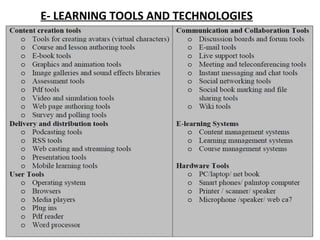
E- LEARNING TOOLS AND TECHNOLOGIES
1. Communication Tools
• As you are aware, modern technology
provides us with a plethora of options for
communicating. The most common
Communication tools used in e-learning
include, e-mail, Instant Messaging
and Blogging.
• E-mail: E-mail stands for electronic mail; e-mail is defined as
the transmission of messages over communication networks.
There are many e-mail service providers and the most famous
ones are Yahoo mail and G mail. Exchanging-mail messages
with a mentor or peer is an e-learning experience.
• Instant Messaging(IM): Instant messaging is the exchange of
text messages through a software application in real-time.
Instant messaging allows learners to chat with one another
through text messages. This has become very popular as here,
everything is performed in a faster, more reliable and
cohesive manner. Instant messaging helps teachers to create
subject specific groups for exchange of information and
sharing of resources. Instant messaging applications like
Whats Up are extensively used by teaching community as
reliable communication tool.
• Chat: Chat is synchronous communication tool
facilitating online communication. This tool
helps teachers and learners to schedule a
discussion on a particular question or theme
and later save the chat discussion for later
use. The chat tool is an integrated tool in all
the LMS and there are many standalone chat
applications which can be used outside the
LMS.
Blogging:
• A blog is your own website that you are going to update on
an on-going basis. A blog is a frequently updated online
personal journal or diary. It is a place to express yourself to
the world and to share your thoughts and your passions.
Most blogs are interactive, allowing visitors to leave
comments .Many blogs provide commentary or news on a
particular subject; others function as more personal online
diaries. A typical blog combines text, images, and links to
other blogs, Web pages, and other media related to its
topic. The ability of readers to leave comments in an
interactive format is an important part of many blogs. Most
blogs are primarily textual, although some focus on art (art
blog), photographs (photo blog), videos (video blogging),
music (MP3 blog), and audio (podcasting).
 
2.Collaboration Tools
• The e-learning technology offers a number of
collaboration tools to learn from one another,
to work on assignments, Projects in groups
and the like. Some of the popular
collaboration tools include Chat, forum, wiki,
online groups, audio/video conferencing,
social bookmarking and social networking.
• Wiki: A wiki is a collaborative web site that
collects and organizes content, created and
revised by its users. The most well-known
example is Wikipedia. Wiki is also a feature
available in all the Learner Management
System. In an e-learning context wiki permits
teachers to give many kind of task to the
learners to collaborate and create content on
any topic.
• Social Bookmarking: A social bookmarking
service is a centralized online service which
enables users to add, annotate, edit, and share
bookmarks of web documents. Social
bookmarking websites enhance and improve
the learning experiences by encouraging group
collaboration. They also help in organizing and
saving web resources faster and easier for
students. Social bookmarking services offer
greater scope for research, integration, and
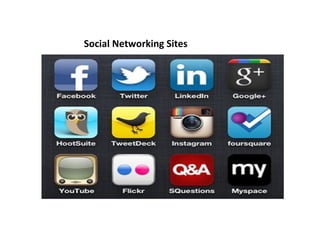
Social Networking Sites
• Social Networking site is the phrase used to describe
any Web site that enables users to create public
profiles within that Web site and form relationships
with other users of the same Web site who access
their profile. Social networking sites can be used to
describe community-based Web sites, online
discussions forums, chartrooms and other social
spaces online. Examples include Facebook, twitter,
Linkedln , Google+ etc. (Source: .
• Social networking can be used effectively for e-
learning by creating specific interest groups. The
learners within this group can share information,
photographs, videos, graphics related to a particular
topic. This can also be used by teachers to collaborate
in generating and sharing resources online with ease
thereby facilitating learning.
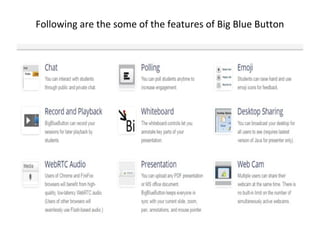
• Web Conferencing: Web conferencing is highly 
interactive, Internet-based applications with a rich 
collaboration feature set (e.g. audio/video from 
presenters and learners, application sharing, white 
boarding and markup tools, breakout rooms, polling, 
quizzing,hand raising and emoticon responses, slides 
and media, Web site tours, public/private text Chat). It 
is capable of scaling from small groups to hundreds or 
thousands of simultaneous users. In "synchronous e-
learning," we refer to Web conferencing. Web 
conferencing technologies offer tremendous potential 
for robust interactivity and collaboration through their 
versatility and rich feature options. There are many 
online tools for organizing video/web conferencing to 
facilitate collaborative learning. Applications like 
BigBlueButton.
Following are the some of the features of Big Blue Button
4. Content Creation Tools/Authoring tools
• An e-learning content authoring tool is a 
software package which developers use to create 
and package e-learning content deliverable to 
end users. According to Wikipedia.org, “a content 
authoring tool is a software application used to 
create multimedia content typically for delivery 
on the World Wide Web. Content-authoring tools 
may also create content in other file formats so 
the training can be delivered on a CD (Compact 
Disc) or in other formats for various different 
uses. The category of content-authoring tools 
includes HTML, Flash, and various types of e-
learning authoring tools.”
• e-learning authoring tools are a class of 
products designed for people who need to 
create online educational or training courses 
that are deployed from a standard, cloud-
based learning management system.
• There are many proprietary as well as open 
source authoring tools available currently in 
the market. Some of the most famous 
proprietary authoring tools are Elucidate, 
Lectora, Easygenerator, Smart Builder, Adobe 
Presenter, Camtasia, Articulate, Captivate and 
Udutu. There are also many open source 
authoring tools which have many features. 
They are Learner Activity Management 
System (LAMS), Adapt, Xerte, and 
eXeLearning.
• Adapt: The Adapt authoring tool is an 
application to allow you to quickly build 
responsive e-learning content. It's accessed 
through a web browser. You can create an 
account, log in, create courses and add assets, 
components and extensions. You can preview 
and publish your e-learning content from the 
authoring tool
• LAMS: Learner Activity Management System 
(LAMS) is a revolutionary new tool for 
designing, managing, and delivering online 
collaborative learning activities. It provides 
teachers with highly intuitive visual authoring 
environment for creating sequence of learning 
activities.
• Xerte: Xerte is a fully-featured e-learning development 
environment for creating rich interactivity. Xerte is aimed 
at developers of interactive content who will create 
sophisticated content with some scripting, and Xerte can 
be used to extend the capabilities of Xerte Online Toolkits 
with new tools for content authors. Xerte Online Toolkits is 
a server-based suite of tools for content authors. E-learning 
materials can be authored quickly and easily using browser-
based tools, with no programming required. Xerte Online 
Toolkits is aimed at content authors, who will assemble 
content using simple wizards. Content authors can easily 
collaborate on projects. Xerte Online Toolkits can be 
extended by developers using Xerte.
• eXeLearning: The eXe project developed a freely 
available Open Source authoring application to assist 
teachers and academics in the publishing of web 
content without the need to become proficient in 
HTML or XML markup. Resources authored in eXe 
can be exported in IMS Content Package, SCORM 1.2, 
or IMS Common Cartridge formats or as simple self-
contained web pages.
5. Delivery and Distribution Tools
• There are many options to deliver e-learning today. Most 
common approach is to deliver online learning using a 
Learner Management System which has so many e-learning 
tools and technologies integrated in one place. The other 
approach gaining popularity currently is Massive Open 
Online Course (MOOC) format. A massive open online 
course (MOOC) is a model for delivering learning content 
online to any person who wants to take a course, with no 
limit on attendance. In addition to these two approaches e-
learning can also be delivered as flipped learning in which 
the typical lecture and homework elements of a course are 
reversed. WebQuest is an inquiry-oriented lesson format in 
which most or all the information that learners work with 
comes from the web.
• The e-learning could also be delivered or
distributed through websites, as webcast,
podcast, e-pub, streaming video, webinars,
virtual tours and games.
• EPUB: Wikipedia defines EPUB as an e-book
file format with the extension epub that can
be downloaded and read on devices like smart
phones, tablets, computers, or e-readers. It is
a free and open standard published by the
International Digital Publishing Forum (IDPF).
The term is short for electronic publication
and is sometimes styled ePub. Sigil is an open
source epub authoring tool and caliber is an
open source epub reader.
Podcasting
• Podcasting: Podcasting is a form of audio
broadcasting on the Internet. The audio files are
developed and distributed using RSS to the
computers of subscribed users. These files may
then be uploaded to digital music or multimedia
players like the iPod. A podcast can be easily
created from a digital audio file. The podcaster
first saves the file as an MP3 and then uploads it
to the Web site of a service provider. Vodcasting
(video-on-demand casting) is the same principle
as Podcasting with the addition of video.
• Audio/Video Streaming: Streaming Audio/Video is content
sent in compressed form over the internet and displayed by
the viewer in real time. With streaming video or streaming
media, a Web user does not have to wait to download a file
to play it. Instead, the media is sent in a continuous stream
of data and is played as it arrives. The services offered by
YouTube are valued by e-learning providers world over.
Many institutions have created their own exclusive
channels for providing their e-content to the end users
using YouTube. E-learning professionals use to make their
e-learning courses more interactive, fun, and informative
using YouTube. In fact, it has the power to transform a
potentially dull or complicated subject matter into an
overall exciting and engaging e-learning experience. E-
learning providers like Khan Academy uses YouTube
extensively in delivering their e-content.
MOOC
MOOC: Massive Open Online Course ( MOOC)
is a new approache to delivering e-learning.
MOOC is a model for delivering learning
content online to any person who wants to
take a course, with no limit on attendance.
Some of the famous MOOC providers are edX,
Coursera, and Udacity. The Indian MOOC
initiative is known as SWAYAM.
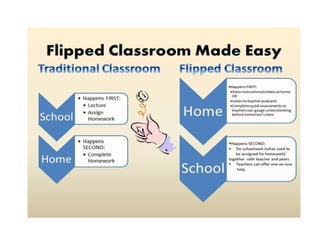
• Flipped Learning: Flipped classroom model is
yet another approach in delivering e-learning
in a blended format. The flipped classroom
describes a reversal of traditional teaching
where students gain first exposure to new
material outside of class, usually via reading or
lecture videos, and then class time is used to
do the harder work of assimilating that
knowledge through strategies such as
problem-solving, discussion or debates.
(Vanderbilt University, Center for Teaching).
WebQuest
• WebQuest: Web Quest developed in 1995 by
Bernie Dodge of San Diego State University.
Simply put, a WebQuest is an inquiry-based
activity where students are given a task and
provided with access to on-line resources to
help them complete the task. WebQuest is an
online-based lesson in which most or all of the
information that students explore and
evaluate comes from the World Wide Web.
• WebQuest are:
1. The Introduction orients students and captures
their interest.
2. The Task describes the activity's end product.
3. The Process explains strategies students
should use to complete the task.
4. The Resources are the Web sites students will
use to complete the task.
5. The Evaluation measures the results of the
activity.
6. The Conclusion sums up the activity and
encourages students to reflect on its process and
results.
LEARNING MANAGEMENT SYSTEM
(LMS)
• After so many years of technology use in education, it is felt that educators today need a web-
enabled relational database that links curriculum, instructional resources, assessment strategies,
student data, and staff proficiencies all on a single platform. This is possible by adopting a
comprehensive and systemic integration of a multi-dimensional system called Learning
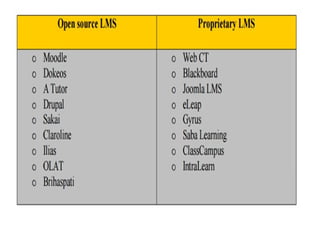
Management System (LMS). LMS provide an infrastructure platform through which learning
content is delivered and the learning and learners are managed. It provides a combination of
software tools that perform a variety of functions related to online and offline training
administration and performance management. Typically, an LMS is internet-based software that
deploys, manages, tracks, reports on the interaction between the learner and the content, and the
learner and the instructor. Administratively, an LMS makes it easy to enter, track, manage, and
report on learning activities and competencies. An LMS is not limited to e-learning and can also
manage other forms of instruction. In essence, an LMS primarily focuses on competencies, learning
activities, and the logistics of delivering learning activities. An LMS does not focus on creation,
reusability, management, or improvement of content itself. Tasks of the LMS:
•
• Manage learners taking whole courses
• Manage the curriculum
• Manage courses in various curriculums
• Present options depending on learner profiles
• Track learner needs and preferences
• Track course completions and scores
•
•
Features of LMS
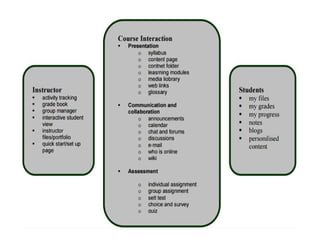
• LMS has specific features meant for
instructor, course interaction, and students.
Listings of all these features are given below:
• The focus of an LMS is to deliver online
courses or training to learners, while
managing students and keeping track of their
progress and performance across all types of
training activities. An LMS is not used to
create course content.
• ADVANTAGES AND POTENTIAL DRAWBACKS OF E-
LEARNING
• Advantages of e-Learning to the Trainer or Organization
• Reduced overall cost is the single most influential factor in
adopting e-learning. The elimination of costs associated
with instructor's salaries, meeting room rentals, and
student travel, lodging, and meals are directly quantifiable.
• Increased retention and application
• Consistent delivery of content is possible with
asynchronous, self-paced e-learning.
• Expert knowledge is communicated, but more importantly
captured, with good e-learning and knowledge
management systems.
• Proof of completion and certification, essential elements
of training initiatives, can be automated.
• Advantages to the Learner
• On-demand availability enables students to
complete training conveniently at off-hours or
from home.
• Self-pacing for slow or quick learners reduces
stress and increases satisfaction.
• Interactivity engages users, pushing them rather
than pulling them through training.
• Confidence that refresher or quick reference
materials are available reduces burden of
responsibility of mastery.
Potential drawbacks
• Technology dependent: Learners will need access to a
machine of minimum specification as dictated by the
e-learning supplier or access to a service with a high
bandwidth to transfer the course materials in a timely
way.
• Material Incompatibility: Some materials designed for
one particular system will not function properly on
another (for example, the Apple Macintosh and the
Windows PC). Standards will help in the area.
• Unsuitable for Certain Types of Training: Any skill that
relies heavily on inter-personal contact although these
courses could be supplemented by e-learning.
• Unsuitable for Certain Types of Learners: e-learning requires a high-level
of self-discipline and personal time management. E-Learners need to be
highly self-motivated to take full advantage of the medium as often the
online learning experience can be impersonal. Working through
'packaged' programmes can be irritating.
• Reliant of the Quality of the Content: It is too easy for some institutions
to defer the photocopying costs onto the learner by placing all lecture
notes and course handouts online. Such practices often mean that the
course materials are in an inappropriate format for online learning.
Course providers need to develop new technical skills and course design
skills to suit the new medium.
• Expensive: Start-up cost of an e-learning service is expensive and the cost
of production of online training materials is very high. Teachers must be
confident that the extra costs are balanced with the benefits of delivering
a course online. Significant time needs to be invested in course set-up and
in ongoing maintenance (checking links, updating course content etc.).
• Reliant on Human Support: E-learning is still dependent on help on either
the course materials or the software.
• Social/economic disadvantage: It can limit or prevent access by some
student groups (for example, cost of equipment, online access and
printing).
• No Match for Face-to-Face Teaching: Electronic
communication does not necessarily provide a good match
for face-to-face communication and is more linear than
face-to-face discussion.
• Too Reliant on IT Skills: Learners may have limited IT skills,
or be uncomfortable with electronic communication and
need to learn how to use the medium effectively.
• Disabilities: Students with visual or physical impairments
may be disadvantaged.
• Inflexible: Flexibility may be lost as adjustments to the
course in response to student reaction are not easy to
make once the course is underway.
• Pedagogically Unsound: The electronic environment does
not per se offer a pedagogically enhancing learning
environment.
Re-Usable learning Objects (RLO)
• The RLO Concept
• The acronym RLO stands for Reusable Learning Object. There are
various definitions for RLOs used by learning object practitioners,
educators and theorists. They have been used in different disciplines
including academia, extension/outreach, government , corporate
world, and as open learning source.
• A Reusable Learning Object is a type of online instruction that
provides a digital educational resource that can be reused, scaled
and shared from a central online repository in the support of
instruction and learning. Each RLO supports a single learning
objective, which is streamlined into a digital library of RLOs. They
vary in size, scope and level of granularity ranging from small chunks
of instruction to a series of combined resources to provide a more
complex learning experience.
• A learning object is a resource, usually digital and web-based, that
can be used and re-used to support learning.
Characteristics of RLOs:
• Digital (available online 24/7)
• Self-contained – each learning object can be taken independently
• Reusable – a single RLO may be used in multiple contexts for multiple
purposes
• Searchable - easy to find learning material; each RLO is tagged with
metadata
• RLO are small units of learning (~5-15 minutes) that do not overload a
learner with content
• Flexible – easy to update and change
• Standardized – adopt the same organizational structure
• Can be aggregated – learning objects can be grouped into a larger
collection of content, including traditional course structures
• Provide interoperability – blend into Learning Management Systems (e.g.
WebCT Vista, Moodle)
• Are suited to address a new type of learner – “Net-generation learner”
adapted to multi-tasking and digital technologies
• Enhance student-centered learning

E learning ppt