



diigo
Lisa Sjogren
First Things, First
Introductory Activity
Answer the following question:
   How do you conduct research with your
   students?
   What tools do you use to aide your student’s
   research?
Discuss your answer with your neighbor, be
prepared to share.
Today’s Objectives

• Remembering, marking and sharing websites.
• Explore particular tools available in Diigo
• Join the C4 Group
• Spend some self-exploration time building
  your diigo account.
About Diigo
About Diigo
• diigo = Digest of Internet Information,
  Groups, and Other Stuff
• diigo is two services in one:
 • it is a research and collaborative research
    tool
  • a knowledge-sharing community and
    social content site.
5 Reasons diigo is better
     than del.icio.us
1. Highlighting
2. Save bookmarks, regardless of where you
   are, or what browser you are using.
3. Comments that actually are worth it.
4. Send bookmarks to multiple locations
   with one click
5. Keep your delicious account.
Bookmarking Basics
What is social bookmarking?

 Social bookmarking is a method for
 Internet users to organize, store, manage and
 search for bookmarks of resources online.
 Unlike file sharing, the resources themselves
 aren't shared, merely bookmarks that
 reference them.

                              From Wikipedia
Install the Diigolet

Diigolet is a “super bookmarklet” that allows
you to highlight and add sticky-notes, in
addition to simple bookmarking.
http://www.diigo.com/tools/diigolet
The Firefox Plug-In
• Currently not ‘approved’ in District 279
• Request has been submitted to put into the
  software portal.
• Will email C participants when it is
               4


  available for download.
• Tools that use plug-in are indicated(*)
Bookmarking
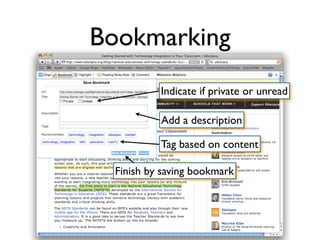
          Indicate if private or unread

          Add a description

          Tag based on content

 Finish by saving bookmark
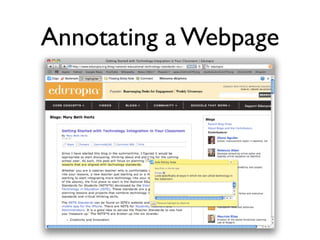
Annotating a Webpage
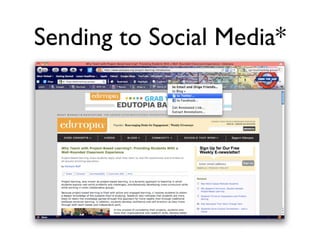
Sending to Social Media*
Groups
What are bookmarking groups?

• Diigo Groups provides a collaborative
  research and learning tool that allows any
  group of people to pool their findings
  through group bookmarks, highlights, sticky
  notes, and forum.
• Can be part of professional groups and/or
  teacher-student groups.
Join the C Group        4


http://groups.diigo.com/group/c4-model-of-
learning
   • Benefits:
    • Able to share resources with other
        group members.
     • Able to have a conversation about
        different weblinks.
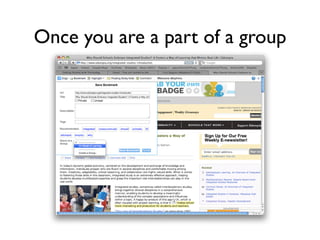
Once you are a part of a group
Setting up a Class Group
• Visit http://www.diigo.com/education
• Request status of account to be upgraded
  to an educators account.
• You will be given access to a teacher
  console.
• Utilize skills learned later this week to
  collect student usernames.
Using Social Bookmarking
    in the Classroom
How do we use this in our classroom?


• Generate a list of websites for students.
• Keep your resources in multiple locations,
  as they are always on the web.
• Create student accounts to have controlled
  research groups.
Auto-posting to your blog

https://secure.diigo.com/blog_this/daily_blog
• enables you to post new annotated
  bookmarks to your blog daily.
• Able to add multiple blogs.
Webslides*
http://slides.diigo.com/
How it is useful?
   • Provide a quick briefing, a simple
      tutorial or guided tour on any subject.
   • Can add music and/or voice narration.
http://slides.diigo.com/list/christyinsdesign/
ms-science
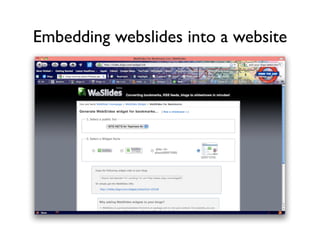
Embedding webslides into a website
Advanced Topics
Feeding del.icio.us
 http://secure.diigo.com/tools/save_to_others
1. Select the service
2. Import your account information
3. Check the account to make sure it is valid
4. Save
 After you set up- it will post to both.
Embedding tagrolls and
     link rolls
http://www.diigo.com/tools/tagroll
• Shows list of your most common tags.
http://www.diigo.com/tools/linkrolls
• Display links that are tag(s) specific and/or
  with your annotations only.
• When clicked readers will see your
  annotations on the webpage.
How to embed

• Copy embed code and paste into your
  blog, moodle, or any other web 2.0 that
  allows embedding.
• Similar to what is seen on
  http://youtube.com
Site Communities and
    Tag Communities
http://www.diigo.com/community/sites
• Aggregate users who annotate the same
  website/tags and build meaningful reader
  communities
• Discover and connect with other readers
  interested in the same site/tags.
Further Information
Discussion Forums
• Located on the Moodle Course
 • How could diigo be used in the
    classroom?
 • How could teachers collaborate with
    diigo?
 • How could cross curricular activities be
    developed using diigo?
After the Fact

http://moodle.district279.org/moodle/
course/view.php?id=763
http://help.diigo.com
http://help.diigo.com/teacher-account/faq

Diigo Presentation- Revised

  • 1.
  • 2.
  • 3.
    Introductory Activity Answer thefollowing question: How do you conduct research with your students? What tools do you use to aide your student’s research? Discuss your answer with your neighbor, be prepared to share.
  • 4.
    Today’s Objectives • Remembering,marking and sharing websites. • Explore particular tools available in Diigo • Join the C4 Group • Spend some self-exploration time building your diigo account.
  • 5.
  • 6.
    About Diigo • diigo= Digest of Internet Information, Groups, and Other Stuff • diigo is two services in one: • it is a research and collaborative research tool • a knowledge-sharing community and social content site.
  • 7.
    5 Reasons diigois better than del.icio.us 1. Highlighting 2. Save bookmarks, regardless of where you are, or what browser you are using. 3. Comments that actually are worth it. 4. Send bookmarks to multiple locations with one click 5. Keep your delicious account.
  • 8.
  • 9.
    What is socialbookmarking? Social bookmarking is a method for Internet users to organize, store, manage and search for bookmarks of resources online. Unlike file sharing, the resources themselves aren't shared, merely bookmarks that reference them. From Wikipedia
  • 10.
    Install the Diigolet Diigoletis a “super bookmarklet” that allows you to highlight and add sticky-notes, in addition to simple bookmarking. http://www.diigo.com/tools/diigolet
  • 11.
    The Firefox Plug-In •Currently not ‘approved’ in District 279 • Request has been submitted to put into the software portal. • Will email C participants when it is 4 available for download. • Tools that use plug-in are indicated(*)
  • 12.
    Bookmarking Indicate if private or unread Add a description Tag based on content Finish by saving bookmark
  • 13.
  • 14.
  • 15.
  • 16.
    What are bookmarkinggroups? • Diigo Groups provides a collaborative research and learning tool that allows any group of people to pool their findings through group bookmarks, highlights, sticky notes, and forum. • Can be part of professional groups and/or teacher-student groups.
  • 17.
    Join the CGroup 4 http://groups.diigo.com/group/c4-model-of- learning • Benefits: • Able to share resources with other group members. • Able to have a conversation about different weblinks.
  • 18.
    Once you area part of a group
  • 19.
    Setting up aClass Group • Visit http://www.diigo.com/education • Request status of account to be upgraded to an educators account. • You will be given access to a teacher console. • Utilize skills learned later this week to collect student usernames.
  • 20.
    Using Social Bookmarking in the Classroom
  • 21.
    How do weuse this in our classroom? • Generate a list of websites for students. • Keep your resources in multiple locations, as they are always on the web. • Create student accounts to have controlled research groups.
  • 22.
    Auto-posting to yourblog https://secure.diigo.com/blog_this/daily_blog • enables you to post new annotated bookmarks to your blog daily. • Able to add multiple blogs.
  • 23.
    Webslides* http://slides.diigo.com/ How it isuseful? • Provide a quick briefing, a simple tutorial or guided tour on any subject. • Can add music and/or voice narration. http://slides.diigo.com/list/christyinsdesign/ ms-science
  • 24.
  • 25.
  • 26.
    Feeding del.icio.us http://secure.diigo.com/tools/save_to_others 1.Select the service 2. Import your account information 3. Check the account to make sure it is valid 4. Save After you set up- it will post to both.
  • 27.
    Embedding tagrolls and link rolls http://www.diigo.com/tools/tagroll • Shows list of your most common tags. http://www.diigo.com/tools/linkrolls • Display links that are tag(s) specific and/or with your annotations only. • When clicked readers will see your annotations on the webpage.
  • 28.
    How to embed •Copy embed code and paste into your blog, moodle, or any other web 2.0 that allows embedding. • Similar to what is seen on http://youtube.com
  • 29.
    Site Communities and Tag Communities http://www.diigo.com/community/sites • Aggregate users who annotate the same website/tags and build meaningful reader communities • Discover and connect with other readers interested in the same site/tags.
  • 30.
  • 31.
    Discussion Forums • Locatedon the Moodle Course • How could diigo be used in the classroom? • How could teachers collaborate with diigo? • How could cross curricular activities be developed using diigo?
  • 32.