1 / 51
2 / 51
FOSDEM, February 2018
MySQL Point-in-Time Recovery like a Rockstar
Accelerate MySQL point-in-time recovery for large workloads


Frédéric Descamps - MySQL Community Manager - Oracle
3 / 51
 
Safe Harbor Statement
The following is intended to outline our general product direction. It is intended for
information purpose only, and may not be incorporated into any contract. It is not a
commitment to deliver any material, code, or functionality, and should not be relied up in
making purchasing decisions. The development, release and timing of any features or
functionality described for Oracle´s product remains at the sole discretion of Oracle.
Copyright @ 2018 Oracle and/or its affiliates. All rights reserved.
4 / 51
about.me/lefred
Who am I ?
Copyright @ 2018 Oracle and/or its affiliates. All rights reserved.
5 / 51
Frédéric Descamps
@lefred
MySQL Evangelist
Hacking MySQL since 3.23
devops believer
living in Belgium 🇧🇪
http://lefred.be
 
Copyright @ 2018 Oracle and/or its affiliates. All rights reserved.
6 / 51
what is PITR ?
point-in-time recovery
Copyright @ 2018 Oracle and/or its affiliates. All rights reserved.
7 / 51
PITR: Definition
from Wikipedia (thank you Jaime)
Point-in-time recovery (PITR) in the context of computers involves systems whereby an
administrator can restore or recover a set of data or a particular setting from a time in
the past.
Once PITR logging starts for a PITR-capable database, a database administrator can
restore that database from backups to the state that it had at any time since.
Copyright @ 2018 Oracle and/or its affiliates. All rights reserved.
8 / 51
PITR: Definition
from Wikipedia (thank you Jaime)
Point-in-time recovery (PITR) in the context of computers involves systems whereby an
administrator can restore or recover a set of data or a particular setting from a time in
the past.
Once PITR logging starts for a PITR-capable database, a database administrator can
restore that database from backups to the state that it had at any time since.
Please donate to wikimedia : https://goo.gl/ZYVFhf
Copyright @ 2018 Oracle and/or its affiliates. All rights reserved.
9 / 51
MySQL PITR
requirements
Copyright @ 2018 Oracle and/or its affiliates. All rights reserved.
10 / 51
Requirements
To be able to perform point-in-time recovery with MySQL, you need to have:
Copyright @ 2018 Oracle and/or its affiliates. All rights reserved.
11 / 51
Requirements
To be able to perform point-in-time recovery with MySQL, you need to have:
decent backups
Copyright @ 2018 Oracle and/or its affiliates. All rights reserved.
12 / 51
Requirements
To be able to perform point-in-time recovery with MySQL, you need to have:
decent backups
binary logs enabled
Copyright @ 2018 Oracle and/or its affiliates. All rights reserved.
13 / 51
Requirements
To be able to perform point-in-time recovery with MySQL, you need to have:
decent backups
binary logs enabled
keeping your binlogs at least since the last successful backup
Copyright @ 2018 Oracle and/or its affiliates. All rights reserved.
14 / 51
MySQL PITR
Procedure
Copyright @ 2018 Oracle and/or its affiliates. All rights reserved.
15 / 51
Procedure
The procedure to perform a PITR with MySQL is the following:
Copyright @ 2018 Oracle and/or its affiliates. All rights reserved.
16 / 51
Procedure
The procedure to perform a PITR with MySQL is the following:
find the binary log file and the position of the event you want restore up to
Copyright @ 2018 Oracle and/or its affiliates. All rights reserved.
17 / 51
Procedure
The procedure to perform a PITR with MySQL is the following:
find the binary log file and the position of the event you want restore up to
restore the last backup
Copyright @ 2018 Oracle and/or its affiliates. All rights reserved.
18 / 51
Procedure
The procedure to perform a PITR with MySQL is the following:
find the binary log file and the position of the event you want restore up to
restore the last backup
find the binlog position of the last restored event
Copyright @ 2018 Oracle and/or its affiliates. All rights reserved.
19 / 51
Procedure
The procedure to perform a PITR with MySQL is the following:
find the binary log file and the position of the event you want restore up to
restore the last backup
find the binlog position of the last restored event
replay all events present in the binary logs since the backup up to the position of
the transaction we want to skip
Copyright @ 2018 Oracle and/or its affiliates. All rights reserved.
20 / 51
Procedure
The procedure to perform a PITR with MySQL is the following:
find the binary log file and the position of the event you want restore up to
restore the last backup
find the binlog position of the last restored event
replay all events present in the binary logs since the backup up to the position of
the transaction we want to skip
see the manual: https://dev.mysql.com/doc/refman/5.7/en/point-in-time-recovery.html
Copyright @ 2018 Oracle and/or its affiliates. All rights reserved.
21 / 51
MySQL PITR
Example
Copyright @ 2018 Oracle and/or its affiliates. All rights reserved.
22 / 51
Example
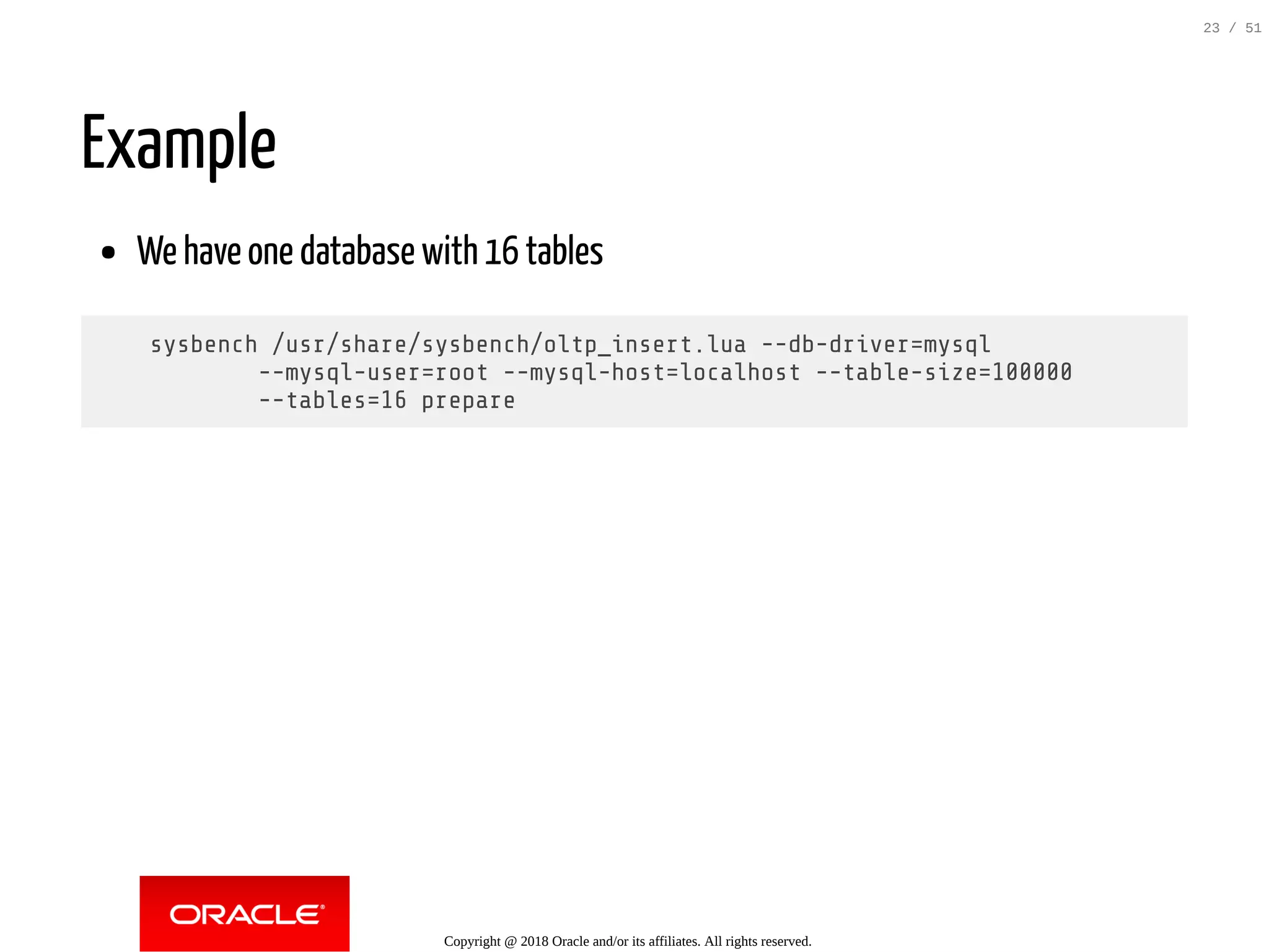
We have one database with 16 tables
sysbench /usr/share/sysbench/oltp_insert.lua --db-driver=mysql
--mysql-user=root --mysql-host=localhost --table-size=100000
--tables=16 prepare
Copyright @ 2018 Oracle and/or its affiliates. All rights reserved.
23 / 51
Example
We have one database with 16 tables
sysbench /usr/share/sysbench/oltp_insert.lua --db-driver=mysql
--mysql-user=root --mysql-host=localhost --table-size=100000
--tables=16 prepare
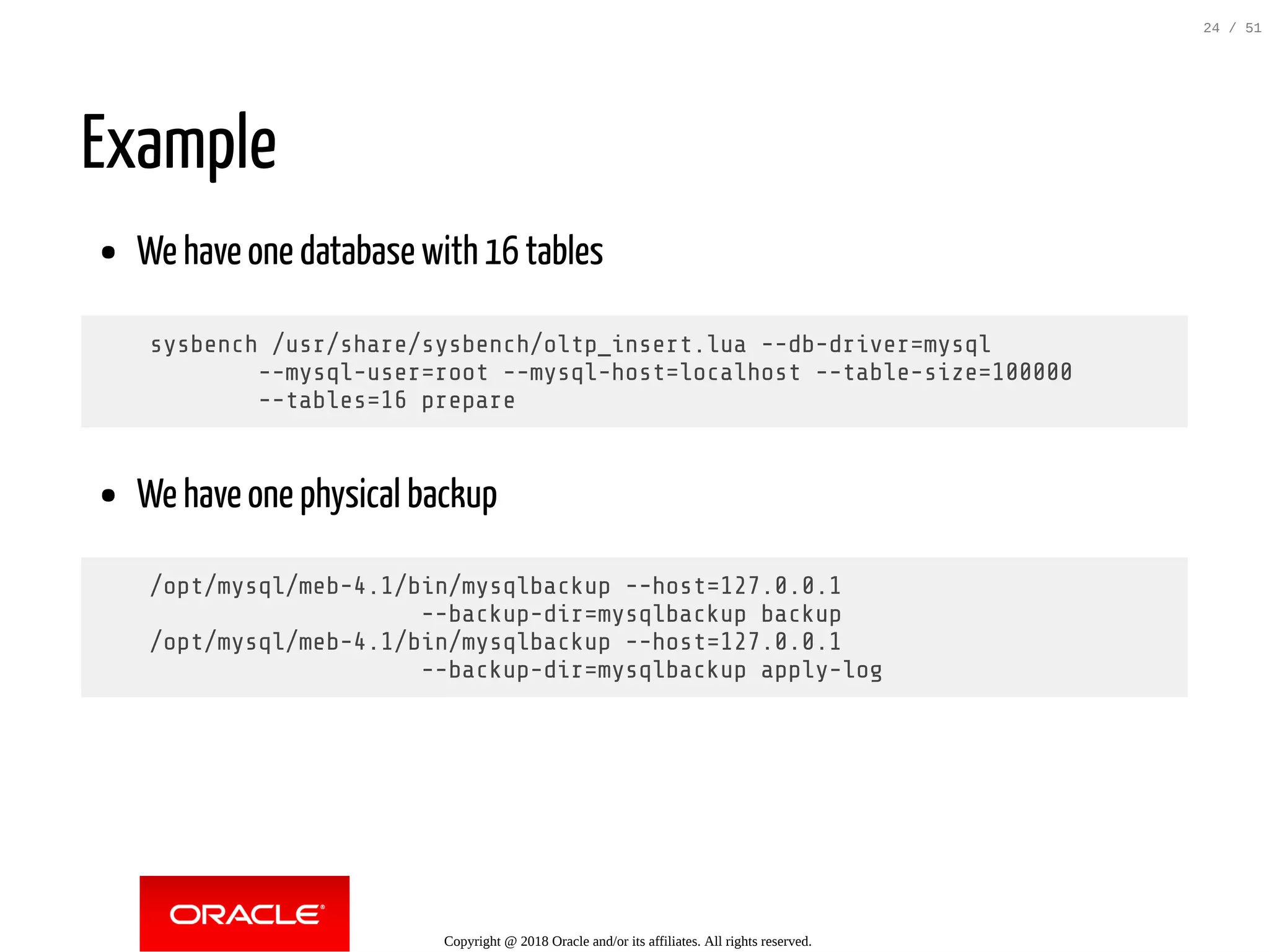
We have one physical backup
/opt/mysql/meb-4.1/bin/mysqlbackup --host=127.0.0.1
--backup-dir=mysqlbackup backup
/opt/mysql/meb-4.1/bin/mysqlbackup --host=127.0.0.1
--backup-dir=mysqlbackup apply-log
Copyright @ 2018 Oracle and/or its affiliates. All rights reserved.
24 / 51
Example
We have one database with 16 tables
sysbench /usr/share/sysbench/oltp_insert.lua --db-driver=mysql
--mysql-user=root --mysql-host=localhost --table-size=100000
--tables=16 prepare
We have one physical backup
/opt/mysql/meb-4.1/bin/mysqlbackup --host=127.0.0.1
--backup-dir=mysqlbackup backup
/opt/mysql/meb-4.1/bin/mysqlbackup --host=127.0.0.1
--backup-dir=mysqlbackup apply-log
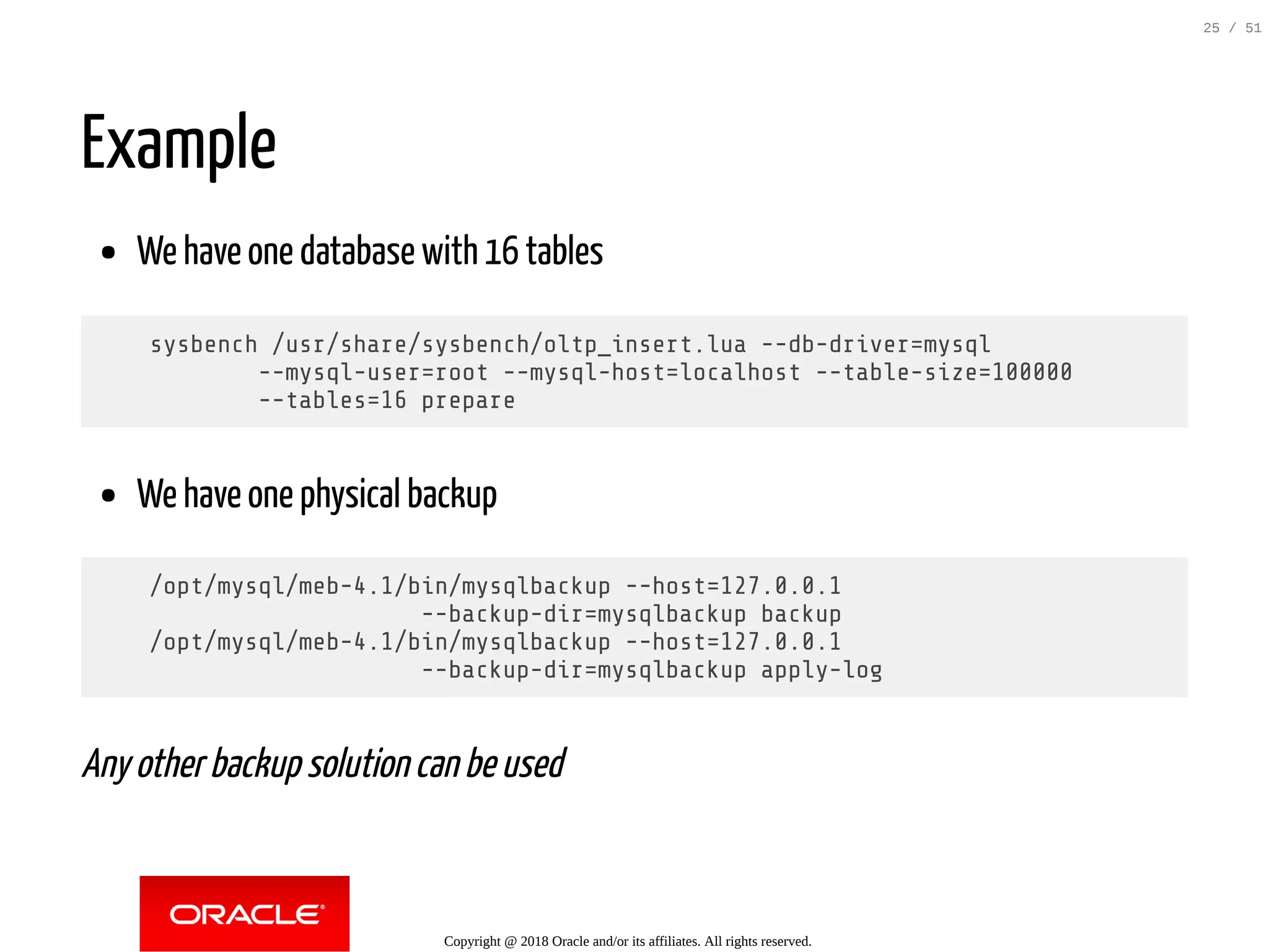
Any other backup solution can be used
Copyright @ 2018 Oracle and/or its affiliates. All rights reserved.
25 / 51
Example (2)
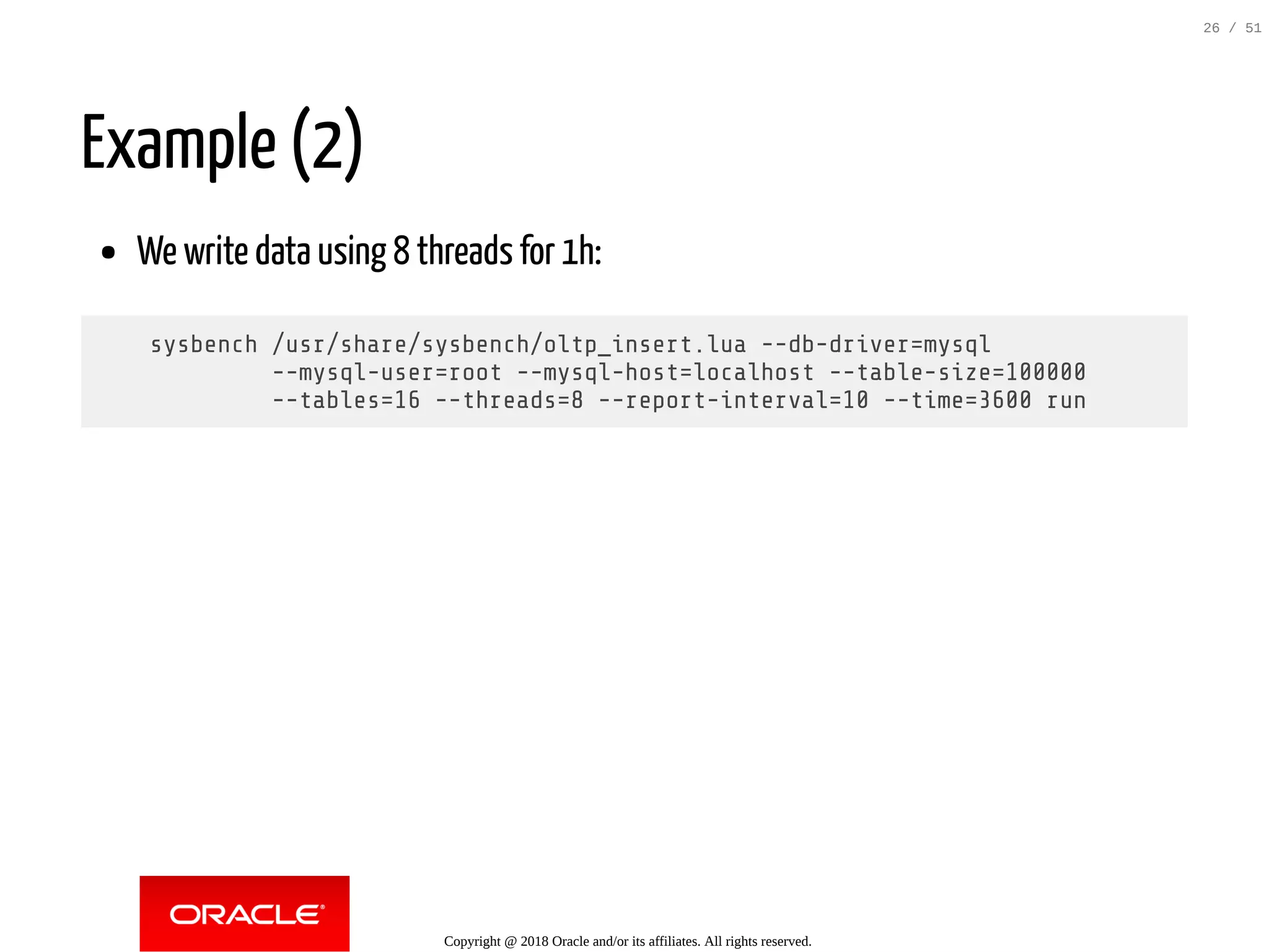
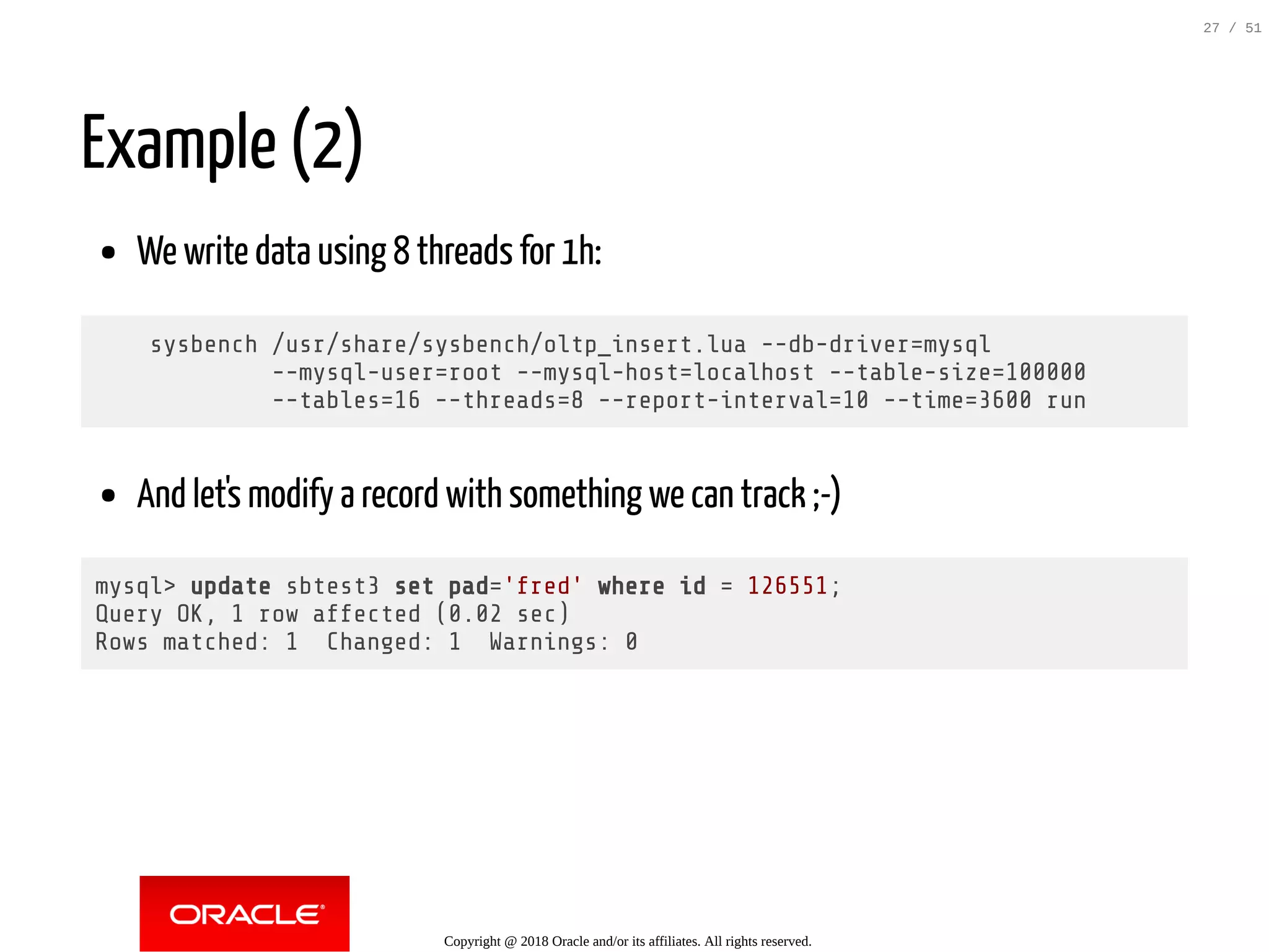
We write data using 8 threads for 1h:
sysbench /usr/share/sysbench/oltp_insert.lua --db-driver=mysql
--mysql-user=root --mysql-host=localhost --table-size=100000
--tables=16 --threads=8 --report-interval=10 --time=3600 run
Copyright @ 2018 Oracle and/or its affiliates. All rights reserved.
26 / 51
Example (2)
We write data using 8 threads for 1h:
sysbench /usr/share/sysbench/oltp_insert.lua --db-driver=mysql
--mysql-user=root --mysql-host=localhost --table-size=100000
--tables=16 --threads=8 --report-interval=10 --time=3600 run
And let's modify a record with something we can track ;-)
mysql> update sbtest3 set pad='fred' where id = 126551;
Query OK, 1 row affected (0.02 sec)
Rows matched: 1 Changed: 1 Warnings: 0
Copyright @ 2018 Oracle and/or its affiliates. All rights reserved.
27 / 51
Suddenly...
Copyright @ 2018 Oracle and/or its affiliates. All rights reserved.
28 / 51
Suddenly...
Copyright @ 2018 Oracle and/or its affiliates. All rights reserved.
29 / 51
Suddenly...
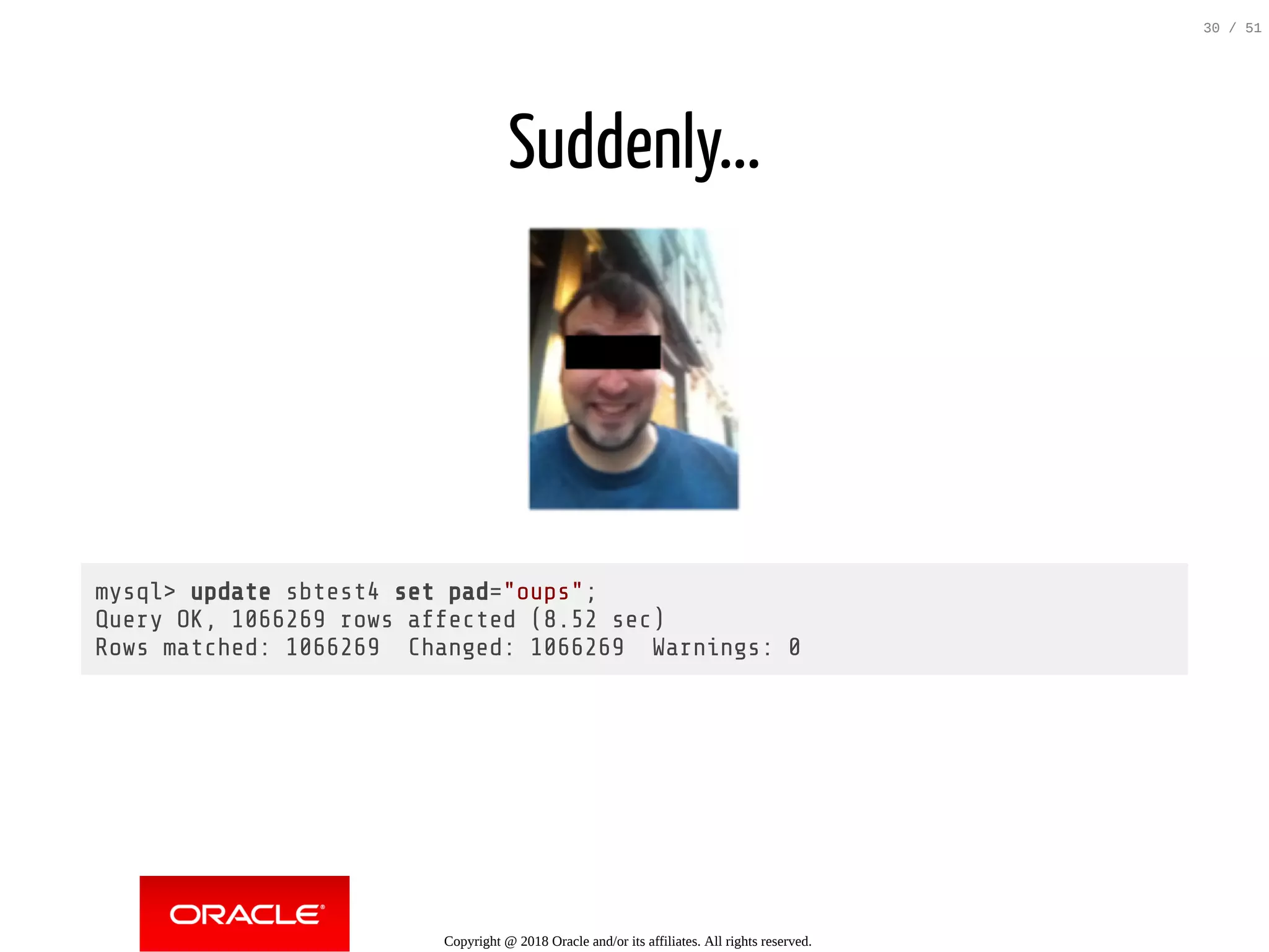
mysql> update sbtest4 set pad="oups";
Query OK, 1066269 rows affected (8.52 sec)
Rows matched: 1066269 Changed: 1066269 Warnings: 0
Copyright @ 2018 Oracle and/or its affiliates. All rights reserved.
30 / 51
UPDATE without WHERE clause !?!
Copyright @ 2018 Oracle and/or its affiliates. All rights reserved.
31 / 51
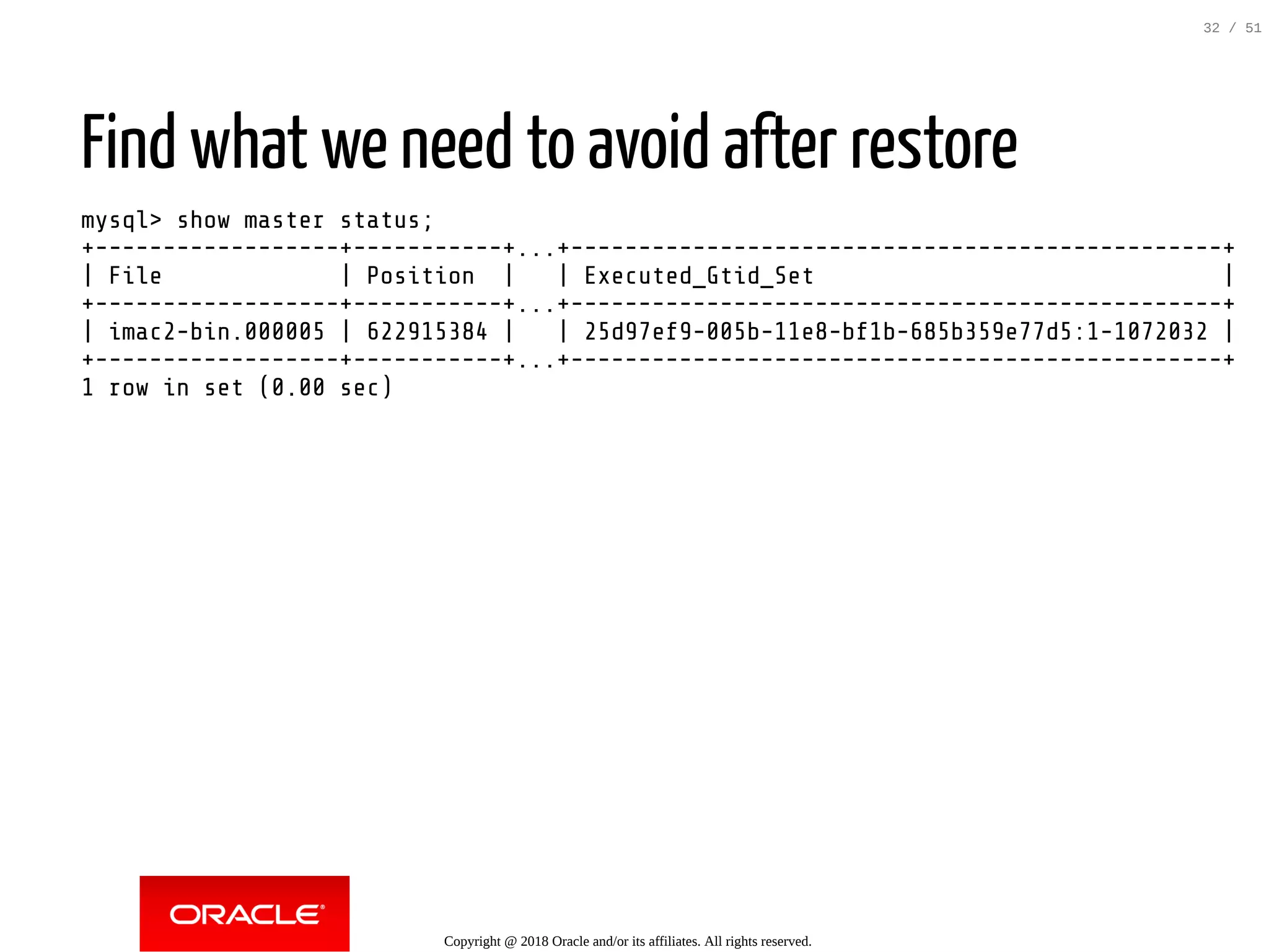
Find what we need to avoid after restore
mysql> show master status;
+------------------+-----------+...+------------------------------------------------+
| File | Position | | Executed_Gtid_Set |
+------------------+-----------+...+------------------------------------------------+
| imac2-bin.000005 | 622915384 | | 25d97ef9-005b-11e8-bf1b-685b359e77d5:1-1072032 |
+------------------+-----------+...+------------------------------------------------+
1 row in set (0.00 sec)
Copyright @ 2018 Oracle and/or its affiliates. All rights reserved.
32 / 51
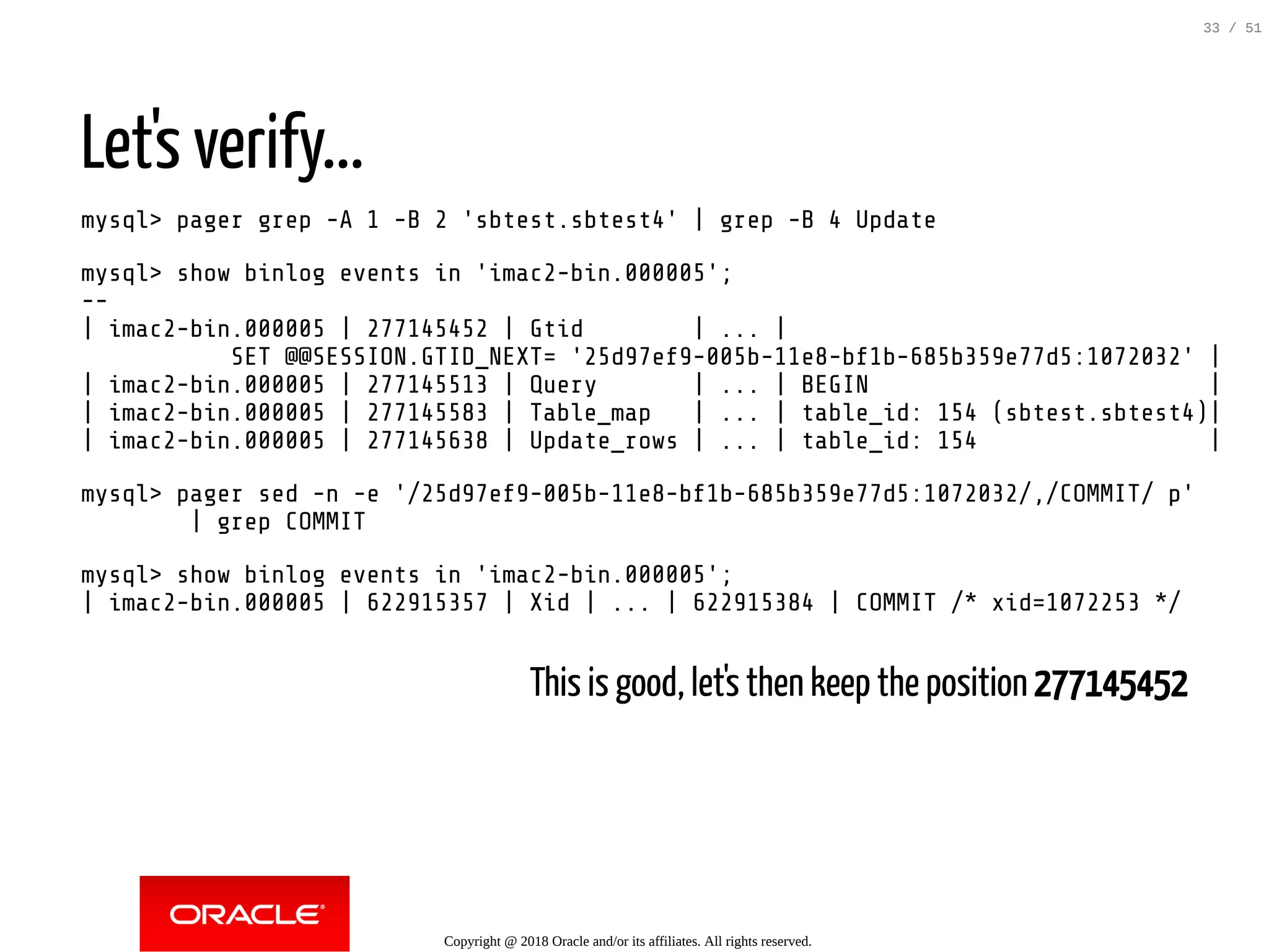
Let's verify...
mysql> pager grep -A 1 -B 2 'sbtest.sbtest4' | grep -B 4 Update
mysql> show binlog events in 'imac2-bin.000005';
--
| imac2-bin.000005 | 277145452 | Gtid | ... |
SET @@SESSION.GTID_NEXT= '25d97ef9-005b-11e8-bf1b-685b359e77d5:1072032' |
| imac2-bin.000005 | 277145513 | Query | ... | BEGIN |
| imac2-bin.000005 | 277145583 | Table_map | ... | table_id: 154 (sbtest.sbtest4)|
| imac2-bin.000005 | 277145638 | Update_rows | ... | table_id: 154 |
mysql> pager sed -n -e '/25d97ef9-005b-11e8-bf1b-685b359e77d5:1072032/,/COMMIT/ p'
| grep COMMIT
mysql> show binlog events in 'imac2-bin.000005';
| imac2-bin.000005 | 622915357 | Xid | ... | 622915384 | COMMIT /* xid=1072253 */
This is good, let's then keep the position 277145452
Copyright @ 2018 Oracle and/or its affiliates. All rights reserved.
33 / 51
Stop MySQL and save the binlogs
[root@imac2 ~]# systemctl stop mysqld
[root@imac2 ~]# mkdir /mnt/mysql/binlogs
[root@imac2 ~]# cd /var/lib/mysql
[root@imac2 mysql]# cp imac2-bin.* /mnt/mysql/binlogs/
Copyright @ 2018 Oracle and/or its affiliates. All rights reserved.
34 / 51
Stop MySQL and save the binlogs
[root@imac2 ~]# systemctl stop mysqld
[root@imac2 ~]# mkdir /mnt/mysql/binlogs
[root@imac2 ~]# cd /var/lib/mysql
[root@imac2 mysql]# cp imac2-bin.* /mnt/mysql/binlogs/
Restore the backup
[root@imac2 mysql]# rm -rf *
[root@imac2 mysql]# /opt/mysql/meb-4.1/bin/mysqlbackup
--backup-dir=/tmp/mysqlbackup copy-back
...
mysqlbackup completed OK! with 3 warnings
[root@imac2 mysql]# chown -R mysql. *
Copyright @ 2018 Oracle and/or its affiliates. All rights reserved.
35 / 51
Point-in-Time Recovery
Now we can start MySQL and replay the binlogs from the backup position, until the
"EVENT" (277145452)
# grep binlog_position backup_variables.txt
binlog_position=imac2-bin.000004:888830919
[root@imac2 binlogs]# time mysqlbinlog -j 888830919
--stop-position 277145452 imac2-bin.00000[4-5] | mysql
real 305m18.867s
I only needed to replay events from imac2-bin.00000[4-5] in fact, but it could be way
more than that
Copyright @ 2018 Oracle and/or its affiliates. All rights reserved.
36 / 51
Point-in-Time Recovery
Now we can start MySQL and replay the binlogs from the backup position, until the
"EVENT" (277145452)
# grep binlog_position backup_variables.txt
binlog_position=imac2-bin.000004:888830919
[root@imac2 binlogs]# time mysqlbinlog -j 888830919
--stop-position 277145452 imac2-bin.00000[4-5] | mysql
real 305m18.867s
I only needed to replay events from imac2-bin.00000[4-5] in fact, but it could be way
more than that
-rw-r----- 1 root root 1.1G Jan 23 21:27 imac2-bin.000004
-rw-r----- 1 root root 595M Jan 23 21:27 imac2-bin.000005
Copyright @ 2018 Oracle and/or its affiliates. All rights reserved.
37 / 51
Was it really like a rockstar ?
Copyright @ 2018 Oracle and/or its affiliates. All rights reserved.
38 / 51
Was it really like a rockstar ?
NO !
Copyright @ 2018 Oracle and/or its affiliates. All rights reserved.
39 / 51
Why not ?
If you have a large amount of large binary logs and your workload is not single threaded
like mysqlbinlog... this process can take for eveeeeeeeeer !
Copyright @ 2018 Oracle and/or its affiliates. All rights reserved.
40 / 51
Let's do it like a rockstar !
Copyright @ 2018 Oracle and/or its affiliates. All rights reserved.
41 / 51
Find and Set the last executed GTID during
backup
[root@imac2 mysql]# cat backup_variables.txt | grep gtid
gtid_executed=25d97ef9-005b-11e8-bf1b-685b359e77d5:1-6001
The name of the file depends of your backup tool
After restoring the backup, restart MySQL with this change in my.cnf:
skip-slave-start
Finally set the GTID AND ALSO the GTID of the transaction we want to avoid:
mysql> reset master;
mysql> SET @@GLOBAL.GTID_PURGED='25d97ef9-005b-11e8-bf1b-685b359e77d5:1-6001,
25d97ef9-005b-11e8-bf1b-685b359e77d5:1072032';
Copyright @ 2018 Oracle and/or its affiliates. All rights reserved.
42 / 51
MySQL PITR
Now the cool stuff !
Copyright @ 2018 Oracle and/or its affiliates. All rights reserved.
43 / 51
We will copy all the saved binlogs and rename them as relaylogs !
[root@imac2 mysql]# for i in $(ls /mnt/mysql/binlogs/*.0*)
do
ext=$(echo $i | cut -d'.' -f2)
cp $i imac2-relay-bin.$ext
done
Copyright @ 2018 Oracle and/or its affiliates. All rights reserved.
44 / 51
We will copy all the saved binlogs and rename them as relaylogs !
[root@imac2 mysql]# for i in $(ls /mnt/mysql/binlogs/*.0*)
do
ext=$(echo $i | cut -d'.' -f2)
cp $i imac2-relay-bin.$ext
done
Don't forget to create the index file too:
[root@imac2 mysql]# ls ./imac2-relay-bin.0* >imac2-relay-bin.index
[root@imac2 mysql]# chown mysql. *relay*
[root@imac2 mysql]# cat imac2-relay-bin.index
./imac2-relay-bin.000001
./imac2-relay-bin.000002
./imac2-relay-bin.000003
./imac2-relay-bin.000004
./imac2-relay-bin.000005
Copyright @ 2018 Oracle and/or its affiliates. All rights reserved.
45 / 51
Get ready to do PITR like a rockstar !
Copyright @ 2018 Oracle and/or its affiliates. All rights reserved.
46 / 51
Get ready to do PITR like a rockstar !
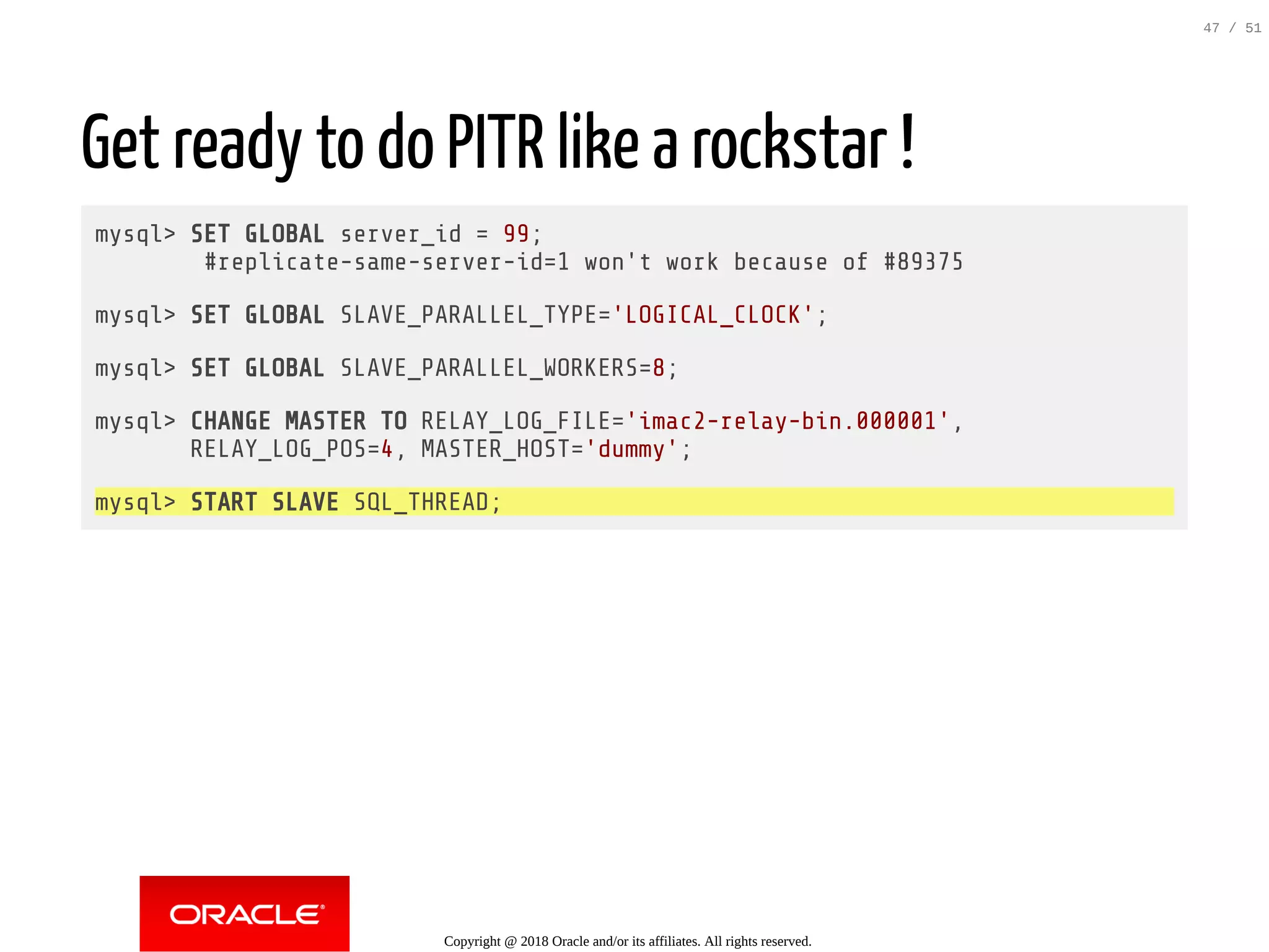
mysql> SET GLOBAL server_id = 99;
#replicate-same-server-id=1 won't work because of #89375
mysql> SET GLOBAL SLAVE_PARALLEL_TYPE='LOGICAL_CLOCK';
mysql> SET GLOBAL SLAVE_PARALLEL_WORKERS=8;
mysql> CHANGE MASTER TO RELAY_LOG_FILE='imac2-relay-bin.000001',
RELAY_LOG_POS=4, MASTER_HOST='dummy';
mysql> START SLAVE SQL_THREAD;
Copyright @ 2018 Oracle and/or its affiliates. All rights reserved.
47 / 51
Get ready to do PITR like a rockstar !
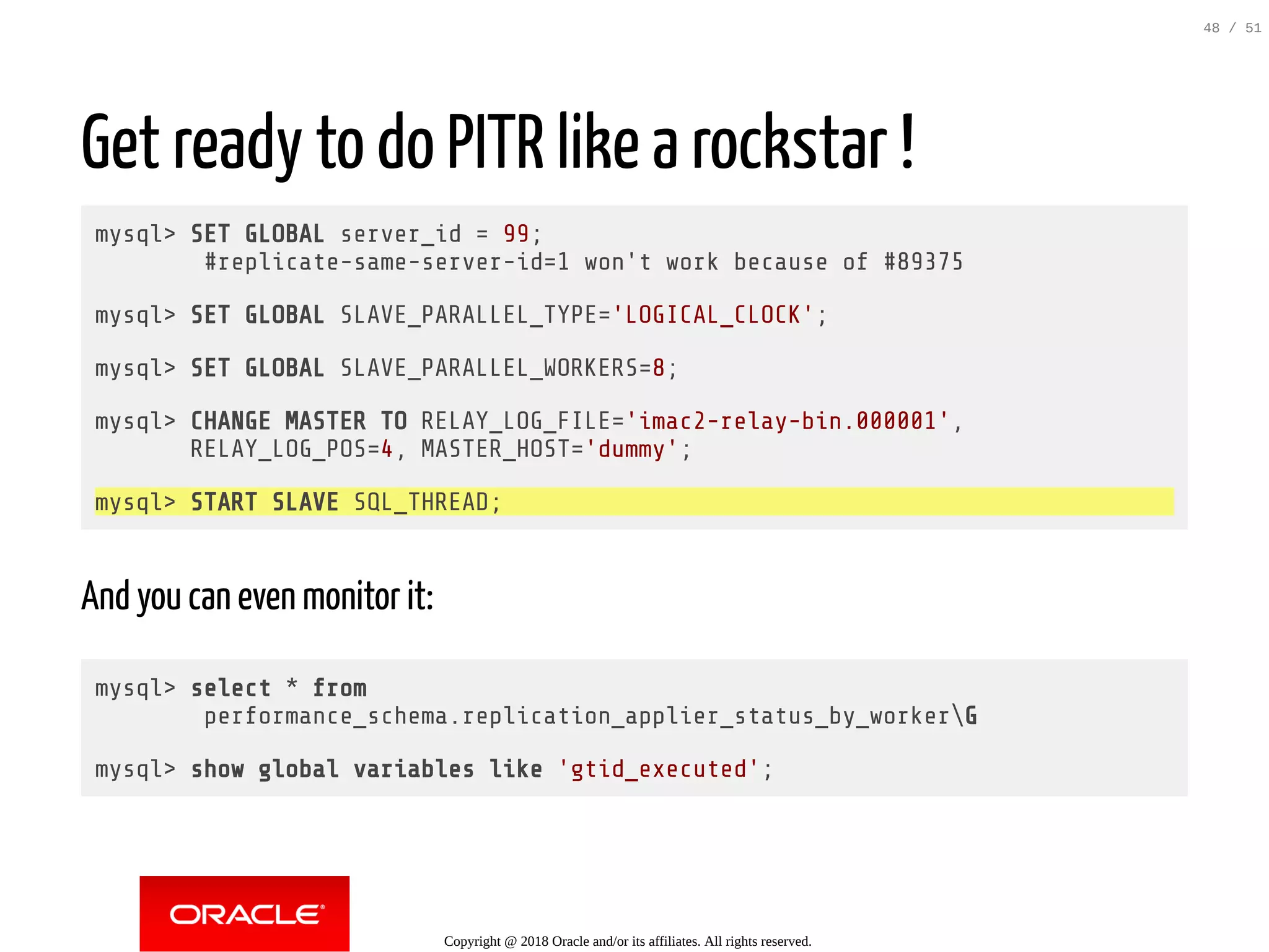
mysql> SET GLOBAL server_id = 99;
#replicate-same-server-id=1 won't work because of #89375
mysql> SET GLOBAL SLAVE_PARALLEL_TYPE='LOGICAL_CLOCK';
mysql> SET GLOBAL SLAVE_PARALLEL_WORKERS=8;
mysql> CHANGE MASTER TO RELAY_LOG_FILE='imac2-relay-bin.000001',
RELAY_LOG_POS=4, MASTER_HOST='dummy';
mysql> START SLAVE SQL_THREAD;
And you can even monitor it:
mysql> select * from
performance_schema.replication_applier_status_by_workerG
mysql> show global variables like 'gtid_executed';
Copyright @ 2018 Oracle and/or its affiliates. All rights reserved.
48 / 51
it took less than 22 mins !
Copyright @ 2018 Oracle and/or its affiliates. All rights reserved.
49 / 51
if you are brave and want to go at light speed
Try https://github.com/lefred/MyUndelete
50 / 51
Thank you !
Any Questions ?
http://lefred.be
Copyright @ 2018 Oracle and/or its affiliates. All rights reserved.
51 / 51

FOSDEM MySQL & Friends Devroom, February 2018 MySQL Point-in-Time Recovery like a Rockstar

  • 1.
  • 2.
  • 3.
    FOSDEM, February 2018 MySQLPoint-in-Time Recovery like a Rockstar Accelerate MySQL point-in-time recovery for large workloads       Frédéric Descamps - MySQL Community Manager - Oracle 3 / 51
  • 4.
      Safe Harbor Statement Thefollowing is intended to outline our general product direction. It is intended for information purpose only, and may not be incorporated into any contract. It is not a commitment to deliver any material, code, or functionality, and should not be relied up in making purchasing decisions. The development, release and timing of any features or functionality described for Oracle´s product remains at the sole discretion of Oracle. Copyright @ 2018 Oracle and/or its affiliates. All rights reserved. 4 / 51
  • 5.
    about.me/lefred Who am I? Copyright @ 2018 Oracle and/or its affiliates. All rights reserved. 5 / 51
  • 6.
    Frédéric Descamps @lefred MySQL Evangelist HackingMySQL since 3.23 devops believer living in Belgium 🇧🇪 http://lefred.be   Copyright @ 2018 Oracle and/or its affiliates. All rights reserved. 6 / 51
  • 7.
    what is PITR? point-in-time recovery Copyright @ 2018 Oracle and/or its affiliates. All rights reserved. 7 / 51
  • 8.
    PITR: Definition from Wikipedia(thank you Jaime) Point-in-time recovery (PITR) in the context of computers involves systems whereby an administrator can restore or recover a set of data or a particular setting from a time in the past. Once PITR logging starts for a PITR-capable database, a database administrator can restore that database from backups to the state that it had at any time since. Copyright @ 2018 Oracle and/or its affiliates. All rights reserved. 8 / 51
  • 9.
    PITR: Definition from Wikipedia(thank you Jaime) Point-in-time recovery (PITR) in the context of computers involves systems whereby an administrator can restore or recover a set of data or a particular setting from a time in the past. Once PITR logging starts for a PITR-capable database, a database administrator can restore that database from backups to the state that it had at any time since. Please donate to wikimedia : https://goo.gl/ZYVFhf Copyright @ 2018 Oracle and/or its affiliates. All rights reserved. 9 / 51
  • 10.
    MySQL PITR requirements Copyright @2018 Oracle and/or its affiliates. All rights reserved. 10 / 51
  • 11.
    Requirements To be ableto perform point-in-time recovery with MySQL, you need to have: Copyright @ 2018 Oracle and/or its affiliates. All rights reserved. 11 / 51
  • 12.
    Requirements To be ableto perform point-in-time recovery with MySQL, you need to have: decent backups Copyright @ 2018 Oracle and/or its affiliates. All rights reserved. 12 / 51
  • 13.
    Requirements To be ableto perform point-in-time recovery with MySQL, you need to have: decent backups binary logs enabled Copyright @ 2018 Oracle and/or its affiliates. All rights reserved. 13 / 51
  • 14.
    Requirements To be ableto perform point-in-time recovery with MySQL, you need to have: decent backups binary logs enabled keeping your binlogs at least since the last successful backup Copyright @ 2018 Oracle and/or its affiliates. All rights reserved. 14 / 51
  • 15.
    MySQL PITR Procedure Copyright @2018 Oracle and/or its affiliates. All rights reserved. 15 / 51
  • 16.
    Procedure The procedure toperform a PITR with MySQL is the following: Copyright @ 2018 Oracle and/or its affiliates. All rights reserved. 16 / 51
  • 17.
    Procedure The procedure toperform a PITR with MySQL is the following: find the binary log file and the position of the event you want restore up to Copyright @ 2018 Oracle and/or its affiliates. All rights reserved. 17 / 51
  • 18.
    Procedure The procedure toperform a PITR with MySQL is the following: find the binary log file and the position of the event you want restore up to restore the last backup Copyright @ 2018 Oracle and/or its affiliates. All rights reserved. 18 / 51
  • 19.
    Procedure The procedure toperform a PITR with MySQL is the following: find the binary log file and the position of the event you want restore up to restore the last backup find the binlog position of the last restored event Copyright @ 2018 Oracle and/or its affiliates. All rights reserved. 19 / 51
  • 20.
    Procedure The procedure toperform a PITR with MySQL is the following: find the binary log file and the position of the event you want restore up to restore the last backup find the binlog position of the last restored event replay all events present in the binary logs since the backup up to the position of the transaction we want to skip Copyright @ 2018 Oracle and/or its affiliates. All rights reserved. 20 / 51
  • 21.
    Procedure The procedure toperform a PITR with MySQL is the following: find the binary log file and the position of the event you want restore up to restore the last backup find the binlog position of the last restored event replay all events present in the binary logs since the backup up to the position of the transaction we want to skip see the manual: https://dev.mysql.com/doc/refman/5.7/en/point-in-time-recovery.html Copyright @ 2018 Oracle and/or its affiliates. All rights reserved. 21 / 51
  • 22.
    MySQL PITR Example Copyright @2018 Oracle and/or its affiliates. All rights reserved. 22 / 51
  • 23.
    Example We have onedatabase with 16 tables sysbench /usr/share/sysbench/oltp_insert.lua --db-driver=mysql --mysql-user=root --mysql-host=localhost --table-size=100000 --tables=16 prepare Copyright @ 2018 Oracle and/or its affiliates. All rights reserved. 23 / 51
  • 24.
    Example We have onedatabase with 16 tables sysbench /usr/share/sysbench/oltp_insert.lua --db-driver=mysql --mysql-user=root --mysql-host=localhost --table-size=100000 --tables=16 prepare We have one physical backup /opt/mysql/meb-4.1/bin/mysqlbackup --host=127.0.0.1 --backup-dir=mysqlbackup backup /opt/mysql/meb-4.1/bin/mysqlbackup --host=127.0.0.1 --backup-dir=mysqlbackup apply-log Copyright @ 2018 Oracle and/or its affiliates. All rights reserved. 24 / 51
  • 25.
    Example We have onedatabase with 16 tables sysbench /usr/share/sysbench/oltp_insert.lua --db-driver=mysql --mysql-user=root --mysql-host=localhost --table-size=100000 --tables=16 prepare We have one physical backup /opt/mysql/meb-4.1/bin/mysqlbackup --host=127.0.0.1 --backup-dir=mysqlbackup backup /opt/mysql/meb-4.1/bin/mysqlbackup --host=127.0.0.1 --backup-dir=mysqlbackup apply-log Any other backup solution can be used Copyright @ 2018 Oracle and/or its affiliates. All rights reserved. 25 / 51
  • 26.
    Example (2) We writedata using 8 threads for 1h: sysbench /usr/share/sysbench/oltp_insert.lua --db-driver=mysql --mysql-user=root --mysql-host=localhost --table-size=100000 --tables=16 --threads=8 --report-interval=10 --time=3600 run Copyright @ 2018 Oracle and/or its affiliates. All rights reserved. 26 / 51
  • 27.
    Example (2) We writedata using 8 threads for 1h: sysbench /usr/share/sysbench/oltp_insert.lua --db-driver=mysql --mysql-user=root --mysql-host=localhost --table-size=100000 --tables=16 --threads=8 --report-interval=10 --time=3600 run And let's modify a record with something we can track ;-) mysql> update sbtest3 set pad='fred' where id = 126551; Query OK, 1 row affected (0.02 sec) Rows matched: 1 Changed: 1 Warnings: 0 Copyright @ 2018 Oracle and/or its affiliates. All rights reserved. 27 / 51
  • 28.
    Suddenly... Copyright @ 2018Oracle and/or its affiliates. All rights reserved. 28 / 51
  • 29.
    Suddenly... Copyright @ 2018Oracle and/or its affiliates. All rights reserved. 29 / 51
  • 30.
    Suddenly... mysql> update sbtest4set pad="oups"; Query OK, 1066269 rows affected (8.52 sec) Rows matched: 1066269 Changed: 1066269 Warnings: 0 Copyright @ 2018 Oracle and/or its affiliates. All rights reserved. 30 / 51
  • 31.
    UPDATE without WHEREclause !?! Copyright @ 2018 Oracle and/or its affiliates. All rights reserved. 31 / 51
  • 32.
    Find what weneed to avoid after restore mysql> show master status; +------------------+-----------+...+------------------------------------------------+ | File | Position | | Executed_Gtid_Set | +------------------+-----------+...+------------------------------------------------+ | imac2-bin.000005 | 622915384 | | 25d97ef9-005b-11e8-bf1b-685b359e77d5:1-1072032 | +------------------+-----------+...+------------------------------------------------+ 1 row in set (0.00 sec) Copyright @ 2018 Oracle and/or its affiliates. All rights reserved. 32 / 51
  • 33.
    Let's verify... mysql> pagergrep -A 1 -B 2 'sbtest.sbtest4' | grep -B 4 Update mysql> show binlog events in 'imac2-bin.000005'; -- | imac2-bin.000005 | 277145452 | Gtid | ... | SET @@SESSION.GTID_NEXT= '25d97ef9-005b-11e8-bf1b-685b359e77d5:1072032' | | imac2-bin.000005 | 277145513 | Query | ... | BEGIN | | imac2-bin.000005 | 277145583 | Table_map | ... | table_id: 154 (sbtest.sbtest4)| | imac2-bin.000005 | 277145638 | Update_rows | ... | table_id: 154 | mysql> pager sed -n -e '/25d97ef9-005b-11e8-bf1b-685b359e77d5:1072032/,/COMMIT/ p' | grep COMMIT mysql> show binlog events in 'imac2-bin.000005'; | imac2-bin.000005 | 622915357 | Xid | ... | 622915384 | COMMIT /* xid=1072253 */ This is good, let's then keep the position 277145452 Copyright @ 2018 Oracle and/or its affiliates. All rights reserved. 33 / 51
  • 34.
    Stop MySQL andsave the binlogs [root@imac2 ~]# systemctl stop mysqld [root@imac2 ~]# mkdir /mnt/mysql/binlogs [root@imac2 ~]# cd /var/lib/mysql [root@imac2 mysql]# cp imac2-bin.* /mnt/mysql/binlogs/ Copyright @ 2018 Oracle and/or its affiliates. All rights reserved. 34 / 51
  • 35.
    Stop MySQL andsave the binlogs [root@imac2 ~]# systemctl stop mysqld [root@imac2 ~]# mkdir /mnt/mysql/binlogs [root@imac2 ~]# cd /var/lib/mysql [root@imac2 mysql]# cp imac2-bin.* /mnt/mysql/binlogs/ Restore the backup [root@imac2 mysql]# rm -rf * [root@imac2 mysql]# /opt/mysql/meb-4.1/bin/mysqlbackup --backup-dir=/tmp/mysqlbackup copy-back ... mysqlbackup completed OK! with 3 warnings [root@imac2 mysql]# chown -R mysql. * Copyright @ 2018 Oracle and/or its affiliates. All rights reserved. 35 / 51
  • 36.
    Point-in-Time Recovery Now wecan start MySQL and replay the binlogs from the backup position, until the "EVENT" (277145452) # grep binlog_position backup_variables.txt binlog_position=imac2-bin.000004:888830919 [root@imac2 binlogs]# time mysqlbinlog -j 888830919 --stop-position 277145452 imac2-bin.00000[4-5] | mysql real 305m18.867s I only needed to replay events from imac2-bin.00000[4-5] in fact, but it could be way more than that Copyright @ 2018 Oracle and/or its affiliates. All rights reserved. 36 / 51
  • 37.
    Point-in-Time Recovery Now wecan start MySQL and replay the binlogs from the backup position, until the "EVENT" (277145452) # grep binlog_position backup_variables.txt binlog_position=imac2-bin.000004:888830919 [root@imac2 binlogs]# time mysqlbinlog -j 888830919 --stop-position 277145452 imac2-bin.00000[4-5] | mysql real 305m18.867s I only needed to replay events from imac2-bin.00000[4-5] in fact, but it could be way more than that -rw-r----- 1 root root 1.1G Jan 23 21:27 imac2-bin.000004 -rw-r----- 1 root root 595M Jan 23 21:27 imac2-bin.000005 Copyright @ 2018 Oracle and/or its affiliates. All rights reserved. 37 / 51
  • 38.
    Was it reallylike a rockstar ? Copyright @ 2018 Oracle and/or its affiliates. All rights reserved. 38 / 51
  • 39.
    Was it reallylike a rockstar ? NO ! Copyright @ 2018 Oracle and/or its affiliates. All rights reserved. 39 / 51
  • 40.
    Why not ? Ifyou have a large amount of large binary logs and your workload is not single threaded like mysqlbinlog... this process can take for eveeeeeeeeer ! Copyright @ 2018 Oracle and/or its affiliates. All rights reserved. 40 / 51
  • 41.
    Let's do itlike a rockstar ! Copyright @ 2018 Oracle and/or its affiliates. All rights reserved. 41 / 51
  • 42.
    Find and Setthe last executed GTID during backup [root@imac2 mysql]# cat backup_variables.txt | grep gtid gtid_executed=25d97ef9-005b-11e8-bf1b-685b359e77d5:1-6001 The name of the file depends of your backup tool After restoring the backup, restart MySQL with this change in my.cnf: skip-slave-start Finally set the GTID AND ALSO the GTID of the transaction we want to avoid: mysql> reset master; mysql> SET @@GLOBAL.GTID_PURGED='25d97ef9-005b-11e8-bf1b-685b359e77d5:1-6001, 25d97ef9-005b-11e8-bf1b-685b359e77d5:1072032'; Copyright @ 2018 Oracle and/or its affiliates. All rights reserved. 42 / 51
  • 43.
    MySQL PITR Now thecool stuff ! Copyright @ 2018 Oracle and/or its affiliates. All rights reserved. 43 / 51
  • 44.
    We will copyall the saved binlogs and rename them as relaylogs ! [root@imac2 mysql]# for i in $(ls /mnt/mysql/binlogs/*.0*) do ext=$(echo $i | cut -d'.' -f2) cp $i imac2-relay-bin.$ext done Copyright @ 2018 Oracle and/or its affiliates. All rights reserved. 44 / 51
  • 45.
    We will copyall the saved binlogs and rename them as relaylogs ! [root@imac2 mysql]# for i in $(ls /mnt/mysql/binlogs/*.0*) do ext=$(echo $i | cut -d'.' -f2) cp $i imac2-relay-bin.$ext done Don't forget to create the index file too: [root@imac2 mysql]# ls ./imac2-relay-bin.0* >imac2-relay-bin.index [root@imac2 mysql]# chown mysql. *relay* [root@imac2 mysql]# cat imac2-relay-bin.index ./imac2-relay-bin.000001 ./imac2-relay-bin.000002 ./imac2-relay-bin.000003 ./imac2-relay-bin.000004 ./imac2-relay-bin.000005 Copyright @ 2018 Oracle and/or its affiliates. All rights reserved. 45 / 51
  • 46.
    Get ready todo PITR like a rockstar ! Copyright @ 2018 Oracle and/or its affiliates. All rights reserved. 46 / 51
  • 47.
    Get ready todo PITR like a rockstar ! mysql> SET GLOBAL server_id = 99; #replicate-same-server-id=1 won't work because of #89375 mysql> SET GLOBAL SLAVE_PARALLEL_TYPE='LOGICAL_CLOCK'; mysql> SET GLOBAL SLAVE_PARALLEL_WORKERS=8; mysql> CHANGE MASTER TO RELAY_LOG_FILE='imac2-relay-bin.000001', RELAY_LOG_POS=4, MASTER_HOST='dummy'; mysql> START SLAVE SQL_THREAD; Copyright @ 2018 Oracle and/or its affiliates. All rights reserved. 47 / 51
  • 48.
    Get ready todo PITR like a rockstar ! mysql> SET GLOBAL server_id = 99; #replicate-same-server-id=1 won't work because of #89375 mysql> SET GLOBAL SLAVE_PARALLEL_TYPE='LOGICAL_CLOCK'; mysql> SET GLOBAL SLAVE_PARALLEL_WORKERS=8; mysql> CHANGE MASTER TO RELAY_LOG_FILE='imac2-relay-bin.000001', RELAY_LOG_POS=4, MASTER_HOST='dummy'; mysql> START SLAVE SQL_THREAD; And you can even monitor it: mysql> select * from performance_schema.replication_applier_status_by_workerG mysql> show global variables like 'gtid_executed'; Copyright @ 2018 Oracle and/or its affiliates. All rights reserved. 48 / 51
  • 49.
    it took lessthan 22 mins ! Copyright @ 2018 Oracle and/or its affiliates. All rights reserved. 49 / 51
  • 50.
    if you arebrave and want to go at light speed Try https://github.com/lefred/MyUndelete 50 / 51
  • 51.
    Thank you ! AnyQuestions ? http://lefred.be Copyright @ 2018 Oracle and/or its affiliates. All rights reserved. 51 / 51