Copyright © 2013, Oracle and/or its affiliates. All rights reserved.
1
MySQL Enterprise Backup:
PITR Partial Online Recovery
Keith Hollman
MySQL Principal Sales Consultant EMEA
Copyright © 2013, Oracle and/or its affiliates. All rights reserved.
3
Agenda
 Objectives for today.
 Backup and what to do.
 Restore procedures.
Copyright © 2013, Oracle and/or its affiliates. All rights reserved.
4
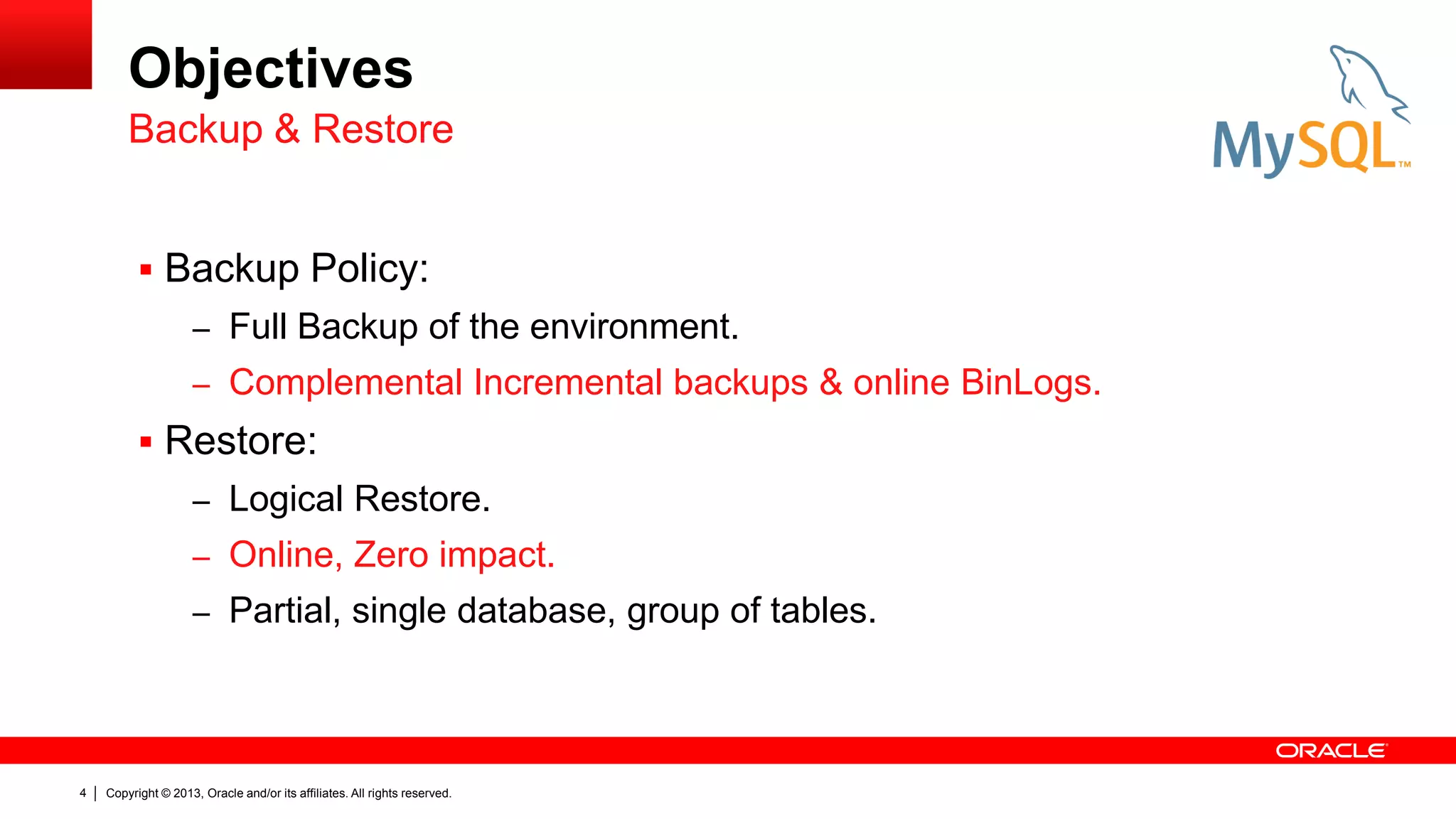
Objectives
 Backup Policy:
– Full Backup of the environment.
– Complemental Incremental backups & online BinLogs.
 Restore:
– Logical Restore.
– Online, Zero impact.
– Partial, single database, group of tables.
Backup & Restore
Copyright © 2013, Oracle and/or its affiliates. All rights reserved.
5
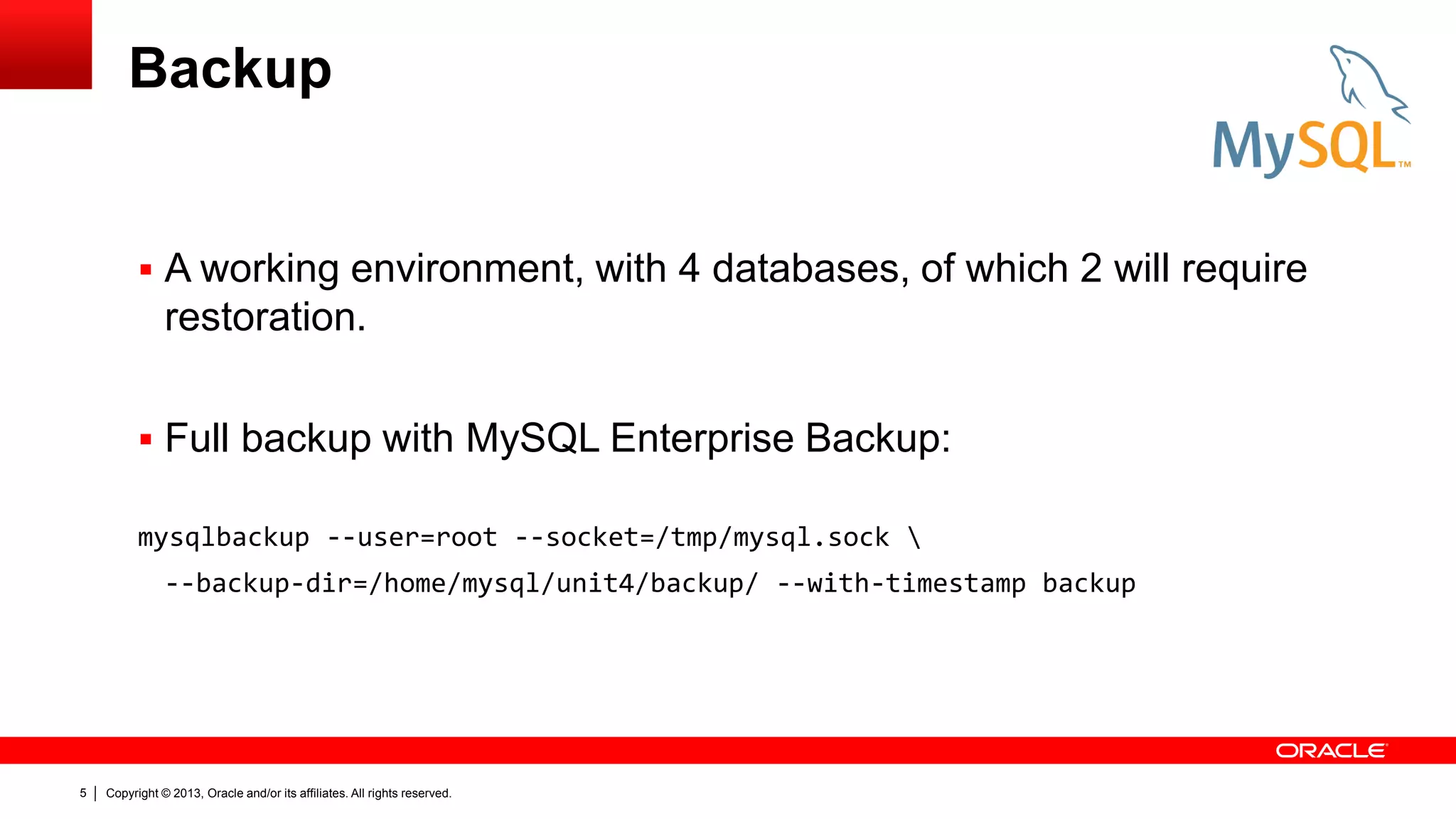
Backup
 A working environment, with 4 databases, of which 2 will require
restoration.
 Full backup with MySQL Enterprise Backup:
mysqlbackup --user=root --socket=/tmp/mysql.sock 
--backup-dir=/home/mysql/unit4/backup/ --with-timestamp backup
Copyright © 2013, Oracle and/or its affiliates. All rights reserved.
6
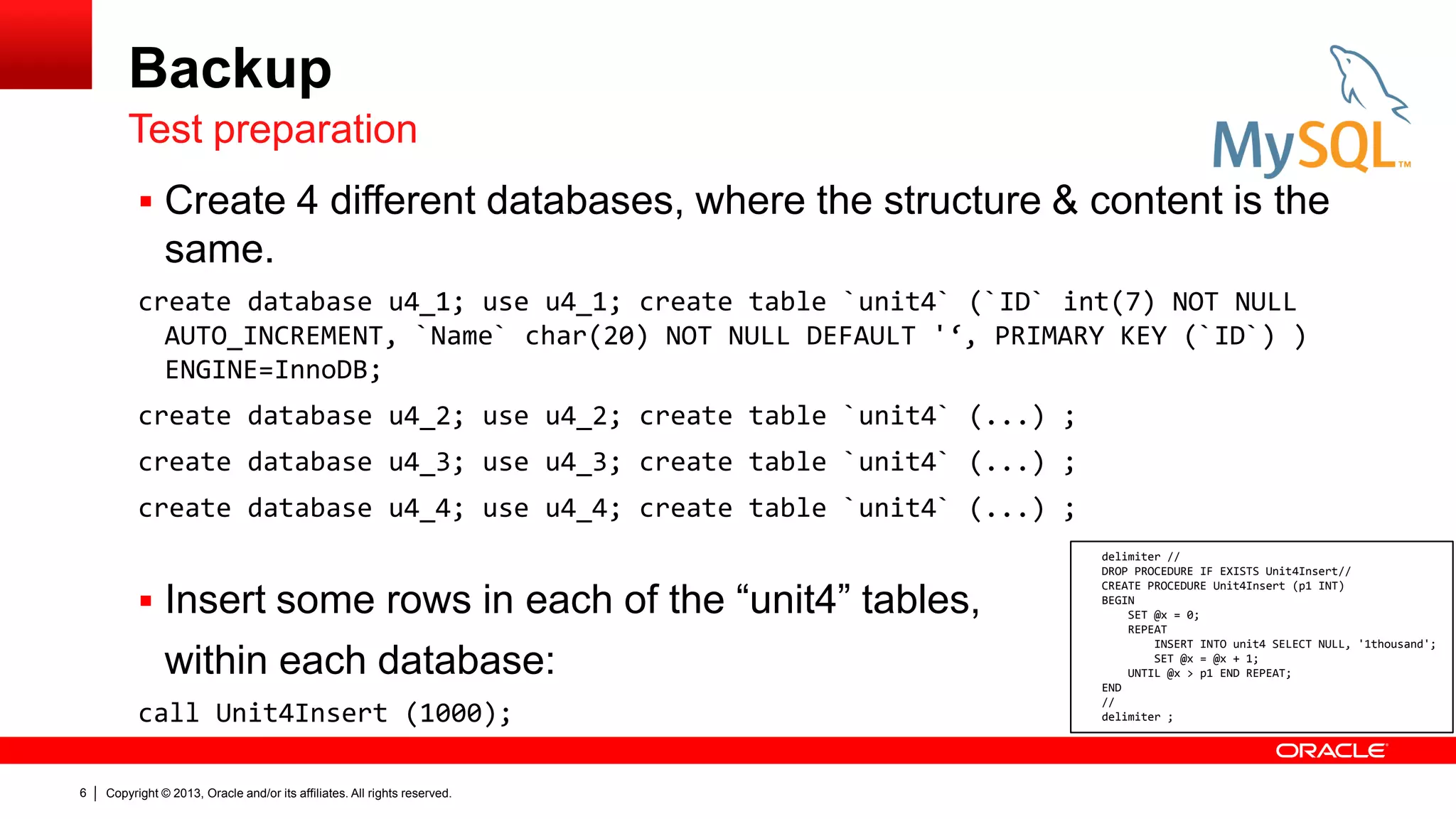
Backup
 Create 4 different databases, where the structure & content is the
same.
create database u4_1; use u4_1; create table `unit4` (`ID` int(7) NOT NULL
AUTO_INCREMENT, `Name` char(20) NOT NULL DEFAULT '‘, PRIMARY KEY (`ID`) )
ENGINE=InnoDB;
create database u4_2; use u4_2; create table `unit4` (...) ;
create database u4_3; use u4_3; create table `unit4` (...) ;
create database u4_4; use u4_4; create table `unit4` (...) ;
 Insert some rows in each of the “unit4” tables,
within each database:
call Unit4Insert (1000);
Test preparation
delimiter //
DROP PROCEDURE IF EXISTS Unit4Insert//
CREATE PROCEDURE Unit4Insert (p1 INT)
BEGIN
SET @x = 0;
REPEAT
INSERT INTO unit4 SELECT NULL, '1thousand';
SET @x = @x + 1;
UNTIL @x > p1 END REPEAT;
END
//
delimiter ;
Copyright © 2013, Oracle and/or its affiliates. All rights reserved.
7
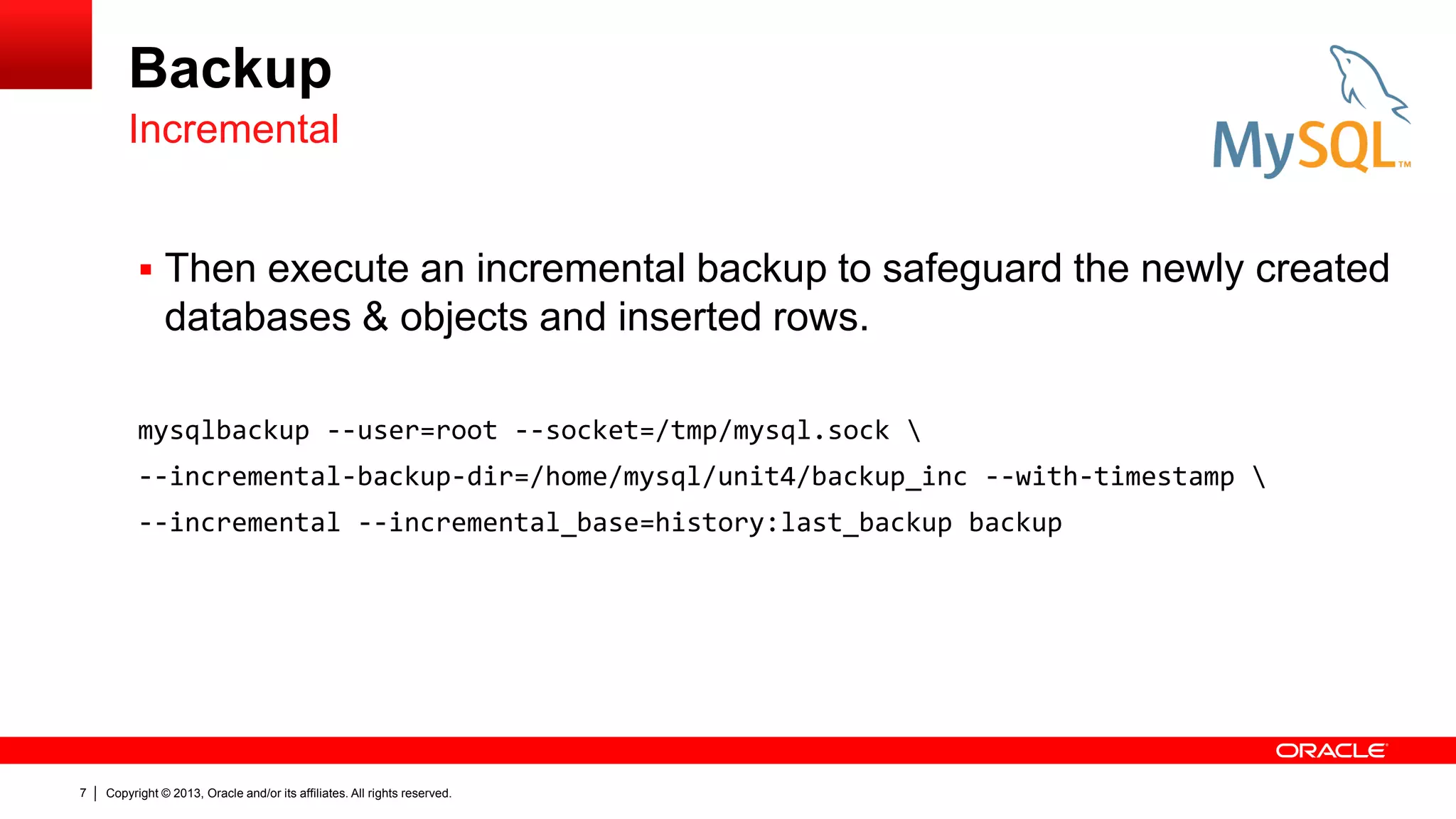
Backup
 Then execute an incremental backup to safeguard the newly created
databases & objects and inserted rows.
mysqlbackup --user=root --socket=/tmp/mysql.sock 
--incremental-backup-dir=/home/mysql/unit4/backup_inc --with-timestamp 
--incremental --incremental_base=history:last_backup backup
Incremental
Copyright © 2013, Oracle and/or its affiliates. All rights reserved.
8
Recovery
Copyright © 2013, Oracle and/or its affiliates. All rights reserved.
9
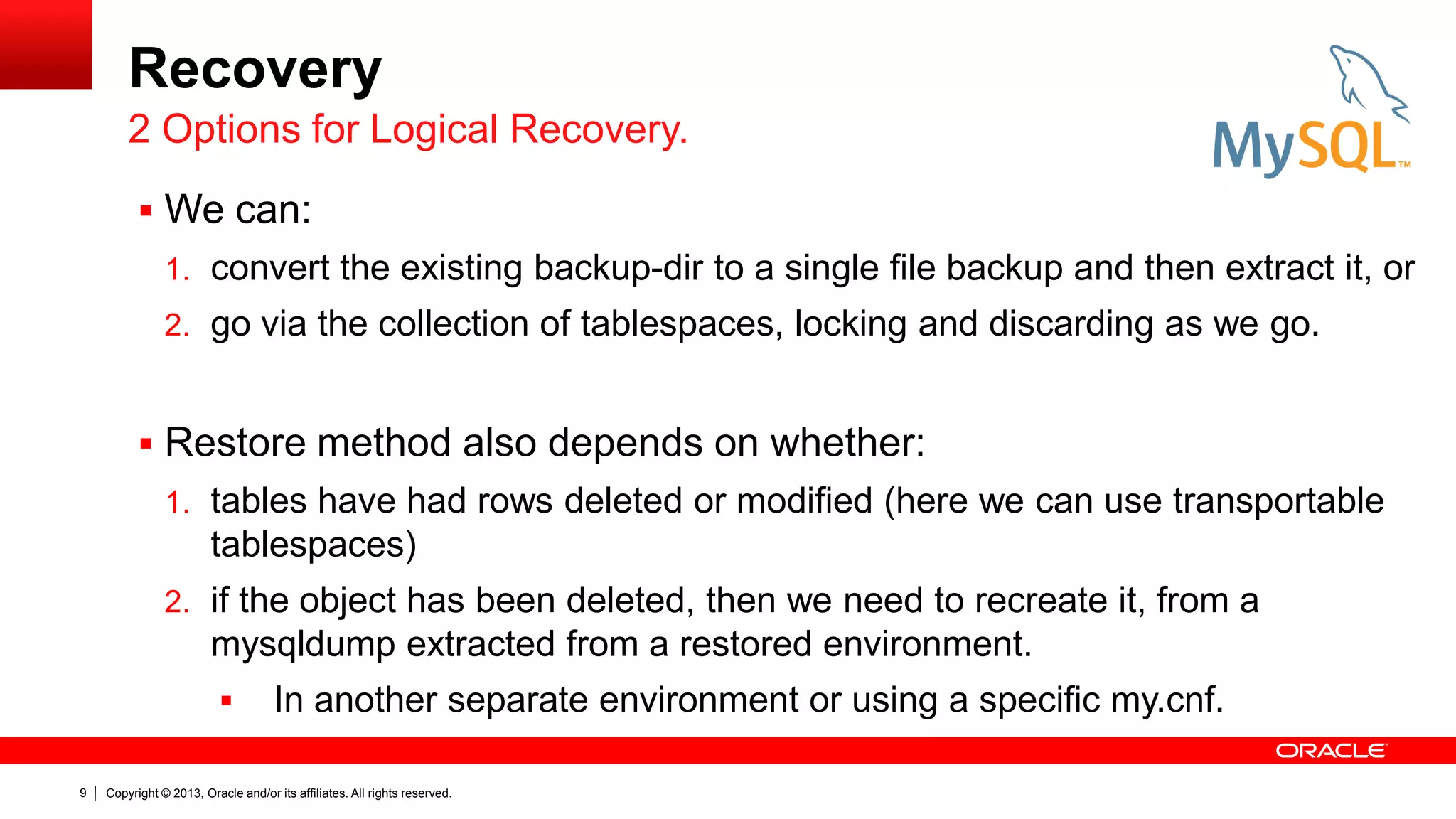
Recovery
 We can:
1. convert the existing backup-dir to a single file backup and then extract it, or
2. go via the collection of tablespaces, locking and discarding as we go.
 Restore method also depends on whether:
1. tables have had rows deleted or modified (here we can use transportable
tablespaces)
2. if the object has been deleted, then we need to recreate it, from a
mysqldump extracted from a restored environment.
 In another separate environment or using a specific my.cnf.
2 Options for Logical Recovery.
Copyright © 2013, Oracle and/or its affiliates. All rights reserved.
10
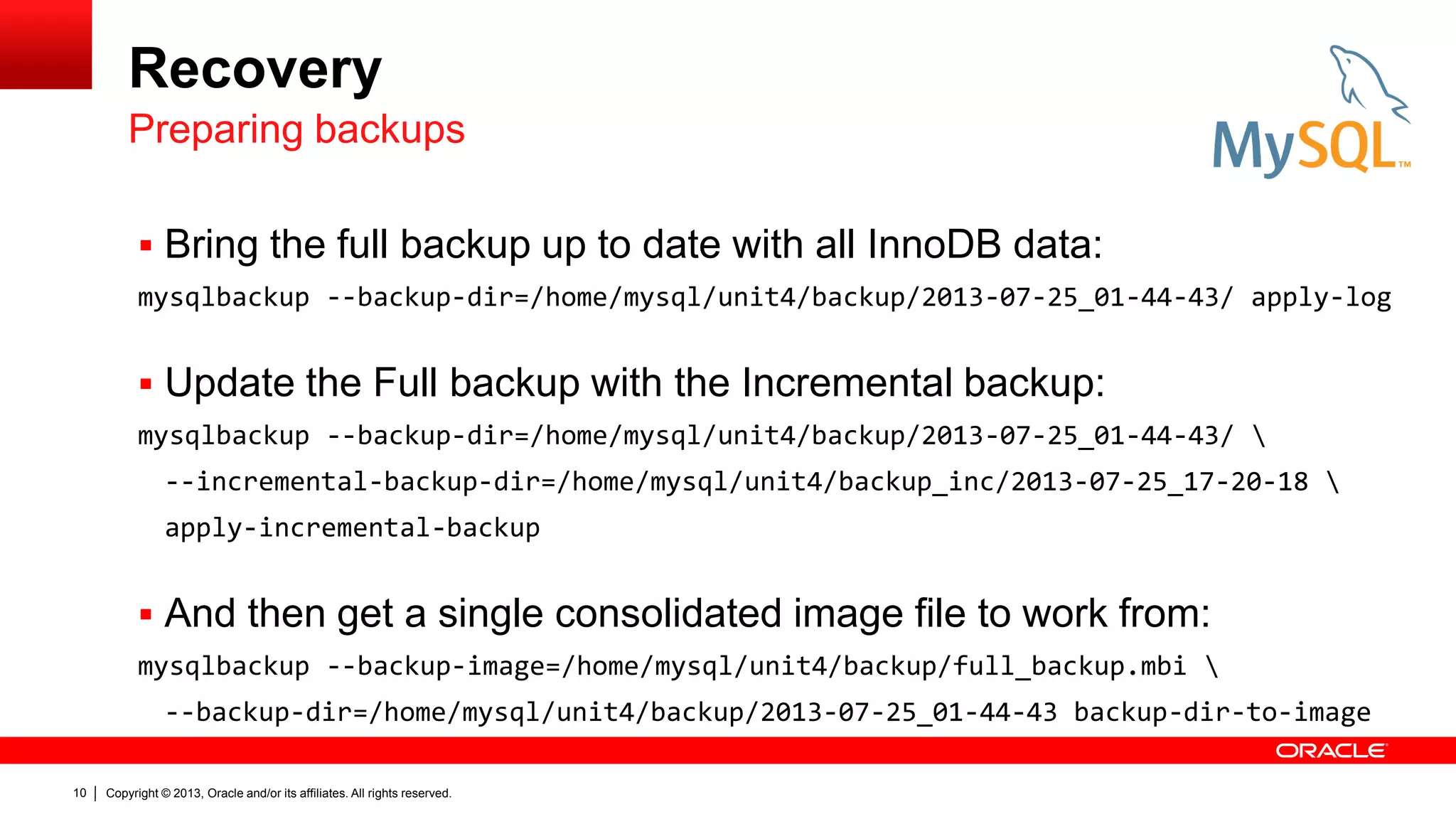
Recovery
 Bring the full backup up to date with all InnoDB data:
mysqlbackup --backup-dir=/home/mysql/unit4/backup/2013-07-25_01-44-43/ apply-log
 Update the Full backup with the Incremental backup:
mysqlbackup --backup-dir=/home/mysql/unit4/backup/2013-07-25_01-44-43/ 
--incremental-backup-dir=/home/mysql/unit4/backup_inc/2013-07-25_17-20-18 
apply-incremental-backup
 And then get a single consolidated image file to work from:
mysqlbackup --backup-image=/home/mysql/unit4/backup/full_backup.mbi 
--backup-dir=/home/mysql/unit4/backup/2013-07-25_01-44-43 backup-dir-to-image
Preparing backups
Copyright © 2013, Oracle and/or its affiliates. All rights reserved.
11
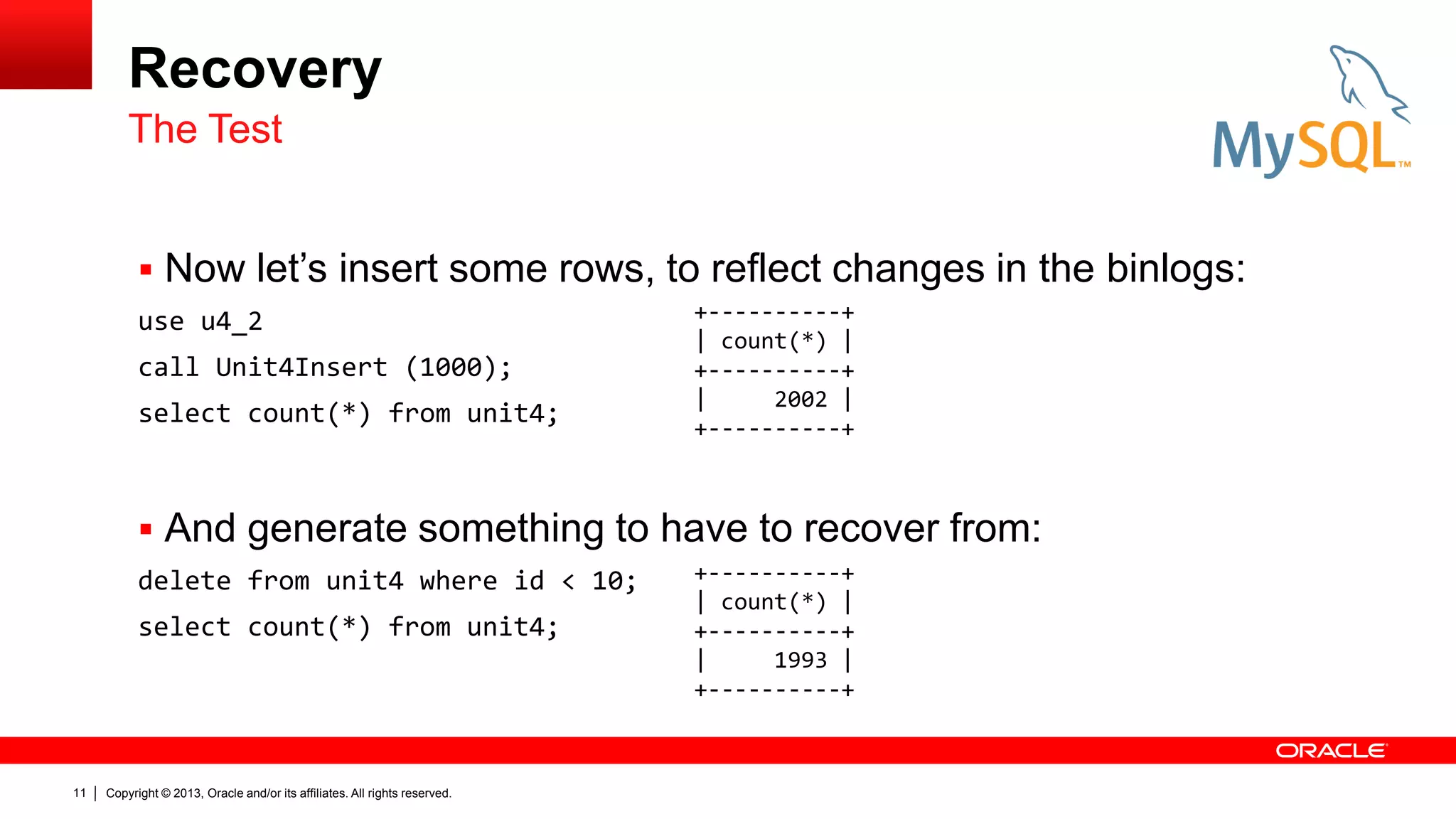
Recovery
 Now let’s insert some rows, to reflect changes in the binlogs:
use u4_2
call Unit4Insert (1000);
select count(*) from unit4;
 And generate something to have to recover from:
delete from unit4 where id < 10;
select count(*) from unit4;
The Test
+----------+
| count(*) |
+----------+
| 2002 |
+----------+
+----------+
| count(*) |
+----------+
| 1993 |
+----------+
Copyright © 2013, Oracle and/or its affiliates. All rights reserved.
12
Recovery
Copyright © 2013, Oracle and/or its affiliates. All rights reserved.
13
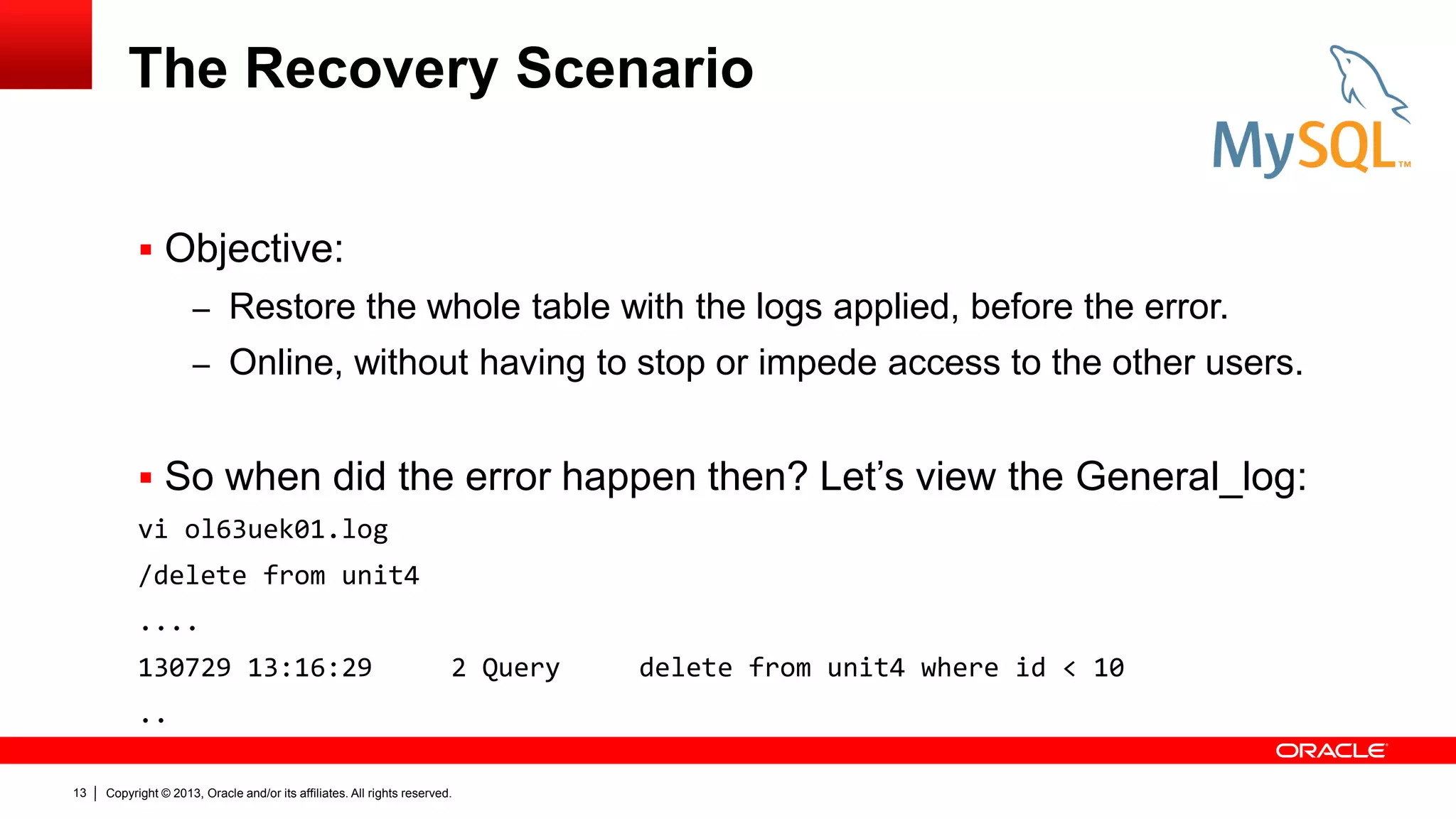
The Recovery Scenario
 Objective:
– Restore the whole table with the logs applied, before the error.
– Online, without having to stop or impede access to the other users.
 So when did the error happen then? Let’s view the General_log:
vi ol63uek01.log
/delete from unit4
....
130729 13:16:29 2 Query delete from unit4 where id < 10
..
Copyright © 2013, Oracle and/or its affiliates. All rights reserved.
14
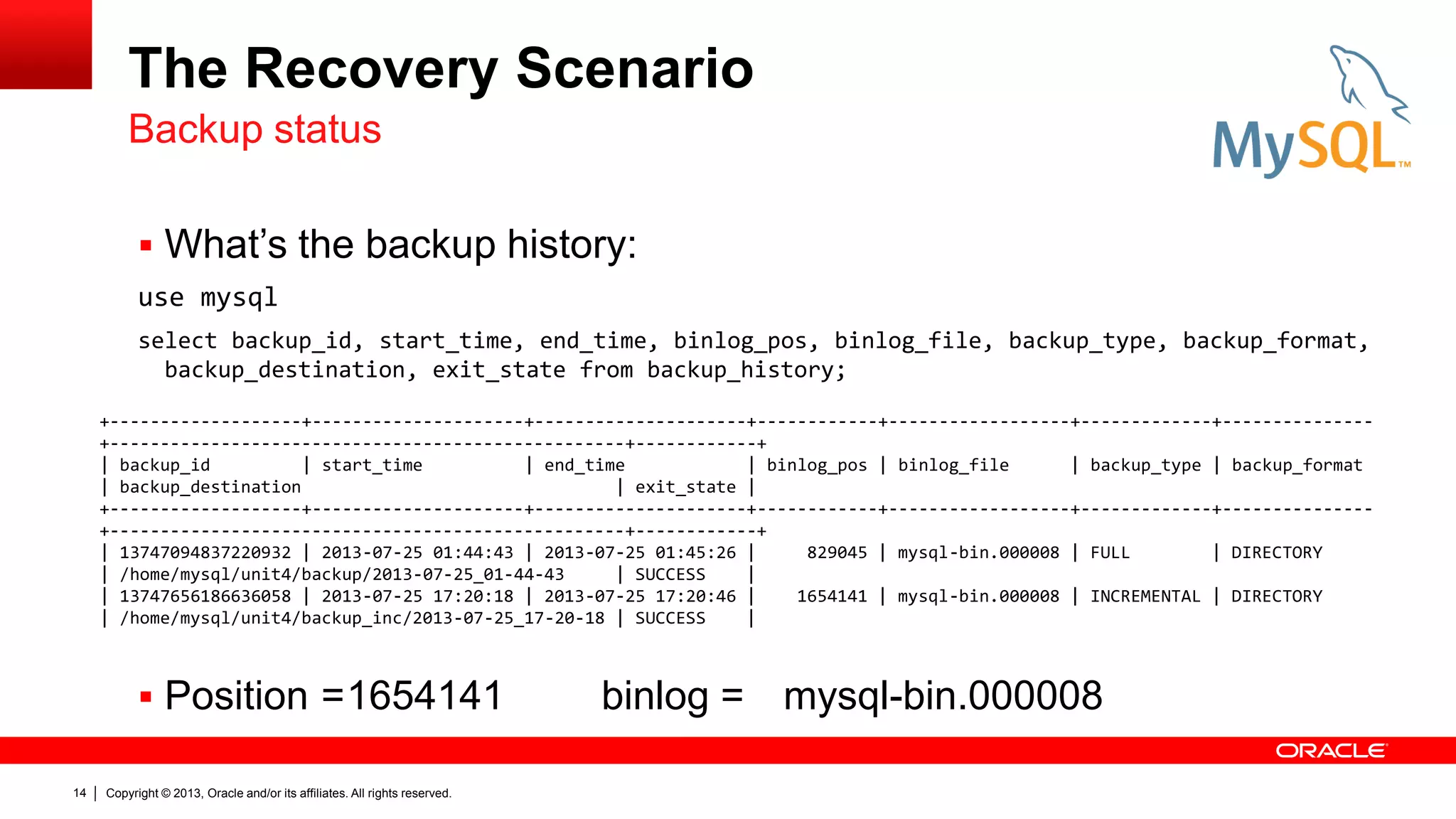
The Recovery Scenario
 What’s the backup history:
use mysql
select backup_id, start_time, end_time, binlog_pos, binlog_file, backup_type, backup_format,
backup_destination, exit_state from backup_history;
 Position =1654141 binlog = mysql-bin.000008
Backup status
+-------------------+---------------------+---------------------+------------+------------------+-------------+---------------
+---------------------------------------------------+------------+
| backup_id | start_time | end_time | binlog_pos | binlog_file | backup_type | backup_format
| backup_destination | exit_state |
+-------------------+---------------------+---------------------+------------+------------------+-------------+---------------
+---------------------------------------------------+------------+
| 13747094837220932 | 2013-07-25 01:44:43 | 2013-07-25 01:45:26 | 829045 | mysql-bin.000008 | FULL | DIRECTORY
| /home/mysql/unit4/backup/2013-07-25_01-44-43 | SUCCESS |
| 13747656186636058 | 2013-07-25 17:20:18 | 2013-07-25 17:20:46 | 1654141 | mysql-bin.000008 | INCREMENTAL | DIRECTORY
| /home/mysql/unit4/backup_inc/2013-07-25_17-20-18 | SUCCESS |
Copyright © 2013, Oracle and/or its affiliates. All rights reserved.
15
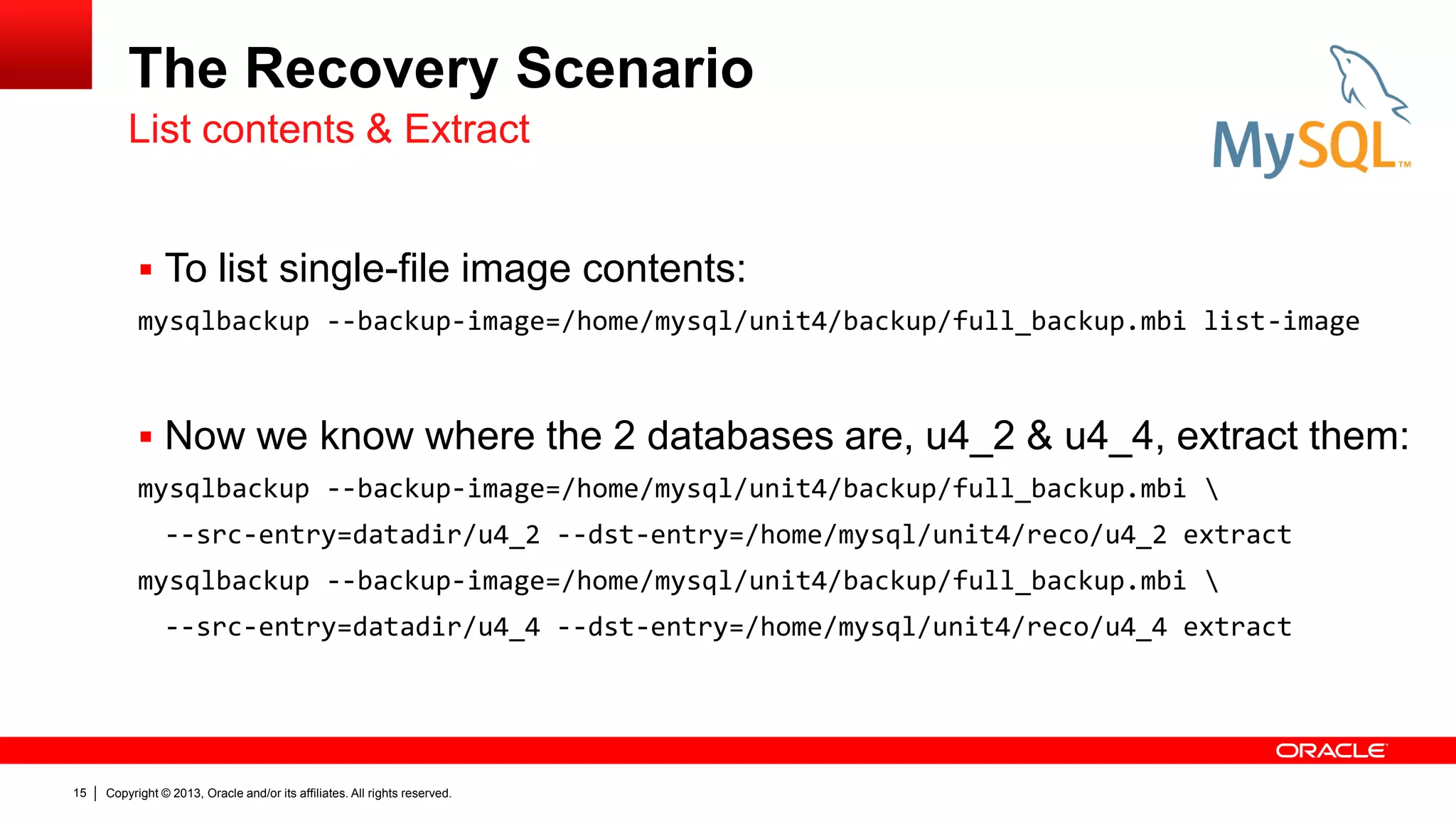
The Recovery Scenario
 To list single-file image contents:
mysqlbackup --backup-image=/home/mysql/unit4/backup/full_backup.mbi list-image
 Now we know where the 2 databases are, u4_2 & u4_4, extract them:
mysqlbackup --backup-image=/home/mysql/unit4/backup/full_backup.mbi 
--src-entry=datadir/u4_2 --dst-entry=/home/mysql/unit4/reco/u4_2 extract
mysqlbackup --backup-image=/home/mysql/unit4/backup/full_backup.mbi 
--src-entry=datadir/u4_4 --dst-entry=/home/mysql/unit4/reco/u4_4 extract
List contents & Extract
Copyright © 2013, Oracle and/or its affiliates. All rights reserved.
16
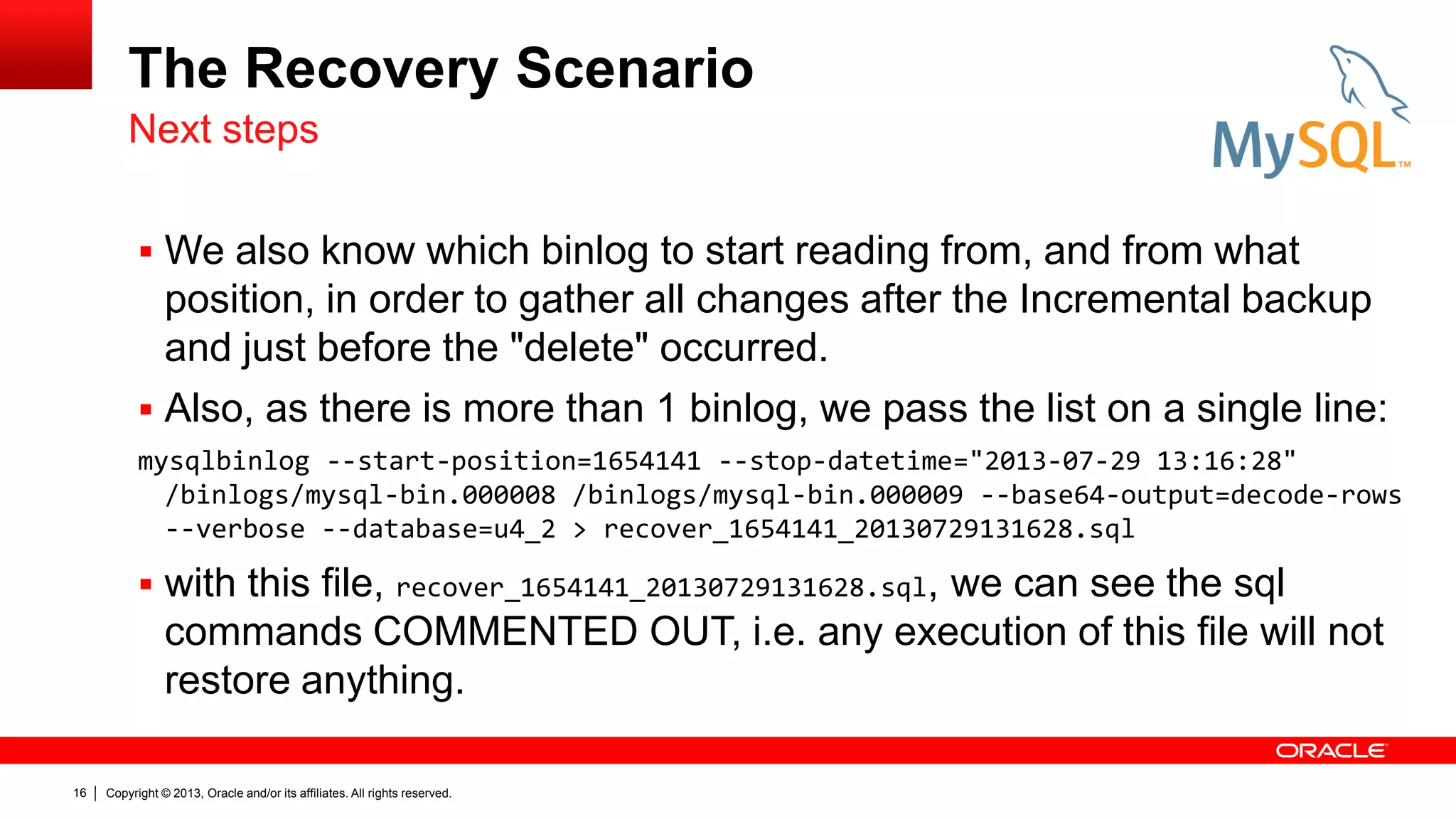
The Recovery Scenario
 We also know which binlog to start reading from, and from what
position, in order to gather all changes after the Incremental backup
and just before the "delete" occurred.
 Also, as there is more than 1 binlog, we pass the list on a single line:
mysqlbinlog --start-position=1654141 --stop-datetime="2013-07-29 13:16:28"
/binlogs/mysql-bin.000008 /binlogs/mysql-bin.000009 --base64-output=decode-rows
--verbose --database=u4_2 > recover_1654141_20130729131628.sql
 with this file, recover_1654141_20130729131628.sql, we can see the sql
commands COMMENTED OUT, i.e. any execution of this file will not
restore anything.
Next steps
Copyright © 2013, Oracle and/or its affiliates. All rights reserved.
17
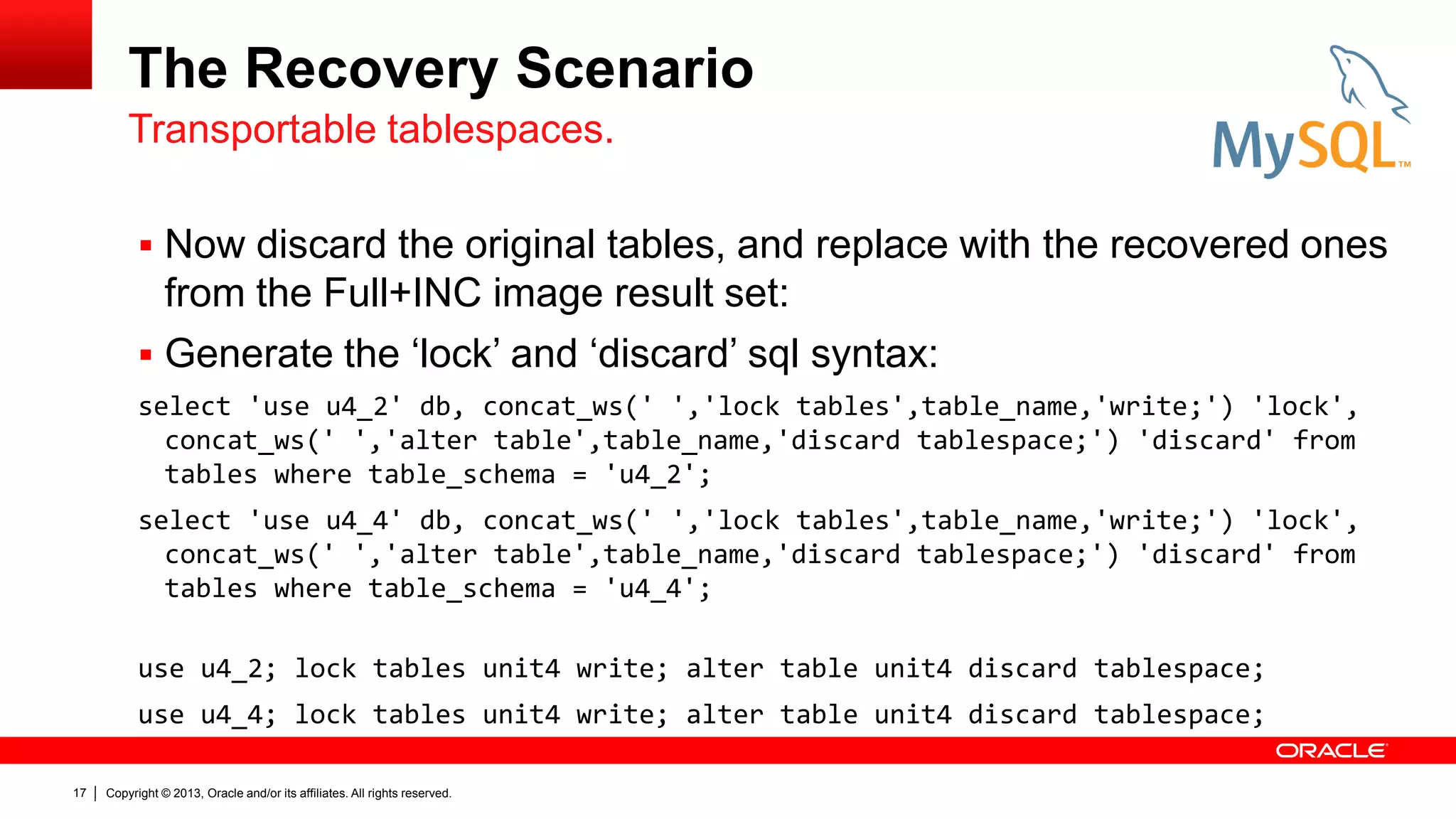
The Recovery Scenario
 Now discard the original tables, and replace with the recovered ones
from the Full+INC image result set:
 Generate the ‘lock’ and ‘discard’ sql syntax:
select 'use u4_2' db, concat_ws(' ','lock tables',table_name,'write;') 'lock',
concat_ws(' ','alter table',table_name,'discard tablespace;') 'discard' from
tables where table_schema = 'u4_2';
select 'use u4_4' db, concat_ws(' ','lock tables',table_name,'write;') 'lock',
concat_ws(' ','alter table',table_name,'discard tablespace;') 'discard' from
tables where table_schema = 'u4_4';
use u4_2; lock tables unit4 write; alter table unit4 discard tablespace;
use u4_4; lock tables unit4 write; alter table unit4 discard tablespace;
Transportable tablespaces.
Copyright © 2013, Oracle and/or its affiliates. All rights reserved.
18
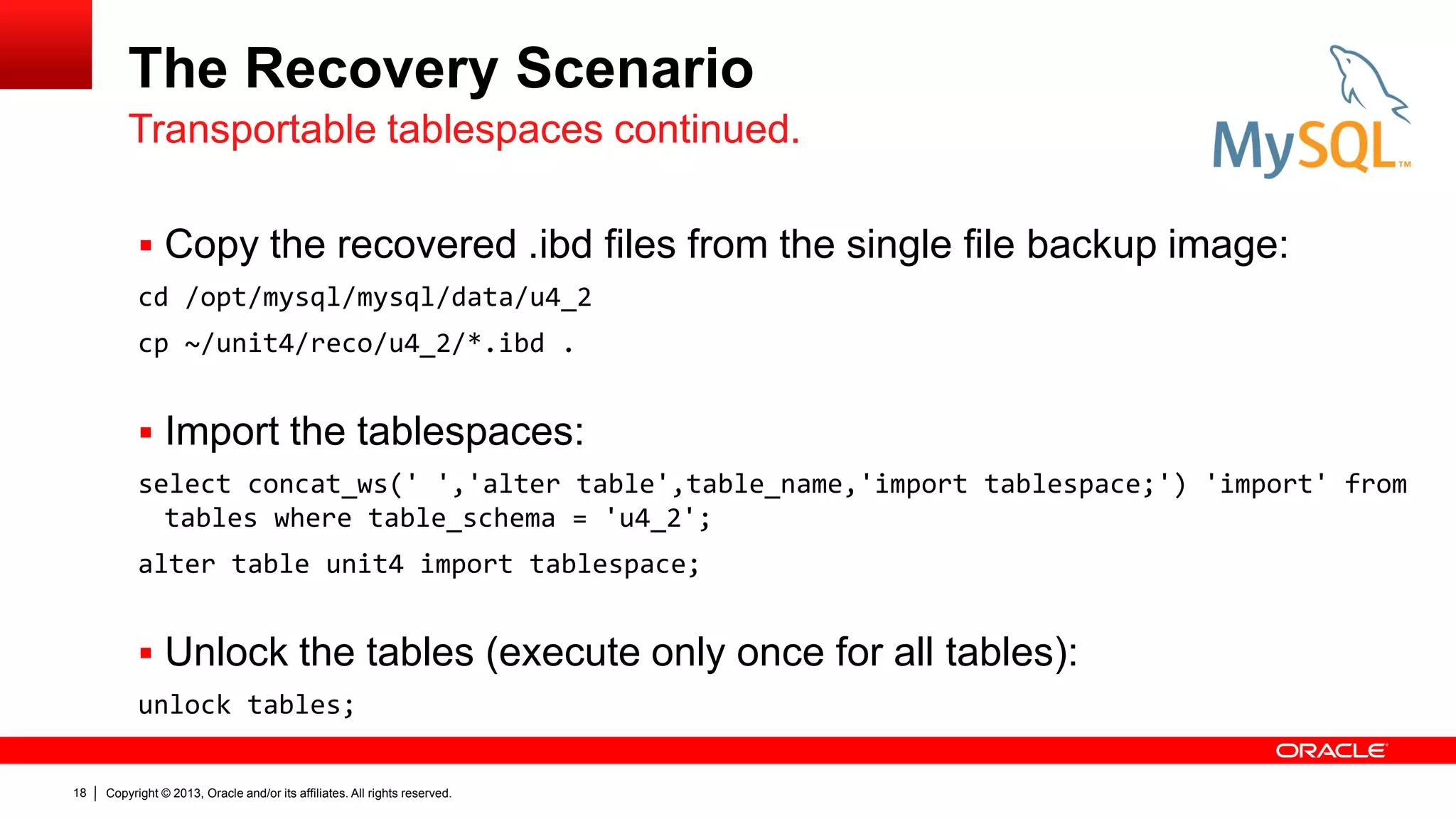
The Recovery Scenario
 Copy the recovered .ibd files from the single file backup image:
cd /opt/mysql/mysql/data/u4_2
cp ~/unit4/reco/u4_2/*.ibd .
 Import the tablespaces:
select concat_ws(' ','alter table',table_name,'import tablespace;') 'import' from
tables where table_schema = 'u4_2';
alter table unit4 import tablespace;
 Unlock the tables (execute only once for all tables):
unlock tables;
Transportable tablespaces continued.
Copyright © 2013, Oracle and/or its affiliates. All rights reserved.
19
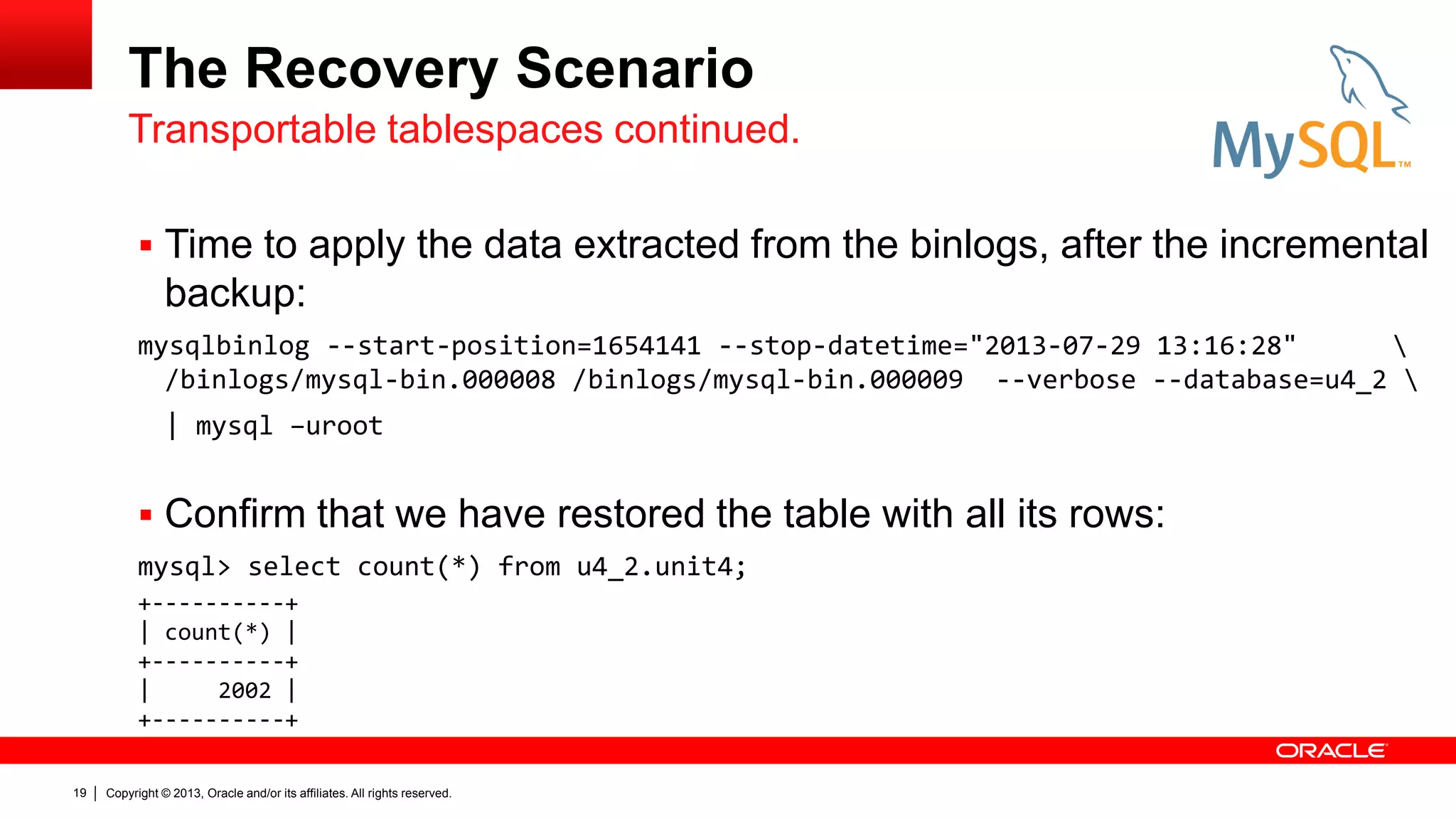
The Recovery Scenario
 Time to apply the data extracted from the binlogs, after the incremental
backup:
mysqlbinlog --start-position=1654141 --stop-datetime="2013-07-29 13:16:28" 
/binlogs/mysql-bin.000008 /binlogs/mysql-bin.000009 --verbose --database=u4_2 
| mysql –uroot
 Confirm that we have restored the table with all its rows:
mysql> select count(*) from u4_2.unit4;
Transportable tablespaces continued.
+----------+
| count(*) |
+----------+
| 2002 |
+----------+
Copyright © 2013, Oracle and/or its affiliates. All rights reserved.
20
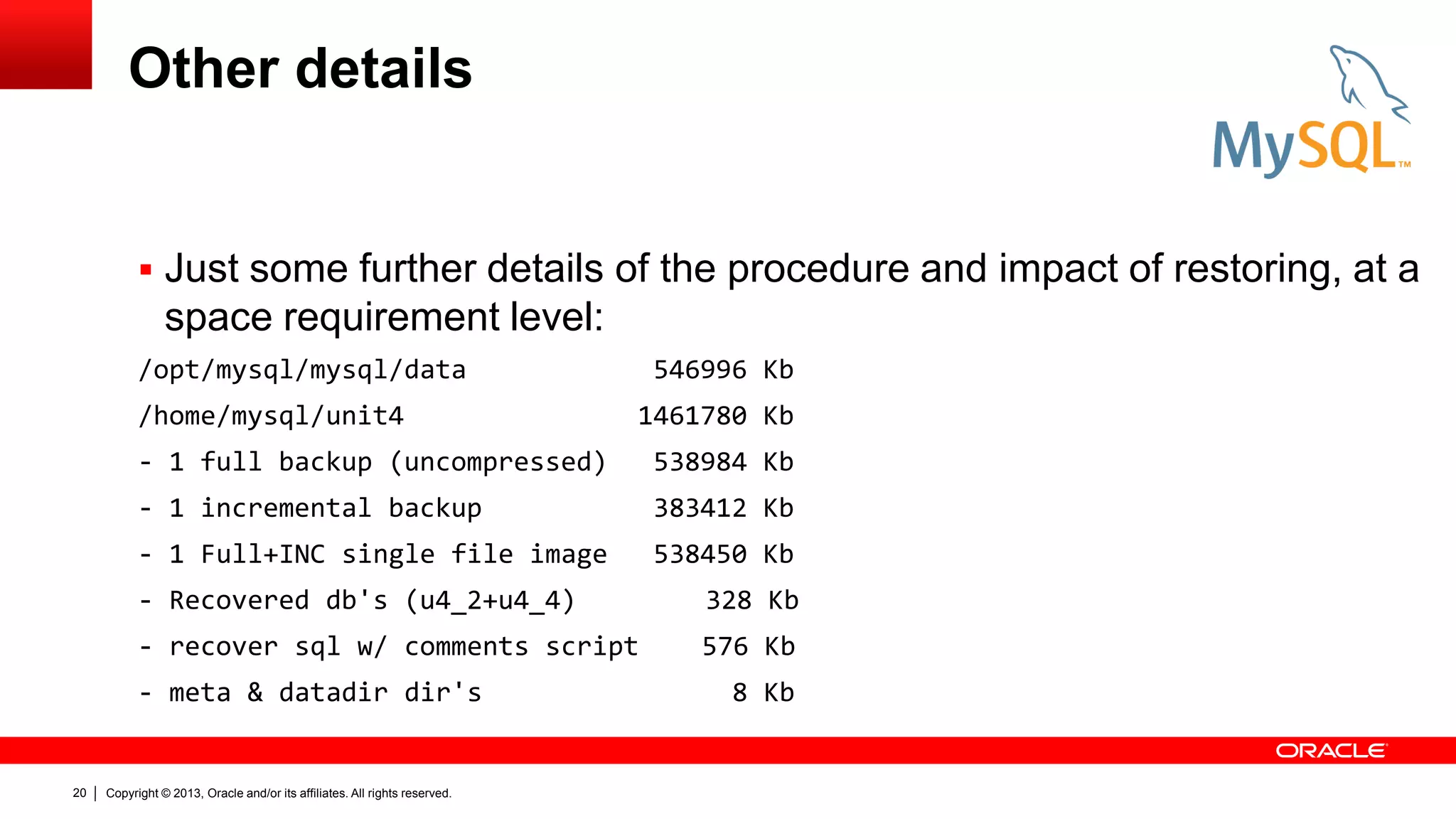
Other details
 Just some further details of the procedure and impact of restoring, at a
space requirement level:
/opt/mysql/mysql/data 546996 Kb
/home/mysql/unit4 1461780 Kb
- 1 full backup (uncompressed) 538984 Kb
- 1 incremental backup 383412 Kb
- 1 Full+INC single file image 538450 Kb
- Recovered db's (u4_2+u4_4) 328 Kb
- recover sql w/ comments script 576 Kb
- meta & datadir dir's 8 Kb
Copyright © 2013, Oracle and/or its affiliates. All rights reserved.
21
Copyright © 2013, Oracle and/or its affiliates. All rights reserved.
22
Copyright © 2013, Oracle and/or its affiliates. All rights reserved.
23

MySQL Enterprise Backup: PITR Partial Online Recovery

  • 1.
    Copyright © 2013,Oracle and/or its affiliates. All rights reserved. 1
  • 2.
    MySQL Enterprise Backup: PITRPartial Online Recovery Keith Hollman MySQL Principal Sales Consultant EMEA
  • 3.
    Copyright © 2013,Oracle and/or its affiliates. All rights reserved. 3 Agenda  Objectives for today.  Backup and what to do.  Restore procedures.
  • 4.
    Copyright © 2013,Oracle and/or its affiliates. All rights reserved. 4 Objectives  Backup Policy: – Full Backup of the environment. – Complemental Incremental backups & online BinLogs.  Restore: – Logical Restore. – Online, Zero impact. – Partial, single database, group of tables. Backup & Restore
  • 5.
    Copyright © 2013,Oracle and/or its affiliates. All rights reserved. 5 Backup  A working environment, with 4 databases, of which 2 will require restoration.  Full backup with MySQL Enterprise Backup: mysqlbackup --user=root --socket=/tmp/mysql.sock --backup-dir=/home/mysql/unit4/backup/ --with-timestamp backup
  • 6.
    Copyright © 2013,Oracle and/or its affiliates. All rights reserved. 6 Backup  Create 4 different databases, where the structure & content is the same. create database u4_1; use u4_1; create table `unit4` (`ID` int(7) NOT NULL AUTO_INCREMENT, `Name` char(20) NOT NULL DEFAULT '‘, PRIMARY KEY (`ID`) ) ENGINE=InnoDB; create database u4_2; use u4_2; create table `unit4` (...) ; create database u4_3; use u4_3; create table `unit4` (...) ; create database u4_4; use u4_4; create table `unit4` (...) ;  Insert some rows in each of the “unit4” tables, within each database: call Unit4Insert (1000); Test preparation delimiter // DROP PROCEDURE IF EXISTS Unit4Insert// CREATE PROCEDURE Unit4Insert (p1 INT) BEGIN SET @x = 0; REPEAT INSERT INTO unit4 SELECT NULL, '1thousand'; SET @x = @x + 1; UNTIL @x > p1 END REPEAT; END // delimiter ;
  • 7.
    Copyright © 2013,Oracle and/or its affiliates. All rights reserved. 7 Backup  Then execute an incremental backup to safeguard the newly created databases & objects and inserted rows. mysqlbackup --user=root --socket=/tmp/mysql.sock --incremental-backup-dir=/home/mysql/unit4/backup_inc --with-timestamp --incremental --incremental_base=history:last_backup backup Incremental
  • 8.
    Copyright © 2013,Oracle and/or its affiliates. All rights reserved. 8 Recovery
  • 9.
    Copyright © 2013,Oracle and/or its affiliates. All rights reserved. 9 Recovery  We can: 1. convert the existing backup-dir to a single file backup and then extract it, or 2. go via the collection of tablespaces, locking and discarding as we go.  Restore method also depends on whether: 1. tables have had rows deleted or modified (here we can use transportable tablespaces) 2. if the object has been deleted, then we need to recreate it, from a mysqldump extracted from a restored environment.  In another separate environment or using a specific my.cnf. 2 Options for Logical Recovery.
  • 10.
    Copyright © 2013,Oracle and/or its affiliates. All rights reserved. 10 Recovery  Bring the full backup up to date with all InnoDB data: mysqlbackup --backup-dir=/home/mysql/unit4/backup/2013-07-25_01-44-43/ apply-log  Update the Full backup with the Incremental backup: mysqlbackup --backup-dir=/home/mysql/unit4/backup/2013-07-25_01-44-43/ --incremental-backup-dir=/home/mysql/unit4/backup_inc/2013-07-25_17-20-18 apply-incremental-backup  And then get a single consolidated image file to work from: mysqlbackup --backup-image=/home/mysql/unit4/backup/full_backup.mbi --backup-dir=/home/mysql/unit4/backup/2013-07-25_01-44-43 backup-dir-to-image Preparing backups
  • 11.
    Copyright © 2013,Oracle and/or its affiliates. All rights reserved. 11 Recovery  Now let’s insert some rows, to reflect changes in the binlogs: use u4_2 call Unit4Insert (1000); select count(*) from unit4;  And generate something to have to recover from: delete from unit4 where id < 10; select count(*) from unit4; The Test +----------+ | count(*) | +----------+ | 2002 | +----------+ +----------+ | count(*) | +----------+ | 1993 | +----------+
  • 12.
    Copyright © 2013,Oracle and/or its affiliates. All rights reserved. 12 Recovery
  • 13.
    Copyright © 2013,Oracle and/or its affiliates. All rights reserved. 13 The Recovery Scenario  Objective: – Restore the whole table with the logs applied, before the error. – Online, without having to stop or impede access to the other users.  So when did the error happen then? Let’s view the General_log: vi ol63uek01.log /delete from unit4 .... 130729 13:16:29 2 Query delete from unit4 where id < 10 ..
  • 14.
    Copyright © 2013,Oracle and/or its affiliates. All rights reserved. 14 The Recovery Scenario  What’s the backup history: use mysql select backup_id, start_time, end_time, binlog_pos, binlog_file, backup_type, backup_format, backup_destination, exit_state from backup_history;  Position =1654141 binlog = mysql-bin.000008 Backup status +-------------------+---------------------+---------------------+------------+------------------+-------------+--------------- +---------------------------------------------------+------------+ | backup_id | start_time | end_time | binlog_pos | binlog_file | backup_type | backup_format | backup_destination | exit_state | +-------------------+---------------------+---------------------+------------+------------------+-------------+--------------- +---------------------------------------------------+------------+ | 13747094837220932 | 2013-07-25 01:44:43 | 2013-07-25 01:45:26 | 829045 | mysql-bin.000008 | FULL | DIRECTORY | /home/mysql/unit4/backup/2013-07-25_01-44-43 | SUCCESS | | 13747656186636058 | 2013-07-25 17:20:18 | 2013-07-25 17:20:46 | 1654141 | mysql-bin.000008 | INCREMENTAL | DIRECTORY | /home/mysql/unit4/backup_inc/2013-07-25_17-20-18 | SUCCESS |
  • 15.
    Copyright © 2013,Oracle and/or its affiliates. All rights reserved. 15 The Recovery Scenario  To list single-file image contents: mysqlbackup --backup-image=/home/mysql/unit4/backup/full_backup.mbi list-image  Now we know where the 2 databases are, u4_2 & u4_4, extract them: mysqlbackup --backup-image=/home/mysql/unit4/backup/full_backup.mbi --src-entry=datadir/u4_2 --dst-entry=/home/mysql/unit4/reco/u4_2 extract mysqlbackup --backup-image=/home/mysql/unit4/backup/full_backup.mbi --src-entry=datadir/u4_4 --dst-entry=/home/mysql/unit4/reco/u4_4 extract List contents & Extract
  • 16.
    Copyright © 2013,Oracle and/or its affiliates. All rights reserved. 16 The Recovery Scenario  We also know which binlog to start reading from, and from what position, in order to gather all changes after the Incremental backup and just before the "delete" occurred.  Also, as there is more than 1 binlog, we pass the list on a single line: mysqlbinlog --start-position=1654141 --stop-datetime="2013-07-29 13:16:28" /binlogs/mysql-bin.000008 /binlogs/mysql-bin.000009 --base64-output=decode-rows --verbose --database=u4_2 > recover_1654141_20130729131628.sql  with this file, recover_1654141_20130729131628.sql, we can see the sql commands COMMENTED OUT, i.e. any execution of this file will not restore anything. Next steps
  • 17.
    Copyright © 2013,Oracle and/or its affiliates. All rights reserved. 17 The Recovery Scenario  Now discard the original tables, and replace with the recovered ones from the Full+INC image result set:  Generate the ‘lock’ and ‘discard’ sql syntax: select 'use u4_2' db, concat_ws(' ','lock tables',table_name,'write;') 'lock', concat_ws(' ','alter table',table_name,'discard tablespace;') 'discard' from tables where table_schema = 'u4_2'; select 'use u4_4' db, concat_ws(' ','lock tables',table_name,'write;') 'lock', concat_ws(' ','alter table',table_name,'discard tablespace;') 'discard' from tables where table_schema = 'u4_4'; use u4_2; lock tables unit4 write; alter table unit4 discard tablespace; use u4_4; lock tables unit4 write; alter table unit4 discard tablespace; Transportable tablespaces.
  • 18.
    Copyright © 2013,Oracle and/or its affiliates. All rights reserved. 18 The Recovery Scenario  Copy the recovered .ibd files from the single file backup image: cd /opt/mysql/mysql/data/u4_2 cp ~/unit4/reco/u4_2/*.ibd .  Import the tablespaces: select concat_ws(' ','alter table',table_name,'import tablespace;') 'import' from tables where table_schema = 'u4_2'; alter table unit4 import tablespace;  Unlock the tables (execute only once for all tables): unlock tables; Transportable tablespaces continued.
  • 19.
    Copyright © 2013,Oracle and/or its affiliates. All rights reserved. 19 The Recovery Scenario  Time to apply the data extracted from the binlogs, after the incremental backup: mysqlbinlog --start-position=1654141 --stop-datetime="2013-07-29 13:16:28" /binlogs/mysql-bin.000008 /binlogs/mysql-bin.000009 --verbose --database=u4_2 | mysql –uroot  Confirm that we have restored the table with all its rows: mysql> select count(*) from u4_2.unit4; Transportable tablespaces continued. +----------+ | count(*) | +----------+ | 2002 | +----------+
  • 20.
    Copyright © 2013,Oracle and/or its affiliates. All rights reserved. 20 Other details  Just some further details of the procedure and impact of restoring, at a space requirement level: /opt/mysql/mysql/data 546996 Kb /home/mysql/unit4 1461780 Kb - 1 full backup (uncompressed) 538984 Kb - 1 incremental backup 383412 Kb - 1 Full+INC single file image 538450 Kb - Recovered db's (u4_2+u4_4) 328 Kb - recover sql w/ comments script 576 Kb - meta & datadir dir's 8 Kb
  • 21.
    Copyright © 2013,Oracle and/or its affiliates. All rights reserved. 21
  • 22.
    Copyright © 2013,Oracle and/or its affiliates. All rights reserved. 22
  • 23.
    Copyright © 2013,Oracle and/or its affiliates. All rights reserved. 23