Search APIs & Universal
Links
Mercari Inc.
@kitasuke
About me
Mercari
My works
→ Cardio -Simple HealthKit wrapper for workout app
in watchOS 2-
→ PagingMenuController -Paging view controller
with customizable menu-
→ GoogleMaterialIconFont -Google Material Design
Icons for Swift and ObjC-
My future talks
→ Introducing new features for watchOS 2
@MOSA software meeting
Search API
Completely New Search
Experience
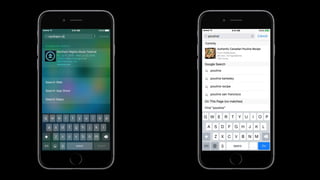
App results appear in
Spotlight and Safari even
app not installed
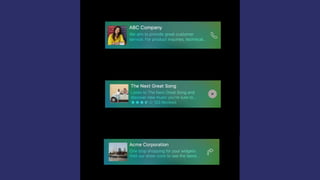
Rich contents with
powerful action
Universal and Seamless
experience
How it works
Index contents via Search
APIs
What to index?
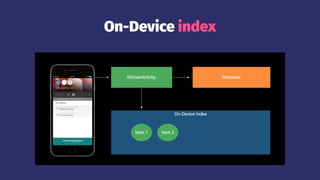
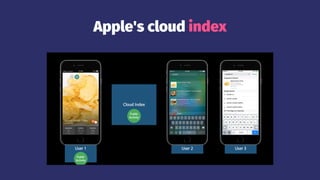
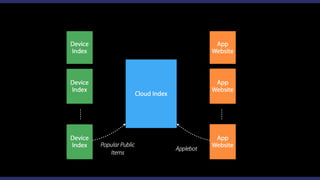
Index Architecture
On-Device index
Apple's cloud index
Let's see in-depth
features!
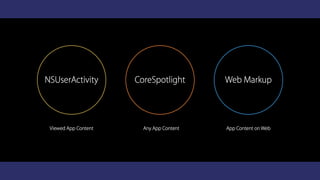
3 Search APIs
NSUserActivity
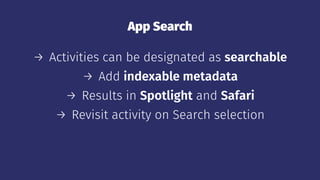
App Search
→ Activities can be designated as searchable
→ Add indexable metadata
→ Results in Spotlight and Safari
→ Revisit activity on Search selection
Enable Capabilities
var eligibleForHandoff: Bool
var eligibleForSearch: Bool
var eligibleForPublicIndexing: Bool
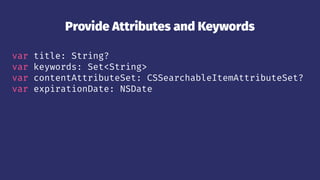
Provide Attributes and Keywords
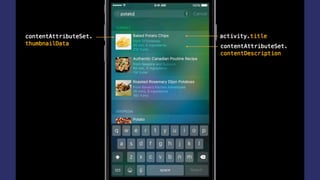
var title: String?
var keywords: Set<String>
var contentAttributeSet: CSSearchableItemAttributeSet?
var expirationDate: NSDate
Restoring on the Web
var webpageURL: NSURL?
Create Activity
var activity: NSUserActivity = NSUserActivity(activityType: "com.example")
activity.title = "Baked Potato Chips"
activity.userInfo = ["id": "http://www.example.com/recipe/111"]
activity.eligibleForSearch = true
activity.eligibleForPublicIndexing = true
activity.becomeCurrent()
Continue Activity
func application(UIApplication,
continueUserActivity userActivity: NSUserActivity,
restorationHandler: [AnyObject]? -> Void) -> Bool {
if userActivity.activityType == "com.example" {
// Restore state for userActivity and userInfo
}
return true
}
Public Indexing
→ Activities can be designated as public
→ Multiple users engage with device results
→ Popular public results available to other users
→ Results in Search and Safari (if URL included)
Public vs Private
→ Designated "public" if searchable activity fields
are solely public
→ Provisions to prevent user-specific activities from
being indexed
Additional Benets
Handoff
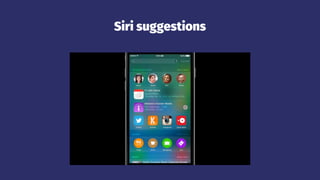
Siri suggestions
CoreSpotlight
CoreSpotlight
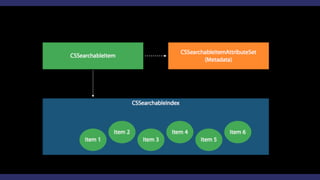
→ For any app content
→ Methods to add, update and delete items
→ Used by Messages, Mail, Calendar and Notes
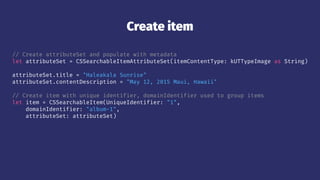
Create item
// Create attributeSet and populate with metadata
let attributeSet = CSSearchableItemAttributeSet(itemContentType: kUTTypeImage as String)
attributeSet.title = "Haleakala Sunrise"
attributeSet.contentDescription = "May 12, 2015 Maui, Hawaii"
// Create item with unique identifier, domainIdentifier used to group items
let item = CSSearchableItem(UniqueIdentifier: "1",
domainIdentifier: "album-1",
attributeSet: attributeSet)
Index item
// Index item
CSSearchableIndex.defaultSearchableIndex().indexSearchableItems([item]) { error in
if error != nil {
print("Item indexed!")
}
}
Restore
// Application delegate called when CoreSpotlight result is tapped
func application(UIApplication,
continueUserActivity userActivity: NSUserActivity,
restorationHandler: [AnyObject]? -> Void) -> Bool {
if userActivity.activityType == CSSearchableItemActionType {
let uniqueIdentifier = userActivity.userInfo?
[CSSearchableItemActivityIdentifier] as? String
// Use 'uniqueIdentifier'
}
return true
}
Update
// Same method as adding item to index
func indexSearchableItems(items: [CSSearchableItem],
completionHandler: ((NSError?) -> Void)?)
Delete
// Identifiers
func deleteSearchableItemsWithIdentifiers(identifiers: [String],
completionHandler: ((NSError?) -> Void)?)
identifiers = ["1", "4", "5"]
Delete
// DomainIdentifier
func deleteSearchableItemsWithDomainIdentifiers(DomainIdentifiers: [String],
completionHandler: ((NSError?) -> Void)?)
domainIdentifiers = ["domain-2"]
Delete
// All
func deleteAllSearchableItemsWithCompletionHandler(completionHandler: ((NSError?) -> Void)?)
Web Markup
Indexing Web Content
→ The content driving your app may live on the web,
not locally inside the app
→ Deep linked pages from your app's website are
indexed for app search
Applebot nds deep links
from the web
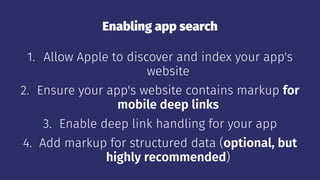
Enabling app search
1. Allow Apple to discover and index your app's
website
2. Ensure your app's website contains markup for
mobile deep links
3. Enable deep link handling for your app
4. Add markup for structured data (optional, but
highly recommended)
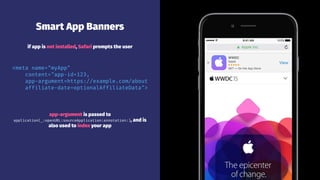
Smart App Banners
if app is not installed, Safari prompts the user
<meta name="myApp"
content="app-id=123,
app-argument=https://example.com/about
affiliate-date=optionalAffiliateData">
app-argument is passed to
application(_:openURL:sourceApplication:annotation:), and is
also used to index your app
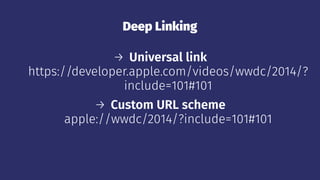
Deep Linking
→ Universal link
https://developer.apple.com/videos/wwdc/2014/?
include=101#101
→ Custom URL scheme
apple://wwdc/2014/?include=101#101
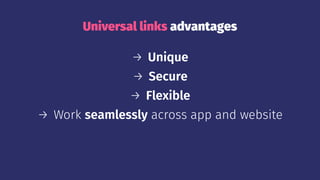
Universal links advantages
→ Unique
→ Secure
→ Flexible
→ Work seamlessly across app and website
Support Universal Link in your server
→ Create your apple-app-site-association file
→ Generate an SSL certification
→ Sign your file
→ Upload to your server
Support Universal Link in your app
func application(application: UIApplication,
continueUserActivity userActivity: NSUserActivity,
restorationHandler: ([AnyObject]!) -> Void) -> Bool
var webpageURL: NSURL?
var activityType: String
let NSUserActivityTypeBrowsingWeb: String
class NSURLComponents: NSObject
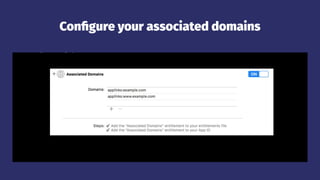
Congure your associated domains
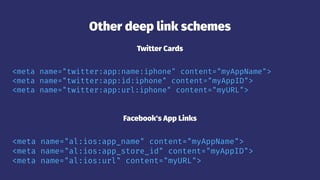
Other deep link schemes
Twitter Cards
<meta name="twitter:app:name:iphone" content="myAppName">
<meta name="twitter:app:id:iphone" content="myAppID">
<meta name="twitter:app:url:iphone" content="myURL">
Facebook's App Links
<meta name="al:ios:app_name" content="myAppName">
<meta name="al:ios:app_store_id" content="myAppID">
<meta name="al:ios:url" content="myURL">
Support deep linking
func application(application: UIApplication, openURL url: NSURL,
sourceApplication: String?, annotation: AnyObject) -> Bool {
// In this example, the URL is http://example.com/profile/?123
guard let component = NSURLComponents(URL: url, resolvingAgainstBaseURL: true),
let path = component.path, let query = component.query else { return false }
if path == "/profile" {
// Pass the profile ID from the URL, to the view controller
return profileViewController.loadProfile(query)
}
return false
}
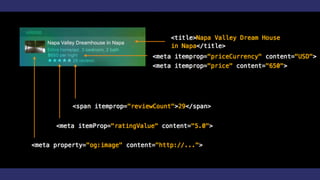
Rich Results
→ Go beyond just a title and description
→ Results can contain images, structured data, and
even actions
→ Rich results are more engaging to users and can
improve your ranking
Other deep link schemes
Open Graph
<meta property="og:image" content="http://example.com/hello.jpg">
<meta property="og:audio" content="http://example.com/music.m4a">
<meta property="og:video" content="http://example.com/cats.mp4">
schema.org JSON-LD
<script type="application/ld+json">
{
"@context": "http://schema.org",
"@type": "AggregateRating",
"ratingValue": "4",
"reviewCount": "250"
}
</script>
Supported schemas
→ AggregateRating
→ Offers
→ PriceRange
→ InteractionCount
→ Organization
→ Recipe
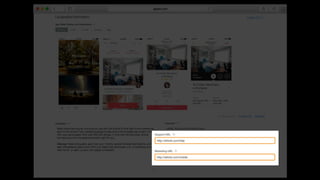
App Search API Validation Tool
Test your webpage for iOS 9 Search APIs. Enter a URL
and Applebot will crawl your webpage and show
how you can optimize for best results.
https://search.developer.apple.com/appsearch-
validation-tool/
Improve Ranking
Relevance
Linking 3 APIs
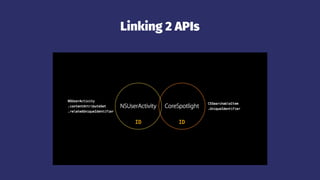
Linking 2 APIs
Relevance score
User Experience
Descriptive Results
Richer results have better satisfaction and engagement
→ Thumbnail, well-structured description, ratings,
and actions
→ Relevant and applealing image
→ Key information user is looking for
Keywords associate your result with queries
→ Typical items should have 3 to 5 keywords
→ Category keywords, e.g., "ticket" or "recipe"
→ Synonyms or abbreviations for item subject
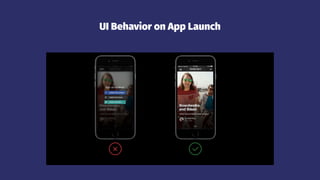
UI Behavior on App Launch
Speed
Time from tapping a search result to the content in
your app is measured and used in ranking.
Data protection
Pay attention to the appropriate data protection
level for your user's content.
Common FAQs
Not showing in the search results
→ Try using different keywords
→ In the case of Web Markup, results will only show
up after the page has been crawled by Applebot,
and once a certain level of relevance has been
attained
Supported devices?
App Search is available with iOS9, However, the
search functionality of NSUserActivity and
CoreSpotlight are not supported on the iPhone 4s,
iPad 2, iPad (3rd generation), iPad mini, and iPod
touch (5th generation).
Available on OS X?
CoreSpotlight and the search functionality of
NSUserActivity are not supported. However, web
search results may be shown.
References
Introducing Search APIs
Seamless Linking to Your App
iOS Search API Best Practices and FAQs

Search APIs & Universal Links

  • 1.
    Search APIs &Universal Links Mercari Inc. @kitasuke
  • 2.
  • 3.
  • 4.
    My works → Cardio-Simple HealthKit wrapper for workout app in watchOS 2- → PagingMenuController -Paging view controller with customizable menu- → GoogleMaterialIconFont -Google Material Design Icons for Swift and ObjC-
  • 5.
    My future talks →Introducing new features for watchOS 2 @MOSA software meeting
  • 6.
  • 7.
  • 8.
    App results appearin Spotlight and Safari even app not installed
  • 10.
  • 12.
  • 14.
  • 15.
    Index contents viaSearch APIs
  • 16.
  • 17.
  • 18.
  • 19.
  • 20.
  • 21.
  • 23.
  • 24.
    App Search → Activitiescan be designated as searchable → Add indexable metadata → Results in Spotlight and Safari → Revisit activity on Search selection
  • 25.
    Enable Capabilities var eligibleForHandoff:Bool var eligibleForSearch: Bool var eligibleForPublicIndexing: Bool
  • 26.
    Provide Attributes andKeywords var title: String? var keywords: Set<String> var contentAttributeSet: CSSearchableItemAttributeSet? var expirationDate: NSDate
  • 27.
    Restoring on theWeb var webpageURL: NSURL?
  • 28.
    Create Activity var activity:NSUserActivity = NSUserActivity(activityType: "com.example") activity.title = "Baked Potato Chips" activity.userInfo = ["id": "http://www.example.com/recipe/111"] activity.eligibleForSearch = true activity.eligibleForPublicIndexing = true activity.becomeCurrent()
  • 30.
    Continue Activity func application(UIApplication, continueUserActivityuserActivity: NSUserActivity, restorationHandler: [AnyObject]? -> Void) -> Bool { if userActivity.activityType == "com.example" { // Restore state for userActivity and userInfo } return true }
  • 31.
    Public Indexing → Activitiescan be designated as public → Multiple users engage with device results → Popular public results available to other users → Results in Search and Safari (if URL included)
  • 32.
    Public vs Private →Designated "public" if searchable activity fields are solely public → Provisions to prevent user-specific activities from being indexed
  • 33.
  • 34.
  • 35.
  • 36.
  • 37.
    CoreSpotlight → For anyapp content → Methods to add, update and delete items → Used by Messages, Mail, Calendar and Notes
  • 39.
    Create item // CreateattributeSet and populate with metadata let attributeSet = CSSearchableItemAttributeSet(itemContentType: kUTTypeImage as String) attributeSet.title = "Haleakala Sunrise" attributeSet.contentDescription = "May 12, 2015 Maui, Hawaii" // Create item with unique identifier, domainIdentifier used to group items let item = CSSearchableItem(UniqueIdentifier: "1", domainIdentifier: "album-1", attributeSet: attributeSet)
  • 40.
    Index item // Indexitem CSSearchableIndex.defaultSearchableIndex().indexSearchableItems([item]) { error in if error != nil { print("Item indexed!") } }
  • 41.
    Restore // Application delegatecalled when CoreSpotlight result is tapped func application(UIApplication, continueUserActivity userActivity: NSUserActivity, restorationHandler: [AnyObject]? -> Void) -> Bool { if userActivity.activityType == CSSearchableItemActionType { let uniqueIdentifier = userActivity.userInfo? [CSSearchableItemActivityIdentifier] as? String // Use 'uniqueIdentifier' } return true }
  • 42.
    Update // Same methodas adding item to index func indexSearchableItems(items: [CSSearchableItem], completionHandler: ((NSError?) -> Void)?)
  • 43.
    Delete // Identifiers func deleteSearchableItemsWithIdentifiers(identifiers:[String], completionHandler: ((NSError?) -> Void)?) identifiers = ["1", "4", "5"]
  • 44.
    Delete // DomainIdentifier func deleteSearchableItemsWithDomainIdentifiers(DomainIdentifiers:[String], completionHandler: ((NSError?) -> Void)?) domainIdentifiers = ["domain-2"]
  • 45.
  • 46.
  • 47.
    Indexing Web Content →The content driving your app may live on the web, not locally inside the app → Deep linked pages from your app's website are indexed for app search
  • 48.
    Applebot nds deeplinks from the web
  • 50.
    Enabling app search 1.Allow Apple to discover and index your app's website 2. Ensure your app's website contains markup for mobile deep links 3. Enable deep link handling for your app 4. Add markup for structured data (optional, but highly recommended)
  • 52.
    Smart App Banners ifapp is not installed, Safari prompts the user <meta name="myApp" content="app-id=123, app-argument=https://example.com/about affiliate-date=optionalAffiliateData"> app-argument is passed to application(_:openURL:sourceApplication:annotation:), and is also used to index your app
  • 53.
    Deep Linking → Universallink https://developer.apple.com/videos/wwdc/2014/? include=101#101 → Custom URL scheme apple://wwdc/2014/?include=101#101
  • 54.
    Universal links advantages →Unique → Secure → Flexible → Work seamlessly across app and website
  • 55.
    Support Universal Linkin your server → Create your apple-app-site-association file → Generate an SSL certification → Sign your file → Upload to your server
  • 56.
    Support Universal Linkin your app func application(application: UIApplication, continueUserActivity userActivity: NSUserActivity, restorationHandler: ([AnyObject]!) -> Void) -> Bool var webpageURL: NSURL? var activityType: String let NSUserActivityTypeBrowsingWeb: String class NSURLComponents: NSObject
  • 57.
  • 58.
    Other deep linkschemes Twitter Cards <meta name="twitter:app:name:iphone" content="myAppName"> <meta name="twitter:app:id:iphone" content="myAppID"> <meta name="twitter:app:url:iphone" content="myURL"> Facebook's App Links <meta name="al:ios:app_name" content="myAppName"> <meta name="al:ios:app_store_id" content="myAppID"> <meta name="al:ios:url" content="myURL">
  • 59.
    Support deep linking funcapplication(application: UIApplication, openURL url: NSURL, sourceApplication: String?, annotation: AnyObject) -> Bool { // In this example, the URL is http://example.com/profile/?123 guard let component = NSURLComponents(URL: url, resolvingAgainstBaseURL: true), let path = component.path, let query = component.query else { return false } if path == "/profile" { // Pass the profile ID from the URL, to the view controller return profileViewController.loadProfile(query) } return false }
  • 60.
    Rich Results → Gobeyond just a title and description → Results can contain images, structured data, and even actions → Rich results are more engaging to users and can improve your ranking
  • 61.
    Other deep linkschemes Open Graph <meta property="og:image" content="http://example.com/hello.jpg"> <meta property="og:audio" content="http://example.com/music.m4a"> <meta property="og:video" content="http://example.com/cats.mp4"> schema.org JSON-LD <script type="application/ld+json"> { "@context": "http://schema.org", "@type": "AggregateRating", "ratingValue": "4", "reviewCount": "250" } </script>
  • 63.
    Supported schemas → AggregateRating →Offers → PriceRange → InteractionCount → Organization → Recipe
  • 64.
    App Search APIValidation Tool Test your webpage for iOS 9 Search APIs. Enter a URL and Applebot will crawl your webpage and show how you can optimize for best results. https://search.developer.apple.com/appsearch- validation-tool/
  • 65.
  • 66.
  • 67.
  • 68.
  • 69.
  • 70.
  • 71.
  • 72.
    Richer results havebetter satisfaction and engagement → Thumbnail, well-structured description, ratings, and actions → Relevant and applealing image → Key information user is looking for
  • 73.
    Keywords associate yourresult with queries → Typical items should have 3 to 5 keywords → Category keywords, e.g., "ticket" or "recipe" → Synonyms or abbreviations for item subject
  • 74.
    UI Behavior onApp Launch
  • 75.
    Speed Time from tappinga search result to the content in your app is measured and used in ranking.
  • 76.
    Data protection Pay attentionto the appropriate data protection level for your user's content.
  • 77.
  • 78.
    Not showing inthe search results → Try using different keywords → In the case of Web Markup, results will only show up after the page has been crawled by Applebot, and once a certain level of relevance has been attained
  • 79.
    Supported devices? App Searchis available with iOS9, However, the search functionality of NSUserActivity and CoreSpotlight are not supported on the iPhone 4s, iPad 2, iPad (3rd generation), iPad mini, and iPod touch (5th generation).
  • 80.
    Available on OSX? CoreSpotlight and the search functionality of NSUserActivity are not supported. However, web search results may be shown.
  • 81.
    References Introducing Search APIs SeamlessLinking to Your App iOS Search API Best Practices and FAQs