Make Your App
Searchable with Core
Spotlight
Marian O’Shea
• Core Spotlight Search
Full index of app content
• NSuserActivity
Index of content that the user has interacted with
Both use NSUserActivity
Introduced in iOS 9 for third party developers
Core Spotlight
Core Spotlight
• Makes your App’s private content searchable
• Core Spotlight indexes your content
• Best for relatively static data
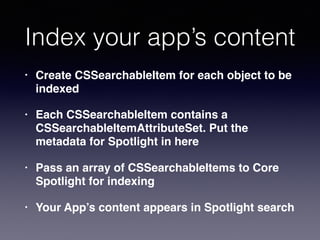
Index your app’s content
• Create CSSearchableItem for each object to be
indexed
• Each CSSearchableItem contains a
CSSearchableItemAttributeSet. Put the
metadata for Spotlight in here
• Pass an array of CSSearchableItems to Core
Spotlight for indexing
• Your App’s content appears in Spotlight search
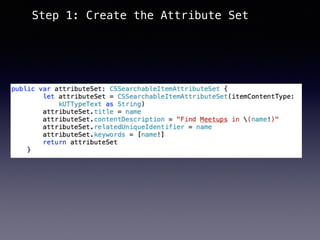
Step 1: Create the Attribute Set
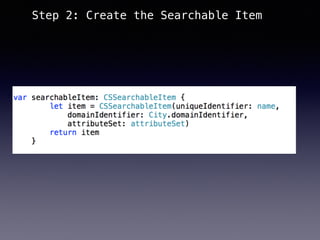
Step 2: Create the Searchable Item
Step 3: Create the Index
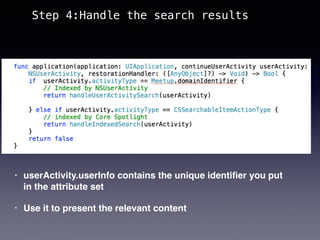
• userActivity.userInfo contains the unique identifier you put
in the attribute set
• Use it to present the relevant content
Step 4:Handle the search results
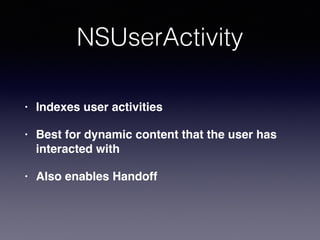
NSUserActivity
• Indexes user activities
• Best for dynamic content that the user has
interacted with
• Also enables Handoff
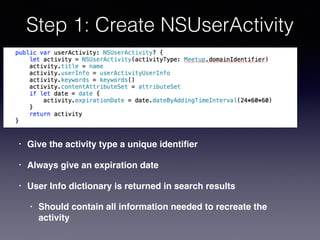
Step 1: Create NSUserActivity
• Give the activity type a unique identifier
• Always give an expiration date
• User Info dictionary is returned in search results
• Should contain all information needed to recreate the
activity
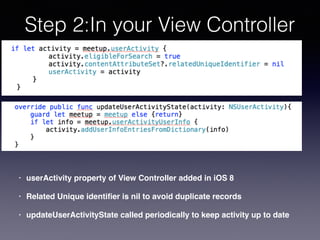
Step 2:In your View Controller
• userActivity property of View Controller added in iOS 8
• Related Unique identifier is nil to avoid duplicate records
• updateUserActivityState called periodically to keep activity up to date
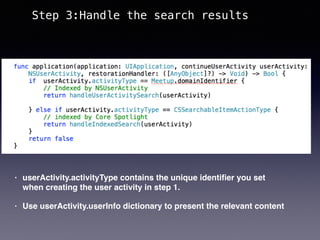
• userActivity.activityType contains the unique identifier you set
when creating the user activity in step 1.
• Use userActivity.userInfo dictionary to present the relevant content
Step 3:Handle the search results
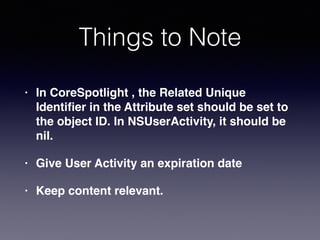
Things to Note
• In CoreSpotlight , the Related Unique
Identier in the Attribute set should be set to
the object ID. In NSUserActivity, it should be
nil.
• Give User Activity an expiration date
• Keep content relevant.
Thank You!
https://github.com/primulaveris/CoreSpotlightDemo

Core Spotlight search

  • 1.
    Make Your App Searchablewith Core Spotlight Marian O’Shea
  • 2.
    • Core SpotlightSearch Full index of app content • NSuserActivity Index of content that the user has interacted with Both use NSUserActivity Introduced in iOS 9 for third party developers Core Spotlight
  • 4.
    Core Spotlight • Makesyour App’s private content searchable • Core Spotlight indexes your content • Best for relatively static data
  • 5.
    Index your app’scontent • Create CSSearchableItem for each object to be indexed • Each CSSearchableItem contains a CSSearchableItemAttributeSet. Put the metadata for Spotlight in here • Pass an array of CSSearchableItems to Core Spotlight for indexing • Your App’s content appears in Spotlight search
  • 6.
    Step 1: Createthe Attribute Set
  • 7.
    Step 2: Createthe Searchable Item
  • 8.
    Step 3: Createthe Index
  • 9.
    • userActivity.userInfo containsthe unique identifier you put in the attribute set • Use it to present the relevant content Step 4:Handle the search results
  • 10.
    NSUserActivity • Indexes useractivities • Best for dynamic content that the user has interacted with • Also enables Handoff
  • 11.
    Step 1: CreateNSUserActivity • Give the activity type a unique identifier • Always give an expiration date • User Info dictionary is returned in search results • Should contain all information needed to recreate the activity
  • 12.
    Step 2:In yourView Controller • userActivity property of View Controller added in iOS 8 • Related Unique identifier is nil to avoid duplicate records • updateUserActivityState called periodically to keep activity up to date
  • 13.
    • userActivity.activityType containsthe unique identifier you set when creating the user activity in step 1. • Use userActivity.userInfo dictionary to present the relevant content Step 3:Handle the search results
  • 14.
    Things to Note •In CoreSpotlight , the Related Unique Identifier in the Attribute set should be set to the object ID. In NSUserActivity, it should be nil. • Give User Activity an expiration date • Keep content relevant.
  • 15.