






Responsive Design
With Visualforce Pages
May 22, 2014
Keir Bowden
CTO, BrightGen
@bob_buzzard
What
Why
How
Bootstrap
Demo
Agenda
What
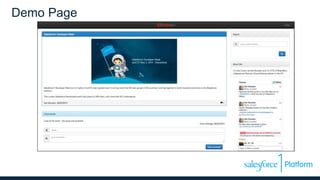
Demo Page
What is Responsive Design?
 Pages respond to device
– Viewport size
– Orientation
 Term coined by Ethan Marcotte
– http://bobbuzz.me.uk/1hI879K
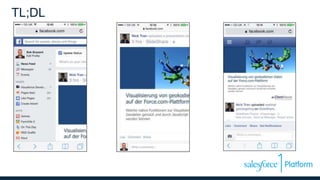
TL;DL
What
Why
How
Bootstrap
Demo
Agenda
Why
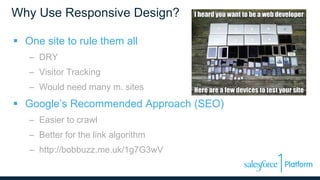
Why Use Responsive Design?
 One site to rule them all
– DRY
– Visitor Tracking
– Would need many m. sites
 Google’s Recommended Approach (SEO)
– Easier to crawl
– Better for the link algorithm
– http://bobbuzz.me.uk/1g7G3wV
What
Why
How
Bootstrap
Demo
Agenda
How
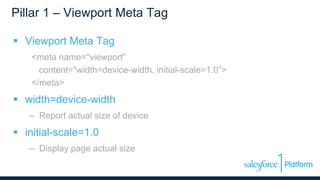
Pillar 1 – Viewport Meta Tag
 Viewport Meta Tag
<meta name="viewport”
content="width=device-width, initial-scale=1.0”>
</meta>
 width=device-width
– Report actual size of device
 initial-scale=1.0
– Display page actual size
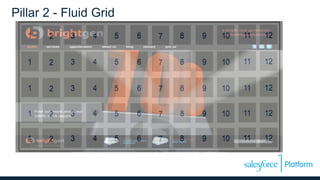
Pillar 2 - Fluid Grid
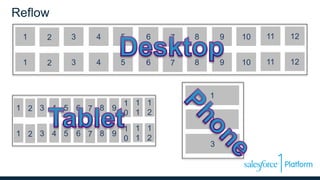
Reflow
1 2 3 4 5 6 7 8 9 10 11 12
1 2 3 4 5 6 7 8 9 10 11 12
3
1
2
1 2 3 4 5 6 7 8 9
1
0
1
1
1
2
1 2 3 4 5 6 7 8 9
1
0
1
1
1
2
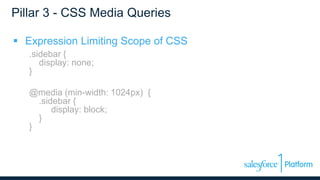
Pillar 3 - CSS Media Queries
 Expression Limiting Scope of CSS
.sidebar {
display: none;
}
@media (min-width: 1024px) {
.sidebar {
display: block;
}
}
What
Why
How
Bootstrap
Demo
Agenda
Bootstrap
Bootstrap
 Responsive Front End Framework
 HTML, CSS and JavaScript
 Mobile First
 Number 1 project on GitHub (forks/stars)
http://getbootstrap.com
Fluid Grid
 12 column default
 4 Breakpoints
– Large > 1200px
– Medium > 992px
– Small > 768px
– Extra Small < 768x
 Column Span Style Classes
– col-md-6
– col-xs-12
Visualforce + Bootstrap
 Visualforce is container
– Thin wrapper around HTML markup
– Provides access to data
 Minimal Page Generation
– No <head>, <body> tags
– Exclude standard style sheeets
Visualforce + Bootstrap
 Avoid Most Standard Components
– No <apex:pageblock /> – not responsive
– <apex:includeScript>, <apex:stylesheet/>
– <apex:outputText>
– <apex:repeat />
 Forms versus Remoting
– Remoting = fast
– Forms + rerender = DOM manipulation
What
Why
How
Bootstrap
Demo
Agenda
Demo
Demo
 Blog landing page
– Recent posts
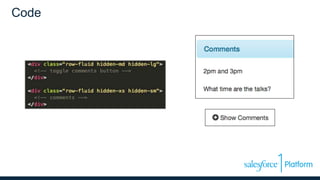
– Comments
– Search
– Social media
 http://bobbuzz.me.uk/SF1RD
 Github : http://bobbuzz.me.uk/SF1GH
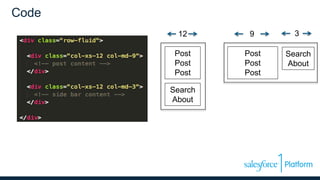
Code
Post
Post
Post
Search
About
12
Post
Post
Post
Search
About
9 3
Code
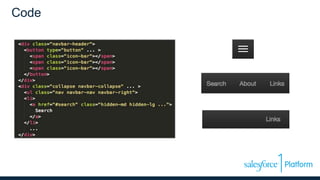
Code
Challenges - Tables
 Tables are wide
 Columns wrap when narrow
 Rows need to remain consistent
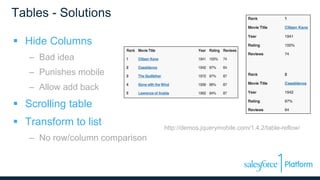
Tables - Solutions
 Hide Columns
– Bad idea
– Punishes mobile
– Allow add back
 Scrolling table
 Transform to list
– No row/column comparison
http://demos.jquerymobile.com/1.4.2/table-reflow/
Challenges - Images
 Desktop images can be large
 Use bandwidth, memory
 86% of sites deliver the same content regardless of
device
– http://bobbuzz.me.uk/1kMbZs9
Images - Solutions
 Download and hide
– All images, every device
– Only show subset
 Download and shrink
– One image, resized
– Wasteful
Images - Solutions
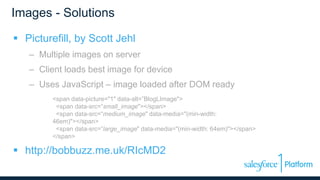
 Picturefill, by Scott Jehl
– Multiple images on server
– Client loads best image for device
– Uses JavaScript – image loaded after DOM ready
<span data-picture="1" data-alt=”BlogLImage">
<span data-src=“small_image"></span>
<span data-src=“medium_image" data-media="(min-width:
46em)"></span>
<span data-src=”large_image" data-media="(min-width: 64em)"></span>
</span>
 http://bobbuzz.me.uk/RIcMD2
Thank You

Responsive Web Design with Visualforce

  • 1.
  • 2.
  • 3.
  • 4.
  • 5.
    What is ResponsiveDesign?  Pages respond to device – Viewport size – Orientation  Term coined by Ethan Marcotte – http://bobbuzz.me.uk/1hI879K
  • 6.
  • 7.
  • 8.
    Why Use ResponsiveDesign?  One site to rule them all – DRY – Visitor Tracking – Would need many m. sites  Google’s Recommended Approach (SEO) – Easier to crawl – Better for the link algorithm – http://bobbuzz.me.uk/1g7G3wV
  • 9.
  • 10.
    Pillar 1 –Viewport Meta Tag  Viewport Meta Tag <meta name="viewport” content="width=device-width, initial-scale=1.0”> </meta>  width=device-width – Report actual size of device  initial-scale=1.0 – Display page actual size
  • 11.
    Pillar 2 -Fluid Grid
  • 12.
    Reflow 1 2 34 5 6 7 8 9 10 11 12 1 2 3 4 5 6 7 8 9 10 11 12 3 1 2 1 2 3 4 5 6 7 8 9 1 0 1 1 1 2 1 2 3 4 5 6 7 8 9 1 0 1 1 1 2
  • 13.
    Pillar 3 -CSS Media Queries  Expression Limiting Scope of CSS .sidebar { display: none; } @media (min-width: 1024px) { .sidebar { display: block; } }
  • 14.
  • 15.
    Bootstrap  Responsive FrontEnd Framework  HTML, CSS and JavaScript  Mobile First  Number 1 project on GitHub (forks/stars) http://getbootstrap.com
  • 16.
    Fluid Grid  12column default  4 Breakpoints – Large > 1200px – Medium > 992px – Small > 768px – Extra Small < 768x  Column Span Style Classes – col-md-6 – col-xs-12
  • 17.
    Visualforce + Bootstrap Visualforce is container – Thin wrapper around HTML markup – Provides access to data  Minimal Page Generation – No <head>, <body> tags – Exclude standard style sheeets
  • 18.
    Visualforce + Bootstrap Avoid Most Standard Components – No <apex:pageblock /> – not responsive – <apex:includeScript>, <apex:stylesheet/> – <apex:outputText> – <apex:repeat />  Forms versus Remoting – Remoting = fast – Forms + rerender = DOM manipulation
  • 19.
  • 20.
    Demo  Blog landingpage – Recent posts – Comments – Search – Social media  http://bobbuzz.me.uk/SF1RD  Github : http://bobbuzz.me.uk/SF1GH
  • 21.
  • 22.
  • 23.
  • 24.
    Challenges - Tables Tables are wide  Columns wrap when narrow  Rows need to remain consistent
  • 25.
    Tables - Solutions Hide Columns – Bad idea – Punishes mobile – Allow add back  Scrolling table  Transform to list – No row/column comparison http://demos.jquerymobile.com/1.4.2/table-reflow/
  • 26.
    Challenges - Images Desktop images can be large  Use bandwidth, memory  86% of sites deliver the same content regardless of device – http://bobbuzz.me.uk/1kMbZs9
  • 27.
    Images - Solutions Download and hide – All images, every device – Only show subset  Download and shrink – One image, resized – Wasteful
  • 28.
    Images - Solutions Picturefill, by Scott Jehl – Multiple images on server – Client loads best image for device – Uses JavaScript – image loaded after DOM ready <span data-picture="1" data-alt=”BlogLImage"> <span data-src=“small_image"></span> <span data-src=“medium_image" data-media="(min-width: 46em)"></span> <span data-src=”large_image" data-media="(min-width: 64em)"></span> </span>  http://bobbuzz.me.uk/RIcMD2
  • 29.