Google AMP
(Accelerated Mobile Pages)
By Chitpong Wuttanan (iFew)
Updated as of 6 Mar 2019
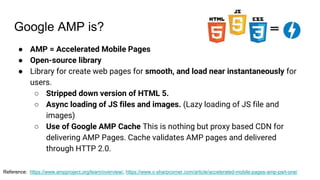
Google AMP is?
● AMP = Accelerated Mobile Pages
● Open-source library
● Library for create web pages for smooth, and load near instantaneously for
users.
○ Stripped down version of HTML 5.
○ Async loading of JS files and images. (Lazy loading of JS file and
images)
○ Use of Google AMP Cache This is nothing but proxy based CDN for
delivering AMP Pages. Cache validates AMP pages and delivered
through HTTP 2.0.
Reference: https://www.ampproject.org/learn/overview/, https://www.c-sharpcorner.com/article/accelerated-mobile-pages-amp-part-one/
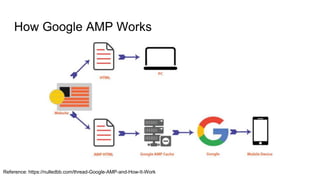
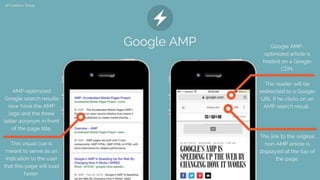
How Google AMP Works
Reference: https://nulledbb.com/thread-Google-AMP-and-How-It-Work
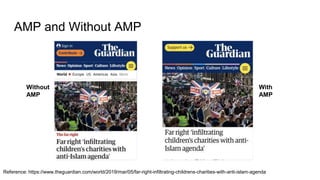
AMP and Without AMP
Reference: https://www.theguardian.com/world/2019/mar/05/far-right-infiltrating-childrens-charities-with-anti-islam-agenda
Without
AMP
With
AMP
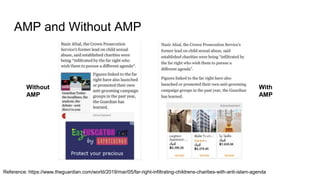
AMP and Without AMP
Reference: https://www.theguardian.com/world/2019/mar/05/far-right-infiltrating-childrens-charities-with-anti-islam-agenda
Without
AMP
With
AMP
How Google AMP Works
Reference: https://nulledbb.com/thread-Google-AMP-and-How-It-Work
Benefits
● Increase Website Page Speed
● SEO
● Increase Ad views
Reference: https://www.slideshare.net/kadamtechseo/google-amp-132722079
Concern Point
● More work and less analytics
● Less control over content and design
● Limiting the design styles
○ Only Inline styles are allowed that too with maximum of 50 kb size.
○ Only async JavaScripts are allowed. If at all third-party JavaScript needed, those should be
loaded through iframe.
○ Sizes of resources like images, ads should be specified statically in AMP HTML.
○ Minimize style and layout recalculations.
○ HTML Forms are not allowed.
○ AMP needs to be validated.
Reference: https://www.slideshare.net/kadamtechseo/google-amp-132722079, https://www.c-sharpcorner.com/article/accelerated-mobile-pages-
amp-part-one/
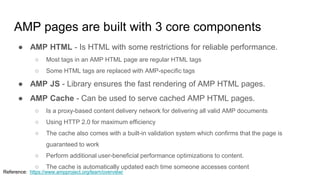
AMP pages are built with 3 core components
● AMP HTML - Is HTML with some restrictions for reliable performance.
○ Most tags in an AMP HTML page are regular HTML tags
○ Some HTML tags are replaced with AMP-specific tags
● AMP JS - Library ensures the fast rendering of AMP HTML pages.
● AMP Cache - Can be used to serve cached AMP HTML pages.
○ Is a proxy-based content delivery network for delivering all valid AMP documents
○ Using HTTP 2.0 for maximum efficiency
○ The cache also comes with a built-in validation system which confirms that the page is
guaranteed to work
○ Perform additional user-beneficial performance optimizations to content.
○ The cache is automatically updated each time someone accesses content
Reference: https://www.ampproject.org/learn/overview/
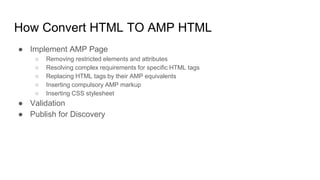
How Convert HTML TO AMP HTML
● Implement AMP Page
○ Removing restricted elements and attributes
○ Resolving complex requirements for specific HTML tags
○ Replacing HTML tags by their AMP equivalents
○ Inserting compulsory AMP markup
○ Inserting CSS stylesheet
● Validation
● Publish for Discovery
Implement
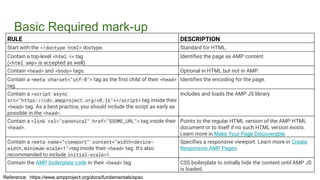
Basic Required mark-up
RULE DESCRIPTION
Start with the <!doctype html> doctype. Standard for HTML.
Contain a top-level <html ⚡> tag
(<html amp> is accepted as well).
Identifies the page as AMP content.
Contain <head> and <body> tags. Optional in HTML but not in AMP.
Contain a <meta charset="utf-8"> tag as the first child of their <head>
tag.
Identifies the encoding for the page.
Contain a <script async
src="https://cdn.ampproject.org/v0.js"></script> tag inside their
<head> tag. As a best practice, you should include the script as early as
possible in the <head>.
Includes and loads the AMP JS library.
Contain a <link rel="canonical" href="$SOME_URL"> tag inside their
<head>.
Points to the regular HTML version of the AMP HTML
document or to itself if no such HTML version exists.
Learn more in Make Your Page Discoverable.
Contain a <meta name="viewport" content="width=device-
width,minimum-scale=1">tag inside their <head> tag. It's also
recommended to include initial-scale=1.
Specifies a responsive viewport. Learn more in Create
Responsive AMP Pages.
Contain the AMP boilerplate code in their <head> tag. CSS boilerplate to initially hide the content until AMP JS
is loaded.
Reference: https://www.ampproject.org/docs/fundamentals/spec
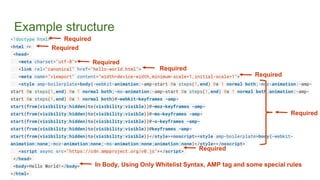
Example structure
<!doctype html>
<html ⚡>
<head>
<meta charset="utf-8">
<link rel="canonical" href="hello-world.html">
<meta name="viewport" content="width=device-width,minimum-scale=1,initial-scale=1">
<style amp-boilerplate>body{-webkit-animation:-amp-start 8s steps(1,end) 0s 1 normal both;-moz-animation:-amp-
start 8s steps(1,end) 0s 1 normal both;-ms-animation:-amp-start 8s steps(1,end) 0s 1 normal both;animation:-amp-
start 8s steps(1,end) 0s 1 normal both}@-webkit-keyframes -amp-
start{from{visibility:hidden}to{visibility:visible}}@-moz-keyframes -amp-
start{from{visibility:hidden}to{visibility:visible}}@-ms-keyframes -amp-
start{from{visibility:hidden}to{visibility:visible}}@-o-keyframes -amp-
start{from{visibility:hidden}to{visibility:visible}}@keyframes -amp-
start{from{visibility:hidden}to{visibility:visible}}</style><noscript><style amp-boilerplate>body{-webkit-
animation:none;-moz-animation:none;-ms-animation:none;animation:none}</style></noscript>
<script async src="https://cdn.ampproject.org/v0.js"></script>
</head>
<body>Hello World!</body>
</html>
Required
Required
Required
Required
Required
Required
Required
In Body, Using Only Whitelist Syntax, AMP tag and some special rules
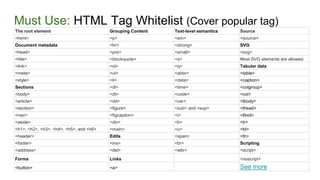
Must Use: HTML Tag Whitelist (Cover popular tag)
The root element Grouping Content Text-level semantics Source
<html> <p> <em> <source>
Document metadata <hr> <strong> SVG
<head> <pre> <small> <svg>
<title> <blockquote> <s> Most SVG elements are allowed.
<link> <ol> <q> Tabular data
<meta> <ul> <abbr> <table>
<style> <li> <data> <caption>
Sections <dl> <time> <colgroup>
<body> <dt> <code> <col>
<article> <dd> <var> <tbody>
<section> <figure> <sub> and <sup> <thead>
<nav> <figcaption> <i> <tfoot>
<aside> <div> <b> <tr>
<h1>, <h2>, <h3>, <h4>, <h5>, and <h6> <main> <u> <td>
<header> Edits <span> <th>
<footer> <ins> <br> Scripting
<address> <del> <wbr> <script>
Forms Links <noscript>
<button> <a> See more
Must Use: Replace some HTML Tag
Reference: https://www.ampproject.org/docs/fundamentals/spec
noscript Allowed. Can be used anywhere in the document. If specified, the content inside the <noscript> element displays if JavaScript is
disabled by the user.
img Replaced with amp-img. , <amp-img> does have an end tag </amp-img>.
video Replaced with amp-video.
audio Replaced with amp-audio.
iframe Replaced with amp-iframe.
form Allowed. Require including amp-form extension.
input elements Mostly allowed with exception of some input types, namely, <input[type=image]>, <input[type=button]>, <input[type=password]>,
<input[type=file]> are invalid. Related tags are also allowed: <fieldset>, <label>
style Required style tag for amp-boilerplate. One additional style tag is allowed in head tag for the purpose of custom styling. This style tag
must have the attribute amp-custom.
link rel values registered on microformats.org are allowed. If a rel value is missing from our white list, please submit an issue. stylesheet
and other values like preconnect, prerender and prefetch that have side effects in the browser are disallowed. There is a special case
for fetching stylesheets from white listed font providers.
meta The http-equiv attribute may be used for specific allowable values; see the AMP validator specification for details.
a The href attribute value must not begin with javascript:. If set, the target attribute value must be _blank. Otherwise allowed.
svg Most SVG elements are allowed.
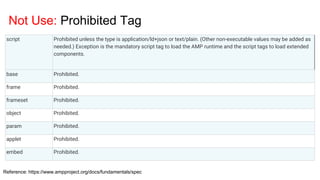
Not Use: Prohibited Tag
Reference: https://www.ampproject.org/docs/fundamentals/spec
script Prohibited unless the type is application/ld+json or text/plain. (Other non-executable values may be added as
needed.) Exception is the mandatory script tag to load the AMP runtime and the script tags to load extended
components.
base Prohibited.
frame Prohibited.
frameset Prohibited.
object Prohibited.
param Prohibited.
applet Prohibited.
embed Prohibited.
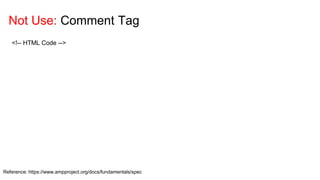
Not Use: Comment Tag
Reference: https://www.ampproject.org/docs/fundamentals/spec
<!-- HTML Code -->
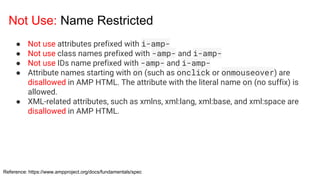
Not Use: Name Restricted
Reference: https://www.ampproject.org/docs/fundamentals/spec
● Not use attributes prefixed with i-amp-
● Not use class names prefixed with -amp- and i-amp-
● Not use IDs name prefixed with -amp- and i-amp-
● Attribute names starting with on (such as onclick or onmouseover) are
disallowed in AMP HTML. The attribute with the literal name on (no suffix) is
allowed.
● XML-related attributes, such as xmlns, xml:lang, xml:base, and xml:space are
disallowed in AMP HTML.
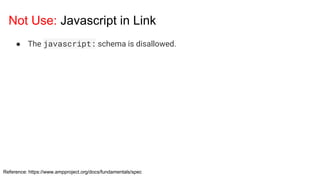
Not Use: Javascript in Link
Reference: https://www.ampproject.org/docs/fundamentals/spec
● The javascript: schema is disallowed.
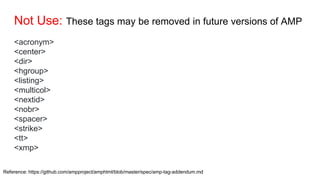
Not Use: These tags may be removed in future versions of AMP
<acronym>
<center>
<dir>
<hgroup>
<listing>
<multicol>
<nextid>
<nobr>
<spacer>
<strike>
<tt>
<xmp>
Reference: https://github.com/ampproject/amphtml/blob/master/spec/amp-tag-addendum.md
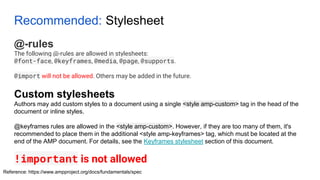
Recommended: Stylesheet
@-rules
The following @-rules are allowed in stylesheets:
@font-face, @keyframes, @media, @page, @supports.
@import will not be allowed. Others may be added in the future.
Reference: https://www.ampproject.org/docs/fundamentals/spec
Custom stylesheets
Authors may add custom styles to a document using a single <style amp-custom> tag in the head of the
document or inline styles.
@keyframes rules are allowed in the <style amp-custom>. However, if they are too many of them, it's
recommended to place them in the additional <style amp-keyframes> tag, which must be located at the
end of the AMP document. For details, see the Keyframes stylesheet section of this document.
!important is not allowed
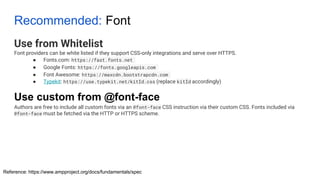
Recommended: Font
Use from Whitelist
Font providers can be white listed if they support CSS-only integrations and serve over HTTPS.
● Fonts.com: https://fast.fonts.net
● Google Fonts: https://fonts.googleapis.com
● Font Awesome: https://maxcdn.bootstrapcdn.com
● Typekit: https://use.typekit.net/kitId.css (replace kitId accordingly)
Authors are free to include all custom fonts via an @font-face CSS instruction via their custom CSS. Fonts included via
@font-face must be fetched via the HTTP or HTTPS scheme.
Reference: https://www.ampproject.org/docs/fundamentals/spec
Use custom from @font-face
Recommended: Javascript
Must Have
● The <script> tag must have an async attribute
● a custom-element attribute referencing the name of the element.
● The script URL must start with https://cdn.ampproject.org and
must follow a very strict pattern of /vd+/[a-z-]+-
(latest|d+|d+.d+).js.
Reference: https://www.ampproject.org/docs/fundamentals/spec
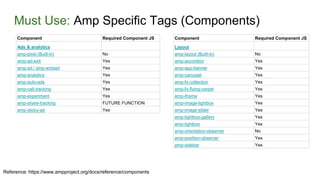
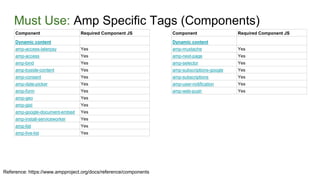
Must Use: Amp Specific Tags (Components)
Reference: https://www.ampproject.org/docs/reference/components
Component Required Component JS
Ads & analytics
amp-pixel (Built-in) No
amp-ad-exit Yes
amp-ad / amp-embed Yes
amp-analytics Yes
amp-auto-ads Yes
amp-call-tracking Yes
amp-experiment Yes
amp-share-tracking FUTURE FUNCTION
amp-sticky-ad Yes
Component Required Component JS
Layout
amp-layout (Built-in) No
amp-accordion Yes
amp-app-banner Yes
amp-carousel Yes
amp-fx-collection Yes
amp-fx-flying-carpet Yes
amp-iframe Yes
amp-image-lightbox Yes
amp-image-slider Yes
amp-lightbox-gallery Yes
amp-lightbox Yes
amp-orientation-observer No
amp-position-observer Yes
amp-sidebar Yes
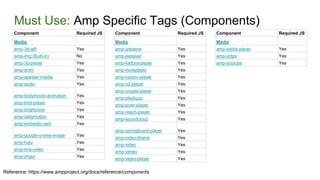
Must Use: Amp Specific Tags (Components)
Reference: https://www.ampproject.org/docs/reference/components
Component Required Component JS
Dynamic content
amp-access-laterpay Yes
amp-access Yes
amp-bind Yes
amp-byside-content Yes
amp-consent Yes
amp-date-picker Yes
amp-form Yes
amp-geo Yes
amp-gist Yes
amp-google-document-embed Yes
amp-install-serviceworker Yes
amp-list Yes
amp-live-list Yes
Component Required Component JS
Dynamic content
amp-mustache Yes
amp-next-page Yes
amp-selector Yes
amp-subscriptions-google Yes
amp-subscriptions Yes
amp-user-notification Yes
amp-web-push Yes
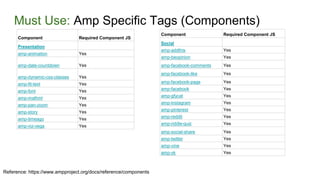
Must Use: Amp Specific Tags (Components)
Reference: https://www.ampproject.org/docs/reference/components
Component Required JS
Media
amp-3d-gltf Yes
amp-img (Built-in) No
amp-3q-player Yes
amp-anim Yes
amp-apester-media Yes
amp-audio Yes
amp-bodymovin-animation Yes
amp-brid-player Yes
amp-brightcove Yes
amp-dailymotion Yes
amp-embedly-card Yes
amp-google-vrview-image Yes
amp-hulu Yes
amp-ima-video Yes
amp-imgur Yes
Component Required JS
Media
amp-izlesene Yes
amp-jwplayer Yes
amp-kaltura-player Yes
amp-mowplayer Yes
amp-nexxtv-player Yes
amp-o2-player Yes
amp-ooyala-player Yes
amp-playbuzz Yes
amp-powr-player Yes
amp-reach-player Yes
amp-soundcloud Yes
amp-springboard-player Yes
amp-video-iframe Yes
amp-video Yes
amp-vimeo Yes
amp-viqeo-player Yes
Component Required JS
Media
amp-wistia-player Yes
amp-yotpo Yes
amp-youtube Yes
Must Use: Amp Specific Tags (Components)
Reference: https://www.ampproject.org/docs/reference/components
Component Required Component JS
Presentation
amp-animation Yes
amp-date-countdown Yes
amp-dynamic-css-classes Yes
amp-fit-text Yes
amp-font Yes
amp-mathml Yes
amp-pan-zoom Yes
amp-story Yes
amp-timeago Yes
amp-viz-vega Yes
Component Required Component JS
Social
amp-addthis Yes
amp-beopinion Yes
amp-facebook-comments Yes
amp-facebook-like Yes
amp-facebook-page Yes
amp-facebook Yes
amp-gfycat Yes
amp-instagram Yes
amp-pinterest Yes
amp-reddit Yes
amp-riddle-quiz Yes
amp-social-share Yes
amp-twitter Yes
amp-vine Yes
amp-vk Yes
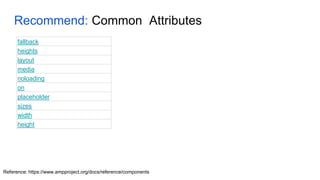
Recommend: Common Attributes
Reference: https://www.ampproject.org/docs/reference/components
fallback
heights
layout
media
noloading
on
placeholder
sizes
width
height
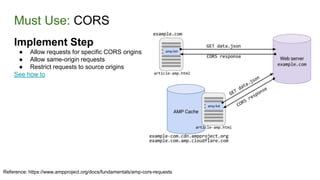
Must Use: CORS
Reference: https://www.ampproject.org/docs/fundamentals/amp-cors-requests
Implement Step
● Allow requests for specific CORS origins
● Allow same-origin requests
● Restrict requests to source origins
See how to
Must Use: AMP Cache
Reference: https://www.ampproject.org/docs/fundamentals/how_cached
AMP Cache is a proxy-based content delivery network (CDN) for delivering valid
AMP documents. AMP Caches are designed to:
1. Serve only valid AMP pages.
2. Allow AMP pages to be preloaded efficiently and safely.
3. Perform additional user-beneficial performance optimizations to content.
Currently, there are two AMP Cache providers:
● Google AMP Cache
● Cloudflare AMP Cache
Must Use: AMP Cache
Reference: https://www.ampproject.org/docs/fundamentals/how_cached
● As a publisher, you don't choose an AMP Cache provider, it's actually the
platform that links to your content that chooses the AMP Cache (if any) to
use.
● Publishing a valid AMP document automatically opts it into cache
delivery.
● Should you desire not to have your document cached, one option is to
remove the amp attribute from the HTML tag. This makes the document
technically invalid AMP
● Cached AMP pages are accessed by platforms and mobile apps.
(platforms like Google Search, Google News, and Cloudflare)
Must Use: AMP Cache
Reference: https://www.ampproject.org/docs/fundamentals/how_cached
● As a publisher, you don't choose an AMP Cache provider, it's actually the
platform that links to your content that chooses the AMP Cache (if any) to
use.
● Publishing a valid AMP document automatically opts it into cache
delivery.
● Should you desire not to have your document cached, one option is to
remove the amp attribute from the HTML tag. This makes the document
technically invalid AMP
● Cached AMP pages are accessed by platforms and mobile apps.
(platforms like Google Search, Google News, and Cloudflare)
Must Use: How does my AMP page get cached?
Reference: https://www.ampproject.org/docs/fundamentals/how_cached
● Platform discovery: Platforms discover your AMP content via the <html ⚡> or
<html amp> tag and cache the content.
● Cache URL request: Platforms can specifically request an AMP page by
using the AMP Cache URL format. The AMP Cache acts as a reverse proxy,
therefore, when the platform accesses the page, it results in the page being
cached automatically.
○ Cloudflare AMP Cache URL example:
https://amp.cloudflare.com/c/foo.com/amp_document.html
○ Google AMP Cache URL example: https://foo-
com.cdn.ampproject.org/c/s/foo.com/amp_document.html
Recommend to Read: Optimization AMP to better
Reference: https://www.ampproject.org/docs/fundamentals/
● Best practices for creating an AMP story
● Optimizing your hosted AMP pages
● Improve user engagement
Recommended: Meta Tag
Open Graph Protocol, Twitter Cards, etc.
Can use other standard tag
● Schema.org : https://schema.org/docs/schemas.html
Recommend
Reference: https://www.ampproject.org/docs/fundamentals/
Recommended: Tools convert HTML to AMP
[PHP] AMP PHP Library
https://github.com/Lullabot/amp-library
[PHP] AMP for Wordpress (Google Official Contribute)
https://wordpress.org/plugins/amp/
[PHP] AMP for WP
https://wordpress.org/plugins/accelerated-mobile-pages/
[.NET Core] HtmlToAmpConverter
https://www.nuget.org/packages/HtmlToAmpConverter/
[.NET Framework] HtmlToAmp
https://www.nuget.org/packages/HtmlToAmp/
Validation
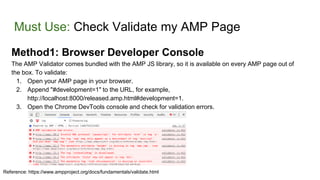
Must Use: Check Validate my AMP Page
Method1: Browser Developer Console
The AMP Validator comes bundled with the AMP JS library, so it is available on every AMP page out of
the box. To validate:
1. Open your AMP page in your browser.
2. Append "#development=1" to the URL, for example,
http://localhost:8000/released.amp.html#development=1.
3. Open the Chrome DevTools console and check for validation errors.
Reference: https://www.ampproject.org/docs/fundamentals/validate.html
Must Use: Check Validate my AMP Page
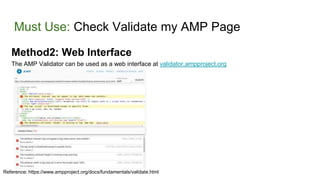
Method2: Web Interface
The AMP Validator can be used as a web interface at validator.ampproject.org
Reference: https://www.ampproject.org/docs/fundamentals/validate.html
Must Use: Check Validate my AMP Page
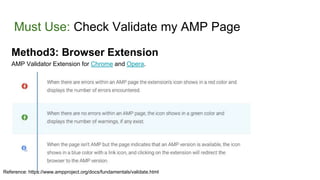
Method3: Browser Extension
AMP Validator Extension for Chrome and Opera.
Reference: https://www.ampproject.org/docs/fundamentals/validate.html
Discovery
Must Use: Link to AMP document for discovery
In document, should point link in <header> to AMP Version :
● <link rel="amphtml"
href="https://www.example.com/url/to/amp/document.html">
In AMP document, should point link canonical back to original document:
● <link rel="canonical"
href="https://www.example.com/url/to/canonical/document.html">
Reference: https://www.ampproject.org/docs/fundamentals/discovery
Must Use: Setup Schema for discovery
Use Schema.org for most search engines
● Follow schema from https://Schema.org
● Example
Use Open Graph Protocol (OGP) to provide rich snippets on Facebook
● The Open Graph Protocol (OGP) provides Facebook with the metadata necessary to allow web
pages to have the same functionality as other Facebook objects.
Use Twitter Cards to provide rich snippets on Twitter
● Twitter Cards are an extension to the Open Graph Protocol applicable for Twitter. They allow you to
add media attachments like images and video to Tweets with a link to your web page
See How To and Best Practice
Reference: https://www.ampproject.org/docs/fundamentals/discovery

Google AMP (Accelerated Mobile Pages)

  • 1.
    Google AMP (Accelerated MobilePages) By Chitpong Wuttanan (iFew) Updated as of 6 Mar 2019
  • 2.
    Google AMP is? ●AMP = Accelerated Mobile Pages ● Open-source library ● Library for create web pages for smooth, and load near instantaneously for users. ○ Stripped down version of HTML 5. ○ Async loading of JS files and images. (Lazy loading of JS file and images) ○ Use of Google AMP Cache This is nothing but proxy based CDN for delivering AMP Pages. Cache validates AMP pages and delivered through HTTP 2.0. Reference: https://www.ampproject.org/learn/overview/, https://www.c-sharpcorner.com/article/accelerated-mobile-pages-amp-part-one/
  • 3.
    How Google AMPWorks Reference: https://nulledbb.com/thread-Google-AMP-and-How-It-Work
  • 4.
    AMP and WithoutAMP Reference: https://www.theguardian.com/world/2019/mar/05/far-right-infiltrating-childrens-charities-with-anti-islam-agenda Without AMP With AMP
  • 5.
    AMP and WithoutAMP Reference: https://www.theguardian.com/world/2019/mar/05/far-right-infiltrating-childrens-charities-with-anti-islam-agenda Without AMP With AMP
  • 6.
    How Google AMPWorks Reference: https://nulledbb.com/thread-Google-AMP-and-How-It-Work
  • 7.
    Benefits ● Increase WebsitePage Speed ● SEO ● Increase Ad views Reference: https://www.slideshare.net/kadamtechseo/google-amp-132722079
  • 8.
    Concern Point ● Morework and less analytics ● Less control over content and design ● Limiting the design styles ○ Only Inline styles are allowed that too with maximum of 50 kb size. ○ Only async JavaScripts are allowed. If at all third-party JavaScript needed, those should be loaded through iframe. ○ Sizes of resources like images, ads should be specified statically in AMP HTML. ○ Minimize style and layout recalculations. ○ HTML Forms are not allowed. ○ AMP needs to be validated. Reference: https://www.slideshare.net/kadamtechseo/google-amp-132722079, https://www.c-sharpcorner.com/article/accelerated-mobile-pages- amp-part-one/
  • 9.
    AMP pages arebuilt with 3 core components ● AMP HTML - Is HTML with some restrictions for reliable performance. ○ Most tags in an AMP HTML page are regular HTML tags ○ Some HTML tags are replaced with AMP-specific tags ● AMP JS - Library ensures the fast rendering of AMP HTML pages. ● AMP Cache - Can be used to serve cached AMP HTML pages. ○ Is a proxy-based content delivery network for delivering all valid AMP documents ○ Using HTTP 2.0 for maximum efficiency ○ The cache also comes with a built-in validation system which confirms that the page is guaranteed to work ○ Perform additional user-beneficial performance optimizations to content. ○ The cache is automatically updated each time someone accesses content Reference: https://www.ampproject.org/learn/overview/
  • 10.
    How Convert HTMLTO AMP HTML ● Implement AMP Page ○ Removing restricted elements and attributes ○ Resolving complex requirements for specific HTML tags ○ Replacing HTML tags by their AMP equivalents ○ Inserting compulsory AMP markup ○ Inserting CSS stylesheet ● Validation ● Publish for Discovery
  • 11.
  • 12.
    Basic Required mark-up RULEDESCRIPTION Start with the <!doctype html> doctype. Standard for HTML. Contain a top-level <html ⚡> tag (<html amp> is accepted as well). Identifies the page as AMP content. Contain <head> and <body> tags. Optional in HTML but not in AMP. Contain a <meta charset="utf-8"> tag as the first child of their <head> tag. Identifies the encoding for the page. Contain a <script async src="https://cdn.ampproject.org/v0.js"></script> tag inside their <head> tag. As a best practice, you should include the script as early as possible in the <head>. Includes and loads the AMP JS library. Contain a <link rel="canonical" href="$SOME_URL"> tag inside their <head>. Points to the regular HTML version of the AMP HTML document or to itself if no such HTML version exists. Learn more in Make Your Page Discoverable. Contain a <meta name="viewport" content="width=device- width,minimum-scale=1">tag inside their <head> tag. It's also recommended to include initial-scale=1. Specifies a responsive viewport. Learn more in Create Responsive AMP Pages. Contain the AMP boilerplate code in their <head> tag. CSS boilerplate to initially hide the content until AMP JS is loaded. Reference: https://www.ampproject.org/docs/fundamentals/spec
  • 13.
    Example structure <!doctype html> <html⚡> <head> <meta charset="utf-8"> <link rel="canonical" href="hello-world.html"> <meta name="viewport" content="width=device-width,minimum-scale=1,initial-scale=1"> <style amp-boilerplate>body{-webkit-animation:-amp-start 8s steps(1,end) 0s 1 normal both;-moz-animation:-amp- start 8s steps(1,end) 0s 1 normal both;-ms-animation:-amp-start 8s steps(1,end) 0s 1 normal both;animation:-amp- start 8s steps(1,end) 0s 1 normal both}@-webkit-keyframes -amp- start{from{visibility:hidden}to{visibility:visible}}@-moz-keyframes -amp- start{from{visibility:hidden}to{visibility:visible}}@-ms-keyframes -amp- start{from{visibility:hidden}to{visibility:visible}}@-o-keyframes -amp- start{from{visibility:hidden}to{visibility:visible}}@keyframes -amp- start{from{visibility:hidden}to{visibility:visible}}</style><noscript><style amp-boilerplate>body{-webkit- animation:none;-moz-animation:none;-ms-animation:none;animation:none}</style></noscript> <script async src="https://cdn.ampproject.org/v0.js"></script> </head> <body>Hello World!</body> </html> Required Required Required Required Required Required Required In Body, Using Only Whitelist Syntax, AMP tag and some special rules
  • 14.
    Must Use: HTMLTag Whitelist (Cover popular tag) The root element Grouping Content Text-level semantics Source <html> <p> <em> <source> Document metadata <hr> <strong> SVG <head> <pre> <small> <svg> <title> <blockquote> <s> Most SVG elements are allowed. <link> <ol> <q> Tabular data <meta> <ul> <abbr> <table> <style> <li> <data> <caption> Sections <dl> <time> <colgroup> <body> <dt> <code> <col> <article> <dd> <var> <tbody> <section> <figure> <sub> and <sup> <thead> <nav> <figcaption> <i> <tfoot> <aside> <div> <b> <tr> <h1>, <h2>, <h3>, <h4>, <h5>, and <h6> <main> <u> <td> <header> Edits <span> <th> <footer> <ins> <br> Scripting <address> <del> <wbr> <script> Forms Links <noscript> <button> <a> See more
  • 15.
    Must Use: Replacesome HTML Tag Reference: https://www.ampproject.org/docs/fundamentals/spec noscript Allowed. Can be used anywhere in the document. If specified, the content inside the <noscript> element displays if JavaScript is disabled by the user. img Replaced with amp-img. , <amp-img> does have an end tag </amp-img>. video Replaced with amp-video. audio Replaced with amp-audio. iframe Replaced with amp-iframe. form Allowed. Require including amp-form extension. input elements Mostly allowed with exception of some input types, namely, <input[type=image]>, <input[type=button]>, <input[type=password]>, <input[type=file]> are invalid. Related tags are also allowed: <fieldset>, <label> style Required style tag for amp-boilerplate. One additional style tag is allowed in head tag for the purpose of custom styling. This style tag must have the attribute amp-custom. link rel values registered on microformats.org are allowed. If a rel value is missing from our white list, please submit an issue. stylesheet and other values like preconnect, prerender and prefetch that have side effects in the browser are disallowed. There is a special case for fetching stylesheets from white listed font providers. meta The http-equiv attribute may be used for specific allowable values; see the AMP validator specification for details. a The href attribute value must not begin with javascript:. If set, the target attribute value must be _blank. Otherwise allowed. svg Most SVG elements are allowed.
  • 16.
    Not Use: ProhibitedTag Reference: https://www.ampproject.org/docs/fundamentals/spec script Prohibited unless the type is application/ld+json or text/plain. (Other non-executable values may be added as needed.) Exception is the mandatory script tag to load the AMP runtime and the script tags to load extended components. base Prohibited. frame Prohibited. frameset Prohibited. object Prohibited. param Prohibited. applet Prohibited. embed Prohibited.
  • 17.
    Not Use: CommentTag Reference: https://www.ampproject.org/docs/fundamentals/spec <!-- HTML Code -->
  • 18.
    Not Use: NameRestricted Reference: https://www.ampproject.org/docs/fundamentals/spec ● Not use attributes prefixed with i-amp- ● Not use class names prefixed with -amp- and i-amp- ● Not use IDs name prefixed with -amp- and i-amp- ● Attribute names starting with on (such as onclick or onmouseover) are disallowed in AMP HTML. The attribute with the literal name on (no suffix) is allowed. ● XML-related attributes, such as xmlns, xml:lang, xml:base, and xml:space are disallowed in AMP HTML.
  • 19.
    Not Use: Javascriptin Link Reference: https://www.ampproject.org/docs/fundamentals/spec ● The javascript: schema is disallowed.
  • 20.
    Not Use: Thesetags may be removed in future versions of AMP <acronym> <center> <dir> <hgroup> <listing> <multicol> <nextid> <nobr> <spacer> <strike> <tt> <xmp> Reference: https://github.com/ampproject/amphtml/blob/master/spec/amp-tag-addendum.md
  • 21.
    Recommended: Stylesheet @-rules The following@-rules are allowed in stylesheets: @font-face, @keyframes, @media, @page, @supports. @import will not be allowed. Others may be added in the future. Reference: https://www.ampproject.org/docs/fundamentals/spec Custom stylesheets Authors may add custom styles to a document using a single <style amp-custom> tag in the head of the document or inline styles. @keyframes rules are allowed in the <style amp-custom>. However, if they are too many of them, it's recommended to place them in the additional <style amp-keyframes> tag, which must be located at the end of the AMP document. For details, see the Keyframes stylesheet section of this document. !important is not allowed
  • 22.
    Recommended: Font Use fromWhitelist Font providers can be white listed if they support CSS-only integrations and serve over HTTPS. ● Fonts.com: https://fast.fonts.net ● Google Fonts: https://fonts.googleapis.com ● Font Awesome: https://maxcdn.bootstrapcdn.com ● Typekit: https://use.typekit.net/kitId.css (replace kitId accordingly) Authors are free to include all custom fonts via an @font-face CSS instruction via their custom CSS. Fonts included via @font-face must be fetched via the HTTP or HTTPS scheme. Reference: https://www.ampproject.org/docs/fundamentals/spec Use custom from @font-face
  • 23.
    Recommended: Javascript Must Have ●The <script> tag must have an async attribute ● a custom-element attribute referencing the name of the element. ● The script URL must start with https://cdn.ampproject.org and must follow a very strict pattern of /vd+/[a-z-]+- (latest|d+|d+.d+).js. Reference: https://www.ampproject.org/docs/fundamentals/spec
  • 24.
    Must Use: AmpSpecific Tags (Components) Reference: https://www.ampproject.org/docs/reference/components Component Required Component JS Ads & analytics amp-pixel (Built-in) No amp-ad-exit Yes amp-ad / amp-embed Yes amp-analytics Yes amp-auto-ads Yes amp-call-tracking Yes amp-experiment Yes amp-share-tracking FUTURE FUNCTION amp-sticky-ad Yes Component Required Component JS Layout amp-layout (Built-in) No amp-accordion Yes amp-app-banner Yes amp-carousel Yes amp-fx-collection Yes amp-fx-flying-carpet Yes amp-iframe Yes amp-image-lightbox Yes amp-image-slider Yes amp-lightbox-gallery Yes amp-lightbox Yes amp-orientation-observer No amp-position-observer Yes amp-sidebar Yes
  • 25.
    Must Use: AmpSpecific Tags (Components) Reference: https://www.ampproject.org/docs/reference/components Component Required Component JS Dynamic content amp-access-laterpay Yes amp-access Yes amp-bind Yes amp-byside-content Yes amp-consent Yes amp-date-picker Yes amp-form Yes amp-geo Yes amp-gist Yes amp-google-document-embed Yes amp-install-serviceworker Yes amp-list Yes amp-live-list Yes Component Required Component JS Dynamic content amp-mustache Yes amp-next-page Yes amp-selector Yes amp-subscriptions-google Yes amp-subscriptions Yes amp-user-notification Yes amp-web-push Yes
  • 26.
    Must Use: AmpSpecific Tags (Components) Reference: https://www.ampproject.org/docs/reference/components Component Required JS Media amp-3d-gltf Yes amp-img (Built-in) No amp-3q-player Yes amp-anim Yes amp-apester-media Yes amp-audio Yes amp-bodymovin-animation Yes amp-brid-player Yes amp-brightcove Yes amp-dailymotion Yes amp-embedly-card Yes amp-google-vrview-image Yes amp-hulu Yes amp-ima-video Yes amp-imgur Yes Component Required JS Media amp-izlesene Yes amp-jwplayer Yes amp-kaltura-player Yes amp-mowplayer Yes amp-nexxtv-player Yes amp-o2-player Yes amp-ooyala-player Yes amp-playbuzz Yes amp-powr-player Yes amp-reach-player Yes amp-soundcloud Yes amp-springboard-player Yes amp-video-iframe Yes amp-video Yes amp-vimeo Yes amp-viqeo-player Yes Component Required JS Media amp-wistia-player Yes amp-yotpo Yes amp-youtube Yes
  • 27.
    Must Use: AmpSpecific Tags (Components) Reference: https://www.ampproject.org/docs/reference/components Component Required Component JS Presentation amp-animation Yes amp-date-countdown Yes amp-dynamic-css-classes Yes amp-fit-text Yes amp-font Yes amp-mathml Yes amp-pan-zoom Yes amp-story Yes amp-timeago Yes amp-viz-vega Yes Component Required Component JS Social amp-addthis Yes amp-beopinion Yes amp-facebook-comments Yes amp-facebook-like Yes amp-facebook-page Yes amp-facebook Yes amp-gfycat Yes amp-instagram Yes amp-pinterest Yes amp-reddit Yes amp-riddle-quiz Yes amp-social-share Yes amp-twitter Yes amp-vine Yes amp-vk Yes
  • 28.
    Recommend: Common Attributes Reference:https://www.ampproject.org/docs/reference/components fallback heights layout media noloading on placeholder sizes width height
  • 29.
    Must Use: CORS Reference:https://www.ampproject.org/docs/fundamentals/amp-cors-requests Implement Step ● Allow requests for specific CORS origins ● Allow same-origin requests ● Restrict requests to source origins See how to
  • 30.
    Must Use: AMPCache Reference: https://www.ampproject.org/docs/fundamentals/how_cached AMP Cache is a proxy-based content delivery network (CDN) for delivering valid AMP documents. AMP Caches are designed to: 1. Serve only valid AMP pages. 2. Allow AMP pages to be preloaded efficiently and safely. 3. Perform additional user-beneficial performance optimizations to content. Currently, there are two AMP Cache providers: ● Google AMP Cache ● Cloudflare AMP Cache
  • 31.
    Must Use: AMPCache Reference: https://www.ampproject.org/docs/fundamentals/how_cached ● As a publisher, you don't choose an AMP Cache provider, it's actually the platform that links to your content that chooses the AMP Cache (if any) to use. ● Publishing a valid AMP document automatically opts it into cache delivery. ● Should you desire not to have your document cached, one option is to remove the amp attribute from the HTML tag. This makes the document technically invalid AMP ● Cached AMP pages are accessed by platforms and mobile apps. (platforms like Google Search, Google News, and Cloudflare)
  • 32.
    Must Use: AMPCache Reference: https://www.ampproject.org/docs/fundamentals/how_cached ● As a publisher, you don't choose an AMP Cache provider, it's actually the platform that links to your content that chooses the AMP Cache (if any) to use. ● Publishing a valid AMP document automatically opts it into cache delivery. ● Should you desire not to have your document cached, one option is to remove the amp attribute from the HTML tag. This makes the document technically invalid AMP ● Cached AMP pages are accessed by platforms and mobile apps. (platforms like Google Search, Google News, and Cloudflare)
  • 33.
    Must Use: Howdoes my AMP page get cached? Reference: https://www.ampproject.org/docs/fundamentals/how_cached ● Platform discovery: Platforms discover your AMP content via the <html ⚡> or <html amp> tag and cache the content. ● Cache URL request: Platforms can specifically request an AMP page by using the AMP Cache URL format. The AMP Cache acts as a reverse proxy, therefore, when the platform accesses the page, it results in the page being cached automatically. ○ Cloudflare AMP Cache URL example: https://amp.cloudflare.com/c/foo.com/amp_document.html ○ Google AMP Cache URL example: https://foo- com.cdn.ampproject.org/c/s/foo.com/amp_document.html
  • 34.
    Recommend to Read:Optimization AMP to better Reference: https://www.ampproject.org/docs/fundamentals/ ● Best practices for creating an AMP story ● Optimizing your hosted AMP pages ● Improve user engagement
  • 35.
    Recommended: Meta Tag OpenGraph Protocol, Twitter Cards, etc. Can use other standard tag ● Schema.org : https://schema.org/docs/schemas.html Recommend Reference: https://www.ampproject.org/docs/fundamentals/
  • 36.
    Recommended: Tools convertHTML to AMP [PHP] AMP PHP Library https://github.com/Lullabot/amp-library [PHP] AMP for Wordpress (Google Official Contribute) https://wordpress.org/plugins/amp/ [PHP] AMP for WP https://wordpress.org/plugins/accelerated-mobile-pages/ [.NET Core] HtmlToAmpConverter https://www.nuget.org/packages/HtmlToAmpConverter/ [.NET Framework] HtmlToAmp https://www.nuget.org/packages/HtmlToAmp/
  • 37.
  • 38.
    Must Use: CheckValidate my AMP Page Method1: Browser Developer Console The AMP Validator comes bundled with the AMP JS library, so it is available on every AMP page out of the box. To validate: 1. Open your AMP page in your browser. 2. Append "#development=1" to the URL, for example, http://localhost:8000/released.amp.html#development=1. 3. Open the Chrome DevTools console and check for validation errors. Reference: https://www.ampproject.org/docs/fundamentals/validate.html
  • 39.
    Must Use: CheckValidate my AMP Page Method2: Web Interface The AMP Validator can be used as a web interface at validator.ampproject.org Reference: https://www.ampproject.org/docs/fundamentals/validate.html
  • 40.
    Must Use: CheckValidate my AMP Page Method3: Browser Extension AMP Validator Extension for Chrome and Opera. Reference: https://www.ampproject.org/docs/fundamentals/validate.html
  • 41.
  • 42.
    Must Use: Linkto AMP document for discovery In document, should point link in <header> to AMP Version : ● <link rel="amphtml" href="https://www.example.com/url/to/amp/document.html"> In AMP document, should point link canonical back to original document: ● <link rel="canonical" href="https://www.example.com/url/to/canonical/document.html"> Reference: https://www.ampproject.org/docs/fundamentals/discovery
  • 43.
    Must Use: SetupSchema for discovery Use Schema.org for most search engines ● Follow schema from https://Schema.org ● Example Use Open Graph Protocol (OGP) to provide rich snippets on Facebook ● The Open Graph Protocol (OGP) provides Facebook with the metadata necessary to allow web pages to have the same functionality as other Facebook objects. Use Twitter Cards to provide rich snippets on Twitter ● Twitter Cards are an extension to the Open Graph Protocol applicable for Twitter. They allow you to add media attachments like images and video to Tweets with a link to your web page See How To and Best Practice Reference: https://www.ampproject.org/docs/fundamentals/discovery