Building Responsive
Websites with the
Bootstrap 3 Framework
Michael Slater and Charity Grace Kirk

michael@webvanta.com
888.670.6793
1
Today’s Presenters
Michael Slater
‣

President and Cofounder of Webvanta

‣

Has been creating content-rich websites since the
web’s early days

‣

Previously director of technology strategy at Adobe
Systems

Charity Grace Kirk
‣

Senior web developer at Webvanta

‣

More than 5 years experience building sites for clients
on the Webvanta platform

‣

Experience in content strategy, search engine
optimization, and online marketing.

2
Asking Questions
Now
• Ask questions by entering the text
in the GoToWebinar control panel
Later
• Follow up with us afterwards
(sales@webvanta.com) if you have questions
that didn’t get addressed
• Link to slides, video, and code will be emailed
to you tomorrow
3
What is Your Role in
Building Websites?
• Designer
• Developer
• Manager

4
Why Responsive
Design?

5
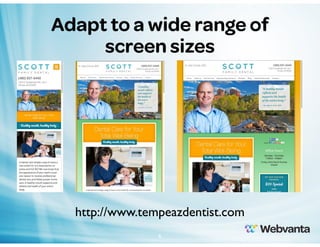
Adapt to a wide range of
screen sizes

http://www.tempeazdentist.com
6
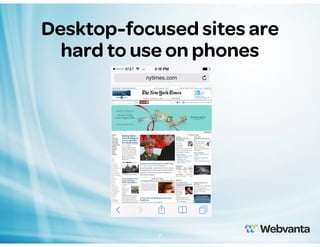
Desktop-focused sites are
hard to use on phones

7
Google encouraging
responsive design

Searches on mobile phones should link to
mobile-friendly content
8
How much of your browsing
is on a phone or tablet?
• None
• Less than 10%
• 10% to 40%
• About half
• More than half

9
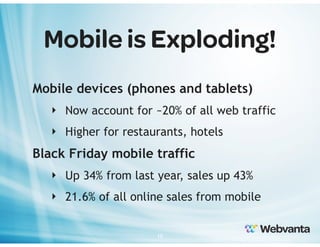
Mobile is Exploding!
Mobile devices (phones and tablets)
‣ Now account for ~20% of all web traffic
‣ Higher for restaurants, hotels

Black Friday mobile traffic
‣ Up 34% from last year, sales up 43%
‣ 21.6% of all online sales from mobile
10
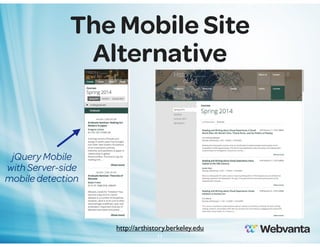
The Mobile Site
Alternative

jQuery Mobile
with Server-side
mobile detection

http://arthistory.berkeley.edu
11
Responsive Design
Basics
• Uses CSS Media Queries
• More than just fluid design
‣ Columns can stack at smaller widths
‣ Sizes, padding, margin … all can adjust
‣ Elements can be hidden or swapped out

12
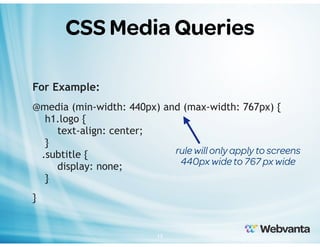
CSS Media Queries
For Example:
@media (min-width: 440px) and (max-width: 767px) {
h1.logo {
text-align: center;
}
rule will only apply to screens
.subtitle {
440px wide to 767 px wide
display: none;
}
}

13
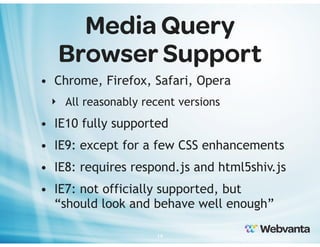
Media Query
Browser Support
• Chrome, Firefox, Safari, Opera
‣ All reasonably recent versions

• IE10 fully supported
• IE9: except for a few CSS enhancements
• IE8: requires respond.js and html5shiv.js
• IE7: not officially supported, but
“should look and behave well enough”
14
Why Bootstrap?
Speed up development
‣ Responsive grid system
‣ Quality default typography
‣ Common components
‣ Popular jQuery plugins
‣ Simplifies “bootstrapping” your design
15
What is Bootstrap?
• Created by Twitter, published as open
source
• Consists of a CSS file, a JS file, and an icon
font
• CSS is compiled from LESS source
• JS can be loaded in “everything” version or
only selected pieces
‣ Requires jQuery
16
Mobile-First Strategy
Content
• Determine what is most important
Layout
• Design to smaller widths first
• Base CSS addresses phones; media queries for
tablet and desktop
Progressive enhancement
• Add elements as screen size increases
17
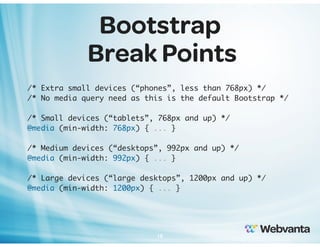
Bootstrap
Break Points
/* Extra small devices (“phones”, less than 768px) */
/* No media query need as this is the default Bootstrap */
/* Small devices (“tablets”, 768px and up) */
@media (min-width: 768px) { ... }
/* Medium devices (“desktops”, 992px and up) */
@media (min-width: 992px) { ... }
/* Large devices (“large desktops”, 1200px and up) */
@media (min-width: 1200px) { ... }

18
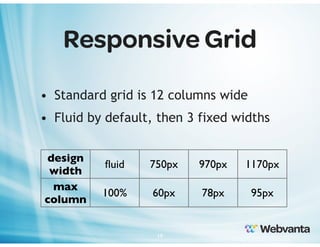
Responsive Grid
• Standard grid is 12 columns wide
• Fluid by default, then 3 fixed widths
design
width
max
column

fluid

750px

970px

1170px

100%

60px

78px

95px

19
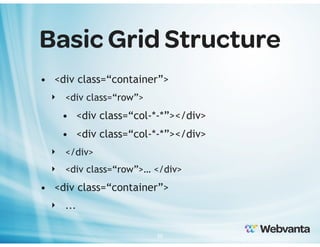
Basic Grid Structure
• <div class=“container”>
‣ <div class=“row”>

• <div class=“col-*-*”></div>
‣ </div>
‣ <div class=“row”>… </div>

• <div class=“container”>
‣ ...
20
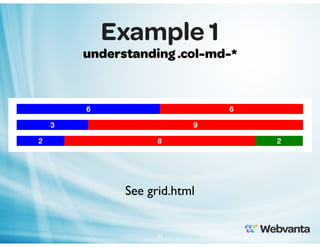
Example 1
understanding .col-md-*

See grid.html

21
Controlling the Grid
• Each breakpoint has its own grid class
‣ .col-xs-*, .col-sm-*, .col-md-*, .col-lg-*

• Below the smallest defined breakpoint
for a column, it stacks vertically

22
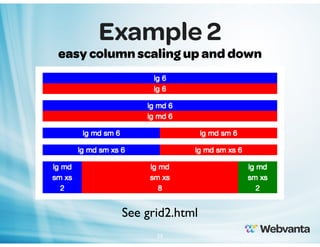
Example 2
easy column scaling up and down

See grid2.html
23
Ordering the Grid
• Push and Pull columns to position on
larger widths.
‣ e.g. .col-md-push-* or .col-md-pull-*

24
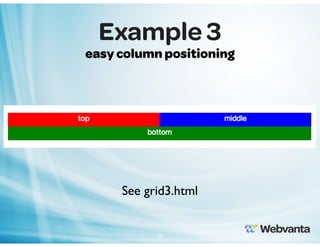
Example 3
easy column positioning

See grid3.html

25
Responsive Images
• Background Images in CSS
‣ Can load appropriate-size image based on
viewport size (via media queries)

• Images in HTML (<img src="filename.jpg">)
‣ Class .img-responsive sets max-width to
100%
‣ Browser scales images to fit container, but
doesn’t allow them to get pixelated
26
Helper Classes
• Bootstrap includes a variety of CSS
classes to help make markup more
semantic
‣ pull-left, pull-right
‣ center-block, text-right, text-center …
‣ clearfix
‣ visible-xs, hidden-xs, visible-md …
27
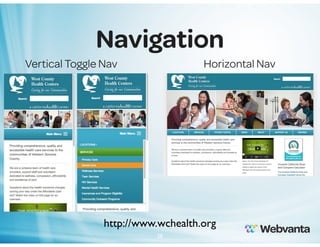
Navigation
Vertical Toggle Nav

Horizontal Nav

http://www.wchealth.org
28
JavaScript Features
• Many common JavaScript-based plugins
and functions included
‣ Carousel, transitions
‣ Modal, alert
‣ Dropdown, tab, tooltip, popover, button
‣ Collapse
‣ Scrollspy
29
JavaScript without
JavaScript
• CSS classes and HTML5 data attributes
used to trigger behavior
• Bootstrap JS file finds these attributes
and uses them to active JS and CSS
code

30
JavaScript Plugin
Examples

see widgets.html

31
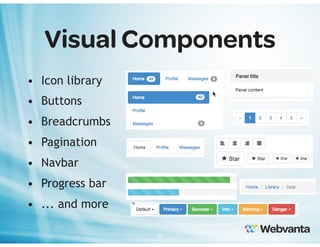
Visual Components
• Icon library
• Buttons
• Breadcrumbs
• Pagination
• Navbar
• Progress bar
• ... and more
32
Does Bootstrap seem
like a good fit for you?
• No (don’t plan to support mobile)
• No (plan to support mobile differently)
• Probably, I need to learn more
• Yes, I can’t wait!

33
Customizing
• Add your own CSS file after the
Bootstrap file to override and add
classes
• Can edit source LESS files and
recompile into customized CSS
‣ Upgrading to new Bootstrap version can
be difficult

34
Other Responsive
Frameworks
• Foundation (foundation.zurb.com)
• Skeleton (getskeleton.com)

35
Get Started!
getbootstrap.com
www.webvanta.com/trial

36
Webvanta
SmartTheme
• Gives you an instant start
• Fully hosted, all code in place
• Integrate with database-driven content
• The fast way to a powerful, custom
and responsive site
• Join our January webinar
37
What are your
major questions?
• Let us know what more you’d like to
know and we’ll use it to guide our
upcoming articles and webinars

38
We’re Here to Help
• Webvanta specializes in creating content-rich
sites that deliver on business goals
• Get your private consultation
‣ Free 30-minute consultation
‣ email sales@webvanta.com or call 888.670.6793

• Learn more online and stay in touch
‣ www.webvanta.com/blog
‣ www.facebook.com/webvanta
39
241 South Main Street
Sebastopol, CA 95472
sales@webvanta.com
888.670.6793
www.webvanta.comt

40

Building Responsive Websites with the Bootstrap 3 Framework

  • 1.
    Building Responsive Websites withthe Bootstrap 3 Framework Michael Slater and Charity Grace Kirk michael@webvanta.com 888.670.6793 1
  • 2.
    Today’s Presenters Michael Slater ‣ Presidentand Cofounder of Webvanta ‣ Has been creating content-rich websites since the web’s early days ‣ Previously director of technology strategy at Adobe Systems Charity Grace Kirk ‣ Senior web developer at Webvanta ‣ More than 5 years experience building sites for clients on the Webvanta platform ‣ Experience in content strategy, search engine optimization, and online marketing. 2
  • 3.
    Asking Questions Now • Askquestions by entering the text in the GoToWebinar control panel Later • Follow up with us afterwards (sales@webvanta.com) if you have questions that didn’t get addressed • Link to slides, video, and code will be emailed to you tomorrow 3
  • 4.
    What is YourRole in Building Websites? • Designer • Developer • Manager 4
  • 5.
  • 6.
    Adapt to awide range of screen sizes http://www.tempeazdentist.com 6
  • 7.
  • 8.
    Google encouraging responsive design Searcheson mobile phones should link to mobile-friendly content 8
  • 9.
    How much ofyour browsing is on a phone or tablet? • None • Less than 10% • 10% to 40% • About half • More than half 9
  • 10.
    Mobile is Exploding! Mobiledevices (phones and tablets) ‣ Now account for ~20% of all web traffic ‣ Higher for restaurants, hotels Black Friday mobile traffic ‣ Up 34% from last year, sales up 43% ‣ 21.6% of all online sales from mobile 10
  • 11.
    The Mobile Site Alternative jQueryMobile with Server-side mobile detection http://arthistory.berkeley.edu 11
  • 12.
    Responsive Design Basics • UsesCSS Media Queries • More than just fluid design ‣ Columns can stack at smaller widths ‣ Sizes, padding, margin … all can adjust ‣ Elements can be hidden or swapped out 12
  • 13.
    CSS Media Queries ForExample: @media (min-width: 440px) and (max-width: 767px) { h1.logo { text-align: center; } rule will only apply to screens .subtitle { 440px wide to 767 px wide display: none; } } 13
  • 14.
    Media Query Browser Support •Chrome, Firefox, Safari, Opera ‣ All reasonably recent versions • IE10 fully supported • IE9: except for a few CSS enhancements • IE8: requires respond.js and html5shiv.js • IE7: not officially supported, but “should look and behave well enough” 14
  • 15.
    Why Bootstrap? Speed updevelopment ‣ Responsive grid system ‣ Quality default typography ‣ Common components ‣ Popular jQuery plugins ‣ Simplifies “bootstrapping” your design 15
  • 16.
    What is Bootstrap? •Created by Twitter, published as open source • Consists of a CSS file, a JS file, and an icon font • CSS is compiled from LESS source • JS can be loaded in “everything” version or only selected pieces ‣ Requires jQuery 16
  • 17.
    Mobile-First Strategy Content • Determinewhat is most important Layout • Design to smaller widths first • Base CSS addresses phones; media queries for tablet and desktop Progressive enhancement • Add elements as screen size increases 17
  • 18.
    Bootstrap Break Points /* Extrasmall devices (“phones”, less than 768px) */ /* No media query need as this is the default Bootstrap */ /* Small devices (“tablets”, 768px and up) */ @media (min-width: 768px) { ... } /* Medium devices (“desktops”, 992px and up) */ @media (min-width: 992px) { ... } /* Large devices (“large desktops”, 1200px and up) */ @media (min-width: 1200px) { ... } 18
  • 19.
    Responsive Grid • Standardgrid is 12 columns wide • Fluid by default, then 3 fixed widths design width max column fluid 750px 970px 1170px 100% 60px 78px 95px 19
  • 20.
    Basic Grid Structure •<div class=“container”> ‣ <div class=“row”> • <div class=“col-*-*”></div> • <div class=“col-*-*”></div> ‣ </div> ‣ <div class=“row”>… </div> • <div class=“container”> ‣ ... 20
  • 21.
  • 22.
    Controlling the Grid •Each breakpoint has its own grid class ‣ .col-xs-*, .col-sm-*, .col-md-*, .col-lg-* • Below the smallest defined breakpoint for a column, it stacks vertically 22
  • 23.
    Example 2 easy columnscaling up and down See grid2.html 23
  • 24.
    Ordering the Grid •Push and Pull columns to position on larger widths. ‣ e.g. .col-md-push-* or .col-md-pull-* 24
  • 25.
    Example 3 easy columnpositioning See grid3.html 25
  • 26.
    Responsive Images • BackgroundImages in CSS ‣ Can load appropriate-size image based on viewport size (via media queries) • Images in HTML (<img src="filename.jpg">) ‣ Class .img-responsive sets max-width to 100% ‣ Browser scales images to fit container, but doesn’t allow them to get pixelated 26
  • 27.
    Helper Classes • Bootstrapincludes a variety of CSS classes to help make markup more semantic ‣ pull-left, pull-right ‣ center-block, text-right, text-center … ‣ clearfix ‣ visible-xs, hidden-xs, visible-md … 27
  • 28.
    Navigation Vertical Toggle Nav HorizontalNav http://www.wchealth.org 28
  • 29.
    JavaScript Features • Manycommon JavaScript-based plugins and functions included ‣ Carousel, transitions ‣ Modal, alert ‣ Dropdown, tab, tooltip, popover, button ‣ Collapse ‣ Scrollspy 29
  • 30.
    JavaScript without JavaScript • CSSclasses and HTML5 data attributes used to trigger behavior • Bootstrap JS file finds these attributes and uses them to active JS and CSS code 30
  • 31.
  • 32.
    Visual Components • Iconlibrary • Buttons • Breadcrumbs • Pagination • Navbar • Progress bar • ... and more 32
  • 33.
    Does Bootstrap seem likea good fit for you? • No (don’t plan to support mobile) • No (plan to support mobile differently) • Probably, I need to learn more • Yes, I can’t wait! 33
  • 34.
    Customizing • Add yourown CSS file after the Bootstrap file to override and add classes • Can edit source LESS files and recompile into customized CSS ‣ Upgrading to new Bootstrap version can be difficult 34
  • 35.
    Other Responsive Frameworks • Foundation(foundation.zurb.com) • Skeleton (getskeleton.com) 35
  • 36.
  • 37.
    Webvanta SmartTheme • Gives youan instant start • Fully hosted, all code in place • Integrate with database-driven content • The fast way to a powerful, custom and responsive site • Join our January webinar 37
  • 38.
    What are your majorquestions? • Let us know what more you’d like to know and we’ll use it to guide our upcoming articles and webinars 38
  • 39.
    We’re Here toHelp • Webvanta specializes in creating content-rich sites that deliver on business goals • Get your private consultation ‣ Free 30-minute consultation ‣ email sales@webvanta.com or call 888.670.6793 • Learn more online and stay in touch ‣ www.webvanta.com/blog ‣ www.facebook.com/webvanta 39
  • 40.
    241 South MainStreet Sebastopol, CA 95472 sales@webvanta.com 888.670.6793 www.webvanta.comt 40