MongoDB
PRESENTED BY
Jörg Reichert
Licensed under cc-by v3.0 (any jurisdiction)
Introduction
● Name derived from humongous (= gigantic)
● NoSQL (= not only SQL) database
● Document oriented database
– documents stored as binary JSON (BSON)
● Ad-hoc queries
● Server side Javascript execution
● Aggregation / MapReduce
● High performance, availability, scalability
MongoDB
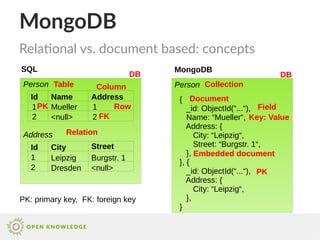
Relational vs. document based: concepts
SQL
Person
Name AddressId
MongoDB
1
2
Mueller 1
Id
Address
City Street
1
2
<null> 2
Leipzig Burgstr. 1
Dresden <null>
Person
{
_id: ObjectId(“...“),
Name: “Mueller“,
Address: {
City: “Leipzig“,
Street: “Burgstr. 1“,
},
}, {
_id: ObjectId(“...“),
Address: {
City: “Leipzig“,
},
}
DB DB
Table CollectionColumn
Row
Document
Key: Value
FieldPK
FK
Relation
Embedded document
PK
PK: primary key, FK: foreign key
MongoDB
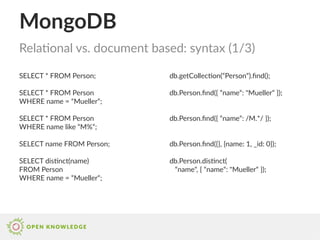
SELECT * FROM Person;
SELECT * FROM Person
WHERE name = “Mueller“;
SELECT * FROM Person
WHERE name like “M%“;
SELECT name FROM Person;
SELECT distinct(name)
FROM Person
WHERE name = “Mueller“;
Relational vs. document based: syntax (1/3)
db.getCollection(“Person“).find();
db.Person.find({ “name“: "Mueller“ });
db.Person.find({ “name“: /M.*/ });
db.Person.find({}, {name: 1, _id: 0});
db.Person.distinct(
“name“, { “name“: "Mueller“ });
MongoDB
SELECT * FROM Person
WHERE id > 10
AND name <> “Mueller“;
SELECT p.name FROM Person p
JOIN Address a
ON p.address = a.id
WHERE a.city = “Leipzig“
ORDER BY p.name DESC;
SELECT * FROM
WHERE name IS NOT NULL;
SELECT COUNT(*) FROM PERSON
WHERE name = “Mueller“;
Relational vs. document based: syntax (2/3)
db.Person.find({ $and: [
{ _id: { $gt: ObjectId("...") }},
{ name: { $ne: "Mueller" }}]});
db.Person.find(
{ Address.city: “Leipzig“ },
{ name: 1, _id: 0 }
).sort({ name: -1 });
db.Person.find( { name: {
$not: { $type: 10 }, $exists: true }});
db.Person.count({ name: “Mueller“ });
db.Person.find(
{ name: “Mueller“ }).count();
MongoDB
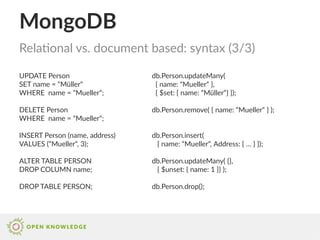
UPDATE Person
SET name = “Müller“
WHERE name = “Mueller“;
DELETE Person
WHERE name = “Mueller“;
INSERT Person (name, address)
VALUES (“Mueller“, 3);
ALTER TABLE PERSON
DROP COLUMN name;
DROP TABLE PERSON;
Relational vs. document based: syntax (3/3)
db.Person.updateMany(
{ name: “Mueller“ },
{ $set: { name: “Müller“} });
db.Person.remove( { name: “Mueller“ } );
db.Person.insert(
{ name: “Mueller“, Address: { … } });
db.Person.updateMany( {},
{ $unset: { name: 1 }} );
db.Person.drop();
MongoDB
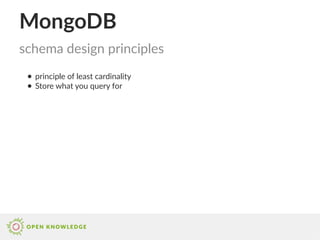
● principle of least cardinality
● Store what you query for
schema design principles
MongoDB
● applicable for 1:1 and 1:n when
n can‘t get to large
● Embedded document cannot get
too large
● Embedded document not very
likely to change
● arrays that grow without bound
should never be embedded
schema design: embedded document
{
_id: ObjectId(“...“),
City: “Leipzig“,
Street: “Burgstr. 1“,
Person: [
{
Name: “Mueller“,
},
{
Name: “Schneider“,
},
]
}
Address
MongoDB
● applicable for :n when n can‘t
get to large
● Referenced document likely to
change often in future
● there are many referenced
documents expected, so storing
only the reference is cheaper
● there are large referenced
documents expected, so storing
only the reference is cheaper
● arrays that grow without bound
should never be embedded
● Address should be accessible on
its own
schema design: referencing
{
_id: ObjectId(“...“),
City: “Leipzig“,
Street: “Burgstr. 1“,
Person: [
ObjectId(“...“), ObjectId(“...“),
]
}
{
_id: ObjectId(“...“),
Name: “Mueller“,
}
Address
Person
MongoDB
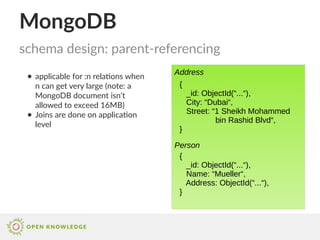
● applicable for :n relations when
n can get very large (note: a
MongoDB document isn‘t
allowed to exceed 16MB)
● Joins are done on application
level
schema design: parent-referencing
{
_id: ObjectId(“...“),
City: “Dubai“,
Street: “1 Sheikh Mohammed
bin Rashid Blvd“,
}
{
_id: ObjectId(“...“),
Name: “Mueller“,
Address: ObjectId(“...“),
}
Address
Person
MongoDB
● applicable for m:n when n and m
can‘t get to large and application
requires to navigate both ends
● disadvantage: need to update
operations when changing
references
schema design: two way referencing
{
_id: ObjectId(“...“),
City: “Leipzig“,
Street: “Burgstr. 1“,
Person: [
ObjectId(“...“), ObjectId(“...“),
]
}
{
_id: ObjectId(“...“),
Name: “Mueller“,
Address: [
ObjectId(“...“), ObjectId(“...“),
]
}
Address
Person
MongoDB
● queries expected to filter by
certain fields of the referenced
document, so including this field
already in the hosts saves an
additional query at application
level
● disadvantage: two update
operations for duplicated field
● disadvantage: additional
memory consumption
schema design: denormalization
{
_id: ObjectId(“...“),
City: “Leipzig“,
Street: “Burgstr. 1“,
}
{
_id: ObjectId(“...“),
Name: “Mueller“,
Address: [
{
id: ObjectId(“...“),
city: “Leipzig“,
}, ...
]
}
Address
Person
MongoDB
● applicable for :n relations when
n can get very large and it‘s
expected that application will
use pagination anyway
● DB schema will already create
the chunks, the application will
later query for
schema design: bucketing
{
_id: ObjectId(“...“),
City: “Leipzig“,
Street: “Burgstr. 1“,
}
{
_id: ObjectId(“...“),
Address: ObjectId(“...“),
Page: 13,
Count: 50,
Persons: [
{ Name: “Mueller“ }, ...
]
}
Address
Person
MongoDB
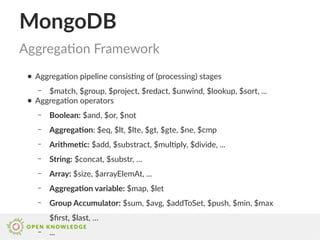
Aggregation Framework
● Aggregation pipeline consisting of (processing) stages
– $match, $group, $project, $redact, $unwind, $lookup, $sort, ...
● Aggregation operators
– Boolean: $and, $or, $not
– Aggregation: $eq, $lt, $lte, $gt, $gte, $ne, $cmp
– Arithmetic: $add, $substract, $multiply, $divide, ...
– String: $concat, $substr, …
– Array: $size, $arrayElemAt, ...
– Aggregation variable: $map, $let
– Group Accumulator: $sum, $avg, $addToSet, $push, $min, $max
$first, $last, …
– ...
MongoDB
Aggregation Framework
db.Person.aggregate( [
{ $match: { name: { $ne: "Fischer" } } },
{ $group: {
_id: "$name",
city_occurs: { $addToSet: "$Address.city" }
} },
{ $project: {
_id: "$_id",
city_count: { $size: "$city_occurs" }
}},
{ $sort: { name: 1 } }
{ $match: { city_count: { $gt: 1 } }},
{ $out: "PersonCityCount"}
] );
PersonCityCount
{
_id: Mueller,
city_count: 2,
},
{
_id: Schmidt,
city_count: 3,
}, ...
MongoDB
Map-Reduce
● More control than aggregation framework, but slower
var map = function() {
if(this.name != "Fischer") emit(this.name, this.Address.city);
}
var reduce = function(key, values) {
var distinct = [];
for(value in values) {
if(distinct.indexOf(value) == -1) distinct.push(value);
}
return distinct.length;
}
db.Person.mapReduce(map, reduce,
{
out: "PersonCityCount2"
});
MongoDB
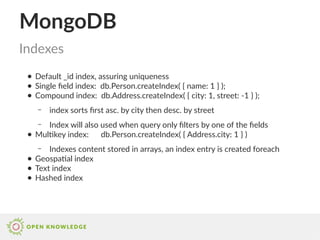
● Default _id index, assuring uniqueness
● Single field index: db.Person.createIndex( { name: 1 } );
● Compound index: db.Address.createIndex( { city: 1, street: -1 } );
– index sorts first asc. by city then desc. by street
– Index will also used when query only filters by one of the fields
● Multikey index: db.Person.createIndex( { Address.city: 1 } )
– Indexes content stored in arrays, an index entry is created foreach
● Geospatial index
● Text index
● Hashed index
Indexes
MongoDB
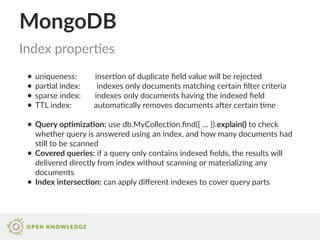
● uniqueness: insertion of duplicate field value will be rejected
● partial index: indexes only documents matching certain filter criteria
● sparse index: indexes only documents having the indexed field
● TTL index: automatically removes documents after certain time
● Query optimization: use db.MyCollection.find({ … }).explain() to check
whether query is answered using an index, and how many documents had
still to be scanned
● Covered queries: if a query only contains indexed fields, the results will
delivered directly from index without scanning or materializing any
documents
● Index intersection: can apply different indexes to cover query parts
Index properties
MongoDB
● Since MongoDB 3.0 WiredTiger is the default storage engine
– locking at document level enables concurrent writes on collection
– durability ensured via write-ahead transaction log and checkpoints (
Journaling)
– supports compression of collections and indexes (via snappy or zlib)
● MMAPv1 was the default storage until MongoDB 3.0
– since MongoDB 3.0 supports locking at collection level, before only
database level
– useful for selective updates, as WiredTiger always replace the hole
document in a update operation
Storage engines
MongoDB
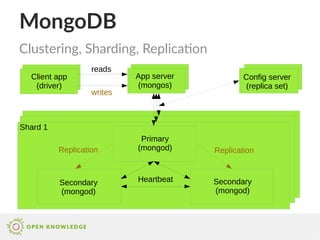
Clustering, Sharding, Replication
Shard 1
Primary
(mongod)
Secondary
(mongod)
Secondary
(mongod)
Config server
(replica set)
App server
(mongos)
Client app
(driver)
Heartbeat
Replication Replication
writes
reads
MongoDB
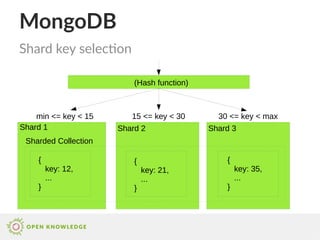
Shard key selection
Shard 1 Shard 2 Shard 3
{
key: 12,
...
}
{
key: 21,
...
}
{
key: 35,
...
}
min <= key < 15 15 <= key < 30 30 <= key < max
Sharded Collection
(Hash function)
MongoDB
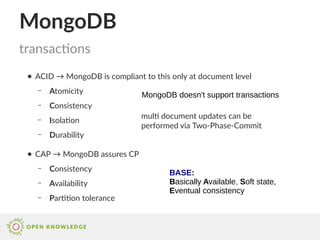
● ACID → MongoDB is compliant to this only at document level
– Atomicity
– Consistency
– Isolation
– Durability
● CAP → MongoDB assures CP
– Consistency
– Availability
– Partition tolerance
transactions
BASE:
Basically Available, Soft state,
Eventual consistency
MongoDB doesn't support transactions
multi document updates can be
performed via Two-Phase-Commit
MongoDB
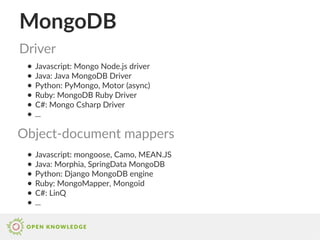
● Javascript: Mongo Node.js driver
● Java: Java MongoDB Driver
● Python: PyMongo, Motor (async)
● Ruby: MongoDB Ruby Driver
● C#: Mongo Csharp Driver
● ...
Driver
Object-document mappers
● Javascript: mongoose, Camo, MEAN.JS
● Java: Morphia, SpringData MongoDB
● Python: Django MongoDB engine
● Ruby: MongoMapper, Mongoid
● C#: LinQ
● ...
MongoDB
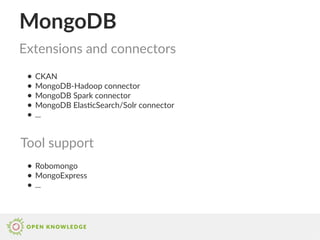
● CKAN
● MongoDB-Hadoop connector
● MongoDB Spark connector
● MongoDB ElasticSearch/Solr connector
● ...
Extensions and connectors
Tool support
● Robomongo
● MongoExpress
● ...
MongoDB
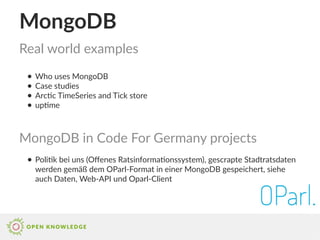
● Who uses MongoDB
● Case studies
● Arctic TimeSeries and Tick store
● uptime
Real world examples
MongoDB in Code For Germany projects
● Politik bei uns (Offenes Ratsinformationssystem), gescrapte Stadtratsdaten
werden gemäß dem OParl-Format in einer MongoDB gespeichert, siehe
auch Daten, Web-API und Oparl-Client
MongoDB
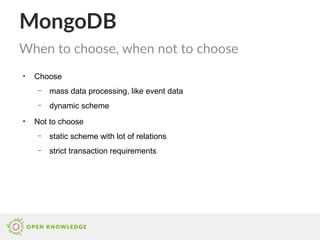
●
Choose
– mass data processing, like event data
– dynamic scheme
●
Not to choose
– static scheme with lot of relations
– strict transaction requirements
When to choose, when not to choose
MongoDB
●
MongoDB Schema Simulation
●
6 Rules of Thumb for MongoDB Schema Design
●
MongoDB Aggregation
●
MongoDB Indexes
●
Sharding
●
MongoDB University
●
Why Relational Databases are not the Cure-All
Links

Mongo DB schema design patterns

  • 1.
    MongoDB PRESENTED BY Jörg Reichert Licensedunder cc-by v3.0 (any jurisdiction)
  • 2.
    Introduction ● Name derivedfrom humongous (= gigantic) ● NoSQL (= not only SQL) database ● Document oriented database – documents stored as binary JSON (BSON) ● Ad-hoc queries ● Server side Javascript execution ● Aggregation / MapReduce ● High performance, availability, scalability
  • 3.
    MongoDB Relational vs. documentbased: concepts SQL Person Name AddressId MongoDB 1 2 Mueller 1 Id Address City Street 1 2 <null> 2 Leipzig Burgstr. 1 Dresden <null> Person { _id: ObjectId(“...“), Name: “Mueller“, Address: { City: “Leipzig“, Street: “Burgstr. 1“, }, }, { _id: ObjectId(“...“), Address: { City: “Leipzig“, }, } DB DB Table CollectionColumn Row Document Key: Value FieldPK FK Relation Embedded document PK PK: primary key, FK: foreign key
  • 4.
    MongoDB SELECT * FROMPerson; SELECT * FROM Person WHERE name = “Mueller“; SELECT * FROM Person WHERE name like “M%“; SELECT name FROM Person; SELECT distinct(name) FROM Person WHERE name = “Mueller“; Relational vs. document based: syntax (1/3) db.getCollection(“Person“).find(); db.Person.find({ “name“: "Mueller“ }); db.Person.find({ “name“: /M.*/ }); db.Person.find({}, {name: 1, _id: 0}); db.Person.distinct( “name“, { “name“: "Mueller“ });
  • 5.
    MongoDB SELECT * FROMPerson WHERE id > 10 AND name <> “Mueller“; SELECT p.name FROM Person p JOIN Address a ON p.address = a.id WHERE a.city = “Leipzig“ ORDER BY p.name DESC; SELECT * FROM WHERE name IS NOT NULL; SELECT COUNT(*) FROM PERSON WHERE name = “Mueller“; Relational vs. document based: syntax (2/3) db.Person.find({ $and: [ { _id: { $gt: ObjectId("...") }}, { name: { $ne: "Mueller" }}]}); db.Person.find( { Address.city: “Leipzig“ }, { name: 1, _id: 0 } ).sort({ name: -1 }); db.Person.find( { name: { $not: { $type: 10 }, $exists: true }}); db.Person.count({ name: “Mueller“ }); db.Person.find( { name: “Mueller“ }).count();
  • 6.
    MongoDB UPDATE Person SET name= “Müller“ WHERE name = “Mueller“; DELETE Person WHERE name = “Mueller“; INSERT Person (name, address) VALUES (“Mueller“, 3); ALTER TABLE PERSON DROP COLUMN name; DROP TABLE PERSON; Relational vs. document based: syntax (3/3) db.Person.updateMany( { name: “Mueller“ }, { $set: { name: “Müller“} }); db.Person.remove( { name: “Mueller“ } ); db.Person.insert( { name: “Mueller“, Address: { … } }); db.Person.updateMany( {}, { $unset: { name: 1 }} ); db.Person.drop();
  • 7.
    MongoDB ● principle ofleast cardinality ● Store what you query for schema design principles
  • 8.
    MongoDB ● applicable for1:1 and 1:n when n can‘t get to large ● Embedded document cannot get too large ● Embedded document not very likely to change ● arrays that grow without bound should never be embedded schema design: embedded document { _id: ObjectId(“...“), City: “Leipzig“, Street: “Burgstr. 1“, Person: [ { Name: “Mueller“, }, { Name: “Schneider“, }, ] } Address
  • 9.
    MongoDB ● applicable for:n when n can‘t get to large ● Referenced document likely to change often in future ● there are many referenced documents expected, so storing only the reference is cheaper ● there are large referenced documents expected, so storing only the reference is cheaper ● arrays that grow without bound should never be embedded ● Address should be accessible on its own schema design: referencing { _id: ObjectId(“...“), City: “Leipzig“, Street: “Burgstr. 1“, Person: [ ObjectId(“...“), ObjectId(“...“), ] } { _id: ObjectId(“...“), Name: “Mueller“, } Address Person
  • 10.
    MongoDB ● applicable for:n relations when n can get very large (note: a MongoDB document isn‘t allowed to exceed 16MB) ● Joins are done on application level schema design: parent-referencing { _id: ObjectId(“...“), City: “Dubai“, Street: “1 Sheikh Mohammed bin Rashid Blvd“, } { _id: ObjectId(“...“), Name: “Mueller“, Address: ObjectId(“...“), } Address Person
  • 11.
    MongoDB ● applicable form:n when n and m can‘t get to large and application requires to navigate both ends ● disadvantage: need to update operations when changing references schema design: two way referencing { _id: ObjectId(“...“), City: “Leipzig“, Street: “Burgstr. 1“, Person: [ ObjectId(“...“), ObjectId(“...“), ] } { _id: ObjectId(“...“), Name: “Mueller“, Address: [ ObjectId(“...“), ObjectId(“...“), ] } Address Person
  • 12.
    MongoDB ● queries expectedto filter by certain fields of the referenced document, so including this field already in the hosts saves an additional query at application level ● disadvantage: two update operations for duplicated field ● disadvantage: additional memory consumption schema design: denormalization { _id: ObjectId(“...“), City: “Leipzig“, Street: “Burgstr. 1“, } { _id: ObjectId(“...“), Name: “Mueller“, Address: [ { id: ObjectId(“...“), city: “Leipzig“, }, ... ] } Address Person
  • 13.
    MongoDB ● applicable for:n relations when n can get very large and it‘s expected that application will use pagination anyway ● DB schema will already create the chunks, the application will later query for schema design: bucketing { _id: ObjectId(“...“), City: “Leipzig“, Street: “Burgstr. 1“, } { _id: ObjectId(“...“), Address: ObjectId(“...“), Page: 13, Count: 50, Persons: [ { Name: “Mueller“ }, ... ] } Address Person
  • 14.
    MongoDB Aggregation Framework ● Aggregationpipeline consisting of (processing) stages – $match, $group, $project, $redact, $unwind, $lookup, $sort, ... ● Aggregation operators – Boolean: $and, $or, $not – Aggregation: $eq, $lt, $lte, $gt, $gte, $ne, $cmp – Arithmetic: $add, $substract, $multiply, $divide, ... – String: $concat, $substr, … – Array: $size, $arrayElemAt, ... – Aggregation variable: $map, $let – Group Accumulator: $sum, $avg, $addToSet, $push, $min, $max $first, $last, … – ...
  • 15.
    MongoDB Aggregation Framework db.Person.aggregate( [ {$match: { name: { $ne: "Fischer" } } }, { $group: { _id: "$name", city_occurs: { $addToSet: "$Address.city" } } }, { $project: { _id: "$_id", city_count: { $size: "$city_occurs" } }}, { $sort: { name: 1 } } { $match: { city_count: { $gt: 1 } }}, { $out: "PersonCityCount"} ] ); PersonCityCount { _id: Mueller, city_count: 2, }, { _id: Schmidt, city_count: 3, }, ...
  • 16.
    MongoDB Map-Reduce ● More controlthan aggregation framework, but slower var map = function() { if(this.name != "Fischer") emit(this.name, this.Address.city); } var reduce = function(key, values) { var distinct = []; for(value in values) { if(distinct.indexOf(value) == -1) distinct.push(value); } return distinct.length; } db.Person.mapReduce(map, reduce, { out: "PersonCityCount2" });
  • 17.
    MongoDB ● Default _idindex, assuring uniqueness ● Single field index: db.Person.createIndex( { name: 1 } ); ● Compound index: db.Address.createIndex( { city: 1, street: -1 } ); – index sorts first asc. by city then desc. by street – Index will also used when query only filters by one of the fields ● Multikey index: db.Person.createIndex( { Address.city: 1 } ) – Indexes content stored in arrays, an index entry is created foreach ● Geospatial index ● Text index ● Hashed index Indexes
  • 18.
    MongoDB ● uniqueness: insertionof duplicate field value will be rejected ● partial index: indexes only documents matching certain filter criteria ● sparse index: indexes only documents having the indexed field ● TTL index: automatically removes documents after certain time ● Query optimization: use db.MyCollection.find({ … }).explain() to check whether query is answered using an index, and how many documents had still to be scanned ● Covered queries: if a query only contains indexed fields, the results will delivered directly from index without scanning or materializing any documents ● Index intersection: can apply different indexes to cover query parts Index properties
  • 19.
    MongoDB ● Since MongoDB3.0 WiredTiger is the default storage engine – locking at document level enables concurrent writes on collection – durability ensured via write-ahead transaction log and checkpoints ( Journaling) – supports compression of collections and indexes (via snappy or zlib) ● MMAPv1 was the default storage until MongoDB 3.0 – since MongoDB 3.0 supports locking at collection level, before only database level – useful for selective updates, as WiredTiger always replace the hole document in a update operation Storage engines
  • 20.
    MongoDB Clustering, Sharding, Replication Shard1 Primary (mongod) Secondary (mongod) Secondary (mongod) Config server (replica set) App server (mongos) Client app (driver) Heartbeat Replication Replication writes reads
  • 21.
    MongoDB Shard key selection Shard1 Shard 2 Shard 3 { key: 12, ... } { key: 21, ... } { key: 35, ... } min <= key < 15 15 <= key < 30 30 <= key < max Sharded Collection (Hash function)
  • 22.
    MongoDB ● ACID →MongoDB is compliant to this only at document level – Atomicity – Consistency – Isolation – Durability ● CAP → MongoDB assures CP – Consistency – Availability – Partition tolerance transactions BASE: Basically Available, Soft state, Eventual consistency MongoDB doesn't support transactions multi document updates can be performed via Two-Phase-Commit
  • 23.
    MongoDB ● Javascript: MongoNode.js driver ● Java: Java MongoDB Driver ● Python: PyMongo, Motor (async) ● Ruby: MongoDB Ruby Driver ● C#: Mongo Csharp Driver ● ... Driver Object-document mappers ● Javascript: mongoose, Camo, MEAN.JS ● Java: Morphia, SpringData MongoDB ● Python: Django MongoDB engine ● Ruby: MongoMapper, Mongoid ● C#: LinQ ● ...
  • 24.
    MongoDB ● CKAN ● MongoDB-Hadoopconnector ● MongoDB Spark connector ● MongoDB ElasticSearch/Solr connector ● ... Extensions and connectors Tool support ● Robomongo ● MongoExpress ● ...
  • 25.
    MongoDB ● Who usesMongoDB ● Case studies ● Arctic TimeSeries and Tick store ● uptime Real world examples MongoDB in Code For Germany projects ● Politik bei uns (Offenes Ratsinformationssystem), gescrapte Stadtratsdaten werden gemäß dem OParl-Format in einer MongoDB gespeichert, siehe auch Daten, Web-API und Oparl-Client
  • 26.
    MongoDB ● Choose – mass dataprocessing, like event data – dynamic scheme ● Not to choose – static scheme with lot of relations – strict transaction requirements When to choose, when not to choose
  • 27.
    MongoDB ● MongoDB Schema Simulation ● 6Rules of Thumb for MongoDB Schema Design ● MongoDB Aggregation ● MongoDB Indexes ● Sharding ● MongoDB University ● Why Relational Databases are not the Cure-All Links