Managing Protected Data with
Globus Connect Server v5
Rachana Ananthakrishnan
rachana@globus.org
Greg Nawrocki
greg@globus.org
Manage Protected Data
2
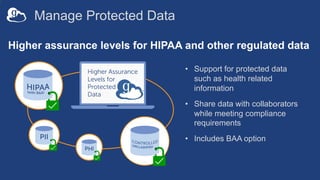
Higher assurance levels for HIPAA and other regulated data
• Support for protected data
such as health related
information
• Share data with collaborators
while meeting compliance
requirements
• Includes BAA option
Globus for high assurance data management
• Restricted data handling
– PHI (Protected Health Information)
– PII (Personally identifiable information)
– Controlled Unclassified Information
• University of Chicago security controls
– NIST 800-53 Low
– Superset of 800-171 Low
• Business Associate Agreements (BAA) will be between
University of Chicago and our subscribers
– University of Chicago has a BAA with Amazon
Restricted data disclosure to Globus
• Globus never sees file contents
– File contents can have restricted data
• File paths/name can have restricted data (e.g. PHI)
• None of the other elements (endpoint definitions,
labels, collection definitions) can contain restricted
data
Globus services in scope for first release
• Globus Services: Auth, Transfer & Sharing, Groups
• Globus Connect Server v5.2 and above
• Globus Connect Personal v3.x
• Web app (app.globus.org)
• Globus Command Line Interface (CLI)
Other features/services/products
• Connectors: Google Drive, AWS S3, CEPH, Box
– Plan to support all connectors in future releases
• Out of scope: Globus ID, old web app, GCS v4.x,
GCSv5.0, 5.1, GCP2.x
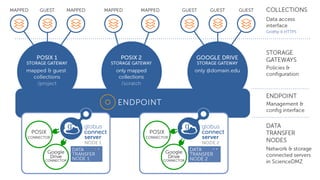
Globus Connect Server 5.3
• Support high assurance data access and standard
data access
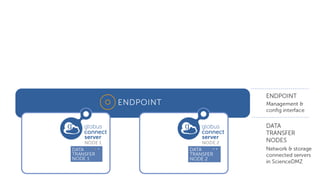
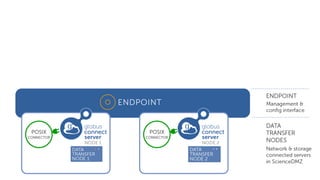
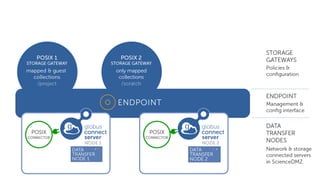
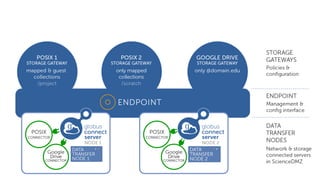
• Multiple connectors:
– POSIX
– Google Drive
– AWS S3
– Ceph
– Box
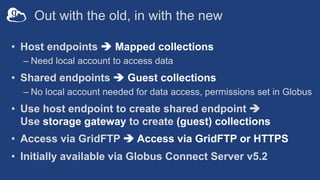
Out with the old, in with the new
• Host endpoints è Mapped collections
– Need local account to access data
• Shared endpoints è Guest collections
– No local account needed for data access, permissions set in Globus
• Use host endpoint to create shared endpoint è
Use storage gateway to create (guest) collections
• Access via GridFTP è Access via GridFTP or HTTPS
• Initially available via Globus Connect Server v5.2
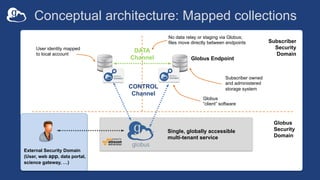
Conceptual architecture: Mapped collections
Globus Endpoint
Subscriber
Security
Domain
Globus
Security
Domain
DATA
Channel
CONTROL
Channel
No data relay or staging via Globus;
files move directly between endpoints
User identity mapped
to local account
Single, globally accessible
multi-tenant service
Globus
“client” software
Subscriber owned
and administered
storage system
External Security Domain
(User, web app, data portal,
science gateway, …)
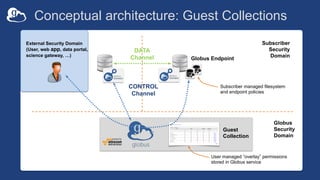
Conceptual architecture: Guest Collections
Subscriber
Security
Domain
User managed ”overlay” permissions
stored in Globus service
Guest
Collection
DATA
Channel
CONTROL
Channel
Subscriber managed filesystem
and endpoint policies
External Security Domain
(User, web app, data portal,
science gateway, …)
Globus Endpoint
Globus
Security
Domain
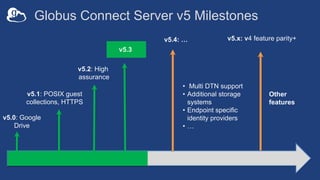
Globus Connect Server v5 Milestones
v5.0: Google
Drive
v5.1: POSIX guest
collections, HTTPS
v5.x: v4 feature parity+
v5.3
• Multi DTN support
• Additional storage
systems
• Endpoint specific
identity providers
• …
Other
features
v5.2: High
assurance
v5.4: …
High Assurance features
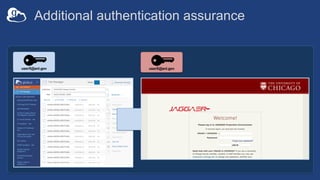
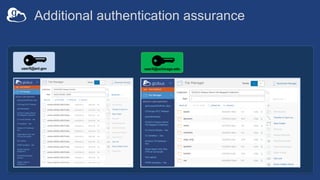
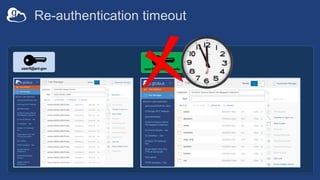
• Additional authentication assurance
– Per storage gateway policy on frequency of authentication with
specific identity for access to data (timeout)
– Ensure that user authenticates with the specific identity that
gives them access within session (decoupling linked identities)
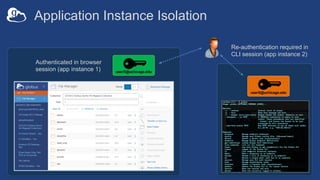
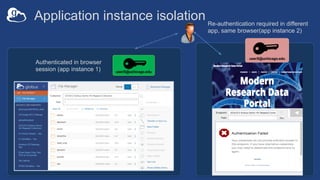
• Session/device isolation
– Authentication context is per application, per session (~browser
session)
• Enforces encryption of all user data in transit
• Audit logging
Additional authentication assurance
userX@anl.govuserX@anl.gov
Additional authentication assurance
userX@anl.gov userX@uchicago.edu
Re-authentication timeout
userX@anl.gov userX@uchicago.edu
Application Instance Isolation
userX@uchicago.edu
Authenticated in browser
session (app instance 1)
Re-authentication required in
CLI session (app instance 2)
userX@uchicago.edu
Application instance isolation
userX@uchicago.edu
Authenticated in browser
session (app instance 1)
Re-authentication required in different
app, same browser(app instance 2)
userX@uchicago.edu
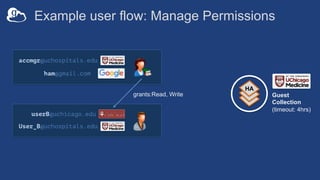
Example user flow: Manage Permissions
HA
accmgr@uchospitals.edu
ham@gmail.com
Guest
Collection
(timeout: 4hrs)
userB@uchicago.edu
User_B@uchospitals.edu
grants:Read, Write
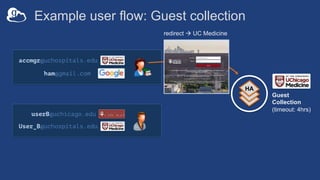
Example user flow: Guest collection
HA
accmgr@uchospitals.edu
ham@gmail.com
Guest
Collection
(timeout: 4hrs)
redirect à UC Medicine
userB@uchicago.edu
User_B@uchospitals.edu
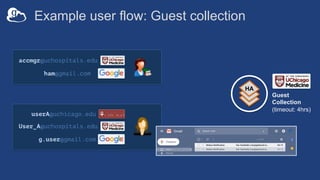
Example user flow: Guest collection
HA
userA@uchicago.edu
User_A@uchospitals.edu
g.user@gmail.com
accmgr@uchospitals.edu
ham@gmail.com
Guest
Collection
(timeout: 4hrs)
[Role:Access Manager]
grants:Read
Example user flow: Guest collection
HA
userA@uchicago.edu
User_A@uchospitals.edu
g.user@gmail.com
accmgr@uchospitals.edu
ham@gmail.com
Guest
Collection
(timeout: 4hrs)
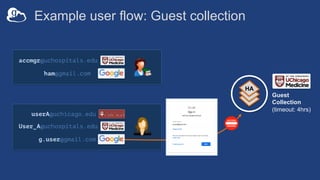
Example user flow: Guest collection
HA
userA@uchicago.edu
User_A@uchospitals.edu
g.user@gmail.com
accmgr@uchospitals.edu
ham@gmail.com
Guest
Collection
(timeout: 4hrs)
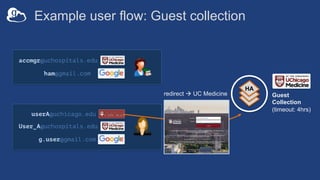
Example user flow: Guest collection
HA
userA@uchicago.edu
User_A@uchospitals.edu
g.user@gmail.com
accmgr@uchospitals.edu
ham@gmail.com
Guest
Collection
(timeout: 4hrs)
redirect à UC Medicine
Example user flow: Guest collection
HA
userA@uchicago.edu
User_A@uchospitals.edu
g.user@gmail.com
accmgr@uchospitals.edu
ham@gmail.com
[Permission:Read]
Guest
Collection
(timeout: 4hrs)
Example management flows
• Managing High Assurance endpoints requires
authentication with authorized identity, within session
– Endpoint configuration
– Globus Groups used to provide access to high assurance data
– Management Console access (e.g. to review logs)
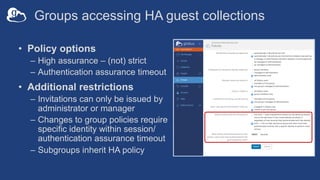
Groups accessing HA guest collections
• Policy options
– High assurance – (not) strict
– Authentication assurance timeout
• Additional restrictions
– Invitations can only be issued by
administrator or manager
– Changes to group policies require
specific identity within session/
authentication assurance timeout
– Subgroups inherit HA policy
Globus security features – endpoint
• Data remain at institution, not hosted by Globus
• Integrity checks of transferred data
• Encryption
– All communications and data in transit are encrypted (data in
flight)
– Encryption algorithm determined by institutional deployment
• Access Control
– Identities provided and managed by institution
– Institution controls all access policies
Globus Connect Server v5 installation flow
• Install GCSv5.3+ binaries
• Register the endpoint at developers.globus.org
• Add connectors
• Add storage gateways
– Set as high assurance, configure authentication assurance timeout
– Set policy on type of collections supported
• Add mapped collection
– User must login with identity from configured domain
– Local account determined by removing the TLD:
username@example1.org è username is local account
https://docs.globus.org/globus-connect-server-v5-installation-guide/ for
installation instructions
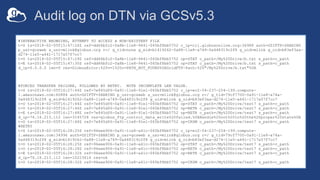
Audit log on DTN via GCSv5.3
Globus Connect Personal (GCP)
• New version for high assurance data handling
• Allow user to choose an identity for use with the
endpoint
– Using GCP for data access requires that identity be in session
– Guest collections will work as they do with GCS
• Additional logging
Globus security features - service
• Secure operations
– Intrusion detection and prevention
– Performance and health monitoring
– Logging
– Secure remote access, access control
– Uniform configuration management and change control
– Backups and disaster recovery
– All data stored by Globus is encrypted at rest
• Use AWS best practices for securing environment
– Virtual Private Clouds – host security
– AWS security groups – network security
– AWS IAM (identity and access management) best practices – individual
security
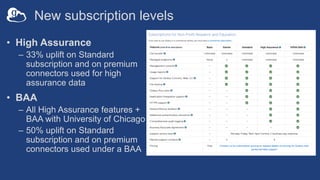
New subscription levels
• High Assurance
– 33% uplift on Standard
subscription and on premium
connectors used for high
assurance data
• BAA
– All High Assurance features +
BAA with University of Chicago
– 50% uplift on Standard
subscription and on premium
connectors used under a BAA
Resources
• New terminologies and ways of doing things:
https://docs.globus.org/globus-connect-server-v5-
installation-guide/ for 4.x – 5.x terminology and
architecture changes
• See https://docs.globus.org/high-assurance/ for
instructions on how to create a high assurance
collection
• GCSv5.3 installation instructions: https://docs.globus.org/globus-
connect-server-v5-installation-guide/ for installation instructions
Questions?

Tutorial: Managing Protected Data with Globus Connect Server v5

  • 1.
    Managing Protected Datawith Globus Connect Server v5 Rachana Ananthakrishnan rachana@globus.org Greg Nawrocki greg@globus.org
  • 2.
    Manage Protected Data 2 Higherassurance levels for HIPAA and other regulated data • Support for protected data such as health related information • Share data with collaborators while meeting compliance requirements • Includes BAA option
  • 3.
    Globus for highassurance data management • Restricted data handling – PHI (Protected Health Information) – PII (Personally identifiable information) – Controlled Unclassified Information • University of Chicago security controls – NIST 800-53 Low – Superset of 800-171 Low • Business Associate Agreements (BAA) will be between University of Chicago and our subscribers – University of Chicago has a BAA with Amazon
  • 4.
    Restricted data disclosureto Globus • Globus never sees file contents – File contents can have restricted data • File paths/name can have restricted data (e.g. PHI) • None of the other elements (endpoint definitions, labels, collection definitions) can contain restricted data
  • 5.
    Globus services inscope for first release • Globus Services: Auth, Transfer & Sharing, Groups • Globus Connect Server v5.2 and above • Globus Connect Personal v3.x • Web app (app.globus.org) • Globus Command Line Interface (CLI)
  • 6.
    Other features/services/products • Connectors:Google Drive, AWS S3, CEPH, Box – Plan to support all connectors in future releases • Out of scope: Globus ID, old web app, GCS v4.x, GCSv5.0, 5.1, GCP2.x
  • 7.
    Globus Connect Server5.3 • Support high assurance data access and standard data access • Multiple connectors: – POSIX – Google Drive – AWS S3 – Ceph – Box
  • 14.
    Out with theold, in with the new • Host endpoints è Mapped collections – Need local account to access data • Shared endpoints è Guest collections – No local account needed for data access, permissions set in Globus • Use host endpoint to create shared endpoint è Use storage gateway to create (guest) collections • Access via GridFTP è Access via GridFTP or HTTPS • Initially available via Globus Connect Server v5.2
  • 15.
    Conceptual architecture: Mappedcollections Globus Endpoint Subscriber Security Domain Globus Security Domain DATA Channel CONTROL Channel No data relay or staging via Globus; files move directly between endpoints User identity mapped to local account Single, globally accessible multi-tenant service Globus “client” software Subscriber owned and administered storage system External Security Domain (User, web app, data portal, science gateway, …)
  • 16.
    Conceptual architecture: GuestCollections Subscriber Security Domain User managed ”overlay” permissions stored in Globus service Guest Collection DATA Channel CONTROL Channel Subscriber managed filesystem and endpoint policies External Security Domain (User, web app, data portal, science gateway, …) Globus Endpoint Globus Security Domain
  • 17.
    Globus Connect Serverv5 Milestones v5.0: Google Drive v5.1: POSIX guest collections, HTTPS v5.x: v4 feature parity+ v5.3 • Multi DTN support • Additional storage systems • Endpoint specific identity providers • … Other features v5.2: High assurance v5.4: …
  • 18.
    High Assurance features •Additional authentication assurance – Per storage gateway policy on frequency of authentication with specific identity for access to data (timeout) – Ensure that user authenticates with the specific identity that gives them access within session (decoupling linked identities) • Session/device isolation – Authentication context is per application, per session (~browser session) • Enforces encryption of all user data in transit • Audit logging
  • 19.
  • 20.
  • 21.
  • 22.
    Application Instance Isolation userX@uchicago.edu Authenticatedin browser session (app instance 1) Re-authentication required in CLI session (app instance 2) userX@uchicago.edu
  • 23.
    Application instance isolation userX@uchicago.edu Authenticatedin browser session (app instance 1) Re-authentication required in different app, same browser(app instance 2) userX@uchicago.edu
  • 24.
    Example user flow:Manage Permissions HA accmgr@uchospitals.edu ham@gmail.com Guest Collection (timeout: 4hrs) userB@uchicago.edu User_B@uchospitals.edu grants:Read, Write
  • 25.
    Example user flow:Guest collection HA accmgr@uchospitals.edu ham@gmail.com Guest Collection (timeout: 4hrs) redirect à UC Medicine userB@uchicago.edu User_B@uchospitals.edu
  • 26.
    Example user flow:Guest collection HA userA@uchicago.edu User_A@uchospitals.edu g.user@gmail.com accmgr@uchospitals.edu ham@gmail.com Guest Collection (timeout: 4hrs) [Role:Access Manager] grants:Read
  • 27.
    Example user flow:Guest collection HA userA@uchicago.edu User_A@uchospitals.edu g.user@gmail.com accmgr@uchospitals.edu ham@gmail.com Guest Collection (timeout: 4hrs)
  • 28.
    Example user flow:Guest collection HA userA@uchicago.edu User_A@uchospitals.edu g.user@gmail.com accmgr@uchospitals.edu ham@gmail.com Guest Collection (timeout: 4hrs)
  • 29.
    Example user flow:Guest collection HA userA@uchicago.edu User_A@uchospitals.edu g.user@gmail.com accmgr@uchospitals.edu ham@gmail.com Guest Collection (timeout: 4hrs) redirect à UC Medicine
  • 30.
    Example user flow:Guest collection HA userA@uchicago.edu User_A@uchospitals.edu g.user@gmail.com accmgr@uchospitals.edu ham@gmail.com [Permission:Read] Guest Collection (timeout: 4hrs)
  • 31.
    Example management flows •Managing High Assurance endpoints requires authentication with authorized identity, within session – Endpoint configuration – Globus Groups used to provide access to high assurance data – Management Console access (e.g. to review logs)
  • 32.
    Groups accessing HAguest collections • Policy options – High assurance – (not) strict – Authentication assurance timeout • Additional restrictions – Invitations can only be issued by administrator or manager – Changes to group policies require specific identity within session/ authentication assurance timeout – Subgroups inherit HA policy
  • 33.
    Globus security features– endpoint • Data remain at institution, not hosted by Globus • Integrity checks of transferred data • Encryption – All communications and data in transit are encrypted (data in flight) – Encryption algorithm determined by institutional deployment • Access Control – Identities provided and managed by institution – Institution controls all access policies
  • 34.
    Globus Connect Serverv5 installation flow • Install GCSv5.3+ binaries • Register the endpoint at developers.globus.org • Add connectors • Add storage gateways – Set as high assurance, configure authentication assurance timeout – Set policy on type of collections supported • Add mapped collection – User must login with identity from configured domain – Local account determined by removing the TLD: username@example1.org è username is local account https://docs.globus.org/globus-connect-server-v5-installation-guide/ for installation instructions
  • 35.
    Audit log onDTN via GCSv5.3
  • 36.
    Globus Connect Personal(GCP) • New version for high assurance data handling • Allow user to choose an identity for use with the endpoint – Using GCP for data access requires that identity be in session – Guest collections will work as they do with GCS • Additional logging
  • 37.
    Globus security features- service • Secure operations – Intrusion detection and prevention – Performance and health monitoring – Logging – Secure remote access, access control – Uniform configuration management and change control – Backups and disaster recovery – All data stored by Globus is encrypted at rest • Use AWS best practices for securing environment – Virtual Private Clouds – host security – AWS security groups – network security – AWS IAM (identity and access management) best practices – individual security
  • 38.
    New subscription levels •High Assurance – 33% uplift on Standard subscription and on premium connectors used for high assurance data • BAA – All High Assurance features + BAA with University of Chicago – 50% uplift on Standard subscription and on premium connectors used under a BAA
  • 39.
    Resources • New terminologiesand ways of doing things: https://docs.globus.org/globus-connect-server-v5- installation-guide/ for 4.x – 5.x terminology and architecture changes • See https://docs.globus.org/high-assurance/ for instructions on how to create a high assurance collection • GCSv5.3 installation instructions: https://docs.globus.org/globus- connect-server-v5-installation-guide/ for installation instructions
  • 40.