Simplifying Science Gateway Data
Management with Globus
Part 2 – Large-scale Data Transfer
October 2020, Gateways 2020
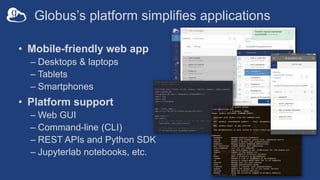
Globus’s platform simplifies applications
• Mobile-friendly web app
– Desktops & laptops
– Tablets
– Smartphones
• Platform support
– Web GUI
– Command-line (CLI)
– REST APIs and Python SDK
– Jupyterlab notebooks, etc.
Why would your gateway need to transfer big files?
• Run an analysis on a community dataset
– Gateway user specifies a type of analysis using a standard dataset, or slice of a
dataset
– Data needs to be moved to the compute server
• Analyze the gateway user’s data
– Data needs to be uploaded from researcher’s computer to the compute server
• Allow gateway user to download simulation results
– Data needs to be downloaded from the compute server to researcher’s computer
• Allow gateway user to submit data to a repository
– Data needs to be transferred to the gateway’s storage from the researcher’s
computer or from a compute server
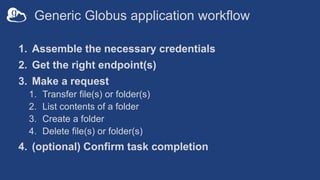
Generic Globus application workflow
1. Assemble the necessary credentials
2. Get the right endpoint(s)
3. Make a request
1. Transfer file(s) or folder(s)
2. List contents of a folder
3. Create a folder
4. Delete file(s) or folder(s)
4. (optional) Confirm task completion
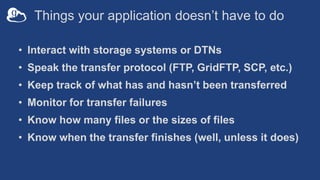
Things your application doesn’t have to do
• Interact with storage systems or DTNs
• Speak the transfer protocol (FTP, GridFTP, SCP, etc.)
• Keep track of what has and hasn’t been transferred
• Monitor for transfer failures
• Know how many files or the sizes of files
• Know when the transfer finishes (well, unless it does)
Demonstration
Large-scale file transfer
in a web application
https://mrdp.globus.org/
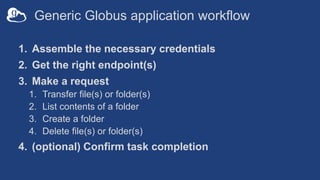
Generic Globus application workflow
1. Assemble the necessary credentials
2. Get the right endpoint(s)
3. Make a request
1. Transfer file(s) or folder(s)
2. List contents of a folder
3. Create a folder
4. Delete file(s) or folder(s)
4. (optional) Confirm task completion
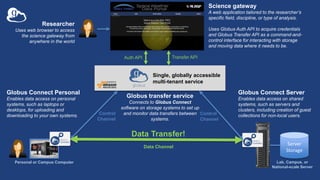
Single, globally accessible
multi-tenant service
Server
Storage
Control
Channel
Data Channel
Control
Channel
Data Transfer!
Researcher
Uses web browser to access
the science gateway from
anywhere in the world
Globus transfer service
Connects to Globus Connect
software on storage systems to set up
and monitor data transfers between
systems.
Personal or Campus Computer
Globus Connect Server
Enables data access on shared
systems, such as servers and
clusters, including creation of guest
collections for non-local users.
Globus Connect Personal
Enables data access on personal
systems, such as laptops or
desktops, for uploading and
downloading to your own systems.
Lab, Campus, or
National-scale Server
Science gateway
A web application tailored to the researcher’s
specific field, discipline, or type of analysis.
Uses Globus Auth API to acquire credentials
and Globus Transfer API as a command-and-
control interface for interacting with storage
and moving data where it needs to be.
Auth API Transfer API
What needs to be in place for it to work?
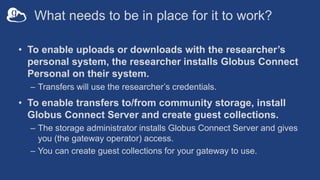
• To enable uploads or downloads with the researcher’s
personal system, the researcher installs Globus Connect
Personal on their system.
– Transfers will use the researcher’s credentials.
• To enable transfers to/from community storage, install
Globus Connect Server and create guest collections.
– The storage administrator installs Globus Connect Server and gives
you (the gateway operator) access.
– You can create guest collections for your gateway to use.
How do we identify the endpoints?
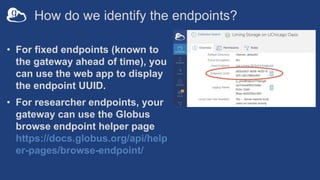
• For fixed endpoints (known to
the gateway ahead of time), you
can use the web app to display
the endpoint UUID.
• For researcher endpoints, your
gateway can use the Globus
browse endpoint helper page
https://docs.globus.org/api/help
er-pages/browse-endpoint/
What credentials are required?
• Gateway requests the transfer on the researcher’s behalf
– E.g., upload/download from researcher’s personal endpoint
– Requires researcher credentials (and permissions)
– Researcher must login to the gateway using Globus and allow the
gateway to perform transfers on the researcher’s behalf
– Researcher must be granted permission to the other end of the transfer
(e.g., via a guest collection)
• Gateway requests the transfer on its own behalf
– E.g., community-owned data in the gateway’s storage
– Requires gateway credentials (and permissions)
– The request is made using the gateway’s credentials and permissions
– Doesn’t require the researcher to login using Globus
Researcher credentials
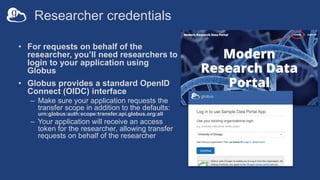
• For requests on behalf of the
researcher, you’ll need researchers to
login to your application using
Globus
• Globus provides a standard OpenID
Connect (OIDC) interface
– Make sure your application requests the
transfer scope in addition to the defaults:
urn:globus:auth:scope:transfer.api.globus.org:all
– Your application will receive an access
token for the researcher, allowing transfer
requests on behalf of the researcher
Client (application) credentials
• To use Globus in an application, you need to register it at
https://developers.globus.org/
• When you register, you’ll receive a Client ID and a Client
Secret.
– These allow your application to use Globus services (as itself)
– Your code can obtain an access token for the Globus Transfer
service
– All requests using this access token will be performed as user
client-id@clients.auth.globus.org
– You can assign permissions to this ID on Globus endpoints, so the
gateway can do things as itself instead of as the logged-in user
Code
Large-scale file transfer
in a web application

Gateways 2020 Tutorial - Large Scale Data Transfer with Globus

  • 1.
    Simplifying Science GatewayData Management with Globus Part 2 – Large-scale Data Transfer October 2020, Gateways 2020
  • 2.
    Globus’s platform simplifiesapplications • Mobile-friendly web app – Desktops & laptops – Tablets – Smartphones • Platform support – Web GUI – Command-line (CLI) – REST APIs and Python SDK – Jupyterlab notebooks, etc.
  • 3.
    Why would yourgateway need to transfer big files? • Run an analysis on a community dataset – Gateway user specifies a type of analysis using a standard dataset, or slice of a dataset – Data needs to be moved to the compute server • Analyze the gateway user’s data – Data needs to be uploaded from researcher’s computer to the compute server • Allow gateway user to download simulation results – Data needs to be downloaded from the compute server to researcher’s computer • Allow gateway user to submit data to a repository – Data needs to be transferred to the gateway’s storage from the researcher’s computer or from a compute server
  • 4.
    Generic Globus applicationworkflow 1. Assemble the necessary credentials 2. Get the right endpoint(s) 3. Make a request 1. Transfer file(s) or folder(s) 2. List contents of a folder 3. Create a folder 4. Delete file(s) or folder(s) 4. (optional) Confirm task completion
  • 5.
    Things your applicationdoesn’t have to do • Interact with storage systems or DTNs • Speak the transfer protocol (FTP, GridFTP, SCP, etc.) • Keep track of what has and hasn’t been transferred • Monitor for transfer failures • Know how many files or the sizes of files • Know when the transfer finishes (well, unless it does)
  • 6.
    Demonstration Large-scale file transfer ina web application https://mrdp.globus.org/
  • 7.
    Generic Globus applicationworkflow 1. Assemble the necessary credentials 2. Get the right endpoint(s) 3. Make a request 1. Transfer file(s) or folder(s) 2. List contents of a folder 3. Create a folder 4. Delete file(s) or folder(s) 4. (optional) Confirm task completion
  • 8.
    Single, globally accessible multi-tenantservice Server Storage Control Channel Data Channel Control Channel Data Transfer! Researcher Uses web browser to access the science gateway from anywhere in the world Globus transfer service Connects to Globus Connect software on storage systems to set up and monitor data transfers between systems. Personal or Campus Computer Globus Connect Server Enables data access on shared systems, such as servers and clusters, including creation of guest collections for non-local users. Globus Connect Personal Enables data access on personal systems, such as laptops or desktops, for uploading and downloading to your own systems. Lab, Campus, or National-scale Server Science gateway A web application tailored to the researcher’s specific field, discipline, or type of analysis. Uses Globus Auth API to acquire credentials and Globus Transfer API as a command-and- control interface for interacting with storage and moving data where it needs to be. Auth API Transfer API
  • 9.
    What needs tobe in place for it to work? • To enable uploads or downloads with the researcher’s personal system, the researcher installs Globus Connect Personal on their system. – Transfers will use the researcher’s credentials. • To enable transfers to/from community storage, install Globus Connect Server and create guest collections. – The storage administrator installs Globus Connect Server and gives you (the gateway operator) access. – You can create guest collections for your gateway to use.
  • 10.
    How do weidentify the endpoints? • For fixed endpoints (known to the gateway ahead of time), you can use the web app to display the endpoint UUID. • For researcher endpoints, your gateway can use the Globus browse endpoint helper page https://docs.globus.org/api/help er-pages/browse-endpoint/
  • 11.
    What credentials arerequired? • Gateway requests the transfer on the researcher’s behalf – E.g., upload/download from researcher’s personal endpoint – Requires researcher credentials (and permissions) – Researcher must login to the gateway using Globus and allow the gateway to perform transfers on the researcher’s behalf – Researcher must be granted permission to the other end of the transfer (e.g., via a guest collection) • Gateway requests the transfer on its own behalf – E.g., community-owned data in the gateway’s storage – Requires gateway credentials (and permissions) – The request is made using the gateway’s credentials and permissions – Doesn’t require the researcher to login using Globus
  • 12.
    Researcher credentials • Forrequests on behalf of the researcher, you’ll need researchers to login to your application using Globus • Globus provides a standard OpenID Connect (OIDC) interface – Make sure your application requests the transfer scope in addition to the defaults: urn:globus:auth:scope:transfer.api.globus.org:all – Your application will receive an access token for the researcher, allowing transfer requests on behalf of the researcher
  • 13.
    Client (application) credentials •To use Globus in an application, you need to register it at https://developers.globus.org/ • When you register, you’ll receive a Client ID and a Client Secret. – These allow your application to use Globus services (as itself) – Your code can obtain an access token for the Globus Transfer service – All requests using this access token will be performed as user client-id@clients.auth.globus.org – You can assign permissions to this ID on Globus endpoints, so the gateway can do things as itself instead of as the logged-in user
  • 14.

Editor's Notes

  • #3 The same things you can do in Globus’s GUI can also be done by an application using APIs, SDK, or CLI. This simplifies applications because Globus manages the transfer: the application only needs to assemble the right credentials and make the request. Globus does the rest.
  • #4 Examples of “analysis on a community dataset”: Examples of ”analyze user’s data”: Examples of “download simulation results”: Examples of “submit data to a repository”:
  • #5 KEY POINT: This is ALL the application has to do. (Next slide shows what the application DOES NOT have to do.)
  • #7 Modern Research Data Portal: https://mrdp.globus.org/ Show how you login using Globus. Show how you browse data in the portal and SELECT AN ENDPOINT using the Globus browse endpoint helper page. Show how the transfer is submitted by the portal itself. (Maybe) show how https://app.globus.org/ also shows the transfer!
  • #8 KEY POINT: This is ALL the application has to do. (Next slide shows what the application DOES NOT have to do.)
  • #15 WHICH GITHUB REPO WILL WE WALK THROUGH?