OPTIMISING
WORKFLOWS FOR
DIGITAL ARCHIVES
UCD Digital Library
Audrey Drohan
SLA – Digital Initiatives
10th July 2018
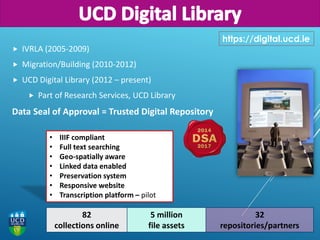
 IVRLA (2005-2009)
 Migration/Building (2010-2012)
 UCD Digital Library (2012 – present)
 Part of Research Services, UCD Library
Data Seal of Approval = Trusted Digital Repository
https://digital.ucd.ie
• IIIF compliant
• Full text searching
• Geo-spatially aware
• Linked data enabled
• Preservation system
• Responsive website
• Transcription platform – pilot
82
collections online
5 million
file assets
32
repositories/partners
© University College Dublin
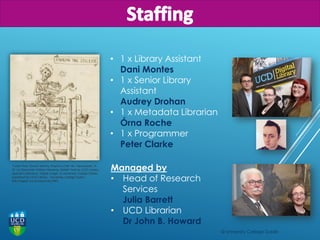
"Letter from Gerard Manley Hopkins (Oak Hill, Hampstead, N.
W.) to Alexander William Mowbray Baillie" held by UCD Library,
Special Collections. Digital image: © University College Dublin,
published by UCD Library, University College Dublin,
http://digital.ucd.ie/view/ivrla:3963
• 1 x Library Assistant
Dani Montes
• 1 x Senior Library
Assistant
Audrey Drohan
• 1 x Metadata Librarian
Órna Roche
• 1 x Programmer
Peter Clarke
Managed by
• Head of Research
Services
Julia Barrett
• UCD Librarian
Dr John B. Howard
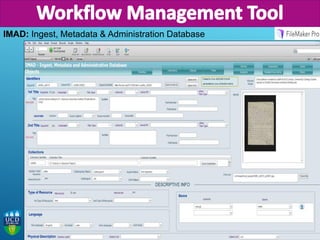
IMAD: Ingest, Metadata & Administration Database
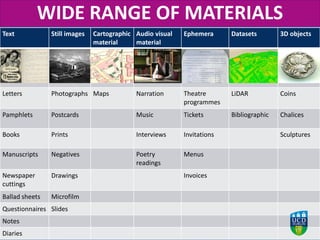
Text Still images Cartographic
material
Audio visual
material
Ephemera Datasets 3D objects
Letters Photographs Maps Narration Theatre
programmes
LiDAR Coins
Pamphlets Postcards Music Tickets Bibliographic Chalices
Books Prints Interviews Invitations Sculptures
Manuscripts Negatives Poetry
readings
Menus
Newspaper
cuttings
Drawings Invoices
Ballad sheets Microfilm
Questionnaires Slides
Notes
Diaries
WIDE RANGE OF MATERIALS
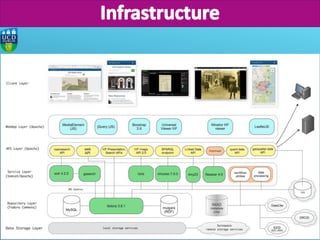
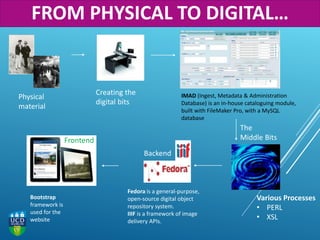
Fedora is a general-purpose,
open-source digital object
repository system.
IIIF is a framework of image
delivery APIs.
IMAD (Ingest, Metadata & Administration
Database) is an in-house cataloguing module,
built with FileMaker Pro, with a MySQL
database
Various Processes
• PERL
• XSL
Bootstrap
framework is
used for the
website
Frontend
Backend
The
Middle Bits
Creating the
digital bits
Physical
material
FROM PHYSICAL TO DIGITAL…
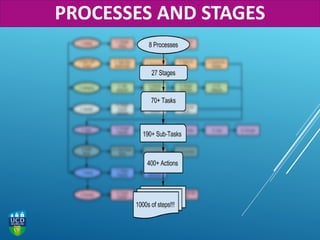
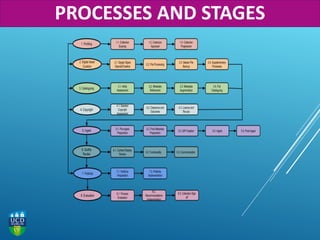
PROCESSES AND STAGES
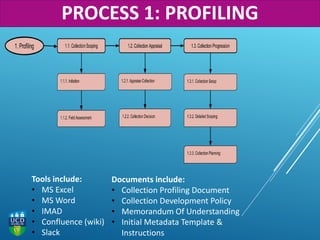
Documents include:
• Collection Profiling Document
• Collection Development Policy
• Memorandum Of Understanding
• Initial Metadata Template &
Instructions
Tools include:
• MS Excel
• MS Word
• IMAD
• Confluence (wiki)
• Slack
PROCESS 1: PROFILING
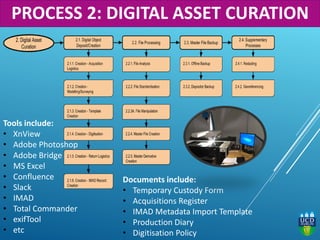
Tools include:
• XnView
• Adobe Photoshop
• Adobe Bridge
• MS Excel
• Confluence
• Slack
• IMAD
• Total Commander
• exifTool
• etc
Documents include:
• Temporary Custody Form
• Acquisitions Register
• IMAD Metadata Import Template
• Production Diary
• Digitisation Policy
PROCESS 2: DIGITAL ASSET CURATION
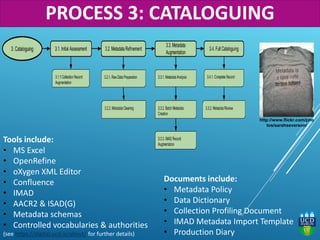
Documents include:
• Metadata Policy
• Data Dictionary
• Collection Profiling Document
• IMAD Metadata Import Template
• Production Diary
Tools include:
• MS Excel
• OpenRefine
• oXygen XML Editor
• Confluence
• IMAD
• AACR2 & ISAD(G)
• Metadata schemas
• Controlled vocabularies & authorities
(see https://digital.ucd.ie/about/ for further details)
http://www.flickr.com/pho
tos/sarahseverson/
PROCESS 3: CATALOGUING
Documents include:
• Collection Profiling Document
• Copyright Register
• Copyright Clearance Template
• Copyright Policy
Tools include:
• MS Excel
• Confluence
• IMAD
• Copyright & Related Rights Act
• EUIPO
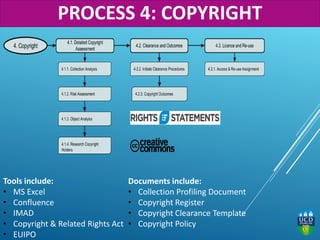
PROCESS 4: COPYRIGHT
Documents include:
• Various scripts & XSLTs
• Collection Profile Document
• Production Diary
• MODS & EAD XML Templates
• Data Dictionary
• ID Map
• EAD DSC Section Template
Tools include:
• Fedora-Commons
• Fedora Client Interface
• oXygen
• FITS
• WinSCP
• Komodo
• Perl script
• Jira, etc…
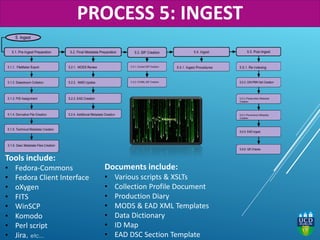
PROCESS 5: INGEST
Documents include:
• QR checklist
• MODS Templates
• EAD Templates
Tools include:
• Digital Library Website
• Various web browsers
• Various devices
• Mirador
• IMAD
• EAD
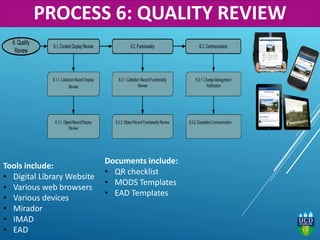
PROCESS 6: QUALITY REVIEW
Documents include:
• Publicity Plan
• Master Publicity List
• Publicity Calendar
• Collection themes & highlights list
Tools include:
• Internal & external communication channels
• Social Media
• Google Arts & Culture
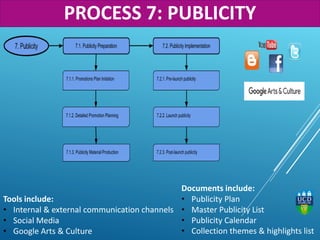
PROCESS 7: PUBLICITY
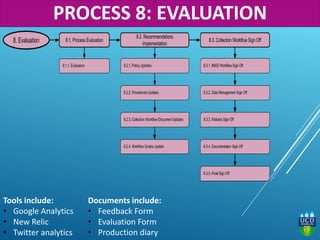
Tools include:
• Google Analytics
• New Relic
• Twitter analytics
Documents include:
• Feedback Form
• Evaluation Form
• Production diary
PROCESS 8: EVALUATION
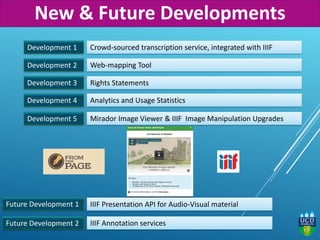
Development 1 Crowd-sourced transcription service, integrated with IIIF
Web-mapping Tool
Rights Statements
IIIF Presentation API for Audio-Visual material
Development 2
Development 3
Future Development 1
Future Development 2
Development 4 Analytics and Usage Statistics
Development 5 Mirador Image Viewer & IIIF Image Manipulation Upgrades
IIIF Annotation services
New & Future Developments
FACING CHALLENGES
Challenge 1 STORAGE!!!!!!!!!!!!!!!!!
FACING CHALLENGES
Challenge 1
Challenge 2
STORAGE!!!!!!!!!!!!!!!!!
What do we do with Orphan Works? Esp. those not covered by the Directive?
FACING CHALLENGES
Challenge 1
Challenge 2
STORAGE!!!!!!!!!!!!!!!!!
What do we do with Orphan Works? Esp. those not covered by the Directive?
Challenge 3 Scaling up and keeping up – a team of 4 doing collections AND projects!
FACING CHALLENGES
Challenge 1
Challenge 2
STORAGE!!!!!!!!!!!!!!!!!
What do we do with Orphan Works? Esp. those not covered by the Directive?
Challenge 3 Scaling up and keeping up – a team of 4 doing collections AND projects!
Challenge 4 Preservation issues: proprietary file types
FACING CHALLENGES
Challenge 1
Challenge 2
STORAGE!!!!!!!!!!!!!!!!!
What do we do with Orphan Works? Esp. those not covered by the Directive?
Challenge 3 Scaling up and keeping up – a team of 4 doing collections AND projects!
Challenge 4 Preservation issues: proprietary file types
Challenge 5 Dealing with ever more complex digital objects: video, LiDAR, etc
FACING CHALLENGES
Challenge 1
Challenge 2
STORAGE!!!!!!!!!!!!!!!!!
What do we do with Orphan Works? Esp. those not covered by the Directive?
Challenge 3 Scaling up and keeping up – a team of 4 doing collections AND projects!
Challenge 4 Preservation issues: proprietary file types
Challenge 6 Managing expectations – scanning is quick(ish) but the whole workflow is not!
Challenge 5 Dealing with ever more complex digital objects: video, LiDAR
FACING CHALLENGES
Challenge 1
Challenge 2
STORAGE!!!!!!!!!!!!!!!!!
What do we do with Orphan Works? Esp. those not covered by the Directive?
Challenge 3 Scaling up and keeping up – a team of 4 doing collections AND projects!
Challenge 4 Preservation issues: proprietary file types
Challenge 6 Managing expectations – scanning is quick(ish) but the whole workflow is not!
Challenge 5 Dealing with ever more complex digital objects: video, LiDAR
Challenge 7 Knowledge sharing across GLAM institutions – breaking out of SILOS
FACING CHALLENGES
Challenge 1
Challenge 2
STORAGE!!!!!!!!!!!!!!!!!
What do we do with Orphan Works? Esp. those not covered by the Directive?
Challenge 3 Scaling up and keeping up – a team of 4 doing collections AND projects!
Challenge 4 Preservation issues: proprietary file types
Challenge 6 Managing expectations – scanning is quick(ish) but the whole workflow is not!
Challenge 5 Dealing with ever more complex digital objects: video, LiDAR
Challenge 7 Knowledge sharing across GLAM institutions – breaking out of silos
Challenge 8 Modify workflows and tools to deal with Cultural Heritage AND Research Data
FACING CHALLENGES
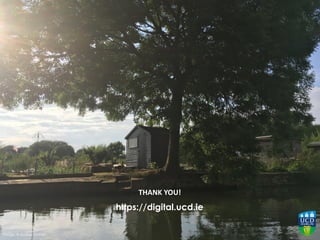
THANK YOU!
https://digital.ucd.ie
Image: © Audrey Drohan

Optimising Workflows for Digital Archives: UCD Digital Library

  • 1.
    OPTIMISING WORKFLOWS FOR DIGITAL ARCHIVES UCDDigital Library Audrey Drohan SLA – Digital Initiatives 10th July 2018
  • 2.
     IVRLA (2005-2009) Migration/Building (2010-2012)  UCD Digital Library (2012 – present)  Part of Research Services, UCD Library Data Seal of Approval = Trusted Digital Repository https://digital.ucd.ie • IIIF compliant • Full text searching • Geo-spatially aware • Linked data enabled • Preservation system • Responsive website • Transcription platform – pilot 82 collections online 5 million file assets 32 repositories/partners
  • 3.
    © University CollegeDublin "Letter from Gerard Manley Hopkins (Oak Hill, Hampstead, N. W.) to Alexander William Mowbray Baillie" held by UCD Library, Special Collections. Digital image: © University College Dublin, published by UCD Library, University College Dublin, http://digital.ucd.ie/view/ivrla:3963 • 1 x Library Assistant Dani Montes • 1 x Senior Library Assistant Audrey Drohan • 1 x Metadata Librarian Órna Roche • 1 x Programmer Peter Clarke Managed by • Head of Research Services Julia Barrett • UCD Librarian Dr John B. Howard
  • 5.
    IMAD: Ingest, Metadata& Administration Database
  • 6.
    Text Still imagesCartographic material Audio visual material Ephemera Datasets 3D objects Letters Photographs Maps Narration Theatre programmes LiDAR Coins Pamphlets Postcards Music Tickets Bibliographic Chalices Books Prints Interviews Invitations Sculptures Manuscripts Negatives Poetry readings Menus Newspaper cuttings Drawings Invoices Ballad sheets Microfilm Questionnaires Slides Notes Diaries WIDE RANGE OF MATERIALS
  • 7.
    Fedora is ageneral-purpose, open-source digital object repository system. IIIF is a framework of image delivery APIs. IMAD (Ingest, Metadata & Administration Database) is an in-house cataloguing module, built with FileMaker Pro, with a MySQL database Various Processes • PERL • XSL Bootstrap framework is used for the website Frontend Backend The Middle Bits Creating the digital bits Physical material FROM PHYSICAL TO DIGITAL…
  • 8.
  • 9.
  • 10.
    Documents include: • CollectionProfiling Document • Collection Development Policy • Memorandum Of Understanding • Initial Metadata Template & Instructions Tools include: • MS Excel • MS Word • IMAD • Confluence (wiki) • Slack PROCESS 1: PROFILING
  • 11.
    Tools include: • XnView •Adobe Photoshop • Adobe Bridge • MS Excel • Confluence • Slack • IMAD • Total Commander • exifTool • etc Documents include: • Temporary Custody Form • Acquisitions Register • IMAD Metadata Import Template • Production Diary • Digitisation Policy PROCESS 2: DIGITAL ASSET CURATION
  • 12.
    Documents include: • MetadataPolicy • Data Dictionary • Collection Profiling Document • IMAD Metadata Import Template • Production Diary Tools include: • MS Excel • OpenRefine • oXygen XML Editor • Confluence • IMAD • AACR2 & ISAD(G) • Metadata schemas • Controlled vocabularies & authorities (see https://digital.ucd.ie/about/ for further details) http://www.flickr.com/pho tos/sarahseverson/ PROCESS 3: CATALOGUING
  • 13.
    Documents include: • CollectionProfiling Document • Copyright Register • Copyright Clearance Template • Copyright Policy Tools include: • MS Excel • Confluence • IMAD • Copyright & Related Rights Act • EUIPO PROCESS 4: COPYRIGHT
  • 14.
    Documents include: • Variousscripts & XSLTs • Collection Profile Document • Production Diary • MODS & EAD XML Templates • Data Dictionary • ID Map • EAD DSC Section Template Tools include: • Fedora-Commons • Fedora Client Interface • oXygen • FITS • WinSCP • Komodo • Perl script • Jira, etc… PROCESS 5: INGEST
  • 15.
    Documents include: • QRchecklist • MODS Templates • EAD Templates Tools include: • Digital Library Website • Various web browsers • Various devices • Mirador • IMAD • EAD PROCESS 6: QUALITY REVIEW
  • 16.
    Documents include: • PublicityPlan • Master Publicity List • Publicity Calendar • Collection themes & highlights list Tools include: • Internal & external communication channels • Social Media • Google Arts & Culture PROCESS 7: PUBLICITY
  • 17.
    Tools include: • GoogleAnalytics • New Relic • Twitter analytics Documents include: • Feedback Form • Evaluation Form • Production diary PROCESS 8: EVALUATION
  • 18.
    Development 1 Crowd-sourcedtranscription service, integrated with IIIF Web-mapping Tool Rights Statements IIIF Presentation API for Audio-Visual material Development 2 Development 3 Future Development 1 Future Development 2 Development 4 Analytics and Usage Statistics Development 5 Mirador Image Viewer & IIIF Image Manipulation Upgrades IIIF Annotation services New & Future Developments
  • 19.
  • 20.
  • 21.
    Challenge 1 Challenge 2 STORAGE!!!!!!!!!!!!!!!!! Whatdo we do with Orphan Works? Esp. those not covered by the Directive? FACING CHALLENGES
  • 22.
    Challenge 1 Challenge 2 STORAGE!!!!!!!!!!!!!!!!! Whatdo we do with Orphan Works? Esp. those not covered by the Directive? Challenge 3 Scaling up and keeping up – a team of 4 doing collections AND projects! FACING CHALLENGES
  • 23.
    Challenge 1 Challenge 2 STORAGE!!!!!!!!!!!!!!!!! Whatdo we do with Orphan Works? Esp. those not covered by the Directive? Challenge 3 Scaling up and keeping up – a team of 4 doing collections AND projects! Challenge 4 Preservation issues: proprietary file types FACING CHALLENGES
  • 24.
    Challenge 1 Challenge 2 STORAGE!!!!!!!!!!!!!!!!! Whatdo we do with Orphan Works? Esp. those not covered by the Directive? Challenge 3 Scaling up and keeping up – a team of 4 doing collections AND projects! Challenge 4 Preservation issues: proprietary file types Challenge 5 Dealing with ever more complex digital objects: video, LiDAR, etc FACING CHALLENGES
  • 25.
    Challenge 1 Challenge 2 STORAGE!!!!!!!!!!!!!!!!! Whatdo we do with Orphan Works? Esp. those not covered by the Directive? Challenge 3 Scaling up and keeping up – a team of 4 doing collections AND projects! Challenge 4 Preservation issues: proprietary file types Challenge 6 Managing expectations – scanning is quick(ish) but the whole workflow is not! Challenge 5 Dealing with ever more complex digital objects: video, LiDAR FACING CHALLENGES
  • 26.
    Challenge 1 Challenge 2 STORAGE!!!!!!!!!!!!!!!!! Whatdo we do with Orphan Works? Esp. those not covered by the Directive? Challenge 3 Scaling up and keeping up – a team of 4 doing collections AND projects! Challenge 4 Preservation issues: proprietary file types Challenge 6 Managing expectations – scanning is quick(ish) but the whole workflow is not! Challenge 5 Dealing with ever more complex digital objects: video, LiDAR Challenge 7 Knowledge sharing across GLAM institutions – breaking out of SILOS FACING CHALLENGES
  • 27.
    Challenge 1 Challenge 2 STORAGE!!!!!!!!!!!!!!!!! Whatdo we do with Orphan Works? Esp. those not covered by the Directive? Challenge 3 Scaling up and keeping up – a team of 4 doing collections AND projects! Challenge 4 Preservation issues: proprietary file types Challenge 6 Managing expectations – scanning is quick(ish) but the whole workflow is not! Challenge 5 Dealing with ever more complex digital objects: video, LiDAR Challenge 7 Knowledge sharing across GLAM institutions – breaking out of silos Challenge 8 Modify workflows and tools to deal with Cultural Heritage AND Research Data FACING CHALLENGES
  • 28.