






You Know, For Search
lightning talk
lightning talk


    kick ass
lightning talk


    kick ass


       ~joke
ping 127.0.0.1
ping 127.0.0.1
  icmq_seq=0 name=shay.banon
ping 127.0.0.1
  icmq_seq=0 name=shay.banon
  icmq_seq=1 a.k.a=kimchy
ping 127.0.0.1
  icmq_seq=0 name=shay.banon
  icmq_seq=1 a.k.a=kimchy
  icmq_seq=2 blog=http://kimchy.org
ping 127.0.0.1
  icmq_seq=0 name=shay.banon
  icmq_seq=1 a.k.a=kimchy
  icmq_seq=2 blog=http://kimchy.org
  icmq_seq=3 twitter=kimchy
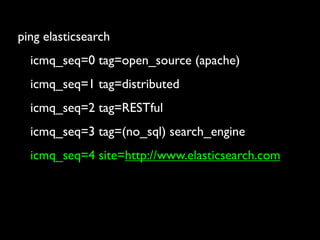
ping elasticsearch
ping elasticsearch
  icmq_seq=0 tag=open_source (apache)
ping elasticsearch
  icmq_seq=0 tag=open_source (apache)
  icmq_seq=1 tag=distributed
ping elasticsearch
  icmq_seq=0 tag=open_source (apache)
  icmq_seq=1 tag=distributed
  icmq_seq=2 tag=RESTful
ping elasticsearch
  icmq_seq=0 tag=open_source (apache)
  icmq_seq=1 tag=distributed
  icmq_seq=2 tag=RESTful
  icmq_seq=3 tag=(no_sql) search_engine
ping elasticsearch
  icmq_seq=0 tag=open_source (apache)
  icmq_seq=1 tag=distributed
  icmq_seq=2 tag=RESTful
  icmq_seq=3 tag=(no_sql) search_engine
  icmq_seq=4 site=http://www.elasticsearch.com
open_source
open_source

              apache_2
open_source

              apache_2


  http://github.com/elasticsearch/elasticsearch
open_source

              apache_2


  http://github.com/elasticsearch/elasticsearch


               fork, push, send_pull
your_data
your_data
      => your_search
your_data
             => your_search

a product should natively
            talk the domain model
your_data
             => your_search

a product should natively
            talk the domain model
     and not the other way around
recipes for good domain model language

             - document_oriented
recipes for good domain model language

             - document_oriented
             - schema free
recipes for good domain model language

             - document_oriented
             - schema free
             - include json
recipes for good domain model language

             - document_oriented
             - schema free
             - include json
                 de_facto open_web standard
lets build ourself an amazon store


      (we will get to the cloud laters)
first thing we have are books
this is how they look like


            {
                "book" : {
                  "isbn" : "0812504321",
                  "name" : "Call of the Wild",
                  "author" : {
                     "first_name" : "Jack",
                     "last_name" : "London"
                  },
                  "pages" : 128,
                  "tag" : ["fiction", "children"]
                }
            }
lets index it


$ curl -XPUT host:9200/amazon/book/0812504321 -d ‘
                    {
                        "book" : {
                          "isbn" : "0812504321",
                          "name" : "Call of the Wild",
                          "author" : {
                             "first_name" : "Jack",
                             "last_name" : "London"
                          },
                          "pages" : 128,
                          "tag" : ["fiction", "children"]
                        }
                    }
‘
... `amazon` is the _index name


$ curl -XPUT host:9200/amazon/book/0812504321 -d ‘
                    {
                        "book" : {
                          "isbn" : "0812504321",
                          "name" : "Call of the Wild",
                          "author" : {
                             "first_name" : "Jack",
                             "last_name" : "London"
                          },
                          "pages" : 128,
                          "tag" : ["fiction", "children"]
                        }
                    }
‘
... `book` is the _type


$ curl -XPUT host:9200/amazon/book/0812504321 -d ‘
                    {
                        "book" : {
                          "isbn" : "0812504321",
                          "name" : "Call of the Wild",
                          "author" : {
                             "first_name" : "Jack",
                             "last_name" : "London"
                          },
                          "pages" : 128,
                          "tag" : ["fiction", "children"]
                        }
                    }
‘
... `0812504321` is the _id


$ curl -XPUT host:9200/amazon/book/0812504321 -d ‘
                    {
                        "book" : {
                          "isbn" : "0812504321",
                          "name" : "Call of the Wild",
                          "author" : {
                             "first_name" : "Jack",
                             "last_name" : "London"
                          },
                          "pages" : 128,
                          "tag" : ["fiction", "children"]
                        }
                    }
‘
search for all fiction books
$ curl -XGET host:9200/amazon/book/_search?q=tag:fiction‘
search for all fiction books
$ curl -XGET host:9200/amazon/book/_search?q=tag:fiction‘


         {"_shards":{"total":5,"successful":5,"failed":0},"hits":{"total":1,"hits":
         [{"_index":"amazon","_type":"book","_id":"0812504321", "_source" : {
            "book" : {
               "isbn" : "0812504321",
               "name" : "Call of the Wild",
               "author" : {
                  "first_name" : "Jack",
                  "last_name" : "London"
               },
               "pages" : 128,
               "tag" : ["fiction", "children"]
            }
         }}]}}
... number of total hits
$ curl -XGET host:9200/amazon/book/_search?q=tag:fiction‘


         {"_shards":{"total":5,"successful":5,"failed":0},"hits":{"total":1,"hits":
         [{"_index":"amazon","_type":"book","_id":"0812504321", "_source" : {
            "book" : {
               "isbn" : "0812504321",
               "name" : "Call of the Wild",
               "author" : {
                  "first_name" : "Jack",
                  "last_name" : "London"
               },
               "pages" : 128,
               "tag" : ["fiction", "children"]
            }
         }}]}}
... each hit has the `_index` it came from
$ curl -XGET host:9200/amazon/book/_search?q=tag:fiction‘


         {"_shards":{"total":5,"successful":5,"failed":0},"hits":{"total":1,"hits":
         [{"_index":"amazon","_type":"book","_id":"0812504321", "_source" : {
            "book" : {
               "isbn" : "0812504321",
               "name" : "Call of the Wild",
               "author" : {
                  "first_name" : "Jack",
                  "last_name" : "London"
               },
               "pages" : 128,
               "tag" : ["fiction", "children"]
            }
         }}]}}
... each hit has the `_type` it belongs to
$ curl -XGET host:9200/amazon/book/_search?q=tag:fiction‘


         {"_shards":{"total":5,"successful":5,"failed":0},"hits":{"total":1,"hits":
         [{"_index":"amazon","_type":"book","_id":"0812504321", "_source" : {
            "book" : {
               "isbn" : "0812504321",
               "name" : "Call of the Wild",
               "author" : {
                  "first_name" : "Jack",
                  "last_name" : "London"
               },
               "pages" : 128,
               "tag" : ["fiction", "children"]
            }
         }}]}}
... each hit has its `_id`
$ curl -XGET host:9200/amazon/book/_search?q=tag:fiction‘


         {"_shards":{"total":5,"successful":5,"failed":0},"hits":{"total":1,"hits":
         [{"_index":"amazon","_type":"book","_id":"0812504321", "_source" : {
            "book" : {
               "isbn" : "0812504321",
               "name" : "Call of the Wild",
               "author" : {
                  "first_name" : "Jack",
                  "last_name" : "London"
               },
               "pages" : 128,
               "tag" : ["fiction", "children"]
            }
         }}]}}
... each hit has the actual _source document
$ curl -XGET host:9200/amazon/book/_search?q=tag:fiction‘


         {"_shards":{"total":5,"successful":5,"failed":0},"hits":{"total":1,"hits":
         [{"_index":"amazon","_type":"book","_id":"0812504321", "_source" : {
            "book" : {
               "isbn" : "0812504321",
               "name" : "Call of the Wild",
               "author" : {
                  "first_name" : "Jack",
                  "last_name" : "London"
               },
               "pages" : 128,
               "tag" : ["fiction", "children"]
            }
         }}]}}
... each hit has the actual _source document
$ curl -XGET host:9200/amazon/book/_search?q=tag:fiction‘


         {"_shards":{"total":5,"successful":5,"failed":0},"hits":{"total":1,"hits":
         [{"_index":"amazon","_type":"book","_id":"0812504321", "_source" : {
            "book" : {
               "isbn" : "0812504321",
               "name" : "Call of the Wild",
               "author" : {
                  "first_name" : "Jack",                 (can be disabled)
                  "last_name" : "London"
               },
               "pages" : 128,
               "tag" : ["fiction", "children"]
            }
         }}]}}
next, we have cds


           {
               "cd" : {
                  "asin" : "B00192IV0O",
                  "name" : "THE E.N.D. (Energy Never Dies)",
                  "artist" : "Black Eyed Peas",
                  "label" : "Interscope",
                  "release_date": "2009-06-09",
                  "tag" : ["hip-hop", "pop-rap"]
               }
           }
lets index it as well


$ curl -XPUT host:9200/amazon/cd/B00192IV0O -d ‘


                    {
                        "cd" : {
                           "asin" : "B00192IV0O",
                           "name" : "THE E.N.D. (Energy Never Dies)",
                           "artist" : "Black Eyed Peas",
                           "label" : "Interscope",
                           "release_date": "2009-06-09",
                           "tag" : ["hip-hop", "pop-rap"]
                        }
                    }


‘
... same _index, `amazon`


$ curl -XPUT host:9200/amazon/cd/B00192IV0O -d ‘


                    {
                        "cd" : {
                           "asin" : "B00192IV0O",
                           "name" : "THE E.N.D. (Energy Never Dies)",
                           "artist" : "Black Eyed Peas",
                           "label" : "Interscope",
                           "release_date": "2009-06-09",
                           "tag" : ["hip-hop", "pop-rap"]
                        }
                    }


‘
... new _type, `cd`


$ curl -XPUT host:9200/amazon/cd/B00192IV0O -d ‘


                    {
                        "cd" : {
                           "asin" : "B00192IV0O",
                           "name" : "THE E.N.D. (Energy Never Dies)",
                           "artist" : "Black Eyed Peas",
                           "label" : "Interscope",
                           "release_date": "2009-06-09",
                           "tag" : ["hip-hop", "pop-rap"]
                        }
                    }


‘
search for all hip-hop cds

$ curl -XGET host:9200/amazon/cd/_search?q=tag:hip-hop‘
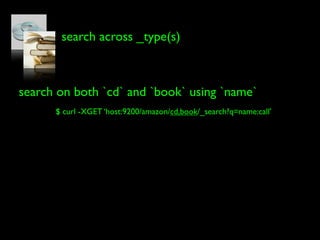
search across _type(s)


search on both `cd` and `book` using `name`
      $ curl -XGET ‘host:9200/amazon/cd,book/_search?q=name:call’
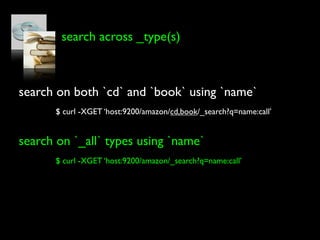
search across _type(s)


search on both `cd` and `book` using `name`
      $ curl -XGET ‘host:9200/amazon/cd,book/_search?q=name:call’


search on `_all` types using `name`
      $ curl -XGET ‘host:9200/amazon/_search?q=name:call’
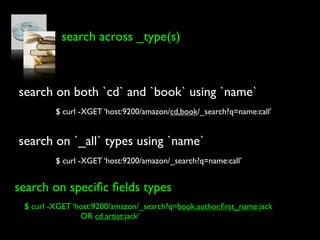
search across _type(s)


search on both `cd` and `book` using `name`
         $ curl -XGET ‘host:9200/amazon/cd,book/_search?q=name:call’


search on `_all` types using `name`
         $ curl -XGET ‘host:9200/amazon/_search?q=name:call’


search on specific fields types
 $ curl -XGET ‘host:9200/amazon/_search?q=book.author.first_name:jack
                OR cd.artist:jack‘
book and cd can be indices as well


$ curl -XPUT host:9200/book/info/0812504321 -d ‘


                     {
                         "isbn" : "0812504321",
                         "name" : "Call of the Wild",
                         "author" : {
                            "first_name" : "Jack",
                            "last_name" : "London"
                         },
                         "pages" : 128,
                         "tag" : ["fiction", "children"]
                     }


‘
... `book` is now the _index


$ curl -XPUT host:9200/book/info/0812504321 -d ‘


                     {
                         "isbn" : "0812504321",
                         "name" : "Call of the Wild",
                         "author" : {
                            "first_name" : "Jack",
                            "last_name" : "London"
                         },
                         "pages" : 128,
                         "tag" : ["fiction", "children"]
                     }


‘
... `info` is the _type


$ curl -XPUT host:9200/book/info/0812504321 -d ‘


                     {
                         "isbn" : "0812504321",
                         "name" : "Call of the Wild",
                         "author" : {
                            "first_name" : "Jack",
                            "last_name" : "London"
                         },
                         "pages" : 128,
                         "tag" : ["fiction", "children"]
                     }


‘
cd is an index as well


$ curl -XPUT host:9200/cd/info/B00192IV0O -d ‘


                     {
                         "asin" : "B00192IV0O",
                         "name" : "THE E.N.D. (Energy Never Dies)",
                         "artist" : "Black Eyed Peas",
                         "label" : "Interscope",
                         "release_date": "2009-06-09",
                            "tag" : ["hip-hop", "pop-rap"]
                     }


‘
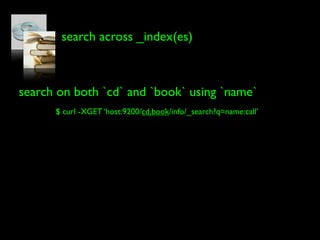
search across _index(es)


search on both `cd` and `book` using `name`
      $ curl -XGET ‘host:9200/cd,book/info/_search?q=name:call’
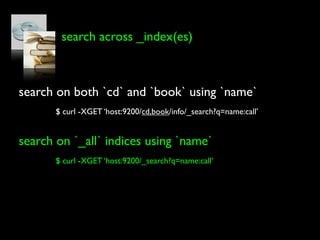
search across _index(es)


search on both `cd` and `book` using `name`
       $ curl -XGET ‘host:9200/cd,book/info/_search?q=name:call’


search on `_all` indices using `name`
       $ curl -XGET ‘host:9200/_search?q=name:call’
query_dsl
query_dsl


done with the your_data part
query_dsl


done with the your_data part

       => now to the your_search part
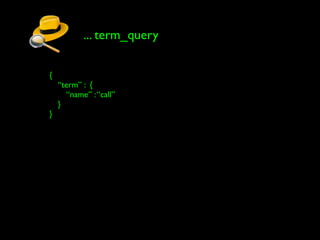
... term_query

{
    “term” : {
       “name” : “call”
    }
}
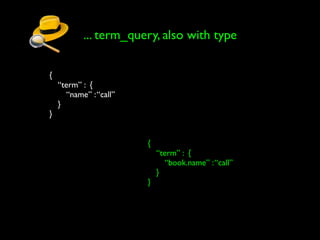
... term_query, also with type

{
    “term” : {
       “name” : “call”
    }
}


                         {
                             “term” : {
                                “book.name” : “call”
                             }
                         }
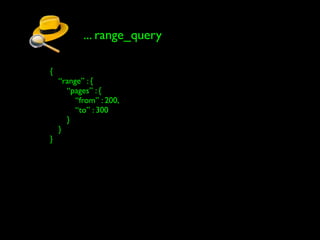
... range_query

{
    “range” : {
      “pages” : {
         “from” : 200,
         “to” : 300
      }
    }
}
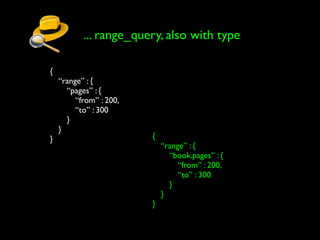
... range_query, also with type

{
    “range” : {
      “pages” : {
         “from” : 200,
         “to” : 300
      }
    }
}                        {
                             “range” : {
                               “book.pages” : {
                                  “from” : 200,
                                  “to” : 300
                               }
                             }
                         }
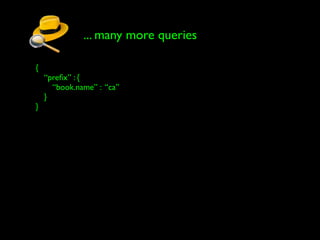
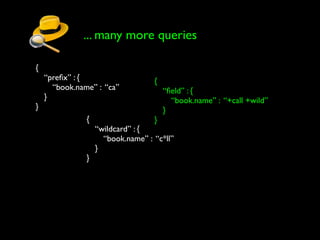
... many more queries

{
    “prefix” : {
      “book.name” : “ca”
    }
}
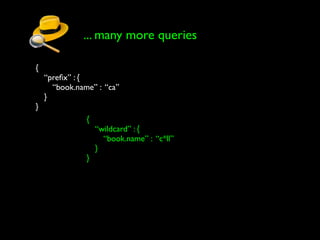
... many more queries

{
    “prefix” : {
      “book.name” : “ca”
    }
}
               {
                   “wildcard” : {
                     “book.name” : “c*ll”
                   }
               }
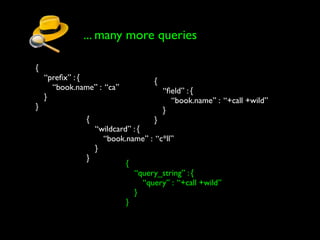
... many more queries

{
    “prefix” : {                    {
      “book.name” : “ca”               “field” : {
    }                                    “book.name” : “+call +wild”
}                                      }
               {                   }
                   “wildcard” : {
                     “book.name” : “c*ll”
                   }
               }
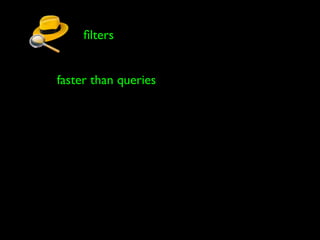
... many more queries

{
    “prefix” : {                     {
      “book.name” : “ca”                “field” : {
    }                                     “book.name” : “+call +wild”
}                                       }
               {                    }
                   “wildcard” : {
                     “book.name” : “c*ll”
                   }
               }
                           {
                               “query_string” : {
                                 “query” : “+call +wild”
                               }
                           }
... and, of course, bool_query

{
    “bool” : {
      “must” : [
         { “field” : { “book.name” : “+call +wild” } },
         { “range” : { “book.pages” : { “gte” : 200 } } }
      ],
      “must_not” : [
         { “term” : { “book.author.first_name” : “jack” } }
      ],
      “should” : [
         { “term” : { “book.author.last_name” : “london” } }
      ]
    }
}
filters


faster than queries
filters


faster than queries
              no scoring
filters


faster than queries
              no scoring

    cached for even faster access
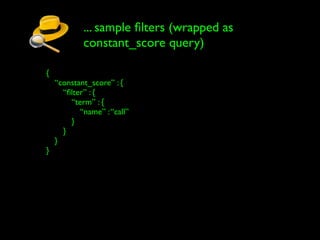
... sample filters (wrapped as
            constant_score query)

{
    “constant_score” : {
      “filter” : {
        “term” : {
           “name” : “call”
        }
      }
    }
}
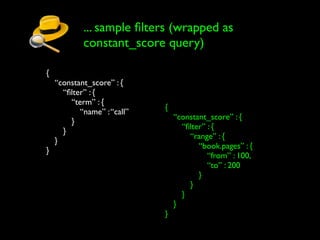
... sample filters (wrapped as
            constant_score query)

{
    “constant_score” : {
      “filter” : {
        “term” : {
                             {
           “name” : “call”
                                 “constant_score” : {
        }
                                   “filter” : {
      }
                                     “range” : {
    }
                                        “book.pages” : {
}
                                           “from” : 100,
                                           “to” : 200
                                        }
                                     }
                                   }
                                 }
                             }
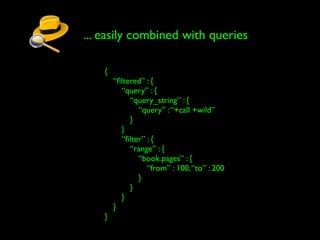
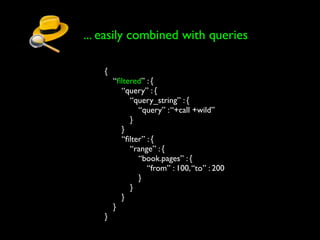
... easily combined with queries

    {
        “filtered” : {
          “query” : {
             “query_string” : {
               “query” : “+call +wild”
             }
          }
          “filter” : {
             “range” : {
               “book.pages” : {
                  “from” : 100, “to” : 200
               }
             }
          }
        }
    }
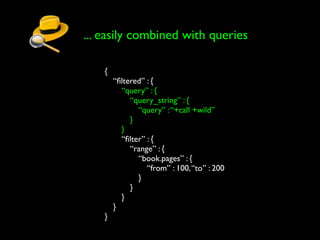
... easily combined with queries

    {
        “filtered” : {
          “query” : {
             “query_string” : {
               “query” : “+call +wild”
             }
          }
          “filter” : {
             “range” : {
               “book.pages” : {
                  “from” : 100, “to” : 200
               }
             }
          }
        }
    }
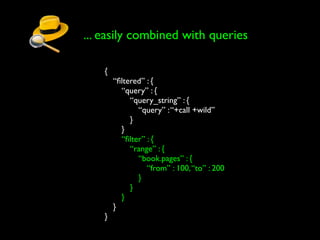
... easily combined with queries

    {
        “filtered” : {
          “query” : {
             “query_string” : {
               “query” : “+call +wild”
             }
          }
          “filter” : {
             “range” : {
               “book.pages” : {
                  “from” : 100, “to” : 200
               }
             }
          }
        }
    }
... easily combined with queries

    {
        “filtered” : {
          “query” : {
             “query_string” : {
               “query” : “+call +wild”
             }
          }
          “filter” : {
             “range” : {
               “book.pages” : {
                  “from” : 100, “to” : 200
               }
             }
          }
        }
    }
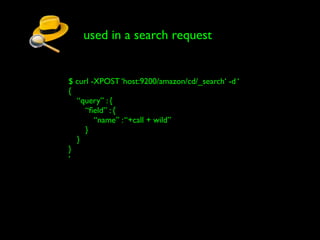
used in a search request


$ curl -XPOST ‘host:9200/amazon/cd/_search‘ -d ‘
{
  “query” : {
     “field” : {
        “name” : “+call + wild”
     }
  }
}
‘
other search features


highlighting
other search features


highlighting

               facets
other search features


highlighting
                        retrieve specific fields
               facets
other search features


 highlighting
                         retrieve specific fields
                facets

_all field
other search features


 highlighting
                         retrieve specific fields
                facets

_all field
                           scrolling
distributed
automatic shard allocation
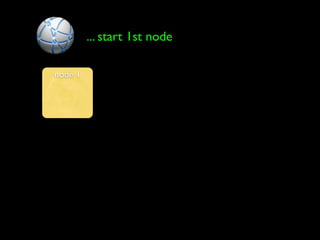
... start 1st node

node 1
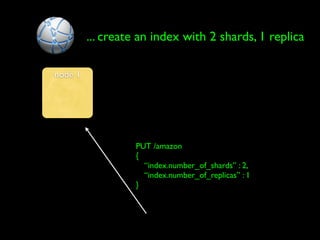
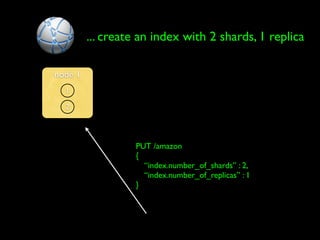
... create an index with 2 shards, 1 replica

node 1


                  PUT /amazon
                  {
                    “index.number_of_shards” : 2,
                    “index.number_of_replicas” : 1
                  }
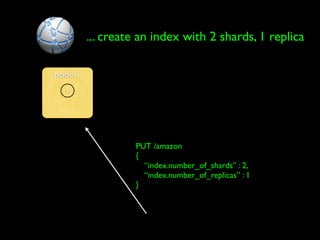
... create an index with 2 shards, 1 replica

node 1
  1


                  PUT /amazon
                  {
                    “index.number_of_shards” : 2,
                    “index.number_of_replicas” : 1
                  }
... create an index with 2 shards, 1 replica

node 1
  1

  2


                  PUT /amazon
                  {
                    “index.number_of_shards” : 2,
                    “index.number_of_replicas” : 1
                  }
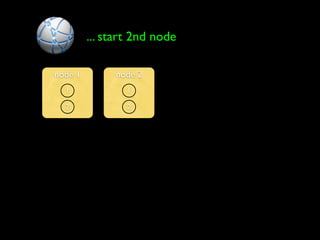
... start 2nd node

node 1        node 2
  1              1

  2              2
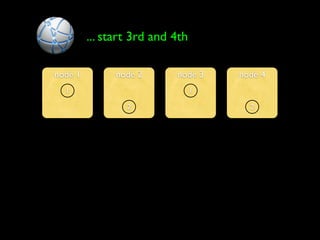
... start 3rd and 4th

node 1         node 2      node 3    node 4
  1                              1

                 2                     2
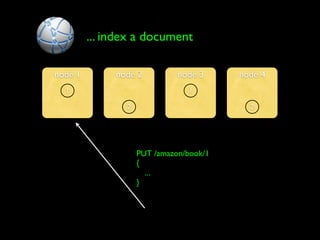
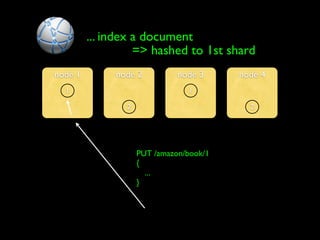
... index a document

node 1        node 2          node 3     node 4
  1                             1

                2                          2


                    PUT /amazon/book/1
                    {
                      ...
                    }
... index a document
                   => hashed to 1st shard
node 1        node 2          node 3     node 4
  1                             1

                2                          2


                    PUT /amazon/book/1
                    {
                      ...
                    }
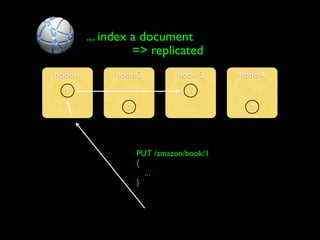
... index a document
                   => replicated
node 1        node 2           node 3     node 4
  1                              1

                 2                          2


                     PUT /amazon/book/1
                     {
                       ...
                     }
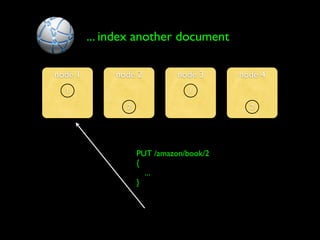
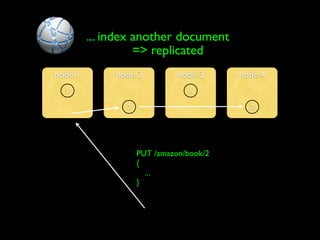
... index another document

node 1        node 2          node 3     node 4
  1                             1

                2                          2


                    PUT /amazon/book/2
                    {
                      ...
                    }
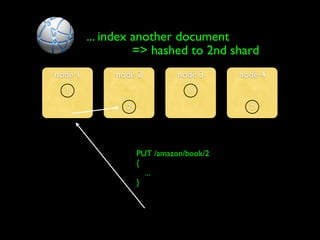
... index another document
                   => hashed to 2nd shard
node 1        node 2          node 3     node 4
  1                             1

                2                          2


                    PUT /amazon/book/2
                    {
                      ...
                    }
... index another document
                   => replicated
node 1        node 2          node 3     node 4
  1                             1

                2                          2


                    PUT /amazon/book/2
                    {
                      ...
                    }
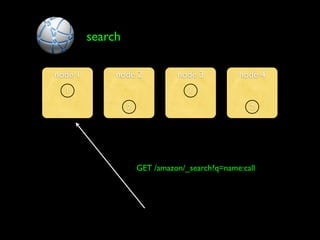
search

node 1        node 2            node 3          node 4
  1                                1

                  2                                2


                      GET /amazon/_search?q=name:call
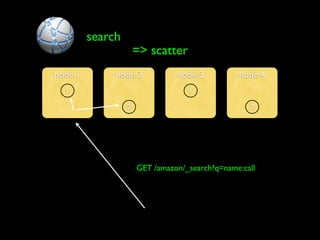
search
                      => scatter
node 1        node 2            node 3          node 4
  1                                1

                  2                                2


                      GET /amazon/_search?q=name:call
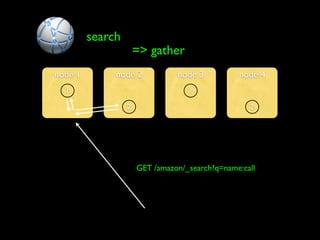
search
                      => gather
node 1        node 2            node 3          node 4
  1                                1

                  2                                2


                      GET /amazon/_search?q=name:call
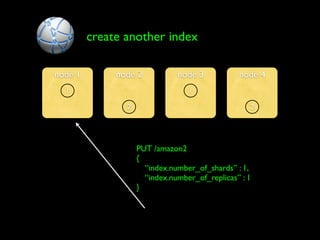
create another index

node 1        node 2           node 3           node 4
  1                               1

                2                                  2


                    PUT /amazon2
                    {
                      “index.number_of_shards” : 1,
                      “index.number_of_replicas” : 1
                    }
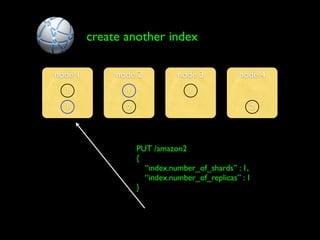
create another index

node 1        node 2           node 3           node 4
  1             1                 1

  1             2                                  2


                    PUT /amazon2
                    {
                      “index.number_of_shards” : 1,
                      “index.number_of_replicas” : 1
                    }
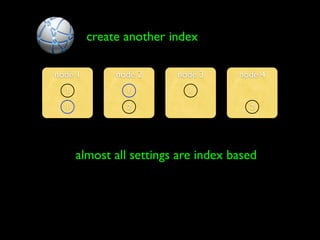
create another index

node 1        node 2     node 3      node 4
  1             1          1

  1             2                      2


      almost all settings are index based
per document consistency

            - you index it, its there
per document consistency

            - you index it, its there
            - no need to commit / flush
per document consistency

            - you index it, its there
            - no need to commit / flush
            - uses a transaction log
(near) real_time search

             - automatic, 1 second refresh rate
(near) real_time search

             - automatic, 1 second refresh rate
             - there’s an api for that
(near) real_time search

             - automatic, 1 second refresh rate
             - there’s an api for that
                  - POST /_refresh
long_term persistency

             - similar to apple time_machine
long_term persistency

             - similar to apple time_machine
             - or data_grid write_behind
long_term persistency

             - similar to apple time_machine
             - or data_grid write_behind
             - write changes to index / translog
long_term persistency

             - similar to apple time_machine
             - or data_grid write_behind
             - write changes to index / translog
               - to a shared persistent storage
long_term persistency

             - similar to apple time_machine
             - or data_grid write_behind
             - write changes to index / translog
               - to a shared persistent storage
               - asynchronously (reliable)
long_term persistency

             - similar to apple time_machine
             - or data_grid write_behind
             - write changes to index / translog
               - to a shared persistent storage
               - asynchronously (reliable)
               - low requirements from storage
long_term persistency

             - similar to apple time_machine
             - or data_grid write_behind
             - write changes to index / translog
               - to a shared persistent storage
               - asynchronously (reliable)
               - low requirements from storage
             - cluster meta_data persisted
long_term persistency ... storage options

              - shared file system
long_term persistency ... storage options

              - shared file system
                 - no need for locking, etc ...
long_term persistency ... storage options

              - shared file system
                 - no need for locking, etc ...
              - hadoop, using HDFS
long_term persistency ... storage options

              - shared file system
                 - no need for locking, etc ...
              - hadoop, using HDFS
              - cloud (aws_s3, rackspace_cloud_files)
long_term persistency ... node storage

             - considered transient
long_term persistency ... node storage

             - considered transient
                 - can be recovered from gateway
long_term persistency ... node storage

             - considered transient
                 - can be recovered from gateway
             - can be stored on
long_term persistency ... node storage

             - considered transient
                 - can be recovered from gateway
             - can be stored on
                 - local file system
long_term persistency ... node storage

             - considered transient
                 - can be recovered from gateway
             - can be stored on
                 - local file system
                 - heap (jvm) memory
long_term persistency ... node storage

             - considered transient
                 - can be recovered from gateway
             - can be stored on
                 - local file system
                 - heap (jvm) memory
                 - native (os) memory
long_term persistency ... node storage

             - considered transient
                 - can be recovered from gateway
             - can be stored on
                 - local file system
                 - heap (jvm) memory
                 - native (os) memory
                 - fs & memory combination
native cloud support

in the cloud
native cloud support

in the cloud
    machine removed / added more dynamically
native cloud support

   in the cloud
        machine removed / added more dynamically

machine fail more “dynamically”
native cloud support

   in the cloud
        machine removed / added more dynamically

machine fail more “dynamically”

                  local storage is wiped
native cloud support ... storage

       - local storage is wiped
native cloud support ... storage

       - local storage is wiped
       - use external storage (aws ebs)
native cloud support ... storage

       - local storage is wiped
       - use external storage (aws ebs)
          - needs to be per machine / shard
native cloud support ... storage

       - local storage is wiped
       - use external storage (aws ebs)
          - needs to be per machine / shard
          - can get wiped as well ...
native cloud support ... storage

       - local storage is wiped
       - use external storage (aws ebs)
          - needs to be per machine / shard
          - can get wiped as well ...
          - mmm..., ok, snapshot to aws s3
native cloud support ... storage

       - local storage is wiped
       - use external storage (aws ebs)
          - needs to be per machine / shard
          - can get wiped as well ...
          - mmm..., ok, snapshot to aws s3
       - expensive => ebs & s3
native cloud support ... storage

       - local storage is wiped
       - use external storage (aws ebs)
          - needs to be per machine / shard
          - can get wiped as well ...
          - mmm..., ok, snapshot to aws s3
       - expensive => ebs & s3
       - snapshot interval problematic
native cloud support ... storage

       - local storage is wiped
       - use external storage (aws ebs)
          - needs to be per machine / shard
          - can get wiped as well ...
          - mmm..., ok, snapshot to aws s3
       - expensive => ebs & s3
       - snapshot interval problematic
native cloud support ... the elastic way

       - use long term persistency
native cloud support ... the elastic way

       - use long term persistency
       - directly into cloud blob storage
native cloud support ... the elastic way

       - use long term persistency
       - directly into cloud blob storage
            - aws s3, rackspace cloud_files
native cloud support ... the elastic way

       - use long term persistency
       - directly into cloud blob storage
            - aws s3, rackspace cloud_files
native cloud support ... the elastic way

       - use long term persistency
       - directly into cloud blob storage
            - aws s3, rackspace cloud_files
       - reliable & asynchronous
native cloud support ... discovery

       - no multicast
native cloud support ... discovery

       - no multicast
       - resort to unicast discovery
native cloud support ... discovery

       - no multicast
       - resort to unicast discovery
       - who’s my special nodes ...
native cloud support ... discovery

       - no multicast
       - resort to unicast discovery
       - who’s my special nodes ...
            - require persistent ip’s
native cloud support ... discovery

       - no multicast
       - resort to unicast discovery
       - who’s my special nodes ...
            - require persistent ip’s
            - complicate operations
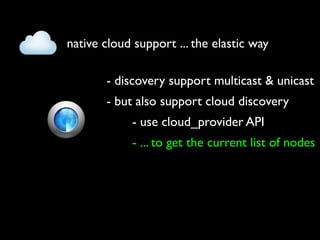
native cloud support ... the elastic way

       - discovery support multicast & unicast
native cloud support ... the elastic way

       - discovery support multicast & unicast
       - but also support cloud discovery
native cloud support ... the elastic way

       - discovery support multicast & unicast
       - but also support cloud discovery
            - use cloud_provider API
native cloud support ... the elastic way

       - discovery support multicast & unicast
       - but also support cloud discovery
            - use cloud_provider API
            - ... to get the current list of nodes
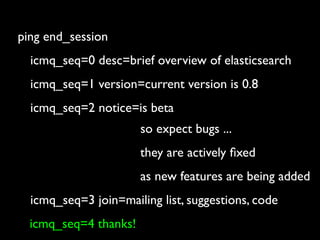
ping end_session
ping end_session
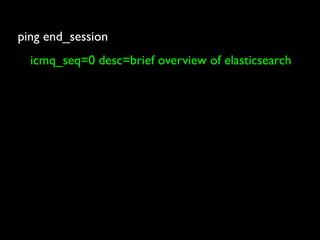
  icmq_seq=0 desc=brief overview of elasticsearch
ping end_session
  icmq_seq=0 desc=brief overview of elasticsearch
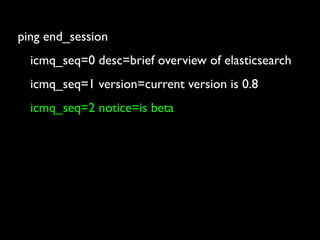
  icmq_seq=1 version=current version is 0.8
ping end_session
  icmq_seq=0 desc=brief overview of elasticsearch
  icmq_seq=1 version=current version is 0.8
  icmq_seq=2 notice=is beta
ping end_session
  icmq_seq=0 desc=brief overview of elasticsearch
  icmq_seq=1 version=current version is 0.8
  icmq_seq=2 notice=is beta
                     so expect bugs ...
ping end_session
  icmq_seq=0 desc=brief overview of elasticsearch
  icmq_seq=1 version=current version is 0.8
  icmq_seq=2 notice=is beta
                     so expect bugs ...
                     they are actively fixed
ping end_session
  icmq_seq=0 desc=brief overview of elasticsearch
  icmq_seq=1 version=current version is 0.8
  icmq_seq=2 notice=is beta
                     so expect bugs ...
                     they are actively fixed
                     as new features are being added
ping end_session
  icmq_seq=0 desc=brief overview of elasticsearch
  icmq_seq=1 version=current version is 0.8
  icmq_seq=2 notice=is beta
                      so expect bugs ...
                      they are actively fixed
                      as new features are being added
  icmq_seq=3 join=mailing list, suggestions, code
ping end_session
  icmq_seq=0 desc=brief overview of elasticsearch
  icmq_seq=1 version=current version is 0.8
  icmq_seq=2 notice=is beta
                       so expect bugs ...
                       they are actively fixed
                       as new features are being added
  icmq_seq=3 join=mailing list, suggestions, code
  icmq_seq=4 thanks!
ping audience

ElasticSearch at berlinbuzzwords 2010

  • 1.
  • 2.
  • 3.
  • 4.
    lightning talk kick ass ~joke
  • 5.
  • 6.
    ping 127.0.0.1 icmq_seq=0 name=shay.banon
  • 7.
    ping 127.0.0.1 icmq_seq=0 name=shay.banon icmq_seq=1 a.k.a=kimchy
  • 8.
    ping 127.0.0.1 icmq_seq=0 name=shay.banon icmq_seq=1 a.k.a=kimchy icmq_seq=2 blog=http://kimchy.org
  • 9.
    ping 127.0.0.1 icmq_seq=0 name=shay.banon icmq_seq=1 a.k.a=kimchy icmq_seq=2 blog=http://kimchy.org icmq_seq=3 twitter=kimchy
  • 10.
  • 11.
    ping elasticsearch icmq_seq=0 tag=open_source (apache)
  • 12.
    ping elasticsearch icmq_seq=0 tag=open_source (apache) icmq_seq=1 tag=distributed
  • 13.
    ping elasticsearch icmq_seq=0 tag=open_source (apache) icmq_seq=1 tag=distributed icmq_seq=2 tag=RESTful
  • 14.
    ping elasticsearch icmq_seq=0 tag=open_source (apache) icmq_seq=1 tag=distributed icmq_seq=2 tag=RESTful icmq_seq=3 tag=(no_sql) search_engine
  • 15.
    ping elasticsearch icmq_seq=0 tag=open_source (apache) icmq_seq=1 tag=distributed icmq_seq=2 tag=RESTful icmq_seq=3 tag=(no_sql) search_engine icmq_seq=4 site=http://www.elasticsearch.com
  • 16.
  • 17.
    open_source apache_2
  • 18.
    open_source apache_2 http://github.com/elasticsearch/elasticsearch
  • 19.
    open_source apache_2 http://github.com/elasticsearch/elasticsearch fork, push, send_pull
  • 20.
  • 21.
    your_data => your_search
  • 22.
    your_data => your_search a product should natively talk the domain model
  • 23.
    your_data => your_search a product should natively talk the domain model and not the other way around
  • 24.
    recipes for gooddomain model language
  • 25.
    recipes for gooddomain model language - document_oriented
  • 26.
    recipes for gooddomain model language - document_oriented - schema free
  • 27.
    recipes for gooddomain model language - document_oriented - schema free - include json
  • 28.
    recipes for gooddomain model language - document_oriented - schema free - include json de_facto open_web standard
  • 29.
    lets build ourselfan amazon store
  • 30.
    lets build ourselfan amazon store (we will get to the cloud laters)
  • 31.
    first thing wehave are books
  • 32.
    this is howthey look like { "book" : { "isbn" : "0812504321", "name" : "Call of the Wild", "author" : { "first_name" : "Jack", "last_name" : "London" }, "pages" : 128, "tag" : ["fiction", "children"] } }
  • 33.
    lets index it $curl -XPUT host:9200/amazon/book/0812504321 -d ‘ { "book" : { "isbn" : "0812504321", "name" : "Call of the Wild", "author" : { "first_name" : "Jack", "last_name" : "London" }, "pages" : 128, "tag" : ["fiction", "children"] } } ‘
  • 34.
    ... `amazon` isthe _index name $ curl -XPUT host:9200/amazon/book/0812504321 -d ‘ { "book" : { "isbn" : "0812504321", "name" : "Call of the Wild", "author" : { "first_name" : "Jack", "last_name" : "London" }, "pages" : 128, "tag" : ["fiction", "children"] } } ‘
  • 35.
    ... `book` isthe _type $ curl -XPUT host:9200/amazon/book/0812504321 -d ‘ { "book" : { "isbn" : "0812504321", "name" : "Call of the Wild", "author" : { "first_name" : "Jack", "last_name" : "London" }, "pages" : 128, "tag" : ["fiction", "children"] } } ‘
  • 36.
    ... `0812504321` isthe _id $ curl -XPUT host:9200/amazon/book/0812504321 -d ‘ { "book" : { "isbn" : "0812504321", "name" : "Call of the Wild", "author" : { "first_name" : "Jack", "last_name" : "London" }, "pages" : 128, "tag" : ["fiction", "children"] } } ‘
  • 37.
    search for allfiction books $ curl -XGET host:9200/amazon/book/_search?q=tag:fiction‘
  • 38.
    search for allfiction books $ curl -XGET host:9200/amazon/book/_search?q=tag:fiction‘ {"_shards":{"total":5,"successful":5,"failed":0},"hits":{"total":1,"hits": [{"_index":"amazon","_type":"book","_id":"0812504321", "_source" : { "book" : { "isbn" : "0812504321", "name" : "Call of the Wild", "author" : { "first_name" : "Jack", "last_name" : "London" }, "pages" : 128, "tag" : ["fiction", "children"] } }}]}}
  • 39.
    ... number oftotal hits $ curl -XGET host:9200/amazon/book/_search?q=tag:fiction‘ {"_shards":{"total":5,"successful":5,"failed":0},"hits":{"total":1,"hits": [{"_index":"amazon","_type":"book","_id":"0812504321", "_source" : { "book" : { "isbn" : "0812504321", "name" : "Call of the Wild", "author" : { "first_name" : "Jack", "last_name" : "London" }, "pages" : 128, "tag" : ["fiction", "children"] } }}]}}
  • 40.
    ... each hithas the `_index` it came from $ curl -XGET host:9200/amazon/book/_search?q=tag:fiction‘ {"_shards":{"total":5,"successful":5,"failed":0},"hits":{"total":1,"hits": [{"_index":"amazon","_type":"book","_id":"0812504321", "_source" : { "book" : { "isbn" : "0812504321", "name" : "Call of the Wild", "author" : { "first_name" : "Jack", "last_name" : "London" }, "pages" : 128, "tag" : ["fiction", "children"] } }}]}}
  • 41.
    ... each hithas the `_type` it belongs to $ curl -XGET host:9200/amazon/book/_search?q=tag:fiction‘ {"_shards":{"total":5,"successful":5,"failed":0},"hits":{"total":1,"hits": [{"_index":"amazon","_type":"book","_id":"0812504321", "_source" : { "book" : { "isbn" : "0812504321", "name" : "Call of the Wild", "author" : { "first_name" : "Jack", "last_name" : "London" }, "pages" : 128, "tag" : ["fiction", "children"] } }}]}}
  • 42.
    ... each hithas its `_id` $ curl -XGET host:9200/amazon/book/_search?q=tag:fiction‘ {"_shards":{"total":5,"successful":5,"failed":0},"hits":{"total":1,"hits": [{"_index":"amazon","_type":"book","_id":"0812504321", "_source" : { "book" : { "isbn" : "0812504321", "name" : "Call of the Wild", "author" : { "first_name" : "Jack", "last_name" : "London" }, "pages" : 128, "tag" : ["fiction", "children"] } }}]}}
  • 43.
    ... each hithas the actual _source document $ curl -XGET host:9200/amazon/book/_search?q=tag:fiction‘ {"_shards":{"total":5,"successful":5,"failed":0},"hits":{"total":1,"hits": [{"_index":"amazon","_type":"book","_id":"0812504321", "_source" : { "book" : { "isbn" : "0812504321", "name" : "Call of the Wild", "author" : { "first_name" : "Jack", "last_name" : "London" }, "pages" : 128, "tag" : ["fiction", "children"] } }}]}}
  • 44.
    ... each hithas the actual _source document $ curl -XGET host:9200/amazon/book/_search?q=tag:fiction‘ {"_shards":{"total":5,"successful":5,"failed":0},"hits":{"total":1,"hits": [{"_index":"amazon","_type":"book","_id":"0812504321", "_source" : { "book" : { "isbn" : "0812504321", "name" : "Call of the Wild", "author" : { "first_name" : "Jack", (can be disabled) "last_name" : "London" }, "pages" : 128, "tag" : ["fiction", "children"] } }}]}}
  • 45.
    next, we havecds { "cd" : { "asin" : "B00192IV0O", "name" : "THE E.N.D. (Energy Never Dies)", "artist" : "Black Eyed Peas", "label" : "Interscope", "release_date": "2009-06-09", "tag" : ["hip-hop", "pop-rap"] } }
  • 46.
    lets index itas well $ curl -XPUT host:9200/amazon/cd/B00192IV0O -d ‘ { "cd" : { "asin" : "B00192IV0O", "name" : "THE E.N.D. (Energy Never Dies)", "artist" : "Black Eyed Peas", "label" : "Interscope", "release_date": "2009-06-09", "tag" : ["hip-hop", "pop-rap"] } } ‘
  • 47.
    ... same _index,`amazon` $ curl -XPUT host:9200/amazon/cd/B00192IV0O -d ‘ { "cd" : { "asin" : "B00192IV0O", "name" : "THE E.N.D. (Energy Never Dies)", "artist" : "Black Eyed Peas", "label" : "Interscope", "release_date": "2009-06-09", "tag" : ["hip-hop", "pop-rap"] } } ‘
  • 48.
    ... new _type,`cd` $ curl -XPUT host:9200/amazon/cd/B00192IV0O -d ‘ { "cd" : { "asin" : "B00192IV0O", "name" : "THE E.N.D. (Energy Never Dies)", "artist" : "Black Eyed Peas", "label" : "Interscope", "release_date": "2009-06-09", "tag" : ["hip-hop", "pop-rap"] } } ‘
  • 49.
    search for allhip-hop cds $ curl -XGET host:9200/amazon/cd/_search?q=tag:hip-hop‘
  • 50.
  • 51.
    search across _type(s) searchon both `cd` and `book` using `name` $ curl -XGET ‘host:9200/amazon/cd,book/_search?q=name:call’
  • 52.
    search across _type(s) searchon both `cd` and `book` using `name` $ curl -XGET ‘host:9200/amazon/cd,book/_search?q=name:call’ search on `_all` types using `name` $ curl -XGET ‘host:9200/amazon/_search?q=name:call’
  • 53.
    search across _type(s) searchon both `cd` and `book` using `name` $ curl -XGET ‘host:9200/amazon/cd,book/_search?q=name:call’ search on `_all` types using `name` $ curl -XGET ‘host:9200/amazon/_search?q=name:call’ search on specific fields types $ curl -XGET ‘host:9200/amazon/_search?q=book.author.first_name:jack OR cd.artist:jack‘
  • 54.
    book and cdcan be indices as well $ curl -XPUT host:9200/book/info/0812504321 -d ‘ { "isbn" : "0812504321", "name" : "Call of the Wild", "author" : { "first_name" : "Jack", "last_name" : "London" }, "pages" : 128, "tag" : ["fiction", "children"] } ‘
  • 55.
    ... `book` isnow the _index $ curl -XPUT host:9200/book/info/0812504321 -d ‘ { "isbn" : "0812504321", "name" : "Call of the Wild", "author" : { "first_name" : "Jack", "last_name" : "London" }, "pages" : 128, "tag" : ["fiction", "children"] } ‘
  • 56.
    ... `info` isthe _type $ curl -XPUT host:9200/book/info/0812504321 -d ‘ { "isbn" : "0812504321", "name" : "Call of the Wild", "author" : { "first_name" : "Jack", "last_name" : "London" }, "pages" : 128, "tag" : ["fiction", "children"] } ‘
  • 57.
    cd is anindex as well $ curl -XPUT host:9200/cd/info/B00192IV0O -d ‘ { "asin" : "B00192IV0O", "name" : "THE E.N.D. (Energy Never Dies)", "artist" : "Black Eyed Peas", "label" : "Interscope", "release_date": "2009-06-09", "tag" : ["hip-hop", "pop-rap"] } ‘
  • 58.
  • 59.
    search across _index(es) searchon both `cd` and `book` using `name` $ curl -XGET ‘host:9200/cd,book/info/_search?q=name:call’
  • 60.
    search across _index(es) searchon both `cd` and `book` using `name` $ curl -XGET ‘host:9200/cd,book/info/_search?q=name:call’ search on `_all` indices using `name` $ curl -XGET ‘host:9200/_search?q=name:call’
  • 61.
  • 62.
  • 63.
    query_dsl done with theyour_data part => now to the your_search part
  • 64.
    ... term_query { “term” : { “name” : “call” } }
  • 65.
    ... term_query, alsowith type { “term” : { “name” : “call” } } { “term” : { “book.name” : “call” } }
  • 66.
    ... range_query { “range” : { “pages” : { “from” : 200, “to” : 300 } } }
  • 67.
    ... range_query, alsowith type { “range” : { “pages” : { “from” : 200, “to” : 300 } } } { “range” : { “book.pages” : { “from” : 200, “to” : 300 } } }
  • 68.
    ... many morequeries { “prefix” : { “book.name” : “ca” } }
  • 69.
    ... many morequeries { “prefix” : { “book.name” : “ca” } } { “wildcard” : { “book.name” : “c*ll” } }
  • 70.
    ... many morequeries { “prefix” : { { “book.name” : “ca” “field” : { } “book.name” : “+call +wild” } } { } “wildcard” : { “book.name” : “c*ll” } }
  • 71.
    ... many morequeries { “prefix” : { { “book.name” : “ca” “field” : { } “book.name” : “+call +wild” } } { } “wildcard” : { “book.name” : “c*ll” } } { “query_string” : { “query” : “+call +wild” } }
  • 72.
    ... and, ofcourse, bool_query { “bool” : { “must” : [ { “field” : { “book.name” : “+call +wild” } }, { “range” : { “book.pages” : { “gte” : 200 } } } ], “must_not” : [ { “term” : { “book.author.first_name” : “jack” } } ], “should” : [ { “term” : { “book.author.last_name” : “london” } } ] } }
  • 73.
  • 74.
  • 75.
    filters faster than queries no scoring cached for even faster access
  • 76.
    ... sample filters(wrapped as constant_score query) { “constant_score” : { “filter” : { “term” : { “name” : “call” } } } }
  • 77.
    ... sample filters(wrapped as constant_score query) { “constant_score” : { “filter” : { “term” : { { “name” : “call” “constant_score” : { } “filter” : { } “range” : { } “book.pages” : { } “from” : 100, “to” : 200 } } } } }
  • 78.
    ... easily combinedwith queries { “filtered” : { “query” : { “query_string” : { “query” : “+call +wild” } } “filter” : { “range” : { “book.pages” : { “from” : 100, “to” : 200 } } } } }
  • 79.
    ... easily combinedwith queries { “filtered” : { “query” : { “query_string” : { “query” : “+call +wild” } } “filter” : { “range” : { “book.pages” : { “from” : 100, “to” : 200 } } } } }
  • 80.
    ... easily combinedwith queries { “filtered” : { “query” : { “query_string” : { “query” : “+call +wild” } } “filter” : { “range” : { “book.pages” : { “from” : 100, “to” : 200 } } } } }
  • 81.
    ... easily combinedwith queries { “filtered” : { “query” : { “query_string” : { “query” : “+call +wild” } } “filter” : { “range” : { “book.pages” : { “from” : 100, “to” : 200 } } } } }
  • 82.
    used in asearch request $ curl -XPOST ‘host:9200/amazon/cd/_search‘ -d ‘ { “query” : { “field” : { “name” : “+call + wild” } } } ‘
  • 83.
  • 84.
  • 85.
  • 86.
    other search features highlighting retrieve specific fields facets
  • 87.
    other search features highlighting retrieve specific fields facets _all field
  • 88.
    other search features highlighting retrieve specific fields facets _all field scrolling
  • 89.
  • 90.
  • 91.
    ... start 1stnode node 1
  • 92.
    ... create anindex with 2 shards, 1 replica node 1 PUT /amazon { “index.number_of_shards” : 2, “index.number_of_replicas” : 1 }
  • 93.
    ... create anindex with 2 shards, 1 replica node 1 1 PUT /amazon { “index.number_of_shards” : 2, “index.number_of_replicas” : 1 }
  • 94.
    ... create anindex with 2 shards, 1 replica node 1 1 2 PUT /amazon { “index.number_of_shards” : 2, “index.number_of_replicas” : 1 }
  • 95.
    ... start 2ndnode node 1 node 2 1 1 2 2
  • 96.
    ... start 3rdand 4th node 1 node 2 node 3 node 4 1 1 2 2
  • 97.
    ... index adocument node 1 node 2 node 3 node 4 1 1 2 2 PUT /amazon/book/1 { ... }
  • 98.
    ... index adocument => hashed to 1st shard node 1 node 2 node 3 node 4 1 1 2 2 PUT /amazon/book/1 { ... }
  • 99.
    ... index adocument => replicated node 1 node 2 node 3 node 4 1 1 2 2 PUT /amazon/book/1 { ... }
  • 100.
    ... index anotherdocument node 1 node 2 node 3 node 4 1 1 2 2 PUT /amazon/book/2 { ... }
  • 101.
    ... index anotherdocument => hashed to 2nd shard node 1 node 2 node 3 node 4 1 1 2 2 PUT /amazon/book/2 { ... }
  • 102.
    ... index anotherdocument => replicated node 1 node 2 node 3 node 4 1 1 2 2 PUT /amazon/book/2 { ... }
  • 103.
    search node 1 node 2 node 3 node 4 1 1 2 2 GET /amazon/_search?q=name:call
  • 104.
    search => scatter node 1 node 2 node 3 node 4 1 1 2 2 GET /amazon/_search?q=name:call
  • 105.
    search => gather node 1 node 2 node 3 node 4 1 1 2 2 GET /amazon/_search?q=name:call
  • 106.
    create another index node1 node 2 node 3 node 4 1 1 2 2 PUT /amazon2 { “index.number_of_shards” : 1, “index.number_of_replicas” : 1 }
  • 107.
    create another index node1 node 2 node 3 node 4 1 1 1 1 2 2 PUT /amazon2 { “index.number_of_shards” : 1, “index.number_of_replicas” : 1 }
  • 108.
    create another index node1 node 2 node 3 node 4 1 1 1 1 2 2 almost all settings are index based
  • 109.
  • 110.
    per document consistency - you index it, its there
  • 111.
    per document consistency - you index it, its there - no need to commit / flush
  • 112.
    per document consistency - you index it, its there - no need to commit / flush - uses a transaction log
  • 113.
  • 114.
    (near) real_time search - automatic, 1 second refresh rate
  • 115.
    (near) real_time search - automatic, 1 second refresh rate - there’s an api for that
  • 116.
    (near) real_time search - automatic, 1 second refresh rate - there’s an api for that - POST /_refresh
  • 117.
  • 118.
    long_term persistency - similar to apple time_machine
  • 119.
    long_term persistency - similar to apple time_machine - or data_grid write_behind
  • 120.
    long_term persistency - similar to apple time_machine - or data_grid write_behind - write changes to index / translog
  • 121.
    long_term persistency - similar to apple time_machine - or data_grid write_behind - write changes to index / translog - to a shared persistent storage
  • 122.
    long_term persistency - similar to apple time_machine - or data_grid write_behind - write changes to index / translog - to a shared persistent storage - asynchronously (reliable)
  • 123.
    long_term persistency - similar to apple time_machine - or data_grid write_behind - write changes to index / translog - to a shared persistent storage - asynchronously (reliable) - low requirements from storage
  • 124.
    long_term persistency - similar to apple time_machine - or data_grid write_behind - write changes to index / translog - to a shared persistent storage - asynchronously (reliable) - low requirements from storage - cluster meta_data persisted
  • 125.
  • 126.
    long_term persistency ...storage options - shared file system
  • 127.
    long_term persistency ...storage options - shared file system - no need for locking, etc ...
  • 128.
    long_term persistency ...storage options - shared file system - no need for locking, etc ... - hadoop, using HDFS
  • 129.
    long_term persistency ...storage options - shared file system - no need for locking, etc ... - hadoop, using HDFS - cloud (aws_s3, rackspace_cloud_files)
  • 130.
  • 131.
    long_term persistency ...node storage - considered transient
  • 132.
    long_term persistency ...node storage - considered transient - can be recovered from gateway
  • 133.
    long_term persistency ...node storage - considered transient - can be recovered from gateway - can be stored on
  • 134.
    long_term persistency ...node storage - considered transient - can be recovered from gateway - can be stored on - local file system
  • 135.
    long_term persistency ...node storage - considered transient - can be recovered from gateway - can be stored on - local file system - heap (jvm) memory
  • 136.
    long_term persistency ...node storage - considered transient - can be recovered from gateway - can be stored on - local file system - heap (jvm) memory - native (os) memory
  • 137.
    long_term persistency ...node storage - considered transient - can be recovered from gateway - can be stored on - local file system - heap (jvm) memory - native (os) memory - fs & memory combination
  • 138.
  • 139.
  • 140.
    native cloud support inthe cloud machine removed / added more dynamically
  • 141.
    native cloud support in the cloud machine removed / added more dynamically machine fail more “dynamically”
  • 142.
    native cloud support in the cloud machine removed / added more dynamically machine fail more “dynamically” local storage is wiped
  • 143.
  • 144.
    native cloud support... storage - local storage is wiped
  • 145.
    native cloud support... storage - local storage is wiped - use external storage (aws ebs)
  • 146.
    native cloud support... storage - local storage is wiped - use external storage (aws ebs) - needs to be per machine / shard
  • 147.
    native cloud support... storage - local storage is wiped - use external storage (aws ebs) - needs to be per machine / shard - can get wiped as well ...
  • 148.
    native cloud support... storage - local storage is wiped - use external storage (aws ebs) - needs to be per machine / shard - can get wiped as well ... - mmm..., ok, snapshot to aws s3
  • 149.
    native cloud support... storage - local storage is wiped - use external storage (aws ebs) - needs to be per machine / shard - can get wiped as well ... - mmm..., ok, snapshot to aws s3 - expensive => ebs & s3
  • 150.
    native cloud support... storage - local storage is wiped - use external storage (aws ebs) - needs to be per machine / shard - can get wiped as well ... - mmm..., ok, snapshot to aws s3 - expensive => ebs & s3 - snapshot interval problematic
  • 151.
    native cloud support... storage - local storage is wiped - use external storage (aws ebs) - needs to be per machine / shard - can get wiped as well ... - mmm..., ok, snapshot to aws s3 - expensive => ebs & s3 - snapshot interval problematic
  • 152.
    native cloud support... the elastic way
  • 153.
    native cloud support... the elastic way - use long term persistency
  • 154.
    native cloud support... the elastic way - use long term persistency - directly into cloud blob storage
  • 155.
    native cloud support... the elastic way - use long term persistency - directly into cloud blob storage - aws s3, rackspace cloud_files
  • 156.
    native cloud support... the elastic way - use long term persistency - directly into cloud blob storage - aws s3, rackspace cloud_files
  • 157.
    native cloud support... the elastic way - use long term persistency - directly into cloud blob storage - aws s3, rackspace cloud_files - reliable & asynchronous
  • 158.
    native cloud support... discovery
  • 159.
    native cloud support... discovery - no multicast
  • 160.
    native cloud support... discovery - no multicast - resort to unicast discovery
  • 161.
    native cloud support... discovery - no multicast - resort to unicast discovery - who’s my special nodes ...
  • 162.
    native cloud support... discovery - no multicast - resort to unicast discovery - who’s my special nodes ... - require persistent ip’s
  • 163.
    native cloud support... discovery - no multicast - resort to unicast discovery - who’s my special nodes ... - require persistent ip’s - complicate operations
  • 164.
    native cloud support... the elastic way
  • 165.
    native cloud support... the elastic way - discovery support multicast & unicast
  • 166.
    native cloud support... the elastic way - discovery support multicast & unicast - but also support cloud discovery
  • 167.
    native cloud support... the elastic way - discovery support multicast & unicast - but also support cloud discovery - use cloud_provider API
  • 168.
    native cloud support... the elastic way - discovery support multicast & unicast - but also support cloud discovery - use cloud_provider API - ... to get the current list of nodes
  • 169.
  • 170.
    ping end_session icmq_seq=0 desc=brief overview of elasticsearch
  • 171.
    ping end_session icmq_seq=0 desc=brief overview of elasticsearch icmq_seq=1 version=current version is 0.8
  • 172.
    ping end_session icmq_seq=0 desc=brief overview of elasticsearch icmq_seq=1 version=current version is 0.8 icmq_seq=2 notice=is beta
  • 173.
    ping end_session icmq_seq=0 desc=brief overview of elasticsearch icmq_seq=1 version=current version is 0.8 icmq_seq=2 notice=is beta so expect bugs ...
  • 174.
    ping end_session icmq_seq=0 desc=brief overview of elasticsearch icmq_seq=1 version=current version is 0.8 icmq_seq=2 notice=is beta so expect bugs ... they are actively fixed
  • 175.
    ping end_session icmq_seq=0 desc=brief overview of elasticsearch icmq_seq=1 version=current version is 0.8 icmq_seq=2 notice=is beta so expect bugs ... they are actively fixed as new features are being added
  • 176.
    ping end_session icmq_seq=0 desc=brief overview of elasticsearch icmq_seq=1 version=current version is 0.8 icmq_seq=2 notice=is beta so expect bugs ... they are actively fixed as new features are being added icmq_seq=3 join=mailing list, suggestions, code
  • 177.
    ping end_session icmq_seq=0 desc=brief overview of elasticsearch icmq_seq=1 version=current version is 0.8 icmq_seq=2 notice=is beta so expect bugs ... they are actively fixed as new features are being added icmq_seq=3 join=mailing list, suggestions, code icmq_seq=4 thanks!
  • 178.