

Couchbase Server 2.0 and
Cross Data Center replication


                Dipti Borkar


                                1
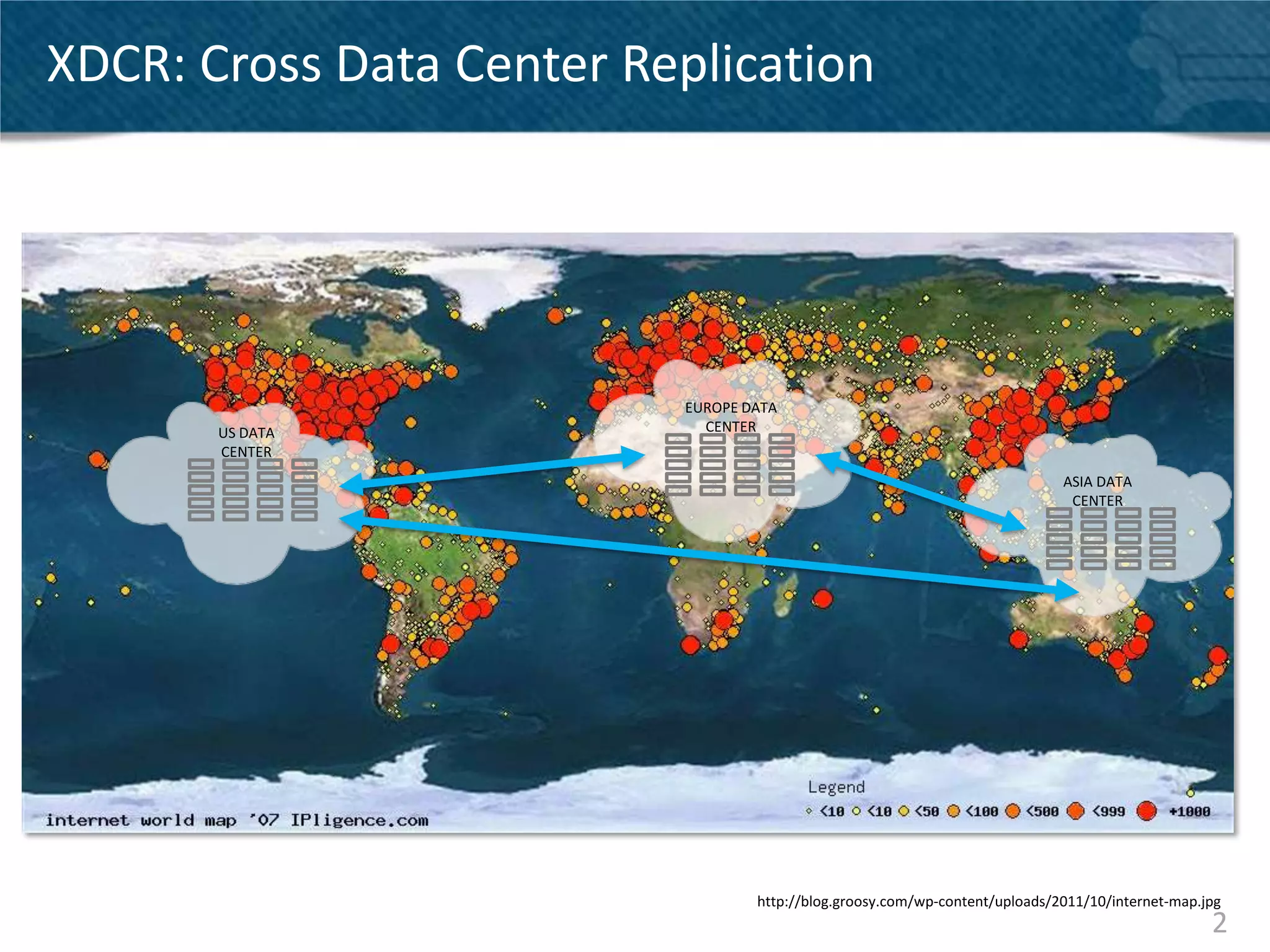
XDCR: Cross Data Center Replication


                          EUROPE DATA
       US DATA              CENTER
       CENTER
                                                                             ASIA DATA
                                                                              CENTER


                                  http://blog.groosy.com/wp-content/uploads/2011/10/internet-map.jpg
                                                                                                  2
Cross Data Center Replication – The basics

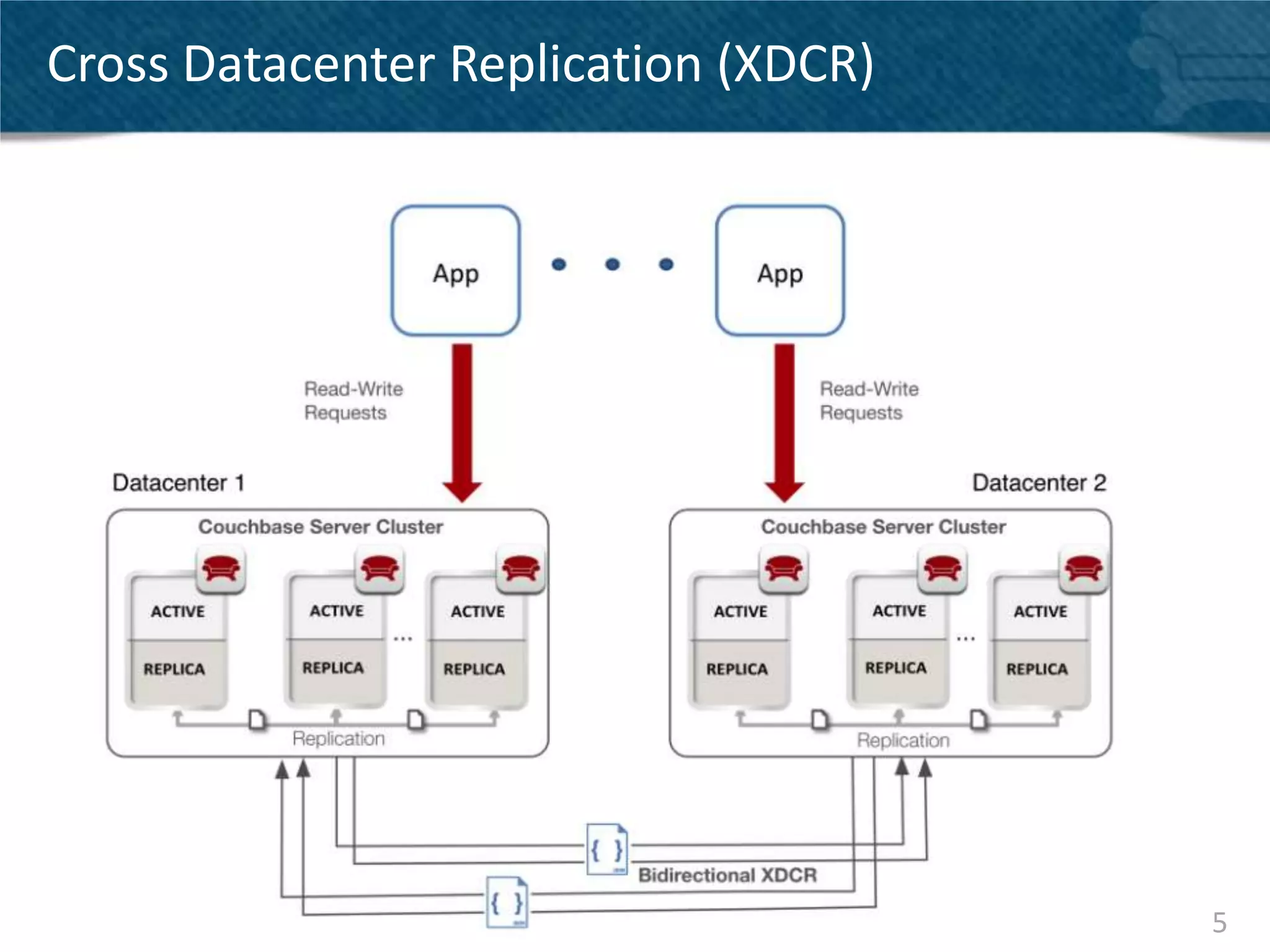
• Replicate your Couchbase data across clusters
• Clusters may be spread across geos
• Configured on a per-bucket basis
• Supports unidirectional and bidirectional operation
• Application can read and write from both clusters
  (active – active replication)
• Replication throughput scales out linearly
• Different from intra-cluster replication


                                                        3
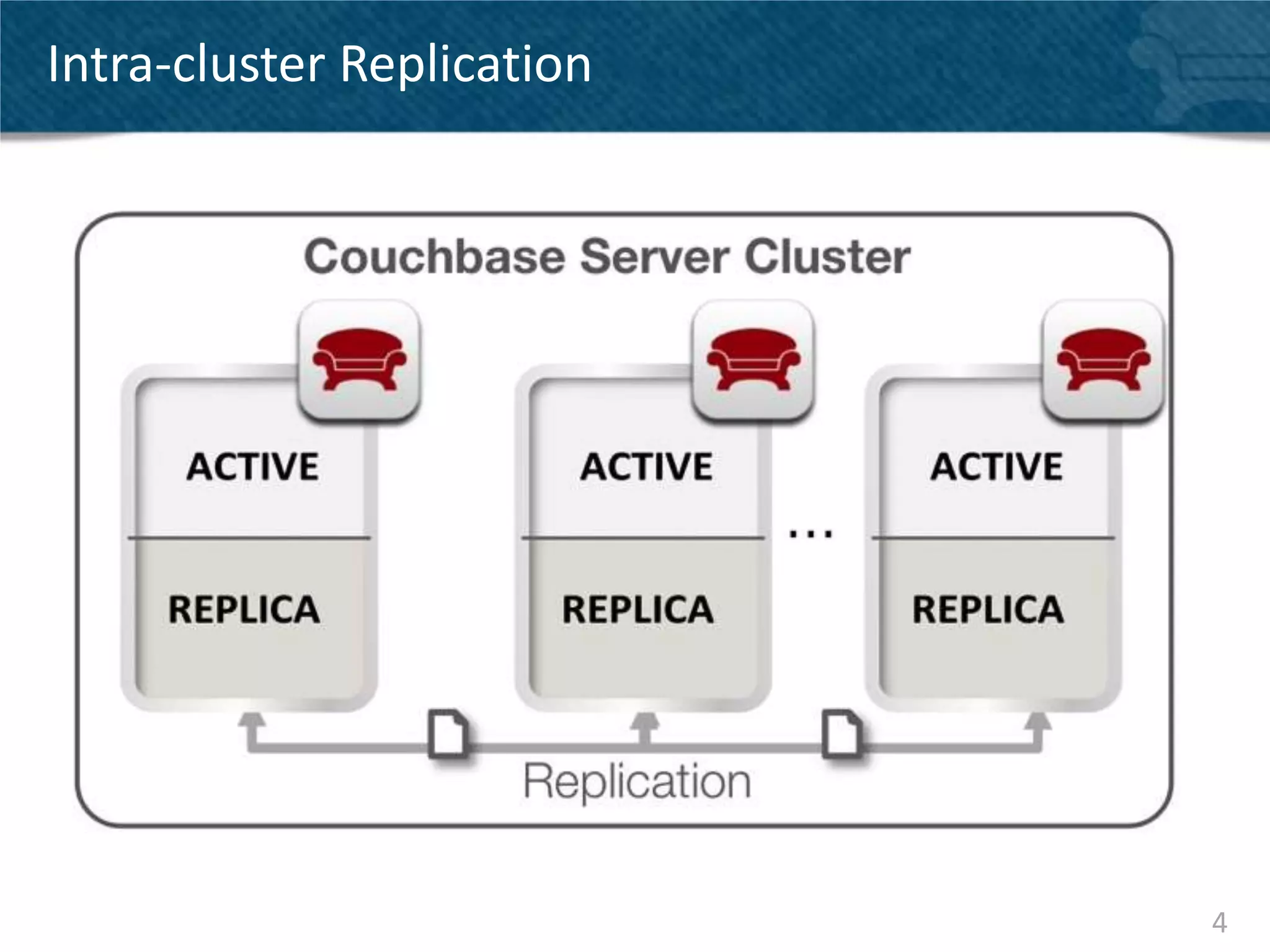
Intra-cluster Replication


                            4
Cross Datacenter Replication (XDCR)


                                      5
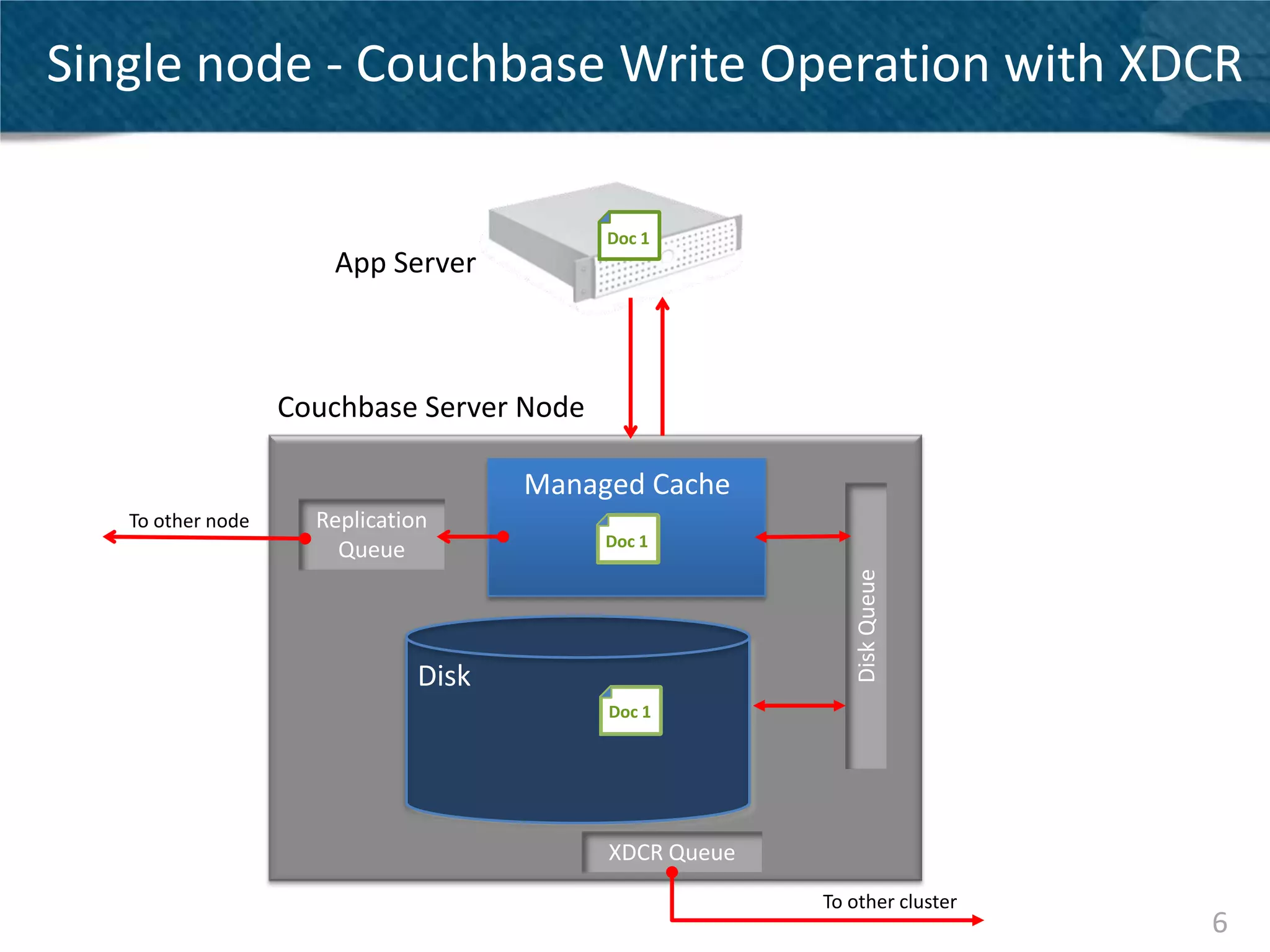
Single node - Couchbase Write Operation with XDCR
                                                   2

                                           Doc 1
                      App Server


                   Couchbase Server Node
                                       3           2    3
                                      Managed Cache
   To other node     Replication
                                           Doc 1
                       Queue


                                                            Disk Queue
                               Disk
                                           Doc 1


                                           XDCR Queue
                                                        To other cluster
                                                                           6
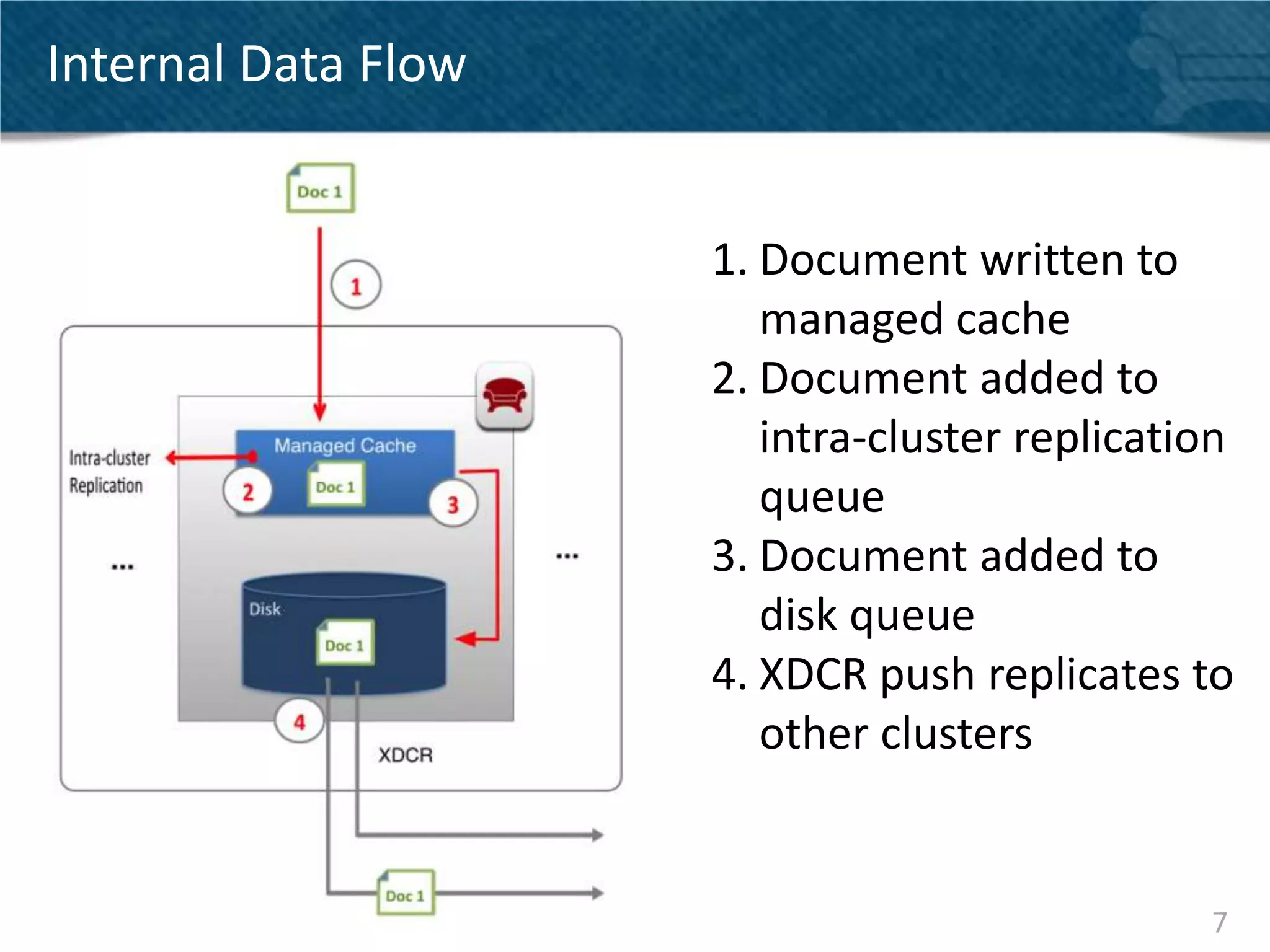
Internal Data Flow


                     1. Document written to
                        managed cache
                     2. Document added to
                        intra-cluster replication
                        queue
                     3. Document added to
                        disk queue
                     4. XDCR push replicates to
                        other clusters


                                               7
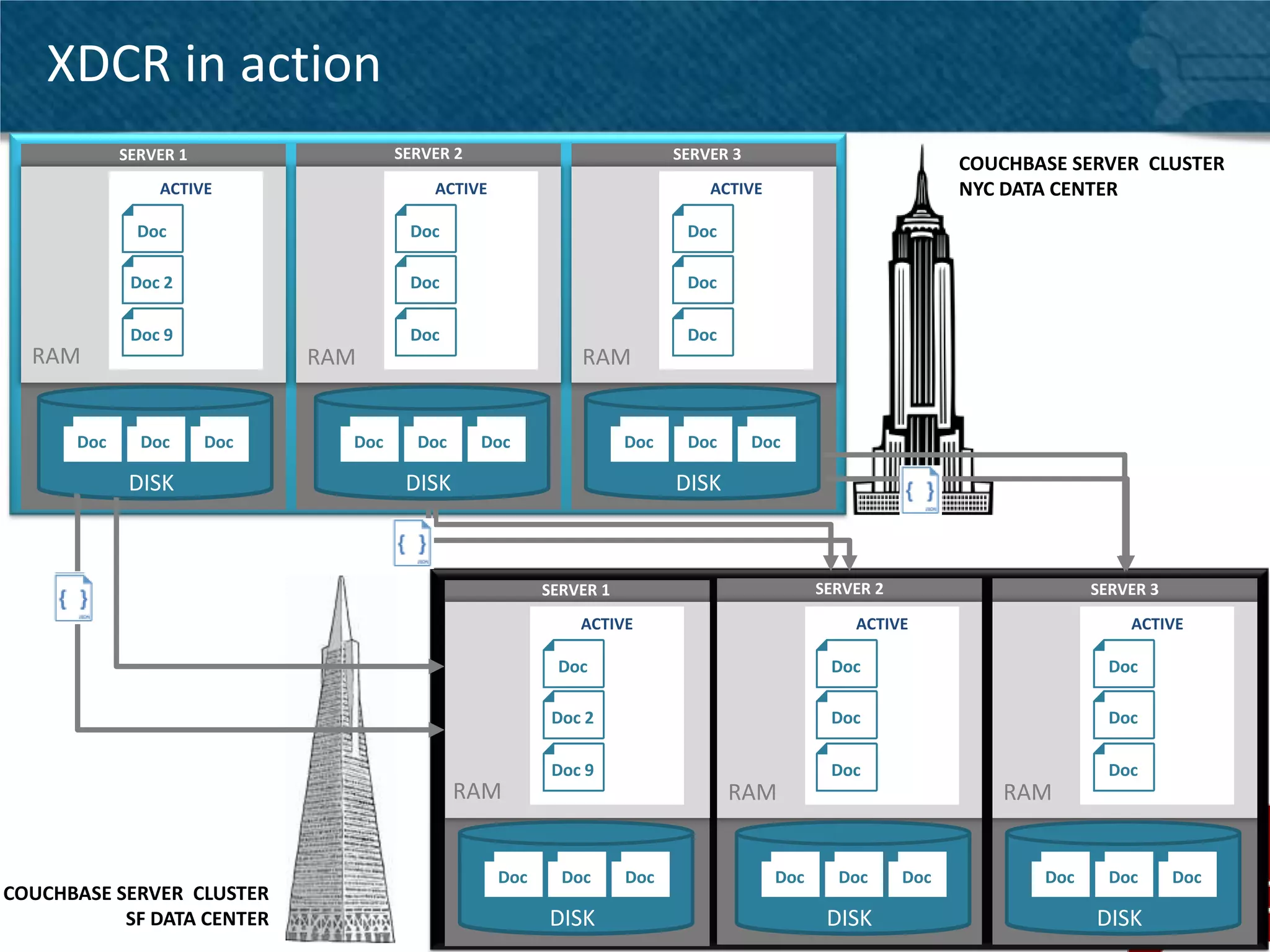
XDCR in action
            SERVER 1                 SERVER 2                            SERVER 3
                                                                                                             COUCHBASE SERVER CLUSTER
                ACTIVE                   ACTIVE                              ACTIVE                          NYC DATA CENTER
              Doc                     Doc                                 Doc

             Doc 2                    Doc                                 Doc

             Doc 9                    Doc                                 Doc
  RAM                        RAM                            RAM


      Doc     Doc      Doc     Doc     Doc      Doc                Doc    Doc       Doc

             DISK                     DISK                               DISK


                                                        SERVER 1                            SERVER 2                      SERVER 3
                                                            ACTIVE                              ACTIVE                        ACTIVE

                                                         Doc                                 Doc                            Doc

                                                         Doc 2                               Doc                            Doc

                                                         Doc 9                               Doc                            Doc
                                             RAM                                RAM                             RAM


                                                  Doc     Doc      Doc                Doc     Doc      Doc          Doc     Doc      Doc
COUCHBASE SERVER CLUSTER
           SF DATA CENTER                               DISK                                 DISK                         DISK             8
XDCR ARCHITECTURE


                    9
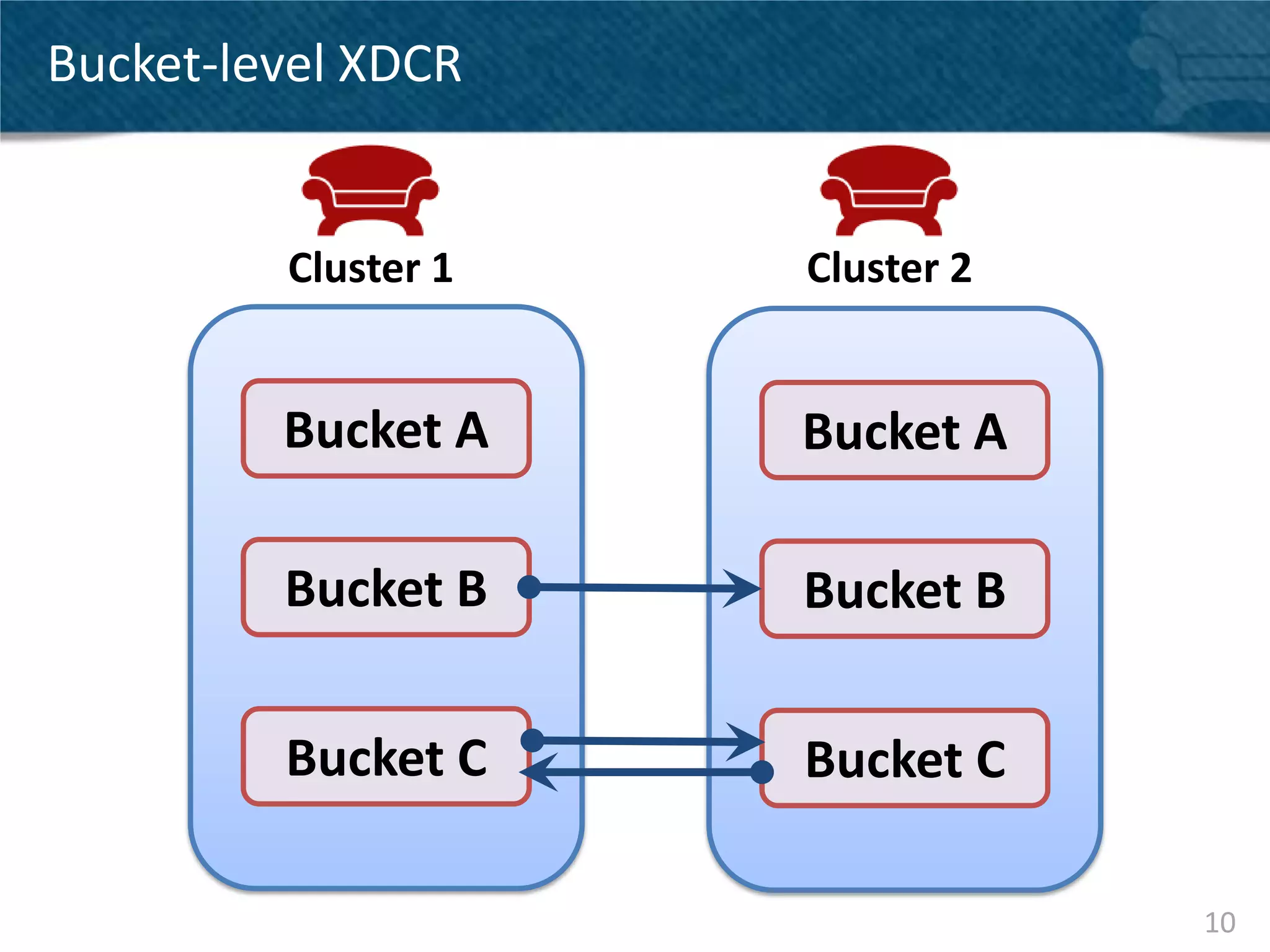
Bucket-level XDCR


         Cluster 1   Cluster 2


         Bucket A    Bucket A

         Bucket B    Bucket B

         Bucket C    Bucket C

                                 10
Continuous Reliable Replication

• All data mutations replicated to destination cluster
• Multiple streams round-robin across vBuckets in
  parallel (32 default)
• Automatic resume after network disruption


                                                         11
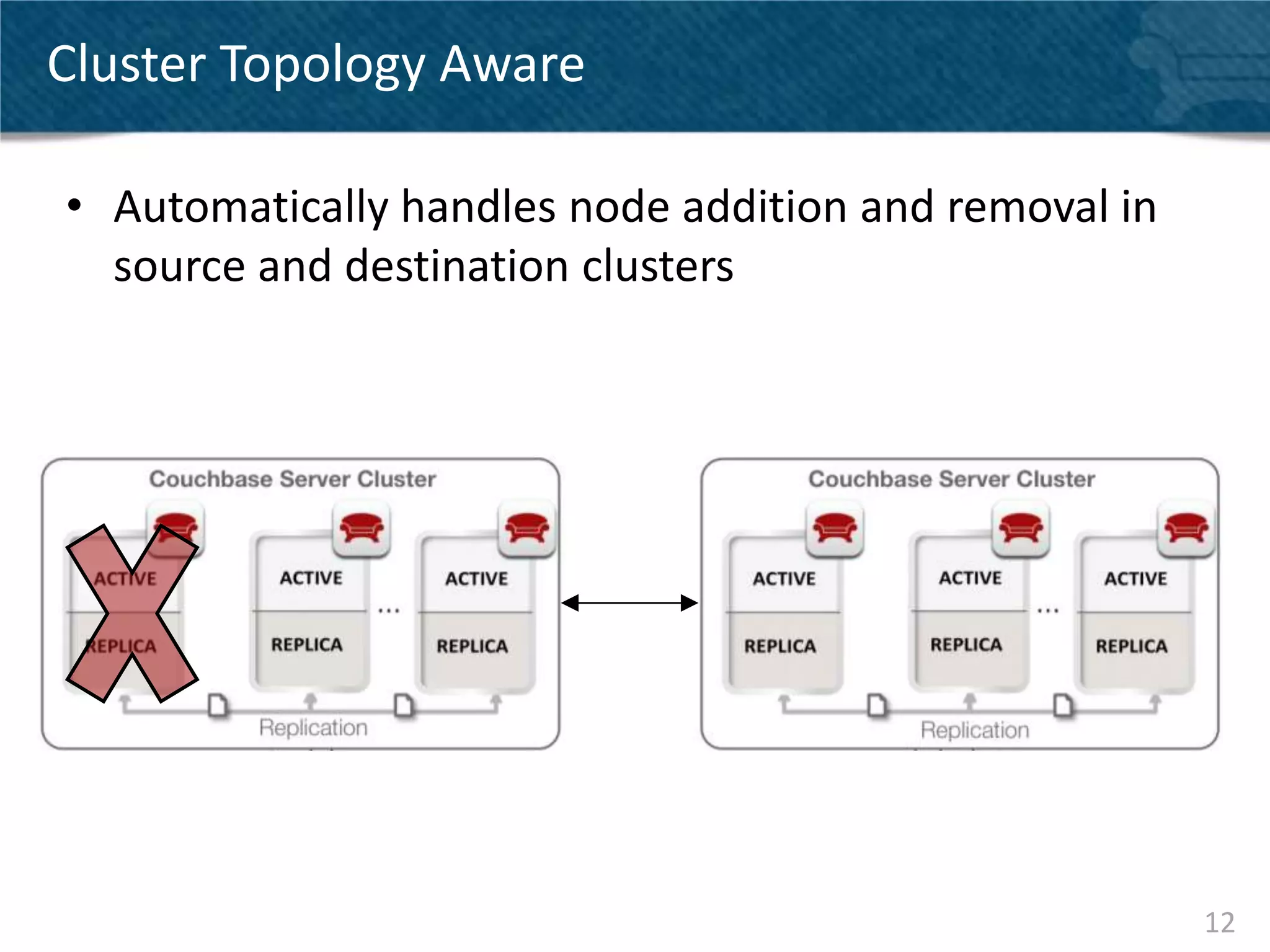
Cluster Topology Aware

• Automatically handles node addition and removal in
  source and destination clusters


                                                       12
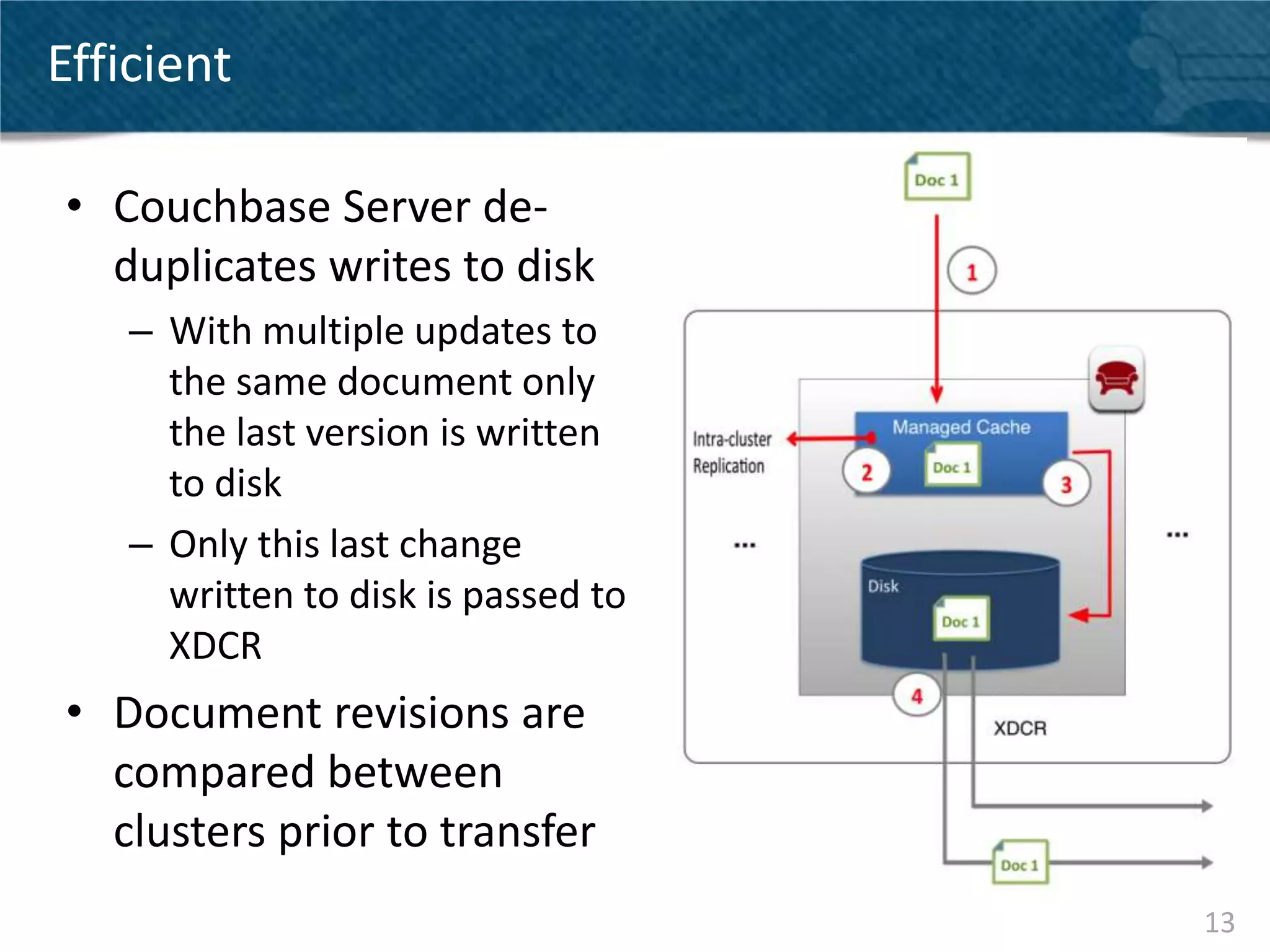
Efficient

• Couchbase Server de-
  duplicates writes to disk
    – With multiple updates to
      the same document only
      the last version is written
      to disk
    – Only this last change
      written to disk is passed to
      XDCR
• Document revisions are
  compared between
  clusters prior to transfer
                                     13
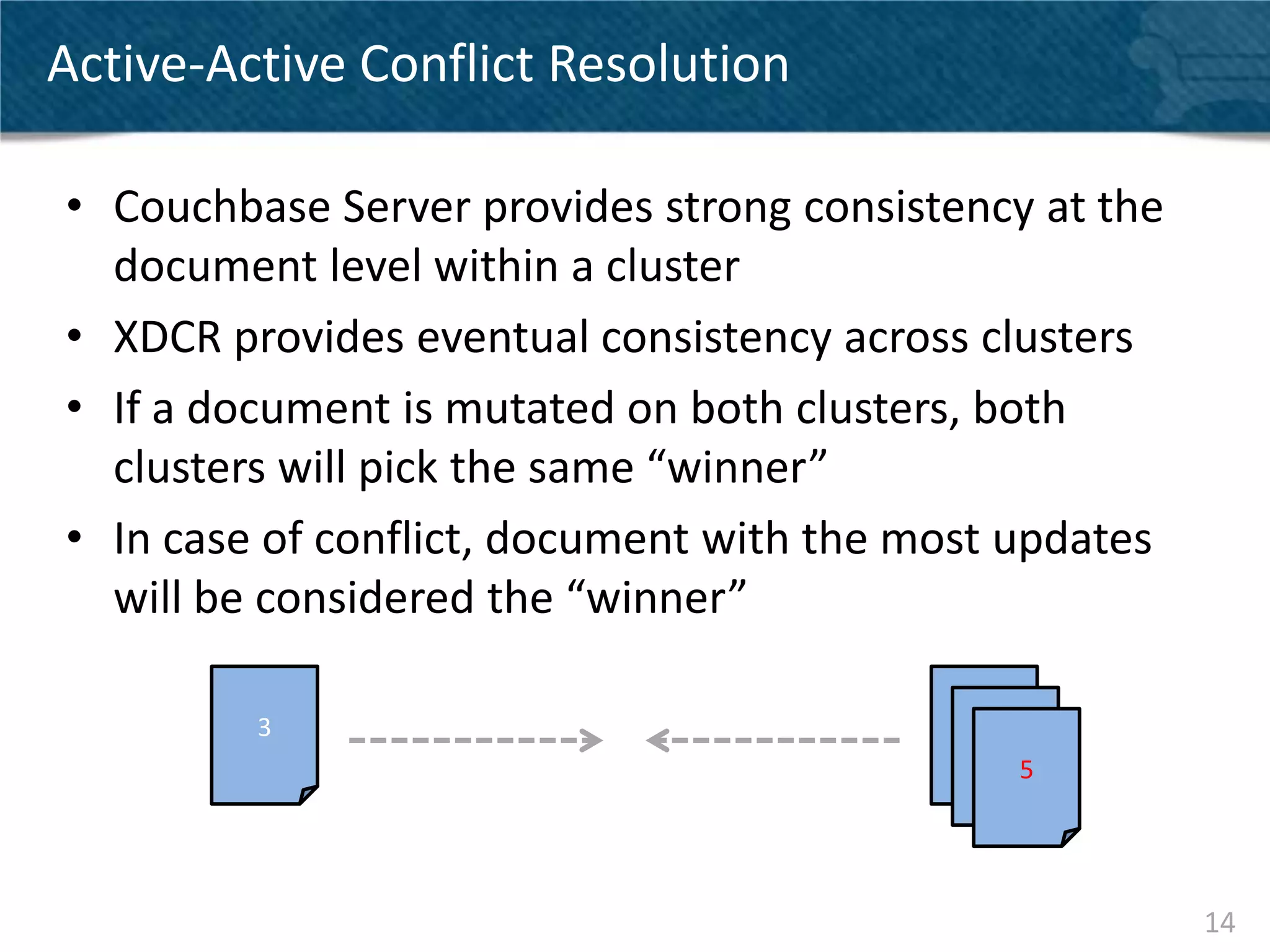
Active-Active Conflict Resolution

• Couchbase Server provides strong consistency at the
  document level within a cluster
• XDCR provides eventual consistency across clusters
• If a document is mutated on both clusters, both
  clusters will pick the same “winner”
• In case of conflict, document with the most updates
  will be considered the “winner”

         3                                 3
                                               3
                                                   5


                                                        14
CONFIGURATION
     AND
 MONITORING


                15
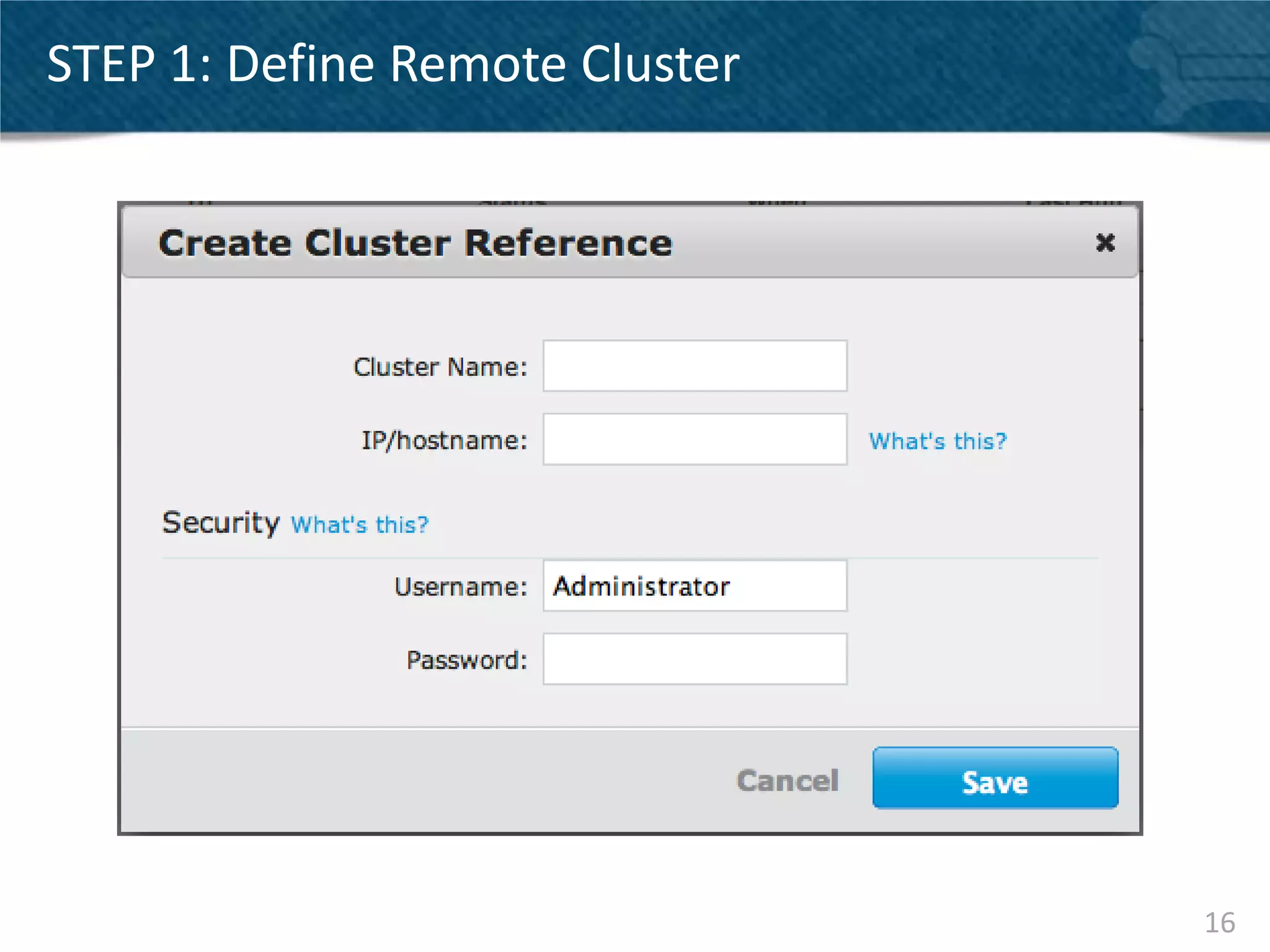
STEP 1: Define Remote Cluster


                                16
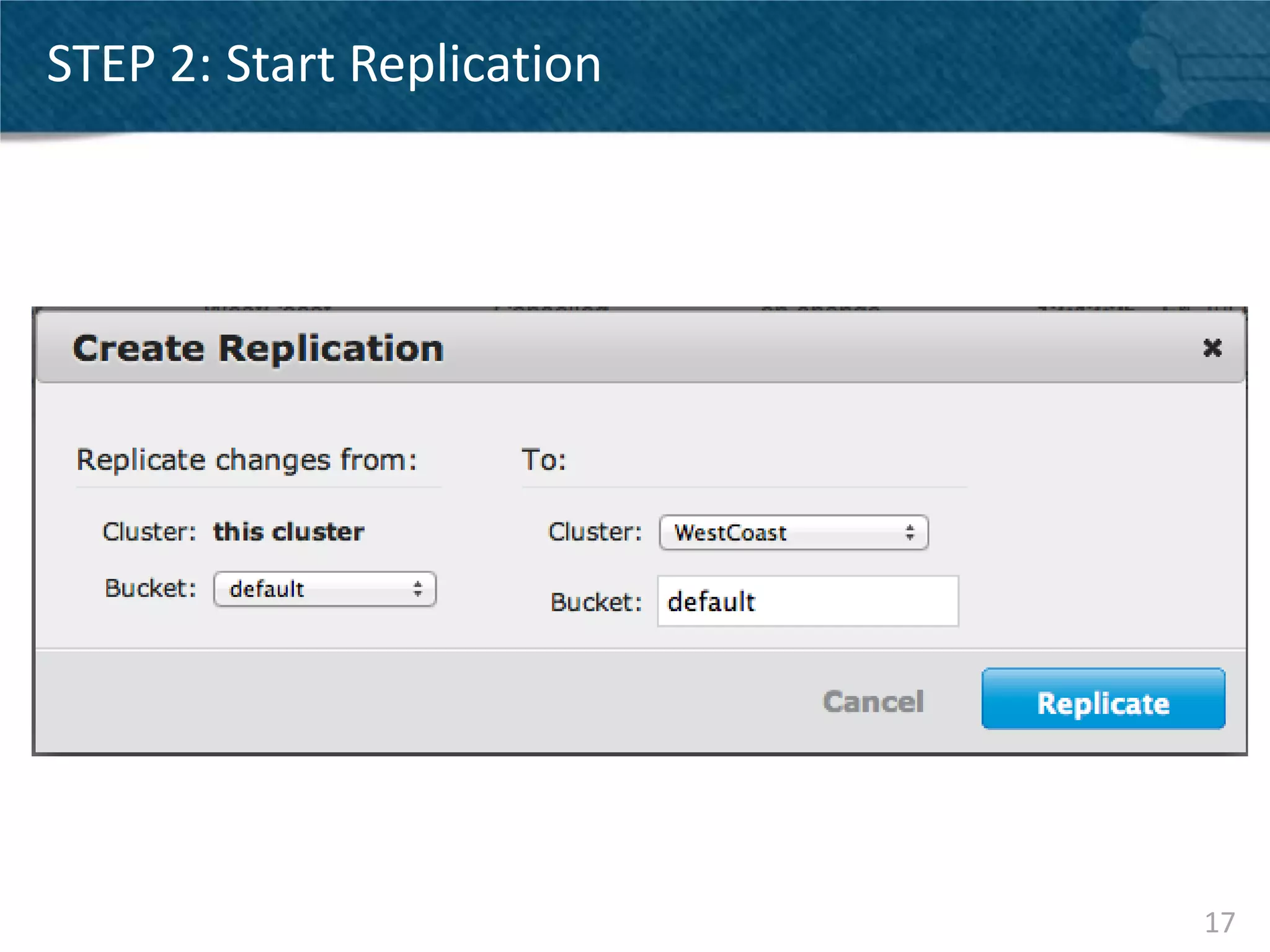
STEP 2: Start Replication


                            17
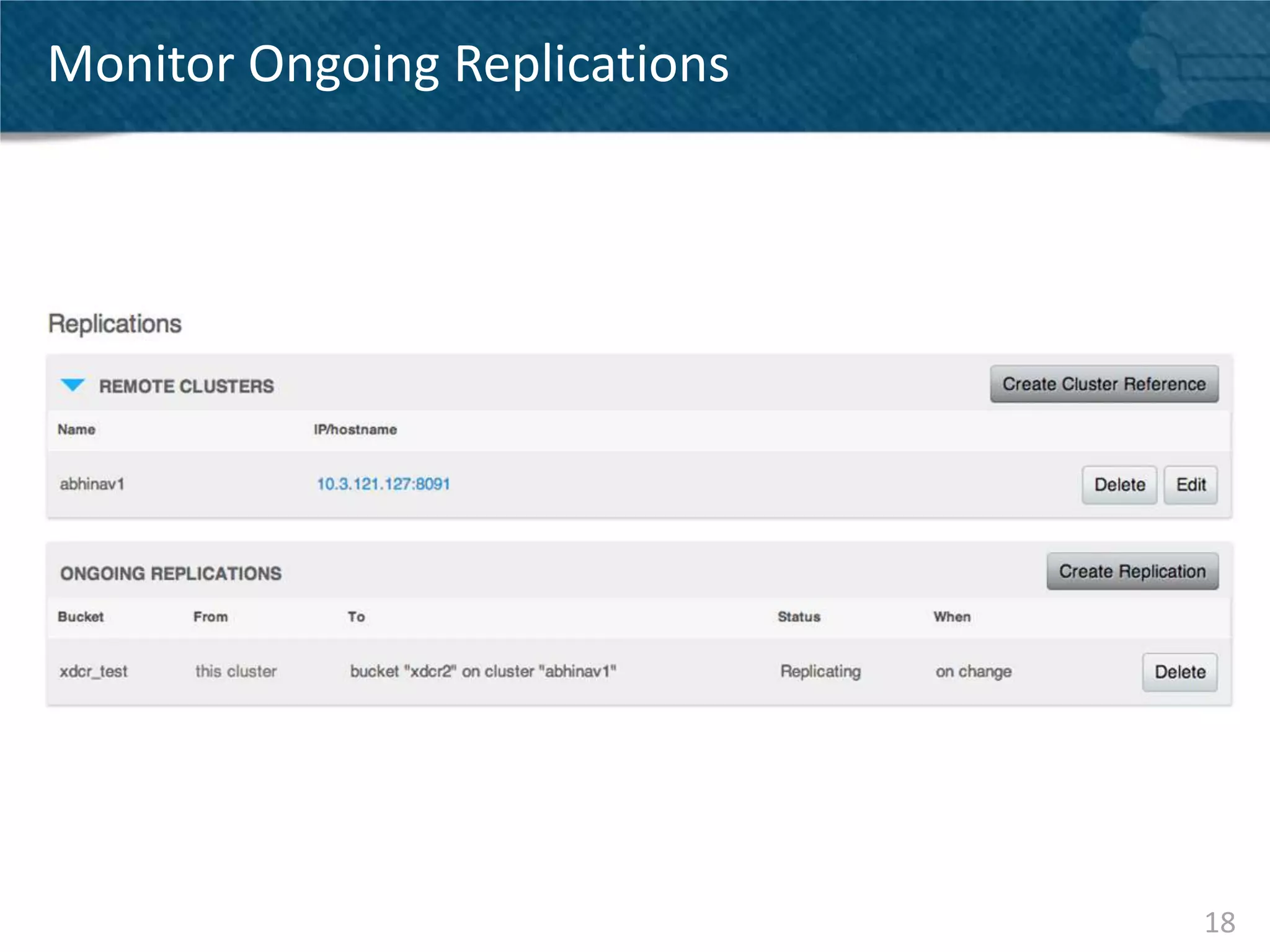
Monitor Ongoing Replications


                               18
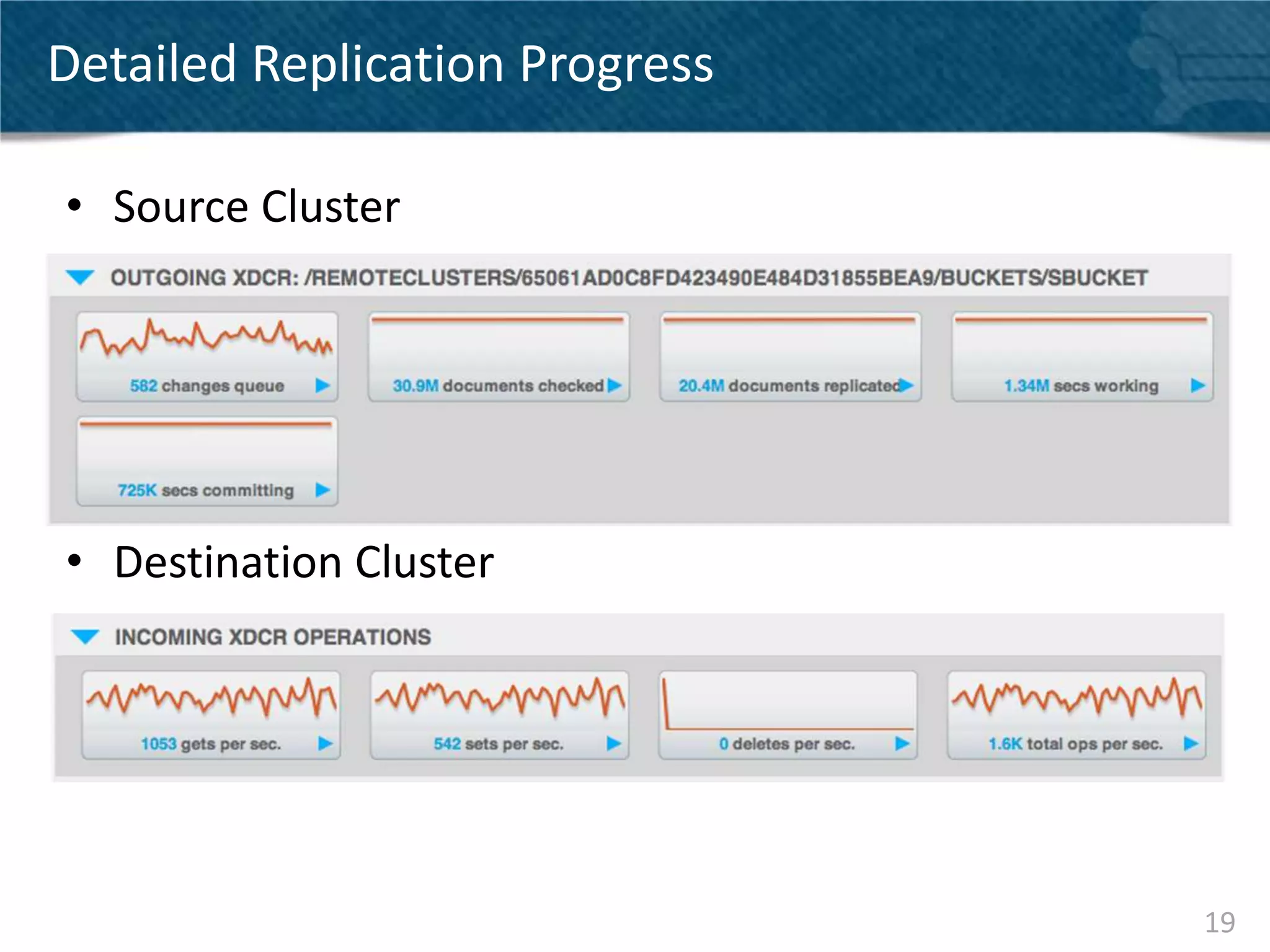
Detailed Replication Progress

• Source Cluster


• Destination Cluster


                                19
XDCR TOPOLOGIES


                  20
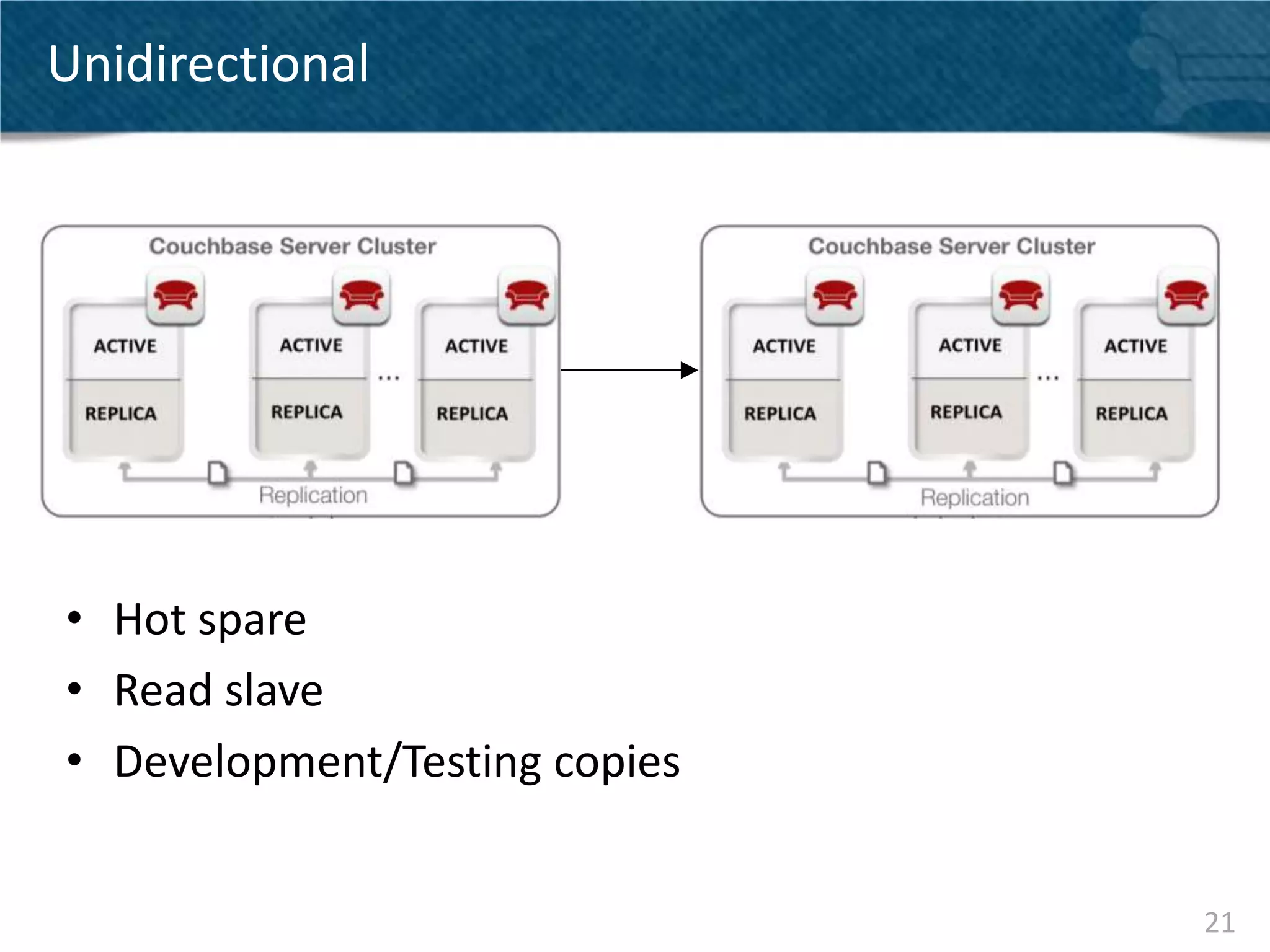
Unidirectional


• Hot spare
• Read slave
• Development/Testing copies


                               21
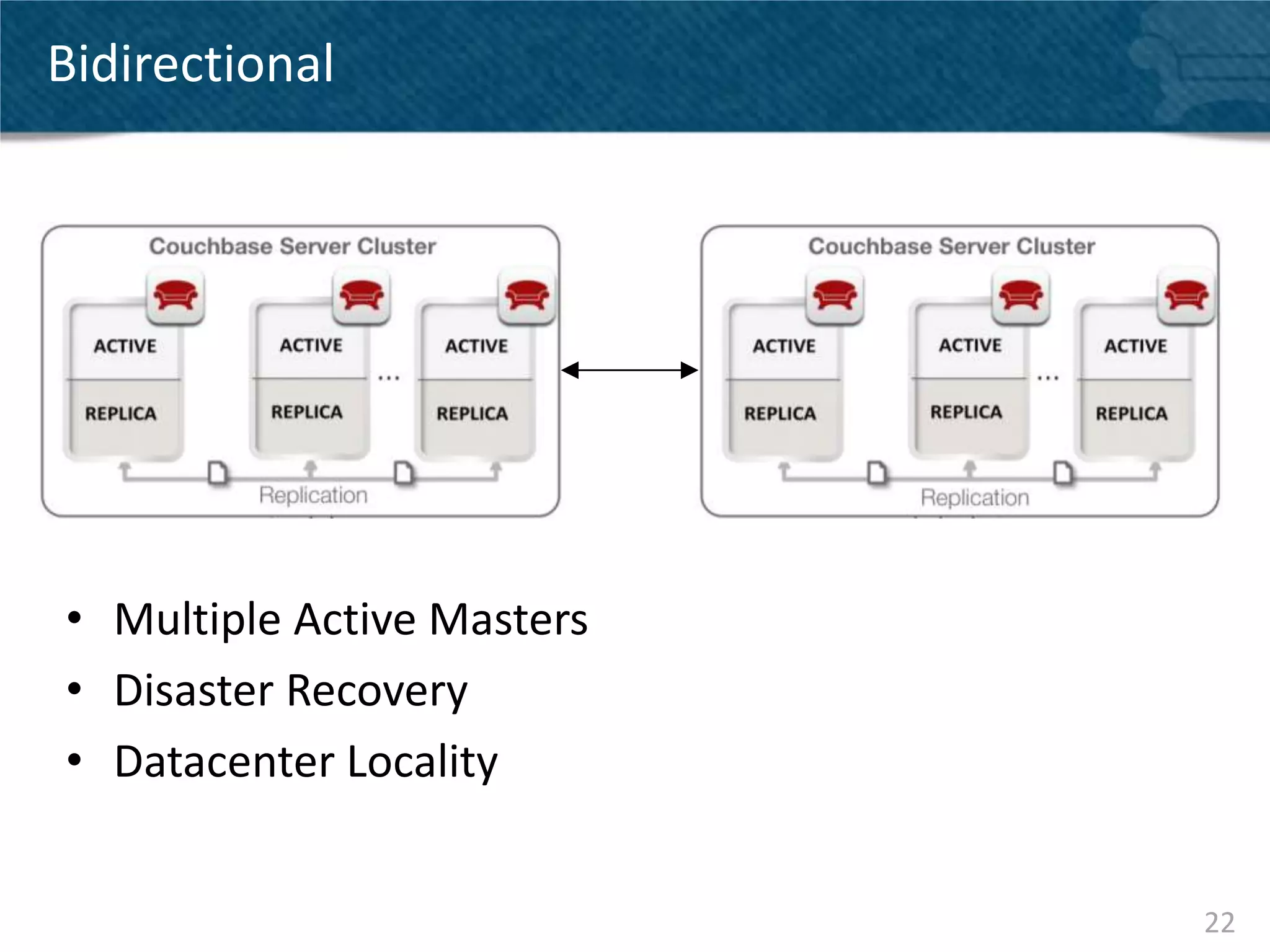
Bidirectional


• Multiple Active Masters
• Disaster Recovery
• Datacenter Locality


                            22
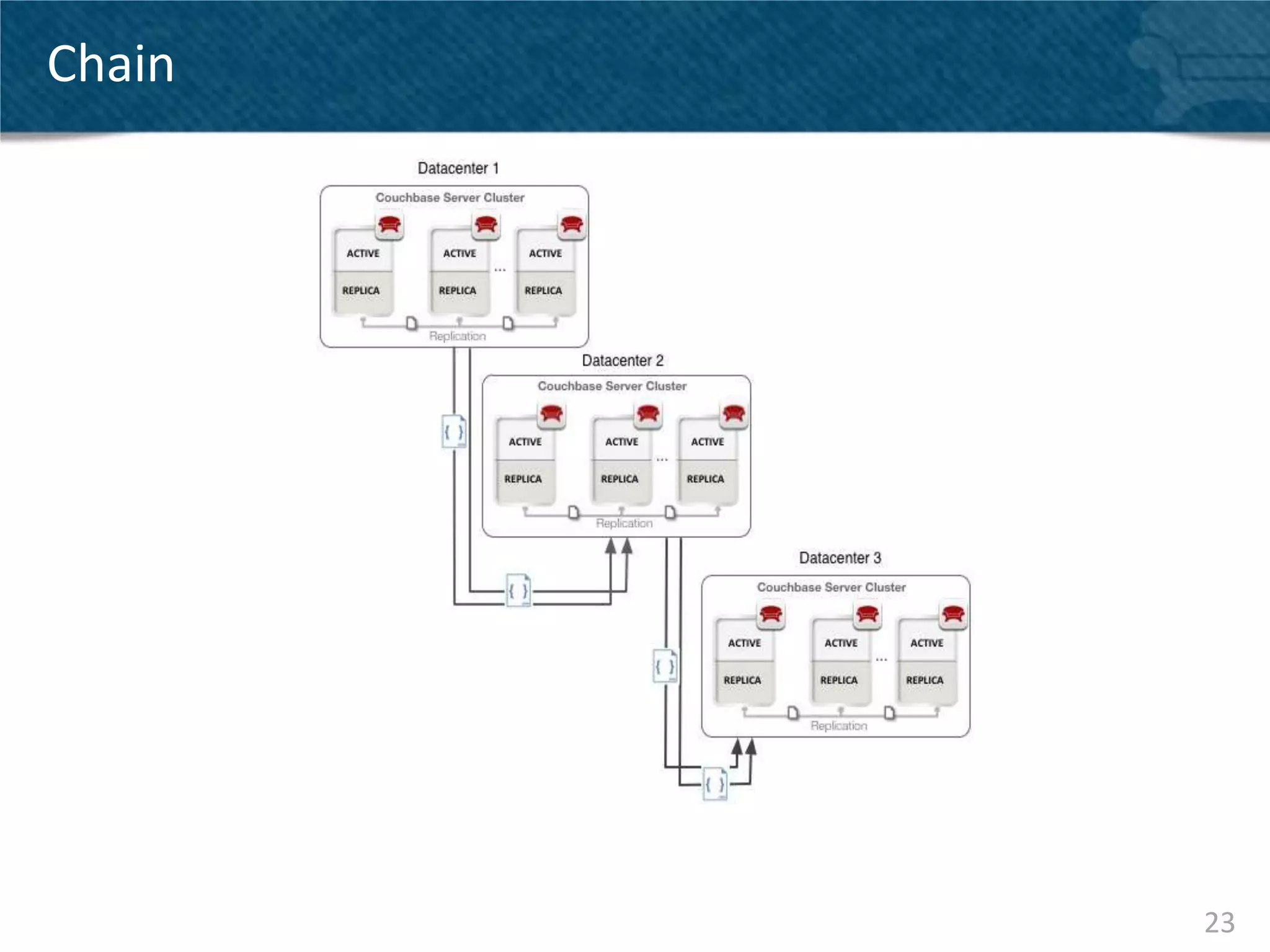
Chain


        23
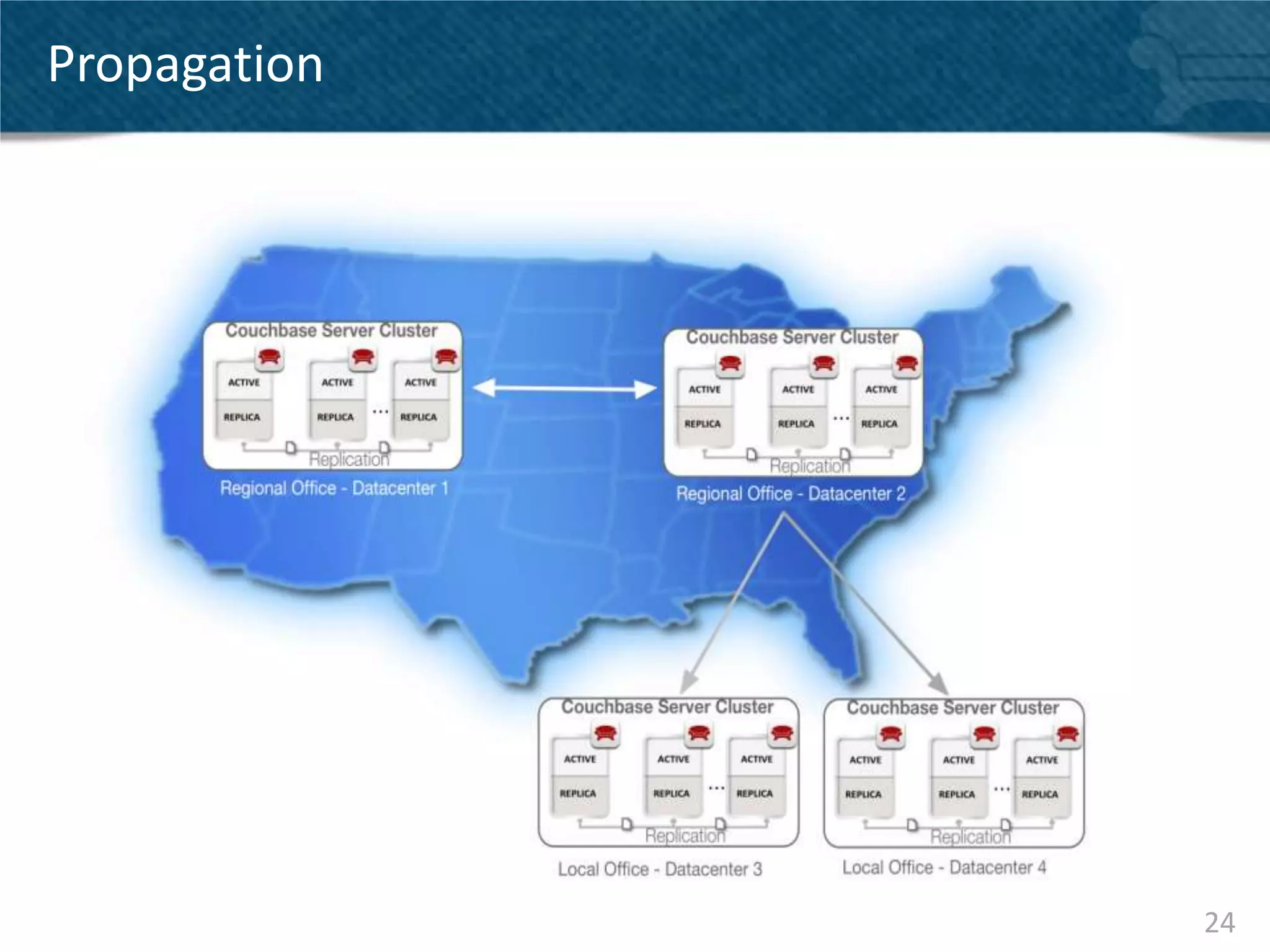
Propagation


              24
XDCR in the Cloud

• Server Naming
   – Optimal configuration using DNS name that resolves to
     internal address for intra-cluster communication and public
     address for inter-cluster communication
• Security
   – XDCR traffic is not encrypted, plan topology accordingly
   – Consider 3rd party Amazon VPN solutions


                                                                   25
USE CASES


            26
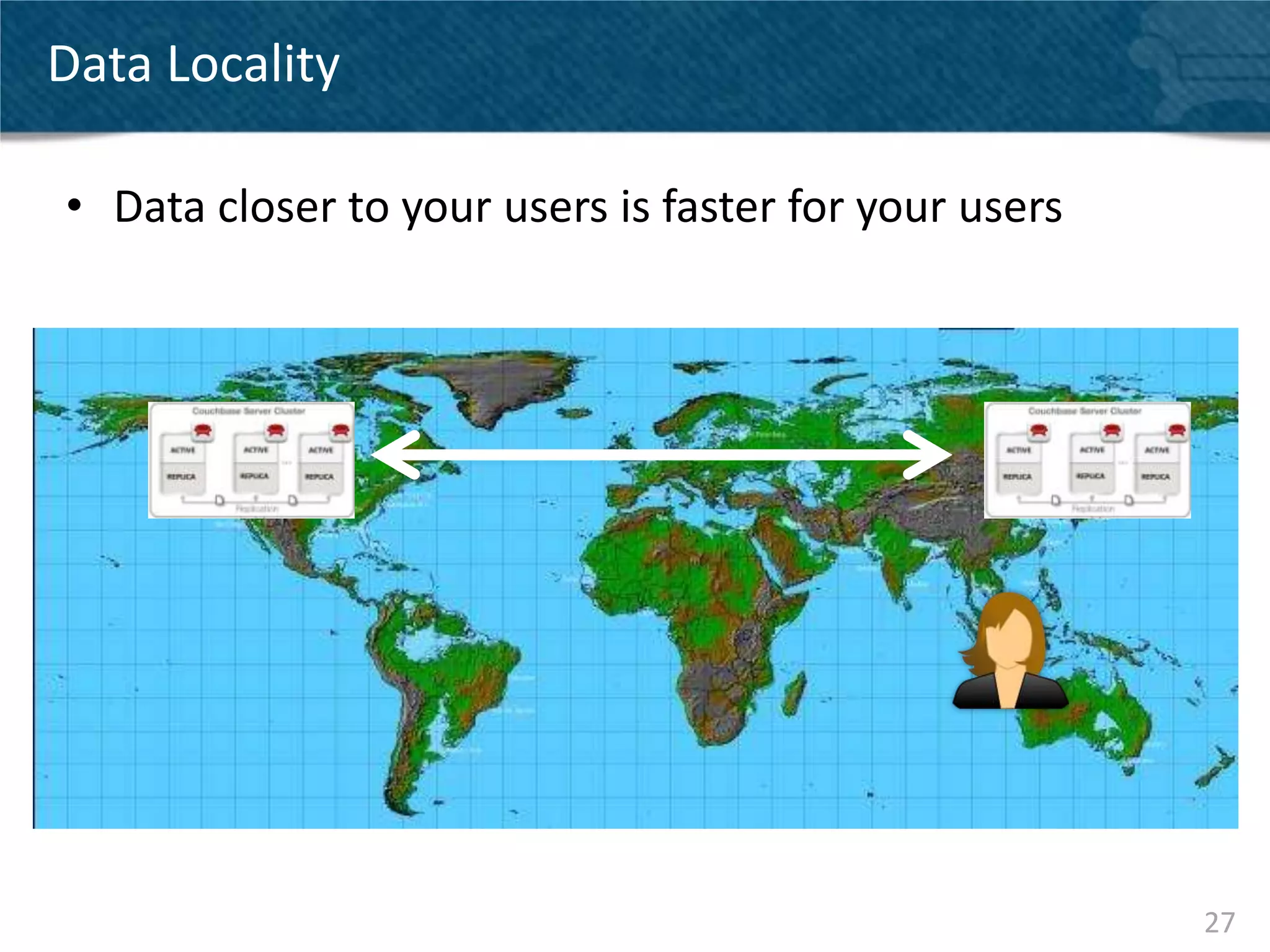
Data Locality

• Data closer to your users is faster for your users


                                                       27
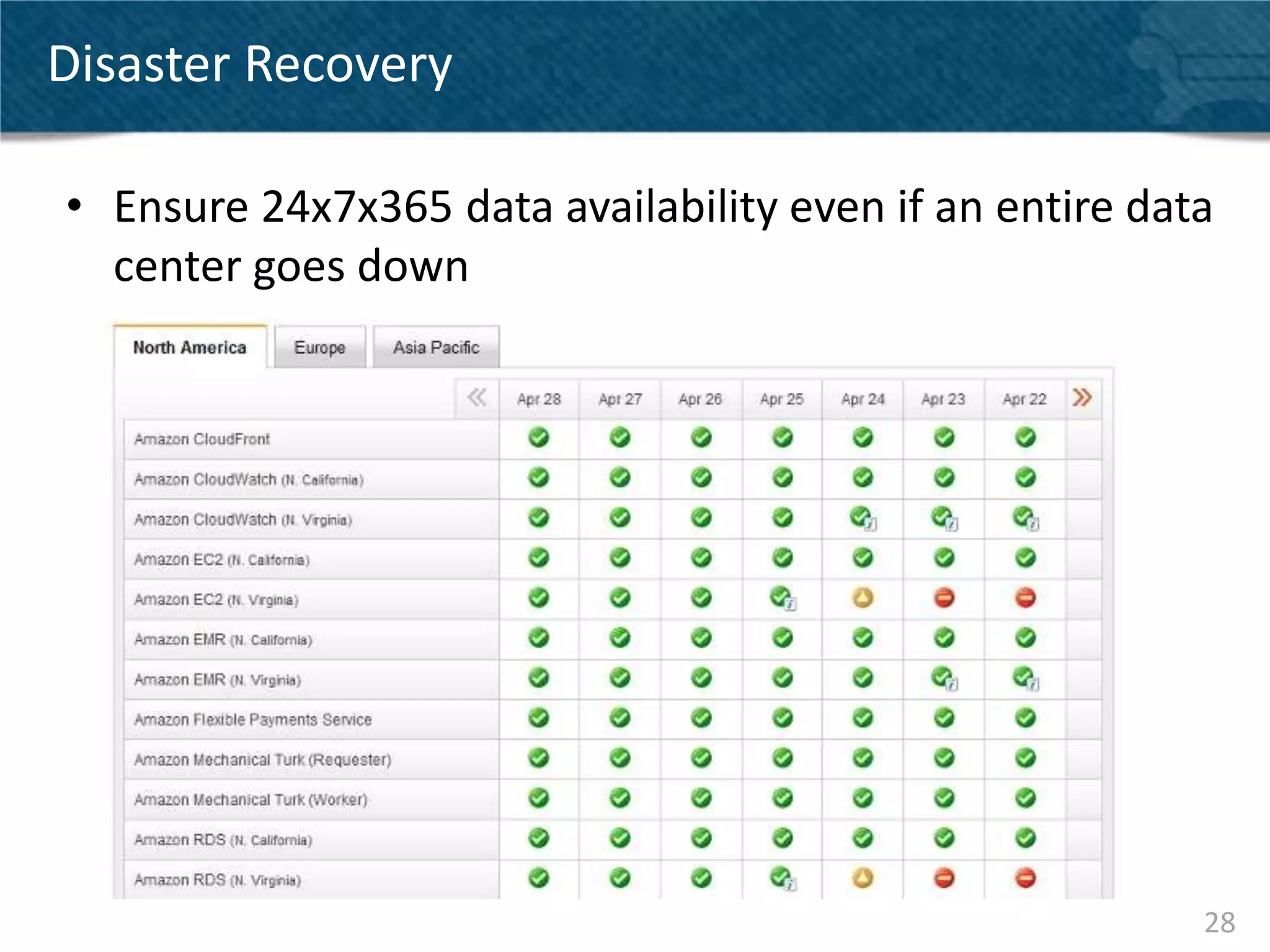
Disaster Recovery

• Ensure 24x7x365 data availability even if an entire data
  center goes down


                                                         28
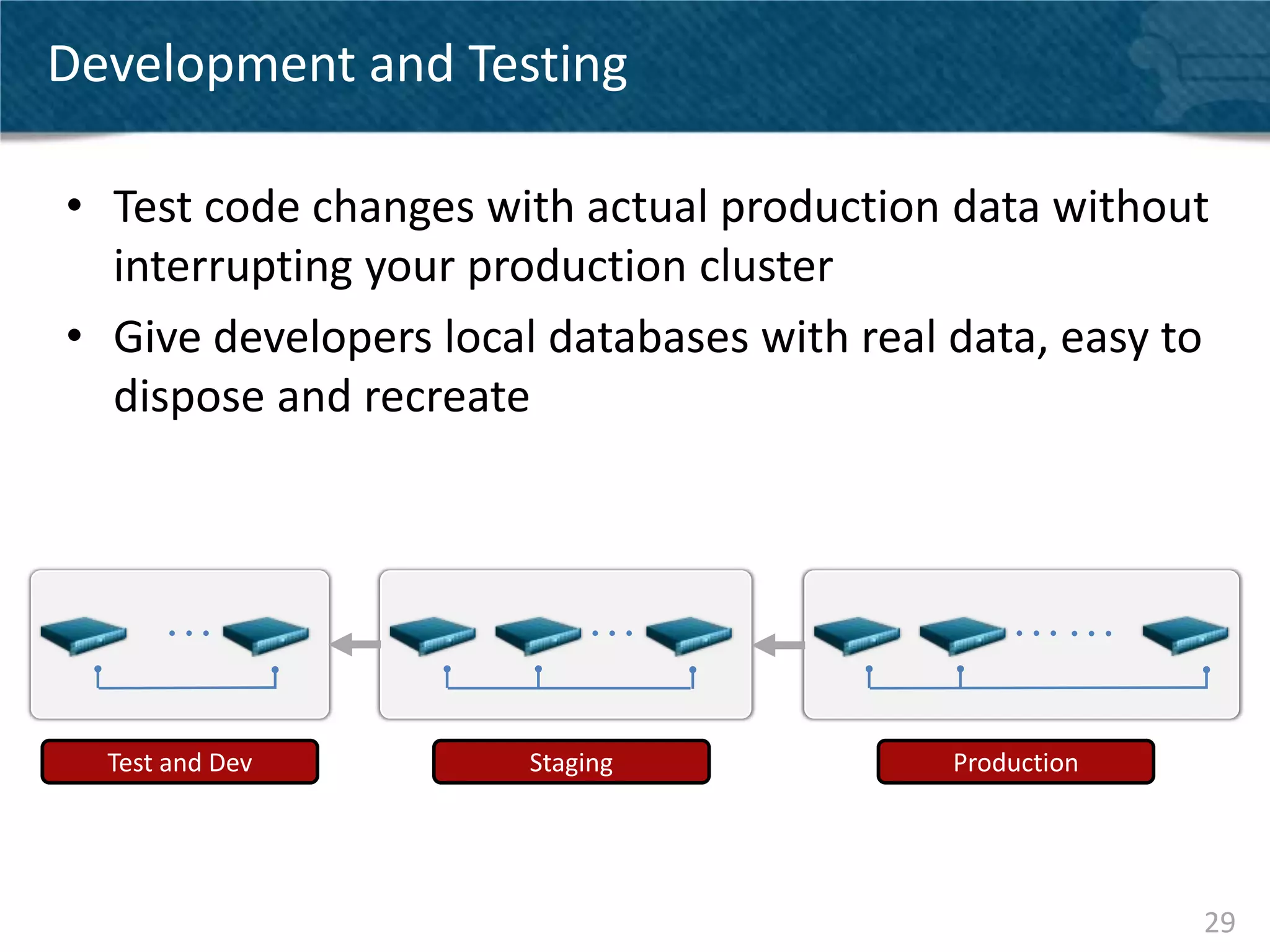
Development and Testing

• Test code changes with actual production data without
  interrupting your production cluster
• Give developers local databases with real data, easy to
  dispose and recreate


  Test and Dev         Staging              Production


                                                         29
Impact of XDCR on the cluster

Your clusters need to be sized for XDCR
• XDCR is CPU intensive
   – Configure the number of parallel streams based on your CPU
     capacity
• You are doubling your I/O usage
   – I/O capacity needs to be sized correctly
• You will need more memory particularly for
  bidirectional XDCR
   – Memory capacity needs to be sized correctly


                                                              30
Additional Resources

• Couchbase Server Manual -
  http://www.couchbase.com/docs/couchbase-manual-
  2.0/couchbase-admin-tasks-xdcr.html
• Getting Started with XDCR blog -
  http://blog.couchbase.com/cross-data-center-
  replication-step-step-guide-amazon-aws


                                                    31
Q&A


      32
THANK YOU


      @DBORKAR
DIPTI@COUCHBASE.COM


                      33

Couchbase Server 2.0 - XDCR - Deep dive

  • 1.
    Couchbase Server 2.0and Cross Data Center replication Dipti Borkar 1
  • 2.
    XDCR: Cross DataCenter Replication EUROPE DATA US DATA CENTER CENTER ASIA DATA CENTER http://blog.groosy.com/wp-content/uploads/2011/10/internet-map.jpg 2
  • 3.
    Cross Data CenterReplication – The basics • Replicate your Couchbase data across clusters • Clusters may be spread across geos • Configured on a per-bucket basis • Supports unidirectional and bidirectional operation • Application can read and write from both clusters (active – active replication) • Replication throughput scales out linearly • Different from intra-cluster replication 3
  • 4.
  • 5.
  • 6.
    Single node -Couchbase Write Operation with XDCR 2 Doc 1 App Server Couchbase Server Node 3 2 3 Managed Cache To other node Replication Doc 1 Queue Disk Queue Disk Doc 1 XDCR Queue To other cluster 6
  • 7.
    Internal Data Flow 1. Document written to managed cache 2. Document added to intra-cluster replication queue 3. Document added to disk queue 4. XDCR push replicates to other clusters 7
  • 8.
    XDCR in action SERVER 1 SERVER 2 SERVER 3 COUCHBASE SERVER CLUSTER ACTIVE ACTIVE ACTIVE NYC DATA CENTER Doc Doc Doc Doc 2 Doc Doc Doc 9 Doc Doc RAM RAM RAM Doc Doc Doc Doc Doc Doc Doc Doc Doc DISK DISK DISK SERVER 1 SERVER 2 SERVER 3 ACTIVE ACTIVE ACTIVE Doc Doc Doc Doc 2 Doc Doc Doc 9 Doc Doc RAM RAM RAM Doc Doc Doc Doc Doc Doc Doc Doc Doc COUCHBASE SERVER CLUSTER SF DATA CENTER DISK DISK DISK 8
  • 9.
  • 10.
    Bucket-level XDCR Cluster 1 Cluster 2 Bucket A Bucket A Bucket B Bucket B Bucket C Bucket C 10
  • 11.
    Continuous Reliable Replication •All data mutations replicated to destination cluster • Multiple streams round-robin across vBuckets in parallel (32 default) • Automatic resume after network disruption 11
  • 12.
    Cluster Topology Aware •Automatically handles node addition and removal in source and destination clusters 12
  • 13.
    Efficient • Couchbase Serverde- duplicates writes to disk – With multiple updates to the same document only the last version is written to disk – Only this last change written to disk is passed to XDCR • Document revisions are compared between clusters prior to transfer 13
  • 14.
    Active-Active Conflict Resolution •Couchbase Server provides strong consistency at the document level within a cluster • XDCR provides eventual consistency across clusters • If a document is mutated on both clusters, both clusters will pick the same “winner” • In case of conflict, document with the most updates will be considered the “winner” 3 3 3 5 14
  • 15.
    CONFIGURATION AND MONITORING 15
  • 16.
    STEP 1: DefineRemote Cluster 16
  • 17.
    STEP 2: StartReplication 17
  • 18.
  • 19.
    Detailed Replication Progress •Source Cluster • Destination Cluster 19
  • 20.
  • 21.
    Unidirectional • Hot spare •Read slave • Development/Testing copies 21
  • 22.
    Bidirectional • Multiple ActiveMasters • Disaster Recovery • Datacenter Locality 22
  • 23.
  • 24.
  • 25.
    XDCR in theCloud • Server Naming – Optimal configuration using DNS name that resolves to internal address for intra-cluster communication and public address for inter-cluster communication • Security – XDCR traffic is not encrypted, plan topology accordingly – Consider 3rd party Amazon VPN solutions 25
  • 26.
  • 27.
    Data Locality • Datacloser to your users is faster for your users 27
  • 28.
    Disaster Recovery • Ensure24x7x365 data availability even if an entire data center goes down 28
  • 29.
    Development and Testing •Test code changes with actual production data without interrupting your production cluster • Give developers local databases with real data, easy to dispose and recreate Test and Dev Staging Production 29
  • 30.
    Impact of XDCRon the cluster Your clusters need to be sized for XDCR • XDCR is CPU intensive – Configure the number of parallel streams based on your CPU capacity • You are doubling your I/O usage – I/O capacity needs to be sized correctly • You will need more memory particularly for bidirectional XDCR – Memory capacity needs to be sized correctly 30
  • 31.
    Additional Resources • CouchbaseServer Manual - http://www.couchbase.com/docs/couchbase-manual- 2.0/couchbase-admin-tasks-xdcr.html • Getting Started with XDCR blog - http://blog.couchbase.com/cross-data-center- replication-step-step-guide-amazon-aws 31
  • 32.
    Q&A 32
  • 33.
    THANK YOU @DBORKAR DIPTI@COUCHBASE.COM 33

Editor's Notes

  • #3 Web application have global usersSo have the same data in multiple data center and keep it synchronized with Cross Data Center ReplicationAllows reads and writes of data in any data center (master-master, active-active)Low latency local data access for local users (pin users to their local data center)Deal with failing datacenters by routing traffic to any of the other data centers (disaster recovery)Has conflict detection and simple resolution should same revision of document be modified concurrently in different datacenter. (no customized policy at this point)
  • #4 Overview of what this feature is
  • #5 Review Existing Couchbase Server Replication*NEEDS HIGHER RES IMAGE*
  • #7 1.  A set request comes in from the application .2.  Couchbase Server responses back that they key is written3. Couchbase Server then Replicates the data out to memory in the other nodes4. At the same time it is put the data into a write que to be persisted to disk
  • #9 Move data close to usersRead and write data in any datacenterMultiple locations for disaster recoveryIndependently managed clusters serving same data
  • #11 XDCR replications are configured on the bucket level within your clusterAs shown here, bucket A is configured to not be replicated at allBucket B is configured with uni-directional replication, from cluster 1 to cluster 2Changes made in bucket b on cluster 1 will be propagated to cluster 2, however changes made to bucket b on cluster 2 will NOT be propagated back to cluster 1Bucket C is configured with bi-directional replication between clusters 1 and 2Changes made in either cluster will be propagated to the otherBucket level configuration gives you flexibility to customize the behavior for your specific use case
  • #13 Topology changes on both sides of the XDCR replication are supported
  • #28 *INSERT a world map, highlighting latency*
  • #29 *INSERT diagram depicting how application continues to operate with datacenter failure*