Couchbase Server 2.0
  Indexing and Querying
     Quick Overview

        Dipti Borkar
        Director, Product Management


                                       1   1
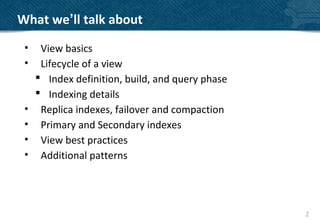
What we’ll talk about
 •    View basics
 •    Lifecycle of a view
      Index definition, build, and query phase
      Indexing details
 •    Replica indexes, failover and compaction
 •    Primary and Secondary indexes
 •    View best practices
 •    Additional patterns


                                                  2
JSON Documents

• Map more closely to objects or entities
• CRUD Operations, lightweight schema
  {
      “fields” : [“with basic types”, 3.14159, true],
      “like” : “your favorite language”
  }
• Stored under an identifier key
  client.set(“mydocumentid”, myDocument);
  mySavedDocument = client.get(“mydocumentid”);


                                                        3
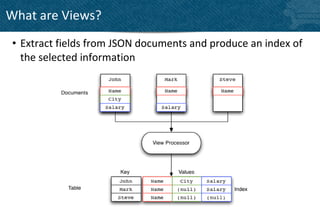
What are Views?
 • Extract fields from JSON documents and produce an index of
   the selected information
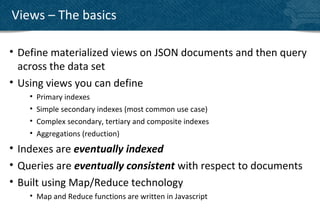
Views – The basics

• Define materialized views on JSON documents and then query
  across the data set
• Using views you can define
    •   Primary indexes
    •   Simple secondary indexes (most common use case)
    •   Complex secondary, tertiary and composite indexes
    •   Aggregations (reduction)
• Indexes are eventually indexed
• Queries are eventually consistent with respect to documents
• Built using Map/Reduce technology
    • Map and Reduce functions are written in Javascript
View Lifecycle
Define -> Build -> Query


                           66
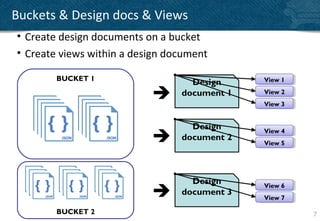
Buckets & Design docs & Views
• Create design documents on a bucket
• Create views within a design document

        BUCKET 1                              View 11
                                              View
                                   Design
                                document 1   View 22
                                              View
                                              View 33
                                              View


                                   Design     View 44
                                              View
                                document 2
                                              View 55
                                              View


                                   Design     View 66
                                              View
                                document 3
                                              View 77
                                              View

        BUCKET 2                                        7
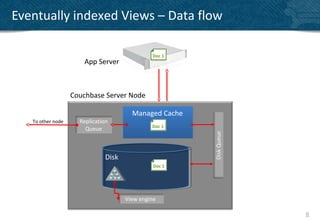
Eventually indexed Views – Data flow
                                                        2

                                               Doc 1
                      App Server


                   Couchbase Server Node
                                         33          2      33
                                        Managed Cache 2
   To other node     Replication
                                               Doc 1
                       Queue


                                                                 Disk Queue
                               Disk
                                                Doc 1


                                      View engine

                                                                              8
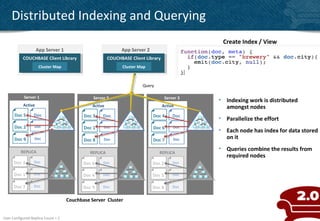
Distributed Indexing and Querying
                                                                                                 Create Index / View
                    App Server 1                              App Server 2
           COUCHBASE Client Library
            COUCHBASE Client Library                    COUCHBASE Client Library
                                                         COUCHBASE Client Library
                     Cluster Map                              Cluster Map


                                                                       Query

            Server 1                           Server 2                              Server 3
                                                                                                • Indexing work is distributed
           Active                              Active                            Active           amongst nodes
      Doc 5      Doc                       Doc 3    Doc                      Doc 4       Doc
                                                                                                • Parallelize the effort
      Doc 2       Doc                      Doc 1    Doc                      Doc 6       Doc
                                                                                                • Each node has index for data stored
      Doc 9       Doc                      Doc 8    Doc                      Doc 7       Doc      on it

          REPLICA
                                                                                                • Queries combine the results from
                                              REPLICA                           REPLICA
                                                                                                  required nodes
      Doc 3      Doc                       Doc 6    Doc                      Doc 2       Doc

      Doc 1      Doc                       Doc 4    Doc                      Doc 5       Doc


      Doc 7      Doc                       Doc 9    Doc                      Doc 8       Doc


                                    Couchbase Server Cluster


User Configured Replica Count = 1
                                                                                                                                 9
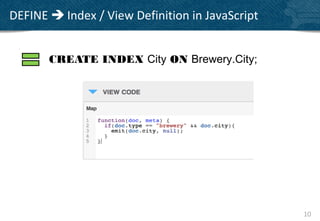
DEFINE  Index / View Definition in JavaScript


       CREATE INDEX City ON Brewery.City;


                                                 10
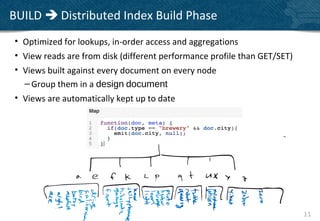
BUILD  Distributed Index Build Phase
• Optimized for lookups, in-order access and aggregations
• View reads are from disk (different performance profile than GET/SET)
• Views built against every document on every node
  – Group them in a design document
• Views are automatically kept up to date


                                                                          11
QUERY  Dynamic Queries with Optional Aggregation
•   Eventually consistent with respect to document updates
•   Efficiently fetch a document or group of similar documents
•   Queries will use cached values from B-tree inner nodes when possible
•   Take advantage of in-order tree traversal with group_level queries
    Query ?startkey=“J”&endkey=“K”
    {“rows”:[{“key”:“Juneau”,“value”:null}]}


                                                                           12
Index building details

 – All the views within a design document are incrementally updated
   when the view is accessed or auto-indexing kicks in
 – Automatic view updates
   • In addition to forcing an index build at query time, active & replica indexes are
     updated every 3 seconds of inactivity if there are at least 5000 new changes
     (configurable)
 – The entire view is recreated if the view definition has changed
 – Views can be conditionally updated by specifying the “stale”
   argument to the view query
 – The index information stored on disk consists of the combination
   of both the key and value information defined within your view.
Queries run against stale indexes by default

• stale=update_after (default if nothing is specified)
  – always get fastest response
  – can take two queries to read your own writes
• stale=ok
  – auto update will trigger eventually
  – might not see your own writes for a few minutes
  – least frequent updates -> least resource impact
• stale=false
  – Use with “set with persistence” if data needs to be included in
    view results
  – BUT be aware of delay it adds, only use when really required
                                                                      14
Views and Replica indexes
• In addition to replicas for data (up to 3 copies), optionally
  create replica for indexes
• Each node manages replica index data structures
• Set at a bucket level
• Replica index populated from replica data
• Replica index is used after a failover
Views and failover

• Replica indexes enabled on failover
• Replicas indexes are rebuilt on replica nodes
  – Automatically incrementally built based on replica data
  – Updated every 3 seconds of inactivity if there are at least 5000
    new changes
  – Not copied/moved to be consistent with persisted replica data
View Compaction

 • Compaction is ONLINE
 • Reclaims empty allocated space from disk
 • Indexes are stored on disk for active vBuckets on each
   node and updated in append-only manner
 • Auto-compaction performed in the background
    – Set the database fragmentation levels
    – Set the index fragmentation levels
    – Choose a schedule
    – Global and bucket specific settings
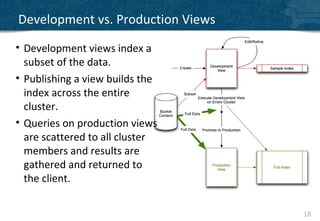
Development vs. Production Views
• Development views index a
  subset of the data.
• Publishing a view builds the
  index across the entire
  cluster.
• Queries on production views
  are scattered to all cluster
  members and results are
  gathered and returned to
  the client.


                                   18
Simple Primary
      and
Secondary Indexing


                     19 1
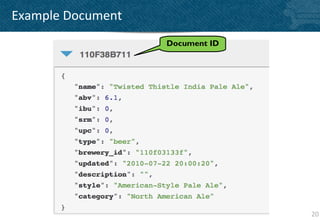
Example Document
                   Document ID


                                 20
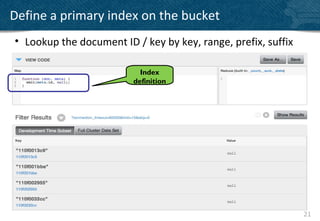
Define a primary index on the bucket
• Lookup the document ID / key by key, range, prefix, suffix

                           Index
                         definition


                                                               21
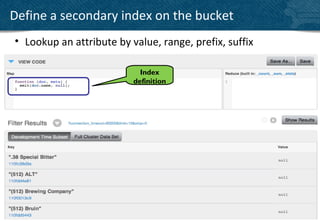
Define a secondary index on the bucket
• Lookup an attribute by value, range, prefix, suffix

                            Index
                          definition


                                                        22
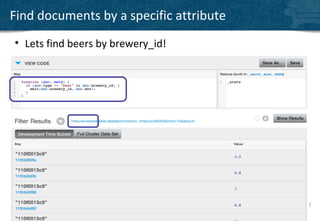
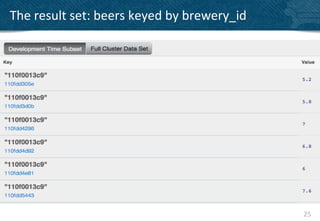
Find documents by a specific attribute
• Lets find beers by brewery_id!


                                         23
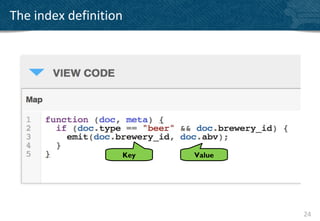
The index definition


                   Key   Value


                                 24
The result set: beers keyed by brewery_id


                                            25
View Best Practices


                      26 2
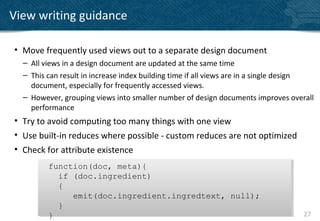
View writing guidance

• Move frequently used views out to a separate design document
  – All views in a design document are updated at the same time
  – This can result in increase index building time if all views are in a single design
    document, especially for frequently accessed views.
  – However, grouping views into smaller number of design documents improves overall
    performance
• Try to avoid computing too many things with one view
• Use built-in reduces where possible - custom reduces are not optimized
• Check for attribute existence
         function(doc, meta){
         function(doc, meta){
           if (doc.ingredient)
           if (doc.ingredient)
           {
           {
              emit(doc.ingredient.ingredtext, null);
              emit(doc.ingredient.ingredtext, null);
           }
           }
         }
         }                                                                          27
View writing guidance

• Do not include the document in the view value
  – Instead either use the GET / SET API or the API that includes documents filtered by
    the query [example: willIncludeDocs()]
  – Emit either null or the ID instead (meta.id) in your key or value data
                             emit(doc.name, null)
                              emit(doc.name, null)
• Don’t emit too much data into a view value
  – Use views to filter documents
  – Then use the data path to access the matched documents
• Use Document Types to make views more selective
                     function(doc, meta)
                     function(doc, meta)
                     {
                     {
                       if(doc.type == “player”)
                       if(doc.type == “player”)
                        emit(doc.experience, null);
                        emit(doc.experience, null);
                     }
                     }
                                                                                      28
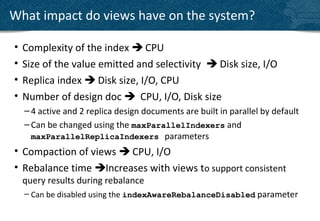
What impact do views have on the system?

•   Complexity of the index  CPU
•   Size of the value emitted and selectivity  Disk size, I/O
•   Replica index  Disk size, I/O, CPU
•   Number of design doc  CPU, I/O, Disk size
    – 4 active and 2 replica design documents are built in parallel by default
    – Can be changed using the maxParallelIndexers and
      maxParallelReplicaIndexers parameters
• Compaction of views  CPU, I/O
• Rebalance time Increases with views to support consistent
    query results during rebalance
    – Can be disabled using the indexAwareRebalanceDisabled parameter
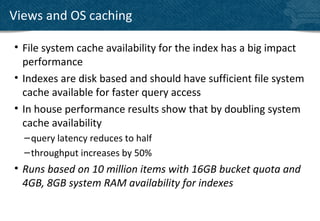
Views and OS caching

• File system cache availability for the index has a big impact
  performance
• Indexes are disk based and should have sufficient file system
  cache available for faster query access
• In house performance results show that by doubling system
  cache availability
  – query latency reduces to half
  – throughput increases by 50%
• Runs based on 10 million items with 16GB bucket quota and
  4GB, 8GB system RAM availability for indexes
Query Pattern
Basic Aggregations


                     31 3
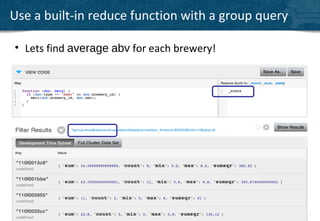
Use a built-in reduce function with a group query

• Lets find average abv for each brewery!


                                                    32
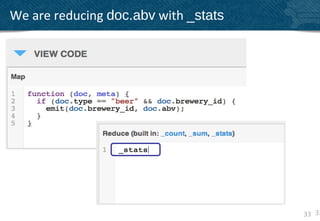
We are reducing doc.abv with _stats


                                      33 33
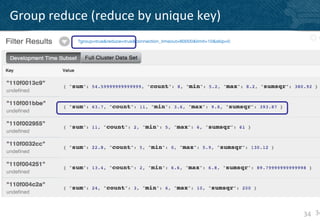
Group reduce (reduce by unique key)


                                      34 34
Query Pattern
Time-based Rollups


                     35 3
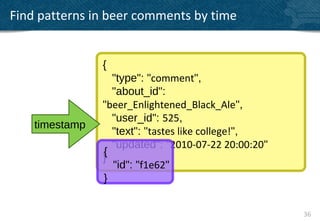
Find patterns in beer comments by time


                {
                  "type": "comment",
                  "about_id":
                "beer_Enlightened_Black_Ale",
                  "user_id": 525,
    timestamp
                  "text": "tastes like college!",
                  "updated": "2010-07-22 20:00:20"
                {
                }
                  "id": "f1e62"
                }


                                                     36
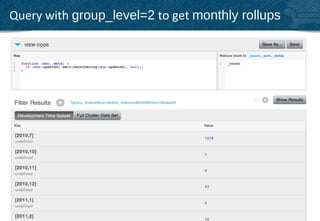
Query with group_level=2 to get monthly rollups


                                                  37
dateToArray() is your friend


                                      ()
                                rr ay
                                  oA
                                eT
                            dat
• String or Integer based timestamps
• Output optimized for group_level queries
• array of JSON numbers:
  [2012,9,21,11,30,44]                       38
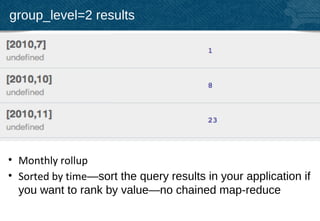
group_level=2 results


• Monthly rollup
• Sorted by time—sort the query results in your application if
  you want to rank by value—no chained map-reduce
                                                            39
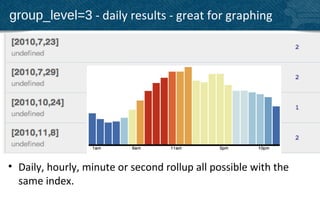
group_level=3 - daily results - great for graphing


• Daily, hourly, minute or second rollup all possible with the
  same index.

                                                                 40
Query Pattern
 Leaderboard


                41 4
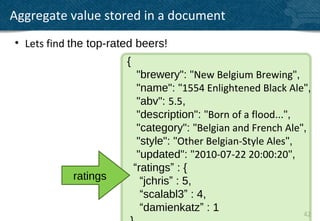
Aggregate value stored in a document
• Lets find the top-rated beers!
                       {
                            "brewery": "New Belgium Brewing",
                            "name": "1554 Enlightened Black Ale",
                            "abv": 5.5,
                            "description": "Born of a flood...",
                            "category": "Belgian and French Ale",
                            "style": "Other Belgian-Style Ales",
                            "updated": "2010-07-22 20:00:20",
                           “ratings” : {
            ratings          “jchris” : 5,
                             “scalabl3” : 4,
                             “damienkatz” : 1                    42
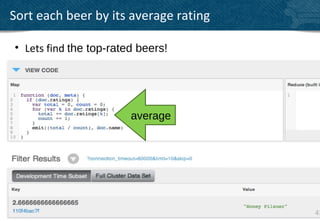
Sort each beer by its average rating

• Lets find the top-rated beers!


                        average


                                       43 43
Questions?


             44 4
THANK YOU

DIPTI@COUCBASE.COM
     @DBORKAR


                     45 4

Couchbase Server 2.0 - Indexing and Querying - Deep dive

  • 1.
    Couchbase Server 2.0 Indexing and Querying Quick Overview Dipti Borkar Director, Product Management 1 1
  • 2.
    What we’ll talkabout • View basics • Lifecycle of a view  Index definition, build, and query phase  Indexing details • Replica indexes, failover and compaction • Primary and Secondary indexes • View best practices • Additional patterns 2
  • 3.
    JSON Documents • Mapmore closely to objects or entities • CRUD Operations, lightweight schema { “fields” : [“with basic types”, 3.14159, true], “like” : “your favorite language” } • Stored under an identifier key client.set(“mydocumentid”, myDocument); mySavedDocument = client.get(“mydocumentid”); 3
  • 4.
    What are Views? • Extract fields from JSON documents and produce an index of the selected information
  • 5.
    Views – Thebasics • Define materialized views on JSON documents and then query across the data set • Using views you can define • Primary indexes • Simple secondary indexes (most common use case) • Complex secondary, tertiary and composite indexes • Aggregations (reduction) • Indexes are eventually indexed • Queries are eventually consistent with respect to documents • Built using Map/Reduce technology • Map and Reduce functions are written in Javascript
  • 6.
    View Lifecycle Define ->Build -> Query 66
  • 7.
    Buckets & Designdocs & Views • Create design documents on a bucket • Create views within a design document BUCKET 1 View 11 View Design  document 1 View 22 View View 33 View Design View 44 View  document 2 View 55 View Design View 66 View  document 3 View 77 View BUCKET 2 7
  • 8.
    Eventually indexed Views– Data flow 2 Doc 1 App Server Couchbase Server Node 33 2 33 Managed Cache 2 To other node Replication Doc 1 Queue Disk Queue Disk Doc 1 View engine 8
  • 9.
    Distributed Indexing andQuerying Create Index / View App Server 1 App Server 2 COUCHBASE Client Library COUCHBASE Client Library COUCHBASE Client Library COUCHBASE Client Library Cluster Map Cluster Map Query Server 1 Server 2 Server 3 • Indexing work is distributed Active Active Active amongst nodes Doc 5 Doc Doc 3 Doc Doc 4 Doc • Parallelize the effort Doc 2 Doc Doc 1 Doc Doc 6 Doc • Each node has index for data stored Doc 9 Doc Doc 8 Doc Doc 7 Doc on it REPLICA • Queries combine the results from REPLICA REPLICA required nodes Doc 3 Doc Doc 6 Doc Doc 2 Doc Doc 1 Doc Doc 4 Doc Doc 5 Doc Doc 7 Doc Doc 9 Doc Doc 8 Doc Couchbase Server Cluster User Configured Replica Count = 1 9
  • 10.
    DEFINE  Index/ View Definition in JavaScript CREATE INDEX City ON Brewery.City; 10
  • 11.
    BUILD  DistributedIndex Build Phase • Optimized for lookups, in-order access and aggregations • View reads are from disk (different performance profile than GET/SET) • Views built against every document on every node – Group them in a design document • Views are automatically kept up to date 11
  • 12.
    QUERY  DynamicQueries with Optional Aggregation • Eventually consistent with respect to document updates • Efficiently fetch a document or group of similar documents • Queries will use cached values from B-tree inner nodes when possible • Take advantage of in-order tree traversal with group_level queries Query ?startkey=“J”&endkey=“K” {“rows”:[{“key”:“Juneau”,“value”:null}]} 12
  • 13.
    Index building details – All the views within a design document are incrementally updated when the view is accessed or auto-indexing kicks in – Automatic view updates • In addition to forcing an index build at query time, active & replica indexes are updated every 3 seconds of inactivity if there are at least 5000 new changes (configurable) – The entire view is recreated if the view definition has changed – Views can be conditionally updated by specifying the “stale” argument to the view query – The index information stored on disk consists of the combination of both the key and value information defined within your view.
  • 14.
    Queries run againststale indexes by default • stale=update_after (default if nothing is specified) – always get fastest response – can take two queries to read your own writes • stale=ok – auto update will trigger eventually – might not see your own writes for a few minutes – least frequent updates -> least resource impact • stale=false – Use with “set with persistence” if data needs to be included in view results – BUT be aware of delay it adds, only use when really required 14
  • 15.
    Views and Replicaindexes • In addition to replicas for data (up to 3 copies), optionally create replica for indexes • Each node manages replica index data structures • Set at a bucket level • Replica index populated from replica data • Replica index is used after a failover
  • 16.
    Views and failover •Replica indexes enabled on failover • Replicas indexes are rebuilt on replica nodes – Automatically incrementally built based on replica data – Updated every 3 seconds of inactivity if there are at least 5000 new changes – Not copied/moved to be consistent with persisted replica data
  • 17.
    View Compaction •Compaction is ONLINE • Reclaims empty allocated space from disk • Indexes are stored on disk for active vBuckets on each node and updated in append-only manner • Auto-compaction performed in the background – Set the database fragmentation levels – Set the index fragmentation levels – Choose a schedule – Global and bucket specific settings
  • 18.
    Development vs. ProductionViews • Development views index a subset of the data. • Publishing a view builds the index across the entire cluster. • Queries on production views are scattered to all cluster members and results are gathered and returned to the client. 18
  • 19.
    Simple Primary and Secondary Indexing 19 1
  • 20.
    Example Document Document ID 20
  • 21.
    Define a primaryindex on the bucket • Lookup the document ID / key by key, range, prefix, suffix Index definition 21
  • 22.
    Define a secondaryindex on the bucket • Lookup an attribute by value, range, prefix, suffix Index definition 22
  • 23.
    Find documents bya specific attribute • Lets find beers by brewery_id! 23
  • 24.
  • 25.
    The result set:beers keyed by brewery_id 25
  • 26.
  • 27.
    View writing guidance •Move frequently used views out to a separate design document – All views in a design document are updated at the same time – This can result in increase index building time if all views are in a single design document, especially for frequently accessed views. – However, grouping views into smaller number of design documents improves overall performance • Try to avoid computing too many things with one view • Use built-in reduces where possible - custom reduces are not optimized • Check for attribute existence function(doc, meta){ function(doc, meta){ if (doc.ingredient) if (doc.ingredient) { { emit(doc.ingredient.ingredtext, null); emit(doc.ingredient.ingredtext, null); } } } } 27
  • 28.
    View writing guidance •Do not include the document in the view value – Instead either use the GET / SET API or the API that includes documents filtered by the query [example: willIncludeDocs()] – Emit either null or the ID instead (meta.id) in your key or value data emit(doc.name, null) emit(doc.name, null) • Don’t emit too much data into a view value – Use views to filter documents – Then use the data path to access the matched documents • Use Document Types to make views more selective function(doc, meta) function(doc, meta) { { if(doc.type == “player”) if(doc.type == “player”) emit(doc.experience, null); emit(doc.experience, null); } } 28
  • 29.
    What impact doviews have on the system? • Complexity of the index  CPU • Size of the value emitted and selectivity  Disk size, I/O • Replica index  Disk size, I/O, CPU • Number of design doc  CPU, I/O, Disk size – 4 active and 2 replica design documents are built in parallel by default – Can be changed using the maxParallelIndexers and maxParallelReplicaIndexers parameters • Compaction of views  CPU, I/O • Rebalance time Increases with views to support consistent query results during rebalance – Can be disabled using the indexAwareRebalanceDisabled parameter
  • 30.
    Views and OScaching • File system cache availability for the index has a big impact performance • Indexes are disk based and should have sufficient file system cache available for faster query access • In house performance results show that by doubling system cache availability – query latency reduces to half – throughput increases by 50% • Runs based on 10 million items with 16GB bucket quota and 4GB, 8GB system RAM availability for indexes
  • 31.
  • 32.
    Use a built-inreduce function with a group query • Lets find average abv for each brewery! 32
  • 33.
    We are reducingdoc.abv with _stats 33 33
  • 34.
    Group reduce (reduceby unique key) 34 34
  • 35.
  • 36.
    Find patterns inbeer comments by time { "type": "comment", "about_id": "beer_Enlightened_Black_Ale", "user_id": 525, timestamp "text": "tastes like college!", "updated": "2010-07-22 20:00:20" { } "id": "f1e62" } 36
  • 37.
    Query with group_level=2to get monthly rollups 37
  • 38.
    dateToArray() is yourfriend () rr ay oA eT dat • String or Integer based timestamps • Output optimized for group_level queries • array of JSON numbers: [2012,9,21,11,30,44] 38
  • 39.
    group_level=2 results • Monthlyrollup • Sorted by time—sort the query results in your application if you want to rank by value—no chained map-reduce 39
  • 40.
    group_level=3 - dailyresults - great for graphing • Daily, hourly, minute or second rollup all possible with the same index. 40
  • 41.
  • 42.
    Aggregate value storedin a document • Lets find the top-rated beers! { "brewery": "New Belgium Brewing", "name": "1554 Enlightened Black Ale", "abv": 5.5, "description": "Born of a flood...", "category": "Belgian and French Ale", "style": "Other Belgian-Style Ales", "updated": "2010-07-22 20:00:20", “ratings” : { ratings “jchris” : 5, “scalabl3” : 4, “damienkatz” : 1 42
  • 43.
    Sort each beerby its average rating • Lets find the top-rated beers! average 43 43
  • 44.
  • 45.

Editor's Notes

  • #3 if you are ingesting Tweets, git commits, and linked-in API data, there ’ s little value in transforming it before you save it. just store it and sort it out later — the same holds for user data
  • #7 schemaless is good as far as it goes, but what it ’ s really saying is: “ don ’ t worry about the database ” so a lot of the patterns move to the application. that ’ s what this section is about.
  • #9 1.  A set request comes in from the application . 2.  Couchbase Server responses back that they key is written 3. Couchbase Server then Replicates the data out to memory in the other nodes 4. At the same time it is put the data into a write que to be persisted to disk
  • #10 Bulletize the text. Make sure the builds work.
  • #11 Defined via SDKs or administration console Deploying a new view to production is an online operation , but can be heavy
  • #19 no downtime deploy?
  • #35 If Sum = 11 and Count = 2, the Average is 5.5
  • #43 ratings are stored in a hash to ensure each user can only rate each beer once