NoSQL for SQL Professionals
Dipti Borkar
Director, Product Management
Link to Slides

http://bit.ly/17pgrcP
Macro Trends Driving NoSQL Technology
More Data

More Users

+

Interactive Apps

+

NoSQL
Lacking Solutions, Users Forced to Invent

Bigtable

November 2006

Dynamo
October 2007

Cassandra
August 2008

Voldemort
February 2009

Very few organizations can build and maintain database software technology.
But every organization building interactive web applications needs this technology.
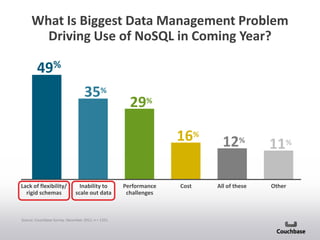
What Is Biggest Data Management Problem
Driving Use of NoSQL in Coming Year?

49%
35%

29%
16%

Lack of flexibility/
rigid schemas

Inability to
scale out data

Source: Couchbase Survey, December 2011, n = 1351.

Performance
challenges

Cost

12%
All of these

11%
Other
Relational vs. NoSQL
Key Differences
Relational Technology Scales Up
Application Scales Out
Just add more commodity web servers
System Cost
Application Performance

Web/App Server Tier

Users

RDBMS Scales Up
Get a bigger, more complex server
System Cost
Application Performance

Won’t
scale
beyond
this point

Relational Database
Users

Expensive and disruptive sharding, doesn’t perform at web scale
Couchbase Server Scales Out Like App
Tier

Application Scales Out
Just add more commodity web servers
System Cost
Application Performance

Web/App Server Tier

Users

NoSQL Database Scales Out
Cost and performance mirrors app tier
System Cost
Application Performance

Couchbase Distributed Data Store

Users

Scaling out flattens the cost and performance curves
Differences
• 1. Tables vs Document
-

Relational has tables with predefined columns: Schema pre-determined before
data can be inserted.
Best practice is to normalize by splitting into several tables, joined by PK-FK
relation.
Differences
• Tables vs Document (contd.)
-

In Couchbase, there are no tables only documents
A logical entity is stored within a single document
Different documents do not need to have the same set of fields or structure
You differentiate different types of documents either based on key names you
provide or by adding attributes
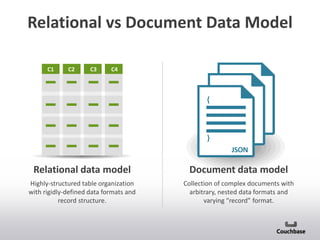
Relational vs Document Data Model
C1

C2

C3

C4

{

JSON
JSON

}
JSON

Relational data model

Document data model

Highly-structured table organization
with rigidly-defined data formats and
record structure.

Collection of complex documents with
arbitrary, nested data formats and
varying “record” format.
Differences
• Joins vs logical single document
-

Single logical document. No need for joins.
If normalized and several documents, then use a series of gets
recipe= couchbase.get("my-recipe-id");
reviews = couchbase.multiget(recipe.comments);

• Transactions
-

Relational: Atomicity can span several records across several tables.
NoSQL: Atomicity confined to at document level
Key Couchbase Concepts
Clients

Servers

Documents

User/application data

Read/write from/to

Data Buckets

Multitenant Architecture

Which live on

Server Nodes

based on bucket partitioning

That form a

Couchbase Cluster

dynamically scalable
RDBMS Example: User Profile
User Info

Address Info

KEY

First

Last

ZIP_id

ZIP_id

CITY

STATE

ZIP

1

Dipti

Borkar

2

1

DEN

CO

30303

2

Joe

Smith

2

2

MV

CA

94040

3

Ali

Dodson

2

3

CHI

IL

60609

4

John

Doe

3

4

NY

NY

10010

To get information about specific user, you perform a join across two tables
Document Example: User Profile

{
“ID”: 1,
“FIRST”: “Dipti”,
“LAST”: “Borkar”,
“ZIP”: “94040”,
“CITY”: “MV”,
“STATE”: “CA”

=

+

}
JSON

All data in a single document
Making a Change Using RDBMS
Photo Table

User Table
User ID

First

Last

Zip

Country
ID

1

Dipti

Borkar

94040

001

Country Table

User ID

TEL
3

Photo ID

Comment

2

d043

NYC

2

b054

Country
ID

Country ID

Country name

001

001

USA

Bday

007

002

UK

003

Argentina

004

Australia

005

Aruba

006

Austria

007

Brazil

008

Canada

009

Chile

2

Joe

Smith

94040

001

5

c036

Miami

001

3

Ali

Dodson

94040

001

7

d072

Sunset

133

5002

e086

Spain

133

4

Sarah

Gorin

NW1

002

5

Bob

Young

30303

001

6

Nancy

Baker

10010

001

Status Table

8

Ray

Jones

Lee

Chen

31311
V5V3M

001
008

.
.
.

•
•
•

Status ID

Text

1

a42

At conf

134

4

b26

excited

007

5

7

User ID

Country
ID

c32

hockey

008

12

d83

Go A’s

001

5000

e34

sailing

005

130

Affiliations Table
User ID

Doug

Moore

04252

001

50001

Mary

White

SW195

002

50002

Lisa

Clark

12425

001

Affl ID

Affl Name

Country
ID

2

a42

Cal

001

4

b96

USC

001

7

50000

•
•
•

c14

UW

001

8

e22

Oxford

002

Portugal

131

Romania

132

Russia

133

Spain

134

Sweden
Making the Same Change With a
Document DB
{
“ID”: 1,
“FIRST”: “Dipti”,
“LAST”: “Borkar”,
“ZIP”: “94040”,
“CITY”: “MV”,
“STATE”: “CA”,
“STATUS”:
, “TEXT”: “At Conf”
,}
} “GEO_LOC”: “134” -,
“COUNTRY”: ”USA”

}

JSON

Just add information to a document
Relational vs Document Performance
User Table

Photo Table

First

Last

Zip

1

Frank

Wiegel
Weigel

94040

2

Joe

Smith

94040

3

Ali

Dodson

94040

4

Sarah

Gorin

Bob

Young

30303

6

Nancy

Baker

10010

7

Ray

Jones

31311

Photo
ID

Comment

d043

NYC

2

b054

Bday

5

c036

Miami

7

d072

Sunset

5002

e086

Spain

NW1

5

User
ID
2

User
ID

Status Table

Lee

Chen

V5V3

•
•
•

Status
ID

Text

1

a42

At conf

4
5

b26
c032

5
4

c32
b26

hockey

d83

Go A’s

5000

e34

sailing

Affiliations Table
User
ID

5000

Doug

Moore

04252

5001

Mary

White

41694

5002
5002

Lisa
Lisa

Clark

12425

{

excited

12

8

User
ID

{

Affiliations Affiliations
ID
Name

2

a42
b96
c14

UW

8

e22

JSON
JSON
JSON
JSON
JSON
JSON

USC

7

}

}

}

}

}}

Cal

4

{

{

{{

Oxford

Faster response times and higher throughput
Document Databases Easily Accommodate
Unstructured Data
Hotels
{
“ID”: 1,
“NAME”: “Fairmont San Francisco”,
“DESCRIPTION”: “Historic grandeur…”,
“AVG_REVIEWER_SCORE”: “4.3”,
“AMENITY”: ,“TYPE”: “gym”,
DESCRIPTION: “fitness center”
},
,“TYPE”: “wifi”,
“DESCRIPTION”: “free wifi”-,
“RATE_TYPE”: “nightly”,
“PRICE”: “$199”,
“REVIEWS”: *“review_1”, “review_2”+,
“ATTRACTIONS”: “Chinatown”,
{
}
“ID”: 2,
“NAME”: “W San Francisco”,
JSON
“DESCRIPTION”: “Chic, hip accommodations..”,
“AVG_REVIEWER_SCORE”: “4.0”,
“AMENITY”: ,“TYPE”: “spa”,
DESCRIPTION: “Bliss Spa”
},
,“TYPE”: “wifi”,
“DESCRIPTION”: “free wifi”-,
,“TYPE”: “dining”,
“DESCRIPTION”: “bar/lounge”-,
“RATE_TYPE”: “nightly”,
“PRICE”: “$194”,
“REVIEWS”: *“review_1”, “review_2”+,
}

JSON
Document Databases Easily Accommodate
Unstructured Data
Hotels
{
“ID”: 1,
“NAME”:
“Fairmont San
Francisco”,
…-

JSON

Reviews
{
“REVIEW_ID”: 1,
“REVIEW”: “Loved Hotel &
Location”,
“WOULD RECOMMEND”:
“yes”,
{
“AVG_REVIEWER_SCORE”: “5”,
“REVIEW_ID”: 2,
“REVIEW_DATE”: “May
“REVIEW”: “Nice, but a few
29, 2013”,
kinks”, “271”,
“USER_PROFILE_ID”:
“WOULD RECOMMEND”:
“yes”,
}
“AVG_REVIEWER_SCORE”: “4”,
JSON
“REVIEW_DATE”: “May
22, 2013”,
“USER_PROFILE_ID”: “923”,

}

JSON
Document Databases Easily Accommodate
Unstructured Data
Hotel Descriptions
{
“ID”: 1,
“NAME”:
“Fairmont San
Francisco”,
…-

JSON

Reviews
{
“REVIEW_ID”:
1,
“REVIEW”:
“Loved Hotel…”,
…-

JSON

User Profiles

{
“REVIEW_ID”:
2,
“REVIEW”:
“Nice, but …”,
…-

JSON

{
“USER_ID”: 1,
{
“DISPLAY_NAME ”:
“USER_ID”: 1,
“Ted’s Trip Experience”,
“DISPLAY_NAME ”:
“CITY”: “Saratoga”,
“WhatWhat567”,
“STATE”: “California”,
“CITY”: “Kansas
“NUM_OF_REVIEWS”:
City”,
“8”,
“STATE”: “MO”,
}
“NUM_OF_REVIEWS”:
“3”,
JSON
}
JSON
Document Databases Easily Accommodate
Unstructured Data
Hotel Descriptions
{
“ID”: 1,
“NAME”:
“Fairmont San
Francisco”,
…-

Hotels
points to
reviews

JSON

Reviews
{
“REVIEW_ID”:
1,
“REVIEW”:
“Loved Hotel…”,
…-

JSON

{
“REVIEW_ID”:
2,
“REVIEW”:
“Nice, but …”,
…-

JSON

User Profiles
{
“USER_ID”: 1,
“DISPLAY”:
“Ted’s Trip…”,
…-

{
“USER_ID”: 2,
“DISPLAY”:
“WhatWhat …”,
…-

JSON

Document IDs associates related objects

JSON

Reviews
points
to users
Indexing with Document Databases
Index on AVG_REVIEWER_SCORE
Indexing with Document Databases
Index on AVG_REVIEWER_SCORE
Index
…
4.0, doc_id
4.0, doc_id
4.1, doc_id
4.3, doc_id
5.0, doc_id
…
Querying with Document Databases
Query on AVG_REVIEWER_SCORE
Query

Index
…
3.4, doc_id
3.4, doc_id
3.5, doc_id
3.6, doc_id
3.7, doc_id
3.8, doc_id
4.0, doc_id
4.1, doc_id
4.3, doc_id
4.5, doc_id
4.7, doc_id
4.9, doc_id
5.0, doc_id
…
5.0, doc_id

Matching Results
Flavors of NoSQL
NoSQL catalog

Database
(memory/disk)

Cache
(memory only)

Key-Value

Data Structure

memcached

redis

membase

Document

Column

Graph

couchbase

cassandra

Neo4j

mongoDB
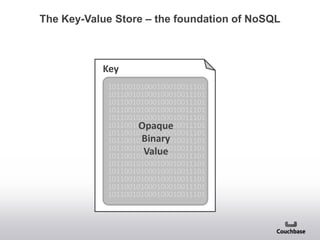
The Key-Value Store – the foundation of NoSQL

Key
101100101000100010011101
101100101000100010011101
101100101000100010011101
101100101000100010011101
101100101000100010011101
101100101000100010011101
Opaque
101100101000100010011101
Binary
101100101000100010011101
101100101000100010011101
Value
101100101000100010011101
101100101000100010011101
101100101000100010011101
101100101000100010011101
101100101000100010011101
101100101000100010011101
Memcached – the NoSQL precursor

Key
101100101000100010011101
101100101000100010011101
101100101000100010011101
101100101000100010011101
101100101000100010011101
101100101000100010011101
Opaque
101100101000100010011101
Binary
101100101000100010011101
101100101000100010011101
Value
101100101000100010011101
101100101000100010011101
101100101000100010011101
101100101000100010011101
101100101000100010011101
101100101000100010011101

memcached
In-memory only
Limited set of operations
Blob Storage: Set, Add, Replace, CAS
Retrieval: Get
Structured Data: Append, Increment
“Simple and fast.”

Challenges: cold cache, disruptive elasticity
Couchbase – document-oriented database
Key

Couchbase

{
“string” : “string”,
“string” : value,
“string” :
, “string” : “string”,
JSON
“string” : value -,
OBJECT
“string” : * array +
}

(“DOCUMENT”)

Auto-sharding
Disk-based with built-in memcached cache
Cache refill on restart
Memcached compatible (drop in replace)
Highly-available (data replication)
Add or remove capacity to live cluster
When values are JSON objects (“documents”):
Create indices, views and query against the
views
NoSQL catalog

Database
(memory/disk)

Cache
(memory only)

Key-Value

Data Structure

memcached

redis

membase

Document

couchbase

Column

Graph
MongoDB – Document-oriented database
Key

MongoDB

{

}

“string” : “string”,
“string” : value,
“string” :
BSON
, “string” : “string”,
OBJECT
“string” : value -,
“string” : * array +
(“DOCUMENT”)

Disk-based with in-memory “caching”
BSON (“binary JSON”) format and wire protocol
Master-slave replication
Auto-sharding
Values are BSON objects
Supports ad hoc queries – best when indexed
MongoDB Architecture
NoSQL catalog

Database
(memory/disk)

Cache
(memory only)

Key-Value

Data Structure

memcached

redis

membase

Document

couchbase

mongoDB

Column

Graph
Cassandra – Column overlays
Key

Column 1
Column 2

Column 3
(not present)

101100101000100010011101
101100101000100010011101
101100101000100010011101
101100101000100010011101
101100101000100010011101
101100101000100010011101
Opaque
101100101000100010011101
Binary
101100101000100010011101
101100101000100010011101
Value
101100101000100010011101
101100101000100010011101
101100101000100010011101
101100101000100010011101
101100101000100010011101
101100101000100010011101

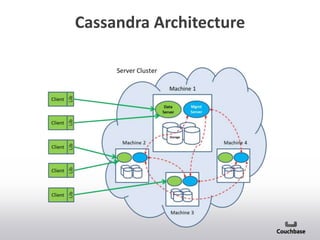
Cassandra
Disk-based system
Clustered
External caching required for low-latency reads
“Columns” are overlaid on the data
Not all rows must have all columns
Supports efficient queries on columns
Restart required when adding columns
Good cross-datacenter support
Cassandra Architecture
NoSQL catalog

Database
(memory/disk)

Cache
(memory only)

Key-Value

Data Structure

memcached

redis

membase

Document

Column

couchbase

cassandra

mongoDB

Graph
Neo4j – Graph database
Key
101100101000100010011101
101100101000100010011101
101100101000100010011101
101100101000100010011101
101100101000100010011101
101100101000100010011101
Opaque
101100101000100010011101
Binary
101100101000100010011101
101100101000100010011101
Value
101100101000100010011101
101100101000100010011101
101100101000100010011101
101100101000100010011101
101100101000100010011101
101100101000100010011101

Key

Neo4j

Key

101100101000100010011101
101100101000100010011101
101100101000100010011101
101100101000100010011101
101100101000100010011101
101100101000100010011101
Opaque
101100101000100010011101
Binary
101100101000100010011101
101100101000100010011101
Value
101100101000100010011101
101100101000100010011101
101100101000100010011101
101100101000100010011101
101100101000100010011101
101100101000100010011101

101100101000100010011101
101100101000100010011101
101100101000100010011101
101100101000100010011101
101100101000100010011101
101100101000100010011101
Opaque
101100101000100010011101
Binary
101100101000100010011101
101100101000100010011101
Value
101100101000100010011101
101100101000100010011101
101100101000100010011101
101100101000100010011101
101100101000100010011101
101100101000100010011101

Key
101100101000100010011101
101100101000100010011101
101100101000100010011101
101100101000100010011101
101100101000100010011101
101100101000100010011101
Opaque
101100101000100010011101
Binary
101100101000100010011101
101100101000100010011101
Value
101100101000100010011101
101100101000100010011101
101100101000100010011101
101100101000100010011101
101100101000100010011101
101100101000100010011101

Key
101100101000100010011101
101100101000100010011101
101100101000100010011101
101100101000100010011101
101100101000100010011101
101100101000100010011101
Opaque
101100101000100010011101
Binary
101100101000100010011101
101100101000100010011101
Value
101100101000100010011101
101100101000100010011101
101100101000100010011101
101100101000100010011101
101100101000100010011101
101100101000100010011101

Disk-based system
External caching required for low-latency reads
Nodes, relationships and paths
Properties on nodes
Delete, Insert, Traverse, etc.
NoSQL catalog

Database
(memory/disk)

Cache
(memory only)

Key-Value

Data Structure

memcached

redis

membase

Document

Column

Graph

couchbase

cassandra

Neo4j

mongoDB
Where is NoSQL a good fit?
Market Adoption
Internet Companies
• Social Gaming
• Ad Networks
• Social Networks
• Online Business Services
• E-Commerce
• Online Media
• Content Management
• Cloud Services

Enterprises
• Communications
• Retail
• Financial Services
• Health Care
• Automotive/Airline
• Agriculture
• Consumer Electronics
• Business Systems
Market Adoption – Customers
Internet Companies

Enterprises

More than 300 customers -- 5,000 production deployments worldwide
Application Characteristics - Data driven
• 3rd party or user defined structure (Twitter feeds)
• Support for unlimited data growth (Viral apps)

• Data with non-homogenous structure
• Need to quickly and often change data structure
• Variable length documents

• Sparse data records
• Hierarchical data

Couchbase is a good fit
Application Characteristics - Performance
driven
• Low latency critical (ex. 1millisecond)
• High throughput (ex. 200000 ops / sec)
• Large number of users
• Unknown demand with sudden growth of users/data
• Predominantly direct document access
• Read / Mixed / Write heavy workloads

Couchbase is a good fit
Common Use Cases
Social Gaming
• Couchbase stores
player and game
data
• Examples
customers include:
Zynga
• Tapjoy, Ubisoft, Ten
cent

Mobile Apps
• Couchbase stores user
info and app content
• Examples customers
include: Kobo, Playtika

Ad Targeting
• Couchbase stores
user information for
fast access
• Examples customers
include:
AOL, Mediamind, Co
nvertro

Session store
• Couchbase Server as a keyvalue store
• Examples customers include:
Concur, Sabre

User Profile Store
• Couchbase Server as a
key-value store
• Examples customers
include: Tunewiki

High availability cache
• Couchbase Server used as a cache tier replacement

• Examples customers include: Orbitz

Content & Metadata
Store

• Couchbase document store
with Elasticsearch
• Examples customers
include: McGraw Hill,
Tunewiki

3rd party data aggregation
• Couchbase stores social media and
data feeds
• Examples customers include:
Sambacloud
Q&A
Thank you

dipti@couchbase.com
@dborkar

Characteristics of no sql databases

  • 1.
    NoSQL for SQLProfessionals Dipti Borkar Director, Product Management
  • 2.
  • 3.
    Macro Trends DrivingNoSQL Technology More Data More Users + Interactive Apps + NoSQL
  • 4.
    Lacking Solutions, UsersForced to Invent Bigtable November 2006 Dynamo October 2007 Cassandra August 2008 Voldemort February 2009 Very few organizations can build and maintain database software technology. But every organization building interactive web applications needs this technology.
  • 5.
    What Is BiggestData Management Problem Driving Use of NoSQL in Coming Year? 49% 35% 29% 16% Lack of flexibility/ rigid schemas Inability to scale out data Source: Couchbase Survey, December 2011, n = 1351. Performance challenges Cost 12% All of these 11% Other
  • 6.
  • 7.
  • 8.
    Relational Technology ScalesUp Application Scales Out Just add more commodity web servers System Cost Application Performance Web/App Server Tier Users RDBMS Scales Up Get a bigger, more complex server System Cost Application Performance Won’t scale beyond this point Relational Database Users Expensive and disruptive sharding, doesn’t perform at web scale
  • 9.
    Couchbase Server ScalesOut Like App Tier Application Scales Out Just add more commodity web servers System Cost Application Performance Web/App Server Tier Users NoSQL Database Scales Out Cost and performance mirrors app tier System Cost Application Performance Couchbase Distributed Data Store Users Scaling out flattens the cost and performance curves
  • 11.
    Differences • 1. Tablesvs Document - Relational has tables with predefined columns: Schema pre-determined before data can be inserted. Best practice is to normalize by splitting into several tables, joined by PK-FK relation.
  • 12.
    Differences • Tables vsDocument (contd.) - In Couchbase, there are no tables only documents A logical entity is stored within a single document Different documents do not need to have the same set of fields or structure You differentiate different types of documents either based on key names you provide or by adding attributes
  • 13.
    Relational vs DocumentData Model C1 C2 C3 C4 { JSON JSON } JSON Relational data model Document data model Highly-structured table organization with rigidly-defined data formats and record structure. Collection of complex documents with arbitrary, nested data formats and varying “record” format.
  • 14.
    Differences • Joins vslogical single document - Single logical document. No need for joins. If normalized and several documents, then use a series of gets recipe= couchbase.get("my-recipe-id"); reviews = couchbase.multiget(recipe.comments); • Transactions - Relational: Atomicity can span several records across several tables. NoSQL: Atomicity confined to at document level
  • 15.
    Key Couchbase Concepts Clients Servers Documents User/applicationdata Read/write from/to Data Buckets Multitenant Architecture Which live on Server Nodes based on bucket partitioning That form a Couchbase Cluster dynamically scalable
  • 16.
    RDBMS Example: UserProfile User Info Address Info KEY First Last ZIP_id ZIP_id CITY STATE ZIP 1 Dipti Borkar 2 1 DEN CO 30303 2 Joe Smith 2 2 MV CA 94040 3 Ali Dodson 2 3 CHI IL 60609 4 John Doe 3 4 NY NY 10010 To get information about specific user, you perform a join across two tables
  • 17.
    Document Example: UserProfile { “ID”: 1, “FIRST”: “Dipti”, “LAST”: “Borkar”, “ZIP”: “94040”, “CITY”: “MV”, “STATE”: “CA” = + } JSON All data in a single document
  • 18.
    Making a ChangeUsing RDBMS Photo Table User Table User ID First Last Zip Country ID 1 Dipti Borkar 94040 001 Country Table User ID TEL 3 Photo ID Comment 2 d043 NYC 2 b054 Country ID Country ID Country name 001 001 USA Bday 007 002 UK 003 Argentina 004 Australia 005 Aruba 006 Austria 007 Brazil 008 Canada 009 Chile 2 Joe Smith 94040 001 5 c036 Miami 001 3 Ali Dodson 94040 001 7 d072 Sunset 133 5002 e086 Spain 133 4 Sarah Gorin NW1 002 5 Bob Young 30303 001 6 Nancy Baker 10010 001 Status Table 8 Ray Jones Lee Chen 31311 V5V3M 001 008 . . . • • • Status ID Text 1 a42 At conf 134 4 b26 excited 007 5 7 User ID Country ID c32 hockey 008 12 d83 Go A’s 001 5000 e34 sailing 005 130 Affiliations Table User ID Doug Moore 04252 001 50001 Mary White SW195 002 50002 Lisa Clark 12425 001 Affl ID Affl Name Country ID 2 a42 Cal 001 4 b96 USC 001 7 50000 • • • c14 UW 001 8 e22 Oxford 002 Portugal 131 Romania 132 Russia 133 Spain 134 Sweden
  • 19.
    Making the SameChange With a Document DB { “ID”: 1, “FIRST”: “Dipti”, “LAST”: “Borkar”, “ZIP”: “94040”, “CITY”: “MV”, “STATE”: “CA”, “STATUS”: , “TEXT”: “At Conf” ,} } “GEO_LOC”: “134” -, “COUNTRY”: ”USA” } JSON Just add information to a document
  • 20.
    Relational vs DocumentPerformance User Table Photo Table First Last Zip 1 Frank Wiegel Weigel 94040 2 Joe Smith 94040 3 Ali Dodson 94040 4 Sarah Gorin Bob Young 30303 6 Nancy Baker 10010 7 Ray Jones 31311 Photo ID Comment d043 NYC 2 b054 Bday 5 c036 Miami 7 d072 Sunset 5002 e086 Spain NW1 5 User ID 2 User ID Status Table Lee Chen V5V3 • • • Status ID Text 1 a42 At conf 4 5 b26 c032 5 4 c32 b26 hockey d83 Go A’s 5000 e34 sailing Affiliations Table User ID 5000 Doug Moore 04252 5001 Mary White 41694 5002 5002 Lisa Lisa Clark 12425 { excited 12 8 User ID { Affiliations Affiliations ID Name 2 a42 b96 c14 UW 8 e22 JSON JSON JSON JSON JSON JSON USC 7 } } } } }} Cal 4 { { {{ Oxford Faster response times and higher throughput
  • 21.
    Document Databases EasilyAccommodate Unstructured Data Hotels { “ID”: 1, “NAME”: “Fairmont San Francisco”, “DESCRIPTION”: “Historic grandeur…”, “AVG_REVIEWER_SCORE”: “4.3”, “AMENITY”: ,“TYPE”: “gym”, DESCRIPTION: “fitness center” }, ,“TYPE”: “wifi”, “DESCRIPTION”: “free wifi”-, “RATE_TYPE”: “nightly”, “PRICE”: “$199”, “REVIEWS”: *“review_1”, “review_2”+, “ATTRACTIONS”: “Chinatown”, { } “ID”: 2, “NAME”: “W San Francisco”, JSON “DESCRIPTION”: “Chic, hip accommodations..”, “AVG_REVIEWER_SCORE”: “4.0”, “AMENITY”: ,“TYPE”: “spa”, DESCRIPTION: “Bliss Spa” }, ,“TYPE”: “wifi”, “DESCRIPTION”: “free wifi”-, ,“TYPE”: “dining”, “DESCRIPTION”: “bar/lounge”-, “RATE_TYPE”: “nightly”, “PRICE”: “$194”, “REVIEWS”: *“review_1”, “review_2”+, } JSON
  • 22.
    Document Databases EasilyAccommodate Unstructured Data Hotels { “ID”: 1, “NAME”: “Fairmont San Francisco”, …- JSON Reviews { “REVIEW_ID”: 1, “REVIEW”: “Loved Hotel & Location”, “WOULD RECOMMEND”: “yes”, { “AVG_REVIEWER_SCORE”: “5”, “REVIEW_ID”: 2, “REVIEW_DATE”: “May “REVIEW”: “Nice, but a few 29, 2013”, kinks”, “271”, “USER_PROFILE_ID”: “WOULD RECOMMEND”: “yes”, } “AVG_REVIEWER_SCORE”: “4”, JSON “REVIEW_DATE”: “May 22, 2013”, “USER_PROFILE_ID”: “923”, } JSON
  • 23.
    Document Databases EasilyAccommodate Unstructured Data Hotel Descriptions { “ID”: 1, “NAME”: “Fairmont San Francisco”, …- JSON Reviews { “REVIEW_ID”: 1, “REVIEW”: “Loved Hotel…”, …- JSON User Profiles { “REVIEW_ID”: 2, “REVIEW”: “Nice, but …”, …- JSON { “USER_ID”: 1, { “DISPLAY_NAME ”: “USER_ID”: 1, “Ted’s Trip Experience”, “DISPLAY_NAME ”: “CITY”: “Saratoga”, “WhatWhat567”, “STATE”: “California”, “CITY”: “Kansas “NUM_OF_REVIEWS”: City”, “8”, “STATE”: “MO”, } “NUM_OF_REVIEWS”: “3”, JSON } JSON
  • 24.
    Document Databases EasilyAccommodate Unstructured Data Hotel Descriptions { “ID”: 1, “NAME”: “Fairmont San Francisco”, …- Hotels points to reviews JSON Reviews { “REVIEW_ID”: 1, “REVIEW”: “Loved Hotel…”, …- JSON { “REVIEW_ID”: 2, “REVIEW”: “Nice, but …”, …- JSON User Profiles { “USER_ID”: 1, “DISPLAY”: “Ted’s Trip…”, …- { “USER_ID”: 2, “DISPLAY”: “WhatWhat …”, …- JSON Document IDs associates related objects JSON Reviews points to users
  • 25.
    Indexing with DocumentDatabases Index on AVG_REVIEWER_SCORE
  • 26.
    Indexing with DocumentDatabases Index on AVG_REVIEWER_SCORE Index … 4.0, doc_id 4.0, doc_id 4.1, doc_id 4.3, doc_id 5.0, doc_id …
  • 27.
    Querying with DocumentDatabases Query on AVG_REVIEWER_SCORE Query Index … 3.4, doc_id 3.4, doc_id 3.5, doc_id 3.6, doc_id 3.7, doc_id 3.8, doc_id 4.0, doc_id 4.1, doc_id 4.3, doc_id 4.5, doc_id 4.7, doc_id 4.9, doc_id 5.0, doc_id … 5.0, doc_id Matching Results
  • 28.
  • 29.
    NoSQL catalog Database (memory/disk) Cache (memory only) Key-Value DataStructure memcached redis membase Document Column Graph couchbase cassandra Neo4j mongoDB
  • 30.
    The Key-Value Store– the foundation of NoSQL Key 101100101000100010011101 101100101000100010011101 101100101000100010011101 101100101000100010011101 101100101000100010011101 101100101000100010011101 Opaque 101100101000100010011101 Binary 101100101000100010011101 101100101000100010011101 Value 101100101000100010011101 101100101000100010011101 101100101000100010011101 101100101000100010011101 101100101000100010011101 101100101000100010011101
  • 31.
    Memcached – theNoSQL precursor Key 101100101000100010011101 101100101000100010011101 101100101000100010011101 101100101000100010011101 101100101000100010011101 101100101000100010011101 Opaque 101100101000100010011101 Binary 101100101000100010011101 101100101000100010011101 Value 101100101000100010011101 101100101000100010011101 101100101000100010011101 101100101000100010011101 101100101000100010011101 101100101000100010011101 memcached In-memory only Limited set of operations Blob Storage: Set, Add, Replace, CAS Retrieval: Get Structured Data: Append, Increment “Simple and fast.” Challenges: cold cache, disruptive elasticity
  • 32.
    Couchbase – document-orienteddatabase Key Couchbase { “string” : “string”, “string” : value, “string” : , “string” : “string”, JSON “string” : value -, OBJECT “string” : * array + } (“DOCUMENT”) Auto-sharding Disk-based with built-in memcached cache Cache refill on restart Memcached compatible (drop in replace) Highly-available (data replication) Add or remove capacity to live cluster When values are JSON objects (“documents”): Create indices, views and query against the views
  • 33.
    NoSQL catalog Database (memory/disk) Cache (memory only) Key-Value DataStructure memcached redis membase Document couchbase Column Graph
  • 34.
    MongoDB – Document-orienteddatabase Key MongoDB { } “string” : “string”, “string” : value, “string” : BSON , “string” : “string”, OBJECT “string” : value -, “string” : * array + (“DOCUMENT”) Disk-based with in-memory “caching” BSON (“binary JSON”) format and wire protocol Master-slave replication Auto-sharding Values are BSON objects Supports ad hoc queries – best when indexed
  • 35.
  • 36.
    NoSQL catalog Database (memory/disk) Cache (memory only) Key-Value DataStructure memcached redis membase Document couchbase mongoDB Column Graph
  • 37.
    Cassandra – Columnoverlays Key Column 1 Column 2 Column 3 (not present) 101100101000100010011101 101100101000100010011101 101100101000100010011101 101100101000100010011101 101100101000100010011101 101100101000100010011101 Opaque 101100101000100010011101 Binary 101100101000100010011101 101100101000100010011101 Value 101100101000100010011101 101100101000100010011101 101100101000100010011101 101100101000100010011101 101100101000100010011101 101100101000100010011101 Cassandra Disk-based system Clustered External caching required for low-latency reads “Columns” are overlaid on the data Not all rows must have all columns Supports efficient queries on columns Restart required when adding columns Good cross-datacenter support
  • 38.
  • 39.
    NoSQL catalog Database (memory/disk) Cache (memory only) Key-Value DataStructure memcached redis membase Document Column couchbase cassandra mongoDB Graph
  • 40.
    Neo4j – Graphdatabase Key 101100101000100010011101 101100101000100010011101 101100101000100010011101 101100101000100010011101 101100101000100010011101 101100101000100010011101 Opaque 101100101000100010011101 Binary 101100101000100010011101 101100101000100010011101 Value 101100101000100010011101 101100101000100010011101 101100101000100010011101 101100101000100010011101 101100101000100010011101 101100101000100010011101 Key Neo4j Key 101100101000100010011101 101100101000100010011101 101100101000100010011101 101100101000100010011101 101100101000100010011101 101100101000100010011101 Opaque 101100101000100010011101 Binary 101100101000100010011101 101100101000100010011101 Value 101100101000100010011101 101100101000100010011101 101100101000100010011101 101100101000100010011101 101100101000100010011101 101100101000100010011101 101100101000100010011101 101100101000100010011101 101100101000100010011101 101100101000100010011101 101100101000100010011101 101100101000100010011101 Opaque 101100101000100010011101 Binary 101100101000100010011101 101100101000100010011101 Value 101100101000100010011101 101100101000100010011101 101100101000100010011101 101100101000100010011101 101100101000100010011101 101100101000100010011101 Key 101100101000100010011101 101100101000100010011101 101100101000100010011101 101100101000100010011101 101100101000100010011101 101100101000100010011101 Opaque 101100101000100010011101 Binary 101100101000100010011101 101100101000100010011101 Value 101100101000100010011101 101100101000100010011101 101100101000100010011101 101100101000100010011101 101100101000100010011101 101100101000100010011101 Key 101100101000100010011101 101100101000100010011101 101100101000100010011101 101100101000100010011101 101100101000100010011101 101100101000100010011101 Opaque 101100101000100010011101 Binary 101100101000100010011101 101100101000100010011101 Value 101100101000100010011101 101100101000100010011101 101100101000100010011101 101100101000100010011101 101100101000100010011101 101100101000100010011101 Disk-based system External caching required for low-latency reads Nodes, relationships and paths Properties on nodes Delete, Insert, Traverse, etc.
  • 41.
    NoSQL catalog Database (memory/disk) Cache (memory only) Key-Value DataStructure memcached redis membase Document Column Graph couchbase cassandra Neo4j mongoDB
  • 42.
    Where is NoSQLa good fit?
  • 43.
    Market Adoption Internet Companies •Social Gaming • Ad Networks • Social Networks • Online Business Services • E-Commerce • Online Media • Content Management • Cloud Services Enterprises • Communications • Retail • Financial Services • Health Care • Automotive/Airline • Agriculture • Consumer Electronics • Business Systems
  • 44.
    Market Adoption –Customers Internet Companies Enterprises More than 300 customers -- 5,000 production deployments worldwide
  • 45.
    Application Characteristics -Data driven • 3rd party or user defined structure (Twitter feeds) • Support for unlimited data growth (Viral apps) • Data with non-homogenous structure • Need to quickly and often change data structure • Variable length documents • Sparse data records • Hierarchical data Couchbase is a good fit
  • 46.
    Application Characteristics -Performance driven • Low latency critical (ex. 1millisecond) • High throughput (ex. 200000 ops / sec) • Large number of users • Unknown demand with sudden growth of users/data • Predominantly direct document access • Read / Mixed / Write heavy workloads Couchbase is a good fit
  • 47.
    Common Use Cases SocialGaming • Couchbase stores player and game data • Examples customers include: Zynga • Tapjoy, Ubisoft, Ten cent Mobile Apps • Couchbase stores user info and app content • Examples customers include: Kobo, Playtika Ad Targeting • Couchbase stores user information for fast access • Examples customers include: AOL, Mediamind, Co nvertro Session store • Couchbase Server as a keyvalue store • Examples customers include: Concur, Sabre User Profile Store • Couchbase Server as a key-value store • Examples customers include: Tunewiki High availability cache • Couchbase Server used as a cache tier replacement • Examples customers include: Orbitz Content & Metadata Store • Couchbase document store with Elasticsearch • Examples customers include: McGraw Hill, Tunewiki 3rd party data aggregation • Couchbase stores social media and data feeds • Examples customers include: Sambacloud
  • 48.
  • 49.

Editor's Notes

  • #2 These slides are meant to discuss and address the technical differences of RDBMS vs. NoSQL from a document modeling and performance/scale perspective.
  • #5 Get “But every . . .” onto 1 line.
  • #8 These are the 4 “promises” of NoSQL
  • #13 Do not failover a healthy node!
  • #14 Do not failover a healthy node!
  • #15 Most of you are probably familiar with the table layout. A table is defined with a set of column. And each record in the table conforms to the schema. If you wish to capture different data in the future, the table schema must be changed using the alter table statement. Typically data is normalized in the 3rd normal form reduce duplication. Large tables are split into smaller tables.using foreign keys
  • #16 Do not failover a healthy node!
  • #18 Summary bullet should read “To get info about a specific user you perform a join across two tables”Shouldn’t “Geo Info” be “Address Info”Changes names so they are employee names.Example. Normalized schema 2 tables Fk connects the two. To get information about a specific error, you will perform and join across the two tables
  • #19 Example. Normalized schema 2 tables Fk connects the two. To get information about a specific error, you will perform and join across the two tables
  • #21 The data is modeled for the application code and not for the database.
  • #22 Most of you are probably familiar with the table layout. A table is defined with a set of column. And each record in the table conforms to the schema. If you wish to capture different data in the future, the table schema must be changed using the alter table statement. Typically data is normalized in the 3rd normal form reduce duplication. Large tables are split into smaller tables.using foreign keys
  • #23 This example shows how a very simple user profile is represented.In a relational database, the user information might be represented across 2 interrelated tables.In a document database, the information is aggregated into a single document that is very natural to program with.So, this is how the data model is different. Let’s now talk about how scalability is different.
  • #24 This example shows how a very simple user profile is represented.In a relational database, the user information might be represented across 2 interrelated tables.In a document database, the information is aggregated into a single document that is very natural to program with.So, this is how the data model is different. Let’s now talk about how scalability is different.
  • #25 This example shows how a very simple user profile is represented.In a relational database, the user information might be represented across 2 interrelated tables.In a document database, the information is aggregated into a single document that is very natural to program with.So, this is how the data model is different. Let’s now talk about how scalability is different.
  • #26 This example shows how a very simple user profile is represented.In a relational database, the user information might be represented across 2 interrelated tables.In a document database, the information is aggregated into a single document that is very natural to program with.So, this is how the data model is different. Let’s now talk about how scalability is different.
  • #27 This example shows how a very simple user profile is represented.In a relational database, the user information might be represented across 2 interrelated tables.In a document database, the information is aggregated into a single document that is very natural to program with.So, this is how the data model is different. Let’s now talk about how scalability is different.
  • #28 This example shows how a very simple user profile is represented.In a relational database, the user information might be represented across 2 interrelated tables.In a document database, the information is aggregated into a single document that is very natural to program with.So, this is how the data model is different. Let’s now talk about how scalability is different.
  • #29 This example shows how a very simple user profile is represented.In a relational database, the user information might be represented across 2 interrelated tables.In a document database, the information is aggregated into a single document that is very natural to program with.So, this is how the data model is different. Let’s now talk about how scalability is different.
  • #45 These are the market segments
  • #46 Partial listing of companies with paid production deploymentsThousands more using open source