ShareFile Enterprise
Roger Bösch
Citrix Systems International GmbH
ShareFile Introduction
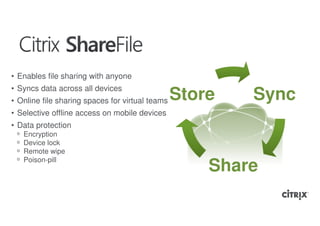
• Enables file sharing with anyone
• Syncs data across all devices
• Online file sharing spaces for virtual teams   Store   Sync
• Selective offline access on mobile devices
• Data protection
 ᵒ   Encryption
 ᵒ   Device lock
 ᵒ   Remote wipe
 ᵒ   Poison-pill
                                                     Share
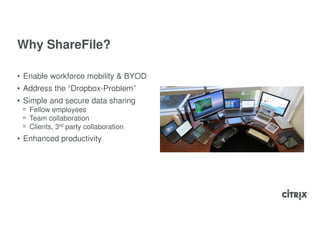
Why ShareFile?

• Enable workforce mobility & BYOD
• Address the “Dropbox-Problem”
• Simple and secure data sharing
 ᵒ Fellow employees
 ᵒ Team collaboration
 ᵒ Clients, 3rd party collaboration
• Enhanced productivity
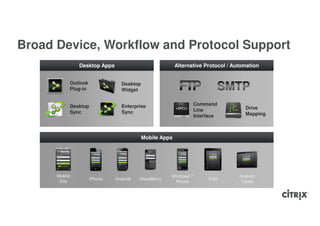
Broad Device, Workflow and Protocol Support
               Desktop Apps                             Alternative Protocol / Automation


           Outlook              Desktop
           Plug-in              Widget


           Desktop              Enterprise                       Command
                                                                 Line              Drive
           Sync                 Sync                                               Mapping
                                                                 Interface


                                          Mobile Apps


      Mobile                                         Windows 7                   Android
                     iPhone   Android   BlackBerry                    iPad
       Site                                           Phone                       Tablet
ShareFile High-level
Architecture
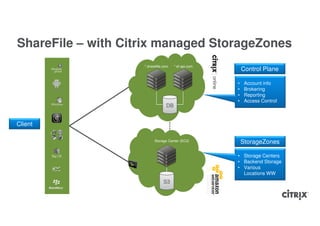
ShareFile – with Citrix managed StorageZones
                    *.sharefile.com   *.sf-api.com
                                                         Control Plane

                                                     •    Account info
                                                     •    Brokering
                                                     •    Reporting
                                                     •    Access Control
                                 DB


Client

                          Storage Center (EC2)           StorageZones

                                                     • Storage Centers
                                                     • Backend Storage
                                                     • Various
                                                       Locations WW
                                S3
ShareFile – Current Architecture
With Citrix managed StorageZones
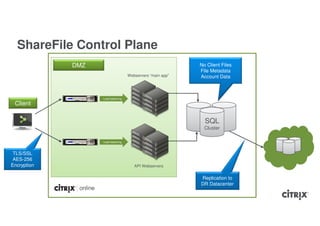
ShareFile Control Plane
             DMZ                                            No Client Files
                                                            File Metadata
                                    Webservers “main app”   Account Data


                   Load balancing

 Client

                                                              SQL
                                                              Cluster

                   Load balancing


 TLS/SSL
 AES-256
Encryption                             API Webservers


                                                            Replication to
                                                            DR Datacenter
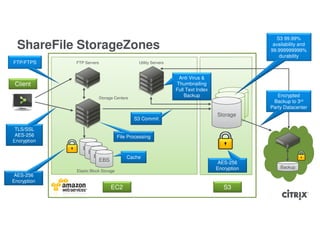
S3 99.99%
  ShareFile StorageZones                                                                        availability and
                                                                                               99.999999999%
                                                                                                   durability
FTP/FTPS     FTP Servers                      Utility Servers


                                                                 Anti Virus &
 Client                                                         Thumbnailing
                                                                Full Text Index
                         Storage Centers
                                                                    Backup                        Encrypted
                                                                                                Backup to 3rd
                                                                                     Storage   Party Datacenter
                                                                                   Storage
                                                                                  Storage
                                            S3 Commit

 TLS/SSL
 AES-256                             File Processing
Encryption
                EBS
                 EBS
                   EBS                   Cache
                    EBS                                                            AES-256
                                                                                  Encryption       Backup
             Elastic Block Storage
 AES-256
Encryption
                               EC2                                                   S3
ShareFile StorageZones - Download
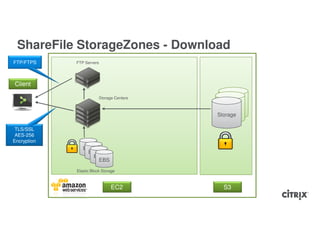
FTP/FTPS     FTP Servers


Client

                         Storage Centers
                                              Storage
                                            Storage
                                           Storage

 TLS/SSL
 AES-256
Encryption
                EBS
                 EBS
                   EBS
                    EBS
             Elastic Block Storage


                               EC2           S3
Availability and Redundancy
Availability Information

• Real-time backup to Citrix data center
• Automatic failover (if necessary)
• Lazy file deletion to support file recovery
ShareFile StorageZones

• Store files in customer managed
  StorageZones and/or in the Citrix managed
  StorageZones
• Modified On-Prem version of existing
  Storage Plane software
• Same user experience
• Technology Preview available
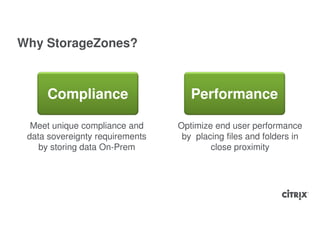
Why StorageZones?


     Compliance                     Performance

  Meet unique compliance and     Optimize end user performance
 data sovereignty requirements    by placing files and folders in
    by storing data On-Prem              close proximity
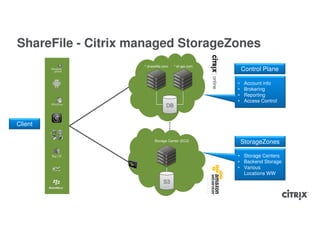
ShareFile - Citrix managed StorageZones
                    *.sharefile.com   *.sf-api.com
                                                         Control Plane

                                                     •    Account info
                                                     •    Brokering
                                                     •    Reporting
                                                     •    Access Control
                                 DB


Client

                          Storage Center (EC2)           StorageZones

                                                     • Storage Centers
                                                     • Backend Storage
                                                     • Various
                                                       Locations WW
                                S3
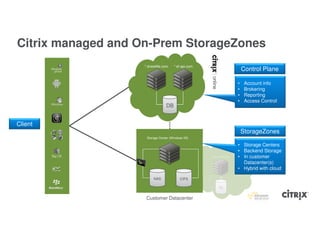
Citrix managed and On-Prem StorageZones
                   *.sharefile.com    *.sf-api.com
                                                                                Control Plane

                                                                            •    Account info
                                                                            •    Brokering
                                                                            •    Reporting
                                                                            •    Access Control
                                 DB


Client
                                                                                StorageZones
                    Storage Center (Windows IIS)

                                                                            • Storage Centers
                                                                            • Backend Storage
                                                     Storage Center (EC2)   • In customer
                                                                              Datacenter(s)
                                                                            • Hybrid with cloud

                        NAS               CIFS

                                                            S3


                    Customer Datacenter
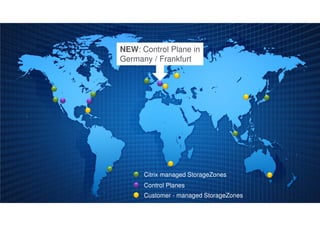
NEW: Control Plane in
Germany / Frankfurt


      Citrix managed StorageZones
      Control Planes
      Customer - managed StorageZones
Using StorageZones
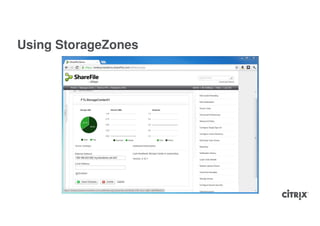
Using StorageZones

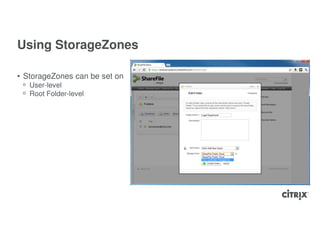
• StorageZones can be set on
 ᵒ User-level
 ᵒ Root Folder-level
Using StorageZones
On-Prem Deployment Models
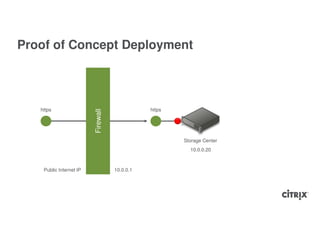
Proof of Concept Deployment


   https                                       https
                         Firewall


                                                       Storage Center
                                                         10.0.0.20


    Public Internet IP              10.0.0.1
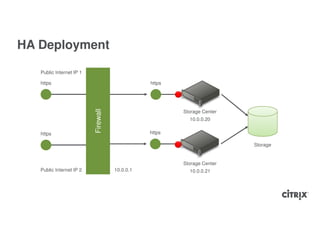
HA Deployment

   Public Internet IP 1

   https                                        https


                          Firewall
                                                        Storage Center
                                                          10.0.0.20

   https                                        https

                                                        Storage Center   Storage


                                                        Storage Center
   Public Internet IP 2              10.0.0.1             10.0.0.21
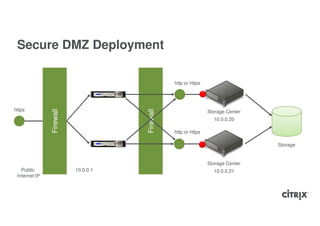
Secure DMZ Deployment

                                                http or https


https
               Firewall


                                     Firewall
                                                                Storage Center
                                                                  10.0.0.20

                                                http or https

                                                                                 Storage


                                                                Storage Center
   Public                 10.0.0.1                                10.0.0.21
 Internet IP
StorageZones Setup
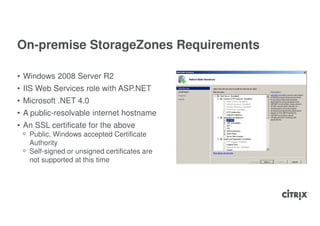
On-premise StorageZones Requirements

• Windows 2008 Server R2
• IIS Web Services role with ASP.NET
• Microsoft .NET 4.0
• A public-resolvable internet hostname
• An SSL certificate for the above
 ᵒ Public, Windows accepted Certificate
   Authority
 ᵒ Self-signed or unsigned certificates are
   not supported at this time
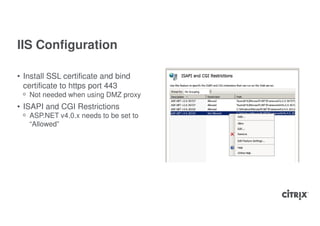
IIS Configuration

• Install SSL certificate and bind
  certificate to https port 443
 ᵒ Not needed when using DMZ proxy
• ISAPI and CGI Restrictions
 ᵒ ASP.NET v4.0.x needs to be set to
   “Allowed”
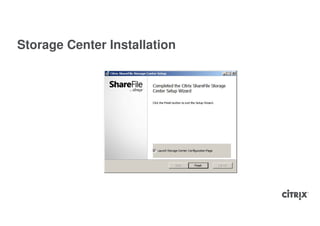
Storage Center Installation
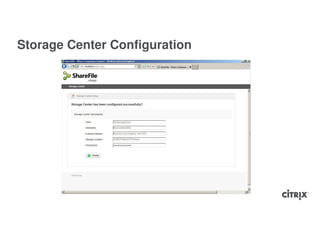
Storage Center Configuration
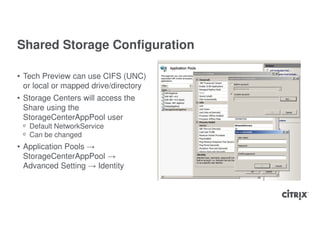
Shared Storage Configuration

• Tech Preview can use CIFS (UNC)
  or local or mapped drive/directory
• Storage Centers will access the
  Share using the
  StorageCenterAppPool user
 ᵒ Default NetworkService
 ᵒ Can be changed
• Application Pools →
  StorageCenterAppPool →
  Advanced Setting → Identity
ShareFile Security
Security Information

• SSAE 16 audited data centers
• SSL Encryption in transit
• AES 256-bit encryption at rest
• All uploaded files scanned for viruses
• Daily scans for McAfee SECURE accreditation
• All ShareFile servers protected by dedicated firewalls
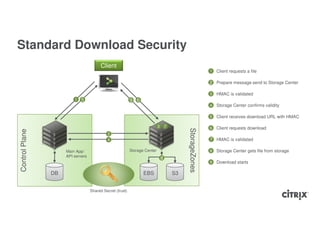
Standard Download Security
                                         Client
                                                                                                            1   Client requests a file

                                                                                                            2 Prepare message send to Storage Center

                                                                                                            3   HMAC is validated
                         1   5                             9 6
                                                                                                            4   Storage Center confirms validity

                                                                                                            5   Client receives download URL with HMAC

                                                                            3       7                       6   Client requests download


                                                                                             StorageZones
Control Plane


                                            2
                                            4                                                               7 HMAC is validated

                     Main App/                             Storage Center                                   8   Storage Center gets file from storage
                     API servers
                                                                                8
                                                                                                            9   Download starts

                DB                                                EBS                   S3


                                   Shared Secret (trust)
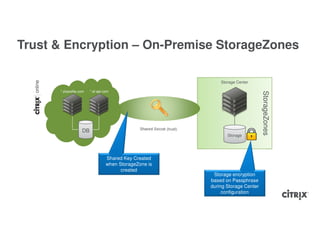
Trust & Encryption – On-Premise StorageZones

                                                                            Storage Center

      *.sharefile.com   *.sf-api.com


                                                                                                StorageZones
                                                Shared Secret (trust)
                   DB
                                                                               Storage


                                  Shared Key Created
                                  when StorageZone is
                                        created
                                                                         Storage encryption
                                                                        based on Passphrase
                                                                        during Storage Center
                                                                             configuration
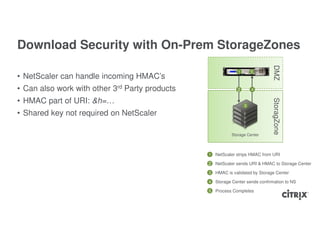
Download Security with On-Prem StorageZones


                                                                               DMZ
                                                              1       5
• NetScaler can handle incoming HMAC’s
• Can also work with other 3rd Party products                 2       4


• HMAC part of URI: &h=…


                                                                               StoragZone
                                                                  3

• Shared key not required on NetScaler

                                                           Storage Center


                                                1   NetScaler strips HMAC from URI

                                                2 NetScaler sends URI & HMAC to Storage Center
                                                3   HMAC is validated by Storage Center

                                                4   Storage Center sends confirmation to NS

                                                5   Process Completes
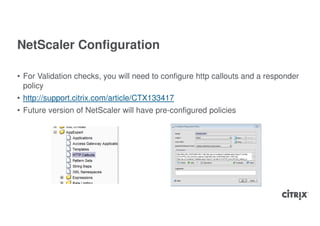
NetScaler Configuration

• For Validation checks, you will need to configure http callouts and a responder
  policy
• http://support.citrix.com/article/CTX133417
• Future version of NetScaler will have pre-configured policies
ShareFile Authentication
ShareFile Authentication Options

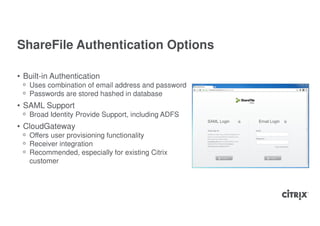
• Built-in Authentication
 ᵒ Uses combination of email address and password
 ᵒ Passwords are stored hashed in database
• SAML Support
 ᵒ Broad Identity Provide Support, including ADFS
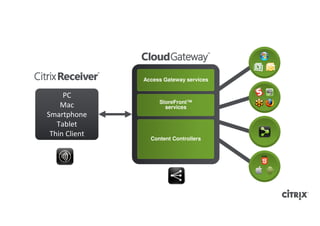
• CloudGateway
 ᵒ Offers user provisioning functionality
 ᵒ Receiver integration
 ᵒ Recommended, especially for existing Citrix
   customer
Enterprise Active Directory Options

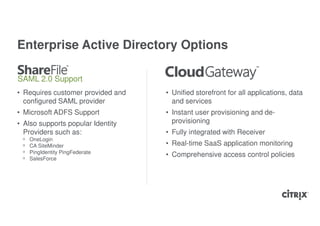
SAML 2.0 Support
• Requires customer provided and   • Unified storefront for all applications, data
  configured SAML provider           and services
• Microsoft ADFS Support           • Instant user provisioning and de-
• Also supports popular Identity     provisioning
  Providers such as:               • Fully integrated with Receiver
 ᵒ   OneLogin
 ᵒ   CA SiteMinder                 • Real-time SaaS application monitoring
 ᵒ   PingIdentity PingFederate
                                   • Comprehensive access control policies
 ᵒ   SalesForce
SAML Authentication

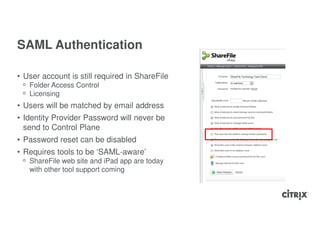
• User account is still required in ShareFile
 ᵒ Folder Access Control
 ᵒ Licensing
• Users will be matched by email address
• Identity Provider Password will never be
  send to Control Plane
• Password reset can be disabled
• Requires tools to be ‘SAML-aware’
 ᵒ ShareFile web site and iPad app are today
   with other tool support coming
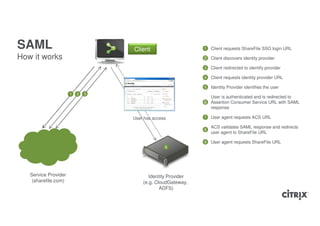
SAML                                  Client                     1   Client requests ShareFile SSO login URL

How it works                                                     2 Client discovers identity provider
                                                                 3   Client redirected to identify provider

                                                                 4   Client requests identity provider URL

                                                                 5   Identity Provider identifies the user
                      1
                      7   2
                          8   3
                              9   4   5
                                                                   User is authenticated and is redirected to
                                                                 6 Assertion Consumer Service URL with SAML
                                                                   response

                                      User has access            7   User agent requests ACS URL

                                                                     ACS validates SAML response and redirects
                                                                 8
                                                                     user agent to ShareFile URL

                                                                 9   User agent requests ShareFile URL
                                                    6


   Service Provider                          Identity Provider
    (sharefile.com)                       (e.g. CloudGateway,
                                                  ADFS)
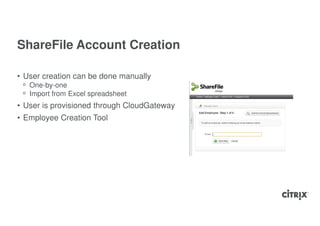
ShareFile Account Creation

• User creation can be done manually
 ᵒ One-by-one
 ᵒ Import from Excel spreadsheet
• User is provisioned through CloudGateway
• Employee Creation Tool
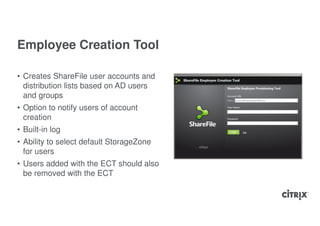
Employee Creation Tool

• Creates ShareFile user accounts and
  distribution lists based on AD users
  and groups
• Option to notify users of account
  creation
• Built-in log
• Ability to select default StorageZone
  for users
• Users added with the ECT should also
  be removed with the ECT
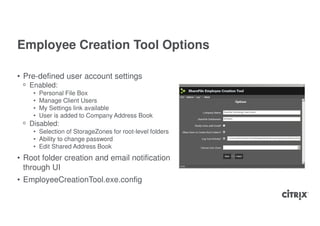
Employee Creation Tool Options

• Pre-defined user account settings
 ᵒ Enabled:
    •   Personal File Box
    •   Manage Client Users
    •   My Settings link available
    •   User is added to Company Address Book
 ᵒ Disabled:
    • Selection of StorageZones for root-level folders
    • Ability to change password
    • Edit Shared Address Book
• Root folder creation and email notification
  through UI
• EmployeeCreationTool.exe.config
Citrix CloudGateway &
Receiver
Follow-me-data
Access Gateway services


     PC
                    StoreFront™
    Mac               services
Smartphone
   Tablet
 Thin Client
                 Content Controllers
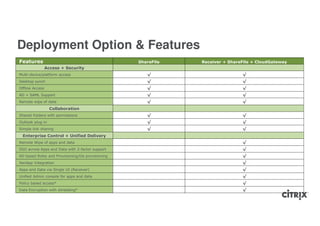
Deployment Option & Features
Features                                          ShareFile   Receiver + ShareFile + CloudGateway
                 Access + Security
Multi-device/platform access                         √                        √
Desktop synch                                        √                        √
Offline Access                                       √                        √
AD + SAML Support                                    √                        √
Remote wipe of data                                  √                        √
                   Collaboration
Shared Folders with permissions                      √                        √
Outlook plug-in                                      √                        √
Simple link sharing                                  √                        √
 Enterprise Control + Unified Delivery
Remote Wipe of apps and data                                                  √
SSO across Apps and Data with 2-factor support                                √
AD based Roles and Provisioning/De-provisioning                               √
XenApp Integration                                                            √
Apps and Data via Single UI (Receiver)                                        √
Unified Admin console for apps and data                                       √
Policy based access*                                                          √
Data Encryption with shredding*                                               √
What’s Next
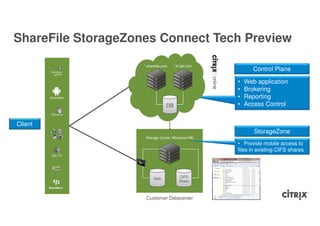
ShareFile StorageZones Connect Tech Preview

                    *.sharefile.com   *.sf-api.com
                                                            Control Plane

                                                     •   Web application
                                                     •   Brokering
                                                     •   Reporting
                                  DB                 •   Access Control


Client
                                                            StorageZone
                     Storage Center (Windows IIS)
                                                     • Provide mobile access to
                                                     files in existing CIFS shares


                                         CIFS
                          NAS
                                         Share


                     Customer Datacenter
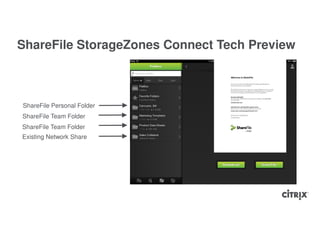
ShareFile StorageZones Connect Tech Preview


ShareFile Personal Folder
ShareFile Team Folder
Existing Network Share
Work better. Live better.

Citrix Day 2012: ShareFile

  • 1.
    ShareFile Enterprise Roger Bösch CitrixSystems International GmbH
  • 2.
  • 3.
    • Enables filesharing with anyone • Syncs data across all devices • Online file sharing spaces for virtual teams Store Sync • Selective offline access on mobile devices • Data protection ᵒ Encryption ᵒ Device lock ᵒ Remote wipe ᵒ Poison-pill Share
  • 4.
    Why ShareFile? • Enableworkforce mobility & BYOD • Address the “Dropbox-Problem” • Simple and secure data sharing ᵒ Fellow employees ᵒ Team collaboration ᵒ Clients, 3rd party collaboration • Enhanced productivity
  • 5.
    Broad Device, Workflowand Protocol Support Desktop Apps Alternative Protocol / Automation Outlook Desktop Plug-in Widget Desktop Enterprise Command Line Drive Sync Sync Mapping Interface Mobile Apps Mobile Windows 7 Android iPhone Android BlackBerry iPad Site Phone Tablet
  • 6.
  • 7.
    ShareFile – withCitrix managed StorageZones *.sharefile.com *.sf-api.com Control Plane • Account info • Brokering • Reporting • Access Control DB Client Storage Center (EC2) StorageZones • Storage Centers • Backend Storage • Various Locations WW S3
  • 8.
    ShareFile – CurrentArchitecture With Citrix managed StorageZones
  • 9.
    ShareFile Control Plane DMZ No Client Files File Metadata Webservers “main app” Account Data Load balancing Client SQL Cluster Load balancing TLS/SSL AES-256 Encryption API Webservers Replication to DR Datacenter
  • 10.
    S3 99.99% ShareFile StorageZones availability and 99.999999999% durability FTP/FTPS FTP Servers Utility Servers Anti Virus & Client Thumbnailing Full Text Index Storage Centers Backup Encrypted Backup to 3rd Storage Party Datacenter Storage Storage S3 Commit TLS/SSL AES-256 File Processing Encryption EBS EBS EBS Cache EBS AES-256 Encryption Backup Elastic Block Storage AES-256 Encryption EC2 S3
  • 11.
    ShareFile StorageZones -Download FTP/FTPS FTP Servers Client Storage Centers Storage Storage Storage TLS/SSL AES-256 Encryption EBS EBS EBS EBS Elastic Block Storage EC2 S3
  • 12.
  • 13.
    Availability Information • Real-timebackup to Citrix data center • Automatic failover (if necessary) • Lazy file deletion to support file recovery
  • 14.
  • 15.
    ShareFile StorageZones • Storefiles in customer managed StorageZones and/or in the Citrix managed StorageZones • Modified On-Prem version of existing Storage Plane software • Same user experience • Technology Preview available
  • 16.
    Why StorageZones? Compliance Performance Meet unique compliance and Optimize end user performance data sovereignty requirements by placing files and folders in by storing data On-Prem close proximity
  • 17.
    ShareFile - Citrixmanaged StorageZones *.sharefile.com *.sf-api.com Control Plane • Account info • Brokering • Reporting • Access Control DB Client Storage Center (EC2) StorageZones • Storage Centers • Backend Storage • Various Locations WW S3
  • 18.
    Citrix managed andOn-Prem StorageZones *.sharefile.com *.sf-api.com Control Plane • Account info • Brokering • Reporting • Access Control DB Client StorageZones Storage Center (Windows IIS) • Storage Centers • Backend Storage Storage Center (EC2) • In customer Datacenter(s) • Hybrid with cloud NAS CIFS S3 Customer Datacenter
  • 19.
    NEW: Control Planein Germany / Frankfurt Citrix managed StorageZones Control Planes Customer - managed StorageZones
  • 20.
  • 21.
    Using StorageZones • StorageZonescan be set on ᵒ User-level ᵒ Root Folder-level
  • 22.
  • 23.
  • 24.
    Proof of ConceptDeployment https https Firewall Storage Center 10.0.0.20 Public Internet IP 10.0.0.1
  • 25.
    HA Deployment Public Internet IP 1 https https Firewall Storage Center 10.0.0.20 https https Storage Center Storage Storage Center Public Internet IP 2 10.0.0.1 10.0.0.21
  • 26.
    Secure DMZ Deployment http or https https Firewall Firewall Storage Center 10.0.0.20 http or https Storage Storage Center Public 10.0.0.1 10.0.0.21 Internet IP
  • 27.
  • 28.
    On-premise StorageZones Requirements •Windows 2008 Server R2 • IIS Web Services role with ASP.NET • Microsoft .NET 4.0 • A public-resolvable internet hostname • An SSL certificate for the above ᵒ Public, Windows accepted Certificate Authority ᵒ Self-signed or unsigned certificates are not supported at this time
  • 29.
    IIS Configuration • InstallSSL certificate and bind certificate to https port 443 ᵒ Not needed when using DMZ proxy • ISAPI and CGI Restrictions ᵒ ASP.NET v4.0.x needs to be set to “Allowed”
  • 30.
  • 31.
  • 32.
    Shared Storage Configuration •Tech Preview can use CIFS (UNC) or local or mapped drive/directory • Storage Centers will access the Share using the StorageCenterAppPool user ᵒ Default NetworkService ᵒ Can be changed • Application Pools → StorageCenterAppPool → Advanced Setting → Identity
  • 33.
  • 34.
    Security Information • SSAE16 audited data centers • SSL Encryption in transit • AES 256-bit encryption at rest • All uploaded files scanned for viruses • Daily scans for McAfee SECURE accreditation • All ShareFile servers protected by dedicated firewalls
  • 35.
    Standard Download Security Client 1 Client requests a file 2 Prepare message send to Storage Center 3 HMAC is validated 1 5 9 6 4 Storage Center confirms validity 5 Client receives download URL with HMAC 3 7 6 Client requests download StorageZones Control Plane 2 4 7 HMAC is validated Main App/ Storage Center 8 Storage Center gets file from storage API servers 8 9 Download starts DB EBS S3 Shared Secret (trust)
  • 36.
    Trust & Encryption– On-Premise StorageZones Storage Center *.sharefile.com *.sf-api.com StorageZones Shared Secret (trust) DB Storage Shared Key Created when StorageZone is created Storage encryption based on Passphrase during Storage Center configuration
  • 37.
    Download Security withOn-Prem StorageZones DMZ 1 5 • NetScaler can handle incoming HMAC’s • Can also work with other 3rd Party products 2 4 • HMAC part of URI: &h=… StoragZone 3 • Shared key not required on NetScaler Storage Center 1 NetScaler strips HMAC from URI 2 NetScaler sends URI & HMAC to Storage Center 3 HMAC is validated by Storage Center 4 Storage Center sends confirmation to NS 5 Process Completes
  • 38.
    NetScaler Configuration • ForValidation checks, you will need to configure http callouts and a responder policy • http://support.citrix.com/article/CTX133417 • Future version of NetScaler will have pre-configured policies
  • 39.
  • 40.
    ShareFile Authentication Options •Built-in Authentication ᵒ Uses combination of email address and password ᵒ Passwords are stored hashed in database • SAML Support ᵒ Broad Identity Provide Support, including ADFS • CloudGateway ᵒ Offers user provisioning functionality ᵒ Receiver integration ᵒ Recommended, especially for existing Citrix customer
  • 41.
    Enterprise Active DirectoryOptions SAML 2.0 Support • Requires customer provided and • Unified storefront for all applications, data configured SAML provider and services • Microsoft ADFS Support • Instant user provisioning and de- • Also supports popular Identity provisioning Providers such as: • Fully integrated with Receiver ᵒ OneLogin ᵒ CA SiteMinder • Real-time SaaS application monitoring ᵒ PingIdentity PingFederate • Comprehensive access control policies ᵒ SalesForce
  • 42.
    SAML Authentication • Useraccount is still required in ShareFile ᵒ Folder Access Control ᵒ Licensing • Users will be matched by email address • Identity Provider Password will never be send to Control Plane • Password reset can be disabled • Requires tools to be ‘SAML-aware’ ᵒ ShareFile web site and iPad app are today with other tool support coming
  • 43.
    SAML Client 1 Client requests ShareFile SSO login URL How it works 2 Client discovers identity provider 3 Client redirected to identify provider 4 Client requests identity provider URL 5 Identity Provider identifies the user 1 7 2 8 3 9 4 5 User is authenticated and is redirected to 6 Assertion Consumer Service URL with SAML response User has access 7 User agent requests ACS URL ACS validates SAML response and redirects 8 user agent to ShareFile URL 9 User agent requests ShareFile URL 6 Service Provider Identity Provider (sharefile.com) (e.g. CloudGateway, ADFS)
  • 44.
    ShareFile Account Creation •User creation can be done manually ᵒ One-by-one ᵒ Import from Excel spreadsheet • User is provisioned through CloudGateway • Employee Creation Tool
  • 45.
    Employee Creation Tool •Creates ShareFile user accounts and distribution lists based on AD users and groups • Option to notify users of account creation • Built-in log • Ability to select default StorageZone for users • Users added with the ECT should also be removed with the ECT
  • 46.
    Employee Creation ToolOptions • Pre-defined user account settings ᵒ Enabled: • Personal File Box • Manage Client Users • My Settings link available • User is added to Company Address Book ᵒ Disabled: • Selection of StorageZones for root-level folders • Ability to change password • Edit Shared Address Book • Root folder creation and email notification through UI • EmployeeCreationTool.exe.config
  • 47.
  • 48.
    Access Gateway services PC StoreFront™ Mac services Smartphone Tablet Thin Client Content Controllers
  • 51.
    Deployment Option &Features Features ShareFile Receiver + ShareFile + CloudGateway Access + Security Multi-device/platform access √ √ Desktop synch √ √ Offline Access √ √ AD + SAML Support √ √ Remote wipe of data √ √ Collaboration Shared Folders with permissions √ √ Outlook plug-in √ √ Simple link sharing √ √ Enterprise Control + Unified Delivery Remote Wipe of apps and data √ SSO across Apps and Data with 2-factor support √ AD based Roles and Provisioning/De-provisioning √ XenApp Integration √ Apps and Data via Single UI (Receiver) √ Unified Admin console for apps and data √ Policy based access* √ Data Encryption with shredding* √
  • 52.
  • 53.
    ShareFile StorageZones ConnectTech Preview *.sharefile.com *.sf-api.com Control Plane • Web application • Brokering • Reporting DB • Access Control Client StorageZone Storage Center (Windows IIS) • Provide mobile access to files in existing CIFS shares CIFS NAS Share Customer Datacenter
  • 54.
    ShareFile StorageZones ConnectTech Preview ShareFile Personal Folder ShareFile Team Folder ShareFile Team Folder Existing Network Share
  • 55.