Downloaded 167 times



![Connect-AzureAD
Get-AzureADDirectorySetting
$Policy = Get-AzureADDirectorySettingTemplate –Id 62375ab9-6b52-
47ed-826b-58e47e0e304b
$Setting = $Policy.CreateDirectorySetting()
$Setting[“EnableGroupCreation”] = “false”
$Setting[“GroupCreationAllowedGroupId”] = “your group ID”
New-AzureADDirectorySetting -DirectorySetting $Setting
https://docs.microsoft.com/en-
us/powershell/azure/overview?view=azureadps-2.0](https://image.slidesharecdn.com/ecs19maarteneekelsmicrosoftteamsarchitecturedeepdive-190604165105/85/ECS19-Maarten-Eekels-MICROSOFT-TEAMS-ARCHITECTURE-DEEP-DIVE-13-320.jpg)
![•
•
$template = Get-AzureADDirectorySettingTemplate | ? {$_.displayname
-eq "group.unified.guest"}
$settings = $template.CreateDirectorySetting()
$settings["AllowToAddGuests"]=$False
$groupID = (Get-AzureADGroup -SearchString “<your group
name").ObjectId
Get-AzureADObjectSetting -TargetObjectId $groupID -TargetType
Groups | fl Values
New-AzureADObjectSetting -TargetObjectId $groupID -TargetType
Groups
-DirectorySetting $settings
Get-AzureADObjectSetting -TargetObjectId $groupId -TargetType
Groups | Set-AzureADObjectSetting -TargetObjectId $groupId -
TargetType Groups -DirectorySetting $settings](https://image.slidesharecdn.com/ecs19maarteneekelsmicrosoftteamsarchitecturedeepdive-190604165105/85/ECS19-Maarten-Eekels-MICROSOFT-TEAMS-ARCHITECTURE-DEEP-DIVE-14-320.jpg)

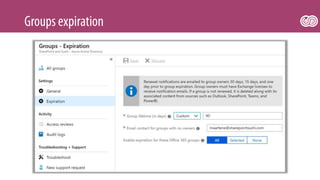
![Get-AzureADDirectorySetting
$directorySetting = Get-AzureADDirectorySetting -Id 92efeacc-
89c6-4c16-b1cf-107aaf87f7dc
$directorySetting.Values
$directorySetting["PrefixSuffixNamingRequirement"] =
"Grp_[Department]_[GroupName]"
$directorySetting["CustomBlockedWordsList"]="Payroll,CEO,HR"
Set-AzureADDirectorySetting -Id (Get-AzureADDirectorySetting
| where -Property DisplayName -Value "Group.Unified" -EQ).id
-DirectorySetting $directorySetting](https://image.slidesharecdn.com/ecs19maarteneekelsmicrosoftteamsarchitecturedeepdive-190604165105/85/ECS19-Maarten-Eekels-MICROSOFT-TEAMS-ARCHITECTURE-DEEP-DIVE-17-320.jpg)
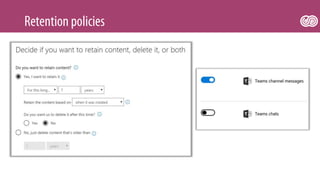





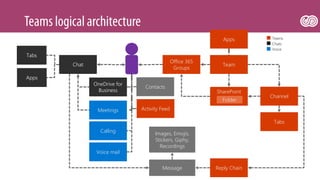
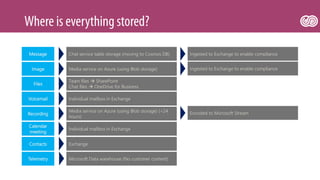
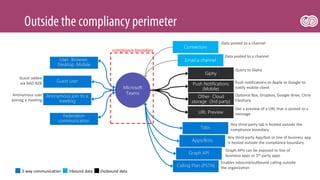
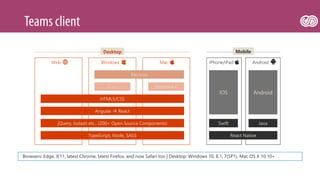
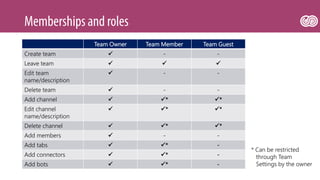
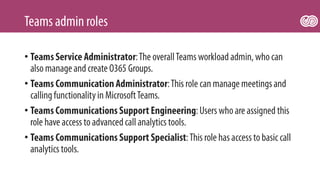
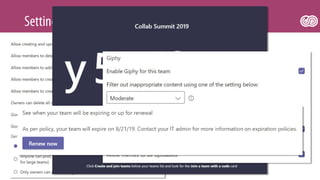
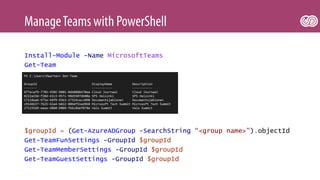
This document provides information about Microsoft Teams including: - Contact information for support - An overview of the different services and storage locations used by Teams like SharePoint, OneDrive, Exchange, and Azure - Details on compliance and data flows including what data crosses the compliance boundary - Supported platforms and browsers for Teams - Languages and frameworks used to build Teams - Permissions for team owners, members, and guests - PowerShell commands for managing teams, members, and settings


![[McDermott] Configuring SharePoint Hybrid Search and Taxonomy](https://cdn.slidesharecdn.com/ss_thumbnails/pgz9ksmftuoazr68jpcf-signature-d4523b3bf020616e67040d2a940ba8bf9aeab187b20da49956548f98de22ea12-poli-180606121949-thumbnail.jpg?width=640&height=640&fit=bounds)
![[Noel] Azure AD Connect Technical Deep Dive](https://cdn.slidesharecdn.com/ss_thumbnails/y2ofibujt2cx5fautvbm-signature-d4523b3bf020616e67040d2a940ba8bf9aeab187b20da49956548f98de22ea12-poli-180606121948-thumbnail.jpg?width=640&height=640&fit=bounds)

![[Jansen] Transforming your classic team sites into modern group connected tea...](https://cdn.slidesharecdn.com/ss_thumbnails/kxox0bq5rywisazgyhqc-signature-d4523b3bf020616e67040d2a940ba8bf9aeab187b20da49956548f98de22ea12-poli-180606121948-thumbnail.jpg?width=640&height=640&fit=bounds)


![[Delimon] Unraveling Teams vs Skype for Business](https://cdn.slidesharecdn.com/ss_thumbnails/ecs18johandelimonunravelingteamsvsskypeforbusiness-180618091110-thumbnail.jpg?width=640&height=640&fit=bounds)


![[Carius] Skype Online, Teams, and PSTN](https://cdn.slidesharecdn.com/ss_thumbnails/g7jkb2m3rb2ddrfjpy2n-signature-d4523b3bf020616e67040d2a940ba8bf9aeab187b20da49956548f98de22ea12-poli-180606121949-thumbnail.jpg?width=640&height=640&fit=bounds)


![[Pinto] Is my SharePoint Development team properly enlighted?](https://cdn.slidesharecdn.com/ss_thumbnails/pfiteaf0tvqlojwipmpj-signature-d4523b3bf020616e67040d2a940ba8bf9aeab187b20da49956548f98de22ea12-poli-180606121949-thumbnail.jpg?width=640&height=640&fit=bounds)


![[White/Himmelstein] Bridge the Cloud Divide with Hybrid Business Intelligence](https://cdn.slidesharecdn.com/ss_thumbnails/hucbm6lpsnmb7lx8kjb7-signature-d4523b3bf020616e67040d2a940ba8bf9aeab187b20da49956548f98de22ea12-poli-180606121948-thumbnail.jpg?width=640&height=640&fit=bounds)
![[Patel] SPFx: An ISV Insight into latest Microsoft's customization model](https://cdn.slidesharecdn.com/ss_thumbnails/ecs18shaipatelspfxanisvinsight-180618091115-thumbnail.jpg?width=640&height=640&fit=bounds)


![[Webinar] Understanding Microsoft Teams: What You Need to Know](https://cdn.slidesharecdn.com/ss_thumbnails/msteamswebinarcardiologmelissa-171212224116-thumbnail.jpg?width=640&height=640&fit=bounds)


![20260201 [FOSDEM] gomodjail - library sandboxing for Go modules.pdf](https://cdn.slidesharecdn.com/ss_thumbnails/20260201fosdemgomodjail-librarysandboxingforgomodules-260201225659-76609ec4-thumbnail.jpg?width=640&height=640&fit=bounds)


![谷歌留痕技术教程[ 𝙩𝙤𝙥 𝟮𝟯𝟯. 𝙘 𝙤𝙢 ]](https://cdn.slidesharecdn.com/ss_thumbnails/top233-260130173900-2eb784f9-thumbnail.jpg?width=640&height=640&fit=bounds)


