Using multi-tenant WordPress to
simplify development
(among other things)
About Me
• WordPress dev at WashU since December 2011
• “Professional code monkey, amateur grease monkey.”
• WordCamp STL organizer
• Luckiest WordPress dev in the world!
About Me
December 2011
• 0 WordPress sites
• 1,000s of SharePoint sites
(OK, maybe an exaggeration but who cares about SP)
• 3 Devs
July 2013
• 100s of WordPress Sites hosted locally
• 100s of WordPress Sites hosted on CampusPress
• 0 SharePoint sites
(OK, maybe an exaggeration but who cares about SP)
• >25 Devs, designers, content strategists, project managers, etc…
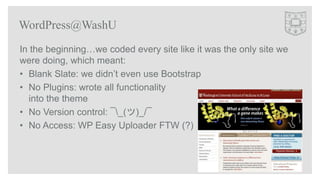
WordPress@WashU
In the beginning…we coded every site like it was the only site we
were doing, which meant:
• Blank Slate: we didn’t even use Bootstrap
• No Plugins: wrote all functionality
into the theme
• No Version control: ¯_(ツ)_/¯
• No Access: WP Easy Uploader FTW (?)
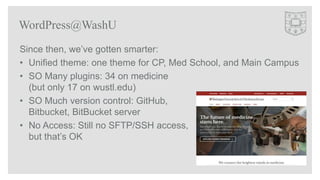
WordPress@WashU
Since then, we’ve gotten smarter:
• Unified theme: one theme for CP, Med School, and Main Campus
• SO Many plugins: 34 on medicine
(but only 17 on wustl.edu)
• SO Much version control: GitHub,
Bitbucket, BitBucket server
• No Access: Still no SFTP/SSH access,
but that’s OK
WordPress@WashU
While we may have a unified theme, there are still “one off”s that
we handle, plus child themes and legacy sites.
We have over 30 “in-house” plugins that are used on at least one
site.
Multiply X by Y and you just get a headache
Developing for WordPress@WashU
First attempt – let’s not talk about that
Second attempt – Symlinks to Symlinks in Symlinks (OK, maybe not THAT bad)
Third (and so far final) attempt – Multitennant!!!
Developing for WordPress@WashU
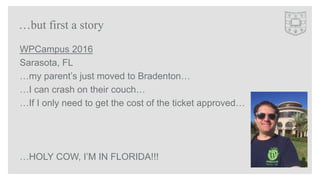
WPCampus 2016
Sarasota, FL
…my parent’s just moved to Bradenton…
…I can crash on their couch…
…If I only need to get the cost of the ticket approved…
…HOLY COW, I’M IN FLORIDA!!!
…but first a story
“ ‘..a software architecture in which a single instance of software
runs on a server and serves multiple tenants…’
-the Internet”
-Mike Corkum
Multitenant 101
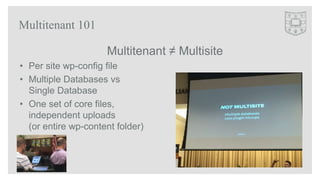
Multitenant ≠ Multisite
• Per site wp-config file
• Multiple Databases vs
Single Database
• One set of core files,
independent uploads
(or entire wp-content folder)
Multitenant 101
N.B. I came up with the term “landlord” to describe the main set of
WordPress Core files
Multitenant 101
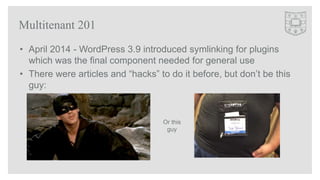
• April 2014 - WordPress 3.9 introduced symlinking for plugins
which was the final component needed for general use
• There were articles and “hacks” to do it before, but don’t be this
guy:
Multitenant 201
Or this
guy
Multitenant 201
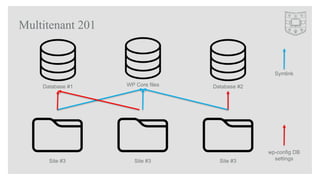
WP Core files Database #2Database #1
Site #3Site #3Site #3
Symlink
wp-config DB
settings
Confused Yet?
Multitenant 201
(I apologize for our lack of hammocks)
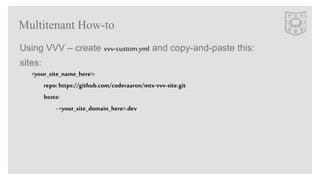
Using VVV – create vvv-custom.yml and copy-and-paste this:
sites:
<your_site_name_here>:
repo: https://github.com/coderaaron/mtv-vvv-site.git
hosts:
- <your_site_domain_here>.dev
Multitenant How-to
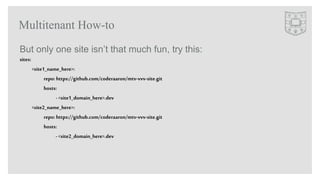
But only one site isn’t that much fun, try this:
sites:
<site1_name_here>:
repo: https://github.com/coderaaron/mtv-vvv-site.git
hosts:
- <site1_domain_here>.dev
<site2_name_here>:
repo: https://github.com/coderaaron/mtv-vvv-site.git
hosts:
- <site2_domain_here>.dev
Multitenant How-to
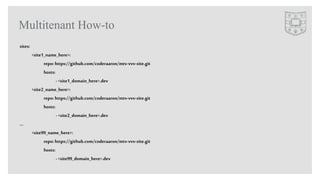
sites:
<site1_name_here>:
repo: https://github.com/coderaaron/mtv-vvv-site.git
hosts:
-<site1_domain_here>.dev
<site2_name_here>:
repo:https://github.com/coderaaron/mtv-vvv-site.git
hosts:
-<site2_domain_here>.dev
…
<site99_name_here>:
repo: https://github.com/coderaaron/mtv-vvv-site.git
hosts:
-<site99_domain_here>.dev
Multitenant How-to
ALL DONE!
Multitenant How-to
• Checked to see if there is a landlord
– If not download WordPress Core
– Create a certificate to sign other certificates
• Create database
• Setup symlinks for mu-plugins, plugins, and themes
• Create a certificate and signs it using the landlord’s certificate
• Copies the modified wp-config.php and index.php
• Runs famous “5 Minute Install”
…but what’d that do?
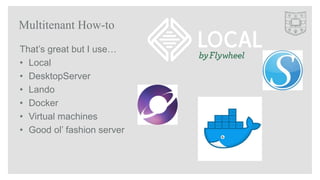
That’s great but I use…
• Local
• DesktopServer
• Lando
• Docker
• Virtual machines
• Good ol’ fashion server
Multitenant How-to
Manual Multitenant how-to
• Install WordPress (no need to do 5 minute install, just need core
files)
– Change wp-config.php to
require$_SERVER['DOCUMENT_ROOT'].'/wp-config.php’;
Manual Multitenant how-to
• If you want to use WP-CLI add this to wp-config.php:
//require_once(ABSPATH. 'wp-settings.php’);
if( '<PATH_TO_LANDLORD>’ == $_SERVER['DOCUMENT_ROOT']) {
$_SERVER['DOCUMENT_ROOT']= getcwd();
}
• Replace <PATH_TO_LANDLORD> with the absolute path to you core files
(i.e. /var/www/wp_core)
Manual Multitenant how-to
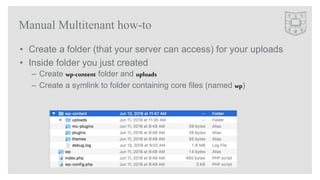
• Create a folder (that your server can access) for your uploads
• Inside folder you just created
– Create wp-content folder and uploads
– Create a symlink to folder containing core files (named wp)
Manual Multitenant how-to
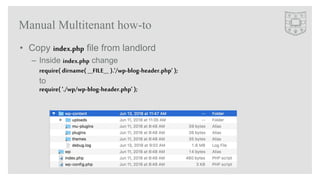
• Copy index.php file from landlord
– Inside index.php change
require( dirname( __FILE__ ).'/wp-blog-header.php’ );
to
require( './wp/wp-blog-header.php' );
Manual Multitenant how-to
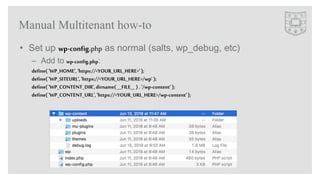
• Set up wp-config.php as normal (salts, wp_debug, etc)
– Add to wp-config.php:
define( 'WP_HOME', 'https://<YOUR_URL_HERE>’);
define( 'WP_SITEURL','https://<YOUR_URL_HERE>/wp’ );
define( 'WP_CONTENT_DIR',dirname( __FILE__ ) . '/wp-content’);
define( 'WP_CONTENT_URL','https://<YOUR_URL_HERE>/wp-content');
Manual Multitenant how-to
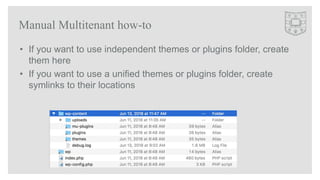
• If you want to use independent themes or plugins folder, create
them here
• If you want to use a unified themes or plugins folder, create
symlinks to their locations
Manual Multitenant how-to
THAT’S IT!!!
https://github.com/coderaaron/WPCampusDemo
Manual Multitenant how-to
• Questions?
• Thank you!
• github.com/coderaaron
• twitter.com/coderaaron
The End

Using multi-tenant WordPress to simplify development

  • 1.
    Using multi-tenant WordPressto simplify development (among other things)
  • 2.
  • 3.
    • WordPress devat WashU since December 2011 • “Professional code monkey, amateur grease monkey.” • WordCamp STL organizer • Luckiest WordPress dev in the world! About Me
  • 4.
    December 2011 • 0WordPress sites • 1,000s of SharePoint sites (OK, maybe an exaggeration but who cares about SP) • 3 Devs July 2013 • 100s of WordPress Sites hosted locally • 100s of WordPress Sites hosted on CampusPress • 0 SharePoint sites (OK, maybe an exaggeration but who cares about SP) • >25 Devs, designers, content strategists, project managers, etc… WordPress@WashU
  • 5.
    In the beginning…wecoded every site like it was the only site we were doing, which meant: • Blank Slate: we didn’t even use Bootstrap • No Plugins: wrote all functionality into the theme • No Version control: ¯_(ツ)_/¯ • No Access: WP Easy Uploader FTW (?) WordPress@WashU
  • 6.
    Since then, we’vegotten smarter: • Unified theme: one theme for CP, Med School, and Main Campus • SO Many plugins: 34 on medicine (but only 17 on wustl.edu) • SO Much version control: GitHub, Bitbucket, BitBucket server • No Access: Still no SFTP/SSH access, but that’s OK WordPress@WashU
  • 7.
    While we mayhave a unified theme, there are still “one off”s that we handle, plus child themes and legacy sites. We have over 30 “in-house” plugins that are used on at least one site. Multiply X by Y and you just get a headache Developing for WordPress@WashU
  • 8.
    First attempt –let’s not talk about that Second attempt – Symlinks to Symlinks in Symlinks (OK, maybe not THAT bad) Third (and so far final) attempt – Multitennant!!! Developing for WordPress@WashU
  • 9.
    WPCampus 2016 Sarasota, FL …myparent’s just moved to Bradenton… …I can crash on their couch… …If I only need to get the cost of the ticket approved… …HOLY COW, I’M IN FLORIDA!!! …but first a story
  • 10.
    “ ‘..a softwarearchitecture in which a single instance of software runs on a server and serves multiple tenants…’ -the Internet” -Mike Corkum Multitenant 101
  • 11.
    Multitenant ≠ Multisite •Per site wp-config file • Multiple Databases vs Single Database • One set of core files, independent uploads (or entire wp-content folder) Multitenant 101
  • 12.
    N.B. I cameup with the term “landlord” to describe the main set of WordPress Core files Multitenant 101
  • 13.
    • April 2014- WordPress 3.9 introduced symlinking for plugins which was the final component needed for general use • There were articles and “hacks” to do it before, but don’t be this guy: Multitenant 201 Or this guy
  • 14.
    Multitenant 201 WP Corefiles Database #2Database #1 Site #3Site #3Site #3 Symlink wp-config DB settings
  • 15.
    Confused Yet? Multitenant 201 (Iapologize for our lack of hammocks)
  • 16.
    Using VVV –create vvv-custom.yml and copy-and-paste this: sites: <your_site_name_here>: repo: https://github.com/coderaaron/mtv-vvv-site.git hosts: - <your_site_domain_here>.dev Multitenant How-to
  • 17.
    But only onesite isn’t that much fun, try this: sites: <site1_name_here>: repo: https://github.com/coderaaron/mtv-vvv-site.git hosts: - <site1_domain_here>.dev <site2_name_here>: repo: https://github.com/coderaaron/mtv-vvv-site.git hosts: - <site2_domain_here>.dev Multitenant How-to
  • 18.
  • 19.
  • 20.
    • Checked tosee if there is a landlord – If not download WordPress Core – Create a certificate to sign other certificates • Create database • Setup symlinks for mu-plugins, plugins, and themes • Create a certificate and signs it using the landlord’s certificate • Copies the modified wp-config.php and index.php • Runs famous “5 Minute Install” …but what’d that do?
  • 21.
    That’s great butI use… • Local • DesktopServer • Lando • Docker • Virtual machines • Good ol’ fashion server Multitenant How-to
  • 22.
  • 23.
    • Install WordPress(no need to do 5 minute install, just need core files) – Change wp-config.php to require$_SERVER['DOCUMENT_ROOT'].'/wp-config.php’; Manual Multitenant how-to
  • 24.
    • If youwant to use WP-CLI add this to wp-config.php: //require_once(ABSPATH. 'wp-settings.php’); if( '<PATH_TO_LANDLORD>’ == $_SERVER['DOCUMENT_ROOT']) { $_SERVER['DOCUMENT_ROOT']= getcwd(); } • Replace <PATH_TO_LANDLORD> with the absolute path to you core files (i.e. /var/www/wp_core) Manual Multitenant how-to
  • 25.
    • Create afolder (that your server can access) for your uploads • Inside folder you just created – Create wp-content folder and uploads – Create a symlink to folder containing core files (named wp) Manual Multitenant how-to
  • 26.
    • Copy index.phpfile from landlord – Inside index.php change require( dirname( __FILE__ ).'/wp-blog-header.php’ ); to require( './wp/wp-blog-header.php' ); Manual Multitenant how-to
  • 27.
    • Set upwp-config.php as normal (salts, wp_debug, etc) – Add to wp-config.php: define( 'WP_HOME', 'https://<YOUR_URL_HERE>’); define( 'WP_SITEURL','https://<YOUR_URL_HERE>/wp’ ); define( 'WP_CONTENT_DIR',dirname( __FILE__ ) . '/wp-content’); define( 'WP_CONTENT_URL','https://<YOUR_URL_HERE>/wp-content'); Manual Multitenant how-to
  • 28.
    • If youwant to use independent themes or plugins folder, create them here • If you want to use a unified themes or plugins folder, create symlinks to their locations Manual Multitenant how-to
  • 29.
  • 30.
    • Questions? • Thankyou! • github.com/coderaaron • twitter.com/coderaaron The End