


@cliffseal
THE BIG IDEA
Multiple independent instances of WordPress
running off one, non-hacked core directory
(and possibly sharing themes and plugins, too)
@cliffseal
We use this stuff for
(evermoresites.com)
@cliffseal
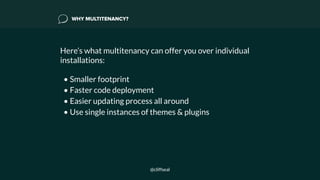
WHY MULTITENANCY?
Here’s what multitenancy can offer you over individual
installations:

• Smaller footprint
• Faster code deployment
• Easier updating process all around
• Use single instances of themes & plugins
@cliffseal
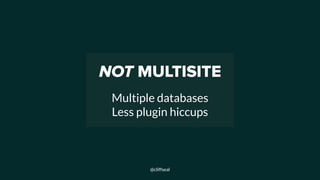
NOT MULTISITE


Multiple databases
Less plugin hiccups
@cliffseal
WHAT’S NEW WITH MULTITENANCY?
• Symlinked plugins: Smart people have been talking
about multitenancy (and doing it) for years. Some best
practices have emerged, while WordPress 3.9 included
this critical final step.

• GitHub mirrors: things like WordPress core being
mirrored on Github have made the whole process
easier.
@cliffseal
HOW THE BIG IDEA WORKS


(For Evermore, At Least)
@cliffseal
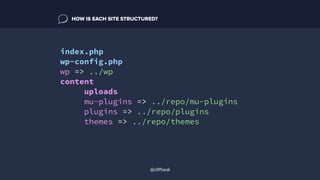
index.php
wp-config.php
wp => ../wp
content
uploads
mu-plugins => ../repo/mu-plugins
plugins => ../repo/plugins
themes => ../repo/themes
HOW IS EACH SITE STRUCTURED?
@cliffseal
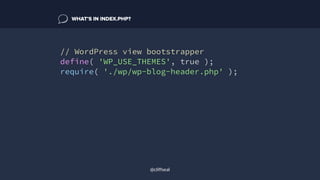
// WordPress view bootstrapper
define( 'WP_USE_THEMES', true );
require( './wp/wp-blog-header.php' );
WHAT’S IN INDEX.PHP?
@cliffseal
define('WP_HOME','https://' .
basename(__DIR__));
define('WP_SITEURL','https://' .
basename(__DIR__) . '/wp');
define( 'WP_CONTENT_DIR',
dirname( __FILE__ ) . '/content' );
define( 'WP_CONTENT_URL', 'https://' .
$_SERVER['HTTP_HOST'] . '/content' );
WHAT’S IN WP-CONFIG.PHP?
@cliffseal
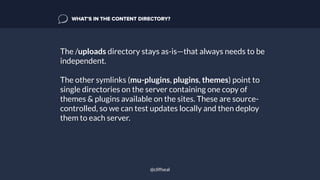
The /uploads directory stays as-is—that always needs to be
independent.
The other symlinks (mu-plugins, plugins, themes) point to
single directories on the server containing one copy of
themes & plugins available on the sites. These are source-
controlled, so we can test updates locally and then deploy
them to each server.
WHAT’S IN THE CONTENT DIRECTORY?
@cliffseal
You need a standard WordPress core directory at the other
end of your symlink. Simply add in your own wp-
config.php:
include_once( $_SERVER['DOCUMENT_ROOT'] .
'/wp-config.php' );
This file never gets updated either in a standard core
update or in a Git checkout.
WHAT’S IN THE WP DIRECTORY?
@cliffseal
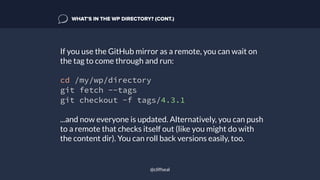
If you use the GitHub mirror as a remote, you can wait on
the tag to come through and run:
cd /my/wp/directory
git fetch --tags
git checkout -f tags/4.3.1
...and now everyone is updated. Alternatively, you can push
to a remote that checks itself out (like you might do with
the content dir). You can roll back versions easily, too.
WHAT’S IN THE WP DIRECTORY? (CONT.)
@cliffseal
1.COMBINE STEPS
2.WRITE SCRIPT
3.????
4.PROFIT!!!
@cliffseal
WHAT SHOULD WE LOOK OUT FOR?
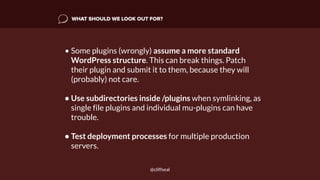
• Some plugins (wrongly) assume a more standard
WordPress structure. This can break things. Patch
their plugin and submit it to them, because they will
(probably) not care.
• Use subdirectories inside /plugins when symlinking, as
single file plugins and individual mu-plugins can have
trouble.
• Test deployment processes for multiple production
servers.
@cliffseal
@cliffseal

Introducing Wordpress Multitenancy

  • 1.
  • 2.
    THE BIG IDEA Multipleindependent instances of WordPress running off one, non-hacked core directory (and possibly sharing themes and plugins, too) @cliffseal
  • 3.
    We use thisstuff for (evermoresites.com) @cliffseal
  • 4.
    WHY MULTITENANCY? Here’s whatmultitenancy can offer you over individual installations:
 • Smaller footprint • Faster code deployment • Easier updating process all around • Use single instances of themes & plugins @cliffseal
  • 5.
  • 6.
    WHAT’S NEW WITHMULTITENANCY? • Symlinked plugins: Smart people have been talking about multitenancy (and doing it) for years. Some best practices have emerged, while WordPress 3.9 included this critical final step.
 • GitHub mirrors: things like WordPress core being mirrored on Github have made the whole process easier. @cliffseal
  • 7.
    HOW THE BIGIDEA WORKS 
 (For Evermore, At Least) @cliffseal
  • 8.
    index.php wp-config.php wp => ../wp content uploads mu-plugins=> ../repo/mu-plugins plugins => ../repo/plugins themes => ../repo/themes HOW IS EACH SITE STRUCTURED? @cliffseal
  • 9.
    // WordPress viewbootstrapper define( 'WP_USE_THEMES', true ); require( './wp/wp-blog-header.php' ); WHAT’S IN INDEX.PHP? @cliffseal
  • 10.
    define('WP_HOME','https://' . basename(__DIR__)); define('WP_SITEURL','https://' . basename(__DIR__). '/wp'); define( 'WP_CONTENT_DIR', dirname( __FILE__ ) . '/content' ); define( 'WP_CONTENT_URL', 'https://' . $_SERVER['HTTP_HOST'] . '/content' ); WHAT’S IN WP-CONFIG.PHP? @cliffseal
  • 11.
    The /uploads directorystays as-is—that always needs to be independent. The other symlinks (mu-plugins, plugins, themes) point to single directories on the server containing one copy of themes & plugins available on the sites. These are source- controlled, so we can test updates locally and then deploy them to each server. WHAT’S IN THE CONTENT DIRECTORY? @cliffseal
  • 12.
    You need astandard WordPress core directory at the other end of your symlink. Simply add in your own wp- config.php: include_once( $_SERVER['DOCUMENT_ROOT'] . '/wp-config.php' ); This file never gets updated either in a standard core update or in a Git checkout. WHAT’S IN THE WP DIRECTORY? @cliffseal
  • 13.
    If you usethe GitHub mirror as a remote, you can wait on the tag to come through and run: cd /my/wp/directory git fetch --tags git checkout -f tags/4.3.1 ...and now everyone is updated. Alternatively, you can push to a remote that checks itself out (like you might do with the content dir). You can roll back versions easily, too. WHAT’S IN THE WP DIRECTORY? (CONT.) @cliffseal
  • 14.
  • 15.
    WHAT SHOULD WELOOK OUT FOR? • Some plugins (wrongly) assume a more standard WordPress structure. This can break things. Patch their plugin and submit it to them, because they will (probably) not care. • Use subdirectories inside /plugins when symlinking, as single file plugins and individual mu-plugins can have trouble. • Test deployment processes for multiple production servers. @cliffseal
  • 16.