CompTIA Network +
Chapter 2
Dissecting the OSI Model
FOR MOR INFORMATION VISIT
http://www.certblaster.com/product/network-n10-006-practice-tests/ live
Objectives
 What is the purpose of a Network model?
 What are the layers of the OSI model?
 What are the characteristics of each layer of the
OSI model?
 How does the TCP/IP stack compare to the OSI
model?
 What are the well-known TCP and/or UDP port
numbers for a given collection of common
applications
The Purpose of Reference Models
• It breaks network communication into smaller, simpler parts
that are easier to develop.
• It facilitates standardization of network components to allow
multiple-vendor development and support.
• It allows different types of network hardware and software to
communicate with each other.
• It prevents changes in one layer from affecting the other layers
so that they can develop more quickly.
• It breaks network communication into smaller parts to make
learning it easier to understand.
The OSI seven-layer model
Application
Presentation
Session
Transport
Network
Data Link
Physical
Figure 2-2 OSI Stack
1
2
3
4
5
6
7
Mnemonics for the OSI Model
Away
Pizza
Sausage
Throw
Not
Do
Please
All
People
Seem
To
Need
Data
Processing
Quick Summary of Layers 1-4
Transport
Network
Data Link
Physical1
2
3
4 TCP & UDP Ports
Routers, IP Address
Switches, MAC
Address
Cables
Service
WAN
LAN
OSI Layers in Wireshark
1
2
3
4
7
Physical Layer
Physical
• How Bits are represented
on the medium
• Wring standards for
connectors and jacks
• Physical topology
• Synchronizing bits
• Bandwidth usage
• Multiplexing strategy
Figure 2-4 Layer 1: Physical Layer
Bandwidth Usage
• Broadband
– Multiple channels share the same medium
– Ex: cable TV uses frequency division
multiplexing (each channel uses a different
frequency range)
• Baseband
– The whole medium is used for one
transmission
– Example: Ethernet
ABCA_CABCA_C
Time-Division Multiplexing (TDM)
• Each channel gets the same amount of
time on the wire
AAAA
B_B_
CCCC
ABCACABCAC
Statistical Time-Division
Multiplexing (StatTDM)
AAAA
B_B_
CCCC
• Busy channels get more time on the wire
Frequency Division Multiplexing
(FDM)
AAAA
B_B_
CCCC
• Example: signals sent with different colors
through the same fiber optic cable
AAAA
B_B_
CCCC
AAAA
B_B_
Layer 1 Devices
• Cables
• Wireless access points
• Hubs
– Because they don’t pay any attention to
addresses, they just deliver signals to every
connected device like a crossover cable
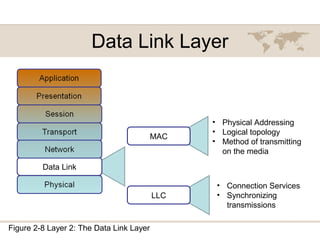
Data Link Layer
Data Link
• Physical Addressing
• Logical topology
• Method of transmitting
on the media
Figure 2-8 Layer 2: The Data Link Layer
MAC
LLC
• Connection Services
• Synchronizing
transmissions
MAC Addresses
• IPCONFIG /ALL
• Physical Address
• Built into the network interface
Connection Services
• Flow control
– Prevents sender from sending data faster
than the client can accept it
• Error control
– When a frame is received, a checksum is
used to detect errors
• Usually a Cyclic Redundancy Check (CRC)
– If the receiver's checksum does not match the
sender's checksum, the frame is discarded
and resent
Layer 2 Devices
• Switches
• Bridges
• Network Interface Cards (NICs)
Network Layer
Network
• Logical addressing
• Switching
• Route discovery and
selection
• Connection services
• Bandwidth usage
• Multiplexing strategy
Figure 2-9 Layer 3: The Network Layer
IP Address
• Logical address
• Changes when the device is moved
Switching
• Packet switching
– Data is broken into packets
– Many packets travel along network
connections like cars on a freeway
• Circuit switching
– A physical line is dedicated to each
connection
– Ex: old copper landline phone systems
• Message switching
– Store-and-forward, like email
Layer 3 Devices
• Routers
• Multilayer Switches
Transport Layer
Transport
• TCP/UDP
• Windowing
• Buffering
Figure 2-10 Layer 4: The Transport Layer
TCP and UDP
• Transmission Control Protocol (TCP)
– Connection-oriented and reliable
– Handshake makes sure both ends are ready
– Segments are acknowledged and resent if
necessary
• User Datagram Protocol (UDP)
– Connectionless and unreliable
– No handshake
– Best-effort delivery, no acknowledgements
TCP Sliding Window
Figure 2-11 TCP Sliding Window
ICMP
(Internet Control Message Protocol)
• At layer 4
• Used by ping and traceroute, and to
indicate errors such as dropped packets
Session Layer
Session
• Setting up a session
• Maintaining a session
• Tearing down a session
Figure 2-12 Layer 5: The Session Layer
Example of a Session
• User logs in with a username & password
• All data now has a special significance
until that user logs off, or the session
times out, or is terminated some other way
• Layer 6 Protocol
– H.323 (voice or video)
– NetBIOS (file sharing)
Presentation Layer
Presentation
• Data formatting
• Encryption
Figure 2-13 Layer 6: The Presentation Layer
Application Layer
Application
• Application services
• Service advertisement
Application Layer
• Closest to the user
• Hands data to an application in the format
it expects, with no addresses or other
transmission artifacts
• Examples: a downloaded file, an email
message
The TCP/IP Stack
Application
Transport
Internet
Network Interface
The TCP/IP and OSI Models Compared
Application
Transport
Internet
Network Interface
TCP/IP Stack
Application
Presentation
Session
Transport
Network
Data Link
Physical
OSI Stack
Figure 2-15 TCP/IP Stack
IP Ver4 Header
TTL (Time-to-Live)
• TTL decreases by one each time the
packet is forwarded by a router
• If TTL reaches zero, the packet is
discarded
• This eliminates packets trapped in routing
loops
Demo: Routing Loop
TCP Header
Figure 2-17 TCP Segment Format
TCP Header Fields
• Port numbers
– Indicate which program on the end device
should receive the data
– Examples: Port 25 for email, 80 for HTTP
• Window size
– Number of bytes that can be sent before
waiting for an ACK
TCP Header Fields
• Sequence and Acknowledgement
numbers
– Used to put packets in order to reassemble
files and other large messages
• Flags like SYN and ACK are used for the
TCP handshake and to acknowledge data
received
UDP Header
0 16 31
SOURCE PORT DESTINATION PORT
LENGTH CHECKSUM
• No handshake, acknowledgements,
sequencing, or flow control
Common Ports
Link Ch 2d for flash cards
Port Types
Port numbers are assigned in various ways, based
on three ranges:
System Ports (0-1023), System Ports are assigned by IETF process for
standards-track protocols, as per RFC6335. Also known as well-known-
ports
User Ports (1024-49151) ,User Ports are assigned by IANA using the
"Expert Review" process, as per RFC6335
Dynamic and/or Private Ports (49152-65535), Dynamic Ports are not
assigned, they are dynamically created as your computer need them. Also
known as ephemeral ports.
Communication Between Two Systems

Get into Networking by Clearing Comptia Network+ Test

  • 1.
    CompTIA Network + Chapter2 Dissecting the OSI Model FOR MOR INFORMATION VISIT http://www.certblaster.com/product/network-n10-006-practice-tests/ live
  • 2.
    Objectives  What isthe purpose of a Network model?  What are the layers of the OSI model?  What are the characteristics of each layer of the OSI model?  How does the TCP/IP stack compare to the OSI model?  What are the well-known TCP and/or UDP port numbers for a given collection of common applications
  • 3.
    The Purpose ofReference Models • It breaks network communication into smaller, simpler parts that are easier to develop. • It facilitates standardization of network components to allow multiple-vendor development and support. • It allows different types of network hardware and software to communicate with each other. • It prevents changes in one layer from affecting the other layers so that they can develop more quickly. • It breaks network communication into smaller parts to make learning it easier to understand.
  • 4.
    The OSI seven-layermodel Application Presentation Session Transport Network Data Link Physical Figure 2-2 OSI Stack 1 2 3 4 5 6 7
  • 5.
    Mnemonics for theOSI Model Away Pizza Sausage Throw Not Do Please All People Seem To Need Data Processing
  • 6.
    Quick Summary ofLayers 1-4 Transport Network Data Link Physical1 2 3 4 TCP & UDP Ports Routers, IP Address Switches, MAC Address Cables Service WAN LAN
  • 7.
    OSI Layers inWireshark 1 2 3 4 7
  • 8.
    Physical Layer Physical • HowBits are represented on the medium • Wring standards for connectors and jacks • Physical topology • Synchronizing bits • Bandwidth usage • Multiplexing strategy Figure 2-4 Layer 1: Physical Layer
  • 9.
    Bandwidth Usage • Broadband –Multiple channels share the same medium – Ex: cable TV uses frequency division multiplexing (each channel uses a different frequency range) • Baseband – The whole medium is used for one transmission – Example: Ethernet
  • 10.
    ABCA_CABCA_C Time-Division Multiplexing (TDM) •Each channel gets the same amount of time on the wire AAAA B_B_ CCCC
  • 11.
  • 12.
    Frequency Division Multiplexing (FDM) AAAA B_B_ CCCC •Example: signals sent with different colors through the same fiber optic cable AAAA B_B_ CCCC AAAA B_B_
  • 13.
    Layer 1 Devices •Cables • Wireless access points • Hubs – Because they don’t pay any attention to addresses, they just deliver signals to every connected device like a crossover cable
  • 14.
    Data Link Layer DataLink • Physical Addressing • Logical topology • Method of transmitting on the media Figure 2-8 Layer 2: The Data Link Layer MAC LLC • Connection Services • Synchronizing transmissions
  • 15.
    MAC Addresses • IPCONFIG/ALL • Physical Address • Built into the network interface
  • 16.
    Connection Services • Flowcontrol – Prevents sender from sending data faster than the client can accept it • Error control – When a frame is received, a checksum is used to detect errors • Usually a Cyclic Redundancy Check (CRC) – If the receiver's checksum does not match the sender's checksum, the frame is discarded and resent
  • 17.
    Layer 2 Devices •Switches • Bridges • Network Interface Cards (NICs)
  • 18.
    Network Layer Network • Logicaladdressing • Switching • Route discovery and selection • Connection services • Bandwidth usage • Multiplexing strategy Figure 2-9 Layer 3: The Network Layer
  • 19.
    IP Address • Logicaladdress • Changes when the device is moved
  • 20.
    Switching • Packet switching –Data is broken into packets – Many packets travel along network connections like cars on a freeway • Circuit switching – A physical line is dedicated to each connection – Ex: old copper landline phone systems • Message switching – Store-and-forward, like email
  • 21.
    Layer 3 Devices •Routers • Multilayer Switches
  • 22.
    Transport Layer Transport • TCP/UDP •Windowing • Buffering Figure 2-10 Layer 4: The Transport Layer
  • 23.
    TCP and UDP •Transmission Control Protocol (TCP) – Connection-oriented and reliable – Handshake makes sure both ends are ready – Segments are acknowledged and resent if necessary • User Datagram Protocol (UDP) – Connectionless and unreliable – No handshake – Best-effort delivery, no acknowledgements
  • 24.
    TCP Sliding Window Figure2-11 TCP Sliding Window
  • 25.
    ICMP (Internet Control MessageProtocol) • At layer 4 • Used by ping and traceroute, and to indicate errors such as dropped packets
  • 26.
    Session Layer Session • Settingup a session • Maintaining a session • Tearing down a session Figure 2-12 Layer 5: The Session Layer
  • 27.
    Example of aSession • User logs in with a username & password • All data now has a special significance until that user logs off, or the session times out, or is terminated some other way • Layer 6 Protocol – H.323 (voice or video) – NetBIOS (file sharing)
  • 28.
    Presentation Layer Presentation • Dataformatting • Encryption Figure 2-13 Layer 6: The Presentation Layer
  • 29.
    Application Layer Application • Applicationservices • Service advertisement
  • 30.
    Application Layer • Closestto the user • Hands data to an application in the format it expects, with no addresses or other transmission artifacts • Examples: a downloaded file, an email message
  • 31.
  • 32.
    The TCP/IP andOSI Models Compared Application Transport Internet Network Interface TCP/IP Stack Application Presentation Session Transport Network Data Link Physical OSI Stack Figure 2-15 TCP/IP Stack
  • 33.
  • 34.
    TTL (Time-to-Live) • TTLdecreases by one each time the packet is forwarded by a router • If TTL reaches zero, the packet is discarded • This eliminates packets trapped in routing loops
  • 35.
  • 36.
    TCP Header Figure 2-17TCP Segment Format
  • 37.
    TCP Header Fields •Port numbers – Indicate which program on the end device should receive the data – Examples: Port 25 for email, 80 for HTTP • Window size – Number of bytes that can be sent before waiting for an ACK
  • 38.
    TCP Header Fields •Sequence and Acknowledgement numbers – Used to put packets in order to reassemble files and other large messages • Flags like SYN and ACK are used for the TCP handshake and to acknowledge data received
  • 39.
    UDP Header 0 1631 SOURCE PORT DESTINATION PORT LENGTH CHECKSUM • No handshake, acknowledgements, sequencing, or flow control
  • 40.
    Common Ports Link Ch2d for flash cards
  • 41.
    Port Types Port numbersare assigned in various ways, based on three ranges: System Ports (0-1023), System Ports are assigned by IETF process for standards-track protocols, as per RFC6335. Also known as well-known- ports User Ports (1024-49151) ,User Ports are assigned by IANA using the "Expert Review" process, as per RFC6335 Dynamic and/or Private Ports (49152-65535), Dynamic Ports are not assigned, they are dynamically created as your computer need them. Also known as ephemeral ports.
  • 42.