HTML, CSS, JavaScript &
                                Windows 8


                                      christopher.bennage
                                             @microsoft.com

patterns & practices symposium 2013
bennage
@bennage
 bennage
dev.bennage.com
    bennage
Welcome to

 WonderL
 and
“Curiouser and curiouser!”
Cried Alice (she was so
much surprised, that for the
moment she quite forgot how
Living in a

 SandBox
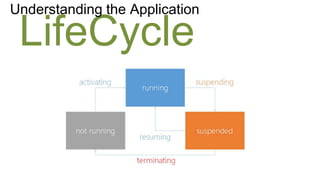
Understanding the Application

 LifeCycle
Navigating the

 Landscape
                    Windows Runtime
                    Windows Library for JavaScript
                    DOM
                    JavaScript
                    Visual Studio Templates
Fascinating & Mesmerizing Bits Regarding

JavaScript
Responsivene
Strange Things Affecting


 ss                  JavaScript is Single Thread
                     Everything Blocks the UI
                     Even Unexpected Things
function blocking() {

    var items = getBigArrayOfItems();

    for(var i = items.length - 1; i >= 0; i--) {
        doExpensiveComputationOn(items[i]);
    }

}
function not_blocking() {

    var items = getBigArrayOfItems();
    var i = items.length - 1;

    function processNext() {
        doExpensiveComputationOn(items[i]);
        i--;
        if(i >= 0) {
             setImmediate(processNext);
        }
    }

    processNext();
}
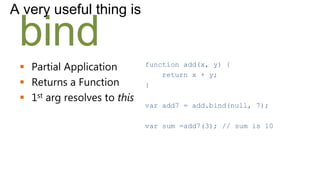
A very useful thing is

 bind
  Partial Application        function add(x, y) {
                                  return x + y;
  Returns a Function         }
  1st arg resolves to this
                              var add7 = add.bind(null, 7);

                              var sum =add7(3); // sum is 10
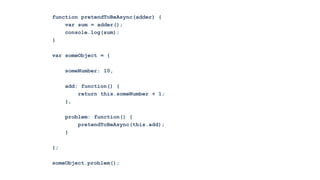
function pretendToBeAsync(adder) {
    var sum = adder();
    console.log(sum);
}

var someObject = {

     someNumber: 10,

     add: function() {
         return this.someNumber + 1;
     },

     problem: function() {
         pretendToBeAsync(this.add);
     }

};

someObject.problem();
Did I miss

 jQuery?
              document.querySelector()
              WinJS.xhr()
              WinJS.Utilities.addClass()
Wat? This is JavaScript…

 Memory Leaks
  apps are long running
  higher chance of memory
   leaks
  URL.createObjectURL(blob)
Things to Know about the

Windows
Library for
JavaScript
Understand

 Promises
  Objects represent a task
  Composable
  Cancellable
Be sure to Cancel

 Async
  Be aware of what’s happening
  A common scenario is
   Navigating Away
  Custom promises probably need to
   be cancelled too
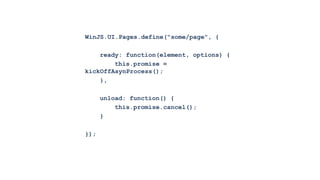
WinJS.UI.Pages.define("some/page", {

    ready: function(element, options) {
        this.promise =
kickOffAsynProcess();
    },

      unload: function() {
          this.promise.cancel();
      }

});
_createViewModels: function (files) {
    var count = files.length;
    var results = new Array(count);
    var index = count - 1;
    var proceed = true;

   function onCancellation() {
       proceed = false;
   }

    return new WinJS.Promise(function
(complete, error) {

       function processNextFile() {
           var file = files[index];
           results[index] = new Hilo.Picture(file);
           index--;

           if (index < 0) {
               complete(results);
           } else if (!proceed) {
               error("Cancel");
           } else {
               setImmediate(processNextFile);
           }
       }

       processNextFile();

   }, onCancellation);
Understand the built-in

 Navigation
  WinJS.Navigation
  WinJS.UI.Pages
  navigator.js
Various & Sundry

 miscellania
                use a single AppBar
                built-in message queue
                manually create two-way binding
A few things about the

Windows Runtime
WinRT
They are not JavaScript, those


 Objects                 Objects originating within
                         WinRT are not mutable like
                         plain ol’ JavaScript objects.

                          WinJS.Binding.as()
var fileQuery =
Windows.Storage.KnownFolders.picturesLibrary.createFileQuery();
fileQuery.getFilesAsync(0, 2).then(function (results) {
    var storageFile = results[0];
    var observable = WinJS.Binding.as(storageFile); // sad panda
});
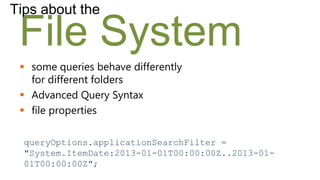
Tips about the

 File System
  some queries behave differently
   for different folders
  Advanced Query Syntax
  file properties

  queryOptions.applicationSearchFilter =
  "System.ItemDate:2013-01-01T00:00:00Z..2013-01-
  01T00:00:00Z";
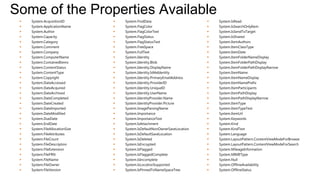
Some of the Properties Available
    System.AcquisitionID           System.FindData                           System.IsRead
    System.ApplicationName         System.FlagColor                          System.IsSearchOnlyItem
    System.Author                  System.FlagColorText                      System.IsSendToTarget
    System.Capacity                System.FlagStatus                         System.IsShared
    System.Category                System.FlagStatusText                     System.ItemAuthors
    System.Comment                 System.FreeSpace                          System.ItemClassType
    System.Company                 System.FullText                           System.ItemDate
    System.ComputerName            System.Identity                           System.ItemFolderNameDisplay
    System.ContainedItems          System.Identity.Blob                      System.ItemFolderPathDisplay
    System.ContentStatus           System.Identity.DisplayName               System.ItemFolderPathDisplayNarrow
    System.ContentType             System.Identity.IsMeIdentity              System.ItemName
    System.Copyright               System.Identity.PrimaryEmailAddress       System.ItemNameDisplay
    System.DateAccessed            System.Identity.ProviderID                System.ItemNamePrefix
    System.DateAcquired            System.Identity.UniqueID                  System.ItemParticipants
    System.DateArchived            System.Identity.UserName                  System.ItemPathDisplay
    System.DateCompleted           System.IdentityProvider.Name              System.ItemPathDisplayNarrow
    System.DateCreated             System.IdentityProvider.Picture           System.ItemType
    System.DateImported            System.ImageParsingName                   System.ItemTypeText
    System.DateModified            System.Importance                         System.ItemUrl
    System.DueDate                 System.ImportanceText                     System.Keywords
    System.EndDate                 System.IsAttachment                       System.Kind
    System.FileAllocationSize      System.IsDefaultNonOwnerSaveLocation      System.KindText
    System.FileAttributes          System.IsDefaultSaveLocation              System.Language
    System.FileCount               System.IsDeleted                          System.LayoutPattern.ContentViewModeForBrowse
    System.FileDescription         System.IsEncrypted                        System.LayoutPattern.ContentViewModeForSearch
    System.FileExtension           System.IsFlagged                          System.MileageInformation
    System.FileFRN                 System.IsFlaggedComplete                  System.MIMEType
    System.FileName                System.IsIncomplete                       System.Null
    System.FileOwner               System.IsLocationSupported                System.OfflineAvailability
    System.FileVersion             System.IsPinnedToNameSpaceTree            System.OfflineStatus
An application’s

 Structure
  standard, historical
  modules (AMD)
  something new &
   magical
Sundry Means of Accomplishing

 Unit Tests
  how to structure
  frameworks
  functional style makes it easier


  chutzpah.codeplex.com
  visionmedia.github.com/mocha
The End
•   hilojs.codeplex.com
•   github.com/NobleJS/WinningJS

Windows 8 JavaScript (Wonderland)

  • 1.
    HTML, CSS, JavaScript& Windows 8 christopher.bennage @microsoft.com patterns & practices symposium 2013
  • 2.
  • 3.
  • 4.
  • 5.
    Welcome to WonderL and “Curiouser and curiouser!” Cried Alice (she was so much surprised, that for the moment she quite forgot how
  • 6.
    Living in a SandBox
  • 7.
  • 8.
    Navigating the Landscape  Windows Runtime  Windows Library for JavaScript  DOM  JavaScript  Visual Studio Templates
  • 9.
    Fascinating & MesmerizingBits Regarding JavaScript
  • 11.
    Responsivene Strange Things Affecting ss  JavaScript is Single Thread  Everything Blocks the UI  Even Unexpected Things
  • 12.
    function blocking() { var items = getBigArrayOfItems(); for(var i = items.length - 1; i >= 0; i--) { doExpensiveComputationOn(items[i]); } }
  • 13.
    function not_blocking() { var items = getBigArrayOfItems(); var i = items.length - 1; function processNext() { doExpensiveComputationOn(items[i]); i--; if(i >= 0) { setImmediate(processNext); } } processNext(); }
  • 14.
    A very usefulthing is bind  Partial Application function add(x, y) { return x + y;  Returns a Function }  1st arg resolves to this var add7 = add.bind(null, 7); var sum =add7(3); // sum is 10
  • 15.
    function pretendToBeAsync(adder) { var sum = adder(); console.log(sum); } var someObject = { someNumber: 10, add: function() { return this.someNumber + 1; }, problem: function() { pretendToBeAsync(this.add); } }; someObject.problem();
  • 16.
    Did I miss jQuery?  document.querySelector()  WinJS.xhr()  WinJS.Utilities.addClass()
  • 17.
    Wat? This isJavaScript… Memory Leaks  apps are long running  higher chance of memory leaks  URL.createObjectURL(blob)
  • 18.
    Things to Knowabout the Windows Library for JavaScript
  • 19.
    Understand Promises Objects represent a task  Composable  Cancellable
  • 20.
    Be sure toCancel Async  Be aware of what’s happening  A common scenario is Navigating Away  Custom promises probably need to be cancelled too
  • 21.
    WinJS.UI.Pages.define("some/page", { ready: function(element, options) { this.promise = kickOffAsynProcess(); }, unload: function() { this.promise.cancel(); } });
  • 22.
    _createViewModels: function (files){ var count = files.length; var results = new Array(count); var index = count - 1; var proceed = true; function onCancellation() { proceed = false; } return new WinJS.Promise(function (complete, error) { function processNextFile() { var file = files[index]; results[index] = new Hilo.Picture(file); index--; if (index < 0) { complete(results); } else if (!proceed) { error("Cancel"); } else { setImmediate(processNextFile); } } processNextFile(); }, onCancellation);
  • 23.
    Understand the built-in Navigation  WinJS.Navigation  WinJS.UI.Pages  navigator.js
  • 24.
    Various & Sundry miscellania  use a single AppBar  built-in message queue  manually create two-way binding
  • 25.
    A few thingsabout the Windows Runtime
  • 26.
    WinRT They are notJavaScript, those Objects Objects originating within WinRT are not mutable like plain ol’ JavaScript objects. WinJS.Binding.as()
  • 27.
    var fileQuery = Windows.Storage.KnownFolders.picturesLibrary.createFileQuery(); fileQuery.getFilesAsync(0,2).then(function (results) { var storageFile = results[0]; var observable = WinJS.Binding.as(storageFile); // sad panda });
  • 28.
    Tips about the File System  some queries behave differently for different folders  Advanced Query Syntax  file properties queryOptions.applicationSearchFilter = "System.ItemDate:2013-01-01T00:00:00Z..2013-01- 01T00:00:00Z";
  • 29.
    Some of theProperties Available  System.AcquisitionID  System.FindData  System.IsRead  System.ApplicationName  System.FlagColor  System.IsSearchOnlyItem  System.Author  System.FlagColorText  System.IsSendToTarget  System.Capacity  System.FlagStatus  System.IsShared  System.Category  System.FlagStatusText  System.ItemAuthors  System.Comment  System.FreeSpace  System.ItemClassType  System.Company  System.FullText  System.ItemDate  System.ComputerName  System.Identity  System.ItemFolderNameDisplay  System.ContainedItems  System.Identity.Blob  System.ItemFolderPathDisplay  System.ContentStatus  System.Identity.DisplayName  System.ItemFolderPathDisplayNarrow  System.ContentType  System.Identity.IsMeIdentity  System.ItemName  System.Copyright  System.Identity.PrimaryEmailAddress  System.ItemNameDisplay  System.DateAccessed  System.Identity.ProviderID  System.ItemNamePrefix  System.DateAcquired  System.Identity.UniqueID  System.ItemParticipants  System.DateArchived  System.Identity.UserName  System.ItemPathDisplay  System.DateCompleted  System.IdentityProvider.Name  System.ItemPathDisplayNarrow  System.DateCreated  System.IdentityProvider.Picture  System.ItemType  System.DateImported  System.ImageParsingName  System.ItemTypeText  System.DateModified  System.Importance  System.ItemUrl  System.DueDate  System.ImportanceText  System.Keywords  System.EndDate  System.IsAttachment  System.Kind  System.FileAllocationSize  System.IsDefaultNonOwnerSaveLocation  System.KindText  System.FileAttributes  System.IsDefaultSaveLocation  System.Language  System.FileCount  System.IsDeleted  System.LayoutPattern.ContentViewModeForBrowse  System.FileDescription  System.IsEncrypted  System.LayoutPattern.ContentViewModeForSearch  System.FileExtension  System.IsFlagged  System.MileageInformation  System.FileFRN  System.IsFlaggedComplete  System.MIMEType  System.FileName  System.IsIncomplete  System.Null  System.FileOwner  System.IsLocationSupported  System.OfflineAvailability  System.FileVersion  System.IsPinnedToNameSpaceTree  System.OfflineStatus
  • 30.
    An application’s Structure  standard, historical  modules (AMD)  something new & magical
  • 32.
    Sundry Means ofAccomplishing Unit Tests  how to structure  frameworks  functional style makes it easier  chutzpah.codeplex.com  visionmedia.github.com/mocha
  • 33.
    The End • hilojs.codeplex.com • github.com/NobleJS/WinningJS

Editor's Notes

  • #6 Just like Alice’s adventure, my adventure will feature many items of different size.Some topics will be small and some large. We ramble shall between seemingly disconnected episodes, yet in the end we will arrive at a happy place.Let me begin by assuming that you don’t know a lot about developing Windows Store Apps. Oh, BTW, that’s what they are called.
  • #7 Wonderland is a special place, and so are Windows Store Apps.WSAs cannot do everything that traditional desktop apps can do there. There is a limit to the API. These limits are there in order to provider a better experience.Example of a really good restaurant with a limited selection, as opposed to the mediocre one that tries to serve everything.More trust, less dangerConsistencyMy dad wondered if tablets were inherently “more safe” with respected to viruses. Sand boxed environments are.
  • #8 http://blogs.msdn.com/b/windowsappdev/archive/2012/04/10/managing-app-lifecycle-so-your-apps-feel-quot-always-alive-quot.aspx
  • #9 WinRT is common across platforms. It’s the core Windows API.WinJS is a library built in JavaScript. It provides some wrappers for WinRT, controls, html+js specific utilities, helpers for async in js.DOM or Document Object Model, is the same one (more or less) that you are familiar with in IE10. It’s a JS API that allows you to query and manipulate all of the elements that result from your markup + css. We can use newer APIs without fear of browser compatibility.JavaScript in Windows 8 is liberated since we’d don’t have to worry about browser compatibility. Newer language features can be used freely.There is functionality implemented in the VS templates that you can use if you like.Newer DOM/JS features:XHR2Web WorkersTyped ArraysWeb SocketsFileReaderPointer events (IE only currently)Blob URLsrequestAnimationFrameindexedDBcss grid layout
  • #10 There are wonders and dangers unique to JavaScript.What should we look for and what should we avoid?
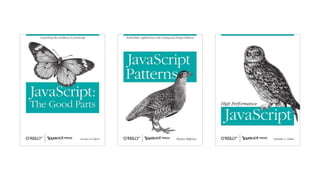
  • #11 Books to consider:JavaScript: The Good Parts by Douglas CrockfordJavaScript Patterns by StoyanStephanovHigh Performance JavaScript by Nicholas C. Zakas
  • #13 This never yields . It is unrelenting!
  • #14 Read “High Performance JavaScript” by Nicholas C. ZakassetImmediate is currently an IE-only functionhttps://developer.mozilla.org/en-US/docs/DOM/window.setImmediateif (!window.setImmediate) {window.setImmediate = function(func, args){ return window.setTimeout(func, 0, args); };window.clearImmediate = window.clearTimeout;}
  • #15 Demonstrate from a Node consolehttp://msdn.microsoft.com/en-us/library/ff841995(v=VS.94).aspxhttps://developer.mozilla.org/en-US/docs/JavaScript/Reference/Global_Objects/Function/bind
  • #17 Personally, I mostly use jQuery for selecting elements, also some ajax requests.Given that, I didn’t really miss jQuery all that much. Of course, you can use jQuery.
  • #18 http://msdn.microsoft.com/en-us/library/ie/hh772302(v=vs.85).aspxhttps://developer.mozilla.org/en-US/docs/DOM/window.URL.createObjectURL
  • #20 http://msdn.microsoft.com/en-us/library/windows/apps/hh700330.aspxhttp://dev.bennage.com/blog/2012/08/21/winjs-unpacking-promises/Promises are important for when you are dealing withasync operations. They are aptly named.Cancellable, except when they are not.
  • #24 I found this to be a source of confusion, both for myself and other experienced devs.Out of the box, WinJS includes WinJS.Navigation.It providers “navigation” methods such as back, forward, and navigate.As well as “state” members such as history, canGoBack, canGoForward.It also includes WinJS.UI.Pages.It primarily provides a way to define page controls. A page control is an object implementing IPageControlMembers. The interface is mostly about defining steps in a lifecycle.The Pages object also provides a way to “render” a defined page by providing its id (uri) and a DOM element.navigator.js comes in new project templates (not all of them). It listens to the event emitted from Navigation, handles the DOM manipulation, and invokes the related Pages bits.
  • #25 http://code.msdn.microsoft.com/windowsapps/App-bar-sample-a57eeae9WinJS.Application.queueEvent({ type: &quot;custom-event-name&quot; });WinJS.Application.addEventListener(“custom-event-name&quot;, function(){ });For info about custom bindings, lookup binding initializers
  • #29 varboolean = storageFolder.areQueryOptionsSupported(queryOptions);new Date().toISOString();You can use AQS to query the file system. Great. So what is AQS?http://msdn.microsoft.com/en-us/library/windows/desktop/bb266512(v=vs.85).aspx
  • #30 The list of system properties (partially displayed above):http://msdn.microsoft.com/en-us/library/ff521735(v=vs.85).aspxTable of Properties, arranged into groups:http://msdn.microsoft.com/en-us/library/dd561977(v=vs.85).aspx
  • #31 standard/historical,what you get with file | new projectsimple &amp; straight forward, but takes some continued manual effortdirectly linked files are cached bytecodehttp://msdn.microsoft.com/en-us/library/windows/apps/xaml/hh849088.aspxAMD – asynchronous module definitionusing requireJSsimilar to NodeJS or CommonJS modulesOther options for modularityrequires a bootstrapper (or compiler)This space is growing, changing, maturing.