Azure Reference
Architectures
Christopher Bennage
patterns & practices
AzureCAT
What do
customer find
confusing?
Recipe
•Proven
•Prescriptive
•Standardized
•Episodic
•Executable
•Open
Scenarios
• Running VM workloads in Azure
• Web application architectures for Azure App Service
• Connecting your on-premises network to Azure
• Extending on-premises identity to Azure
• Protecting the cloud boundary in Azure
VM workloads
• Single VM
• Multiple VMs with
load balancing
• Supporting typical
N-tier
• Multiple region
active-passive with
failover
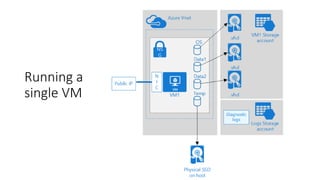
Running a
single VM
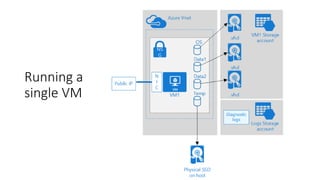
Running a
single VM
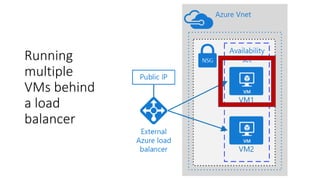
Running
multiple
VMs behind
a load
balancer
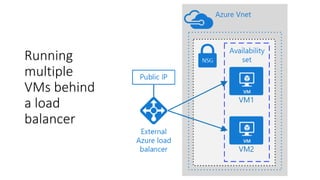
Running
multiple
VMs behind
a load
balancer
Running
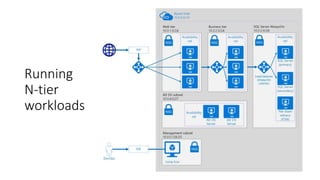
N-tier
workloads
Running
N-tier
workloads
Managed
Services
workloads
• Basic web app
• Improving
scalability
• Improving
availability
Basic
Web
App
Basic
Web
App
Improving
Scalability
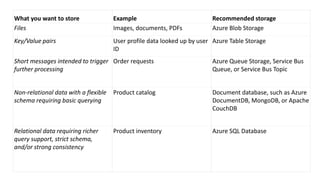
What you want to store Example Recommended storage
Files Images, documents, PDFs Azure Blob Storage
Key/Value pairs User profile data looked up by user
ID
Azure Table Storage
Short messages intended to trigger
further processing
Order requests Azure Queue Storage, Service Bus
Queue, or Service Bus Topic
Non-relational data with a flexible
schema requiring basic querying
Product catalog Document database, such as Azure
DocumentDB, MongoDB, or Apache
CouchDB
Relational data requiring richer
query support, strict schema,
and/or strong consistency
Product inventory Azure SQL Database
Improving
Scalability
Improving
Availability
Improving
Availability
Connecting your on-premises network to
Azure
• Site-to-Site VPN
• ExpressRoute
• High Availability
Extending on-premises identity to Azure
• Azure AD
• AD in Azure,
joined to a forest
• AD in Azure,
separate forest
• AD Federation
Services
Protecting the cloud boundary in Azure
• Between Azure
and the Internet
• Between Azure
and On-Prem
Azure Vnet
10.0.0.0/16
Management subnet
10.0.0.128/25
Jump box Monitoring
NSG
Web tier
10.0.1.0/24
Availability
setNSG
Business tier
10.0.2.0/24
Availability
setNSG
Data tier
10.0.3.0/24
Availability
setNSG
PIP
DevOps
PIP
Replication
Azure Vnet
10.0.0.0/16
Gateway subnet
10.0.255.224/27
VPN Gateway
Management subnet
10.0.0.128/25
Jump box Monitoring
NSG
On-premises network
192.168.0.0/16
Gateway
Web tier
10.0.1.0/24
Availability
setNSG
Business tier
10.0.2.0/24
Availability
setNSG
Data tier
10.0.3.0/24
Availability
setNSG
Azure Vnet
10.0.0.0/16
Gateway subnet
10.0.255.224/27
UDR
Private DMZ in
10.0.0.0/27
Internal load
balancer
N
I
C
N
I
C
Private DMZ out
10.0.0.32/27
NVA
NVA
NSG
N
I
C
N
I
C
NSG
Management subnet
10.0.0.128/25
Jump box Monitoring
NSG
Public DMZ in
10.0.0.64/27
N
I
C
N
I
C
Public DMZ out
10.0.0.96/27
NVA
NVA
NSG
N
I
C
N
I
C
NSGPIP
PIP
Web tier
10.0.1.0/24
Availability
set
AD FS proxy subnet
10.0.4.128/27
Availability
set
Availability
set
Availability
set
NSG
NSG
Business tier
10.0.2.0/24
Availability
setNSG
Data tier
10.0.3.0/24
Availability
setNSG
AD FS subnet
10.0.4.32/27
Availability
setNSG
AD DS subnet
10.0.4.0/27
Availability
setNSG
On-premises network
192.168.0.0/16
Gateway
Partner network
Federation server
Trust relationship
Web app request
Federated authentication request
Authentication request
Sample - VMs
• Windows VM recommendations
• Parameter files
• Script
• Premium storage for vhds
• Standard storage for logging
• No more than 20 VMs per
storage account
What’s next?
Resources
• https://aka.ms/arch-diagrams
• https://aka.ms/architecture
• https://github.com/mspnp/reference-architectures
• https://github.com/Microsoft/azure-docs/tree/master/articles/guidance

Azure Reference Architectures

Editor's Notes

  • #2 Image Source: http://www.arch2o.com/penang-global-city-center-asymptote-architecture/
  • #3 Four years ago, I personally had a very naïve understanding of the cloud. I had an app-dev background. I had built numerous LOB apps, general web, etc. In my pre-cloud world, I never thought about infrastructure. It was just there. The IT pros did it all for me. The last time I had touched production hardware was in 1999. My view of the cloud was shaped by companies like Heroku. I mostly thought of cloud as a way to make deployment easier. To put this in terms of today’s Azure services, I thought it was all Web Apps and SQL DB. My perspective change when I joined the Azure team almost 3 years ago. Image source: https://flic.kr/p/cxbFwL
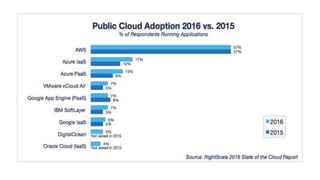
  • #4 We started off 2016 doing a deep analysis of what customers we struggling with. We looked across dozen of deep customer engagements that AzureCAT was directly involved in. This included enterprises, ISVs, and SIs. We talked to our Solution Architects in the field, Microsoft Consulting Services, and our Premiere Support organization. We were a little bit surprised.  Majority of the issues are around infrastructure such as networking, storage accounts etc. Connectivity to on-prem and hybrid ID management as well Image Source: https://www.flickr.com/photos/foilman/2803261256/
  • #5 Here’s some recent survey result from RightScale. (They were about 1,000 respondents.) This is an independent survey that had nothing to do with our internal research. Notice that Azure’s IaaS is higher than Azure’s PaaS. Also notice that the IaaS grew 5% and PaaS only grew 4%. AWS isn’t broken down by IaaS and PaaS. I believe this is because it’s assumed it’s all IaaS. Source: http://www.rightscale.com/blog/cloud-industry-insights/cloud-computing-trends-2016-state-cloud-survey
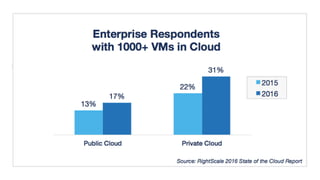
  • #6 Not only are people using IaaS, but a significant number have large deployments. Again, these numbers appear to be growing. These survey results align with our own personal research. Getting the infrastructure right is critical, and many people are struggling to get it right. Sometimes the reason is that transfer of knowledge was a problem (on-prem to cloud) as well as between domains (mobile - cloud, device - backend) Source: http://www.rightscale.com/blog/cloud-industry-insights/cloud-computing-trends-2016-state-cloud-survey
  • #7 A Reference Architecture is Proven. Based on engagements that Microsoft has had with customers Prescriptive. It’s a recipe for success. We’re not teaching you the science of baking, but we’re helping you make a cake. In addition, we try to provide the reason for the prescription so that you are still learning Standardized. We’ve set up a format to make it easier for you to find the RefArch that you need. Episodic. Many of the RefArchs form steps in a series, or they build on top of one another. This was intentional so that they wouldn’t overwhelm. Executable. You can deploy what the RefArch prescribes with your own customization. This is typically a template. Open. Are RefArchs are completely open source. We welcome contributions. Image Source: https://flic.kr/p/bXTbxL
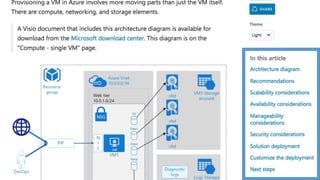
  • #8  The heart of it is the “child scenario” articles. The attached file is the template for a child scenario. Description Diagram Recommendations Availability Security Scalability Manageability Next steps Additional resources How to deploy RefArch include an executable component that embodies the recommendations.
  • #9 We specifically chose these scenarios based on our research into our customer’s need: Compute or VM-based workloads spanning multiple regions Web applications with managed services Connecting your on-prem network to average for hybrid cloud scenarios Securing your network or implementing perimeter networks Managing identity (with an emphasis on hybrid) We started from the “bottom up” with these scenarios. I mean that we targeted scenarios that were foundational. We think of them as “horizontal” scenario, or “cross cutting” scenarios. For example, you might be implementing a specific “vertical” solution (e.g. online retail or SAP) but these scenarios are likely to be applicable. We’re currently working on content that bridge these scenarios. We want to help you understand how they are connected to the “vertical” solutions, and even how they are connected to each other. https://aka.ms/architecture
  • #10 We won’t go through all of the details, but I want to dig a little deeper into a couple of the scenarios so that you get a feeling of what’s in our RefArchs I should add that all of our RefArch use Azure Resource Manager. This means that this particular guidance doesn’t apply to some services, typically identified as “Classic”
  • #11 First, a single box isn’t recommended for any production workload. A “single VM” is actually a collection of many different resources. We explain the Azure resources that make up a “VM”. OS disks, data disks, and temporary disks Lives in a VNet and Subnet We start each RefArch with some recommendations: Start with a VM that most closely matches your existing on-prem hw but test and evaluate to get a better fit. Use DS- and GS-series because these machine sizes support Premium Storage Use Premium Storage for best disk I/O performance. Create a separate storage account to hold diagnostic logs. Use standard locally redundant storage (LRS) diagnostic logs. Understand the limits of each resource. This is good general advice. VM size – number NICs, storage options, network bandwidth, and IOPS The default rules for an NSG block all internet traffic.
  • #12 Managing Put tightly-coupled resources that share the same life cycle into a same resource group. Enable monitoring and diagnostics diagnostics infrastructure logs, boot diagnostics.  In Azure, "stopped" and "deallocated" are different states. You are charged when the VM status is stopped. You are not charged when the VM is deallocated. Security: Use the Azure Security Center Checks for updated patches Checks for presence of antimalware Beware that ASC is configured per subscription. Use RBAC to limit access
  • #13 To overcome the availability issues of running a single VM, deploy multiple VMs in an availability set. Use a load balancer to distribute traffic across the VMs, improving availability and scalability. Recommendations Use Availability Sets You must create at least two VMs  Don’t use it with one! The VMs behind the load balancer should all be placed within the same subnet. Do not expose the VMs directly to the Internet, but instead give each VM a private IP address. Clients connect using the public IP address of the load balancer. Create separate Azure storage accounts for each VM This could mean 2 storage account per VM (premium and standard)
  • #14 Scaling When you add a new VM to an availability set, make sure to create a NIC for the VM, and add the NIC to the back-end address pool on the load balancer. Otherwise, Internet traffic won't be routed to the new VM. For autoscaling, or rapid scale, consider VM Scale Sets Scale Sets do not currently support data disks Availability The Availability Set helps with planned and unplanned maintenance events. Update Domain Fault Domain Make sure to configure the availability set when you provision the VM. Currently, there is no way to add a Resource Manager VM to an availability set after the VM is provisioned. LB probe is sent from a known IP address, 168.63.129.16. Make sure you don't block traffic to or from this IP in any firewall policies or network security group (NSG) rules. There some limitations to consider with load balancer. E.g., number of rules Some default limits can be exceeded by contacting our support
  • #15 We choose a ”standard” 3-tier architecture, but the recommendations are applicable for many variations. In our RefArch, we are running SQL Server on VMs (as opposed to Azure SQL Database). We also have a Linux version that uses Apache Cassandra. Recommendations: Create an Availability Set for each tier, and provision at least two VMs in each tier. Create a separate subnet for each tier. This allows us to isolate each tier Use an Internet-facing load balancer to distribute incoming Internet traffic to the web tier, an internal load balancer to distribute network traffic from the web tier to the business tier. A jumpbox, also called a bastion host, is a VM on the network that administrators use to connect to the other VMs. The jumpbox has an NSG that allows remote traffic only from whitelisted public IP addresses. The NSG should permit remote desktop (RDP) traffic. Monitoring software such as Nagios, Zabbix, or Icinga can give you insight into response time, VM uptime, and the overall health of your system. Install the monitoring software on a VM that's placed in a separate management subnet.
  • #16 Use network security groups (NSGs) to restrict network traffic within the VNet. SQL Server Always On Availability Group.  Provides high availability at the data tier, by enabling replication and failover. Networking Choose an address range that does not overlap with your on-premise network, in case you need to set up a gateway between the VNet and your on-premise network later. Once you create the VNet, you can't change the address range. LB is a service, you don’t need to bring you own I’m skipping over the multi-region RefArch, but I encourage you to go read it. 
  • #17 In the last RefArch, we focused on IaaS. In this one we use only managed services (aka PaaS).
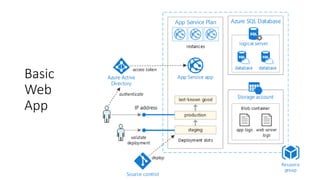
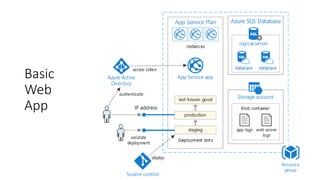
  • #18 App Service is a fully managed platform for creating and deploying cloud applications. Web Apps, Logic Apps, API Apps, and Mobile Apps App Service plan provides the managed virtual machines (VMs) that host your app. All apps associated with a plan run on the same VM instances. Azure SQL Database is a relational database-as-a-service. Logical server.  a logical server hosts your databases. You can create multiple databases per logical server. Create an Azure storage account with a blob container to store diagnostic logs. Azure Active Directory (Azure AD). Use Azure AD or another identity provider for authentication. You are charged for the instances in the App Service plan, even if the app is stopped. Make sure to delete plans that you aren't using (for example, test deployments). Provision the App Service plan and the SQL Database in the same region to minimize network latency.
  • #19 With App Service there are two ways to scale: Scale up, which means changing the instance size. The instance size determines the memory, number of cores, and storage on each VM instance. You can scale up manually by changing the instance size or the plan tier. Scale out, which means adding instances to handle increased load. Each pricing tier has a maximum number of instances. (Limits!) You can scale out manually by changing the instance count, or use autoscaling to have Azure automatically add or remove instances based on a schedule and/or performance metrics. Minimize scaling events – they can restart the app and effect availability. Most people use CPU, but it’s not the only resource that needs to scale. Monitor resource usage and add scale rules appropriately. Image Sources: https://flic.kr/p/bCGjge https://flic.kr/p/jZL5Cg
  • #20 Scaling Autoscale rules include a cool-down period, which is the interval to wait after a scale action has completed before starting a new scale action. The cool-down period lets the system stabilize before scaling again. Set a shorter cool-down period for adding instances Set a longer cool-down period for removing instances Image Source: https://flic.kr/p/qZ295P
  • #21 Availability App Service does have a single instance SLA Use point-in-time restore to recover from human error by returning the database to an earlier point in time. Use geo-restore to recover from a service outage  by restoring a database from a geo-redundant backup. Regarding the App Service backup The backup file includes app settings in plain text and these may include secrets, such as connection strings For SQL databases it exports the database to a SQL .bacpac file, consuming DTUs
  • #22 You deploy an App Service in “slots”. There’s always one name “production”. We recommend creating a staging slot for deploying updates. you can verify before swapping Can also help with warm-up time (cold start) This is blue/green. We also recommend a last-known-good slot. Don't use slots on your production deployment for testing all apps within the same App Service plan share the same VM instances Each deployment slot has a public IP address. Secure the non-production slots using Azure Active Directory login  so that only members of your development and DevOps teams can reach those endpoints. When you swap a deployment slot, the app settings are swapped by default. If you need different settings for slots, you can create app settings that "stick" to a slot.
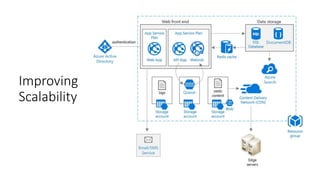
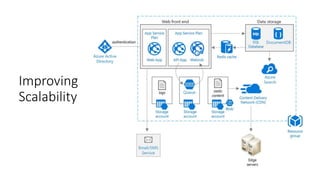
  • #23 API App WebJob run long-running tasks in the background run on a schedule, continously, or in response to a trigger runs as a background process in the context of an App Service app Storage queue for async messaging Separate App Service Plan for independent scaling. Azure Redis Cache to cache semi-static data or session state. Azure CDN to cache static content. Polyglot persistent - Multiple data stores, including relational and document-oriented databases. Azure Search for storing searchable indexes. consolidate a single search index from multiple data stores You can move to multiple App Service Plans later We have additional guidance on Caching, CDN, and Background jobs. See http://aka.ms/practices
  • #25 Horizontal partitioning (often called sharding). Each partition is a data store in its own right, but all partitions have the same schema. Each partition is known as a shard and holds a specific subset of the data. Vertical partitioning Each partition holds a subset of the fields for items in the data store. The fields are divided according to their pattern of use. Functional partitioning. Data is aggregated according to how it is used by each bounded context in the system. Increase scalability of a SQL database by sharding the database. Sharding refers to partitioning the database horizontally. Sharding allows you to scale out the database horizontally using Elastic Database tools. Some of the benefits of sharing are better transaction throughput faster running queries over a subset of the data. Sharding strategies are hard to get right. (e.g., don’t go by names, you’ll get hotspots) See our guidance: https://docs.microsoft.com/en-us/azure/best-practices-data-partitioning Image Source: https://flic.kr/p/6HsbhP
  • #26 For more notes on security, Web App cannot make client-side AJAX calls to the API App unless you enable CORS (Cross-Origin Resource Sharing) App Service has built-in support for this Azure SQL Database has Transparent Data Encryption  It performs real-time encryption and decryption of an entire database (including backups and transaction log files) It requires no changes to the application. It does add some latency – separate the data that must be secure into its own database enable encryption only for that database.
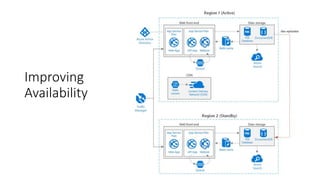
  • #27 This introduces a second region Traffic Manager routes requests to the primary region. It’s health probe calls an end point expecting a 200 When there’s no 200, Traffic Manager fails over to the secondary region Geo-replication of SQL Database and DocumentDB.
  • #28 With respect to choosing a region for the standby deployment: Each Azure region is paired with another region within the same geography (usually). In general, choose regions from the same regional pair (for example, East US 2 and Central US). Benefits of doing so include: If there is a broad outage, recovery of at least one region out of every pair is prioritized. Planned Azure system updates are rolled out to paired regions sequentially to minimize possible downtime. In most cases, regional pairs reside within the same geography to meet data residency requirements. Use separate resource groups for the primary region, secondary region, and Traffic Manager . This lets you manage the resources deployed to each region as a single collection. Also see our guidance about BCDR. Image Source: https://flic.kr/p/bqGUy8
  • #29 WRT to Traffic Manager, It supports several routing algorithms. For this scenario use priority routing (formerly called failover routing). This send traffic to the primary region unless the endpoint for that region becomes unreachable. Create a health probe endpoint that reports the overall health of the application The endpoint should check critical dependencies such as the App Service apps, Storage queue, and SQL Database. You don’t have to check all services though. DNS servers must update the cached DNS records for the IP address, Which depends on the DNS time-to-live (TTL). The default TTL is 300 seconds (5 minutes), You can configure this value when you create the Traffic Manager profile. TM is a SPOF in this architecture! Image Source: https://flic.kr/p/38BcAd
  • #30 A few final thoughts: As mentioned, both SQL Database and DocumentDb support geo-replication See their documentation for details Regarding strategies Active/passive with hot standby. Traffic goes to one region, while the other waits on standby. The application is deployed and running in the secondary region. You might start with a smaller instance count in the secondary data center and then scale out as needed. Active/passive with cold standby. The same, but application is not deployed until needed for failover. This approach costs less to run but will generally have longer down time during a failure. Active/active. Both regions are active, and requests are load balanced between them. If one data center becomes unavailable, it is taken out of rotation. Our RA assumes active/passive with hot standby
  • #31 Using a VPN ✓Uses Internet connection ✓200 Mbps  ✓Simple Using ExpressRoute ✓Dedicated circuit ✓Up to 10 Gbps  ✓Predictable Latency Making it HA ✓ HA for mission critical ✓ Complicated to configure https://docs.microsoft.com/azure/guidance/guidance-ra-hybrid-networking
  • #32 Azure AD ✓SSO ✓Straightforward  ✓Only users and groups Joined to forest ✓AD DS features are needed ✓Reduced latency vs on-prem  ✓Same identity available on-prem Separate forest ✓Multiple domains ✓Logically distinct resources ✓No need to replicate AD FS ✓AD DS features are needed ✓Reduced latency vs on-prem  ✓Same identity available on-prem
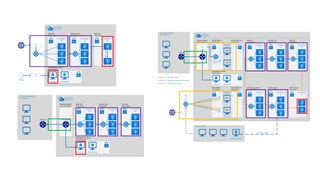
  • #33 You can create a DMZ (also known as a perimeter network) to filter traffic that crosses the cloud boundary. A DMZ in Azure consists of a set of network virtual appliances (NVAs) firewall, inspecting network packets, denying access to suspicious requests These NVAs are implemented as Azure VMs.
  • #35 We noticed that we were repeating ourselves a lot. We noticed that we were repeating ourselves a lot.
  • #36 We wanted the executable component of our RefArchs to: Follows published the recommended practices Easy to customize for your needs (configure parameter files) Used together to create end-to-end solutions Avoid new concepts (build on the existing “template language”) Image Source: https://flic.kr/p/5QsL9q
  • #37 Never check passwords, access keys, or connection strings into source control. Instead, pass these as parameters to a deployment script that stores these values as app settings.
  • #38 It’s open source. Please contribute!
  • #39 what’s next for RAs? Support for KeyVault (don’t check in passwords!) Service Fabric Continuous Integration Guidance on how to make and compose your own building blocks Image Source: https://flic.kr/p/3rrW4