
Introduction to WinJS
        Dmitri Artamonov
       BlueMetal Architects
      dmitria@bluemetal.com
             #dartamon
MARQUEE SPONSOR
PLATINUM SPONSOR
PLATINUM SPONSOR
PLATINUM SPONSOR
GOLD SPONSORS
SILVER SPONSORS
Agenda
 Switching from C#
 What is WinJS?
 What’s under the hood?
 Where does WinJS fit?
 What’s new in WinJS?
 Patterns and Practices
 Managing WinJS on the Enterprise
 Testing WinJS for Store Submission
What I will not talk about
 Tiles and Notifications
 Content before Chrome
 Sensors/NFC
 Contracts/Charms
 New Controls
 Process Lifecycle Management
 Triggers/Background Tasks
 Etc…
Switching from C#/XAML to WinJS
 Difference in thinking – advantages of HTML5 over XAML
 XAML -> HTML5/CSS3
 C#/CLR -> Javascript/WinJS
 Code Organization
 MVVM -> MVC
 Available Tools
 Is C# now obsolete?
What is WinJS?
 A standard library to access native Windows 8 functionality through
  Javascript and HTML5
 Fully HTML5-compliant
 Uses attributes to add new Windows 8 functionality to standard
  HTML5 code
 Accessed as a standard object in Javascript
What’s under the hood?
 Language projections
 Web hardware-accelerated rendering and Javascript interpretation
  technology originally started with IE9 (HTML5 compliant)
 Connects to the same .winmd components as the C#/XAML Windows
  8 applications
 Chakra JScript engine has its peculiarities – garbage collection is done
  at the end of script execution, can use up a lot of memory
 Will WinJS evolve away from IE roots?
Under the hood (cont’d)
 Chakra engine for Javascript interpretation
Where does WinJS fit?
 Rapid development, friendly to web developers
 Performance can be slower than other languages, may improve in the
  future
 Can fully interface with components written in other languages
 More maintainable by enterprises with web developer staff
 Development can be less frustrating and cheaper if you take
  advantage of libraries and resources already available to JS developers
 Lower costs and faster workflow – designers can work with HTML
  directly
Other JS Libraries
 jQuery
 Graphing (HighCharts or Raphael)
 MVC libraries
 You can create applications without using WinJS at all!
What’s new?
 Page Structure/Navigation
 Promises
 Cloud Integration
 Contracts
 Tiles and Notifications
 Speech Integration
Page Structure and Navigation in WinJS
 Similar to the browser – HTML file that references JS files
 PageControlNavigator out of the box
 Navigation back stack
 Standard Project Template Demo
Promises
 Async pattern implemented in javascript, similar to try-catch-finally

WinJS.xhr({ url: urlString, responseType: "json" }).then(
      function handleResponse(result) {
                 // Handle the returned data
          },
        function handleException(exception) {
                 // Handle return exception
        }
).done(function afterResponse() {
        // Handle code to be executed once xhr returns
});
Cloud integration
 File Picker APIs – saving to the cloud and loading from the cloud –
  allows us to expose the cloud as part of the file system
 File Picker APIs – exposes a custom UI that allows users to pick files to
  open or a location to save - hosted view activation.
 File Picker APIs – what constitutes a file is up to you – aggregation?
 Roaming API – saving data in the cloud that is associated with your
  profile
 Roaming API - creating an experience, not just one app on one
  machine
 SkyDrive Demo
Patterns and Practices
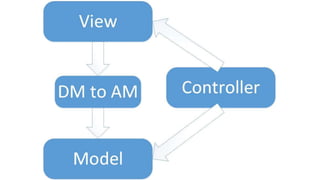
 MVC?
 Regions
 Combining WinJS with C# via .winmd components
 Modules and Dependency Injection
 Dynamic code loading (requires disabling security)
MVVM
 There were problems with MVVM
 Lack of controllers in classic MVVM, debate between heavy VMs and
  use of controllers
 Dedicated classes to store information for presentation
 With XAML, only one DataContext per view
 Can’t be directly transitioned to WinJS – absence of two-way
  bindings, multiple data contexts per view
MVC on WinJS
 Where do we move from MVVM? Is MVVM dead?
 Current limitation: no two-way binding in WinJS
 Have to trap user input and respond to it
 Trapping can be done via a controller, get rid of classic MVVM
 Application/Domain Model conversion can be done via regions
 Use defined namespaces and classes to create observable objects;
  ways to make objects observable are also available
Regions
 Using the magic of WinJS we can bind elements to objects, thus
  setting their datacontext
 Two ways we can do the binding: data-win-bind and data-win-
  bindsource
 data-win-bind is used for binding a single field to the data context
HTML5:
<span data-win-bind=“innerText: dto.title”></span>
JS:
WinJS.Binding.processAll(target element, data context object)
Regions (cont’d)
 data-win-bindsource allows to set the data context for an element
  declaratively instead of calling WinJS.Binding.processAll() in Javascript
 <div data-win-bindsource=“dto">
 Allows for more binding code to be moved into HTML5
Using .winmd components
 You can create your own .winmd components in other languages that
  your app can interface with, the same way it does with WinJS
 Take advantage of performance or library disparities – different
  components are implemented differently
Modules and dependency injection
 Javascript was born from simple scripting
 Modern applications require maintainable, testable code with private
  scope
 A module is an anonymous, self-executing function with parameters for
  dependency injection:

(function (internalParam1, internalParam2) {
       "use strict";
       // private code goes here
})(globalParam1, globalParam2);
Modules and namespaces
 Exposing endpoints for public access from the module via classes and
  namespaces:
WinJS.Namespace.define("ClassicCars", {
      FindCars: _findCars(), // can define members in namespaces
      RepairBills: WinJS.Class.define(function(quantity) { // constructor
      code goes here },
      { GetCost: _getCost }, // instance members
      { repairBillTypes: [ “S", “U" ] }) // static members
});
Dynamic code loading
 What if we could update the application dynamically, without having
  to re-distribute it?
 Can download HTML/JS code via iframe (security enabled, features
  disabled)
 Fragments API – able to load in HTML content from external web
  sources into the application
 Can download code directly into the app (requires unsecure calls, will
  not be allowed in the Windows Store)
 execUnsafeLocalFunction - overrides HTML injection security
Managing WinJS on the enterprise
 What are the development costs?
 Effectiveness vs. C#/XAML or C++
 Migration of previous code?
 What happens to legacy applications on C#?
 What happens to legacy web applications that we want to migrate to
  Windows 8?
 How to write internal applications and deploy – next slide
Enterprise story (unofficial)
 Internal Windows Store for enterprise applications
 Deployment by employees to their machines from a restricted pool of
  applications
 Enforces security policies
 Creates a contained environment for controlling what applications are
  on enterprise machines
Testing for Submission - WACK
 The submission process involves automatic testing
 Windows App Certification Kit
 Microsoft provides a testing kit for developers to test their
  applications in advance
 Tests security, performance, etc.
 Subjectivity kept to a minimum, maximum transparency
Questions?
 dmitria@bluemetal.com
        #dartamon
http://blog.bluemetal.com

WinJS at NYC Code Camp 2012

  • 1.
    Introduction to WinJS Dmitri Artamonov BlueMetal Architects dmitria@bluemetal.com #dartamon
  • 2.
  • 3.
  • 4.
  • 5.
  • 6.
  • 7.
  • 8.
    Agenda  Switching fromC#  What is WinJS?  What’s under the hood?  Where does WinJS fit?  What’s new in WinJS?  Patterns and Practices  Managing WinJS on the Enterprise  Testing WinJS for Store Submission
  • 9.
    What I willnot talk about  Tiles and Notifications  Content before Chrome  Sensors/NFC  Contracts/Charms  New Controls  Process Lifecycle Management  Triggers/Background Tasks  Etc…
  • 10.
    Switching from C#/XAMLto WinJS  Difference in thinking – advantages of HTML5 over XAML  XAML -> HTML5/CSS3  C#/CLR -> Javascript/WinJS  Code Organization  MVVM -> MVC  Available Tools  Is C# now obsolete?
  • 11.
    What is WinJS? A standard library to access native Windows 8 functionality through Javascript and HTML5  Fully HTML5-compliant  Uses attributes to add new Windows 8 functionality to standard HTML5 code  Accessed as a standard object in Javascript
  • 13.
    What’s under thehood?  Language projections  Web hardware-accelerated rendering and Javascript interpretation technology originally started with IE9 (HTML5 compliant)  Connects to the same .winmd components as the C#/XAML Windows 8 applications  Chakra JScript engine has its peculiarities – garbage collection is done at the end of script execution, can use up a lot of memory  Will WinJS evolve away from IE roots?
  • 14.
    Under the hood(cont’d)  Chakra engine for Javascript interpretation
  • 15.
    Where does WinJSfit?  Rapid development, friendly to web developers  Performance can be slower than other languages, may improve in the future  Can fully interface with components written in other languages  More maintainable by enterprises with web developer staff  Development can be less frustrating and cheaper if you take advantage of libraries and resources already available to JS developers  Lower costs and faster workflow – designers can work with HTML directly
  • 17.
    Other JS Libraries jQuery  Graphing (HighCharts or Raphael)  MVC libraries  You can create applications without using WinJS at all!
  • 18.
    What’s new?  PageStructure/Navigation  Promises  Cloud Integration  Contracts  Tiles and Notifications  Speech Integration
  • 19.
    Page Structure andNavigation in WinJS  Similar to the browser – HTML file that references JS files  PageControlNavigator out of the box  Navigation back stack  Standard Project Template Demo
  • 20.
    Promises  Async patternimplemented in javascript, similar to try-catch-finally WinJS.xhr({ url: urlString, responseType: "json" }).then( function handleResponse(result) { // Handle the returned data }, function handleException(exception) { // Handle return exception } ).done(function afterResponse() { // Handle code to be executed once xhr returns });
  • 21.
    Cloud integration  FilePicker APIs – saving to the cloud and loading from the cloud – allows us to expose the cloud as part of the file system  File Picker APIs – exposes a custom UI that allows users to pick files to open or a location to save - hosted view activation.  File Picker APIs – what constitutes a file is up to you – aggregation?  Roaming API – saving data in the cloud that is associated with your profile  Roaming API - creating an experience, not just one app on one machine  SkyDrive Demo
  • 22.
    Patterns and Practices MVC?  Regions  Combining WinJS with C# via .winmd components  Modules and Dependency Injection  Dynamic code loading (requires disabling security)
  • 23.
    MVVM  There wereproblems with MVVM  Lack of controllers in classic MVVM, debate between heavy VMs and use of controllers  Dedicated classes to store information for presentation  With XAML, only one DataContext per view  Can’t be directly transitioned to WinJS – absence of two-way bindings, multiple data contexts per view
  • 27.
    MVC on WinJS Where do we move from MVVM? Is MVVM dead?  Current limitation: no two-way binding in WinJS  Have to trap user input and respond to it  Trapping can be done via a controller, get rid of classic MVVM  Application/Domain Model conversion can be done via regions  Use defined namespaces and classes to create observable objects; ways to make objects observable are also available
  • 28.
    Regions  Using themagic of WinJS we can bind elements to objects, thus setting their datacontext  Two ways we can do the binding: data-win-bind and data-win- bindsource  data-win-bind is used for binding a single field to the data context HTML5: <span data-win-bind=“innerText: dto.title”></span> JS: WinJS.Binding.processAll(target element, data context object)
  • 29.
    Regions (cont’d)  data-win-bindsourceallows to set the data context for an element declaratively instead of calling WinJS.Binding.processAll() in Javascript  <div data-win-bindsource=“dto">  Allows for more binding code to be moved into HTML5
  • 30.
    Using .winmd components You can create your own .winmd components in other languages that your app can interface with, the same way it does with WinJS  Take advantage of performance or library disparities – different components are implemented differently
  • 31.
    Modules and dependencyinjection  Javascript was born from simple scripting  Modern applications require maintainable, testable code with private scope  A module is an anonymous, self-executing function with parameters for dependency injection: (function (internalParam1, internalParam2) { "use strict"; // private code goes here })(globalParam1, globalParam2);
  • 32.
    Modules and namespaces Exposing endpoints for public access from the module via classes and namespaces: WinJS.Namespace.define("ClassicCars", { FindCars: _findCars(), // can define members in namespaces RepairBills: WinJS.Class.define(function(quantity) { // constructor code goes here }, { GetCost: _getCost }, // instance members { repairBillTypes: [ “S", “U" ] }) // static members });
  • 33.
    Dynamic code loading What if we could update the application dynamically, without having to re-distribute it?  Can download HTML/JS code via iframe (security enabled, features disabled)  Fragments API – able to load in HTML content from external web sources into the application  Can download code directly into the app (requires unsecure calls, will not be allowed in the Windows Store)  execUnsafeLocalFunction - overrides HTML injection security
  • 34.
    Managing WinJS onthe enterprise  What are the development costs?  Effectiveness vs. C#/XAML or C++  Migration of previous code?  What happens to legacy applications on C#?  What happens to legacy web applications that we want to migrate to Windows 8?  How to write internal applications and deploy – next slide
  • 35.
    Enterprise story (unofficial) Internal Windows Store for enterprise applications  Deployment by employees to their machines from a restricted pool of applications  Enforces security policies  Creates a contained environment for controlling what applications are on enterprise machines
  • 37.
    Testing for Submission- WACK  The submission process involves automatic testing  Windows App Certification Kit  Microsoft provides a testing kit for developers to test their applications in advance  Tests security, performance, etc.  Subjectivity kept to a minimum, maximum transparency
  • 38.
    Questions? dmitria@bluemetal.com #dartamon http://blog.bluemetal.com

Editor's Notes

  • #11 Advantages of HTML5 over XAML, better organization Role of WinRT Components and C# in the new Javscript world
  • #13 WinRT through .winmd components provides the functionality. Language projections connect the individual languages down to the .winmd components. Runtime Broker provides sandboxing and guards against illegal API calls
  • #22 Demo skydriveHave a web application for data entry and work on analysis using the tablet, sync the files as part of the file systemHosted view activation – the view inside the app trying to open or save the file actually opens a frame that displays your application
  • #36 Migration - Salvaging business logic vs. presentation layer